


Why This Matters
If you run learning at a company, found an EdTech product, or manage a training platform, the video player is where your course content meets your learner — and where most of your interactivity, tracking, and accessibility obligations live or die. Pick the wrong build-vs-buy line and you either pay a vendor forever for a player you have outgrown, or you sink a year of engineering into rebuilding playback the browser already gives you for free. The teams that get this right spend their budget in one place: the thin, valuable layer that makes their video interactive and measurable, and let proven libraries handle the unglamorous, bug-ridden work of actually playing the bytes. This article gives you the vocabulary to draw that line correctly, the architecture to brief your engineers, and the numbers to defend the decision to your CFO.
First, What an "Interactive Video Player" Actually Is
Start with the plain words. A video player is the software that shows a video and gives the learner the controls — play, pause, a scrubber to move through time, volume, captions, fullscreen. An interactive video player adds a second job: it lets things happen at moments in the video and lets the learner do things back. A quiz pops up at 4:30 and playback waits for an answer. A clickable hotspot appears on a piece of equipment. A choice at the end of a scene sends the learner down one of two branches. And quietly, the whole time, the player is writing down what happened so the learning system can score it.
So an interactive video player is really two things stacked: a playback engine that turns a video file into moving pictures and sound, and an interaction layer that watches the playback and overlays meaning on top of it. The single most important decision in this whole article follows from that split. You will not build the playback engine — the web browser and a few mature libraries already do it better than you could afford to. You will decide how much of the interaction layer you own. Everything below is about drawing that line in the right place.
To make the playback-engine point concrete: the browser ships a complete video player inside the <video> element, defined by the HTML Living Standard, the continuously-updated specification that governs the web platform (WHATWG HTML Living Standard, media elements). It decodes common formats, draws default controls, and exposes a rich programming interface — the HTMLMediaElement — that lets your code press play, read the current time, and listen for events. That interface is the foundation every option in this article is built on, including the commercial ones.
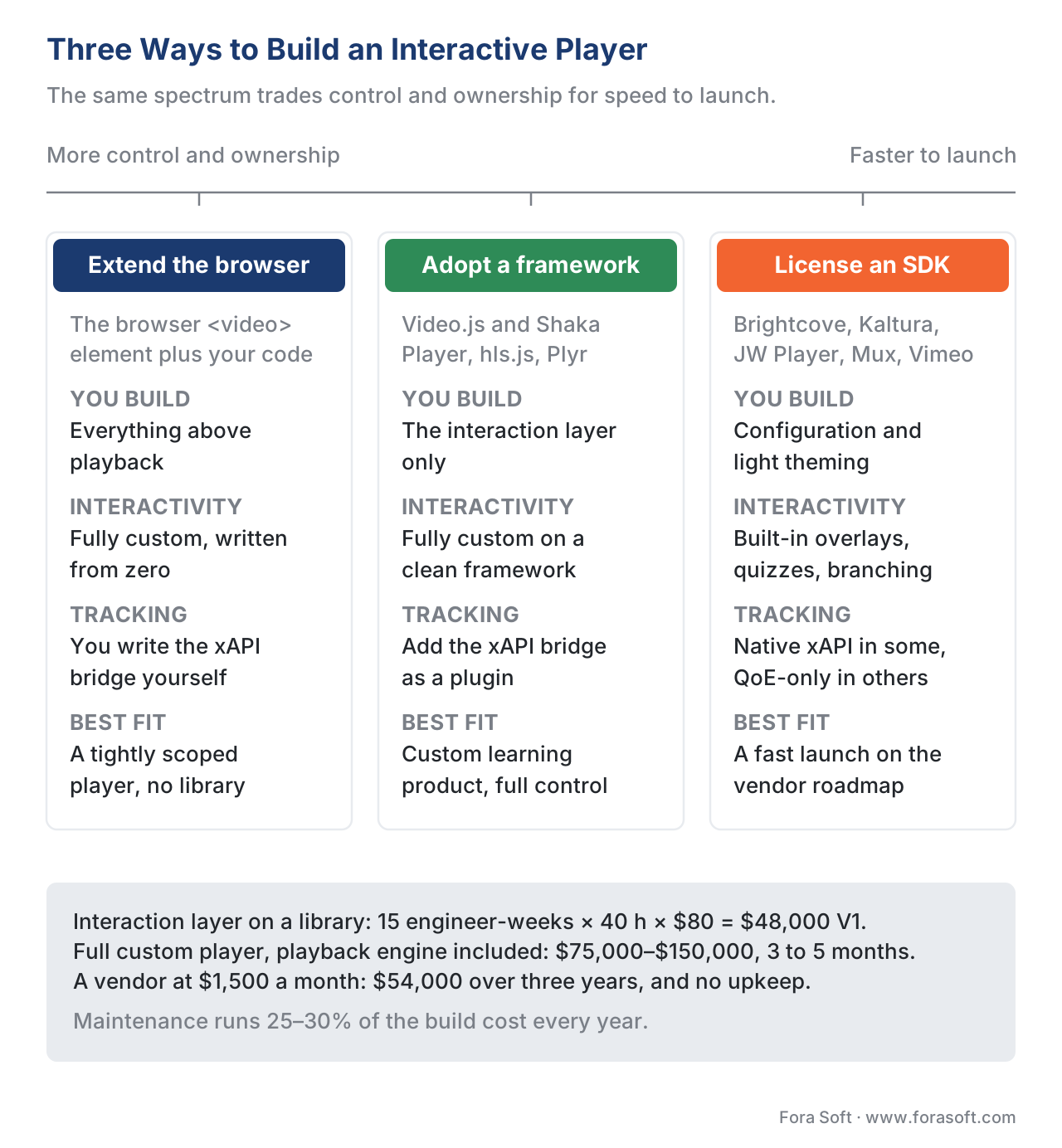 Figure 1. The three build paths on one spectrum. Left to right trades control and ownership for speed-to-launch: extend the native HTML5 player, adopt an open-source framework (Video.js, Shaka), or license a commercial interactive-video SDK. Most learning products land in the middle and build only the interaction layer.
The Three Ways to Build It
There are three honest paths, and they sit on a spectrum from "you own everything" to "the vendor owns everything." Naming them clearly is half the decision.
Path one: extend the native HTML5 player. You take the browser's built-in <video> element and build your controls, overlays, and tracking directly on its programming interface. You pull in zero or one small library. This gives you total control and the smallest possible code footprint, but you personally own every cross-browser quirk — and there are many.
Path two: adopt an open-source JavaScript framework. You build on a mature, free library that has already solved the cross-browser problems and given you a clean structure to extend. The two names you will hear most are Video.js and Shaka Player, and they solve different problems (more on that below). This is where most custom learning products land: the library handles playback and gives you extension points; you build the interaction layer.
Path three: license a commercial interactive-video SDK. You pay a vendor — Brightcove, Kaltura, JW Player, Mux, Vimeo, Wistia, and others — for a player that already includes some interactivity, analytics, and hosting. You ship fast and you write little code, but you adapt your product to the vendor's feature set, pay ongoing fees, and accept whatever tracking and data export they offer.
None of these is "right." The right one depends on a single question we will keep returning to: is the interactive layer your product's differentiator, or a feature you just need to exist? Hold that question; the architecture below is what lets you answer it.
The Architecture: Five Layers That Matter
Whatever path you choose, a working interactive video player has the same five layers. Understanding them lets you see exactly which layers a vendor gives you and which you are on the hook for. Picture them stacked from the bytes at the bottom to the dashboard at the top.
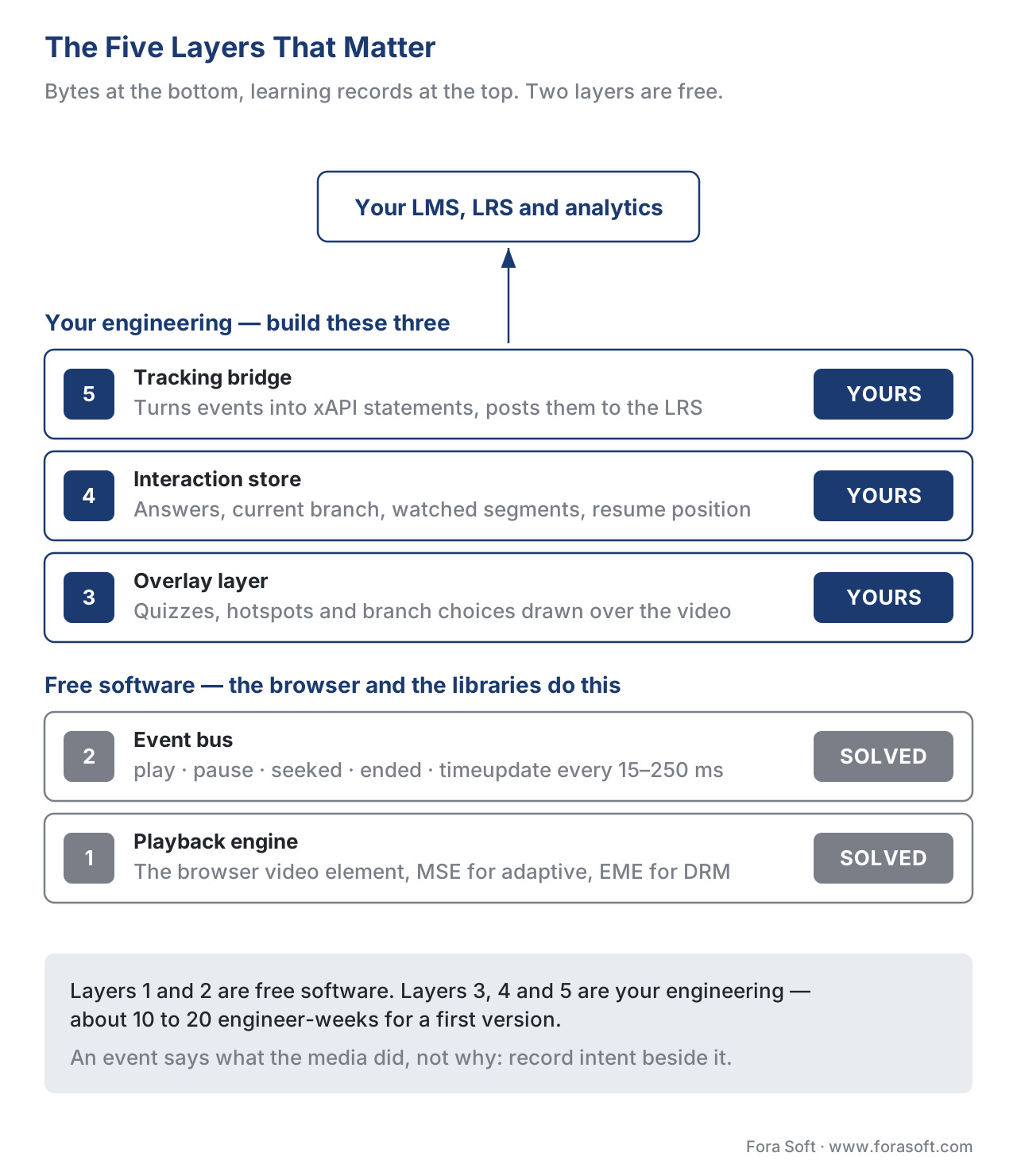 Figure 2. The five layers of an interactive video player. The playback engine and event bus are largely solved by the browser and open-source libraries; the overlay layer, interaction store, and tracking bridge are where your engineering and your differentiation live.
Layer one — the playback engine. This turns a video into pictures and sound and handles the hard parts of streaming: adapting quality to the network, buffering, and playing protected content. For a single self-hosted file the browser's <video> element does this alone. For adaptive streaming — where the video switches quality on the fly — the browser exposes Media Source Extensions (MSE), the W3C specification that lets JavaScript feed the player a media stream it assembles itself (W3C Media Source Extensions). For protected content, Encrypted Media Extensions (EME) is the W3C Recommendation that lets the player talk to a digital-rights-management module without a plugin (W3C Encrypted Media Extensions, Recommendation, 2017). You almost never touch MSE and EME directly; a library does it for you. The adaptive-streaming internals belong to a different discipline — see the Video Streaming section for how adaptive bitrate and protocols work; this article treats playback as a solved layer and builds above it.
Layer two — the event bus. This is the heartbeat of an interactive player and the most under-appreciated layer. The HTMLMediaElement interface emits a steady stream of events as the video plays: play, pause, seeking, seeked, timeupdate (fired repeatedly as the position moves), ended, and more (WHATWG HTML Living Standard, media events). Think of these events as a public announcement system inside the player: "playback started," "the learner jumped to 5:40," "we reached the end." Every layer above subscribes to these announcements. Your overlays listen so they know when to appear. Your tracking listens so it knows what to record. Your accessibility state listens so it can keep custom controls in sync. The event bus is not something you build so much as something you organize — and organizing it well is the difference between a player that feels alive and one that feels broken.
Layer three — the overlay layer. This is where interactivity becomes visible: the quiz card at 4:30, the clickable hotspot, the branching choice, the note pinned to a moment. Mechanically, an overlay is HTML drawn on top of the video, shown and hidden based on the current time the event bus reports. The deep design work — how quizzes, hotspots, and branches actually behave — is covered in their own articles (in-player quizzes and polls, hotspots, overlays, and clickable video, and branching scenarios). The player's job is narrower but critical: give every overlay a reliable clock and a reliable container. We will see below why both of those are harder than they sound.
Layer four — the interaction store. When a learner answers the quiz or picks a branch, that result has to live somewhere — first in the player's memory during the session, then saved so a refresh or a returning learner does not lose progress. The interaction store is the player's short-term memory. It holds the answers, the current branch, the watched segments, and the resume position. It is small but it is the difference between a player that respects a learner's time and one that makes them start over.
Layer five — the tracking bridge. This is the layer that turns everything the player saw into data a learning system can use. It listens to the event bus and the interaction store and emits xAPI statements — short, standardized sentences like "Maria answered the question at 4:30 correctly" — into a Learning Record Store (LRS), the database that holds them. xAPI (the Experience API) is the learning-data standard stewarded by ADL, and it has a dedicated Video Profile that defines exactly how to describe video events (xAPI Video Profile, ADL, v1.0.3). This bridge is what makes your interactive video measurable, and it is covered in depth in tracking video with the xAPI Video Profile. Below, we build a small version of it so you can see the mechanism.
The headline for your budget: layers one and two are largely solved by free software. Layers three, four, and five are where your engineering goes — and where your product either differentiates or doesn't.
The Event Model Is the Architecture
If you take one technical idea from this article, take this one: in a well-built interactive player, the video's own event stream is the central nervous system, and every feature is a subscriber to it. Beginners use these events only to move a progress bar. Strong teams treat them as the bus that overlays, branching, tracking, and accessibility all plug into. Same events, completely different architecture.
Here is the catch that separates a polished player from a janky one. The most obvious event for "where are we in the video," timeupdate, is deliberately imprecise. The browser fires it only every 15 to 250 milliseconds, and the exact rate depends on system load (MDN, timeupdate event). For a progress bar that is fine — nobody notices a bar that updates four times a second. For an overlay that must appear on an exact frame, it is too coarse; the quiz can pop a quarter-second late, which looks broken. The modern fix is a newer browser callback, requestVideoFrameCallback, which runs once per displayed video frame and hands you a time value precisely aligned to the video's clock (MDN, requestVideoFrameCallback). The practical rule: use timeupdate for cheap, forgiving updates like the scrubber, and reach for the frame callback when an interaction has to land on the exact moment. Knowing which to use where is the kind of detail that does not show up in a feature list but absolutely shows up in how the product feels.
There is a second subtlety worth naming because it bites every team that builds tracking. An event tells you what the media did, not why. When you see a pause event, you cannot tell from the event alone whether the learner clicked pause or your own quiz overlay paused the video to wait for an answer. The video engineering team at Mux, who maintain a widely used player, put it bluntly after years of this work: the events "might fire, they might not, they might fire in rapid succession," and distinguishing user-initiated from system-initiated state is itself a hard problem (Mux, "6 Years Building Video Players," 2026). The lesson for your architecture: your interaction store must record intent alongside the raw event, or your analytics will lie to you about what learners did.
Building the Tracking Bridge: From Player Event to xAPI
Let's make the tracking bridge concrete, because it is the layer most directly tied to the value of a learning product, and seeing it in code demystifies it. You do not need to read code to make build-vs-buy decisions, but one look at how small the bridge is will calm any fear that tracking is exotic.
The xAPI Video Profile defines a small, fixed vocabulary for video. It adds three video-specific verbs — played, paused, and seeked — and reuses standard xAPI verbs for the rest: initialized when the video is ready, completed when the learner reaches the completion threshold, and terminated when they leave (xAPI Video Profile, ADL, v1.0.3). It also defines where the details go: result extensions named time, time-from, time-to, progress, and played-segments carry the precise timing, and context extensions carry things like the video length and whether captions were on (xAPI Video Profile, ADL, v1.0.3).
So the bridge's job is a translation table. A browser event comes in; an xAPI statement goes out. Here is a minimal, runnable sketch — note the obviously fake learner data:
const video = document.querySelector("video");
const actor = { mbox: "mailto:learner@example.org", name: "Test Learner" };
const object = { id: "https://example.org/courses/safety/video-7" };

function sendStatement(verbId, verbLabel, resultExtensions) {
  const statement = {
    actor,
    verb: { id: verbId, display: { "en-US": verbLabel } },
    object,
    result: { extensions: resultExtensions }
  };
  // POST the statement to your Learning Record Store (LRS)
  navigator.sendBeacon("/lrs/statements", JSON.stringify(statement));
}

// Player event  ->  xAPI verb + timing
video.addEventListener("play", () =>
  sendStatement("https://w3id.org/xapi/video/verbs/played",
                "played", { "https://w3id.org/xapi/video/extensions/time": video.currentTime }));

video.addEventListener("seeked", () =>
  sendStatement("https://w3id.org/xapi/video/verbs/seeked", "seeked", {
    "https://w3id.org/xapi/video/extensions/time-from": lastTime,
    "https://w3id.org/xapi/video/extensions/time-to": video.currentTime
  }));
That is the entire idea: listen on the event bus, translate to the standard vocabulary, post to the store. The hard parts are not the translation; they are three edge cases that the naïve version above gets wrong, and they are worth knowing so you can ask your team about them.
First, the seek storm. When a learner drags the scrubber, the browser can fire dozens of seeked events in a second. Sent raw, that floods your LRS with noise. The fix is to debounce — wait until the dragging settles, then send one statement describing the net jump from where they started to where they landed.
Second, the completion threshold. "Watched to the end" and "completed" are not the same, and the Video Profile is explicit about this: completion is defined against a threshold — by default the whole video, but configurable — and you compute it from the segments actually watched, not from the playhead reaching the final second (xAPI Video Profile, ADL). A learner who skips to the end has reached the last second without watching anything. The played-segments extension exists precisely so you can tell the difference. This is the same "watched 100% is not completed" trap that haunts the whole learning-metrics discussion.
Third, batching and reliability. Posting one HTTP request per event is wasteful and fragile; if the learner closes the tab mid-request, the statement is lost. Mature bridges buffer statements and flush them in batches, and use a delivery method that survives the page closing. These are solved problems, but they are your problems if you build the bridge — and a reason some teams value a vendor that ships tracking that already handles them.
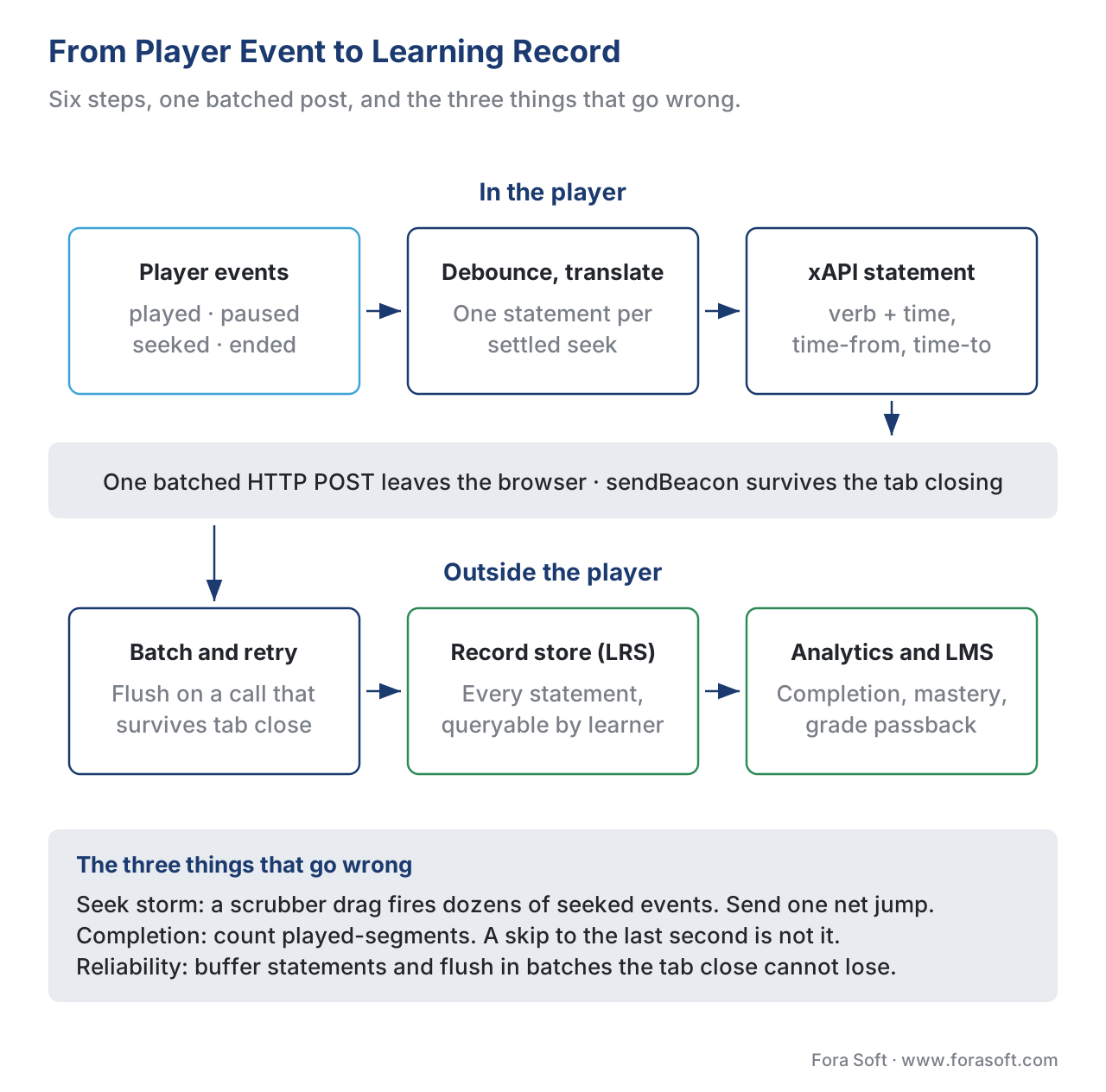 Figure 3. The tracking bridge. Raw player events (play, pause, seeked, ended) are debounced, translated to xAPI Video Profile verbs with timing extensions, batched, and posted to the Learning Record Store — which feeds analytics and the LMS.
Video.js vs Shaka Player vs Bare HTML5
For the open-source path, two libraries dominate the conversation and they are not really competitors — they solve different layers. Getting this distinction right saves teams from picking the wrong tool and rebuilding later.
Video.js is an extensibility framework around a player. Its value is structure: a tree of UI components you can register and rearrange, a two-tier plugin system for adding behavior (simple function plugins and stateful plugins with their own lifecycle), and a "Tech" abstraction so the same player can drive different playback technologies (Video.js documentation). It is Apache-2.0 licensed and free. What it gives a learning product is a clean place to hang your overlay layer and your tracking bridge — the framework is, in effect, designed for the kind of extension this article is about. What it does not include out of the box is sophisticated adaptive streaming or any analytics; you add those.
Shaka Player, built by Google, is a playback engine, not a UI framework. Its job is adaptive streaming: it plays DASH and HLS — the two main adaptive-streaming formats — by driving MSE and EME, handles offline download and DRM across Widevine, PlayReady, and FairPlay, and ships an optional, separate UI library for controls (Shaka Player, Google, Apache-2.0). It has no concept of overlays, hotspots, quizzes, or learning interactions. If your priority is robust streaming of protected, adaptive content, Shaka is the strong choice — and you build the interaction layer on top of it yourself.
There are lighter options too. hls.js and dash.js are pure playback engines for one streaming format each, with no UI at all — you attach them to a bare <video> and build everything else. Plyr and MediaElement.js are lightweight, accessible UI players good for simpler needs. The point of naming them is that "use an open-source player" is not one decision; it is a choice along an axis from "just the controls" (Plyr) to "just the streaming" (Shaka/hls.js) to "a framework to extend" (Video.js). For most interactive learning products, Video.js is the natural base because it is built to be extended; Shaka joins it when adaptive streaming and DRM are first-order requirements.
A note on the bare-HTML5 path: it is viable, and for a tightly scoped product it can be the cleanest choice, because you carry no library weight. But you also re-solve, by hand, the cross-browser bugs these libraries exist to absorb — and the next section is a tour of the worst of them.
The Pitfalls Nobody Puts in the Feature List
Interactive video is a field of small, vicious traps. Every one below has shipped broken in real products. Knowing them lets you test for them before launch and ask vendors the right questions.
Fullscreen eats your overlays. When the browser goes fullscreen, it promotes one element and its children to the top of the screen and hides everything else (MDN, Fullscreen API). If your overlays are siblings of the <video> rather than children of the container you fullscreen, they vanish the moment a learner hits the fullscreen button — quizzes, hotspots, and all. The fix is architectural: every overlay must live inside the same container element that goes fullscreen. Teams that learn this in production learn it from a support ticket that says "the quiz disappears on the projector."
Mobile Safari has its own rules. On iPhones, a video without the playsinline attribute is forced into the native fullscreen player the moment it plays, which throws away your entire custom interface — controls, overlays, tracking UI (WebKit, "New video policies for iOS"). And autoplay only works when the video is muted. The fix is known (playsinline, plan for muted autoplay, require a tap to start sound), but a team that does not test on a real iPhone discovers it from a one-star review.
DRM can block your overlays from compositing. This is the genuinely hard one, and almost no published guide mentions it. When content is protected with EME-based DRM, the video frames may render through a secure path the rest of the page cannot read. Drawing a protected frame to an HTML canvas is blocked, and a canvas that has touched protected or cross-origin content throws an error when you try to read its pixels (W3C public lists; MDN, CORS-enabled image). If your overlay design assumed it could read frames — to generate thumbnails, blur a region, or composite effects — DRM breaks it. The lesson: decide early whether you need DRM, because it constrains what your overlay layer can do, and design the overlays as DOM elements over the video rather than effects drawn into it.
Custom controls quietly fail accessibility. The browser's native controls are keyboard-operable and screen-reader-labeled for free. The moment you replace them with your own styled controls — which most branded learning players do — you inherit the obligation to rebuild that accessibility by hand. The classic failure is a scrubber built as a plain <div> with no keyboard support and no role="slider", which is invisible to assistive technology and fails WCAG 2.1's Keyboard requirement, Success Criterion 2.1.1, a Level A obligation (W3C WCAG). Captions are a separate, named requirement: Success Criterion 1.2.2 (Captions, Prerecorded) is Level A, and live captions under 1.2.4 are Level AA (W3C WCAG 2.2). Accessibility is not a reason to avoid building a custom player; it is a reason to budget for doing it correctly, which the full treatment in WCAG 2.1 AA for educational video lays out.
The rebuild trap. The subtlest pitfall is scope. A player starts as "just play and pause," then needs captions, then adaptive streaming, then DRM, then analytics, then ads, then offline — and each addition seemed small. The Mux team, after nine billion player requests, concluded that even a well-built player maintained by one strong engineer "isn't sustainable" at scale, because the surface area never stops growing (Mux, 2026). This is the strongest argument for not building the playback engine, and the strongest argument for building only the thin interaction layer that is genuinely yours.
The Numbers: What Building Actually Costs
Walk the arithmetic, because build-vs-buy is a financial decision dressed as a technical one. The figures below are 2026 engineering estimates — confirm against your own team's rates — but the structure of the cost is what matters.
Building the interaction layer only on top of an open-source player — overlays, interaction store, the xAPI bridge, accessible custom controls — is a contained project. A reasonable first version lands in the range of 10 to 20 engineer-weeks. Put a number on it:
- 15 engineer-weeks × 40 hours × (say) $80/hour blended rate = $48,000 for a solid V1.
Building a full custom player including the playback engine — your own adaptive streaming, DRM integration, and cross-browser playback — is a different universe, commonly $75,000 to $150,000 and three to five months of heavy work, before maintenance (Fora Soft, custom video player and streaming estimates). And maintenance is not optional: plan for roughly 25–30% of the build cost per year just to keep pace with browser changes and bug reports.
Now the buy side. A commercial player or interactive-video SDK typically runs from a few hundred to a few thousand dollars a month depending on volume and features, and saves you the V1 weeks entirely. Over three years, a $1,500/month vendor is about $54,000 — close to the cost of building the interaction layer once, but with no maintenance burden and no control over the roadmap.
The honest read of these numbers: never build the playback engine unless playback itself is your product (it almost never is for a learning company). Building the interaction layer is the same order of magnitude as a few years of vendor fees — so the decision turns not on raw cost but on whether owning that layer gives you something the vendor can't: custom interaction types, your own data pipeline, and no per-seat ceiling. If those matter, building pays for itself; if they don't, buying is the disciplined choice.
Build, Buy, or Extend: The Comparison
Here is the decision laid out, with the standards each path supports — because for a learning product, tracking support is not a footnote, it is the whole point.
| Option | What you build | Interactivity | Tracking / standards | Best fit |
|---|---|---|---|---|
| Bare HTML5 + your code | Everything above playback | Fully custom | You build the xAPI bridge | Tightly scoped, no library weight |
| Video.js (extend) | Overlay layer, store, tracking | Fully custom on a clean framework | Add xAPI Video Profile via plugin | Custom learning product, full control |
| Shaka Player | All interactivity + UI | Build it yourself | Build the xAPI bridge yourself | Adaptive, DRM-protected streaming first |
| H5P (interactive-video tool) | Author-level config only | Built-in quizzes, bookmarks, jumps | Emits xAPI natively; you host the LRS | Course-level interactivity, fast |
| Commercial SDK (Brightcove, Kaltura) | Configuration, light theming | Built-in overlays, branching, quizzes | Native xAPI in some (Kaltura, Brightcove); none in others | Fast launch, accept vendor roadmap |
| Commercial SDK (Mux, JW, Vimeo, Wistia) | Configuration | Varies; often limited | QoE analytics, not xAPI | Marketing/VOD video, less learning tracking |
The single most important column for a learning team is the tracking one. Among open-source players, none ships viewer analytics or xAPI — you build the bridge (which the code above shows is tractable). Among commercial options, only some — notably Kaltura and Brightcove's interactivity product — emit xAPI natively; many popular players give you excellent streaming-quality analytics but nothing your LMS can read as learning data. H5P sits in a useful middle: it generates xAPI statements natively but relies on your platform to forward them to an LRS. Choosing a player that produces quality-of-service metrics when you needed learning records is one of the most expensive mismatches in this space, and it is invisible until integration day.
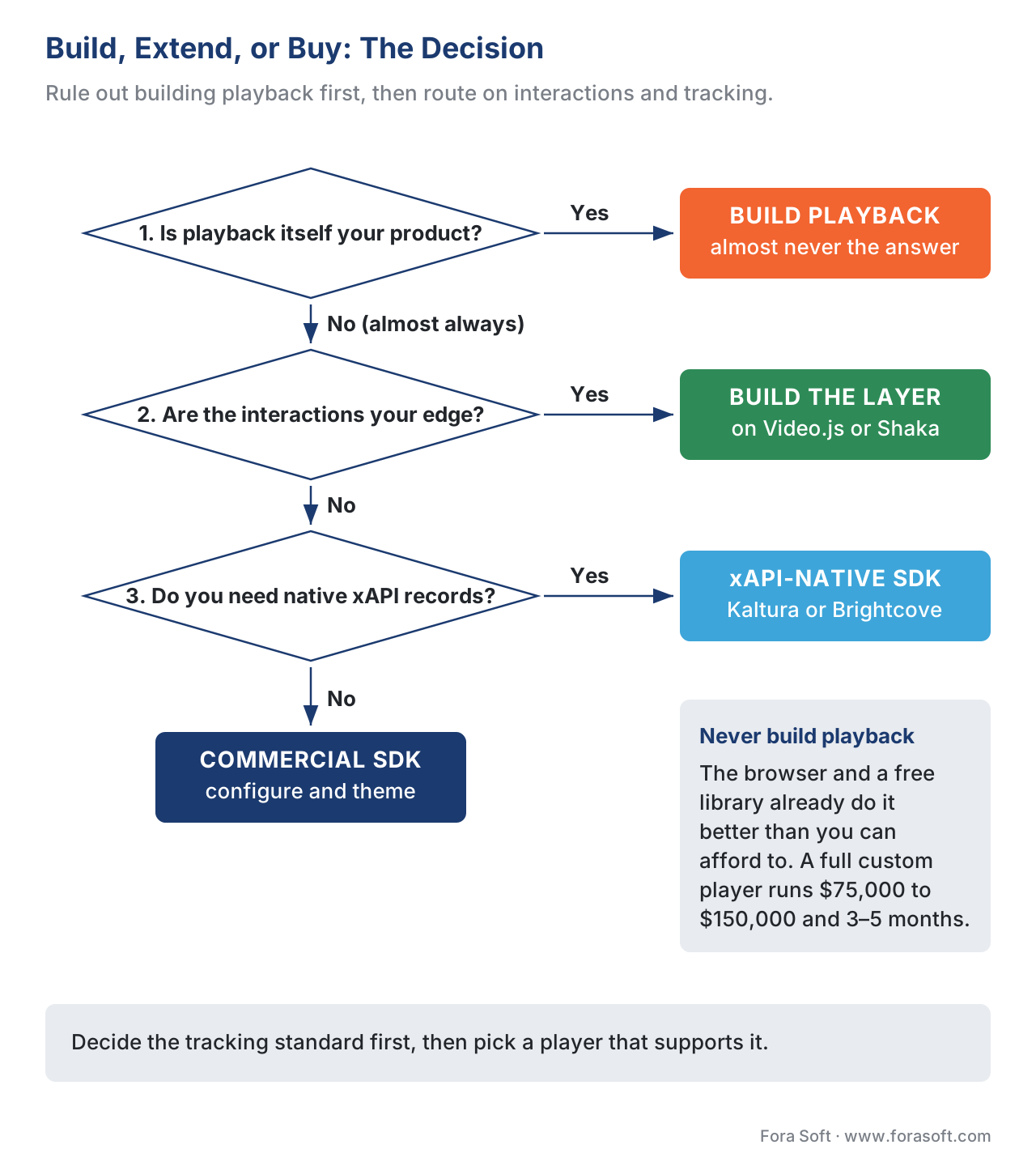 Figure 4. The build-vs-buy decision. Start by ruling out building the playback engine, then route on whether custom interactions and native xAPI tracking are core to your product. Most learning products extend an open-source framework and build the interaction layer.
A Common Mistake: Confusing "A Player" With "The Interactive Layer"
The mistake that wastes the most money in this space is treating "build a video player" as one undifferentiated decision. Teams either over-build — reconstructing playback, streaming, and DRM that Video.js and Shaka already give them free — or over-buy, paying a premium vendor for a full platform when all they needed was the interaction layer on a free base. The discipline is to split the question every time: playback is a solved, commodity layer you should take from the browser or a library; the interaction layer (overlays, store, xAPI bridge) is where your product's value and your engineering budget belong. Say it out loud in the planning meeting — "we are not building a player, we are building the interactive layer on top of one" — and the build-vs-buy decision usually answers itself.
A close cousin of this mistake is choosing the player before checking the tracking. Engineers pick the library with the nicest API or the slickest controls, build for two months, and discover at integration time that it emits streaming-quality metrics, not xAPI learning records — and the LMS can't read a thing. Decide your tracking standard first, then choose a player that supports it or commit to building the bridge.
Free download: Interactive Video Player Build-vs-Buy ChecklistA one-page decision aid: rule out building playback, the signs you should build the interaction layer, the signs you should buy a commercial SDK, and the tracking and accessibility must-haves before you ship.Where Fora Soft Fits In
We build custom learning-video products, and the interactive video player is where we spend the most time drawing the build-vs-buy line for clients. The pattern we recommend almost every time is the disciplined one: never rebuild playback — extend a proven open-source framework like Video.js, or pair it with Shaka when adaptive streaming and DRM matter — and invest the engineering budget in the overlay layer, the interaction store, and the xAPI tracking bridge, because those are the parts that make the product yours and measurable. Across video conferencing, streaming, OTT, and e-learning work since 2005, the recurring lesson is that the player is mostly commodity and the interactive-and-trackable layer is the differentiator — so that is where careful engineering pays back. We scope it so the commodity layers stay cheap and the valuable layer gets the attention it deserves.



The handbook
Fora Soft Video Engineering Handbook
We wrote a seven-volume series that takes the whole video stack apart across 9,000+ pages — encoding, delivery, audio and AI. Volume 3 is the one this article stands on: players and how they recover from a stall, trick play, subtitles, DRM and EME, WebRTC, and the quality-of-experience monitoring that tells you whether the playback layer is doing its job — the ground your overlay layer and tracking bridge are built on. Volume 2 covers the transport, ingest and HLS or DASH packaging your player pulls from, and volume 1 what happens to the pixels before any of that, so the team you brief can argue the build-vs-buy line from the mechanism instead of the marketing page. Written by Nikolay Sapunov, CEO at Fora Soft.
Should you extend a player, or license one?
Send us the interactions your courses need, the tracking standard your LMS has to read, and the player you are on today — and we will come back with where the build-vs-buy line falls for you, what the interaction layer would take to ship, and what owning it costs against three years of vendor fees. 250+ video products shipped since 2005.
See our case studies
Case study
BrainCert
The first WebRTC and HTML5 virtual classroom LMS, built from the ground up: 100K+ customers, 500M+ real-time classroom minutes across 10 datacenters at 99.995% uptime, 300+ features and SCORM and xAPI support — the engineering went into the interactive and trackable layer, not into playback.
Case study
Scholarly
Sydney's selective-test prep platform: 15,000+ active users, live classes for up to 2,000 students at once on LiveKit and WebRTC, with DASH and HLS for the recordings — adaptive playback taken from libraries, quizzes and whiteboard built as the layer that makes it a course.
Case study
Tabsera
A K-12 LMS in English, French, Arabic and Turkish where gamified courses, quizzes and an interactive whiteboard carry the product — the shape where the player stays commodity and every hour of engineering goes to the overlay layer on top of it.
What to read next
Tracking
Tracking Video With xAPI: The Video Profile
The verbs, extensions and thresholds the bridge above has to get right.
Overlays
In-Player Quizzes and Polls
What the overlay layer actually has to do, question by question.
Accessibility
WCAG 2.1 AA for Educational Video
What custom controls owe the keyboard and the screen reader.
Decision
Build vs Buy vs Hybrid for Learning Video
The same call made once per layer, for the whole platform.
References
- HTML Living Standard — Media elements (
<video>, HTMLMediaElement,<track>) — WHATWG. The<video>element, theHTMLMediaElementinterface (play(),pause(),currentTime, seeking), the media event set, and the<track>kindattribute. Tier 1. https://html.spec.whatwg.org/multipage/media.html - Media Source Extensions™ — World Wide Web Consortium (W3C). The interface that lets JavaScript generate media streams for adaptive playback; current canonical doc is a 2025 Working Draft, original Recommendation 17 November 2016. Tier 1. https://www.w3.org/TR/media-source-2/
- Encrypted Media Extensions (EME) — W3C Recommendation, 18 September 2017. The standard for playing DRM-protected media via a Content Decryption Module without plugins; relevant to why protected frames can't be composited to canvas. Tier 1. https://www.w3.org/TR/encrypted-media/
- xAPI Video Profile, v1.0.3 — ADL Initiative / xAPI Video Community of Practice (IRI
https://w3id.org/xapi/video). The video verbsplayed/paused/seeked, reuse ofinitialized/completed/terminated, and thetime/time-from/time-to/progress/played-segmentsextensions. Tier 1. https://github.com/adlnet/xapi-authored-profiles/blob/master/video/v1.0.3/video.jsonld - Experience API (xAPI) Specification, Version 1.0.3 — ADL Initiative. The actor–verb–object statement model and the Learning Record Store the tracking bridge writes to. Tier 1. https://github.com/adlnet/xAPI-Spec/blob/master/xAPI-About.md
- WCAG 2.2 — Success Criteria 1.2.2 (Captions, Prerecorded, Level A), 1.2.4 (Captions, Live, Level AA), 2.1.1 (Keyboard, Level A), 2.4.7 (Focus Visible, Level AA) — W3C Recommendation, 5 October 2023. The accessibility obligations a custom control set must meet. Tier 1. https://www.w3.org/TR/WCAG22/
- Media Fragments URI 1.0 — W3C Recommendation, 25 September 2012. The
#t=temporal-fragment syntax used to seek to a moment in a video. Tier 1. https://www.w3.org/TR/media-frags/ - Video.js documentation — Components, Plugins, Tech — Video.js (Apache 2.0). The component tree, the two-tier plugin system, and the playback-technology abstraction that make it the natural base to extend. Tier 4. https://docs.videojs.com
- Shaka Player — Google (Apache 2.0). Adaptive DASH/HLS playback via MSE + EME, offline storage, multi-DRM, and a separate UI library; no interactivity layer. Tier 4. https://github.com/shaka-project/shaka-player
- H5P Interactive Video & xAPI documentation — H5P.org. Author-level overlays (quizzes, bookmarks, jumps) and native xAPI statement emission via the external dispatcher; relies on the host to forward to an LRS. Tier 4. https://h5p.org/interactive-video
- "6 Years Building Video Players, 9 Billion Requests" — Mux engineering blog, 2026. First-party account of why player events are inconsistent, why events ≠ state, and why player scope is unsustainable to own — the canonical "rebuild trap" source. Tier 4. https://www.mux.com/blog/6-years-building-video-players-9-billion-requests-starting-over
requestVideoFrameCallback/timeupdateevent — MDN Web Docs. The frame-accurate callback for overlay sync and the documented imprecision (~15–250 ms) oftimeupdate. Tier 6. https://developer.mozilla.org/en-US/docs/Web/API/HTMLVideoElement/requestVideoFrameCallback- Fullscreen API; New video policies for iOS — MDN Web Docs; WebKit blog. Why fullscreen reparents and hides sibling overlays, and why iOS needs
playsinlineand muted autoplay. Tier 6 / Tier 4. https://developer.mozilla.org/en-US/docs/Web/API/Fullscreen_API - Custom video player development; custom video streaming app guide — Fora Soft engineering blog. 2026 effort and cost ranges for the interaction layer versus a full custom player, and the maintenance share. Tier 5. https://www.forasoft.com/blog/article/custom-video-player-development
Where popular sources disagreed with the standards, the standards won. Many tutorials build custom controls with no keyboard or ARIA support and present that as a finished player; WCAG 2.2 (SC 2.1.1, Level A) makes keyboard operability mandatory, so this article treats accessibility as a build requirement, not an optional polish — overriding the tutorial-tier sources (e.g., freshman.tech) on that point. Likewise, vendor pages that label streaming quality-of-service metrics as "video analytics" were not treated as equivalent to xAPI learning records; the xAPI Video Profile (Tier 1) defines what learning tracking actually requires.
