


Why This Matters
If you are an L&D director, an EdTech founder, or a product lead, you do not buy or build an "interactive video player" — you commit to an entire subsystem that has to plug into your learning platform and survive an audit. The danger is partial thinking: a team ships a beautiful player with branching and quizzes, then discovers six months later that none of it is tracked the way the corporate learning management system expects, the grades never reach the gradebook, and the public-sector buyer rejects it for missing captions. This article gives you the whole map at once so you can see those obligations before you spend the budget, brief engineers against a shared picture, and route money to the parts that differentiate your product instead of the parts that are already solved. It is the capstone of the interactive-video block: the place where the player, the overlays, the tracking, and the learning system finally connect.
What a "Reference Design" Is, and Why You Want One
A reference design is a known-good blueprint: a diagram of the parts, the connections between them, and the standards on each connection, that a team can adopt instead of inventing the structure from scratch. Think of it the way an architect uses a proven floor plan — you still choose the finishes and the materials, but you do not re-derive where load-bearing walls go. In our world the "walls" are the boundaries between systems, and getting them in the right place is what keeps the build from collapsing into rework later.
The reason interactive video needs one is that it sits at a junction of three disciplines that rarely live in the same head. There is video engineering (playing the bytes, adapting to the network), there is interaction design (quizzes, hotspots, branches), and there is learning-data engineering (tracking, standards, the gradebook). A team strong in one is usually weak in another. The reference design is the shared document that lets the video engineer, the instructional designer, and the LMS administrator argue about the same picture rather than three different ones.
Everything below assembles that picture. We will name seven subsystems, draw them as one architecture, follow the data as it flows across them, connect the whole thing to a learning management system through real standards, walk the cost, and close with the three deployment patterns most products actually use.
The Seven Subsystems, As One Architecture
Here is the full picture. Every interactive-learning-video product, whether you build it or assemble it from vendors, contains these seven subsystems in this order. Read it left to right as the life of one lesson: it is authored, stored and delivered, played and made interactive, remembered, translated into learning records, handed to a learning system, and finally reported on.
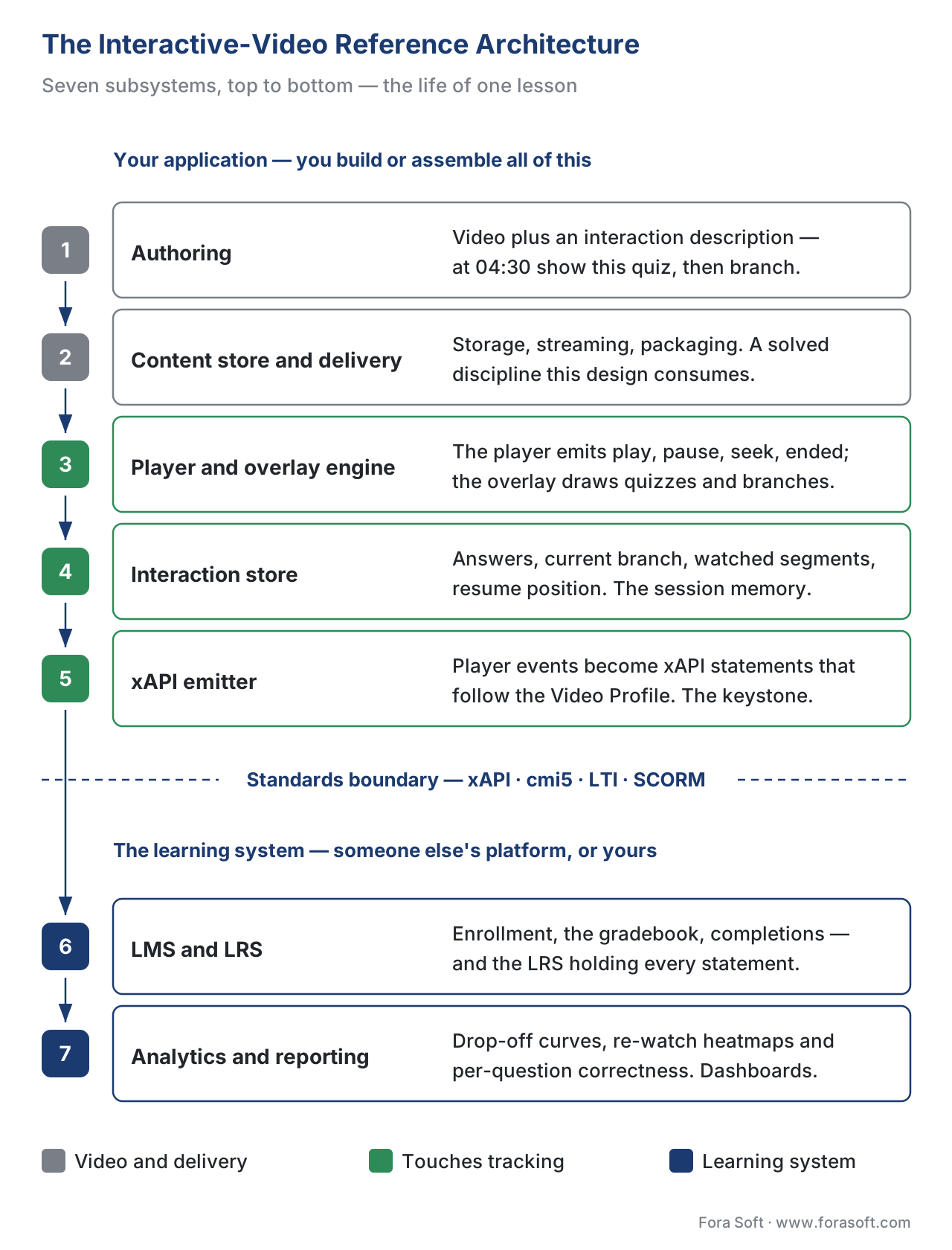 Figure 1. The interactive-video reference architecture, end to end. The first three subsystems handle the video and the interactivity; the standards boundary (the dashed line) is where the experience becomes learning data; the last subsystems are the learning system and its reporting. Stages that touch tracking are tinted green.
Subsystem one — authoring. This is where a course creator builds the interactive video: uploads the source video, marks the moments where a quiz or hotspot or branch should appear, and defines what "complete" means. Authoring can be a full tool you build, an open-source content type such as the interactive video in H5P (a free framework for rich content), or a commercial studio. The output of authoring is not a video file; it is a video file plus a description of the interactions — a small data structure that says "at 4:30, show this quiz; on this answer, jump to 7:10."
Subsystem two — the content store and delivery. The source video and the interaction description have to be stored and then delivered to learners, often at the right quality for each network. This is the streaming layer, and it is a solved discipline that lives in its own field — see the Video Streaming section for how adaptive delivery actually works, and the Video Encoding section for the codec and bitrate-ladder choices. This reference design treats delivery as a service it consumes, not a thing it rebuilds. The one decision that belongs here is packaging: whether the lesson is shipped as a loose web app, or wrapped in a learning package (we cover packaging in packaging and delivering content).
Subsystem three — the interactive player and overlay engine. This is the heart of the experience and the subject of the previous article, building an interactive video player. The player shows the video and exposes its events — play, pause, seek, ended. The overlay engine listens to those events and draws the right interaction at the right second: the quiz card, the clickable hotspot, the branch choice. You almost never build the playback engine — the browser and libraries like Video.js do it — but the overlay engine is where your product differentiates.
Subsystem four — the interaction store. When the learner answers the quiz or picks a branch, that result needs a memory: first during the session, then saved so a refresh or a returning learner does not lose progress. The interaction store is the player's short-term notebook. It holds answers, the current branch, the segments actually watched, and the resume position. It is small, but it is the difference between a player that respects a learner's time and one that makes them start the module over.
Subsystem five — the xAPI emitter (the tracking bridge). This is the most important subsystem in a learning product, because it is the one that turns the experience into measurable data. It listens to the player events and the interaction store and emits Experience API statements — short standardized sentences like "Maria answered the question at 4:30 correctly" — following the rules of the xAPI Video Profile. We give this subsystem its own section below, because it is where the reference design earns its keep.
Subsystem six — the standards boundary into the learning system. This is the dashed line in the diagram, and it is the single most important boundary in the whole design. To the left of it, everything is your application — your player, your overlays, your data. To the right of it sits the learning management system (LMS) — the platform that enrolls learners, holds the gradebook, and issues completions — and its companion data store, the Learning Record Store (LRS), a database built specifically to hold xAPI statements. The connection across this boundary is never ad-hoc; it uses one or more named standards (xAPI, cmi5, LTI, or the older SCORM), and choosing the right one is the central architectural decision. We connect them below.
Subsystem seven — analytics and reporting. Once the learning records land in the LRS and the LMS, someone has to turn them into answers: who completed, where learners dropped off, which quiz question everyone got wrong. This is the analytics layer, and it reads from the LRS (and often a separate data warehouse) to produce dashboards for instructors, learners, and the business. The deep treatment of these metrics lives in learning metrics 101 and the Metrics block; here it is the last stage of the pipeline.
The budget headline is the same as it was for the player: subsystems one through four and seven have strong off-the-shelf options, while subsystem five — the standards-correct tracking bridge — and the wiring across subsystem six are where teams most often underestimate the work and where a wrong call is most expensive to fix.
The Data Contract: What Actually Flows Across the Boundary
A reference design is only as good as the data contract it defines — the precise list of what crosses each connection. Vague contracts ("the player sends tracking data to the LMS") are how projects fail review. Let us make it concrete by following one learner through the system.
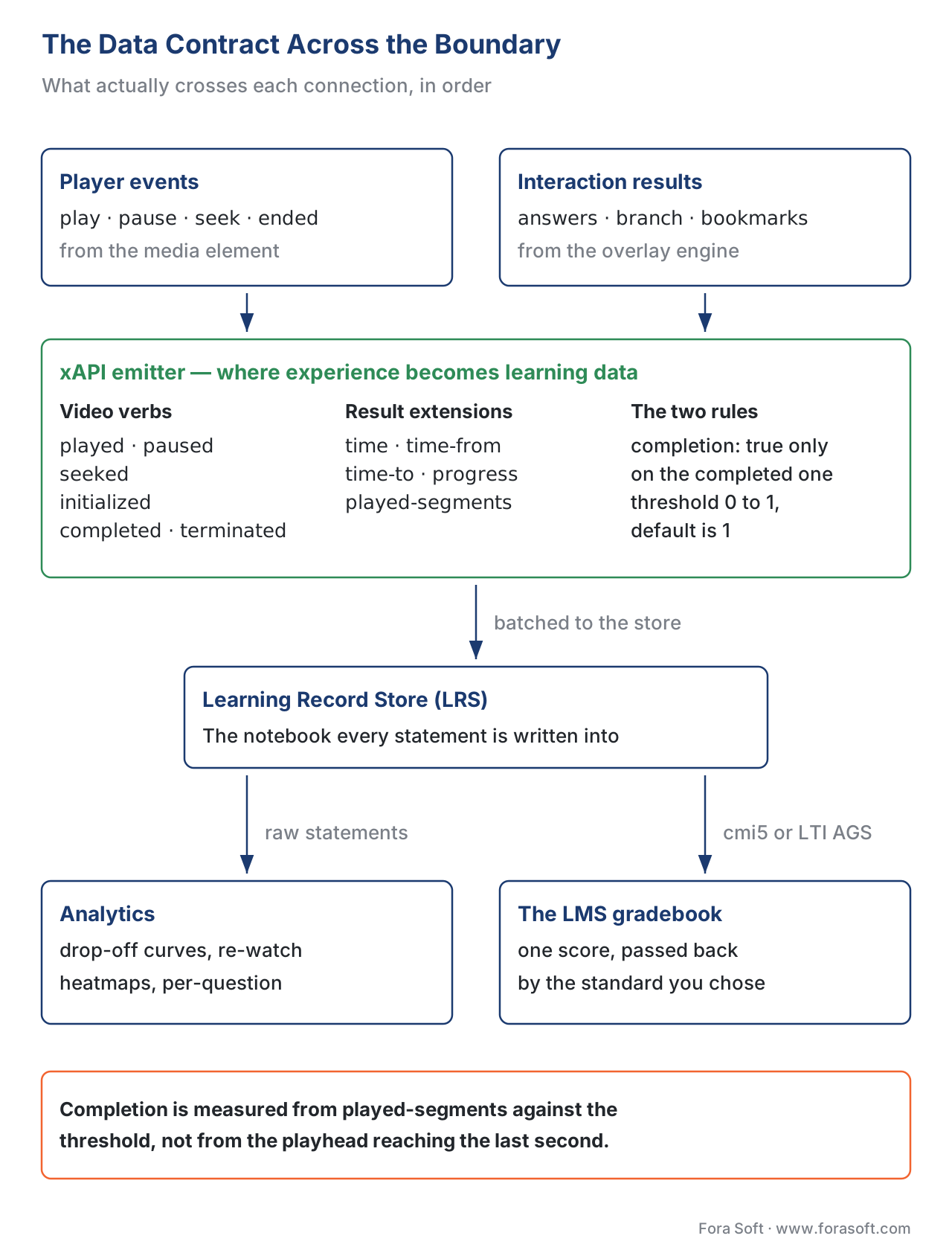 Figure 2. The data contract. Player events and interaction results become xAPI statements (video verbs plus completion and answers), batch into the Learning Record Store, and from there feed analytics and — via cmi5 or LTI grade passback — the LMS gradebook.
The player and overlay engine produce two kinds of events. The first kind is video events: the learner pressed play, paused, jumped from 2:10 to 6:40, reached the end. The second kind is interaction results: the learner answered the 4:30 quiz correctly, chose branch B, bookmarked a moment.
The xAPI emitter translates both kinds into xAPI statements in the actor–verb–object shape defined by the Experience API specification, version 1.0.3 (ADL Initiative, xAPI 1.0.3). For the video events it uses the xAPI Video Profile (ADL / xAPI Video Community of Practice, v1.0.3), which defines three video-specific verbs — played, paused, seeked — and reuses standard verbs for the rest: initialized when the video is ready, completed when the threshold is met, and terminated when the learner leaves. The details ride in result extensions named time, time-from, time-to, progress, and played-segments.
Two rules from the spec are worth stating precisely because they trip up almost every first build. First, the Video Profile requires that the completion property be set to true only on the completed statement, and that other video statements must not include it (xAPI Video Profile, v1.0.3, statement data model). Second, completion is measured against a completion threshold — a number between 0 and 1, assumed to be 1 (the whole video) if not specified — and it is computed from the played-segments the learner actually watched, aggregated across attempts, not from the playhead reaching the final second (xAPI Video Profile, v1.0.3). A learner who drags the scrubber to the end has reached the last second without watching anything; the played-segments extension exists precisely so your design can tell the difference. This is the same "watched 100% is not completed" trap covered in learning metrics 101.
The statements flow into the Learning Record Store. From there, two things happen. Analytics reads the raw statements to build engagement dashboards — drop-off curves, re-watch heatmaps, per-question correctness. And a score — derived from the quiz results — is passed back to the LMS gradebook, but how that passback happens depends on which standard you chose at subsystem six, which is the next section.
Connecting to the Learning System: The Three Standards That Matter
The dashed boundary in Figure 1 is crossed by a standard, and there are three live choices in 2026 (plus the legacy one you will still meet). Picking the right one for your situation is the architectural decision this whole reference design is built to clarify. Here they are in plain language before we map them.
The Experience API (xAPI) is the modern learning-data standard, stewarded by the ADL Initiative. An xAPI statement is a sentence — "Maria completed Module 3" — and the LRS is the notebook those sentences are written into. xAPI is the right tool when you want rich, detailed tracking of every interaction inside the video, including events that happen outside a formal course launch. Its weakness on its own is that it does not define how a course is launched or how the LMS knows a learner is "done."
cmi5 is the bridge standard, also from ADL. It is a profile of xAPI that adds the missing rules: how the LMS launches the lesson, how it passes the learner a secure token, and a small fixed vocabulary of statements (launched, initialized, passed, failed, completed) that any cmi5-conformant LMS understands. Picture cmi5 as the etiquette that lets your rich xAPI tracking also satisfy a corporate LMS that needs a clean "passed/failed/completed" answer. If your video lives inside a corporate learning platform and must report completion reliably, cmi5 is usually the right boundary.
Learning Tools Interoperability (LTI), from 1EdTech (formerly IMS Global), solves a different problem: launching your interactive-video tool inside an LMS as if it were a native feature, and sending grades back. LTI 1.3 uses a security handshake based on OpenID Connect and a signed token — single sign-on is a consequence of the mechanism, not a separate login (1EdTech LTI 1.3 Core). The grade passback uses Assignment and Grade Services (AGS), version 2.0, which lets your tool create a column in the LMS gradebook and write scores to it without the instructor touching anything (1EdTech LTI Advantage, AGS v2.0). Two companion services complete the bundle: Deep Linking, so an instructor can browse your video catalog from inside the LMS and embed a specific lesson, and Names and Role Provisioning Services (NRPS), so your tool learns who is enrolled and their role. If your product is a tool that plugs into many institutions' LMSes — common for higher education and EdTech — LTI is your boundary.
The legacy option is SCORM (ADL), the standard that packages a course so any learning system can play and track it — a shipping container for a lesson. SCORM 1.2 and SCORM 2004 still run the majority of corporate content, but they track a fixed, limited data model inside a single LMS launch and cannot capture rich video interactions. Use SCORM only when a buyer's old LMS accepts nothing else; otherwise prefer cmi5, which gives you SCORM-style completion and xAPI's detail.
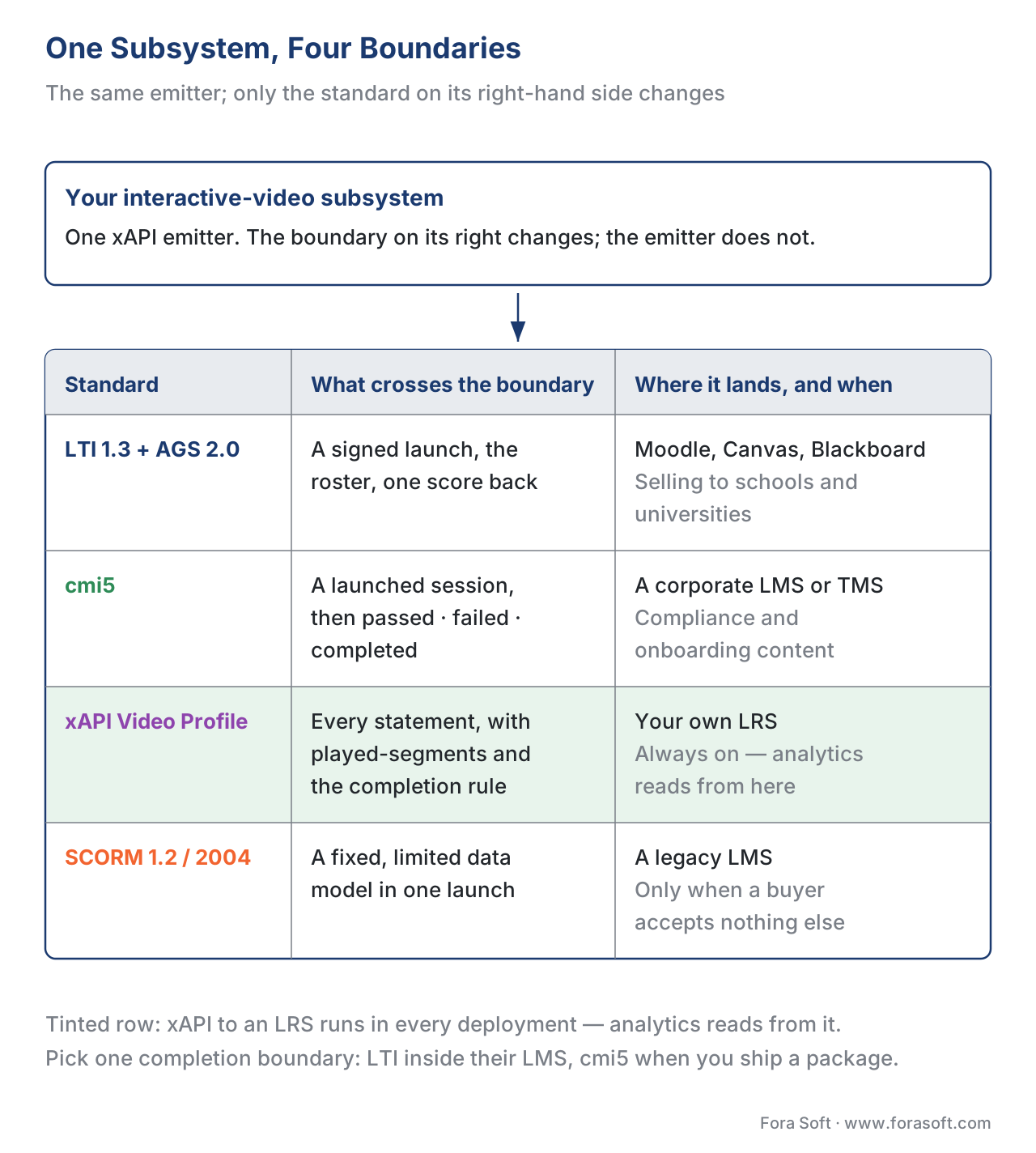 Figure 3. The integration map. The same subsystem connects to different learning systems through different standards: LTI 1.3 for tool launch and grade passback, cmi5 for launch-and-complete inside corporate LMSes, raw xAPI to a standalone LRS for deep analytics, and legacy SCORM only where a buyer requires it.
The reference design's stance is deliberate: emit rich xAPI Video Profile statements to an LRS for analytics always, and choose your LMS-completion boundary — cmi5 or LTI AGS — based on how the product is sold. The deep, article-length comparison of these standards lives in SCORM vs xAPI vs cmi5 vs LTI; here the job is to show where each one sits in the architecture.
What You Build, What You Buy
Now overlay the build-vs-buy line on the architecture. The honest summary is that you should buy or adopt the bottom of the stack (playback, delivery) and the parts with strong commodity options, and build the thin layer where your product is different. Here are the four realistic paths for assembling the whole subsystem, with the one column that decides most learning purchases — standards support.
| Path | What you get | Standards support (xAPI / cmi5 / LTI / SCORM) | Time to first launch | Best fit |
|---|---|---|---|---|
| H5P (open-source content type) | Authoring + player + overlays + native xAPI emit, free | xAPI yes (native statements); SCORM/cmi5/LTI via the host LMS, not by H5P itself | Days | A pilot, or content that lives inside an LMS that already hosts H5P |
| Extend open-source (Video.js + your overlay engine + your emitter) | Full control of overlays, interaction store, and tracking; you own the data | You implement exactly the standards you need — xAPI Video Profile, cmi5, LTI AGS | 10–20 engineer-weeks for the interaction + tracking layer | A product where interactivity and data are the differentiator |
| Commercial interactive-video SDK | Player + some interactivity + analytics + hosting | Varies by vendor; confirm xAPI/cmi5/LTI export before signing | Weeks | Speed to market matters more than owning the stack |
| Full custom (build playback too) | Everything, including the playback engine | Whatever you implement | 75–150+ engineer-weeks; rarely justified | Almost never — the browser already gives you playback |
The table makes the trap visible: the cheapest-looking option (a commercial SDK) can be the most expensive over time if its standards export does not match your LMS, because you will rebuild the tracking bridge anyway. Confirm the standards-support column before the demo dazzles you.
A Cost Example, With the Arithmetic Shown
Let us put a number on building the differentiating middle — the overlay engine, interaction store, and standards-correct xAPI emitter — on top of an open-source player. This is the most common build, and the numbers come from our own delivery experience and published ranges (Fora Soft, custom video player development, 2026).
Start with the engineering. The interaction and tracking layer is roughly 10 to 20 engineer-weeks for a solid first version. Take the midpoint, 15 weeks. At a blended rate of, say, $4,000 per engineer-week:
15 engineer-weeks × $4,000/week = $60,000 (first version of the middle layer)
Now add the standards boundary. Wiring cmi5 launch-and-complete or an LTI 1.3 tool with AGS grade passback is typically 4 to 8 additional engineer-weeks, because the security handshake and the gradebook integration must be tested against each target LMS. Take 6 weeks:
6 engineer-weeks × $4,000/week = $24,000 (one standards boundary, tested)
So a first production version of the interactive layer plus one LMS integration lands near $84,000. Then budget ongoing maintenance — browsers, LMS versions, and the standards themselves all move — at the usual 25–30% of build cost per year:
$84,000 × 0.27 ≈ $22,700 per year (maintenance)
Compare that to a commercial SDK at, say, $30,000–$80,000 per year in license fees with limited data control. The build pays back within roughly two to three years if the interactivity and data are core to your product; if they are a checkbox, the SDK is cheaper. That is the build-vs-buy decision this reference design exists to inform, and the learning-platform cost model calculator lets you run it with your own numbers.
The Three Deployment Patterns
The same seven-subsystem architecture gets deployed in three recognisably different shapes, depending on where the learning management system sits relative to your product. Knowing which one you are is the fastest way to pick your standards boundary.
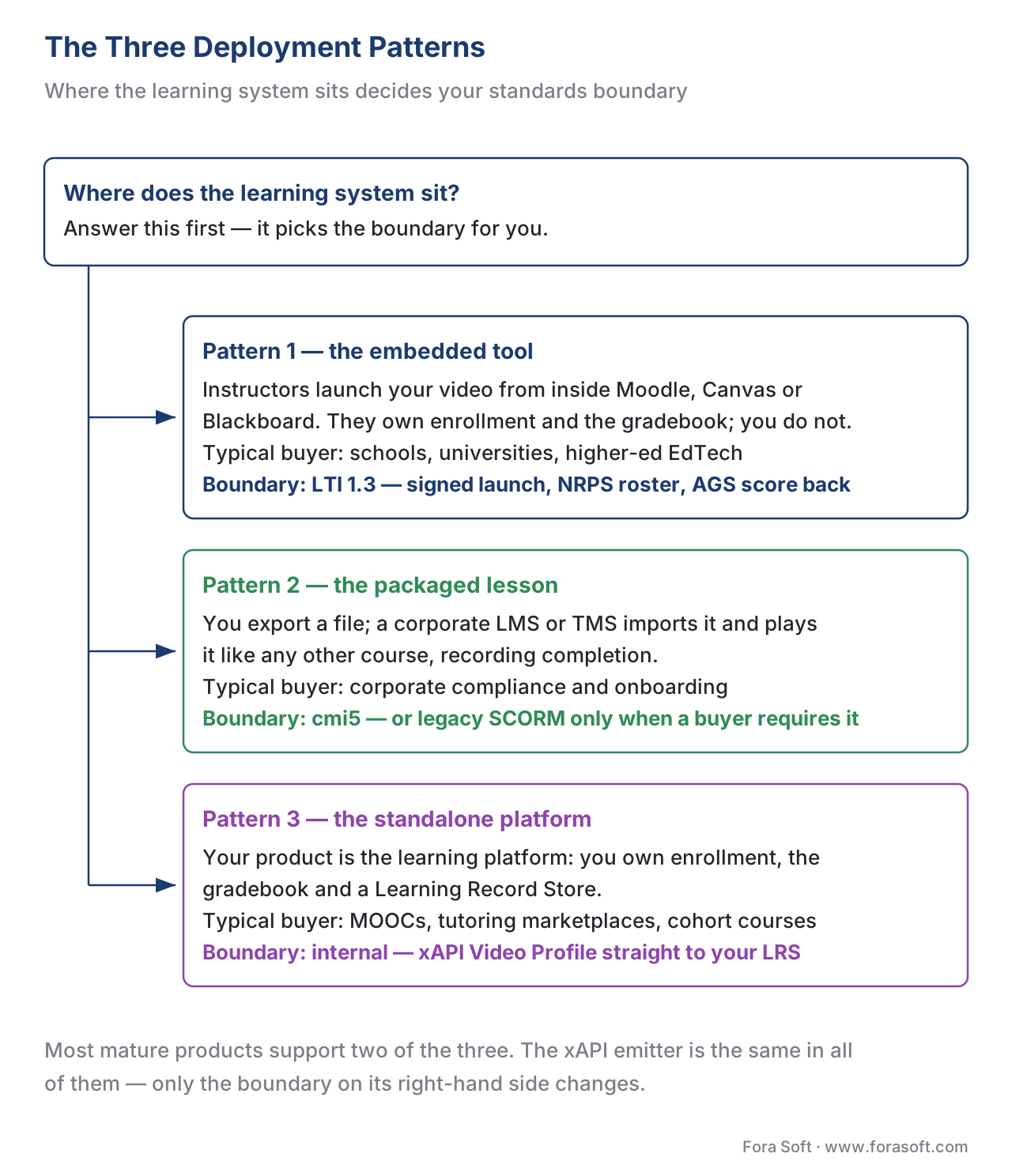 Figure 4. The three deployment patterns. Where the LMS sits decides the standards boundary: a tool launched inside someone else's LMS uses LTI; a package handed to a corporate LMS uses cmi5 (or legacy SCORM); a standalone platform owns its LRS and emits xAPI directly.
Pattern one — the embedded tool (LTI). Your interactive video is a feature that instructors launch from inside their own LMS — Moodle, Canvas, Blackboard. You do not own the gradebook or the enrollment; the LMS does. The boundary is LTI 1.3: the LMS launches your tool with a signed token, NRPS tells you the roster, and AGS writes the score back. This is the dominant pattern for products sold to schools and universities.
Pattern two — the packaged lesson (cmi5 or SCORM). Your interactive video is exported as a package that a corporate LMS or training management system imports and launches like any other course. The boundary is cmi5 (modern, xAPI-based, recommended) or legacy SCORM (only when required). You ship a file; the LMS plays it and records completion. This is the dominant pattern for corporate compliance and onboarding content.
Pattern three — the standalone platform (xAPI + your own LRS). Your product is the learning platform — you own enrollment, the gradebook, and a Learning Record Store. The boundary is internal: your player emits xAPI Video Profile statements directly to your LRS, and you build the analytics on top. This gives you the richest data and the most control, and it is the pattern for MOOCs, tutoring marketplaces, and cohort platforms. The reference architectures for these products are detailed in Block 9.
Most mature products end up supporting two of the three — for example, a standalone platform that also exports cmi5 packages for corporate buyers. The reference design accommodates this because the xAPI emitter is the same in all three; only the boundary on its right-hand side changes.
A Common Mistake That Sinks Interactive-Video Projects
The single most expensive mistake in this whole architecture is treating the standards boundary as an afterthought — building the player and overlays first, then "adding tracking later." Tracking is not a coat of paint; it shapes the design of every subsystem to its left. If the interaction store does not record which segments were watched and the intent behind each pause, the xAPI emitter cannot produce a truthful completed statement or a defensible played-segments value, and no amount of later work recovers data the player never captured. Teams that bolt tracking on at the end routinely discover their completion numbers are wrong, their grade passback double-counts retries, and a compliance buyer rejects the product. Design the data contract first, then build leftward from it.
Two accessibility pitfalls belong in the same warning. Custom overlay controls that are not keyboard-operable fail WCAG 2.1 Success Criterion 2.1.1 (Keyboard), and video without captions fails SC 1.2.2 (Captions, Prerecorded) — both Level A, the floor, not the ceiling (W3C WCAG 2.1). Public-sector and many enterprise buyers will not accept a product that misses them, and retrofitting accessibility into an overlay engine is far costlier than designing it in. Accessibility is part of the reference design, not a later sprint.
Free download: Interactive Video Reference Design — Readiness ChecklistOne page to pressure-test a design before you spend the budget: architecture completeness, the data contract and xAPI tracking, the cmi5 / LTI / SCORM boundary, accessibility, and analytics.Where Fora Soft Fits In
The build-vs-buy line in this article is the one we help teams draw. Fora Soft has built video streaming, real-time conferencing, and interactive learning software since 2005, which means the same team understands the playback layer, the overlay engine, and the standards boundary — the three disciplines that rarely sit in one place. We help when interactivity and learning data are core to your product and a generic SDK would force you to rebuild the tracking bridge anyway: we extend a proven open-source player, build the overlay and interaction layers you actually differentiate on, and wire a standards-correct xAPI, cmi5, or LTI boundary into your learning platform. Where buying is the right call, we say so. The verticals we work in — e-learning, video conferencing, streaming, OTT, telemedicine, and AR/VR — all share this real-time-and-interactive-video spine.



The handbook
Fora Soft Video Engineering Handbook
Subsystems two and three of this reference design — delivery and the player — are a discipline of their own, and we wrote it down: seven volumes and 9,000+ pages covering the whole video stack, from the pixel to production. Volume 3 is the one to open next: ABR ladders, CDNs, players, trick play, DRM and the economics of delivery, which is the layer your overlay engine sits on. Volume 2 covers transport, ingest and packaging into HLS and MPEG-DASH — the subsystem this design consumes rather than rebuilds — and volume 1 covers the encoding underneath both. Written by Nikolay Sapunov, CEO at Fora Soft.
Not sure where to draw the build-vs-buy line on your interactive video?
Tell us which of the seven subsystems you already have, and we will tell you what the standards boundary costs to wire and where buying beats building. 250+ video products shipped since 2005.
See our case studies
Case study
Scholarly
Pattern three, built: the platform owns enrollment, the gradebook and its own event store, running live classes for up to 2,000 students at once across 15,000+ active users, with ClickHouse under the analytics.
Case study
BrainCert
The standards boundary as the product: SCORM and xAPI support, proctored exams and DRM across 500M+ real-time classroom minutes for 100K+ customers.
Case study
Tabsera
The interactive layer has to behave identically everywhere: quizzes and an interactive whiteboard in a K-12 LMS running in English, French, Arabic and Turkish, on web and on iOS.
What to read next
Standards
Tracking Video With xAPI: The Video Profile and What to Capture
Subsystem five in full: every verb, every extension, and the played-segments maths behind a truthful completion.
Standards
SCORM vs xAPI vs cmi5 vs LTI: Which Standard, When
The article-length comparison behind this design's central call — which boundary to put on subsystem six.
Foundations
The Learning-Platform Cost Model: What It Costs to Build and Run
Run the $84,000 build and the 27% maintenance line with your own rates and your own scope.
Foundations
Learning Metrics 101: Completion, Progress, Mastery, Engagement
Why a learner who drags the scrubber to the end has not completed anything, and what to measure instead.
References
- Experience API (xAPI) Specification, Version 1.0.3 — ADL Initiative. The actor–verb–object statement model and the Learning Record Store statements are written to. Tier 1. https://github.com/adlnet/xAPI-Spec/blob/master/xAPI-About.md
- xAPI Video Profile, v1.0.3 — ADL Initiative / xAPI Video Community of Practice. Video verbs (
played,paused,seeked), reuse ofinitialized/completed/terminated, thetime/time-from/time-to/progress/played-segmentsextensions, completion threshold, and the rule thatcompletion: trueappears only on thecompletedstatement. Tier 1. https://github.com/adlnet/xapi-authored-profiles/blob/master/video/v1.0.3/video.jsonld - cmi5 Specification — ADL Initiative. The xAPI profile that adds launch, the secure session token, and the
launched/initialized/passed/failed/completedvocabulary for LMS-grade completion. Tier 1. https://github.com/AICC/CMI-5_Spec_Current - Learning Tools Interoperability (LTI) 1.3 Core — 1EdTech (formerly IMS Global). The OpenID Connect–based launch and signed JWT; SSO as a consequence of the mechanism. Tier 1. https://www.imsglobal.org/spec/lti/v1p3
- LTI Advantage — Assignment and Grade Services, Version 2.0; Deep Linking; Names and Role Provisioning Services — 1EdTech. Gradebook line items and score passback, content selection, and roster/role provisioning. Tier 1. https://www.imsglobal.org/spec/lti-ags/v2p0
- WCAG 2.1 — W3C Recommendation, 5 June 2018. Success Criteria 1.2.2 (Captions, Prerecorded, A), 2.1.1 (Keyboard, A), 1.2.4 (Captions, Live, AA). The accessibility floor a custom overlay/control set must meet. Tier 1. https://www.w3.org/TR/WCAG21/
- HTML Living Standard — media elements (
<video>,HTMLMediaElement,<track>) — WHATWG. The native player, its event set, and the text-track interface the overlay engine subscribes to. Tier 1. https://html.spec.whatwg.org/multipage/media.html - SCORM 1.2 and SCORM 2004 4th Edition — ADL Initiative. The legacy packaging/run-time standard with a fixed, limited data model inside one LMS launch; the boundary to use only when a buyer requires it. Tier 1. https://adlnet.gov/projects/scorm/
- Interactive Video content type and the H5P external xAPI dispatcher — H5P.org. Author-level overlays and native xAPI statement emission via
H5P.externalDispatcher; the host LMS forwards to the LRS. Tier 4. https://h5p.org/documentation/x-api - Video.js documentation — Components, Plugins, Tech — Video.js (open source, Apache 2.0). The extensibility framework most learning products build the overlay engine on. Tier 4. https://docs.videojs.com
- xAPI analytics guide; video tracking — Kaltura Knowledge Center. A first-party account of a commercial platform emitting xAPI from the portal and embedded players to an LRS. Tier 4. https://knowledge.kaltura.com/help/xapi-analytics-guide
- Custom video player development — effort and cost ranges — Fora Soft (engineering blog), 2026. The engineer-week and maintenance ranges used in the cost example. Tier 5. https://www.forasoft.com/blog/article/custom-video-player-development
