


Why This Matters
If you build or sell learning video, the moment of truth is the upload screen of a customer's learning platform. You hand them a file; either it plays and tracks, or it throws a cryptic error and the deal stalls. This article is for the L&D director, EdTech founder, or product manager who has to decide how their content ships — embedded in a package, or hosted and launched remotely — and brief engineers without learning a spec by heart. Get packaging and delivery right and one build plays in Moodle, Canvas, and a corporate platform alike, with the heavy video streamed efficiently and updateable without re-shipping. Get it wrong and you ship per-customer zips that break on the next platform update, blow up egress bills, or never report completion at all.
First, The Words: Package, Manifest, And PIF
Three terms do most of the work in this article, so pin them down before anything else.
A package is the unit you hand to a learning platform. It is a folder of files — HTML, JavaScript, images, and a description file — that the platform can import and run on its own, without anyone configuring it by hand. Think of it as a flat-pack piece of furniture: every part and an assembly sheet in one box, so any compliant warehouse can stock and ship it.
A manifest is that assembly sheet. It is a single text file, written in the structured format called XML, that lists everything in the package and explains how the pieces fit: which file launches first, what counts as a lesson, and which files belong to which lesson. The standard called SCORM (the Sharable Content Object Reference Model, the long-standing packaging format every learning platform can read) requires this file to be named imsmanifest.xml and to sit at the very top of the folder. As SCORM's own packaging documentation puts it, the manifest "completely describes the content."
A PIF — Package Interchange File — is simply that folder zipped into one .zip, with the manifest at the root of the zip. SCORM calls the zip a PIF; in everyday speech people just say "the SCORM package" or "the zip." The zip is the most common way courses move between an authoring tool and a platform.
So the chain is: you author a course, the authoring tool writes a manifest, everything gets zipped into a PIF, and the platform unzips it, reads the manifest, and knows how to launch and track the course. That is the whole packaging idea in one sentence.
What Goes Inside A SCORM Manifest
Open a SCORM manifest and, under the spec language, you find three meaningful parts. Understanding them is enough to debug most packaging problems.
The first part is resources — the list of actual files that make up the course. SCORM splits these into two kinds, and the difference matters more than any other detail in the file. A SCO (Sharable Content Object) is a piece of content that talks to the platform: it can report "started," "completed," a score, and time spent. An Asset is static content that just gets shown — an image, a PDF, a raw video file — and reports nothing. The plain-language test: if it needs to track, it is a SCO; if it only needs to display, it is an Asset. A course that should record completion but was packaged as a bare Asset will play perfectly and track nothing, which is one of the quieter ways a package "works but doesn't."
The second part is organizations — the table of contents. This arranges the resources into a tree of items: a top-level course, modules under it, lessons under those. SCORM's rule is strict and worth knowing: an item either has children (a folder) or points to a resource (a file), never both — exactly like folders and files on a computer, with no "empty folders" allowed. Most courses have one default organization; you can ship more than one to present the same content to different audiences.
The third part is metadata — the descriptive labels: title, description, author, keywords, recorded in a format called Learning Object Metadata (LOM). Metadata is mostly optional and exists to make content findable and reusable. For a single video course you can keep it minimal.
SCORM 2004 adds a fourth, optional part — sequencing rules that control the order learners move through activities — encoded in the manifest as XML. SCORM 1.2, the older and still widely deployed version, has no real sequencing. This is the first place the "which SCORM version?" question bites, and we will return to it.
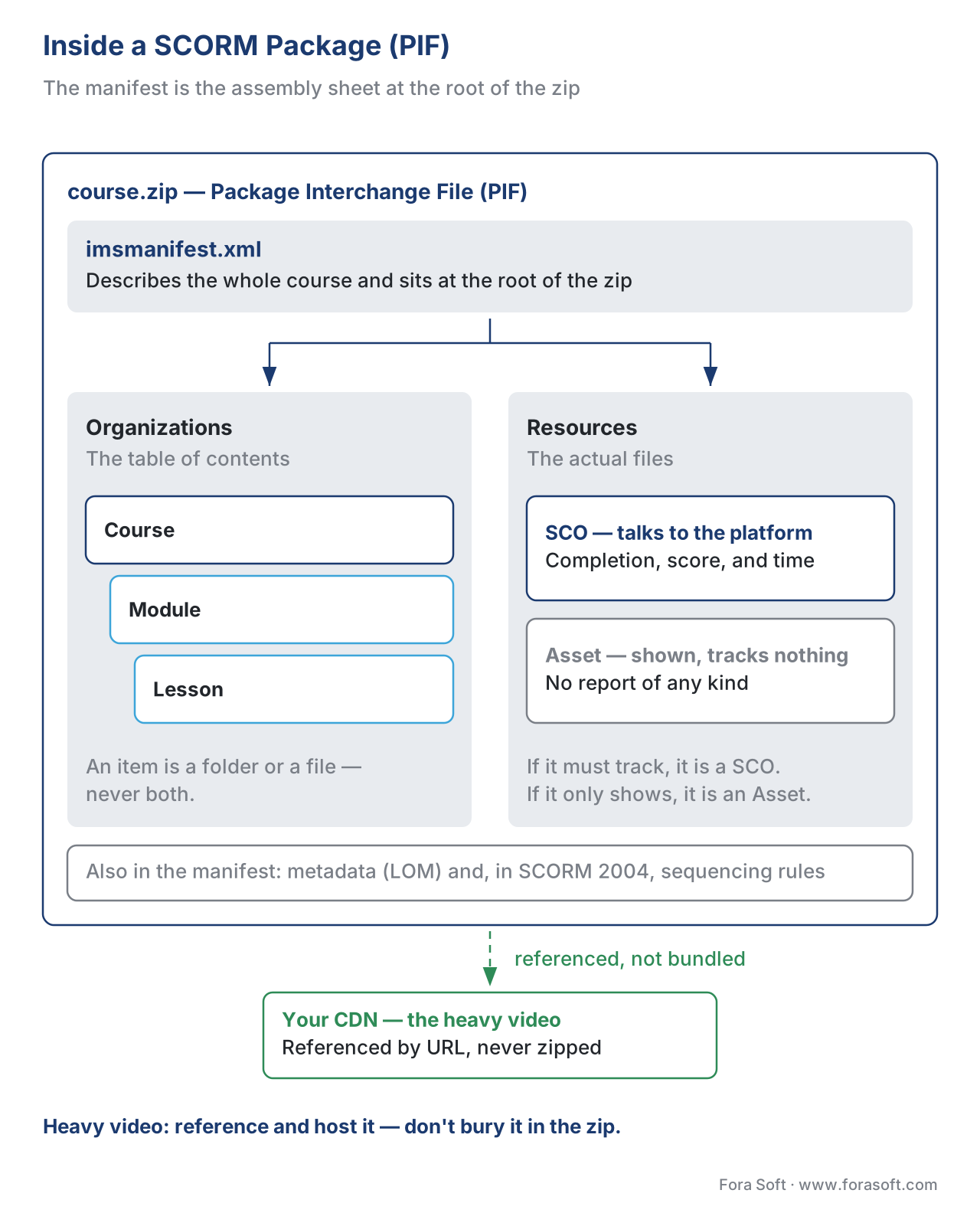 Figure 1. Inside a SCORM package (PIF). The manifest sits at the root and points to an organizations tree and a resource list; SCOs talk to the platform, Assets are shown but track nothing, and heavy video is best referenced, not buried inside the zip.
How A Package Is Authored
You rarely write a manifest by hand. The job of producing a valid package belongs to SCORM authoring tools — applications that take your slides, video, and quizzes and export a conformant PIF with the manifest written for you. Commercial tools (Articulate Storyline and Rise, Adobe Captivate, iSpring, Lectora) and the open-source H5P and Adapt all export SCORM, and most now export xAPI and cmi5 too. A SCORM editor in this sense is the export-and-repackage layer, not a separate product category.
For a team building a custom video product, there are two honest paths. You can author courses in one of these tools and export packages — fast, no engineering, but limited to what the tool's player supports. Or you can generate packages programmatically from your own player: write the manifest, include a small SCORM "wrapper" (the JavaScript that finds and talks to the platform's tracking interface), and zip it. The second path is more work but gives you control over the video player, the tracking detail, and the hosting model — which is the whole reason a video company builds its own packaging in the first place.
A practical rule for creating SCORM content that survives contact with a real platform: keep the package self-contained and avoid server-side code. SCORM strongly favours portability — every file the course needs should be listed in the manifest and, ideally, sit inside the PIF, with no dependency on a database or a server script that the customer's platform will not run. Break that rule and the course works on your machine and fails on theirs.
SCORM, cmi5, And xAPI: Same Idea, Different Package
This section's sibling articles cover each standard in depth; here we care only about how each one packages and delivers. The difference decides your hosting model.
A SCORM package is self-contained by design. The content and its tracking script ride inside the PIF, the platform unzips them onto its own server, and the course runs from there. Tracking is a fixed data model — completion, score, time — reported while the learner is inside an LMS session (see SCORM explained). Simple to hand over; weak for rich video, and a copy you cannot revoke once delivered.
A cmi5 package is built for distributed content. Its course-structure file — which the spec requires to be named cmi5.xml — lists assignable units (AUs), the launchable pieces, and each AU is referenced by a launch URL that can point anywhere on the web (see cmi5 explained). As the cmi5 specification states, "the AU's resources may be referenced from an external host or be placed in a ZIP file." That one sentence is the key to modern delivery: with cmi5, the platform can hold a tiny package while your video stays on your own infrastructure. Underneath, cmi5 uses xAPI (the Experience API) to send rich statements to a Learning Record Store (LRS) — the database that holds learning records as simple sentences like "Maria completed Module 3" (see xAPI explained).
Raw xAPI has no single packaging standard at all; you decide where content lives and emit statements directly to an LRS. For video specifically, the xAPI Video Profile defines the play, pause, seek, and completed statements that turn "watched" into per-second insight — the detail SCORM throws away. If you are weighing the four, the SCORM vs xAPI vs cmi5 vs LTI comparison maps each to its best job.
The packaging takeaway: SCORM bundles everything and copies it to the platform; cmi5 lets you ship a thin launcher and host the heavy media yourself. For a video product, that distinction is the difference between an egress bill you control and one you do not.
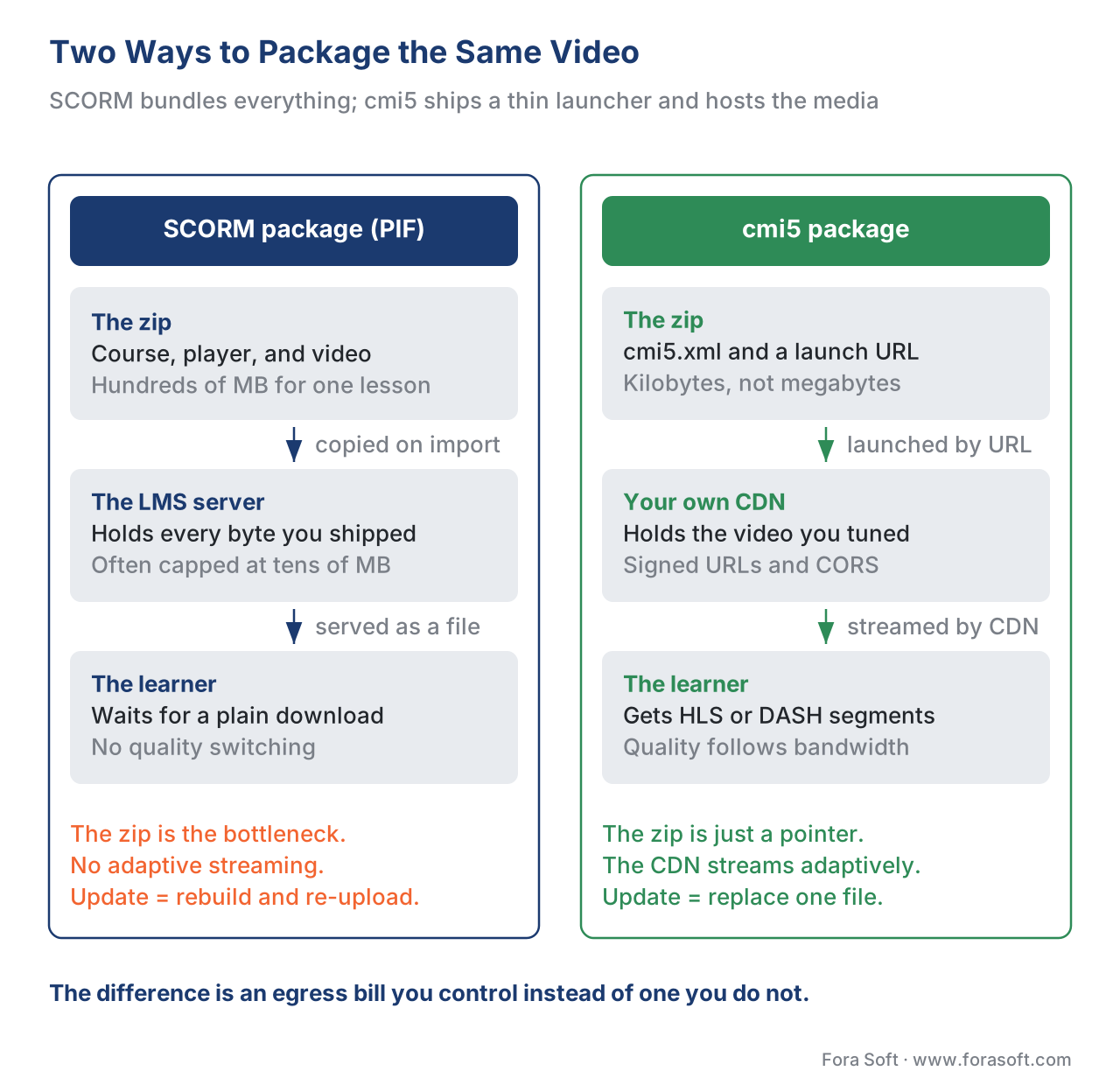 Figure 2. Two packaging models. A SCORM PIF carries the content (and tempts you to bury video) inside the zip the LMS copies. A cmi5 package ships a thin
 cmi5.xml whose assignable units launch from a URL — so the heavy video can stream from your own CDN.
The Real Problem Is Delivery: Where The Video Lives
Here is the trap. The natural instinct is to drop the course video straight into the package — it is "self-contained," after all. For a five-minute talking-head clip that is fine. For a real catalogue it is a mistake, and the reasons are concrete.
Video is heavy. A single 20-minute lesson at a reasonable bitrate is hundreds of megabytes; a course is gigabytes. Many platforms cap the upload size of a package — often tens or low hundreds of megabytes — so a video-laden PIF is rejected before it imports. Even when it imports, the platform serves that file as a plain download from its own server, with no adaptive streaming, so a learner on a weak connection waits or stalls. And every time you fix a typo in the video you must rebuild and re-upload the whole package everywhere it lives.
The professional pattern is to keep video out of the package and stream it from a content delivery network (CDN) — a global network of servers that cache your files close to each learner so they load fast. The package carries only the player and a pointer; the player requests the video from the CDN and streams it adaptively, using HLS or DASH (the two standard ways to chop video into short segments and switch quality to match the learner's bandwidth — covered in the Video Streaming section, with codec choices in choosing a codec). The package stays small enough to import anywhere; the video stays on infrastructure you tuned; and updating a lesson means replacing one file on the CDN, not re-shipping a package.
Two delivery concerns ride along with hosting. First, access control: if the video is just a public URL, anyone can take it. Signed URLs — links that carry a short-lived, cryptographically signed token and expire after minutes — let only an authenticated learner's player fetch the file, so your catalogue is not freely copyable. Second, cost, which is where the arithmetic earns its place.
A Worked Example: The Egress Bill You Choose
Delivery cost is dominated by egress — the price a cloud or CDN charges to send data out to learners. Walk the numbers once and the hosting decision makes itself.
Suppose one course holds 300 MB of video, and 5,000 learners each watch it once.
Total data sent = video size × learners
                = 0.3 GB × 5,000
                = 1,500 GB  (about 1.5 TB)

Egress cost     = data × price per GB
                = 1,500 GB × $0.085/GB     (typical CDN rate, 2026)
                = $127.50 for the course
That is the floor. Now add reality: learners rewatch, drop off and restart, and stream at higher quality on good connections, so effective data is often two to three times the single-watch figure — call it $250–$380 for the same course. Scale to a catalogue of 50 such courses and you are budgeting low tens of thousands of dollars a year in delivery alone. None of this shows up if you bury video in a SCORM package, because the platform absorbs the serving cost — until it throttles you, caps the upload, or the customer asks why their storage bill jumped. Hosting on your own CDN makes the cost visible and controllable, and it is the only model that scales (the full version of this math, with transcoding and multi-CDN, lives in scaling delivery).
The Same-Origin Wall: Why Hosting Breaks Tracking
Now the technical catch that surprises every team the first time. The browser enforces a security rule called the same-origin policy: scripts on a page from one web address may not freely read or talk to a page from a different web address. It exists to stop a malicious site from reading your bank tab.
SCORM tracking depends on exactly that cross-page conversation. When a platform launches a SCORM course, it opens the course in a frame or window and the course's script must reach outward to find the platform's tracking interface (the "API adapter") in the parent page. If the course is served from your CDN at one address and the platform lives at another, the browser blocks that reach, and the course throws the single most common SCORM error there is: "Unable to find API adapter" / "Unable to acquire LMS API." As SCORM's own guidance states plainly, "since SCORM requires that the content and player reside in the same domain," cross-domain hosting needs a deliberate workaround.
There are three honest ways through this wall. The first is to host the whole SCORM package on the platform (no cross-domain problem, but you lose control and re-shipping pain returns). The second is the dispatch pattern: ship the platform a tiny package that, instead of carrying content, securely bridges back to your hosted course — using a technique like the browser's postMessage, which is built to pass data between windows across domains. Rustici's Dispatch, Content Controller, and Cross Domain are the best-known commercial implementations; they let you keep the course on your servers, update it centrally, and revoke or seat-limit access. The third is to use cmi5 or xAPI instead of SCORM, because their tracking talks to an LRS over an authorised web service (the launch URL carries an endpoint and a one-time token), which is built for cross-domain from the start — no same-origin wall to climb.
This is the deep reason a video company gravitates to cmi5 or a dispatch model: it is the only way to host your own video and track reliably across every customer's platform.
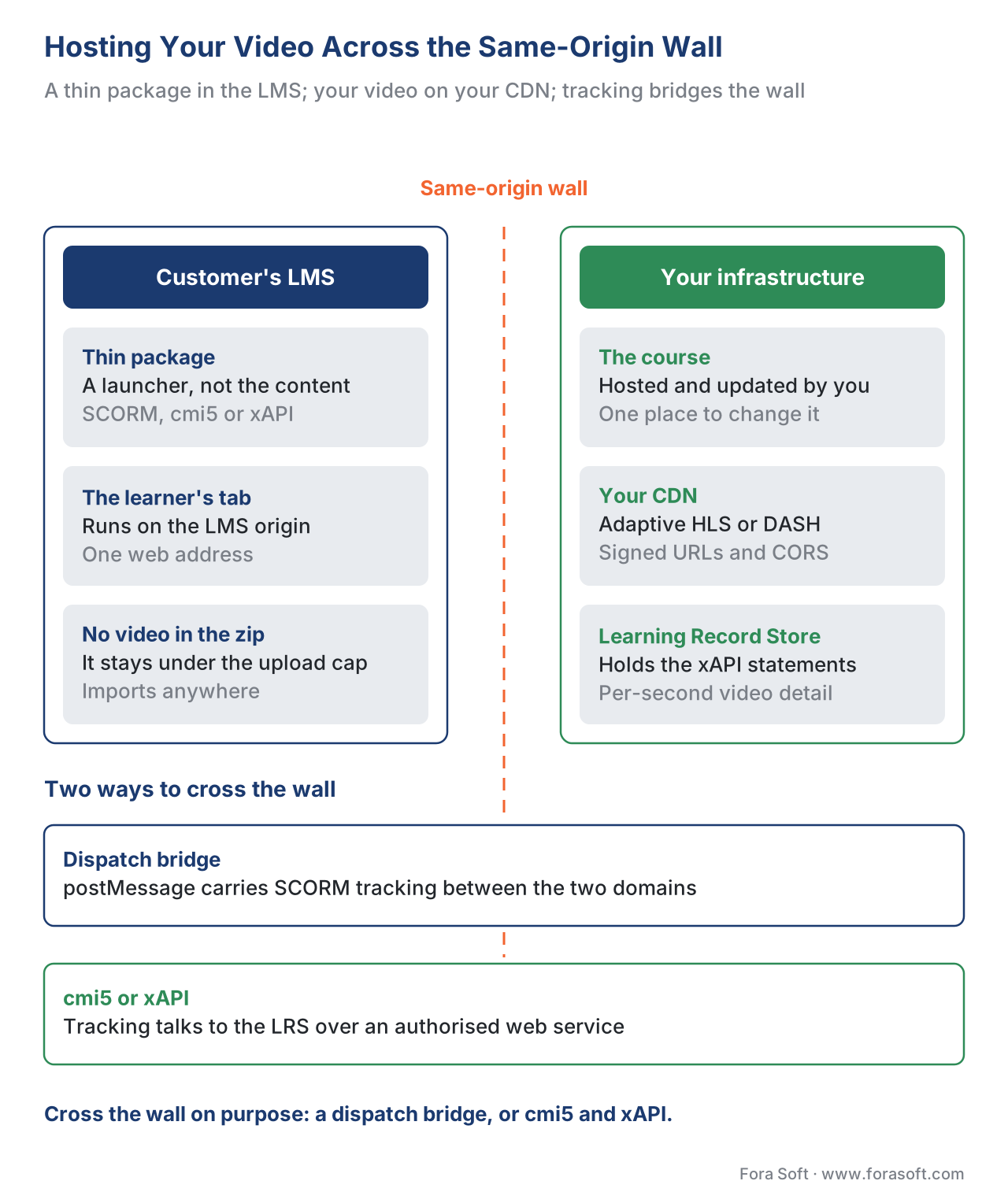 Figure 3. Hosting your own content across the same-origin wall. A thin package sits in the LMS; the course and CDN-streamed video live on your infrastructure behind signed URLs and CORS; tracking crosses the wall via a dispatch bridge (postMessage) or via an LRS using cmi5/xAPI.
Make The CDN Cooperate: CORS
One more piece makes hosted video actually play. When a player on the platform's page fetches a video from your CDN, the browser treats it as a cross-origin request and, by default, may block it. The fix is CORS (Cross-Origin Resource Sharing) — a set of response headers your CDN sends that say, in effect, "it is allowed for that other site to load my files." Adaptive video over HLS or DASH, and the thumbnails and caption files that ride with it, all need CORS configured on the CDN, or they fail silently with nothing in the player but an error in the console. CORS is not optional plumbing; it is the line between "the video loads" and "the video does not," and it is cheap to set up once you know to.
The Failure Gallery: "It Works In Authoring, Not In The LMS"
Almost every packaging support ticket is one of a handful of failures. Knowing the shortlist turns a day of debugging into ten minutes.
The course cannot find the API. "Unable to acquire LMS API" is the headline failure. Causes, in order of frequency: the content is hosted on a different domain than the platform (same-origin wall); the platform launched the course in a new window instead of a frame, so the script cannot find the parent; or the SCORM version the course expects does not match what the platform speaks. Fix the launch method to a frame, match versions, or move to a dispatch/cmi5 model for cross-domain.
Files are missing from the manifest. The course runs in the authoring tool because every file is on your disk, but the PIF omitted a video, font, or script the manifest never listed — so on the platform it shows a broken player. The manifest must list every file the course needs; if it is not in the manifest and the zip, it does not exist on the platform.
The wrong content type or version. The package was uploaded as a generic file rather than flagged as SCORM content, or as SCORM 2004 to a platform that only does 1.2 (or vice-versa). The course loads but never tracks. Confirm the platform's supported version before you build the package, not after.
It tracks "completed" but nothing else — or nothing at all. The content was packaged as a static Asset (no tracking code), or as SCORM when the buyer wanted video engagement. SCORM records completion, score, and time, not play, pause, seek, or watched segments; rich video means cmi5 or xAPI with the Video Profile and an LRS.
"Watched 100%" was treated as "completed." A video player reaching its end is a player event, not a completion. Completion is whatever the content reports through SCORM's completion status, a cmi5 completed statement, or an xAPI statement you define. Decide what "complete" means before a customer's auditor asks.
The video stalls or will not load. Either the package buried the video and the platform serves it without streaming, or the CDN is missing CORS headers or signed-URL configuration. Host on a CDN, configure CORS, and stream adaptively.
The Packaging Options, Side By Side
The surfaces are the same across standards; the packaging and hosting behaviour differs. Here is the honest comparison for a video product.
| Standard / format | Manifest file | Video tracking | Hosting model | Best fit for video |
|---|---|---|---|---|
| SCORM 1.2 | imsmanifest.xml |
Completion, score, time; no sequencing | Self-contained PIF, copied to LMS | Widest compatibility; weak for video |
| SCORM 2004 4th Ed | imsmanifest.xml + sequencing |
Completion, score, time; sequencing rules | Self-contained PIF, copied to LMS | When ordered navigation matters |
| cmi5 | cmi5.xml (assignable units) |
Rich, via xAPI underneath | Thin package; AUs launch from a URL | Best fit — host video, track richly |
| xAPI + Video Profile | None (you define structure) | Per-second play/pause/seek/segments | You host everything; statements to an LRS | Deepest video analytics |
| IMS Common Cartridge | imsmanifest.xml (1EdTech) |
Limited; not a video-tracking format | Self-contained package | Course material exchange, not video tracking |
Read it as a pattern: SCORM maximises compatibility and minimises control; cmi5 keeps compatibility while letting you host and track richly; raw xAPI maximises insight and effort. For a learning-video product that must host its own media and play across many platforms, cmi5 (with xAPI underneath) is usually the target, with a SCORM package produced as well for buyers who still require it.
Versioning: Update Without Re-Shipping
Content changes — a fact goes stale, a logo updates, a lesson is re-shot. How painful that is depends entirely on your packaging choice, which is the quiet reason hosting wins.
With a self-contained SCORM package copied to every customer's platform, an update means rebuilding the PIF and re-uploading it to every platform that holds a copy, then hoping each customer re-imports it. With a hosted model — cmi5, xAPI, or SCORM-via-dispatch — the package on each platform is just a pointer, so you update the video or the course on your own CDN once and every learner gets the new version on next launch. Treat content like software: keep the launcher stable, version the hosted assets behind it, and never make a customer re-import to get a fix. To scope your own packaging and hosting decision the first time, download the SCORM/cmi5 packaging checklist.
Free download: SCORM Packaging and Conformance ChecklistA one-page checklist to run before you ship a package: the package structure and the manifest, SCO versus asset, the run-time API calls and data fields to verify, the SCORM 1.2 versus 2004 decision, and how to test conformance before a customer's platform does it for you.Where Fora Soft Fits In
Fora Soft has built video learning, streaming, and interactive-player software since 2005, across 239+ shipped projects. On packaging and delivery, the recurring decision we help teams make is the one at the centre of this article: package thin and host the video yourself, rather than burying gigabytes in a SCORM zip that caps out on upload and cannot be updated without re-shipping. Our work usually sits at the player and delivery layer — a video player that exports as cmi5 (with a SCORM package alongside for buyers who need it), streams adaptively from a CDN behind signed URLs and CORS, and tracks per-second engagement via the xAPI Video Profile into a Learning Record Store. We treat the cross-domain tracking problem as a design input, not a surprise, so the same build plays and tracks in Moodle, Canvas, and a corporate platform without per-customer rework.



The handbook
Fora Soft Video Engineering Handbook
We wrote a seven-volume series that takes the whole video stack apart across 9,000+ pages — encoding, delivery, audio and AI — so the hosting model behind a course catalogue is something you design on purpose instead of inheriting from an authoring tool. Volume 3 sits closest to this article: adaptive bitrate, CDNs, players, signed delivery and the economics of streaming, which is where the $0.085 per gigabyte in the worked example above comes from. Volume 2 covers the layer underneath it — transport, ingest, HLS and MPEG-DASH — so the segments a cmi5 launch URL points at are built the way a player expects, and volume 1 explains the encoding decisions that set how many hundreds of megabytes one lesson weighs before anyone argues about where to put it. Written by Nikolay Sapunov, CEO at Fora Soft.
Where should your course video actually live?
Tell us how big the catalogue is, which platforms your buyers run, and whether you still need a SCORM package alongside cmi5 — and we will come back with the packaging and hosting model that fits, the cross-domain tracking design that goes with it, and what each part costs to build. 250+ video products shipped since 2005.
See our case studies
Case study
BrainCert
A WebRTC and HTML5 virtual classroom LMS we built from the architecture up: 100K+ customers, 500M+ real-time classroom minutes across 10 datacentres, SCORM and xAPI support for the content that has to travel, and its own QuantumKey DRM so a course is never a file a buyer can simply keep.
Case study
Scholarly
The hosted model of this article running at exam-season peaks: 15,000+ active users, adaptive DASH and HLS served from object storage behind a CDN, and live classes of up to 2,000 students at once — delivery tuned by us, not absorbed by someone else's platform.
Case study
Tabsera
A K-12 LMS in English, French, Arabic, and Turkish whose courses ship to the web and to dedicated iOS apps — one library of content, more than one place it has to import and play, which is the portability problem packaging exists to solve.
What to read next
Standards
SCORM explained: what it is, what it tracks, when to use it
The format this article packages for, from the run-time API down to what it will and will not record.
Standards
cmi5: the bridge between SCORM and xAPI
The thin-package standard that lets the launch URL point at your CDN and the tracking still land.
Standards
SCORM vs xAPI vs cmi5 vs LTI: which standard, when
The four side by side, so you can pick what to build against instead of shipping all of them.
Delivery
Scaling delivery: CDN, transcoding, and cost at volume
The full version of the egress arithmetic above, with transcoding, storage, and multi-CDN in it.
References
- ADL Initiative. SCORM 2004 4th Edition — Content Aggregation Model (CAM) and SCORM 1.2. https://adlnet.gov/projects/scorm/ (Tier 1 — primary specification; the Package Interchange File, the
imsmanifest.xmlrequirement, SCOs vs Assets, organizations, LOM metadata, and the SCORM 2004 sequencing binding.) - AICC / ADL. cmi5 Specification (Current) and Conceptual Overview of cmi5. https://github.com/AICC/CMI-5_Spec_Current and https://aicc.github.io/CMI-5_Spec_Current/flows/cmi5-overview.html (Tier 1 — primary specification; the
cmi5.xmlcourse-structure file, assignable units, the launch URL with endpoint/fetch/actor/registration parameters, the "resources may be referenced from an external host" rule, and the requirement that the LMS include an LRS.) - ADL Initiative. Experience API (xAPI) Specification, Version 1.0.3 (Part 2: Statements). https://github.com/adlnet/xAPI-Spec (Tier 1 — primary specification; the statement model and the Learning Record Store used for tracking beyond SCORM's fixed data model.)
- ADL / xAPI Video Community of Practice. xAPI Video Profile. https://github.com/adlnet/xapi-authored-profiles/tree/master/video (Tier 1 — primary specification; the played, paused, seeked, and completed statements for per-second video tracking.)
- 1EdTech (IMS Global). Common Cartridge and Content Packaging specifications. https://www.imsglobal.org/cc/index.html (Tier 1 — primary specification; the IMS Content Packaging lineage SCORM's manifest derives from, and the Common Cartridge exchange format.)
- IETF. HTTP Live Streaming (HLS), RFC 8216, August 2017. https://www.rfc-editor.org/rfc/rfc8216 (Tier 1 — primary specification; the segmented adaptive-streaming delivery used to stream course video from a CDN rather than bury it in a package.)
- SCORM.com / Rustici Software. SCORM Content Packaging and How to bypass SCORM cross-domain JavaScript restrictions (the same-origin policy). https://scorm.com/scorm-explained/technical-scorm/content-packaging/ and https://scorm.com/scorm-cross-domain/ (Tier 4 — first-party engineering documentation; the manifest description, the PIF, the same-origin requirement, and the dispatch / postMessage cross-domain pattern.)
- SCORM.com / Rustici Software. Why can't my content find the SCORM API? and How to fix a missing API adapter SCORM error. https://scorm.com/blog/why-cant-my-content-find-the-scorm-api/ and https://rusticisoftware.com/resources/how-to-fix-a-missing-api-adapter-scorm-error/ (Tier 4 — first-party documentation; the "Unable to acquire LMS API" failure, its cross-domain and new-window causes, and the version-mismatch case.)
- Rustici Software. Rustici Dispatch, Content Controller, and Cross Domain product documentation. https://rusticisoftware.com/products/rustici-dispatch/ (Tier 4 — first-party documentation; the dispatch/hosted-launcher pattern for centrally hosting, updating, and revoking content across LMSs in SCORM, xAPI, cmi5, and AICC.)
- MDN Web Docs. Same-origin policy and Cross-Origin Resource Sharing (CORS). https://developer.mozilla.org/en-US/docs/Web/Security/Same-origin_policy (Tier 6 — orientation only; the browser security model that constrains cross-domain SCORM tracking and the CORS headers that allow CDN-hosted video to load.)
Where vendor documentation (Tier 4) could differ from the standards, this article follows the ADL SCORM/xAPI/cmi5 specs and the 1EdTech content-packaging specs for standards claims (the manifest structure, the PIF, SCO vs Asset, the cmi5.xml course structure, the AU launch model, and the xAPI statement/LRS model), and uses Rustici/SCORM.com and MDN only for "what actually ships" and the browser security mechanics. The same-origin constraint and the dispatch workaround are vendor-documented engineering practice, not a clause of the SCORM spec, and are flagged as such.
