


This is engineering guidance, not legal advice. Confirm specifics with qualified counsel.
Why this matters
If you build or buy a learning-video product, accessibility is not a feature you add for goodwill — it is a legal requirement, a procurement gate, and, increasingly, a lawsuit waiting for the product that ignores it. A course video without captions locks out deaf learners; a video player that only works with a mouse locks out people who navigate by keyboard; and either failure can void a contract with a university or a government buyer, or land you in a complaint with the US Department of Education's Office for Civil Rights. This article is for the L&D director, EdTech founder, or product manager who needs to know what the law actually requires, what it will cost, and how to brief an engineer — without wading through spec text. It is the anchor of this course's accessibility block; the deep dives on captions, transcripts, and audio-description workflow follow in the articles it links to.
What WCAG actually is
Start with the plain version. WCAG — the Web Content Accessibility Guidelines — is a single, internationally agreed rulebook for what makes digital content usable by people with disabilities. It is written and maintained by the World Wide Web Consortium (W3C), the same standards body that defines HTML, through its Web Accessibility Initiative [1]. When a law, a contract, or a court says "make it accessible," WCAG is almost always the yardstick they mean.
The rulebook is organized under four principles, easy to remember by the initials POUR: content must be Perceivable (you can take it in — so a deaf user needs captions), Operable (you can drive it — so a keyboard user can reach every button), Understandable (it behaves predictably), and Robust (it works with assistive technology like screen readers) [1]. Under those principles sit testable rules called success criteria, and each criterion is tagged with a conformance level: A (the floor), AA (the level nearly every law adopts), and AAA (the aspirational ceiling, rarely required wholesale) [1]. "Meeting WCAG 2.1 AA" means satisfying every Level A and every Level AA criterion that applies to your content. It is all-or-nothing per level: one failed AA criterion and the page is not AA-conformant.
A quick word on version numbers, because they cause real confusion. WCAG 2.0 was published in 2008. WCAG 2.1 was published as a finished W3C standard on 5 June 2018, adding seventeen new criteria — many of them for mobile and low-vision users. WCAG 2.2 followed on 5 October 2023, adding nine more [1]. The versions are backwards-compatible: anything meeting 2.2 also meets 2.1 and 2.0, and existing criteria do not change between versions — later versions only add [1]. So why does the law still say "2.1" when 2.2 exists? Because regulations reference a frozen, dated version, and they update slowly. The practical answer for a builder: 2.1 AA is the legal floor today; build to 2.2 AA and you are both compliant now and ahead of the next update. We return to 2.2 at the end.
The scale of who this serves is worth stating once. The World Health Organization estimates that about 1.3 billion people — roughly one in six worldwide — live with a significant disability, including 1.5 billion with some hearing loss and over 2.2 billion with a vision impairment [2]. Accessibility is not an edge case; it is a sixth of your potential learners.
Why education is a high-litigation target
Of all the places accessibility law bites, education bites hardest, for a simple reason: a course is a gateway to a credential, a grade, or a job, so a learner shut out of the video is shut out of an outcome with legal weight. Courts and regulators treat that as discrimination, not inconvenience.
The landmark cases are about video captions specifically. In 2015 the National Association of the Deaf sued Harvard and MIT, alleging their vast libraries of free online course videos were either uncaptioned or inaccurately captioned; both universities settled in 2020, agreeing to caption content across their platforms to a defined accuracy standard and paying legal costs of well over a million dollars [3]. The University of California, Berkeley faced a 2016 finding from the Department of Justice that its free public course videos were inaccessible; rather than caption more than 20,000 videos, Berkeley initially pulled the entire library offline — a stark illustration that "take it down" is the failure mode of leaving accessibility too late [4].
The enforcement machinery is broad. Public institutions answer to the Department of Justice and the Department of Education's Office for Civil Rights under the Americans with Disabilities Act (ADA) and Sections 504 and 508 of the Rehabilitation Act [4]. Private platforms are sued under ADA Title III, the "public accommodations" provision — and web-accessibility cases now make up roughly 36% of all ADA Title III lawsuits filed in US federal court in 2025 [5]. The lesson for a learning-video product is blunt: you do not get to decide whether accessibility applies to you. The only choice is whether you build it in or get told to.
Which law applies to you, and which standard it names
"Do I have to comply?" has a precise answer that depends on who you are and who you sell to. The table below maps the four regimes a learning-video product usually meets. Read it as a build-vs-buy input: the standard in column three is the contract your engineering must satisfy, and the date in the last column is when.
| Who you are | Law | Standard it names | Deadline / status |
|---|---|---|---|
| US public school, college, university, or other state/local government | ADA Title II (2024 DOJ web rule) | WCAG 2.1 AA | 50,000+ population: 26 Apr 2027; under 50,000 & special districts: 26 Apr 2028 [6] |
| US federal agency or a vendor selling to one | Section 508 (Revised 508 Standards, 2017) | WCAG 2.0 AA | In force since Jan 2018 [7] |
| US private EdTech / training platform | ADA Title III (case law) | WCAG 2.1 AA (de facto court standard) | Enforced now via litigation [5] |
| Selling digital products/services to EU consumers | European Accessibility Act, Directive (EU) 2019/882 | EN 301 549 → WCAG 2.1 AA | In force since 28 Jun 2025 [8] |
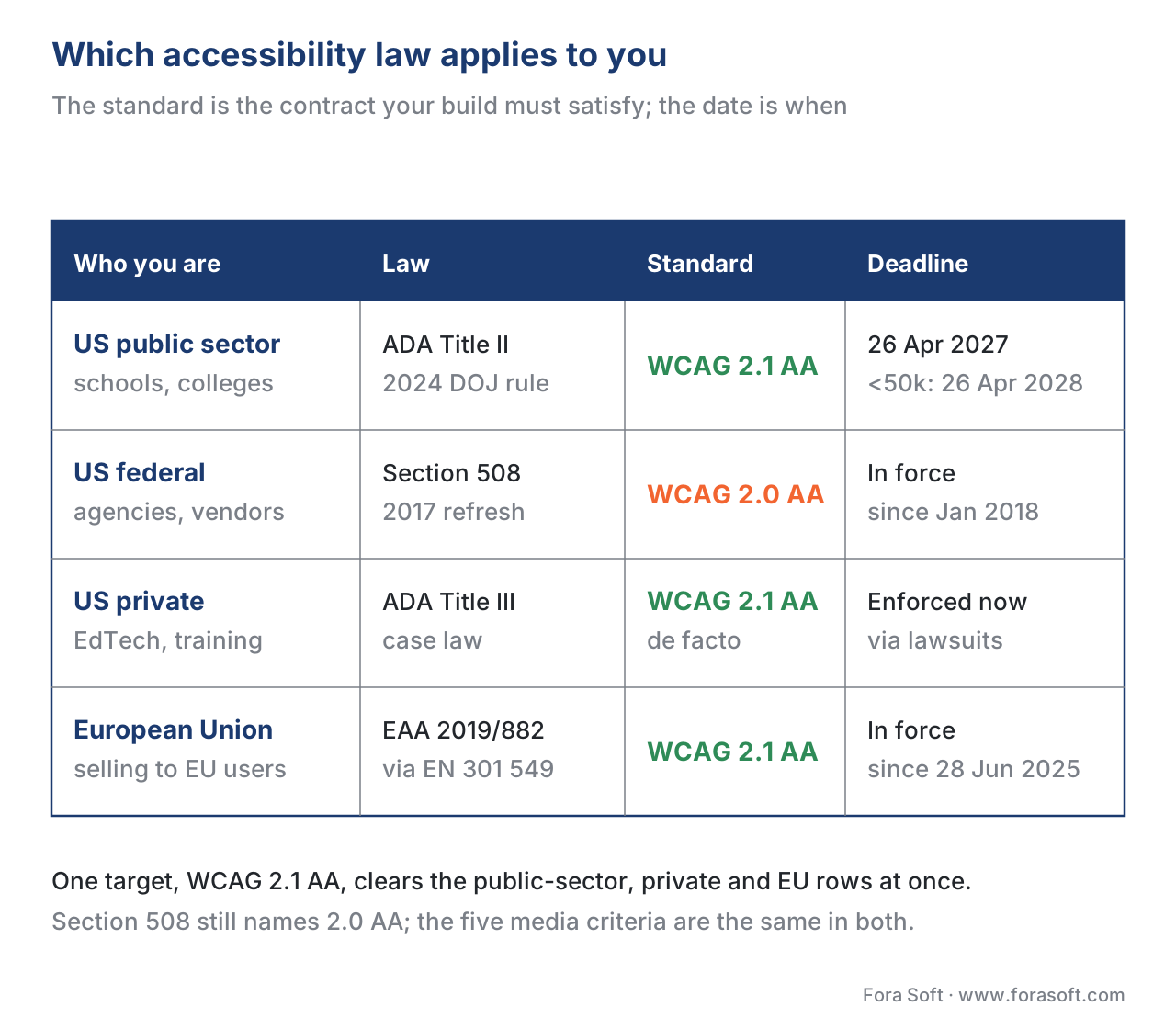 Figure 1. Which accessibility law applies, the standard it names, and the deadline — by who you are and who you sell to. One target, WCAG 2.1 AA, clears the public-sector, private, and EU columns at once.
Two details on this table matter more than the rest. First, the US public-sector deadline moved. The Department of Justice's 2024 rule originally set compliance for April 2026 and 2027; in an Interim Final Rule published on 20 April 2026, the DOJ extended those dates by a year — to 26 April 2027 for entities serving 50,000 or more people, and 26 April 2028 for smaller entities and special districts — citing remediation cost, the limits of AI for fixing content, and litigation risk [6]. If you read an older guide that says "April 2026," it is now out of date. The duty did not weaken; the clock simply moved.
Second, notice that Section 508 still names WCAG 2.0 AA, not 2.1 [7]. For learning video this rarely changes what you build, because the five media criteria that matter most are identical in 2.0 and 2.1. But it is a precise fact a vendor should know when filling out a federal conformance report, and it is exactly the kind of detail loose blog posts get wrong.
A note on private US platforms: the ADA itself names no technical standard for the web, but courts and settlements have converged on WCAG 2.1 AA as the practical benchmark [5]. "There's no law that says 2.1 AA for my private platform" is technically true and strategically useless — it is the standard you will be measured against when a complaint arrives.
The five success criteria that govern learning video
Strip away everything else and learning video is governed by one WCAG guideline — Guideline 1.2, "Time-based Media" — and its five criteria up to Level AA. Memorize these five and you know 90% of what the law asks of a course video. Each is defined below in plain language, with the precise criterion and level so an engineer can find it in the spec.
1.2.1 Audio-only and Video-only (Prerecorded) — Level A. If your content is audio only (a podcast-style lesson), provide a transcript; if it is video with no meaningful audio (a silent screen recording), provide a text or audio alternative [1]. This is the baseline for single-channel media.
1.2.2 Captions (Prerecorded) — Level A. Every prerecorded video with audio needs captions [9]. Captions are not just the dialogue — the standard requires they identify who is speaking and include meaningful non-speech sound ("[notification chimes]") so a deaf viewer gets everything the audio carries [9]. This is the single most-litigated rule for educational video, and the one auto-captions most often fail.
1.2.3 Audio Description or Media Alternative (Prerecorded) — Level A. When the picture carries information the soundtrack does not — an on-screen formula, a diagram the instructor points at silently, text that appears without being read aloud — you must either describe it in audio or provide a full descriptive transcript [10]. A descriptive transcript (every spoken word plus a written account of the important visuals) satisfies this at Level A and has the bonus of serving deaf-blind learners using a braille display [10].
1.2.4 Captions (Live) — Level AA. Live synchronized media — a webinar, a virtual classroom, a streamed lecture — needs live captions [11]. This is a Level AA criterion, so it is squarely inside the legal bar, and it is the one that catches teams who captioned their recorded library but forgot the live class. Real-time captioning is harder and is covered in The Virtual Classroom.
1.2.5 Audio Description (Prerecorded) — Level AA. At Level AA, the "or transcript" escape hatch of 1.2.3 narrows: you are expected to provide actual audio description — spoken narration of important visual content inserted into pauses in the dialogue [1]. In practice, content designed so the narration already describes what is on screen ("as you can see in the top-left cell, the formula returns 42") needs little or no separate description — good instructional design is also good accessibility.
| Criterion | What it requires for learning video | Level | Who it serves |
|---|---|---|---|
| 1.2.1 Audio/Video-only | Transcript for audio-only; text/audio alt for silent video | A | Deaf, blind |
| 1.2.2 Captions (Prerecorded) | Captions with speaker ID + non-speech sound | A | Deaf, hard of hearing |
| 1.2.3 Audio Desc. or Alternative | Describe on-screen-only info, or descriptive transcript | A | Blind, deaf-blind |
| 1.2.4 Captions (Live) | Real-time captions on live classes/webinars | AA | Deaf, hard of hearing |
| 1.2.5 Audio Description | Spoken narration of key visuals in dialogue gaps | AA | Blind, low vision |
 Figure 2. The five media criteria, by conformance level. The green pair — live captions (1.2.4) and audio description (1.2.5) — are the Level AA additions that sit inside the legal bar.
The closed-vs-open caption choice, caption-quality bar, and the full audio-description production workflow are covered in Captions, Transcripts, and Audio Description for Learning.
A common question: are captions the same as subtitles? No, and the difference is legal. Subtitles assume you can hear and translate the dialogue (English audio, Spanish subtitles). Captions assume you cannot hear and so add speaker identity and non-speech sound. WCAG requires captions, not subtitles. A learning platform serving multiple languages needs both — that interplay is the subject of Multilingual Delivery at Scale.
Beyond the media track: the player itself must be accessible
Here is the failure that surprises teams who think accessibility ends at captions: a perfectly captioned video inside an inaccessible player still fails WCAG. The player is web content too, and a fistful of criteria outside Guideline 1.2 apply to it. If you buy an off-the-shelf player you mostly inherit these for free; if you build a custom interactive player — and learning products often do, for quizzes, chapters, and tracking — you own every one of them.
![Diagram titled Anatomy of an accessible learning video, subtitled the media track and the player around it are both in WCAG scope. At the top, a video player mock-up with a play button, a caption bar reading [Dr. Lee] The formula returns 42, and a row of control buttons. Below it, two columns of cards. Media track, in the video: captions, speakers and sounds, 1.2.2 Level A; audio description, narrate key visuals, 1.2.5 Level AA; descriptive transcript, full text version, 1.2.3 Level A; live captions, for live classes, 1.2.4 Level AA. Player chrome, around the video: keyboard operable, no mouse needed, 2.1.1 Level A; visible focus, see where you are, 2.4.7 Level AA; control contrast, buttons at 3 to 1, 1.4.11 Level AA; accessible name, ARIA role and state, 4.1.2 Level A. Closing line: a perfect caption inside an unreachable player still fails the audit.](https://cdn.prod.website-files.com/64e8910adc5a63966a68acea/6ab38f454def17981958d2e7_6ab38ed50a900dba68350740_08_1-wcag-2-1-aa-for-educational-video__03-anatomy.svg) Figure 3. One learning video, every accessibility touchpoint. The media track (left) and the player chrome (right) are both in scope — a perfect caption inside an unreachable player still fails the audit.
Figure 3. One learning video, every accessibility touchpoint. The media track (left) and the player chrome (right) are both in scope — a perfect caption inside an unreachable player still fails the audit.
The big one is 2.1.1 Keyboard (Level A): every control — play, pause, the scrub bar, volume, the captions toggle, fullscreen, and any quiz or chapter button you added — must work with the keyboard alone, because many people cannot use a mouse [1]. Paired with it is 2.4.7 Focus Visible (Level AA): the keyboard user must always see which control they are on, so do not strip the focus outline for visual polish [1]. Custom controls also trigger 4.1.2 Name, Role, Value (Level A): a <div> styled to look like a play button must tell a screen reader that it is a button and whether it is currently playing, which means real ARIA labels and states, not just CSS [1].
Then there is contrast, which trips up branded players constantly. 1.4.3 Contrast (Minimum), Level AA requires text to sit at a contrast ratio of at least 4.5:1 against its background (3:1 for large text) [12]. WCAG 2.1 added 1.4.11 Non-text Contrast (Level AA), which extends the 3:1 rule to the player's controls and meaningful graphics — so a pale-grey pause icon on a white control bar can fail even when your captions are flawless [12]. A few more apply where relevant: 1.4.2 Audio Control (A) and 2.2.2 Pause, Stop, Hide (A) if anything autoplays, and 2.3.1 Three Flashes (A) for any flashing content.
The pragmatic build-vs-buy read: the native browser <video controls> element gives you keyboard support, a visible focus ring, and screen-reader labels at no cost, and mature open-source players such as Able Player were built specifically to satisfy these criteria [13]. The moment you replace that with a custom-skinned player to add interactivity, accessibility becomes your engineering line item — budget it from day one. We cover the architecture of doing this right in Building an Interactive Video Player.
What it costs: the arithmetic of making a course accessible
Accessibility has a price, and naming it honestly is how you decide build-vs-buy and avoid the panic remediation that follows a complaint. Let us cost a realistic course: 40 hours of finished video lessons.
Professional, human-verified captions — the kind that pass the 1.2.2 accuracy bar — run roughly $1 to $3 per minute at market rates in 2026. Work the math out loud:
- 40 hours × 60 = 2,400 minutes of video.
- 2,400 minutes × $1.50/minute (a mid-range blended rate) = $3,600 for compliant captions across the whole course.
Captions also produce the transcript almost for free (the caption file is already a timed transcript), which knocks out much of 1.2.1 and the 1.2.3 media-alternative path in one step. Audio description is the pricier item, because standard description means hiring a writer and a narrator to fill dialogue gaps — figure $15 to $30 per minute for the portions of video that need it, which for a well-narrated course is often a small fraction of the runtime. If 10% of your 2,400 minutes contains undescribed visuals, that is 240 minutes × $20 = $4,800.
So a 40-hour course lands near $8,400 to reach WCAG 2.1 AA on the media track — captions plus targeted audio description — before any player engineering. Two things make that number swing. Design the narration to describe its own visuals and the audio-description line approaches zero. Wait until after a legal complaint and you pay rush rates on the whole library at once, plus legal fees that dwarf the captioning bill — Harvard and MIT's settlement costs alone exceeded a million dollars [3]. The cheapest accessibility is the kind designed in; the most expensive is the kind a court orders. The whole-platform version of this calculation lives in The Learning-Platform Cost Model.
There is an upside the compliance framing hides: captions help everyone. Surveys find the large majority of people watch video with the sound off at least some of the time, around half rely on captions to follow along, and a majority of students use captions as a study aid that improves comprehension — backed by more than a hundred studies on attention and recall [14]. The caption file you produce for one deaf learner also powers search-within-video, multilingual subtitles, and AI summaries. Accessibility spend is rarely only accessibility spend.
The audit a learning product must pass
When you sell a learning-video product to a university, a school district, or a government buyer, someone in procurement will ask a specific question: "Send us your VPAT." This is the gate, and not knowing the answer loses deals.
A VPAT (Voluntary Product Accessibility Template) is a standard form, created by the technology-industry association ITI with the US government's procurement office, on which a vendor documents how their product conforms to accessibility standards [15]. The completed document is called an Accessibility Conformance Report (ACR) [15]. It walks criterion by criterion — including the WCAG media and player criteria above — and marks each as "Supports," "Partially Supports," or "Does Not Support," with explanation. The VPAT comes in editions for Section 508, EN 301 549 (the EU standard), and WCAG, so one document can speak to US and EU buyers at once [15].
The ACR is the credible, evidence-based answer to "is your product accessible?" — and an honest one is more valuable than an inflated one, because a buyer's own testing will expose "Supports" claims that are really "Partially Supports." For an EdTech vendor, a current ACR backed by real testing is a sales asset; its absence is a reason to be passed over for a competitor who has one. Producing it forces exactly the discipline this article argues for: test the media track and the player against each criterion, and write down the truth.
Common mistakes
Educational-video accessibility fails in a handful of predictable ways. Each one below has ended in a complaint or a lost contract.
Shipping auto-captions as if they were compliant captions. Automatic speech recognition produces a rough draft, not a finished caption track — the field's nickname for the result is "craptions." Accuracy on technical vocabulary, accents, and names is exactly where it breaks, and WCAG 1.2.2 expects captions that convey the audio faithfully [9]. AI captions are a starting point you edit, not a finish line; the AI side is covered in Automatic Captions and Subtitles for Learning Video. The rule of thumb buyers apply is near-99% accuracy with correct speaker labels.
Captioning the recordings but not the live class. Teams remember 1.2.2 for the video library and forget 1.2.4 for the webinar and the virtual classroom — both are Level AA, both are required [11].
A beautiful custom player nobody can keyboard through. The most common silent failure: captions are perfect, but the bespoke play button is a <div> with no keyboard handler and no ARIA, failing 2.1.1 and 4.1.2 [1]. The whole video is then inaccessible to keyboard and screen-reader users despite flawless captions.
Forgetting everything around the video. The lecture slides exported as an inaccessible PDF, the un-described diagram, the quiz with color-only feedback ("the green answers are correct") — WCAG applies to the whole learning experience, not just the video file.
"We'll caption it on request." Reactive captioning is both a worse learner experience and, under the public-sector rule, generally not enough — content that is in active use is expected to be accessible up front, with on-request accommodation reserved for narrow exceptions like genuinely archived material [6].
A note on WCAG 2.2 and what comes next
Because specs and laws move on different clocks, it is worth knowing where the puck is going. WCAG 2.2 (October 2023) is the current W3C version and is now also the international standard ISO/IEC 40500:2025 [1]. It adds nine criteria, two of which touch video players directly: 2.5.8 Target Size (Minimum), Level AA, which asks that touch targets such as player buttons be at least 24×24 CSS pixels (a real concern for cramped mobile control bars), and 2.4.11 Focus Not Obscured, Level AA, ensuring a focused control is not hidden behind other UI [16]. The law still points at 2.1 AA today, but the EU's EN 301 549 is expected to move to 2.2, and the DOJ rule explicitly allows meeting a newer standard [6]. Build to 2.2 AA and you satisfy 2.1 AA automatically and avoid re-work when the references update. Further out, the W3C is drafting WCAG 3.0, a longer-term rethink — not a near-term compliance target, but the direction of travel.
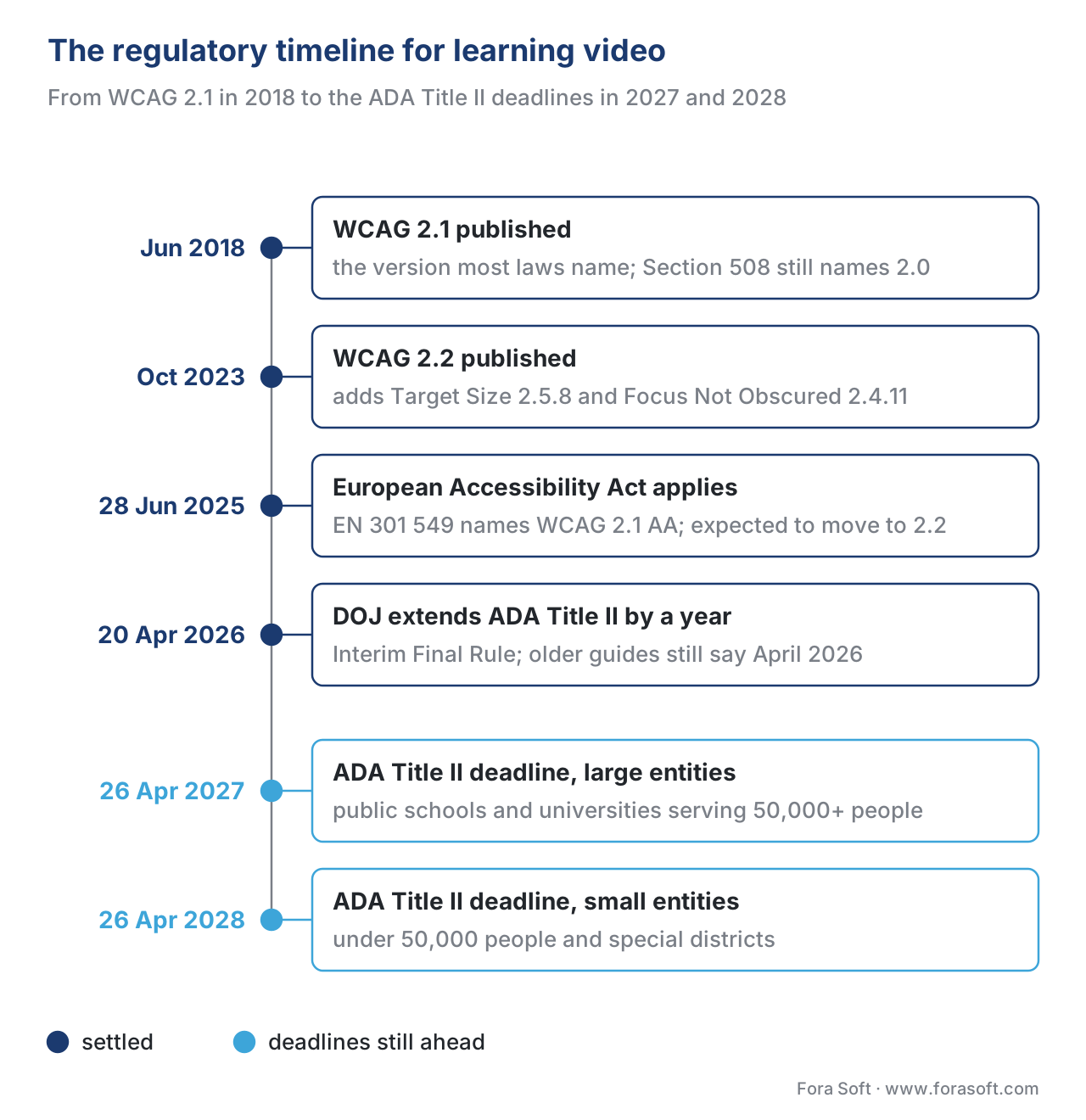 Figure 4. The regulatory timeline for learning-video accessibility. The settled milestones are behind us; the blue markers — the ADA Title II deadlines in April 2027 and April 2028 — are the dates still ahead.
Where Fora Soft fits in
Fora Soft has built video streaming, real-time WebRTC, and interactive-player software since 2005, and accessibility for learning video is usually less about the captions themselves than about the player and pipeline that carry them — a keyboard-operable, screen-reader-labelled player that still supports your quizzes, chapters, and xAPI tracking. The build-vs-buy trade-off is concrete here: an off-the-shelf player hands you the WCAG player criteria for free but limits interactivity, while a custom interactive player gives you the learning features and hands you every accessibility criterion to satisfy yourself. We help teams decide where on that line their product belongs, then build the player and the captioning/transcript workflow so the result passes an audit rather than failing one after launch. The same accessibility-as-engineering discipline runs through the conferencing, telemedicine, and OTT products we work on.



The handbook
Fora Soft Video Engineering Handbook
We wrote a seven-volume series, 9,000+ pages, that works through the whole video stack from the pixel to production — encoding, delivery, audio, and AI. Passing a WCAG audit touches three of them: volume 4 on sound in video products covers accessibility of the audio track — captions, audio description, and the loudness a hard-of-hearing viewer depends on; volume 3 on ABR, CDNs, players and WebRTC is where the player your keyboard and screen-reader users operate gets built, and where live captions ride alongside a live class; volume 6 on computer vision, speech and search covers the speech recognition that drafts captions and transcripts at catalog scale. Work through them and you can design and build a learning-video system end to end. Written by Nikolay Sapunov, CEO at Fora Soft.
Facing a university procurement review or an April 2027 deadline with a custom player?
Tell us what your player and catalog look like today, and we will map the gap to WCAG 2.1 AA — captions and audio description, keyboard and focus, contrast and ARIA labels, the VPAT buyers will ask for — and what it takes to close it without losing quizzes, chapters, or xAPI tracking — 250+ video products shipped since 2005.
See our case studies
Case study
TransLinguist
Captions as a core feature, not an add-on: closed captions in 22 languages, session transcripts, and a sign-language UI on a platform that won the UK NHS framework covering councils and schools.
Case study
Scholarly
The live-class case behind criterion 1.2.4: one platform for live classes of up to 2,000 students, recorded lessons over DASH/HLS, whiteboard and quizzes, for 15,000+ active learners.
Case study
BrainCert
A virtual-classroom LMS built for institutional buyers: SOC 2, ISO 27001, HIPAA and GDPR in place for 100K+ customers and 500M+ classroom minutes at 99.995% uptime.
What to read next
AI captions
Automatic captions and subtitles for learning video
How speech recognition drafts captions for a whole catalog, and why accuracy still needs a human pass.
Player
Building an interactive video player: architecture and trade-offs
The custom player that carries quizzes, chapters and tracking, and the trade-offs of building one.
Delivery
Mobile-first learning video
Small screens, touch input and cramped control bars: the conditions WCAG 2.2 Target Size was written for.
Decision
Build vs buy vs hybrid for learning video
Where an off-the-shelf accessible player is enough, and where a custom build pays for its audit.
References
- W3C Web Accessibility Initiative. WCAG 2 Overview (versions, POUR principles, conformance levels A/AA/AAA; WCAG 2.0 2008, 2.1 published 5 June 2018, 2.2 published 5 October 2023; ISO/IEC 40500:2025; backwards compatibility). https://www.w3.org/WAI/standards-guidelines/wcag/ — Tier 1 (primary standard, W3C). Also the WCAG 2.1 Recommendation: https://www.w3.org/TR/WCAG21/
- World Health Organization. Disability (≈1.3 billion people / 1 in 6 with significant disability; 1.5 billion with hearing loss; 2.2 billion with vision impairment). https://www.who.int/health-topics/disability — Tier 5 (institutional). Scale-of-audience context only.
- National Association of the Deaf. NAD v. Harvard and MIT (2015 suit over uncaptioned/inaccurate online course video; settled 2020; platform-wide captioning + costs). https://www.nad.org/resources/technology/internet-and-distance-learning/ — Tier 5 (party/institutional). Landmark educational-video captioning case.
- 3Play Media / U.S. DOJ. UC Berkeley consent decree and 2016 DOJ findings (free public course video found inaccessible; 20,000+ videos removed; later DOJ consent decree). https://www.3playmedia.com/blog/takeaways-from-uc-berkeleys-consent-decree-with-the-doj/ — Tier 7 (vendor summary of a primary action); the underlying DOJ action is the primary source. Illustrates enforcement and the "take it down" failure mode.
- Level Access / UsableNet. ADA Title III web-accessibility litigation 2025 (web cases ≈36% of ADA Title III federal filings; WCAG 2.1 AA the de facto court standard). https://www.levelaccess.com/blog/title-iii-lawsuits-10-big-companies-sued-over-website-accessibility/ — Tier 7 (litigation tracker). Volume/trend figure; flag for SEO/legal re-verification.
- U.S. Department of Justice, ADA.gov. Fact Sheet: ADA Title II Web & Mobile App Rule + 2026 Interim Final Rule extending compliance dates (WCAG 2.1 AA for state/local government incl. public schools/universities; compliance 26 Apr 2027 for ≥50,000 population, 26 Apr 2028 for smaller/special districts; equivalent facilitation; exceptions). https://www.ada.gov/resources/2024-03-08-web-rule/ and https://www.federalregister.gov/documents/2026/04/20/2026-07663/ — Tier 1 (primary federal rule). Deadlines reflect the April 2026 extension.
- U.S. Access Board / Section508.gov. Revised Section 508 Standards (2017 refresh) (federal ICT must meet WCAG 2.0 Level A and AA; in force since Jan 2018). https://www.section508.gov/manage/laws-and-policies/ — Tier 1 (primary federal standard). Note: still WCAG 2.0, not 2.1.
- European Union. European Accessibility Act, Directive (EU) 2019/882, with EN 301 549 v3.2.1 (obligations apply from 28 June 2025; EN 301 549 currently references WCAG 2.1 AA, expected to move to 2.2). https://eur-lex.europa.eu/eli/dir/2019/882/oj — Tier 1 (primary law). EN 301 549: https://www.etsi.org/standards
- W3C. Understanding SC 1.2.2: Captions (Prerecorded), Level A (captions include speaker ID and meaningful non-speech sound). https://www.w3.org/WAI/WCAG21/Understanding/captions-prerecorded.html — Tier 1 (primary standard guidance).
- W3C. Understanding SC 1.2.3: Audio Description or Media Alternative (Prerecorded), Level A (describe visual-only info, or provide a descriptive transcript). https://www.w3.org/WAI/WCAG21/Understanding/audio-description-or-media-alternative-prerecorded.html — Tier 1.
- W3C. Understanding SC 1.2.4: Captions (Live), Level AA (live synchronized media needs real-time captions). https://www.w3.org/WAI/WCAG21/Understanding/captions-live.html — Tier 1.
- W3C. Understanding SC 1.4.3 Contrast (Minimum), Level AA (4.5:1 text, 3:1 large text) and SC 1.4.11 Non-text Contrast, Level AA (3:1 for UI components/player controls). https://www.w3.org/WAI/WCAG21/Understanding/contrast-minimum.html — Tier 1.
- W3C WAI Media Players guidance and Able Player (native
<video controls>and accessible open-source players provide keyboard, focus, and screen-reader semantics). https://www.w3.org/WAI/media/av/player/ — Tier 1/2 (W3C guidance + first-party tooling). - 3Play Media / Utah State University / University of Maryland. Captions benefit all learners (majority watch with sound off; ~half rely on captions; majority of students use captions as a study aid; 100+ comprehension studies). https://www.3playmedia.com/blog/studies-find-captions-improve-engagement/ — Tier 5/6 (research summary + institutional). Engagement-lever framing.
- Information Technology Industry Council (ITI) / Section508.gov. VPAT and the Accessibility Conformance Report (ACR) (vendor conformance form; editions for Section 508, EN 301 549, WCAG; used in procurement). https://www.section508.gov/sell/acr/ — Tier 1/2 (government procurement guidance + industry template).
- W3C. What's New in WCAG 2.2 and Understanding SC 2.5.8 Target Size (Minimum), Level AA (24×24 CSS px targets; 2.4.11 Focus Not Obscured). https://www.w3.org/WAI/standards-guidelines/wcag/new-in-22/ — Tier 1.
Where sources disagreed, the official standard or rule was followed. Popular guides still cite the original "April 2026" ADA Title II deadline; this article follows the DOJ's April 2026 Interim Final Rule, which extended the dates to April 2027/2028 [6]. Many articles say "the ADA requires WCAG 2.1 AA for all websites"; the precise position is that Title II names 2.1 AA for state/local government [6], Section 508 names 2.0 AA for federal ICT [7], and Title III names no standard but courts apply 2.1 AA in practice [5].
