


Why this matters
If your learners span more than one language, "add a translation" sounds like a task and is actually an architecture decision. Done well, a course reaches a learner in São Paulo, Riyadh, and Jakarta from one video master, one set of language codes, and one content pipeline. Done badly, every new language is a fresh copy of the whole course that drifts out of date the moment the original is edited, and a right-to-left market gets a left-to-right player with the buttons in the wrong place. This article is for the L&D director, EdTech founder, instructional designer, or product manager deciding how far to go on languages and what to tell engineers — it covers what you translate, how many languages ride in one video, how to label them, what right-to-left really demands, and the sync problem that defines "at scale." For how the machine translation and captions get generated, see Automatic Translation and Multilingual Courses; this piece is about delivering the result to every learner.
Three jobs hiding inside the word "multilingual"
People say "we need the course in five languages" and picture one task. There are three, and naming them is the first money-saving move, because they cost different amounts and happen at different times.
The first job is internationalization — designing and building the product so that adding a language later is easy. The international-standards body for the web, the W3C, defines it as "the design and development of a product… that enables easy localization" [1]. The shorthand is i18n (an i, then 18 letters, then n). It is plumbing you lay once: storing text in a universal character set so every script renders, keeping the words separate from the code so a translator never touches a program, and building the player so its layout can flip for a right-to-left language. Nothing about it is visible to a learner. Its whole value is that the next job becomes cheap.
The second job is localization — adapting one version of the product to one market. The W3C calls it "the adaptation of a product… to meet the language, cultural and other requirements of a specific target market (a locale)" [1]. The shorthand is l10n. It is far more than translating sentences: it covers number, date, and currency formats, sorting order, the symbols and colors that carry different meanings in different cultures, examples that make sense locally, and the certificate a learner downloads at the end [1]. Localization is where a course stops feeling translated and starts feeling native.
The third job is translation — converting the words of one language into another. It is a part of localization, not a synonym for it. This is the job teams over-buy: they translate every subtitle and call the course "localized" while the dates still read 06/21/2026 to a learner whose country writes 21.06.2026, and the example still references a holiday no one in that market observes.
The order matters and the standards body is blunt about why: retrofitting an English-only product for a global market is "much more difficult and time-consuming than designing a deliverable with the intent of presenting it globally" [1]. Internationalize first and each new language is a content task. Skip it and each new language is a small re-engineering project. That is the build-vs-buy decision underneath this whole topic — pay once for the architecture, or pay every time for the workaround.
 Figure 1. Internationalization is the architecture you build once; localization adapts a version to a market; translation is the narrowest job inside localization. Most teams buy the third and skip the first.
What you actually translate — it is not just the subtitles
A learning video looks like one thing to translate. It is really five layers, and they have different costs and owners.
The first layer is the spoken audio — what the instructor says. You reach a new language here by subtitling (text of the speech, shown over the original audio) or by dubbing (a new spoken-audio track in the target language). That choice is the central cost decision, covered in its own section below.
The second layer is the captions — and captions are not the same as subtitles, a difference that is legal, not pedantic. Captions assume the viewer cannot hear, so they include speaker labels and meaningful sounds; subtitles assume the viewer can hear but not understand the language, so they translate only the dialogue. Only captions are an accessibility accommodation. The full distinction lives in Captions, Transcripts, and Audio Description for Learning; the point here is that "Spanish subtitles" and "Spanish captions" are two deliverables, not one.
The third layer is the on-screen text and graphics — the title cards, the labels on a diagram, the words baked into a slide. If they are burned into the video pixels, a new language means re-rendering the video; if they are drawn by the player as a separate overlay, a new language is just new text. This single design choice decides whether on-screen text is cheap or expensive to translate, which is the same closed-vs-open logic that governs captions.
The fourth layer is the player interface and the surrounding course — the play button's label, the "next lesson" link, the quiz instructions, the email that says a course is due, the certificate. This is user-interface localization, and teams forget it constantly, shipping perfect Arabic subtitles inside an English-only player.
The fifth layer is the metadata and tracking — the course title in a catalog, the search keywords, and the labels inside the learning records your system stores. These need language codes too, so a report can say which language a learner actually took.
Naming the five layers prevents the most common scoping error: budgeting for subtitles and discovering, mid-project, that the slides, the player, the certificate, and the catalog are all still in the original language.
Subtitles vs dubbed audio: the core cost decision
Reaching a new language in the spoken layer is a fork: subtitle it or dub it. The trade-off is reach versus cost, and the numbers are far apart.
Subtitling adds a small text file per language. In 2026 professional subtitle translation runs roughly $5 to $15 per minute of video [2]. It is fast, it preserves the instructor's real voice, and it doubles as a study aid and a search index. Its cost is the learner's attention — reading while watching splits focus, which matters more for dense technical teaching and for learners with lower reading fluency.
Dubbing replaces the spoken audio with a new recording. Traditional studio dubbing for e-learning runs about $300 to $600 per finished minute for simple work and more for complex narration [2]. It frees the learner's eyes for the screen — which is exactly what a software demo or a hands-on procedure needs — but it is an order of magnitude more expensive and slower, and it hides the original instructor's delivery. AI-generated dubbing has compressed this to roughly $2 to $20 per minute [2], changing the math for some courses; the engineering of that generation is covered in Automatic Translation and Multilingual Courses and in the AI section's real-time multilingual speech translation.
Work a real number. Take a 40-hour course — 2,400 minutes — going into 8 languages.
- Subtitles at a mid rate: 2,400 min × $10 × 8 languages = $192,000.
- Studio dubbing at a low rate: 2,400 min × $400 × 8 languages = $7,680,000.
That 40× gap is why most courses subtitle most languages and dub only the few where eyes-on-screen is essential or the market is large enough to justify it. The healthy default: subtitle broadly, dub selectively, and decide it language by language — not once for the whole catalog. This localization line belongs in the platform-wide budget, the subject of The Learning-Platform Cost Model.
 Figure 2. Subtitle broadly, dub selectively. Subtitles are roughly 5–15 USD/min; studio dubbing runs hundreds per finished minute. Decide per language, not per catalog.
| Dimension | Subtitling | Dubbing |
|---|---|---|
| Cost (2026) | ~$5–15 / min [2] | Studio ~$300–600 / finished min; AI ~$2–20 / min [2] |
| Turnaround | Fast (days) | Slow (studio: days–weeks per language) |
| Learner attention | Splits eyes between text and screen | Frees eyes for the screen |
| Instructor's voice | Preserved | Replaced |
| Best fit | Lectures, talking-head, broad language reach | Software demos, procedures, young or low-literacy learners |
| Delivered as | Subtitle track (WebVTT) | Audio rendition (a second audio track) |
How many languages ride in one video: multi-track delivery
Here is the relief in this whole topic: you almost never copy the video. The picture is shared; only the language layers multiply. A single streamed video can carry one set of moving images plus many audio tracks and many subtitle tracks, and the learner's player picks the pair it needs. This is a property of how modern streaming is packaged, and getting it right is what "delivery at scale" means mechanically. Pushing those tracks to many learners affordably is a delivery-cost question handled in Scaling Delivery: CDN, Transcoding, and Cost at Volume; reaching learners on poor connections is covered in Learning Video on Weak Networks.
The two streaming formats that dominate learning video both support this. HLS (HTTP Live Streaming, Apple's format, defined in the internet standard RFC 8216) groups alternative audio and subtitle versions into rendition groups using a tag called EXT-X-MEDIA [3]. MPEG-DASH (the ISO standard for adaptive streaming, ISO/IEC 23009-1) does the same with an AdaptationSet per language, each carrying a lang attribute [4][5]. We do not re-derive streaming internals here — the deep mechanics live in Fora Soft's HLS deep dive and captions, multi-audio, and WebVTT/IMSC packaging — but three controls matter to anyone deciding how a course behaves across languages.
The first is which track plays by default. In HLS, exactly one rendition in a group may set DEFAULT=YES, and the player plays it "in the absence of information from the user" [3]. That is the track a first-time learner hears before choosing anything.
The second is automatic matching to the learner. The AUTOSELECT=YES attribute lets the player pick a track on its own when it matches the environment — for example, "the chosen system language" of the device [3]. Set this well and a learner whose phone is in Portuguese gets Portuguese audio without touching a menu. The standard ties the two together: if a track is the default, it must also be auto-selectable [3].
The third is forced subtitles — the small, easy-to-miss case. A FORCED=YES subtitle track (HLS allows this only on subtitle tracks) carries content "considered essential to play" even when the learner has subtitles switched off [3]. The classic use is on-screen foreign text or a single line spoken in another language: a Japanese learner watching the original English audio still needs the one French sentence on screen translated [6]. Forced tracks should also be auto-selectable so they appear when relevant [6].
The join that makes all of this work is the language label on each track, and it is a real standard, not a free-text guess — the subject of the next section.
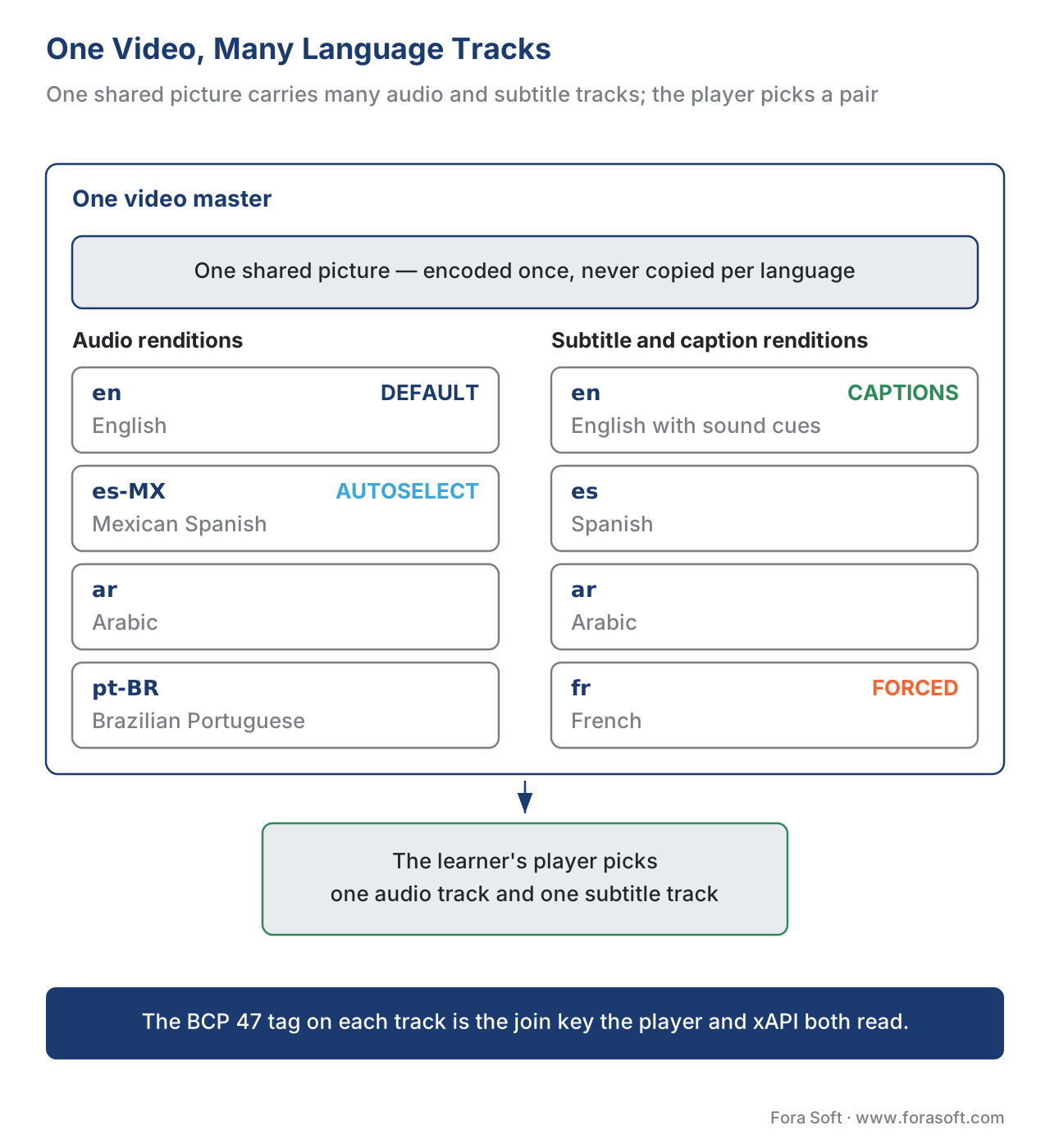 Figure 3. One picture, many language tracks. Each audio and subtitle rendition carries a BCP 47 language tag plus the HLS controls — default, autoselect, forced — that decide what each learner hears and reads.
Label the language correctly: BCP 47 tags
Every language track needs a name a machine can trust. The standard for that name is BCP 47 (the IETF's set of rules for language tags, the core of which is RFC 5646) [7][8]. It is the language code your player, your subtitle file, your streaming manifest, and your tracking records all share — get it consistent and "Spanish" means the same thing everywhere; get it sloppy and a Mexican-Spanish track shows up labeled the same as a Castilian-Spanish one, and the player's auto-match guesses wrong.
A BCP 47 tag is hyphen-separated subtags that go from general to specific [7][8]:
- Language — a short lowercase code:
en(English),es(Spanish),ar(Arabic),zh(Chinese). - Script — an optional four-letter code, capitalized, for the writing system:
zh-Hans(Chinese in Simplified script) versuszh-Hant(Traditional). Serbian issr-Latnorsr-Cyrldepending on alphabet. - Region — an optional two-letter country code:
es-MX(Mexican Spanish) versuses-ES(Spain),pt-BR(Brazil) versuspt-PT(Portugal).
So ru-Cyrl-BY reads "Russian, Cyrillic script, as used in Belarus" [8]. You rarely need all three parts — es is fine until you have two Spanish variants that must not collide, at which point es-MX and es-ES keep them apart. The rule of thumb: tag as specifically as you actually differentiate, and no more.
This same tag is the key everywhere downstream. The streaming formats above carry it as the track's LANGUAGE value [3][4]. The accessibility rules below rely on it in the page's lang attribute [9]. And the learning-records standard, xAPI, uses BCP 47 tags as the keys of its language maps — a small dictionary that stores a course title or a quiz prompt in several languages at once, so a report can show each in the reader's language [10]. One labeling standard, used end to end, is what keeps a many-language product coherent instead of a pile of guesses.
Right-to-left is a layout problem, not a translation problem
Translate a course into Arabic, Hebrew, Persian, or Urdu and you discover the part no translator can fix: the whole interface needs to run the other way. Right-to-left (RTL) languages are written and read from the right, and a left-to-right player dropped into an RTL market looks broken — the progress bar fills the wrong way, "next" sits where "back" should be, and the layout fights the text.
The web has a precise, standard way to handle this, and it is markup, not styling. The W3C's guidance is to set dir="rtl" on the page's root <html> element when the document direction is right-to-left [11]. That one attribute flips block alignment, reorders table columns, and lets the browser's Unicode Bidirectional Algorithm — the built-in logic that arranges mixed left-to-right and right-to-left text, like an English product name inside an Arabic sentence — place every character correctly [11]. The W3C is explicit that you must not set base direction with CSS, because the direction carries meaning and has to survive even when styling does not [11].
For the player's own layout, the move is CSS logical properties: write margin-inline-start instead of margin-left, and text-align: start instead of text-align: left [11]. "Start" means the side where reading begins — left in English, right in Arabic — so one stylesheet mirrors itself automatically when direction flips [11]. Build the player this way once (that is internationalization again) and every RTL language is free; build it with hard-coded "left" and "right" and every RTL language is a manual rework. RTL is the clearest example in this article of why the architecture job comes first.
Localize the interface, not only the video
A subtitled video inside an untranslated product is a half-localized course, and learners feel the seam immediately. The surrounding interface — the player controls, the lesson list, the quiz buttons, the progress messages, the completion email, the downloadable certificate — all carry language too. Localizing it is the same internationalization discipline: keep every piece of visible text out of the code and in a separate file per language, so a translator works on text and never on a program [1].
Localization also reaches past words into format. Dates, numbers, and currencies differ by locale; sorting order differs by language; an example or an icon that lands well in one culture can confuse or offend in another [1]. A certificate that prints the date as 06/21/2026 reads as June 21 to an American learner and as nonsense to most of the world, which writes day-first. None of this is translation; all of it is localization, and skipping it is what makes a course feel converted rather than made-for-me.
Keep every language accessible
Reach and accessibility are the same project, not competing ones. The accessibility standard for the web, WCAG 2.1 at Level AA, has a rule built for multilingual content: Success Criterion 3.1.2 Language of Parts, which requires that the language of each passage "can be programmatically determined" so assistive technology pronounces it correctly [9]. In practice that means marking each language with its BCP 47 tag — the same tag from the labeling section — so a screen reader switches accent and pronunciation when the text switches language, and does not read French in an English voice [9]. The companion rule 3.1.1 sets the language of the page as a whole [9].
Two consequences follow. First, captions in each language are an accessibility deliverable in that language, not a nice-to-have — the litigation and audit reality is covered in WCAG 2.1 AA for Educational Video. Second, a live class delivered in several languages owes live captions in each, under the stricter live-captions criterion (1.2.4, Level AA) [9]. Accessibility done per language is how multilingual reach stays compliant instead of multiplying the audit risk by the number of languages.
The real problem at scale: keeping languages in sync
Everything above is per-language work you can plan. The thing that actually breaks "at scale" is none of it — it is change. The source course is never finished. An instructor fixes an error, a screen in the software updates, a regulation changes a number. The moment the original is edited, every other language is wrong until it is re-translated, and with twelve languages a one-line fix becomes twelve small re-translation jobs, twelve re-renders if text is burned in, and twelve chances for one language to silently fall behind.
This is a content-operations problem, and the standard answer is a single source of truth. Pick one canonical version — the source language plus the source video master — and treat every other language as a derived artifact, never an independent copy [12]. When the source changes, the system flags exactly which segments changed and routes only those to translation, so a one-line fix costs one line of re-translation, not a full re-pass [12].
The tool that runs this is a translation management system (TMS) — software that holds all the language versions, tracks which strings changed, keeps a shared glossary so "completion" is translated the same way every time, and connects by automated hooks to wherever your content lives so updates flow without anyone emailing spreadsheets [12]. The build-vs-buy line here is clear: the source-of-truth model and the sync discipline are non-negotiable, but the TMS itself is almost always bought, not built. Your engineering effort goes into wiring it to the course pipeline, not into reinventing it.
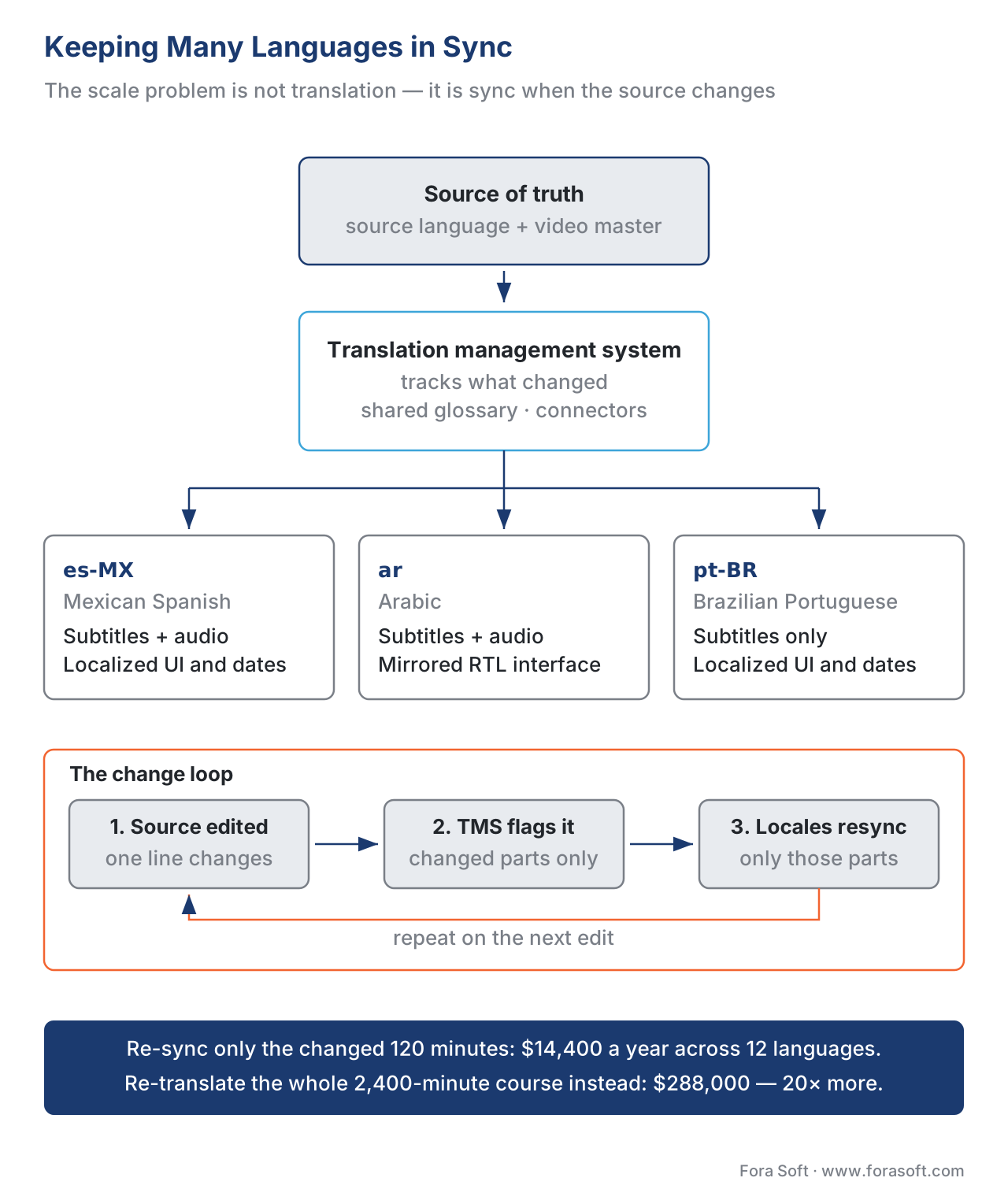 Figure 4. The scale problem is sync, not translation. One source of truth fans out to every locale; when the source changes, only the changed segments are re-translated and re-published.
A number makes the stakes concrete. Suppose a 2,400-minute course in 12 languages gets a 5% content update across the year — 120 minutes of changed material. Re-subtitling only the changed parts costs 120 min × $10 × 12 = $14,400. Re-translating the whole course because you could not tell what changed costs 2,400 × $10 × 12 = $288,000. The 20× difference is not a translation discount; it is the value of the sync architecture. Designing for change is the difference between multilingual being a feature and multilingual being a recurring tax.
Common mistakes
These are the failures that turn up when a course goes from one language to many.
Translating before internationalizing. Teams pay to translate subtitles into eight languages while the player, slides, certificate, and dates stay in the original. The result feels half-finished, and the architecture rework still arrives — now with eight languages already on top of it [1].
Burning text into the video. On-screen titles and labels baked into the pixels mean every language is a full re-render of the video, not a new text file. Keep on-screen text as a player overlay wherever you can.
Sloppy or missing language tags. Labeling two Spanish tracks both as es, or leaving tags off entirely, breaks auto-selection and accessibility at once — the player guesses wrong and the screen reader reads in the wrong accent [7][9]. Tag with BCP 47, and as specifically as you differentiate.
Treating right-to-left as a font swap. Arabic and Hebrew need the whole layout mirrored via dir and logical properties, not just translated text in a left-to-right shell [11]. A "translated" RTL course with the controls on the wrong side reads as broken.
Confusing subtitles with captions. Foreign-language subtitles are not an accessibility accommodation; a deaf learner in any language needs captions with speaker labels and sound cues, which is a separate deliverable per language [9].
No source of truth. When every language is an independent copy, the first edit to the original starts the drift, and within a year the twelve versions teach twelve slightly different courses [12].
Free download: Multilingual Delivery Readiness ChecklistA one-page path from internationalizing the player, to BCP 47 tagging and multi-track packaging, to localizing beyond the words, right-to-left, and keeping every locale in sync.Where Fora Soft fits in
Fora Soft has built video streaming, real-time WebRTC, and interactive-player software since 2005, and for multilingual learning the hard part is rarely the words — it is the player and the pipeline that carry many languages without multiplying the work. The build-vs-buy trade-off is concrete: an off-the-shelf player gives you a caption track and a language menu but little control over RTL layout, default-track logic, forced subtitles, or how locale versions stay in sync, while a custom player lets you wire BCP 47 track selection, mirrored right-to-left interfaces, and a content pipeline tied to one source of truth — and hands you the responsibility of building it right. We help teams decide how far up that line their product needs to go, then build the delivery layer so one video master and one content pipeline reach every language, rather than every language becoming its own slowly-drifting copy. The same media-pipeline and real-time work runs through the conferencing, OTT, and telemedicine products we build.



The handbook
Fora Soft Video Engineering Handbook
Every language track on this page rides on the same video stack, and we wrote the seven-volume, 9,000+ page series that covers it end to end — encoding, delivery, sound and AI. Start with volume 2: HLS, MPEG-DASH and CMAF packaging, which is where rendition groups, AdaptationSets and the default, autoselect and forced flags actually live. Volume 3 covers the players that read those tags, subtitle delivery and the economics of shipping every extra track, and volume 4 covers the codecs, loudness and accessibility work behind a dubbed audio rendition. Work through them and you can design and build the delivery layer this article describes. Written by Nikolay Sapunov, CEO at Fora Soft.
Shipping your course in more than one language?
Tell us which languages you need and which of them have to be dubbed rather than subtitled, and we will scope the multi-track packaging, the BCP 47 tagging, the mirrored right-to-left player and the sync pipeline that keeps every locale current — 250+ video products shipped since 2005.
See our case studies
Case study
TransLinguist
Many languages on one live stream: 75+ supported languages, AI speech-to-speech translation in 16+, closed captioning in 22 and session transcription in every one of them — the platform that won the NHS national framework for language services across the UK.
Case study
Tabsera
A K-12 LMS taught in English, French, Arabic and Turkish, which is why the interface has to mirror for a right-to-left market rather than just carry translated text — plus dedicated iOS apps on top of the web platform.
Case study
Scholarly
The delivery layer every extra language track rides on: adaptive DASH and HLS for 15,000+ active users and live classes of up to 2,000 students at once.
What to read next
Translation
Automatic Translation and Multilingual Courses
How the subtitles and the dubbed audio on this page actually get generated.
Accessibility
WCAG 2.1 AA for Educational Video
The full baseline behind SC 3.1.2 and per-language captions.
Delivery
Scaling Delivery: CDN, Transcoding, Cost
What all those extra audio and subtitle tracks cost once the audience grows.
Tracking
Tracking Video with xAPI
Where the BCP 47 language maps land in your learning records.
References
- W3C Internationalization. Localization vs. Internationalization (i18n is design that enables localization; l10n is adaptation to a locale — covering number/date/currency formats, sorting, symbols, legal requirements, not only translation; retrofitting is far costlier than designing for global from the start). https://www.w3.org/International/questions/qa-i18n — Tier 1 (primary standards-body guidance, W3C). Accessed 2026-06-21.
- GoLocalise; VerboLabs; 3Play Media; PitchAvatar. Video translation / subtitling / dubbing rate guides, 2026 (subtitling ≈ $5–15/min; studio e-learning dubbing ≈ $300–600/finished min for simple work, higher for complex; AI dubbing ≈ $2–20/min). https://golocalise.com/blog/subtitling-rates-guide/ , https://www.verbolabs.com/dubbing-prices/ , https://www.3playmedia.com/blog/ai-dubbing-worth-investment-elearning-localization/ — Tier 6 (industry rate references). Flag for SEO re-verification of the headline ranges.
- IETF. RFC 8216 — HTTP Live Streaming (HLS), §4.3.4.1 EXT-X-MEDIA (audio/subtitle rendition groups;
LANGUAGEis a quoted RFC 5646 tag;DEFAULT=YES= the rendition played in the absence of user information, max one per group;AUTOSELECT=YES= the client MAY play it matching the environment such as the chosen system language;FORCED=YESonly on SUBTITLES = content considered essential to play). https://www.rfc-editor.org/rfc/rfc8216.html — Tier 1 (primary standard). Accessed 2026-06-21. - ISO/IEC. ISO/IEC 23009-1, Dynamic Adaptive Streaming over HTTP (MPEG-DASH) (media components arranged in AdaptationSets; the
langattribute identifies the language per RFC 5646; each language typically its own AdaptationSet). Spec overview via ISO; structure confirmed against DASH-IF guidance. — Tier 1 (primary standard, ISO). Accessed 2026-06-21. - Fora Soft Learn (Video Streaming). MPEG-DASH in Depth: MPD, Periods, Adaptation Sets, Representations (how AdaptationSets group language/audio/subtitle components in a DASH manifest). https://www.forasoft.com/learn/video-streaming/articles-streaming/mpeg-dash-deep-dive — Tier 3 (first-party engineering explainer). Used for the DASH packaging orientation; the standard claim is sourced to [4].
- Netflix Partner Help Center; Mux. Understanding Forced Narrative Subtitles; Subtitles, Captions, WebVTT, HLS, and those magic flags (forced narrative subtitles translate on-screen foreign text and short foreign-language dialogue and display even when subtitles are off; forced tracks should be AUTOSELECT=YES). https://partnerhelp.netflixstudios.com/hc/en-us/articles/217558918-Understanding-Forced-Narrative-Subtitles , https://www.mux.com/blog/subtitles-captions-webvtt-hls-and-those-magic-flags — Tier 4 (first-party streaming-engineering references). Use-case framing; the FORCED mechanics are primary-sourced to [3].
- IETF. BCP 47 / RFC 5646 — Tags for Identifying Languages (language tags are hyphen-separated subtags: language, optional script, optional region; e.g.,
zh-Hant,sr-Latn,es-MX,ru-Cyrl-BY). https://www.rfc-editor.org/rfc/rfc5646.html — Tier 1 (primary standard). Accessed 2026-06-21. - W3C Internationalization / MDN. Language tags in HTML and XML; Choosing a language tag; BCP 47 language tag glossary (subtag order language-script-region; when to add script and region subtags; tag as specifically as needed). https://www.w3.org/International/articles/language-tags/ , https://developer.mozilla.org/en-US/docs/Glossary/BCP_47_language_tag — Tier 2 (standards-body and MDN explainer of [7]).
- W3C. WCAG 2.1 — Understanding SC 3.1.2 Language of Parts (Level AA) and SC 3.1.1 Language of Page (Level A); SC 1.2.4 Captions (Live), Level AA (the language of each passage must be programmatically determinable via the
langattribute so assistive tech pronounces it correctly; especially important when switching between LTR and RTL or different alphabets). https://www.w3.org/WAI/WCAG21/Understanding/language-of-parts.html — Tier 1 (primary standard, W3C). WCAG 2.1 published 2018-06-05; accessed 2026-06-21. - ADL. Experience API (xAPI) Specification — Data: Language Maps (a language map is a dictionary whose key is an RFC 5646 language tag and whose value is the string in that language; used for display names and definitions so one statement carries multiple languages). https://github.com/adlnet/xAPI-Spec/blob/master/xAPI-Data.md — Tier 1 (primary standard, xAPI). Accessed 2026-06-21.
- W3C Internationalization. Structural markup and right-to-left text in HTML (set
dir="rtl"on thehtmlelement for RTL documents; do not set base direction in CSS; use CSS logical properties —start/end,margin-inline-start— so layout mirrors automatically; the Unicode Bidirectional Algorithm reorders mixed-direction text; RTL scripts include Arabic, Hebrew, N'Ko, Syriac, Thaana, Adlam). https://www.w3.org/International/questions/qa-html-dir.en.html — Tier 1 (primary standards-body guidance, W3C). Accessed 2026-06-21. - Phrase; Lokalise; Transifex; Translated. What a translation management system is; multilingual content synchronization (a TMS is the single source of truth for all language versions; tracks changed strings, holds a shared glossary, syncs to content repositories via connectors/webhooks; a sync strategy starts with one source of truth and routes only changed segments). https://phrase.com/blog/posts/translation-management-system-how-it-works/ , https://translated.com/resources/multilingual-content-synchronization-guide — Tier 6 (industry references for the content-ops pattern).
Where sources disagreed, the official standard was followed. Vendor posts often use "subtitles" and "captions" interchangeably; this article keeps the W3C accessibility distinction — captions add speaker identity and non-speech sound and are an accommodation, subtitles translate dialogue [9]. Rate ranges in [2] are vendor-sourced and span wide bands; they are used as orders of magnitude for the cost arithmetic, not as fixed quotes, and are flagged for re-verification.
