


Why This Matters
If you run learning and development, sell courses, or build a training product, language is the largest audience you are leaving on the table. Most of the world does not speak your course's language, and learners complete more, enroll more, and trust more when content arrives in the language they think in. Automatic translation has made multilingual courses affordable for the first time — Coursera localized thousands of courses into 17 languages with AI, and 58 million of its learners live in countries where one of those is the official language. This article gives you the quality reality, the cost math, and the architecture decision so you can decide how to go multilingual at scale and brief your engineers and instructional designers without buying a demo. It is the reach companion to automatic captions for learning video.
What "Multilingual" Actually Means: Three Levels
"Make the course multilingual" hides three very different projects, and confusing them is the first budgeting mistake. Sort them before you price anything.
The first level is translated subtitles: the spoken words appear as on-screen text in the target language while the original audio plays underneath. This is the cheapest, fastest path, it preserves the instructor's real voice, and it is what most platforms ship first. The second level is voice-over or dubbing: a new audio track in the target language replaces or overlays the original. Voice-over is a single narrator read over lowered original audio — common in corporate training; dubbing is a full, lip-timed replacement that matches the speaker — common in polished consumer courses. The third level is full localization: not just the speech but the on-screen text, the slides, the quizzes, the captions of on-screen graphics, the examples, the currency, the dates, and the cultural references — the whole learning experience rebuilt for a locale.
The analogy that holds up: subtitles are a translated menu taped over a foreign-language sign, voice-over is someone reading the sign aloud to you, and full localization is rebuilding the whole storefront for the new neighborhood. Each costs and reaches more than the last. Most course libraries start at level one, add level two for their top markets, and reserve level three for flagship programs.
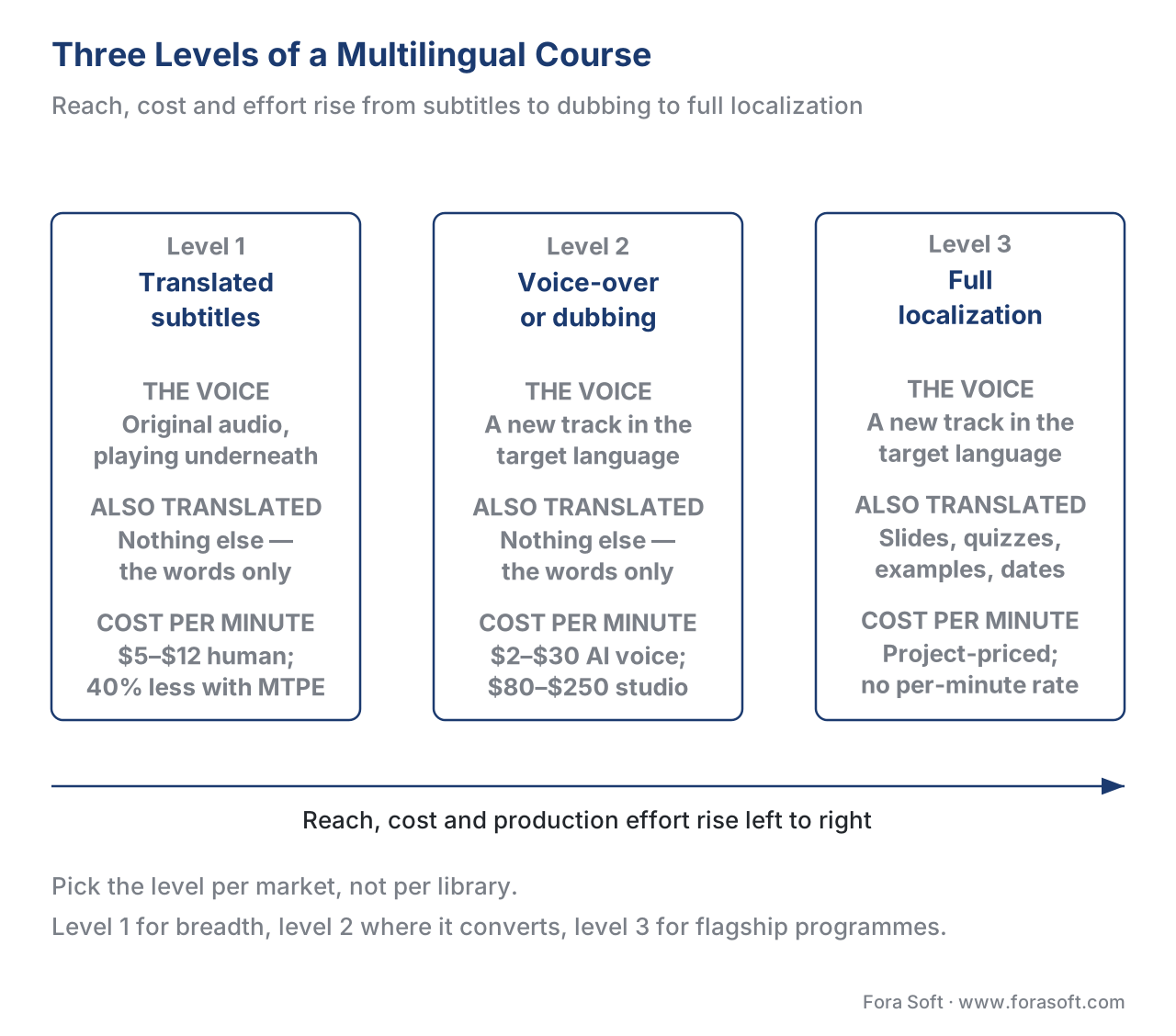 Figure 1. The three levels of going multilingual. Reach, cost, and production effort all rise as you move from subtitles to dubbing to full localization — pick the level per market, not per library.
How Automatic Translation Works
Walk the pipeline once, because — exactly as with captions — the machine does only the middle of it.
It begins with a source text: the corrected caption file or transcript of the original video. Translation quality is capped by this input, so a clean, human-verified transcript in the source language is the foundation. If you are localizing from automatic captions, finish that human-edit step first — translating an error multiplies it across every language.
The source text goes to a machine-translation engine — machine translation, or MT, the software that converts text from one language to another. Modern MT is neural and, since 2024, increasingly built on large language models, which handle context and tone far better than the phrase-by-phrase systems of a decade ago. The engine emits a draft translation, cue by cue, keeping the timestamps so the subtitle stays in sync. The model internals — which engine, how context windows and terminology injection work — live in our AI for Video Engineering section: see real-time multilingual speech translation in calls and, for dubbing pipelines, AI dubbing, voice-over, and auto-subtitle pipelines.
Then comes the step that separates a finished product from a liability: human post-editing. A bilingual reviewer who knows the subject fixes what the machine got wrong — a mistranslated technical term, a flipped meaning, an idiom rendered literally, a sentence that is grammatically fine but pedagogically wrong. The industry calls this machine-translation post-editing, or MTPE, and for educational content it is non-negotiable. This is the same human-review gate every AI learning feature needs.
Only then does the result become a deliverable: a translated WebVTT subtitle file, a synthesized or recorded dub track, or a fully localized course package. The multilingual player loads the right one, the learner picks a language, and — if you wired it — the platform records which language they chose.
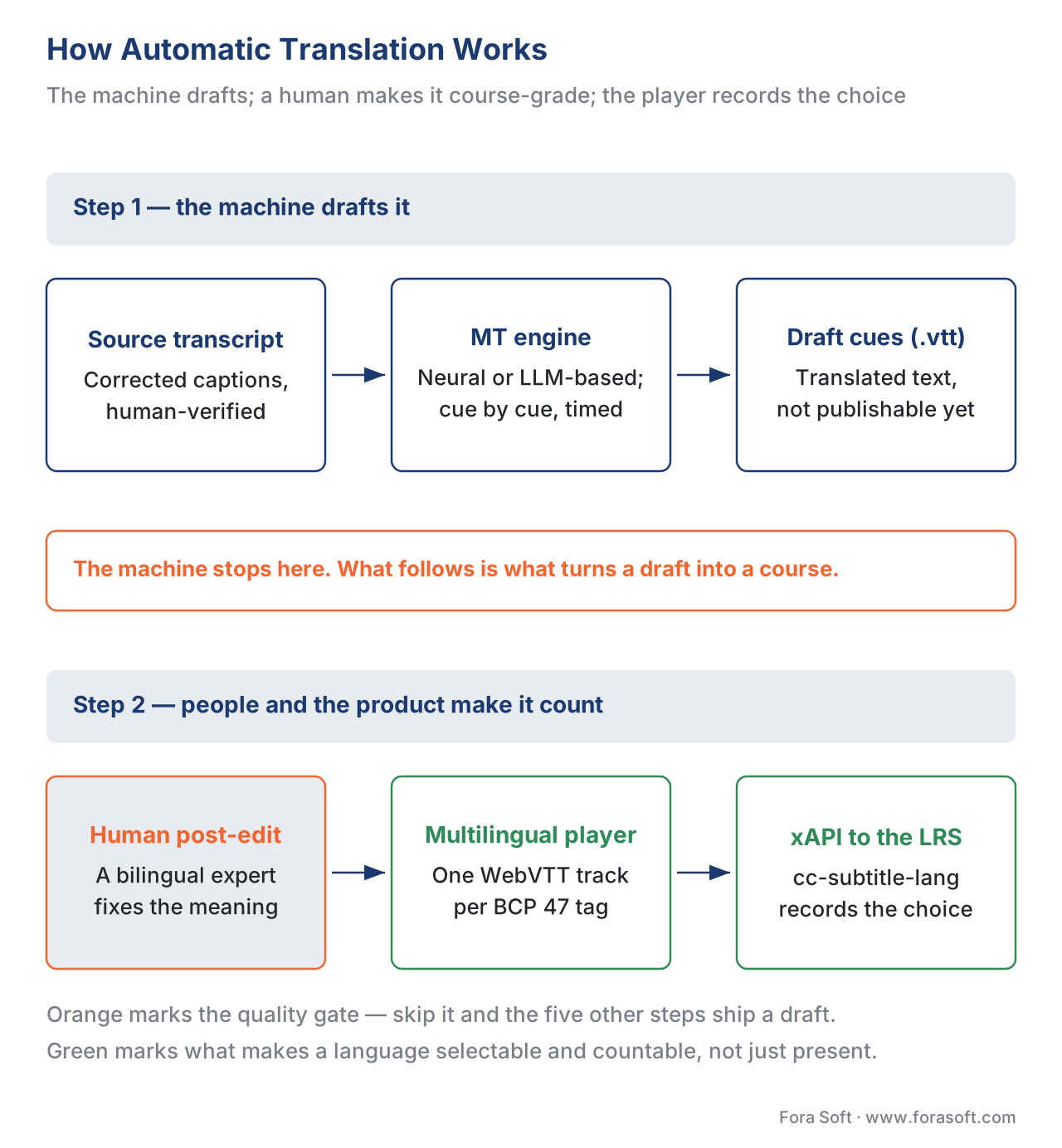 Figure 2. The automatic-translation pipeline end to end. Machine translation is the cheap middle; human post-editing is where the educational quality bar is met, and the player is where the chosen language gets tracked.
The Quality Bar Is Higher for Courses
Here is the misunderstanding that costs the most. "We ran the subtitles through AI translation" is not "our course is available in Spanish." The gap is quality, and education raises the bar above entertainment.
Two measures matter. Word error rate carries over from captions for the source transcript, but translation quality is judged differently — by how well meaning and fluency survive the language jump. The current automatic metric is COMET, a neural model that scores a translation against human judgment, and the current human metric is MQM (Multidimensional Quality Metrics), where reviewers mark each error by type and severity. By 2025, quality-estimation models such as CometKiwi score translations without a reference well enough to flag the risky segments for human attention — which is exactly how you make post-editing efficient: let the machine tell you which 20% of cues to scrutinize.
Why is the bar higher for courses than for a film? Because the errors cluster on the exact words a course exists to teach. A streaming drama can survive a loose idiom; a pharmacology module cannot survive a drug name translated as a common noun, a coding course cannot survive a reserved keyword "translated," and a compliance course cannot survive a legal term that shifts meaning across a border. Do the subtraction out loud:
A 60-minute lecture at ~9,000 spoken words.

Raw machine translation at ~95% adequate (5% problem rate):
  9,000 words × 5% = 450 segments to question in one hour of video.

After post-editing to a course-grade bar:
  the 450 are reviewed; the handful that change meaning are fixed.
The fix is not "a better engine." It is a terminology glossary — a locked, pre-approved translation for every domain term, product name, and acronym — fed to the MT engine and enforced in review. Build the glossary once, reuse it across every language and every course, and you remove the most damaging class of error before a human ever reads a cue. That glossary is the single highest-leverage asset in a localization program.
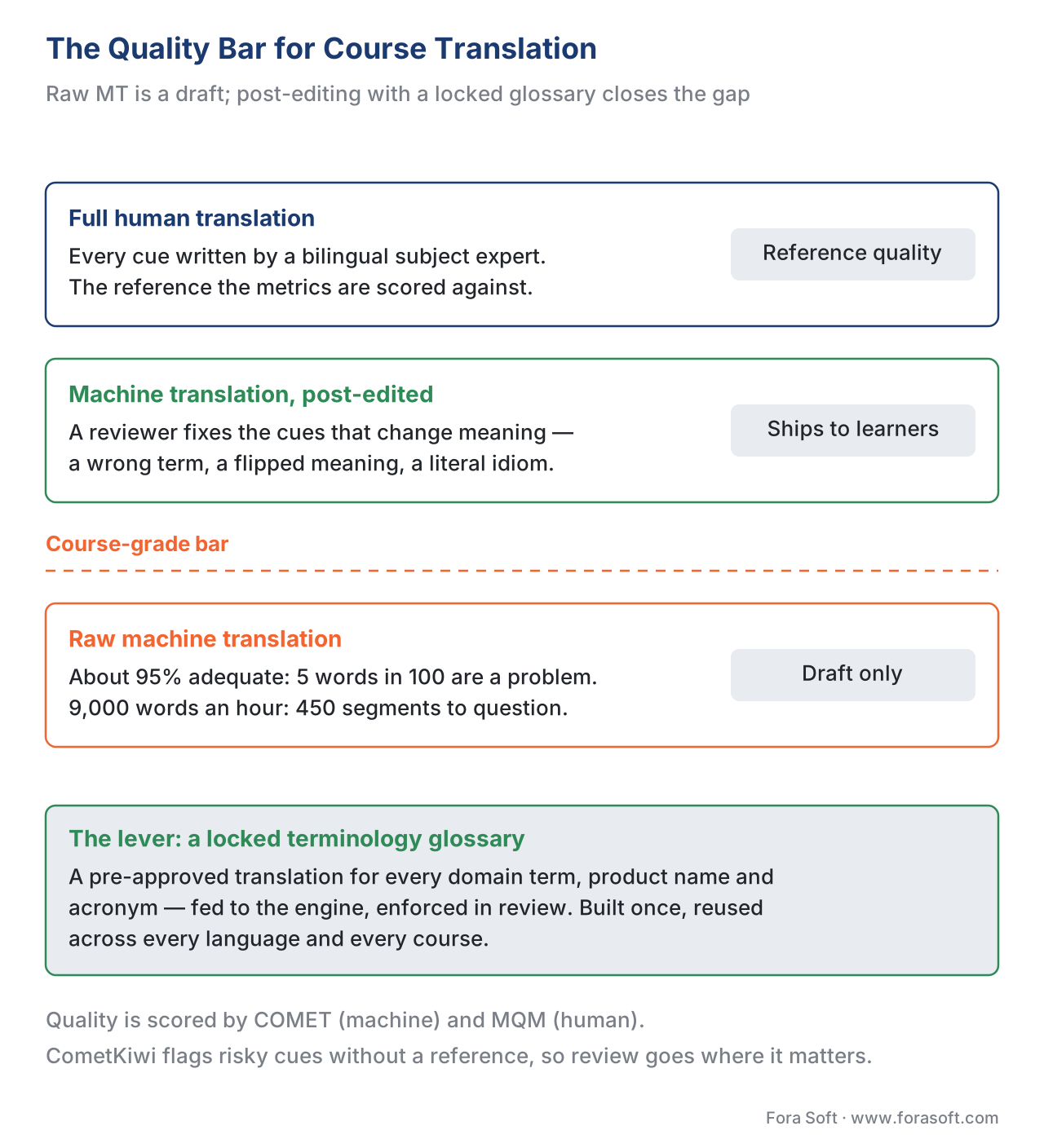 Figure 3. The quality ladder for course translation. Raw MT is a draft; post-editing with a locked terminology glossary closes the gap on the domain terms a course can least afford to get wrong.
Subtitles, Voice-Over, or Dubbing: the Trade-off
The three production methods carry different costs, timelines, and tracking stories. Pick per market, and include the standards-and-tracking column this section always insists on — because a translation that the player cannot select and the analytics cannot count is not finished.
| Method | What the learner gets | Cost shape (per minute) | Time | Standards & tracking |
|---|---|---|---|---|
| Translated subtitles (MTPE) | Original voice + target-language text | ~$5–$12/min human; ~40% less with MT post-edit | Fast | WebVTT per language, BCP 47 tag; xAPI cc-subtitle-lang |
| AI voice-over / dubbing | New synthetic audio track in target language | ~$2–$30/min | Medium | Multi-audio track, BCP 47 tag; xAPI audio-language context |
| Human (studio) dubbing | Studio-recorded, lip-timed audio | ~$80–$250/min (≈$5k–$15k/hour) | Slow | Same delivery; highest quality bar |
| Full localization | Speech + text + slides + quizzes + examples | Project-priced | Slowest | Separate locale package; cross-language xAPI naming |
The pattern most libraries land on: subtitles via MT post-editing for breadth (every market you might serve), AI voice-over for the markets that convert, and human dubbing or full localization only for flagship programs where the brand demands it. AI dubbing has collapsed a cost that used to be prohibitive — studio dubbing runs roughly \$5,000 to \$15,000 per finished hour, while AI dubbing lands in single-digit-to-low-double-digit dollars per minute — but the quality and the "uncanny" risk still argue for subtitles first in most training contexts.
Building One Course That Serves Many Languages
The architecture decision quietly determines your localization cost for years. The wrong default — fork the course once per language — turns every content update into a translation fire drill across a dozen copies. The right default is to separate the content from its locale: one course structure, with language treated as a layer you swap, not a copy you maintain.
In practice that means three things. First, tag every language with a standard code. The standard is BCP 47 (defined by the IETF in RFC 5646, "Tags for Identifying Languages," 2009, with matching rules in RFC 4647), the same tag system the web uses everywhere: en for English, es-419 for Latin American Spanish, pt-BR for Brazilian Portuguese. Use these tags on every subtitle track, audio track, and content variant so any compliant player and any LMS can select the right one. Second, deliver subtitles as one WebVTT file per language, attached to the video through the HTML <track> element with its srclang set to the BCP 47 tag — a video can carry many tracks, one per language, and the learner toggles between them. Third, keep the on-screen text and quiz text out of the video pixels and in a translatable string layer, so the slide that says "Chapter 3" becomes "Capítulo 3" without re-rendering the video.
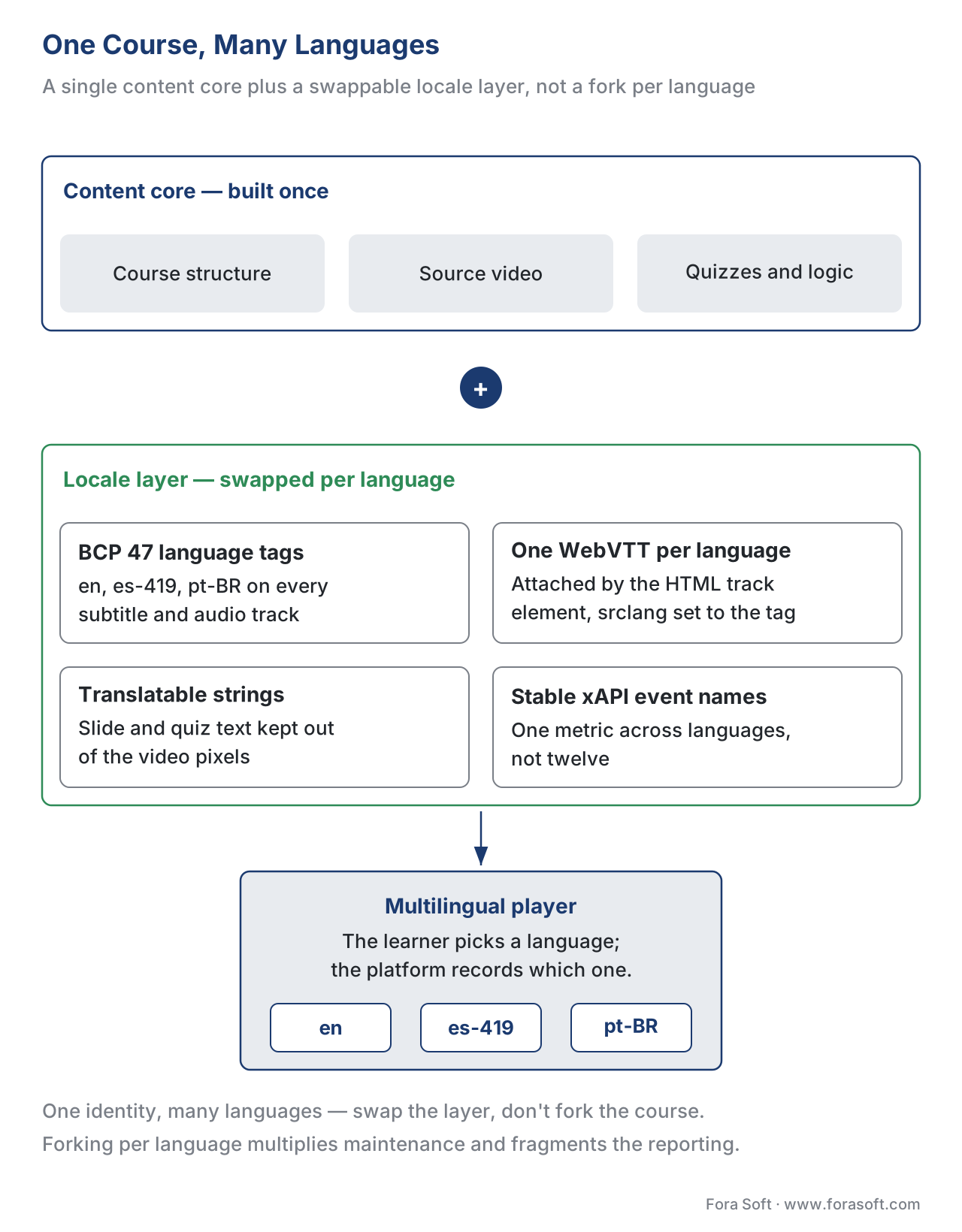 Figure 4. One course, many languages. A single content core plus a swappable locale layer — language tags, per-language subtitle tracks, and translatable strings — beats forking the course per language.
The packaging standards have their own multilingual gotcha. The standard that packages a course so any learning system can play and track it — called SCORM (Sharable Content Object Reference Model, ADL, in its 1.2 and 2004 editions) — can ship multilingual two ways: one package per language, or one package that switches language internally. One-per-language is simpler to author but multiplies maintenance and fragments your reporting; one-package-multilingual is harder to build but keeps a single course identity. Either way, the real risk in localizing SCORM is not the words — it is breaking the launch behavior, the completion logic, or the course identifiers when you rebuild a language variant, so a course that "completed" in English silently stops recording completion in German.
For tracking, the richer standard earns its keep. The Experience API — xAPI, the standard that records learning as statements like "Maria completed Module 3" to a Learning Record Store — and its xAPI Video Profile include a cc-subtitle-lang context extension that records which subtitle language a learner chose. Wire that in and your learning analytics can tell you which languages your audience actually uses — the data that tells you where to spend the next translation dollar. The discipline that makes this work is naming your tracked events identically across languages, so "completed the safety quiz" is one metric, not twelve. For the standards themselves, see SCORM explained and tracking video with xAPI.
A Common Mistake: Machine-Translate and Ship
The failure we see most is a team that runs every subtitle through an MT engine, sees foreign text appear, and marks the course "available in 12 languages." It demos fine and fails on contact. A native-speaking learner hits idioms rendered word-for-word, technical terms turned into everyday nouns, and a sentence that reverses the safety instruction it was translating. The course does not look localized; it looks machine-translated, and it teaches the wrong thing in twelve markets at once. The second failure is structural: text baked into the video pixels or quiz answers hard-coded in the source language, so the "translated" course still shows English on every slide. The fix for the first is the post-editing gate with a terminology glossary; the fix for the second is separating text from pixels before you translate a single word. Automatic translation is a draft. Shipping the draft is not localization — it is the appearance of localization, at the cost of the learners you most wanted to reach.
The Math: Localizing a 50-Hour Library
Lead with the business trade-off, because localization is a recurring cost that scales with both hours and languages.
Walk a 50-hour course library — 3,000 finished minutes — into one language, by subtitles:
Pure human subtitle translation:
  3,000 min × $10/min  ≈ $30,000 per language

MT + human post-edit (MTPE):
  MT pass:    ~$0.05/min × 3,000 ≈ $150
  Post-edit:  ~0.4× the human rate ≈ $12,000
  -----------------------------------------
  ≈ $12,150 per language
Now scale to five languages, the decision most libraries actually face:
Subtitles, human:   5 × $30,000  = $150,000
Subtitles, MTPE:    5 × $12,150  ≈  $60,750   (~60% less)
The post-editing path costs under half as much and scales: re-translating an updated module is a cheap MT pass plus a short edit, and your locked glossary makes every new language faster than the last. Add dubbing only where it pays — AI dubbing for the five markets at roughly \$8/min adds about \$24,000 per language, while studio dubbing the same library would run into the hundreds of thousands. The saving is real, but note what it is not: it is not "free machine translation." The post-edit and the glossary are the parts that buy quality, and cutting them is the false economy that ships twelve broken courses. For the full build-and-run picture, see the learning-platform cost model and building vs buying AI features, and the cost.
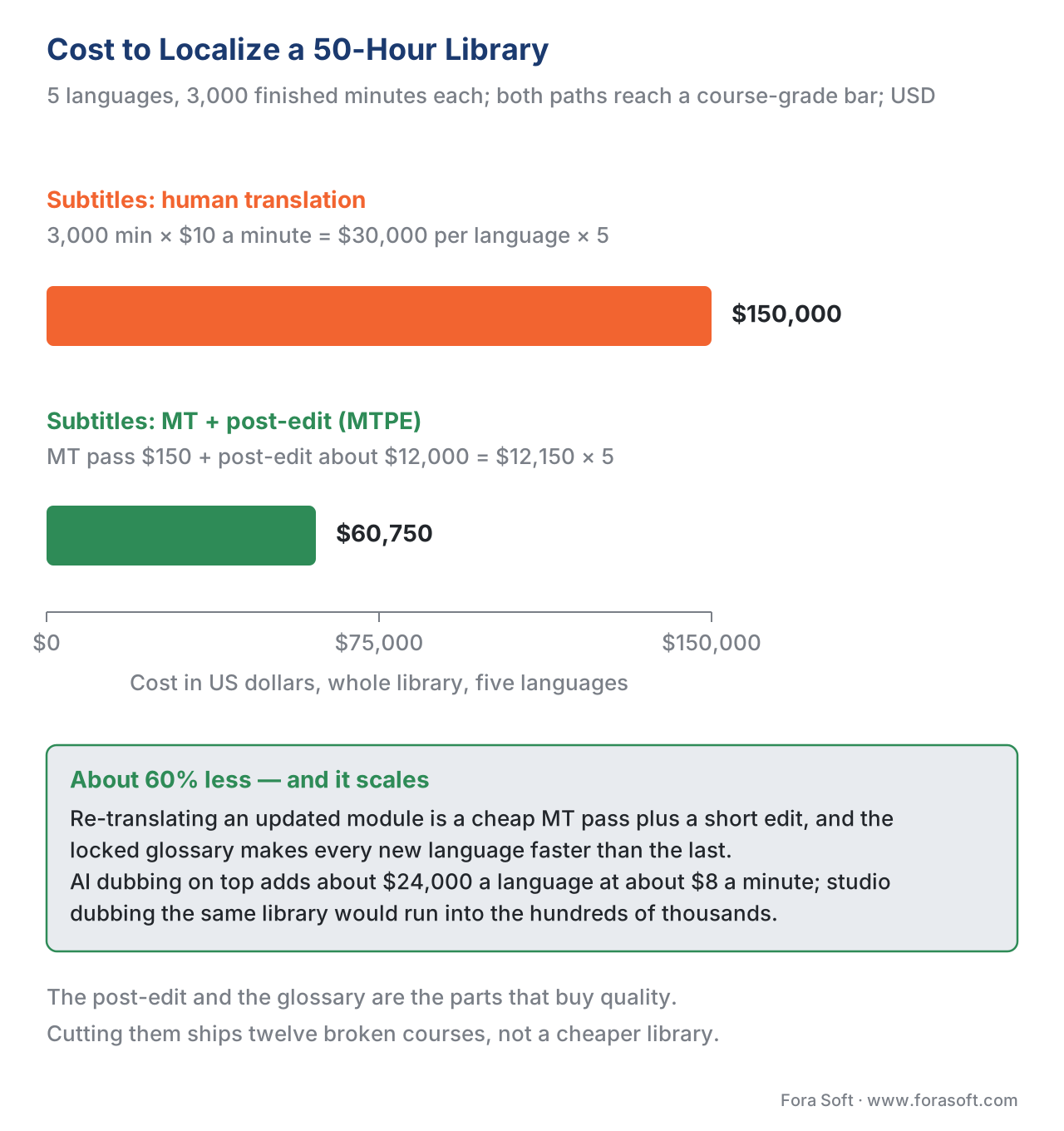 Figure 5. The localization cost trade-off. MT-plus-post-edit subtitles cost roughly 60% less than human subtitles across five languages — and the post-edit step is the part that buys quality.
Where Fora Soft Fits In
We build translation into the learning product, not a separate translation desk beside it. Fora Soft has shipped video conferencing, streaming, e-learning, and AI-driven video features since 2005, so when a client wants to go multilingual we start from the build-vs-buy trade-off: a localization vendor is fastest to a polished result and bills per language, while an MT-plus-post-edit pipeline wired into your authoring system costs engineering up front but keeps the corrected translations, the terminology glossary, and the learner-language data in-house. We wire the MT draft, the human post-editing gate, per-language WebVTT delivery with BCP 47 tags, optional AI voice-over, and an xAPI cc-subtitle-lang signal for every view, so each language enters your catalog as a tracked, selectable, single-source asset rather than a forked copy. We are candid that the post-editing step and a shared glossary are the parts that buy quality — and that skipping them is the costliest shortcut in localization.



The handbook
Fora Soft Video Engineering Handbook
We wrote a seven-volume series that takes the whole video stack apart across 9,000+ pages — encoding, delivery, audio and AI. Volume 6 sits closest to this article: it covers the speech side of a localization pipeline, how a transcript is produced by automatic speech recognition, how a text-to-speech voice is built, and how a language model is prompted so the terminology you locked stays locked. Volume 7 carries the same work into production — live translation and subtitling, cost per stream-hour, and the compliance rules that apply once a voice is synthetic — and volume 3 covers the delivery half you land on: players, subtitle tracks, and the economics of serving one more language. Work through them and you can specify a translation pipeline yourself instead of judging one from a vendor demo. Written by Nikolay Sapunov, CEO at Fora Soft.
Which languages would pay for themselves in your catalog this year?
Tell us how many finished hours you carry, where your transcripts come from and which markets you are chasing — and we will come back with the level worth buying per market, the post-editing workflow that keeps the terminology right, and the BCP 47 and xAPI plumbing that makes each language selectable and countable. 250+ video products shipped since 2005.
See our case studies
Case study
TransLinguist
75+ languages and a marketplace of 30,000+ certified interpreters, with AI speech-to-speech translation in 16+ languages, closed captioning in 22 and session transcription in every one — the machine draft and the human expert in the same product, which is exactly the post-editing shape this article argues for.
Case study
VOLO.live
Attendees scan a QR code, pick their language and get AI subtitles or a voice-over track with no app to install — deployed at Black Hat Briefings 2025 with 22,000+ participants. The proof that language selection belongs in the player, not in a forked copy of the content.
Case study
Tabsera
A K-12 LMS running gamified courses in English, French, Arabic and Turkish, with quizzes and an interactive whiteboard in each — one course structure with the locale swapped around it, including the quiz text that most “translated” courses leave in the source language.
What to read next
Delivery
Multilingual Delivery at Scale
What serving all those languages costs once the translations exist.
Accessibility
Captions, Transcripts, and Audio Description for Learning
The source-language obligation that every translated track inherits.
Tracking
Tracking Video With xAPI: The Video Profile
Where cc-subtitle-lang lives, and how to name events across languages.
Standards
SCORM Explained: What It Tracks and When to Use It
The launch and completion logic a language variant most often breaks.
References
- Tags for Identifying Languages (BCP 47 / RFC 5646) — Internet Engineering Task Force (IETF), A. Phillips & M. Davis, Eds., September 2009. The standard syntax for language tags (
en,pt-BR,es-419) used on subtitle and audio tracks. Tier 1. https://www.rfc-editor.org/info/rfc5646 - Matching of Language Tags (BCP 47 / RFC 4647) — Internet Engineering Task Force (IETF), September 2006. Defines how a player or LMS matches a learner's language preference to available tracks. Tier 1. https://www.rfc-editor.org/info/rfc4647
- WebVTT: The Web Video Text Tracks Format — World Wide Web Consortium (W3C). The native browser subtitle format; one file per language, loaded through the HTML
<track>element. Tier 1. https://www.w3.org/TR/webvtt1/ - HTML
<track>element and thesrclangattribute — WHATWG / MDN Web Docs.srclangmust be a valid BCP 47 tag; a media element carries one track per (kind, srclang, label). Tier 1. https://developer.mozilla.org/en-US/docs/Web/HTML/Reference/Elements/track - xAPI Video Profile — context extension cc-subtitle-lang — Advanced Distributed Learning (ADL) / xAPI Video Community of Practice. Records the subtitle language a learner selected, to an LRS. Tier 1. https://github.com/adlnet/xAPI-Video-Profile
- Experience API (xAPI) Specification, version 1.0.3, Part 2: Statements — Advanced Distributed Learning (ADL) Initiative. The statement model that cross-language tracking builds on. Tier 1. https://github.com/adlnet/xAPI-Spec
- SCORM 2004 4th Edition — Content Aggregation Model & Run-Time Environment — Advanced Distributed Learning (ADL). The packaging and launch behavior at risk when rebuilding language variants. Tier 1. https://adlnet.gov/projects/scorm/
- Web Content Accessibility Guidelines (WCAG) 2.1, SC 1.2.2 Captions (Prerecorded), Level A — World Wide Web Consortium (W3C), 2018. Captions/subtitles obligation that multilingual delivery must also meet per language. Tier 1. https://www.w3.org/WAI/WCAG21/Understanding/captions-prerecorded.html
- "Coursera expands AI-powered translations to 17 popular languages" — Coursera (Marni Baker Stein), 2023. 4,000+ courses and 55+ Professional Certificates in 17 languages; 450,000+ learners used the first seven; 58M+ learners in those language regions. Tier 5. https://blog.coursera.org/coursera-expands-ai-powered-translations-to-17-popular-languages
- "Has Machine Translation Evaluation Achieved Human Parity?" and COMET/MQM quality estimation (2025) — ACL Anthology / COMET framework. CometKiwi reference-free QE now on par with reference-based metrics for flagging risky segments. Tier 5. https://aclanthology.org/2025.acl-short.63.pdf
- "What Is AI Dubbing? The Complete Guide for 2026" and AI vs studio dubbing rates — 3Play Media / industry 2026 benchmarks. AI dubbing ~\$2–\$30/min vs studio dubbing ~\$5,000–\$15,000 per hour. Tier 4. https://www.3playmedia.com/blog/what-is-ai-dubbing/
- "How Much Does Professional Translation Cost in 2026?" and subtitle/MTPE rates — Smartling / industry 2026 benchmarks. Human subtitle translation ~\$5–\$25/min; MT post-edit cuts roughly 40–60%. Tier 4. https://www.smartling.com/blog/translation-rates
Where sources disagreed, the standards win: vendor claims that AI translation makes a course "instantly available" in a new language were overridden by the COMET/MQM quality literature (ref 10) and the standards delivery model (refs 1–7), which together establish that raw MT output must be post-edited and correctly packaged before it meets a course-grade bar.
