


Why This Matters
If you run learning and development, build a course catalog, or own a training product, captions are no longer a nice-to-have you can defer. Since June 2025 the European Accessibility Act has required captions on new commercial video, US public bodies face a hard Web Content Accessibility Guidelines deadline, and a single uncaptioned course can sink a public-sector or enterprise deal. At the same time, three out of four students turn captions on to focus and retain more — even those who can hear perfectly well — so captions quietly raise completion and comprehension across your whole audience. This article gives you the accuracy reality, the cost math, and the standards line so you can decide how to caption at scale and brief your engineers and instructional designers without buying a demo. It is the learning-side companion to where AI fits in a learning product.
Captions, Subtitles, Transcripts: Three Different Things
Start with the words, because they get mixed up and the difference changes what you owe a learner.
Captions are the on-screen text of everything you can hear — the spoken words plus who is speaking and meaningful sounds ("[applause]", "[error tone]"). They are written for someone who cannot hear the audio, so they carry the non-speech information too. Subtitles are the narrower cousin: a text rendering of the dialogue only, usually for someone who can hear but does not understand the language. A transcript is the full text of the video in one document, not timed to the playback — useful for search, study, and skimming, but it is not a substitute for captions during the video.
One more distinction decides how captions reach the screen. Closed captions can be turned on and off by the learner and are shipped as a separate text file the player loads on demand. Open captions are burned into the video pixels and cannot be turned off. Closed is the default for learning video because it is flexible, searchable, multilingual, and trackable; open captions exist mainly for platforms that strip caption files (some social feeds) — a problem you rarely have inside your own learning platform.
The analogy that holds up: a caption file is a subtitle script the player reads aloud in text, line by line, perfectly timed to the picture. Get that script right and any compliant player can show it; get it wrong and every learner sees the mistakes.
Two Reasons Captions Matter: the Law and the Learning
Most teams add captions because they have to. The better teams realize captions also make the content work harder. Both reasons are real, and you need both to size the investment correctly.
The first reason is accessibility law, and it now has teeth. We cover the named standards in the next section; the short version is that new commercial video in the European Union must be captioned, US public entities have a fixed compliance deadline, and "we'll add captions later" is the line that loses regulated deals.
The second reason is engagement, and the evidence is strong. A national study by the Oregon State University Ecampus Research Unit with 3Play Media surveyed 2,124 students across 15 institutions and found that 71% of students without any hearing difficulty use captions at least some of the time, and 75% use them as a learning aid — to focus, retain information, and push through poor audio. Captions help non-native speakers parse a technical lecture, let a learner study on a muted phone in transit, and reinforce spelling of the exact jargon a course is trying to teach. You are not captioning for a small minority; you are captioning for most of your audience.
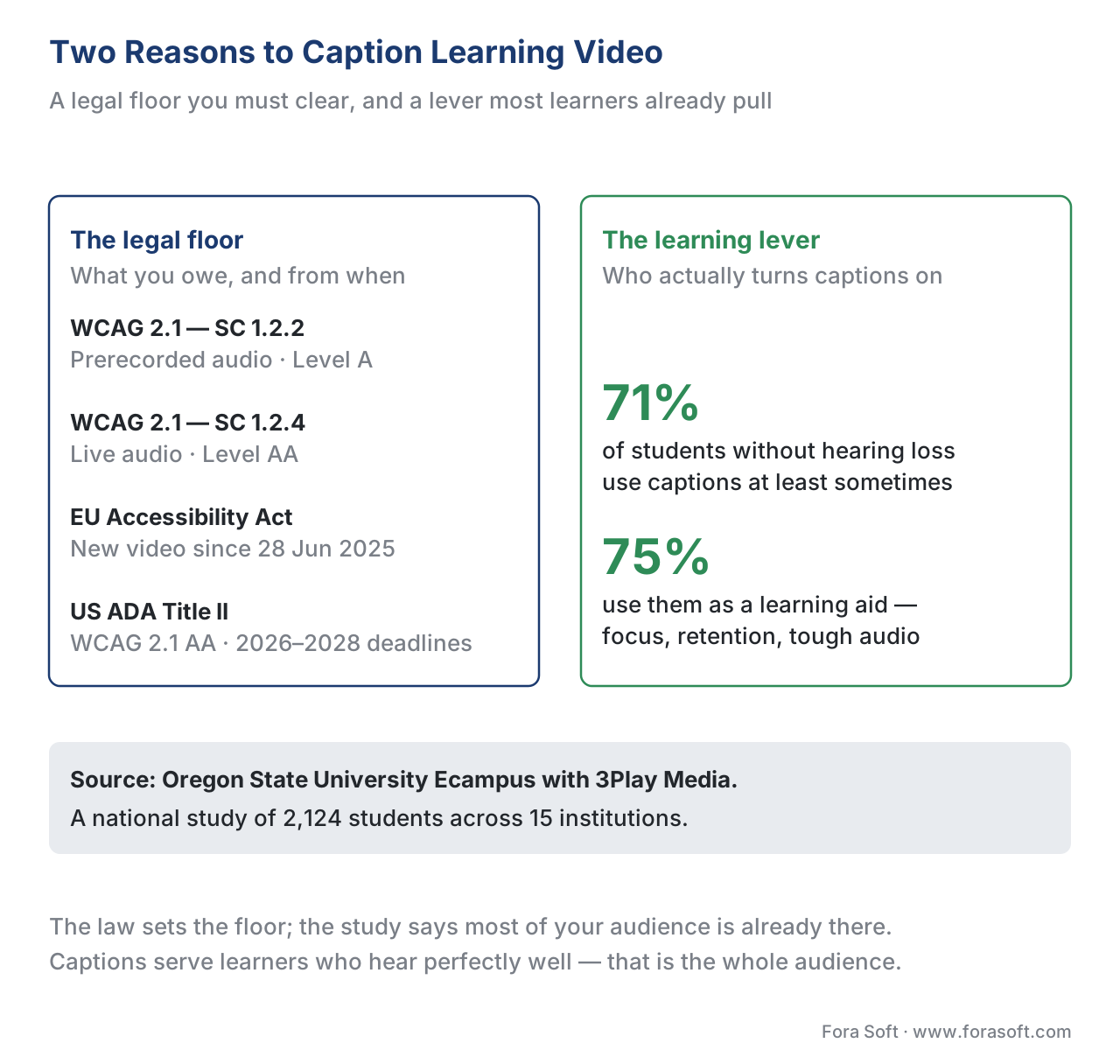 Figure 1. Captions are both a legal floor and a learning lever. Three of four students use captions to focus and retain — most of them without any hearing loss.
The Legal Floor: WCAG, the EAA, and ADA Title II
Captioning obligations trace back to one technical standard that most laws point at, then a set of laws that make it binding. Name them precisely, because a vague claim here misleads a build.
The technical standard is the Web Content Accessibility Guidelines (WCAG) 2.1, Level AA, published by the World Wide Web Consortium. Two of its success criteria govern captions directly. Success Criterion 1.2.2, Captions (Prerecorded), is a Level A requirement: captions for all prerecorded audio in synchronized media — your on-demand course videos. Success Criterion 1.2.4, Captions (Live), is the stricter Level AA requirement: captions for all live audio in synchronized media — your live classes and webinars. Because most procurement asks for Level AA, treat both as in scope: caption the recordings and the live sessions.
The laws that make WCAG binding vary by region. In the European Union, the European Accessibility Act (Directive (EU) 2019/882) became enforceable on 28 June 2025; new commercial digital content and services — including video published after that date — must meet the accessibility requirements, with legacy content given until 2030. In the United States, the Department of Justice's 2024 rule under Title II of the Americans with Disabilities Act adopts WCAG 2.1 Level AA for state and local government web content, with compliance dates in 2026–2027 (extended by an interim rule in April 2026 to 2027–2028 for the two size tiers). US federal agencies and their vendors are bound by Section 508, which also references WCAG. The exact deadline that applies to you depends on where you sell and who your buyer is, but the direction is one-way: more video, captioned, sooner.
This is engineering guidance, not legal advice. Confirm specifics with qualified counsel for your markets.
For the deeper treatment of conformance, audio description, and the full accessibility stack, see WCAG 2.1 AA for educational video and captions, transcripts, and audio description for learning.
How Automatic Captions Are Made
Walk the pipeline once, because the machine does only the middle of it.
It begins with audio: the player or encoder hands the speech track to a speech-to-text engine. That engine — automatic speech recognition, or ASR, the software that turns spoken audio into written words — listens to the audio and emits timed text: each phrase with a start and end timestamp. Modern ASR is good. OpenAI's Whisper model, a common open-source choice, scores roughly a 2.7% word error rate on clean studio audio. The model internals — which engine, how streaming versus batch recognition works, how to handle accents and overlapping speakers — live in our AI for Video Engineering section: see streaming ASR with Deepgram, Whisper, and AssemblyAI and, for live classes, live captions with SFU-side ASR fan-out.
The ASR output becomes a caption file — a timed list of text cues in a standard format (more on which below). At this point you have automatic captions: a draft that is fast and cheap but not yet correct.
Then comes the step that separates a finished product from a liability: human review. A person reads the captions against the audio and fixes what the model got wrong — a misheard technical term, a wrong number, a missing speaker label, punctuation that changes meaning. This is the same human-review gate every AI learning feature needs, and for captions it is where the accessibility standard is actually met.
Only then does the file reach your learning player, where the learner toggles captions on, picks a language, and the player renders the cues in sync with the video.
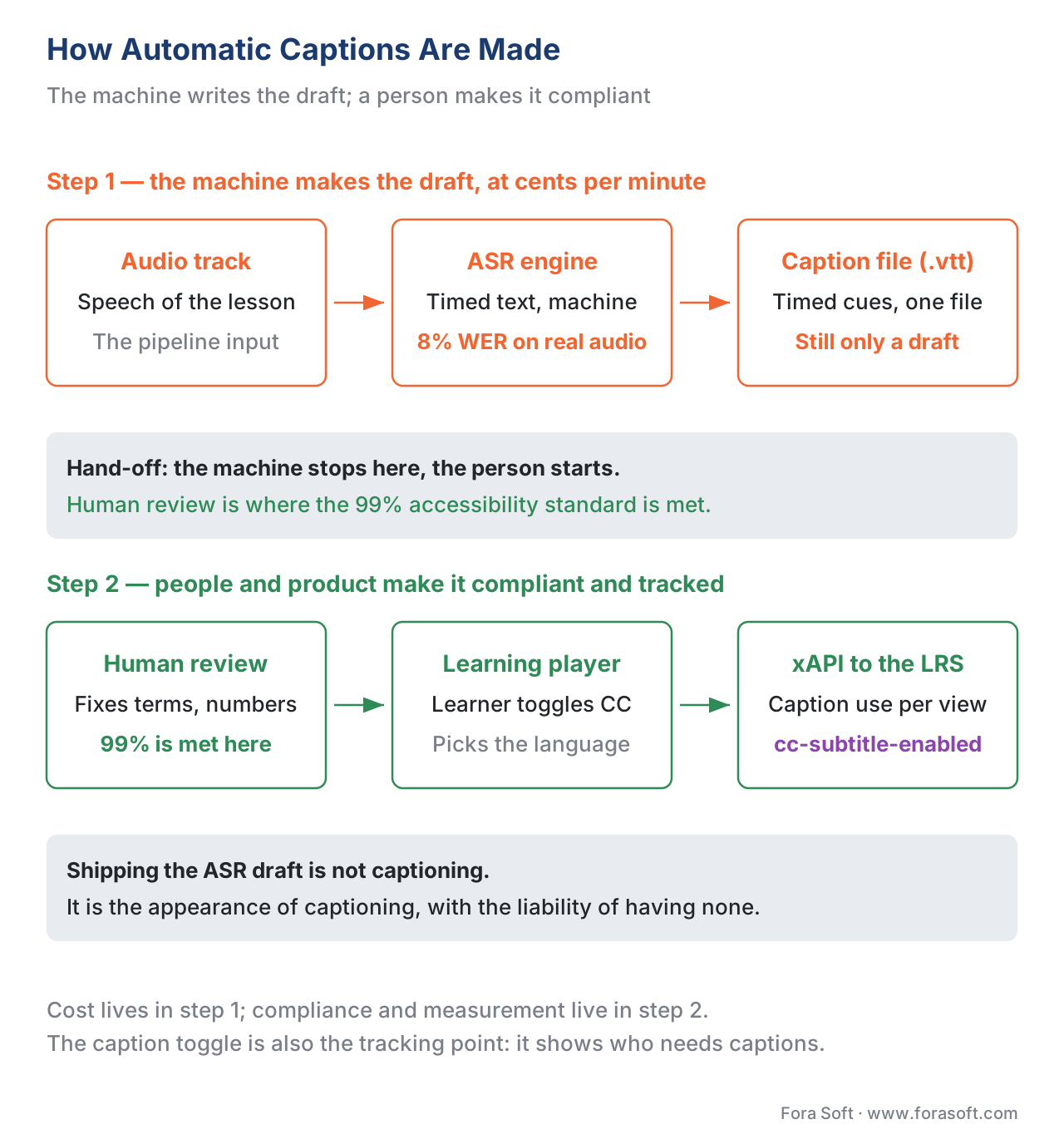 Figure 2. The automatic-caption pipeline end to end. The ASR draft is the cheap middle; human review is where the accessibility standard is met, and the player's caption toggle is where usage gets tracked.
The Accuracy Problem: Why "Automatic" Is Not "Done"
Here is the single most expensive misunderstanding in this topic. "We turned on automatic captions" is not "our video is captioned." The gap is accuracy, and the numbers are not close.
The measure to know is word error rate (WER): the share of words the machine got wrong, counting substitutions, deletions, and insertions, divided by the total words spoken. A 5% WER means 95% of words match the true transcript. Lower is better.
The accessibility standard is demanding. The industry benchmark, referenced by the FCC and codified in the Described and Captioned Media Program's Captioning Key, is 99% accuracy — roughly one error per hundred words, and the errors that remain must not change meaning. Raw automatic captions do not reach it. YouTube's auto-captions test at 85–95% on clean speech, and ungroomed ASR on harder audio averages 60–70%. Whisper's 2.7% WER on pristine studio audio rises to around 8% on real-world recordings and past 25% on low-resource languages and heavy accents.
Do the subtraction out loud, because it reframes the whole project:
A 60-minute lecture at ~9,000 spoken words.

Automatic captions at 92% accuracy (8% WER):
  9,000 words × 8% wrong = 720 wrong words in one hour of video.

Target: 99% accuracy (1% WER):
  9,000 words × 1% wrong = 90 wrong words — and none that change meaning.
The difference between 720 errors and fewer than 90 is the difference between captions that mislead and captions that comply. And the errors cluster exactly where a course can least afford them: the domain terms, drug names, code identifiers, and numbers the lesson exists to teach. ASR is weakest on the vocabulary that matters most. That is why automatic captions are a first draft to edit, never a final artifact to ship.
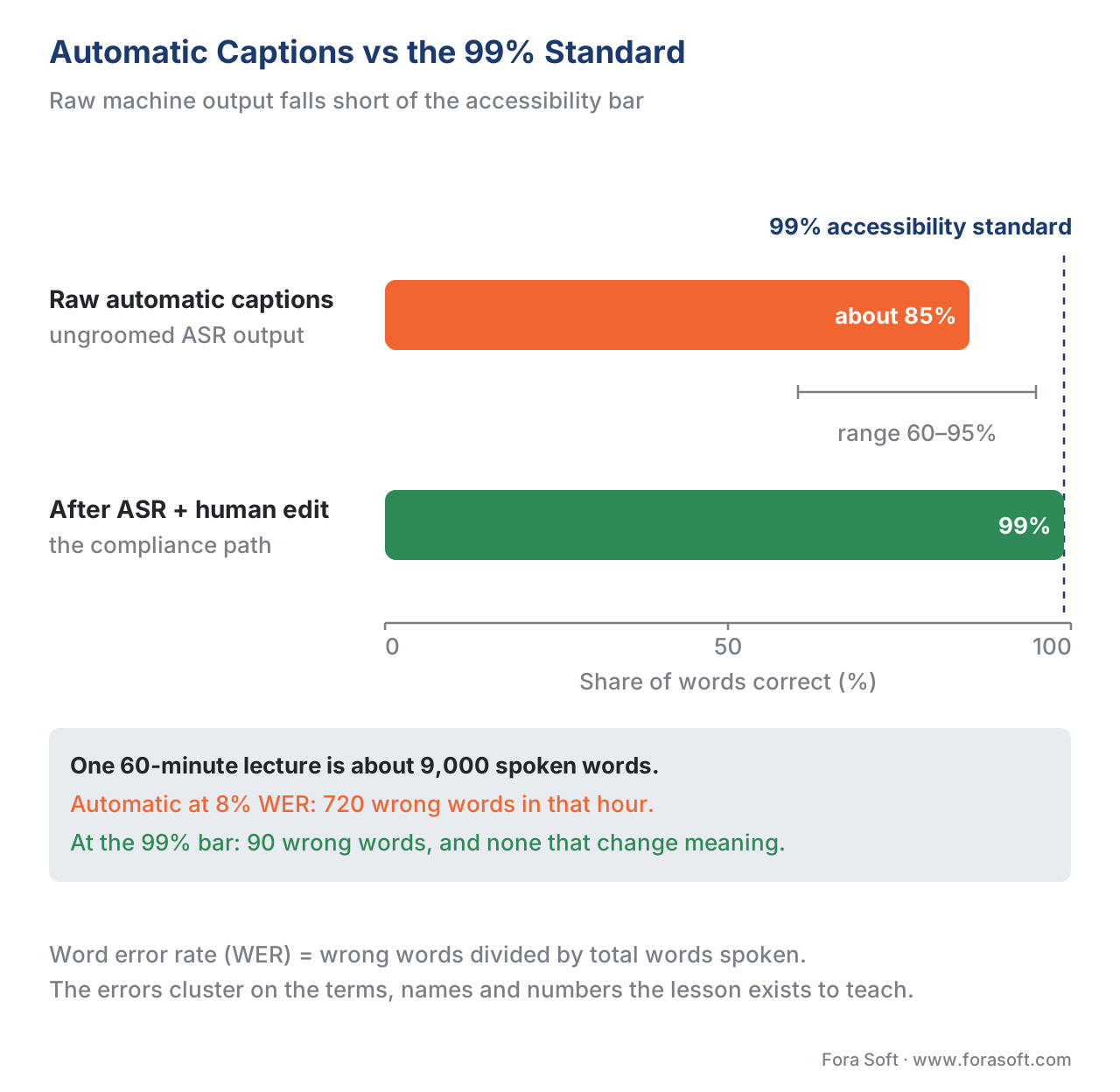 Figure 3. The accuracy gap. Automatic captions fall short of the 99% standard by a wide margin, and the remaining errors land on the exact technical terms a course needs to get right.
The Math: What Captioning a Course Library Costs
Lead with the business trade-off, because captioning is a recurring line item, not a one-off.
Two production paths bracket the cost. Pure human captioning — a professional service transcribes from scratch to the 99% standard — runs roughly \$1 to \$3 per finished minute in 2026, with rush and broadcast-grade work higher. ASR-plus-human-edit — the machine makes the draft and a person corrects it — uses cloud speech-to-text priced in pennies per minute, plus a fraction of the human time, because editing a 92%-correct draft is far faster than typing from silence.
Walk a 50-hour course library through both:
Library: 50 hours = 3,000 finished minutes.

Pure human captioning:
  3,000 min × $1.50/min  ≈ $4,500

ASR + human edit:
  ASR pass:  3,000 min × ~$0.02/min ≈ $60
  Edit pass: ~0.4× the human rate    ≈ $1,800
  ----------------------------------------
  ≈ $1,860 total
The hybrid path costs under half as much and scales: re-captioning an updated module is a cheap ASR pass plus a short edit, not a fresh transcription. The saving is real, but note what it is not — it is not "free automatic captions." The human edit is the part that buys compliance, and cutting it is the false economy that produces "craptions." For the full build-and-run picture, see the learning-platform cost model and building vs buying AI features, and the cost.
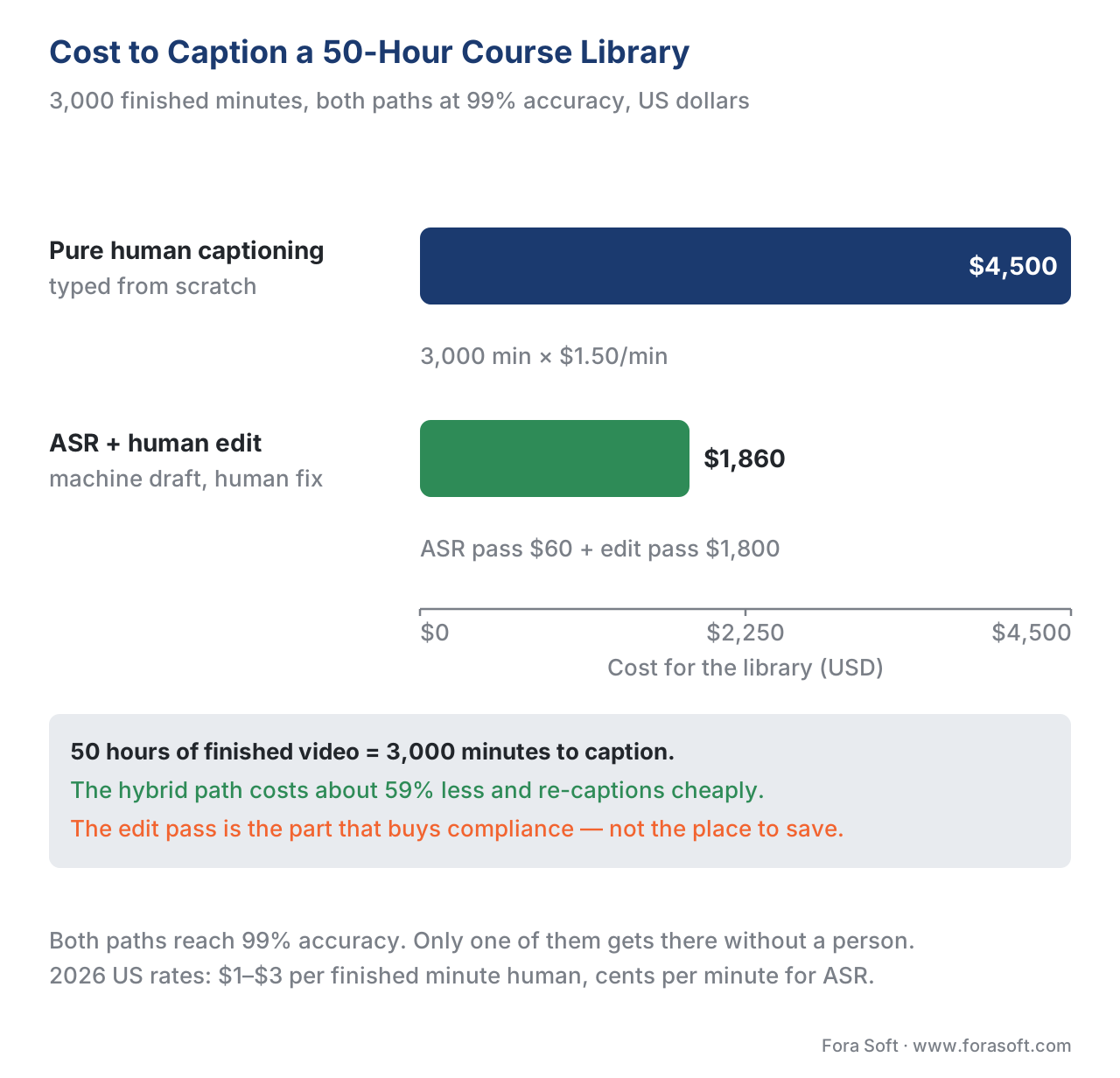 Figure 4. The captioning cost trade-off. The ASR-plus-edit hybrid costs under half of pure human captioning and re-captions cheaply — but the edit step is the part that buys compliance.
What File to Ship, and Where Captions Live
Captions travel as a separate text file the player loads. Three formats matter, and picking the right one avoids a common integration headache.
WebVTT (Web Video Text Tracks) is the W3C standard the browser reads natively through the HTML <track> element. Every major HTML5 player, iOS, Android, and the players that consume HLS and DASH streams read it, so it is the default for learning video on the web. A minimal cue looks like this:
WEBVTT

00:00:04.000 --> 00:00:07.500
The standard that packages a course, called SCORM,
is a shipping container for learning content.
SRT (SubRip) is the older, simpler format — widely supported but with almost no styling or positioning and no clean multi-language story in one file. It is fine as an interchange format and often what an ASR engine emits first; convert it to WebVTT for the web. TTML / IMSC (the W3C's Internet Media Subtitles and Captions profile) is the XML-based, broadcast-grade format used by OTT and premium video, with full styling and layout control; reach for it when you deliver to a streaming pipeline that mandates it. The cross-section deep dive on delivery lives in Video Streaming: captions, multiple audio, WebVTT and IMSC.
The practical default for a learning platform: store the corrected captions as WebVTT, keep a transcript for search, and generate other formats on demand.
Tracking Whether Learners Use Captions
Captions are not just a compliance artifact you ship and forget — they are a signal you can measure, and measuring it is where this section's tracking discipline pays off.
The Experience API video profile — the xAPI Video Profile, the community standard for recording video interactions to a Learning Record Store — includes two context extensions built for exactly this: cc-subtitle-enabled, a true/false flag for whether the learner turned captions on, and cc-subtitle-lang, the language they chose. Wire those into your player's tracking and your learning analytics can answer real questions: what share of learners watch with captions on, which courses see heavy caption use (often a sign of difficult audio or dense material), and which languages your audience actually needs subtitled. That last answer tells you where to spend translation budget — see automatic translation and multilingual courses. Captions stop being a cost center and become an input to product decisions. For how video events flow into tracking in the first place, see tracking video with xAPI: the video profile.
A Common Mistake: Shipping the Draft
The failure we see most is a team that flips on automatic captions, sees text appear, and marks the course "accessible." It demos fine and fails on contact. A deaf learner hits a wall of 700 errors an hour, with the technical terms — the whole point of the course — mangled worst of all. A procurement accessibility audit checks a sample, finds sub-99% captions full of meaning-changing mistakes, and flags the course as non-conformant. The fix is not more ASR; it is the human-edit step that should have been there from the start. Automatic captions are a draft. Shipping the draft is not captioning — it is the appearance of captioning, and it carries the liability of neither having them nor disclosing that you do not.
Build vs Buy: How to Caption at Scale
The decision that sets your captioning operation has three broad shapes, and the right one depends on volume, languages, and how much accuracy you can owe to a machine.
Buy a captioning service. A vendor (3Play Media, Rev, Verbit, and peers) takes your video and returns 99%-accurate caption files, often as ASR-plus-human-edit behind the scenes. Fastest to compliance, priced per minute, and the right first move for most teams — especially with sporadic volume or strict accuracy needs.
Build on an ASR API plus an edit workflow. You call a cloud speech-to-text API (Deepgram, AssemblyAI, OpenAI, the hyperscalers) for the draft, then route it through your own or a vendor's human-edit step before publish. This wins at high, steady volume, when you want captioning embedded in your authoring pipeline so an updated module re-captions automatically, and when you want the corrected files and analytics to live in your platform.
Self-host an open model. You run an open ASR model such as Whisper on your own infrastructure and own the edit workflow end to end. Engineering and GPU cost go up; per-minute cost and data exposure go down. This is for organizations whose content cannot leave their walls or whose volume makes per-minute fees expensive.
Here is the trade-off as a table, with the standards-and-tracking column this section always includes — because captions that are not standards-compliant and not trackable are not finished.
| Option | Accuracy | Cost shape | Time to compliance | Effort | Standards & tracking |
|---|---|---|---|---|---|
| Buy a captioning service | 99% (human-verified) | Per-minute | Fastest | Lowest | WebVTT/SRT/TTML out; xAPI-ready |
| ASR API + human edit | 99% after edit | Pennies/min + edit time | Medium | Medium | WebVTT export; you add xAPI flags |
| Self-host open ASR + edit | 99% after edit | Up-front GPU + ops | Slowest | Highest | WebVTT export; you add xAPI flags |
| Raw automatic only | 60–95% | Pennies/min | Instant — but non-compliant | Lowest | Not accessibility-conformant |
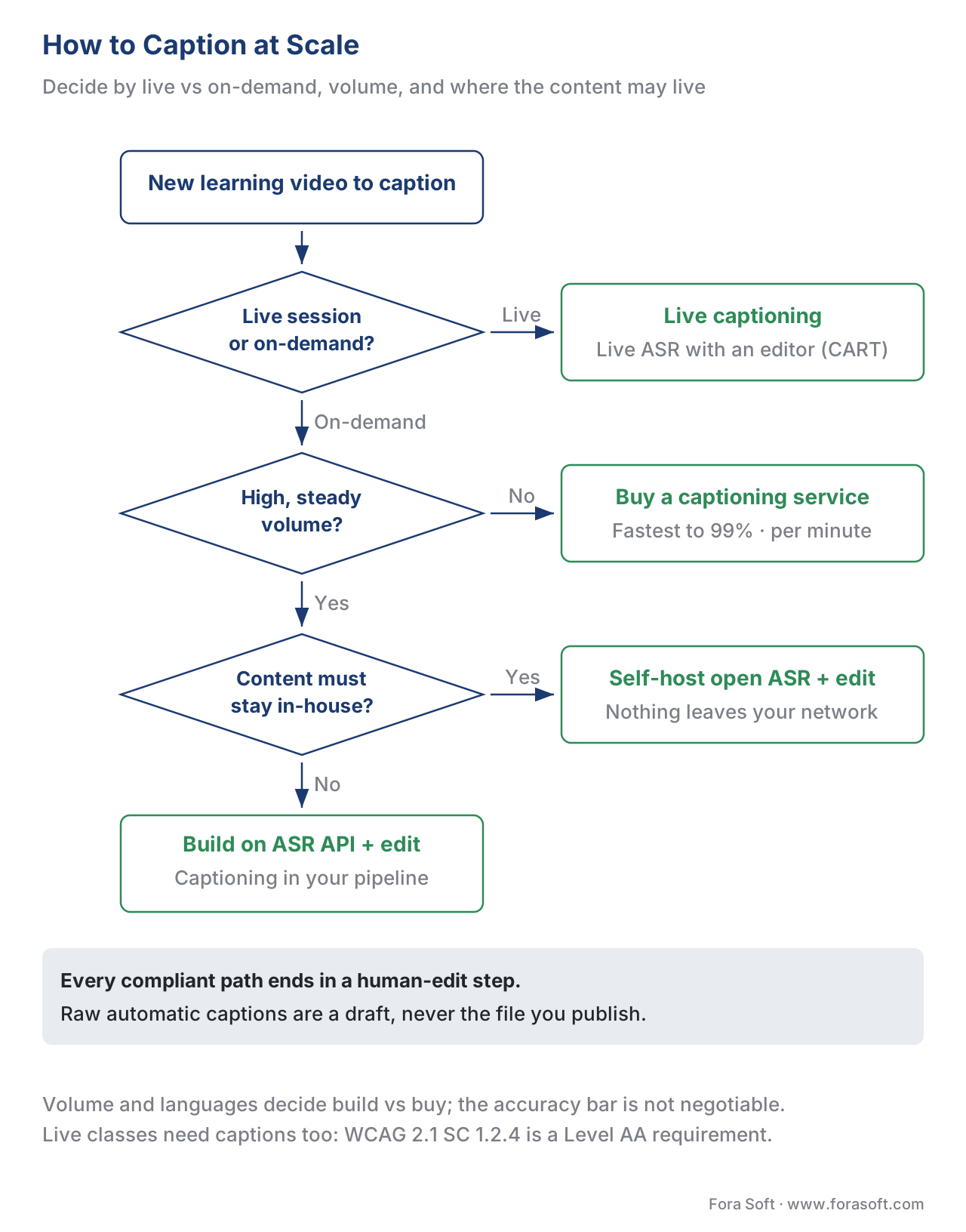 Figure 5. A decision tree for captioning at scale. Every compliant path ends in a human-edit step; raw automatic captions are a draft, never the destination.
Where Fora Soft Fits In
We build the captioning into the learning product, not a transcription desk beside it. Fora Soft has shipped video conferencing, streaming, e-learning, and AI-driven video features since 2005, so when a client needs captions at scale we start from the build-vs-buy trade-off: a captioning vendor is fastest to the 99% standard and bills per minute, while an ASR API or a self-hosted model in your authoring pipeline costs engineering up front but keeps the corrected files, the languages, and the learner data in-house. We wire the ASR draft, the human-edit gate, WebVTT delivery, live captions for the virtual classroom, and an xAPI cc-subtitle-enabled signal for every view, so captions enter your catalog as a tracked, WCAG-conformant asset rather than an unedited draft. We are candid that the human-edit step is the part that buys compliance — and that skipping it is the costliest shortcut in accessibility.



The handbook
Fora Soft Video Engineering Handbook
We wrote a seven-volume series that takes the whole video stack apart across 9,000+ pages — encoding, delivery, audio and AI. Volume 6 is the one this article leans on hardest: its speech chapters walk ASR end to end — how recognition works, where word error rate comes from, and why accents, domain vocabulary and overlapping speakers push it past 25%. Volume 4 covers the audio side that decides how good the draft can be before anyone edits it, together with accessibility and subtitle delivery, and volume 7 covers live captions under a real-time budget, where the editor sits in the loop of a class that is already running. Work through them and you can specify a captioning pipeline yourself instead of taking a vendor’s accuracy number on trust. Written by Nikolay Sapunov, CEO at Fora Soft.
How much of your catalog is captioned to 99% today?
Tell us how many finished minutes you publish a month, in which languages, and whether your classes are live or on-demand, and we will come back with the captioning path that fits — buy, ASR API, or self-hosted — what the human-edit pass costs at your volume, and how to wire caption usage into your analytics. 250+ video products shipped since 2005.
See our case studies
Case study
TransLinguist
A video interpretation platform with 30,000+ certified interpreters across 75+ languages, doing AI speech-to-speech translation in 16+ languages and closed captioning in 22 — captions and transcripts produced in session rather than after it.
Case study
BrainCert
A WebRTC and HTML5 virtual-classroom LMS at $3M annual revenue and 100K+ customers, with 500M+ classroom minutes delivered and SCORM and xAPI support built in — where caption files and caption-usage events have to land.
Case study
Scholarly
15,000+ active users and live classes of up to 2,000 students at once, replacing Zoom and Discord with one platform — the live half of the caption problem, where SC 1.2.4 applies and there is no post-production pass to fix the draft.
What to read next
Accessibility
Captions, Transcripts, and Audio Description for Learning
The full accessible-media set this article covers one part of, and what each one is for.
Standards
WCAG 2.1 AA for Educational Video
What Level AA asks of a course beyond captions, criterion by criterion.
Tracking
Tracking Video With xAPI: The Video Profile
How cc-subtitle-enabled reaches the LRS, and what else the video profile records.
Cost
Building vs Buying AI Features, and the Cost
The same build-or-buy arithmetic applied across every AI feature in a learning product.
References
- Web Content Accessibility Guidelines (WCAG) 2.1, Success Criterion 1.2.2 Captions (Prerecorded), Level A — World Wide Web Consortium (W3C), 2018. Requires captions for all prerecorded audio in synchronized media. Tier 1. https://www.w3.org/WAI/WCAG21/Understanding/captions-prerecorded.html
- Web Content Accessibility Guidelines (WCAG) 2.1, Success Criterion 1.2.4 Captions (Live), Level AA — World Wide Web Consortium (W3C), 2018. Requires captions for all live audio in synchronized media. Tier 1. https://www.w3.org/WAI/WCAG21/Understanding/captions-live.html
- Directive (EU) 2019/882 (the European Accessibility Act) — European Union. Accessibility requirements for products and services; enforceable from 28 June 2025, with legacy content to 2030. Tier 1. https://eur-lex.europa.eu/eli/dir/2019/882/oj
- Nondiscrimination on the Basis of Disability; Accessibility of Web Information and Services of State and Local Government Entities (ADA Title II rule) — US Department of Justice, 2024; compliance dates extended by interim final rule, April 2026. Adopts WCAG 2.1 Level AA. Tier 1. https://www.federalregister.gov/documents/2024/04/24/2024-08038/nondiscrimination-on-the-basis-of-disability-accessibility-of-web-information-and-services-of-state
- xAPI Video Profile — context extensions cc-subtitle-enabled and cc-subtitle-lang — Advanced Distributed Learning (ADL) / xAPI Video Community of Practice. Standard for recording video and caption-usage interactions to an LRS. Tier 1. https://github.com/adlnet/xAPI-Video-Profile
- Experience API (xAPI) Specification, version 1.0.3, Part 2: Statements — Advanced Distributed Learning (ADL) Initiative. The statement model that caption-usage tracking builds on. Tier 1. https://github.com/adlnet/xAPI-Spec
- WebVTT: The Web Video Text Tracks Format — World Wide Web Consortium (W3C). The native browser caption format read by the HTML
<track>element. Tier 1. https://www.w3.org/TR/webvtt1/ - TTML Profiles for Internet Media Subtitles and Captions 1.0.1 (IMSC1) — World Wide Web Consortium (W3C) Recommendation. The XML caption profile used by OTT and broadcast. Tier 1. https://www.w3.org/TR/ttml-imsc1.0.1/
- DCMP Captioning Key — Captioning quality and the 99% accuracy benchmark — Described and Captioned Media Program (DCMP); referenced by the FCC and WCAG. Tier 2. https://dcmp.org/learn/captioningkey
- "Students say closed captions, transcripts aid learning" — Oregon State University Ecampus Research Unit with 3Play Media; 2,124 students across 15 institutions. 71% of students without hearing difficulty use captions; 75% use them as a learning aid. Tier 5. https://ecampus.oregonstate.edu/news/closed-captions/
- AI transcription accuracy benchmarks and Whisper WER (2026) — independent ASR benchmarks. Whisper ~2.7% WER on clean audio, ~8% real-world, 25%+ on low-resource languages. Tier 4. https://voicetonotes.ai/blog/state-of-ai-transcription-accuracy/
- "What's the True Price of Closed Captioning?" and 2026 per-minute caption rates — 3Play Media / industry 2026 benchmarks. Human captioning ~\$1–\$3 per finished minute; ASR a few cents per minute. Tier 4. https://www.3playmedia.com/blog/how-much-does-closed-captioning-service-cost/
Where sources disagreed, the standards win: vendor claims that automatic captions are "accessible out of the box" were overridden by the WCAG criteria (refs 1–2) and the DCMP 99% benchmark (ref 9), which together establish that raw ASR output (refs 11) does not meet the accessibility bar without human review.
