


Why This Matters
If you run training at a company, found an EdTech product, or own a course catalog, the live class is where your most expensive asset — an instructor's time — meets your learners, and where the difference between "we used Zoom" and "we built a classroom" shows up in completion, compliance, and cost. Teams that treat the two as interchangeable ship a meeting with a logo, then discover at audit time that they cannot prove who attended, cannot reuse the recording as a graded resource, and cannot move a learner into the right small group. This article gives you the vocabulary to tell a real virtual classroom from a meeting embed, the architecture to brief your engineers, and the numbers to defend the build-vs-buy decision to your CFO. It is the anchor of this section's live-learning block; every later article builds on the distinctions drawn here.
First, What a Virtual Classroom Actually Is
Start with plain words. A virtual classroom is the software that lets an instructor teach a live lesson to learners over the internet — everyone sees and hears each other in real time, the instructor presents and writes on a shared board, learners raise hands and answer, small groups split off and come back, and the whole session is recorded and logged against the course. It is the online equivalent of a scheduled class period, not a phone call.
Hold one analogy through the whole article. A video meeting is a room you book: people walk in, talk, and the room is forgotten when they leave. A virtual classroom is a class session: it has a teacher and students with different jobs, a register of who showed up, group work, a board that gets saved, and a record that becomes part of each learner's history. Same building materials — cameras, microphones, screens — completely different institution.
That difference is not cosmetic, and it is not mainly about features you can bolt on. It is structural. A meeting tool models everyone as an equal "participant" in one temporary space. A classroom models roles, enrollment, attendance, grouping, and a learning record — and each of those is a real engineering problem layered on top of the live video, not a checkbox in a settings menu.
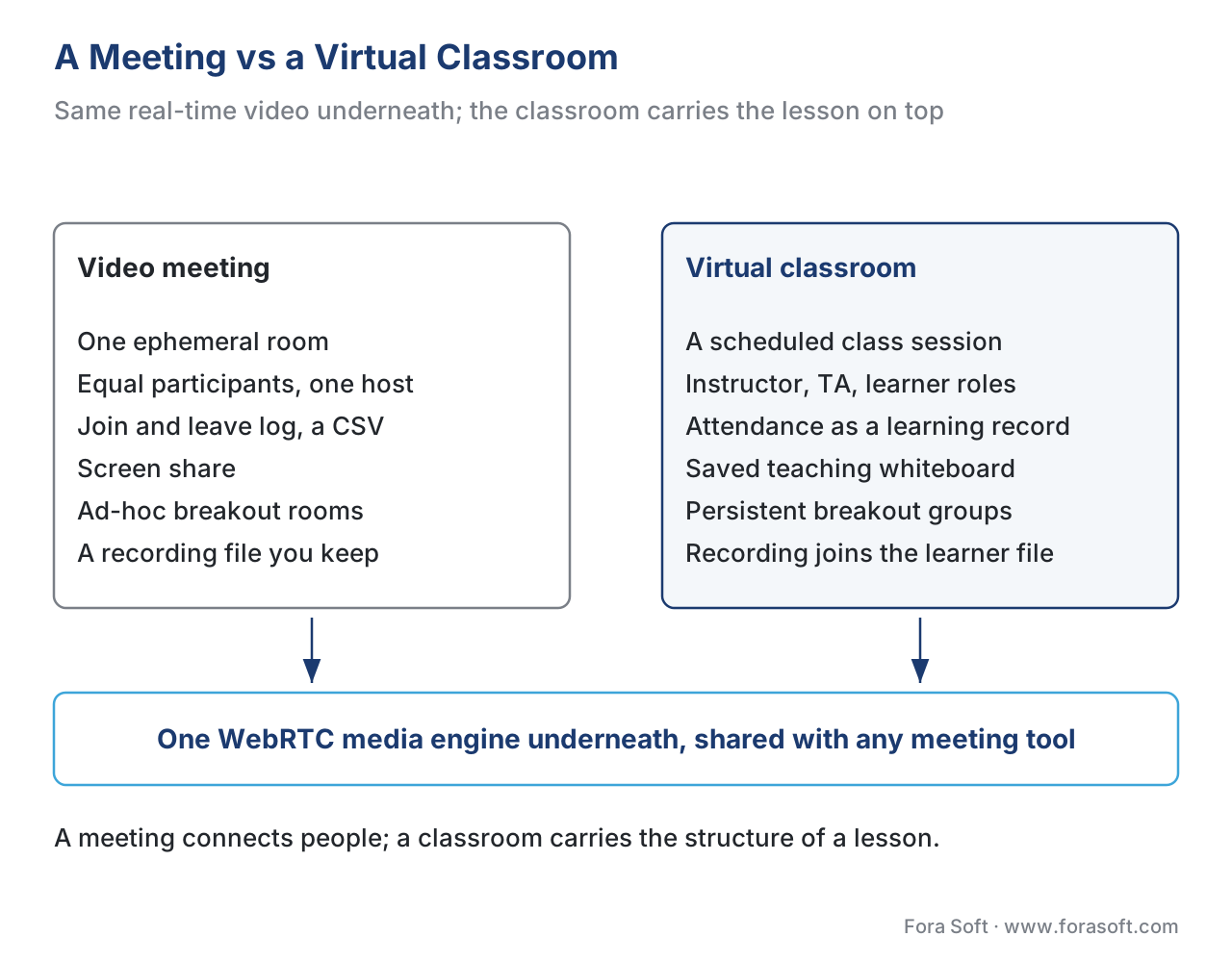 Figure 1. A meeting versus a classroom on the same video base. The meeting is one flat, ephemeral room. The classroom adds five things a meeting tool was not built to carry: teaching roles, attendance as a record, persistent breakout groups, a saved teaching whiteboard, and a recording that joins each learner's file.
The Five Things a Classroom Adds That a Meeting Does Not
A useful test cuts through every "best virtual classroom software" listicle: does the tool merely connect people, or does it carry the structure of a lesson? Five additions separate the two.
1. Teaching roles, not equal participants
In a meeting, everyone is a participant with roughly the same powers; a "host" mostly exists to start the call and mute noise. In a classroom there are distinct roles with deliberately unequal abilities, and the inequality is the point. The instructor presents, controls the floor, moves learners between groups, and ends the session into a record. A teaching assistant (TA) helps run the room — queuing questions, watching the chat, launching polls, troubleshooting a learner's audio — without owning the lesson. The learner participates within limits the instructor sets: hand-raising instead of unmuting at will, answering a poll, writing on the board only when granted the pen.
This asymmetry shows up in visibility too. In purpose-built classrooms, instructors and TAs can see and manage every learner, while a learner typically sees the instructor, the shared content, and only the peers the design intends. Modeling these roles correctly — who can do what, who can see whom — is a permission system, and getting it wrong is how a "classroom" leaks back into feeling like a free-for-all meeting.
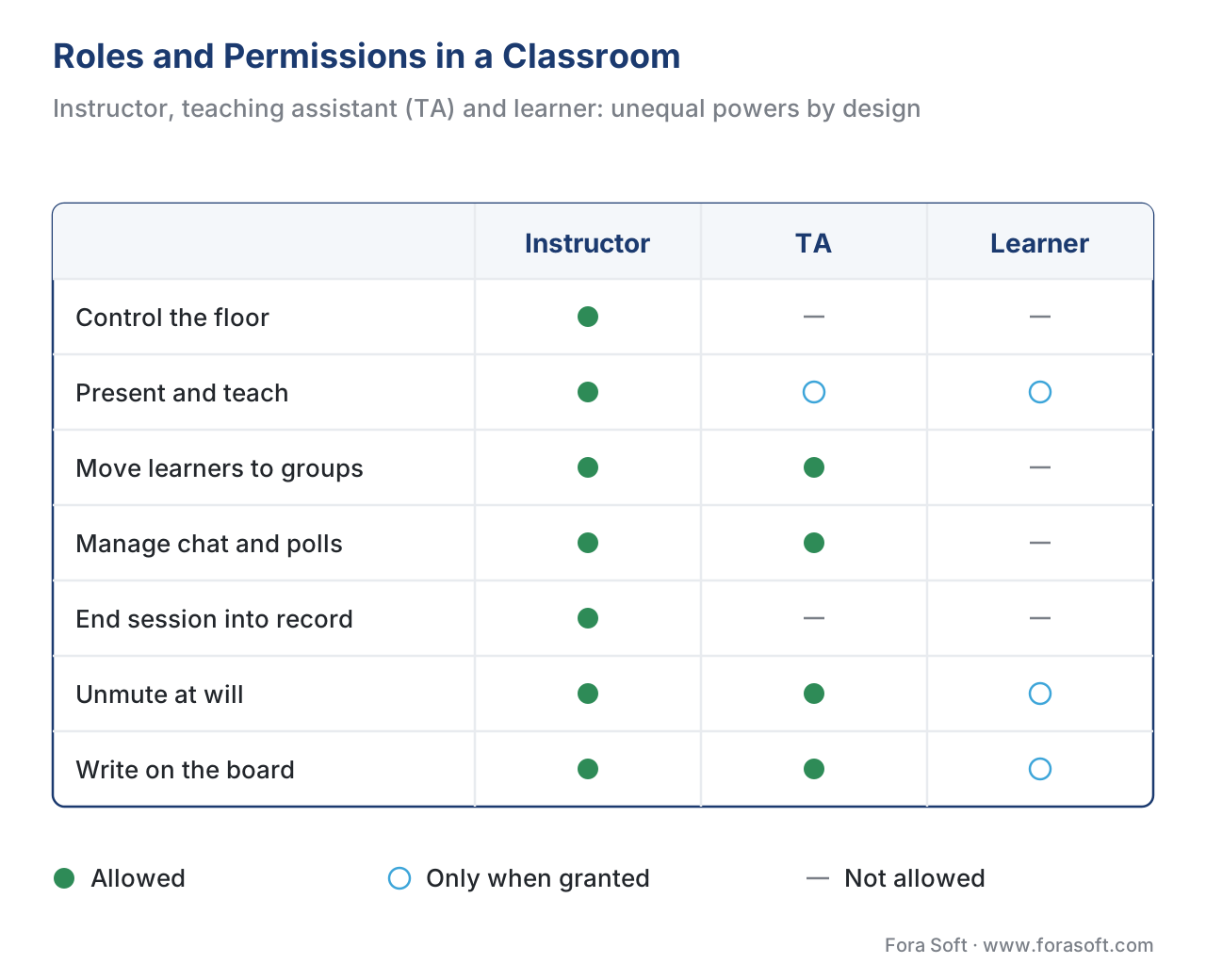 Figure 2. The role-and-permission model. The instructor owns the floor and the record; the TA manages the room without owning the lesson; the learner participates within bounds the instructor sets. A meeting tool collapses all three into one "participant" with a bolt-on "host."
2. Attendance that becomes a learning record
A meeting tool can export a list of who joined and when. A classroom turns that raw join data into attendance — a fact about a learner's progress that the learning system can store, report, and act on. The distinction matters because attendance in a learning context is often a compliance artifact: proof that a nurse sat the mandatory safety briefing, that an employee completed the harassment-prevention session, that a student met a contact-hours requirement.
In standards terms, this is the difference between a log file and a learning statement. The Experience API — the learning-data standard known as xAPI — defines short, structured sentences like "Maria attended the live session on 2026-06-20," written into a Learning Record Store (LRS), the database that holds them. (The full mechanics live in tracking video with the xAPI Video Profile and learning metrics 101.) A classroom is wired to emit attendance as a learning record; a meeting tool hands you a CSV and leaves the wiring to you.
Attendance also carries legal weight the moment it identifies a student. Under the US Family Educational Rights and Privacy Act (FERPA), information that directly relates to an identifiable student and is maintained by an institution is an education record with privacy obligations attached (US Department of Education, Student Privacy Policy Office, "FERPA and Virtual Learning," 2020). A who-attended register tied to named learners falls squarely in that category, which is why a classroom must treat it as protected data, not a throwaway export.
3. Breakout groups, sometimes persistent
Both meetings and classrooms can split people into smaller rooms. The teaching difference is that a classroom often needs groups that persist — the same four learners working together across activities and across sessions, not a fresh random shuffle each time. Persistent small groups let a cohort build on shared work; ad-hoc rooms are fine for a one-off icebreaker. Either way, the engineering is real: assigning learners, moving them mid-session, broadcasting a message to every room, running a countdown, and merging everyone back cleanly is a state-management problem that breaks in messy ways under real classroom churn. The full treatment is in breakout rooms: design, state, and re-merge.
4. A teaching whiteboard, not just screen share
A meeting shares a screen. A classroom needs a shared canvas the instructor teaches on and learners can sometimes write on too — a board that syncs in real time, handles two people drawing at once without scrambling, persists when someone reconnects, and can be exported into the session record. That real-time-sync-with-conflict-handling is a different and harder problem than streaming a screen, and it has its own article in the interactive whiteboard and shared canvas. Teaching-grade screen sharing — high frame rate for a software demo, spotlighting, slide control — is also its own discipline, covered in screen sharing for teaching.
5. A recording that joins the learning record
A meeting recording is a file you might keep. A class recording is a learning resource: trimmed, chaptered, transcoded for the catalog, and linked back to the course so absent learners can watch it and so it can be reused next term. That post-processing pipeline — and the cross-link to how a live WebRTC session becomes an on-demand video — is the subject of recording live classes and post-processing for the catalog.
The recording also reopens the FERPA question. The US Department of Education has clarified that recording a class and sharing it with enrolled students does not by itself violate FERPA; but the moment a recording captures an identifiable student asking a question, presenting, or being named, that portion becomes a student education record and may only be shared within the same enrolled class (US Department of Education, "FERPA and Virtual Learning"; institutional FERPA guidance, 2020). A classroom has to be built knowing the recording is regulated content, not a casual artifact. This is engineering guidance, not legal advice — confirm specifics with qualified counsel.
Under the Hood: Same Engine, Different Vehicle
Here is the fact that surprises most non-technical buyers: a video meeting tool and a virtual classroom usually run on the same real-time-video engine. That engine is WebRTC — Web Real-Time Communication — the browser-native standard for sending live audio, video, and data between participants with very low delay. WebRTC 1.0 is a W3C Recommendation, finalized 26 January 2021, defining the JavaScript interfaces browsers expose for real-time media; it sits on a stack of internet protocols specified by the IETF for browser-based real-time communication (W3C, "WebRTC 1.0: Real-Time Communication Between Browsers," Recommendation, 2021; IETF RFC 8825). Because WebRTC ships in every modern browser, a learner joins a class by opening a link — no plugin, no install.
This article does not re-derive how WebRTC works; that is the job of the Video Streaming section. When you need the protocol internals — how peers find each other, how media is encrypted, how a media server fans video out to many viewers — read WebRTC explained and SFU, MCU, and mesh topologies. The next article in this block, WebRTC for live learning, covers the classroom-specific gotchas. Here we make just one point: the engine is shared; the vehicle built around it is what differs.
A classroom layers learning subsystems on top of the shared media layer. A signaling and session layer knows about enrollment and roles, not just "who is on the call." A breakout-state service tracks group assignments. A whiteboard-sync service keeps the canvas consistent. An attendance and tracking bridge writes learning records. A recording pipeline produces the catalog asset. And a bridge to the learning management system (LMS) ties the session to the course. None of that is WebRTC; all of it is the classroom.
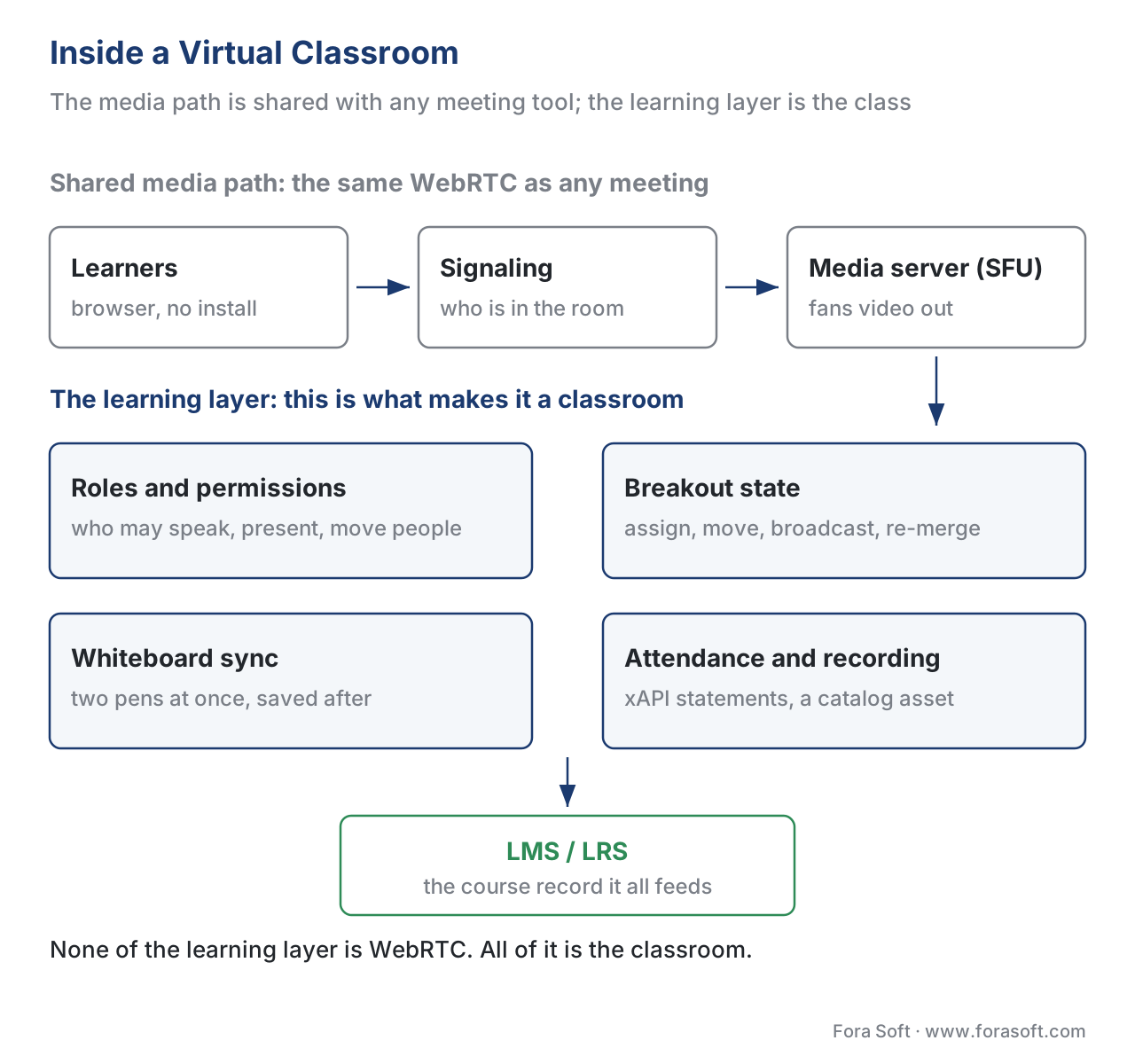 Figure 3. The virtual-classroom subsystem. The WebRTC media path (clients → signaling → media server) is shared with any meeting tool and is owned by the Video Streaming section. The learning subsystems around it — roles, breakout state, whiteboard sync, attendance, recording, and the LMS/LRS bridge — are what make it a classroom.
Why latency matters more when you teach
Both meetings and classrooms want low delay, but teaching is less forgiving. When an instructor asks a question and waits for hands, a half-second of lag turns into awkward cross-talk and dead air; when a learner answers and the instructor reacts a beat late, the back-and-forth that makes a class feel live falls apart. WebRTC is built for this: it targets sub-second, glass-to-glass delay — typically a few hundred milliseconds on a healthy connection — which is why it, and not a broadcast-style protocol with multi-second delay, is the default for the interactive parts of a class. Put the number in context: a 200-millisecond round trip feels like a natural conversation, while a 2-second delay feels like a satellite phone call. The latency budget, and the classroom-specific reasons it is hard to hold on school and corporate networks, are covered in WebRTC for live learning and scaling the live class.
Meeting Platform vs Virtual Classroom: The Comparison
Here is the distinction laid out against the things a learning team actually has to deliver. The standards-and-LMS column is the one that most often decides the build-vs-buy question, because a learning product lives or dies on whether the session feeds the learning record.
| Capability | Video meeting tool | Virtual classroom |
|---|---|---|
| Participant model | Equal participants + a host | Instructor / TA / learner roles, unequal by design |
| Attendance | Join/leave log you export (CSV) | Attendance as a learning record |
| Breakout groups | Ad-hoc, reshuffled each time | Ad-hoc and persistent cohort groups |
| Shared board | Screen share | Real-time collaborative whiteboard, saved |
| Recording | A file you keep | Trimmed, chaptered catalog asset linked to the course |
| Standards / LMS | None native; you build the bridge | xAPI/cmi5 records, LTI launch, LMS write-back |
| Compliance | Generic call privacy | FERPA-aware records and recordings, WCAG live captions |
| Best fit | Conversations, demos, hybrid meetings | Instructor-led courses, compliance training, cohorts |
Two rows deserve a flag. Standards / LMS: off-the-shelf meeting tools emit no learning data; a classroom either ships xAPI/cmi5 records and an LTI launch (the standard that lets a tool launch securely inside any LMS — see LTI explained) or you build that bridge yourself. Compliance: accessibility is a named obligation, not a nice-to-have. Live captions for a synchronous class are required by the Web Content Accessibility Guidelines, version 2.1, Success Criterion 1.2.4 (Captions, Live) at conformance Level AA (W3C, WCAG 2.1, SC 1.2.4). For a public-sector or enterprise buyer, shipping an uncaptioned live class can fail procurement outright.
The Numbers: Build vs Buy a Virtual Classroom
Build-vs-buy is a financial decision dressed as a technical one, so walk the arithmetic. The figures below are 2026 engineering estimates — confirm against your own team's rates — but the structure of the cost is the durable lesson.
There are three honest paths. Embed a meeting SDK (a vendor's video call you drop into your app): fast and cheap to stand up, but you inherit the meeting model and build every learning subsystem — roles, attendance records, persistent breakouts, the LMS bridge — yourself on top. Build on open WebRTC infrastructure (your own media server plus the learning subsystems): maximum control and no per-seat ceiling, the largest engineering investment. Buy a virtual-classroom platform or API (a vendor that already models the classroom): fastest to a real classroom, with the vendor's roadmap and per-seat economics.
Put a number on the build-the-learning-layer path, the one most custom products choose. The live-video base is a solved layer you take from WebRTC infrastructure or a media-server project; the work is the classroom layer on top — role and permission system, breakout state, whiteboard sync, the attendance/xAPI bridge, the recording pipeline, and the LMS integration. A reasonable first version lands in roughly 20 to 35 engineer-weeks:
- 28 engineer-weeks × 40 hours × $80/hour blended rate = $89,600 for a solid V1.
Then maintenance, which is not optional with real-time video: plan for roughly 25–30% of the build cost per year to keep pace with browser changes, scaling, and bug reports — call it $22,000–$27,000 a year on the example above.
Now the buy side. A virtual-classroom platform or per-minute API typically runs from a few hundred to a few thousand dollars a month depending on concurrent seats and recording volume. Over three years, a $2,000/month platform is about $72,000 — close to building the learning layer once, but with no maintenance burden and no control over which classroom features ship next. The honest read: never build the WebRTC media engine unless real-time infrastructure is your product; build the learning layer when roles, your own attendance pipeline, native LMS integration, and per-seat economics are core to the business; buy when speed to a working classroom matters more than owning that layer.
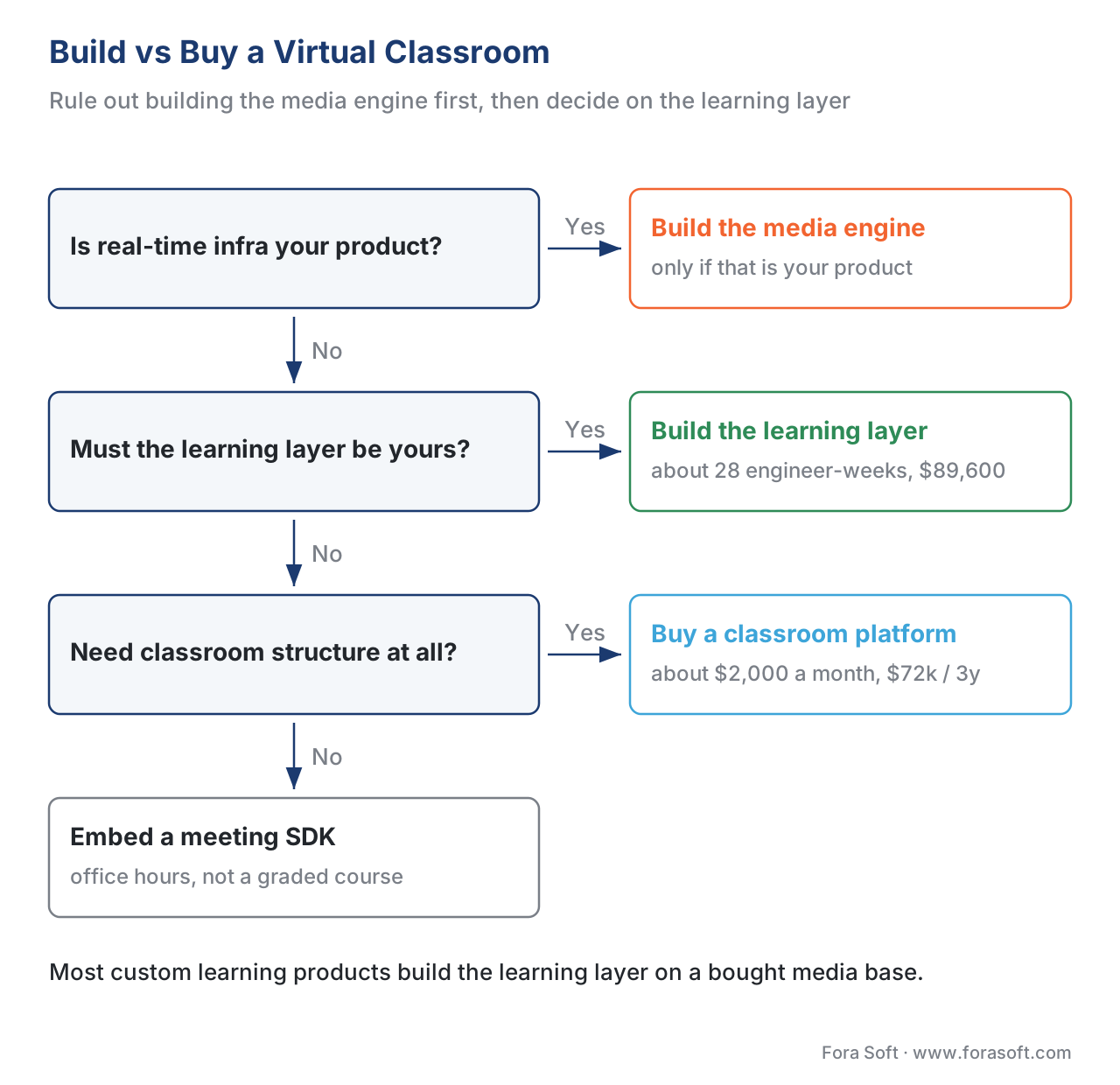 Figure 4. The build-vs-buy decision. Rule out building the WebRTC media engine first, then route on whether the learning layer — roles, attendance records, persistent breakouts, LMS integration — is core to your product. Most custom learning products build the learning layer on a bought media base.
A Common Mistake: Shipping a Meeting With a Logo
The most expensive mistake in live learning is treating "add video calls" as the whole job and embedding a generic meeting tool behind a course skin. It demos beautifully — faces appear, audio works — and then the gaps surface one by one. There is no instructor/learner asymmetry, so a learner can grab the floor. Attendance is a CSV nobody can attach to a transcript, so the compliance team cannot prove the mandatory session happened. Breakouts reshuffle, so cohorts cannot build on shared work. The recording is an unindexed file, not a catalog resource. And because no learning record flows, the LMS shows the live class as a blank — the most-watched event of the week, invisible to every report.
The discipline is to decide, before you pick a tool, which of the five additions your product genuinely needs wired in deeply, and which a generic embed can fake. A weekly office-hours chat may be fine as a meeting embed. A graded, compliance-bound, cohort-based course is a classroom, and pretending otherwise just defers the cost to audit day. Say it in the planning meeting: "are we building a classroom, or embedding a meeting?" — and the build-vs-buy answer usually follows.
Free download: Virtual Classroom vs Meeting — Build Readiness ChecklistA one-page decision aid: the teaching roles, attendance-as-record, breakouts and whiteboard, recording and compliance (FERPA, WCAG live captions), and the WebRTC base and build-vs-buy line to confirm before you ship.Where Fora Soft Fits In
We build custom live-learning products, and the virtual classroom is exactly where we spend the most time drawing the build-vs-buy line for clients. The pattern we recommend is the disciplined one: never rebuild the WebRTC media engine — take it from proven infrastructure — and invest the budget in the learning layer that makes a classroom a classroom: the role-and-permission model, persistent breakouts, the attendance-to-LMS bridge, and a recording pipeline that produces a real catalog asset. Live, interactive video is the intersection of our work since 2005 across video conferencing, streaming, e-learning, and telemedicine, and the recurring lesson is the same — the media path is mostly commodity, and the classroom structure around it is the differentiator, so that is where careful engineering pays back.



The handbook
Fora Soft Video Engineering Handbook
We wrote a seven-volume handbook that works through the whole video stack — encoding, delivery, audio and AI — across 9,000+ pages, and the classroom you just read about sits on three of those layers. Volume 3 is the one to open next: WebRTC, players and the real-time fan-out that carries a live class to 20 seats or 200. Volume 1 explains the encoder trade-off that keeps a shared slide readable while the instructor stays smooth, and Volume 4 covers the sound of the room — capture, loudness and keeping echo out of a lesson. Written by Nikolay Sapunov, CEO at Fora Soft.
Are you building a classroom, or embedding a meeting?
Tell us which of the five additions your product needs wired in deeply — teaching roles, attendance as a learning record, persistent breakouts, a saved board, a recording that becomes a catalog asset — and we will tell you what to build, what to take from existing infrastructure, and what a first version costs. 250+ video products shipped since 2005.
See our case studies
Case study
BrainCert
The first WebRTC and HTML5 virtual-classroom LMS, built as a classroom rather than a meeting with a logo: roles, whiteboard, proctored exams and the course record in one system — 500M+ real-time classroom minutes across 10 datacenters at 99.995% uptime for 100K+ customers.
Case study
Scholarly
Sydney’s leading selective-test prep platform replaced Zoom and Discord with one system: live classes holding up to 2,000 students at once for 15,000+ active users, on LiveKit and WebRTC, with whiteboard, quizzes, LMS and CRM behind the same session.
Case study
InstaClass
A tutoring classroom on WebRTC and Kurento that holds sub-second latency and still connects from behind restrictive school and corporate firewalls — web, iOS and Android, with a shared whiteboard, annotated PDFs and recordings kept after class.
What to read next
Live tools
Breakout Rooms
Persistent groups are a state problem: assign, move, broadcast, re-merge.
Architecture
Live-Learning Reference Architecture
The whole system drawn out, from signaling to the LMS write-back.
Scaling
Scaling the Live Class
What the SFU costs when the lecture seats 200 instead of 20.
Decisions
Build vs Buy vs Hybrid
The same call across the whole learning product, not just the classroom.
References
- WebRTC 1.0: Real-Time Communication Between Browsers — World Wide Web Consortium (W3C) Recommendation, 26 January 2021. The JavaScript APIs browsers expose for real-time audio, video, and data, including NAT traversal via ICE/STUN/TURN. The shared media engine under both meetings and classrooms. Tier 1. https://www.w3.org/TR/webrtc/
- RFC 8825 — Overview: Real-Time Protocols for Browser-Based Applications — Internet Engineering Task Force (IETF), 2021. The umbrella overview of the protocol stack WebRTC builds on for browser real-time communication. Tier 1. https://datatracker.ietf.org/doc/html/rfc8825
- Media Capture and Streams (
getUserMedia) — W3C. The standard interface for capturing a learner's camera and microphone in the browser, the entry point to any live class. Tier 1. https://www.w3.org/TR/mediacapture-streams/ - FERPA and Virtual Learning — US Department of Education, Student Privacy Policy Office, 2020. When a virtual-class recording or attendance record becomes an "education record," and how identifiable student participation must be handled. Tier 1 (regulator guidance). https://studentprivacy.ed.gov/resources/ferpa-and-virtual-learning
- Family Educational Rights and Privacy Act (FERPA), 34 CFR Part 99 — US Department of Education. The regulation defining "education records" and the privacy obligations attached to identifiable student data. Tier 1 (law). https://www.ecfr.gov/current/title-34/subtitle-A/part-99
- WCAG 2.1 — Success Criterion 1.2.4 Captions (Live), Level AA — W3C Recommendation, 5 June 2018. The requirement that all live audio in synchronized media (a live class) carry real-time captions. Tier 1. https://www.w3.org/TR/WCAG21/#captions-live
- Experience API (xAPI) Specification, Version 1.0.3 — ADL Initiative. The actor–verb–object statement model and the Learning Record Store used to record attendance and participation as learning data. Tier 1. https://github.com/adlnet/xAPI-Spec/blob/master/xAPI-About.md
- Most Virtual Classroom Software Was Built for Meetings. Here Is How to Spot the Difference — Engageli, 2026. Industry framing of the meeting-vs-classroom distinction: persistent small groups, native assessment, live analytics, real LMS integration. Tier 6 (orientation). https://www.engageli.com/blog/virtual-classroom-software-2026
- Video Conferencing Platforms vs Virtual Classrooms in eLearning — BrainCert blog. The one-to-many broadcast model of conferencing versus the multi-directional, structured dialogue of a classroom. Tier 6 (orientation). https://blog.braincert.com/video-conferencing-platforms-vs-virtual-classrooms-in-elearning/
- Teaching in the Virtual Classroom — Stanford Teaching and Learning Hub. Practitioner account of roles (instructor/TA), visibility asymmetry, and facilitation in live online teaching. Tier 5 (institutional). https://tlhub.stanford.edu/docs/teaching-in-the-virtual-classroom/
- Custom video conferencing and e-learning development — Fora Soft engineering blog. 2026 effort and cost ranges for building the live-learning layer versus buying a platform, and the maintenance share. Tier 5. https://www.forasoft.com/services/e-learning
Where popular sources disagreed with the standards, the standards won. Many vendor pages describe "video analytics" or a join/leave export as equivalent to attendance tracking; the xAPI specification (Tier 1) defines what a learning record actually is, and FERPA (Tier 1) defines when that record is regulated — so this article treats attendance and recordings as governed learning data, not a casual export, overriding the looser vendor framing.
