


Why This Matters
If you run corporate training, found an EdTech product, or own a course catalog, the day your live class outgrows a meeting is the day your costs, your video quality, and your reliability all change at once — and usually in the middle of a paid pilot. Picking the wrong shape is expensive in two directions: under-build and the 200-person lecture freezes; over-build and you pay two-way-video bandwidth for hundreds of learners who only ever watch. This article gives you the vocabulary to brief engineers, the four shapes a live class can take, and the single most important question — how many people actually talk? — that decides the architecture and the bill. It is the direct sequel to WebRTC for live learning, which explained why the live engine is WebRTC; this article explains how to make that engine carry a crowd.
The Question That Decides Everything: How Many People Talk?
Start with the one number that drives every later decision. A live class has two populations: the people who send video and audio — the instructor, the panelists, the students who unmute to answer — and the people who only receive it. Call them senders and watchers. The cost and the architecture of a live class are set almost entirely by the size of the sender group, not the total headcount.
Here is why. Sending live video is expensive and fragile: each sender's camera has to be carried up to a server and then fanned back out to everyone watching. Receiving video, by contrast, is cheap and well-understood — it is what every streaming service on earth already does at planetary scale. So the engineering problem of a live class is not "how do I show video to 200 people"; that part is easy. The problem is "how many people are sending at once, and how do I fan their streams out without melting a laptop or a budget."
That reframing gives you the four shapes of a live class. A tutorial is a handful of people who all talk. A seminar is a few dozen who might all talk. A lecture is one or two who talk and dozens-to-hundreds who watch. A broadcast lecture is one or two who talk and thousands who watch. Each shape needs a different topology — the word for how the streams are wired between participants — and the rest of this article walks them in order.
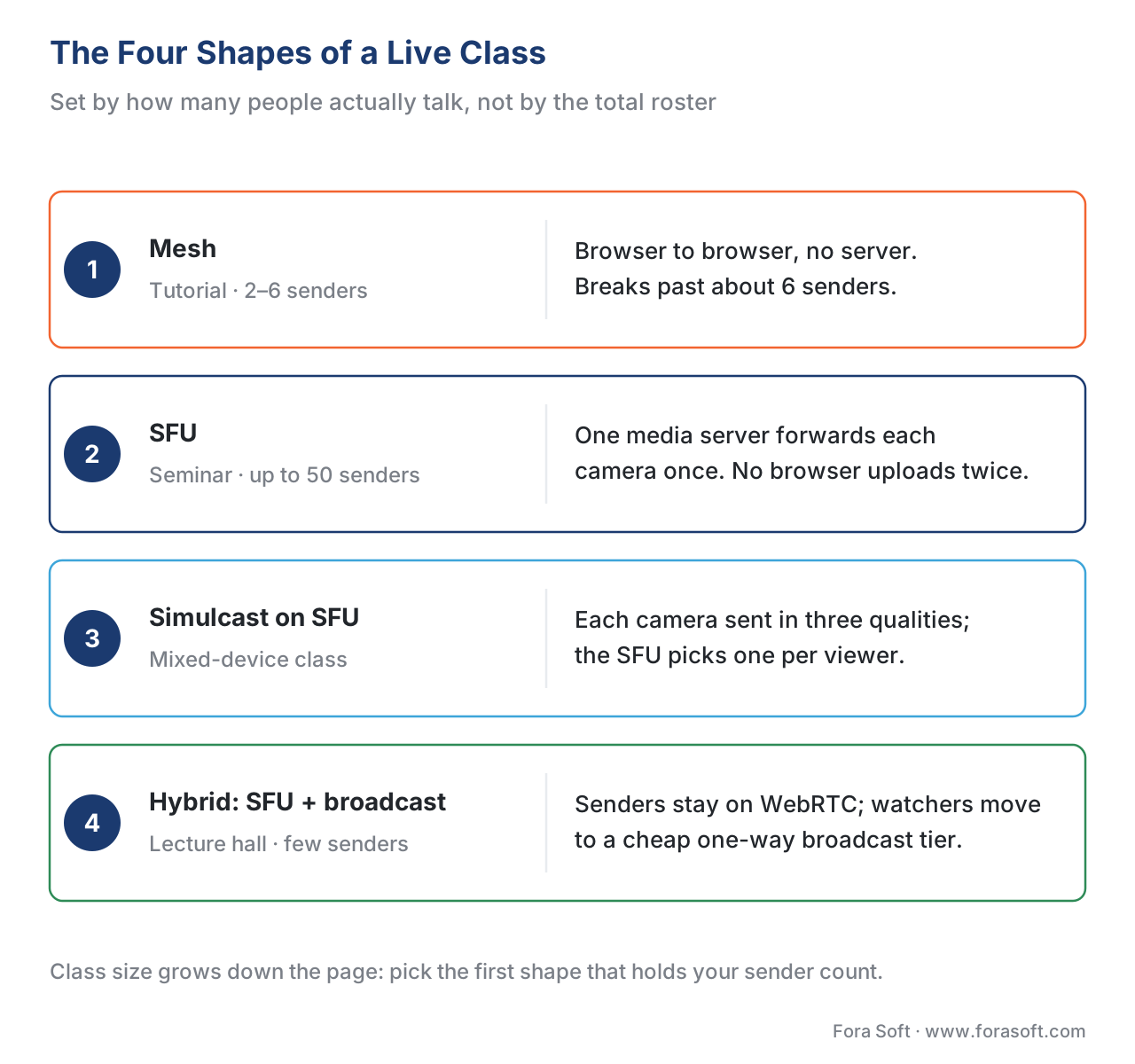 Figure 1. The four shapes of a live class, by how many people talk. A mesh suits a tiny tutorial. An SFU runs the seminar. Simulcast on the SFU serves a mixed-device lecture. A hybrid adds a one-way broadcast tier for the large lecture, keeping only the senders on the expensive interactive path.
Shape 1: Why a Tutorial Works but a Class Does Not — the Mesh
The simplest way to connect a class is to have every browser send its video straight to every other browser, with no server in the middle. This is called a mesh, because the connections form a web where everyone is wired to everyone. For a four-person tutorial it is perfect: cheap, private, and nothing to operate.
The mesh breaks the moment the room grows, and the reason is arithmetic you can do on one hand. In a mesh, each person must upload their camera once for every other person in the room. With 5 people, each browser sends 4 copies of its video and receives 4 — manageable. With 20 people, each browser sends 19 copies and receives 19, and a normal laptop on normal home internet cannot upload nineteen simultaneous video streams. The upload demand and the processor load both fall over somewhere around six to eight active senders. A mesh is a tutorial tool, not a classroom one.
The mesh is covered in depth, alongside the two server-based topologies, in the Video Streaming section's SFU vs MCU vs Mesh. For our purposes the lesson is one line: the mesh dies past about six senders, so any real class needs a server.
Shape 2: The Workhorse of the Live Class — the SFU
The fix for the mesh is to put a smart server in the middle so no browser has to upload more than once. That server is called a Selective Forwarding Unit, or SFU. The name describes exactly what it does: it selectively forwards media. Each participant sends a single copy of their camera up to the SFU, and the SFU forwards the right streams down to everyone who needs them. No browser ever uploads more than its own one stream, no matter how many people are in the room.
Think of the SFU as the class's mail room. Twenty students each drop one letter (their video) at the mail room; the mail room makes the copies and delivers them. The students never have to run twenty errands each — they make one delivery and the mail room handles the fan-out. That single change is what lets a thirty-person seminar run where everyone can unmute and speak.
One property of the SFU matters for your budget and is widely misunderstood: the SFU does not re-encode the video. It forwards the bytes it receives untouched. (An older design called an MCU — Multipoint Control Unit — does re-encode, mixing everyone into one combined picture; it is simpler for the client but far more expensive on the server and adds delay, which is why interactive classes use an SFU, not an MCU.) Because the SFU only forwards, its processor cost is set by the number of streams it relays, not by their resolution — forwarding a 4K stream costs roughly the same processor time as forwarding a 360p one (getstream.io, "Selective Forwarding Unit," 2026). That fact will matter when we count capacity.
This article does not re-derive how an SFU is built — that is the Video Streaming section's job. For the internals, and for a head-to-head of the open-source options (mediasoup, Janus, LiveKit, Jitsi, Pion), read SFU vs MCU vs Mesh and choosing an SFU. Here we stay on the learning question: how do you make one SFU serve a classroom full of different devices, and what happens when the class outgrows a single server?
Shape 3: Serving the Mixed-Device Classroom — Simulcast
Here is a problem the mail-room picture hides. A real class is not a room of identical devices. One learner is on campus fiber with a 27-inch monitor; another is on a phone with two bars of signal on a train; a third is on a locked-down work laptop. The instructor's camera is a single stream. If the SFU forwards that one stream at full quality to everyone, the phone on the train cannot keep up and freezes; if it forwards everyone a low quality so the phone survives, the 27-inch monitor gets a blurry lecture. One stream cannot fit every viewer.
The technique that solves this is called simulcast — short for "simultaneous broadcast." Instead of sending one quality level, each publisher's browser encodes and sends several versions of its camera at once — typically three: a high, a medium, and a low (for example 720p, 360p, and 180p). The SFU receives all three and then, for each individual viewer, forwards only the one their connection and screen can handle. The phone on the train gets the 180p layer; the campus monitor gets the 720p; nobody has to compromise for anyone else. The publisher pays a little more upload to send three layers, and in exchange the server can serve a heterogeneous classroom from one source.
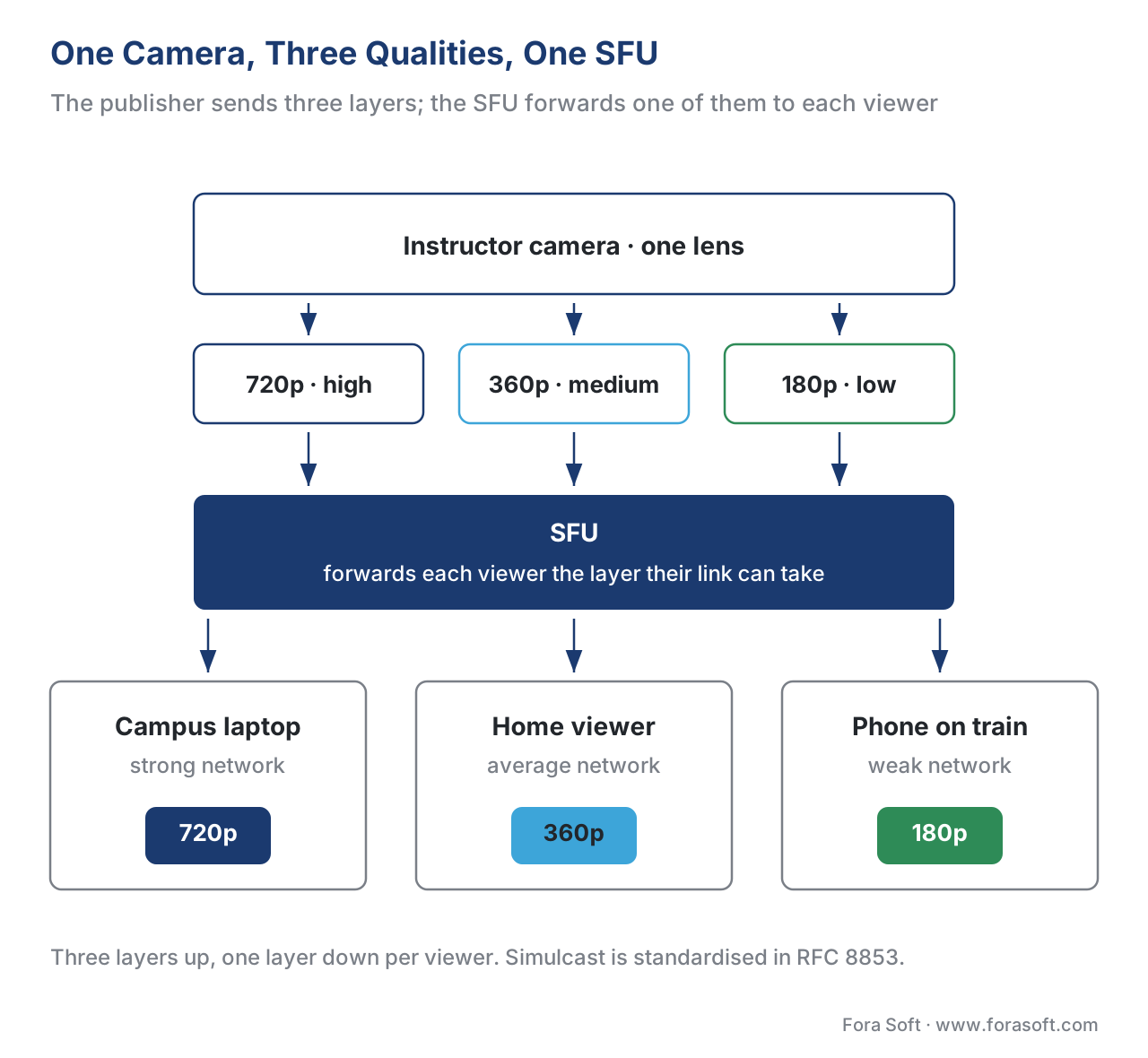 Figure 2. Simulcast serves a mixed-device classroom. The publisher sends three quality layers at once; the SFU forwards each viewer the highest layer their connection and screen can take. One source, three qualities, no shared compromise.
Simulcast is not a vendor feature; it is a standardized mechanism. The way a browser advertises "I am sending three layers" and labels each one is defined in the Internet standard RFC 8853, "Using Simulcast in SDP and RTP Sessions" (IETF, January 2021), which builds on the Restriction Identifier (RID) attribute from RFC 8851 (IETF, January 2021) to tag and cap each layer's resolution and bitrate. Because it is a standard, simulcast works across browsers: in 2026 it is the default for the VP8 and H.264 video formats in every major browser.
The newer alternative: SVC
There is a second, more modern technique that achieves the same goal more efficiently, called Scalable Video Coding, or SVC. Where simulcast sends three separate streams, SVC sends one cleverly layered stream that the server can peel apart — forwarding only the base layer to the phone and the full stack to the campus monitor, without the publisher having to send three independent copies. SVC is more bandwidth-efficient on the upload and is defined for WebRTC in the W3C specification "Scalable Video Coding (SVC) Extension for WebRTC." In 2026 it is the default for the newer VP9 and AV1 video formats in Chromium-based browsers; some platforms (LiveKit, for instance) use simulcast for VP8/H.264 and switch to SVC automatically for VP9/AV1.
For a learning product, the practical takeaway is not which technique your platform uses internally — it is that the capability must be on. The deep mechanics of simulcast, SVC, spatial versus temporal layers, and how the SFU chooses a layer per viewer are the Video Streaming section's territory: read simulcast and SVC: how the SFU serves a heterogeneous audience for the full picture. The classroom point: without simulcast or SVC, a single weak-network learner drags down quality for the whole class, so confirm your platform uses it before you scale.
How Big Is One SFU? Capacity and Cascading
A natural question: if the SFU does the fan-out, how many learners can one server hold? The honest answer is "it depends on how many of them are sending," which is the recurring theme of this article — but useful numbers exist.
Because the SFU's load is driven by the number of streams it forwards, capacity is best measured in streams, not people. A single well-tuned SFU node can forward on the order of a few thousand outbound streams, which a well-run deployment translates to roughly 500 to 800 concurrent video-sending participants per node before bandwidth or connection limits bite (sheerbit.com, "LiveKit Architecture Deep Dive," 2026; getstream.io, 2026). A seminar where 30 people send and 30 receive is a few hundred streams — comfortable for one node. A lecture where 2 people send and 500 watch is barely over a thousand outbound streams — also within one node's reach, which is why a 200-seat lecture, counter to intuition, is not the hard case.
When a session genuinely outgrows one server — thousands of participants, or learners spread across continents — you do not buy one impossibly large server; you connect several SFUs together so they act as one. This is called cascading: SFUs in different regions link to each other, each learner connects to the nearest one, and the servers relay between themselves. Cascading both raises the ceiling and lowers latency, because a student in Singapore connects to a Singapore server instead of crossing an ocean to reach the instructor's server (webrtcHacks, "Improving Scale and Media Quality with Cascading SFUs," Boris Grozev). Cascading is an operational topic owned by the Video Streaming section — see WebRTC at scale: cascading SFUs and regional bridges. For a learning product the rule of thumb is simple: one region of interactive learners fits one SFU; a global cohort needs cascaded SFUs.
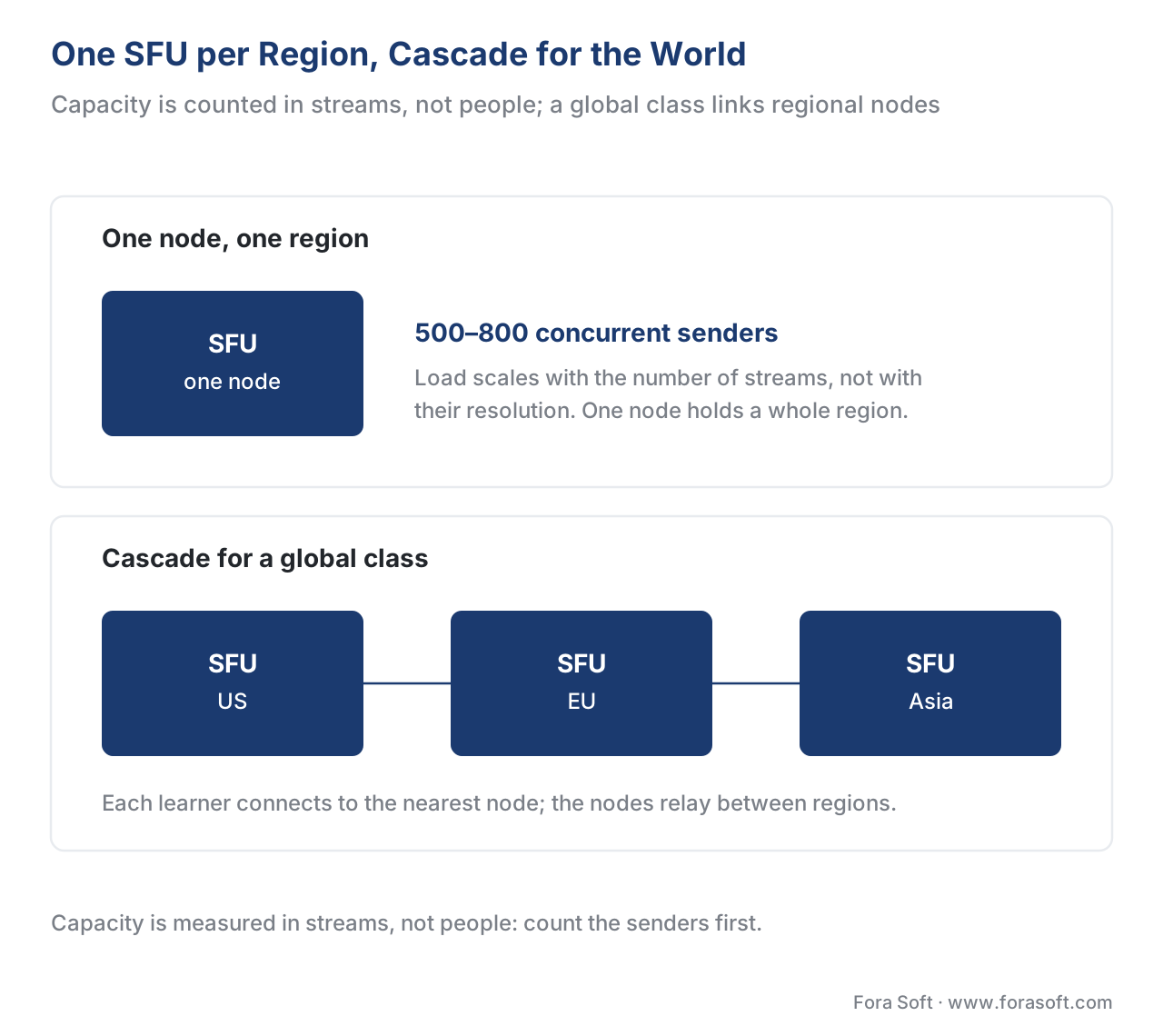 Figure 3. One SFU node serves a region up to its stream ceiling; a global class cascades several regional SFUs so each learner connects to the nearest one. Cascading raises the ceiling and lowers latency at the same time.
Shape 4: The Real Lecture Hall — the Broadcast Tier
Now the case that names this article. You have a lecture: one instructor, a couple of teaching assistants who occasionally speak, and 2,000 enrolled learners who almost never do. Could an SFU serve 2,000 receive-only viewers? With cascading, perhaps — but you would be paying for two-way, real-time video infrastructure to deliver a one-way experience to people who only watch. That is the wrong tool, and the bill proves it.
The right move is to recognize that the 2,000 watchers do not need the interactive engine at all. They need what every streaming platform already delivers cheaply: a one-way video stream. So you split the class into two tiers. The interactive tier keeps the instructor, the TAs, and any student called on to speak on WebRTC through the SFU — sub-second delay, true back-and-forth. The broadcast tier takes the composed class video, bridges it out of the SFU into a streaming format, and delivers it to the silent majority through a content delivery network — the same global cache network that carries on-demand video — at a tiny fraction of the per-viewer cost.
The streaming format for the broadcast tier is usually Low-Latency HLS (LL-HLS), a version of the standard internet video protocol tuned to cut delay to roughly two to six seconds — slow enough to be cheap and CDN-friendly, fast enough that a chat-based "raise your hand to be brought on stage" interaction still feels responsive. (An emerging 2026 standard called Media over QUIC, or MoQ, aims to push broadcast latency lower still; watch it, but LL-HLS is the production default today.) When a watcher is called on, they are promoted: moved from the broadcast tier onto WebRTC for the moments they speak, then moved back. This hybrid — a small, expensive interactive core plus a large, cheap broadcast fringe — is the standard pattern for large live learning, and it is what live-commerce, esports, and webinar products all ship at scale.
 Figure 4. The hybrid lecture. A small interactive tier (instructor, TAs, called-on students) stays on WebRTC via the SFU; the class is bridged to a broadcast tier that fans out cheap low-latency HLS through a CDN to thousands of watchers. A student called on is promoted to WebRTC, then returned.
The bridge from WebRTC to a broadcast stream, and the CDN economics behind it, belong to the Video Streaming section: read recording, broadcasting, and the WebRTC-to-HLS bridge and multi-CDN architecture. The learning decision is the split itself: keep only the senders on WebRTC; push every pure watcher to the broadcast tier.
The Numbers: What Each Shape Costs
Build-vs-buy is a financial decision dressed as a technical one, so put the arithmetic on the table. The dominant recurring cost of a live class is bandwidth — the bytes carried up to and down from the servers — so we will price the same 500-person lecture two ways and watch the difference.
First, everyone on the SFU. Assume a single shared class video at about 1.5 megabits per second per viewer (a reasonable lecture quality). Send that to 500 viewers through the SFU's cloud bandwidth:
- 1.5 megabits/second × 500 viewers = 750 megabits per second flowing out of the SFU.
- A 50-minute class is 3,000 seconds. 750 megabits/second × 3,000 seconds = 2,250,000 megabits.
- Divide by 8 for megabytes, then by 1,000 for gigabytes: 2,250,000 ÷ 8 ÷ 1,000 ≈ 281 GB for one class.
- SFU/real-time cloud egress runs roughly $0.09–$0.12 per GB in 2026. At $0.10/GB: 281 GB × $0.10 = $28.10 per class, for the watchers alone.
Now, the same 500 watchers on a broadcast tier (CDN). The bytes are similar, but CDN egress for one-way streaming is far cheaper at volume — commonly $0.02–$0.05 per GB, and less under commitment. At $0.03/GB: 281 GB × $0.03 = $8.43 per class.
The per-class gap looks small — about twenty dollars — until you multiply by a real catalog. Two hundred such lectures a week, forty weeks a year, is 200 × 40 = 8,000 lectures. The difference of ($28.10 − $8.43) = $19.67 per lecture becomes 8,000 × $19.67 ≈ $157,000 a year saved by routing watchers to the broadcast tier instead of the SFU — before counting the server capacity you free up. That single line is why the hybrid exists. The lesson is not "WebRTC is expensive"; it is match the tier to the role — interactive bytes for senders, cheap broadcast bytes for watchers.
Tracking and Completion at Scale
A live class that scales is still worthless to a learning team if it cannot answer "who attended, and who actually completed?" — and completion is harder in a 500-person broadcast than in a six-person seminar, because most of the audience is on the one-way tier where the interactive player's events are thinner.
The discipline is the same one used everywhere else in this section: emit structured learning events. The standard for fine-grained video events, called the xAPI Video Profile — a community profile built on the Experience API (xAPI) 1.0.3, the learning-data standard — defines statements like "played," "paused," "seeked," "completed," and "terminated" that a player sends to a Learning Record Store (the database that holds xAPI statements). For a live class, you decide up front what "attended" and "completed" mean — joined within the first ten minutes, present for 80% of the runtime, answered at least one in-class poll — and you instrument both tiers to emit the events that prove it. Doing this at scale means batching events so a 2,000-person lecture does not flood the record store at the same instant.
The mechanics of video tracking are covered in tracking video with the xAPI Video Profile, and what the resulting metrics mean is in learning metrics 101. The scaling-specific point: define completion before the lecture, instrument both the interactive and broadcast tiers, and batch the events.
Accessibility at Scale: One Caption Stream, Many Viewers
Captions are not optional, and scale makes them easier in one way and harder in another. Live captions for a synchronous class are required by the Web Content Accessibility Guidelines, version 2.1, Success Criterion 1.2.4 (Captions, Live), at conformance Level AA (W3C, WCAG 2.1, 2018) — for a public-sector, university, or large-enterprise buyer, shipping an uncaptioned lecture can fail procurement outright.
The good news at scale: you caption once. The instructor's audio is transcribed by a single real-time speech-to-text process, and the resulting caption text is fanned out to every viewer on both tiers — there is no per-viewer captioning cost, so a 2,000-seat lecture costs the same to caption as a 20-seat seminar. The harder part is delivery timing: the caption text must arrive in sync with whichever tier the viewer is on, and the broadcast tier's two-to-six-second delay means the caption fan-out has to be aligned to it. The speech-recognition engine and the fan-out pattern are owned by the AI section: see live captions and SFU-side ASR fan-out. The learning point: caption the source once, fan the text out to both tiers, and align it to each tier's delay.
Live-Class Topologies Compared
Here are the four shapes laid out against what a learning team has to deliver. The "standards / tracking" column is the one that most often decides the build, because a learning product lives or dies on whether the session feeds the learning record.
| Capability | Mesh | SFU | Simulcast on SFU | Hybrid (SFU + broadcast) |
|---|---|---|---|---|
| Best class shape | Tutorial (2–6, all talk) | Seminar (up to ~50 talk) | Mixed-device class | Lecture (few talk, many watch) |
| Senders supported | ~6 | Dozens | Dozens | Dozens |
| Watchers supported | n/a | Hundreds | Hundreds | Thousands+ |
| Server needed | None | One SFU | One SFU | SFU + broadcast/CDN |
| Mixed-device quality | Poor | One quality for all | Per-viewer quality | Per-viewer + adaptive ABR |
| Latency to watchers | Sub-second | Sub-second | Sub-second | 2–6 s on broadcast tier |
| Relative cost / watcher | n/a | Highest | Highest | Lowest (CDN) |
| Standards / tracking | xAPI bridge | xAPI bridge | xAPI bridge | xAPI on both tiers |
Two rows deserve a flag. Watchers supported is why the hybrid exists: only the broadcast tier scales a pure audience into the thousands cheaply. Mixed-device quality is why simulcast or SVC is non-negotiable above a handful of senders — without it, one weak connection sets the quality for everyone. Note that the standards burden is constant across every shape: whatever topology you choose, you still build the bridge to the learning record.
A Common Mistake: Confusing Headcount with Sender-Count
The most expensive scaling mistake in live learning is sizing the architecture to total headcount instead of to how many people actually send. A team hears "we need to support a 500-person class" and provisions a heroic SFU cluster to put 500 people in a two-way grid — paying interactive bandwidth for 498 learners who will never unmute, and building a gallery no human can read anyway. Or the opposite: a team builds a clean broadcast lecture for 500, then discovers the pedagogy requires breakout discussions where everyone talks, and the cheap one-way tier cannot do it.
Both failures come from skipping the one question. Before you choose a topology, ask: at our largest real class, how many people are sending video and audio at the same time, and how many are only watching? A 500-person class where 6 ever speak is a hybrid lecture and costs almost nothing per watcher. A 40-person class where all 40 might speak is a simulcast-on-SFU seminar and is genuinely demanding. The headcount is the same order of magnitude; the architecture and the bill are not. Say it in the planning meeting and design to the sender-count, not the roster.
A second, quieter mistake: shipping without simulcast or SVC and only discovering it at the pilot, when the one student on hotel Wi-Fi freezes the seminar for everyone. Turn layered encoding on from day one; it is the cheapest insurance in live learning.
Free download: Live-Class Scaling & Topology ChecklistA one-page decision aid: count your senders against your watchers, pick the topology, confirm simulcast or SVC, plan the broadcast tier and CDN, and instrument tracking on both tiers.Where Fora Soft Fits In
We build custom live-learning products, and the topology conversation is usually the first one we have with a client — because getting the shape right early is what keeps a product affordable when the class grows. The build-vs-buy line we pass on is the same one in this article: never build the media engine — the SFU, simulcast, congestion control, cascading, and the broadcast bridge are a multi-year specialty maintained by dedicated infrastructure teams and open-source projects (mediasoup, Janus, LiveKit) and managed real-time vendors. Rent that layer. Spend your engineering budget on what makes a classroom a classroom: the promote-to-speak flow, attendance and completion as a learning record, the breakout structure, captions, and the bridge to your learning management system. The hard-won lessons here — sizing to sender-count, turning on simulcast, and splitting the lecture into an interactive tier and a broadcast tier — come from shipping real-time video since 2005 across video conferencing, streaming, e-learning, and telemedicine.



The handbook
Fora Soft Video Engineering Handbook
We wrote a seven-volume handbook that works through the whole video stack - encoding, delivery, audio and AI - across 9,000+ pages, and a live class stands on exactly that stack. Volume 3 is where the argument in this article is worked out in full: WebRTC and real-time delivery, CDNs and caching, players, and the delivery economics that decide whether a watcher belongs on the SFU or on the broadcast tier. Volume 2 covers the transport half the broadcast tier runs on - ingest, HLS, MPEG-DASH and CMAF - and Volume 1 explains the encoding decisions behind the three simulcast layers. Written by Nikolay Sapunov, CEO at Fora Soft.
Planning a live class that has to hold 200 seats?
Tell us how many people actually talk and how many only watch, and we will size the topology and the bandwidth bill with you before you build. 250+ video products shipped since 2005.
See our case studies
Case study
Scholarly
Sydney’s leading selective-test prep platform: live classes that hold up to 2,000 students at once, with LiveKit WebRTC on the interactive tier and DASH/HLS for everyone who is only watching — the two-tier split in this article, in production for 15,000+ active users.
Case study
BrainCert
A WebRTC virtual-classroom LMS we built from the architecture up: 500M+ real-time classroom minutes delivered across 10 worldwide datacenters at 99.995% uptime — regional nodes doing the job cascading exists for.
Case study
Worldcast Live
Sub-second latency (0.4–0.5 s) for 10,000 simultaneous viewers at a 1.5 Gb/s bitrate, with quality dropped per viewer on poor connections — the mixed-device problem simulcast solves, at concert scale.
What to read next
Live engine
WebRTC for Live Learning
The prequel: why the live engine is WebRTC, and the gotchas a classroom hits.
Reference design
Live-Learning Reference Architecture
The full picture these four topologies sit inside, end to end.
Delivery
Learning Video on Weak Networks
What the 180p layer is actually for, and how far it carries a learner.
Economics
The Learning-Platform Cost Model
Where the $157,000 a year the hybrid saves sits in the whole bill.
References
- RFC 8853 — Using Simulcast in SDP and RTP Sessions — Internet Engineering Task Force (IETF), January 2021. The standard that defines how a WebRTC endpoint advertises and labels multiple simultaneous quality layers (simulcast) of one camera. The controlling source for the simulcast mechanism described here. Tier 1. https://www.rfc-editor.org/rfc/rfc8853
- RFC 8851 — RTP Payload Format Restrictions (RID) — IETF, January 2021. Defines the Restriction Identifier (RID) attribute used to identify and cap each simulcast layer's resolution and bitrate. Tier 1. https://www.rfc-editor.org/rfc/rfc8851
- RFC 7656 — A Taxonomy of Semantics and Mechanisms for RTP Sources — IETF, 2015. The taxonomy underlying multi-stream RTP, including the layered and simulcast source concepts simulcast and SVC build on. Tier 1. https://www.rfc-editor.org/rfc/rfc7656
- Scalable Video Coding (SVC) Extension for WebRTC — World Wide Web Consortium (W3C). Defines how WebRTC exposes SVC — a single layered stream the SFU can peel apart per viewer — including spatial and temporal scalability modes. Tier 1. https://www.w3.org/TR/webrtc-svc/
- WebRTC 1.0: Real-Time Communication Between Browsers — W3C Recommendation, 26 January 2021. The browser APIs for real-time audio, video, and data that the SFU and simulcast build on. Tier 1. https://www.w3.org/TR/webrtc/
- WCAG 2.1 — Success Criterion 1.2.4 Captions (Live), Level AA — W3C Recommendation, 5 June 2018. The requirement that all live audio in synchronized media — including a scaled live lecture — carry real-time captions. Tier 1. https://www.w3.org/TR/WCAG21/#captions-live
- xAPI Video Profile — Advanced Distributed Learning (ADL) Initiative / xAPI community. The statement vocabulary (played, paused, seeked, completed) for tracking video against the learning record, on both the interactive and broadcast tiers. Built on the Experience API (xAPI) 1.0.3. Tier 1. https://adlnet.gov/projects/xapi-video-profile/
- Improving Scale and Media Quality with Cascading SFUs — webrtcHacks (Boris Grozev), on cascading SFUs across regions to raise capacity and lower latency. Tier 3 (standards-author / first-party engineering). https://webrtchacks.com/sfu-cascading/
- LiveKit Architecture Deep Dive: SFU, Media Routing, and Scaling — SheerBit, 2026. Per-node SFU capacity, simulcast/SVC defaults by codec, and Dynacast layer pausing. Tier 4 (first-party engineering). https://sheerbit.com/livekit-architecture-deep-dive-sfu-media-routing-and-scaling/
- Selective Forwarding Unit (SFU) — getstream.io WebRTC resources, 2026. SFU forwarding model, why CPU scales with stream count not resolution, and single-node capacity ranges. Tier 4. https://getstream.io/resources/projects/webrtc/architectures/sfu/
- SFU Cascading — getstream.io, 2026. How interconnected SFUs serve one session across regions for global scale. Tier 4. https://getstream.io/resources/projects/webrtc/architectures/sfu-cascading/
- How videos affect student engagement (MOOC video study) — Guo, Kim, and Rubin, "How video production affects student engagement," ACM L@S 2014. Empirical basis for why lecture video is segmented and why watch-time is not the same as learning. Tier 5 (peer-reviewed). https://dl.acm.org/doi/10.1145/2556325.2566239
Where popular sources disagreed with the standards, the standards won. Many vendor pages use "simulcast" loosely to mean any multi-quality delivery, blurring it with SVC; RFC 8853 and the W3C webrtc-svc spec (Tier 1) keep them distinct — simulcast sends several independent streams, SVC sends one layered stream — a distinction that affects upload cost and codec choice, and which the loose usage obscures.
