


Why This Matters
If you run live cohorts, virtual classrooms, or instructor-led training, your recordings are quietly your largest content asset — most learners watch the replay, not the live session, and absentees rely on it entirely. Yet most teams bolt recording on as a "hit record, get an MP4" afterthought, then wonder why the catalog is full of hour-long files that open on a frozen lobby slide, have no chapters, and carry captions full of errors. This article gives an L&D director, product manager, or founder the vocabulary to brief engineers precisely, judge a vendor's recording feature against a real catalog standard, and decide where an off-the-shelf platform is enough and where a custom pipeline pays for itself. It is written for the non-engineer who has to make the build-vs-buy call, but it stays accurate enough for the video engineer who will build it.
First, Separate the Two Jobs
Start with the distinction that organises everything else. There is the act of recording — capturing the live session to a file as it happens — and there is post-processing — everything you do to that file afterwards to turn it into a catalog asset learners will actually watch. They are different jobs with different tools, different costs, and different failure modes.
The reason this matters is economic. The recording step is largely solved: the media server that already fans out the live class can write a file with one API call. The post-processing step is where the product is, and where almost all the cost and quality live. A raw recording is to a catalog video what raw footage is to a finished film — the same relationship, and the same gap in effort.
Throughout this article, the live class runs on the real-time communication standard called WebRTC, the browser-native technology covered in WebRTC for live learning. The recording is a video-on-demand asset, usually delivered later as adaptive streaming. Keep those two delivery models — live and on-demand — separate in your head; they carry different costs, different accessibility duties, and different tracking, and blurring them is the root of most recording mistakes.
Why Recording WebRTC Is Genuinely Hard
It helps to know why you cannot simply "save the stream". A live WebRTC class is not a single tidy video file flying across the network. It is a bundle of separate media streams — each camera, each microphone, the shared screen — arriving as small network packets with no fixed frame rate, occasional packet loss, and clocks that drift apart between participants. As the team at Daily, a video-infrastructure provider, put it bluntly, recording WebRTC is hard precisely because there is no neat file to grab; the server must decode every stream, realign them on a common timeline, and re-encode the result into something a normal player can open (Daily, Why recording WebRTC is so hard, engineering blog).
That is why recording almost always happens server-side rather than in the learner's browser. A browser-based recording dies the moment that one laptop closes the lid, drops Wi-Fi, or runs out of memory; a server-side recorder is a reliable, central process you control. For a class anyone will replay later, server-side recording is the default, and the rest of this article assumes it.
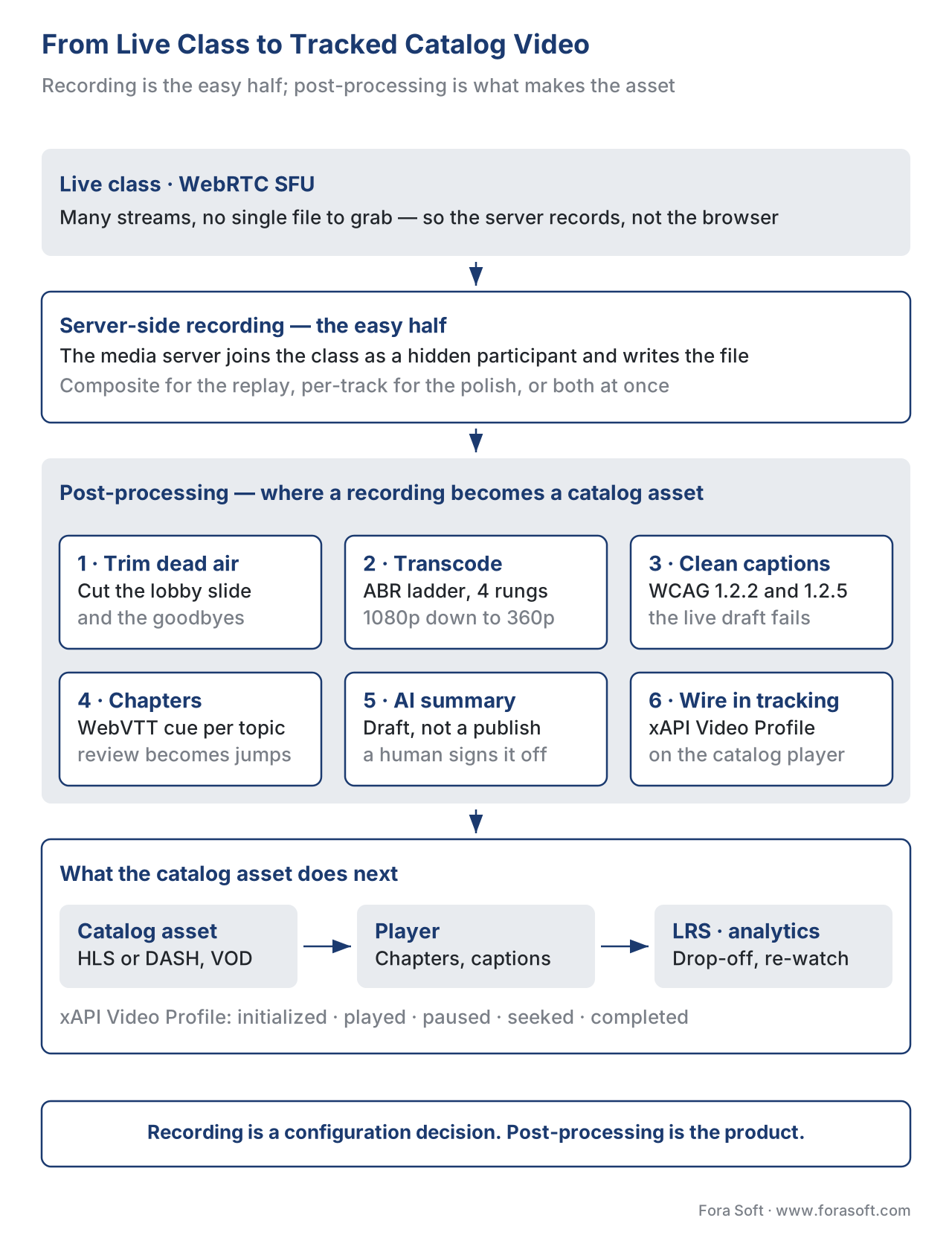 Figure 1. The full journey. The live class is recorded server-side, then post-processing trims, transcodes, captions, and chapters it into a catalog asset that the player tracks back to your learning record store.
The Core Decision: Composited or Per-Track
Server-side recording comes in two shapes, and choosing between them is the first real decision. Get it right and the rest of the pipeline is smooth; get it wrong and you will re-record courses you can never re-shoot.
Composited recording
A composited recording captures the room exactly as it looked — the instructor, the shared slides, the gallery of faces, the layout — and bakes it into one finished video file. Technically, a headless browser (a web browser running on the server with no screen) loads a web page that shows the room, and the server records that page as it plays. LiveKit, a widely used open-source real-time media server, calls this room composite egress: it renders the room with a customizable web layout in Chrome and records the result, and the recording is tied to the room's lifecycle, stopping automatically when the class ends (LiveKit, Egress overview, official docs).
The appeal is simplicity. You get one file, ready to play, that looks like the class looked. As one engineering team that built recording into a WebRTC product noted, the composite stream is simple — your only real worry is where to store it and how to secure it (WebRTC.ventures, Adding Recording to Your WebRTC Application).
The cost is that the layout is frozen. Whatever was on screen at recording time is permanent. If the instructor's slide-share covered the demo, or a learner's camera grabbed the spotlight at the wrong moment, you cannot fix it later — the pixels are welded together. You also cannot easily re-cut the video to feature only the instructor for a polished catalog version.
Per-track recording
A per-track recording does the opposite. It saves each participant's video and audio as its own separate file — the instructor on one track, the screen-share on another, each learner on theirs. LiveKit exposes this as track egress (each track exported on its own, with video left untranscoded) and participant egress (one participant's audio and video saved together) (LiveKit, Egress overview, official docs).
The appeal is total flexibility after the fact. Because the pieces are separate, you can compose any layout you want in post — instructor full-screen, slides full-screen with the instructor in a corner, a clean two-shot — and you can caption each speaker's track independently for better accuracy. This is the path you take when the recording is going into a polished, reusable catalog rather than an internal "watch the replay" archive.
The cost is a second step: separate tracks are not a watchable video until something stitches them back together on a shared timeline — the compositing step that the composited mode did for you up front. That step is engineering work and compute cost. The classic professional pattern, recording raw tracks during the call and compositing afterwards, gives you the most editorial control at the price of the most pipeline (WebRTC.ventures).
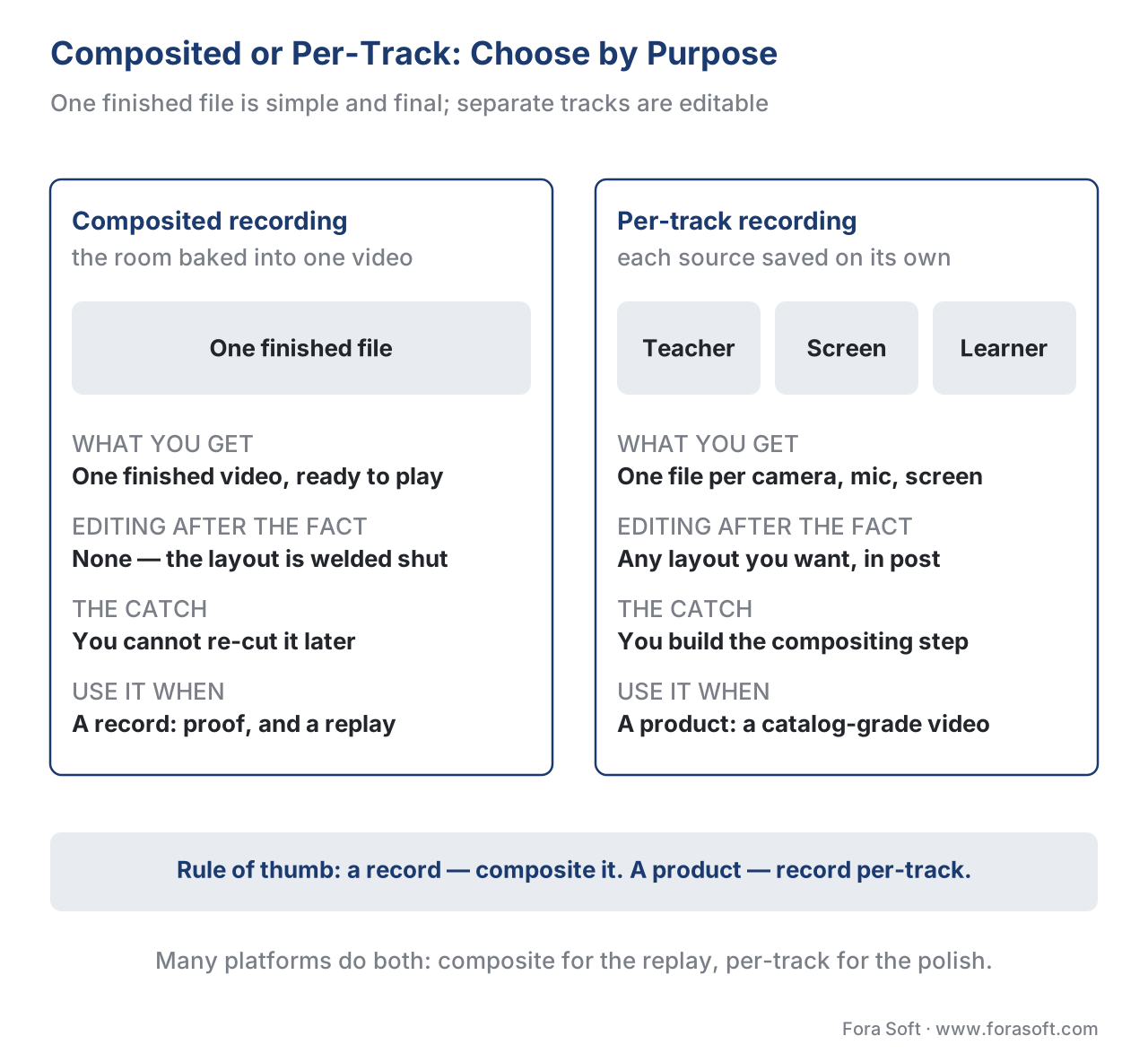 Figure 2. One finished file, or flexible pieces. Composited recording is simple and final; per-track recording is editable but needs a compositing step. Choose by how polished and reusable the catalog asset must be.
The rule of thumb: if the recording is a record — proof a class happened, a replay for absentees — composite it and move on. If the recording is a product — a flagship course video you will re-use for years — record per-track so you can edit it into something catalog-grade. Many mature platforms do both at once: composite for the instant replay, per-track in the background for the eventual polished version. LiveKit's auto egress, for example, can record the room as a composite and each published track separately when the room is created (LiveKit, Egress overview).
A Quick Word on How the File Gets Made
You do not need to build the recorder from scratch, and you should not. The media server records by joining the class as a special, invisible participant. In LiveKit's case the recorder joins as a participant of kind EGRESS, subscribes only to the tracks it needs, and uses an open-source media toolkit (GStreamer) to encode the output to a file or a live stream (LiveKit, Egress overview). It can write a finished MP4, or HLS segments — the chunked format used for adaptive on-demand streaming — directly. The point for a non-engineer: recording is a configuration-and-cost decision, not a research project. The protocol-level recording mechanics, and the bridge from a live WebRTC session to an on-demand HLS file, are covered in the Video Streaming section's WebRTC recording and the HLS bridge — this article stays on the learning application.
# Conceptual: start a room-composite recording when a class begins.
# This is illustrative, not a literal SDK call.
egress.start_room_composite(
    room="algebra-101-2026-06-20",
    layout="speaker-focus",       # the baked-in layout
    output={"type": "hls", "segments": "s3://catalog/algebra-101/"}
)
Post-Processing: Where a Recording Becomes a Catalog Asset
Now the valuable half. A raw recording is rarely fit for the catalog. Post-processing is the sequence of steps that turns it into something a learner will choose to watch and finish. Treat these as a pipeline, run automatically on every recording.
1. Trim the dead air
Every live class has waste at the edges: the five minutes of "can everyone hear me?", the lobby slide, the goodbye shuffle. A catalog video that opens on a frozen waiting-room screen loses the viewer in seconds. The first post-processing step is trimming — cutting the recording down to the real start and end. This can be manual (an editor sets in- and out-points) or assisted (detect the first slide change or the first speech as the likely start). It is the cheapest step with the biggest effect on whether anyone watches.
2. Transcode into an adaptive package
A single high-resolution file is the wrong way to deliver on-demand video to a class on mixed devices and networks. The standard practice is to transcode — re-encode — the recording into several quality levels and chunk them into an adaptive package so each learner's player automatically picks the level their connection can sustain. This is the same adaptive-streaming machinery the rest of Learn covers; do not re-derive it here. The codec and quality-ladder choices belong to the Video Encoding section, and the on-demand delivery and multi-CDN economics to scaling delivery: CDN, transcoding, and cost at volume. The learning-specific point is only this: a class recording is not catalog-ready until it is packaged for adaptive on-demand playback, because your learners are not all on campus fibre.
3. Caption to the prerecorded standard — not the live one
This is the step teams most often get wrong, and it has a legal edge. During the live class you may have shown automatic live captions. That satisfies a live accessibility duty. The moment the class becomes an on-demand recording, a stricter, different duty applies — and the live captions are not good enough to meet it.
The international accessibility standard, the Web Content Accessibility Guidelines (WCAG) 2.1, treats live and prerecorded media differently. Live captions fall under Success Criterion 1.2.4 Captions (Live), at conformance Level AA. A recording is prerecorded media, governed by Success Criterion 1.2.2 Captions (Prerecorded) at Level A, and — crucially — Success Criterion 1.2.5 Audio Description (Prerecorded) at Level AA, which has no live equivalent (W3C, WCAG 2.1, Success Criteria 1.2.2, 1.2.4, 1.2.5). Prerecorded captions must be accurate and synchronized and include relevant non-speech sound; the rough, error-filled output of live auto-captioning does not clear that bar. So the post-processing step is: take the live transcript as a draft, correct it, and ship clean, synchronized captions — plus, for Level AA, audio description of meaningful visual-only content. The speech-to-text engine itself lives in the AI for Video Engineering section; here the duty is to clean its output up to the prerecorded standard. The broader accessibility playbook is in WCAG 2.1 AA for educational video.
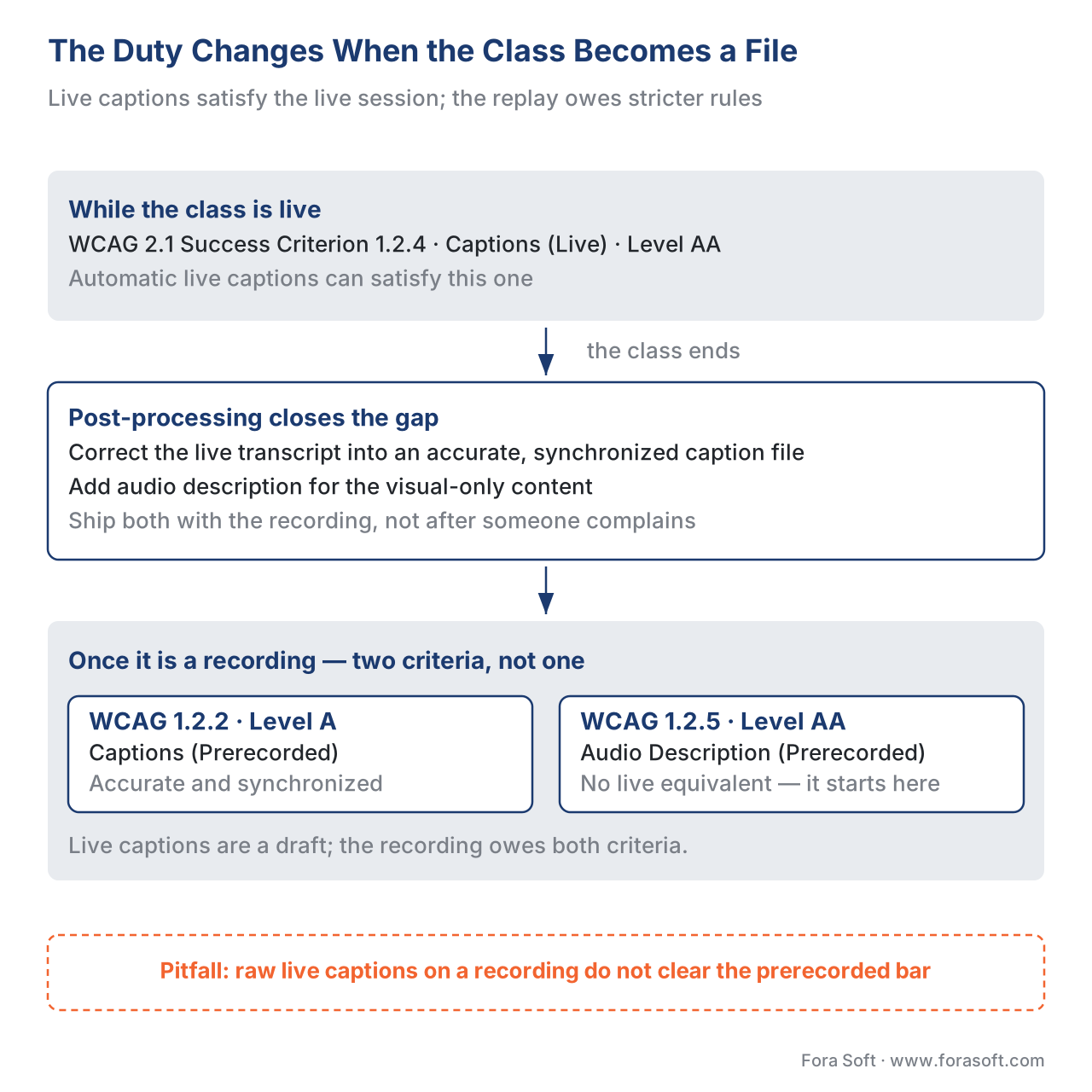 Figure 3. The duty changes when the class becomes a recording. Live captions (WCAG 1.2.4) satisfy the live session; the on-demand replay must meet prerecorded captions (1.2.2) and audio description (1.2.5). Post-processing closes that gap.
4. Chapter the recording
An hour-long lecture with no internal structure is hostile to review — a learner who wants the one section on a topic has to scrub blindly. Chapters fix this: named navigation markers that split the timeline into discrete, jumpable segments. The web-standard way to carry them is a WebVTT file (the W3C Web Video Text Tracks format), where a chapter track is plain text — typically a single line per chapter — that the player turns into clickable markers (W3C, WebVTT: The Web Video Text Tracks Format). Chapters are not cosmetic: industry analytics in 2026 associate chaptered videos with materially higher watch time, because review becomes navigable rather than linear (Mux, Generating video chapters using AI). For a learning catalog, chapters are also where re-watch and "jump to the hard part" behaviour shows up in your analytics.
5. Add the AI assist — carefully
Two post-processing steps are now routinely automated: generating the chapter boundaries and a summary. AI auto-chapter tools detect topic and scene changes and propose chapter breaks and titles, which an editor then refines — a hybrid first-pass-then-review workflow that saves real time per video (Audiorista; Mux, Generating video chapters using AI). The same model can produce a study summary and key-points list for the catalog page. The honest caveat: treat AI chapters and summaries as a draft, not a publish. The model internals — summarization quality, multilingual handling — belong to the AI section's lecture summarization and study aids; the learning-product decision is whether you let auto-output publish unattended (you should not, for graded or compliance content) or gate it behind a quick human check.
6. Wire in tracking so the recording earns data
A catalog recording should not be a dead video. It should report the same learning signals as any other course asset. The standard for capturing rich video behaviour is the xAPI Video Profile — a profile of the Experience API (xAPI) maintained by ADL — which defines specific statements for video: initialized, played, paused, seeked, completed, and terminated, written to your Learning Record Store as the learner watches (ADL, xAPI Video Profile). That is far richer than a raw player's "played" flag: it tells you which segments were re-watched, where learners dropped off, and what they skipped. The mechanics of emitting those statements are covered in tracking video with xAPI: the video profile, and the meaning of the resulting numbers in learning metrics 101. The catalog-specific point: decide at post-processing time what "completed" means for a recorded class, and emit it deliberately — which brings us to the most common confusion in the whole topic.
The Pitfalls That Define a Bad Recording Pipeline
"Watched 100% means completed." It does not, necessarily. A learner can leave a recording playing in a background tab and reach 100% having absorbed nothing; another can watch 80% and pass the quiz. Decide your completion rule on purpose — percentage watched, a knowledge check, or both — and emit the xAPI completed statement to match. Do not let the player's raw progress bar silently define mastery. This is the single most common e-learning measurement error, and it starts in the recording pipeline.
"The live captions carry over." They do not clear the prerecorded bar. As above, live captions satisfy WCAG 1.2.4; a recording owes 1.2.2 and 1.2.5, which auto-captions alone do not meet. Shipping a public-sector or enterprise course with raw auto-captions is both a learner-experience failure and a compliance exposure.
"We'll re-edit the composite later." You cannot. A composited recording is a flattened video — the layout is permanent. If there is any chance you will want to re-cut or re-layout, you had to record per-track. This decision is unwinnable after the fact.
"Recording is free." It is not. A composited recording runs a headless browser as a full server-side participant for the entire class; that compute is metered, and concurrent recordings multiply it. Storage and especially delivery add more. The cost section below makes this concrete.
"Just hit record and it's a course." A raw recording opening on a lobby slide, with no chapters, no clean captions, no adaptive package, and no tracking, is not a catalog asset — it is footage. The post-processing pipeline is the product.
The Cost Arithmetic, Shown Out Loud
Let us price a realistic example so the trade-offs are concrete. Assume a 60-minute class, recorded as a 720p composite at about 1.5 megabits per second (Mbps), going into a catalog that 500 learners will eventually watch.
Recording size. Bitrate times duration gives file size. Work in consistent units:
1.5 Mbps × 3,600 seconds = 5,400 megabits
5,400 megabits ÷ 8 = 675 megabytes ≈ 0.66 GB for the raw 720p recording
Transcoding to an adaptive package. Re-encoding into, say, four quality levels (1080p down to 360p) and chunking them roughly doubles the stored bytes versus the single file:
0.66 GB × ~1.8 (the adaptive ladder) ≈ 1.2 GB stored per hour of class
Storage. Object storage runs on the order of $0.023 per GB per month (typical cloud list price, 2026):
1.2 GB × $0.023 = about $0.028 per month to store one hour of class
A 500-hour catalog: 500 × 1.2 GB = 600 GB × $0.023 ≈ $13.80 per month
Storage, in other words, is almost free. Delivery is where the money is. Content-delivery-network egress runs on the order of $0.085 per GB (typical cloud list price, 2026). If 500 learners each stream the 720p rendition (~0.66 GB):
500 learners × 0.66 GB = 330 GB delivered
330 GB × $0.085 ≈ $28 to deliver this one recording to 500 viewers
Recording compute. The headless-browser recorder is metered per minute of recording — on the order of one to two cents per minute for a composite, so roughly $0.60–$1.20 for the 60-minute class.
The lesson the arithmetic teaches: recording and storing your catalog is cheap; delivering it at scale is the recurring cost, and it grows with views, not with hours recorded. That is why the delivery and CDN economics — and the codec choices that shrink every byte — get their own deep-dives in scaling delivery: CDN, transcoding, and cost at volume and the Video Encoding section. Budget for views, not recordings.
Comparing the Tools You'd Actually Use
You will not build the recorder from raw protocol code. You will pick a media server or a managed service and configure its recording. The table compares the realistic options on the axes that matter for a learning catalog, including whether each readily feeds the caption and xAPI-tracking pipeline this article has described.
| Option | Recording modes | Output formats | Catalog & tracking fit | Build effort |
|---|---|---|---|---|
| LiveKit Egress (open-source / cloud) | Composite, per-track, participant, auto | MP4, HLS, WebM, RTMP | Strong — HLS out, per-track for re-edit, easy to feed xAPI/caption steps | Low–medium |
| mediasoup (open-source SFU, custom) | Per-track via custom recorder | Raw tracks → your pipeline | Full control; you build compositing, captions, tracking | High |
| Janus (open-source) | Per-track (.mjr), composite via post-tool | Needs post-processing to MP4/HLS | Workable; more assembly required | Medium–high |
| Managed CPaaS (e.g., Daily, Twilio-style) | Composite, often per-track | MP4, HLS | Fast to ship; less control, per-minute pricing | Low |
| Browser-side recording | Single client capture | WebM | Poor for catalog — fragile, no server control | Low but unreliable |
The honest reading: a managed service or LiveKit gets you to a working recording fastest; a custom mediasoup pipeline gives you total control over the composited layout, the caption flow, and the tracking, at the price of building it. Which you choose is the build-vs-buy decision this section keeps returning to — and it hinges on how much your catalog quality and tracking differentiate your product.
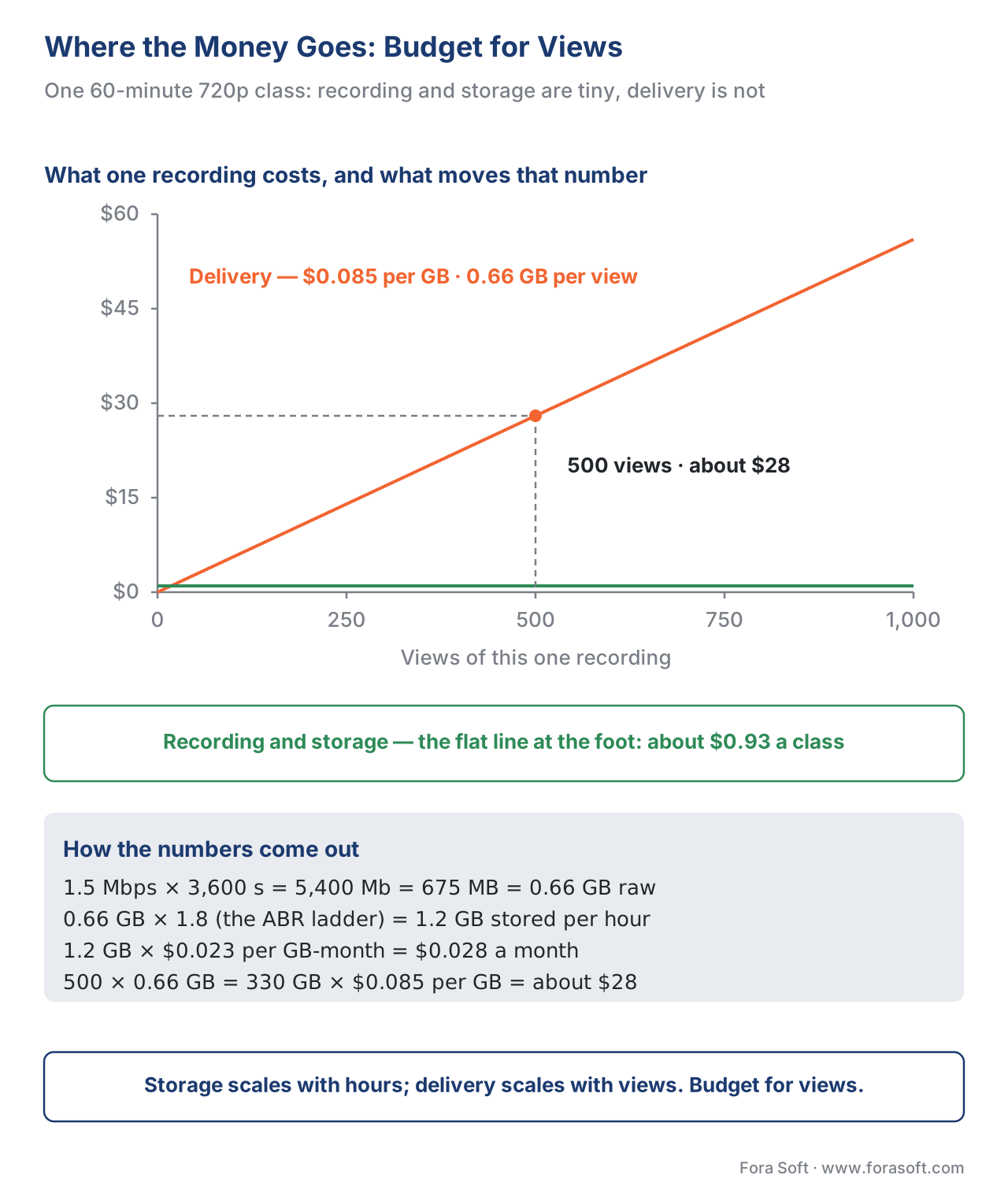 Figure 4. Where the money goes. Recording and storage are cheap and roughly fixed per hour; delivery scales with every view and dominates the bill. Budget for views, not recordings.
Where Fora Soft fits in
Fora Soft has built real-time video, streaming, and on-demand systems since 2005, and a live-class recording pipeline sits exactly at the intersection of the three — WebRTC capture, server-side recording, and adaptive on-demand delivery with learning-grade tracking. The build-vs-buy trade-off we help teams make is concrete: a managed recording feature ships fast and is right for an internal replay archive, while a custom per-track pipeline pays off when the recording is a flagship catalog product that must be re-edited, accurately captioned, chaptered, and tracked through xAPI into your own analytics. We work across e-learning, video streaming, OTT, and conferencing, so we tend to be brought in when a recording feature has to be both broadcast-quality and pedagogically measurable. No hype — the right answer is sometimes "buy the off-the-shelf recorder", and we will say so.



The handbook
Fora Soft Video Engineering Handbook
We wrote a seven-volume handbook that takes the whole video stack apart, from the pixel to production, across 9,000+ pages — enough that an engineer who works through it can design and build the pipeline this article describes. Volume 3 covers the half where the money goes: ABR ladders, CDNs and caching, players and trick play, WebRTC, DRM and the economics of delivery — the arithmetic behind the $28 above. Volume 2 covers ingest and the segmented formats a recording is packaged into, HLS, MPEG-DASH and CMAF, and volume 1 covers the codec and quality-ladder decisions that set how many bytes each view costs you. Written by Nikolay Sapunov, CEO at Fora Soft.
Turning live classes into a catalog worth watching?
Tell us how your classes run and what the recordings have to become, and we will map the recording mode, the post-processing steps and the tracking before anyone writes the integration. 250+ video products shipped since 2005.
See our case studies
Case study
Scholarly
Sydney's selective and scholarship test-prep platform, with live classes for up to 2,000 students at once on LiveKit and WebRTC, then the same sessions delivered back as adaptive DASH and HLS video-on-demand — the exact live-to-catalog path this article describes, on S3 and Cloudflare R2 with ClickHouse behind the analytics.
Case study
VALT
A server-side recording and observation platform for 770+ organizations and 50,000+ users in medical education and simulation labs: encrypted RTMPS capture, scheduled and recurring recordings, and word search inside recorded video through Amazon Transcribe — post-processing that turns a recording into something a learner can navigate.
Case study
BrainCert
A WebRTC and HTML5 virtual-classroom LMS with cloud session recording, SCORM and xAPI support and QuantumKey DRM, running 500M+ classroom minutes across 10 datacenters — the scale at which delivery, not recording, is what shows up on the bill.
What to read next
Tracking
Tracking Video With xAPI: The Video Profile
Step 6 in full: which statements to emit, when, and what they let you answer later.
Accessibility
WCAG 2.1 AA for Educational Video
The whole accessibility playbook behind the 1.2.2 and 1.2.5 duties this article stops at.
Delivery cost
Scaling Delivery: CDN, Transcoding, and Cost at Volume
Where the $28 goes when the catalog is 500 hours and the views keep coming.
Navigation
Chaptering, Transcripts, and In-Video Search
Chapters and transcripts as a product feature, not just a post-processing step.
References
- LiveKit. Egress overview (official documentation) — RoomComposite, participant, track, and auto egress; GStreamer encoding; MP4/HLS output;
EGRESSparticipant model. https://docs.livekit.io/server/egress (Tier 4, first-party engineering). Accessed 2026-06-20. - W3C. Web Content Accessibility Guidelines (WCAG) 2.1, W3C Recommendation — Success Criterion 1.2.2 Captions (Prerecorded, Level A); 1.2.4 Captions (Live, Level AA); 1.2.5 Audio Description (Prerecorded, Level AA). https://www.w3.org/TR/WCAG21/ (Tier 1, primary standard). Accessed 2026-06-20.
- ADL. xAPI Video Profile — video statement vocabulary (initialized, played, paused, seeked, completed, terminated) for reporting video to an LRS. https://adlnet.gov/projects/xapi-video-profile/ (Tier 1, primary standard). Accessed 2026-06-20.
- ADL. Experience API (xAPI) Specification, version 1.0.3 — Part 2: Statements; the statement model the Video Profile extends. https://github.com/adlnet/xAPI-Spec (Tier 1, primary standard). Accessed 2026-06-20.
- W3C. WebVTT: The Web Video Text Tracks Format — chapter cues as navigation markers. https://www.w3.org/TR/webvtt1/ (Tier 1, primary standard). Accessed 2026-06-20.
- Daily. Why recording WebRTC is so hard (engineering blog) — variable frame rate, packet loss, clock drift, and why recording is server-side. https://www.daily.co/blog/why-recording-webrtc-is-so-hard-2/ (Tier 3, first-party engineering). Accessed 2026-06-20.
- WebRTC.ventures. Adding Recording to Your WebRTC Application (engineering blog) — composite vs per-track trade-offs; record-raw-then-composite pattern. https://webrtc.ventures/2021/03/adding-recording-to-your-webrtc-application/ (Tier 3, first-party engineering). Accessed 2026-06-20.
- Mux. Generating video chapters using AI (engineering documentation) — auto-chapter generation and watch-time effect. https://www.mux.com/docs/examples/ai-generated-chapters (Tier 4, vendor engineering). Accessed 2026-06-20.
- Audiorista. How to Create AI Chapter Markers for Audio & Video — hybrid AI-then-review chapter workflow. https://www.audiorista.com/blog/how-to-auto-generate-chapter-markers-for-audio-and-video-with-ai (Tier 6, orientation). Accessed 2026-06-20.
Where sources disagreed, the official standard won. Vendor blogs describing "auto-captions = accessible" were overridden by WCAG 2.1's explicit split between live (1.2.4) and prerecorded (1.2.2/1.2.5) criteria. Cloud storage/egress and recording-compute prices are typical 2026 list prices used for illustration — confirm against your provider's current rate card.
