


Why This Matters
If you run training at a company, found an EdTech product, or own a course catalog, the live class is where your most expensive asset — an instructor's time — meets your learners in real time, and the engine under that class is almost always WebRTC. Knowing why it is the default, and where it quietly fails, is the difference between a pilot that wins the district and one that dies on a school firewall nobody tested against. This article gives a non-technical decision-maker the vocabulary to brief engineers, the four classroom-specific risks to budget for, and the build-vs-buy line that keeps you from rebuilding infrastructure you should rent. It is the engineering companion to the virtual classroom, which explained what a classroom is; this one explains why the live engine is WebRTC and what breaks.
First, What WebRTC Actually Is
Start with plain words. WebRTC — Web Real-Time Communication — is the built-in browser technology for sending live audio, video, and data directly between people with very little delay. When a learner clicks a class link and their camera appears next to the instructor's a moment later, with no download and no plugin, that is WebRTC doing its job. It is not an app you install; it is a capability already baked into Chrome, Safari, Firefox, and Edge.
Two facts make WebRTC a real standard rather than one vendor's product, and both matter when you are betting a learning platform on it. First, the browser side is a formal web standard: WebRTC 1.0 is a World Wide Web Consortium (W3C) Recommendation, finalized on 26 January 2021, which defines the JavaScript interfaces every browser exposes for real-time media (W3C, "WebRTC 1.0: Real-Time Communication Between Browsers," Recommendation, 2021). Second, the network side is a stack of internet protocols specified by the Internet Engineering Task Force (IETF); the umbrella overview is RFC 8825, "Overview: Real-Time Protocols for Browser-Based Applications" (IETF, 2021). Because both halves are open standards, no single company can take WebRTC away from you, and any compliant browser can join your class.
This article does not re-derive how those protocols work — that is the job of the Video Streaming section. When you need the internals — how two browsers find each other, how media is encrypted, how a server fans one video out to many viewers — read WebRTC explained and SFU, MCU, and mesh topologies. Here we stay on one question: why is WebRTC the right engine for a live class, and what are the classroom-specific traps?
Why WebRTC Won Real-Time Learning
Three properties, in order of importance to teaching.
1. Sub-second latency makes a class feel live
The word that matters here is latency — the delay between something happening at one end and being seen at the other. For a broadcast, a few seconds of delay is invisible; you are watching, not talking. For teaching, delay is poison. When an instructor asks "any questions?" and waits, a half-second lag turns into awkward cross-talk and dead air; when a learner answers and the instructor reacts a beat late, the back-and-forth that makes a class feel alive falls apart.
Put the number in human terms. WebRTC targets glass-to-glass delay — camera lens to the other person's screen — of well under a second, typically a few hundred milliseconds on a healthy connection, and production systems regularly report under 150 milliseconds through a media server. A 200-millisecond round trip feels like a normal conversation. A 2-second delay feels like a satellite phone call where everyone keeps interrupting. That gap is exactly the difference between WebRTC and the broadcast-style protocols (such as HLS, the protocol most on-demand video uses) that carry 5 to 30 seconds of delay. For the interactive parts of a class — discussion, hand-raising, cold-calling, live problem-solving — WebRTC's sub-second budget is not a nice-to-have; it is the reason the class works at all.
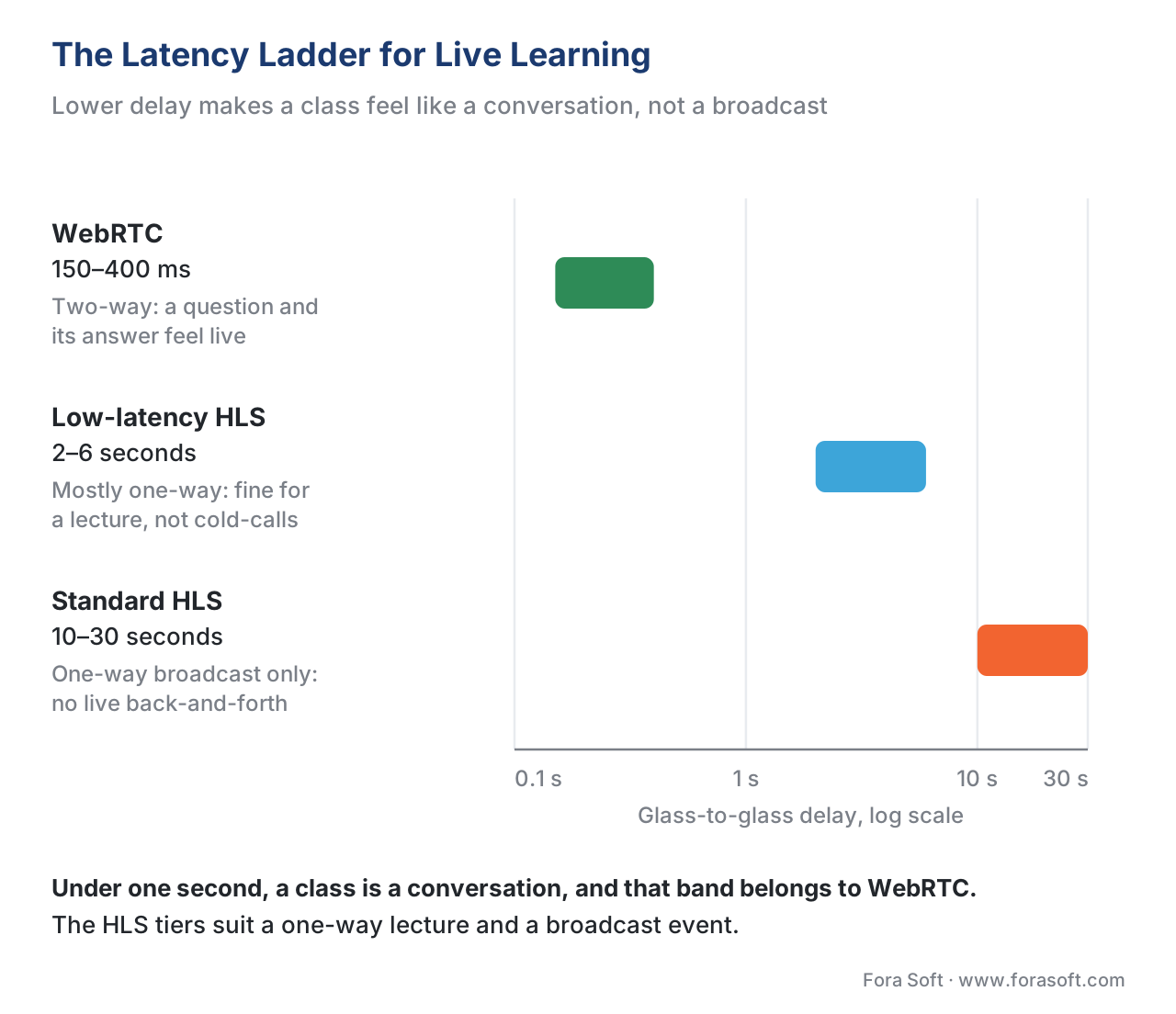 Figure 1. The latency ladder. WebRTC's sub-second, two-way delay is what makes a discussion feel like a conversation; low-latency HLS (2–6 seconds) suits a one-way lecture with a chat-delayed Q&A; standard HLS (10–30 seconds) is broadcast only. The interactive class lives in the green band.
2. Browser-native means zero install — and that is an enrollment number
The second reason is friction. A learner joins a WebRTC class by opening a link. There is no app to download, no plugin to approve, no IT ticket to file on a managed school laptop. That sounds like a convenience; in a learning product it is a completion-and-enrollment number. Every install step between "click the link" and "I am in class" loses a fraction of learners — the ones on a locked-down work laptop, the ones on an unfamiliar device, the ones who simply give up. The browser-native nature of WebRTC, standardized through the Media Capture and Streams interface that asks permission for the camera and microphone (W3C, "Media Capture and Streams"), removes that friction entirely.
3. A built-in data channel carries the rest of the classroom
A class is not only faces and voices. It is chat, polls, hand-raises, a shared whiteboard, and quiz interactions. WebRTC includes a data channel — a low-latency pipe for arbitrary data that rides alongside the audio and video. That single channel is what lets a poll result, a raised hand, or a whiteboard stroke arrive with the same immediacy as the video, instead of lagging behind on a separate connection. The interactive layer that sits on top of this — quizzes, branching, annotation — is the subject of the interactive video block; the live whiteboard specifically is covered in the interactive whiteboard and shared canvas.
How a Learner Actually Connects (and Why Schools Break It)
To understand the gotchas, you need one simplified picture of how two browsers reach each other — and then we hand the details to the Streaming section.
When a learner joins, their browser tries to find a direct path to the other participants. Most home and mobile networks hide devices behind a router using a technique called NAT (Network Address Translation), so the browser needs help discovering its own public address. A small, cheap helper called a STUN server (Session Traversal Utilities for NAT, IETF RFC 8489) tells the browser "here is how the outside world sees you," and a method called ICE (Interactive Connectivity Establishment, IETF RFC 8445) tries every candidate path until one works. When a direct path succeeds, media flows browser-to-browser or browser-to-server, STUN's job is done, and the cost to you is almost nothing.
The problem is the networks that refuse a direct path. Many schools, universities, hospitals, and corporations run strict firewalls that block everything except ordinary web traffic on ports 80 and 443. On those networks, ICE cannot find a direct route, and the only way to connect is to relay every packet of audio and video through a server that both sides can reach — a TURN server (Traversal Using Relays around NAT, IETF RFC 8656), typically configured to run over TLS on port 443 so it looks like normal secure web traffic and slips through. TURN always works, which is why it is the safety net. But because it carries every byte of media, it is also where the bills appear.
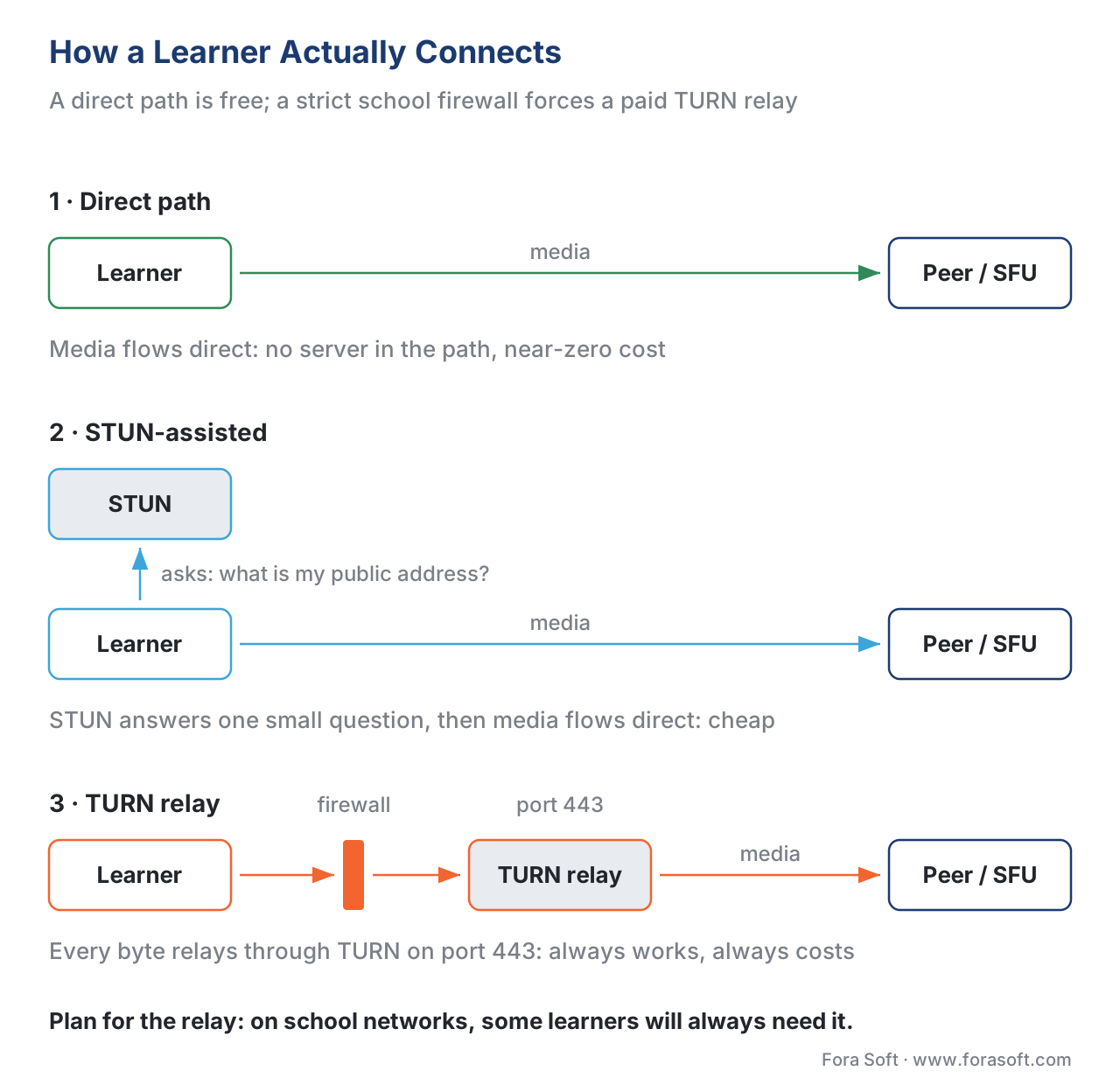 Figure 2. Three ways a learner connects. A direct path is free; STUN helps two browsers find each other and is cheap; a strict school or corporate firewall forces every byte through a TURN relay on port 443 — the path that always works and always costs. Plan for the relay, because some learners will always need it.
Gotcha 1: TURN-Relay Cost on School and Corporate Networks
Here is the trap that catches teams who only tested on home Wi-Fi. In a friendly network, most media flows directly and your server costs are tiny. But a meaningful share of real learners — exactly the ones on school, campus, and corporate networks you most want to sell into — sit behind firewalls that force a TURN relay. Relayed media is billed at cloud bandwidth rates, and a live class moves a lot of bytes.
Walk the arithmetic out loud, because the number surprises people. Take one learner whose media must be relayed:
- A reasonable live-class stream is about 1 megabit per second up (their camera) and 1.5 megabits per second down (the instructor plus a few visible peers), so roughly 2.5 megabits per second through the relay.
- A 50-minute class is 3,000 seconds. 2.5 megabits/second × 3,000 seconds = 7,500 megabits.
- Divide by 8 to get megabytes: 7,500 ÷ 8 = 937.5 megabytes ≈ 0.94 GB of relayed media for one learner, one class.
Now scale it. Imagine a class of 25 learners on a locked-down district network where every learner is relayed:
- 25 learners × 0.94 GB = 23.4 GB per class session.
- Cloud egress runs roughly $0.09–$0.12 per GB in 2026 (AWS, Google Cloud, and managed real-time vendors such as LiveKit all sit in this band). At $0.10/GB: 23.4 GB × $0.10 = $2.34 per class.
That single number looks trivial — until you multiply by a real schedule. Two hundred classrooms, five days a week, forty weeks a year is 200 × 5 × 40 = 40,000 class-sessions. At $2.34 each: 40,000 × $2.34 ≈ $93,600 a year in relay bandwidth alone, on top of every other cost. The lesson is not "WebRTC is expensive." It is: the relay is the variable that scales with your worst networks, so model it before you price the contract, and design to keep direct connections working wherever possible. Reducing video resolution on the relayed tier, capping the number of simultaneous incoming streams, and running your own TURN servers in the right regions are the levers that move that bill.
Gotcha 2: Scaling Past a Meeting to a Lecture Hall
The second trap is assuming a small WebRTC demo scales linearly. It does not, and the reason is architecture.
The simplest WebRTC setup connects everyone to everyone directly — a mesh. With 4 people that is fine. With 30 it collapses, because each browser must send its video to every other browser and receive everyone else's; the upload demand and the laptop's processor both fall over somewhere around 6 to 8 active video senders. A 30-person seminar, let alone a 200-seat lecture, cannot run on a mesh.
The fix is a media server. A Selective Forwarding Unit (SFU) is a server each participant sends one copy of their video to; the SFU then forwards the right streams to the right people, so no browser has to upload more than once. An SFU comfortably runs a 30-person seminar where everyone might speak, and scales to hundreds of viewers when only a few people are on camera. For a true lecture hall — one instructor, 500+ silent learners — you add a one-way broadcast tier (often low-latency HLS) fed from the SFU, so the handful of interactive participants stay on WebRTC while the silent audience watches a cheap, massively scalable stream. That hybrid — WebRTC for interaction plus a broadcast tier for reach — is the standard pattern for large live learning.
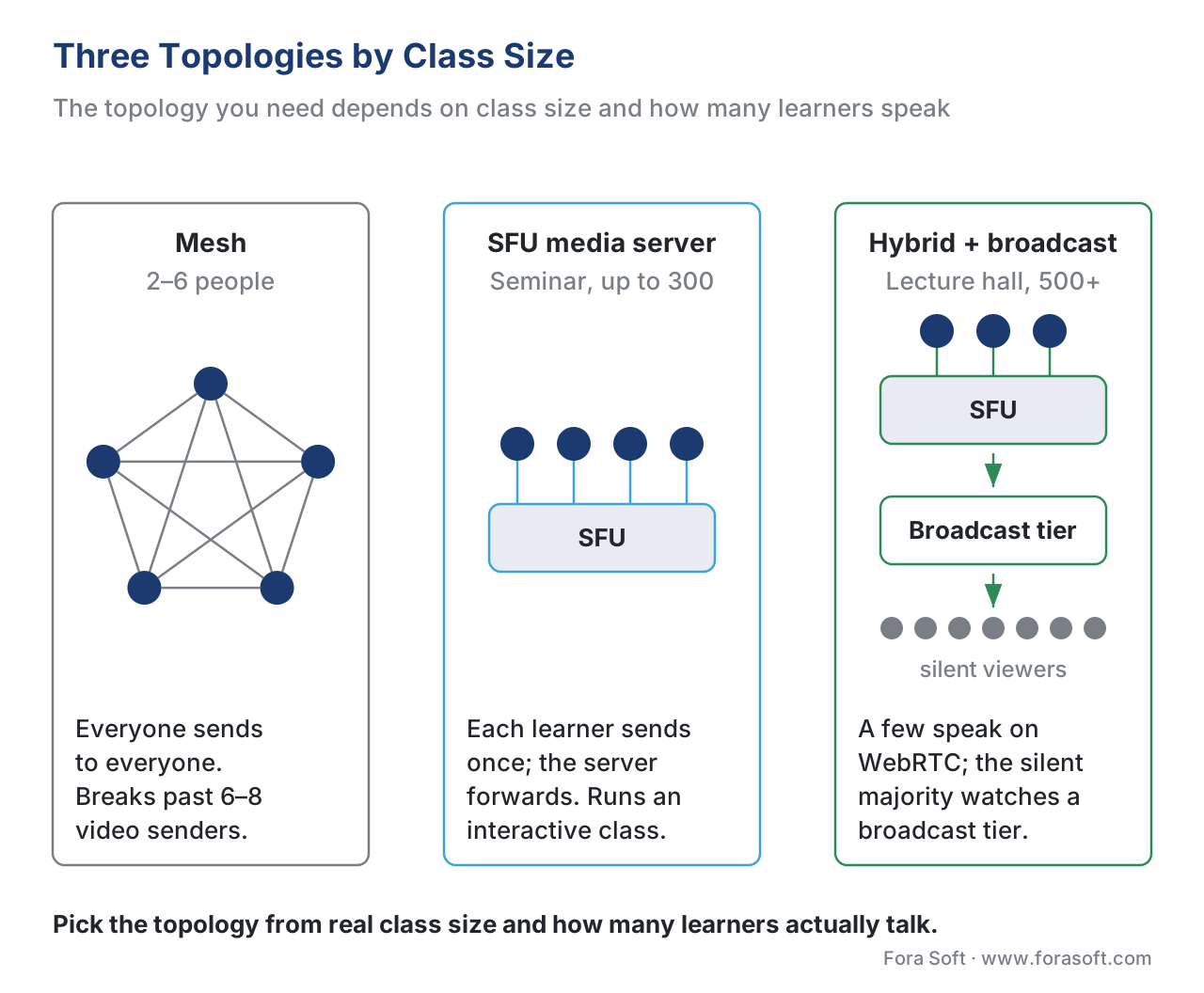 Figure 3. Three topologies by class size. A mesh suits 2–6 people and breaks beyond that. An SFU runs the interactive seminar (everyone can speak). A large lecture adds a broadcast tier fed by the SFU, so a few interactive participants stay on WebRTC while hundreds watch a scalable one-way stream.
The SFU, simulcast (sending several quality levels so each viewer gets one their connection can handle), and the broadcast bridge are protocol-level topics owned by the Streaming section — read scaling the live class: SFU, simulcast, and the 200-seat lecture for the learning-specific decision, and simulcast, SVC, and the SFU for the internals. The classroom point is simply this: the topology you need is a function of class size and how many people actually talk, so decide that before you pick a tool.
Gotcha 3: The Recording Problem
Ask any team that shipped a live-learning product what surprised them, and recording is near the top. It seems trivial — "just record the call" — and it is the opposite.
Recording in the browser, on the instructor's machine, breaks in predictable ways: it dies when the tab closes, it cannot reliably capture everyone at scale, and it produces a single file no learning system can index. Production recording happens on the server: a recording component joins the session like a silent participant or pulls streams straight from the SFU, writes them to cloud storage, and a separate pipeline trims, composes the gallery view, transcodes the result into the formats a catalog needs, and publishes it through a content delivery network for on-demand replay. None of that is the live call; all of it is a second system you have to build or buy.
For a learning product, the recording is not just a file — it is a learning asset that should join the learner's record. The standard that captures fine-grained video events, called the xAPI Video Profile (a community profile built on the Experience API, the learning-data standard known as xAPI), defines structured statements like "played," "paused," "seeked," and "completed" so a replayed class feeds the same analytics as any other course video (ADL, xAPI Video Profile; Experience API 1.0.3). The mechanics of how a WebRTC session becomes an on-demand asset live in recording live classes and post-processing for the catalog and, for the protocol bridge, WebRTC recording and the HLS bridge; the tracking layer is in tracking video with the xAPI Video Profile. Budget for the recording pipeline as a first-class subsystem, not a checkbox.
Gotcha 4: Captions and Compliance Are Not Optional
The fourth trap is shipping an uncaptioned live class to a buyer who is legally required to provide captions. Live captions for a synchronous class are not a courtesy; they are a named accessibility requirement. The Web Content Accessibility Guidelines, version 2.1, Success Criterion 1.2.4 (Captions, Live) at conformance Level AA require real-time captions for all live audio in synchronized media (W3C, WCAG 2.1, SC 1.2.4, 2018). For a public-sector, university, or large-enterprise buyer, an uncaptioned live class can fail procurement outright, and in several jurisdictions it can create legal exposure.
Captioning a live WebRTC class means feeding the audio to a real-time speech-to-text service and delivering the text to learners with minimal delay — a pipeline that touches the audio engineering and the AI model, both owned by other sections. For the speech-recognition side and the fan-out pattern, see live captions and SFU-side ASR; for the audio pipeline that feeds it, see the WebRTC audio pipeline end to end. The classroom point: captions are a requirement to design in from the start, not a feature to bolt on after a buyer asks.
A note on security, because buyers ask: WebRTC media is encrypted by default. The specification mandates that audio and video travel over SRTP and that the connection be secured with DTLS, so a live class is private on the wire without extra work (IETF RFC 8827, "WebRTC Security Architecture"; RFC 8826, "Security Considerations for WebRTC"). The details are in WebRTC security: DTLS and SRTP.
WebRTC vs the Alternatives for Live Learning
Here is the distinction laid out against what a learning team actually has to deliver. The "tracking / standards" column is the one that most often decides the build, because a learning product lives or dies on whether the session feeds the learning record.
| Capability | WebRTC | Low-latency HLS | Standard HLS broadcast |
|---|---|---|---|
| Glass-to-glass latency | Under 1 second (typ. 150–400 ms) | ~2–6 seconds | ~10–30 seconds |
| Direction | Two-way, interactive | Mostly one-way + delayed chat | One-way only |
| Best class size | 2–300 interactive | Hundreds–thousands viewing | Unlimited viewing |
| Hand-raise / cold-call | Yes, feels live | No (delay breaks it) | No |
| Install friction | None — browser-native | None — browser-native | None |
| Server cost driver | TURN relay + SFU egress | CDN egress (cheaper/GB) | CDN egress (cheapest/GB) |
| Tracking / standards | Build the xAPI bridge | Build the xAPI bridge | Build the xAPI bridge |
| Best fit | Seminars, tutoring, cohorts | Large interactive lectures | Pure broadcast events |
Two rows deserve a flag. Latency is why WebRTC owns the interactive class and why no amount of CDN tuning makes a broadcast protocol feel live. Server cost driver is why the hybrid pattern from Gotcha 2 exists: WebRTC's per-stream relay and SFU egress are pricier per gigabyte than a CDN's broadcast egress, so you keep the expensive interactive tier small and push the silent majority onto the cheap broadcast tier.
The Numbers: What WebRTC Costs in a Learning Product, and Build vs Buy
Build-vs-buy is a financial decision dressed as a technical one, so be explicit about the layers. There are three honest paths, and the right answer is almost always a mix.
Never build the WebRTC media engine itself. The browser stack, the SFU, simulcast, congestion control, and TURN are a multi-year specialty maintained by dedicated infrastructure teams and open-source projects (mediasoup, Janus, LiveKit, and the managed CPaaS vendors). Rebuilding them is justified only if real-time infrastructure is your product. For everyone else, you rent the media engine — either a managed video API priced per participant-minute and per gigabyte, or your own deployment of an open-source SFU plus TURN servers you operate.
Build the learning layer on top. Roles, attendance as a learning record, persistent breakouts, the whiteboard, the recording-to-catalog pipeline, the captions integration, and the bridge to your learning management system — that is where a live-learning product is actually differentiated, and where your engineering budget belongs. The build estimate for that layer is detailed in the virtual classroom and the section's learning-platform cost model.
Model the running cost honestly. The recurring bill is dominated by two variable lines: the relay/egress bandwidth from Gotcha 1 (which scales with your worst networks) and the recording-and-storage pipeline from Gotcha 3. A managed API hides these inside a per-minute price; a self-operated SFU exposes them as raw cloud bills you must forecast. Either way, the dominant variable is bandwidth, and the dominant risk is under-estimating how many learners will be relayed.
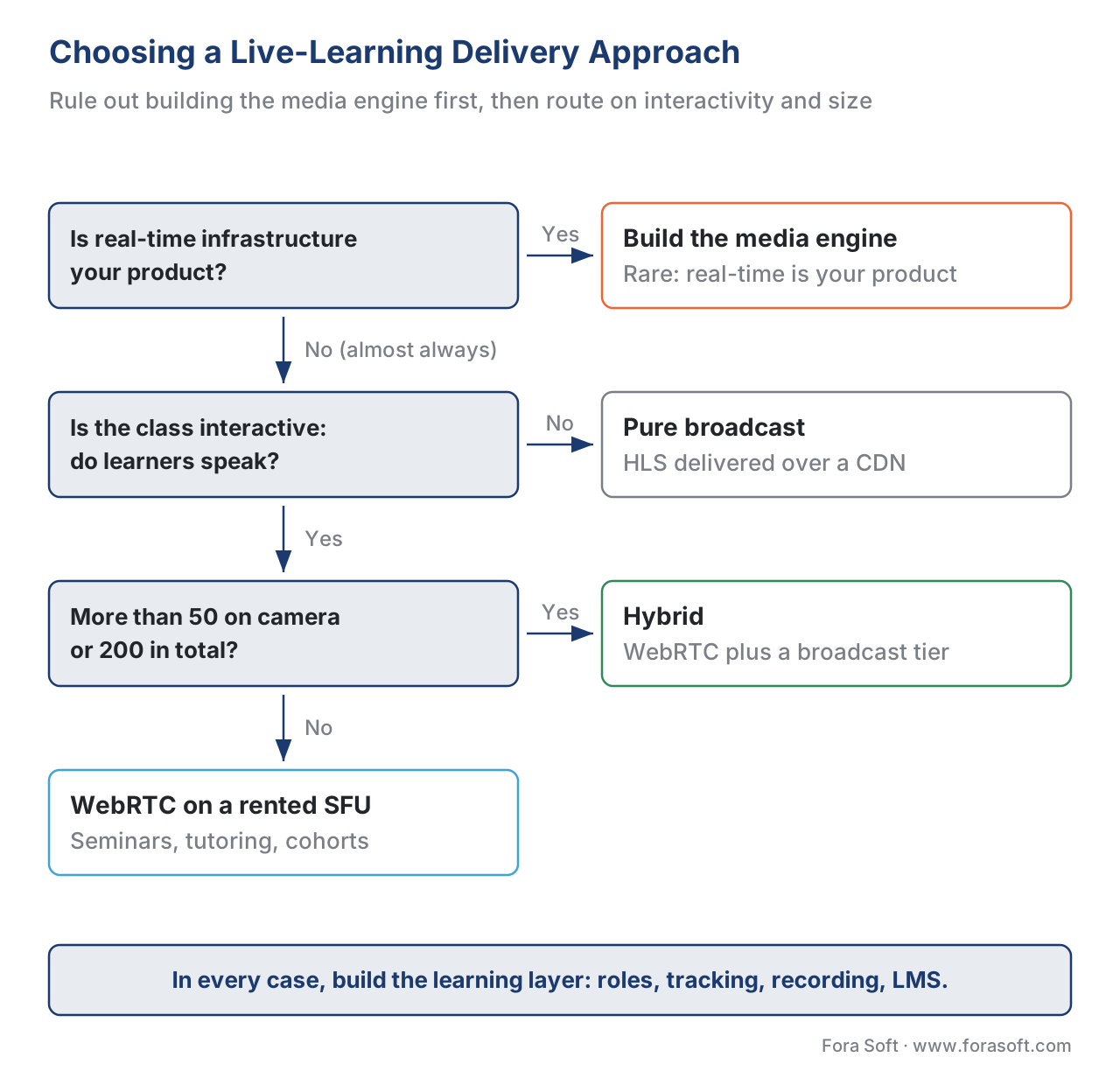 Figure 4. Choosing the delivery approach. Rule out building the media engine first. Then route on interactivity and scale: a small interactive class is WebRTC on a rented SFU; a large lecture is the hybrid WebRTC-plus-broadcast tier; a pure broadcast event is HLS. Build the learning layer in every case.
A Common Mistake: The Demo That Passed and the Pilot That Failed
The most expensive mistake in live learning is validating on the wrong network. A team builds a WebRTC prototype, tests it on the office Wi-Fi and their home connections, sees crisp sub-second video, and declares the hard part done. Then the school pilot starts. Half the students are on a district network that blocks everything but port 443, so every one of them is forced onto the TURN relay nobody load-tested or budgeted. The lecture-hall section has 180 students, and the mesh prototype that ran fine with the eight-person dev team melts. A teacher asks for last week's recording and there isn't one, because recording was the instructor's browser tab and it crashed at minute six. And the accessibility office rejects the whole thing for shipping without live captions.
Every one of those failures was predictable. The discipline is to test against the networks you will actually sell into — a locked-down school or corporate firewall, not just home Wi-Fi — to decide your topology from real class sizes, to treat recording and captions as subsystems from day one, and to budget the relay bill before you sign. Say it in the planning meeting: "what happens on a network that forces TURN, at our largest real class size, when someone needs the recording with captions?" If you cannot answer all four, you are not ready to pilot.
Free download: WebRTC Live-Learning Readiness ChecklistA one-page pre-pilot decision aid: latency budget, TURN/firewall and relay-cost planning, the scaling topology for your real class size, the server-side recording pipeline, live captions and WCAG compliance, and the build-vs-buy line.Where Fora Soft Fits In
We build custom live-learning products, and WebRTC is the engine under most of them — so the recurring lesson we pass to clients is exactly the build-vs-buy line in this article: never rebuild the media engine, rent it from proven infrastructure, and invest the budget in the learning layer that makes a classroom a classroom. The gotchas here are not theoretical for us; TURN-relay cost on school networks, the lecture-hall scaling pattern, and the recording-to-catalog pipeline are the hard-won lessons of shipping real-time video since 2005 across video conferencing, streaming, e-learning, and telemedicine. When a learning team comes to us, the first conversation is usually about which delivery tier each class needs and what the relay bandwidth will really cost — because getting those two right early is what keeps a live-learning product affordable at scale.



The handbook
Fora Soft Video Engineering Handbook
We wrote a seven-volume handbook that works through the whole video stack, from the pixel to production, so that an engineer who finishes it can design and ship a system like the live class in this article. Volume 3 is the one to open next: WebRTC, the SFU and the economics of every relayed gigabyte. Volume 2 covers the transport underneath — NAT, ports and the HLS tier a lecture hall falls back to — and Volume 7 shows where live captions plug into a real-time pipeline. Written by Nikolay Sapunov, CEO at Fora Soft.
Will your live class survive a school firewall and a 200-seat lecture?
Tell us your largest real class size and the networks your learners join from, and we will tell you which topology you need, what the TURN relay will cost per term, and which parts to rent rather than build — before the pilot, not after. 250+ video products shipped since 2005.
See our case studies
Case study
InstaClass
A group-tutoring virtual school built to get through firewalls: we used WebRTC and Kurento so learners in countries that block ordinary calls, such as the UAE, still reach their tutors — Gotcha 1 of this article, solved in production.
Case study
Scholarly
Sydney’s leading selective-test prep platform: live classes for up to 2,000 students at once and 15,000+ active users, on LiveKit and WebRTC with DASH/HLS alongside — the SFU-plus-broadcast pattern for a lecture hall.
Case study
BrainCert
The first WebRTC and HTML5 virtual-classroom LMS: 500M+ real-time classroom minutes across 10 datacenters at 99.995% uptime, with the learning layer — courses, whiteboard, proctored exams — built on top of the live engine.
What to read next
Foundations
The Virtual Classroom
What a classroom needs that a meeting does not — the product this engine runs.
Live classes
Recording Live Classes
Gotcha 3 in full: server-side recording and the pipeline to the catalog.
Accessibility
Captions, Transcripts, Audio Description
Gotcha 4 in full: what WCAG asks of a learning video, live and recorded.
Strategy
Build vs Buy vs Hybrid
Where to rent the media engine and where your own build pays off.
References
- WebRTC 1.0: Real-Time Communication Between Browsers — World Wide Web Consortium (W3C) Recommendation, 26 January 2021. The JavaScript APIs browsers expose for real-time audio, video, and data, including the data channel and NAT traversal via ICE/STUN/TURN. The engine under any live class. Tier 1. https://www.w3.org/TR/webrtc/
- RFC 8825 — Overview: Real-Time Protocols for Browser-Based Applications — Internet Engineering Task Force (IETF), 2021. The umbrella overview of the protocol stack WebRTC builds on. Tier 1. https://datatracker.ietf.org/doc/html/rfc8825
- RFC 8445 — Interactive Connectivity Establishment (ICE) — IETF, 2018. The method by which WebRTC discovers and tests candidate network paths to connect two endpoints. Tier 1. https://datatracker.ietf.org/doc/html/rfc8445
- RFC 8656 — Traversal Using Relays around NAT (TURN) — IETF, 2020. The relay protocol used when a direct path is blocked — the source of the relay-bandwidth cost discussed here. Tier 1. https://datatracker.ietf.org/doc/html/rfc8656
- RFC 8489 — Session Traversal Utilities for NAT (STUN) — IETF, 2020. How an endpoint discovers its public address behind a NAT, the cheap first step before any relay. Tier 1. https://datatracker.ietf.org/doc/html/rfc8489
- RFC 8827 — WebRTC Security Architecture (and RFC 8826, Security Considerations for WebRTC) — IETF, 2021. WebRTC media is encrypted by default via DTLS and SRTP. Tier 1. https://datatracker.ietf.org/doc/html/rfc8827
- WCAG 2.1 — Success Criterion 1.2.4 Captions (Live), Level AA — W3C Recommendation, 5 June 2018. The requirement that all live audio in synchronized media (a live class) carry real-time captions. Tier 1. https://www.w3.org/TR/WCAG21/#captions-live
- xAPI Video Profile — Advanced Distributed Learning (ADL) Initiative / xAPI community. The statement vocabulary (played, paused, seeked, completed) for tracking video, including a recorded class, against the learning record. Built on the Experience API (xAPI) 1.0.3. Tier 1. https://adlnet.gov/projects/xapi-video-profile/
- Media Capture and Streams (getUserMedia) — W3C. The standard interface for capturing a learner's camera and microphone in the browser, the entry point to any live class. Tier 1. https://www.w3.org/TR/mediacapture-streams/
- How Much Does It Really Cost to Build and Run a WebRTC Application? — WebRTC.ventures, October 2025. Engineering breakdown of WebRTC running costs, including TURN-relay bandwidth as the dominant variable line. Tier 4 (first-party engineering). https://webrtc.ventures/2025/10/how-much-does-it-really-cost-to-build-and-run-a-webrtc-application/
- TURN: Traversal Using Relays around NAT — BlogGeek.me (Tsahi Levent-Levi). Why TURN relays all media, why it is a last resort, and why its bandwidth and CPU cost is significant. Tier 4 (first-party engineering). https://bloggeek.me/webrtcglossary/turn/
- Enhanced live classroom experience at scale with the WebRTC-HLS stack — 100ms engineering blog, 2026. The hybrid pattern: WebRTC for interaction plus an HLS broadcast tier for scale, and server-side recording above ~200 participants. Tier 4. https://www.100ms.live/blog/live-classroom-webrtc-hls
Where popular sources disagreed with the standards, the standards won. Many vendor pages describe WebRTC as "peer-to-peer," implying media always flows directly browser-to-browser; the ICE, STUN, and TURN RFCs (Tier 1) make clear that on restrictive networks media is relayed through a TURN server — the distinction that drives the cost analysis here, and which the looser "P2P" framing obscures.
