


Why this matters
If you build a video product — telemedicine, e-learning, an OTT broadcast control room, a WebRTC-based surveillance dashboard, an AI voice agent that talks to humans — you are picking one of these three topologies on day one. The choice sets your server cost, your scaling ceiling, your latency floor, and what the user interface can show on screen. Get it wrong at the architecture level and no amount of front-end polish will fix it. This article explains each topology from first principles, shows the bandwidth math, names the moment each one breaks, and gives you a decision tree you can hand to a stakeholder.
What "topology" means here, in plain language
A topology, in the context of a real-time video call, is the shape of the lines connecting the people in the room. The video has to travel from each speaker's camera to each listener's screen somehow. The question is whether the lines go directly between people, or whether they pass through a machine in the middle, and if so what that machine does to the streams as they flow through.
A useful mental image: a group conversation in a real room. In a small kitchen, four friends can all hear each other directly — no one needs to repeat anything. In a town hall, a microphone and a public-address system pick up each speaker and amplify them so everyone in the back can hear. In a televised debate, an editor in a control room takes feeds from every camera, picks the right one, mixes the audio, and broadcasts a single combined signal to viewers at home. The kitchen is a Mesh, the PA system is a Selective Forwarding Unit, the control room is a Multipoint Control Unit. The principles are the same in software, and the trade-offs map almost one-to-one.
WebRTC, the protocol family that browsers use to send live media, does not prescribe a topology. The architecture document for browser RTC, IETF RFC 8825, defines the protocol from one browser's perspective and leaves multi-party arrangements to the application. That is why the same JavaScript API can be used to build all three of the patterns in this article — and why picking between them is your job, not the browser's.
A note on naming. "Peer-to-peer" and "Mesh" mean the same thing in the WebRTC literature when more than two people are in the call. "P2P" is sometimes used narrowly to mean the two-party case, where there is genuinely no server in the path. We use Mesh throughout this article and note where industry usage differs.
 Figure 1. The three topologies side by side. In Mesh, four participants form six direct lines. In MCU, four lines go up and one line comes down per participant. In SFU, four lines go up and three come down per participant — but the server never decodes the video.
Mesh: every participant talks to every other participant
The simplest topology is also the oldest. In a Mesh call, each participant opens one WebRTC connection to every other participant. There is no media server in the path. Each browser captures its camera and microphone, encodes the bytes once per recipient, and sends a copy directly to each peer. Each browser also receives a separate stream from each peer and decodes them all locally.
The appeal is obvious. There is no infrastructure to build, no server to pay for, no co-location to negotiate. You write the JavaScript, the browsers do the work, and the only thing the operator pays for is a small signalling server that helps the browsers find each other. For two-party calls, this is the correct topology — Mesh is what every WebRTC tutorial demonstrates because it is what WebRTC was designed for first.
The bandwidth math that kills Mesh
The trouble starts at three participants and becomes catastrophic by six. Every participant in a Mesh of N people uploads one stream per other participant — that's N − 1 outbound streams. They also download N − 1 streams.
Let us put numbers on it. A modest 720p video stream at 30 frames per second runs about 1.5 megabits per second. In a four-person call, every participant uploads 1.5 × 3 = 4.5 Mbps and downloads the same. In a six-person call, every participant uploads 1.5 × 5 = 7.5 Mbps. The download side is symmetric: 7.5 Mbps in. On a typical home connection in 2026 — say 30 Mbps down, 10 Mbps up — six people is the last call that fits, and only just. A seventh participant pushes everyone over their upload ceiling, frames start dropping, and the call audibly degrades for everyone.
The CPU cost grows in lockstep. Each participant's browser is running N − 1 video encoders and N − 1 decoders, each consuming a chunk of CPU. Chrome historically allowed at most ten simultaneous peer connections per tab. Public guidance from the WebRTC working group converges around five participants as the practical ceiling for Mesh.
Where Mesh still belongs
It is tempting to dismiss Mesh as a relic. That would be a mistake. There are real production cases where Mesh is the right answer in 2026:
- Two-party calls — telephony, one-on-one consultations, doctor-patient video visits. Two endpoints, no server, lowest possible latency. This is the strongest case for Mesh and not going anywhere.
- Privacy-sensitive calls where the operator must not see the media. A mesh call never traverses any server in the operator's control plane (signalling does, but signalling is metadata, not media). For some compliance regimes that distinction matters.
- Prototypes, demos, and unit tests. Mesh is what you build when you want to ship a working call in an afternoon and worry about scale later.
The honest summary: Mesh is the right tool for N ≤ 4 with no production traffic targets. Above that, the bandwidth math is unforgiving, and someone in the room is about to have a bad call.
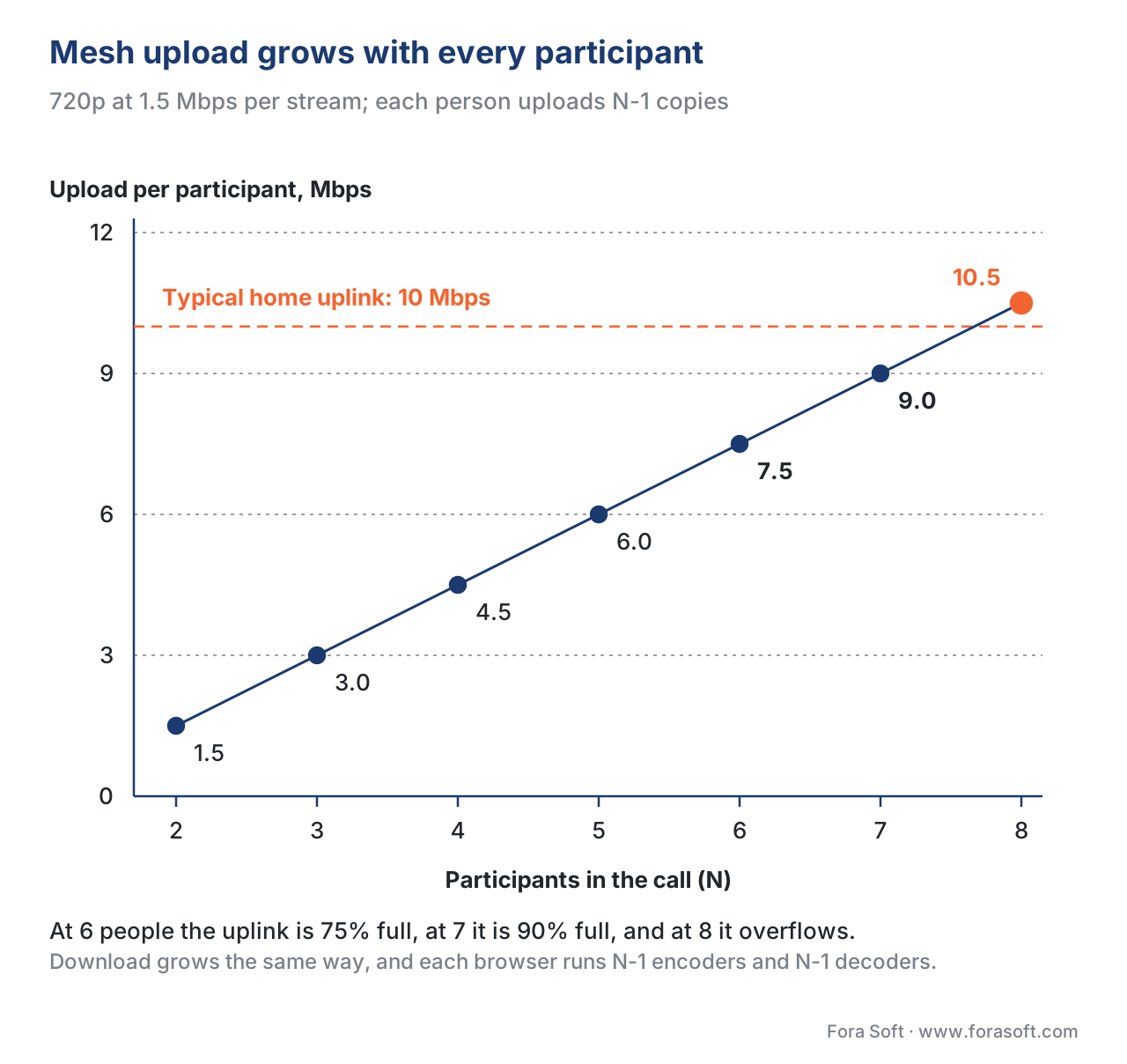 Figure 2. The Mesh upload curve. At four participants, every browser uploads 4.5 Mbps. At seven, 9 Mbps — over the upload ceiling of a typical home connection. Mesh fails by bandwidth before it fails by CPU.
MCU: every participant talks to a server that mixes their streams
The Multipoint Control Unit is the topology that broadcasters used before WebRTC existed, and the one that hardware video-conferencing systems (Polycom, Cisco TelePresence, Tandberg) shipped throughout the 2000s. It is the oldest answer to multi-party calling that does not break above five participants.
The architecture is conceptually simple. Every participant opens one WebRTC connection to the MCU server. They upload one media stream. The server decodes every incoming stream, mixes them — audio is summed, video is composited into a grid or active-speaker layout, captions are overlaid — and re-encodes the result into a single composite stream. The server then sends that one composite stream back to every participant.
From the client's point of view, the call has exactly two media flows: one outbound, one inbound. Bandwidth per participant is constant at 2 × bitrate regardless of room size. CPU is constant at one encode plus one decode per participant. The user's browser does not even know how many other people are in the call — it sees a single video.
What the MCU buys you, and what it costs
The price for that elegance is paid by the server, and paid heavily. The MCU must decode every incoming stream — N decoders running in parallel per room — then composite them (which is GPU- and CPU-intensive video processing) and re-encode the output, often once per participant if each gets a personalised layout or quality. A single 12-party room can saturate a whole physical server's worth of CPU.
The cost numbers are striking. Industry estimates put MCU deployments at roughly ten to fifty times the per-participant cost of an SFU at the same load. A 1,000-participant SFU deployment that costs $400 a month in cloud compute would cost $4,000 to $20,000 as an MCU. Latency is also higher: the decode-mix-re-encode round trip adds 200 to 400 milliseconds on top of network latency, against the 100 to 200 milliseconds an SFU adds. For a conversational call, that pushes you well past the 400 ms glass-to-glass threshold above which conversations feel unnatural.
So why use it at all in 2026? Two reasons remain valid:
- Composite output to legacy systems. If the call has to be ingested into a broadcast suite, a recording pipeline that expects a single H.264 file, an RTMP relay, or a SIP-based hardware endpoint that cannot handle multiple streams, an MCU is the natural bridge. The mixer's output is the file the broadcaster wants.
- Devices that cannot decode multiple simultaneous streams. Old set-top boxes, certain in-car infotainment systems, embedded surveillance dashboards with one hardware decoder. The MCU does the math centrally so the device has to do nothing.
For everything else — modern browsers, modern phones, anything that ships in 2026 with a hardware video decoder — the MCU's cost is no longer justified by its convenience.
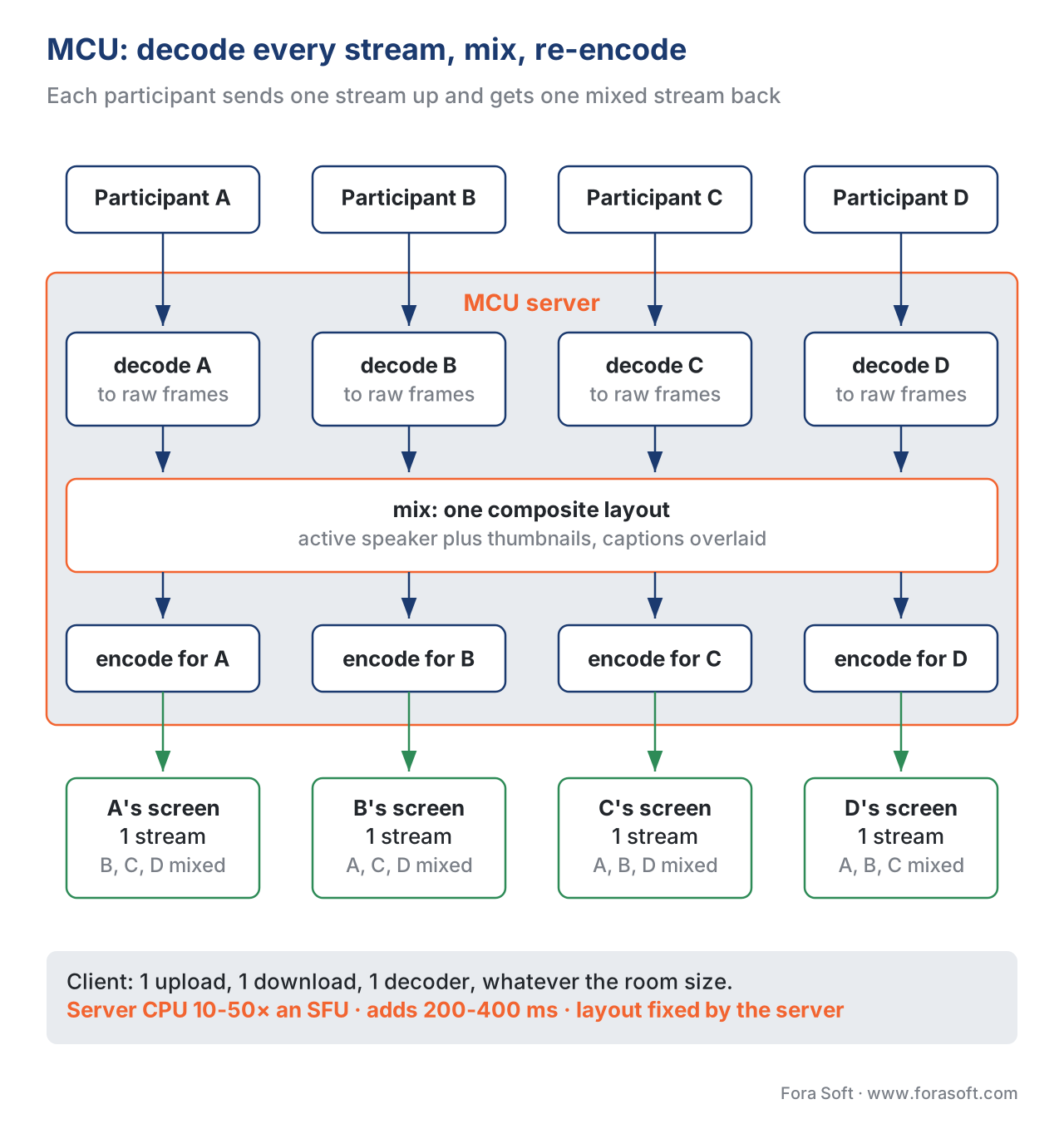 Figure 3. MCU pipeline. Every incoming stream is decoded, mixed into a composite layout (active speaker + thumbnails in this example), then re-encoded once per participant. The output bandwidth from the server is constant per participant; the CPU cost on the server grows with the square of room size.
SFU: every participant talks to a server that forwards their stream untouched
The Selective Forwarding Unit is the topology that won. Every modern video conferencing platform — Zoom, Google Meet, Microsoft Teams, Discord, Twitch's WebRTC ingest path, every recent telemedicine and e-learning product — runs on an SFU at its core. There is broad consensus in the WebRTC community that the SFU is the default for any group call larger than four people and the right starting point for almost any new product.
The architecture is the mirror image of the MCU in one specific way: the server never decodes the media. Each participant uploads one stream to the SFU. The SFU keeps that stream encrypted, in its original encoded form, and forwards it to every other participant who has subscribed to it. Each participant downloads N − 1 streams from the SFU and decodes them locally.
This sounds, at first, like the worst of both worlds. The client is back to decoding N − 1 streams (CPU cost like Mesh) and downloading N − 1 streams (download bandwidth like Mesh). The SFU has to terminate every connection (work like MCU). What is the gain?
Two crucial differences swing the trade-off:
- The upload side is no longer a Mesh. Every participant uploads exactly one stream, not N − 1. Upload is the asymmetric, scarce side of every home and mobile connection. That single change is why SFU calls scale to dozens of participants on consumer hardware where Mesh fails at five.
- The server's CPU cost is tiny. An SFU is described in the literature as a "byte shifter" — its job is to terminate the WebRTC connection, decrypt the transport layer, look at the headers to figure out which subscribers want this packet, re-encrypt it for each subscriber, and forward. It does not look at the video bytes themselves. One CPU core can forward streams for hundreds of consumers; one well-tuned mediasoup worker handles 500 to 800 concurrent video participants per node.
The math is what makes SFU production-grade. Server cost per participant is roughly an order of magnitude below MCU; the SFU adds 100 to 200 milliseconds of latency against the MCU's 200 to 400; the layout flexibility is essentially unlimited because the client decides what to render.
Layout flexibility is the secret feature
It is easy to focus on the bandwidth math and miss the part of SFU that customers care about. Because the client receives every speaker's stream independently, the application can choose at runtime which speaker to show large, which to pin, which to spotlight, who is in the gallery and who is hidden. The user can change the layout instantly with no round-trip to the server. The host can highlight one participant; another viewer can pin a different participant; both work without any server-side composition.
In an MCU world, layout is decided server-side, baked into the composite, and changing it for one user means re-encoding for that user. In an SFU world, layout is a CSS grid. That is why the modern web video conferencing UI looks the way it does.
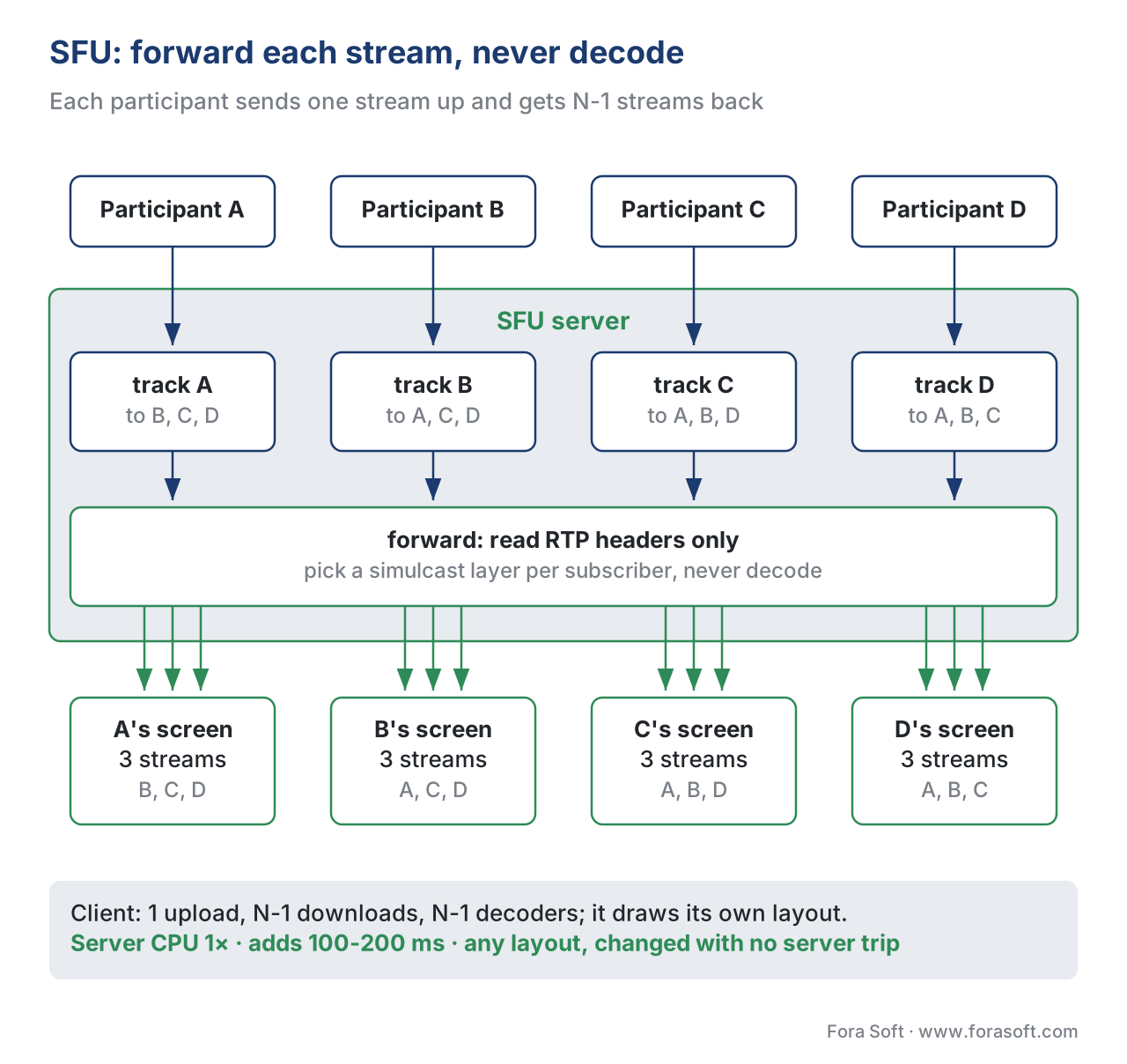 Figure 4. SFU pipeline. The server receives one stream per participant, never decodes the video, and forwards each stream to every subscriber. The download side grows linearly with the room; the upload side is constant. Layout is decided client-side.
Simulcast and SVC: how an SFU serves a heterogeneous room
A real call has participants on a gigabit fibre desktop, a sluggish hotel Wi-Fi laptop, and a mobile phone on 4G. They cannot all consume the same 1080p stream. The SFU has to send each subscriber a quality their pipe can handle — without re-encoding (because that would turn it into an MCU and erase the cost advantage).
The trick is to make the sender produce multiple qualities in parallel and let the SFU pick. There are two ways to do it:
- Simulcast — the sender encodes the same video three times at different resolutions and bitrates (typically 1080p at 2.5 Mbps, 360p at 600 kbps, 180p at 150 kbps) and uploads all three to the SFU as separate streams. The SFU decides which of the three to forward to each subscriber based on bandwidth feedback from that subscriber. Simulcast is supported in every major SFU and is what LiveKit's client SDKs use by default.
- Scalable Video Coding (SVC) — the sender produces a single layered bitstream where lower-quality layers can be extracted without the upper layers. The SFU can drop layers per subscriber. SVC is more efficient at the wire than simulcast (fewer bits encoded total) and is the direction the industry is heading, particularly with AV1's hardware SVC support.
The receiver-side decision — which layer to forward to each subscriber — is driven by congestion-control feedback. The SFU watches the bandwidth feedback from each subscriber (delivered via Transport-wide Congestion Control or REMB) and switches layers up and down accordingly. Two subscribers watching the same speaker may, at the same instant, be getting different qualities.
This is the part of the SFU that turns a clever architecture into a production-grade system. We have a separate article on the topic (Simulcast and SVC: how the SFU serves a heterogeneous audience).
Cascading SFUs: how you scale past one server's capacity
A single SFU node — depending on the implementation, the CPU, and the codec — handles somewhere between 500 and a few thousand concurrent video participants. Beyond that, you need more nodes. The pattern is to put SFUs in multiple regions, connect them to each other over a private backbone, and let participants connect to the nearest one. Streams hop from the publisher's regional SFU to the subscriber's regional SFU at most once, then fan out locally.
This is how LiveKit Cloud scales — a globally distributed mesh of SFU nodes, coordinated through Redis, with media routed over an optimised backbone. It is how Jitsi's "Cascading SFU" research from 2018 (Boris Grozev's work, still cited) became production architecture. A session can grow from one room of fifty to a million concurrent users without changing the topology type — you still have an SFU underneath; you just have many of them, working together.
We cover the cascading pattern, regional bridges, and AI-agent integration in WebRTC at scale: cascading SFUs, regional bridges, AI agents.
A comparison table you can hand to a stakeholder
The table below is the version of this article you can paste into a one-pager. Numbers are 2026 industry estimates from production deployments; they will move 10-20% in either direction depending on codec choice and exact tuning, but the order of magnitude is stable.
| Criterion | Mesh | MCU | SFU |
|---|---|---|---|
| Server media role | None | Decode + mix + re-encode | Forward only, no decode |
| Client upload (per participant) | (N − 1) × bitrate | 1 × bitrate | 1 × bitrate |
| Client download (per participant) | (N − 1) × bitrate | 1 × bitrate | (N − 1) × bitrate |
| Client decoders running | N − 1 | 1 | N − 1 |
| Server CPU growth | O(0) | O(N²) | O(N) |
| Added latency vs network | ~0 ms | 200–400 ms | 100–200 ms |
| Layout flexibility | Per-client (any) | Server-decided (composite) | Per-client (any) |
| Practical ceiling per room | 4–5 participants | 50–100 (high cost) | 500–1,000 per node, millions cascaded |
| Relative cost per participant | $0 server | 10–50× SFU | 1× (baseline) |
| Right for | 2-party, demos | Broadcast composition, legacy endpoints | Almost everything else |
A common mistake: confusing "P2P" with "no server"
A persistent confusion is that "WebRTC peer-to-peer" means there is no server at all. There is always a server in a WebRTC call — the signalling server that helps the browsers exchange SDP offers and answers, the STUN server that helps each peer discover its public address, and the TURN server that relays media when a direct connection cannot be established because of restrictive NAT.
The TURN server is the one that catches teams out. In commercial Mesh deployments, on commercial mobile carriers and corporate networks, between 15% and 30% of calls cannot establish a direct peer-to-peer connection and must relay through TURN. TURN bandwidth is a billed service. So a "P2P" deployment that promised zero server cost actually pays for TURN bandwidth for a quarter of its sessions, often more.
This does not invalidate Mesh as a topology. It does mean that the cost story for Mesh is "TURN bandwidth for a third of calls" — not "free". And TURN bandwidth, at scale, can rival the cost of an SFU. We cover the mechanics in NAT, firewalls, STUN, TURN, ICE: how WebRTC actually reaches a phone.
A worked example: picking a topology for a telemedicine product
Imagine a telemedicine product with three call types:
- Doctor-patient consultations. Two people, no recording, lowest possible latency. Mesh. No SFU in the path means no third party touches the encrypted media; the privacy story for HIPAA and equivalent regimes is cleaner.
- Specialist consultations. A primary doctor, a patient, and one or two specialists. Up to four parties, occasional recording for clinical notes. SFU. Recording lifts even small calls onto the server path; once you are paying for an SFU, use it.
- Grand-round lectures. One doctor lecturing to fifty residents. SFU — with simulcast — and the SFU output bridged into a recording pipeline for the lecture archive. This is also where the one MCU function we still use makes sense: the recording bridge can mix the SFU output into a single composite file for the archive, even though the live call is SFU.
A product like that runs all three topologies in the same codebase. The architecture is not "pick one"; it is "pick the right one per call type". That is what mature WebRTC products do.
Free download: WebRTC Topology Decision SheetOne page to settle Mesh vs MCU vs SFU before you write code: the three topologies side by side, the upload and download math for rooms of 2 to 8 people, four decision steps and the five pitfalls that push teams into a rebuild.Where Fora Soft fits in
We have been building real-time video products since 2005, with WebRTC at the centre of the practice since the standard stabilised. The decision tree above is one we walk every new product through — telemedicine and e-learning need the privacy story Mesh delivers for two-party calls and the layout flexibility SFU delivers for everything else; video conferencing and virtual classrooms run on cascading SFUs by default; OTT and broadcast control rooms still need an MCU somewhere in the pipeline for the composite output to the broadcast suite. Picking the right topology per call type is one of the first conversations we have in a discovery sprint, because it sets the cost and scale story for the next two years of the product. That choice is the starting point of our custom WebRTC architecture work, and the conferencing products built on it come from our video conferencing app development team, from 1-on-1 calls to 10,000-viewer webinars.

The book
Video Streaming: A Complete Guide to Video Delivery: From ABR and CDNs to Players, WebRTC, DRM, and the Economics of Streaming
This article picks a topology per call type. Book 3 builds on that choice: how an SFU serves a mixed room with simulcast and SVC, how cascading SFUs grow past one server, where TURN relays eat into the budget, and how a WebRTC call gets recorded and bridged to HLS. Book 2 covers the network underneath, from UDP and congestion control to NAT traversal. Both belong to a seven-volume handbook that covers the whole video stack from the pixel to production, so an engineer who works through it can design and ship a group-call product that holds up at 5, 50 and 5,000 participants. Written by Nikolay Sapunov, CEO at Fora Soft.
Not sure whether your calls need Mesh, an SFU or an MCU?
Tell us your call types, room sizes and whether you record, and we will map each call type to a topology, estimate server and TURN cost for your traffic, and point out where a composite output is still worth an MCU. 250+ video products shipped since 2005.
See our case studies
Case study
CirrusMed
A HIPAA-compliant telemedicine practice built on peer-to-peer video visits for 20+ physicians and patients in 48+ U.S. states — the two-party doctor-and-patient call where Mesh is still the right answer.
Case study
TransLinguist
Conferencing with live interpretation in 75+ languages on a mediasoup SFU: speakers, interpreters and listeners each get the streams they need, with captions in 22 languages and recording on top.
Case study
ProVideoMeeting
Browser video on Kurento next to phone dial-in over SIP through FreeSWITCH — the mixed setup where an endpoint that takes one stream sits in the same meeting as full WebRTC clients.
What to read next
WebRTC
Simulcast and SVC: How the SFU Serves a Heterogeneous Audience
How one SFU sends 1080p to a fibre desktop and 180p to a phone on 4G without re-encoding.
WebRTC
WebRTC at Scale: Cascading SFUs, Regional Bridges, AI Agents
What happens when one SFU node is not enough: regional bridges, cascades and agents in the room.
WebRTC
Recording, Broadcasting, and the WebRTC-to-HLS Bridge
The one place an MCU-style mixer still earns its cost: one composite file for the archive or broadcast.
Networking
TURN Bandwidth Calculator: What Your WebRTC Relay Traffic Actually Costs
Why a “free” Mesh call still pays for relays, and how to size that bill before launch.
References
- IETF RFC 8825, Overview: Real-Time Protocols for Browser-Based Applications, May 2021. The architectural overview document for browser RTC; defines the protocol from one browser's perspective and explicitly leaves multi-party arrangements to the application.
https://www.rfc-editor.org/rfc/rfc8825 - IETF RFC 8826 / RFC 8827 / RFC 8835, WebRTC Security Architecture / Security Considerations / Transports, January 2021. The security and transport pieces of the same RFC 8825 family; relevant to how SFUs handle encrypted media without decrypting it.
- W3C, WebRTC 1.0: Real-Time Communication Between Browsers, W3C Recommendation, 26 January 2023. The browser API that all three topologies are built on top of.
https://www.w3.org/TR/webrtc/ - mediasoup documentation, Scalability, v3. The reference implementation pattern for SFU workers and routers, with the canonical 500-consumer-per-worker guideline.
https://mediasoup.org/documentation/v3/scalability/ - LiveKit Engineering, How we built a globally distributed mesh network to scale WebRTC, LiveKit Blog. The canonical contemporary write-up of cascading-SFU production architecture, including the Redis-coordinated control plane.
https://blog.livekit.io/scaling-webrtc-with-distributed-mesh/ - webrtcHacks (Boris Grozev), Improving Scale and Media Quality with Cascading SFUs, 2018. The original cascading-SFU paper that became reference architecture for Jitsi and most of the industry.
https://webrtchacks.com/sfu-cascading/ - BlogGeek.me (Tsahi Levent-Levi), WebRTC SFU Explained: Technology, Pros, Cons & Use Cases. The most-cited industry primer on SFU trade-offs; useful for the "why this won" framing.
https://bloggeek.me/webrtcglossary/sfu/ - Microsoft Azure Communication Services documentation, Simulcast. Vendor documentation of the simulcast subscription model that an SFU uses to serve heterogeneous bandwidth audiences.
https://learn.microsoft.com/en-us/azure/communication-services/concepts/voice-video-calling/simulcast - SignalWire blog, P2P? SFU? MCU? Which WebRTC Architecture Is Right for You. Production-deployer write-up with cost ranges that match the SFU/MCU 10–50× ratio cited elsewhere.
https://signalwire.com/blogs/industry/p2p-sfu-mcu-find-out-which-webrtc-architecture-is-right-for-you - Antmedia.io, Mesh vs SFU vs MCU: Choosing the Right WebRTC Network Topology. Vendor primer with bandwidth math worked through; useful as a competitive benchmark.
Note on standards-tracking: WebRTC 1.0 is a W3C Recommendation as of January 2023 (final stage). The IETF RFC 8825 family is final. The simulcast/SVC parts of the platform are still evolving — AV1 SVC hardware support is shipping unevenly across browsers, and the WebRTC working group continues to publish updates in the webrtc-encoded-transform and webrtc-pc extensions.
