


Why This Matters
If you are scoping a virtual-classroom product — a tutoring marketplace, a cohort-course platform, a corporate training system with live instructor-led sessions — you are about to commission the most complex thing in e-learning: real-time video, shared interactive state, and learning records, all at once, all in milliseconds. Most teams underestimate it because the demo looks like a video call, and video calls feel solved. This article gives an L&D director, EdTech founder, or product manager the complete architectural map so you can brief engineers precisely, judge a vendor's "virtual classroom" against a real reference design, and know which planes you can buy off the shelf and which ones — almost always the learning bridge — you will have to build. It is written for the non-engineer making the build-versus-buy call, but it stays accurate enough for the video engineer and the LMS architect who will build it.
First, the One Idea That Organizes Everything
A virtual classroom looks like a video meeting, and that resemblance is the most expensive misunderstanding in the field. A meeting has one job: get faces and voices between people with low delay. A live class has that job plus three more — it has to run structured activities (breakout groups, a shared whiteboard, polls), it has to turn the session into a reusable recording, and above all it has to report into a learning system so the organization knows who attended, who participated, and who passed. That fourth job is the one a generic video tool does not do, and it is the reason this section exists.
So the reference architecture is best understood not as one system but as four cooperating planes, each with a different job, a different failure mode, and a different build-versus-buy answer:
The control plane runs identity, rooms, scheduling, presence, and permissions — the "who is allowed in which room and as what role" logic. The media plane moves the actual audio and video with millisecond latency, almost always through a selective forwarding unit (more on that term in a moment). The shared-state plane keeps everyone's breakout assignment, whiteboard strokes, chat, and poll results consistent in real time. And the learning bridge connects the live session to the learning-management system and the learning-record store, so the class produces durable records, grades, and analytics.
Keep those four planes separate in your head and the rest of this article — and the rest of your build — falls into place. Blur them together and you get the classic failure: a beautiful video call that cannot tell your LMS anything happened.
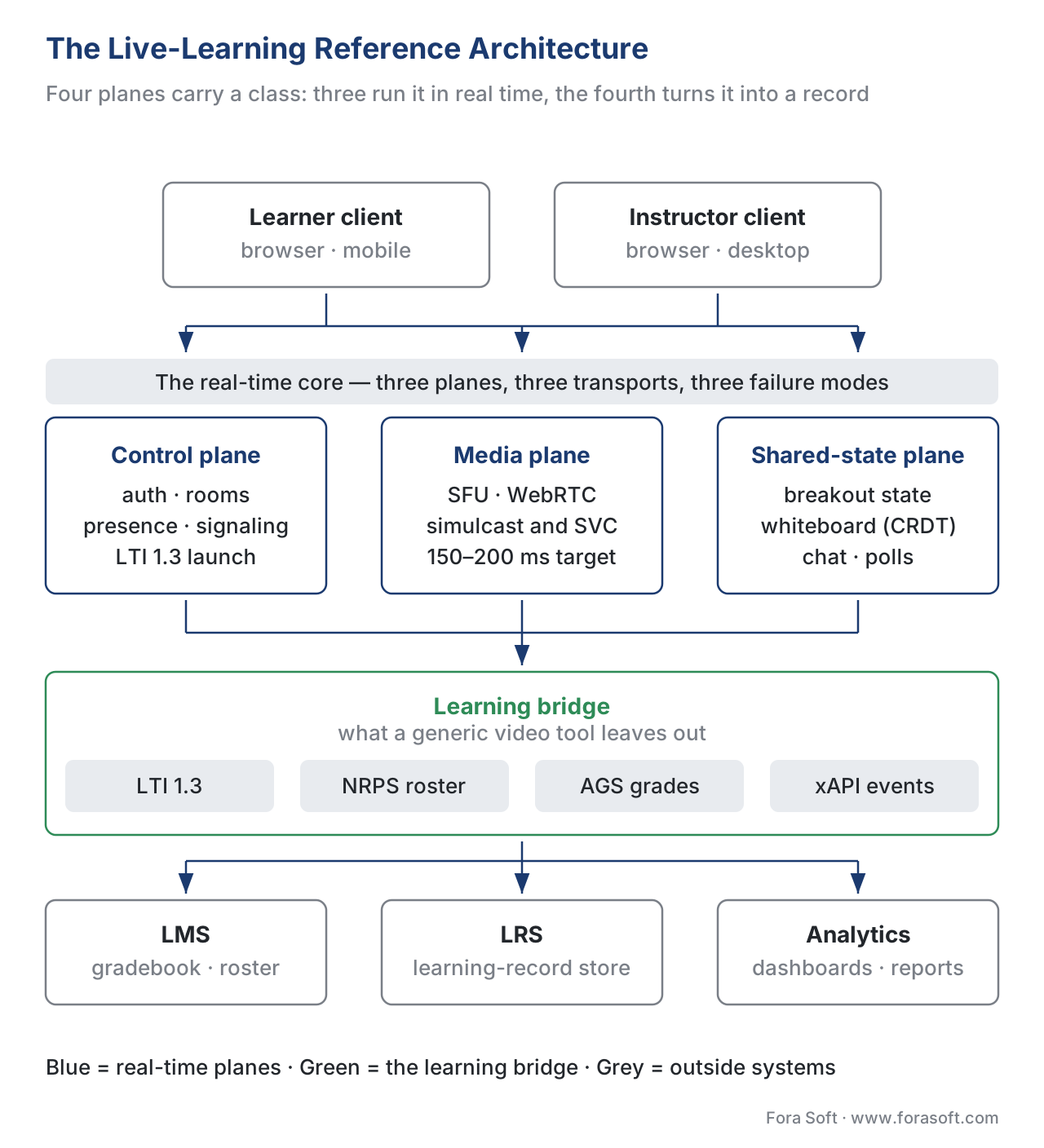 Figure 1. The full picture. Four planes — control, media, shared-state, and the learning bridge — connect the learner and instructor clients at the top to the LMS, learning-record store, and analytics at the bottom. The learning bridge (green) is what makes this a classroom and not a meeting.
Plane 1: The Control Plane
Start where every session starts: someone signs in and joins a room. The control plane is the set of services that handle this — authentication and single sign-on, the room and session model, scheduling, presence ("who is online right now"), roles (instructor, teaching assistant, learner, observer), and permissions (who can share screen, who can admit people, who can start the recording).
The plane's first contact with the learning world happens here, at sign-in. In a real product the learner usually does not create a separate account; they arrive from the LMS already authenticated. The mechanism is the standard that lets an external tool be trusted inside any learning system, called LTI (Learning Tools Interoperability), maintained by the standards body 1EdTech. We will return to LTI in detail in the learning-bridge section, because it is the single most important integration in the whole architecture. For now, hold one fact: in a well-built classroom, identity is delegated, not duplicated.
The control plane is also where signaling lives. Signaling is the out-of-band conversation that sets up a real-time connection before any video flows — the two endpoints exchange "here is how to reach me and here is what media I can send," and only then does the media path open. A useful shift in 2026 is that this once-bespoke step is standardizing: the WHIP and WHEP specifications collapse what used to be a custom WebSocket protocol into plain HTTP for publishing and playback, and most media servers and CPaaS vendors now expose them. The deep mechanics of signaling and connection setup belong to the WebRTC for live learning article; here, the point is architectural: signaling is a control-plane responsibility, separate from the media path it sets up.
The control plane is the cheapest plane to build and the easiest to get right, but it is where your role and permission model is decided — and that model has to match the classroom you are running. A one-to-one tutoring session, a thirty-seat seminar with breakout groups, and a two-hundred-seat lecture with only the instructor on camera are three different permission worlds. Decide the roles before you write a line of media code.
Plane 2: The Media Plane
This is the plane people picture when they think "video class," and it is the one most likely to be bought rather than built. Its job is narrow and brutal: move audio and video between participants with low enough delay that conversation feels natural — roughly 150–200 milliseconds glass-to-glass is the target where real interaction still works.
For anything beyond a one-to-one call, the media plane is built around a selective forwarding unit (SFU) — a media server that receives each participant's video once and selectively forwards it to the others, instead of making every participant send a copy to every other participant. The why, and the alternatives (peer-to-peer mesh, and the server-side mixing of an MCU), are covered in scaling the live class: SFU, simulcast, and the 200-seat lecture. The protocol internals — how the SFU forwards, what simulcast and SVC do, how TURN relays traverse firewalls — belong to the Video Streaming section's SFU, MCU, and mesh topologies and simulcast and SVC. This section does not re-derive them; it places the SFU correctly in the larger architecture and tells you how big it has to get.
Two facts size the media plane. First, a single SFU node on modern hardware handles on the order of 500–1,000 forwarded streams before you need a second one; a single mediasoup worker, for example, is commonly cited in that range. Second, beyond a few thousand concurrent publishers you cascade — each region runs its own SFU, learners join the nearest node, and the servers relay between themselves only the streams that must cross regions. That cascading idea is the same one Jitsi shipped as Octo and that newer servers like LiveKit now make their default behaviour. The scaling-tier figure later in this article turns these numbers into a decision.
The build-versus-buy line is clearest here. The media plane is a solved, commoditized capability: managed real-time platforms (CPaaS) and open-source servers (mediasoup, LiveKit, Janus, Jitsi) all do it well. You build a custom media plane only when control over the media path is itself your product — which is rare. For most learning products, you buy or self-host an existing SFU and spend your engineering on the planes that differentiate you.
Plane 3: The Shared-State Plane
Here is where a class stops being a broadcast and becomes a room you do things in. The shared-state plane keeps the non-video, interactive state consistent for everyone: which learner is in which breakout group, every stroke on the whiteboard, the chat log, the live poll tally, the raised hands, the shared cursor. This plane is invisible in a demo and decisive in production, because it is where "everyone sees the same thing at the same time" is either solved or not.
The defining technical choice of this plane is how you keep distributed copies of that state in agreement. The modern default for the whiteboard and collaborative surfaces is a family of data structures called CRDTs (conflict-free replicated data types) — structures designed so that when two people draw or type at the same time, the edits merge into the same result on every screen without a central referee deciding the order. By 2026 two libraries, Yjs and Automerge, dominate this space; Yjs in particular is the common choice for performance-critical surfaces like whiteboards. The reason CRDTs win here is responsiveness: a stroke has to appear under the stylus before any server round-trip, because even 80 milliseconds between pen-down and ink breaks the feeling of drawing — so the local copy must update instantly and reconcile afterward.
The transport for this state is usually a real-time data channel (the WebRTC data channel or a WebSocket), separate from the video. That separation matters: your whiteboard must keep working smoothly even when the video is struggling on a weak connection. The breakout-room machinery — splitting a room into groups, moving learners between SFU rooms, preserving each group's whiteboard and chat, and re-merging everyone — is its own design problem covered in breakout rooms: design, state, and re-merge, and the canvas itself in the interactive whiteboard and shared canvas. Architecturally, the lesson is that breakout state and whiteboard state live in this plane, not the media plane, and they have their own persistence and their own scaling story.
The shared-state plane is the one teams most often under-budget. It is also, frequently, where a custom build earns its keep — a tutoring product whose whiteboard and shared problem-solving surface are the pedagogy cannot buy that off the shelf without becoming generic.
Plane 4: The Learning Bridge — What Makes It a Classroom
Now the plane that justifies this entire section. Everything above could describe a good video-collaboration tool. The learning bridge is what turns it into a learning product: it connects the live session to the organization's learning systems so the class produces durable identity, attendance, participation, grades, and analytics. There are three connections to understand, and they use named standards — getting these right is non-negotiable, because a wrong standards claim sends a team down a non-conformant build.
The launch: LTI 1.3. The learner clicks the class inside their LMS — Moodle, Canvas, a corporate LMS — and lands in your virtual classroom already signed in, with the right role. The standard that makes this work is LTI 1.3 (Learning Tools Interoperability) from 1EdTech. It is precise to describe it correctly: LTI 1.3 is not a password login. It uses an OpenID Connect (OIDC) launch and a signed token — a JSON Web Token (JWT) carrying the user's identity, role, and course context — so the LMS vouches for the user and your tool trusts that signed message. Single sign-on is a consequence of this mechanism, not the mechanism itself. Saying "LTI logs the user in" is the kind of loose claim that misleads a build.
The roster and the grades: LTI Advantage. On top of the LTI 1.3 launch sit three optional services, together called LTI Advantage. Two of them matter intensely for a classroom. Names and Role Provisioning Services (NRPS) lets your tool pull the official course roster and each person's role — so your classroom knows who the enrolled learners are without you maintaining a separate list. Assignment and Grade Services (AGS) lets your tool push scores and comments back into the LMS gradebook — so a graded live activity, a participation score, or an attendance mark appears where the institution expects it. The third service, Deep Linking, lets an instructor pick and embed a specific session from inside the LMS. These are defined in the 1EdTech LTI Advantage Implementation Guide; cite the service by name when you scope it.
The learning events: xAPI to the LRS. LTI handles who and what grade. The richer question — what happened during the class — is answered by the Experience API (xAPI), maintained by ADL, which records learning events as simple statements ("Maria joined the live session," "Maria spoke for 4 minutes," "Maria completed the breakout task") into a store called a Learning Record Store (LRS). When the class is recorded and watched later, the replay is tracked with the xAPI Video Profile — the same video-event vocabulary (played, paused, seeked, completed) used for any catalog video, covered in tracking video with xAPI. The distinction to keep clean: SCORM and the LMS gradebook track a fixed set of outcomes; xAPI and the LRS capture the rich, granular behaviour. A serious classroom uses both — LTI/AGS for the official grade, xAPI/LRS for the analytics.
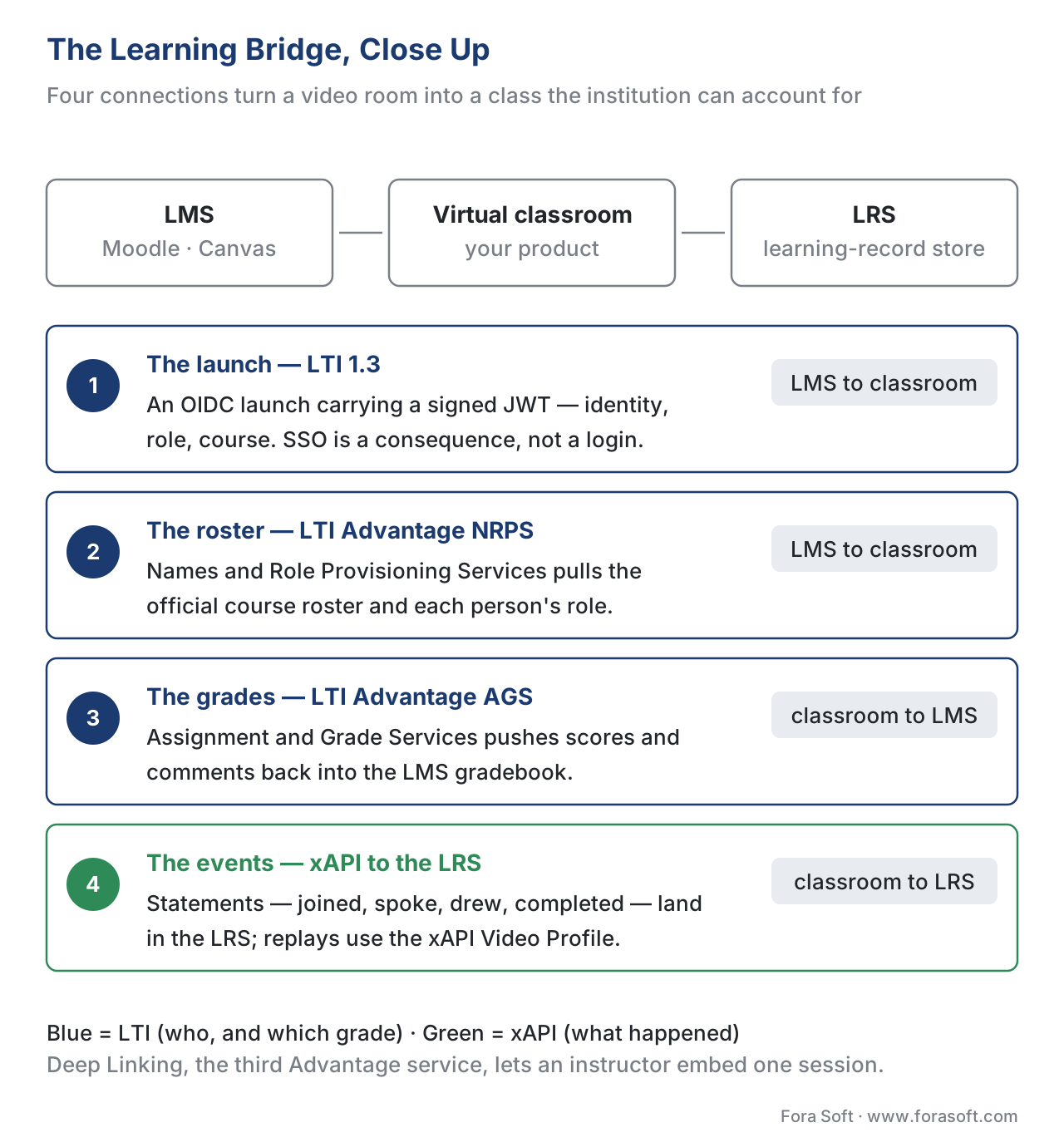 Figure 2. The learning bridge in detail. The LMS launches the classroom over LTI 1.3 (OIDC + signed JWT); the classroom pulls the roster via NRPS, pushes grades back via AGS, and streams granular learning events to the learning-record store via xAPI. This bridge is the work a generic video tool does not do.
Putting the Planes Together: How a Class Actually Runs
Walk one session through all four planes, because the choreography is the architecture. A learner clicks the class link inside their LMS. The control plane receives an LTI 1.3 launch, validates the signed token, reads the role and course, and seats the learner in the right room — no second login. Signaling sets up the connection. The media plane routes the learner's audio and video through the SFU and forwards everyone else's down to them, picking the right simulcast quality for their network. When the instructor splits the class into groups, the shared-state plane reassigns learners to breakout sub-rooms, hands each group its own whiteboard (a CRDT document) and chat, and later re-merges them. Throughout, the learning bridge is writing xAPI statements to the LRS — joined, spoke, drew, answered the poll — and at the end it pushes a participation or quiz score back to the LMS gradebook over AGS. After class, the recording pipeline turns the session into a tracked catalog video, as described in recording live classes and post-processing.
That single walkthrough is the whole product. Every feature you will ever add lands in one of those four planes.
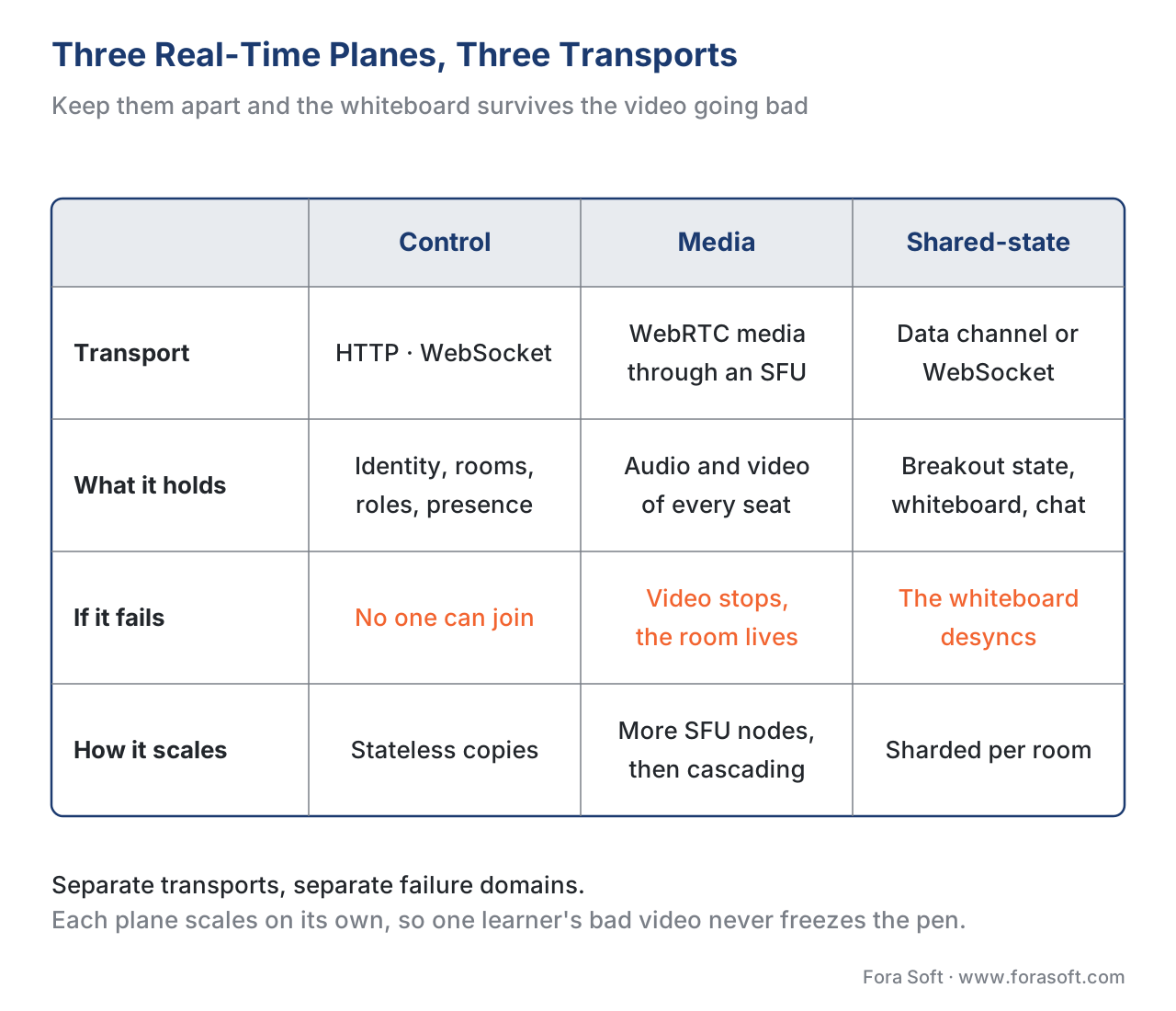 Figure 3. Separation of concerns. The control plane, media plane, and shared-state plane run on different transports and scale independently. Keeping them separate is why the whiteboard keeps working when one learner's video degrades.
Sizing the Build: The Scaling Tiers
"Virtual classroom" spans wildly different builds depending on size, and the architecture flexes accordingly. Four tiers cover almost every learning product, and naming yours up front prevents both over- and under-engineering.
Tier 1 — one-to-one (tutoring, office hours). A single tutor and learner. The media can run peer-to-peer (a direct connection, no media server) with a relay server only as a fallback for hard networks. The shared-state plane still matters — tutoring lives on the shared whiteboard — but the media plane is at its simplest. This is the cheapest tier to run.
Tier 2 — small interactive class (up to ~30–50, the seminar). Everyone can be on camera; breakout rooms and the whiteboard are central. A single SFU node handles the media comfortably. This is the tier most "virtual classroom" products target, and it is where the shared-state plane does the most work.
Tier 3 — the large class (up to a few hundred, the lecture). Now most participants are receive-only. The instructor and a handful of active learners publish video; the rest watch. Simulcast and SVC gate the publisher count and serve the receive-only majority cheaply. A single SFU, or a small cluster, still covers it.
Tier 4 — the massive session (thousands to tens of thousands, the keynote / MOOC live event). You cascade SFUs across regions, and at the top end you bridge to a one-way broadcast path (low-latency HLS) for the pure viewers while keeping WebRTC for the interactive core. The economics and codec choices here lean on scaling delivery: CDN, transcoding, and cost at volume and the Video Encoding section.
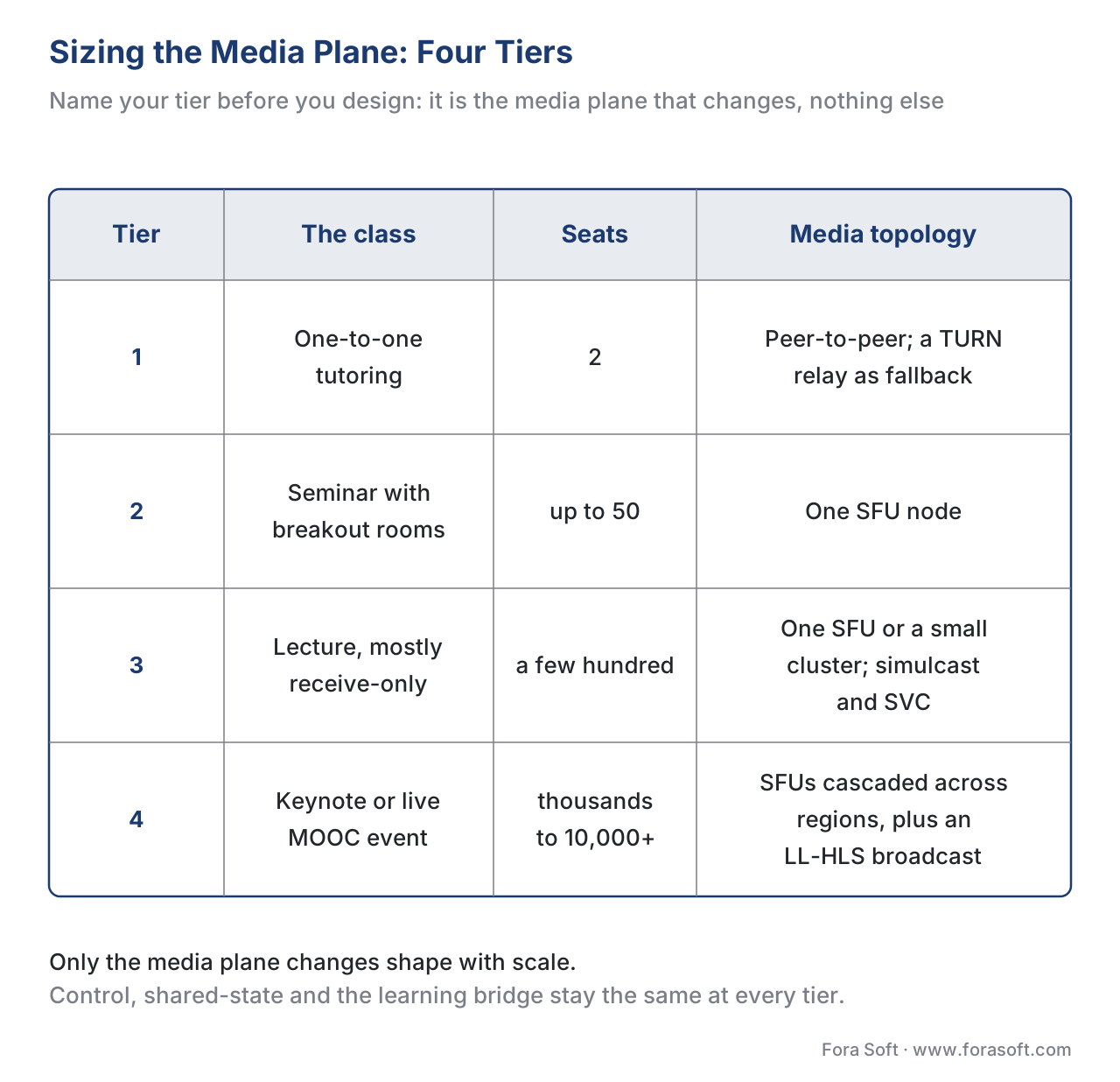 Figure 4. Four tiers, four topologies. From peer-to-peer tutoring to cascaded SFUs with a broadcast bridge, the media plane changes shape with scale — while the control, state, and learning-bridge planes stay structurally the same.
The Cost and Latency Arithmetic, Shown Out Loud
Make one tier concrete. Take Tier 2: a 50-minute seminar, 30 learners all on camera at 720p, with breakout rooms and a shared whiteboard, recorded for the catalog.
Latency budget. The target for natural conversation is glass-to-glass delay under about 200 milliseconds. A rough budget:
capture + encode      ≈  30 ms
network to SFU        ≈  40 ms (regional)
SFU forward           ≈  10 ms
network to viewer     ≈  40 ms
jitter buffer + decode ≈ 50 ms
-----------------------------------
total                 ≈ 170 ms  → under the 200 ms conversational ceiling
The whiteboard sits on a separate budget: local ink is instant (0 ms perceived), and the CRDT update reconciles in the background, so a slow video link never freezes the pen.
Bandwidth and cost. Thirty publishers at ~1.2 Mbps each, forwarded by the SFU to the other 29, is the load that sizes your media server — well within a single SFU node. The recurring bill, as the recording article showed, is dominated not by the live hour but by delivery of the replay. If 200 learners later watch the 50-minute recording at ~0.6 GB each:
200 viewers × 0.6 GB = 120 GB delivered
120 GB × $0.085/GB (typical 2026 CDN egress) ≈ $10.20 to deliver this replay
The live session's media compute is a fixed, modest cost; the replay's delivery scales with views. Budget for views, not for live hours — the same lesson the recording article reached, now confirmed from the architecture level.
The Pitfalls That Define a Bad Build
"It's just a video call with a whiteboard." This is the root error. A video call has no learning bridge — no LTI launch, no roster sync, no grade passback, no xAPI events. A product built on that assumption ships, demos well, and then cannot answer the institution's first question: who attended and who passed?
"LTI logs the user in." It does not, mechanically. LTI 1.3 is an OIDC launch carrying a signed JWT; single sign-on is the consequence. Teams that model it as a password login build the integration wrong and fail conformance.
"We'll add grade passback later." Grade passback (AGS) shapes your data model — what a "score" is, how activities map to gradebook columns, when scores are sent. Retrofitting it means reworking the learning bridge after the fact. Decide the AGS model before you build the activities that feed it.
"Breakout state lives in the media server." It does not, and putting it there couples two planes that should scale independently. Breakout assignment, whiteboard strokes, and chat belong to the shared-state plane on their own transport, so they survive media trouble and persist for the recording.
"One SFU is enough, forever." It is enough until your largest session crosses a few thousand publishers, at which point the absence of a cascade plan becomes an outage. Pick your tier honestly and design the media plane for the session you will actually run, not the demo.
"Watched the replay 100% = completed the class." Attendance, participation, and completion are different signals with different sources — AGS attendance, xAPI participation events, and a deliberate completion rule. Conflating them, the most common e-learning measurement error, starts in this architecture.
Comparing the Build-vs-Buy Options Per Plane
The build-versus-buy decision is not one decision; it is four, one per plane. The table makes the realistic options explicit, including how each path handles the learning standards that define a classroom.
| Plane | Buy / off-the-shelf | Self-host open source | Custom build | Standards it must speak |
|---|---|---|---|---|
| Control plane | CPaaS auth + rooms | Keycloak + custom room model | Full custom | LTI 1.3 launch, OIDC/SAML SSO |
| Media plane | CPaaS SFU (managed) | mediasoup, LiveKit, Janus, Jitsi | Rare — only if media is the product | WebRTC; WHIP/WHEP |
| Shared-state plane | Embeddable whiteboard SDK | Yjs / Automerge CRDT + your UI | Custom canvas + sync | (app-level; data channel) |
| Learning bridge | Rarely sold standalone | LTI tool libraries + an LRS | Usually custom — this is your differentiator | LTI 1.3 + Advantage (NRPS, AGS), xAPI + Video Profile |
The pattern almost every successful build follows: buy or self-host the media plane, build the learning bridge. The media plane is commoditized; the learning bridge is where your product is trusted by an institution, and it is rarely available as a drop-in. The shared-state plane is the swing decision — buy it if the whiteboard is incidental, build it if collaborative work is your pedagogy.
Free download: Virtual-Classroom Reference Architecture Readiness ChecklistA one-page aid that pressure-tests all four planes of a live-learning platform — control, media, shared-state, and the LTI/xAPI learning bridge — plus the scaling tier and the recording-to-catalog path, before you commit a budget.Where Fora Soft Fits In
Fora Soft has built real-time video, conferencing, streaming, and e-learning systems since 2005, and a live-learning platform sits at the exact intersection of those skills — WebRTC media, shared real-time state, and the learning bridge into an LMS. The build-versus-buy trade-off we help teams make is concrete and per-plane: a managed SFU and an embeddable whiteboard get a seminar product to market fast, while a custom shared-state plane and a custom LTI/xAPI learning bridge are what make a tutoring marketplace or a cohort platform genuinely differentiated and institution-ready. We work across e-learning, video conferencing, streaming, OTT, and telemedicine, so we are usually brought in when a classroom has to be both broadcast-grade in the media plane and rigorously measurable in the learning bridge. No hype: for the media plane the honest answer is often "self-host an existing SFU," and we will say so — the engineering you own should be the part that differentiates your product.



The handbook
Fora Soft Video Engineering Handbook
We wrote a seven-volume series that takes the whole video stack apart across 9,000+ pages — encoding, delivery, audio and AI — and someone who works through it can design and build the media plane this article maps. Volume 3 sits closest to the classroom: WebRTC and real time, players and recovery after a stall, CDN and caching, and the delivery economics behind that $0.085 a gigabyte. Volume 2 is where the glass-to-glass latency budget, NAT traversal and the HLS packaging behind the Tier 4 broadcast bridge are worked out, and volume 1 is the encoding foundation the whole stack stands on. Written by Nikolay Sapunov, CEO at Fora Soft.
Which of the four planes are you actually buying?
Tell us the tier you are building for and which LMS has to trust the room — and we will come back with a plane-by-plane build-versus-buy split: what a managed SFU covers, what the shared-state plane costs to own, and how much of the LTI 1.3 and xAPI bridge you have to write yourself. 250+ video products shipped since 2005.
See our case studies
Case study
BrainCert
A WebRTC and HTML5 virtual-classroom LMS with 100K+ customers and 500M+ real-time classroom minutes across 10 datacenters at 99.995% uptime — breakout rooms, an interactive whiteboard, proctored exams and SCORM/xAPI support in one product. It is all four planes built together, with the learning bridge treated as a feature the institution can audit rather than a later add-on.
Case study
Scholarly
Sydney’s selective-test prep platform: 15,000+ active users and live classes for up to 2,000 students at once, on LiveKit and WebRTC for the interactive core with DASH/HLS for the rest, and ClickHouse, Grafana and Prometheus behind the analytics. It replaced a Zoom-plus-Discord setup — the exact “it is just a video call” starting point this article warns about.
Case study
WorldCast Live
A concert platform holding 0.4–0.5 s latency at 1.5 Gb/s for 10,000 simultaneous viewers on a custom WebRTC and Kurento architecture, with quality dropped dynamically for weak connections. That is Tier 4 of the table above in production: the interactive core stays real-time while the viewing majority is served cheaply.
What to read next
Media plane
WebRTC for Live Learning: Why It Is the Default, and Its Classroom Gotchas
The protocol under the media plane, and where it bites in a classroom.
Scaling
Scaling the Live Class: SFU, Simulcast, and the 200-Seat Lecture
Tiers 3 and 4 in detail: topologies, simulcast, and when to cascade.
Shared state
Breakout Rooms: Design, State, and Re-Merge
The hardest job in the shared-state plane, worked through end to end.
Standards
LTI Explained: Launching Tools Inside Any LMS
The OIDC launch and the Advantage services, one level deeper.
References
- W3C. WebRTC: Real-Time Communication in Browsers, W3C Recommendation — the browser real-time media API underlying the media plane and the data channel. https://www.w3.org/TR/webrtc/ (Tier 1, primary standard). Accessed 2026-06-20.
- 1EdTech (IMS Global). Learning Tools Interoperability (LTI) Advantage Implementation Guide, version 1.3 — the OIDC launch, signed JWT, and the three Advantage services (Deep Linking, Names and Role Provisioning Services, Assignment and Grade Services). https://www.imsglobal.org/spec/lti/v1p3/impl (Tier 1, primary standard). Accessed 2026-06-20.
- 1EdTech. Learning Tools Interoperability (standard overview) — LTI 1.3 security framework and the LTI Advantage service set. https://www.1edtech.org/standards/lti (Tier 1/2, standards body). Accessed 2026-06-20.
- ADL. Experience API (xAPI) Specification, version 1.0.3 — Part 2: Statements; the statement model used for live-session learning events. https://github.com/adlnet/xAPI-Spec (Tier 1, primary standard). Accessed 2026-06-20.
- ADL. xAPI Video Profile — the video-event vocabulary (initialized, played, paused, seeked, completed) used for tracking the recorded replay. https://adlnet.gov/projects/xapi-video-profile/ (Tier 1, primary standard). Accessed 2026-06-20.
- IETF. WebRTC-HTTP Ingestion Protocol (WHIP) and WebRTC-HTTP Egress Protocol (WHEP) — HTTP-based signaling for publish and playback standardizing the control-plane signaling step. https://datatracker.ietf.org/doc/draft-ietf-wish-whip/ (Tier 1, draft standard — cited as a draft; may change). Accessed 2026-06-20.
- Fora Soft. WebRTC Architecture for Production: SFU, MCU, MoQ Guide — 12-component reference architecture and topology decisions from 1:1 to 10K+ broadcast. https://www.forasoft.com/learn/webrtc-architecture-production-systems (Tier 3, first-party engineering). Accessed 2026-06-20.
- LiveKit. Architecture and scaling (official documentation) — cluster-of-nodes model, Redis coordination, cascading/distributed rooms across servers. https://docs.livekit.io/home/ (Tier 4, first-party engineering). Accessed 2026-06-20.
- Yjs. Yjs documentation — CRDT framework for shared editing of the whiteboard and collaborative surfaces. https://docs.yjs.dev/ (Tier 4, first-party engineering). Accessed 2026-06-20.
- W3C. Web Content Accessibility Guidelines (WCAG) 2.1, W3C Recommendation — Success Criterion 1.2.4 Captions (Live, AA) for the live session; 1.2.2 / 1.2.5 for the recorded replay. https://www.w3.org/TR/WCAG21/ (Tier 1, primary standard). Accessed 2026-06-20.
Where sources disagreed, the official standard won. Vendor descriptions of LTI as "a login" were overridden by the 1EdTech LTI 1.3 spec, which defines an OIDC launch with a signed JWT — SSO is a consequence, not the mechanism. SFU per-node capacity (≈500–1,000 streams) and CDN egress (~$0.085/GB) are typical 2026 figures for illustration — confirm against your provider's current rate card and load tests. WHIP/WHEP are cited as drafts and may change before final ratification.
