


Why This Matters
If you are building or buying a virtual classroom, breakout rooms are the feature that separates a real teaching tool from a video-call with a school logo, because small-group work is where learners actually talk. They are also the feature most likely to break in front of thirty students: a learner gets moved and loses audio, a room won't close, the timer fires but nobody returns, or a reconnecting student lands in the wrong group. Those failures are not video bugs — they are state bugs, and they are expensive to fix after launch because the fix usually means redesigning how room membership is stored. This article gives you the architecture and the state model up front so you can brief engineers against a shared picture, decide what to build versus buy, and avoid the predictable failure modes before they cost you a class.
What a Breakout Room Actually Is
Start with the plain meaning. A breakout room is a temporary sub-session of a live class: the instructor takes a class of, say, thirty learners and splits them into six groups of five, each group gets its own private audio and video space for ten minutes, and then everyone comes back together. Think of it as moving people between physical rooms in a building during a workshop — same event, same attendees, different walls for a while. The video and audio of a breakout room are nothing new; they use the same real-time machinery as the main class, which we cover in WebRTC for live learning.
What is new is the bookkeeping. The system must always know which learner belongs to which group, who is allowed to move between groups, what happens when someone's laptop drops and rejoins, and how to bring everyone back. That bookkeeping — the membership and the rules around it — is the breakout feature. Everything else is plumbing you already have.
So the right mental model is this: a breakout system is a membership graph (which person is in which room) plus a set of operations on that graph (assign, move, broadcast, time, re-merge), all kept consistent across every learner's screen in real time. Build that graph well and the video takes care of itself. Build it badly and no amount of video quality will save the lesson.
Why Breakout Rooms Earn Their Keep
Before the engineering, the pedagogy, because it justifies the budget. Education research on online tutorials consistently finds that small-group work raises participation: learners report feeling more comfortable speaking in a group of four than in a class of forty, are more likely to raise a concern, and treat the room change as a re-engagement break that reduces boredom (University of Guelph, Office of Teaching and Learning, 2021). Collaboration in small groups is associated with deeper learning and longer retention than passive listening.
The same research is honest about the failure mode: learners in unstructured breakout rooms often struggle to coordinate, and a room with no task quickly goes silent. The practical lesson for a product team is that a breakout feature is not just "split the call" — it has to carry a task into the room (a prompt, a shared document, a whiteboard) and give the instructor a way to monitor and help. That shapes what you build: breakout rooms need a content channel and an instructor-visibility channel, not just isolated audio.
The Five Things a Breakout System Must Do
Strip away the marketing and every breakout feature is these five operations on the membership graph. Get all five right and the feature feels solid.
One — assign learners to rooms. Three models exist, and a good product offers all three: automatic (the system randomly distributes learners evenly), manual (the instructor drags each learner into a room), and self-select (learners pick their own room from a list). Self-select is the modern default for adult learners because it removes the instructor bottleneck, but it needs a cap per room so groups stay balanced.
Two — move people mid-session. The instructor must be able to pull a learner from one room into another, or into the main room, without ending anyone's session. This is the operation that most often breaks audio, because a naive implementation tears down the media connection and rebuilds it; a good one re-points subscriptions while the connection stays alive.
Three — broadcast to every room. The instructor needs a one-to-many announcement — "two minutes left, start wrapping up" — that reaches all rooms at once. In Zoom this is a short text note shown briefly on every participant's screen, separate from any room's chat (Zoom Support, broadcast message, 2026). Some products also support an audio broadcast that briefly interrupts every room.
Four — run a timer. Breakouts are time-boxed. The system shows a countdown, warns when time is nearly up, and can auto-close the rooms when the timer expires. A grace period — typically 60 seconds — lets learners finish a sentence before they are pulled back (Zoom Support, breakout timer options, 2026).
Five — re-merge into the main room. Closing the rooms returns every learner to the main session, restoring the exact state they left: same media, same roster, same instructor. Re-merge is deceptively hard because it is the moment the membership graph collapses back to one node, and any learner the system "lost" during the breakout becomes visible as a bug here.
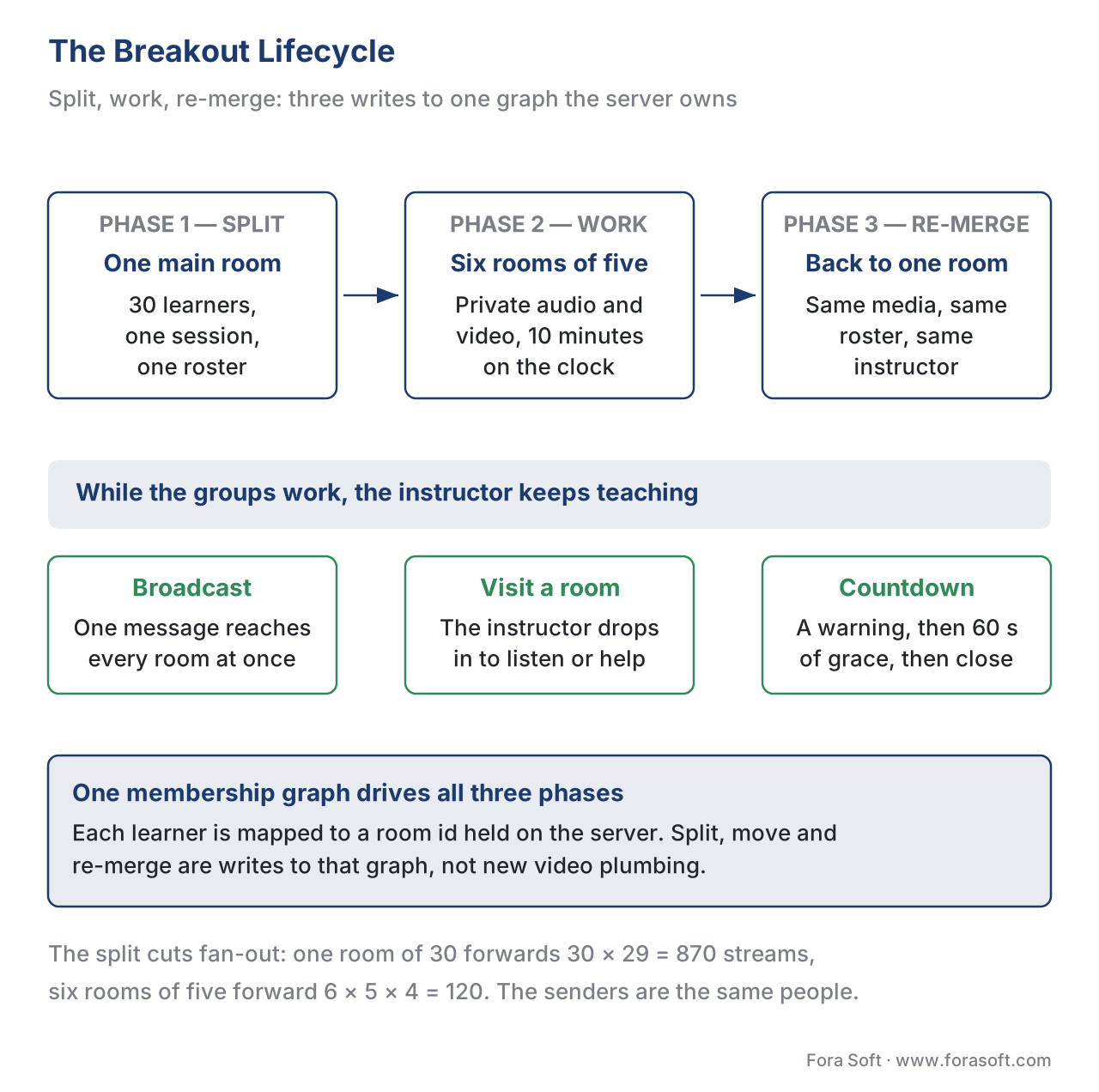 Figure 1. The breakout lifecycle. One main room splits into timed small groups, the instructor broadcasts and visits rooms during the work, and a countdown re-merges everyone back into the main session — all driven by one membership graph.
How It Works Under the Hood: Two Architectures
There are two sound ways to build breakout rooms, and the difference is where the rooms live. Both assume a selective forwarding unit (SFU) — the media server that forwards each person's video to the others without mixing it, explained in depth in the Video Streaming section and applied to large classes in scaling the live class.
Architecture A — logical partition (one SFU, re-routed subscriptions). Everyone stays connected to the same media server and the same signaling channel; what changes is the routing rules. When the class splits, the server simply stops forwarding the other groups' streams to each learner and forwards only their own room's streams. Moving a learner is a change to a subscription table, not a new connection. This is the simpler operational model — one server, one connection per learner, one place to hold state — and it is how most modern WebRTC platforms implement breakouts. Its limit is blast radius: a problem with that server affects the whole class.
Architecture B — separate rooms (a distinct session per group). Each breakout group is its own room, possibly on its own media server instance. Splitting the class means creating six rooms and moving each learner's connection into one. This gives strong isolation — a crash in one group does not touch the others, and groups can even sit on different servers for load — at the cost of more moving parts: the connection is re-established on move, and membership must be tracked across rooms.
The honest default for a learning product is Architecture A for a single class on one server, moving toward B only when isolation or per-group scaling genuinely matters — a marketplace running thousands of simultaneous small classes, for instance. Whichever you choose, the membership graph is the same; only the media wiring differs.
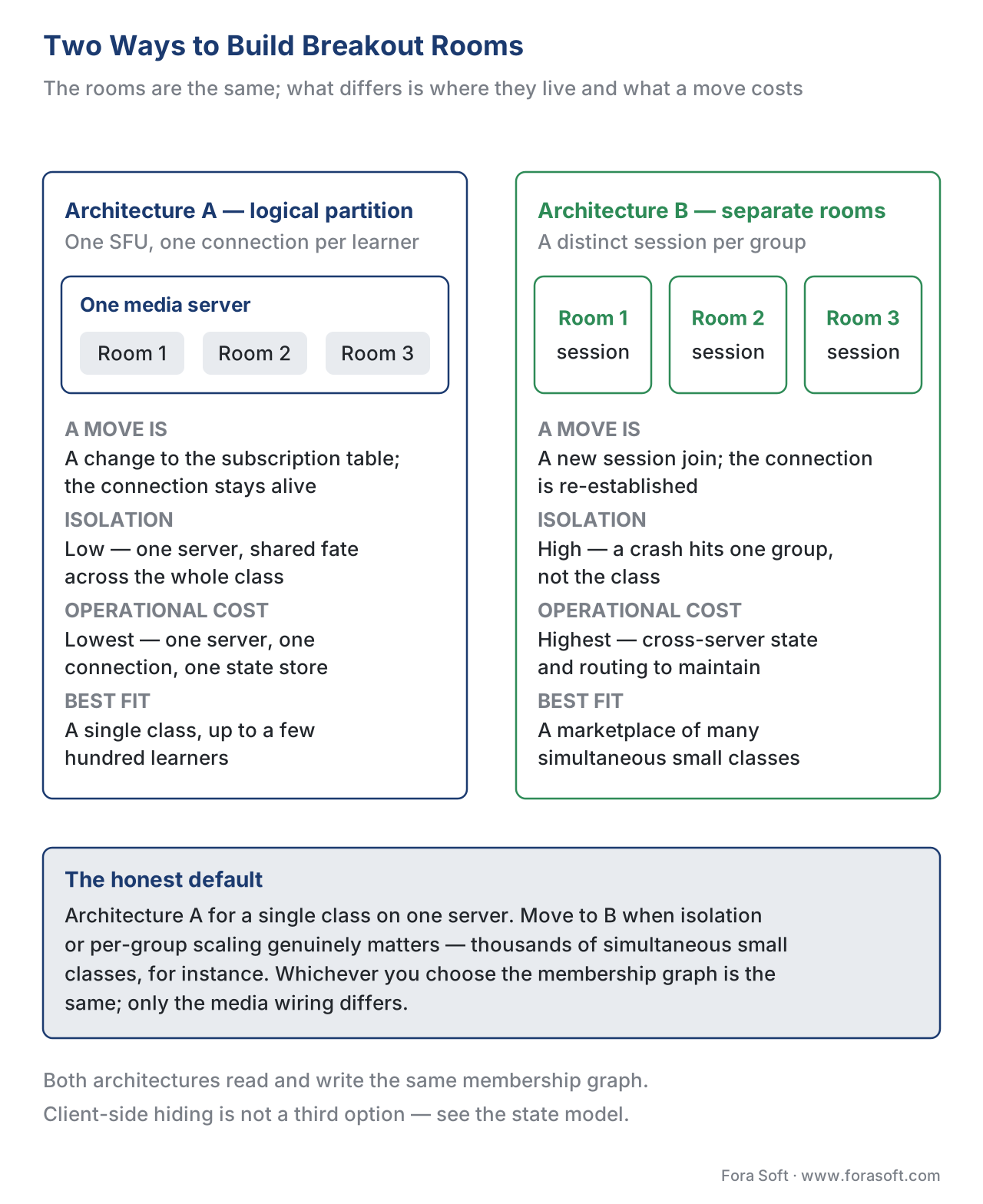 Figure 2. The two architectures. Left: one media server re-routes who-sees-whom (simple, shared fate). Right: a separate room per group (isolated, more moving parts). Both are driven by the same membership state.
The State Model That Makes It Reliable
Here is the single most important design decision: one authoritative source of truth for the membership graph, held on the server, never on the clients. Every breakout bug you have ever seen traces back to two screens disagreeing about who is in which room. The server owns the graph; clients are told what to render.
In practice the graph is a small, fast-changing data structure — each learner mapped to a room id, plus per-room metadata (open or closed, the timer's end time, the assignment model). Because it changes every time someone is assigned or moved, it lives in fast shared storage; production systems commonly keep this dynamic room-and-participant state in an in-memory store such as Redis so that every server process and the signaling layer read the same answer. The signaling channel — the same control connection that carries authentication and room membership — is what pushes graph changes to every client in real time.
Two events stress the model, and both must be designed for, not patched later:
The move. When the instructor moves a learner, the server updates the graph, then tells that learner's client to subscribe to the new room's streams and unsubscribe from the old. In Architecture A the media connection never drops; only subscriptions change. Get this wrong — by tearing down and rebuilding the connection — and the learner sees a black screen and silence for a few seconds, which in a ten-minute breakout is a tenth of the lesson.
The reconnect. A learner's network drops and the client rejoins. The client must not guess where it belongs; it asks the server, which reads the authoritative graph and returns "you are in room 3, which is open, with four minutes left." Because the server is the source of truth, a reconnect is just a re-read of the graph, and the learner lands exactly where they were. If clients held their own state, a reconnect would be a coin flip.
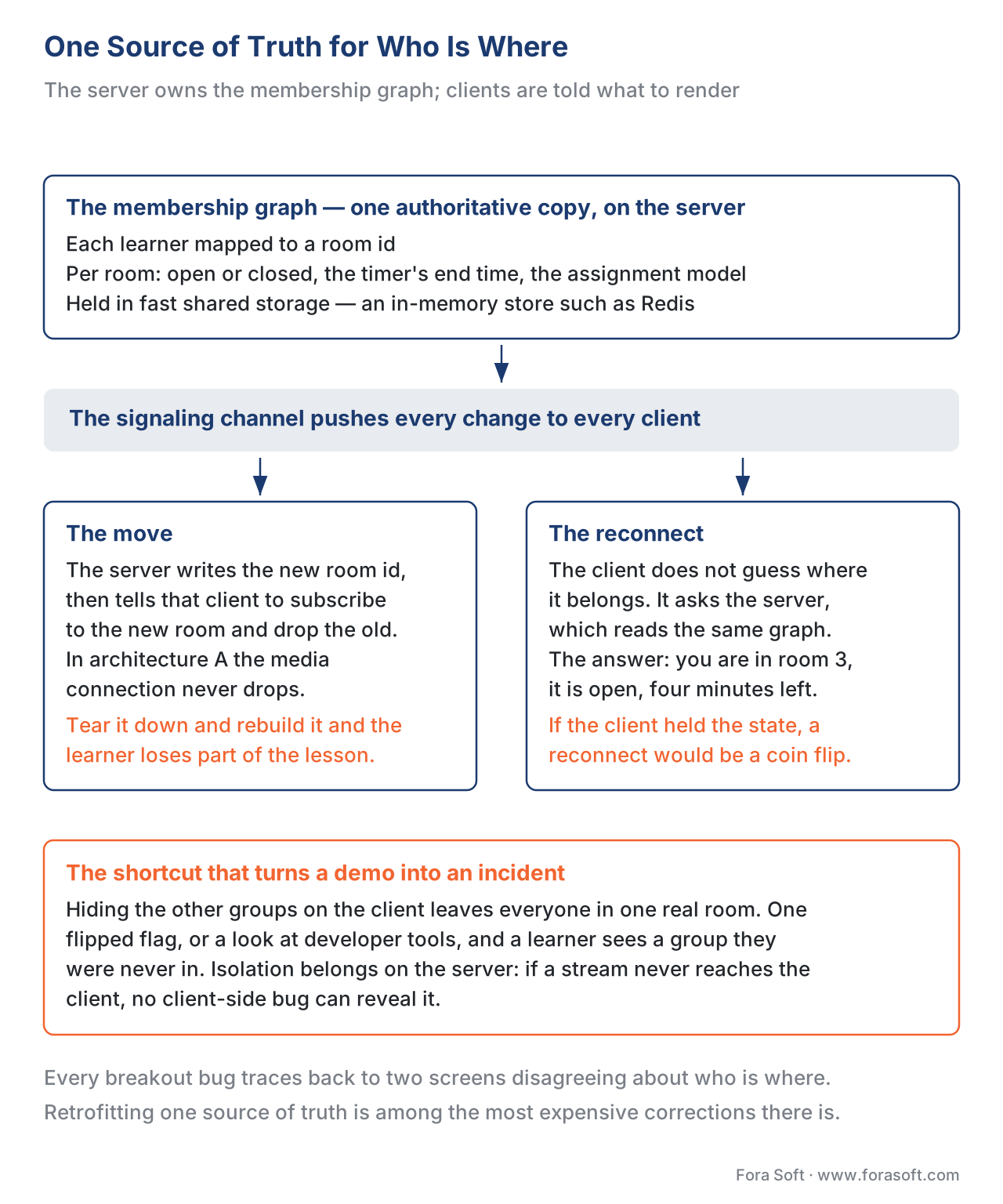 Figure 3. One source of truth. The server holds the membership graph in fast shared storage; signaling pushes changes to clients; moves and reconnects are reads against the same graph, so screens never disagree.
Instructor Controls During the Breakout
While groups work, the instructor needs to teach, not just watch a wall of rooms. Three controls matter. Visiting a room lets the instructor drop into any group to listen or help, which is simply a temporary move of the instructor node into that room's subgraph. Asking for help lets a learner raise a flag the instructor sees across all rooms — the small-group equivalent of a raised hand. The broadcast pushes a message to every room at once. These are not luxuries: the same education research that praises breakouts warns that unmonitored groups go quiet, so instructor presence is part of the feature, not an add-on.
One numeric note on cost, because teams worry breakouts multiply their bill. They usually do not. A breakout actually reduces downstream fan-out, because each learner now subscribes only to their small group instead of the whole class. Take a class of 30 in active all-see-all discussion: each learner receives 29 streams, so the server forwards 30 × 29 = 870 streams. Split into 6 rooms of 5, each learner receives 4 streams, so the server forwards 6 × 5 × 4 = 120 streams — roughly a seventh of the load. The senders are the same people; you have simply stopped forwarding streams nobody is watching. Relay (TURN) cost, covered in WebRTC for live learning, scales with senders, so it is essentially unchanged.
A Comparison You Can Hand to Engineers
The build decision usually comes down to the table below. The "isolation" column is the one that decides most architectures, just as a standards column decides most tooling choices elsewhere in this section.
| Approach | How a move works | Isolation (one group's failure) | Operational cost | Best fit |
|---|---|---|---|---|
| Logical partition (one SFU) | Re-point subscriptions; connection stays alive | Low — shared server, shared fate | Lowest — one server, one connection, one state store | A single class up to a few hundred learners |
| Separate rooms, one server | New session join inside the same server | Medium — rooms isolated, server shared | Moderate — track membership across rooms | Many groups needing clean separation |
| Separate rooms, multiple servers | New session join, possibly different server | High — a crash hits one group only | Highest — cross-server state, routing | A marketplace of many simultaneous small classes |
| Client-side "hide" (anti-pattern) | Mute/hide other groups on the client | None — everyone is still in one room | Looks cheap, fails privacy | Never — see the pitfall below |
A Common Mistake That Turns a Demo into an Incident
The most tempting shortcut is the most dangerous: implementing breakouts as a client-side illusion. In this anti-pattern everyone stays in one real room and each client simply hides the other groups' video and mutes their audio. It demos beautifully and ships fast. Then a learner opens the browser's developer tools, or a bug flips a flag, and they can see and hear a group they were never meant to join — a privacy breach in a graded or sensitive class. Worse, the server never had a real membership graph, so moves, reconnects, and recording per room are impossible to add later without a rewrite. Breakout isolation must be enforced on the server, by not forwarding the other groups' media at all. If a stream never reaches the client, no client-side bug can reveal it.
A second, quieter mistake is losing state on a move or reconnect because the client held the truth. We covered the fix above: the server owns the graph, and every move and reconnect is a read against it. Design that on day one; retrofitting a single source of truth into a system that scattered state across clients is one of the most expensive corrections in real-time video.
Accessibility and the Class Record
Two obligations follow learners into the breakout room. First, captions must travel with the learner. If the main class has live captions — required for many public-sector and enterprise buyers under WCAG 2.1 Success Criterion 1.2.4 (Captions, Live), Level AA (W3C WCAG 2.1) — the breakout room needs them too, which means your captioning must be per-room aware, not bolted only to the main stage. Second, controls must be keyboard-operable (WCAG 2.1 SC 2.1.1, Keyboard, Level A); a learner who cannot click "ask for help" with a mouse must reach it with a keyboard. If you record breakouts for the class record — see recording live classes — record per room, tagged with the membership graph, so the recording reflects who was actually present.
Free download: Breakout Rooms — Readiness ChecklistThe one-page check to run before you ship breakouts: the three assignment models, where the membership graph lives, what a move and a reconnect do to it, the instructor controls that keep groups from going quiet, captions and keyboard access inside the room, and per-room recording tagged with the roster.Where Fora Soft Fits In
Breakout rooms are a state problem wearing a video costume, and that is exactly the seam we work on. Fora Soft has built real-time video, conferencing, and virtual-classroom software since 2005, so the same team understands the media server, the signaling layer, and the membership state that has to stay consistent across all of them. We help when a learning product needs reliable breakouts — moves that do not drop audio, reconnects that land learners in the right room, per-room recording and captions — and we are candid about when an off-the-shelf classroom SDK already covers your needs and a custom build is not warranted. The verticals we work in — e-learning, video conferencing, telemedicine, and streaming — all live or die on this same real-time-state spine.



The handbook
Fora Soft Video Engineering Handbook
We wrote a seven-volume series that takes the whole video stack apart across 9,000+ pages — encoding, delivery, audio and AI. Volume 3 sits closest to this article: WebRTC and real-time media, selective forwarding and subscription control, how a player recovers from a stall, and the QoE monitoring that tells you a move cost someone their audio. Volume 2 covers the transport underneath — UDP against TCP, congestion control, NAT traversal and relays — which is why reconnects happen at all, and volume 4 covers the audio half a breakout lives on, from echo cancellation and noise suppression to the captions that have to follow a learner into the room. Work through them and you can specify this membership-and-media spine yourself instead of judging it from a vendor demo. Written by Nikolay Sapunov, CEO at Fora Soft.
What happens in your classroom when a learner reconnects mid-breakout?
Tell us how your live classes are built today — which media server, where room membership is stored, what a move does to the connection — and we will come back with the architecture that fits your class sizes, the state model that keeps two screens from disagreeing, and what it takes to add per-room captions and recording. 250+ video products shipped since 2005.
See our case studies
Case study
BrainCert
A WebRTC and HTML5 virtual classroom with breakout rooms, screen sharing and proctored exams, running 500M+ real-time classroom minutes across 10 datacenters at 99.995% uptime for 100K+ customers — the membership graph under real teaching load, not a demo.
Case study
Scholarly
Live classes for up to 2,000 students at once on LiveKit and WebRTC, with Redis and NATS holding the fast-changing session state and Kubernetes carrying exam-season peaks — the shape this article argues for when the room count grows.
Case study
Tabsera
A K-12 LMS in four languages where quizzes and an interactive whiteboard carry the lesson — the content channel a small group needs, because a breakout room with no task and no shared artefact goes quiet within a minute.
What to read next
Fundamentals
The Virtual Classroom: How It Differs From a Meeting
The product these rooms live inside, and what teaching adds to a call.
Real time
WebRTC for Live Learning
The media machinery a move re-points, and what relay traffic actually costs.
Scale
Scaling the Live Class: SFU, Simulcast, and the 200-Seat Lecture
What the SFU under your rooms does when the class stops being small.
Recording
Recording Live Classes and Post-Processing for the Catalog
How per-room recordings get tagged with who was actually in the room.
References
- WebRTC 1.0: Real-Time Communication Between Browsers — W3C Recommendation. The browser real-time media model (peer connections, tracks, subscriptions) underlying all breakout media. Tier 1. https://www.w3.org/TR/webrtc/
- RFC 8831 — WebRTC Data Channels — IETF. The reliable/unreliable data channel used to carry signaling and breakout-control messages alongside media. Tier 1. https://www.rfc-editor.org/rfc/rfc8831
- RFC 8825 — Overview: Real-Time Protocols for Browser-Based Applications — IETF. The architecture of a WebRTC application, including signaling separate from media. Tier 1. https://www.rfc-editor.org/rfc/rfc8825
- WCAG 2.1 — W3C Recommendation, 5 June 2018. Success Criteria 1.2.4 (Captions, Live, AA) and 2.1.1 (Keyboard, A) that breakout rooms must also satisfy. Tier 1. https://www.w3.org/TR/WCAG21/
- LiveKit Documentation — Rooms, participants, and tracks — LiveKit. First-party account of the room/participant/track model and selective subscription that logical-partition breakouts re-route. Tier 4. https://docs.livekit.io/home/get-started/api-primitives
- mediasoup Documentation — Router, Transport, Producer/Consumer — mediasoup. The router/consumer model behind per-room media forwarding in an SFU. Tier 4. https://mediasoup.org/documentation/v3/mediasoup/design/
- Zoom Support — Using breakout rooms; broadcast a message; timer and options — Zoom. The de facto reference behaviour for assignment models, broadcast, countdown, and re-merge. Tier 4. https://support.zoom.com/hc/en/article?id=zm_kb&sysparm_article=KB0061102
- Breakout Rooms Can Increase Student Engagement in Online Tutorials — University of Guelph, Office of Teaching and Learning, 2021. Evidence that small-group breakouts raise participation and re-engagement. Tier 5. https://otl.uoguelph.ca/teaching-learning-resources/sotl-snapshots/remote-teaching-and-teaching-technology/breakout-rooms
- Supporting Student Collaboration in Online Breakout Rooms through Interactive Group Activities — New Directions in the Teaching of Physical Sciences, 2022 (ERIC EJ1334495). Evidence that breakouts need a task and shared artefact to work. Tier 5. https://files.eric.ed.gov/fulltext/EJ1334495.pdf
