


Why this matters
If you are an L&D director, an EdTech founder, or a product lead, the build-vs-buy question arrives first and badly framed. People treat it as a budget question — "what's cheapest?" — when it is really an architecture question that decides what your product can ever become. Choose "buy" and you inherit someone else's video player, tracking model, and limits; choose "build" and you own everything, including the bill. This article exists so you can make that call on purpose, with the trade-offs and current numbers in front of you, instead of defaulting to whatever your loudest engineer or vendor prefers. Read it with the platform anatomy map and the cost model open — this is the decision that turns those two into a plan.
The three paths, in plain language
Every learning platform you have ever used was built one of three ways, and the words get muddled, so let us define them before we use them.
The first path is to buy — to rent a finished, hosted learning platform that someone else operates, usually as software-as-a-service (SaaS — software you access over the web for a monthly fee instead of installing and running it yourself). You sign up, upload courses, and learners log in. Think of buying as renting a fully furnished apartment: you move in tomorrow, but you cannot move the walls.
The second path is to extend — to take an open-source learning platform whose code is free to download and modify, then add your own features on top. The dominant example is Moodle, a learning management system (an LMS — the software that hosts courses, enrols learners, and records their progress) that has existed for over two decades and runs on roughly 150,000 registered sites in more than 230 countries [1][6]. Extending is like buying a house with good bones and renovating: you start from a solid structure, but every change is your responsibility.
The third path is to build — to create a custom platform from an empty editor, choosing every piece of technology and writing the course model, the player, and the tracking yourself. Building is constructing a house from the foundation up on an empty lot: total freedom, total cost, total time.
There is a fourth path that most successful teams actually take, and we will treat it as a first-class option throughout: the hybrid, which keeps a bought or extended system for the boring, solved parts and builds custom only the part that makes the product special — almost always the video. Hold that thought; it is where this article lands.
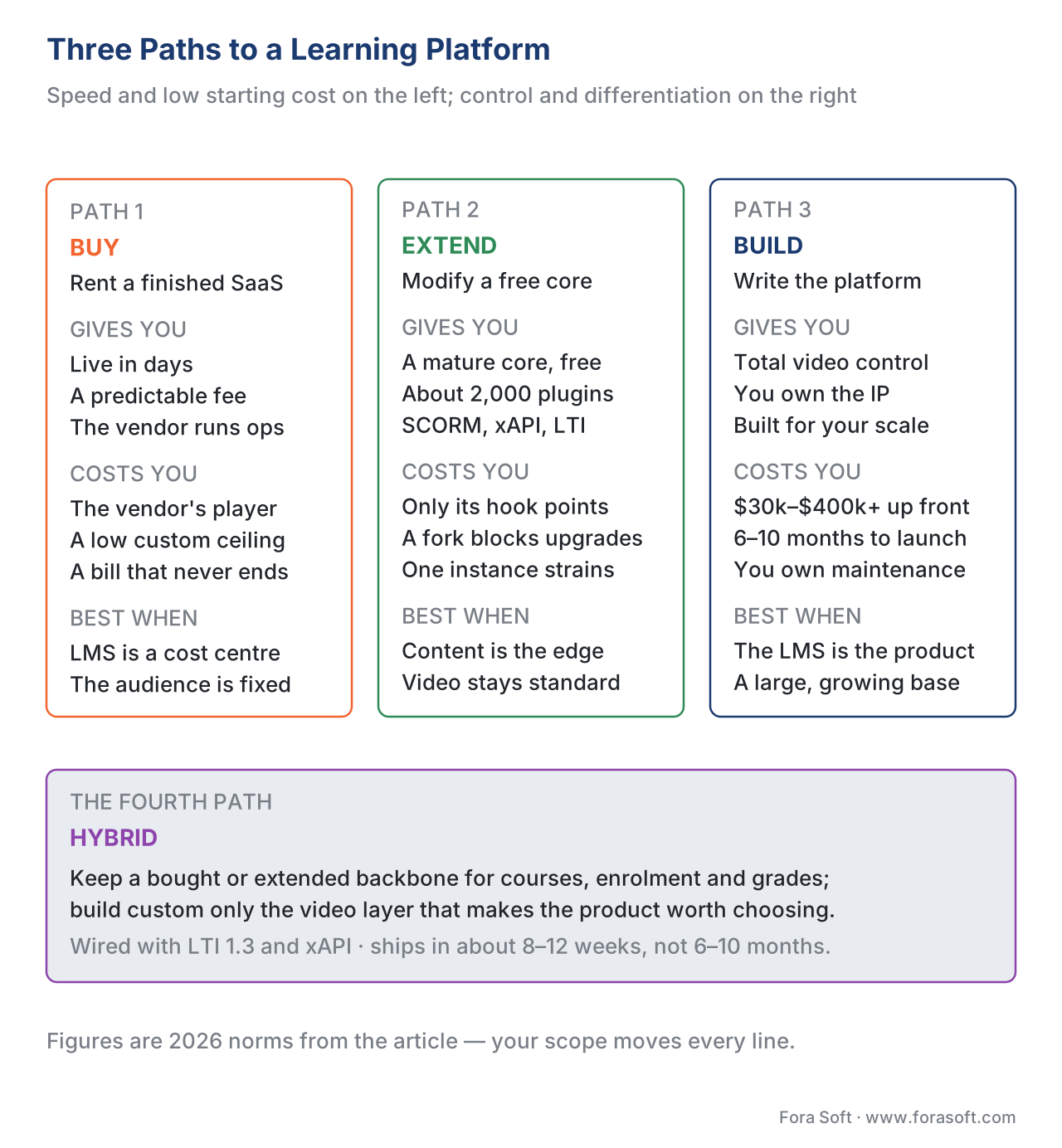 Figure 1. The three paths and the hybrid that bridges them. Speed and low starting cost sit on the left; control and differentiation sit on the right.
The one axis that explains everything: control versus speed
Underneath the three paths is a single trade-off, and once you see it, the whole decision gets simpler. On one end is speed and low starting cost; on the other is control and the ability to differentiate. You cannot maximize both. Every path is a point on that line.
Buying maximizes speed: you can have learners in a course this week, and you pay a predictable monthly fee. The cost is control — you get the vendor's video player, the vendor's tracking, the vendor's idea of what a course looks like, and you change none of it.
Building maximizes control: every pixel, every tracked event, every second of latency in a live class is yours to decide. The cost is speed and money — a custom platform takes months and starts in the low six figures before a single learner signs up.
Extending sits in the middle, but not neatly. You get the vendor's solid core for free and the freedom to add features — but only at the points the core was designed to let you extend. Reach past those points and you are modifying the original code, which quietly forks it and makes future upgrades painful or impossible [3]. Extending feels like control until you hit the part the platform will not let you change.
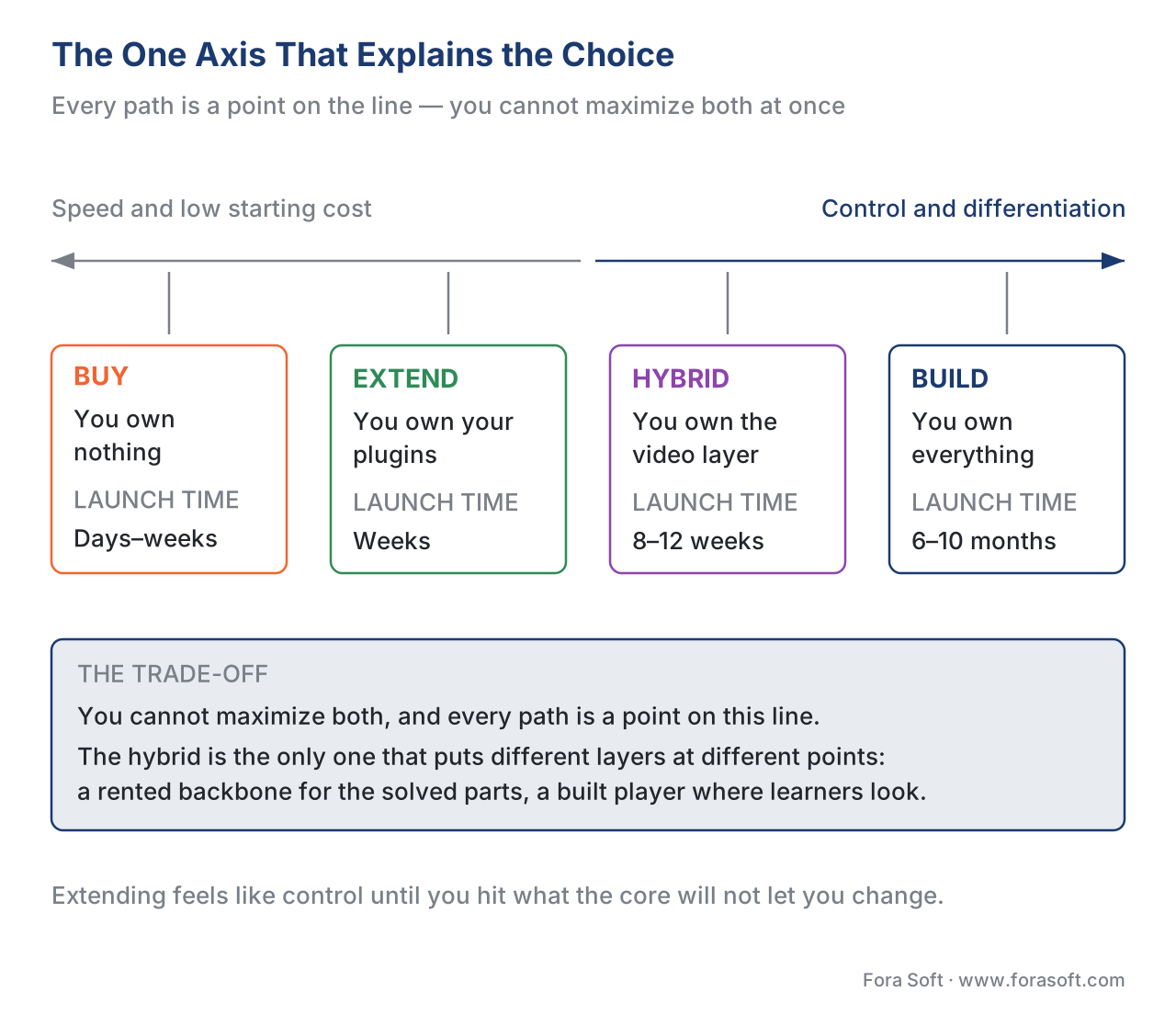 Figure 2. The control-versus-speed spectrum. Each path trades one for the other; the hybrid deliberately splits the difference by layer.
Path 1: Buy a ready-made platform
Buying means choosing among hundreds of commercial learning platforms — corporate training systems, course-creator tools, and hosted academic systems — and paying per learner per month.
The economics are simple and seductive at first. Mid-market SaaS learning platforms run roughly $5 to $15 per user per month in 2026 [4][7]. A specialist corporate platform like Docebo averages around $25,000 a year for 200 learners, often with a minimum seat count [4]. A lighter tool like TalentLMS lists tiers from about $69 to $179 a month for capped user counts, with enterprise pricing on request [4]. For a small audience, those numbers are a rounding error next to a custom build.
The trap is that the bill grows with every learner, forever, and the customization ceiling arrives sooner than you expect. Let us do the arithmetic out loud. At $8 per user per month, a platform with:
- 500 learners costs 500 × $8 × 12 = $48,000 a year
- 5,000 learners costs 5,000 × $8 × 12 = $480,000 a year
- 25,000 learners costs 25,000 × $8 × 12 = $2,400,000 a year
That last number is why large platforms eventually build. A bought platform is cheapest below roughly a few thousand learners and increasingly expensive above it, because you are paying rent on a per-head basis for software you will never own. Enterprise academic systems can reach $100,000 to $200,000 a year in licensing on their own [3].
Buying is the right answer more often than founders like to admit. If your learning platform is a cost centre — internal compliance training, employee onboarding, partner enablement — and your audience is bounded, buy and move on. The video player will be adequate, the tracking will cover the standards your buyers ask about, and you will spend your engineering budget on something that actually differentiates your business.
The common mistake: buying a SaaS platform for a product you intend to sell to consumers who compare you to Duolingo or MasterClass. The customization ceiling shows up in the first week of your beta and never moves. If the platform is the product, buying rarely survives contact with year two.
Path 2: Extend an open-source LMS
Extending means downloading a free, open-source learning platform and adding your own features. Moodle dominates this path: it is written in the PHP programming language, distributed under an open licence that lets anyone use and modify it, and surrounded by a marketplace of roughly 2,000 plugins — add-on modules for interactive content, virtual classrooms, payments, and integrations [6]. It supports the major learning standards out of the box: the course-packaging standard SCORM, the modern tracking standard xAPI, and the tool-launch standard LTI 1.3 [6][8][9][10].
This is genuinely powerful. You inherit twenty years of battle-tested course, quiz, and gradebook logic for free, and you can change a great deal of how the platform looks and behaves through plugins and themes without touching the core code.
The catch is the part nobody puts in the brochure. You can only extend at the points the platform was designed to let you extend. Plugin developers are restricted to the extension points the core explicitly exposes; the parts that were never made customizable stay as they are [3][5]. When your requirement falls outside those points — a fundamentally different video experience, a tracking model the core does not support, a learner flow the architecture assumes away — you have two bad options: fork the core (modify the original code), or live with the limit. Forking the core makes upgrading the platform very difficult, because every future update collides with your changes [3].
There is a performance ceiling too. A traditional Moodle install is a single large application, and it begins to strain under very large audiences and heavy video traffic — the point where your "free" platform turns into a five-figure monthly infrastructure bill for caching, content delivery, and a separate media stack [6]. The plugins themselves vary wildly in quality; half the marketplace is unmaintained or built for an old version, and the wrong combination can ship a security hole on day one.
Extending is the right answer when you need more control than buying allows but your differentiator is content and pedagogy, not a radically custom video experience — for example, an institution that wants its own branding, a few custom workflows, and standards support, but teaches in fairly standard course shapes. Our guide to integrating with Moodle covers the wiring in detail.
Path 3: Build a custom platform
Building means starting from nothing and choosing every piece: a modern web framework for the interface, your own server and database, a dedicated video stack, and a course-and-tracking model designed around your product instead of someone else's defaults.
This is the only path that gives you total control of the three things that make learning video hard: the interactive player, the tracking layer, and — if you teach live — the real-time video classroom. It is also the only path where you own the intellectual property outright, which matters enormously if you ever want to sell or raise money against the product.
The cost is real and front-loaded. A focused custom platform — a minimum viable product — starts around $30,000 and an enterprise-grade build can exceed $200,000 [3]. Other 2026 estimates put a full custom LMS at $150,000 to $400,000 up front plus $30,000 to $60,000 a year in maintenance, breaking even within three to four years for organizations above roughly 5,000 users when compared against six-figure annual licensing [3]. A full custom build typically takes six to ten months from discovery to launch [2], though a tightly scoped MVP can ship faster.
Here is the build-versus-buy crossover in one calculation. Suppose a custom build costs $180,000 and $40,000 a year to run, and the SaaS alternative costs $8 per learner per month. Over three years:
- Build: $180,000 + (3 × $40,000) = $300,000, regardless of audience size
- Buy, at N learners: N × $8 × 12 × 3 = $288 × N
Setting them equal: N = $300,000 ÷ $288 ≈ 1,040 learners. Below about a thousand sustained learners over three years, buying wins on pure cost; above it, the custom build starts to pay for itself — and the gap widens fast as you grow. (Your numbers will differ; the free worksheet and the cost-model spreadsheet let you plug in your own.)
The common mistake on this path: building the commodity layers from scratch because you are building anyway. Re-implementing enrolment, grading, and basic course management buys you nothing your learners can see, burns months, and adds maintenance forever. Build the differentiator; do not rebuild the solved problem.
The fourth path most teams should take: hybrid
The cleanest answer for a surprising number of products is to refuse the all-or-nothing choice. Keep a bought or extended system as the backbone — the source of truth for courses, enrolment, grading, and standards — and build custom only the video layer that makes your product worth choosing.
Architecturally, this works because the learning standards were designed for exactly this. You can run a system like Moodle as a headless backbone (headless means the data and logic live in one system while a separate, custom interface sits in front of it) and connect your own video application through its web-services interface or through LTI 1.3, the standard that lets an external tool launch securely inside a host platform. Your player streams and tracks rich video interaction, then writes results back as xAPI statements so the backbone still owns the gradebook and the completion record.
A hybrid like this can ship in roughly 8 to 12 weeks — faster and cheaper than a full custom build — and gives you a premium experience where learners actually spend their time, while leaving a clean migration path if you later outgrow the backbone entirely. The price you pay is an integration tax: the backbone's interfaces were not designed for this, and its data model will leak quirks into your code. For most video-first learning products, that tax is well worth paying.
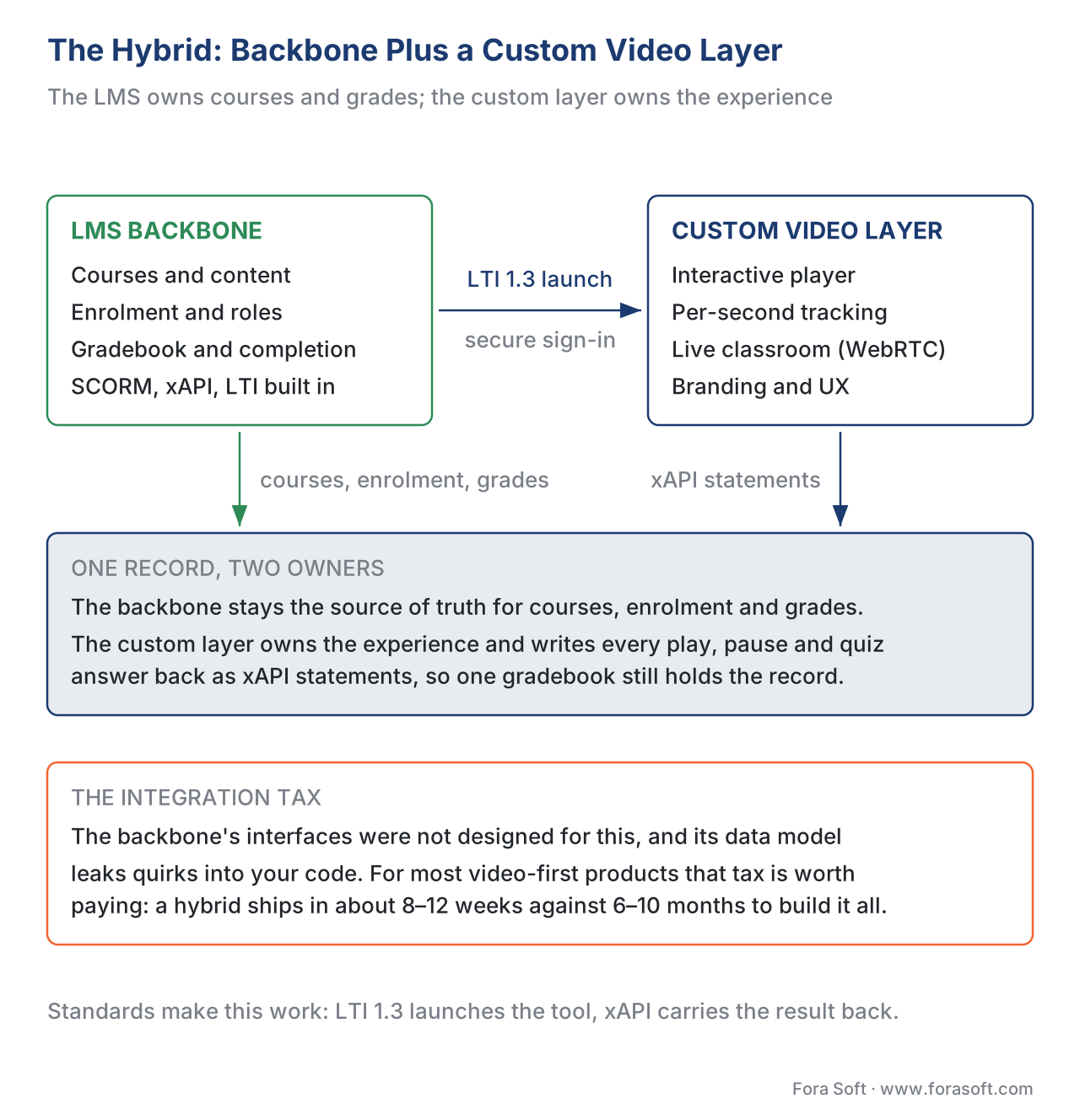 Figure 3. The hybrid pattern. The LMS backbone owns courses, enrolment, and grades; the custom video layer owns the experience and writes results back via LTI launch and xAPI statements.
How the four paths compare
The decision touches more than cost. The table below lays out the dimensions that actually decide it. The "standards support" column matters because it determines whether your content can move between systems and whether enterprise buyers will even consider you.
| Dimension | Buy (SaaS) | Extend (open-source) | Build (custom) | Hybrid |
|---|---|---|---|---|
| Time to launch | Days–weeks | Weeks | 6–10 months | 8–12 weeks |
| Up-front cost | Low (signup) | Low–medium | $30k–$400k+ | Medium |
| Recurring cost shape | Per-seat, grows forever | Hosting + ops | Hosting + maintenance | Hosting + per-seat backbone |
| Customization ceiling | Vendor-set, low | Plugin extension points | None | High on the custom layer |
| Video experience control | Vendor's player | Plugin / embed | Total | Total (custom layer) |
| Standards support | SCORM/xAPI/LTI built in | SCORM/xAPI/LTI/cmi5/QTI built in | You implement it | Backbone provides it |
| IP ownership | None | Core is shared; your plugins are yours | Full | Your custom layer |
| Scales to very large audiences | Costly per-seat | Strains on one instance | Designed for it | Yes, if backbone is scoped |
| Best when | LMS is a cost centre | Content differentiates, not video | LMS is the product | Video differentiates, rest doesn't |
Cells are 2026 norms, not guarantees; your scope moves every row. Standards explained in Block 2.
A decision framework: five questions
You can resolve most of this with five questions, answered honestly.
1. Is the learning platform the product, or a cost centre? If it is internal training or a feature of a larger business, lean buy or extend. If you sell it and it is how you win, lean build or hybrid.
2. Who is your audience comparing you to? Institutions buying off a checklist care about standards and price — buying or extending often wins. Consumers comparing you to polished apps will punish a generic experience — you need custom where they look.
3. How custom is your video? If a standard player and standard tracking are enough, buy or extend. If you need in-video branching, per-second interaction tracking, or live classrooms wired into the lesson flow, you need to build that layer.
4. What does your audience look like in three years? Below a few thousand learners with a stable feature set, buying stays cheapest. Above that, with an evolving roadmap, building or a hybrid pays back.
5. What is your exit story? If you may sell or raise money, owned intellectual property matters and a shared open-source core dilutes it. If the platform is infrastructure forever, that concern disappears.
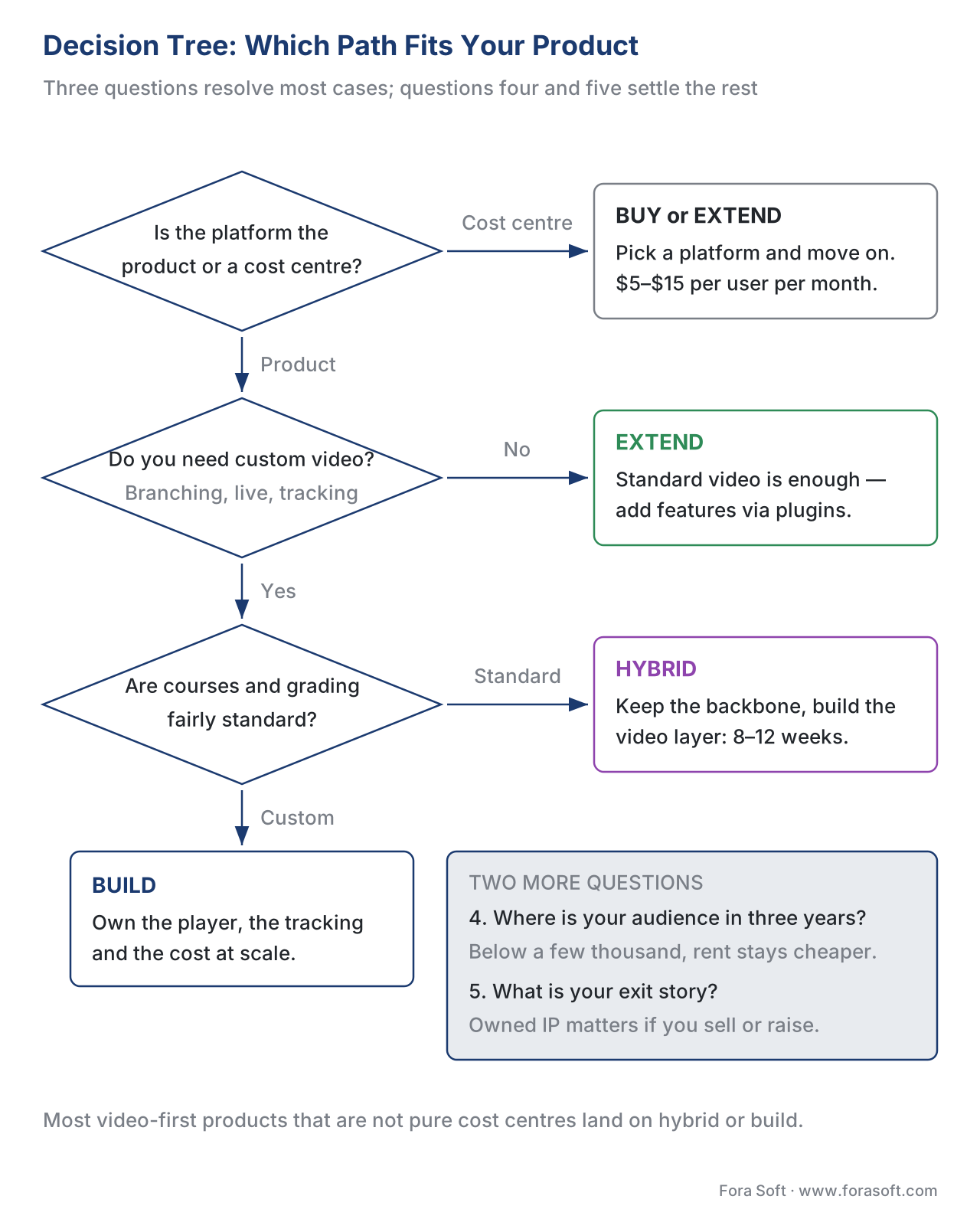 Figure 4. The decision tree. Start at the top; most video-first products that aren't pure cost centres land on build or hybrid.
Cost over time: why the trajectory beats the sticker price
The single most common estimating error is comparing one number to another. Buying has almost no up-front cost and a recurring bill that climbs with every learner. Building has a large up-front cost and a flatter recurring bill. Extending and hybrid sit between. The only fair comparison is the three-year total — the up-front cost plus three years of running cost — at your expected audience size.
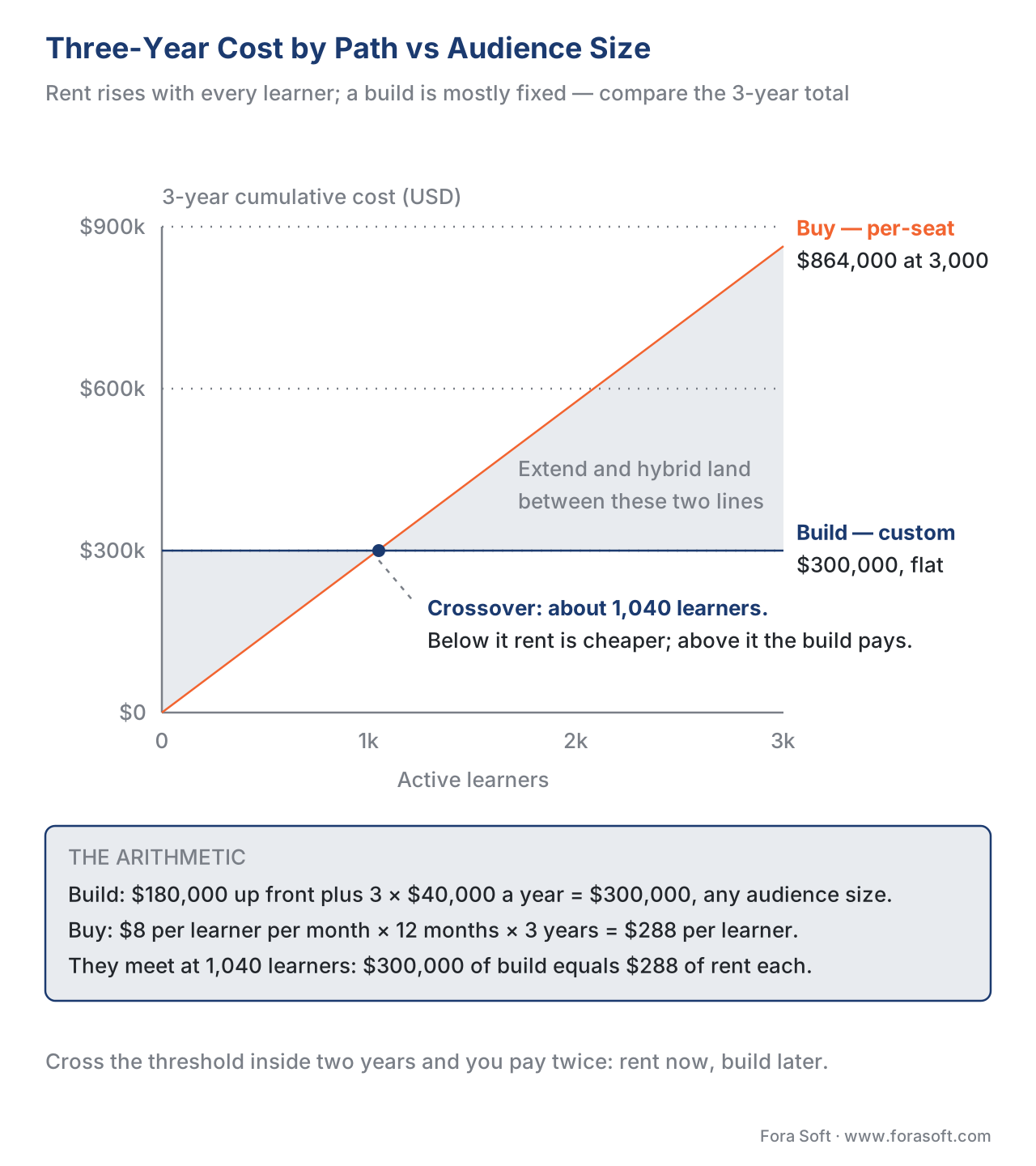 Figure 5. Three-year cost by path. The bought line rises with every learner; the built line is mostly fixed. Where they cross is your build-vs-buy threshold.
The practical consequence: if you can see that you will cross the threshold inside two years, paying for a SaaS platform now and a custom rebuild later means paying twice. In that case a focused custom MVP or a hybrid up front is usually the better trade. If you will stay small, the rent is cheaper than the mortgage. The scoping-and-estimating guide turns this into a concrete number for your project.
Where Fora Soft fits in
We have shipped every path on this page. We have stood up and themed open-source platforms, written custom plugins, and integrated systems like Moodle with video and standards — and we have built fully custom learning platforms from scratch, including AI tutoring, real-time virtual classrooms, and live translation, when the platform was the product. We have also helped teams migrate off a system they had outgrown. Our build-vs-buy framing is vendor-agnostic on purpose: the cheapest engagement we can sell you is the one where we tell you to buy an off-the-shelf platform and walk away, and we say it when it is true. Where we add the most value is the hybrid and custom video layer — the interactive player, the tracking, and the live classroom — which sits at the intersection of our streaming, WebRTC, and e-learning work.



The handbook
Fora Soft Video Engineering Handbook
We wrote a seven-volume series that takes the whole video stack apart across 9,000+ pages — encoding, delivery, audio and AI. Volume 3 sits closest to the decision on this page: players and how they recover from a stall, ABR ladders, CDN economics, WebRTC for the live class, DRM and the QoE monitoring that tells you what a learner actually got — the layer this article argues you should own rather than rent. Volume 1 covers what it costs to produce that video and volume 2 the transport and packaging underneath it, so you can price a custom layer instead of guessing at it and specify the platform yourself rather than judging it from a vendor demo. Written by Nikolay Sapunov, CEO at Fora Soft.
Not sure whether to buy, extend or build your learning platform?
Tell us what you run today — the platform you are on, how many learners you expect in three years, and what your video has to do that a stock player cannot — and we will come back with a vendor-agnostic recommendation, the three-year arithmetic on your own numbers, and what a hybrid would take to ship. 250+ video products shipped since 2005.
See our case studies
Case study
BrainCert
A WebRTC and HTML5 virtual classroom LMS we built from the ground up: 100K+ customers, 500M+ real-time classroom minutes across 10 datacenters at 99.995% uptime, 300+ features — what path 3 looks like when the platform really is the product.
Case study
Scholarly
Sydney's selective-test prep platform: 15,000+ active users and live classes for up to 2,000 students at once on LiveKit and WebRTC, replacing Zoom, Discord and a separate LMS with one system — the custom video layer a per-seat plan never gives you.
Case study
Tabsera
A K-12 LMS in English, French, Arabic and Turkish, where quizzes, an interactive whiteboard and teacher payouts carry the product — the shape this article points at extend or hybrid for, because the edge is content and workflow, not the player.
What to read next
Scoping
Scoping and Estimating a Learning-Video Project
Turns this decision into a number and a plan for your project.
Fundamentals
The Anatomy of a Learning-Video Platform
The map of what you are buying, extending or building.
Standards
LTI Explained: Launching Tools Inside Any LMS
The standard that makes the hybrid path work at all.
Decision
Build vs Buy vs Hybrid for Learning Video
The capstone guide, with the full comparison matrix.
References
- Moodle Statistics — registered sites, users, and countries. Moodle.org, accessed 2026-06-20. https://stats.moodle.org/ (Tier 4)
- "Build or Buy LMS: How to Make the Right Decision in 2026." Cleveroad, 2026, accessed 2026-06-20. https://www.cleveroad.com/blog/build-or-buy-lms-software/ (Tier 4)
- "Custom LMS Development: When to Build vs Buy (2026 Guide)." Of Ash and Fire, 2026, accessed 2026-06-20. https://www.ofashandfire.com/blog/custom-lms-development-cost-guide-build-vs-buy-2026 (Tier 4)
- "LMS Pricing 2026: Complete Cost Guide" and TalentLMS/Docebo pricing data. Educate-me, TalentLMS, Vendr, accessed 2026-06-20. https://www.educate-me.co/blog/talentlms-pricing (Tier 4)
- "Local plugins" and extension-point model. Moodle Developer Resources, accessed 2026-06-20. https://moodledev.io/docs/5.0/apis/plugintypes/local (Tier 4)
- "Moodle vs Custom LMS Development in 2026: Build, Buy, or Hybrid?" Fora Soft, updated 2026-03-06, accessed 2026-06-20. https://www.forasoft.com/blog/article/moodle-or-custom-dev-for-lms-1391 (Tier 3, first-party)
- "Moodle vs Custom Software." Selleo, accessed 2026-06-20. https://medium.com/selleo/moodle-vs-custom-software-what-brings-more-benefits-to-your-organization-152f912d7665 (Tier 4)
- SCORM 2004 4th Edition — Content Aggregation Model & Run-Time Environment. ADL Initiative, 2009, accessed 2026-06-20. https://adlnet.gov/projects/scorm/ (Tier 1, primary standard)
- Experience API (xAPI) Specification v1.0.3 — Part 2: Statements. ADL Initiative, accessed 2026-06-20. https://github.com/adlnet/xAPI-Spec (Tier 1, primary standard)
- Learning Tools Interoperability (LTI) 1.3 Core + LTI Advantage. 1EdTech (formerly IMS Global), accessed 2026-06-20. https://www.imsglobal.org/spec/lti/v1p3 (Tier 1, primary standard)
- Web Content Accessibility Guidelines (WCAG) 2.1, Level AA. W3C, 2018, accessed 2026-06-20. https://www.w3.org/TR/WCAG21/ (Tier 1, primary standard)
- "Headless LMS Guide." Docebo Learning Network, 2026, accessed 2026-06-20. https://www.docebo.com/learning-network/blog/headless-lms/ (Tier 4)
Per the section's source hierarchy, standards claims (SCORM, xAPI, LTI 1.3, WCAG 2.1 AA) follow the official specifications [8][9][10][11]; vendor and analyst sources are used for market and pricing context only. Where a vendor blog implied "Moodle tracks everything," we defer to the SCORM/xAPI specifications: the platform supports those standards, but what is tracked is set by the standard, not the platform.
