


Why this matters
If you sell access to video on the open web — a subscription streaming service, an OTT app, an e-learning platform, a telemedicine portal showing a recorded consultation, any product where the content is more valuable than free — you must ship DRM, and in a browser that means you must ship EME. The studio contract that lets Netflix or Disney+ stream a movie at 4K is conditional on hardware-backed key handling that only the CDM tier of EME provides; without it you ship at 540p or you do not ship at all. Reading this article should leave a product manager able to ask an engineer the right question when a key request times out at 11 p.m. on launch night, and leave a senior frontend engineer with a complete mental model of the API — including the 2026 additions: getStatusForPolicy() for HDCP detection, encryptionScheme capability detection in requestMediaKeySystemAccess(), the new usable-in-future key status added in the May 2026 Working Draft, and the MediaKeySessionClosedReason taxonomy that lets you tell a CDM crash from a license expiry. You do not need any prior DRM knowledge; every term is defined as it appears. By the end you will know why three CDMs is the right number, how the W3C wrote a standard that pleases studios without anointing a single vendor, and which one-line packaging change unlocks Safari on the same asset that already plays in Chrome.
What problem EME was invented to solve
Before EME existed, the browser had no standard way to play encrypted video at all. If a studio wanted DRM on the web, the page had to load a browser plugin — Adobe Flash with its Access DRM, Microsoft Silverlight with PlayReady, or a vendor-specific NPAPI module — and that plugin would run the entire video pipeline outside the browser's sandbox: networking, decoding, rendering, and decryption all in one opaque binary. The model worked, but it had three problems the modern web could not live with. Plugins were a constant source of remote-code-execution vulnerabilities; the major browsers spent the years 2014 through 2017 actively removing plugin support. Plugins broke on mobile, where Apple never allowed Flash on iPhone and Android shipped without it on most carriers by 2015. And plugins gave the page no clean way to participate in the license exchange — the player had to either trust the plugin's built-in license server URL or hack around it, and neither pattern scaled across studios.
So in 2013 a group of engineers from Google, Microsoft, Netflix, and Apple sat down at the W3C and drafted a new specification. The rule they wrote down was a careful one: the browser standard would expose only the message-passing surface between JavaScript and the decryption module, and would say nothing at all about how the decryption module worked, what algorithms it used, or who issued its licenses. The standard would not name Widevine, FairPlay, or PlayReady; the standard would only define requestMediaKeySystemAccess() and let each vendor register its own key system string. Encrypted Media Extensions became a W3C Recommendation on 18 September 2017 (W3C, Encrypted Media Extensions, REC-encrypted-media-20170918), and a follow-on document — Encrypted Media Extensions (with no version suffix in its title, often called EME 2) — has been moving through the Recommendation track ever since; the latest revision as of writing is the W3C Working Draft of 20 May 2026.
The model was politically clever and technically clean. Studios got the protected media path they required without the browser vendors having to bless any single DRM. Browser vendors got rid of plugins. And application developers got a single API surface that, with the right helper library, lets the same player code stream the same encrypted master file to Chrome, Edge, Firefox, and Safari with three different CDMs underneath.
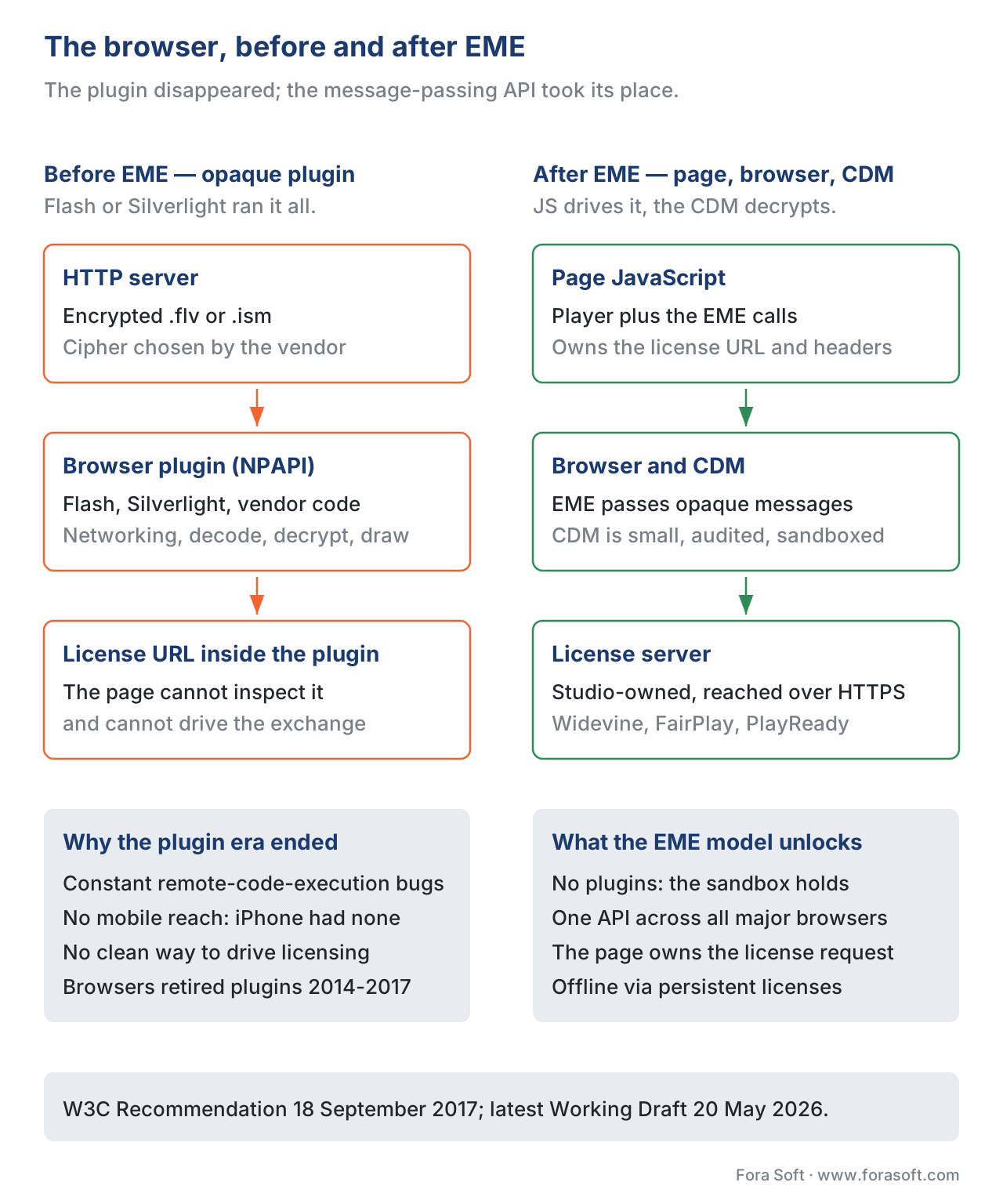 Figure 1. The browser before and after EME. The plugin disappeared; the message-passing API took its place.
The five objects you actually use
The EME surface is small. There are five objects, and a working player touches roughly seven methods across all of them. The five objects are MediaKeySystemAccess, MediaKeys, MediaKeySession, MediaKeyMessageEvent, and the encrypted event that the <video> element fires when the demuxer hits a key identifier it does not recognise.
A MediaKeySystemAccess is the handle a successful capability query returns. You ask the browser, by calling navigator.requestMediaKeySystemAccess(keySystem, configurations), whether it has a CDM that supports the key system you named (com.widevine.alpha, com.apple.fps, com.microsoft.playready.recommendation) under the constraints you listed (codec strings, encryption scheme, persistent vs temporary session type, audio and video robustness tiers, and HDCP requirements). If the browser has a matching CDM, the Promise resolves with a MediaKeySystemAccess whose keySystem and getConfiguration() tell you exactly which subset of your constraints the browser accepted. If not, the Promise rejects. The browser is allowed to negotiate down — you ask for AES-CTR (cenc) and AES-CBC subsample (cbcs); it can give you one or the other but not both — so always check what came back. The requestMediaKeySystemAccess() call is the throat through which every multi-DRM player must pass.
A MediaKeys is the JavaScript proxy for the per-origin CDM instance. You create one by calling access.createMediaKeys() on the MediaKeySystemAccess from the previous step, then attach it to the <video> element with video.setMediaKeys(keys). Once attached, the keys object owns the CDM's view of the video element: every license, every key, every session this player opens belongs to it.
A MediaKeySession is a single conversation between the page and the CDM about one license. You open it by calling keys.createSession(type) where type is temporary (license dies with the tab), persistent-license (license stored on disk for offline playback, scoped to the origin), or — at the W3C level — persistent-usage-record (the CDM remembers that the license was used; useful for rental-window accounting). The session is where the actual license exchange happens: you call session.generateRequest(initDataType, initData) to ask the CDM for a license request blob, you forward that blob to the license server over HTTPS, you call session.update(serverResponse) with whatever the server sends back, and you listen for the keystatuseschange event to find out whether each key is now usable, expired, output-restricted, output-downscaled, status-pending, internal-error, or — added in the May 2026 Working Draft — usable-in-future.
A MediaKeyMessageEvent fires on the session every time the CDM has something to say to the license server. The most important field on it is event.message, an ArrayBuffer of opaque bytes you forward verbatim. You never parse the message; the bytes are Widevine's or PlayReady's or FairPlay's protocol, not yours. The event.messageType enum tells you whether the bytes are a license-request, a license-renewal, a license-renewal-acknowledgement, or an individualization-request — the last one is how Widevine asks the CDM to fetch its per-device certificate before any real license can be issued.
The encrypted event on the <video> element is where the whole dance starts. When the demuxer reads an encrypted MP4 box and discovers a PSSH ("Protection System Specific Header") it does not yet have a key for, it raises an encrypted event on the video element with two fields: initDataType (a registry string like cenc, keyids, or webm) and initData (the PSSH bytes themselves). Your handler creates a MediaKeySession and feeds those bytes into generateRequest(). Most production players also listen for keymessage, keystatuseschange, and the new MediaKeySession.closed Promise so they can tell a session that ended cleanly from one the CDM killed because the certificate got revoked.
The canonical license exchange, in working code
The flow from "user clicks play" to "first decrypted frame" is the same in every player. There are nine steps and they always run in the same order.
// 1. Feature-detect the API and ask for a CDM that fits the asset.
const KEY_SYSTEM   = 'com.widevine.alpha';   // 'com.apple.fps' on Safari; 'com.microsoft.playready.recommendation' on Edge.
const VIDEO_MIME   = 'video/mp4; codecs="avc1.640028"';
const AUDIO_MIME   = 'audio/mp4; codecs="mp4a.40.2"';
const LICENSE_URL  = 'https://drm.example.com/widevine/license';

const config = [{
  initDataTypes:      ['cenc'],
  videoCapabilities:  [{ contentType: VIDEO_MIME, encryptionScheme: 'cenc', robustness: 'SW_SECURE_DECODE' }],
  audioCapabilities:  [{ contentType: AUDIO_MIME, encryptionScheme: 'cenc', robustness: 'SW_SECURE_CRYPTO' }],
  sessionTypes:       ['temporary'],
  persistentState:    'optional',
  distinctiveIdentifier: 'optional',
}];

const access = await navigator.requestMediaKeySystemAccess(KEY_SYSTEM, config);

// 2. Build the per-origin MediaKeys object and attach it to the video element.
const mediaKeys = await access.createMediaKeys();
await video.setMediaKeys(mediaKeys);

// 3. Hand the demuxer the asset; the 'encrypted' event will fire when it hits a PSSH it does not recognise.
video.src = '/streams/protected.mpd';

video.addEventListener('encrypted', async (e) => {
  // 4. Open a temporary session. One session per distinct license.
  const session = mediaKeys.createSession('temporary');

  // 5. Listen for the CDM's outgoing messages.
  session.addEventListener('message', async (msg) => {
    // 6. Forward the opaque CDM bytes to your license server. Do not parse them.
    const resp = await fetch(LICENSE_URL, {
      method:  'POST',
      headers: { 'Content-Type': 'application/octet-stream', 'Authorization': bearer() },
      body:    msg.message,
    });
    const license = await resp.arrayBuffer();
    // 7. Hand the response back to the CDM.
    await session.update(license);
  });

  session.addEventListener('keystatuseschange', () => {
    for (const [_, status] of session.keyStatuses) {
      if (status === 'output-downscaled') warnUser('Premium quality blocked; output not protected enough.');
      if (status === 'output-restricted') warnUser('Playback blocked; HDCP not negotiable.');
    }
  });

  // 8. Ask the CDM for the license request blob; the message event fires as a result.
  await session.generateRequest(e.initDataType, e.initData);

  // 9. (Optional) On unload, close the session so the CDM frees its keys.
  window.addEventListener('beforeunload', () => session.close());
});
Three sentences of detail that every working implementation eventually learns. The license server URL is per-key-system: Widevine, FairPlay, and PlayReady cannot share a single endpoint, because the bytes in msg.message are each protocol's wire format and the response a server produces is in the same format. The update() call is asynchronous and returns a Promise that rejects with a useful error message if the CDM cannot parse the license — log it and your support engineers will save hours. The keystatuseschange listener is the channel through which output-downscaled and output-restricted arrive: those are the two signals that mean "the user is on the wrong output and the CDM refused to release the full-quality keys", and a player that does not surface them ships a movie that mysteriously caps at 540p with no error in the console.
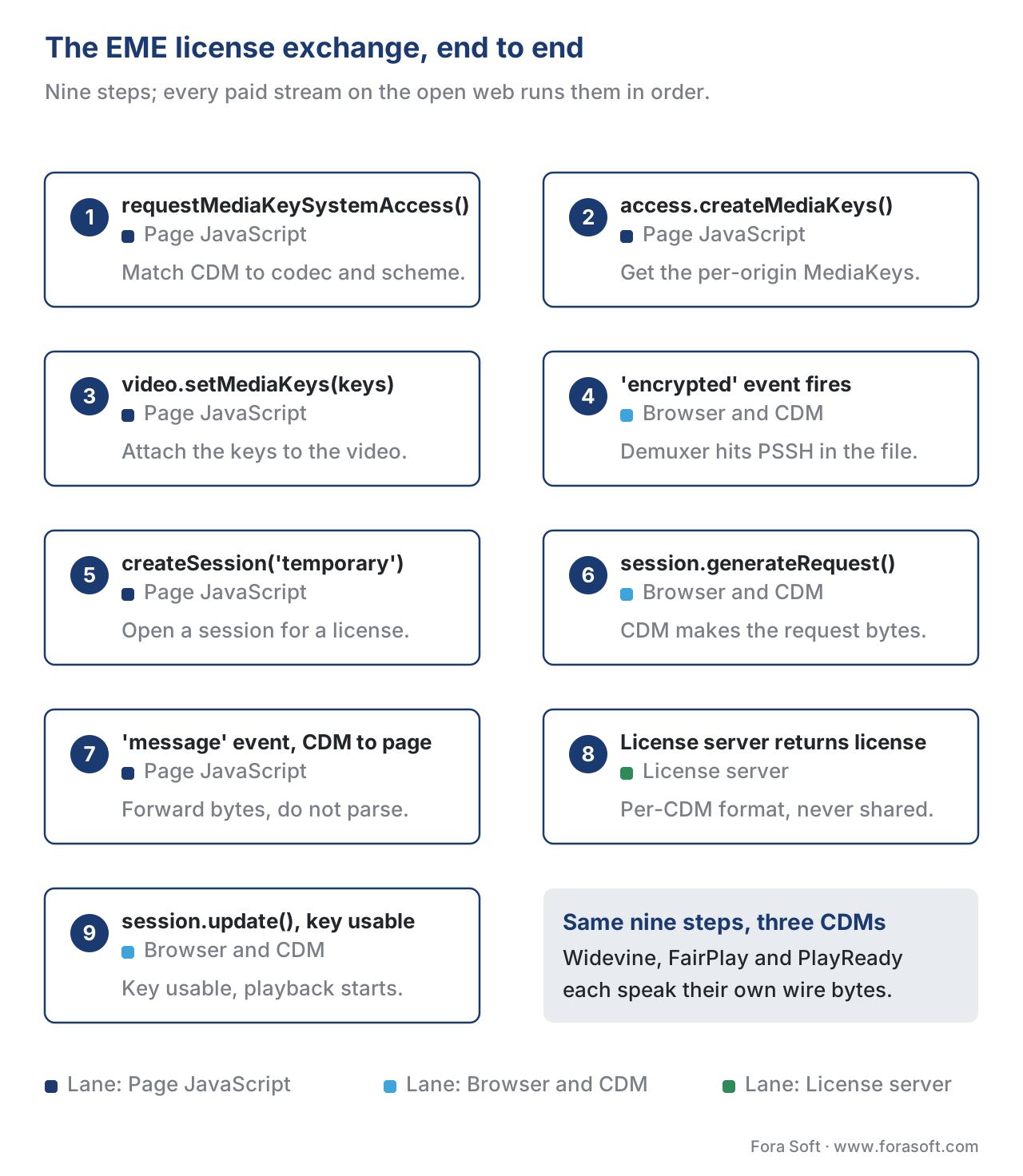 Figure 2. The EME license exchange. Every paid stream on the open web runs this flow.
The three CDMs you ship in 2026
The W3C standard says nothing about which CDMs exist. In practice there are three that matter and you ship all three.
Google Widevine is the CDM that ships in Chrome, Chromium-based Edge, Firefox, Opera, and every Android device with Google Mobile Services. Its key system string is com.widevine.alpha. Widevine defines three security levels: L1 does all media handling — decryption, decoding, and output — inside a hardware Trusted Execution Environment (TEE), and is what studios require for 1080p and above on Android. L2 keeps decryption in the TEE but allows the decoded video to leave it for decoding by the regular GPU; it is the rarest tier and almost never ships on consumer devices any more. L3 runs the entire CDM in software, with no TEE, and is what desktop Chrome on Windows / macOS / Linux reports for almost every user; studios typically cap L3 playback at 480p or 720p. The L1/L2/L3 distinction is queried from the browser's perspective as the robustness string in your requestMediaKeySystemAccess() call — Widevine recognises the values SW_SECURE_CRYPTO, SW_SECURE_DECODE, HW_SECURE_CRYPTO, HW_SECURE_DECODE, and HW_SECURE_ALL, in ascending order of strictness.
Apple FairPlay Streaming, abbreviated FPS, is the CDM that ships in Safari on macOS, on iPhone Safari (since iOS 11.2), on iPad, on Apple TV via tvOS, and inside the macOS / iOS native frameworks (AVContentKeySession). Its key system string on the web is com.apple.fps. FairPlay is special in one architectural way: where Widevine and PlayReady accept the standard MPEG Common Encryption schemes, FairPlay accepts only the cbcs scheme (AES-128 CBC mode, subsample encryption) defined in ISO/IEC 23001-7:2023. If you package a master with cenc (AES-CTR) and send it to Safari, FairPlay refuses to decrypt it; if you re-package with cbcs, the same master plays on every CDM (Widevine since version 16 and PlayReady since version 4.0 both accept cbcs). This is why the modern multi-DRM playbook is "package once in cbcs, ship to all three CDMs". The license exchange shape on the web is identical — requestMediaKeySystemAccess, encrypted event, generateRequest, message, update — but the license server protocol underneath is Apple's SPC (Server Playback Context) / CKC (Content Key Context) format, not Widevine's or PlayReady's, and the Apple App ID and FairPlay certificate are issued by Apple to your account through the FairPlay developer programme.
Microsoft PlayReady is the CDM that ships in Chromium-based Edge on Windows, on Xbox One and Series consoles, on most smart TVs (Tizen, webOS, Vidaa), and on dozens of set-top boxes that the cable industry has built on PlayReady-anchored silicon. Its modern key system string is com.microsoft.playready.recommendation — the older com.microsoft.playready is deprecated and lacks the SL3000 capability path. PlayReady has its own security-level system: SL150 for unprotected test content, SL2000 for software-protected content (1080p ceiling at most studios), and SL3000 for hardware-anchored protection where the CDM runs inside the CPU's TEE. PlayReady SL3000 is the tier that unlocks 4K UHD on Edge on Windows for Netflix and on Xbox for every studio. SL3000 requires a hardware-DRM client and a server SDK at version 3.0.2769 or later; the dash.js / Shaka Player guidance is "always ask for com.microsoft.playready.recommendation first and fall back to plain com.microsoft.playready only if the recommendation key system is unavailable", because the recommendation system is what surfaces SL3000.
| CDM | Key system string | Browsers / platforms | Encryption schemes | Security tiers | Issuer |
|---|---|---|---|---|---|
| Google Widevine | com.widevine.alpha | Chrome, Edge, Firefox, Opera, Android, ChromeOS, Chromecast | cenc, cbcs | L1 / L2 / L3 | Google (free integration) |
| Apple FairPlay Streaming | com.apple.fps | Safari (macOS, iOS, iPadOS), Apple TV, native iOS/macOS | cbcs only | hardware (Secure Enclave) / software fallback | Apple developer programme |
| Microsoft PlayReady | com.microsoft.playready.recommendation | Edge on Windows, Xbox, Tizen, webOS, Vidaa, set-top boxes | cenc, cbcs | SL150 / SL2000 / SL3000 | Microsoft (commercial licence) |
requestMediaKeySystemAccess(), and the platforms each one unlocks.
The Wikipedia phrasing that there are "four CDMs" usually counts the W3C-required Clear Key system as a fourth. Clear Key is the bare-minimum CDM every conformant EME browser must implement; it takes plaintext keys over JSON and is intended for testing and for the rare zero-protection use case. You do not ship Clear Key to paying customers; you do use it for local development against a Shaka or dash.js demo build before pointing the player at a real license server.
 Figure 3. The CDM family tree. EME is the root; the three production CDMs are the branches; the leaves are the security tiers each one exposes.
Encryption schemes: cenc vs cbcs, and why you usually pick one
EME does not encrypt anything. The encryption happens at packaging time, when an encoder or a packager turns the encoded master into segments and writes Common Encryption metadata into each MP4 box. The Common Encryption standard, ISO/IEC 23001-7 (the 2023 edition is current), defines four protection schemes: cenc (AES-128 in counter mode, full-sample), cens (AES-128 counter mode, subsample), cbc1 (AES-128 cipher-block-chaining mode, full-sample), and cbcs (AES-128 cipher-block-chaining mode, subsample, with pattern encryption). In production you only see two of them in 2026: cenc and cbcs.
The split exists for a single architectural reason. Apple's FairPlay was built around AES-CBC at a time when the rest of the industry standardised on AES-CTR, and the two cipher modes are not interoperable at the byte level. For years the practical consequence was that an asset packaged for Widevine and PlayReady (cenc, CTR) had to be re-packaged from scratch for FairPlay (CBC). The 2016 revision of ISO/IEC 23001-7 introduced cbcs — a CBC-subsample-with-pattern variant that both Apple and the rest of the industry could implement — and by 2020 every major CDM accepted it. Today the rule is simple: package once in cbcs, and the same master streams to Widevine, FairPlay, and PlayReady. Package in cenc and you save nothing and you cut Safari off. The only modern reason to keep a separate cenc master is a legacy set-top-box fleet whose firmware was written before its vendor pushed a cbcs-aware update; if your fleet is browser-only or modern smart-TV, cbcs is the answer.
The EME side of this picture is the encryptionScheme member of the MediaKeySystemMediaCapability dictionary that you pass to requestMediaKeySystemAccess(). The attribute was added in the post-2017 maintenance work on the spec precisely so that a player could detect at runtime whether a CDM had cbcs support before committing to a packaging strategy. The W3C calls out the well-known values cenc, cbcs, cbcs-1-9, and cens in the latest Working Draft; in practice you query cbcs and fall back to cenc if cbcs is unsupported (which on a 2026 browser fleet effectively never happens).
const config = [{
  videoCapabilities: [
    { contentType: 'video/mp4; codecs="avc1.640028"', encryptionScheme: 'cbcs' },
    { contentType: 'video/mp4; codecs="avc1.640028"', encryptionScheme: 'cenc' }, // fallback
  ],
  audioCapabilities: [{ contentType: 'audio/mp4; codecs="mp4a.40.2"', encryptionScheme: 'cbcs' }],
  sessionTypes:      ['temporary'],
}];
const access = await navigator.requestMediaKeySystemAccess('com.widevine.alpha', config);
const used   = access.getConfiguration().videoCapabilities[0].encryptionScheme; // 'cbcs' on a modern CDM
Robustness, key statuses, and the silent quality drop
The single most common production complaint about EME-based players is that an asset plays at 540p where it ought to play at 1080p, and the browser console shows nothing. The signal you are looking for is the per-key status in the keystatuseschange event, and the cause is almost always a mismatch between the robustness you asked for and the robustness the device can deliver.
The keyStatuses map on a MediaKeySession is the CDM's per-key verdict. The W3C-defined values, current to the 20 May 2026 Working Draft, are: usable, expired, released, output-restricted, output-downscaled, status-pending, internal-error, and the newly added usable-in-future. usable is what you want. output-downscaled is the CDM telling you it has the key but is going to decrypt only the lower-resolution renditions of the stream because the output path does not satisfy the studio's HDCP policy. output-restricted is the same message escalated: nothing will play at all on this output. usable-in-future is new — it lets a license that is valid only inside a rental window communicate "I have the key, I just cannot use it yet" without forcing the player to throw and retry.
The way to avoid the silent drop is to declare your robustness honestly on the way in. On Widevine the meaningful values are SW_SECURE_CRYPTO (software crypto, no TEE; this is L3), SW_SECURE_DECODE (software decode, software crypto), HW_SECURE_CRYPTO (hardware crypto, software decode; L2-class), HW_SECURE_DECODE (hardware decode and crypto; L1 on devices with TEE-backed video pipelines), and HW_SECURE_ALL (hardware crypto, decode, and output; L1 with secure path). On PlayReady the equivalents are 150, 2000, and 3000 for the three security levels. On FairPlay the web API does not expose a robustness string at all — the CDM negotiates internally with the Secure Enclave and you get what the platform gives you.
The pragmatic recipe for a multi-DRM player is to send a small ladder of robustness values, highest first, and let the browser pick the strongest tier the device can support:
const widevineConfig = [{
  videoCapabilities: ['HW_SECURE_ALL', 'HW_SECURE_DECODE', 'SW_SECURE_DECODE'].map(r => ({
    contentType: 'video/mp4; codecs="avc1.640028"',
    encryptionScheme: 'cbcs',
    robustness: r,
  })),
}];
If the device returns HW_SECURE_ALL, your license server can issue keys for the 4K rendition; if it returns SW_SECURE_DECODE, the policy engine on the server should hand out only the keys for the 720p and below renditions. The contract is enforced on the server, not in the player — the player only reports which robustness tier was actually granted.
The 2026 helper for this loop is MediaKeys.getStatusForPolicy(), which lets a page check what the CDM would do for a given HDCP minimum version without opening a session or fetching a real license. You pass { minHdcpVersion: '2.2' } and the Promise resolves to one of the same key-status values. A player can use this on the splash screen to warn the user "your TV is connected over HDMI 1.4 and our movies require HDCP 2.2; switch cables or fall back to a different device" before the user clicks play.
| Key status | Meaning | What the player should do |
|---|---|---|
usable | CDM has the key and it is usable for decoding now. | Continue playback. |
expired | Key was valid; the license window passed. | Re-request a license; surface "renewing access" if the renewal takes more than a second. |
released | Persistent session released the key via remove(). | Recreate the session. |
output-restricted | CDM refuses to release any keys because output path is insecure. | Surface "Cannot play on this output (HDCP)"; offer alternative device. |
output-downscaled | CDM will release keys only for lower-resolution renditions. | Cap the ABR ladder at the highest rendition the CDM allows; surface "playing at reduced quality". |
status-pending | CDM has not yet evaluated the key. | Wait; do not retry. |
internal-error | CDM hit an internal failure. | Close the session, recreate from scratch; log for support. |
usable-in-future | Key is loaded but the rental window has not opened yet. | Show countdown; do not retry. (Added in W3C WD 2026-05-20.) |
Sessions, persistence, and offline playback
The third axis of EME — after CDM choice and encryption scheme — is session type. A MediaKeySession is created with one of three string types defined in the W3C spec: temporary, persistent-license, and persistent-usage-record. The choice determines whether the license outlives the page and whether the CDM stores any state on disk.
A temporary session is the default and the simplest. The CDM loads the keys into memory, decrypts the segments as they play, and forgets everything when the page closes or the session's close() Promise resolves. This is what you ship for live streams, short-form on-demand, and any case where the user is online and the license is cheap to re-request. The vast majority of production EME traffic is temporary.
A persistent-license session asks the CDM to write the license to its origin-scoped storage on disk so that the same content can play offline later. This is the model behind Netflix's "Available for download" button and every airline's pre-flight video locker. To open a persistent session the browser must allow per-origin persistent state — the persistentState member of your requestMediaKeySystemAccess() config must include required, and the user agent is allowed to surface a permission prompt. When the user wants the content available offline, the player calls keys.createSession('persistent-license'), runs the normal license exchange, and the CDM writes the keys to disk under the origin's quota. When the device goes offline and the user opens the asset, the player retrieves the same session by its ID with session.load(sessionId) instead of createSession(), and the CDM serves the cached keys without going back to the network.
A persistent-usage-record session is the rarer cousin. The CDM does not store the license itself, but it records the fact that the license was used, including timestamps and key IDs. This is how rental-window accounting can be cryptographically attested — the studio can audit who watched what and when. The W3C calls these out as a distinct session type in §6.7 of the Working Draft; production adoption is concentrated in OTT rental services and academic streaming platforms with copyright-tracking obligations.
The two error modes worth knowing. First, storage quota. The CDM stores licenses against the origin's persistent quota, and on the major browsers that quota is bounded — once a user has accumulated several hundred persistent licenses, new createSession('persistent-license') calls start failing with QuotaExceededError. A player that ships offline playback must call keys.getStatusForPolicy() (now widely available) and navigator.storage.estimate() to make storage pressure visible to the user, and must support an "clear downloaded items" UI that calls session.remove() on the licenses the user no longer needs. Second, session closure. The MediaKeySession.closed Promise (added in the 2026 Working Draft, alongside the MediaKeySessionClosedReason enum) resolves with a reason: internal-error, closed-by-application, release-acknowledged, hardware-context-reset, resource-evicted. A player that watches that Promise can tell a benign user-driven close from a CDM crash and trigger the right recovery path.
Common pitfalls
The same six failure modes account for the majority of EME bugs we have seen across more than seven years of multi-DRM work.
Packaging for cenc only and discovering at launch that Safari does not play. Fix at the packager: switch to cbcs, re-encrypt, re-upload. Every modern player can negotiate cbcs on Widevine and PlayReady; only FairPlay is restricted to it.
Sending the same license server URL to every CDM. Widevine speaks Widevine on the wire, PlayReady speaks PlayReady, FairPlay speaks SPC/CKC. The endpoints look superficially HTTP-like but are not interchangeable. Use a multi-DRM licensing service or three distinct endpoints with a shared upstream policy layer.
Forgetting that Edge needs com.microsoft.playready.recommendation, not com.microsoft.playready. The plain key system string predates SL3000 and the browser routes it to the older CDM path; ask for recommendation first and your 4K asset unlocks on Edge on Windows.
Not surfacing output-downscaled. Users do not file bug reports about a CDM enum; they cancel their subscription. Pipe the key-status events into a user-visible banner ("Premium quality requires a certified output device") and into your QoE dashboard.
Treating the message bytes as anything other than opaque. The event.message ArrayBuffer is the CDM's wire format. Forward it. Do not log it (it can leak per-device identifiers). Do not transform it. Do not retry on it client-side; let the server return an error and let the server retry.
Confusing the encrypted event with the keymessage event. encrypted fires on the <video> element when the demuxer hits an unknown PSSH; message fires on a MediaKeySession when the CDM has bytes for the license server. Wiring the listeners to the wrong objects is a common copy-paste bug that produces a player that opens sessions but never sends license requests.
Pitfall callout. A Widevinerobustness: 'HW_SECURE_ALL'config that fails on a Chromebook is not a bug; it is the Chromebook telling you it cannot host a hardware-secure pipeline for the asset you asked for. Catch the rejection on therequestMediaKeySystemAccess()Promise and retry with'SW_SECURE_DECODE'— never throw to the user without trying the lower tier.
A small piece of math, end to end
Here is the back-of-envelope cost of forgetting about robustness. Imagine an OTT product with ten million daily active users, of whom three million attempt to watch a 4K title. Assume that 20% of those users — six hundred thousand — are on devices that report only SW_SECURE_DECODE and would silently get the 720p stream because the player did not declare a robustness ladder.
Streaming costs first. The 4K rendition averages 18 Mbps; the 720p rendition averages 4 Mbps. Six hundred thousand users watching 90 minutes at 4 Mbps is 600,000 × 90 × 60 × 4 / 8 = 1,620,000,000 megabytes = roughly 1.62 petabytes saved per day, compared to the same users watching at 18 Mbps. At a typical large-scale CDN price of $0.005 per GB delivered, that is $8,100 per day, or about $3 million per year, that the operator does not spend on egress.
Now subtract the lost-quality cost. If 1% of those six hundred thousand users notice the 720p ceiling and churn at a $10 monthly average revenue per user, that is 6,000 × $10 × 12 = $720,000 per year in lost subscription revenue. The arithmetic balances toward the operator — but only by an order of magnitude, and only because the example assumed 1% churn. At 5% churn, the operator is now $0.6 million worse off per year for shipping a silently-downscaling player.
The number that the math actually argues for is not "ship 720p" or "ship 4K"; it is "ship a player that knows which tier the device can support and tells the user honestly". That player gets both the egress savings on the genuinely lower-tier devices and the retention on the high-tier ones.
What changes when you ship a native app instead of a browser
EME is the browser story. The same three CDMs exist outside the browser, but each has its own native API.
On iOS and macOS apps, FairPlay flows through AVContentKeySession in the AVFoundation framework. The shape is nearly isomorphic to the EME flow — the app receives a key request from the framework, forwards an SPC to the key server, receives a CKC, and feeds it back — but the API is Objective-C / Swift, the session lifecycle is the framework's, and the key server protocol bytes are the same SPC/CKC bytes as on the web. Apple's WWDC 2018 session 507, "AVContentKeySession Best Practices", is still the canonical reference for the offline rental window and dual-expiry pattern.
On Android, Widevine flows through MediaDrm in the platform's media stack. ExoPlayer hides almost all of it behind DefaultDrmSessionManager. The license server protocol is the same Widevine wire format as in the browser; the security levels are queried via MediaDrm.SECURITY_LEVEL_HW_SECURE_ALL and friends, with the same HW_SECURE_ALL / HW_SECURE_DECODE / SW_SECURE_DECODE ladder the browser exposes.
On Windows native apps, PlayReady flows through PlayReadyContentResolver and the wider PlayReady DRM client SDK. The SL150/2000/3000 distinction maps to the same robustness contract; the server SDK requirement is the same v3.0.2769 baseline.
For our purposes — a browser-first article in a player-engineering block — the practical takeaway is that the EME flow you build in the browser is the most portable mental model of all four. Once you have shipped EME, the native paths are recognisable variations of the same conversation.
Verifying the standard against the implementations
When the sources disagree, the spec wins. Two examples worth knowing.
The current W3C Working Draft is Encrypted Media Extensions dated 20 May 2026 (W3C, working draft, https://www.w3.org/TR/encrypted-media-2/). It carries the latest list of key statuses (including usable-in-future) and the MediaKeySessionClosedReason enum. The last Recommendation — the most authoritative form a W3C document can take — is still the September 2017 publication (W3C, Encrypted Media Extensions, REC-encrypted-media-20170918). Several popular blog posts and how-to articles still describe getStatusForPolicy() as "coming soon"; it has shipped in Chrome since 2018 and is now part of the Working Draft's normative text in §6.6.
The current Common Encryption standard is ISO/IEC 23001-7:2023. The 2016 edition first introduced the cbcs scheme; several older blog posts still describe cbcs as Apple-only. By 2026 every shipping CDM accepts cbcs, and the practical rule is "package in cbcs". If a vendor doc you find says otherwise, check its publication date.
Where Fora Soft fits in
Fora Soft has shipped EME-based playback into video streaming products since the W3C Recommendation became practical to deploy in 2018, with engineering teams that have built multi-DRM stacks for OTT, e-learning, telemedicine, and video surveillance customers across Widevine, FairPlay, and PlayReady. The shipping rhythm we use on every new product is to package masters once in cbcs from day one, normalise on Shaka Player or hls.js for the player layer, integrate one of the multi-DRM licensing services (or stand up a self-hosted Axinom or castLabs server when the customer needs to keep the licence path inside their own infrastructure), and instrument every keystatuseschange event into the QoE pipeline so that silent 540p drops surface in the dashboard before they surface in a support ticket. Where customers ship offline playback — a common pattern in pilot-training and corporate-learning workloads — we wire persistent-license sessions to a quota-aware UI from the start; retro-fitting the quota story after launch is the expensive path. If you need this playback path built into your own service, our OTT and Internet TV development team ships multi-DRM licensing, CBCS packaging and the device QA matrix as part of the build, and our video streaming software development work covers the HLS and DASH delivery underneath it.

The book
Video Streaming: A Complete Guide to Video Delivery: From ABR and CDNs to Players, WebRTC, DRM, and the Economics of Streaming
This article ends where the key turns usable and playback starts. The book takes the player half of the stack from there: how a browser player picks a rendition and recovers from a stall, where DRM sits next to ABR, trick play and subtitles, what a multi-DRM licence path costs per stream, and how all of it lands on the monthly invoice. Written by Nikolay Sapunov, CEO at Fora Soft.
Not sure your DRM covers every browser and device you sell to?
Send us the key systems your player asks for today and the devices you have to support, and we will tell you where playback quietly drops to 720p, which CDM is missing, and what the licence path should look like. 250+ video products shipped since 2005.
See our case studies
Case study
Worldcast Live
Concert streaming at 0.4-0.5 s glass-to-glass for 10,000 simultaneous viewers at 1.5 Gb/s: ticketed live video, where the player has to hold up while the paying audience is already watching.
Case study
TradeCaster
A live trading platform with 46,000+ users on $99-$119 monthly plans: subscription video, where who may watch and on which device is part of the product, not an afterthought.
Case study
Speed.Space
Remote production at 1080p and 8 Mbps, used on Netflix, Electronic Arts and HBO shoots: studio material whose handling rules travel with the file to every screen that opens it.
What to read next
DRM
DRM 101: Why Three Systems, and Why You Ship All Three
The business reason behind the three CDMs this article drives from one API.
Packaging
Common Encryption (CENC) in Depth
Where cenc and cbcs come from, and why one cbcs master feeds all three CDMs.
Widevine
Widevine Security Levels: L1, L2, L3 - What They Really Mean
The tier ladder behind the HW_SECURE_ALL strings and the silent drop to 540p.
Cost
Multi-DRM Cost Calculator: What Widevine, FairPlay and PlayReady Cost
What shipping all three licence paths adds to the bill, per stream and per month.
References
- W3C. Encrypted Media Extensions. W3C Working Draft, 20 May 2026. https://www.w3.org/TR/encrypted-media-2/ — normative source for
MediaKeySystemAccess,MediaKeys,MediaKeySession, the key-status enum (including the newusable-in-futurevalue),MediaKeySessionClosedReason,encryptionSchemecapability detection, andgetStatusForPolicy(). Reading this draft instead of vendor paraphrases is what lets the article citeusable-in-futurecorrectly where other articles do not yet mention it. - W3C. Encrypted Media Extensions (Recommendation). REC-encrypted-media-20170918, 18 September 2017. https://www.w3.org/TR/2017/REC-encrypted-media-20170918/ — the original Recommendation that established the EME object model and the temporary / persistent-license / persistent-usage-record session types.
- W3C. Encrypted Media Extensions Stream Format Registry. https://www.w3.org/TR/eme-stream-registry/ — registry of accepted initialization-data formats (
cenc,keyids,webm). - W3C. Encrypted Media Extensions Initialization Data Format Registry. https://w3c.github.io/encrypted-media/format-registry/initdata/ — normative reference for the
initDataTypestrings the encrypted event delivers. - W3C / WICG. Encrypted Media: HDCP Policy Check. https://wicg.github.io/hdcp-detection/ — the explainer the
getStatusForPolicy()method came from; clarifies the HDCP version enum (1.0–2.3). - ISO/IEC 23001-7:2023, Information technology — MPEG systems technologies — Part 7: Common encryption in ISO base media file format files. https://www.iso.org/standard/84637.html — the standard that defines the
cenc,cens,cbc1, andcbcsschemes. Paywalled normative text; the article paraphrases from the abstract and §6 of the catalogue page. - Apple. FairPlay Streaming Overview. Apple Developer documentation, 2024 revision. https://developer.apple.com/streaming/fps/FairPlayStreamingOverview.pdf — primary source for SPC / CKC, SAMPLE-AES, and the FairPlay-only
cbcsrequirement on the iOS/macOS / Apple TV path. - Apple. AVContentKeySession Best Practices. WWDC 2018 Session 507. https://developer.apple.com/videos/play/wwdc2018/507/ — primary source for the offline rental-window pattern and the dual-expiry key contract on iOS / macOS.
- Microsoft. PlayReady Client-Server Compatibility and Migration. https://learn.microsoft.com/en-us/playready/overview/client-server-compatibility — defines the server-SDK baseline (3.0.2769) required for SL3000 client interop and the
com.microsoft.playready.recommendationkey system string. - Microsoft. Developing SL3000 Clients. https://learn.microsoft.com/en-us/playready/overview/developing-sl3000-products — primary source for the hardware-DRM client / TEE requirement that unlocks 4K UHD on Edge on Windows and Xbox.
- Google. Widevine DRM Architecture Overview. https://developers.google.com/widevine — primary source for the L1 / L2 / L3 security-level taxonomy and the
SW_SECURE_*/HW_SECURE_*robustness strings used inrequestMediaKeySystemAccess(). - MDN. Navigator.requestMediaKeySystemAccess(). https://developer.mozilla.org/en-US/docs/Web/API/Navigator/requestMediaKeySystemAccess — practical reference for the configuration dictionary, used to cross-check argument names and Promise behaviour.
- MDN. MediaKeys.getStatusForPolicy(). https://developer.mozilla.org/en-US/docs/Web/API/MediaKeys/getStatusForPolicy — practical reference for the HDCP policy check method.
- Google. Introduction to Encrypted Media Extensions. web.dev. https://web.dev/articles/eme-basics — the article that first popularised the five-step EME flow; useful for cross-checking the canonical lifecycle.
- Shaka Project. Shaka Player DRM Configuration Tutorial. https://github.com/shaka-project/shaka-player/blob/main/docs/tutorials/drm-config.md — primary reference for the
player.configure({ drm: { servers: { ... } } })pattern and for thevideoRobustness: ['HW_SECURE_ALL']advanced-config example used in this article. - DASH Industry Forum. PlayReady SL3000 support requires com.microsoft.playready.recommendation key system. Discussion #3869, dash.js GitHub. https://github.com/Dash-Industry-Forum/dash.js/discussions/3869 — confirms in primary-implementer voice that the
recommendationkey system string is the only one that surfaces SL3000. - WebKit Project. Adopting Multi-Element Activation in Safari 17.1 / FairPlay sections. https://webkit.org/ — corroborating timeline for the FairPlay /
cbcsinteroperability story on Safari 17.1. - Streaming Video Technology Alliance University. W3C Encrypted Media Extensions (EME) Recommendation. https://university.svta.org/industry-resource/w3c-encrypted-media-extensions-eme-recommendation/ — secondary source for the historical narrative around the 2017 Recommendation and the plugin-replacement rationale.
