


Why this matters
If you have ever tried to launch a paid OTT product and watched the same engineer say "we'll just use Widevine" in a kickoff meeting, this article is the answer to the polite follow-up question you weren't sure how to ask: why isn't one DRM enough? The honest answer is because three companies — Google, Apple, and Microsoft — each invented their own, and none of them will play another's CDM inside their own browser. For a product manager scoping a streaming launch, this article is the map. For a founder weighing whether DRM is worth the integration cost, the latest MPA-aligned industry estimates put global video-piracy losses at roughly USD 75 billion per year in 2026 and growing toward USD 125 billion by 2028 — context that frames why every studio that licenses premium content makes multi-DRM a contractual requirement. For an engineer about to integrate a DRM service provider, the article is the technical primer that makes the vendor's docs readable.
What "DRM" actually is in a streaming pipeline
Before any acronym lands, let's pin down the job. The compression scheme that shrinks the picture, called a codec, is one job. The file format that holds the compressed bits, called a container, is another. The rules for moving the container across a network, called a protocol, are a third. And the rules for letting only the right viewer decrypt and play it, called Digital Rights Management or DRM, are a fourth. DRM sits on top of the codec, inside the container, threaded through the protocol — but it answers a question none of the others address: should this device, in this country, with this account, be allowed to see this stream right now?
Modern streaming DRM is a four-piece system, and every piece has a name in the standards.
First, the packager encrypts the audio and video samples inside the container — usually CMAF / fragmented MP4 — using a symmetric key called the content key. The encryption format is fixed by a 2012 ISO standard called Common Encryption (CENC), specified in ISO/IEC 23001-7. That standard defines exactly which bytes of each video sample get encrypted, which stay in the clear, and how the encrypted file declares which DRM systems can unlock it.
Second, the packager declares which DRMs are allowed to issue a licence for that file. It does that by writing one or more short binary blocks called PSSH boxes (Protection System Specific Header) into the file's initialization segment — one PSSH box per DRM system, each containing the System ID that names the DRM and a small payload of vendor-specific metadata. Multiple PSSH boxes in the same file is how a single CMAF stream tells Widevine, FairPlay, and PlayReady all at once: here is your key reference; ask your licence server for the rest.
Third, when the player loads the file, the browser hands the PSSH data to a black box called a Content Decryption Module (CDM). The CDM is the actual implementation of Widevine, FairPlay, or PlayReady that ships inside the browser or the operating system — and it is the only piece of the pipeline that ever sees the decrypted bytes. The hand-off uses an API standardised by the W3C called Encrypted Media Extensions (EME), published as a Recommendation in September 2017 and currently being polished in the 2025-08-21 Working Draft.
Fourth, the CDM asks a licence server for the actual content key. The CDM signs the request with a device-specific identity that the DRM vendor issued during device manufacturing or browser installation; the licence server replies with the wrapped key and an attached policy (geo-rules, output rules, time window, allowed resolution); the CDM unwraps the key, decrypts the sample, and pushes the decoded pixels to the video output — ideally inside a hardware-isolated path the rest of the operating system cannot read.
Those four jobs — encrypt once, declare multiple DRMs, hand to a CDM, fetch a per-session licence — are common across all three big DRMs. What differs between Widevine, FairPlay, and PlayReady is which device ecosystem the CDM ships on, what the licence-server protocol looks like, and how strong the hardware isolation is. That's the whole story, and the next sections unpack each of those differences.
Why three systems exist (and not one)
The short version: every major device platform shipped its own CDM, and every other platform refuses to install it. There is no neutral DRM that runs everywhere because the device makers are also the DRM owners.
Google's Widevine is the CDM in Chrome, Chromium-derived browsers (Edge falls back to it on non-Windows), Firefox (licensed), Android phones, Android TV, ChromeOS, and most Linux media stacks. Apple's FairPlay Streaming is the CDM in Safari (macOS and iOS), AVFoundation on every other iOS and tvOS app, and the Apple TV native streaming pipeline; it does not ship on any non-Apple platform. Microsoft's PlayReady is the CDM in Edge on Windows, the Xbox console family, Windows native UWP apps, Samsung's Tizen TVs, LG's webOS TVs, Hisense's Vidaa TVs, and a long tail of broadcast set-top boxes.
That gives you three disjoint coverage maps that, taken together, cover essentially every household device that plays premium streaming video. Pick any one of them and you exclude one ecosystem entirely: Widevine only excludes Apple and the TV platforms; FairPlay-only excludes anything that is not Apple; PlayReady-only excludes Apple, Android, and Chrome. Industry guidance has converged on the same conclusion since the mid-2010s — to ship to the open web you need at least Widevine plus FairPlay; to ship to a paid OTT app that targets TVs and Xbox you usually add PlayReady on top. The major multi-DRM providers structure their pricing exactly that way.
The reason none of the three vendors merged their systems is contractual, not technical. The big movie studios — the Motion Picture Association members, plus their streaming siblings Netflix, Disney+, and Amazon — accept content into a paid streaming catalogue only if the playback stack uses an approved hardware-backed DRM on the device. Each studio's "approved list" is the union of Widevine L1, FairPlay with Secure Enclave, and PlayReady SL3000. A single open-source DRM would have to be approved by every studio in every region, which is a multi-year regulatory process none of the three vendors will pay for given that the three-DRM status quo already works.
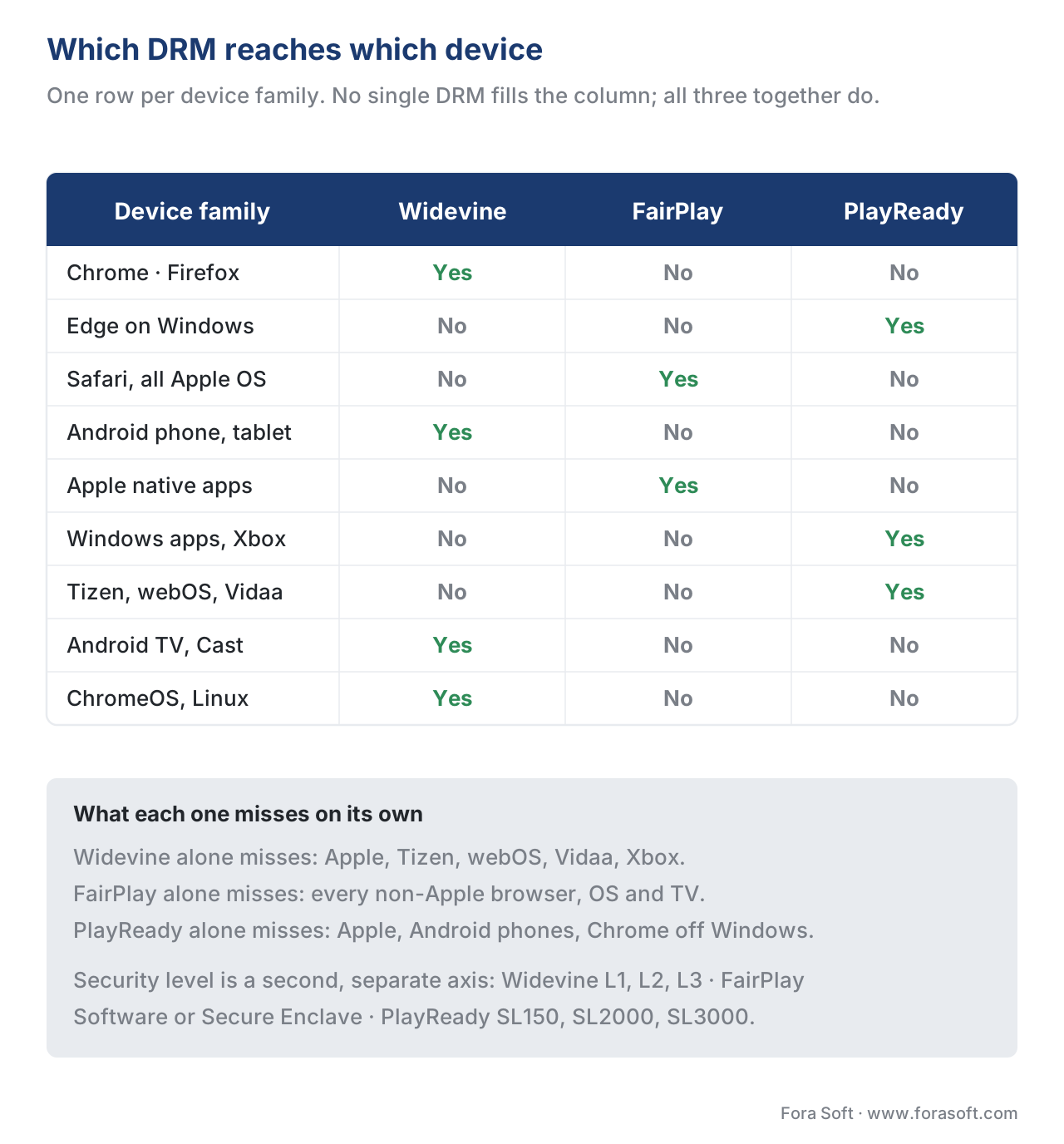 Figure 1. Where each DRM ships, and the gaps a single-DRM strategy leaves behind.
The one-encryption, three-licenses architecture
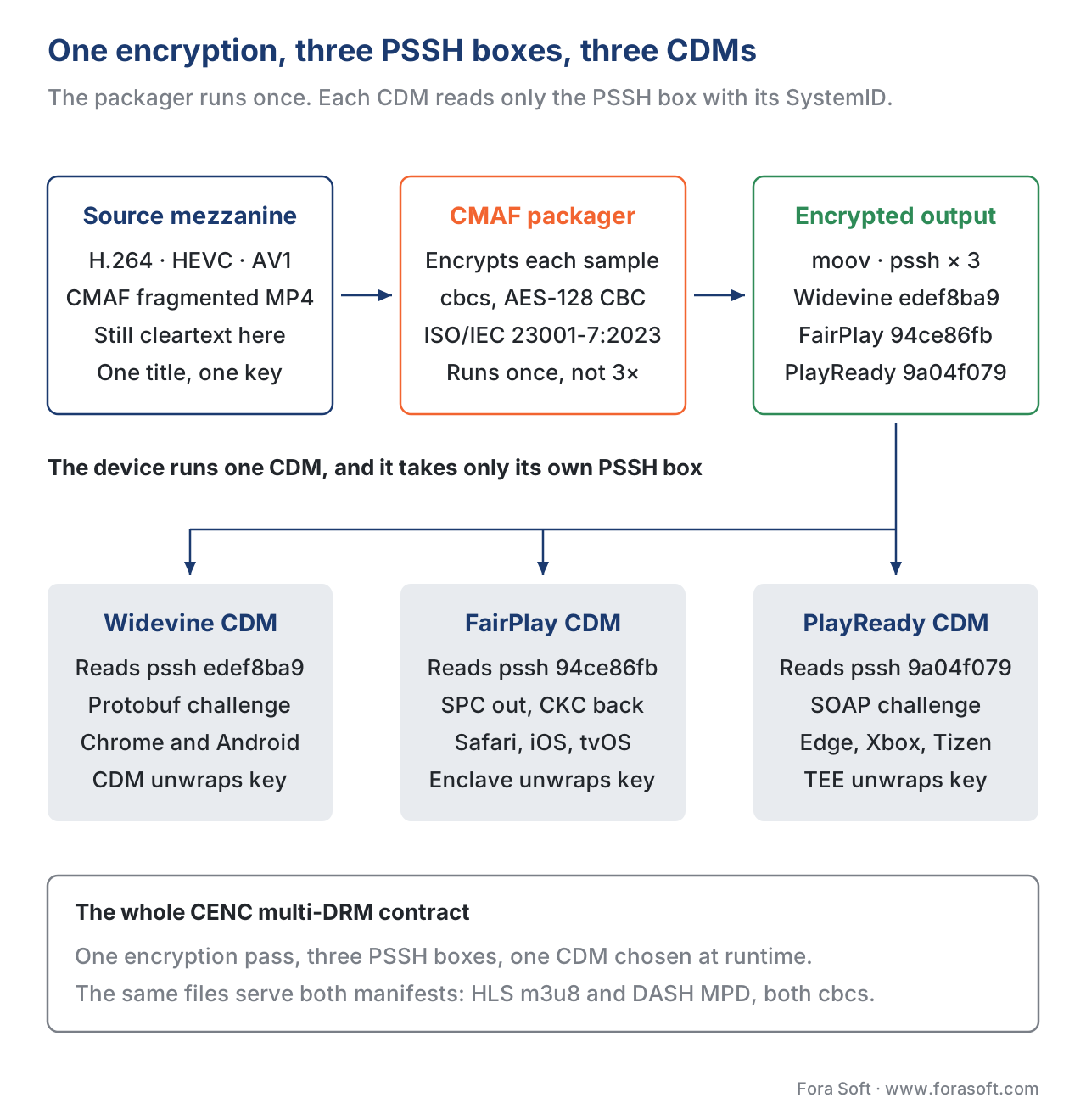
Here is the trick that makes multi-DRM practical: you don't encrypt the file three times, you encrypt it once. Common Encryption, the ISO standard from 2012, was designed exactly for this — to let a single encrypted segment serve every DRM on the planet, with each DRM issuing its own licence for the same key.
The mechanism is small and clean. The standard defines four protection schemes that name how a video sample is encrypted: cenc (AES-128 in Counter mode, full subsample), cbc1 (AES-128 in CBC mode, full subsample), cens (AES-CTR pattern encryption — encrypt one of every ten 16-byte blocks), and cbcs (AES-CBC pattern encryption — the same one-in-ten pattern but using CBC mode). Two of those — cenc and cbcs — became the production defaults. The pattern modes were added so that decoders running on weak chips (older smart TVs, low-end phones) could decrypt the stream in real time without the CPU melting.
In 2026 the dominant pattern is CMAF packaged once, encrypted with cbcs, and signed for both HLS and MPEG-DASH manifests. The reason cbcs won — and it is genuinely the default now, not a transition story — is that Apple's FairPlay Streaming will only decrypt content encrypted with cbcs, and after the September 2020 round of DASH-IF guidance every other DRM (Widevine, PlayReady) added full cbcs support so a single encryption could serve both Apple and non-Apple players. Encrypting twice (once cenc for DASH, once cbcs for HLS-on-FairPlay) is still legal — and is still in DASH-IF Implementation Guidelines Part 6 §10 — but it doubles your origin storage for no quality benefit, and the industry has voted with its packagers.
Once you've encrypted, the packager writes those PSSH boxes into the initialization segment — one per DRM you want to support. Each PSSH box carries a 16-byte System ID that names the DRM vendor (edef8ba9-79d6-4ace-a3c8-27dcd51d21ed for Widevine; 94ce86fb-07ff-4f43-adb8-93d2fa968ca2 for FairPlay; 9a04f079-9840-4286-ab92-e65be0885f95 for PlayReady) and a small DRM-specific blob — for Widevine it includes the Key ID and a "content ID"; for PlayReady it is a base-64 XML object called a Pro header. When a browser loads the file, EME passes every PSSH box it can read to the active CDM; the CDM picks the one whose System ID matches and ignores the rest.
That's the whole multi-DRM trick on the encryption side. One file, multiple PSSH boxes, one chosen CDM, one licence call. Let's walk it end to end.
 cbcs, declared via three PSSH boxes, dispatched to three CDMs">
Figure 2. A single CMAF /
cbcs, declared via three PSSH boxes, dispatched to three CDMs">
Figure 2. A single CMAF / cbcs encryption serves Widevine, FairPlay, and PlayReady through three PSSH boxes.
The licence exchange, end to end
The licence exchange is the part most engineers see first when a stream fails to play. Reading it once makes the error codes legible for the rest of your career.
Step 1 — Manifest load and CDM selection. The player loads the HLS or DASH manifest, sees the protection signalling (an #EXT-X-KEY METHOD=SAMPLE-AES line in HLS, or a <ContentProtection> element in the DASH MPD), reads the System IDs offered, and calls navigator.requestMediaKeySystemAccess() with a list of key systems the player would accept. EME picks the first one the browser actually supports and returns a MediaKeySystemAccess handle.
Step 2 — Initialization-data dispatch. As soon as the player's MSE buffer receives the initialization segment, the browser parses the PSSH boxes and fires an encrypted event on the <video> element. The player creates a MediaKeySession, calls generateRequest(initDataType, initData) with the PSSH bytes of the matching System ID, and waits for the CDM to produce a licence-request blob. The blob is opaque — the player has no way to read it; only the CDM can.
Step 3 — Licence-server round trip. The player sends the licence-request blob to the streaming service's licence-server endpoint over HTTPS, usually carrying a session token in a custom header. The licence server checks the token (is this user paid, is the rental window still open, is the device geographically allowed?), asks the key management system for the wrapped key, attaches a policy object (allowed output resolution, HDCP requirement, persistent vs streaming, expiration), wraps the response for the specific CDM's protocol, and returns it. The whole call typically lands in 100–250 milliseconds.
Step 4 — Licence install and decrypt. The player passes the response blob to MediaKeySession.update(response). The CDM unwraps the key into its protected memory; the key never crosses into JavaScript or even into the renderer process. The CDM then decrypts each incoming sample, hands the decoded pixels to the GPU's protected video pipeline, and the rest of the operating system never sees an unprotected frame.
Step 5 — Renewal and rotation. For long sessions or for live streams that rotate keys mid-stream (every few hours for an event broadcast), the CDM fires a message event with messageType: "license-renewal" or "individualization-request"; the player makes another HTTPS call; the CDM swaps in the new key without dropping a frame.
The whole exchange is the same for all three DRMs at the EME layer. What differs is what's inside the blob. Widevine speaks a Protobuf-based protocol; FairPlay speaks a binary message it calls the Server Playback Context (SPC) which the licence server, called the Key Server Module (KSM), replies to with a Content Key Context (CKC); PlayReady speaks a SOAP envelope. Your player code touches none of this — the CDM hides it — but your licence-server vendor implements all three protocols on the back end, which is why managed multi-DRM services exist.
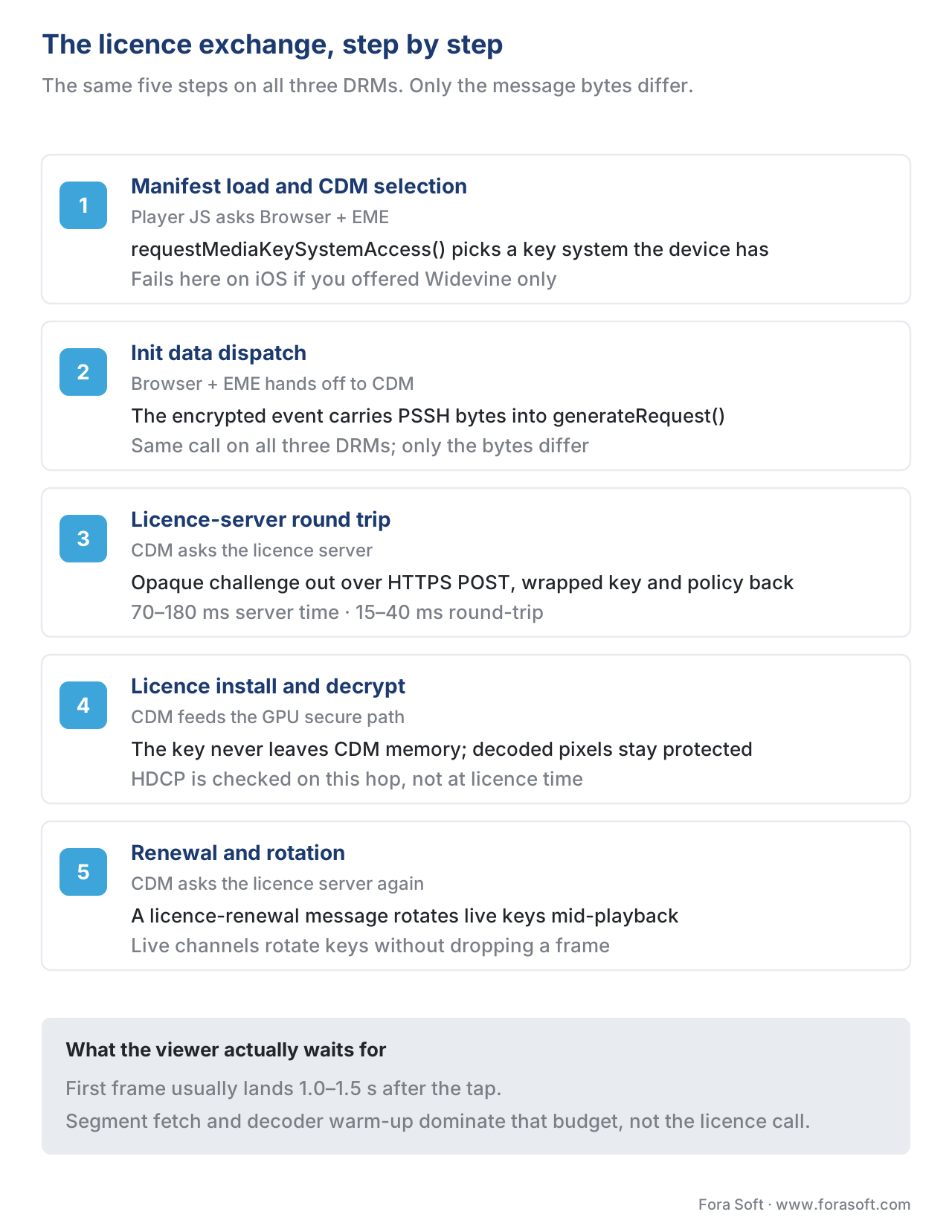 Figure 3. The five-step EME licence exchange — identical at the API layer, different inside the blob for each DRM.
Security levels: where 4K and HDR really come from
Studio licences for premium content — UHD, HDR, theatrical-window early releases — almost always carry a clause that says playback is only permitted on a hardware-backed DRM with a verified output protection chain. Each of the three DRMs publishes its own ladder of security levels, and the studio policy is enforced by the licence server: if the CDM identifies as a lower tier than the policy allows, the licence server returns a downgraded licence with a lower maximum resolution baked in.
Widevine's ladder is the most widely cited. L1 means every operation — key handling and video decoding — happens inside a Trusted Execution Environment, which on Arm chips means TrustZone. L1 devices are eligible for 1080p and above, including 4K HDR on devices that also have a hardware HDCP 2.2/2.3 path. L2 is a mixed mode where the cryptography is in the TEE but parts of the video pipeline run in normal memory; most of the streaming industry has phased out L2 and treats it as L3 in practice. L3 is software-only — keys and decryption live in normal process memory — and is capped at SD resolution (480p or 540p depending on the service). This is the reason Netflix and Disney+ silently downgrade to 480p in desktop Chrome: on most desktops Widevine reports L3 (because the Widevine CDM in Chrome is a software DRM), so the studios' policy clamps the resolution.
PlayReady's ladder is structurally identical, with a different naming convention. SL150 is software, intended only for closed testing and explicitly not recommended for production. SL2000 is software hardened on the device. SL3000 is hardware — the PlayReady stack runs inside the chip's TEE, exactly like Widevine L1 — and is the level the Smart TV ecosystem (Samsung Tizen, LG webOS, Hisense Vidaa, Xbox) ships at. Studio licences map cleanly: 4K UHD typically requires SL3000.
FairPlay does not publish a numbered ladder because Apple ships a single FairPlay implementation per device generation. What it does instead is gate hardware-level protection through the Secure Enclave, the dedicated co-processor that exists in every iPhone since the A7 chip, every iPad since the A8X, every Mac since Apple Silicon (M1), and every Apple TV since the 4K generation. On those devices the content key is fetched, unwrapped, and held entirely inside the Secure Enclave; the rest of the operating system, including the kernel, cannot read it. Older Macs using Intel chips have no Secure Enclave and therefore run FairPlay in software, which studios treat the same way they treat Widevine L3.
Everything above 1080p also requires a hardware-protected output path, normally HDCP 2.2 or 2.3 over HDMI. The DRM licence carries the required HDCP version; the CDM queries the operating system for the actual output's HDCP capability; if the output cable does not support HDCP 2.2 the licence falls back to 1080p, and if the output is mirrored to a recording device the licence usually refuses to issue at all. The 4K-HDR licence path is, in practice, hardware DRM + HDCP 2.2 + a Trusted Video Path, and any one of those missing knocks you a tier down.
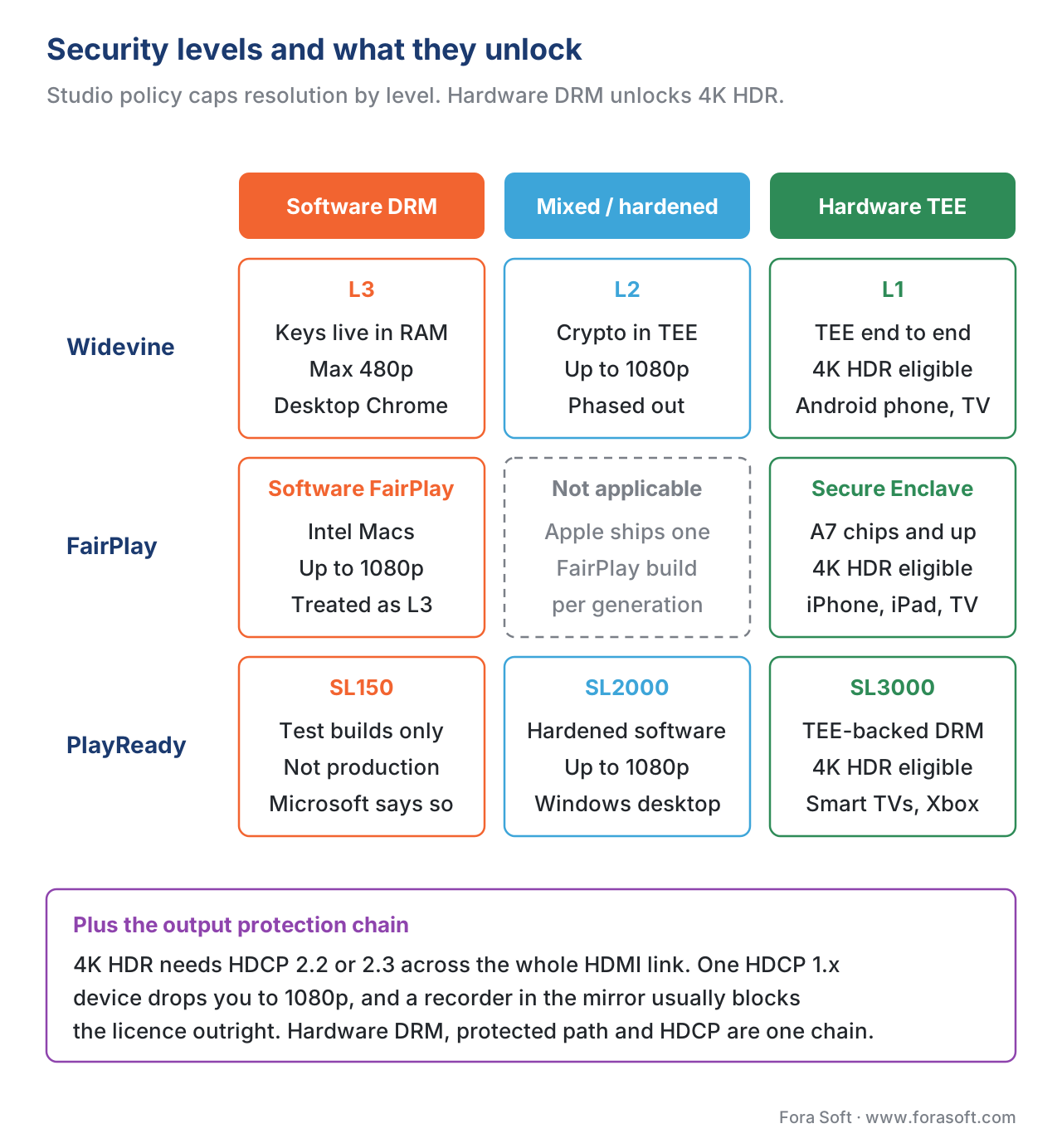 Figure 4. DRM security levels and the resolution tiers studios attach to each.
A worked example: shipping a global VOD service
Let's run the numbers on a hypothetical paid-VOD launch — a streamer serving recorded shows to phones, tablets, smart TVs, Xboxes, and the open web — to make the cost shape concrete.
Suppose the service ships 2,000 hours of catalogue at three quality tiers (1080p SDR, 4K SDR, 4K HDR) and expects 500,000 monthly active subscribers at full-rollout steady state. Each subscriber plays roughly 20 hours per month, which gives 10 million viewer-hours per month and, on a rough assumption of one fresh licence per 1-hour session, about 10 million licence requests per month.
The encoding and packaging side is independent of how many DRMs you ship — you encode and package the catalogue once per quality tier, encrypted with cbcs, signed for all three DRMs via PSSH. Storage rises slightly because PSSH boxes are a few hundred bytes per init segment, but at catalogue scale it's negligible. The visible cost line for DRM is the licence-server bill.
Public price lists from the major managed-DRM vendors in 2026 cluster around two pricing shapes: monthly platform fees of roughly USD 100–2,000 plus per-licence-request fees of roughly USD 0.01–0.05 (averaged across the three DRMs and across volume tiers). For 10 million licences per month at the middle of that range — say USD 0.02 per licence — the licence-server line is on the order of USD 200,000 per month, plus the platform fee. That's the gross retail price before volume commits; large streamers negotiate that down significantly with committed-volume contracts.
For comparison, the same service running on a single DRM would pay roughly a third of that — but it would lose access to the iOS/tvOS audience (no FairPlay) or the Smart TV audience (no PlayReady) or the Android/Chrome audience (no Widevine). The economics make the three-DRM bill the cheaper option once you price in the subscribers you don't acquire.
Encoding and packaging, in case you're building the whole cost model: encode once for each quality tier (covered separately in our bitrate-ladder article), package with a CMAF packager that supports CENC (Shaka Packager, Bento4 mp4encrypt, AWS MediaPackage, Unified Streaming, Norsk), point the packager's --protection-scheme cbcs flag at your KMS (most multi-DRM providers run a CPIX-speaking KMS so the packager fetches keys automatically), publish HLS and DASH manifests off the same segments, and wire the player to talk to your licence-server endpoints. The full end-to-end build cost is dominated by the licence-server vendor selection and the player-side integration testing — the encryption itself, with modern packagers, is two configuration flags.
A worked example, the licence-server transaction
Let's also walk one licence exchange concretely so the engineer reader can scope the integration work. The numbers below are real production averages from 2026.
You — the streaming service — host a licence-server endpoint at https://license.example.com/widevine, also /fairplay and /playready for the other two. A new viewer hits play on a 4K-HDR episode. Their Android TV is a Widevine-L1 device.
The Android TV player initiates EME, generates a Widevine licence request blob (~1 KB), and POSTs it to your /widevine endpoint with an Authorization: Bearer <session-jwt> header carrying their subscription state. Network time: about 15–40 ms RTT to your edge.
Your licence-server middleware validates the JWT (about 1 ms), looks up the content's policy from your CMS (the title is rented through tomorrow, allowed in Germany, no 4K-HDR in Russia), calls the upstream Widevine "modular" licence-server (typically through your DRM vendor's HTTPS API, about 50–120 ms), receives the wrapped key plus policy, signs the response for the device, and returns the licence blob (~2 KB) to the client. Total server-side time: typically 70–180 ms.
The CDM installs the key and decrypts the first sample. First-frame playback lands at roughly 1.0–1.5 seconds from tapping play — almost all of which is segment download, manifest parsing, and decoder warm-up, not the licence exchange itself. In our experience the DRM round trip rarely shows up as the bottleneck; the manifest fetch and the first-segment decode dominate.
That latency budget matters for live streams more than VOD. For a live event with a 30-second budget, an extra 200 ms is invisible. For a low-latency live stream targeting 2-second glass-to-glass over LL-HLS, you must measure and tune. The classic optimisation is persistent licences (the CDM caches the key in its own protected storage so subsequent sessions skip the licence call), used by Netflix and Disney+ to make the second click on a series episode instant.
The four mistakes everyone makes first
Pattern recognition from the production projects we have seen at Fora Soft, in rough order of how often they happen.
Mistake 1 — Encrypt with cenc only. A team ships DASH with cenc AES-CTR, sees it work everywhere Widevine and PlayReady go, then discovers six months later that adding Safari requires a separate re-encryption with cbcs. The fix is annoying because content already shipped is locked to cenc and re-packaging the catalogue is non-trivial. The right default in 2026 is cbcs from day one, dual-signalled for both HLS and DASH.
Mistake 2 — Forget the persistent-licence flag. A team ships full DRM and discovers that opening any episode of a show makes a fresh licence call. On a strict live-streaming budget that's fine, but for VOD it triples the licence-server bill and adds 100 ms to every play. The W3C-standard fix is to set persistentState: 'required' and sessionType: 'persistent-license' in the MediaKeySystemAccess configuration, and to set a multi-hour LicenseExpiration in the licence-server policy.
Mistake 3 — Send the same licence to every device. A team uses one vanilla licence policy across mobile, web, and TV. Mobile playback works, web works, and then the TV catalogue fails inspection at the studio because the TV's PlayReady reports SL3000 but the licence the server returned was tagged SL2000-eligible. The fix is to have the licence server inspect the incoming request's reported security level and issue a policy matched to it — SL3000 / L1 / Secure Enclave for premium 4K HDR, lower tiers for fallback resolution.
Mistake 4 — Skip the licence-server load test. A team launches a big premiere event, the moment the stream goes live every viewer's CDM starts asking for a licence in the same 30-second window, and the licence-server vendor's regional endpoint rate-limits. The fix is a peak-traffic load test against the vendor's actual production endpoint, with a fallback plan (a second region, a second vendor) for the hot 30 seconds of a premiere.
How to decide your DRM stack
The mental model that works for almost every product: pick your devices first, then layer the DRMs.
If your audience is web-and-mobile only (a Twitch-style live-streaming app, a music-video service, a podcast-with-video service), Widevine + FairPlay is the minimum and almost always the maximum. Skip PlayReady unless you need Edge-on-Windows for a regulated-enterprise customer.
If your audience includes smart TVs or game consoles (any OTT product targeting Samsung, LG, Hisense, Roku, Xbox), add PlayReady. Roku is a special case — its proprietary BrightScript stack has its own DRM bindings and you ship through Roku's DRM partners, but you still encrypt with cbcs and ship the same CMAF. Android TV uses Widevine, so it falls under your existing Widevine licence.
If your audience includes Apple TV (the tvOS-native app, not Apple TV streaming sticks running other platforms), FairPlay is non-negotiable. Apple's App Store reviewers reject paid-video apps that play content without an approved DRM.
If your catalogue includes 4K HDR or theatrical-window premium content, you also need to wire HDCP version checks into the player, hardware-DRM-only policies into the licence server (refuse to license to Widevine L3, PlayReady SL150/SL2000, or software FairPlay), and persistent licences with short expirations for users who download for offline.
If your business is closed enterprise (training videos behind SSO, internal corporate communications), DRM is usually overkill — a token-authenticated signed-URL pipeline (covered in detail in our token-auth article) gives you 90% of the protection at 10% of the integration cost.
For most consumer products the verdict is simple: encrypt once with CMAF/cbcs, sign three PSSH boxes, contract a managed multi-DRM provider (the major options are PallyCon, EZDRM, BuyDRM, Axinom, and AWS Elemental MediaPackage with secure packager), wire your player with EME, and budget about 3–6 weeks of engineering time for the end-to-end integration including the iOS/tvOS/Tizen/webOS test pass.
Where Fora Soft fits in
Fora Soft has shipped DRM-protected streaming products since 2010 across our core verticals — OTT and Internet TV, video-on-demand, e-learning, telemedicine, and live video conferencing with recording. The pattern of work we see most often is the launch-time integration: a streaming team with an encoded catalogue, a CDN contract, and a player that nearly works but fails on FairPlay for iOS or refuses to play 4K on a Tizen TV. We unpick the licence-server policy, fix the PSSH signalling, and rebuild the cbcs packaging pipeline if it was wired for cenc only. The same expertise covers WebRTC products that have to record sessions back to a DRM-protected HLS archive (a common pattern in telemedicine compliance and e-learning content libraries) and surveillance products that need a tamper-evident, DRM-signed evidentiary trail. Multi-DRM launches are standard scope for our OTT and Internet TV platform development, and teams already on Wowza get the same packaging and licence work from our Wowza streaming developers.

The book
Video Streaming: A Complete Guide to Video Delivery: From ABR and CDNs to Players, WebRTC, DRM, and the Economics of Streaming
This article stops at the contract: encrypt once, sign three PSSH boxes, let each CDM take its own. Book 3 of the handbook picks it up from there and gives DRM its own chapters alongside the rest of the delivery half of the stack - the EME player integration, the licence-server policy that decides who gets 4K, ABR and CDN behaviour around it, and what the whole thing costs per viewer-hour. That is 1,182 pages on everything that happens between your packager and the screen. Written by Nikolay Sapunov, CEO at Fora Soft.
Stuck on the DRM leg of your launch?
Tell us which devices you have to reach and which catalogue you have to protect, and we will map that onto an encryption scheme, a licence-server contract, and a player integration you can test - 250+ video products shipped since 2005.
See our case studies
Case study
Vodeo
A paid catalogue that lives on Apple hardware: a Netflix-style rental service for Janson Media with 100,000+ users, an iOS app plus AirPlay and Chromecast, and a 480p/720p/1080p ladder - the shape of product where FairPlay is not a choice.
Case study
Bellicon Smart TV
One catalogue of 530+ workout videos shipped to Apple tvOS, Android TV, and the web at once - three device families, and no single CDM that reaches all three.
Case study
Worldcast Live
The other side of the line: pay-per-view concerts at 0.4-0.5 s glass-to-glass for 10,000 simultaneous viewers over WebRTC, where entitlement is a token problem rather than a CENC problem.
What to read next
Security levels
Widevine security levels: L1, L2, L3 - what they really mean
The TEE architecture behind the 480p cap, and how studios turn it into policy.
Apple
FairPlay Streaming in depth
The SPC and CKC exchange in full, and why FairPlay never leaves HLS.
Microsoft
PlayReady in depth: Microsoft's DRM explained for 2026
SL150, SL2000 and SL3000, and the smart-TV estate that makes PlayReady unavoidable.
Browser API
Encrypted Media Extensions (EME): how DRM lives in a browser
The W3C API your player actually calls at every one of the five steps above.
References
- ISO/IEC 23001-7:2023 — Common Encryption in ISO base media file format files — the controlling standard for the
cenc,cbc1,cens, andcbcsprotection schemes. Current edition 2023; first edition 2012 (overrides every vendor blog that describes onlycenc). - W3C Encrypted Media Extensions (encrypted-media-2) — current Editor's Draft, 21 August 2025; the original Recommendation dates from 18 September 2017. The normative source for
requestMediaKeySystemAccess(), theMediaKeySessionlifecycle, and the licence-message flow. - W3C "cenc" Initialization Data Format — defines the PSSH-box-based initialization data the browser hands to the CDM; cites ISO/IEC 23001-7 for the binary layout.
- Microsoft PlayReady — Security Level — Microsoft's official PlayReady documentation for SL150, SL2000, and SL3000. Cited for the explicit not-recommended status of SL150 and the TEE requirement of SL3000.
- Google Widevine DRM — Overview — the primary Widevine documentation; covers CENC support, L1/L2/L3 levels, and the modular licence-server protocol.
- Apple FairPlay Streaming Overview (PDF) — Apple's primary FairPlay Streaming reference, defines the SPC/CKC exchange and the HLS-only constraint.
- DASH-IF Implementation Guidelines: Content Protection and Security — DASH Industry Forum, Part 6 of the Interoperability Points (current v5.0). The de-facto implementation profile for
cbcsandcencin DASH, including the dual-scheme dual-signalling rule cited in §10. - Encrypted Media Extensions Initialization Data Format Registry — W3C registry of accepted EME init-data formats, including
cenc(PSSH) andwebmandkeyids. - Encrypted Media Extensions Stream Format Registry — W3C registry of container formats EME supports; includes the ISOBMFF /
cencentry that DASH and HLS use. - Industry analyst estimates of global video-piracy losses (multiple sources, May 2026) — context only; the article does not depend on the precise dollar figure for any technical claim.
