


Why this matters
The bitrate ladder is the single biggest lever you have on streaming cost, perceived quality, and start-up time. A bad ladder pays the egress bill three times: once in pixels nobody can see, once in rebuffers from rungs that are too sparse, and once in encoder hours spent generating renditions nobody picks. Marketing, finance, and product all meet the ladder through three signals — bandwidth cost per viewer, complaints about quality, and start-up time — and engineering meets it through a thicket of parameters with no obvious right answer. This article gives every audience the same mental model: what each ladder generation does, what it costs, and what to ship when.
What a bitrate ladder actually is
A bitrate ladder is a list of pre-encoded versions of the same video, each at a different combination of resolution and bitrate. The list lives inside the manifest — the small text file the player downloads first. For HTTP Live Streaming, abbreviated HLS, the manifest is a multi-variant playlist file with the extension .m3u8; the controlling document is the Internet Engineering Task Force standard RFC 8216, §4.3.4.2. For Dynamic Adaptive Streaming over HTTP, abbreviated DASH, the manifest is the Media Presentation Description file with the extension .mpd; the controlling document is the International Organization for Standardization standard ISO/IEC 23009-1:2022.
Each pre-encoded version is called a rung, and each rung has a bitrate (how many bits per second the version spends), a resolution (width × height in pixels), a codec (H.264, HEVC, VP9, AV1), a frame rate, and an audio variant association. The player picks one rung at a time and switches when the network changes. A 1080p video-on-demand title in 2026 typically ships with 6–9 rungs. A live event ships with 4–7. A short-form social video ships with 3–4.
The reason you need a ladder at all is that one network condition does not exist. A user on a 50 Mbps fibre line can take a 6,000 kbps top rung; a user on a slow 4G cell can take 800 kbps. The ladder is the contract that lets both watch the same title without the platform serving two different files.
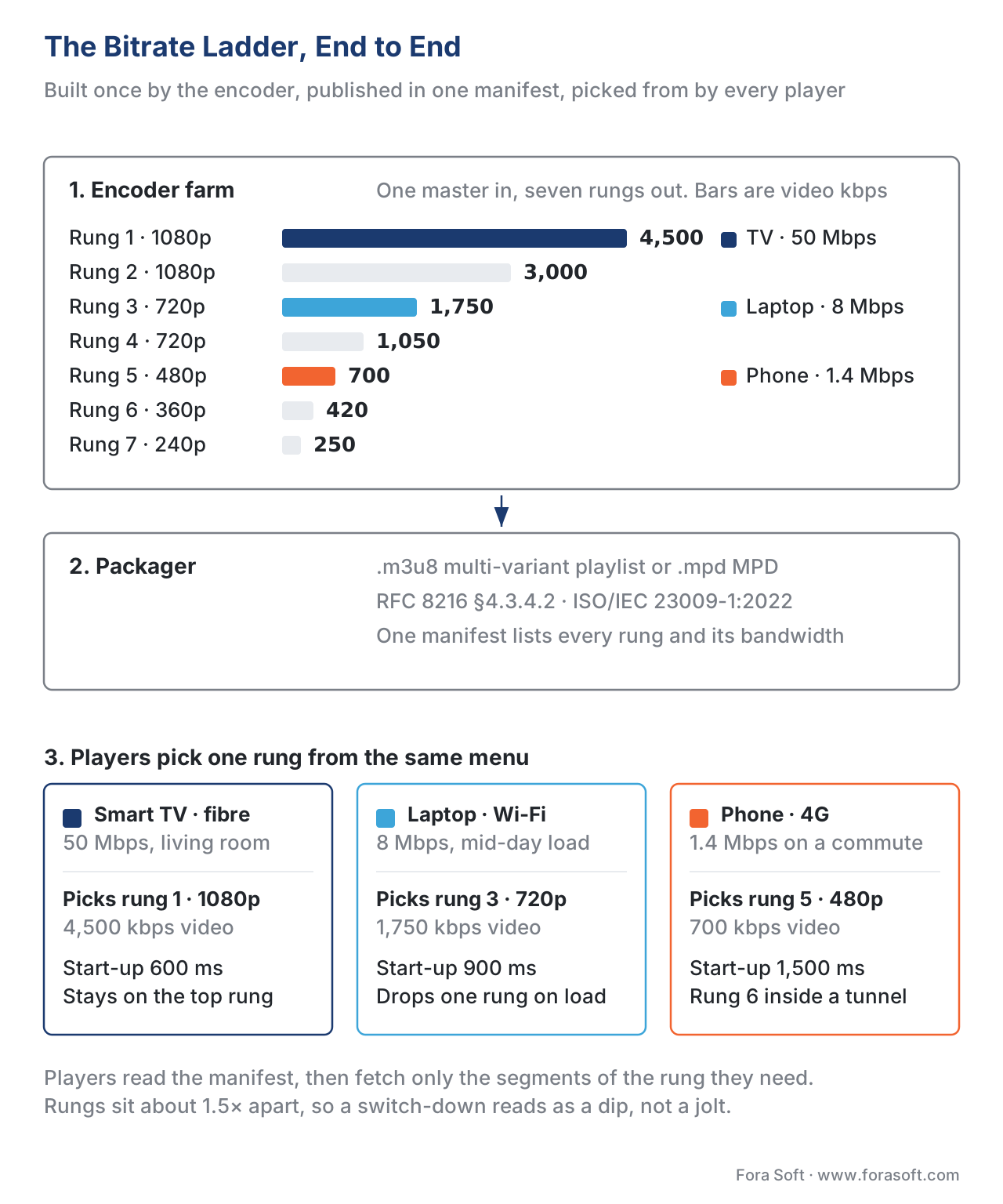 Figure 1. The ladder is the menu. The encoder builds it once; the packager publishes it; every player picks rungs from the same list according to its own measured network.
The classic fixed ladder — 2014 and the world Apple inherited
Before Netflix's 2015 publication, every streaming platform shipped the same ladder for every title. The exact numbers varied per vendor, but the shape was the same: a hand-tuned list of bitrates and resolutions chosen once by an engineering team and then frozen for years.
The reference ladder published in Apple's HLS Authoring Specification for many years had nine rungs and looked like this. Apple still maintains and updates this specification — at the time of writing the latest revision is dated 2025-09 — and the ladder is in §2.7.
| Rung | Bitrate (kbps) | Resolution | Notes |
|---|---|---|---|
| 1 | 235 | 416×234 | Mobile fallback |
| 2 | 375 | 640×360 | Slow Wi-Fi |
| 3 | 560 | 768×432 | Mobile data |
| 4 | 750 | 960×540 | Average broadband |
| 5 | 1,050 | 1280×720 | Good Wi-Fi (720p) |
| 6 | 1,750 | 1280×720 | Cleaner 720p |
| 7 | 2,350 | 1920×1080 | Entry-level 1080p |
| 8 | 3,000 | 1920×1080 | Mid 1080p |
| 9 | 4,500 | 1920×1080 | High 1080p |
Three rules govern any fixed ladder, and they survive into per-title and per-shot work largely unchanged.
Rule 1 — Geometric spacing. Adjacent rungs are roughly 1.5× apart in bitrate, not equally spaced. A jump from 400 kbps to 600 kbps is a 50% step that the user can see; a jump from 4,000 kbps to 4,200 kbps is a 5% step that mostly wastes encoder time. The Apple ladder's ratios fall between 1.4× and 1.6×.
Rule 2 — Resolution moves with bitrate. A 400 kbps stream at 1920×1080 looks worse than a 400 kbps stream at 640×360, because the encoder is asked to spread its bit budget over too many pixels. There is a "knee" above which adding pixels stops adding visible quality at a given bitrate. The classic ladder hides the knee by clustering two or three rungs at the same resolution near the top, then dropping resolution at the bottom.
Rule 3 — One step at a time on the way down. A player that drops from 4,500 kbps directly to 750 kbps produces a visible jolt; one that drops 4,500 → 3,000 → 1,750 hides the change. The ladder must be dense enough to allow smooth descent, and sparse enough to keep encoder cost reasonable.
The problem with the fixed ladder is the underlying assumption — that every title needs the same bitrate-to-quality curve. A static cartoon and a fast-action sports broadcast both look acceptable at 2,000 kbps with completely different settings. The cartoon barely needs 1,000 kbps; the sports stream needs 3,500 kbps to avoid blocking. A fixed ladder either overspends on the cartoon or underdelivers on the sports.
The math of overspending
Take 1,000 hours of cartoon and 1,000 hours of action. On a fixed ladder, both get encoded at exactly the same bitrates. The action title fills its 4,500 kbps top rung with useful detail; the cartoon spends those bits on flat surfaces and slow gradients that any encoder can compress cheaply.
A back-of-envelope number: if 30% of a streaming platform's catalogue is "easy" content (animation, slideshow lectures, talking heads) and the fixed top rung is set at 4,500 kbps, the platform pays about 4,500 × 30% = 1,350 kbps of avoidable bandwidth on a third of its hours, every time a viewer watches the top rung. Across 1 billion viewing hours per year — a typical mid-tier streaming platform — that is roughly 600 petabytes of avoidable egress, at a 2026 CDN price of $0.005–$0.015 per gigabyte, somewhere between $3 million and $9 million a year of bandwidth that pays for nothing visible.
This is the number Netflix went after in 2015.
Per-title encoding — Netflix 2015 and the convex hull
In December 2015, Netflix published Per-Title Encode Optimization on its engineering blog. The argument was that a single, fixed ladder is wrong because each title has a different relationship between bitrate and perceived quality, and the platform should build the ladder for each title individually. The savings, Netflix reported, were 15–20% bandwidth at the same VMAF — the Video Multi-method Assessment Fusion perceptual quality metric Netflix had open-sourced earlier that year.
The mechanism is brute force, but disciplined brute force.
How per-title encoding works, step by step
Step 1 — Many trial encodes. For each title, the encoder runs trial passes at a grid of resolutions (typically five to seven steps, from 1920×1080 down to 320×180) and at several quantization parameter settings inside each resolution. A typical grid for a single feature film involves 30 to 100 trial encodes.
Step 2 — Measure quality on every trial. Each trial encode is decoded and scored against the original master with a perceptual quality metric. Netflix uses VMAF; some vendors use peak signal-to-noise ratio (PSNR) or Structural Similarity Index (SSIM). The output is a table of (resolution, bitrate, quality) triples.
Step 3 — Plot the points and find the convex hull. Plot each trial as a point with bitrate on the x-axis and quality on the y-axis. Each resolution generates its own curve — usually a rising line that flattens out at higher bitrates. The lowest resolution wins at the leftmost (lowest-bitrate) end; the highest resolution wins at the rightmost (highest-bitrate) end. The outer envelope of all curves — the rightmost point at each quality level — is the convex hull, the set of bitrate-resolution pairs that achieve the highest possible quality at every bitrate.
Step 4 — Sample the hull to build the ladder. Pick five to nine points along the convex hull at the quality levels the platform wants to ship, and use those exact (resolution, bitrate) pairs as the ladder rungs.
The result is a ladder that is specific to the title. A cartoon's ladder might top out at 2,000 kbps for 1080p because the encoder can fit 1080p quality into that budget. A high-motion sports broadcast's ladder might need 6,500 kbps to deliver the same VMAF at 1080p. Same quality, different bitrates, different rungs.
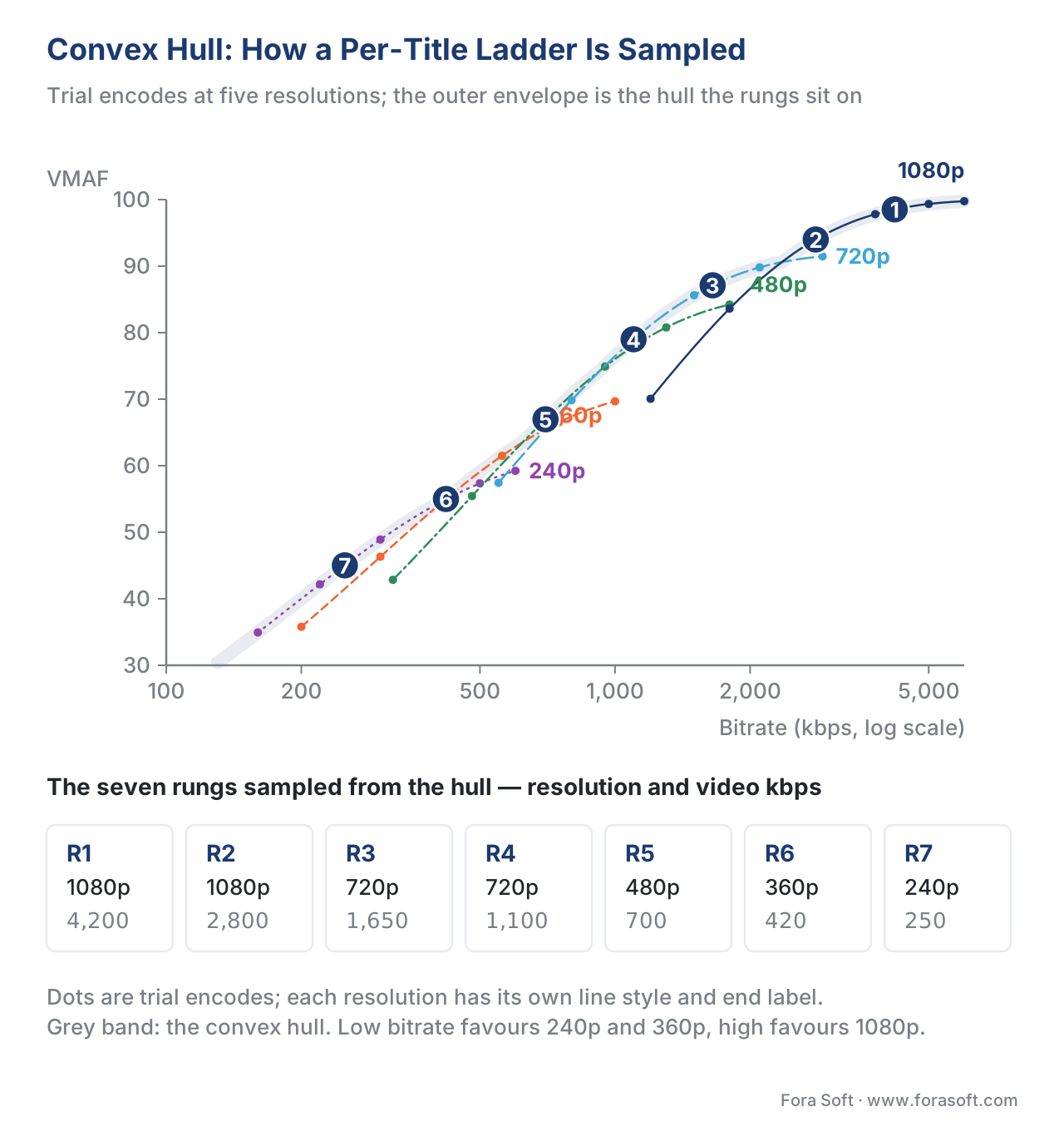 Figure 2. Five resolution curves; the outer envelope (highlighted) is the convex hull. The ladder picks five points along the hull at the platform's target quality levels.
The numbers Netflix reported, and what they mean
Netflix's 2015 paper gave a worked example: the animated title Boss Baby dropped from a 5,800 kbps top rung on the fixed ladder to a 2,000 kbps top rung on the per-title ladder, with no visible quality loss. The high-motion title Bright kept a top rung in the 4,500–5,800 kbps range. Across the catalogue, the average bandwidth saved at the same VMAF was 20%.
This single number — 20% bandwidth at the same quality — is what made per-title encoding the industry default. On a streaming platform with $50 million a year in CDN egress, 20% is $10 million a year of free margin, recovered with one engineering project.
Where per-title encoding is in 2026
Per-title encoding has been industry standard since roughly 2019. The vendors who ship it include:
- Netflix's internal pipeline, the originator, still in production at the catalogue scale (~250,000 hours of content).
- Bitmovin Per-Title Encoding, a commercial product, reports double-digit monthly cost savings for VOD customers in case studies published 2018–2025.
- Mux Instant Per-Title, which builds the ladder on a single fast probe instead of a full grid of trial encodes, trading a small amount of optimality for much lower encoder cost.
- AWS Elemental MediaConvert, with QVBR (Quality-Defined Variable Bitrate) and automated ABR mode, which approximates per-title behaviour without an explicit convex-hull search.
- Open-source approaches, primarily via the AOM-Edge benchmark project, the Bitmovin Per-Title Bitrate Ladder Benchmark Tool, and FFmpeg-based home-grown pipelines.
The 2025 Bitmovin Video Developer Report, surveying 167 developers across 34 countries, lists per-title encoding and multi-codec strategies as the top two ways video developers expect to cut cost over the next two years. That signal is not subtle.
Per-shot encoding — Netflix 2018 and the dynamic optimizer
Per-title encoding treats a 90-minute movie as one bitrate-quality curve. That is wrong in a different way: inside a single title, a slow dialogue scene needs fewer bits than a chase sequence with explosions and rain. A per-title ladder forces both to share the same bitrate; the dialogue spends bits it does not need; the chase scene gets fewer than it deserves and shows blocking.
In March 2018, Netflix published Dynamic Optimizer — A Perceptual Video Encoding Optimization Framework. The idea: cut the title into shots (continuous sequences between hard scene cuts), build a small convex-hull search for each shot, and let the per-shot encoder pick the bitrate and resolution that best fits this scene, not the whole movie. The savings on top of per-title averaged another 10–15% at the same VMAF.
How per-shot encoding works
Step 1 — Shot detection. A shot-detection pass walks the master and finds the boundaries — hard cuts where one camera angle ends and the next begins. A 90-minute feature film typically has 800–1,500 shots; an episodic drama has 600–1,200; a sports broadcast has thousands of micro-shots and is often handled with fixed-length segments instead of true shot detection.
Step 2 — Per-shot convex-hull search. For each shot, run the same brute-force trial encodes the per-title pipeline runs, but on a much smaller chunk (one to thirty seconds of content). Score each trial with VMAF.
Step 3 — Pick the optimal point under a global constraint. The encoder solves a global optimisation: pick one (resolution, bitrate) point per shot such that the union of all picks achieves the highest possible average quality under a target total bitrate. Mathematically this is a constrained convex optimisation; Netflix's paper formulates it with Lagrangian relaxation.
Step 4 — Stitch the shots into a single encoded stream per rung. Each rung of the final ladder is a concatenation of per-shot picks, all at the same nominal target bitrate but with different (resolution, complexity) trade-offs scene by scene. The packager treats the result as one continuous file.
The output is a video that varies its compression effort with the content. The dialogue runs at a lower bitrate than the chase, but the user sees consistent VMAF across both.
What ships in production
Netflix turned on dynamic-optimizer encoding for selected catalogue titles in 2018 and for ultra-high-definition (UHD/4K) content broadly in 2020. By 2026 the technique is in production at Netflix, Disney+, Warner Bros. Discovery, YouTube (under different internal names), and is shipped by Bitmovin and Brightcove as a commercial feature.
The engineering cost is real. Per-title typically increases the encoding pipeline's compute by 2–4× over a fixed ladder; per-shot adds another 3–8×. For a small catalogue with millions of plays per title, the bandwidth savings dwarf the encoder cost. For a long-tail catalogue with thousands of titles and very few plays each, the math flips — running a full per-shot search on a title that gets watched 10 times a year may never recoup the encoder bill.
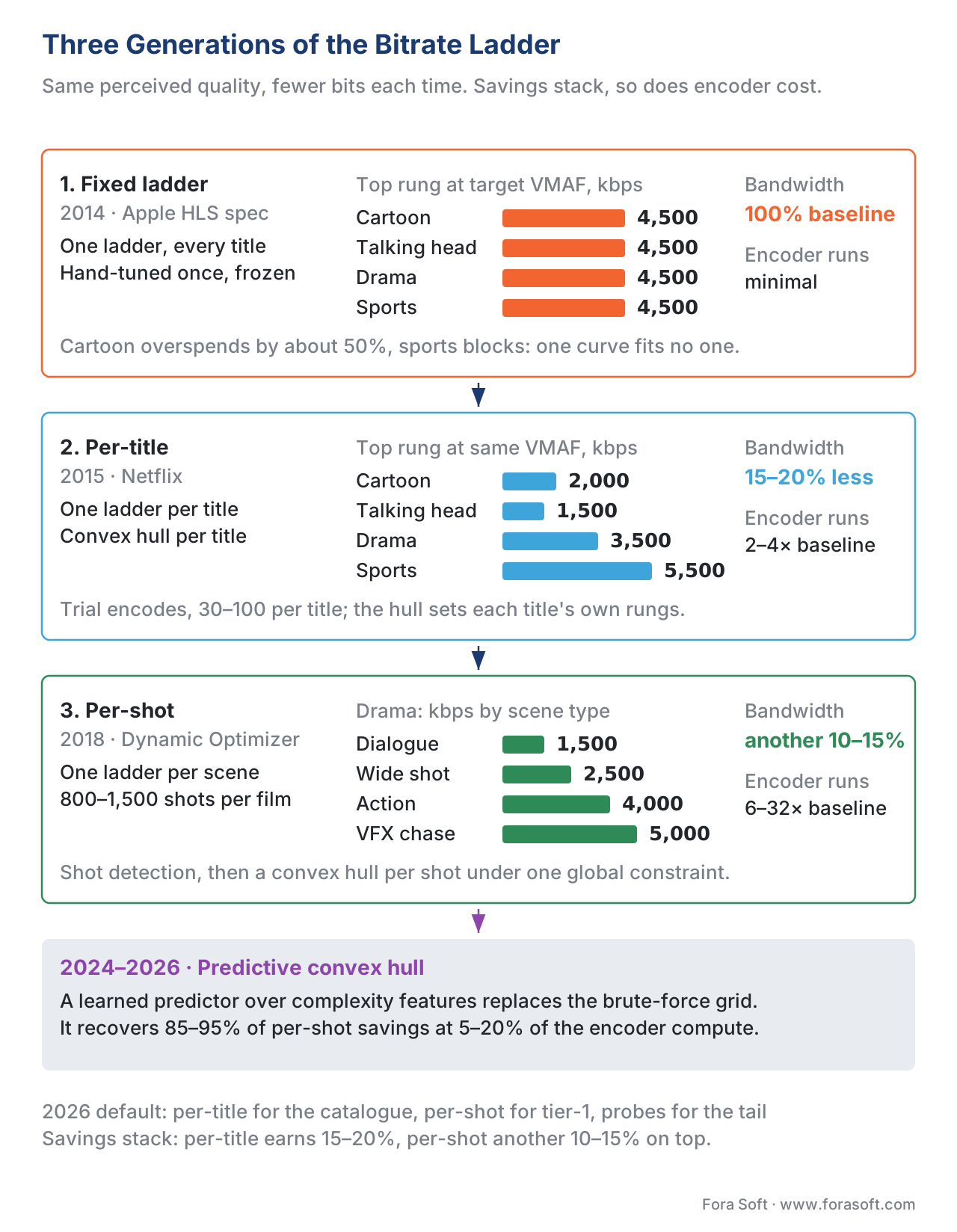 Figure 3. Three generations, three savings tiers. Per-title earns the first 15–20%; per-shot earns the next 10–15%; the convex-hull plus AI tools of 2024–2026 push the curve further still.
The 2024–2026 generation — AI-driven convex hull, per-frame, instant per-title
By 2024 the limitation of per-shot encoding was clear: the encoder still has to run a brute-force grid of trial encodes for each shot. On a large catalogue that is millions of compute-hours per year. The 2024–2026 generation of ladder-building tools attacks that cost.
Predictive convex-hull tools
A 2024 line of research uses lightweight content-complexity features — spatial detail, temporal motion, the perceptual entropy of a clip — to predict where the convex hull will land without running the brute-force trial encodes. The 2024 paper Optimal Transcoding Resolution Prediction for Efficient Per-Title Bitrate Ladder Estimation (Telli et al., arXiv:2401.04405) reports that a single fast probe pass plus a learned predictor matches the brute-force convex hull within 1% VMAF on average, at less than 5% of the encoder compute.
The 2024 Constructing Per-Shot Bitrate Ladders using Visual Information Fidelity paper (arXiv:2408.01932) does the same for per-shot, using the Visual Information Fidelity (VIF) metric as a faster proxy for VMAF during the search. The 2025 ACM Multimedia Computing journal survey by Sotirakis et al. ("Convex Hull Prediction Methods for Bitrate Ladder Construction") catalogues the family — Akamai, Ericsson, Mux, and Bitmovin all ship variants — and reports that the best 2025 predictors recover 85–95% of the per-shot bandwidth savings at 10–20× lower compute than a brute-force per-shot pipeline.
Instant per-title and probe-based pipelines
Mux's Instant Per-Title approach, published 2018 and refined through 2024, builds a per-title ladder using a single fast probe of the source plus a learned regression model. The trade-off is explicit: 1–3% optimality lost vs the brute-force convex hull; 5–10× encoder cost recovered. For platforms with a long-tail catalogue and millions of titles, this is the only economically viable per-title approach.
Per-frame and content-aware encoding
A handful of 2025–2026 systems take the per-shot idea further and apply it at the per-frame or per-group-of-pictures level. Visionular's Aurora1 encoder, AOM-derived AV1 implementations, and Bitmovin's per-scene mode in 2026 all advertise per-frame bitrate adaptation. The empirical savings beyond per-shot are smaller (3–7% additional at the same VMAF in published benchmarks), and the engineering complexity is substantial. For most platforms, per-shot remains the sweet spot in 2026.
What the 2026 default looks like
For a streaming engineer building a new platform in 2026, the right default is:
- Per-title encoding for every title with more than ~10,000 expected lifetime views. The encoder cost is recovered in months.
- Per-shot encoding for tier-1 catalogue and live broadcast events with high viewership. The marginal savings on top of per-title are real.
- Predictive / probe-based per-title for the long tail. Don't run a brute-force grid on a title that will be played 100 times.
- Plain fixed ladder only as a fallback — for source content too short to probe, or in early-stage prototypes.
Picking your top and bottom rungs
The ladder's endpoints — the top rung and the bottom rung — matter more than the rungs in the middle, because they cap what every viewer experiences.
The top rung
The right top rung is the bitrate above which the median viewer's network cannot sustain it, with a generous safety margin. Three signals tell you the answer:
- Player telemetry on existing traffic. What percentage of sessions reach the top rung? If less than 5% sustain it, the top rung is decorative — it costs storage and encoder time but serves no one. Retire it.
- The codec ceiling. H.264 stops adding visible quality somewhere around 8–10 Mbps for 1080p, 20–25 Mbps for 4K. HEVC stops around 5–6 Mbps for 1080p, 12–15 Mbps for 4K. AV1 stops around 3.5–4.5 Mbps for 1080p, 8–10 Mbps for 4K. Don't build a top rung above the codec's visible ceiling.
- The viewing device. A 4K rung is wasted on a phone, but a 1080p rung is wasted on a 4K television. If your audience skews TV, push the top rung higher; if it skews mobile, cap it.
The bottom rung
The right bottom rung is the bitrate that plays at all on the slowest realistic network in your audience. In 2026 the answer for global streaming is 200–400 kbps at 240p–360p. For domestic broadband-only streaming, 600–800 kbps at 480p is enough. For a corporate-network video platform with guaranteed 5 Mbps minimum, the bottom rung can be 1,500 kbps.
The mistake is to over-cap the bottom rung in pursuit of "visual quality". A 480p stream at 800 kbps is recoverable; no stream at all because the next rung up is 1,500 kbps and the user's mobile data died is not.
A worked example — building a ladder for a 1080p drama
Walk through a concrete build. The title is a 90-minute 1080p drama with mixed content — slow dialogue scenes and a few action set pieces. Audience: 60% smart-TV, 30% laptop, 10% mobile. Codec: HEVC mainline; H.264 as a compatibility companion.
Step 1 — Pick the resolution grid. 1920×1080, 1280×720, 854×480, 640×360, 426×240. Five resolutions cover the screen sizes in the audience.
Step 2 — Pick the bitrate grid. Run the trial encodes at constant rate factor 21, 24, 27, 30, 33, 36, 39 (HEVC). Each resolution × CRF combination produces a trial encode and a VMAF score.
Step 3 — Run the trial encodes. 5 × 7 = 35 trials per shot. For a per-title build, that is 35 trials on the whole movie. For a per-shot build with 1,000 detected shots, that is 35,000 trials — but each is short. On a 32-core encoder farm, the per-title pass takes a few minutes; the per-shot pass takes a few hours.
Step 4 — Plot the convex hull and sample it. The encoder finds the points where (1080p HEVC, 4,200 kbps), (1080p HEVC, 2,800 kbps), (720p HEVC, 1,650 kbps), (720p HEVC, 1,100 kbps), (480p HEVC, 700 kbps), (360p HEVC, 420 kbps), and (240p HEVC, 250 kbps) sit on the hull. Those become the seven HEVC rungs.
Step 5 — Generate the H.264 companion ladder. H.264 needs roughly 1.5–1.8× the bitrate of HEVC for the same VMAF. The H.264 rungs become 6,500 / 4,500 / 2,600 / 1,750 / 1,100 / 650 / 400 kbps at the same resolutions.
Step 6 — Publish the manifest. The HLS multi-variant playlist or DASH MPD lists all 14 rungs (7 HEVC + 7 H.264) with codec strings, bandwidth attributes, and resolution attributes. Apple devices pick the HEVC rungs first per their codec preference order; everything else picks H.264.
| Rung | Codec | Bitrate (kbps) | Resolution | Used by |
|---|---|---|---|---|
| 1 | HEVC | 4,200 | 1920×1080 | Smart TV, laptop |
| 2 | HEVC | 2,800 | 1920×1080 | Smart TV, laptop |
| 3 | HEVC | 1,650 | 1280×720 | Tablet, laptop |
| 4 | HEVC | 1,100 | 1280×720 | Tablet |
| 5 | HEVC | 700 | 854×480 | Mobile data |
| 6 | HEVC | 420 | 640×360 | Slow mobile |
| 7 | HEVC | 250 | 426×240 | Last-resort fallback |
| 8 | H.264 | 6,500 | 1920×1080 | Compatibility |
| 9 | H.264 | 4,500 | 1920×1080 | Compatibility |
| 10 | H.264 | 2,600 | 1280×720 | Compatibility |
| 11 | H.264 | 1,750 | 1280×720 | Compatibility |
| 12 | H.264 | 1,100 | 854×480 | Compatibility |
| 13 | H.264 | 650 | 640×360 | Compatibility |
| 14 | H.264 | 400 | 426×240 | Compatibility |
Live streaming — the ladder you cannot tune
A pre-recorded title gets the full convex-hull search. A live broadcast does not — there is no time to run trial encodes before each shot. Live ladders ship today in three variants.
Variant 1 — Static live ladder. A hand-tuned fixed ladder, the way every live broadcast worked in 2018. Three to five rungs. Cheap to ship; suboptimal for hard-to-encode content like sports.
Variant 2 — Live per-title. A short probe window — typically the first 5–30 seconds of the stream — is used to tune the ladder for the rest of the broadcast. Works for predictable broadcasts (a 90-minute soccer game with consistent motion characteristics). Brittle for unpredictable content (a chat show that cuts to a news clip).
Variant 3 — Adaptive live ladder. A live encoder continuously monitors content complexity (motion vectors, scene-change frequency) and adjusts the bitrate envelope and rung set within constraints. AWS Elemental's QVBR live, Bitmovin's adaptive live encoding, and Harmonic VOS' real-time per-scene mode all implement variants.
The headline number: live per-title and adaptive live ladders save 10–15% bandwidth vs static, at the cost of ~20% extra encoder compute and a more complex operational story.
Common mistakes and how to avoid them
The most common ladder failures we see in production audits:
- Top rung nobody can reach. A 12 Mbps 4K rung on a streaming service whose median viewer has a 25 Mbps line that fluctuates to 10 Mbps under load. The rung exists in the manifest, the encoder pays for it every title, and almost nobody plays it because the player can never sustain it. Audit your player telemetry; retire any rung played by less than 5% of sessions.
- Bottom rung too high. A 1.5 Mbps bottom rung on a global mobile audience. The first time a user's connection drops to 600 kbps, the player has nowhere to go but stall. The fix is a fallback rung below 500 kbps, even if it looks ugly — ugly playing beats not-playing.
- Equal-bitrate spacing instead of geometric. A ladder at 500 / 1,000 / 1,500 / 2,000 / 2,500 kbps wastes encoder time at the top (the 2,000 → 2,500 jump is only 25%) and gives the player too few options at the bottom (the 500 → 1,000 jump is 100%). Use 1.5× spacing.
- Per-title without checking the long tail. Building a brute-force per-title pipeline for a 50,000-title catalogue where the median title plays 200 times. The encoder bill eats the bandwidth savings. Use probe-based per-title (Mux Instant or equivalent) for the tail.
- Fixed ladder for live sports. Sports content varies wildly in encoder difficulty — a slow pre-match warm-up versus a five-on-one breakaway have completely different bit budgets. A fixed live ladder over-spends on the warm-up and under-delivers on the breakaway. Use at least live per-title.
Where Fora Soft fits in
We have built video streaming, WebRTC, conferencing, surveillance, e-learning, and OTT platforms since 2005, and the bitrate-ladder decisions in this article are some of the first we make on every new project. The choice between fixed, per-title, and per-shot is rarely "the best one" — it is the right trade-off given the catalogue size, the encoder budget, the audience networks, and the launch timeline. We routinely ship per-title for paid OTT clients and live per-title for sports broadcasts; we routinely ship fixed three-rung ladders for early-stage education platforms because the engineering payback is not there yet. The discipline is the same on both ends: measure first, then optimise. Our OTT and Internet TV development team builds per-title encoding into VOD catalogues, and our scalable video streaming work pairs the ladder with ABR and multi-CDN delivery for live audiences.

The book
Video Streaming: A Complete Guide to Video Delivery: From ABR and CDNs to Players, WebRTC, DRM, and the Economics of Streaming
We wrote a seven-volume handbook that takes the whole video stack apart, from the pixel to production, so that someone who works through it can design and build a system like the one this article sizes. Volume 3 is where the ladder lives: the convex hull and how a per-title search actually runs, the rung-selection algorithms on the player side that decide which of your rungs get used, what retiring a top rung does to the CDN bill, and the QoE telemetry that tells you nobody reached it. Volume 2 covers the transport and packaging your finished rungs ship inside — HLS, MPEG-DASH and CMAF. Written by Nikolay Sapunov, CEO at Fora Soft.
Not sure whether per-title pays back on your catalogue?
Send us the rung list you encode today, a week of player telemetry, and how your plays are spread across titles. We will tell you which rungs nobody reaches, whether a brute-force convex-hull pass earns back its encoder hours at your title count, and where a probe-based pipeline is the better trade. 250+ video products shipped since 2005.
See our case studies
Case study
Speed.Space
Remote production recording at 1080p and 8 Mbps for Netflix, Electronic Arts and HBO productions. When the top rung is written into the contract, the convex-hull work happens under it — the hull decides how many rungs you need below to keep the session alive.
Case study
Worldcast Live
Ticketed HD concerts at 1.5 Gb/s and 0.4–0.5 s glass-to-glass for 10,000 simultaneous viewers. A live show gets no trial encodes: the ladder is set from a probe in the first seconds and then has to hold for the whole broadcast.
Case study
TradeCaster
Live desktop streaming for 46,000+ traders on $99–$119 monthly subscriptions, auto-scaling through market hours. Charts and terminals are the easy-content case from this article: a fixed ladder spends a 4,500 kbps top rung on flat screens that per-title encoding fits into a fraction of it.
What to read next
ABR
Adaptive Bitrate Streaming Explained Without Buzzwords
The other half of the story: how a player walks the ladder you just built.
Tools
Bitrate-to-Rendition Ladder Calculator
Run the spacing and codec rules from this article on your own numbers.
Economics
CDN Cost Economics: 95th-Percentile, Commit, Overage, Transit
Where the $0.005–$0.015 per GB in the overspending math comes from.
Protocols
HLS in Depth: m3u8, Segments, Multi-Variant Playlists
How the finished rungs become the multi-variant playlist a player reads.
References
- Netflix Technology Blog, Per-Title Encode Optimization, December 2015. https://netflixtechblog.com/per-title-encode-optimization-7e99442b62a2 — the foundational per-title paper.
- Netflix Technology Blog, Dynamic Optimizer — A Perceptual Video Encoding Optimization Framework, March 2018. https://netflixtechblog.com/dynamic-optimizer-a-perceptual-video-encoding-optimization-framework-e19f1e3a277f — the foundational per-shot paper.
- Netflix Technology Blog, Optimized Shot-Based Encodes: Now Streaming!, October 2018. — the production roll-out of per-shot.
- IETF RFC 8216, HTTP Live Streaming, August 2017, §4.3.4.2 (multi-variant playlists). https://www.rfc-editor.org/rfc/rfc8216 — controlling standard for HLS manifests.
- ISO/IEC 23009-1:2022, Dynamic Adaptive Streaming over HTTP (DASH) — Part 1: Media presentation description and segment formats. — controlling standard for DASH manifests.
- Apple, HLS Authoring Specification for Apple Devices, revision 2025-09, §2.7 (encoding tiers). https://developer.apple.com/documentation/http-live-streaming/hls-authoring-specification-for-apple-devices — Apple's reference ladder. Per §4.3.2 of our methodology, this is the controlling document for the Apple ecosystem.
- Apple, What's New in HTTP Live Streaming — WWDC 2025, June 2025. https://developer.apple.com/streaming/Whats-new-HLS.pdf — Apple's 2025 update on HLS ladders for HEVC and Apple Vision Pro content.
- Telli et al., Optimal Transcoding Resolution Prediction for Efficient Per-Title Bitrate Ladder Estimation, arXiv:2401.04405, January 2024. https://arxiv.org/abs/2401.04405 — probe-based per-title prediction.
- Tmar et al., Constructing Per-Shot Bitrate Ladders using Visual Information Fidelity, arXiv:2408.01932, August 2024. https://arxiv.org/abs/2408.01932 — VIF-based per-shot construction.
- Sotirakis et al., Convex Hull Prediction Methods for Bitrate Ladder Construction: Design, Evaluation, and Comparison, ACM Transactions on Multimedia Computing, Communications, and Applications, 2025. https://dl.acm.org/doi/10.1145/3723006 — the 2025 survey of predictive convex-hull tools.
- Bitmovin, 2025 Video Developer Report (8th annual edition, 167 respondents, 34 countries). https://bitmovin.com/ — per-title and multi-codec as top cost-cutting priorities.
- Bitmovin, Per-Title Bitrate Ladder Benchmark Tool. https://bitmovin.com/per-title-bitrate-ladder-benchmark-tool/ — open implementation of per-title benchmarking.
- Mux Blog, Per-Title Encoding @ Scale and Instant Per-Title Encoding. https://www.mux.com/blog/per-title-encoding-scale and https://www.mux.com/blog/instant-per-title-encoding — probe-based per-title in production.
