


Why This Matters
Packaging is the most-undervalued layer of a streaming stack and the layer that quietly decides how much storage you pay for, how fast you can ship a new device platform, and whether a DRM rotation in two years requires you to re-encode the catalogue or just re-issue keys. A product manager who treats packaging as "the thing that happens after encoding" loses the ability to negotiate the storage-vs-compute trade-off that defines the origin's monthly bill; a founder who picks a packager without understanding the static-vs-JIT split locks themselves into a workflow that quadruples storage costs on the day the catalogue passes a thousand titles. Streaming engineers need the same picture from the other side: which packager honours the latest LL-HLS draft, which one ships an honest CMAF write path, what the actual command-line difference is between Shaka and Bento4 for a multi-DRM CMAF VOD. This article gives both audiences the same map, with the standards numbers, the runnable commands, and the cost arithmetic that lets you make the call.
What a Packager Actually Does
A packager is a program that reads encoded video and audio, slices it into time-aligned pieces called segments, wraps each piece in a container format the player understands, writes a text manifest the player reads first to know which segments exist, and — optionally — encrypts the segments with content keys provided by a digital rights management system. That is the whole job description.
It is helpful to picture the packager as a deli counter. The encoder is the butcher's room out back; it produces long, fully-encoded sides of meat called mezzanine files — one per quality rung on the bitrate ladder. The packager is the counter clerk who slices the side into uniform 4-second portions, wraps each in branded paper (the fragmented MP4 container), labels them, and pins a price-list to the wall (the manifest) so customers can ask for the slices they want in the quality they want. If the deli sells encrypted "premium" cuts, the clerk also locks each slice with a tamper-evident seal that only customers with the right key can break (Common Encryption). The customers — players on phones, browsers, smart TVs — never see the original side; they only ever fetch labelled slices.
Three jobs run together: fragment, manifest, encrypt. The packager exists because a player cannot consume a multi-gigabyte single-file encode. Players consume HTTP requests to short files, indexed by a manifest, optionally protected by a DRM key. Everything below is the detail of those three jobs.
Where Packaging Sits in the Pipeline
The streaming pipeline before the packager looks like this. A camera or a stored master file feeds an encoder (FFmpeg, AWS Elemental Live, Bitmovin, NETINT, x264/x265/SVT-AV1, libvpx, etc.). The encoder produces one mezzanine file per quality rung — a complete H.264, HEVC, AV1, or VVC encode at 240p/360p/480p/720p/1080p/4K, each at its target bitrate. Those mezzanines are the packager's input.
The packager's outputs go to an origin — a small server (or an S3 bucket fronted by CloudFront) that holds the segment files and serves them over HTTP. Downstream of the origin sits the content delivery network (CDN) — a global cache layer that pulls segments from the origin once and serves them to viewers from edges close to their physical location. The viewer's player fetches the manifest first, parses the list of rungs, picks one, then fetches segments one by one from the nearest edge.
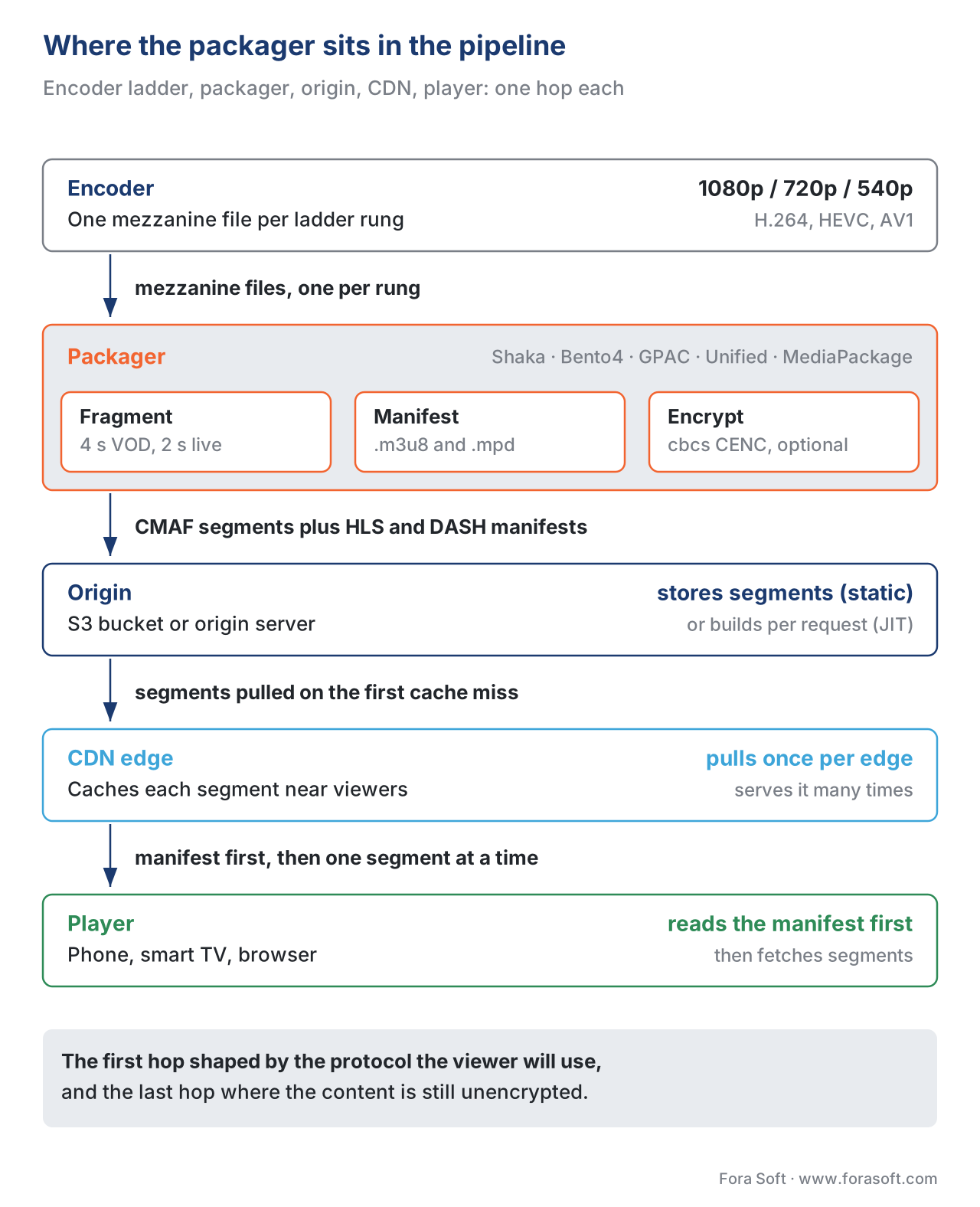 Figure 1. Packaging sits between the encoder ladder and the origin. The packager's job is to convert encoded mezzanines into short segments plus a manifest, optionally with CENC encryption, ready for a CDN to cache and a player to consume.
This is the canonical streaming pipeline covered in The Streaming Pipeline, End to End. Two facts about the packager's position matter for this article. First, the packager is the first place in the pipeline where the output is shaped by the protocol the viewer will use. The encoder produces a generic encode; the packager produces an HLS-ready or DASH-ready (or both) presentation. Second, the packager is the last place in the pipeline where the content is in its plain form before encryption locks it for the rest of its life on disk.
Fragments, Segments, Chunks: The Three Words
The single most common source of confusion in packaging vocabulary is the difference between fragment, segment, and chunk. The ISO/IEC 23000-19 CMAF specification (2018, second edition 2020) gives each a precise meaning, and serious packaging tooling enforces the distinction.
A CMAF chunk is one moof box followed by one mdat box inside a fragmented MP4 file. moof is the movie fragment box; it holds the timing and sample-table metadata for the bytes that follow. mdat is the media data box; it holds the encoded video or audio samples themselves. A chunk is the smallest independently-decodable unit in CMAF, often a single 200-millisecond piece of GOP-aligned video.
A CMAF fragment is one or more contiguous chunks that share an addressable URL relative to the segment. Most production packagers in 2026 use a one-to-one mapping — one fragment equals one chunk — and the term "fragment" mostly survives because the underlying ISO base media file format (ISO/IEC 14496-12) uses it.
A CMAF segment is one or more fragments that together form an addressable unit the player downloads in a single HTTP request — typically 2, 4, or 6 seconds of video. A segment is the unit that appears in the HLS playlist or the DASH MPD timeline. It begins on a keyframe so it can be decoded without reference to any earlier segment.
The relationship is chunk ≤ fragment ≤ segment. For low-latency streaming (LL-HLS, LL-DASH), the chunk is the meaningful transport unit — the player asks for partial segments built from chunks as they are produced live, instead of waiting for the full segment. For everything else, the segment is the meaningful unit.
Two consequences for the engineer building the packaging step. First, the packager must align segment boundaries with the encoder's keyframe interval — otherwise the player downloads a "segment" whose first frame is a P-frame depending on data the player does not have. Most production encoders ship a --gop-size knob that the packager reads; missing this alignment is the single most common packaging bug. Second, the segment duration is the lower bound on switching latency. If your segments are 6 seconds long, the player can switch rendition at most once every 6 seconds; if they are 2 seconds long, four times more often. The trade-off is explained below.
Segment Duration: The 2 / 4 / 6 Trade-off
How long should a segment be? The whole industry argued about this for a decade. The 2026 consensus is narrow: 4 seconds for VOD, 2 seconds for live, with longer (6 seconds) acceptable for VOD-only catalogues that prize CDN cache efficiency over fast rendition switches, and shorter (1 second or less, via LL-HLS partial segments) for live streams chasing low latency. Apple's HLS Authoring Specification (revision 2025-09, §4.3.2.2) recommends 6-second segments for standard HLS and 0.33-second parts for LL-HLS partial segments.
The arithmetic for the trade-off is short.
Number of HTTP requests per hour, per rendition = 3600 / segment_duration
At 2-second segments: 1,800 requests/hour/rendition
At 4-second segments:   900 requests/hour/rendition
At 6-second segments:   600 requests/hour/rendition
Shorter segments triple the request load on the origin and CDN. CDNs charge by request as well as by byte, so the request count maps directly to the monthly bill. Each request also carries its own HTTP header overhead — roughly 500–800 bytes of headers per request — which inflates total transfer for short segments.
The other side of the ledger.
Player rendition-switch latency ≥ segment_duration
At 2-second segments: 2 s minimum response to a bandwidth change
At 4-second segments: 4 s minimum response
At 6-second segments: 6 s minimum response

Player startup latency ≥ segment_duration × buffer_segments
At 2-second segments × 3 segments to start: 6 s startup
At 4-second segments × 3 segments to start: 12 s startup
At 6-second segments × 3 segments to start: 18 s startup
The player must buffer enough segments to absorb a brief network dip before it can start playback. Three segments is a typical floor. So a 6-second segment with 3 segments to start gives an 18-second time-to-first-frame in the worst case — which is why VOD platforms that serve mobile users on flaky networks usually settle on 4 seconds, and live platforms chasing sports settle on 2 seconds.
For low-latency live, the segment is split into partial segments (LL-HLS) or chunks (LL-DASH / CMAF), each as short as 200–333 ms. The full segment still exists in the manifest for clients that do not understand LL-HLS, but the LL-aware client subscribes to partial-segment additions as they are produced. See LL-HLS in Depth and LL-DASH and Low-Latency CMAF for the protocol mechanics.
Containers: ISO BMFF, fMP4, and Why MPEG-TS Is Fading
A container is the file format that wraps encoded samples plus the metadata a player needs to decode and time them. Two container families matter for streaming packaging in 2026.
Fragmented MP4 (fMP4), also called the ISO Base Media File Format (ISO/IEC 14496-12) or ISO BMFF, is the default container for nearly everything new. A fragmented MP4 file begins with an initialisation segment — ftyp (file-type box) and moov (movie box, holds the codec config) — followed by any number of moof/mdat pairs (the fragments). The segment files written by Shaka Packager, Bento4, or any CMAF-aware packager are fMP4 files. CMAF is a subset of fMP4 plus extra constraints that ensure cross-platform compatibility.
MPEG-2 Transport Stream (MPEG-TS or .ts) is the older container, originally designed for satellite and cable broadcast. Until 2016, HLS was MPEG-TS only — the HLS spec required .ts segments. Apple added fMP4 support in HLS with iOS 10 (June 2016), and HEVC over HLS requires fMP4 (MPEG-TS cannot carry HEVC over HLS by spec). DASH never supported MPEG-TS in mainstream profiles; DASH has always been fMP4.
Why does this matter for the packager? Because some legacy device fleets still cannot decode fMP4 HLS — old smart TVs, Apple TVs running tvOS 9, certain set-top boxes. A packager that needs to serve those fleets must emit both MPEG-TS and fMP4 segment variants, doubling storage. The 2026 reality is that this set is small enough that most platforms drop MPEG-TS entirely and use CMAF-fMP4 alone, with MPEG-TS reserved for the broadcast contribution side of the pipeline (RIST, SRT) where its mux structure is genuinely useful.
The other reason fMP4 won: the same fMP4 segment can be referenced by both an HLS manifest and a DASH manifest. With MPEG-TS, an HLS stream and a DASH stream of the same content had to be packaged separately. With fMP4 — and especially with CMAF, which constrains fMP4 enough that both Apple and the DASH-IF agreed on a common subset — one set of bytes serves both. Storage halves; cache hit rates roughly double.
CMAF: The Container That Unified HLS and DASH
Common Media Application Format (CMAF), standardised as ISO/IEC 23000-19 in 2018 with the second edition published in 2020, is the format that ended a decade of duplicated packaging workflows. CMAF defines two things: a strict subset of fMP4 that all CMAF-compliant tools and players must follow, and a media profile catalogue (CMAF-AVC, CMAF-HEVC, CMAF-AV1) that pins the codec and bitstream-format choices.
The single most important consequence of CMAF, for the packaging engineer, is that a single CMAF segment can be addressed by both an HLS playlist and a DASH MPD. The same .m4s file on disk shows up as #EXT-X-MAP + #EXTINF lines in the HLS playlist and as a <SegmentTemplate> reference in the DASH MPD. Two manifests, one set of bytes.
For an OTT platform with a thousand titles, this halves storage on the spot. For a CDN, it doubles the effective cache hit rate — a viewer on iOS (HLS) and a viewer on a smart TV (DASH) cache-warm the same edge object instead of two separate ones.
CMAF also constrains the encryption story (see Common Encryption below). All CMAF-conformant packagers and players support the cbcs AES-CBC pattern scheme, which is the only Common Encryption mode all three major DRMs (Widevine, PlayReady, FairPlay) handle in their current releases. With CMAF + cbcs, a single encrypted segment is decryptable by any of the three DRMs given the right license — true "encrypt once, deliver to all" for the first time.
CMAF is covered in its own dedicated article: CMAF: The Packaging Format That Unified HLS and DASH. The summary for this article is that the 2026 default packaging output is CMAF, full stop, unless you have an explicit reason to maintain a legacy MPEG-TS or non-CMAF DASH variant for a specific device class.
Manifests: HLS Playlists and DASH MPDs
The manifest is the text file the player fetches first. It tells the player two things: what renditions exist (the multivariant playlist in HLS, the MPD in DASH), and which segment URLs make up each rendition (the media playlists in HLS, the <SegmentTemplate> or <SegmentTimeline> in DASH).
An HLS multivariant playlist is a small text file beginning #EXTM3U. Each rendition is one #EXT-X-STREAM-INF line — bandwidth, resolution, codec — followed by a URL to its media playlist. A minimal multivariant playlist for a three-rung 1080p/720p/480p ladder is 12 lines of text. Apple's HLS Authoring Specification (revision 2025-09) governs the recommended forms and tags. The protocol itself is being re-published as RFC 8216bis (latest draft draft-pantos-hls-rfc8216bis-22, 2026), which will obsolete RFC 8216 once finalised.
An HLS media playlist describes one rendition's segments. It opens with #EXTM3U, #EXT-X-VERSION:7, #EXT-X-TARGETDURATION:4, then for an fMP4 rendition #EXT-X-MAP:URI="init.mp4" (the initialisation segment), and a list of #EXTINF:4.0 + segment-URL pairs. A 2-hour movie at 4-second segments has 1,800 segment lines.
A DASH MPD (Media Presentation Description) is an XML file. The root is <MPD>, with one or more <Period> blocks (a Period is a coherent time range — usually the whole VOD, or a live window). Inside a Period, one <AdaptationSet> per media type (one for video, one for audio, one per subtitle language). Inside an AdaptationSet, one <Representation> per quality rung. Inside a Representation, exactly one of <BaseURL>, <SegmentBase>, <SegmentList>, or <SegmentTemplate> describes how to address the segments. The ISO/IEC 23009-1:2022 standard (fifth edition) defines the schema; the DASH Industry Forum (DASH-IF) publishes implementation guidelines that constrain which combinations to use in practice.
The three segment-addressing styles in DASH matter for packaging.
<SegmentBase>is for single-segment representations — the whole rendition is one large fMP4 file, with byte-range requests addressing fragments inside it. Useful for VOD when you want to minimise HTTP requests; rarely used.<SegmentList>is an explicit list of segment URLs. The packager writes each segment URL into the manifest. Verbose but unambiguous; favoured when segment durations are irregular.<SegmentTemplate>with a$Number$or$Time$placeholder is the default in 2026. The packager writes one template line — e.g.media="segment-$Number$.m4s"— and either a<SegmentTimeline>(explicit start times and durations per segment) or adurationattribute (regular segments). The player computes segment URLs on the fly. This is by far the most cache-friendly approach.
For live, the packager combines <SegmentTemplate> with <SegmentTimeline> — the timeline grows as new segments are produced, and the player polls the MPD periodically to learn about new segments.
<!-- Minimal DASH MPD for a single live video rendition using SegmentTemplate -->
<MPD type="dynamic" availabilityStartTime="2026-05-23T12:00:00Z" minBufferTime="PT4S">
  <Period>
    <AdaptationSet contentType="video" mimeType="video/mp4" codecs="avc1.640028">
      <Representation id="v1" bandwidth="3000000" width="1280" height="720">
        <SegmentTemplate timescale="1000" initialization="init-$RepresentationID$.m4s"
                         media="seg-$RepresentationID$-$Number$.m4s" startNumber="1">
          <SegmentTimeline>
            <S t="0" d="4000" r="20"/>  <!-- 20 segments of 4000 ms each, starting at t=0 -->
          </SegmentTimeline>
        </SegmentTemplate>
      </Representation>
    </AdaptationSet>
  </Period>
</MPD>
The two manifests reference the same fMP4 segment files when the workflow is CMAF. That is the whole point of CMAF.
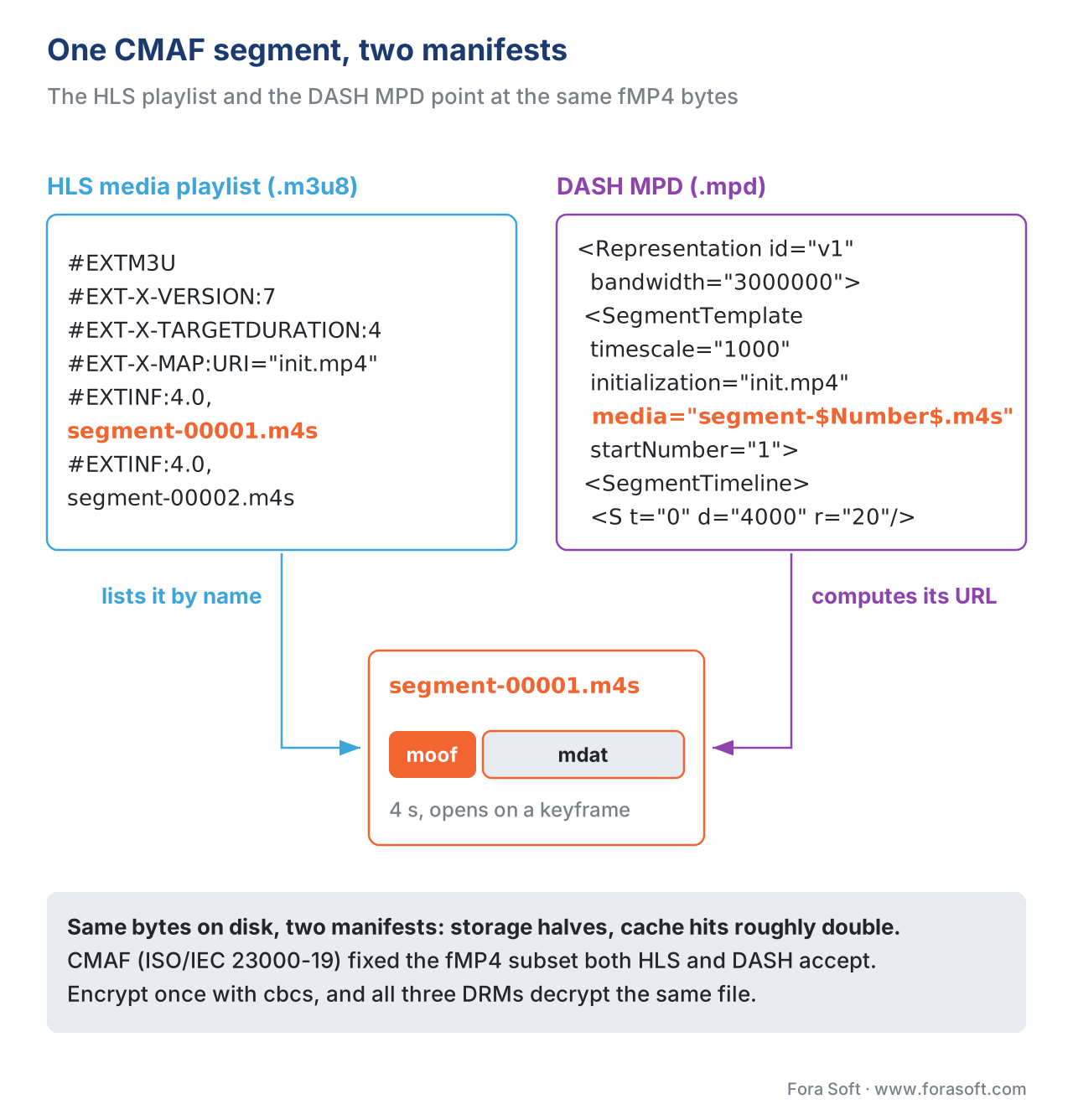 Figure 2. With CMAF, one fMP4 segment on disk is addressed by both the HLS media playlist and the DASH MPD. Storage halves; CDN cache hits double.
Common Encryption: Encrypt Once, Decrypt Anywhere
If the content is paid — a Netflix episode, a paid course, a live pay-per-view — the packager encrypts each segment using a content key, and a digital rights management (DRM) license server hands out the matching decryption key to authenticated players. The technical contract between the packager and the player is Common Encryption (CENC), standardised as ISO/IEC 23001-7 (third edition 2016, fourth edition 2023).
CENC defines four schemes in total; only two matter in 2026 production.
cencscheme — AES-128 in CTR (counter) mode, applied to full sample data. Originally the only mode Widevine and PlayReady supported.cbcsscheme — AES-128 in CBC (cipher block chaining) mode, applied in a 1:9 pattern (encrypt one 16-byte block, skip nine). Designed to be efficient for hardware decoders. The only mode Apple FairPlay supports.
For most of the 2010s, cbcs was Apple-only and cenc was Widevine/PlayReady-only. Platforms had to encrypt twice — once with cenc for DASH/Widevine/PlayReady, once with cbcs for HLS/FairPlay — and store both copies. The convergence happened in two steps. Google added cbcs support to Widevine in 2017. Microsoft added cbcs support to PlayReady 4.0 in 2018. By 2020, all three major DRMs decrypted cbcs cleanly, and the industry pivoted to single-encryption workflows.
The 2026 default is cbcs encryption with CMAF segments, indexed by both HLS and DASH manifests. A single encrypted .m4s segment file decrypts on iOS (FairPlay), on Android and Chrome (Widevine), and on Edge and Xbox (PlayReady), given the right key. The key itself comes from a multi-DRM license server (BuyDRM, EZDRM, castLabs, Axinom, AWS Elemental MediaTailor, Mux Video DRM, Bitmovin) that issues FairPlay, Widevine, and PlayReady licenses against the same content key.
One caveat. If your target audience includes Android devices older than Android 7.0 (released August 2016), you need cenc rather than cbcs — Android added cbcs support to its media framework in 7.0. In 2026 the install base of pre-Android-7.0 devices is below 0.5% globally; the trade-off is almost always to drop those devices and ship cbcs-only.
The packager step is short. Shaka Packager, Bento4, AWS MediaPackage, Unified Origin, Wowza, and GPAC all support both schemes via a single command-line flag. The license-server configuration is the longer story — see DRM 101: Why Three Systems, and Why You Ship All Three and the dedicated Common Encryption (CENC) in Depth article for the operational detail.
The Packager Market: Open Source
Two open-source packagers dominate. Both are command-line tools and both can be embedded as libraries.
Shaka Packager (developed by Google's Widevine team, MIT-licensed, github.com/shaka-project/shaka-packager) is the de-facto reference. Latest stable release v3.7.2 (April 2026). Written in C++. Supports HLS, DASH, both cenc and cbcs encryption, Widevine and PlayReady and FairPlay license-server integration, CMAF output, live and VOD modes. Shaka Packager's command-line interface is opinionated and consistent — one stream argument per rendition, one flag per packaging concern.
A minimal Shaka Packager invocation that turns a video and an audio mezzanine into a CMAF HLS+DASH presentation with cbcs encryption:
packager \
  'in=video_720p.mp4,stream=video,init_segment=v720/init.mp4,segment_template=v720/$Number$.m4s,playlist_name=v720.m3u8' \
  'in=audio.m4a,stream=audio,init_segment=a/init.mp4,segment_template=a/$Number$.m4s,playlist_name=a.m3u8' \
  --hls_master_playlist_output master.m3u8 \
  --mpd_output stream.mpd \
  --protection_scheme cbcs \
  --enable_raw_key_encryption \
  --keys label=video:key_id=<32-hex>:key=<32-hex>,label=audio:key_id=<32-hex>:key=<32-hex>
The output is a directory tree of fMP4 init segments and $Number$.m4s media segments, plus an HLS multivariant playlist (master.m3u8), per-rendition HLS media playlists, and a DASH MPD (stream.mpd). Each segment is encrypted under the per-track key. A multi-DRM license server issues FairPlay, Widevine, and PlayReady licenses against the supplied key IDs.
Bento4 (developed by Axiomatic Systems, GPL-licensed core with a separately licensed commercial SDK, bento4.com) is the older of the two and remains heavily used in production. The high-level packaging tools are mp4dash for DASH and mp4hls for HLS — both are Python wrappers around the lower-level C++ binaries (mp4fragment, mp4encrypt, mp42hls).
A typical Bento4 DASH packaging run, using one video mezzanine per rung:
mp4dash --output-dir=dash/ \
        --hls \
        --encryption-cenc-scheme=cbcs \
        --encryption-key=<key_id_hex>:<key_hex> \
        video_360p.mp4 video_720p.mp4 video_1080p.mp4 audio.m4a
The --hls flag tells mp4dash to also emit an HLS multivariant playlist that references the same fMP4 segments as the DASH MPD — this is Bento4's CMAF-style dual output. The segment files end up in numbered subdirectories under dash/; the stream.mpd and master.m3u8 live at the top.
The 2024 GPAC analysis from Motion Spell (the company behind GPAC) compared the three open-source packagers (Shaka, Bento4, GPAC) on a CMAF VOD workload. The headline finding: GPAC packaged a 90-minute movie roughly 3× faster than Shaka Packager and roughly 5× faster than Bento4 on the same hardware, and GPAC was the only one that emitted spec-conformant CMAF without manual fix-ups for two of the test inputs. Shaka remains the default choice for teams that prize community size and Google-team backing; Bento4 the default for teams already using mp4-tools in their pipelines; GPAC for teams that need raw throughput or specific CMAF chunk-level control.
Eyevinn's Encore Packager (github.com/Eyevinn/encore-packager) is a higher-level service wrapper around Shaka Packager, updated January 2026. It is not a separate packaging engine — under the hood it shells out to Shaka — but it provides a managed pipeline-style API that suits CI/CD-driven media workflows.
The Packager Market: Commercial
Four commercial packagers / managed packaging services account for most of the non-open-source production deployment.
Unified Origin (CodeShop, unified-streaming.com) is a software-only origin that performs just-in-time packaging from a small set of fMP4 source files (the "Unified" source files, which are themselves fragmented MP4 with an internal index). Unified Origin holds the bitrate ladder as N fMP4 files on disk and synthesises HLS, DASH, MSS, or HDS manifests and segments on each player request, in any combination of encryption schemes. The commercial advantage is operational: one input format on disk, every output format on the wire, with full multi-DRM applied at request time.
AWS Elemental MediaPackage is AWS's managed packaging service. It ingests one or more fMP4 or HLS or DASH inputs from MediaLive (AWS's live encoder), packages them into HLS, DASH, CMAF, or Microsoft Smooth Streaming output, applies CENC encryption via AWS SPEKE for any of the three major DRMs, and serves the result through CloudFront. Just-in-time on the egress side; the segments are not pre-written to S3 in their final form. Billing is per GB of egress plus per-second of running time, and is a large part of why companies that grow past a few hundred concurrent live channels eventually move to a self-managed origin.
Wowza Streaming Engine is a long-established Java-based streaming server that does packaging plus ingest plus origin plus live transcoding in one process. Wowza ships its own JIT packaging pipeline for HLS and DASH, integrated with its multi-DRM partners. Wowza's role in 2026 is mostly enterprise on-premise and edge deployments where AWS isn't an option (regulated environments, broadcast plant, satellite uplink sites).
Norsk (id3as, norsk.video) is a TypeScript SDK and runtime for building live streaming pipelines, including packaging. It is not a one-shot CLI like Shaka — it is a programmable runtime where the developer wires up nodes: ingest, transcode, package, encrypt, output. Norsk's USP is the LL-HLS / LL-DASH support and the ability to express complex live workflows (multi-language audio routing, real-time graphics, dynamic ad insertion) in code rather than configuration.
The pattern across the commercial market is value-added-services rather than fundamentally different packaging. Under the hood, most commercial packagers either embed Shaka or implement the same ISO standards directly; the differentiator is the managed-service surface around them.
Static vs Just-in-Time: The Two Deployment Shapes
Packaging deployment splits into two architectures. The choice is the single biggest cost lever in the packaging layer.
Static packaging writes every segment file to storage once at ingest. A 90-minute movie packaged into a six-rung ladder, 4-second segments, audio in three languages, in both HLS-MPEG-TS and HLS-fMP4 and DASH-fMP4 = roughly 24,000 segment files on disk per title. At a thousand titles, 24 million files. The packager runs once per title (or once per language addition), then the segments live forever on the origin. CDN cache hit rates are excellent because every file URL is stable across viewers; storage cost is the constraint.
Just-in-time packaging (JIT) stores one fMP4 source file per rendition — six files for a six-rung ladder — and synthesises segment files and manifest entries on each player request. The packager runs per request. The thousand-title catalogue stores 6,000 source files (six per title) instead of 24 million segment files; that is a roughly 4,000× storage reduction.
The trade-off is origin compute. A JIT origin runs the packaging logic on the hot path of every player request, every segment fetch. Modern JIT origins (Unified Origin, AWS MediaPackage, Mediapackage-on-Lambda variants) handle this efficiently — sub-millisecond per segment — but the compute bill replaces some of what the storage bill no longer pays.
The cache story is also different. With static packaging, segment URLs are stable forever; the CDN caches each segment once and serves billions of times from the cache. With JIT, segment URLs are also stable (the JIT origin generates deterministic URLs given the source files and the manifest parameters), so CDN cache hit rates are similar — but the origin must shield itself with an aggressive front-cache because a cache miss now triggers packaging work, not just a disk read. JIT origins are almost always deployed behind an origin shield.
The 2026 inflection point at which JIT pays back is roughly:
- Under 100 titles: static usually wins on simplicity. Storage cost is irrelevant; you save the JIT-origin licensing/operational cost.
- 100–1,000 titles: depends on the catalogue churn. If titles are added and removed frequently, JIT wins because static requires re-packaging on every new device/encryption rotation. If titles are static and accessed evenly, static wins on cache simplicity.
- Over 1,000 titles: JIT wins on storage almost always. The few exceptions are platforms with extreme cache-hit-rate optimisation needs (Netflix, YouTube) that build their own origin tier and amortise the storage across their fleet.
This is the canonical breakdown; the deeper comparison lives in the next article, Just-in-Time Packaging vs Pre-Packaged Origin.
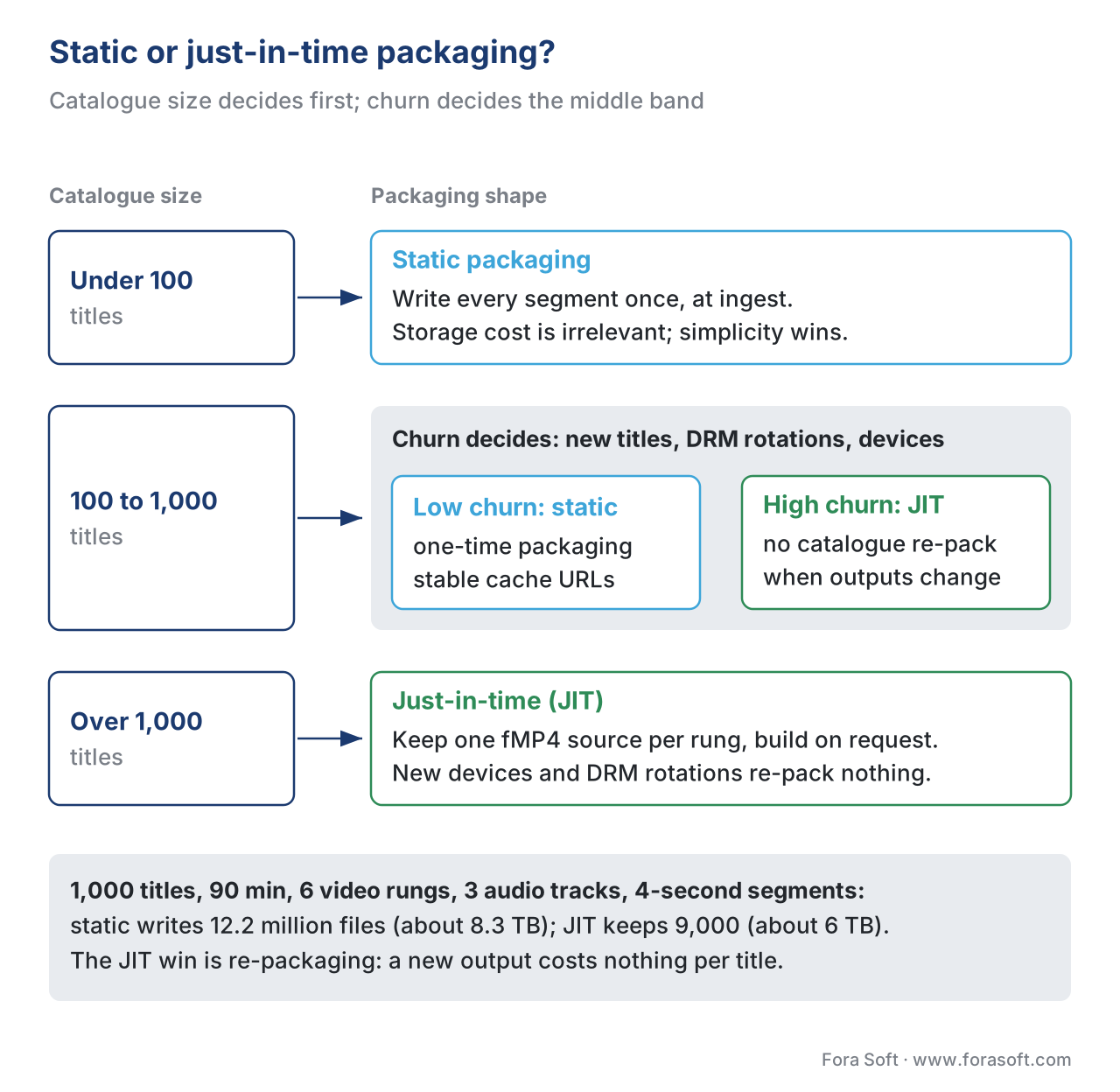 Figure 3. Static packaging wins on simplicity at small catalogues; JIT wins on storage and flexibility past 1,000 titles. The two cross around 100 titles with high churn.
A Worked Example: Cost of Static Packaging for a 1,000-Title Catalogue
To make the storage trade-off concrete, here is the arithmetic for a mid-sized OTT platform packaging 1,000 movies, each 90 minutes, with a six-rung 1080p/720p/540p/360p/240p/144p ladder, 4-second CMAF segments, audio in three languages, encrypted with cbcs.
Segments per rendition per title:
90 minutes × 60 seconds / 4 seconds per segment = 1,350 segments per video rendition per title
Total video segment files per title:
1,350 × 6 video renditions = 8,100 video segment files per title
Audio segment files per title:
1,350 × 3 audio renditions = 4,050 audio segment files per title
Init segments per title:
6 video + 3 audio = 9 init segments per title
Total segment files per title:
8,100 + 4,050 + 9 = 12,159 segment files per title
Across the 1,000-title catalogue:
12,159 × 1,000 = 12.159 million segment files
Average segment size, assuming H.264 with bitrates 5/3/1.5/0.8/0.4/0.2 Mbps for video (weighted to lower rungs for average viewing patterns) and 128 kbps audio:
Video bytes per segment (mid-rung 720p at 3 Mbps): 3 Mbps × 4 s / 8 = 1.5 MB per segment
Audio bytes per segment: 128 kbps × 4 s / 8 = 64 KB per segment
Total storage:
Video: 8,100 segments × 1,000 titles × ~1 MB avg = ~8 TB
Audio: 4,050 segments × 1,000 titles × 64 KB = ~260 GB
Total: ~8.3 TB on disk
At S3 Standard pricing (May 2026, US-East-1): roughly $0.023/GB-month = $190/month for the static-packaged catalogue. That is the static workflow's storage cost.
The JIT workflow stores only 6 video + 3 audio = 9 source fMP4 files per title, each holding the full 90-minute encode at one bitrate. Source-file sizes:
720p 3 Mbps × 90 minutes = ~2 GB per file
Total per title: ~6 GB across the six video rungs + ~80 MB audio = ~6.1 GB
1,000 titles × 6.1 GB = ~6 TB
The JIT storage is actually comparable in this example, because the source files store the same total bytes. The JIT win shows up when the platform needs another packaging output — a new device profile (Android TV with a different supported codec subset), a new encryption scheme rotation, a new audio track addition. The static workflow re-packages 12 million files; the JIT workflow re-runs the packager logic at request time and stores nothing new.
That is the JIT lever in one sentence: JIT decouples the cost of adding a packaging output from the size of the catalogue.
A Common Mistake: Mismatched Keyframe and Segment Boundaries
The most frequent packaging bug — one we have seen in roughly half the streaming codebases we have audited — is encoding with a keyframe interval that does not divide evenly into the segment duration. A packager configured for 4-second segments fed an encode with a 2.5-second keyframe interval produces some segments that begin on a keyframe and some that do not. The non-keyframe segments are technically valid fMP4, but the player can only decode them by replaying earlier segments — defeating the point of having addressable segments.
Worse, when a player switches rendition (say, from 1080p to 720p mid-stream), the switch can only land on a segment boundary that is also a keyframe boundary in the new rendition. Mismatched keyframe intervals across the ladder cause invisible switching delays — the player waits one extra segment before the new rendition is decodable.
The fix is to set every encoder in the ladder to the same closed GOP, with GOP length equal to the segment duration. For 4-second segments at 30 fps, the encoder argument is GOP-size = 120 frames. For 25 fps, GOP-size = 100. For 60 fps, GOP-size = 240. Every encoder, every rendition, identical. Shaka Packager will warn if it detects misalignment; Bento4 will not, and the bug will surface only when a viewer's player logs a stall during switching.
Free download: Packaging Decision SheetOne page with the 2026 packager market (Shaka, Bento4, GPAC, Unified, AWS MediaPackage, Wowza, Norsk, Eyevinn), the CMAF + cbcs defaults, the static-vs-JIT decision points and the segment-duration arithmetic from this article.Where Fora Soft Fits In
We have shipped packaging pipelines for video streaming OTT platforms, live e-learning systems, telemedicine platforms with paid-content tiers, and surveillance archives that distribute recorded video to investigators across police precincts. Across those projects, the consistent pattern is that the packaging layer absorbs most of the operational decisions that follow the product launch — every new device, every new DRM rotation, every new low-latency requirement lands first on the packager. We default to CMAF + cbcs + a JIT origin for catalogues over a few hundred titles, and to static Shaka-packaged CMAF for small live-event platforms where simplicity beats flexibility. The full code-and-infrastructure picture for these stacks is in the relevant case studies on our site. If your catalogue needs this layer, our OTT and Internet TV development team ships the packager, multi-DRM and origin as part of the platform, and our video streaming software development practice covers the live and low-latency side.
The book
Video Streaming: A Complete Guide to Video Delivery: From Network Protocols and Transport to Ingest, HLS, and MPEG-DASH
This article maps what a packager does between the encoder and the origin. Book 2 takes the same path chapter by chapter: how fMP4 and CMAF segments are built, how HLS playlists and DASH MPDs address them, how segment duration trades latency against request count, and how Common Encryption lets one set of bytes serve every DRM. Written by Nikolay Sapunov, CEO at Fora Soft.
Static or just-in-time: which packaging shape fits your catalogue?
Send us your title count, bitrate ladder, target devices and DRM plan, and we will tell you which packager to run, whether static or JIT pays back at your size, which segment duration to ship, and how many files and terabytes each option puts on disk. 250+ video products shipped since 2005.
See our case studies
Case study
Drundoo
Bulgarian internet TV with 60 live channels plus a movie, series and catch-up library: a live packaging path and a VOD catalogue path behind one player.
Case study
Scholarly
Adaptive DASH and HLS over S3 and Cloudflare R2 for 15,000+ active users, with live classes of up to 2,000 students and a recorded-lesson library.
Case study
Mindbox
RTSP camera feeds repackaged by FFmpeg into HLS so any browser can play them, rolled out in 50+ deployments.
What to read next
Packaging
CMAF: The Packaging Format That Unified HLS and DASH
The container behind one-segment-two-manifests, and the constraints that make it work on every player.
Delivery protocols
HLS in Depth: m3u8, Segments, Multi-Variant Playlists
Every tag the packager writes into an HLS playlist, and what the player does with it.
Delivery protocols
MPEG-DASH in Depth: MPD, Periods, Adaptation Sets, Representations
The MPD side of the same segments: Periods, templates and timelines, element by element.
DRM
Common Encryption (CENC) in Depth
What cenc and cbcs do to the bytes the packager writes, and why cbcs became the default.
References
- ISO/IEC 23000-19:2020, Common Media Application Format (CMAF) for segmented media — second edition, 2020. The CMAF base specification. (iso.org catalogue)
- ISO/IEC 23001-7:2023, Information technology — MPEG systems technologies — Part 7: Common encryption in ISO base media file format files — fourth edition, 2023. The CENC specification; defines the
cencandcbcsschemes. (iso.org catalogue) - ISO/IEC 23009-1:2022, Information technology — Dynamic adaptive streaming over HTTP (DASH) — Part 1: Media presentation description and segment formats — fifth edition, 2022. The DASH base specification. (iso.org catalogue)
- ISO/IEC 14496-12:2022, ISO base media file format — eighth edition, 2022. The fMP4 base specification on which CMAF is built. (iso.org catalogue)
- Pantos, R., May, W., HTTP Live Streaming 2nd Edition — IETF draft
draft-pantos-hls-rfc8216bis-22, 2026. Subject to revision before RFC publication; supersedes RFC 8216. (datatracker.ietf.org) - Apple Inc., HLS Authoring Specification for Apple Devices, revision 2025-09. Apple's normative requirements on top of RFC 8216 / 8216bis for the Apple ecosystem. (developer.apple.com)
- Shaka Packager release notes, v3.7.2, April 2026. (github.com/shaka-project/shaka-packager/releases)
- Axiomatic Systems, Bento4 documentation —
mp4dash,mp4hls,mp4encryptreference. (bento4.com) - Motion Spell, Is GPAC a Better Open Source Choice Than Bento4 and Shaka Packager? (April 2024). (motionspell.com)
- CodeShop, Unified Origin VOD Packaging Documentation (2026). (docs.unified-streaming.com)
- AWS Elemental MediaPackage Concepts and Terminology (2026). (docs.aws.amazon.com/mediapackage)
- DASH Industry Forum, DASH-IF Implementation Guidelines: Restricted Timing Model (latest revision, 2025). (dashif.org)
- Bitmovin, Optimal Adaptive Streaming Formats MPEG-DASH & HLS Segment Length (revised 2025). (bitmovin.com)
- Microsoft, PlayReady Content Encryption Modes (Microsoft Learn, 2025). (learn.microsoft.com)
- Netflix Technology Blog, Behind the Streams: Building a Reliable Cloud Live Streaming Pipeline for Netflix, Part 2 (September 2025). (netflixtechblog.medium.com)
Per the source-hierarchy rule, the article followed the standards documents (CMAF, CENC, DASH, HLS draft-22, Apple HLS Authoring Specification) over vendor blog summaries on every protocol claim; vendor sources are cited only where they document production deployment behaviour or release-level details a spec cannot provide.
