


Why this matters
You have a streaming product. Some of it is paid, some of it is geo-restricted, some of it is for logged-in users only. Putting "is this user allowed?" logic on your origin works for ten thousand views per day and collapses under a million per minute. Every serious CDN solves this by signing the URL at the edge — and every serious team gets it wrong at least once. This article is for the engineer scoping that work, the product manager comparing vendors, and the architect who has been told "just turn on signed URLs" without being told what breaks next.
What "signed URL" actually means
A signed URL is a normal HTTP URL plus three extra pieces of evidence: a policy (what the bearer is allowed to do), an expiry (when the permission ends), and a signature (a cryptographic hash that ties the policy and expiry to a secret only you and the CDN share). Anyone can read the URL. Nobody who does not hold the secret can forge a new one.
The two flavours of signature in production are HMAC-SHA256 and RSA-SHA256 (often called RS256 in JWT land). HMAC uses a single shared secret on both ends — fast to compute, cheap to store, and the default for Akamai EdgeAuth, Google Media CDN, Fastly's signed URL recipes, Cloudflare Stream's signing-key flow, and most NGINX-based CDNs. RSA uses a key pair — you sign with the private key, the CDN verifies with the public key. CloudFront and Mux take the RSA route because it lets you rotate the verifier (the public key in the CDN's "key group") independently from the signer (your application server). Both flavours produce an opaque blob attached to the URL; the difference matters only when you design key rotation.
A worked example. The cleartext to be signed is the canonical request the viewer will make:
URL path:      /vod/customer42/manifest.m3u8
Expires:       1748185200            (Unix epoch seconds, ≈ 2025-05-25 13:00 UTC)
Allowed IP:    203.0.113.7/32
Customer:      customer42
You hash that string with your secret key and SHA-256, then base64-encode it. The CDN receives the request, repeats the same hash with the same secret, and compares. One bit different anywhere — wrong path, wrong expiry, IP outside the range — and the request is rejected at the edge.
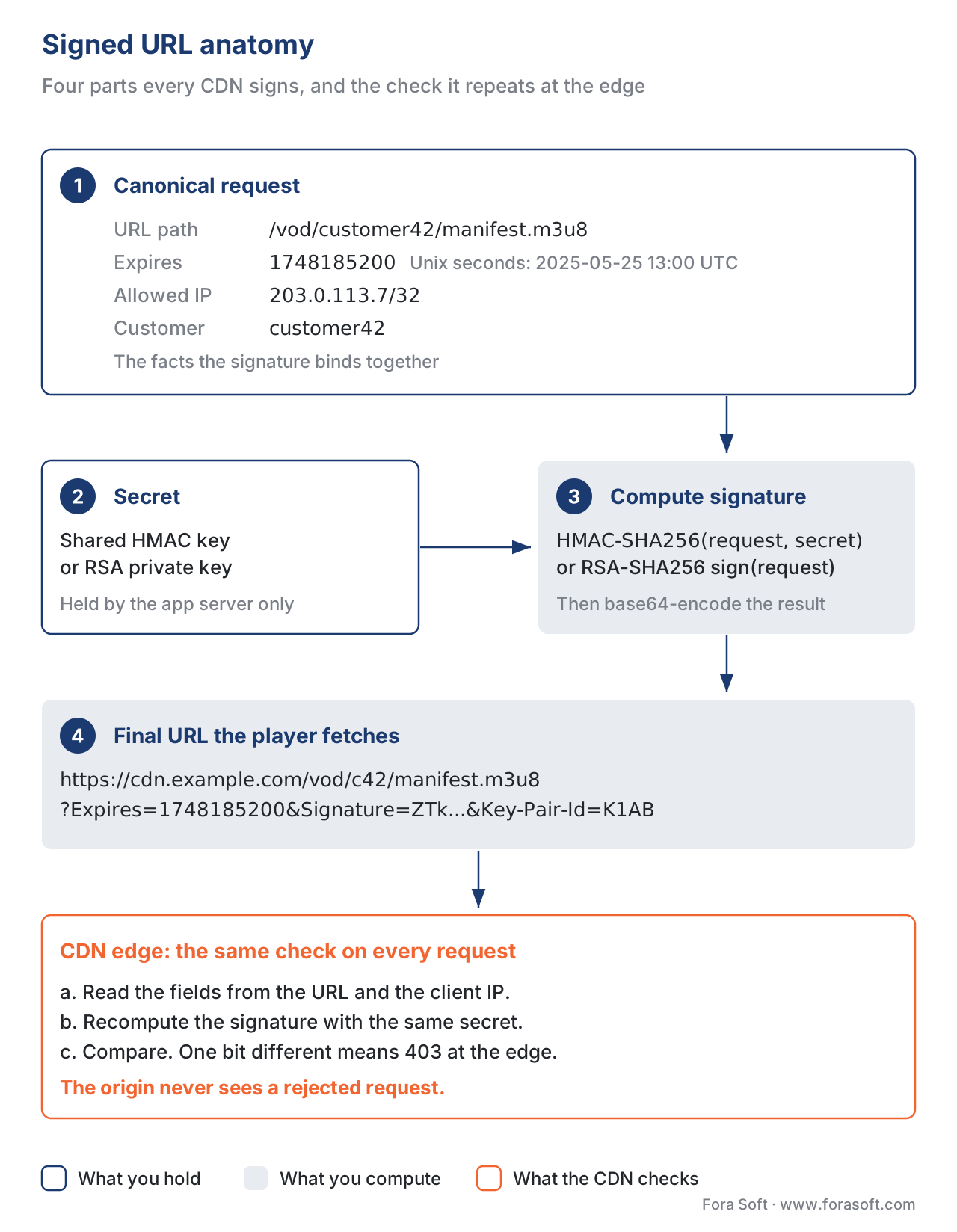 Figure 1. The four moving parts every signed-URL scheme shares.
The five CDN dialects, side by side
The vocabulary differs, the algorithm is the same. The table below is the part most teams wish they had on day one.
| CDN | Token format | Algorithm | Placement | Where the spec lives |
|---|---|---|---|---|
| Amazon CloudFront | Canned or custom policy + signature | RSA-SHA1 (legacy) or RSA-SHA256 via key groups | Query string (?Policy=…&Signature=…&Key-Pair-Id=…) or cookies (CloudFront-Policy, -Signature, -Key-Pair-Id) | AWS CloudFront Developer Guide, "Use signed URLs" and "Set signed cookies using a custom policy" |
| Akamai Adaptive Media Delivery (EdgeAuth) | ACL + expiry + nonce + HMAC | HMAC-SHA256 (default) | Query string, cookie, or header — configurable per-property | Akamai TechDocs, "Enable Token Authentication" |
| Cloudflare Stream | JWT (RS256) | RSA-SHA256, generated via API token, signing key, or Worker binding | Path component (/<token>/manifest.m3u8) | Cloudflare Stream docs, "Secure your Stream" |
| Google Media CDN | Dual-token: short HMAC for path + long cookie | HMAC-SHA1 / HMAC-SHA256 / Ed25519 | Query string + cookie | Google Cloud "Edge cache origin → signed requests" |
| Mux (and most JWT-first vendors) | Signed JWT, RS256 | 2048-bit RSA key pair | Query string (?token=<JWT>) | Mux "Secure video playback" guides |
The reserved query-parameter names differ by vendor. CloudFront removes Key-Pair-Id, Policy, and Signature before forwarding to the origin, but it forwards any name suffixed with -PREFIX, which is the escape hatch when your application also needs a parameter named, say, Policy. Akamai's default is hdnts; Google Media CDN uses edge-cache-token; Cloudflare Stream puts the JWT into the path, not the query string, specifically to keep the URL cacheable.
The IPv6 trap. CloudFront's custom policy with an IpAddress field is a v4-only construct — if you enable IPv6 on the distribution, the IP check silently breaks. AWS documents this; teams find it three months in, when an iOS rollout exposes the first IPv6-only carrier.
The signature algorithm is migrating. CloudFront's "trusted key groups" flow uses RSA-SHA256; the older "trusted signers" flow used RSA-SHA1 (acceptable, but on the way out). Akamai's HMAC-SHA1 is still supported and still in field; new properties should default to HMAC-SHA256.
Signed URL or signed cookie — for a streaming workload, both
For a single download, a signed URL is enough. For HLS or DASH, the player will fetch one master playlist, several media playlists, a key URI, and hundreds or thousands of segments. Rewriting every URL in the manifests with a per-request signature is one option; setting a signed cookie once at session start and letting the player fetch everything inside the protected origin path is the other.
CloudFront's own documentation is direct: signed cookies are the right pick when you protect "many files" or want to keep the URLs themselves clean and cacheable. Akamai's session-token model is essentially the same idea — an access token validates a session, then a "long" session token rides in a cookie or query string for the rest of the stream. The trade-off: cookies require third-party cookie support, which fails on some smart-TV browsers and on iOS Safari for cross-domain players. The hybrid pattern — signed cookie for manifests and keys, signed URL on the master playlist to bootstrap the session — is the default in production today.
If you sign segment URLs individually, sign the common prefix rather than the full URL of each segment. CloudFront and Akamai both support this with a wildcard or "ACL" — one signature covers /customer42/title-9000/* for one hour, so the player does not request a fresh signature per segment and the CDN cache key remains stable. Signing each segment URL is the second most common reason teams blow up their cache hit ratio after badly designed cache keys.
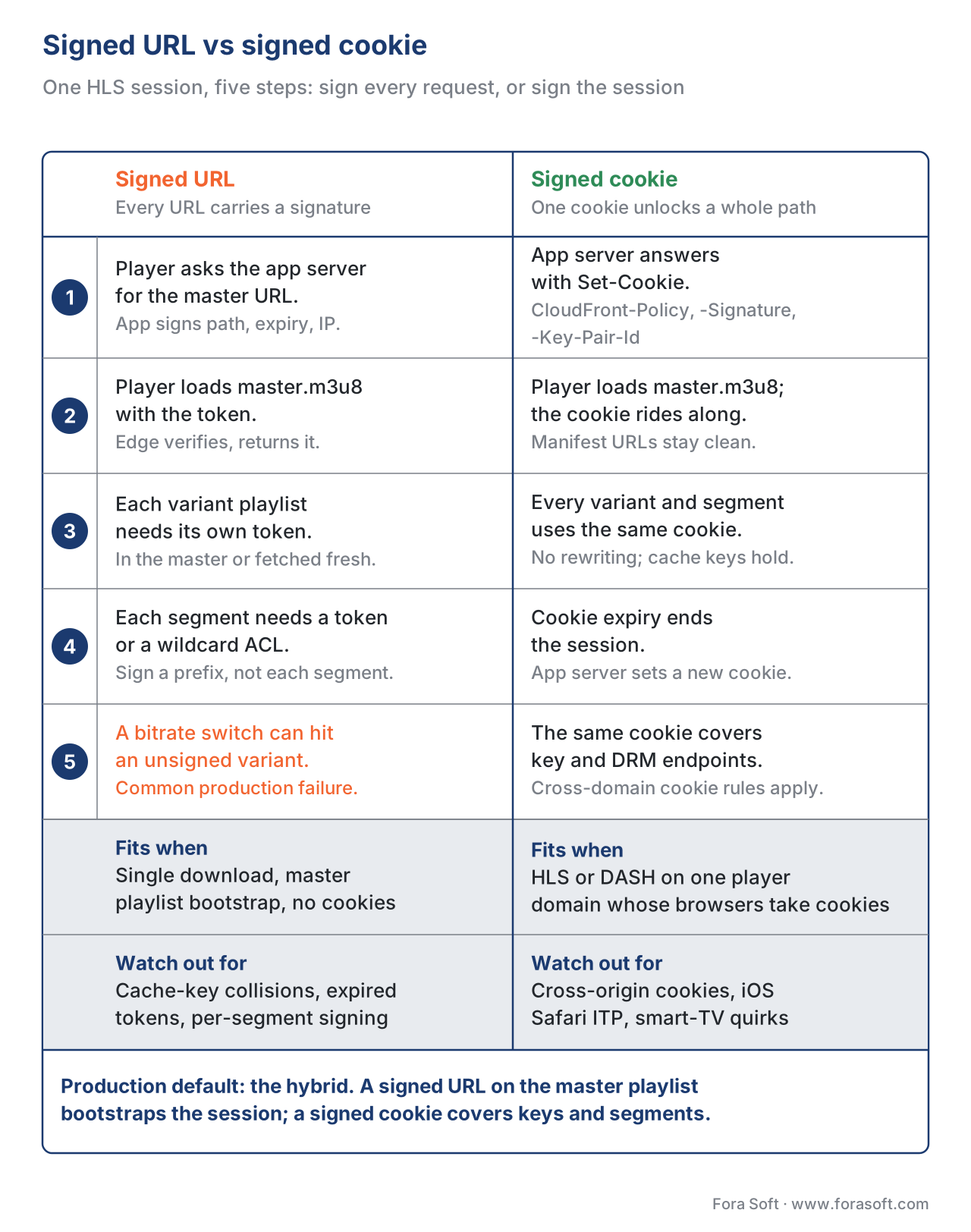 Figure 2. The two flows side by side for one HLS playback session.
Token expiry and the mid-session refresh problem
Tokens are short-lived on purpose: a leaked URL should stop working in minutes, not days. For VOD that finishes in 15 minutes, a 30-minute expiry is fine. For a 3-hour live concert or a 90-minute movie, the token will expire mid-playback and the next playlist refresh or segment fetch will get a 403.
There are three robust patterns. Long-enough expiry is the simplest: set the token to outlive the longest plausible session, accept the slightly larger window of misuse. Token renewal keeps a short expiry and refreshes the signed URL from your application server before it expires; in hls.js this is done by listening for the MANIFEST_LOADED event, then either calling hls.loadSource() with a new URL or rewriting requests in xhrSetup to attach a fresh token. Path-only signature signs only the base path and lets a separate, short-lived "session token" cookie carry the time bound, so the path signature stays stable for the full title.
The pitfall worth naming is bitrate switching. Akamai's hls.js bug 1450 — still cited in the community — is exactly this: an Akamai token signs /master.m3u8 and the four variant playlists referenced inside it; when the player switches up to the 5 Mbps rendition for the first time, it requests a fifth variant playlist whose URL was never visited and whose token may have expired. The fix is to sign the common ACL (/title-9000/*) rather than individual playlists, and to renew the token before the longest expected viewing session.
Origin protection — the other half of the job
A signed URL on the CDN does nothing if a curious user can hit the origin directly. The locking pattern is layered.
The origin sees only CDN traffic. CloudFront does this via Origin Access Control (OAC, the modern replacement for OAI) on S3, or via signed origin headers on a custom HTTP origin. Akamai's Site Shield publishes an IP list the origin firewall accepts. Cloudflare uses Authenticated Origin Pulls with a client certificate; Google Cloud CDN uses Cloud Armor plus a X-Edge-Cache-Token shared secret. The principle: the origin's network ACL rejects everything not coming from the CDN's edges.
Mutual TLS between CDN and origin is the upgrade for paid-tier traffic. The CDN presents a client certificate; the origin validates it; intermediaries cannot pretend to be the CDN. AWS, Akamai, Fastly, and Cloudflare all support this on the enterprise tier.
Authenticated origin headers. The CDN attaches a header — CloudFront-Key-Pair-Id, a custom HMAC, or a JWT — that the origin verifies on every request. Belt and braces: even if someone scrapes the origin IP, requests without the header are dropped.
The reverse question — "what if the CDN itself is compromised?" — is what DRM and forensic watermarking exist for. That is a different layer; this article ends at the segment leaving the CDN.
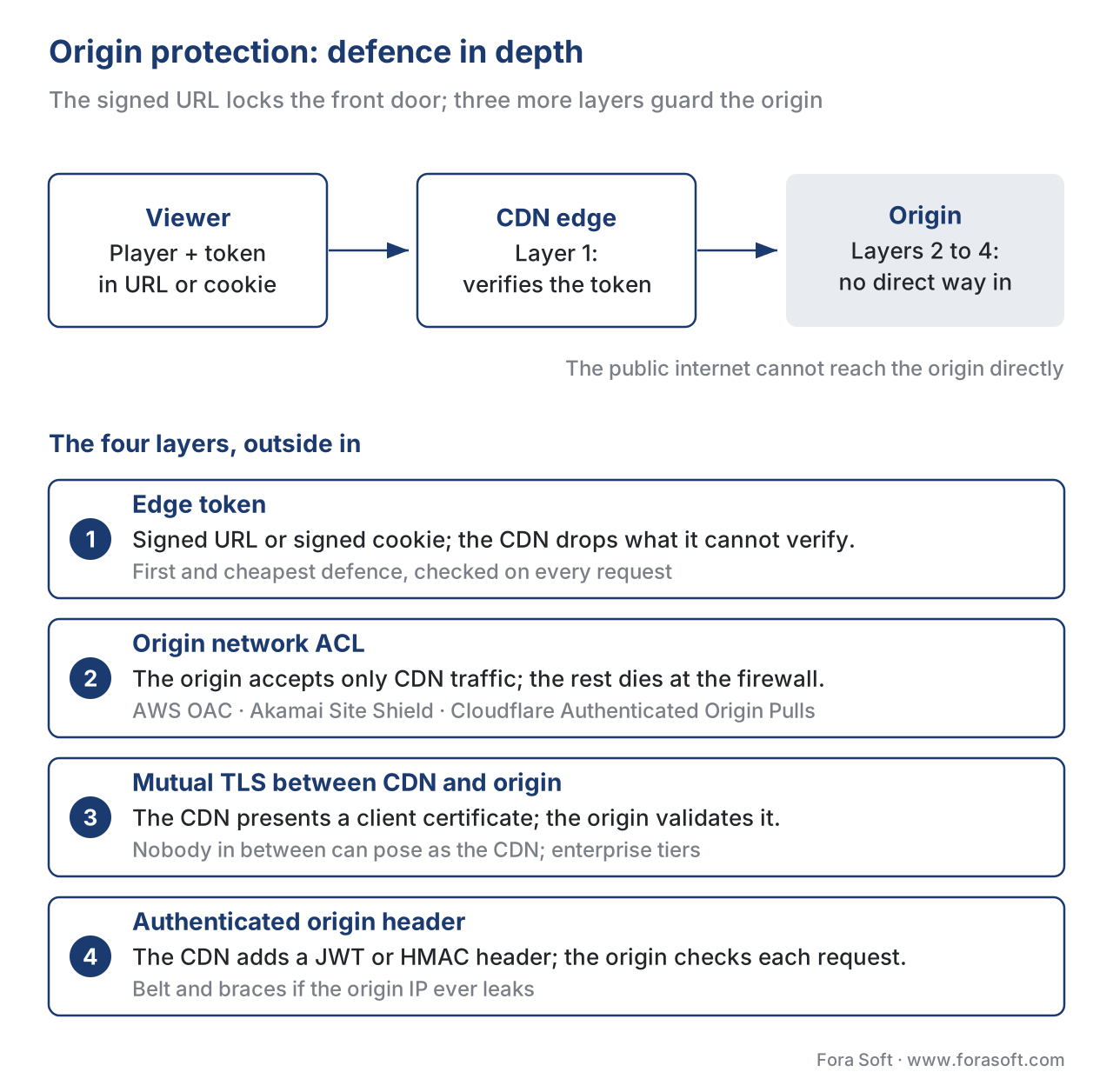 Figure 3. Defence in depth from edge token to origin firewall.
The cache-key trap (or, how a signed URL silently destroys your hit ratio)
This is the single most common production failure with signed URLs, and it costs real money.
A CDN caches an object under a cache key — a deterministic function of the URL and a subset of headers and query strings. When the signature ends up inside the cache key, every viewer gets a unique cache key for the same object, the cache hit ratio drops from 99% to roughly 0%, the origin egress bill explodes, and the team finds out from the finance dashboard, not the engineering one.
Three rules keep you out of trouble. Strip the signature parameters from the cache key. CloudFront does this by default for Policy, Signature, and Key-Pair-Id; Akamai's default hdnts is excluded; for any other vendor or any custom parameter name, verify and configure. Use signed cookies for shared assets, because cookies are not in the default cache key. Sign the common path, not the unique URL — the cache key stays the same across viewers because the underlying URL is the same.
The second trap inside this trap: cache lifetime longer than token lifetime. CloudFront will happily serve a cached 200 response after the signature in the original URL has expired, because the cache key doesn't include the expiry. For paid content, set the CDN's max-age short enough that re-signing happens at least once per cache lifetime, or rely on cookie-based sessions where the cookie itself carries the time bound.
Common mistakes
Pitfall: signing every segment URL individually. The cache hit ratio collapses and the CDN bill triples. Sign the common ACL or use a signed cookie at the session level.
Three more failure modes worth flagging once. Storing the signing secret in the front-end (it appears in view-source). Setting the same expiry for everyone (a single replay attack works for the full window — pin to IP, user ID, or device). Skipping the origin-protection step because "the signed URL is enough" (it isn't — without origin ACL, the origin URL is one whois lookup away from being scraped).
Where Fora Soft fits in
Most of our streaming, OTT, telemedicine, and e-learning projects start with the same conversation: the team has a working video pipeline and is about to put it behind a paywall, a regional licence, or a clinician-only access list. We design the signed-URL flow against the customer's CDN of choice, wire the origin lockdown (OAC, Site Shield, Authenticated Origin Pulls, or a custom edge token), and instrument the player so token-expiry events surface as alerts rather than viewer complaints. The same scaffolding underpins our video-conferencing and surveillance work, where the access list is per-room or per-camera rather than per-asset. Our OTT and IPTV development team builds the paywall, entitlement and signed-URL layer for subscription services, and our scalable streaming architects lock down origins across multi-CDN delivery.

The book
Video Streaming: A Complete Guide to Video Delivery: From ABR and CDNs to Players, WebRTC, DRM, and the Economics of Streaming
Signed URLs are one lock on a paid stream. Book 3 walks the whole delivery path around it: CDN cache keys and origin shielding, the players that have to renew tokens mid-session, multi-DRM and forensic watermarking for when the CDN itself is not enough, and the egress bill that shows up when the cache key goes wrong. Written by Nikolay Sapunov, CEO at Fora Soft.
Putting your streams behind a paywall or a login?
Tell us your CDN, your player and who should see what. We will design the signing scheme, check that signatures stay out of the cache key, plan token renewal for long sessions and lock the origin so nobody can go around the edge. 250+ video products shipped since 2005.
See our case studies
Case study
Worldcast Live
Pay-per-view HD concerts for 10,000 simultaneous viewers at 0.4–0.5 s latency: only ticket holders get the stream.
Case study
Perspire.tv
Live and on-demand fitness classes sold per video, per session and per channel subscription, with trainers keeping 80% of revenue.
Case study
V.A.L.T
HIPAA-compliant recording and review for medical training and police interviews: 770+ U.S. organizations, 50,000+ users, footage only the right people can open.
What to read next
CDN
Cache Keys for Streaming, and Why They Break
The other half of the signed-URL trap: what goes into the key.
CDN
Origin Shielding and Tiered Caching
Fewer requests reach the origin you just locked down.
Protocols
HLS in Depth: m3u8, Segments, Multi-Variant Playlists
Every playlist and segment a token has to cover.
DRM
DRM 101: Why Three Systems, and Why You Ship All Three
The layer that still protects content after it leaves the CDN.
References
- Amazon Web Services. CloudFront Developer Guide — Use signed URLs. https://docs.aws.amazon.com/AmazonCloudFront/latest/DeveloperGuide/private-content-signed-urls.html (accessed 2026-05-24).
- Amazon Web Services. CloudFront Developer Guide — Create a signed URL using a custom policy. https://docs.aws.amazon.com/AmazonCloudFront/latest/DeveloperGuide/private-content-creating-signed-url-custom-policy.html (accessed 2026-05-24).
- Amazon Web Services. CloudFront Developer Guide — Decide to use signed URLs or signed cookies. https://docs.aws.amazon.com/AmazonCloudFront/latest/DeveloperGuide/private-content-choosing-signed-urls-cookies.html (accessed 2026-05-24).
- Amazon Web Services. Amazon CloudFront for Media — Best Practices for Streaming Media Delivery. AWS whitepaper PDF.
- Akamai Technologies. Adaptive Media Delivery — Enable Token Authentication. https://techdocs.akamai.com/adaptive-media-delivery/docs/enable-token-authentication (accessed 2026-05-24).
- Akamai Technologies. Adaptive Media Delivery — Add Token Authentication. https://techdocs.akamai.com/adaptive-media-delivery/docs/add-token-auth (accessed 2026-05-24).
- Cloudflare. Cloudflare Stream — Secure your Stream. https://developers.cloudflare.com/stream/viewing-videos/securing-your-stream/ (accessed 2026-05-24).
- Cloudflare. Cloudflare Stream API — Create signed URL tokens for videos. https://developers.cloudflare.com/api/resources/stream/subresources/token/methods/create/ (accessed 2026-05-24).
- Mux. Secure video playback — guides and JWT signing. https://www.mux.com/docs/guides/secure-video-playback and https://www.mux.com/docs/guides/signing-jwts (accessed 2026-05-24).
- Google Cloud / Sinha, V. Protecting HLS Streaming with Google Media CDN Dual Token authentication using HMAC tokens. Google Cloud Community on Medium (accessed 2026-05-24).
- IETF. RFC 8216 — HTTP Live Streaming, August 2017, §4.4.4 EXT-X-KEY (controls the URI from which AES-128 key material is fetched; same URI can carry an authentication token).
- IETF. draft-pantos-hls-rfc8216bis-22 — HTTP Live Streaming 2nd Edition, 2026 (work in progress; subject to change before RFC publication).
- Apple. HTTP Live Streaming (HLS) Authoring Specification for Apple devices, revision 2025-09 (accessed 2026-05-24).
- video-dev/hls.js. Issue #1450 — Akamai HLS with Auth Tokens expire. Therefore bitrate switching fails. GitHub.
- video-dev/hls.js. API documentation —
xhrSetupconfig option for custom XHR setup including auth headers. https://github.com/video-dev/hls.js/blob/master/docs/API.md (accessed 2026-05-24). - aws-samples. amazon-cloudfront-protecting-hls-manifest-with-signed-url. GitHub reference implementation.
