


Updated October 2026: browser caps re-checked (Netflix now lists 1080p for Chrome and Firefox on macOS and Linux, 4K for Chrome on Windows), Google’s Widevine Cloud License Service shutdown on 13 April 2027, and a new “how to check your level” guide and FAQ.
Widevine L1 vs L2 vs L3: The Short Answer
Widevine L1 is the highest of Google Widevine’s three security levels: the content keys, the decryption and the decoded video all stay inside the device’s hardware Trusted Execution Environment (TEE), so streaming services allow HD and 4K. Widevine L2 decrypts inside the TEE but decodes the video outside it, and almost no shipping device uses it. Widevine L3 is software-only, with no TEE; it is what every desktop Chrome, Edge and Firefox browser gets from Widevine, so services cap it at 480p–1080p depending on their own policy.
| Level | Keys and decryption | Decoded video | Typical devices (2026) | Typical cap on paid services |
|---|---|---|---|---|
| L1 | Hardware TEE | Secure video path in hardware | Certified Android phones and tablets, Android TV / Google TV, Fire TV, smart TVs, Chromebooks with hardware DRM | HD to 4K |
| L2 | Hardware TEE | Normal memory | Rare; a few older devices | Set by each service; rarely targeted |
| L3 | Software (white-box cryptography) | Normal memory | Desktop browsers on Windows, macOS and Linux; rooted or uncertified Android | 480p to 1080p |
Is L1 better than L3? For a viewer, yes: L1 is the level that unlocks HD and 4K in Netflix, Prime Video and Disney+ apps. You cannot install, download or switch on L1 yourself. The level comes from the device’s chip and its factory certification, which is why the same app plays 4K on one tablet and standard definition on another.
This guide is written by Fora Soft’s streaming engineers: 250+ video products shipped since 2005, and the authors of the seven-volume Fora Soft Video Engineering Handbook.
Why This Matters
If you sell paid video, the Widevine security level your viewer's device reports is the single field that decides whether your 4K marketing claim is true or a lie. A product manager reading this article will leave knowing why Disney+ stops at 720p in every desktop browser while the same title plays in 4K on a Google TV stick — different chips, different robustness, different licensing rules. An engineer will leave with the exact code path that queries the level, the exact pssh and tenc plumbing that ties resolution caps to security levels (covered in our Common Encryption (CENC) in depth article), and the exact robustness strings to pass to requestMediaKeySystemAccess. A founder weighing piracy risk will leave with a defensible answer to "how much harder is L1 to break than L3?" — short version: L3’s white-box cryptography has been publicly broken since 2019 (David Buchanan’s Differential Fault Analysis result, then a 2020 proof-of-concept and a 2025 hack.lu talk that reproduced the approach), while L1 has no public, generic break. What leaks from L1 instead are keys pulled from individual devices, and Google revokes those.
This is one half of a pair. The companion piece — DRM 101: why three systems, and why you ship all three — explains why Widevine alone is not enough; this article explains why one Widevine is, in practice, three Widevines.
What a Security Level Actually Is
Before any letter-and-number lands, let's pin down the job. A Widevine security level is a contract between Google and the device manufacturer about where in the device's hardware the dangerous operations happen — the decryption of the content key, the decryption of the video samples, and the decoded video frames on their way to the screen.
There are three dangerous operations and three places they can happen:
- The license parse — when the device receives an encrypted license from a license server, it has to decrypt that license to extract the content key.
- The sample decrypt — when the device receives an encrypted video sample (a slice of an I-frame, a P-frame, a B-frame), it has to decrypt the sample using the content key.
- The decoded frame — once the sample is decrypted, the decoder turns it into pixels and pushes those pixels to the display.
A Trusted Execution Environment, abbreviated TEE — a separate, isolated processor mode that the regular Android or Linux operating system cannot read from — can host all three. Alternatively, normal application memory (the same memory your browser uses to render a webpage) can host all three. The Widevine level is the two-character shorthand for which combination you have.
L1 — all three operations happen inside a TEE. The keys never appear in normal CPU memory, the decrypted samples never appear in normal CPU memory, and the decoded frames are pushed straight from the TEE to the display controller through a secure video path. The host operating system cannot read the keys, the host operating system cannot read the decoded pixels, and a screen-capture tool running on the host operating system sees a black rectangle where the video should be.
L2 — the license parse and the sample decrypt happen inside a TEE, but the decrypted compressed samples leave the TEE and are decoded and handled in normal application memory. The keys are safe; the pixels are not. L2 is rare in practice — almost no production device ships at L2 — because the cost of building a TEE is enormous and once you have it, building the secure video path that turns L2 into L1 is comparatively cheap. The 2026 production landscape has effectively two levels: L1 and L3.
L3 — no TEE is used. All three operations happen in normal application memory. The keys, the samples, and the decoded frames are all visible to the host operating system. The cryptography is still real — AES-128, RSA, the same primitives as L1 — but it is implemented in software, hidden by a technique called white-box cryptography that tries to make the key impossible to extract by static analysis. White-box cryptography has been broken in public more than once: David Buchanan announced a Differential Fault Analysis break of L3’s white-box AES in January 2019, Tomer Hadad published a working proof-of-concept Chrome extension in 2020, and in October 2025 a Neodyme researcher revisited the same attack class at hack.lu. That is why most services cap L3 below the top of their resolution ladder.
The single most useful sentence in this article is the next one. The security level lives in the device, not in the content. Your encrypted file is the same file regardless of who plays it back; what changes is which devices the license server agrees to release the key to, and which resolutions the license is allowed to unlock for each of them.
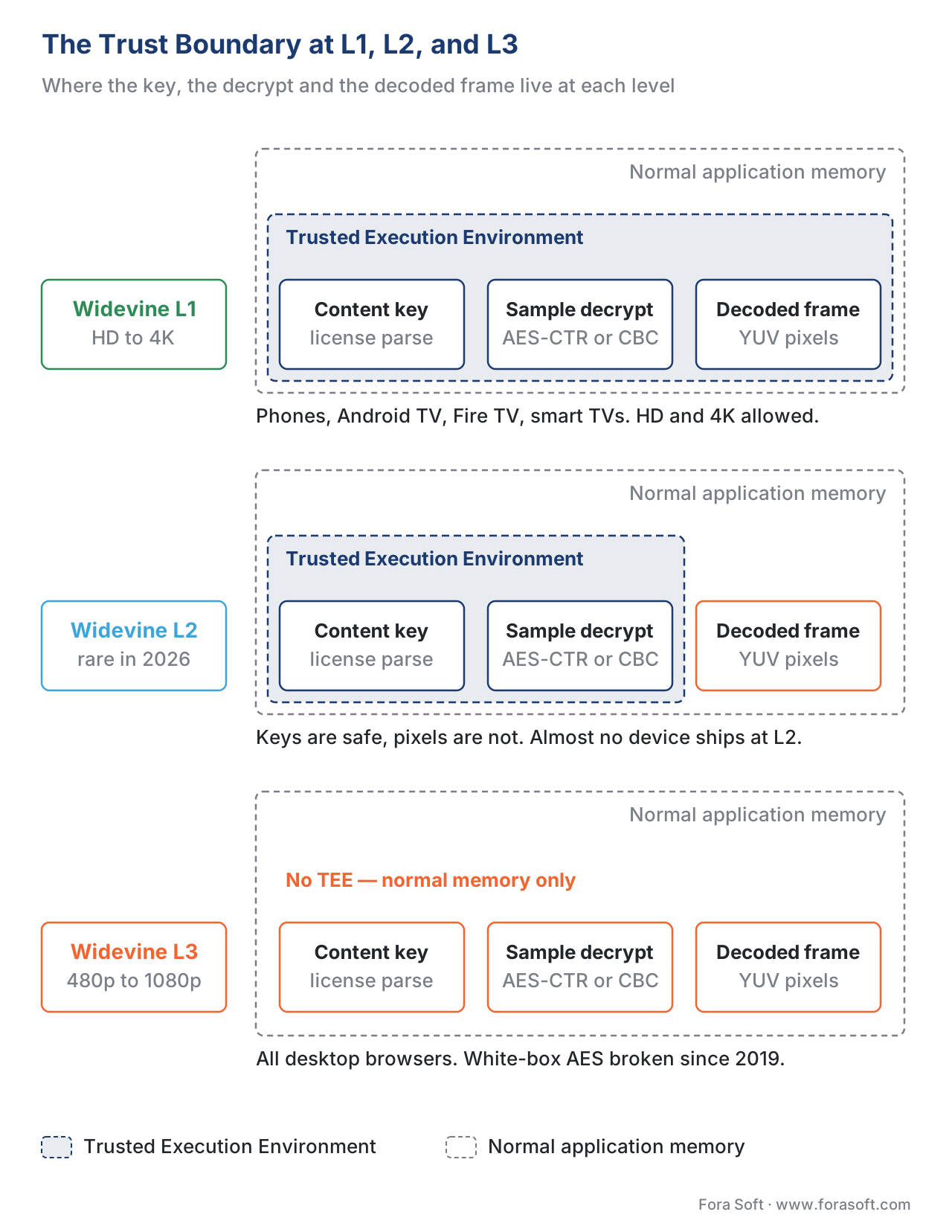 Figure 1. The trust boundary at L1, L2, and L3. The TEE is the shaded dashed navy frame; “normal memory” is everything outside it.
Where Each Level Actually Lives in 2026
This is the table every product team should print and pin above the desk. The cap column is service policy, not a Widevine rule; Netflix figures are from its supported-browsers page, checked 9 October 2026.
| Device class | Widevine level | Typical cap on major services (Oct 2026) |
|---|---|---|
| Modern Android phone (Pixel 6+, Galaxy S22+, Xiaomi 12+) | L1 | HD to 4K, depending on the service and the screen |
| Older, rooted or uncertified Android phone | L3 | Standard definition on most paid services |
| Android TV / Google TV (2020+), Google TV Streamer | L1 | 4K UHD |
| Fire TV Stick 4K | L1 | 4K UHD |
| Samsung Tizen / LG webOS smart TV | L1 (PlayReady also on board) | 4K UHD |
| Chromebook with hardware DRM | L1 | Netflix up to 4K on a qualifying Chromebook Plus; Disney+ 720p; Prime Video SD in the browser |
| Chrome on Windows | L3 for Widevine; hardware DRM via PlayReady | Netflix up to 4K on a qualifying PC |
| Edge on Windows | L3 for Widevine; hardware DRM via PlayReady SL3000 | Netflix up to 4K on a qualifying PC |
| Chrome on macOS | L3 | Netflix up to 1080p (Safari uses FairPlay for 4K) |
| Chrome or Firefox on Linux | L3 | Netflix up to 1080p |
| Firefox on Windows or macOS | L3 | Netflix up to 1080p |
| Any desktop browser | L3 | Disney+ 720p |
Sources: Netflix’s supported browsers and system requirements (checked 9 October 2026), Chromium’s Widevine key-system code, DoveRunner’s PlayReady SL3000 on Chrome guide, Starry Hope’s July 2026 Chromebook test, and the device notes from Bitmovin and Bunny.net. Google’s certified-device list lives in the partner-only Widevine integration console at integration.widevine.com.
The headline pattern is consistent and worth memorising. Almost every device built for the living room is L1; every device built for general-purpose computing is L3. That gap is exactly the engineering chasm between "I built this device to play video" and "I built this device to do anything". A Chromecast or a Roku or a Samsung TV is a small, locked-down embedded computer with a verified boot chain, a measured firmware, and a chip-level TEE. A MacBook running Chrome is a general-purpose laptop with a million ways to attach a debugger, and Google cannot give it L1 without lying about the security guarantee.
The single most-asked question about this table — “why does my laptop browser get a lower resolution than my TV?” — has a one-paragraph answer. Desktop Chrome, Edge and Firefox run the Widevine CDM as an ordinary user-space process, and its keys are protected only by white-box cryptography, so every service treats it as software-grade protection and sets its own cap. As of October 2026 Netflix allows up to 1080p in Chrome and Firefox on macOS and Linux (Edge on macOS stays at 720p), Disney+ stops at 720p in any computer browser, and Prime Video promises “up to HD” in Windows and macOS browsers. To go higher on a PC, the browser has to switch DRM: on Windows, Edge and Chrome can use Microsoft PlayReady with hardware security (SL3000), the hardware-backed path for 4K on Windows. On a Chromebook the same Chrome code reaches L1 because the chip supplies the TEE. The chassis, not the browser, is what changes.
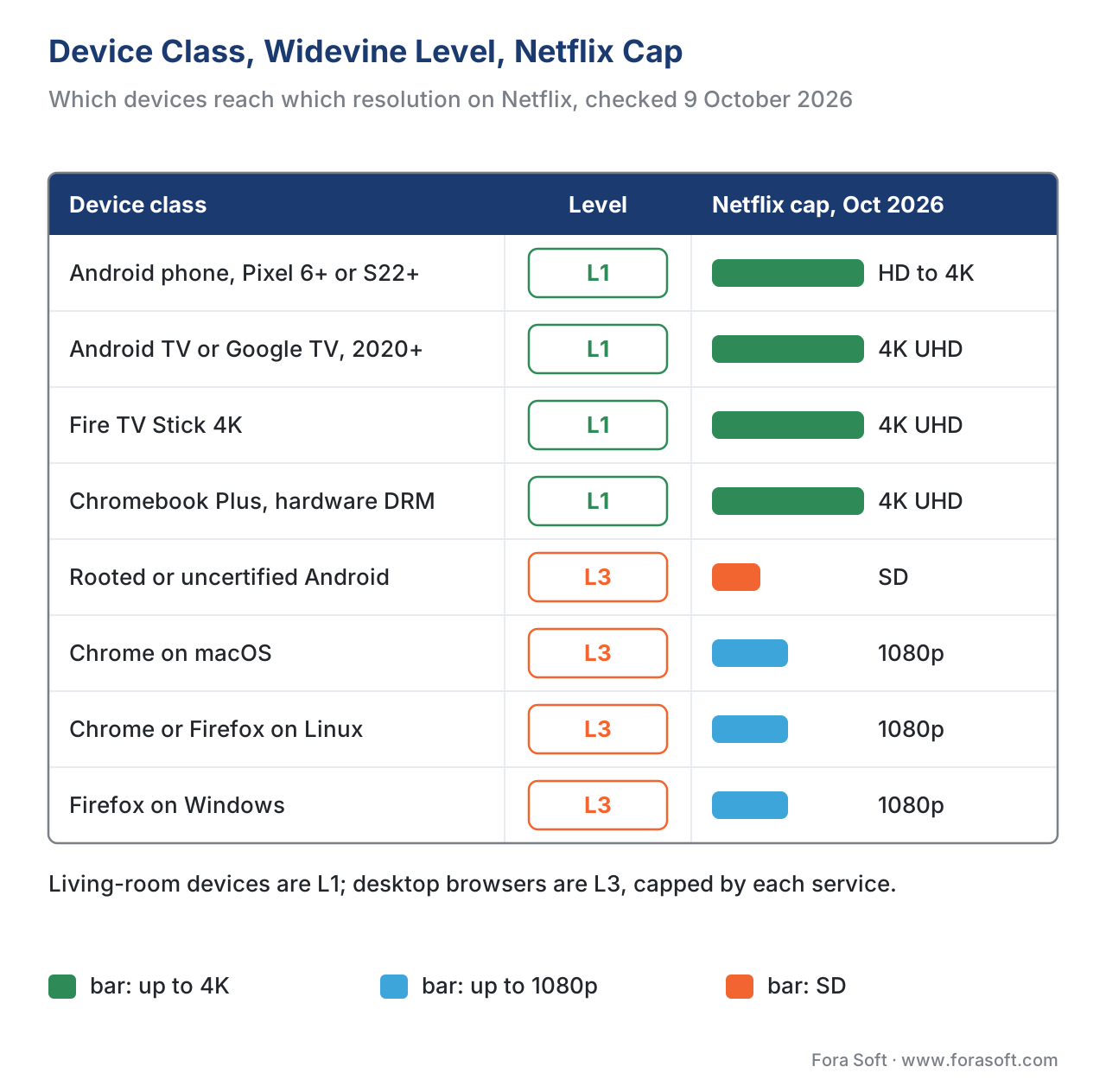 Figure 2. Widevine level and Netflix resolution cap by device class, checked 9 October 2026.
The Robustness String and How EME Asks for a Level
When a web page wants to play protected video in a browser, it calls a single function: navigator.requestMediaKeySystemAccess, defined in the W3C Encrypted Media Extensions (EME) specification (still the 2017 W3C Recommendation; the next version, published under the shortname encrypted-media-2, was last published as a Working Draft on 7 July 2026). The call asks the browser whether the key system com.widevine.alpha is available and, crucially, what robustness level the browser can guarantee.
Widevine recognises five robustness strings plus the empty default — the same six values Chromium’s key-system code accepts. Reading them aloud is the first lesson in DRM operations:
SW_SECURE_CRYPTO— software-based white-box cryptography; decoding outside any TEE. Widevine L3.SW_SECURE_DECODE— software cryptography plus a software (obfuscated) decoder. Widevine L3 on desktop; on Android, Chrome already requires hardware secure codecs from this level upward, which in practice means an L1 device.HW_SECURE_CRYPTO— keys and decryption inside the TEE, decoding outside it. Widevine L2.HW_SECURE_DECODE— decryption and decoding of compressed samples inside the TEE. Widevine L1.HW_SECURE_ALL— hardware-backed keys, hardware decode, and hardware-protected decoded frames through a secure video path. Widevine L1, strictest profile. This is the level premium services ask for before releasing 4K keys.""(empty string) — the browser is asked to pick "whatever it can do". Most browsers downgrade toSW_SECURE_CRYPTO(L3) when the robustness is empty. This is the most common production bug, because a website that forgets to set robustness will silently get the L3 tier on Android phones and Chromebooks that could have qualified for higher-resolution keys.
The robustness string is checked by the browser, not sent to the license server. It decides whether requestMediaKeySystemAccess succeeds and which mode the CDM runs in. The license request that follows carries the CDM’s certified security level and device certificate, and the license server applies the content policy to that: “what level is this device certified at, and which resolution tiers may be unlocked at that level?” The server then releases only the content keys the policy allows for that level, so a device that qualifies gets the keys for the higher-resolution renditions and one that does not can decrypt only the lower ones.
Here is the minimum production JavaScript for a 1080p-and-up service:
const config = [{
  initDataTypes: ['cenc'],
  videoCapabilities: [{
    contentType: 'video/mp4; codecs="hvc1.2.4.L153.B0"',
    robustness: 'HW_SECURE_ALL',
  }],
  audioCapabilities: [{
    contentType: 'audio/mp4; codecs="mp4a.40.2"',
    robustness: 'SW_SECURE_CRYPTO',
  }],
}];

navigator.requestMediaKeySystemAccess('com.widevine.alpha', config)
  .then(keySystemAccess => {
    // HW_SECURE_ALL is available here; the license server still decides the resolution tier
  })
  .catch(err => {
    // fall back to a less strict config (HW_SECURE_DECODE, then SW_SECURE_CRYPTO)
    // and adjust the available renditions in your manifest accordingly
  });
The pattern is try strict first, fall back if rejected. Never start with the loosest config: capable devices will run the CDM in a weaker mode and receive only lower-tier keys. Which keys an L3 device can get is enforced by the license server’s policy, not by the page. The same logic applies to native Android, where the level query is exposed via MediaDrm.getPropertyString("securityLevel") and returns one of the strings "L1", "L2", "L3" directly — no robustness mapping required.
Platform reality check (Chromium source, October 2026). On Windows, Chrome does not offer hardware robustness with the Widevine key system at all: Chromium’s Widevine key-system code says hardware security “is not supported with the Widevine key”, so HW_SECURE_* requests fail there. Hardware DRM in Chrome on Windows goes through PlayReady instead — key system com.microsoft.playready.recommendation.3000; DoveRunner documents Chrome 140 or later, Windows 11 21H2 or later, x64 only, for SL3000 (DoveRunner’s integration guide). On ChromeOS, HW_SECURE_* requires a device identifier for hardware DRM or remote attestation. On Android, Chrome demands hardware secure codecs from SW_SECURE_DECODE upward.
The Pipeline Inside L1: TEE, Secure Video Path, and HDCP
The phrase "all three operations happen inside a TEE" hides four pieces of infrastructure that have to exist on the chip before any of it is true. They are worth a short tour because every one of them is a place L1 can fail and silently fall back to L3.
1. Verified boot. When the device powers on, a small piece of code in the silicon (the "boot ROM", literally read-only memory burned into the chip at the foundry) checks a signature on the bootloader before running it. The bootloader checks the signature on the kernel; the kernel checks the signature on the system image; and in the secure world the TEE operating system verifies the Widevine trusted application before loading it. If any signature fails, the chain breaks and the device refuses to load the next stage. The boot-signing keys belong to the device manufacturer. Without verified boot, there is no L1. This is the single biggest reason rooted Android phones lose L1 — root requires an unlocked bootloader, an unlocked bootloader breaks the verified boot chain, and Widevine sees the broken chain and demotes the device to L3 on the next boot. The Widevine documentation on integration.widevine.com and the Android Verified Boot specification describe the exact chain on each platform.
2. The TEE itself. On ARM-based devices (almost every Android phone and almost every Smart TV), the TEE is an ARM TrustZone-enforced secure world that runs in parallel with the regular operating system. The CPU itself has two modes — "normal world" and "secure world" — and the chip silicon enforces that normal-world software cannot read secure-world memory. Switching from one mode to the other goes through a single instruction called the Secure Monitor Call (SMC) (described in the ARM TrustZone Technical Reference). When the Widevine CDM in normal world needs the secure world to decrypt a license, it issues an SMC and the encrypted license, and the secure world returns the content key handle — never the key itself. The key never crosses the boundary. On x86 Chromebooks the equivalent is a separate security engine on the chip: on 11th- and 12th-gen Intel Core Chromebooks it is the Converged Security Engine working with the Protected Xe Path in the GPU (Intel, 2022). The principle is the same.
3. The secure video path. Once a video sample is decrypted inside the TEE, the decoded YUV pixels go to the display through a hardware-isolated bus that the host operating system cannot tap. On Android this path uses the GPU's secure surface with protected decoder buffers composited through a hardware overlay. The OS never sees the pixels; a screen capture tool returns a black rectangle. The secure video path is what separates L1 from L2 — L2 has the TEE but hands the decrypted compressed samples to a decoder in normal memory, so the decoded pixels are exposed too.
4. HDCP on the output. When the decoded frame finally leaves the chip on an HDMI cable, it is re-encrypted with High-bandwidth Digital Content Protection (HDCP) before being sent over the wire. HDCP 2.2 is required for 4K from most major studios; HDCP 1.4 is sufficient for 1080p. The receiving TV decrypts and displays the frame. If the HDMI cable's path includes an HDCP-non-compliant device (a cheap HDMI capture box, a non-compliant AV receiver), HDCP authentication fails and the source returns 480p or a black screen. This is why "I plugged in a 4K receiver and Netflix dropped to SD" is a common help-desk ticket — the receiver is HDCP 1.4 only.
The layered stack is the entire reason L1 is hard to attack: an adversary has to break verified boot, escape the normal-world OS into the secure world, defeat the TEE’s memory isolation, tap the secure video path, and strip HDCP — all without the chip noticing and revoking its keys. That is why there is no public, generic L1 break comparable to the L3 attacks. What does happen is extraction from individual devices: in December 2021 a working L1 CDM pulled from a Lenovo tablet was posted to GitHub next to 4K download scripts (TorrentFreak). Google’s answer to that class of leak is revocation — license servers stop trusting that device’s certificate — which is why the revocation check in step 4 below matters.
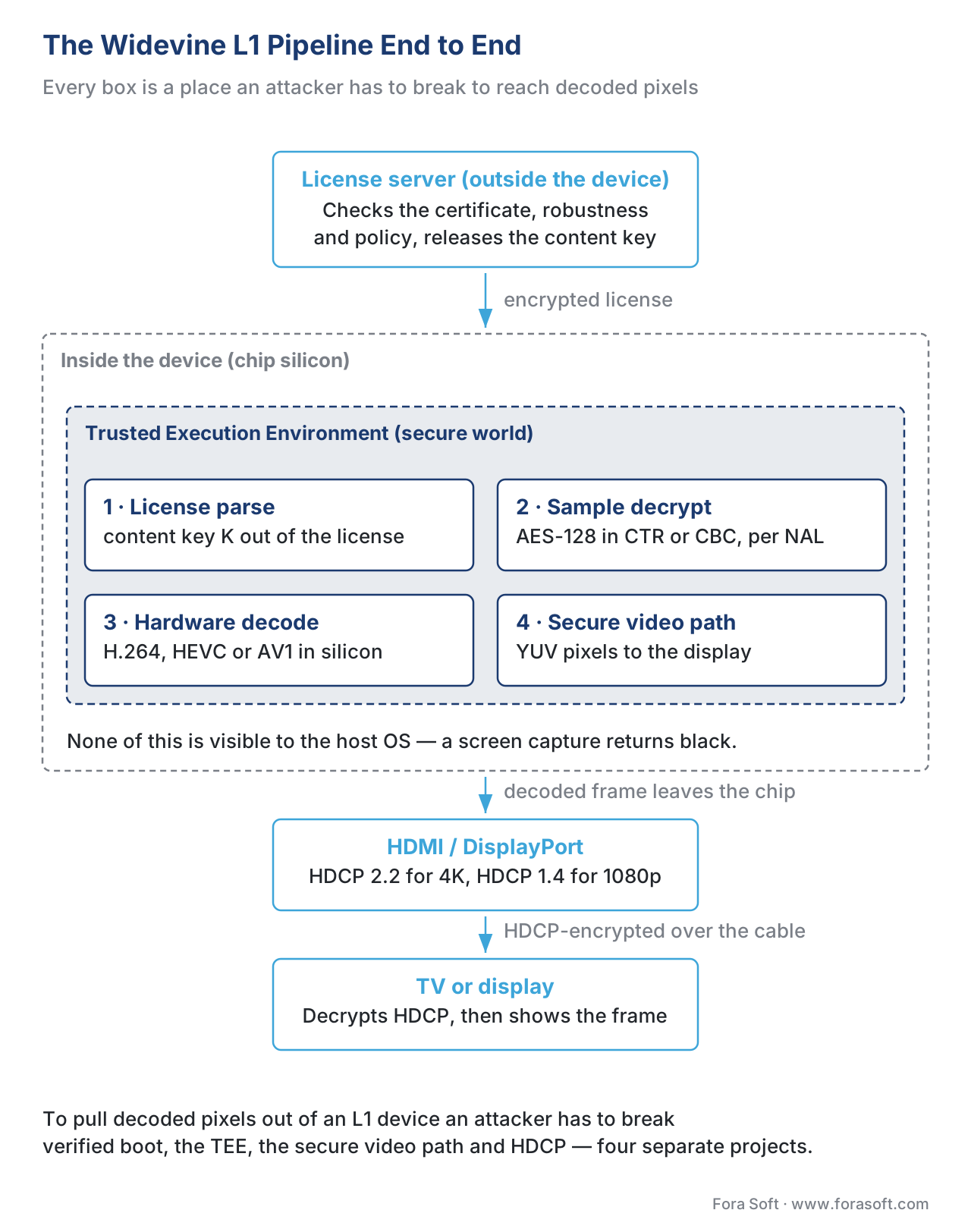 Figure 3. The L1 pipeline. Each box on this diagram is a place an attacker would have to break.
Why L3 Is Cheap, Useful, and Capped at 720p–1080p
L3 is the level you get when you take Widevine and remove the chip support. It runs anywhere a regular CPU does — every Chrome browser on every laptop on every operating system. The CDM is a single shared library (on Windows it ships as widevinecdm.dll; on macOS it is a .dylib inside Chrome's Frameworks directory) loaded into the browser's process address space.
The protection is white-box cryptography: the AES and RSA implementations inside the CDM are constructed so that the keys are mathematically interleaved with the algorithm's lookup tables, with the intent that a reverse engineer reading the binary cannot point at any bytes and say "those are the keys". The technique was introduced in academic literature by Chow et al. in 2002 and has been the subject of a steady stream of break papers ever since. The most influential public break was David Buchanan’s January 2019 Differential Fault Analysis (DFA) result against the white-box AES in desktop Chrome’s L3 CDM, announced without proof-of-concept code (Android Police). In 2020 Tomer Hadad published widevine-l3-decryptor, a Chrome extension that recovered content keys from the L3 CDM; Google called it a circumvention and updated its software protections (Krebs on Security), and the tool’s README says it stopped working on 31 May 2021. In October 2025 Neodyme’s Felipe Custodio Romero revisited DFA against L3’s white-box AES at hack.lu 2025. Separately, Widevine pushed a mandatory security update to its desktop browser CDMs in October 2025 (Axinom DRM announcements). The cycle is ongoing.
This is why services cap L3 below their top rendition, and the cap is a per-service policy, not a Widevine rule. As of October 2026 Netflix lists up to 1080p for Chrome and Firefox on macOS and Linux, Disney+ stops at 720p in any computer browser, and Prime Video promises “up to HD” in Windows and macOS browsers (Starry Hope, July 2026). The single useful generalisation: if a viewer is on a desktop browser with Widevine, do not advertise above 720p in your manifest unless your content licence permits it and your license server is configured to release those keys to L3.
A separate paragraph for the operational reality: even though L3 is “cracked”, in 2026 most HD piracy does not come through L3 at all. A pirate who wants HD-quality leaks of 1080p content goes for HDMI capture from a hardware Smart TV or for keys extracted from a cheap L1 device (an analog-hole equivalent for the digital age) rather than fighting white-box AES. The L3 protection is good enough to deter casual sharing — copying a stream off Chrome to a friend is hard for a non-technical user — and that is the threshold most studios are happy with for 720p.
Where the Level Actually Lives: the License Server Conversation
Three actors decide a viewer's effective security level: the device, the license server, and the content owner's policy. Their conversation is short.
Step 1. The device boots, the Widevine TEE binary loads, and Widevine queries the chip's secure-world identity (the device was provisioned with a factory keybox or device certificate that ties it to a certified security level). The CDM remembers the level the chip is certified at — L1, L2, or L3.
Step 2. The application calls requestMediaKeySystemAccess with a robustness string, and the browser confirms the device can run the CDM in that mode. Native Android apps skip EME and read the level from MediaDrm directly.
Step 3. Playback starts. The player parses the manifest (HLS or DASH), encounters an encrypted segment, and asks the CDM for a license. The CDM generates a license request that includes (a) the key IDs and content ID from the Widevine pssh init data (the KID plumbing is covered in our CENC in depth article), (b) the device certificate, and (c) the CDM’s certified security level and client information. The CDM signs the request with the device's private key and sends it to the license server.
Step 4. The license server validates the device certificate (revocation list check), reads the device’s certified security level from the request, and checks the content policy — a set of rules attached to the content key in the server's database. The content policy is where studio contracts live: "this key may be released to L1 devices for 4K, to L1 devices for 1080p down-rezzed if no HDCP, and to L3 devices for 720p capped, and to nothing else." The server selects the keys the policy allows for that security level, builds a license, protects it with keys bound to the device certificate (in simplified terms, a session key wrapped with the device’s RSA key), and returns it.
Step 5. The CDM decrypts the license inside the TEE (L1) or in normal memory (L3), extracts the content key, and feeds it to the decoder. Playback begins.
The mistake every team makes the first time is treating "the device is L1" as enough. The device being L1 is necessary but not sufficient. The license server also has to be configured to release L1 licenses, the content policy has to permit the resolution the player is asking for, and the manifest has to list the right KID (one key per resolution tier is the production pattern — see the Common mistakes callout below). Get any of those wrong and the same L1 device that played 4K yesterday plays 480p today.
Check who runs your license server before April 2027. Google is retiring the Widevine Cloud License Service (CLS), which NAGRA also calls Widevine as a Service, on 13 April 2027 (Axinom, NAGRA). Services that call Google’s cloud license endpoint directly have to move to the Widevine License Server SDK on their own infrastructure or to a certified multi-DRM provider, and the key-tier policies described above have to move with them. Miss the date and Widevine playback fails on every device, L1 and L3 alike.
How to Check Your Device’s Widevine Level
The quickest check depends on the device. Whatever it shows, the level is fixed by the chip and the device maker’s certification: an app or a setting cannot upgrade L3 to L1, and only the manufacturer can restore L1 with a firmware update or a key reprovisioning.
- Android phone or tablet: install a DRM checker such as DRM Info from Google Play and read the “Security Level” line under Widevine CDM — it says L1 or L3. Developers get the same value from
MediaDrm.getPropertyString("securityLevel"). - Android TV, Google TV or Fire TV streamer: devices sold as certified 4K streamers report L1; the same checker apps confirm it where they can be installed.
- Desktop Chrome, Edge or Firefox: Widevine is always L3 on Windows, macOS and Linux.
chrome://componentsshows the “Widevine Content Decryption Module” version, not a level. Hardware DRM on a computer comes from PlayReady (Edge and Chrome on Windows) or FairPlay (Safari). - Chromebook: L1 depends on the chip. Netflix’s 4K tier needs a Chromebook Plus, Chrome, a 4K screen or a 4K display connected over HDCP 2.2, and at least 15 Mbps (Starry Hope’s July 2026 summary of Netflix’s requirements).
- Inside your own player: call
requestMediaKeySystemAccesswithHW_SECURE_ALL, thenHW_SECURE_DECODE, thenSW_SECURE_CRYPTO, and log which one succeeds. On Android and ChromeOS that tells you whether the device can run hardware Widevine; on Windows theHW_SECURE_*requests always fail with Widevine, so test PlayReady there.
Why does a phone drop from L1 to L3? Almost always because the bootloader was unlocked, the phone was rooted or flashed with a custom ROM, or the factory keys were revoked or wiped during a repair. Relocking the bootloader on stock firmware restores L1 on some models; if the keys themselves are gone, only the manufacturer can reprovision them.
Common Mistakes (And How to Catch Them Before Production)
Pitfall: one content key for all resolutions.
If you encrypt the 240p, 480p, 720p, 1080p, and 4K ladder with the sameKID, the license server has only one decision to make: release the key or don't. That means an L3 device that successfully decrypts 720p has automatically decrypted the 1080p and 4K renditions too — because the same key unlocks all of them. The fix is oneKIDper resolution tier (240p–720p shareKID_A; 1080p usesKID_B; 4K usesKID_C), so the license server can releaseKID_Ato L3 devices while withholdingKID_BandKID_C. Separate keys for audio, SD, HD and UHD are the common production pattern at large OTT services.
Pitfall: leaving robustness empty.
A web app that omits therobustnessfield in its EME config will get whatever the browser chooses to give it, which is almost alwaysSW_SECURE_CRYPTO(L3). The L1 phone in the viewer's hand stays at L3 because the website never asked for L1. Always set robustness explicitly and fall back step by step.
Pitfall: assuming Android always reports L1.
Rooted phones, unlocked bootloaders, custom ROMs, and tampered firmware demote the device from L1 to L3 silently. TheMediaDrm.getPropertyString("securityLevel")call is the only way to be sure; never trust the manifest's resolution to be deliverable just because the OS version is recent. The free DRM Info app on Google Play reports the level for an end-user; for QA, instrument it via Android's MediaDrm API.
Pitfall: requesting HW_SECURE_ALL and aborting on rejection.
TherequestMediaKeySystemAccesspromise rejects if the device cannot meet the requested robustness. A request forHW_SECURE_ALLon a low-end Android TV (it might be L1 for video, but not for the secure surface path) rejects entirely and your player falls back to "no DRM available" instead of "L1 down-rezzed". Always handle the rejection by retrying with the next-lower robustness, not by aborting playback.
Frequently asked questions
What is Widevine L1?
Widevine L1 is the highest Widevine security level: content keys, decryption and decoded video stay inside the device’s hardware Trusted Execution Environment. It is the level paid streaming services require before they send HD or 4K.
Which is better, Widevine L1 or L3?
L1 is better for watching paid video: it unlocks HD and 4K, while L3 is software-only and usually capped at 480p to 1080p depending on the service. L3 still plays protected content; it just gets a lower resolution.
What is the difference between Widevine L1, L2 and L3?
L1 keeps keys, decryption and decoded frames in hardware; L2 keeps keys and decryption in hardware but decodes in normal memory; L3 does everything in software. In 2026 almost every device is either L1 or L3.
Can Widevine L3 be upgraded to L1?
No app or setting can upgrade L3 to L1, because the level comes from the chip and the device’s factory certification. A phone that lost L1 after unlocking its bootloader sometimes gets it back after relocking on stock firmware; otherwise only the manufacturer can reprovision the keys.
How do I check my Widevine level?
On Android, install a DRM checker such as DRM Info from Google Play and read the Widevine “Security Level” line; it shows L1 or L3. On a desktop computer you do not need to check: Widevine in Chrome, Edge and Firefox is always L3 on Windows, macOS and Linux.
Why does my browser stream at a lower resolution than my TV?
Desktop browsers run Widevine L3, a software-only CDM, so each service caps them: in October 2026 Netflix allows up to 1080p in Chrome and Firefox on macOS and Linux, and Disney+ stops at 720p in any computer browser. TVs and streaming sticks run L1 in hardware, so they get 4K.
What is com.widevine.alpha?
com.widevine.alpha is the key-system string a web page passes to navigator.requestMediaKeySystemAccess to ask the browser for Widevine. The robustness string in the same call decides whether the page asks for L3 or L1 behaviour.
What is an L3 CDM?
An L3 CDM is the software Widevine Content Decryption Module that browsers such as Chrome, Edge and Firefox download and run in normal memory. Its keys are hidden with white-box cryptography rather than protected by hardware, which is why services cap its resolution.
Is Widevine safe, and do I need to install it?
Widevine is Google’s DRM component, and you do not install it by hand: it ships with Android and Chrome, and Firefox downloads it automatically when you allow DRM-controlled content. Its job is to decrypt licensed video for playback.
Does Linux support Widevine L1?
No desktop Linux browser gets Widevine L1; Chrome and Firefox on Linux run L3. As of October 2026 Netflix still serves them up to 1080p.
What does Widevine L1 support mean on a tablet?
It means the tablet’s chip and firmware are certified for Widevine L1, so Netflix, Prime Video and Disney+ apps can stream HD to it. Budget tablets without that certification run L3 and usually get standard definition in those apps.
Free download: Widevine Level Detection ChecklistOne page with the six robustness strings and the level each one maps to, how to read the level on Android, ChromeOS and desktop browsers, the license-server policy pattern for one KID per resolution tier, and the four pitfalls that ship to production.Where Fora Soft Fits In
We have built and operated Widevine-protected OTT video, video conferencing, and telemedicine platforms across the seven verticals we ship into — streaming, OTT/Internet TV, WebRTC, video surveillance, e-learning, telemedicine, and AR/VR — 250+ video products since 2005. The work that earns its money is rarely "integrate Widevine"; it is the device-by-device QA matrix that proves a 1080p Smart TV in the customer's bedroom and an L3 desktop Chrome on the customer's laptop both behave correctly, the license-server policy work that translates a 14-page studio contract into 40 lines of policy JSON, and the production-grade fallback ladder that does not strand a viewer at a black screen when their bootloader is unlocked. We build those things as a default, not an extra. If your licenses still come from Google’s Cloud License Service, moving those policies to a new license server before April 2027 is the same kind of work. If you need DRM handled this way in your own product, our OTT and Internet TV development team ships multi-DRM, key-tier policies and the device QA matrix as part of the build, and our video streaming software development practice covers packaging, CDN delivery and the player side.

The book
Video Streaming: A Complete Guide to Video Delivery: From ABR and CDNs to Players, WebRTC, DRM, and the Economics of Streaming
This article stops where the trust boundary sits and what studios do about it. The book carries the protected path the rest of the way: common encryption and the pssh, tenc and KID plumbing that puts three DRM systems in one file, multi-DRM license services and key rotation, how the key ladder is split so an L3 device gets 720p and nothing above it, and what keeping a device QA matrix green actually costs. Written by Nikolay Sapunov, CEO at Fora Soft.
Selling 1080p and not sure which of your viewers can actually receive it?
Send us your content policy, the device mix you sell to, and the resolutions you advertise — you get back a key-tier plan, a robustness fallback ladder, the device QA matrix that proves both and, if you license through Google’s Cloud License Service, a migration plan for its 13 April 2027 shutdown. 250+ video products shipped since 2005.
See our case studies
Case study
Smart STB IPTV
White-label IPTV app pre-installed on Android set-top boxes, delivering 3,000+ live channels for a Swiss operator — the living-room device class this article puts at L1, where the app, not a website, reads the security level.
Case study
Speed.Space
Remote content production recording at 1080p and 8 Mbps for Netflix, Electronic Arts and HBO shoots — material at exactly the resolution tier a studio contract governs, with 25 participants and role-based access deciding who sees what.
Case study
Sprii
Danish live shopping across web, iOS and Android with 72,000+ live events and €365M in sales — one audience that spans L1 phones and L3 desktop browsers, which is the device split this article is about.
What to read next
Multi-DRM
DRM 101: why three systems, and why you ship all three
The companion piece: why one Widevine is never the whole answer.
Packaging
Common Encryption (CENC) in depth
The pssh, tenc and KID boxes that let one file carry all three DRM systems.
Browser API
Encrypted Media Extensions: how DRM lives in a browser
Where the robustness string on this page is actually sent, and what comes back.
Microsoft DRM
PlayReady in depth
The SL2000 and SL3000 levels that decide 4K on Tizen, webOS and Edge.
References
- W3C Encrypted Media Extensions, Recommendation 18 September 2017 — the EME specification that defines
requestMediaKeySystemAccessand the robustness string contract. Status: W3C Recommendation. Read directly from the W3C TR snapshot. (Standards body — Tier 1.) - ISO/IEC 23001-7:2023, Common encryption in ISO base media file format files (3rd edition), catalogue entry iso.org/standard/84637 — the controlling document for the
pssh,tenc, andKIDboxes that carry Widevine identifiers in CMAF/MP4. The normative PDF is paywalled. (Standards body — Tier 1.) - Android Verified Boot 2.0 documentation, source.android.com — the verified-boot chain that underpins Widevine L1 on Android. (First-party, Google — Tier 1 for Android-specific behaviour.)
- ARM Architecture Reference Manual — TrustZone Technical Reference Manual (ARMv8-A) — the SMC instruction and normal-world / secure-world model that ARM TEEs use. (Standards body — Tier 1.)
- Widevine integration console, integration.widevine.com — the Google-operated partner portal that lists certified device security levels (partner login required). (First-party, Google — Tier 1.)
- Bitmovin, "Widevine Security Levels in Depth", developer.bitmovin.com — the most accurate vendor-published mapping of robustness strings to security levels. (First-party engineering blog — Tier 3.)
- Bunny.net, "Google Widevine DRM" documentation — vendor mapping of device classes to security levels in 2025. (First-party engineering blog — Tier 3.)
- G. Patat, M. Sabt, P.-A. Fouque, "Exploring Widevine for Fun and Profit", arXiv:2204.09298 (Univ. Rennes, IRISA, CNRS, 2022) — peer-reviewed reverse-engineering of the Widevine CDM. The most thorough public account of the Widevine protocol. (Academic — Tier 5.)
- T. Hadad (tomer8007),
widevine-l3-decryptor, GitHub, 2020 (archived 2022) — the public proof-of-concept that recovered content keys from the desktop L3 CDM; the README records that it stopped working on 31 May 2021. (Open-source security research — Tier 5.) - Digital Content Protection LLC, "HDCP 2.3 Specification" abstract — the HDCP standard that protects the HDMI hop after L1 decoding. (Standards body — Tier 1.)
- W3C, Encrypted Media Extensions (
encrypted-media-2), Working Draft 7 July 2026 — the next EME version; the 2017 Recommendation remains the current Recommendation. (Standards body — Tier 1.) - Chromium source,
components/cdm/renderer/widevine_key_system_info.cc— the robustness strings Chrome accepts for Widevine and the per-platform rules (no hardware Widevine on Windows; identifier on ChromeOS; hardware secure codecs on Android). Read 9 October 2026. (First-party code — Tier 1.) - Netflix Help Center, “Netflix supported browsers and system requirements” — per-browser resolution limits on Windows, macOS, ChromeOS and Linux. Checked 9 October 2026. (First-party service policy — Tier 2.)
- DoveRunner, “Supporting PlayReady SL3000 on Windows Chrome” (updated 5 December 2025) — Chrome 140+, Windows 11 21H2+, key system
com.microsoft.playready.recommendation.3000. (Vendor documentation — Tier 2.) - Axinom, “Widevine CLS sunset” (April 2026) — Google’s Widevine Cloud License Service shuts down on 13 April 2027. (Vendor — Tier 2.)
- NAGRA, “Widevine Cloud Licence Service shutdown” — confirms the 13 April 2027 date and the migration options. (Vendor — Tier 2.)
- Axinom, DRM announcements — “Widevine Browser CDM — Security Update — October 2025”, a mandatory update for desktop browser CDMs. (Vendor — Tier 2.)
- Intel, “Bring Premium Protected Content to Chrome OS” (15 February 2022) — L1 hardware DRM on 11th- and 12th-gen Intel Core Chromebooks via the Converged Security Engine and Protected Xe Path. (Vendor — Tier 2.)
- Starry Hope, “Netflix on a Chromebook Streams in 4K, but Disney+ Stops at 720p and Prime Video at SD” (19 July 2026) — tested browser caps for Netflix, Disney+ and Prime Video. (Independent test — Tier 4.)
- Android Police, “Google’s Widevine L3 DRM … has been broken” (2 January 2019) — David Buchanan’s DFA break of L3 white-box AES. (Press — Tier 4.)
- Krebs on Security, “Google Mending Another Crack in Widevine” (26 October 2020) — Tomer Hadad’s L3 proof-of-concept and Google’s response; Google states L1 and L2 were not affected. (Press — Tier 4.)
- hack.lu 2025, F. Custodio Romero (Neodyme), “Revisiting Widevine L3: DRM as a playground for Hackers” (23 October 2025) — DFA on L3 white-box AES via partial emulation. (Security research — Tier 5.)
- TorrentFreak, “‘Widevine Dump’: Leaked Code Downloads HD Video from Disney+, Amazon, and Netflix” (27 December 2021) — a leaked L1 CDM from a Lenovo tablet published with 4K download scripts. (Press — Tier 4.)
