


Why this matters
When a streaming team scopes a paid launch, the DRM line in the budget spreadsheet is almost always wrong, and wrong in the same way: someone has assumed that three DRMs cost three times as much as one. They don't. The encryption is done once and the per-license fee is paid once per session regardless of which of the three Content Decryption Modules the viewer's device happens to use. Founders meet this number when they ask "can we just ship Widevine to save money"; product managers meet it when they scope an iOS or smart-TV expansion; engineers meet it when they pick a managed-DRM vendor and read a price list of platform fees and per-request tiers. This calculator answers the three questions all of them ask: what will multi-DRM cost me per month at my scale, which lever actually moves that number, and what do I lose if I drop a DRM to save money. It uses the same cost model and 2026 price ranges we documented, with sourcing, in our companion article on DRM 101: why three systems, and why you ship all three.
Use the calculator. The rest of this article explains every input it takes and every number it returns.
The DRM bill is a multiplication problem
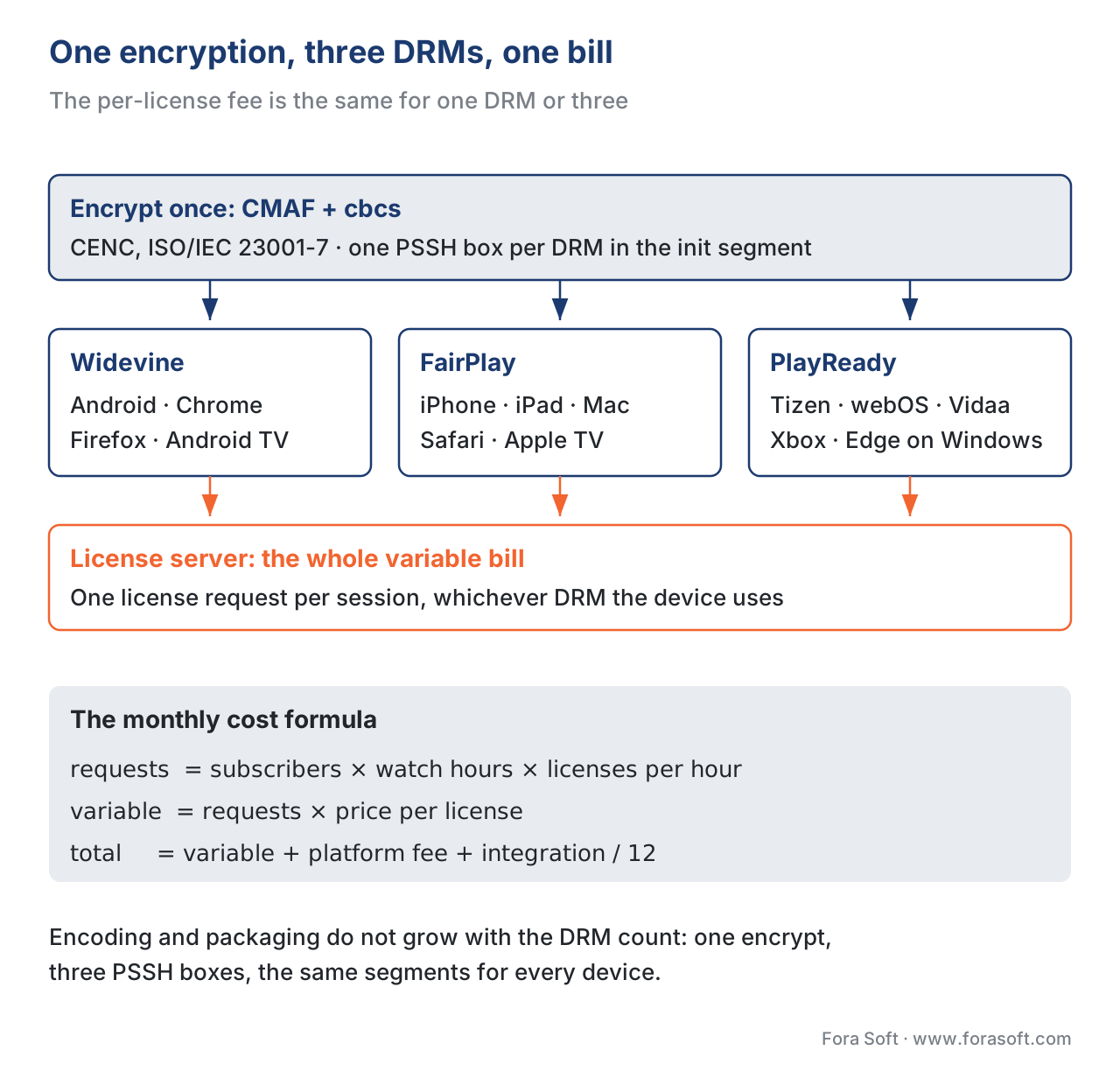
Streaming DRM cost has a visible line and an invisible line. The invisible line is encoding and packaging: you encode the catalogue once per quality tier, encrypt it once with the cbcs scheme, and write one PSSH box per DRM into the initialization segment. That work does not scale with the number of DRMs — it is the same two packager flags whether you ship one DRM or three, as we walk through in the Common Encryption article. The visible line, the one that shows up on the monthly invoice, is the license server: every time a viewer's device asks for a content key, the managed-DRM vendor charges a per-request fee, and on top of that you pay a flat monthly platform fee for the service to exist.
So the bill reduces to one formula, and the calculator computes it for you:
license requests / month = subscribers × watch hours / sub × licenses / hour
monthly variable cost     = license requests / month × price per license
monthly total             = monthly variable cost + platform fee + (integration / 12)
Each term is a number you can defend in a budget meeting. The calculator defaults the integration cost to a one-time build amortized over twelve months, so the monthly total reflects a steady-state operating cost rather than a launch spike.
Input 1 — Monthly active subscribers
The count of paying viewers who actually stream in the month. Not registered accounts, not lifetime sign-ups — the people generating license requests this month. This is the single largest driver of the bill, because every other term multiplies against it. The calculator defaults to 500,000 for the mid-OTT preset and lets you set any value.
Input 2 — Watch hours per subscriber per month
How much each subscriber streams. A general-entertainment OTT service runs 15 to 40 hours per subscriber per month; a live-sports service spikes around events; an e-learning platform is far lower, typically 3 to 10 hours because viewing is task-driven rather than ambient. This term, multiplied by the subscriber count, gives total monthly watch hours.
Input 3 — License requests per watch hour
This is the quiet lever. If every playback session fetches a fresh license, and a session is roughly an hour, you generate about one license request per watch hour. But persistent licenses — where the Content Decryption Module caches the key in its own protected storage so the next play of the same title skips the license call entirely — cut this to roughly 0.2 to 0.4 requests per hour for a binge-watching audience. Netflix and Disney+ use persistent licenses specifically to make the second episode click instant and to cut their license-server bill. The calculator defaults to 1 and lets you model the persistent-license saving directly.
Input 4 — Average price per license request
The 2026 retail mid-point for managed multi-DRM, averaged across the three DRMs and across volume tiers, sits around $0.02 per license request. Public price lists cluster in a $0.01 to $0.05 band at low volume; committed-volume contracts with the major vendors pull the effective price down to roughly $0.005 to $0.01. The calculator defaults to $0.02 so the headline number is conservative; drop it to model a negotiated rate.
Input 5 — Target device ecosystems
This is where the audience-versus-cost trade-off lives, and the input that surprises people. You tick the device ecosystems you want to reach, and each one forces exactly one DRM: Android, Chrome, Firefox, ChromeOS, Linux, and Android TV all use Widevine; iPhone, iPad, Mac Safari, and Apple TV all use FairPlay; Samsung Tizen, LG webOS, Hisense Vidaa, Xbox, and Edge-on-Windows all use PlayReady. Crucially, ticking all three boxes does not triple the per-license cost — the same encrypted file serves all three, so the variable bill is unchanged. What changes is the coverage table at the bottom of the calculator, which shows the audience each stack reaches and the audience each one leaves out.
Input 6 — Platform fee and integration
The platform fee is the flat monthly vendor subscription that sits on top of per-request charges, typically $100 to $2,000 depending on tier. The integration cost is the one-time engineering spend to wire up the packager, the license server, and the player across every platform you target — typically three to six weeks for a full multi-DRM build including the iOS, tvOS, Tizen, and webOS test passes. The calculator amortizes that one-time cost over twelve months so it appears as a sane monthly line rather than a launch-month cliff.
A worked example the calculator reproduces
Take the mid-OTT preset: a paid streaming service with 500,000 monthly active subscribers, each streaming 20 hours, one license request per hour, at $0.02 per license, with a $500 platform fee and a five-week integration at $6,000 per week.
Mid-OTT service, all three DRMs
  Watch hours / month   = 500,000 × 20        = 10,000,000 h
  License requests / mo = 10,000,000 × 1       = 10,000,000
  Per-license fees      = 10,000,000 × $0.02   = $200,000
  Platform fee                                 =     $500
  Integration ($30,000 / 12)                   =   $2,500
                                              ───────────
  Monthly total                                ≈ $203,000
  Cost per subscriber                          ≈  $0.406 / mo
Two things jump out, and the calculator draws both. First, the per-license line is 98.5% of the bill — the platform fee and amortized integration are rounding error at this scale. Second, the cost per subscriber is about forty cents a month, which against a $10-to-$15 subscription price is a small single-digit-percent cost of revenue. Drop the "licenses per hour" to 0.3 with persistent licenses and the bill falls to about $62,500; negotiate the price to $0.008 with a volume commit and it falls to about $83,000. Do both and you are near $25,000. None of those savings come from dropping a DRM.

The one fact that changes how you budget
Common pitfall. Almost every first-draft DRM budget multiplies the per-license cost by the number of DRMs. That is wrong. Common Encryption — the ISO standard ISO/IEC 23001-7 — exists precisely so that one encrypted file serves every DRM. The packager encrypts the audio and video once with the cbcs scheme, then writes three PSSH boxes into the init segment, one each for Widevine, FairPlay, and PlayReady. When a viewer's device plays the file, its built-in Content Decryption Module picks the one PSSH box that matches and fetches a single license. One session, one license request, one per-license fee — regardless of how many DRMs the file declares. Shipping three DRMs instead of one does not add a cent to the variable bill. It adds audience.This is why the calculator separates "which DRMs you ship" from "what it costs". The cost is driven entirely by license volume and price. The DRM selection drives only the coverage table — which audience you reach and which you abandon.
What you lose by dropping a DRM
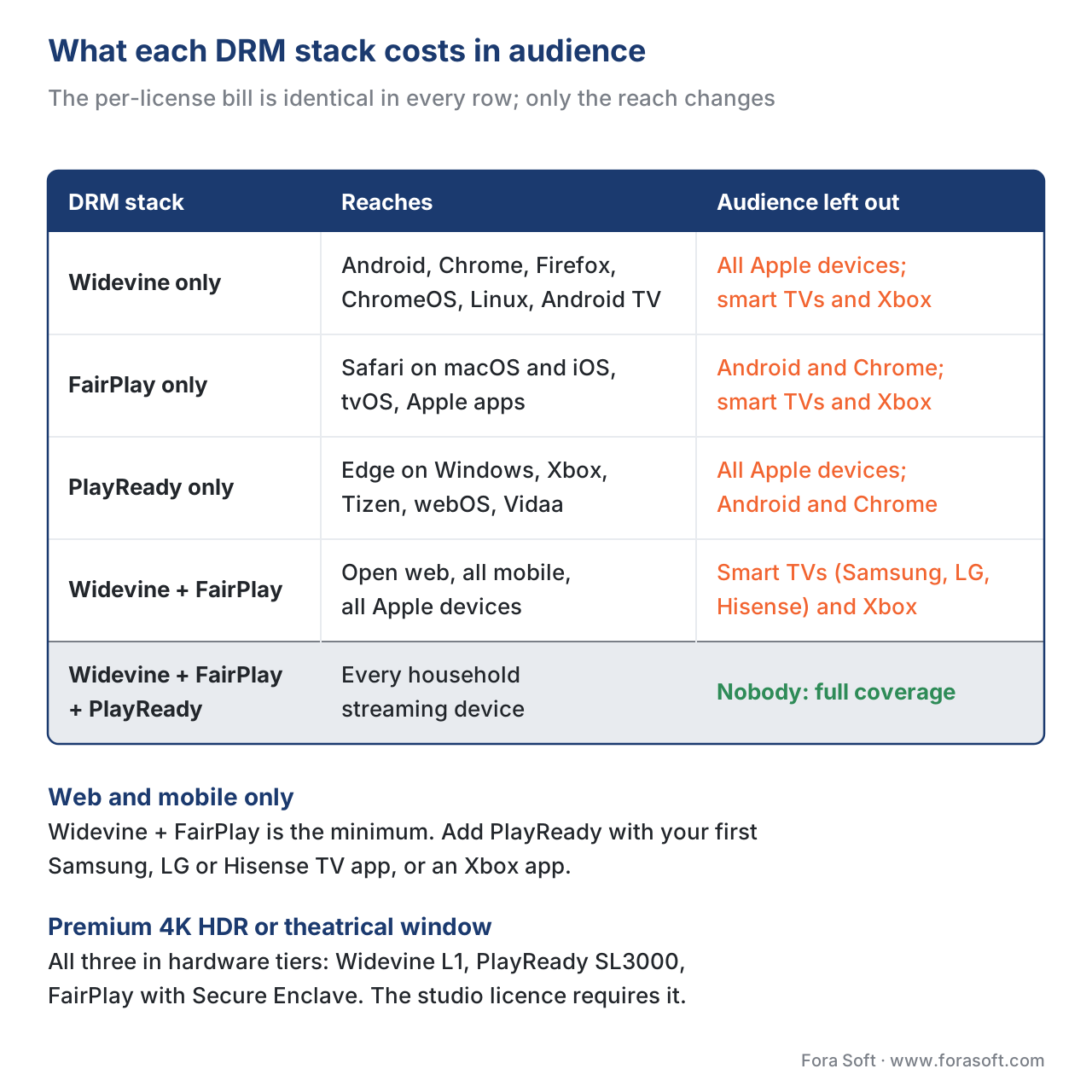
Because dropping a DRM saves no money, the only honest reason to ship fewer than three is that you genuinely do not serve those devices. The calculator's coverage table maps every option against the device ecosystems you ticked, and marks the audience each one would leave out.
| DRM stack | Reaches | Audience left out |
|---|---|---|
| Widevine only | Android, Chrome, Firefox, ChromeOS, Linux, Android TV | All Apple devices; all smart TVs and Xbox |
| FairPlay only | Safari macOS/iOS/iPadOS, tvOS, Apple apps | All Android/Chrome; all smart TVs and Xbox |
| PlayReady only | Edge-on-Windows, Xbox, Tizen, webOS, Vidaa, set-top boxes | All Apple; all Android/Chrome |
| Widevine + FairPlay | Open web, all mobile, all Apple | Smart TVs (Samsung/LG/Hisense) and Xbox |
| Widevine + FairPlay + PlayReady | Every household streaming device | Nobody — full coverage |
Read it as a decision, not a price comparison. If your audience is web-and-mobile only — a live-streaming app, a music-video service — Widevine plus FairPlay is the minimum and usually the maximum; you skip PlayReady because you genuinely do not target TVs, not to save money. The moment you ship a Samsung or LG TV app or an Xbox app, you add PlayReady, and your per-license bill does not change. If your catalogue includes 4K HDR or theatrical-window content, you ship all three in their hardware-backed tiers (Widevine L1, PlayReady SL3000, FairPlay with Secure Enclave) because the studio licence contractually requires it.
The two levers that actually cut the bill
Since the per-license line dominates at any real scale, the two levers worth pulling both act on that line.
Persistent licenses are the larger lever for a video-on-demand service. By setting persistentState: 'required' and sessionType: 'persistent-license' in the player's MediaKeySystemAccess configuration, and a multi-hour expiration in the license-server policy, you let the Content Decryption Module cache the key. A binge-watching subscriber who plays six episodes of a show generates one license request instead of six. For an ambient-viewing OTT audience this routinely cuts license volume by half to two-thirds. It does nothing for a strict live-streaming product where every session is unique, which is why the calculator exposes licenses-per-hour as an input rather than baking in an assumption.
A volume commit is the contract lever. Every major managed-DRM vendor — PallyCon, EZDRM, BuyDRM, Axinom, AWS Elemental MediaPackage — publishes retail per-request pricing that falls steeply with committed monthly volume. At ten million requests a month, the difference between the $0.02 retail mid-point and a negotiated $0.008 is roughly $120,000 a month. The calculator's price-per-license input is where you model the rate you actually negotiated, not the rack rate.
The non-lever, to say it one more time because it is the expensive mistake, is DRM count. Cutting from three DRMs to one saves nothing on the variable bill and costs you an entire device ecosystem.
Free download: Multi-DRM Cost Cheat SheetOne printable page: the monthly cost formula, the 2026 managed-DRM price ranges, the two real cost levers, and the DRM-to-device coverage table.Where Fora Soft fits in
We have shipped DRM-protected streaming products since 2010 across the verticals where the licence bill and the device coverage both matter: OTT and Internet TV serving phones, smart TVs, and consoles; video-on-demand with binge audiences where persistent licenses pay for themselves; e-learning libraries that need web-and-mobile coverage without the TV tier; and telemedicine and surveillance systems that record WebRTC sessions back to a DRM-protected HLS archive. The first DRM conversation we have with a client is almost always this calculator's conversation — agree the subscriber and watch-time numbers, find that the per-license line is the whole bill, and then decide coverage on audience grounds rather than cost grounds. We have shipped 239+ projects since 2005, and the multi-DRM cost model is on the whiteboard early in every paid-streaming engagement. Our OTT and Internet TV development team builds the multi-DRM stack into the platform, and our app development cost calculator gives a first estimate for the rest of the build. For live channels, our video streaming software developers add key rotation without breaking playback.

The book
Video Streaming: A Complete Guide to Video Delivery: From ABR and CDNs to Players, WebRTC, DRM, and the Economics of Streaming
This calculator prices one line of a streaming budget. Book 3 of the handbook covers the systems behind that line and the ones next to it: Common Encryption and the three DRMs, license servers and persistent licenses in EME, the players on web, mobile and smart TV that decide which DRM you need, and the CDN and per-viewer economics that sit beside the DRM bill. Read it when you are scoping a paid launch and want the DRM, device and cost decisions made together. Written by Nikolay Sapunov, CEO at Fora Soft.
Budgeting DRM for a paid launch?
Send us your subscriber and watch-time numbers and the devices you plan to ship to. We will come back with the monthly license bill, the persistent-license and contract savings that apply to your audience, and the DRM stack your device list actually needs. 250+ video products shipped since 2005.
See our case studies
Case study
Drundoo
Bulgarian internet TV with 60 live channels, catch-up TV and a movie and series library — the living-room audience that makes PlayReady part of the stack, next to Widevine and FairPlay.
Case study
Vodeo
A movie rental app for Janson Media with 100K+ users, watched on phones and on TVs through AirPlay and Chromecast — licensed studio catalogue where every rental is a playback session to protect.
Case study
BrainCert
An e-learning platform with 100K+ customers on web, iOS and Android, with recorded lessons protected by DRM encryption — the web-and-mobile audience where Widevine plus FairPlay is the whole stack.
What to read next
Encryption
Common Encryption (CENC) in Depth
Why one cbcs encryption serves all three DRMs, and the packager flags that make it work.
DRM
Widevine Security Levels: L1, L2, L3 — What They Really Mean
The hardware tiers a studio licence demands for 4K HDR, and which devices can meet them.
Economics
Cost Economics of a Streaming Product: A Worked Model
Where the DRM line sits next to CDN, encoding and storage in a full streaming P&L.
Economics
CDN Cost Calculator: How a Streaming Bill Is Actually Built
The line that usually outgrows DRM at scale, broken down the same way.
References
- ISO/IEC 23001-7:2023 — Common Encryption in ISO base media file format files. ISO/IEC · 2023
- W3C Encrypted Media Extensions (encrypted-media-2). W3C · 2025-08-21
- Microsoft PlayReady — Security Level. Microsoft · 2026
- Google Widevine DRM — Overview. Google · 2026
- Apple FairPlay Streaming Overview (PDF). Apple Developer · 2026
- DASH-IF Implementation Guidelines: Content Protection and Security (Part 6, v5.0). DASH Industry Forum · 2024
- Fora Soft Learn — DRM 101: Why Three Systems, and Why You Ship All Three. Fora Soft · 2026-05-25
- PallyCon multi-DRM pricing. PallyCon · 2026
- EZDRM pricing. EZDRM · 2026
- AWS Elemental MediaPackage / SPEKE pricing. Amazon Web Services · 2026
