


Why this matters
If you ship video to a browser, mobile web, or smart-TV web runtime in 2026, hls.js is almost certainly already in your bundle — or it should be, because Apple's Safari plays HLS natively and every other browser does not. Reading this article should leave a product manager able to ask an engineer the right questions about adaptive bitrate behaviour, error recovery, and DRM scope, and leave a frontend or smart-TV engineer with a complete mental model of the library: the controllers that compose it, the events that drive a production telemetry pipeline, the config knobs that change ABR behaviour without forking the code, and the four families of error you have to handle on day one. You do not need any prior streaming knowledge; every term is defined when it appears. By the end you will know why a 1.5 megabyte JavaScript bundle is what stands between a JPEG and a Netflix-style adaptive stream on the open web, and which one-line setting unlocks low-latency HLS for a 3-second live experience without rewriting your player.
What hls.js is, and what it is not
The shortest accurate sentence is this. hls.js is a JavaScript library that reads an HLS playlist, fetches the video chunks it points to, repackages them on the fly into a format the browser can decode, hands those bytes to the browser's Media Source Extensions API, and exposes an event stream rich enough to drive an entire production player UI on top — all from inside an open-source MIT-licensed package you npm install like any other dependency. It is not a UI: it ships no buttons, no skin, no tap targets. It is not a transcoder: every byte it sends to the browser was already encoded by your packager. And it is not a multi-protocol player: hls.js plays HLS, not DASH; for DASH you reach for Shaka Player or dash.js. The library's home page describes itself in one line — "HLS.js is a JavaScript library that plays HLS in browsers with support for MSE" (video-dev/hls.js, README, accessed 2026-05-25) — and that line is the whole product.
The library is built on top of two W3C standards that, together, took roughly a decade to ship across all major browsers. The first is Media Source Extensions (W3C, Media Source Extensions™, Recommendation 17 November 2016; later editions tracked as Media Source Extensions 2 in Candidate Recommendation through 2025), which gives JavaScript the ability to append arbitrary video and audio bytes into a SourceBuffer attached to a <video> element. The second is Encrypted Media Extensions (W3C, Encrypted Media Extensions, Recommendation 18 September 2017; Working Draft updated 20 May 2026), which gives JavaScript a sandboxed way to negotiate decryption keys with the browser's Content Decryption Module. Without MSE there is no way to feed segmented video into a <video> element from JavaScript; without EME there is no way to play paid premium content. hls.js stitches the HLS protocol — defined by IETF RFC 8216 (HTTP Live Streaming, August 2017) and extended by Apple's HLS Authoring Specification for Apple Devices (revision 2025-09) — into those two browser-side APIs.
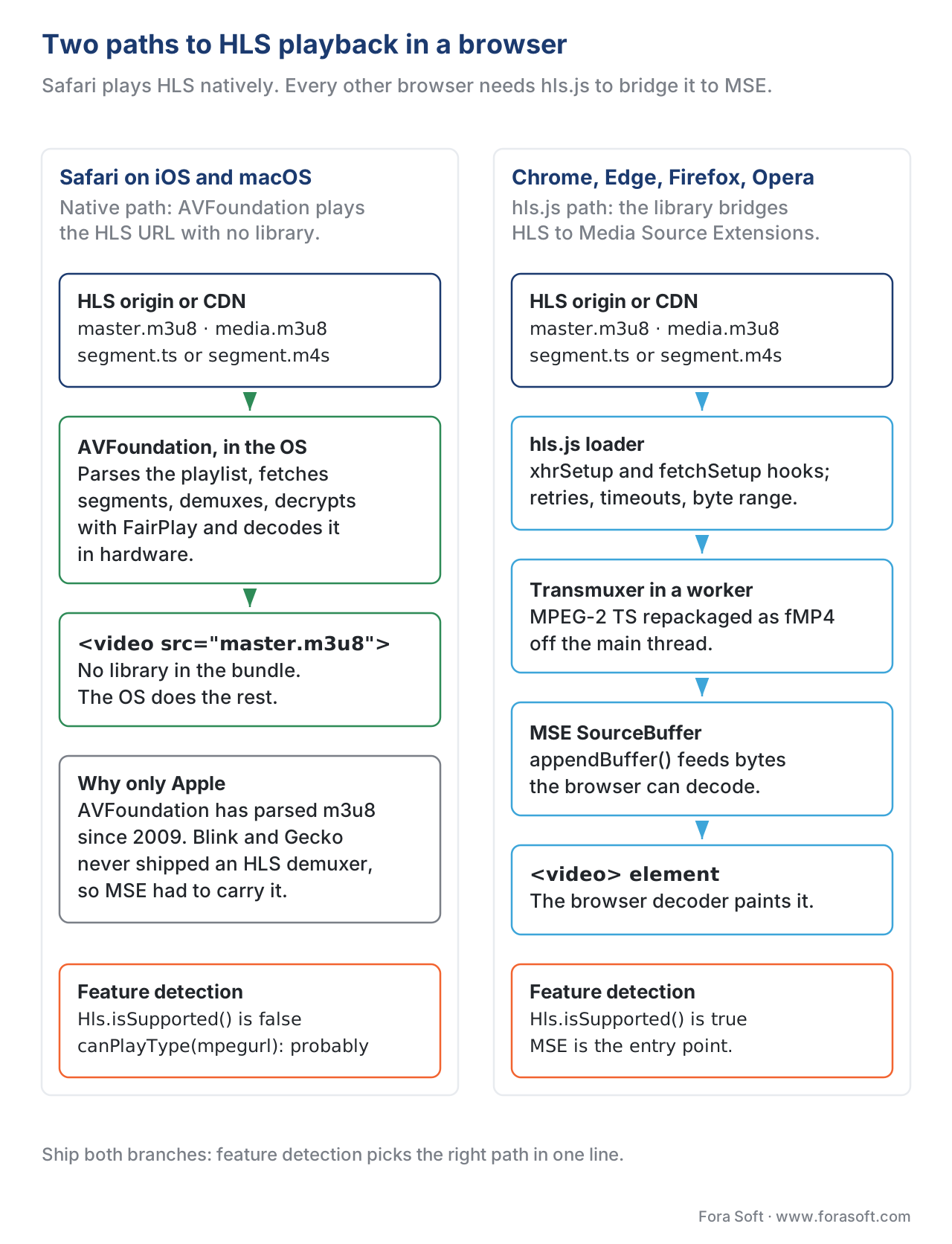 Figure 1. The two paths to HLS playback in a browser. Safari uses the native path; every other browser needs hls.js.
You can confirm this with one line in a fresh tab: Hls.isSupported() returns true in Chrome, Edge, Firefox, and Opera because they expose MSE, and returns false in Safari, where MSE is restricted enough that hls.js falls back to letting the native <video> tag handle the HLS URL directly. On iOS Safari (and iPadOS Safari) the right pattern is to skip hls.js entirely on first paint, set video.src to the playlist URL, and let AVFoundation do the work — Apple's framework already speaks HLS natively, with hardware-accelerated decoding and battery-friendly behaviour the JavaScript path cannot match. On every other browser, hls.js is the path.
Why this library exists at all
HLS was invented by Apple, ratified by Apple, and shipped first on Apple devices. Apple Safari plays HLS natively because AVFoundation, the macOS and iOS media framework, has known how to parse .m3u8 playlists and .ts segments since 2009. Every other browser engine — Blink (Chrome, Edge, Opera), Gecko (Firefox) — chose not to ship a built-in HLS demuxer, both because the protocol was perceived as Apple-controlled and because the MSE API was designed precisely so any JavaScript library could implement any streaming protocol the application needed. The result was a vacuum on the open web: an industry-standard streaming protocol that worked on iPhone out of the box and nowhere else.
hls.js was created by Guillaume du Pontavice at Dailymotion in 2015 to fill that vacuum. The early goal was modest: parse the HLS manifest, fetch the MPEG-2 Transport Stream segments, transmux them to fragmented MP4 (which MSE accepts), and append the bytes into a SourceBuffer. Over the next eleven years the library accumulated controllers — ABR, buffer, EME, audio track, subtitle track, content steering, interstitials — and grew into the de facto cross-browser HLS player, currently maintained by a working group that includes JW Player principal engineer Rob Walch and contributors from Mux, Akamai, Bitmovin, Cloudflare, and dozens of streaming vendors. The GitHub repo had 16,500 stars and 2,700 forks as of May 2026, and the npm package crossed several million weekly downloads in early 2026 (npm registry, hls.js, accessed 2026-05-25). The library lists in-production users that include JW Player, Mux, Wowza, Akamai, Bitmovin, Twitch's web client, and dozens of OTT services through the JW Player and Video.js integrations.
The political subtext matters because it shapes the roadmap. hls.js does not ship behaviour Safari does not also ship; when Apple adds a feature to the HLS Authoring Specification — interstitials, content steering, Pathway Cloning, HEVC over MPEG-2 TS — hls.js follows. When the working group adds something Apple has not — request retry heuristics, ABR tuning knobs, error recovery surfaces — it adds it as configuration, not as a deviation from the spec. The library does not have its own opinion about HLS; it implements Apple's opinion in the browsers Apple does not control.
The architecture in one paragraph
A running hls.js instance is a small graph of objects that hang off the top-level Hls class. The Hls constructor wires up the controllers — a stream controller that runs the segment-fetch state machine, a level controller that owns the multi-variant playlist, an ABR controller that picks the next variant, a buffer controller that owns the MSE SourceBuffer objects, an EME controller that talks to the browser's CDM when DRM is in play, a loader subsystem that does the HTTP fetches, and a transmuxer worker that converts MPEG-2 TS segments to fMP4 — and connects them to each other through a single in-process event bus. You call hls.attachMedia(video) to bind the instance to a <video> element, then hls.loadSource(url) to start fetching the playlist, then listen for events to drive your UI. Everything else is configuration.
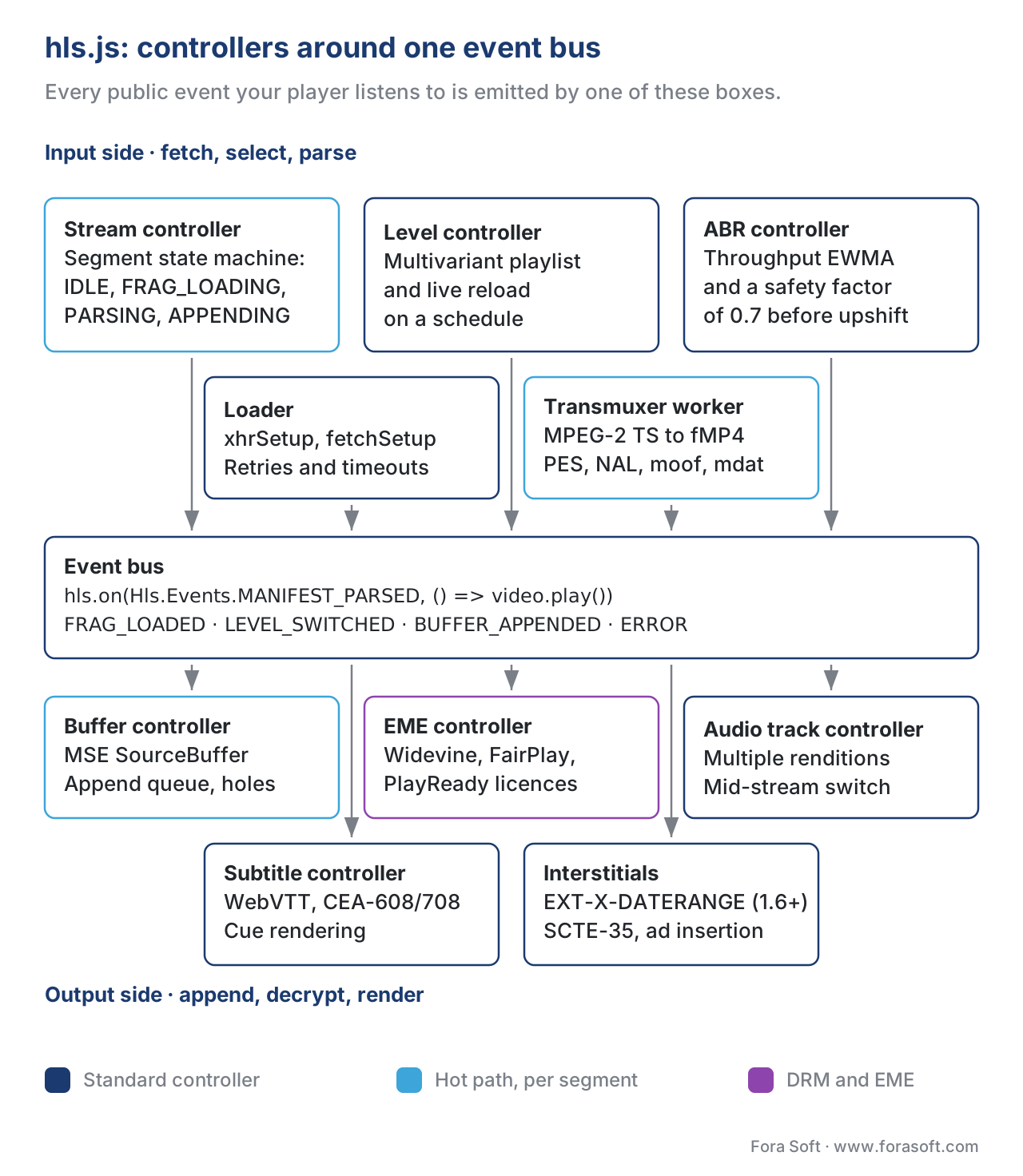 Figure 2. The hls.js controller graph. Every controller subscribes to events on the bus; almost every public event you listen to in your application is emitted from one of these boxes.
That paragraph is the whole picture. The rest of this article zooms into each box, names the events it emits, and tells you which configuration switches matter.
The stream controller
The stream controller is the heart of the library. It owns a small state machine — STOPPED, IDLE, KEY_LOADING, FRAG_LOADING, WAITING_LEVEL, PARSING, PARSED, BUFFER_FLUSHING, ENDED, ERROR — and walks through it once per segment forever. In the simplest run, the machine starts in IDLE, asks the level controller "which variant should I be loading?", transitions to FRAG_LOADING while the loader fetches the segment, transitions to PARSING when the bytes arrive and the transmuxer starts converting MPEG-2 TS to fMP4, transitions to PARSED when the conversion finishes, hands the bytes to the buffer controller for append, and returns to IDLE to do the next segment. When DRM is involved it pauses in KEY_LOADING while the EME controller fetches a license. When the player rebuffers it pauses in BUFFER_FLUSHING. When the stream ends it transitions to ENDED. When anything fails it transitions to ERROR and emits an Hls.Events.ERROR event.
The states are not academic. Every event you listen to in production — FRAG_LOADED, LEVEL_LOADED, BUFFER_APPENDED, MANIFEST_PARSED — fires at a specific state transition, and the order is deterministic. If you write a "time to first frame" instrumentation pass over hls.js (you should), you will measure it as the elapsed time between MEDIA_ATTACHING and the first FRAG_BUFFERED for the video SourceBuffer, and that interval lines up exactly with the stream controller walking from STOPPED through PARSED for the first segment.
The level controller and the ABR controller
The level controller owns the multi-variant playlist (.m3u8 with an EXT-X-STREAM-INF tag per variant) and the per-variant media playlists (.m3u8 with a list of EXTINF segments). It fetches the multi-variant once, then refreshes the active variant's media playlist on a schedule for live streams (every target duration) or once for VOD. It exposes the variants to the ABR controller through a levels array.
The ABR controller picks which variant to load next. The algorithm hls.js ships with is a throughput-based heuristic — it tracks the recent download bandwidth using an exponentially weighted moving average over the last few segments, multiplies the estimate by a safety factor (default 0.7), and picks the highest variant whose declared bitrate is below the safety-adjusted estimate. When the buffer is short or a download is taking longer than expected, the controller can mid-flight abandon the current segment and downshift — the rule is roughly "if fewer than two segments are buffered and the projected download time would deplete the buffer, abort and try a lower variant" (video-dev/hls.js, src/controller/abr-controller.ts, master branch, accessed 2026-05-25). The controller is replaceable: hls.abrController = new MyController(hls) is the supported override path.
Two configuration knobs change ABR behaviour without forking code. abrBandWidthFactor (default 0.95) is the safety factor applied to the throughput estimate when picking the next variant during a steady-state run. abrBandWidthUpFactor (default 0.7) is the more conservative safety factor applied when considering an upshift — the asymmetry is intentional, because picking too low costs you quality and picking too high costs you a rebuffer, and rebuffers hurt watch time more than a 100 kilobit-per-second quality dip does. The v1.7 alpha branch adds abrSwitchInterval as a third knob to cap the rate of variant changes per second, which dampens the "ABR is flapping between rungs" pattern operators see on jittery cellular networks (video-dev/hls.js, Release v1.7.0-alpha.1, 5 March 2026).
Worth noting: the original Buffer Occupancy Lyapunov-based Adaptation, abbreviated BOLA — Park and Chiang's 2016 IEEE INFOCOM paper — was integrated into hls.js as an experimental controller around 2020 but has been less prominent than throughput-based ABR in production deployments; the dash.js project has historically had the more polished BOLA implementation. The hls.js default remains throughput-based for most streams, with BOLA available as a configuration. A separate Learn article walks the BOLA algorithm in detail and explains when each family wins.
The buffer controller
The buffer controller is a thin layer over the browser's Media Source Extensions API. It creates a MediaSource, attaches it to the video element via URL.createObjectURL, opens one SourceBuffer per track (typically one video, one audio, sometimes one subtitles), and serialises append, remove, and end-of-stream operations because MSE refuses concurrent operations on a SourceBuffer. It also handles the messy details: appending fragmented MP4 init segments before media segments, computing buffer-hole tolerances during quality switches, and (since v1.6) the new MEDIA_SOURCE_REQUIRES_RESET error class that recovers from MSE being closed while the buffer thought it was still open (video-dev/hls.js, Release v1.7.0-alpha.1, 5 March 2026).
On iOS Safari 17 and later, the buffer controller can also use the ManagedMediaSource API — the iPhone-Safari subset of MSE that Apple shipped in iOS 17 to finally allow JavaScript players on the iPhone. ManagedMediaSource is not a full MSE: it has tighter rules about when the browser can take memory back, and it requires the source element be wrapped in a <source> child of <video>. hls.js detects it automatically and routes through it on iOS when present. The result is that hls.js can now play DASH-style MSE-fed streams on iPhone Safari for the first time — and the cross-platform stack no longer needs the "iOS branch" that was special-cased for the last decade. That said, in practice most teams still prefer the native AVFoundation path on iOS when the content is HLS, because the native path is hardware-accelerated end to end.
The EME controller
The EME controller is what handles DRM. When the manifest declares an EXT-X-KEY tag that names a key system (Widevine urn:uuid:edef8ba9-..., FairPlay com.apple.streamingkeydelivery, or PlayReady urn:uuid:9a04f079-...), the EME controller intercepts the stream controller's KEY_LOADING state, calls navigator.requestMediaKeySystemAccess, opens a MediaKeySession, fetches the license from the URL you configured, and feeds the key into the browser's Content Decryption Module. The buffer controller cannot append the encrypted bytes until the key arrives, which is why a slow license server is the most common cause of a black-screen-no-error on a paid stream.
The configuration in modern hls.js (v1.3 and later) lives under drmSystems:
const hls = new Hls({
  emeEnabled: true,
  drmSystems: {
    'com.widevine.alpha':           { licenseUrl: 'https://drm.example.com/widevine'  },
    'com.microsoft.playready':      { licenseUrl: 'https://drm.example.com/playready' },
    'com.apple.fps':                { licenseUrl: 'https://drm.example.com/fairplay',
                                      serverCertificateUrl: 'https://drm.example.com/fairplay/cert' },
  },
});
The older widevineLicenseUrl shortcut still works but is deprecated; new code should use drmSystems. FairPlay support over modern EME — not the legacy webkit-prefixed pre-EME path Apple shipped first — landed in v1.6, and v1.6.15 fixed a FairPlay key-ID patching bug that had caused "keyId is null" errors on some encoder configurations (video-dev/hls.js, Release v1.6.15, 19 November 2025). If you ship multi-DRM, lock to v1.6.14 or later. For the full EME mental model — what a CDM is, what cenc vs cbcs means, how the license exchange flows end to end — see our Encrypted Media Extensions (EME) deep dive.
The seven lines of code
A working hls.js player is small enough to fit in a tweet. This is the canonical pattern:
import Hls from 'hls.js';

const video = document.querySelector('video');
const url   = '/streams/master.m3u8';

if (Hls.isSupported()) {
  const hls = new Hls();
  hls.loadSource(url);
  hls.attachMedia(video);
  hls.on(Hls.Events.MANIFEST_PARSED, () => video.play());
} else if (video.canPlayType('application/vnd.apple.mpegurl')) {
  // Safari path: skip hls.js, let AVFoundation handle the HLS URL natively.
  video.src = url;
  video.addEventListener('loadedmetadata', () => video.play());
}
That is it. Eight lines if you count the import. The branch is mandatory because the right answer on Safari is the native path; the wrong answer is to ship hls.js everywhere and accept that it cannot run on iPhone Safari pre-iOS 17. Note that Hls.isSupported() checks for MSE support in general, not for HLS support — it returns true in every modern non-Safari browser and false everywhere else, exactly the inverse of where canPlayType returns truthy.
The order matters slightly. The recommended sequence is loadSource then attachMedia then start listening for events, because attachMedia triggers a MEDIA_ATTACHING → MEDIA_ATTACHED cycle that the stream controller waits for before processing the playlist; doing them in the other order works but adds one event-loop tick of latency. For low-latency live, every tick counts.
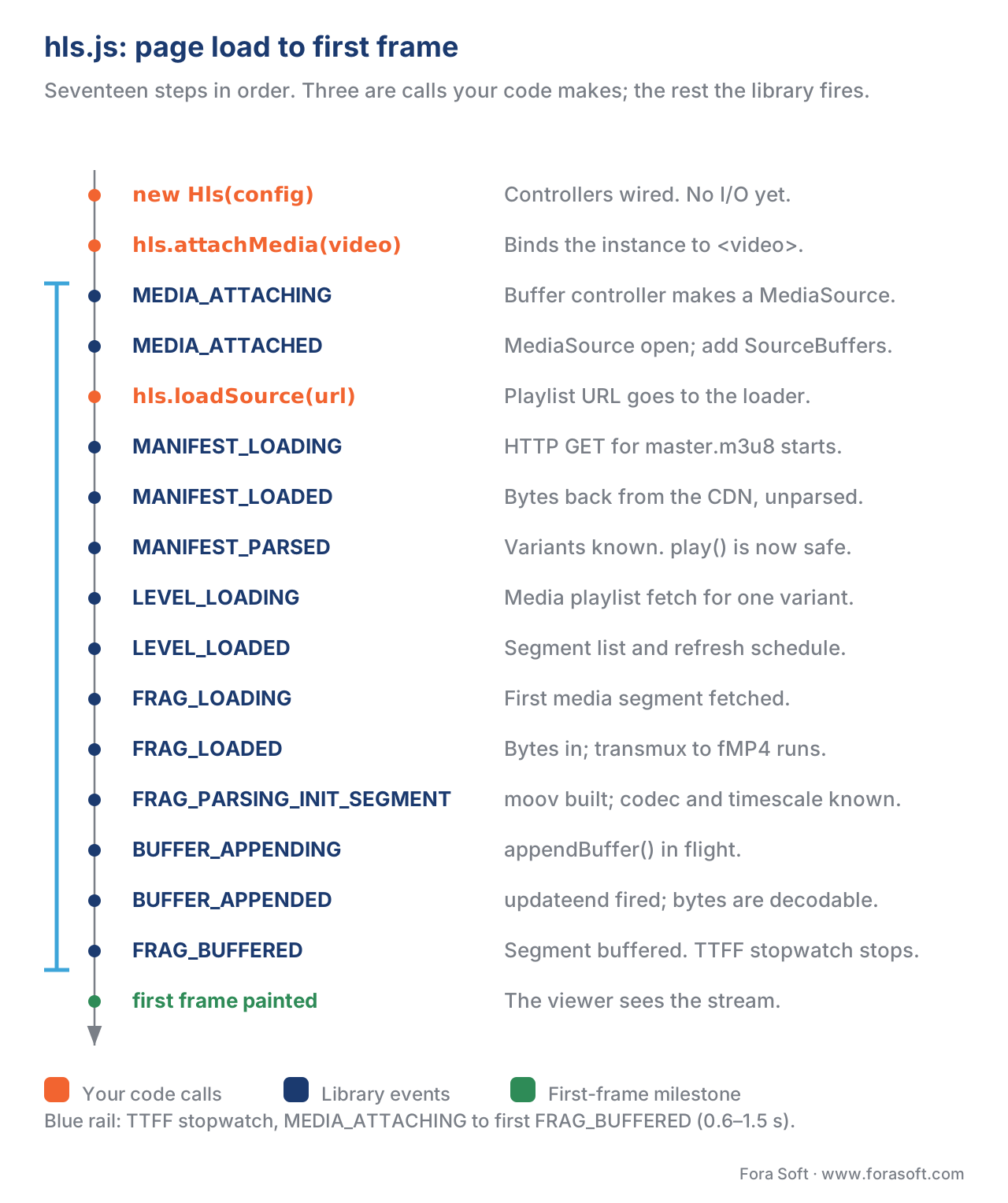 Figure 3. The event sequence from page load to first frame. Time-to-first-frame is the wall-clock distance between MEDIA_ATTACHING and the first FRAG_BUFFERED for the video track.
Error handling, the way you ship it
Errors in hls.js arrive through a single event: Hls.Events.ERROR. The payload is a tagged object with three fields you must read every time — type, details, and fatal — and a fourth data field whose shape depends on the details. There are four type families, and they map to four recovery paths.
Hls.ErrorTypes.NETWORK_ERROR is anything the network layer surfaced: manifest 404, fragment 404, fragment timeout, HTTP status 5xx, or XMLHttpRequest aborted. When fatal, the documented recovery is hls.startLoad() — restart the segment-fetch state machine and try again. The library's own example in the API docs lists exactly that, and the v1.6 documentation walks through it line by line (video-dev/hls.js, docs/API.md, master branch, accessed 2026-05-25).
Hls.ErrorTypes.MEDIA_ERROR is anything the MSE layer or the browser's decoder surfaced: an appendBuffer that the SourceBuffer rejected, a QuotaExceededError, a buffer-hole stall the gap controller could not skip, a decoder error from the browser. When fatal, the documented recovery is hls.recoverMediaError() once; if a second media error fires within a few seconds of the first, call hls.swapAudioCodec() then hls.recoverMediaError() (video-dev/hls.js, docs/API.md, master branch). The audio-codec swap is the recovery for the specific failure mode where the browser's decoder cannot handle a mid-stream codec change.
Hls.ErrorTypes.KEY_SYSTEM_ERROR covers everything the EME path threw: license-request rejected, key status of internal-error or output-restricted, CDM crashed. There is no automatic recovery, because the cause is almost always either a misconfigured license server or a device-policy decision (a Widevine L3 phone trying to play 4K, an HDCP-not-detected condition). The right response is to surface a user-visible "this content is not available on this device" message and emit a telemetry event.
Hls.ErrorTypes.MUX_ERROR and Hls.ErrorTypes.OTHER_ERROR are the rare cases: a transmuxer failed to parse a malformed segment, or a parser hit an unexpected token in the playlist. There is no recovery; log it, switch to a different variant if you can, and surface a generic error to the user.
The pattern every production player ships is some flavour of this:
hls.on(Hls.Events.ERROR, (event, data) => {
  if (!data.fatal) return;             // non-fatal: log and keep playing
  switch (data.type) {
    case Hls.ErrorTypes.NETWORK_ERROR:
      telemetry.error('hls.network', data);
      hls.startLoad();                 // restart the fetch state machine
      break;
    case Hls.ErrorTypes.MEDIA_ERROR:
      telemetry.error('hls.media', data);
      if (mediaErrorRecoveryAttempted) {
        hls.swapAudioCodec();
        hls.recoverMediaError();
      } else {
        mediaErrorRecoveryAttempted = true;
        hls.recoverMediaError();
        setTimeout(() => { mediaErrorRecoveryAttempted = false; }, 5000);
      }
      break;
    default:
      telemetry.error('hls.fatal', data);
      hls.destroy();
      showUnplayableMessage();
  }
});
A common mistake is to call hls.destroy() on every fatal error. Destroying the instance unbinds it from the video element and forces the user to reload the page; doing it on a recoverable NETWORK_ERROR is a one-line bug that ships every quarter. Read data.type first; destroy only when there is no recovery path.
Low-latency HLS through hls.js
The Apple low-latency HLS extension — abbreviated LL-HLS — lets a player download partial segments before the full segment finishes encoding, with a target glass-to-glass latency in the 2–5 second range instead of the 10–30 second range of standard HLS (Apple, HLS Authoring Specification for Apple Devices, revision 2025-09, §6 Low-Latency HLS). hls.js has supported LL-HLS since v1.0 and the support has stabilised through the v1.6 series. Apple removed the HTTP/2 server-push requirement from the spec in September 2023, so articles that describe LL-HLS as requiring HTTP/2 push are out of date; the current spec uses blocking playlist reload, preload hints, and rendition reports as the three low-latency primitives.
Enabling it is a configuration switch, not a code rewrite:
const hls = new Hls({
  lowLatencyMode: true,        // turn LL-HLS on (default true since v1.4)
  liveSyncDuration:    3,      // try to stay ~3 seconds behind the live edge
  maxLiveSyncPlaybackRate: 1.1 // catch up to live by playing at 1.1x when behind
});
The two duration knobs deserve a sentence each. liveSyncDuration is the target distance, in seconds, from the live edge — set it too low and the player will rebuffer on every network blip, set it too high and you have not actually shipped low latency. maxLiveSyncPlaybackRate lets the player accelerate playback slightly when it drifts behind, so the user catches back up to the live edge without a visible seek; the default is 1.0 (off), and most LL-HLS deployments set it to 1.05–1.1.
LL-HLS performance through hls.js is gated as much by the path between the origin and the player as by the player itself. A CDN that does not support HTTP/2 (or HTTP/3) and blocking playlist reload negates the benefit; an LL-HLS-capable player on a non-LL-HLS CDN runs as a standard HLS player. Our LL-HLS deep dive walks the CDN-side requirements.
The numbers operators actually care about
Watch counts of the kind that ship with a player are not interesting; the numbers below are the ones an operator measures on a production hls.js deployment.
| Metric | Definition | Healthy range (typical OTT) |
|---|---|---|
| Time to first frame (TTFF) | Wall-clock from MEDIA_ATTACHING to the first FRAG_BUFFERED for video | 0.6–1.5 s on broadband; 1.5–3 s on cellular |
| Rebuffer ratio | Total rebuffer time ÷ total watch time, per session | < 0.5% target; 1–3% production reality |
| ABR switch rate | Number of LEVEL_SWITCHED events per minute of playback | 0.2–1.0 per minute steady state |
| Variant entropy | Fraction of session time spent on the top rung | 0.6–0.9 on broadband; lower is fine on cellular |
| Fatal error rate | Sessions with at least one fatal Hls.Events.ERROR ÷ all sessions | < 0.5% target; 1–2% production reality |
| Live edge distance | For live, liveSyncPosition − currentTime averaged over a minute | Target ± 0.5 s for LL-HLS; ± 3 s for standard HLS |
BUFFER_STALLED event and the matching RESUME (or the next play-pause cycle), divide by the milliseconds of actual playback, multiply by 100. A 0.5% target on a 60-minute session is 18 seconds of rebuffering, which is roughly the loss budget of one bad segment per session.
When to fork it (almost never) and when to monkey-patch it (more often than you think)
The library is open source under MIT and the temptation to fork it for "just this one feature" is real and almost always wrong. The reason is not legal or moral — it is operational. hls.js ships a release every two to four weeks, and a typical release is a dozen bug fixes against playback corner cases on devices you do not own (Tizen 4.0 from 2018, a webOS 5 build from a 2020 LG, a 5-year-old PlayStation). A fork stops collecting those fixes the moment it diverges. The right pattern, in order of preference:
First, use configuration. Most things people fork to change are exposed as Hls constructor options — xhrSetup, fetchSetup, loader, manifestLoadingTimeOut, levelLoadingTimeOut, fragLoadingTimeOut, lowLatencyMode, liveSyncDuration, liveMaxLatencyDuration, the entire drmSystems object, every ABR factor. The full list is in src/config.ts on the master branch and is the first place to look before opening an issue, let alone forking.
Second, replace a controller. The library exposes abrController, audioTrackController, subtitleTrackController, and the loader subsystem as user-replaceable. If you want a custom ABR — buffer-based, learned, server-driven — write a class and assign it. The base class signature is stable across the v1.6 series.
Third, monkey-patch from outside. If you need to mutate the playlist after fetch (rewrite segment URLs to add a token, strip a misencoded EXT-X-DATERANGE, redirect to a backup origin), supply a custom xhrSetup or fetchSetup function and rewrite the response there. You do not need a fork.
Forking is the right answer only when the bug you need to fix is in transmuxer logic, parser logic, or stream-controller state-machine logic and the change is too small to send upstream. In nine years of shipping hls.js to production, we have done this twice. Both times the patch was a single line; both times we sent it upstream and dropped the fork within two months.
A note on a related pattern: the Hola fork that ships an hls.js provider for JW Player — hola/jwplayer-hlsjs — is not a fork in the sense above; it is a thin adapter that wires hls.js into JW Player's plugin API. JW Player itself has a maintainer on the hls.js working group, so the two projects move in lockstep, and there is no fork drift in the underlying library.
Common pitfalls and what to do about them
The same five mistakes show up in every code review of a production hls.js integration. Naming them once saves a quarter of debugging.
The first is not branching on Safari. hls.js cannot run on iOS Safari before iOS 17, and even on iOS 17 the native AVFoundation path is faster and more battery-efficient for HLS content. The branch we showed earlier — Hls.isSupported() then fall back to canPlayType('application/vnd.apple.mpegurl') — is mandatory.
The second is calling hls.destroy() on every error. We covered the recovery pattern earlier; the rule is startLoad() for NETWORK_ERROR, recoverMediaError() for MEDIA_ERROR, destroy() only when there is no recovery.
The third is listening for MANIFEST_LOADED instead of MANIFEST_PARSED. MANIFEST_LOADED fires after the HTTP fetch finishes; MANIFEST_PARSED fires after the library has parsed the variants and is ready for play(). Calling play() on MANIFEST_LOADED works in Chrome and fails intermittently on Firefox.
The fourth is assuming live currentTime starts at zero. For VOD it does; for live it starts at the live edge, which can be a number like 1719428400 (Unix epoch seconds) or a smaller number depending on the manifest. UI code that draws a progress bar must use seekable.start(0) and seekable.end(0) as the rails, not 0 and duration.
The fifth is not setting per-network-condition timeouts. The defaults — manifestLoadingTimeOut: 10000, fragLoadingTimeOut: 20000 — are sensible on broadband and pessimistic on satellite or 3G. The right pattern is to tighten them on broadband (3 and 6 seconds) and loosen them on detected slow links (30 and 60 seconds); the library does not auto-tune this, your code has to.
Where Fora Soft fits in
We have shipped hls.js inside production players for video conferencing, OTT, e-learning, telemedicine, and video surveillance since the library was at v0.7 — long enough that the "Safari branch" and the "ManagedMediaSource branch" are both reflexes by now. The work that earns trust is rarely the happy path; it is the recovery story, the smart-TV port that gets the buffer controller through a Tizen 4.0 quirk, the LL-HLS deployment whose CDN needed three rounds of tuning before the player's liveSyncDuration actually held, and the multi-DRM stack that ships Widevine + FairPlay + PlayReady from one packager. If your team is building a video product on the open web in 2026, hls.js is in your bundle whether you wrote the integration yourself or inherited it — and the difference between the two is usually a quarter of post-launch QoE work nobody planned for. Our video streaming development team owns that player and LL-HLS tuning work, and our OTT and IPTV platform builds ship it with multi-DRM on web, mobile and Smart TV.

The book
Video Streaming: A Complete Guide to Video Delivery: From ABR and CDNs to Players, WebRTC, DRM, and the Economics of Streaming
This article takes one player apart controller by controller. Book 3 of the handbook is the rest of that player's world: 1,182 pages on ABR and the algorithms that pick a rung, the CDN and cache layer that decides whether your segments arrive in time, the recovery patterns behind startLoad() and recoverMediaError(), multi-DRM, QoE monitoring, and what delivery costs per viewer-hour. Read it and the config object above stops being a list of knobs: liveSyncDuration, abrBandWidthUpFactor and fragLoadingTimeOut become numbers you can defend in a design review. Written by Nikolay Sapunov, CEO at Fora Soft.
Is your hls.js integration ready for the devices you actually ship to?
Send us your player code and the device list you have to cover, and we will tell you which error paths you are missing, which ABR defaults are working against you, and what the Safari and smart-TV branches still need — 250+ video products shipped since 2005.
See our case studies
Case study
Scholarly
Adaptive DASH and HLS playback in the browser for 15,000+ students, with live classes up to 2,000 viewers at once - the case where the player's recovery path decides whether a lesson is watchable.
Case study
VALT
RTMP ingest into HLS playback for 770+ US organisations and 50,000+ users, built and maintained by us for over 10 years - a browser player that has to keep working across a decade of browser releases.
Case study
Mindbox
RTSP cameras repackaged through FFmpeg into HLS across 50+ deployments - a wall of live cameras that has to open in a browser with no plugin, which is the hls.js job exactly.
What to read next
Browser APIs
Media Source Extensions (MSE): how every web player works under the hood
The API hls.js appends into, and the rules that make the buffer controller behave the way it does.
Protocols
HLS in depth: m3u8, segments, multi-variant playlists
The playlist hls.js parses, tag by tag, before any of the controllers get to work.
Players
dash.js in depth
The same job for MPEG-DASH: what the other reference player does differently, and why.
ABR
Adaptive bitrate streaming explained without buzzwords
What the ABR controller is deciding when it picks the next rung, and what it costs to get wrong.
References
- video-dev/hls.js, README and source tree, master branch — <https://github.com/video-dev/hls.js> (accessed 2026-05-25).
- video-dev/hls.js, API.md, master branch — <https://github.com/video-dev/hls.js/blob/master/docs/API.md> (accessed 2026-05-25).
- video-dev/hls.js, Release v1.6.15, 19 November 2025 — <https://github.com/video-dev/hls.js/releases/tag/v1.6.15> (accessed 2026-05-25). Source of the FairPlay key-ID patching fix and the latest stable v1.6 reference.
- video-dev/hls.js, Release v1.7.0-alpha.1, 5 March 2026 — <https://github.com/video-dev/hls.js/releases/tag/v1.7.0-alpha.1> (accessed 2026-05-25). Source of the
abrSwitchInterval,appendTimeout, andMEDIA_SOURCE_REQUIRES_RESETreferences; pre-release subject to change before v1.7.0 final. - video-dev/hls.js,
src/controller/abr-controller.tsandsrc/controller/stream-controller.ts, master branch — <https://github.com/video-dev/hls.js/tree/master/src/controller> (accessed 2026-05-25). Primary source for ABR algorithm and stream-controller state machine. - IETF RFC 8216, HTTP Live Streaming, R. Pantos and W. May (eds.), August 2017 — <https://www.rfc-editor.org/rfc/rfc8216> (accessed 2026-05-25). The base HLS protocol specification; controlling document for playlist syntax and segment semantics that hls.js implements.
- Apple Inc., HLS Authoring Specification for Apple Devices, revision 2025-09, §6 Low-Latency HLS — <https://developer.apple.com/documentation/http-live-streaming/hls-authoring-specification-for-apple-devices> (accessed 2026-05-25). Controlling document for LL-HLS; the September 2023 revision removed the HTTP/2 server-push requirement that older articles still describe as required. The article followed Apple's revised text over the older third-party paraphrases.
- W3C, Media Source Extensions™, Recommendation 17 November 2016, with Media Source Extensions 2 tracked as Candidate Recommendation through 2025 — <https://www.w3.org/TR/media-source/> (accessed 2026-05-25). The browser API hls.js feeds bytes into.
- W3C, Encrypted Media Extensions, Recommendation 18 September 2017, Working Draft updated 20 May 2026 — <https://www.w3.org/TR/encrypted-media/> (accessed 2026-05-25). The browser API the EME controller talks to; spec defines the
requestMediaKeySystemAccesssurface and theMediaKeySessionlifecycle the hls.js EMEController orchestrates. - npm, hls.js package page, accessed 2026-05-25 — <https://www.npmjs.com/package/hls.js>. Source of the weekly download figure cited in 2026; downloads reported by the registry vary by week and across mirroring sources, with several mainstream sources reporting figures in the multi-million-per-week range as of Q1 2026.
- Park J., Famaey J., De Turck F., et al., BOLA: Near-Optimal Bitrate Adaptation for Online Videos, IEEE INFOCOM 2016 — <https://arxiv.org/abs/1601.06748> (accessed 2026-05-25). The buffer-based ABR algorithm cited alongside throughput-based ABR; hls.js supports BOLA as an experimental controller; dash.js's BOLA implementation is the more deployed one.
- Mux Inc. engineering blog, An update on Low Latency HLS live streaming, Part 2 — <https://www.mux.com/blog/low-latency-hls-part-2> (accessed 2026-05-25). Production-deployer perspective on LL-HLS used to cross-check the article's latency-range claims; spec text was preferred where Mux's deployment specifics differed.
