


Why this matters
If you ship video to a browser at any meaningful scale, you ship MSE — whether you wrote the code yourself or imported hls.js, shaka-player, dash.js, or video.js and let it write the code for you. The four open-source players above account for a very large share of non-Apple browser playback, and underneath their public API the same three or four MSE method calls run, in the same order, with the same race conditions. Reading this article should leave a product manager able to ask an engineer the right diagnostic question when a player stalls on iPhone, and leave a senior engineer with a complete mental model of the API including the 2026 additions — Managed Media Source, MSE-in-Worker, and SourceBuffer.changeType() — without having to read the W3C specification end to end. You do not need any prior knowledge of HTTP Live Streaming or MPEG-DASH; everything you need is defined as it appears. By the end you will know why the iPhone Safari "60-second buffer trap" exists, what causes a player to crash with QuotaExceededError at 11 p.m. on a Friday, and which one-line change to a player config fixes it.
The problem MSE was invented to solve
Before MSE existed the browser had exactly one way to play a video. The page included an <video> element with a src attribute pointing at a video file, the browser downloaded the file, and the user pressed play. That model works for a 10-megabyte trailer on a marketing page. It does not work for adaptive streaming.
Adaptive streaming requires three things the simple src model cannot do. The player must download the video in small chunks called segments, not as one big file, so it can start playback in two seconds instead of two minutes. The player must change quality mid-playback — drop from 1080p to 720p when the network slows down — without ever closing the video element. And the player must keep doing those two things, forever, while the user pauses, seeks, switches tabs, plugs in headphones, and rotates the device. The single-source-attribute model has no API surface for any of that.
So in 2013 a group of engineers from Microsoft, Google, Netflix, and the BBC sat down at the W3C and wrote a new API called Media Source Extensions, which gave JavaScript a way to push raw bytes into the video element's internal pipeline. The first Recommendation was published on 17 November 2016 (W3C, Media Source Extensions™, 17 November 2016). A follow-on document called Media Source Extensions 2 is in Working Draft as of 4 November 2025 and contains the major 2020s additions — MediaSourceHandle for Worker support, ManagedMediaSource for mobile devices, and SourceBuffer.changeType() for codec switching.
Everything in this article is built on those two documents.
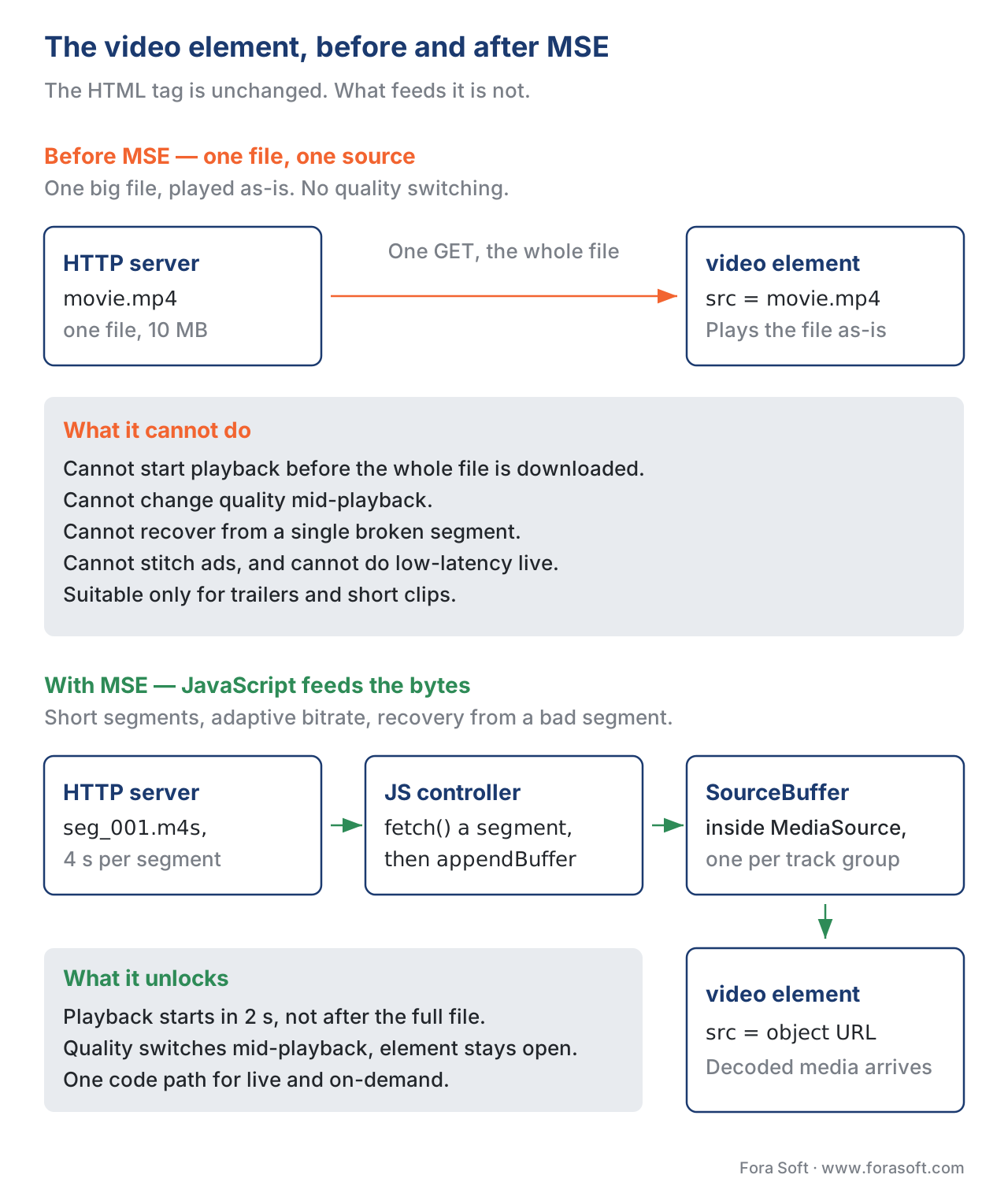 Figure 1. The video element before and after MSE. The
 <video> tag is unchanged; what changed is what feeds it.
The four objects you actually use
The MSE API is small enough to memorise. There are four objects, plus a couple of supporting types, and you will use roughly six methods across all four. The four objects are MediaSource, SourceBuffer, MediaSourceHandle, and ManagedMediaSource.
A MediaSource is the JavaScript-side proxy for the video element's media stream. It is the object you create first, attach to the <video> element, and hand to the page's playback controller. Its job is to coordinate one or more SourceBuffers and expose three lifecycle events (sourceopen, sourceended, sourceclose) plus a readyState enum with three values ("closed", "open", "ended"). Methods on the MediaSource matter mostly at the boundaries: addSourceBuffer(mimeType) to create a per-track buffer, endOfStream() to signal that no more segments are coming, and the static MediaSource.isTypeSupported(mimeType) to check whether the browser can decode the codec the manifest asked for.
A SourceBuffer is the JavaScript-side handle on a buffer of decoded-ready media inside the browser. Each SourceBuffer represents one track group — typically one for video and one for audio, although both can live in a single buffer if the segments are muxed. The buffer is where the actual byte traffic happens: appendBuffer(arrayBuffer) pushes a downloaded segment in, remove(start, end) evicts a time range, and changeType(newMimeType) is how a player switches between H.264 and HEVC mid-playback without tearing down the buffer. The SourceBuffer also carries an updating boolean that is true whenever an append or remove is mid-flight, and the API's single most common bug is appending again while updating is true and getting an InvalidStateError thrown in your face. Listen for the updateend event before the next call. Always.
A MediaSourceHandle is the small handle that crosses the boundary between the page's main thread and a dedicated Worker. It is the key to MSE-in-Worker, which we will treat in its own section below. For now the one fact to internalise is that MediaSourceHandle is transferable through postMessage — once you transfer it, you assign it to video.srcObject (not video.src) and the Worker becomes the buffer's owner.
A ManagedMediaSource is a subclass of MediaSource that ships on Safari 17.1 and later, on iPhone, iPad, and Mac. Its API surface adds two events (startstreaming and endstreaming) and one property (streaming), and its SourceBuffers are ManagedSourceBuffer instances which can be evicted by the browser at any time, with a bufferedchange event when that happens. It is the route — and the only route — by which adaptive streaming reached iPhone Safari. Everything iPhone-related in this article is really a ManagedMediaSource story.
The W3C calls these out in the MSE 2 Working Draft (W3C, Media Source Extensions™ 2, Working Draft 4 November 2025).
The canonical lifecycle, in working code
The lifecycle from "page loads" to "first frame on screen" is the same in every player. There are six steps and they always run in the same order.
// 1. Feature-detect the API and the codec.
const VIDEO_MIME = 'video/mp4; codecs="avc1.640028,mp4a.40.2"';
if (!('MediaSource' in window) || !MediaSource.isTypeSupported(VIDEO_MIME)) {
  throw new Error('MSE or codec not supported');
}

// 2. Create a MediaSource and attach it to the <video> element.
const video = document.querySelector('video');
const mediaSource = new MediaSource();
video.src = URL.createObjectURL(mediaSource);

// 3. Wait for the 'sourceopen' event before doing anything else.
mediaSource.addEventListener('sourceopen', async () => {
  URL.revokeObjectURL(video.src);   // free the blob URL now that we are attached
  const sourceBuffer = mediaSource.addSourceBuffer(VIDEO_MIME);
  sourceBuffer.mode = 'segments';   // 'segments' uses each segment's timestamps

  // 4. Append the initialisation segment first.
  const init = await (await fetch('/init.mp4')).arrayBuffer();
  await appendAndWait(sourceBuffer, init);

  // 5. Append media segments one at a time.
  for (const url of segmentUrls) {
    const seg = await (await fetch(url)).arrayBuffer();
    await appendAndWait(sourceBuffer, seg);
  }

  // 6. Tell the browser there are no more segments.
  mediaSource.endOfStream();
});

function appendAndWait(sourceBuffer, data) {
  return new Promise((resolve, reject) => {
    sourceBuffer.addEventListener('updateend', resolve, { once: true });
    sourceBuffer.addEventListener('error', reject, { once: true });
    sourceBuffer.appendBuffer(data);
  });
}
Six things to call out about the snippet above. First, the feature detection is one line and is non-negotiable; a player that does not check isTypeSupported is a player that will crash on a Tizen TV that lacks AV1. Second, the order matters — addSourceBuffer only works after sourceopen, never before; calling it earlier throws InvalidStateError. Third, the initialisation segment must be the very first thing you append, because it carries the moov atom that describes the entire track — sample rate, codec parameters, resolution. Fourth, every appendBuffer is asynchronous and you must wait for updateend before the next call. Fifth, endOfStream() is the way to tell the browser "I am done", and it transitions the MediaSource from the "open" to the "ended" state, which is what lets the video element know its total duration is now final. Sixth, you revoke the blob URL once the source is attached, because leaving it in place leaks a reference to the MediaSource and stops the garbage collector from cleaning up the page.
That snippet, in spirit, is what every browser-based streaming player does — including the ones that ship at Netflix scale. The differences are in the manifest parser that supplies the segment URLs, the adaptive bitrate algorithm that decides which rendition to fetch, and the buffer-management policy that decides when to call remove(). The MSE API is the same.
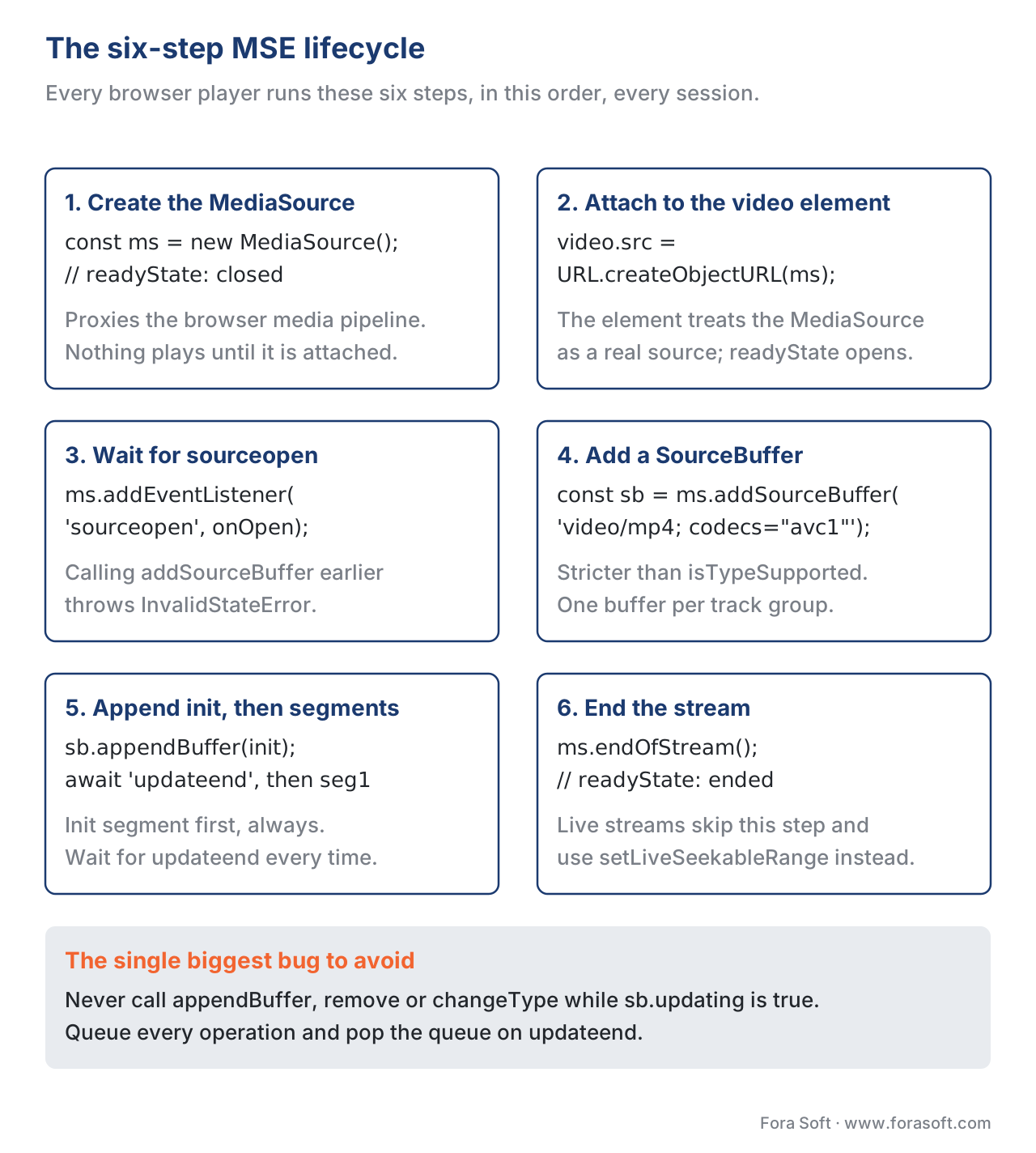 Figure 2. The six-step MSE lifecycle. The video element never sees a complete file; it sees a stream of small appends.
Codec strings, and the strict mode you cannot skip
Every call into MSE carries a MIME-type-plus-codecs string that defines exactly what is in the bytes you are about to push. The format is specified in RFC 6381 (IETF, RFC 6381, August 2011), and a typical example for HLS-style H.264 plus AAC looks like this: video/mp4; codecs="avc1.640028,mp4a.40.2". The avc1.640028 part identifies H.264 High Profile at Level 4.0; the mp4a.40.2 part identifies AAC-LC.
The two rules that catch new MSE programmers off guard are these. First, MediaSource.isTypeSupported(mime) is a probe; it returns true if the browser thinks it can handle the type, but it does not lock anything in. Second, mediaSource.addSourceBuffer(mime) is stricter than the probe — it actually instantiates the parser and the decoder pipeline, and a codec string that passes isTypeSupported on the desktop can still throw NotSupportedError on a smart TV whose decoder pipeline does not accept that exact profile-level combination. The lesson is to test both, on every device the product ships on, and to surface a clear "this codec is not supported on this device" error to the user rather than letting addSourceBuffer throw without explanation.
The codec strings in use across mainstream 2026 deployments are: avc1.<profile><level> for H.264, hvc1.<profile_space>.<profile>.<tier>L<level>.<constraints> for HEVC, vp09.<profile>.<level>.<bit_depth>... for VP9, av01.<profile>.<level>L<tier>.<bit_depth> for AV1, and mp4a.40.<object_type> or opus for audio. MDN's "The codecs parameter in common media types" page (Mozilla Developer Network, accessed May 2026) is the practical reference; we keep a copy linked in the references section below.
The updating race, and the queue you must build
The single most common bug in MSE code is calling appendBuffer while the SourceBuffer is still processing the previous append. The SourceBuffer exposes a updating boolean that is true from the moment appendBuffer is called until the updateend event fires; calling appendBuffer, remove, abort, changeType, or mutating timestampOffset or the append window while updating is true throws InvalidStateError immediately. There is no autoqueue inside the API.
So every production player builds its own queue. The shape of the queue is identical in every codebase: a JavaScript array of pending operations, a single in-flight operation, and a updateend listener that pops the next operation off the queue when the in-flight one finishes. The pattern is short enough to show in full.
class SbQueue {
  constructor(sourceBuffer) {
    this.sb = sourceBuffer;
    this.pending = [];
    this.sb.addEventListener('updateend', () => this.next());
  }
  enqueue(op) {
    this.pending.push(op);
    if (!this.sb.updating) this.next();
  }
  next() {
    const op = this.pending.shift();
    if (op) op();
  }
}

const q = new SbQueue(sourceBuffer);
q.enqueue(() => sourceBuffer.appendBuffer(init));
q.enqueue(() => sourceBuffer.appendBuffer(seg1));
q.enqueue(() => sourceBuffer.remove(0, 5));
q.enqueue(() => sourceBuffer.appendBuffer(seg2));
A senior reader looking at that queue will spot two open questions. The first is what happens when an error event fires instead of an updateend — the queue stalls and the player needs an error-recovery branch. The second is what happens when the JavaScript needs to call abort() to stop a long-running append; abort itself sets updating to false and triggers an updateend, so the queue keeps moving but the appended bytes may be partial and the next append needs to compensate. Every mature player has a wrapper around its queue that handles both cases; both hls.js and shaka-player have a file called something like media-buffer.ts or sourcebuffer-controller.js that does this and almost nothing else.
QuotaExceededError, and the eviction story
A streaming player keeps a forward buffer of perhaps thirty seconds of video (for live) to two minutes (for video-on-demand) in the SourceBuffer at any given moment. That sounds small, but a 1080p high-bitrate VoD asset at 8 Mbps will push roughly 60 MB of decoded buffer per minute, and the browser's media pipeline has finite memory. When the buffer is full, appendBuffer throws QuotaExceededError.
The W3C specification gives the browser permission to evict older data on its own when it needs to, but the spec does not require it; in practice Chromium will throw QuotaExceededError while Safari has historically been more aggressive about silent eviction. The Chrome team published a clear explainer in 2014 that is still accurate today (Chrome Developers, "Handling QuotaExceededError", 2014, accessed May 2026), and the practical recipe is the same in 2026: when you catch QuotaExceededError, call sourceBuffer.remove(0, currentTime - keepBack) to free a chunk of older buffer, wait for updateend, and retry the append.
A real keepBack value is around five seconds on the past side and is the difference between a working player and a player that silently corrupts seeks. A common production setting is to keep about a minute behind the playhead and another minute ahead, capped at ninety seconds total, then call remove whenever the gap exceeds those values.
This is one of the places where ManagedMediaSource on iPhone Safari is meaningfully different from desktop MSE; we cover it below in the "iPhone exception" section.
Common pitfall. The naive fix forQuotaExceededErroris "wrapappendBufferin a try/catch and ignore the throw." That fix produces a player that silently stops downloading new segments while the playhead keeps moving forward, and twenty seconds later the user gets a stall they cannot recover from. The correct fix is to free buffer withremove()and retry; if no removal helps, surface the error to the telemetry layer and switch the player into a recovery mode. Errors are signal, not noise.
Switching codecs without tearing down: changeType()
For a long time changing the codec mid-playback meant destroying the SourceBuffer and the MediaSource and starting over. That worked but introduced a visible pause and lost the back-buffer; it also broke any player that wanted to switch between H.264 and HEVC renditions, or between H.264 Main Profile and High Profile, mid-stream.
In 2018 the W3C added SourceBuffer.changeType(mimeType) to the specification, and the major browsers shipped it during 2019 and 2020. The method is one line in the calling code — sourceBuffer.changeType('video/mp4; codecs="hvc1.1.6.L93.B0"') — and it tells the SourceBuffer to expect bytes of a new codec for subsequent appends, while preserving the already-buffered media. A short demo lives at the official sample site (Google Chrome Samples, "SourceBuffer.changeType", accessed May 2026), and it shows H.264 spliced into HEVC and then into VP9 in a single playback session.
The practical use case in 2026 is two-fold. First, codec-switching ABR: a player that holds a mixed-codec rendition ladder (an H.264 fallback at low bitrates and an HEVC or AV1 tier at high bitrates) can step between the two on a buffer event without re-creating the buffer. Second, ad-stitching with a different codec: server-side ad insertion that splices in a creative encoded with a different profile can rely on changeType to let the player accept the splice without a discontinuity that the user can perceive.
Two cautions. The browser must support both the outgoing and the incoming MIME-type, and isTypeSupported should be called on the incoming type before the changeType call. And changeType is queued through the updating flag like every other write, so it sits inside the same queue described above.
MSE-in-Worker: the Chrome 108 unlock
Until late 2022 every MSE operation ran on the page's main thread. Buffer parsing, codec checks, the appendBuffer itself — all of it competed with the page's render loop for CPU. On a tab with a moderately heavy single-page application around the player, the parsing of a 6-second segment could push the rendering frame budget over 16.7 milliseconds and the page would visibly stutter.
In November 2022, Chrome 108 shipped MSE-in-Worker (Chromium, "MSE in Workers", Chrome Status feature 5177263249162240). The mechanism is the new MediaSourceHandle object. You create a MediaSource inside a dedicated Worker, read its .handle property (a MediaSourceHandle), and transfer the handle to the main thread via postMessage. On the main thread you assign the handle to video.srcObject (not video.src), and from that point on the entire MSE pipeline lives inside the Worker — segment fetch, transmuxing, append, eviction, all of it.
The page sees a measurable reduction in main-thread CPU, and on devices with two or more cores the effect is large: 4K playback on a mid-range laptop that previously rebuffered when the user scrolled the page now keeps the playhead moving forward without a hiccup. The W3C tracker entry plus the W3C MSE 2 Working Draft both define the API in detail; the canonical Wolenetz demo at wolenetz.github.io/mse-in-workers-demo/ is the easiest way to see it run end to end.
// worker.js
const ms = new MediaSource();
const handle = ms.handle;            // MediaSourceHandle, transferable
postMessage({ handle }, [handle]);   // pass to main thread

ms.addEventListener('sourceopen', () => {
  const sb = ms.addSourceBuffer('video/mp4; codecs="avc1.640028,mp4a.40.2"');
  // ... fetch, transmux, append all happen here, off the page's main thread
});
// main.js
const worker = new Worker('worker.js');
worker.onmessage = (e) => {
  document.querySelector('video').srcObject = e.data.handle;  // not src
};
Adoption in 2026 is uneven. Chromium-based browsers (Chrome, Edge, Opera, Brave, and every Chromium-based smart TV browser including Tizen and webOS) support it. Firefox does not yet ship it. Safari does not yet ship it. The big open-source players — hls.js since 1.5, shaka-player since 4.7, dash.js experimentally, and video.js v10's Streaming Processor Framework — all detect support at runtime and turn on the Worker path opportunistically.
The compatibility flag to feature-detect is MediaSource.canConstructInDedicatedWorker. If it is true you can build the Worker pipeline; if it is false or undefined you fall back to the main-thread path. Players that ship both paths typically do so behind a single config flag like worker: true.
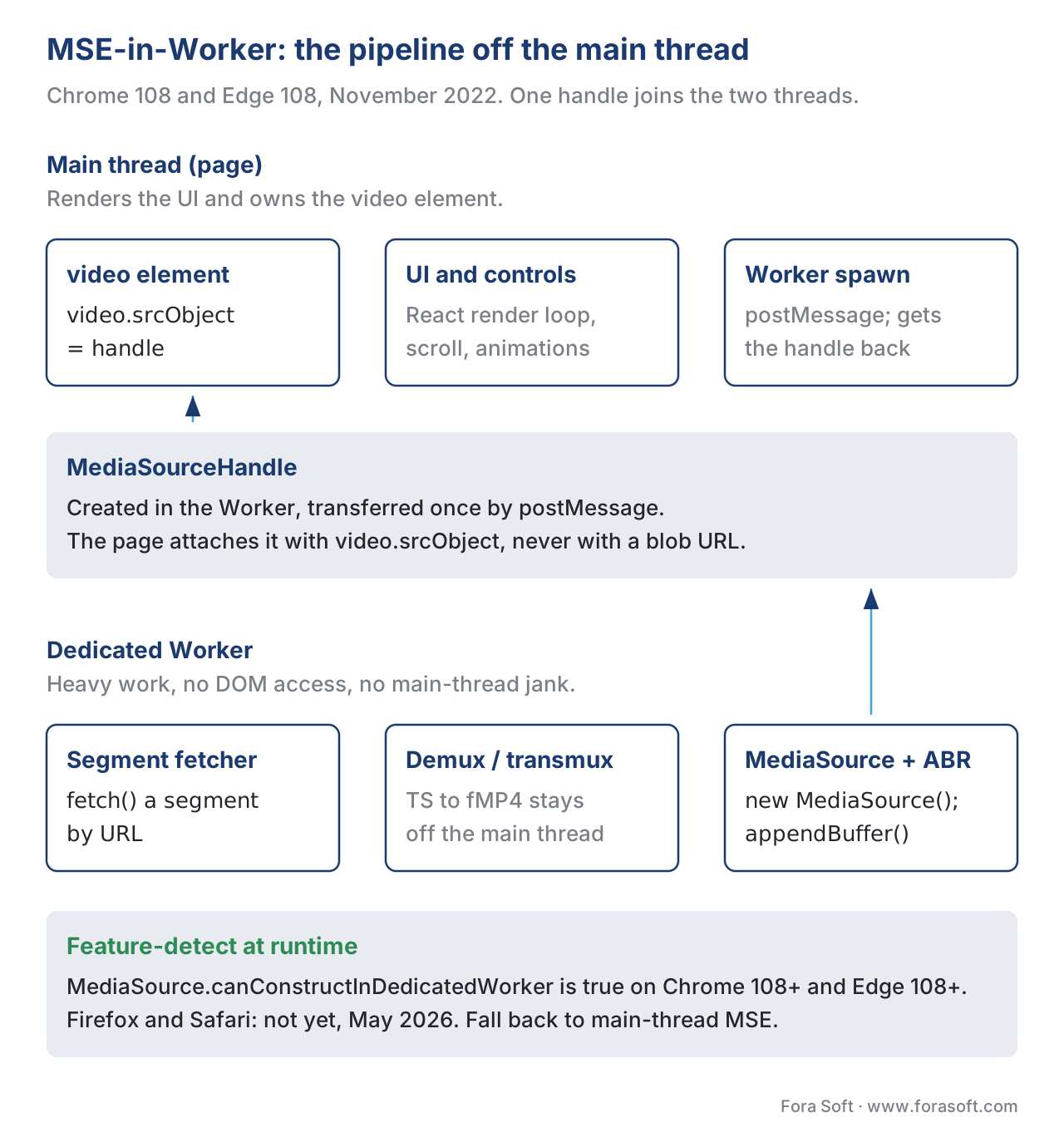 Figure 3. MSE-in-Worker. Every CPU-heavy job moves off the main thread; only the video element and a handle remain visible to the page.
The iPhone exception, and how it ended in October 2023
From the launch of the iPhone in 2007 until October 2023, MSE was simply not available on iPhone Safari. The W3C specification had no special clause about it; Apple just did not implement the API on its mobile WebKit build. The official reason given at WWDC and on the WebKit blog was battery and memory: if every page could freely buffer arbitrarily large amounts of video, the radio would never get to idle, the page would consume runaway memory, and the user's battery would die in an afternoon. There was a practical reason as well — Apple wanted developers to use <video src="…m3u8"> and let Safari's native HLS player handle everything, which meant fewer code paths Apple had to test and fewer browser-side bugs to ship.
The consequence was a decade of expensive workarounds. Every web streaming product that wanted to ship on iPhone had two builds — an MSE build for desktop and tablet, and a "native HLS" build for iPhone — and the iPhone build had to live with the limitations of the <video src> tag (no real adaptive bitrate control from JavaScript, no in-band metadata access without a separate request, no fine-grained quality switching, and a much narrower DRM story). hls.js, the world's most-installed open-source player, simply declined to load on iPhone Safari and pointed the user to the native HLS path.
In October 2023, Apple shipped Safari 17.1 on iOS 17.1 and the picture changed. Safari 17.1 introduced Managed Media Source, an MSE-class API that finally made adaptive streaming via JavaScript possible on iPhone (WebKit Blog, "WebKit Features in Safari 17.1", 24 October 2023, accessed May 2026). ManagedMediaSource is not plain MSE — it adds two new events that hand bandwidth and memory control back to the browser, and we cover both below — but for the purposes of "can I run hls.js on iPhone in 2026", the answer is yes. Every major web player added a ManagedMediaSource code path in 2024 and 2025.
A small note on what "MSE on iPhone" actually means in 2026. iPad has had real MSE since iPadOS 13 (2019). Mac Safari has had real MSE since Safari 8 (2014). The iPhone is the only Apple device that requires ManagedMediaSource specifically — every other Apple platform has both APIs available, and ManagedMediaSource is the preferred API on iPad and Mac as well because of its battery and memory benefits. The feature-detect pattern most player libraries ship in 2026 is const MediaSource = window.ManagedMediaSource ?? window.MediaSource, which prefers MMS when available and falls back to plain MSE otherwise.
ManagedMediaSource, the events, and the "buffer trap"
ManagedMediaSource adds two events that change how the player behaves: startstreaming and endstreaming. The contract is simple: when the browser fires startstreaming, the player should start fetching new segments; when it fires endstreaming, the player should stop fetching. The browser is in charge.
The default heuristic on Safari 17.1 and later is that endstreaming fires when the forward buffer reaches roughly thirty seconds ahead of the playhead, and startstreaming re-arms when the forward buffer drops below about ten seconds. The numbers are not normative — the WebKit team can tune them at any time — but they are the values you can observe in production today.
The community shorthand for this behaviour is "the iPhone 60-second buffer trap." The shorthand is not exactly right — the actual cap depends on conditions and tends to land somewhere between thirty and sixty seconds depending on memory pressure and codec — but the operational rule is the same. On iPhone Safari, you do not get to decide how much video to buffer ahead. The browser decides. The player listens to startstreaming and endstreaming and obeys.
For most live streaming this is a non-issue. A live player wants to stay near the live edge anyway, and thirty seconds of forward buffer is more than the live profile would request. For long-form video-on-demand the policy matters more — a player that on desktop would prefetch two minutes ahead will, on iPhone Safari, sit on a thirty-second window and re-fetch in small bursts. Bandwidth efficiency suffers slightly; battery life improves materially.
Two further hooks are worth noting. The ManagedSourceBuffer instance can fire bufferedchange when the browser evicts data on its own (the page did not call remove; the browser did, and the buffer shrunk). The ManagedMediaSource instance exposes a quality property and a qualitychange event whose value is "low", "medium", or "high" and which the page is expected to read when picking a rendition — Safari sets it to "low" on cellular data or in Low Power Mode and the player is expected to cap the bitrate. The same WebKit blog post above documents both.
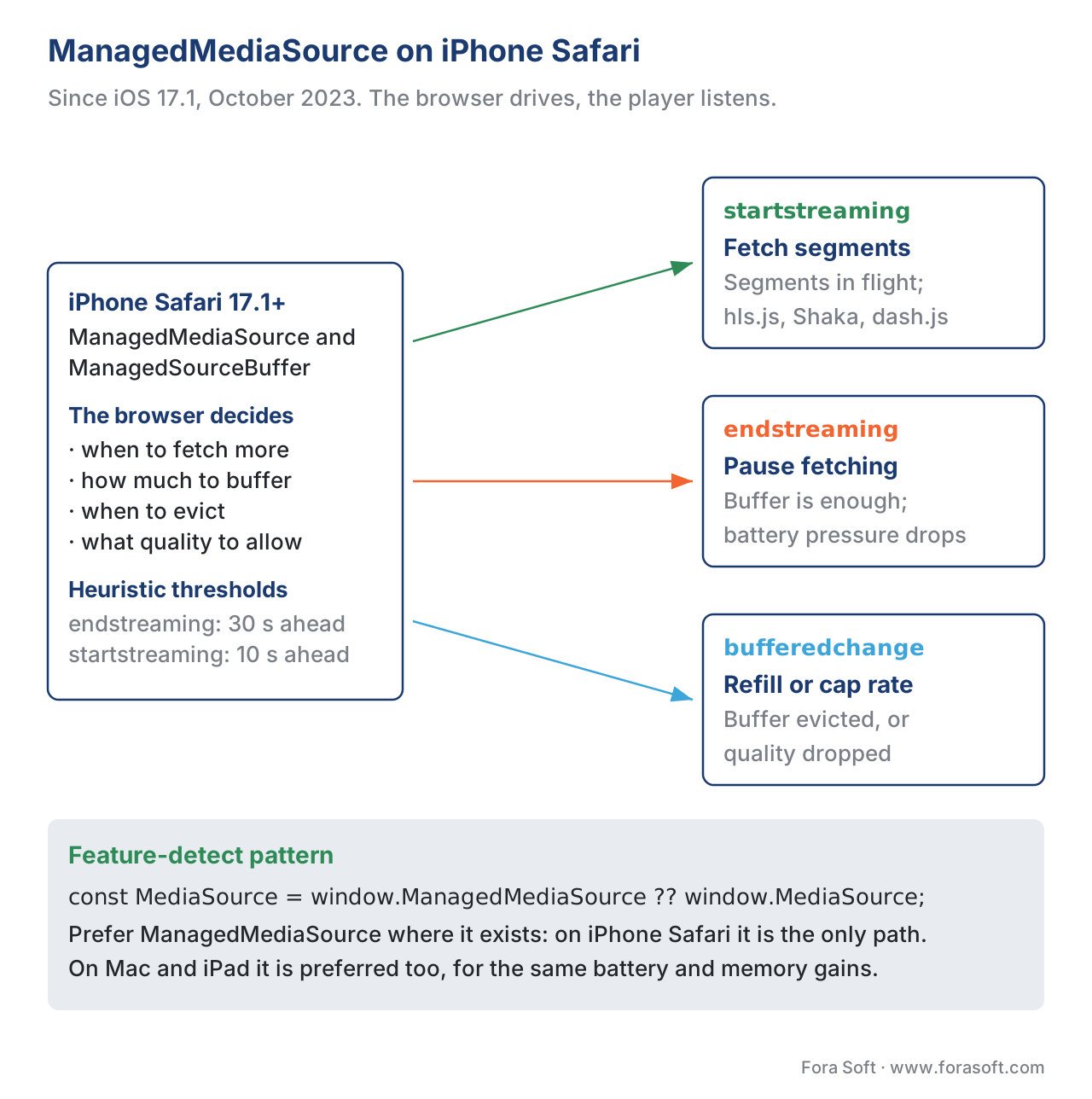 Figure 4. ManagedMediaSource event flow. The browser drives; the player listens. This is the inverse of desktop MSE, where the player drives and the browser obeys.
Browser support and codec coverage in 2026
A precise picture is worth keeping on a single page. The two-table summary below is correct as of May 2026.
| Browser / runtime | MSE | MSE-in-Worker | ManagedMediaSource |
|---|---|---|---|
| Chrome desktop, Edge, Opera | Yes (Chrome 23, 2013) | Yes (108, 2022-11) | No (uses plain MSE) |
| Firefox desktop | Yes (42, 2015) | No (2026) | No (2026) |
| Safari macOS | Yes (Safari 8, 2014) | No | Yes (Safari 17.0, 2023-09) |
| Safari iPadOS | Yes (iPadOS 13, 2019) | No | Yes (Safari 17.0, 2023-09) |
| Safari iPhone | No | No | Yes (Safari 17.1, 2023-10) — the only path on iPhone |
| Chromium-based smart TVs (Tizen, webOS, Android TV, Chromecast, Fire TV) | Yes | Yes on recent builds | Limited; vendor-by-vendor |
| Roku | No | — | — |
| Codec on MSE | Chromium | Firefox | Safari |
|---|---|---|---|
| H.264 / AVC | Yes | Yes | Yes |
| HEVC / H.265 | Yes (default since Chrome 105, 2022) | No (limited platform support) | Yes |
| VP9 | Yes | Yes | Yes (Safari 14) |
| AV1 | Yes (Chrome 90) | Yes (FF 75) | Limited; hardware-decoder dependent |
| AAC, Opus, FLAC, MP3 (audio) | Yes | Yes | Yes |
MediaSource.isTypeSupported('video/mp4; codecs="av01.0.05M.08"') may still return true, but playback will peg the CPU and visibly stutter. The lesson is the one above: probe isTypeSupported, but also surface decoder performance through your telemetry layer and let the field tell you when the answer is wrong on real hardware.
Pitfalls that ship to production
Every team that builds an MSE-based player ships at least three of the bugs in this list. Most ship all of them at least once.
1. Appending while updating is true. Covered above. The fix is the SbQueue pattern.
2. Calling addSourceBuffer before sourceopen. The MediaSource starts in "closed" state and only transitions to "open" when attached to the video element. Calling addSourceBuffer while it is "closed" throws InvalidStateError. The fix is to do everything inside the sourceopen listener.
3. Not setting mediaSource.duration for VoD. A video-on-demand stream needs a duration set explicitly via mediaSource.duration = totalSeconds after the first append; without it the scrub bar reports infinity and seeking misbehaves. Live streams skip this and instead use setLiveSeekableRange().
4. Forgetting to URL.revokeObjectURL the blob URL. Every URL.createObjectURL holds a reference to the underlying MediaSource; not revoking it leaks memory across page navigations.
5. Mixing MPEG-TS and fragmented MP4 in the same SourceBuffer. The MSE byte-stream format registry (W3C, MSE Byte Stream Format Registry, accessed May 2026) lists fMP4 and WebM as registered formats, plus a deprecated MPEG-2 TS format that Apple and Safari do not implement on macOS. In 2026 the only safe choice for new code is fMP4. Low-Latency HLS specifically requires CMAF (which is fMP4) because it segments at the moof level. If your origin still produces MPEG-TS, transmux it on the way in.
6. Switching codecs without changeType. Covered above. Without changeType, the appended bytes of a different profile produce a silent decode error and the playhead halts.
7. Calling endOfStream("decode") on every recoverable error. endOfStream is destructive — it transitions the MediaSource into the "ended" state and prevents further appends. Treat it as a final signal, not an error notification. Many recoverable errors (a single timed-out segment, a transient 404) deserve a retry and a possible rendition downshift, not endOfStream.
8. Holding a buffer larger than the device can afford. This is the iPhone case above, but also applies to mid-range Android laptops and tablets. A two-minute forward buffer at 8 Mbps is roughly 120 MB of decoded media, which is most of a Chromebook's available video memory.
9. Codec string mismatch between manifest and SourceBuffer. The manifest's CODECS attribute (HLS) or the MPD's codecs value (DASH) must match what addSourceBuffer was called with, or else the SourceBuffer will accept the bytes but the underlying parser will discard them as foreign.
10. Not handling the error event on the SourceBuffer. The promise-based wrapper above listens for error but does not analyse it; in production you want to log the type, the buffer state, and the segment URL that triggered it. Every QoE platform (Mux Data, Conviva, Bitmovin Analytics, Datazoom, NPAW) wants those fields in its events.
A worked rebuffer-ratio example
The point of MSE in production is to keep the playhead moving forward. The single most-watched metric for that is the rebuffer ratio — the percentage of intended watch time that the user spends watching a spinner instead of the content. The numbers are small but the math is worth showing once.
Suppose a user watches a forty-five-minute episode (2,700 seconds) of an OTT series. During that session the player encounters two rebuffers — one of fourteen seconds while the network drops on a train, and one of nine seconds while the user opens another tab and the page loses focus. The rebuffer time is 14 + 9 which equals 23 seconds. The rebuffer ratio is 23 / 2700 which equals 0.0085, or roughly 0.85 percent.
That value sits below the one-percent target many products aim for. A session that pushed the ratio above three percent would be flagged as a production incident in most QoE dashboards.
What does MSE have to do with this? Two of the most common causes of a rebuffer ratio that spikes overnight are exactly the bugs above: an updating-race that drops a segment, and a QuotaExceededError that the catch block swallowed. Both surface as the playhead halting in the middle of the buffer for no obvious reason. Both are visible only if the telemetry layer captures the MSE error event and the buffer state at the time of the failure. The pitfalls section is not theoretical; it is what produces the dashboard spike at 11 p.m. on a Friday.
What changes for 2026 and beyond
Three things are worth tracking in the next twelve months.
Worker-MSE in Firefox and Safari. Both vendors are publicly working on it; Mozilla has a tracking bug, and Apple's WebKit team has signalled interest. When both ship, the per-platform feature-detect becomes unnecessary and the Worker path becomes the default in every major player. Watch the Chrome Platform Status entry for the W3C Recommendation upgrade.
Detachable MediaSource and seamless picture-in-picture. WebKit added support in 2026 for detaching a MediaSource from one video element and re-attaching it to another without rebuilding the buffer; the use case is picture-in-picture transitions and tab swaps. The W3C spec text is in the Editor's Draft on GitHub (w3c/media-source, accessed May 2026).
In-band text-track exposure inside MSE. A small but long-overdue addition: in-band caption tracks (CEA-608, CEA-708, IMSC1 in fMP4) parsed and dispatched as TextTrack events through the MediaSource. The W3C Media Working Group held a March 2025 breakout on the topic; WebKit has experimental support and Chromium is tracking. Expect a normative addition to MSE 2 before the recommendation is finalised.
These are the three changes that will affect player architecture decisions through 2027. None is large enough to break existing code, but each removes a class of workaround the major players have carried since the late 2010s.
Free download: MSE Engineer's Quick ReferenceOne page with the four objects, the six lifecycle calls, the codec strings that pass strict mode, and the ManagedMediaSource event contract.Where Fora Soft fits in
Fora Soft has been shipping video streaming, WebRTC conferencing, video surveillance, e-learning, telemedicine, OTT, and AR/VR products since 2005, across 239 projects to date. Most of those that reach a browser ship through an MSE-based player — typically hls.js or shaka-player, sometimes a fork. The pitfalls described above are not lifted from documentation; they are the bugs we have debugged on production calls, the queue patterns we maintain in our internal player toolkit, and the ManagedMediaSource branches we added in 2024 when iPhone Safari became a real target again. If a player is the part of your product the user actually touches, the MSE layer is the part of the player you cannot afford to get wrong; talk to us before you ship a custom path. Our video streaming software development team builds custom MSE players for HLS, DASH and low-latency streams, and our OTT and Internet TV development work ships them across web, Smart TV and set-top boxes.

The book
Video Streaming: A Complete Guide to Video Delivery: From ABR and CDNs to Players, WebRTC, DRM, and the Economics of Streaming
This article stops at the four MSE objects and the six calls that drive them. The book takes the player half further: how the buffer you fill decides which ABR rung the player asks for next, what a 23-second stall does to the QoE numbers your dashboard reports, and how EME rides on the same SourceBuffer you have just learned to feed. Written by Nikolay Sapunov, CEO at Fora Soft.
Does your web player stall and nobody can say why?
Send us the player code and one session where the playhead stopped inside a full buffer, and we will tell you whether it is an append fired while updating was true, a QuotaExceededError the catch block swallowed, or a codec string the browser accepted and then refused. 250+ video products shipped since 2005.
See our case studies
Case study
Worldcast Live
Concert streaming at 0.4-0.5 s glass-to-glass for 10,000 simultaneous viewers at 1.5 Gb/s: browser playback with almost no buffer to hide a late append behind.
Case study
Speed.Space
A remote production platform recording at 1080p and 8 Mb/s for Netflix, Electronic Arts and HBO shoots, switching between streams in the browser while the video element stays open.
Case study
Mindbox
An intelligent VMS with 50+ deployments that turns camera RTSP into HLS with FFmpeg: the transmux step that decides what a browser SourceBuffer will accept at all.
What to read next
Player
What a Streaming Player Actually Does, End to End
The seven sub-systems around the MSE layer this article zooms into.
Players
hls.js in Depth
The append queue and the error recovery of the busiest MSE consumer on the web.
Safari
iOS and Safari: The Native Player You Cannot Escape
Where ManagedMediaSource ends and the native AVPlayer path begins.
ABR
Adaptive Bitrate Streaming Explained Without Buzzwords
How the rung is chosen for the segments you are about to append.
References
- W3C. Media Source Extensions™. W3C Recommendation, 17 November 2016. https://www.w3.org/TR/media-source/ — the original normative document; defines
MediaSource,SourceBuffer, theupdatingflag, andendOfStream. - W3C. Media Source Extensions™ 2. W3C Working Draft, 4 November 2025. https://www.w3.org/TR/media-source-2/ — defines
MediaSourceHandle,ManagedMediaSource,ManagedSourceBuffer, andSourceBuffer.changeType(); the controlling document for everything new since 2020. Working Draft status flagged because it is not yet a Recommendation. - W3C. Media Source Extensions Byte Stream Format Registry. https://www.w3.org/TR/mse-byte-stream-format-registry/ — the list of accepted MSE byte-stream formats; fMP4 and WebM are registered, MPEG-2 TS is deprecated.
- WebKit Project. WebKit Features in Safari 17.1. WebKit Blog, 24 October 2023. https://webkit.org/blog/14735/webkit-features-in-safari-17-1/ — first announcement of Managed Media Source on iPhone, with the
startstreaming/endstreamingevent contract. - WebKit Project. How to use Media Source Extensions with AirPlay. WebKit Blog. https://webkit.org/blog/15036/how-to-use-media-source-extensions-with-airplay/ — covers AirPlay coordination with ManagedMediaSource.
- Apple. Explore media formats for the web. WWDC 2023, Session 10122. https://developer.apple.com/videos/play/wwdc2023/10122/ — Apple's own walkthrough of ManagedMediaSource and why it took ten years.
- Apple. HLS Authoring Specification for Apple Devices. Living document, revision 2025-06. https://developer.apple.com/documentation/http-live-streaming/hls-authoring-specification-for-apple-devices — companion spec for HLS-on-MSE work on Apple platforms.
- Chromium Project. MSE in Workers. Chrome Status feature 5177263249162240. https://chromestatus.com/feature/5177263249162240 — shipping target Chrome 108; the canonical record of Chrome's MSE-in-Worker rollout.
- Mozilla Developer Network. Media Source Extensions API. https://developer.mozilla.org/en-US/docs/Web/API/Media_Source_Extensions_API — the practical browser-API reference; accurate but not normative.
- Mozilla Developer Network. The codecs parameter in common media types. https://developer.mozilla.org/en-US/docs/Web/Media/Guides/Formats/codecs_parameter — the practical codec-string reference for everything that follows
codecs=in a MIME type. - IETF. RFC 6381 — The "Codecs" and "Profiles" Parameters for "Bucket" Media Types. August 2011. https://www.rfc-editor.org/rfc/rfc6381 — the normative reference for codec strings inside MIME types.
- Chromium Project. SourceBuffer.changeType() sample. https://googlechrome.github.io/samples/media/sourcebuffer-changetype.html — working demo of codec-switching ABR.
- Wolenetz, M. MSE in Workers demo. https://wolenetz.github.io/mse-in-workers-demo/ — official end-to-end demo by the Chromium MSE owner.
- Chrome Developers. Handling QuotaExceededError. https://developer.chrome.com/blog/quotaexceedederror — practical recipe for buffer eviction, still accurate in 2026.
hls.jsGitHub. https://github.com/video-dev/hls.js — the dominant open-source consumer of MSE on non-Safari browsers (npm weekly downloads ~5.8M as of May 2026).shaka-playerGitHub. https://github.com/shaka-project/shaka-player — Google-backed MSE-first player; ~205K weekly downloads.dash.jsGitHub. https://github.com/Dash-Industry-Forum/dash.js — DASH-IF reference player; the open implementation of choice for DASH-on-MSE work.video.jsv10 announcement. https://videojs.org/blog/videojs-v10-beta-hello-world-again — context for the Streaming Processor Framework; v10 detects MSE-in-Worker at runtime.
