


Updated October 2026: Shaka Player v5.2 (current patch 5.2.13), Smooth Streaming removed in v5.0, low-latency mode now on by default, Shaka as the default Cast receiver player for HLS, fresh npm and GitHub numbers.
Why this matters
If you ship video to a browser, mobile web, Chromecast, smart TV, or any combination of those targets in 2026, the question of "Shaka Player or hls.js?" lands on someone's desk inside the first sprint of the project — and the answer determines two years of engineering work. Reading this article should leave a product manager able to ask an engineer the right questions about format coverage, DRM scope, offline support, and smart-TV reach, and leave a frontend, mobile-web, or smart-TV engineer with a complete mental model of the library: the engines that compose it, the events that drive a production telemetry pipeline, the config knobs that change ABR behaviour without forking the code, and the four families of error you have to handle on day one. You do not need any prior streaming knowledge; every term is defined when it appears. The short answer, if you only read one line: pick hls.js when you ship HLS only and want the smallest bundle; pick Shaka Player when you ship DASH at all, or need offline downloads, Chromecast or smart-TV reach. By the end you will know why Shaka Player exists, when to use it instead of hls.js, when to use it instead of dash.js, and why a current Shaka release plays low-latency DASH and HLS at about 3.5 seconds glass-to-glass without a single extra line of player code.
What Shaka Player is, and what it is not
The shortest accurate sentence is this. Shaka Player is a JavaScript library that reads a streaming manifest in either MPEG-DASH or HTTP Live Streaming format, fetches the video chunks it points to, hands those chunks to the browser's Media Source Extensions API, negotiates decryption keys with the browser's Content Decryption Module when the stream is protected, and exposes an event stream rich enough to drive an entire production player UI on top — all from inside an open-source Apache-2.0-licensed package you npm install like any other dependency. It is not a UI by default, although it ships an optional, accessible UI library if you want one. It is not a transcoder: every byte it sends to the browser was already encoded by your packager. And it is not an HLS-only player: where hls.js plays HLS, Shaka Player plays both DASH and HLS through the same player.load() call.
The project's own README puts it in one sentence — "Shaka Player is an open-source JavaScript library for adaptive media" that plays DASH and HLS in a browser on top of Media Source Extensions and Encrypted Media Extensions (shaka-project/shaka-player, README, accessed 2026-10-09) — and that is the whole product. Shaka was created at Google in 2014, originated inside the Widevine team as a reference DASH player for the Widevine DRM ecosystem, was open-sourced in 2015, and later moved out of the Google organisation on GitHub into the community-driven shaka-project org. In October 2026 the README lists three maintainers: Ateme, Google and Paramount (shaka-project/shaka-player, README for v5.2.13, accessed 2026-10-09). The current line is v5.2: v5.0.0 shipped on 6 February 2026, v5.1.0 on 15 April 2026, v5.2.0 on 10 July 2026, and v5.2.13 was published on 9 October 2026 (npm registry, shaka-player, accessed 2026-10-09). The team patches four branches every week — 4.15, 4.16, 5.1 and 5.2 — so a pinned older line still gets fixes. Weekly npm downloads reached 391,229 for 1–7 October 2026, up from about 216,000 a week in May 2026; hls.js did 9.7 million and dash.js 740,000 in the same week (npm downloads API, accessed 2026-10-09). The audience is different: hls.js is the default for "I just need HLS on the web", Shaka is the default for "I need DASH, or I need both, or I need offline, or I need Chromecast, or I need a player that does not depend on Apple's roadmap".
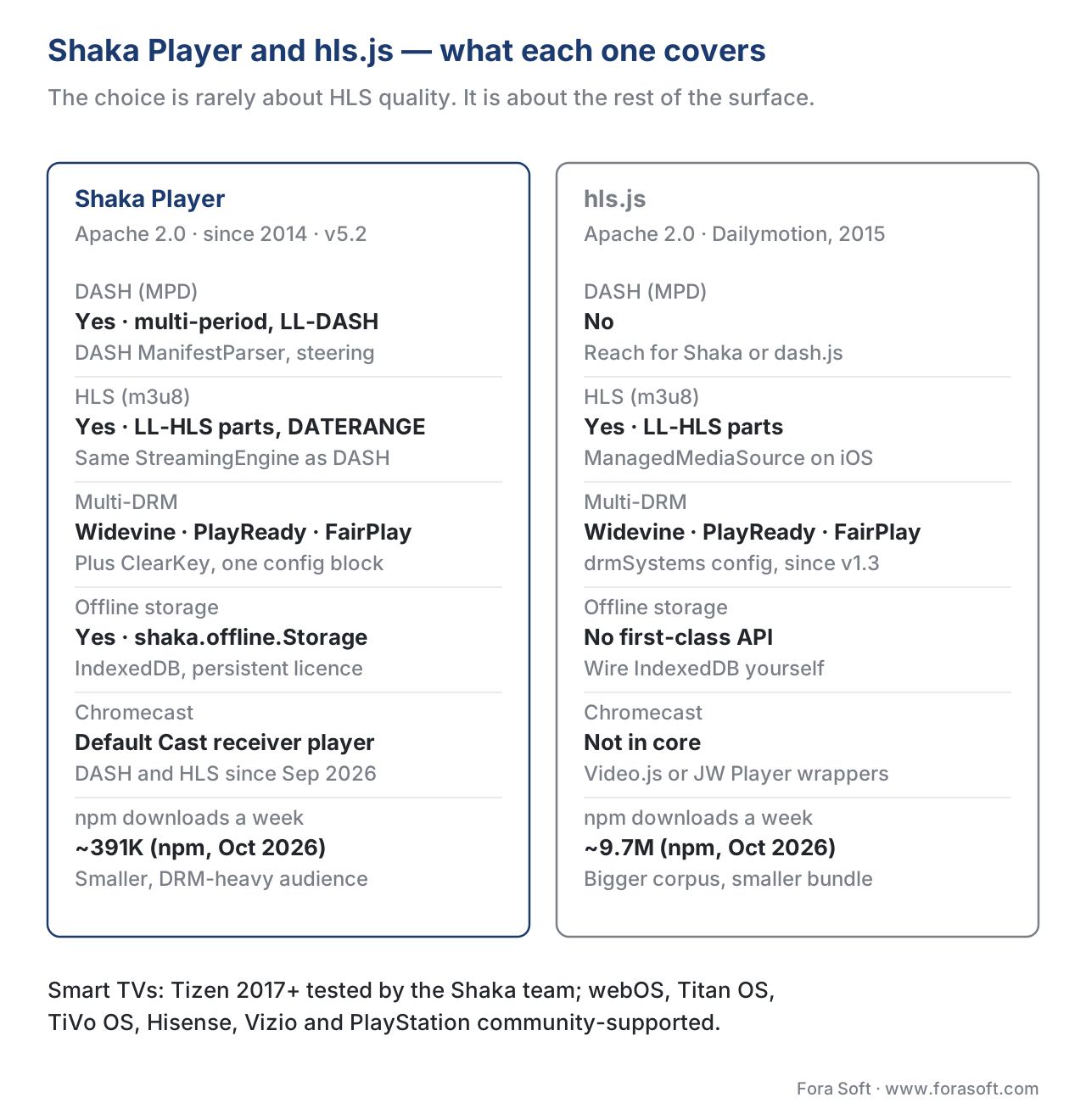 Figure 1. Shaka Player covers both DASH and HLS through one API; hls.js covers HLS only. The choice is rarely about HLS quality — it is about the rest of the surface.
You can confirm Shaka is supported in a fresh tab with two lines: shaka.polyfill.installAll() followed by shaka.Player.isBrowserSupported(). The first installs polyfills that paper over differences between browser implementations of Media Source Extensions and Encrypted Media Extensions; the second returns true in Chrome, Edge, Firefox, Opera, modern Safari with the ManagedMediaSource API, the Chromecast firmware's Web Receiver, the Tizen 2017+ smart TV browser, the WebOS browser since 4.0, and now (in v5.1) TiVo OS and Titan OS. It returns false on browser engines that lack MSE entirely, which in 2026 means almost nothing on the modern web. One nuance on smart TVs: the Shaka team actively tests Tizen 2017 models and the latest Chromecast firmware; webOS, Hisense, Vizio, PlayStation 4 and 5, Titan OS and TiVo OS are listed as expected to work but community-supported (shaka-project/shaka-player, README support matrix, v5.2.13).
Shaka Player official website, demo, npm package and docs
Shaka Player has no separate marketing site: its official home is the GitHub repository shaka-project/shaka-player, and the official Shaka Player demo lives at shaka-project.github.io/shaka-player-release. The old shaka-player-demo.appspot.com address now redirects there, and the API docs and tutorials moved to shaka-project.github.io/shaka-player/docs/api/ (checked 2026-10-09). Shaka Player is free: it is Apache-2.0 licensed, with 8,244 GitHub stars and 1,521 forks on 9 October 2026.
| You are looking for | Where it is (October 2026) | What you get |
|---|---|---|
| Official repository | github.com/shaka-project/shaka-player | Source, README support matrices, CHANGELOG, issues, roadmap |
| Demo player | shaka-project.github.io/shaka-player-release | Release build with sample DASH, HLS and DRM streams; paste your own manifest URL and license server to test |
| Nightly demo | shaka-project.github.io/shaka-player | The main branch, for checking a fix before it ships |
| npm package | npm install shaka-player | v5.2.13; also on jsDelivr and Google Hosted Libraries |
| Docs | shaka-project.github.io/shaka-player/docs/api | API reference plus tutorials: basic usage, DRM, offline, errors, UI |
| Builds | dist/ in the package | Full build about 276 KB gzipped; DASH-only about 199 KB; HLS-only about 209 KB (no UI, Cast or offline); UI build about 343 KB; experimental build adds MSF |
There is no official Shaka Player APK. It is a JavaScript library, so on Android it runs in Chrome, a WebView or an Android TV web app; native Android apps use Google's Media3 ExoPlayer instead. Bundle sizes above were measured on the v5.2.13 npm tarball on 9 October 2026; hls.js 1.7.3 measures about 189 KB gzipped for the full build and 119 KB for the light build.
Why this library exists at all
Two libraries dominate the browser-side streaming world: hls.js and Shaka Player. They were created at almost the same time (hls.js at Dailymotion in 2015, Shaka at Google in 2014-2015) to solve adjacent but different problems. hls.js was built to fix the absence of HLS on non-Safari browsers — Apple's HTTP Live Streaming worked natively on iPhone and macOS but was a non-starter everywhere else. Shaka was built to make Google's streaming stack — DASH packaged with Shaka Packager, encrypted with Widevine, served through Google Cloud CDN, played in the Chromecast Web Receiver — usable on the open web. The two libraries grew up in parallel codebases, with different opinions about layering, ABR, and the role of the UI.
The political subtext shapes the roadmap. Shaka does not have an opinion that conflicts with the underlying spec: when ISO/IEC ships a new DASH revision, Shaka follows; when Apple revises the HLS Authoring Specification, Shaka follows; when W3C tightens Encrypted Media Extensions, Shaka follows. What Shaka adds on top of the specs is operational — a NetworkingEngine that lets you intercept and rewrite every request, an offline-storage layer that lets a user download a movie for an airplane flight, a Chromecast bridge that streams the same content to a big screen with one button, and a pluggable AbrManager that lets you ship the algorithm your data tells you to ship. Where hls.js implements Apple's view of HLS in the browsers Apple does not control, Shaka implements the union of DASH and HLS in every browser, plus the platforms (Chromecast, smart TVs) where the open web has historically struggled.
The largest deployment is Google's own Cast Web Receiver SDK. It has long played DASH through Shaka, and Web Receiver 3.0.0156 (rolled out 4 August to 9 September 2026) set useShakaForHls to true by default, so Shaka now plays HLS on Cast too, with Shaka 4.15.56 as the default bundled version (Google Cast, Web Receiver release notes, accessed 2026-10-09). The GitHub repository has 8,244 stars and 1,521 forks as of 9 October 2026, about half of hls.js's 16,970 stars, but with a different user base — Shaka users are far more likely to be a paid OTT service shipping DRM, multi-CDN, and offline storage, where hls.js users span the long tail of webcasts, training videos, and small-scale live channels.
The architecture in one paragraph
A running Shaka Player instance is a small graph of engines that hang off the top-level shaka.Player class. The constructor wires up the engines — a NetworkingEngine that owns every outbound HTTP request through a plugin-per-scheme system, a ManifestParser instance per format (one for DASH, one for HLS) that turns the bytes of a manifest into Shaka's internal "Variant" objects, a DrmEngine that drives the browser's Encrypted Media Extensions API and the Content Decryption Module behind it, a StreamingEngine that runs the segment-fetch state machine and feeds bytes into the MSE SourceBuffer, a pluggable AbrManager that picks the next variant to load, an optional Storage layer for offline downloads, and an optional shaka.ui.Overlay that renders the play button and controls. You call player.attach(video) to bind the instance to a <video> element, then player.load(url) to start fetching the manifest, then listen for events to drive your UI. Everything else is configuration.
 Figure 2. The Shaka Player engine graph. Every engine has a single responsibility and a clean replacement seam: registerScheme, registerParserByMime, registerKeySystem, configure({abrFactory}).
That paragraph is the whole picture. The rest of this article zooms into each engine, names the events it emits, and tells you which configuration switches matter.
The NetworkingEngine
The NetworkingEngine wraps every outbound HTTP request the player makes — manifest fetches, segment fetches, license requests, side-loaded subtitles, server-time synchronisation, offline downloads. It does so through a plugin-per-scheme model: each URI scheme (http, https, data, blob, an entirely custom one) is registered through shaka.net.NetworkingEngine.registerScheme(scheme, plugin), and at most one plugin handles a given scheme. The defaults ship with HTTP, HTTPS, data, and blob plugins; you replace them when you need to add OAuth headers, proxy through a token-signing service, or route a fetch through a service worker.
A request travels through three rings of filters. A request filter runs before the fetch and is the right place to add an Authorization header, rewrite a host, or replace the URL entirely. A response filter runs after the response comes back and is where you decrypt a wrapped FairPlay license, parse a custom error envelope, or rewrite a content-type. Between them sits the retry machinery, governed by RetryParameters — maxAttempts (default 2), baseDelay (1000 ms), backoffFactor (2.0), fuzzFactor (0.5), timeout (30 000 ms), stallTimeout (5 000 ms), and connectionTimeout (10 000 ms). Every retry waits baseDelay × backoffFactor^attempt, fuzzed by ±50% so a fleet of players cannot stampede a recovering origin (shaka-project/shaka-player, Network and Buffering Configuration, accessed 2026-10-09).
The retry logic deserves a moment because it is one of the parts of Shaka that production teams underestimate. For each of the three traffic classes — manifest, streaming (segments), and DRM (license) — there is a separate retryParameters object. You can listen to the engine's retry event and call preventDefault() to cancel further retries on a 401 (where the issue is authentication, not transient network failure), and the default streaming.failureCallback treats live and VOD differently: on a live stream it schedules another attempt after certain network errors, while on VOD every streaming failure is final. The reason is that a 30-second outage on a live stream can recover on its own when the encoder catches up, but the same outage on a VOD asset usually means a permanently broken segment URL. Replace the callback if your live product needs a different policy (shaka-project/shaka-player, lib/player.js in v5.2.13, checked 2026-10-09).
The ManifestParser
The ManifestParser turns the bytes of a manifest into Shaka's internal model — a shaka.extern.Manifest object that holds a flat list of Variant objects (one per (audio, video, text) combination), each pointing at Stream objects that hold the segment timeline. Multi-period DASH is flattened into continuous streams at parse time, which Shaka has done since v3. Shaka ships two parsers in the standard build: a DASH parser that handles MPD documents per ISO/IEC 23009-1, and an HLS parser that handles m3u8 playlists per IETF RFC 8216 and Apple's HLS Authoring Specification. Microsoft Smooth Streaming support was removed in v5.0 (February 2026), so legacy IIS catalogues need repackaging or an older 4.x branch. The experimental build adds a third parser for MSF, the Media over QUIC streaming format, live only. You register your own parser through shaka.media.ManifestParser.registerParserByMime.
The DASH parser is the original one and the more battle-tested. It supports multi-period MPDs, content steering as defined by DASH-IF, the full SegmentTemplate / SegmentList / SegmentBase suite, the new low-latency availabilityTimeOffset mechanism, multi-DRM through <ContentProtection> elements, multiple audio renditions, and side-loaded subtitles in WebVTT or IMSC. The HLS parser arrived later but caught up: it now supports multi-variant playlists with EXT-X-STREAM-INF, multi-audio with EXT-X-MEDIA, key delivery through EXT-X-KEY and EXT-X-SESSION-KEY, byte-range segments, Discontinuity tags, EXT-X-DATERANGE for SCTE-35 ad markers, and the LL-HLS extensions (parts, preload hints, blocking reload, rendition reports) Apple defined in the HLS Authoring Specification.
Crucially the player uses one code path after the manifest is parsed. The StreamingEngine and the AbrManager do not know whether a Variant came from an MPD or an m3u8; they see Shaka's internal Variant objects and walk the same state machine. This is the structural reason Shaka can play either format without bloating its API — the format-specific surface lives inside the ManifestParser, not the rest of the engine.
The DrmEngine and EME
The DrmEngine is the part of Shaka that handles Digital Rights Management. When the ManifestParser reports that a Variant declares a key system — Widevine via com.widevine.alpha, PlayReady via com.microsoft.playready, or FairPlay via com.apple.fps — the DrmEngine intercepts the StreamingEngine's segment append, calls navigator.requestMediaKeySystemAccess with the right MediaKeySystemConfiguration, opens a MediaKeySession, fetches the license from the URL configured in drm.servers, and feeds the key into the browser's Content Decryption Module. The StreamingEngine cannot append encrypted bytes until the key arrives, which is why a slow license server is the most common cause of a black-screen-no-error on a paid stream.
The standard configuration in 2026 is one block:
player.configure({
  drm: {
    servers: {
      'com.widevine.alpha':      'https://drm.example.com/widevine',
      'com.microsoft.playready': 'https://drm.example.com/playready',
      'com.apple.fps':           'https://drm.example.com/fairplay',
    },
    advanced: {
      'com.apple.fps': {
        serverCertificateUri: 'https://drm.example.com/fairplay/cert',
      },
    },
  },
});
That is the entire surface most production deployments need (shaka-project/shaka-player, DRM Configuration tutorial, accessed 2026-10-09). FairPlay is the exception in the configuration syntax because Apple's key system requires a server-issued certificate before the license exchange begins; Shaka surfaces this as a serverCertificateUri field inside the advanced block. For multi-DRM streams a single player.load() call works for all three systems — Shaka picks the right one based on the browser's reported key-system support, and you do not write any branching logic.
The DrmEngine also exposes lower-level seams for the cases the defaults do not cover. A drm.initDataTransform callback lets you rewrite the PSSH boxes the browser hands you (the bytes that identify which key the segment was encrypted with) before they reach the CDM — useful when your packager and your license server disagree about KID format. A request filter on the NetworkingEngine lets you sign license requests, attach a session token, or proxy through a key-rotation service. And the drm.advanced block per key system exposes the full MediaKeySystemConfiguration surface — videoRobustness, audioRobustness, persistentState, distinctiveIdentifier — for the deployments that need to lock down Widevine to HW_SECURE_ALL on smart TVs.
A Shaka-specific subtlety: the DrmEngine has its own retryParameters separate from manifest and streaming retries (see §NetworkingEngine), so a flaky license server backs off on a different schedule than a flaky segment origin. In production this matters because the two failure modes look identical to a viewer ("black screen") but require different operations playbooks: a segment outage is usually a CDN incident, a license outage is usually a license-server or key-rotation problem.
The StreamingEngine and MSE
The StreamingEngine is the heart of the library. It owns the per-Variant fetch loop, calls the AbrManager when it is time to pick a new variant, places fetched segments into the MSE SourceBuffer objects, and handles the messy edges that the spec authors gave to clients to figure out: when to switch SourceBuffers during a seamless quality change (the answer involves SourceBuffer.changeType() for codec switches), when to flush the buffer ahead of the playhead (during a rapid down-shift, to avoid spending bandwidth on bytes the user will never see), when to skip a missing segment in the timeline (live streams produce occasional gaps when the encoder restarts), and when to declare a fatal error rather than retry forever.
The MSE-2 specification (W3C, Media Source Extensions™ 2, Editor's Draft tracked through 2025) added cleaner support for changeType and for appendEncodedChunks, both of which Shaka uses when available; on browsers that still ship MSE-1 the StreamingEngine emulates the same behaviour through a careful sequence of remove + appendBuffer calls. The interesting state to monitor in production is the "stall" — when the StreamingEngine thinks it is appending bytes but the playhead has not advanced for longer than stallThreshold seconds (default 1). Shaka emits a stalldetected event and, by default, nudges the playhead by stallSkip (0.1 s) forward by a tiny offset to recover from a known browser bug where MSE silently drops a sample. The defaults work for almost every deployment, but the knobs are there.
On iOS Safari 17 and later, the StreamingEngine can also use the ManagedMediaSource API — Apple's iPhone-Safari subset of MSE that finally allows JavaScript players to play DASH on iOS. ManagedMediaSource has tighter rules about when the browser can reclaim memory, and it requires the source element be wrapped inside a <source> child of <video>. Shaka detects it automatically and routes through it when present. The result is that, for the first time, the cross-platform stack does not need an "iOS branch" — but in practice many teams still prefer the native AVFoundation path on iOS when the content is HLS, because the native path is hardware-accelerated end to end.
The AbrManager
The AbrManager is the part of Shaka that picks which variant to load next. The default implementation is a throughput-based heuristic — it tracks the recent download bandwidth using an exponentially weighted moving average over recent segments, applies a safety factor, and picks the highest variant whose declared bitrate fits below the safety-adjusted estimate. The asymmetric safety factors (bandwidthDowngradeTarget and bandwidthUpgradeTarget) are intentional: switching down on jitter costs you quality for a few seconds, but switching up too aggressively risks a rebuffer that costs you watch time on the order of minutes (shaka-project/shaka-player, Network and Buffering Configuration, accessed 2026-10-09).
In v5.1, two ABR refinements landed that are worth your attention. The first is low-latency-aware ABR — Shaka now passes a "is this stream low-latency?" hint to the AbrManager so the algorithm can be more aggressive about staying close to the live edge instead of letting the buffer grow toward steady-state. The second is dropped-frames-aware ABR — Shaka now monitors HTMLVideoElement.getVideoPlaybackQuality() and feeds dropped-frame counts into the AbrManager, so a smart TV that cannot decode 4K HEVC at 60 frames per second will fall back to a variant the hardware can sustain instead of stuttering forever. Both features are shipping defaults and require no configuration to enable (shaka-project/shaka-player, Release v5.1.0, 15 April 2026).
The AbrManager has the cleanest replacement seam in the player. You implement shaka.extern.AbrManager — init, chooseVariant, enable, disable, segmentDownloaded, playbackRateChanged, getBandwidthEstimate, setVariants, configure — and pass a factory through player.configure({abrFactory: () => new MyAbrManager()}). This is how teams ship learning-based ABR (Pensieve, Comyco, or a custom in-house algorithm) on top of Shaka without forking the library.
Offline storage
Shaka Player's offline-storage layer is the feature that separates it most sharply from hls.js. Through the shaka.offline.Storage API, you can download a manifest, every segment it points to, and the DRM license that decrypts it, store the lot inside the browser's IndexedDB database, and play it back later when the user is offline. The license storage works through the EME "persistent-license" session type, which Widevine and PlayReady support on most platforms; FairPlay's offline support exists but requires more application-side wiring on iOS (shaka-project/shaka-player, Offline Storage and Playback tutorial, accessed 2026-05-24).
const storage = new shaka.offline.Storage(player);
storage.configure({
  offline: {
    progressCallback: (content, progress) => console.log(progress),
  },
});
const stored = await storage.store(manifestUri).promise;
// later, even offline:
await player.load(stored.offlineUri);
That snippet is enough to ship an "Save for offline" button on a long-haul-flight movie service. The same API powers the offline-download feature inside several OTT apps that ship Shaka through a webview wrapper, and the Storage class has its own progress events and lifecycle the application drives.
The UI library and the Cast bridge
Shaka ships an optional UI library as a separate bundle (shaka-player.ui.js). The UI provides accessible, localised, RTL-aware controls — play, pause, scrub bar, volume, captions menu, audio track menu, quality menu, full-screen, picture-in-picture, and a Cast button that lights up when a Chromecast device is on the same network. The UI is opt-in: you keep the base shaka-player.compiled.js bundle if you have your own controls.
The Cast bridge is worth a paragraph because it is unique to Shaka. The base library doubles as both a sender (the page running in the user's browser) and a receiver (the JavaScript application that runs on the Chromecast firmware). When a user taps the Cast button, Shaka serialises the current player state — manifest URL, position, DRM configuration, language and caption choices, ABR target — to the receiver, which loads its own Shaka Player instance and resumes the stream on the TV. Google's Cast Web Receiver SDK already bundles Shaka, and since the 3.0.0156 rollout in August–September 2026 it is the default for both DASH and HLS, so a sender that uses Google's Cast SDK directly can rely on the default receiver playing the stream through Shaka. The Shaka-to-Shaka bridge described above (shaka.cast.CastProxy on the sender) is a separate path: it needs a receiver app built with shaka.cast.CastReceiver.
A minimum viable Shaka player
The seven lines below are enough to load a DASH or HLS stream into a browser tab and start playback. They assume the browser is modern enough to support MSE and that the manifest is publicly fetchable.
import shaka from 'shaka-player';

shaka.polyfill.installAll();

if (!shaka.Player.isBrowserSupported()) {
  throw new Error('Browser not supported by Shaka Player');
}

const video = document.getElementById('video');
const player = new shaka.Player();
await player.attach(video);
player.addEventListener('error', e => console.error('Shaka error', e.detail));
await player.load('https://cdn.example.com/asset.mpd');
Notice the symmetric API: player.attach(video) binds the player to a <video> element, player.load(url) starts fetching the manifest, and player.unload() releases everything. The same code plays an .mpd (DASH) or an .m3u8 (HLS) — Shaka picks the parser from the manifest's MIME type or file extension. If you want to add a UI, you swap one line:
const ui = new shaka.ui.Overlay(player, container, video);
That instantiates the optional shaka-player.ui.js bundle and decorates the page with the default control surface. Everything else (DRM, offline, Cast, ABR overrides) is player.configure() calls layered on top of those seven lines.
A worked latency example
A common question on a 2026 project is "if we switch from regular DASH to LL-DASH with Shaka, how much glass-to-glass latency do we save?" Here is the arithmetic on one stream.
A regular DASH stream uses 6-second segments and the player target buffer is three segments ahead of the playhead.
Segment duration × buffer depth = 6 s × 3 = 18 s of player-side latency.
Add about 4 seconds of network and origin latency and 2 seconds of encoder packaging latency, and you get a glass-to-glass figure of:
18 s + 4 s + 2 s = 24 s.
That is steady-state, on a well-behaved CDN. A good number for "wedding live-stream" use but bad for "interactive sports highlights".
The LL-DASH version uses 2-second segments encoded as CMAF chunks of 200 ms each, with availabilityTimeOffset set so the player can request a chunk almost as soon as the encoder produces it. The player target buffer drops to roughly one segment ahead of the live edge:
Segment duration × buffer depth = 2 s × 1 = 2 s of player-side latency.
Network and origin latency stays at about 1 s in the LL-DASH case because the CDN is shielding chunked-transfer-encoded responses, and encoder packaging stays at about 0.5 s.
2 s + 1 s + 0.5 s = 3.5 s glass-to-glass.
On a current release the Shaka side needs no change at all. Since v4.16 (August 2025) streaming.lowLatencyMode defaults to true and only takes effect on streams that advertise low latency, where it also drops inaccurateManifestTolerance to 0 (Shaka Player API docs, shaka.extern.StreamingConfiguration, accessed 2026-10-09). If you pin an older line, or want the intent visible in code, the explicit form is one configuration call:
player.configure({
  streaming: {
    lowLatencyMode: true,
    inaccurateManifestTolerance: 0,
    rebufferingGoal: 0.01,
  },
});
Put those explicit values only on a player instance dedicated to low-latency streams, not in a global config. Either way, that is the entire delta in the player code. The work happens on the packager side (Shaka Packager, Bitmovin, AWS Elemental, or your encoder of choice) and on the CDN side (chunked transfer encoding enabled at the origin and not stripped by intermediate caches). For the comparable LL-HLS path with EXT-X-PART parts and preload hints, the same default covers both formats — set lowLatencyMode: false if you ever need to opt out — which is one of the structural advantages of a multi-format player.
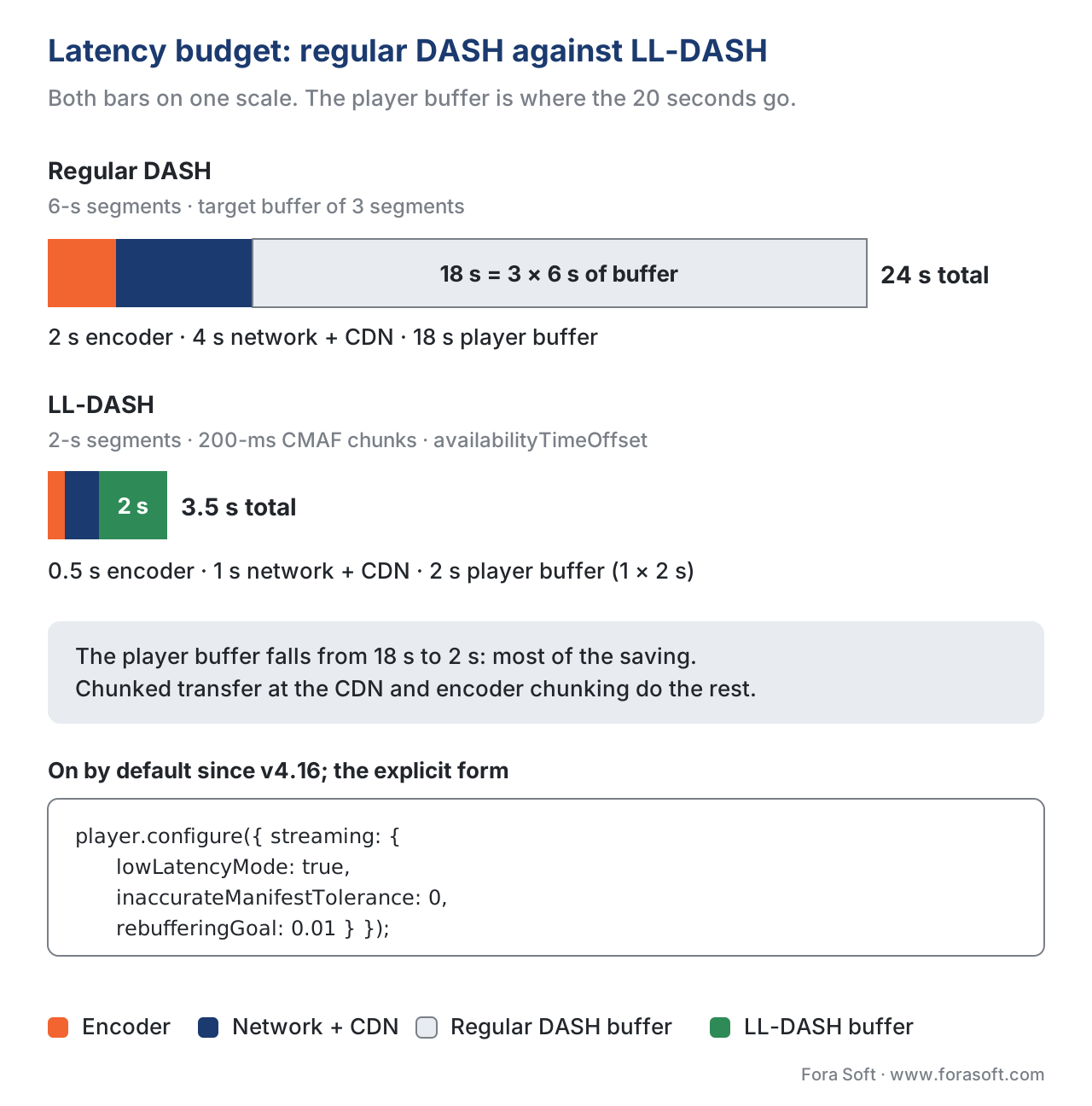 Figure 3. Where the 20-second saving comes from. Most of it is the player buffer dropping from 18 s to 2 s; CDN behaviour and encoder chunking deliver the rest.
Shaka Player vs hls.js — nine axes that decide
The question "Shaka or hls.js?" lands so often that a comparison table is required reading. Both libraries are excellent, Apache-2.0-licensed, actively maintained, and used in production by serious teams. They differ on what they cover and how they extend.
| Axis | Shaka Player | hls.js | Winner for this axis |
|---|---|---|---|
| Format coverage | DASH + HLS (Smooth Streaming removed in v5.0; MSF over QUIC experimental) | HLS only | Shaka if you ship DASH at all |
| Weekly npm downloads (1–7 Oct 2026) | ~391,000 | ~9.7 million | hls.js — bigger ecosystem |
| GitHub stars (9 Oct 2026) | ~8,200 | ~17,000 | hls.js — bigger community |
| Bundle size, gzipped (Oct 2026) | ~276 KB full; ~199 KB DASH-only; ~209 KB HLS-only | ~189 KB full; ~119 KB light | hls.js — smaller |
| DRM scope | Widevine, PlayReady, FairPlay, ClearKey, multi-DRM in one config | Widevine, PlayReady, FairPlay through drmSystems (v1.3+) | Tie — both ship multi-DRM in 2026 |
| Offline storage | First-class IndexedDB-based Storage API | No first-class offline | Shaka — by a wide margin |
| Chromecast | Default player in the Google Cast Web Receiver for DASH and, since Aug–Sep 2026, HLS | Cast through Video.js or custom plumbing | Shaka — out of the box |
| Smart-TV coverage | Tizen 2017+ and Chromecast tested by the team; webOS, Hisense, Vizio, PlayStation, Titan OS, TiVo OS community-supported | Tizen / webOS via community forks | Shaka — wider listed coverage |
| iOS Safari (ManagedMediaSource) | Auto-detected, supported in v4+ | Auto-detected since v1.5 | Tie — both ship it |
For a Fora Soft engagement the most common shape is: an OTT product that already has Widevine-encrypted DASH for Android-and-the-web plus FairPlay-encrypted HLS for iOS, wants Chromecast support from launch, and plans to add offline downloads in Q2. That stack picks Shaka almost every time, and we ship hls.js only on the rare project that is HLS-only on the web and has no plans to add the rest. The reverse case — an HLS-only training-video platform with no plans to add DRM or Cast — picks hls.js for the smaller bundle and the larger debugging community.
A production error-recovery pattern
Every production Shaka deployment ships against the same family of errors. The library categorises them through shaka.util.Error.Category — NETWORK, MEDIA, DRM, MANIFEST, STREAMING, TEXT, STORAGE, CAST, PLAYER — and shaka.util.Error.Severity — RECOVERABLE or CRITICAL (shaka-project/shaka-player, Error Handling tutorial, accessed 2026-10-09). The pattern below is what we ship by default.
player.addEventListener('error', event => {
  const error = event.detail;
  const { category, code, severity, data } = error;

  // Telemetry first — every error, recoverable or not, is a data point.
  telemetry.track('shaka_error', { category, code, severity });

  if (severity === shaka.util.Error.Severity.RECOVERABLE) {
    // Shaka is already retrying. Show a small toast and stay silent.
    ui.showToast('Reconnecting…');
    return;
  }

  // CRITICAL: Shaka has given up. Decide what to do per category.
  switch (category) {
    case shaka.util.Error.Category.NETWORK:
      ui.showError('Network problem. Tap to retry.');
      break;
    case shaka.util.Error.Category.MEDIA:
      // Decoder problem — flush MSE and reload.
      player.unload().then(() => player.load(currentUrl));
      break;
    case shaka.util.Error.Category.DRM:
      // License problem — application has to re-authenticate the user.
      ui.showError('Your session expired. Please sign in again.');
      break;
    case shaka.util.Error.Category.MANIFEST:
      // The manifest URL is broken or the asset was withdrawn.
      ui.showError('This title is not currently available.');
      break;
    default:
      ui.showError('Playback failed. Tap to retry.');
  }
});
That listener is the entire error-handling shape most production deployments need. Notice two things: every error is told to telemetry before any user-facing action runs, and recoverable errors deliberately do nothing user-facing because Shaka is already retrying — surfacing a banner on every recoverable network blip is the most common error-handling mistake we see in code reviews. The categories above also map cleanly onto the four families of operations playbook a streaming product needs: a CDN-or-network playbook, a packaging-and-MSE playbook, a license-server playbook, and an asset-catalogue playbook.
 Figure 4. Map each error category to a specific runbook. The most common error-handling mistake is surfacing every recoverable error to the user.
What v5 changed, and what to ship in 2026
The v5 series is the current line of Shaka Player. v5.0.0 shipped on 6 February 2026 and is a breaking release: it removed Microsoft Smooth Streaming, the LRC, SBV and SSA subtitle formats, setTextTrackVisibility and every deprecated API, and it requires apps to call updateStartTime instead of setting currentTime during startup. On the feature side it added automatic subtitles generated by speech-to-text (configured under accessibility.speechToText), request filters that can run more than once per request, so you can re-sign a license URL on token rotation, AES-256-GCM for HLS, and experimental Media over QUIC playback (shaka-project/shaka-player, CHANGELOG v5.0.0).
v5.1.0 shipped on 15 April 2026 and brought three changes that matter for players in production. The AbrManager now receives a "low-latency hint" from the StreamingEngine, so a custom ABR algorithm can be aware of live-vs-VOD differences without sniffing the manifest. The AbrManager also now sees getVideoPlaybackQuality().droppedVideoFrames, which lets dropped-frame counts feed into variant selection — a smart TV that cannot decode 4K HEVC at 60 frames per second now falls back to 1080p instead of stuttering. And v5.1 adds basic support for two new smart-TV platforms — TiVo OS and Titan OS — which closes a gap older versions had on the long-tail-TV side (shaka-project/shaka-player, Release v5.1.0, 15 April 2026).
v5.2.0 shipped on 10 July 2026, and the 5.2 line is what to target for new deployments in October 2026; v5.2.13 came out on 9 October 2026. The changes worth knowing: transmuxing of MPEG-TS segments now runs in a Web Worker, off the main thread; ClearKey plays in Safari through WebCrypto; getStats() reports timeToFirstFrame, a startup metric you can graph next to rebuffering; the DASH parser resolves linked Periods from the 6th edition of the spec; HLS sequenceMode is now off by default; CMCD reporting moved to the SVTA common library; and the UI gained a fisheye projection for Apple Immersive Video (shaka-project/shaka-player, CHANGELOG v5.2.0). If you are on 5.1, the upgrade is a minor version with no breaking changes listed; if you are on 4.x, budget for the v5.0 removals first, though 4.15 and 4.16 still receive weekly patches.
Common pitfalls
Every project hits a small number of the same Shaka issues. Six worth knowing before you ship.
Forgetting polyfill.installAll. Without it, Safari quietly misbehaves on a half-dozen edge cases (audio context state, fullscreen events, ManagedMediaSource detection, Intl.Segmenter for caption rendering) and the symptoms look random. Always install the polyfill before constructing the player.
Mixing attach and load order on retries. A common pattern after a CRITICAL error is await player.unload(); await player.load(url). This works because attach only needs to be called once per <video> element. Calling attach after unload on the same element either is a no-op or throws, depending on version. The correct shape is to keep the attach on the page lifecycle and only unload + load on retry.
Surfacing recoverable errors to the user. Shaka emits error events for both RECOVERABLE and CRITICAL severities. Recoverable errors mean "I am already retrying"; surfacing a red banner on every one of them makes a working player look broken to the viewer. The pattern above in this article — toast for recoverable, banner for critical — is the floor.
Copying low-latency values onto regular streams. lowLatencyMode is on by default and only changes behaviour when the manifest advertises low latency. Hand-copying LL values such as inaccurateManifestTolerance: 0 and a tiny rebufferingGoal into a global config removes the drift tolerance regular streams rely on and makes rebuffering more likely. Low latency must be produced by the packager (CMAF chunks for DASH, EXT-X-PART parts for HLS), not forced by the player.
Ignoring DRM retry parameters. Manifest and segment retries are not the only kind. A license server is a separate service with its own SLA and its own failure modes; configure drm.retryParameters independently and graph them separately in your QoE dashboard.
Trying to render the UI library without its CSS. The optional shaka-player.ui.js bundle requires controls.css to render correctly. The most common visual bug after switching to the UI library is "buttons are unstyled rectangles" because the stylesheet was not included in the bundle. Both the JS and the CSS ship with the npm package.
Where Fora Soft fits in
We have shipped Shaka Player in production across most of our streaming-adjacent practice areas — OTT and Internet-TV catalogues that need DRM, multi-format coverage, and Chromecast from launch; e-learning platforms that need offline downloads for students on intermittent connectivity; surveillance products where the same library plays live and recorded footage; and a small number of telemedicine products that need EME-grade content protection for clinical recordings. Across those verticals we have been the engineering team that built the player layer end to end (configuration, ABR override, error telemetry, accessibility) more than once. Where the audience can be cleanly served by hls.js — for example, a webcast platform whose catalogue is HLS-only and has no near-term DRM plans — we recommend hls.js and use it instead; the right player is the one that matches the engagement's roadmap, not the one with the biggest community on GitHub. If you are building that player layer now, our OTT and IPTV development team ships Shaka with multi-DRM, ABR tuning and Chromecast, and our video streaming software developers build the HLS and DASH packaging behind it. If you are testing Shaka's experimental MSF path for sub-second live playback, our Media over QUIC development team builds the relay and publisher side it plays from.

The book
Video Streaming: A Complete Guide to Video Delivery: From ABR and CDNs to Players, WebRTC, DRM, and the Economics of Streaming
This article maps Shaka's engines; volume 3 explains what each one is deciding. It covers the bitrate ladder and the ABR logic behind AbrManager, CDN behaviour and stall recovery, multi-DRM with Widevine, PlayReady and FairPlay, offline and trick play, so every configure() switch has the model behind it. Written by Nikolay Sapunov, CEO at Fora Soft.
Shaka or hls.js: which player fits your roadmap?
Tell us your formats, DRM systems, devices and offline plans, and we will tell you which player to ship, which engines to configure, and where your error handling is turning retries into banners. 250+ video products shipped since 2005.
See our case studies
Case study
BrainCert
An e-learning platform with 100K+ customers and 500M+ classroom minutes, shipping DRM-protected course content — the protection layer a DrmEngine exists for.
Case study
Mindbox
An RTSP-to-HLS video management system in 50+ deployments across India — one player layer serving live cameras and recorded footage.
Case study
Worldcast Live
Concerts held at 0.4–0.5 s glass-to-glass for 10,000 simultaneous viewers at 1.5 Gb/s — where error handling that stays silent on retries matters.
What to read next
Players
hls.js in depth
The other big browser player, and the default for HLS-only stacks.
Browser APIs
Encrypted Media Extensions in depth
The browser API the DrmEngine talks to, and how DRM lives in it.
Low latency
LL-DASH and chunked CMAF
The packager and CDN half of the 3.5-second budget above.
Players
Smart TV players
Tizen, webOS, Roku, Android TV: where Shaka runs and where it cannot.
References
- shaka-project/shaka-player — README and source tree, main branch. https://github.com/shaka-project/shaka-player (accessed 2026-10-09). Project identity, Apache-2.0 license, "DASH & HLS client / MSE-EME player" tagline, supported platforms. README for v5.2.13: maintainers (Ateme, Google, Paramount), platform, DRM and manifest support matrices, builds, demo and docs links.
- shaka-project/shaka-player — Tutorial: Basic Usage. https://github.com/shaka-project/shaka-player/blob/main/docs/tutorials/basic-usage.md (accessed 2026-05-24). The minimum-viable player snippet (polyfill, isBrowserSupported, attach, load); event listening pattern.
- shaka-project/shaka-player — Tutorial: DRM Configuration. https://shaka-project.github.io/shaka-player/docs/api/tutorial-drm-config.html (accessed 2026-10-09).
drm.serversmap, FairPlayadvanced.serverCertificateUrirequirement, multi-DRM single configuration. - shaka-project/shaka-player — Tutorial: Network and Buffering Configuration. https://github.com/shaka-project/shaka-player/blob/main/docs/tutorials/network-and-buffering-config.md (accessed 2026-10-09). RetryParameters defaults (maxAttempts 2, baseDelay 1000 ms, backoffFactor 2, fuzzFactor 0.5); per-class retry separation (re-checked against
lib/net/backoff.jsin v5.2.13). - shaka-project/shaka-player — Tutorial: Error Handling. https://shaka-project.github.io/shaka-player/docs/api/tutorial-errors.html (accessed 2026-10-09).
shaka.util.Error.CategoryandSeveritytaxonomy;retryevent preventDefault pattern. - shaka-project/shaka-player — Tutorial: Offline Storage and Playback. https://shaka-project.github.io/shaka-player/docs/api/tutorial-offline.html (accessed 2026-10-09).
shaka.offline.StorageAPI; IndexedDB storage; persistent-license EME session-type integration. - shaka-project/shaka-player — Release v5.1.0, 15 April 2026. https://github.com/shaka-project/shaka-player/releases (accessed 2026-05-24). Low-latency ABR hint, dropped-frame-aware ABR, TiVo OS and Titan OS support, transmuxer optimisations.
- shaka-project/shaka-player — CHANGELOG, entries v5.0.0 (6 February 2026), v5.1.0 (15 April 2026) and v5.2.0 (10 July 2026). https://github.com/shaka-project/shaka-player/blob/main/CHANGELOG.md (accessed 2026-10-09). Smooth Streaming and LRC/SBV/SSA removal, automatic subtitles, MoQ/MSF experimental support, Web Worker transmuxing, Safari ClearKey via WebCrypto, timeToFirstFrame, DASH linked Periods; v4.16.0 low-latency-by-default change.
- Google Cast — Web Receiver release notes (3.0.0150, 3.0.0156). https://developers.google.com/cast/docs/release-notes (accessed 2026-10-09).
useShakaForHlsdefault set to true, making Shaka the default for all Cast playbacks; rollout 4 August to 9 September 2026; default Shaka version 4.15.56. - Shaka Player API docs —
shaka.extern.StreamingConfiguration. https://shaka-project.github.io/shaka-player/docs/api/shaka.extern.html (accessed 2026-10-09).lowLatencyModedefaults to true and applies only to streams that support low latency. - npm registry — shaka-player package page and npm downloads API. https://www.npmjs.com/package/shaka-player; registry data: https://registry.npmjs.org/shaka-player/latest and https://api.npmjs.org/downloads/point/last-week/shaka-player (accessed 2026-10-09). v5.2.13 published 9 October 2026; 391,229 downloads for 1–7 October 2026 (hls.js 9,710,918; dashjs 740,103); bundle sizes measured on the v5.2.13 and hls.js 1.7.3 tarballs.
- Standard — IETF RFC 8216, HTTP Live Streaming, R. Pantos and W. May, August 2017. https://www.rfc-editor.org/rfc/rfc8216 (accessed 2026-05-24). Base HLS protocol specification implemented by the Shaka HLS ManifestParser.
- Standard — Apple Inc., HLS Authoring Specification for Apple Devices, revision 2025-09. https://developer.apple.com/documentation/http-live-streaming/hls-authoring-specification-for-apple-devices (accessed 2026-05-24). Controlling document for LL-HLS extensions (parts, preload hints, blocking reload) that Shaka v4+ implements.
- Standard — ISO/IEC 23009-1:2022, Dynamic adaptive streaming over HTTP (DASH) — Part 1: Media presentation description and segment formats. https://www.iso.org/standard/83314.html (accessed 2026-05-24). Controlling document for the DASH MPD format Shaka's DASH ManifestParser implements.
- Standard — W3C, Media Source Extensions™, Recommendation 17 November 2016; Media Source Extensions 2 Editor's Draft tracked through 2025. https://www.w3.org/TR/media-source/ (accessed 2026-05-24). Browser API the StreamingEngine feeds, including
SourceBuffer.changeTypeused during seamless quality switches. - Standard — W3C, Encrypted Media Extensions, Recommendation 18 September 2017; Working Draft updated 20 May 2026. https://www.w3.org/TR/encrypted-media/ (accessed 2026-05-24). Browser API the DrmEngine talks to;
requestMediaKeySystemAccessandMediaKeySessionlifecycle. - shaka-project/shaka-player — Class: shaka.extern.AbrManager (JSDoc). https://shaka-project.github.io/shaka-player/docs/api/shaka.extern.AbrManager.html (accessed 2026-10-09). Replacement-seam interface: init, chooseVariant, segmentDownloaded, setVariants, configure.
- shaka-project/shaka-player — Class: shaka.drm.DrmEngine (JSDoc). https://shaka-project.github.io/shaka-player/docs/api/shaka.drm.DrmEngine.html (accessed 2026-10-09). DrmEngine internals (now in the
shaka.drmnamespace), NetworkingEngine dependency.
Per the article's standards-discipline rule, any disagreement between Shaka's documentation and the underlying specs (HLS, DASH, MSE, EME) is resolved in favour of the spec; no such conflict was encountered for the topics covered here. Apple's removal of HTTP/2 server-push from the HLS Authoring Specification in the September 2023 revision is reflected in current LL-HLS players, Shaka included, which rely on blocking playlist reload and preload hints rather than push.
