


Why this matters
If you ship MPEG-DASH to a browser in 2026 — for a paid OTT catalogue, a broadcast simulcast, a corporate webcast, a live-betting feed, a smart-TV app whose vendor SDK happens to embed dash.js, or an LL-DASH live event with a 2 to 5-second glass-to-glass target — the question of "should we use dash.js or Shaka Player?" lands on someone's desk inside the first sprint of the project. Reading this article should leave a product manager able to ask an engineer the right questions about format coverage, DRM scope, low-latency strategy, and long-term maintenance risk, and leave a frontend engineer with a complete mental model of the library: the facade, the rules pipeline, the events that drive a production telemetry layer, the configuration knobs that change ABR behaviour without forking the code, and the four classes of error you have to handle on day one. You do not need any prior streaming knowledge; every term is defined when it appears. By the end you will know why dash.js exists, when to choose it over Shaka, when to choose Shaka over it, which one-line setting unlocks low-latency mode, and which two algorithms — DASH-IF's L2A and LoL+ — replace the default ABR rules when sub-2-second latency matters more than peak bitrate.
What dash.js is, and what it is not
The shortest accurate sentence is this. dash.js is a JavaScript library that reads an MPEG-DASH manifest, fetches the video chunks it points to, hands those chunks to the browser's Media Source Extensions API, negotiates decryption keys with the browser's Content Decryption Module when the stream is protected, and exposes an event stream rich enough to drive an entire production player UI on top — all from inside an open-source BSD-3-Clause-licensed package you npm install like any other dependency (Dash-Industry-Forum/dash.js, README, accessed 2026-05-24). It is not a UI by default, although it ships an optional sample controlbar and a brand-new sample reference UI rewritten with AI tools in late 2025. It is not a transcoder: every byte it sends to the browser was already encoded by your packager. And it is not a multi-format library: where Shaka Player plays DASH, HLS, and Microsoft Smooth Streaming through the same player.initialize() call, dash.js plays DASH first and Microsoft Smooth Streaming second through the dedicated MSS handler. There is no HLS path inside dash.js, and there has never been one in any roadmap the project has published — this is the structural reason a DASH-plus-HLS product reaches for Shaka.
The project's own GitHub topic list puts it in one line — "javascript · video · dash · drm · abr · eme · mss · cmaf · smooth-streaming · media-source-extensions · encrypted-media-extensions · adaptive-bitrate-streaming" (Dash-Industry-Forum/dash.js, repository topics, accessed 2026-05-24) — and that line is the whole product surface. dash.js was created at the DASH Industry Forum in 2012, was open-sourced under the BSD license, has been led inside the DASH-IF community for over a decade, and is sponsored by the SVTA (Streaming Video Technology Alliance) since 2023. As of May 2026 the library is on the v5.1.1 series, published on 23 December 2025; v5.0.0 shipped on 17 February 2025 with a multi-bundle build system, and v5.1.0 followed on 21 November 2025 with the LCEVC integration and the rebuilt sample UI (Dash-Industry-Forum/dash.js, releases page, accessed 2026-05-24). Weekly npm downloads sit around 331,000 — far below hls.js's 4.1 million but slightly above Shaka Player's 172,000, which makes dash.js the second-most-downloaded standalone DASH/HLS web player on npm in 2026.
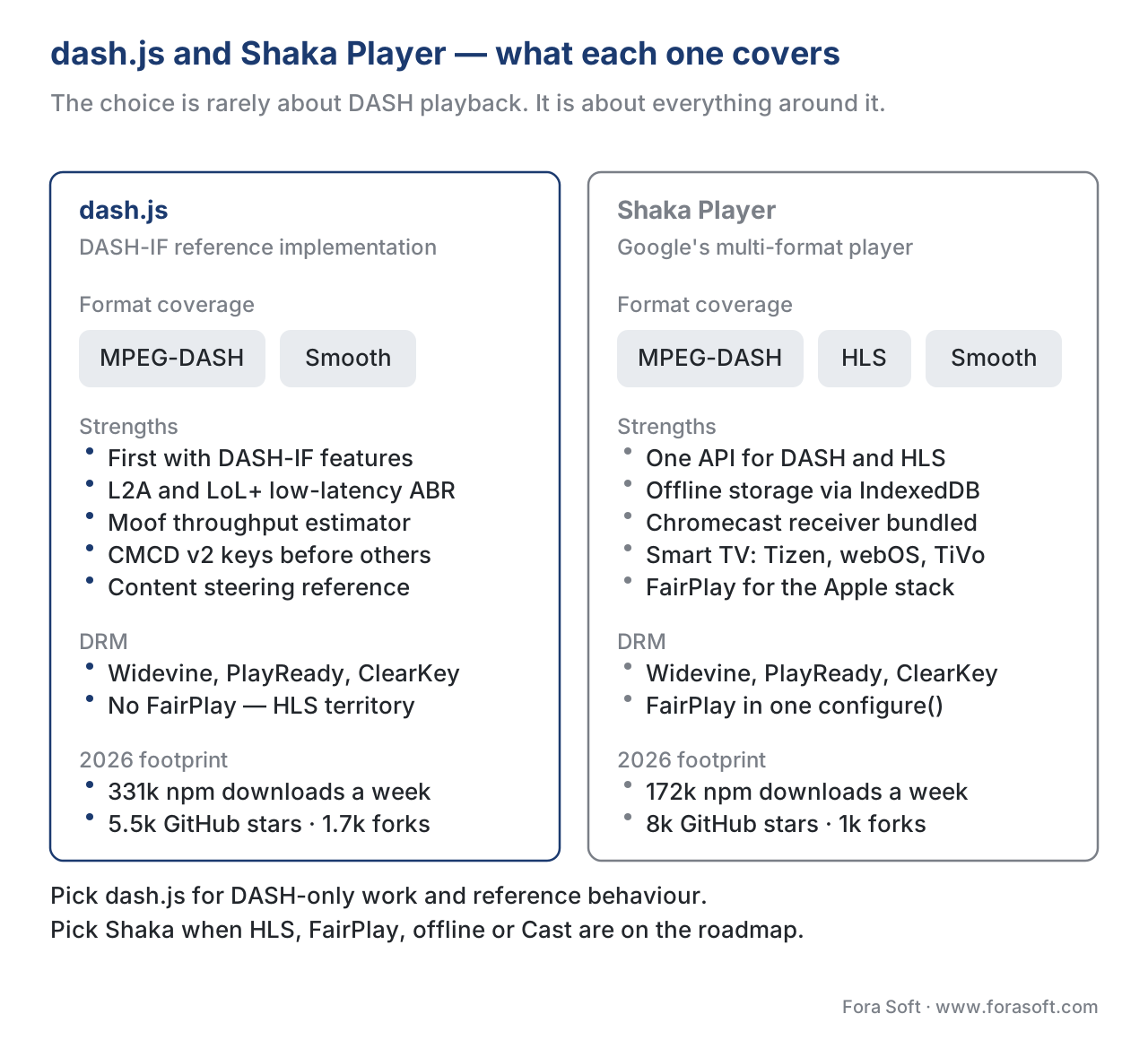 Figure 1. dash.js is the DASH-IF reference; Shaka Player is the multi-format generalist. The choice is rarely about DASH playback quality — it is about everything around it.
You can confirm dash.js is supported in a fresh browser tab with a single check: the library exposes dashjs.supportsMediaSource(), and if it returns true the browser has Media Source Extensions and dash.js can attach to a <video> element. It returns true in Chrome, Edge, Firefox, Opera, modern Safari with the ManagedMediaSource API, the Chromecast firmware's Web Receiver (when the receiver app loads dash.js), Tizen 2017+ smart-TV browsers, and webOS 4.0+. It returns false on iPhone Safari before iOS 17.1 (where ManagedMediaSource was not yet shipped) and on any browser engine that lacks MSE entirely, which in 2026 means almost nothing on the modern web.
Why this library exists at all
Three libraries dominate the browser-side streaming world: hls.js, Shaka Player, and dash.js. They were created at almost the same time — dash.js by the DASH Industry Forum in 2012, Shaka at Google in 2014–2015, and hls.js at Dailymotion in 2015 — to solve adjacent but different problems. dash.js was built as the reference implementation of a brand-new standard: ISO/IEC 23009-1, the MPEG-DASH protocol, had just been published in 2012, and the standards body needed a working JavaScript client to prove the spec was implementable, to surface ambiguities, and to give the DASH ecosystem a public starting point. hls.js was built later to fix the absence of HLS on non-Safari browsers — Apple's HTTP Live Streaming worked natively on iPhone and macOS but was a non-starter everywhere else. Shaka was built to make Google's streaming stack — DASH packaged with Shaka Packager, encrypted with Widevine, served through Google Cloud CDN, played in YouTube and the Chromecast Web Receiver — usable on the open web.
The political subtext shapes the dash.js roadmap. The project's first commitment is to the DASH-IF Implementation Guidelines, which are the de-facto implementation profile for the ISO/IEC 23009-1 standard — when the DASH-IF specifies a new behaviour for content steering, CMCD v2, low-latency catch-up, or DRM key-system priority, dash.js ships it before anyone else. The second commitment is the test corpus: dash.js is the player every commercial DASH packager tests against, which means a bug in dash.js usually surfaces as a bug in the ecosystem, and a fix in dash.js becomes documentation everyone else reads. The third commitment is research: dash.js is the only mainstream web player whose ABR rules engine lets academic groups land novel algorithms — BOLA, L2A, LoL+ — into a production-grade codebase that real teams run, which is why the bibliography under dashif.org/dash.js/pages/usage/low-latency.html reads like a Mile-High Video Conference programme.
The library's in-production users include the BBC (which has been a steady contributor to the LL-DASH work through Piers O'Hanlon at BBC R&D), the Fraunhofer FOKUS team (which maintains the LoL+ work through Daniel Silhavy and Bentaleb's group), several broadcaster reference deployments, and the smart-TV community on Tizen and webOS through the platforms' WebKit / Blink-based browsers. The GitHub repository sits at roughly 5,500 stars and 1,700 forks as of December 2025 — a third of hls.js's star count, slightly less than Shaka's, but with a strikingly different user base. dash.js users are a mix of DASH-IF members, research groups, and OTT engineering teams that need a reference behaviour they can patch; hls.js users span the long tail of webcasts and training videos; Shaka users skew toward paid OTT services with DRM, multi-CDN, and offline requirements.
The architecture in one paragraph
A running dash.js instance is a small graph of services that hang off the top-level MediaPlayer class — the public facade you get from dashjs.MediaPlayer().create(). The constructor wires up the services through FactoryMaker, a dependency-injection container that distinguishes class factories (one instance per create() call, e.g. MediaPlayer itself) from singleton factories (one instance per context, e.g. MediaPlayerModel and Settings). The services include a Settings module that holds the full configuration tree (you mutate it through player.updateSettings()), a StreamController that owns the lifecycle of a stream (manifest parse, period switch, ad insertion, end-of-stream), a ManifestModel and DashAdapter that turn the bytes of an MPD into Shaka's-style Variant objects, a ProtectionController that drives EME for Widevine, PlayReady, and ClearKey, an ABRController that runs an ordered set of Rules to pick the next variant, a BufferController per media type that owns the MSE SourceBuffer for that track, a CatchupController that adjusts playback rate to track the live edge during LL-DASH playback, and a ThroughputController that estimates bandwidth differently depending on whether the stream is low-latency or steady-state. You call player.initialize(videoElement, url, autoStart) to start everything, then listen for events. Everything else is configuration.
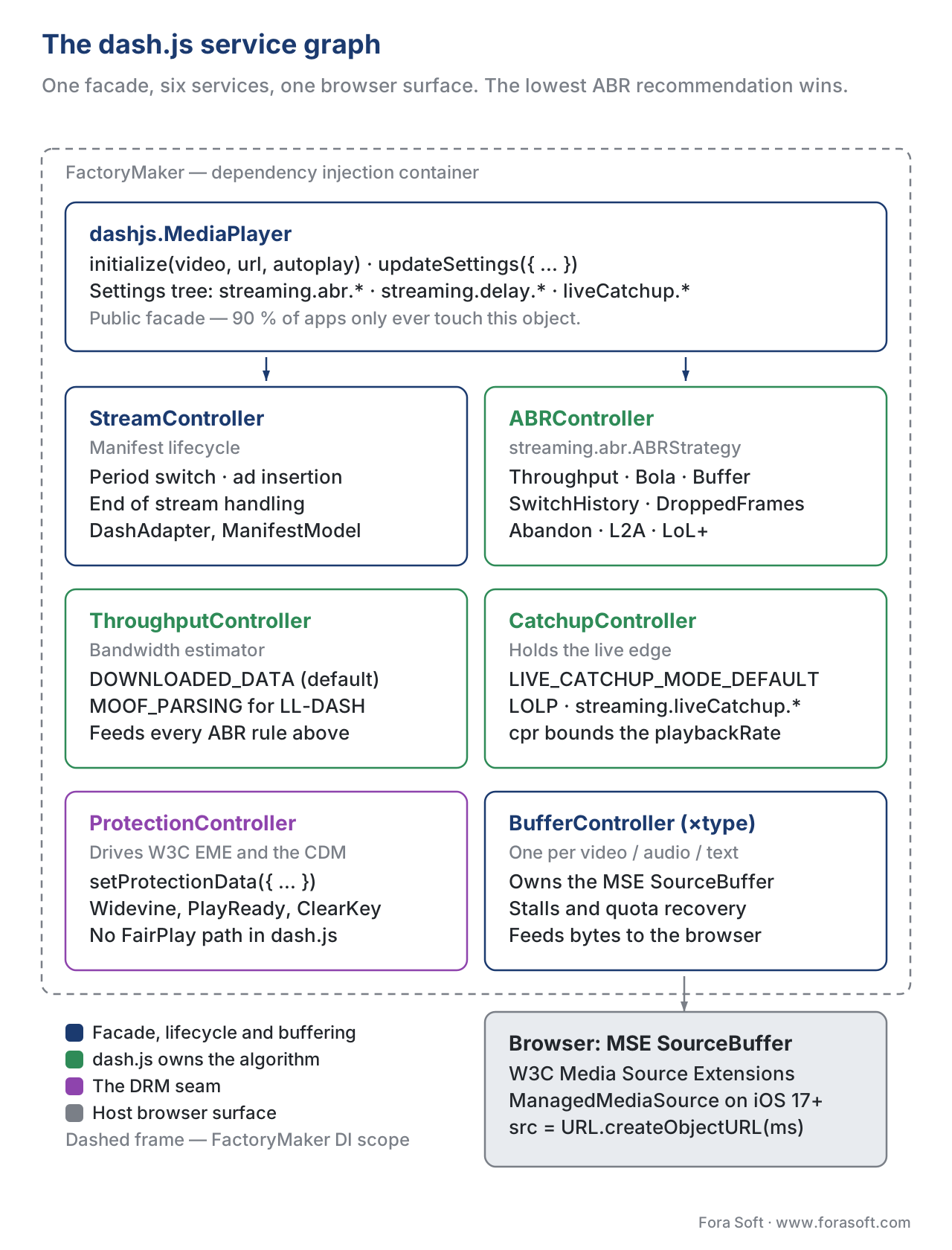 Figure 2. The dash.js service graph. Every service has a single responsibility and a clean replacement seam through
 FactoryMaker overrides or Settings updates.
That paragraph is the whole picture. The rest of this article zooms into each service, names the configuration that matters, and tells you which switches change behaviour in production.
The MediaPlayer facade and FactoryMaker
The MediaPlayer is the only API surface 90% of applications ever touch. You instantiate it with dashjs.MediaPlayer().create(), attach it to a <video> element through player.initialize(videoElement, sourceUrl, autoPlay), change behaviour through player.updateSettings({…}), listen for events through player.on(EventName, callback), and tear it down through player.destroy(). Under the hood every other dash.js module is created lazily by FactoryMaker, which is dash.js's own dependency-injection container.
The seams FactoryMaker exposes are how you extend dash.js without forking it. FactoryMaker.extend(parentClassName, childClass, override, context) lets you register a subclass of any dash.js module — the override flag controls whether the child replaces the parent (override=true) or partially overrides it (override=false, in which case unoverridden methods fall through to the parent). The pattern looks like this (Dash-Industry-Forum/dash.js, Developer Getting Started Guide, accessed 2026-05-24):
import dashjs from 'dashjs';

const CustomThroughputRule = function () {
  const context = this.context;
  // Custom rule logic here.
  return { getMaxIndex: () => /* index */ };
};

dashjs.FactoryMaker.extend('ThroughputRule', CustomThroughputRule, true, context);
That seam is how the L2A and LoL+ rules ship — both are independent *Rule classes registered through the same mechanism the application uses. It is also how teams ship neural ABR (Pensieve, Comyco) on top of dash.js: implement a rule, register it, the existing ABR pipeline takes it as one input among the others.
The ABRController and the rules pipeline
The most distinctive part of dash.js's architecture is the rules-based ABR. Where hls.js and Shaka ship one ABR algorithm with knobs to tune it, dash.js ships an ABR pipeline that runs multiple rules in priority order and picks the most conservative recommendation. The default rule stack contains, roughly: ThroughputRule (throughput-based pick), BolaRule (buffer-based BOLA, the Lyapunov-optimisation algorithm from Park & Chiang's 2016 paper), InsufficientBufferRule (a guard that drops the bitrate when the buffer is dangerously low), SwitchHistoryRule (a stability filter that prevents thrashing), DroppedFramesRule (cuts the bitrate when the decoder is dropping frames), and AbandonRequestRule (cancels a slow segment download and tries a lower rendition instead). Each rule returns a SwitchRequest with a recommended quality index and a priority; the ABRController picks the lowest quality index among the highest-priority requests.
This pipeline is the structural reason dash.js can host research algorithms cleanly. The DYNAMIC algorithm that has been the default since v2.6.0 (September 2017) is itself a pipeline behaviour: DYNAMIC = (buffer level < 10s) ? THROUGHPUT : BOLA, which is to say "if the buffer is small, the throughput rule wins; otherwise BOLA wins" (Spiteri, Sitaraman, Sparacio, From Theory to Practice: Improving Bitrate Adaptation in the DASH Reference Player, ACM Transactions on Multimedia Computing, 2019). The DASH-IF preserved both algorithms as separate rules so teams can pin one or the other for a given workload — for steady-state VOD you might pin BOLA; for low-latency live you pin throughput plus L2A; for a custom workload you implement a new rule and let the pipeline pick.
The configuration knobs that matter are exposed through the streaming.abr settings tree. You change the throughput-estimate weighting through streaming.abr.throughput.averageCalculationMode (arithmetic, geometric, EWMA), set per-media safety factors through streaming.abr.bandwidthSafetyFactor, lock min and max bitrates through streaming.abr.minBitrate and streaming.abr.maxBitrate, and pick the active strategy through streaming.abr.ABRStrategy (abrThroughput, abrBola, abrDynamic, abrL2A, abrLoLP).
The ProtectionController and EME
The ProtectionController is the part of dash.js that handles Digital Rights Management. When the manifest declares a key system — Widevine via com.widevine.alpha, PlayReady via com.microsoft.playready, or ClearKey for testing — the controller calls navigator.requestMediaKeySystemAccess with the right MediaKeySystemConfiguration, opens a MediaKeySession, fetches the license from the URL configured in protection.servers, and feeds the key into the browser's Content Decryption Module. The BufferController cannot append encrypted bytes until the key arrives, which is why a slow license server is the most common cause of a black-screen-no-error on a paid stream.
The standard configuration pattern in 2026 is one block:
player.setProtectionData({
  'com.widevine.alpha': {
    serverURL: 'https://drm.example.com/widevine',
    httpRequestHeaders: { 'X-AxDRM-Message': token }
  },
  'com.microsoft.playready': {
    serverURL: 'https://drm.example.com/playready',
    httpRequestHeaders: { 'X-AxDRM-Message': token }
  }
});
That is the entire surface most production deployments need for multi-DRM (Dash-Industry-Forum/dash.js, DRM usage page, accessed 2026-05-24). dash.js officially supports Widevine, PlayReady, and ClearKey — there is no FairPlay path because FairPlay is bound to Apple's HLS-only ecosystem, and dash.js does not play HLS. For a product that needs DASH on Chrome/Edge/Firefox/Android plus FairPlay-encrypted HLS on iOS Safari, the canonical 2026 architecture is "dash.js (or Shaka) on the web and Android side, native AVPlayer on iOS" — and the choice between dash.js and Shaka on the web side depends on whether you also need HLS in the same player.
A dash.js-specific subtlety: since v4.3.0 the library has supported a systemStringPriority configuration that lets you declare which key-system identifier dash.js should try first when the browser advertises support for several variants of the same DRM. Some Chromium builds advertise both com.widevine.alpha and com.widevine.alpha.experiment (the L1-hardware Widevine path); pinning the priority is how you guarantee L1 playback on devices that support it (Fraunhofer FOKUS Video-Dev, Following the .recommendation — Key system string priority in dash.js, accessed 2026-05-24).
The BufferController and MSE
The BufferController is the per-media-type service that owns the browser's SourceBuffer for that track. There is one BufferController per active media type (video, audio, text), and each handles its own segment fetch loop, append queue, range-removal logic, and quota-exceeded recovery. The controllers run in parallel — the video BufferController can be appending a 1080p segment while the audio BufferController is appending an English audio track, and the two are synchronised at the MSE layer through MediaSource.duration and the playhead.
The interesting state to monitor in production is the buffer-stall — when the BufferController thinks it is appending bytes but the playhead has not advanced for longer than the stall threshold. dash.js emits a PLAYBACK_STALLED event and, depending on the configuration, either nudges the playhead forward by a tiny offset or seeks back to the live edge in low-latency mode. The defaults work for almost every deployment, but the knobs are there.
On iOS Safari 17.1 and later, the BufferController can use Apple's ManagedMediaSource API — the iPhone-Safari subset of MSE that finally allows JavaScript players to play DASH on iOS. ManagedMediaSource has tighter rules about when the browser can reclaim memory, and it requires the source element be wrapped inside a <source> child of <video>. dash.js detects it automatically when it is present.
The ThroughputController and the LL-DASH problem
The ThroughputController is the service whose existence proves a single point: throughput-based ABR breaks at low latency, and the fix is not a knob, it is a different algorithm. Classic throughput estimation works by dividing the segment size by the segment's download time. That formula is fine when segments arrive in burst — a 6 Mbps segment that lasts 6 seconds and downloads in 3 seconds yields a 12 Mbps estimate, which is roughly the available bandwidth. The formula breaks in LL-DASH because the segment is being delivered via HTTP/1.1 chunked transfer encoding as the encoder produces it: the server holds the connection open for the segment's full 6 seconds and dribbles bytes through as each CMAF chunk completes, so the "download time" is identical to the segment duration regardless of the underlying bandwidth. Every segment looks like a 1× bandwidth match, even on a 100 Mbps link (dashif.org/dash.js, Low Latency Streaming, accessed 2026-05-24).
dash.js solves this with two ThroughputController modes you pick through streaming.abr.throughput.lowLatencyDownloadTimeCalculationMode. The default mode records timestamp-plus-bytes pairs every time data arrives, filters out the small entries that represent idle gaps between chunk arrivals, and computes an effective download time from the remaining samples — the formula recovers a realistic bandwidth estimate even though the wall-clock segment duration is unhelpful. The alternative mode is moof-parsing throughput: dash.js parses the incoming bytes, locates each CMAF moof box as it arrives, and treats the time between consecutive moof boxes as the per-chunk download time. Moof-parsing throughput is more precise (it sees the chunk boundaries directly) at the cost of CPU on the player thread.
You pick the mode through one settings call:
player.updateSettings({
  streaming: {
    abr: {
      throughput: {
        lowLatencyDownloadTimeCalculationMode:
          dashjs.Constants.LOW_LATENCY_DOWNLOAD_TIME_CALCULATION_MODE.MOOF_PARSING
      }
    }
  }
});
The default-mode estimator ships as the default because it is cheaper; teams that need the cleanest low-latency ABR on commodity hardware switch to moof-parsing. Either way, the two LL-DASH ABR algorithms (L2A and LoL+) consume the controller's output as their bandwidth input, so picking the right mode matters more than picking the rule that consumes it.
The CatchupController and the live edge
The CatchupController is the LL-DASH-specific service that keeps the player anchored close to the live edge. The job is harder than it sounds: a viewer who pauses for ten seconds and resumes is now ten seconds behind the live edge and needs to catch up; a viewer whose Wi-Fi rebuffered for two seconds is two seconds behind; an over-aggressive ABR algorithm that prefetched a high-bitrate segment is slightly behind because of the longer download. The default catchup mechanism speeds up playback by up to 50% (liveCatchup.playbackRate.max = 0.5, meaning the playback rate can rise to 1.5×) until the latency drift falls back to the target, and slows it down by up to 50% (liveCatchup.playbackRate.min = -0.5, meaning the rate can fall to 0.5×) when the buffer is in danger.
dash.js exposes two catchup modes: the default mode (mathematically: newRate = (1 − cpr) + (cpr × 2) / (1 + e^−d), where cpr is the configured rate and d is a multiple of the latency delta) and the LoL+ mode, which adds a buffer-level term to the same equation so the player slows down (rather than just hovers) when the buffer threatens to drain. You pick the mode through streaming.liveCatchup.mode, set the latency target through streaming.delay.liveDelay (in seconds), set the maximum permitted drift through streaming.liveCatchup.maxDrift (after which dash.js seeks back to the live edge instead of catching up), and set the catch-up rate bounds through streaming.liveCatchup.playbackRate. The full default catchup table is documented in dash.js's low-latency.html page.
A subtlety: the catchup mechanism kicks in only when the current latency is within streaming.liveCatchup.latencyThreshold of the target. If the player is wildly off the target — for instance after a long pause — dash.js will seek straight to the live edge rather than try to catch up at 1.5× for a minute, which would be both audible to the viewer and inefficient.
A minimum viable dash.js player
The seven lines below are enough to load a DASH stream into a browser tab and start playback. They assume the browser is modern enough to support MSE and that the manifest is publicly fetchable (Dash-Industry-Forum/dash.js, Quickstart, accessed 2026-05-24).
<video id="videoPlayer" controls></video>
<script src="https://cdn.dashjs.org/latest/modern/umd/dash.all.min.js"></script>
<script>
  const url = 'https://dash.akamaized.net/envivio/EnvivioDash3/manifest.mpd';
  const player = dashjs.MediaPlayer().create();
  player.initialize(document.querySelector('#videoPlayer'), url, true);
</script>
Notice the API shape: MediaPlayer().create() returns a fresh instance, initialize(video, url, autoPlay) does everything (manifest fetch, MSE binding, autoplay), and player.reset() releases everything. If you want to subscribe to events for telemetry, you add player.on(dashjs.MediaPlayer.events.PLAYBACK_STARTED, …) and the rest follows the same pattern. The library exposes around 70 named events, which together let you build a full QoE telemetry pipeline without sniffing the DOM.
If you want to turn on low-latency mode, you pass the right settings before calling initialize:
player.updateSettings({
  streaming: {
    delay: { liveDelay: 3 },
    liveCatchup: { maxDrift: 0.5, playbackRate: { max: 0.5, min: -0.5 } },
    abr: {
      ABRStrategy: 'abrL2A',
      throughput: {
        lowLatencyDownloadTimeCalculationMode:
          dashjs.Constants.LOW_LATENCY_DOWNLOAD_TIME_CALCULATION_MODE.MOOF_PARSING
      }
    }
  }
});
That is the entire delta in the player code to go from 24-second VOD-style latency to sub-3-second LL-DASH (subject to the encoder producing CMAF chunks and the CDN forwarding chunked transfer encoding). The packager and CDN side of LL-DASH is a longer story covered in our LL-DASH and low-latency CMAF article.
A worked latency example
A common question on a 2026 project is "if we switch from regular DASH to LL-DASH with dash.js, how much glass-to-glass latency do we save?" Here is the arithmetic on one stream.
A regular DASH stream uses 6-second segments and the player target buffer is three segments ahead of the playhead.
Segment duration × buffer depth = 6 s × 3 = 18 s of player-side latency.
Add about 4 seconds of network and origin latency and 2 seconds of encoder packaging latency, and you get a glass-to-glass figure of:
18 s + 4 s + 2 s = 24 s.
That is steady-state, on a well-behaved CDN. A good number for "wedding live stream" use but bad for "in-play sports betting".
The LL-DASH version uses 2-second segments encoded as CMAF chunks of 200 ms each, with availabilityTimeOffset set so the player can request a chunk almost as soon as the encoder produces it. dash.js's streaming.delay.liveDelay is set to 3 seconds:
Player target latency = 3 s (set by streaming.delay.liveDelay).
Network and origin latency stays at about 0.8 s in the LL-DASH case because the CDN is shielding chunked-transfer-encoded responses, and encoder packaging stays at about 0.5 s.
3 s + 0.8 s + 0.5 s ≈ 4.3 s glass-to-glass.
The dash.js-side switch to enable this is the updateSettings block in the previous section. The work happens on the packager side (Shaka Packager, Bitmovin, AWS Elemental, FFmpeg with LL-DASH support, or your encoder of choice) and on the CDN side (chunked transfer encoding enabled at the origin and not stripped by intermediate caches). When the cluster of encoders is itself optimised and the CDN is at the edge, the L2A or LoL+ rule keeps the player close to the 3-second target even through Wi-Fi jitter — that is the empirical result of the DASH-IF reference tests.
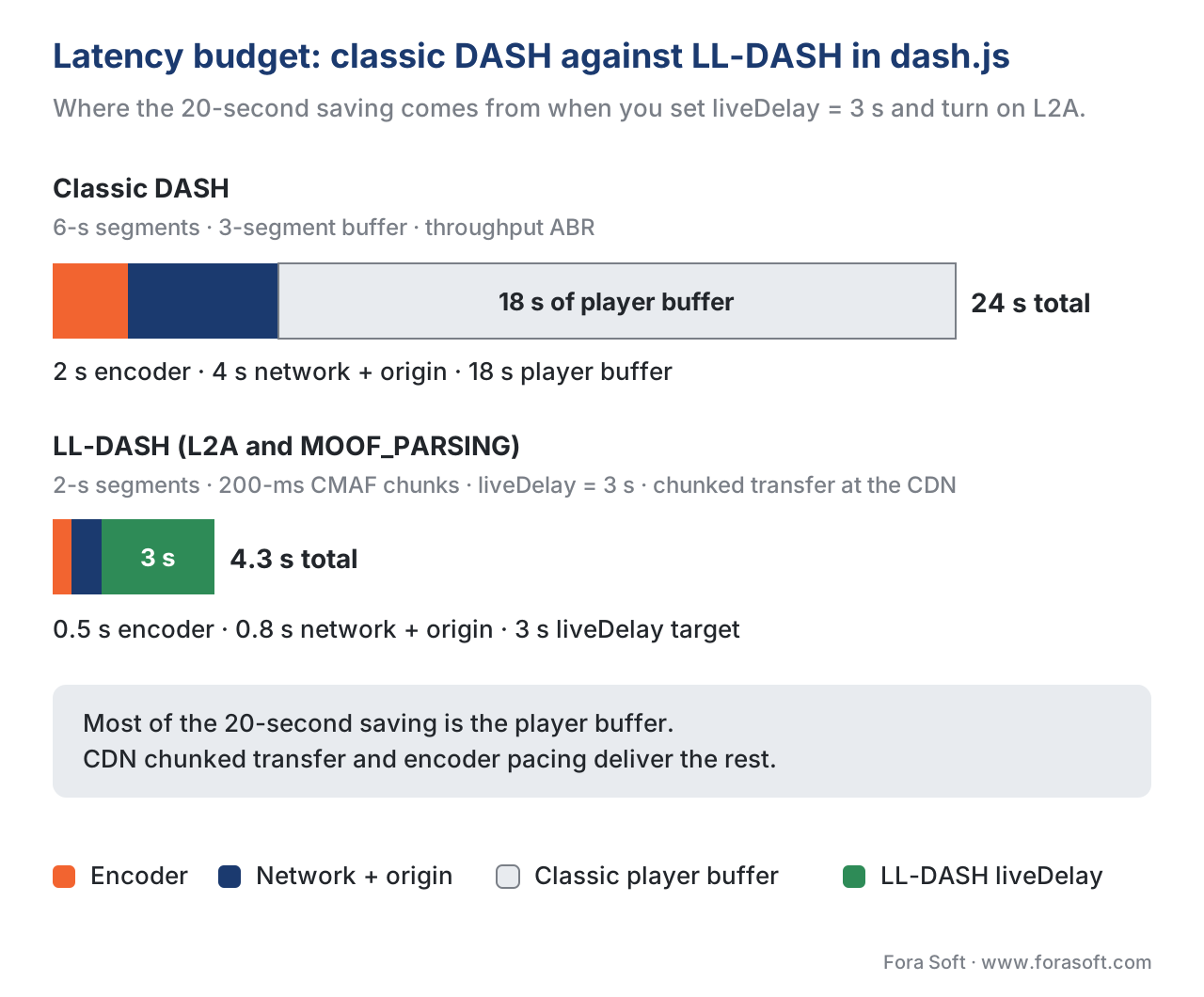 Figure 3. Where the 20-second saving comes from. Most of it is the player buffer dropping from 18 s to ~3 s; CDN behaviour and encoder chunking deliver the rest.
dash.js vs Shaka Player — seven axes that decide
The question "dash.js or Shaka?" lands so often that a comparison table is required reading. Both libraries are excellent, BSD-3 / Apache-2.0-licensed, actively maintained, and used in production by serious teams. They differ on what they cover and how they extend.
| Axis | dash.js | Shaka Player | Winner for this axis |
|---|---|---|---|
| Format coverage | DASH + Microsoft Smooth Streaming | DASH + HLS + Smooth Streaming | Shaka if you ship HLS too |
| Weekly npm downloads (May 2026) | ~331,000 | ~172,000 | dash.js — larger DASH-focused base |
| DRM scope | Widevine, PlayReady, ClearKey (no FairPlay path) | Widevine, PlayReady, FairPlay, ClearKey | Shaka — full multi-DRM |
| LL-DASH algorithms | L2A, LoL+, plus default and moof-parsing throughput modes | Generic low-latency mode without LoL+/L2A primitives | dash.js — by a wide margin |
| Offline storage | No first-class offline | First-class IndexedDB-based Storage API | Shaka |
| Chromecast | Cast through Video.js / custom plumbing only | Bundled in Google Cast Web Receiver SDK | Shaka |
| Reference-implementation status | DASH-IF official reference; every DASH-IF feature lands here first | High-quality implementation; not a standards body | dash.js — for DASH-IF-driven workflows |
For a Fora Soft engagement the most common shape is an OTT product that ships Widevine-encrypted DASH for Android-and-the-web plus FairPlay-encrypted HLS for iOS — that stack picks Shaka almost every time because the second format is required. When the engagement is "ultra-low-latency DASH only, for a live-betting or in-game-shopping product, with research-grade ABR" we ship dash.js with abrL2A or abrLoLP because the alternative does not have the same primitives.
Where dash.js leads the ecosystem (CMCD, CMSD, content steering)
Three CTA-WAVE / DASH-IF / SVTA initiatives shipped to production through dash.js first. Common Media Client Data (CTA-5004) is a standard the client uses to send playback context to the CDN — buffer length, bitrate, content ID, session ID, request type — through HTTP request headers, query strings, or JSON. dash.js ships full CMCD v1 and as of v5.0.0 the v2 keys ltc (live target latency) and msd (measured startup delay). Common Media Server Data (CTA-5006) is the mirror: the CDN tells the client about its current load through HTTP response headers, and dash.js exposes the parsed CMSD response through events your code can react to. Content steering — the 2022 DASH-IF and Apple HLS specification that lets a server tell the player which CDN to use next — landed in dash.js through PR #4031 and is the reference implementation every commercial steering vendor measures against.
All three are documented under dashif.org/dash.js/pages/usage/ and configurable through player.updateSettings(). The point is not that other players can't do it — they can, with delay — but that dash.js ships these features first because the standards process and the implementation process share contributors.
A production error-recovery pattern
Every production dash.js deployment ships against the same family of errors. The library categorises them through dashjs.MediaPlayer.errors.* — the most important constants are MANIFEST_LOADER_LOADING_FAILURE_ERROR_CODE, FRAGMENT_LOADER_LOADING_FAILURE_ERROR_CODE, MEDIASOURCE_TYPE_UNSUPPORTED_CODE, KEY_SESSION_CREATED_ERROR_CODE, KEY_ERROR, and the catch-all MEDIA_SOURCE_ERROR_CODE. The pattern below is what we ship by default.
player.on(dashjs.MediaPlayer.events.ERROR, (event) => {
  const { error } = event;
  const { code, message, data } = error;

  // Telemetry first — every error, recoverable or not, is a data point.
  telemetry.track('dashjs_error', { code, message });

  switch (code) {
    case dashjs.MediaPlayer.errors.MANIFEST_LOADER_LOADING_FAILURE_ERROR_CODE:
      ui.showError('Could not load this title. Tap to retry.');
      break;
    case dashjs.MediaPlayer.errors.FRAGMENT_LOADER_LOADING_FAILURE_ERROR_CODE:
      // CDN problem — dash.js is already retrying inside its loader.
      ui.showToast('Reconnecting…');
      break;
    case dashjs.MediaPlayer.errors.KEY_ERROR:
    case dashjs.MediaPlayer.errors.KEY_SESSION_CREATED_ERROR_CODE:
      ui.showError('Your session expired. Please sign in again.');
      break;
    case dashjs.MediaPlayer.errors.MEDIASOURCE_TYPE_UNSUPPORTED_CODE:
      ui.showError('Your browser cannot play this format.');
      break;
    default:
      ui.showError('Playback failed. Tap to retry.');
  }
});
That listener is the entire error-handling shape most production deployments need. Notice two things: every error is told to telemetry before any user-facing action runs, and recoverable errors (here the fragment-loader failure dash.js is already retrying) deliberately do not surface a red banner — surfacing every transient blip is the most common error-handling mistake we see in code reviews. The categories above also map cleanly onto the four families of operations playbook a streaming product needs: a CDN-or-network playbook, a packaging-and-MSE playbook, a license-server playbook, and an asset-catalogue playbook.
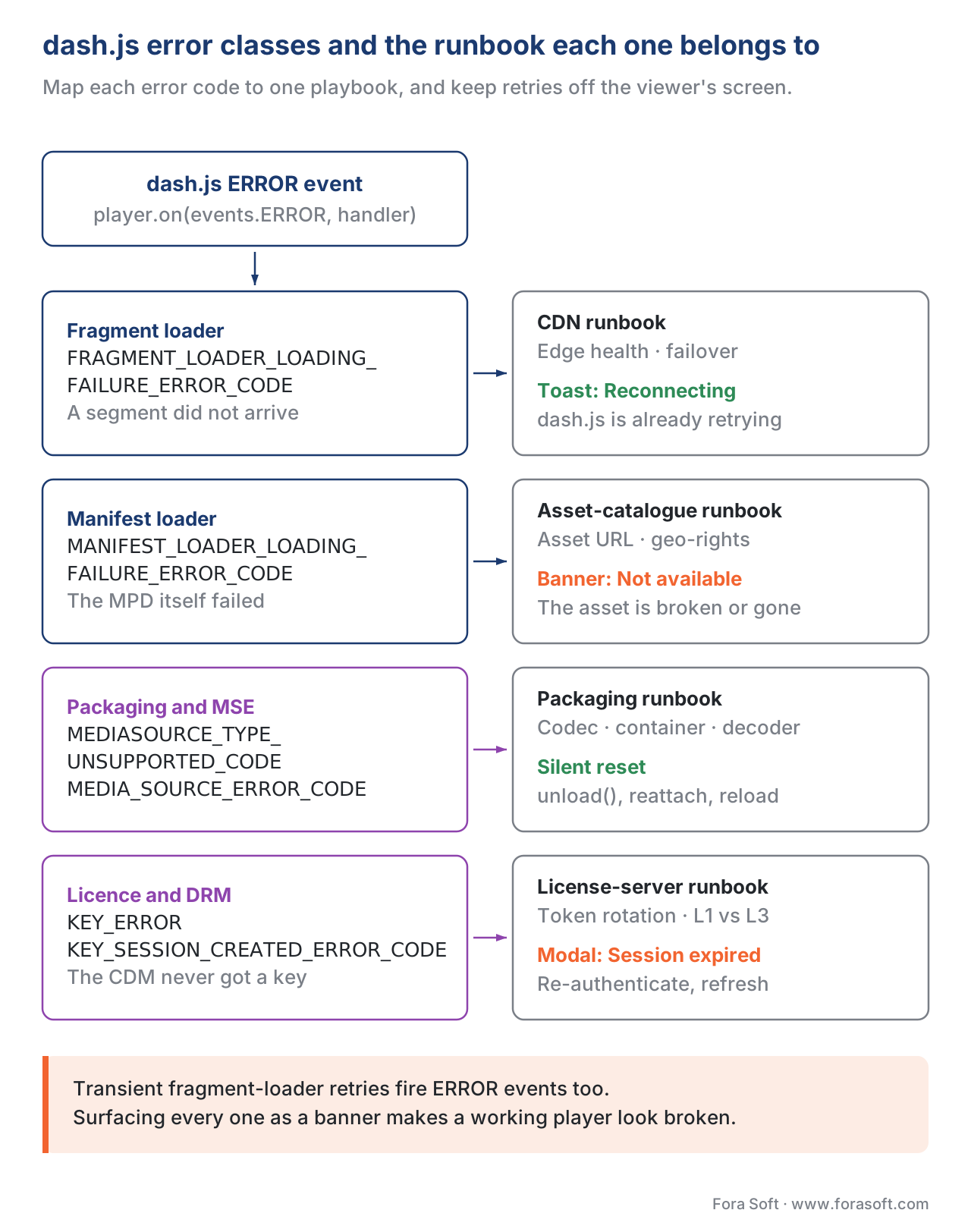 Figure 4. Map each dash.js error class to a specific runbook. The most common error-handling mistake is surfacing every transient fragment-loader retry to the user.
What v5 changed, and what to ship in 2026
The v5 series is the current line of dash.js. v5.0.0 shipped on 17 February 2025 with three changes most teams notice (Dash-Industry-Forum/dash.js, Release v5.0.0, 17 February 2025; SVTA, dash.js v5.0.0 release, 17 February 2025). The build system was rewritten to ship three bundle formats — UMD legacy (for old platforms), UMD modern (the everyday browser target), and ESM modern (the tree-shakeable import path you want for modern bundlers) — which dropped the modern bundle size noticeably and aligned dash.js with how 2025 build tooling actually works. CMCD v2 keys ltc (live target latency) and msd (measured startup delay) landed alongside a setting to choose which outgoing requests carry CMCD parameters, and applications gained the ability to disable handling of CMCD parameters defined in the MPD. A new seekToPresentationTime() method joined the existing seek() so applications can seek to a specific media presentation time rather than a wall-clock seconds offset — a small API but important when integrating with ad-server time codes.
v5.1.0 shipped on 21 November 2025 with the LCEVC and reference-UI work most teams will eventually adopt (Dash-Industry-Forum/dash.js, Release v5.1.0, 21 November 2025). MPEG-5 Part 2 LCEVC (Low Complexity Enhancement Video Coding) integration arrived through the LCEVC SEI path, which lets a content owner ship a base layer at one resolution and a small enhancement layer that the dash.js / V-Nova decoder upscales on the client side. Support for the <Preselection> element in MPD documents matured, the cue-handling layer was rewritten as a Cue Interval Tree for fast lookups during high-cadence ad insertion, and an APIs landed for configuring external subtitles, the maximum number of EME KeySessions, ABR rule priority, and UTC time-sync offset. The reference UI you see on reference.dashif.org/dash.js/ is the rewrite-from-scratch UI mentioned in the release notes, and is still available alongside the legacy UI.
v5.1.1 shipped on 23 December 2025 and is the current published version as of May 2026. It is the patch line you should target for new deployments — bug fixes only on top of v5.1.0.
Common pitfalls
Every project hits a small number of the same dash.js issues. Six worth knowing before you ship.
Targeting the legacy UMD bundle by default. dash.js v5 ships three bundles; the default for modern web bundlers should be modern/esm/dash.all.min.js, not the legacy UMD path. Picking the legacy path on a Webpack 5 / Vite project ships an extra 100 KB of polyfills your users do not need.
Using seek(seconds) instead of seekToPresentationTime(t) against an ad-server time code. The two methods sound similar; one targets a wall-clock seconds offset from stream start, the other targets the MPD's media presentation timeline. For ad insertion against SCTE-35 markers, the latter is the correct call.
Mixing throughput modes on LL-DASH and then blaming the ABR rule. The two lowLatencyDownloadTimeCalculationMode settings (default and moof-parsing) produce different bandwidth estimates. If you switch from one to the other and your ABR behaviour changes, that is the cause — the rule is reading a different input, not behaving differently itself.
Treating every fragment-loader event as a fatal error. dash.js retries fragments inside the loader with exponential backoff. The error event you see at the application level only fires after the retries are exhausted. The wrong pattern is "every fragment-loader retry surfaces a red banner"; the right pattern is "fragment-loader event → toast, manifest-loader event → banner".
Not enabling CMCD on a paid CDN deployment. If you are paying for a CDN that supports CMCD (Akamai, Fastly, Cloudflare, AWS CloudFront with custom rules), turning on streaming.cmcd.enabled = true gives the CDN per-session context that materially improves cache-shielding and per-customer SLA reporting. The cost is nil; the benefit is real.
Loading the sample reference UI in production. The reference UI under reference.dashif.org/dash.js/ is a developer-tool surface that exposes every knob in the player. Shipping it to end users gives them a debugging cockpit nobody asked for. The optional sample controlbar (dash.all.min.js plus the sample CSS) is the lightweight option; for production UI most teams write their own thin component layer on top of player.on(…) events.
Where Fora Soft fits in
We have shipped dash.js in production across most of our streaming-adjacent practice areas — OTT and Internet-TV catalogues that need DASH playback against multi-DRM (Widevine + PlayReady) on the open web, broadcaster simulcast deployments that need DASH-IF reference behaviour, e-learning platforms whose content is DASH-only, surveillance products where the same library plays live and recorded footage, and a small number of low-latency interactive products (live shopping, in-play sports) where L2A or LoL+ inside dash.js was the right primitive. Across those verticals we have been the engineering team that built the player layer end to end (configuration, ABR override, error telemetry, accessibility) more than once. Where the audience can be cleanly served by Shaka — for example, a product that needs HLS in the same player or first-class offline storage — we recommend Shaka and use it instead; the right player is the one that matches the engagement's roadmap, not the one with the largest DASH community on GitHub. Player integration of this kind is a standard part of our video streaming software development and OTT and Internet TV platform projects, from ABR tuning to DRM and analytics hooks.

The book
Video Streaming: A Complete Guide to Video Delivery: From ABR and CDNs to Players, WebRTC, DRM, and the Economics of Streaming
This article stops at the edge of the player; volume 3 is the book that starts there. It works through the bitrate ladder and the ABR rules dash.js implements, then CDN behaviour, stall recovery, trick play, captions and multi-DRM, so every setting you flip in updateSettings has the model behind it. Written by Nikolay Sapunov, CEO at Fora Soft.
Is your DASH player the reason viewers see a spinner?
Send us your MPD and a week of player telemetry and we will tell you which of the seven services is costing you: the ABR rule that abandons too late, the liveDelay you cannot hold, or the error handler that turns a retry into a banner. 250+ video products shipped since 2005.
See our case studies
Case study
Worldcast Live
Concerts held at 0.4–0.5 s glass-to-glass for 10,000 simultaneous viewers at 1.5 Gb/s — the live edge a CatchupController exists to defend.
Case study
Sprii
A Danish live shopping platform with 72,000+ live events and €365M+ in sales — where a 20-second player buffer would cost the sale.
Case study
Mindbox
An RTSP-to-HLS video management system in 50+ deployments across India — one player layer serving live cameras and recorded footage.
What to read next
Players
Shaka Player in depth
The multi-format alternative, and the four things that make you pick it instead.
Protocols
MPEG-DASH in depth
The manifest and segment format dash.js was written to play.
Low latency
LL-DASH and chunked CMAF
The packager and CDN half of the 4.3-second budget above.
Browser APIs
Media Source Extensions in depth
The browser surface BufferController feeds, and what it refuses.
References
- Dash-Industry-Forum/dash.js, README, accessed 2026-05-24. Repository topics list and license declaration. <https://github.com/Dash-Industry-Forum/dash.js>
- Dash-Industry-Forum/dash.js, Releases page, accessed 2026-05-24. Release v5.0.0 (17 February 2025), v5.1.0 (21 November 2025), v5.1.1 (23 December 2025). <https://github.com/Dash-Industry-Forum/dash.js/releases>
- DASH-IF, dash.js — Low Latency Streaming documentation, accessed 2026-05-24. Throughput estimation, CatchupController behaviour, LoL+ catchup math, configuration keys. <https://dashif.org/dash.js/pages/usage/low-latency.html>
- DASH-IF, dash.js — Digital Rights Management (DRM) documentation, accessed 2026-05-24. Widevine / PlayReady / ClearKey configuration;
systemStringPrioritysince v4.3.0. <https://dashif.org/dash.js/pages/usage/drm.html> - DASH-IF, dash.js — Version 4 to 5 migration guide, accessed 2026-05-24. Build-bundle changes; CMCD setting;
seekToPresentationTime. <https://dashif.org/dash.js/pages/developers/migration-guides/4-to-5.html> - DASH-IF, dash.js — Common Media Client Data documentation, accessed 2026-05-24. CMCD v1 and v2 keys; v5.0
ltcandmsdadditions. <https://dashif.org/dash.js/pages/usage/cmcd.html> - DASH-IF, dash.js — L2A Rule documentation, accessed 2026-05-24. L2A-LL implementation reference; ACM MMSys 2020 Grand Challenge context. <https://dashif.org/dash.js/pages/usage/abr/l2a.html>
- DASH-IF, dash.js — LoL+ Rule documentation, accessed 2026-05-24. Hybrid buffer-and-latency catchup; LoL+ ABR pipeline. <https://dashif.org/dash.js/pages/usage/abr/lol_plus.html>
- Spiteri, Sitaraman, Sparacio, From Theory to Practice: Improving Bitrate Adaptation in the DASH Reference Player, ACM Transactions on Multimedia Computing 2019. DYNAMIC algorithm (BOLA + Throughput) released as part of dash.js v2.6.0 on 1 September 2017 and currently the primary ABR algorithm in dash.js for video producers. <https://dl.acm.org/doi/fullHtml/10.1145/3336497>
- Karagkioules et al., Online learning for low-latency adaptive streaming, ACM MMSys 2020 (proceedings). L2A-LL algorithm definition; OCO-based bitrate adaptation; the winning solution of ACM MMSys 2020 Grand Challenge on Adaptation Algorithm for Near-Second Latency. <https://dl.acm.org/doi/abs/10.1145/3339825.3397042>
- ISO/IEC 23009-1:2022, Information technology — Dynamic adaptive streaming over HTTP (DASH) — Part 1: Media presentation description and segment formats. The MPEG-DASH standard dash.js implements. <https://www.iso.org/standard/83314.html>
- W3C Media Source Extensions, Editor's Draft tracked through 2025. The MSE API dash.js feeds. <https://w3c.github.io/media-source/>
- W3C Encrypted Media Extensions, Recommendation 18 September 2017. The EME API dash.js drives through ProtectionController. <https://www.w3.org/TR/encrypted-media/>
- CTA-5004, Common Media Client Data (CMCD), January 2020 / v2 work in CTA-WAVE 2024–2025. The standard dash.js v5.0 ships the
ltcandmsdkeys for. - SVTA, dash.js v5.0.0 Release, 17 February 2025. Public release announcement and feature recap. <https://www.svta.org/2025/02/17/dash-js-v5-0-0-release/>
