


Why this matters
If your course was designed on a laptop and "checked on mobile" at the end, you built it backwards, because the phone is where most learning now happens. This article is for the L&D director, EdTech founder, instructional designer, or product manager who has to decide how much to invest in the mobile experience and what to ask engineers to build. It walks through the five things a phone changes — player, format, data, offline-and-background playback, and accessibility — each with the numbers to size it and the standards to build it correctly. The network mechanics underneath live in Fora Soft's Video Streaming section and the weak-connection case in Learning Video on Weak Networks; this piece is about the mobile product decision — what phone-first costs, what it buys, and which learner you keep because of it.
The phone is the default classroom
Start with the fact that reframes everything else: for a large and growing share of learners, the primary screen is a phone, not a computer. Industry trackers put the global mobile-learning market in the range of $150 billion in 2026, growing at roughly 30% a year, and report that a majority of the workforce now uses a smartphone for some of their training [9]. The exact percentages vary by source and should be read as directional rather than precise, but the direction is not in doubt: a learner is more likely to open your course on a phone, on a couch or a commute, than at a desk.
That changes the job. A desktop course assumes a big screen, a mouse with pixel-perfect precision, a power socket, and usually unmetered Wi-Fi. A phone assumes the opposite of each: a small screen held in one hand, a fingertip instead of a cursor, a battery that drains, and often a metered data plan. "Mobile-first" is the discipline of designing for that harder set of constraints first, then letting the desktop experience be the easy, larger case — rather than designing for the easy case and hoping it survives the hard one. The common failure is to treat the phone as a shrunk-down desktop; the result is tiny controls, horizontal video that wastes a portrait screen, and downloads that quietly burn through someone's data allowance.
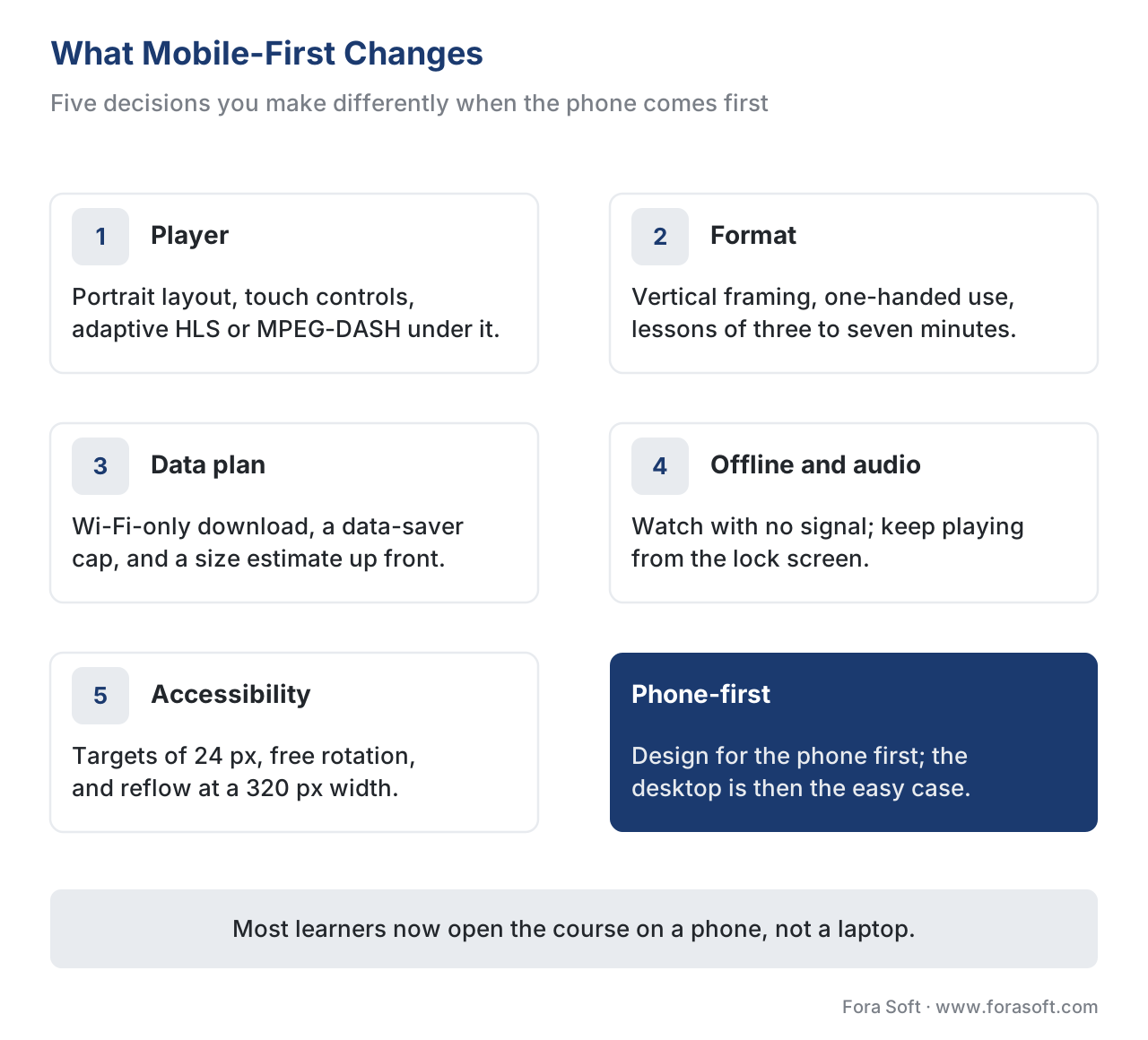 Figure 1. What "mobile-first" actually changes. Five design decisions you make differently when the phone comes first, and the rule that sits under all of them.
Change 1 — The mobile video player
On a phone, the video player is the product, and it behaves differently from a desktop player in three ways that matter.
First, orientation. A phone is usually held upright, so a learning player must work in portrait — showing the video in the top portion of the screen with the transcript, notes, or next-up list below — and expand to fill the screen in landscape when the learner turns the phone for a full-frame view. Forcing one orientation is both a usability problem and an accessibility failure, covered under accessibility below.
Second, the controls must be touchable. On a desktop, a mouse can hit a four-pixel scrubber handle; a thumb cannot. Play, pause, seek, caption, and speed controls have to be large enough and far enough apart to hit reliably while the phone moves in a moving hand. There is a precise standard for this, and it is covered in the math below.
Third, the delivery has to be adaptive and native-friendly. Recorded lessons should stream as adaptive bitrate (ABR) — the same lesson prepared at several quality levels so the player automatically picks the one the connection can carry — using the open standards HLS (HTTP Live Streaming, defined in internet standard RFC 8216) or MPEG-DASH (ISO/IEC 23009-1) [2][3]. The phone platforms are built for exactly these: Apple's player framework, AVPlayer, plays HLS natively, and Android's modern player library, Media3 / ExoPlayer, plays HLS, DASH, and Smooth Streaming and includes a download manager that keeps fetching in the background when the app is closed [10]. The ABR mechanics live in the streaming section's adaptive bitrate explainer; the point here is that you build the mobile player on these standards rather than inventing delivery.
Change 2 — Formats built for the phone: vertical and micro
A phone screen is tall, and a phone session is short. Two format shifts follow.
Vertical (portrait) video uses the whole screen the way the learner is already holding it, with no black bars and no need to rotate. The format is familiar from social apps, and the engagement gap is real: one widely cited platform statistic found viewers up to nine times more likely to finish a vertical video than a horizontal one, and a vertical screen is easier to operate with one thumb [4]. Vertical is not right for everything — a wide software demo or a spreadsheet walkthrough still needs landscape — but for talking-head explanation, demonstrations, and quick how-tos, portrait is the native fit.
Microlearning is the length shift: breaking a topic into short, single-idea lessons rather than hour-long lectures. The practical sweet spot reported across 2026 corporate-training guidance is roughly three to seven minutes per lesson, each answering one question or showing one process end to end, with a knowledge check to anchor it [5][6]. Short lessons fit the gaps in a phone-holder's day — a commute, a coffee break, the few minutes before a meeting — and they map cleanly onto the tracking model below, because each short lesson is a clean unit to mark complete. The format choices are explored further in Learning Video Formats. The mistake to avoid is "shovelware": taking a 60-minute recorded webinar and posting it to the phone unchanged, then wondering why nobody finishes it.
Change 3 — Do not spend the learner's data plan
This is the change product teams in well-connected offices forget. On a metered mobile plan, every megabyte your course uses is a megabyte the learner paid for. The arithmetic is the argument, so work it out. Data used is the bitrate multiplied by the time.
A five-minute micro-lesson, at three common qualities:
- 720p at about 2.5 Mbps: 2.5 Mbps × 300 seconds = 750 megabits ÷ 8 = about 94 MB [11].
- 480p at about 1.2 Mbps: 1.2 × 300 = 360 megabits ÷ 8 = about 45 MB [11].
- Audio only, Opus speech at 24 kbps: 24 kbps × 300 = 7,200 kilobits ÷ 8 = about 0.9 MB [1].
Now scale to a 30-lesson library. Streamed at 720p over cellular, it is roughly 30 × 94 MB ≈ 2.8 GB. Downloaded once at 480p over home Wi-Fi, it is 30 × 45 MB ≈ 1.35 GB of zero cellular data, watched on the commute for free. As audio for the same commute, the whole library is about 30 × 0.9 MB ≈ 27 MB — a rounding error. The lesson: a phone-first player gives the learner control over this, with a per-quality data estimate shown before download, a Wi-Fi-only download switch, and a data-saver cap on cellular streaming quality. These are the same controls Netflix, Spotify, and the platform operating systems already ship, so learners expect them [7][8]. The deeper treatment of delivery economics is in Learning Video on Weak Networks and Scaling Delivery: CDN, Transcoding, and Cost at Volume.
Change 4 — Background audio and offline download
Two phone realities — locked screens and lost signal — turn into two of the most-loved features in a mobile learning app.
Background audio means the lesson keeps playing when the learner locks the phone or switches apps, turning a video course into a podcast for the commute or the gym. The web platform supports this directly through the Media Session API, a W3C specification that lets a web app put the lesson's title and controls on the phone's lock screen and respond to the hardware play, pause, and seek buttons [12]. The audio itself is tiny — the Opus codec, the audio standard used across the web and defined in RFC 6716, carries clear speech at 16–32 kbps and adapts to the connection packet by packet [1]. A learner can finish a module from the lock screen, headphones in, phone in pocket, using almost no data.
Offline download is the dominant mobile-learning pattern for anyone with an unreliable or metered connection: fetch the lesson while on Wi-Fi, watch it later with no network at all. It raises one product question and one engineering question. The product question is the user experience — clear download buttons, a visible queue, a storage indicator, and automatic cleanup of watched lessons — the kind of management Android's Media3 download manager and Apple's offline HLS support are built to provide [10]. The engineering question appears only if the content is protected: a video locked with digital rights management (DRM) — the encryption that stops a paid course from being copied — can be downloaded only if the DRM system issues a persistent (offline) license, a key stored on the device so the file plays without a network. The web standard that brokers this is Encrypted Media Extensions (EME), and the common systems are Google Widevine and Apple FairPlay; if your DRM does not support persistent licenses, offline simply will not work [13]. The broader offline strategy is in Offline and Low-Connectivity Learning.
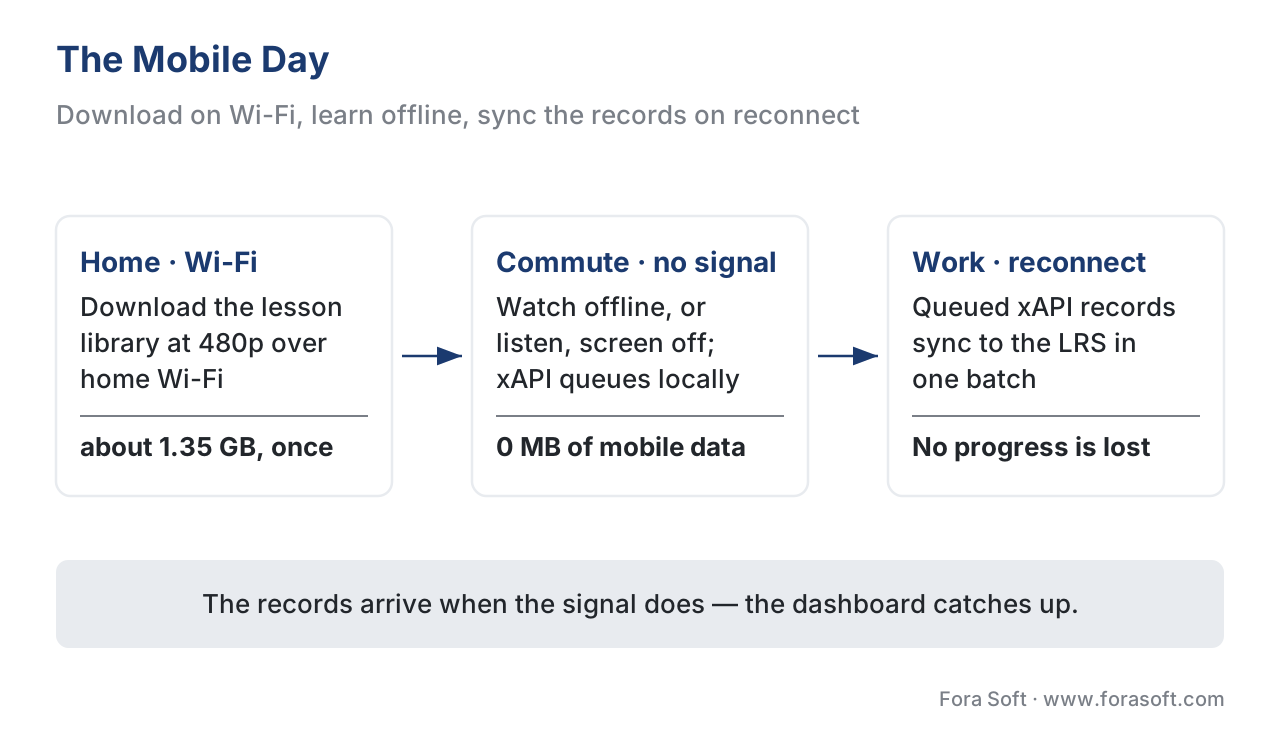 Figure 2. The mobile day. Download on Wi-Fi, consume offline or as background audio with no signal while xAPI statements queue on the device, then sync to the Learning Record Store on reconnect.
Change 5 — Tracking the learner who was never online
A learning product is defined by what it tracks, and offline-and-background playback breaks the naive assumption that the learner is connected when they learn. The fix is the learning-records standard, xAPI (the Experience API), which records each learning event as a short statement — a sentence like "Maria completed Module 3." Because a statement is just a small piece of data, the app stores statements locally while the phone is offline and sends them in a batch to the Learning Record Store (LRS) — the database that holds them — the moment the connection returns [14].
For courses that live inside a traditional learning management system (an LMS, the platform that hosts courses and records who completed what), the right wrapper is cmi5, an xAPI profile (a set of rules on top of xAPI) that adds SCORM-style launch and completion semantics and is explicitly designed so a learner can start on the desktop, continue on the phone, finish offline, and have everything reconcile on sync [15]. The result is a dashboard that updates as if the learner had been online the whole time. Capturing video-watching events precisely — played, paused, seeked, completed — is the job of the xAPI Video Profile, covered in Tracking Video with xAPI.
Mobile accessibility: a standard, not an opinion
Phone-first design has accessibility rules with exact numbers, set by the Web Content Accessibility Guidelines (WCAG), the international standard published by the W3C. Three success criteria matter most on a phone, and they are pass-or-fail.
Target Size (Minimum), WCAG 2.2 Success Criterion 2.5.8 (Level AA): every touch target must be at least 24 by 24 CSS pixels, or have enough spacing that a 24-pixel circle centered on it does not touch a neighbor [16]. The stricter enhanced criterion, 2.5.5 (Level AAA), asks for 44 by 44 pixels — the size most platform design guidelines already recommend [16]. Here is the math made concrete: a control bar of play, rewind, and caption buttons drawn at 20 by 20 pixels with no gap fails, because the 24-pixel circles overlap; bump each button to 24 pixels, or keep 20 pixels but add at least 4 pixels of spacing, and it passes. On a phone moving in a hand, this is the difference between a learner controlling the lesson and fighting it.
Orientation, WCAG 2.1 Success Criterion 1.3.4 (Level AA): do not lock the content to portrait or landscape unless one orientation is essential [17]. A learner who has their phone mounted in a fixed orientation — common for people who use a wheelchair — must still be able to use the course.
Reflow, WCAG 2.1 Success Criterion 1.4.10 (Level AA): content must reflow to a 320-pixel-wide viewport without forcing two-dimensional scrolling [17]. In plain terms: the page must rearrange to fit a narrow phone screen, not make the learner pan sideways to read. And captions remain required regardless of device — a small text track that costs almost nothing and helps every mobile learner in a noisy or silent place — as covered in Captions, Transcripts, and Audio Description and the section's accessibility baseline, WCAG 2.1 AA for Educational Video.
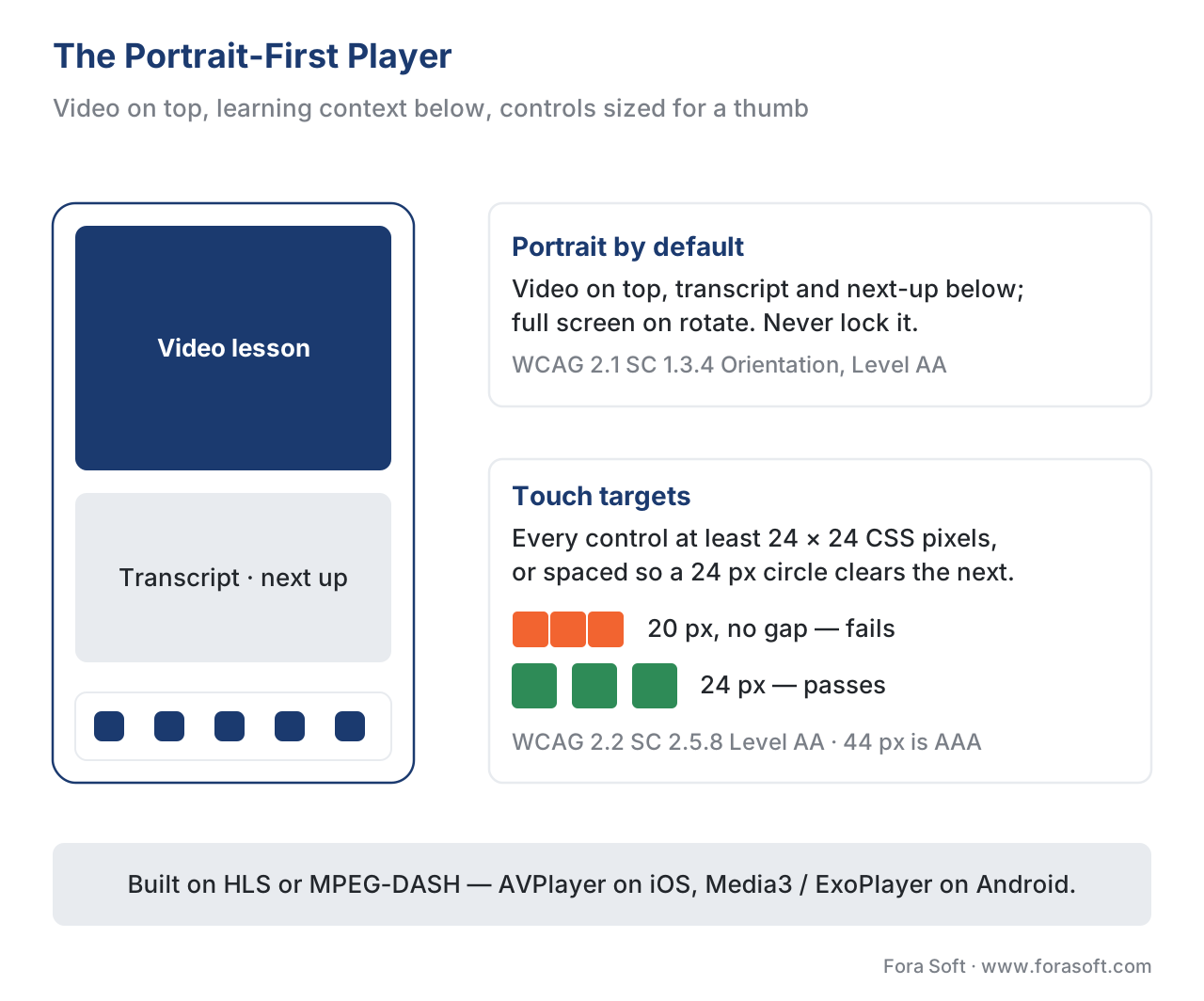 Figure 3. The portrait-first player. Video on top, learning context below, and controls sized to the WCAG 24-pixel minimum so a thumb hits them reliably.
The first decision: PWA, native, or responsive web
Before any of the five changes, you make one build-vs-buy-shaped decision that sets the ceiling on all of them: how the mobile app is built. There are three common paths, and they trade reach and cost against device capability.
A responsive website — one web page that rearranges to fit any screen — is the cheapest to build and needs no app-store install, but its offline and background powers are limited to what the browser allows. A progressive web app (PWA) — an installable website that can cache content and run offline through a background script called a service worker — adds an installed icon, offline caching, and Media Session lock-screen audio at a fraction of native cost; 2026 industry estimates put PWA development at roughly 40–60% the cost of building two separate native apps [18]. A native app (built in Swift for iOS, Kotlin for Android) gives the deepest offline storage, the most reliable background download, and the smoothest integration with platform DRM — at the highest build and maintenance cost, because you are maintaining two codebases [18].
| Approach | Offline video | Background audio | DRM / persistent license | Standards & tracking support | Relative build cost |
|---|---|---|---|---|---|
| Responsive web | Limited (browser cache) | Basic, via Media Session [12] | Browser EME only [13] | HLS/DASH, xAPI, WCAG [2][3][14] | Lowest |
| PWA | Yes, via service worker | Yes, Media Session [12] | Browser EME (Widevine/FairPlay) [13] | HLS/DASH, xAPI/cmi5, WCAG [2][3][15] | ~40–60% of dual native [18] |
| Native (iOS + Android) | Strongest (Media3 / AVPlayer) [10] | Strongest, OS-level | Full Widevine + FairPlay persistent [13] | HLS/DASH, xAPI/cmi5, WCAG [10][15] | Highest (two codebases) |
The build-vs-buy reading: most mobile learning products in 2026 should start from a PWA and go native only when a specific need — strict offline DRM for premium content, the most reliable large-library downloads, or deep device integration — justifies the second and third codebase [18]. Decide this first, because it caps what the player, the offline mode, and the background audio can do. The wider trade-off is in Build vs Buy vs Extend an LMS and the budgeting in The Learning-Platform Cost Model.
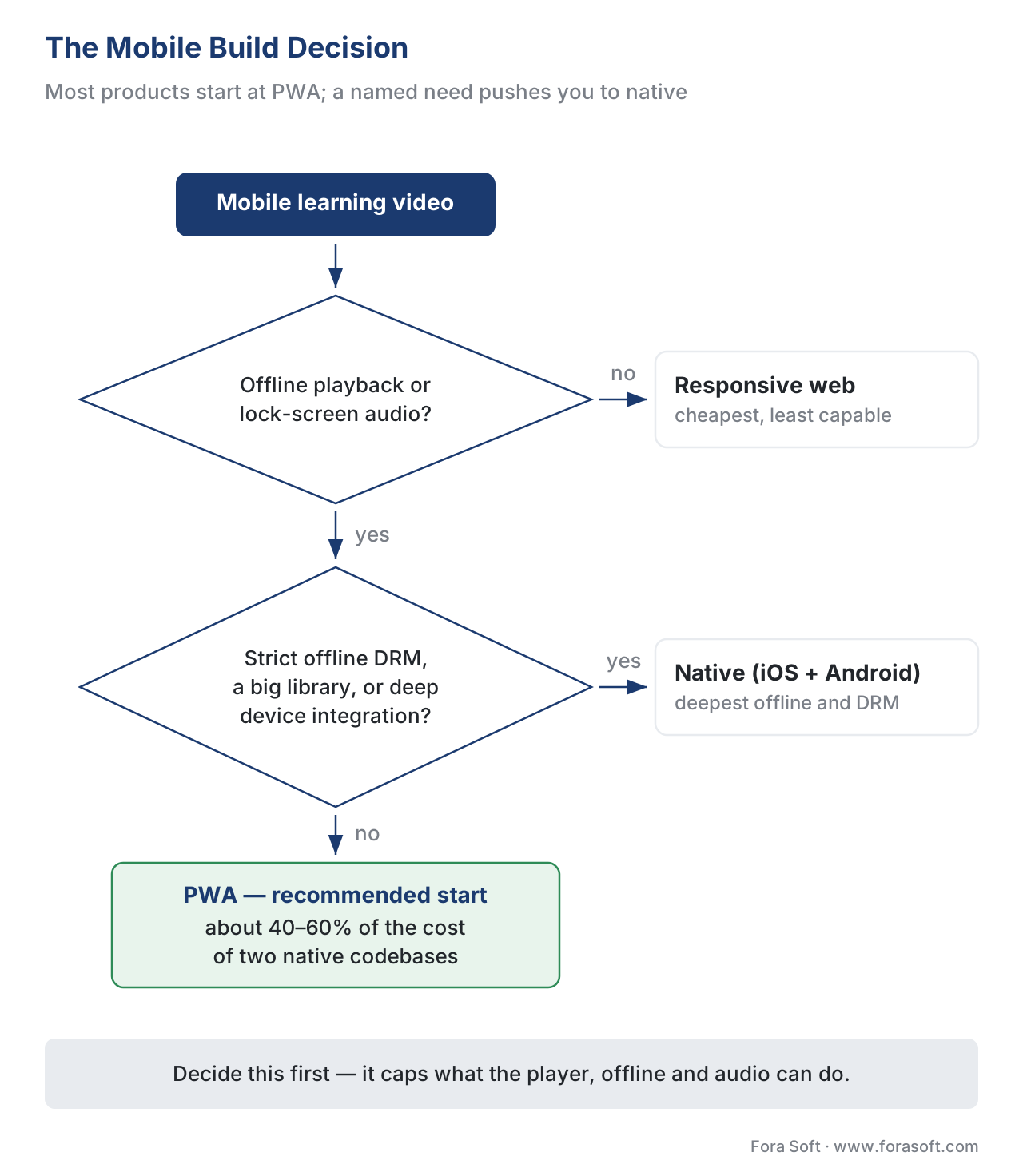 Figure 4. The mobile build decision. Most products start at PWA; strict offline DRM, heavy downloads, or deep device needs push toward native.
Common mistakes
These are the failures that show up the moment a course meets a real phone.
Designing on the desktop and shrinking. Tiny controls, horizontal-only video, and side-scrolling text are the symptoms. Design the phone layout first; expand to desktop.
No data controls. Auto-streaming at the highest quality over cellular spends the learner's money silently. Ship a Wi-Fi-only download switch, a data-saver cap, and a pre-download size estimate [7][8].
Touch targets that are too small or too close. Controls under 24 by 24 pixels with no spacing fail WCAG 2.2 SC 2.5.8 and frustrate every thumb [16].
Offline that forgets to track. Downloading the video but not queuing xAPI statements means the learner's offline progress vanishes. Queue locally and sync on reconnect [14][15].
Locking orientation. Forcing portrait or landscape fails WCAG 2.1 SC 1.3.4 and breaks the experience for learners with a fixed-mount phone [17].
Shipping protected content without persistent-license DRM. If the DRM cannot issue an offline license, the download plays only while online — which defeats the point [13].
Free download: Mobile-First Learning Video Readiness ChecklistOne page across the five phone-first changes: a portrait touch player on HLS or DASH, vertical micro-lesson formats, Wi-Fi-only download and data-saver caps, offline download with background audio and persistent-license DRM, and xAPI/cmi5 offline tracking with the WCAG mobile checks.Where Fora Soft fits in
Fora Soft has built video streaming, real-time WebRTC, OTT, and mobile media apps since 2005, and for mobile-first learning the hard part is rarely a single feature — it is wiring the player, the data controls, offline download, background audio, and offline tracking into one app that behaves correctly on a cheap phone with a metered plan. The build-vs-buy trade-off is concrete: an off-the-shelf mobile player gives you basic playback but little control over the download-and-sync flow, the persistent-license DRM, the lock-screen audio, or the WCAG touch-target details, while a custom build lets you tune each to the phones and plans your learners actually have — and hands you the responsibility of getting the offline-and-tracking engineering right. We help teams choose the PWA-or-native path, then build the mobile layer so the learner on the train still finishes the course. The same streaming, real-time, and offline media work runs through the conferencing, OTT, telemedicine, and surveillance products we build.



The handbook
Fora Soft Video Engineering Handbook
A phone-first course runs on the same video stack as everything else, and we wrote the seven-volume, 9,000+ page series that covers it end to end — encoding, delivery, sound and AI. Start with volume 3: ABR ladders, CDNs, players and DRM, including the persistent licenses that decide whether a downloaded lesson plays with no network. Volume 2 covers the HLS and MPEG-DASH packaging underneath it, and volume 4 covers Opus, loudness and captions — the sound and accessibility work that lock-screen listening and noisy-commute viewing depend on. Written by Nikolay Sapunov, CEO at Fora Soft.
Building the phone side of your learning product?
Tell us which lessons have to work offline, on a metered plan and from the lock screen, and we will scope the player, the download-and-sync flow, the persistent-license DRM and the offline tracking that goes with them — 250+ video products shipped since 2005.
See our case studies
Case study
BrainCert
The whole mobile stack in one product: we built this WebRTC and HTML5 virtual-classroom LMS from the architecture up, including the branded iOS and Android apps, SCORM and xAPI tracking and DRM content protection — 500M+ classroom minutes for 100K+ customers.
Case study
Tabsera
A K-12 LMS that moved to the phone rather than shrinking to it: dedicated iOS apps with bookmarks and notes on top of the web platform, teaching in English, French, Arabic and Turkish.
Case study
Scholarly
Adaptive DASH and HLS delivery so one lesson plays at whatever the connection carries — 15,000+ active users and live classes of up to 2,000 students at once.
What to read next
Accessibility
WCAG 2.1 AA for Educational Video
The full accessibility baseline behind the 24-pixel target and the orientation rule.
Tracking
Tracking Video with xAPI
How played, paused, seeked and completed are captured — including while offline.
Delivery
Scaling Delivery: CDN, Transcoding, Cost
What the data arithmetic on this page costs you once the library and the audience grow.
Formats
Learning Video Formats
Where vertical and micro fit among lecture, live class and cohort formats.
References
- IETF. RFC 6716 — Definition of the Opus Audio Codec, §2 and §2.1.1 (Bitrate) (Opus scales from 6 kbit/s narrowband speech to 510 kbit/s; sweet spots: 8–12 kbps narrowband, 16–20 kbps wideband, 28–40 kbps fullband speech; can change rate on the fly without renegotiating the session to adapt to network conditions). https://www.rfc-editor.org/rfc/rfc6716 — Tier 1 (primary standard, IETF). Published 2012-09; accessed 2026-06-21.
- IETF. RFC 8216 — HTTP Live Streaming (HLS) (a Master Playlist lists multiple Variant Streams at different bit rates / resolutions; the client selects and switches among them as conditions change — the basis of adaptive bitrate delivery; HLS plays natively on Apple devices). https://www.rfc-editor.org/rfc/rfc8216.html — Tier 1 (primary standard, IETF). Accessed 2026-06-21.
- ISO/IEC. ISO/IEC 23009-1 — Dynamic Adaptive Streaming over HTTP (MPEG-DASH) (media presented as multiple Representations at different bitrates within an Adaptation Set; the client adapts by switching Representations). https://www.iso.org/standard/83314.html — Tier 1 (primary standard, ISO). Paywalled; corroborated by the Fora Soft Video Streaming ABR article [19]. Accessed 2026-06-21.
- Disprz; eLearning Industry. Corporate training video best practices 2026; vertical video for mobile learning (most microlearning is consumed on phones; vertical video suits one-handed use; a widely cited platform figure reports viewers up to ~9× more likely to finish a vertical video than a horizontal one). https://disprz.ai/blog/corporate-training-video-content — Tier 6 (industry references). The 9× figure is a platform-marketing statistic, used as directional engagement evidence, not a controlled study; flagged for re-verification.
- eLearning Industry. Microlearning in 2026: a practical blueprint (effective micro-lessons run roughly 3–7 minutes, each answering one question or showing one process, with a knowledge check; microlearning succeeds when useful and to the point, not merely short). https://elearningindustry.com/microlearning-in-2026-a-practical-blueprint-not-just-bite-sized-content — Tier 5 (practitioner guidance).
- Disprz; Indirap. Corporate training video best practices for remote teams, 2026 (ideal training-video length ~3–8 minutes; one video answers one question or explains one process end to end; short focused formats lift retention versus long ones). https://www.indirap.com/blog/corporate-training-for-remote-teams-9-best-video-production-practices-in-2026 — Tier 5 (practitioner guidance).
- Apple. Use Low Data Mode on your iPhone and iPad (system Low Data Mode reduces background data and streaming quality; apps expose Wi-Fi-only and reduced-quality options for cellular). https://support.apple.com/en-us/102433 — Tier 4 (first-party platform reference). Accessed 2026-06-21.
- Google. Use less mobile data with Data Saver (Pixel / Android) (Data Saver restricts background data to Wi-Fi; apps offer Wi-Fi-only download and reduced cellular streaming quality). https://support.google.com/pixelphone/answer/7055392 — Tier 4 (first-party platform reference). Accessed 2026-06-21.
- Gitnux; Research.com; TechClass. Mobile learning statistics, 2026 (mobile-learning market on the order of $150B in 2026 at roughly ~30% CAGR; a majority of the workforce uses smartphones for some training; mobile completion and engagement trend higher than desktop-only). https://gitnux.org/mobile-learning-statistics/ , https://research.com/education/lms-elearning-statistics — Tier 6 (aggregated industry statistics). Read as directional; specific percentages vary by source and are flagged for re-verification.
- Google / Android Developers. Media3 ExoPlayer — HLS and Downloading media (ExoPlayer plays HLS, DASH, and Smooth Streaming; the DownloadService wraps a DownloadManager so downloads continue in the background when the app is closed — the basis of reliable offline download on Android). https://developer.android.com/media/media3/exoplayer/hls , https://developer.android.com/media/media3/exoplayer/downloading-media — Tier 4 (first-party engineering reference). Accessed 2026-06-21.
- VDOCipher; CablePapa. Video data-usage guides, 2025–2026 (approximate hourly/by-resolution data: 360p ~0.3–0.45 GB/hr, 480p ~0.7–1 GB/hr, 720p ~1.5 GB/hr; HEVC/AV1 use 30–50% less than H.264 for the same quality). https://www.vdocipher.com/blog/video-bandwidth-explanation/ — Tier 6 (industry references). Per-minute figures in the article are arithmetic on these bands, used as orders of magnitude.
- W3C. Media Session API (lets a web app expose media metadata and respond to platform play/pause/seek controls on lock screens and notification areas of mobile devices; access is granted when audio playback begins — the basis of background and lock-screen audio on the web). https://www.w3.org/TR/mediasession/ — Tier 1 (primary standard, W3C). Accessed 2026-06-21.
- W3C. Encrypted Media Extensions (EME) (a standardized API for web apps to interact with DRM such as Widevine and FairPlay; where the license policy permits a persistent state, licenses can be stored for later offline playback — the precondition for downloading protected video). https://www.w3.org/TR/encrypted-media/ — Tier 1 (primary standard, W3C). Accessed 2026-06-21.
- ADL. Experience API (xAPI) Specification — Statements and Communication (a learning event is recorded as a statement and stored in a Learning Record Store; statements can be created offline and sent to the LRS in batches when connectivity is available — the basis of offline capture and deferred sync). https://github.com/adlnet/xAPI-Spec — Tier 1 (primary standard, xAPI). Accessed 2026-06-21.
- ADL. cmi5 Specification (an xAPI profile that adds launch, move-on, and completion semantics for content run from an LMS; designed so sessions can run offline and reconcile on reconnect across devices). https://github.com/AICC/CMI-5_Spec_Current — Tier 1 (primary standard, cmi5). Released 2016-06; accessed 2026-06-21.
- W3C. WCAG 2.2 — SC 2.5.8 Target Size (Minimum), Level AA; SC 2.5.5 Target Size (Enhanced), Level AAA (pointer targets at least 24×24 CSS pixels, or sufficiently spaced so a 24px circle does not intersect a neighbor; enhanced level is 44×44 CSS pixels). https://www.w3.org/WAI/WCAG22/Understanding/target-size-minimum.html — Tier 1 (primary standard, W3C). WCAG 2.2 published 2023-10-05; accessed 2026-06-21.
- W3C. WCAG 2.1 — SC 1.3.4 Orientation, Level AA; SC 1.4.10 Reflow, Level AA (do not restrict to a single display orientation unless essential; content reflows to a 320 CSS-pixel-wide viewport without two-dimensional scrolling). https://www.w3.org/TR/WCAG21/ — Tier 1 (primary standard, W3C). WCAG 2.1 published 2018-06-05; accessed 2026-06-21.
- Progressier; MagicBell; Brainhub. PWA vs native app comparison, 2026 (PWAs add offline caching and Media Session lock-screen audio at roughly 40–60% the cost of dual-native; native gives the deepest offline storage, background download, and DRM integration at the cost of two codebases). https://progressier.com/pwa-vs-native-app-comparison-table — Tier 6 (industry references). Cost ranges are industry estimates, flagged for re-verification.
- Fora Soft Learn (Video Streaming, Video Encoding, Audio for Video). Adaptive Bitrate Streaming Explained; Choose a Codec 2026; the Opus Codec Explained (first-party engineering orientation for the ABR, codec, and Opus claims that are primary-sourced to the standards above). https://www.forasoft.com/learn/video-streaming/articles-streaming/abr-streaming-explained — Tier 3 (first-party engineering explainers).
Where sources disagreed, the official standard was followed. Engagement and market figures from tier-5/6 industry sources [4][5][6][9] are used as directional evidence, not fixed quotes, and are flagged for re-verification; the controlling facts — the WCAG target-size, orientation, and reflow criteria [16][17], the Media Session and EME web standards [12][13], the HLS/Opus standards [1][2], and the xAPI/cmi5 offline-sync model [14][15] — are primary-sourced. ISO/IEC 23009-1 [3] is paywalled and corroborated by the first-party MPEG-DASH article [19]; a reviewer with ISO access can add the exact clause.
