


Why this matters
Search is the one discovery surface a viewer chooses to use. Recommendations and home-screen rows act on people passively — and, as the block's opening article argues, discovery is what decides retention — but when someone opens the search box they have a specific intent, and failing them there is the most expensive miss in the whole product, because they wanted to watch something and you could not connect them to it. This article is for the founder, product manager, or streaming CTO who has to decide how much search technology to build, when keyword matching is enough, when semantic search earns its cost, and how search and recommendations should hand off to each other. You will not write the ranking function by hand, but you do have to specify the behavior, choose between building and buying, and know why a search box that only does exact matching quietly loses viewers every day. Search sits directly downstream of the metadata pipeline from the previous article — it can only find what your metadata describes — so the two subjects are halves of one discovery story.
The two jobs of one search box
Start with the distinction that decides everything else, because most teams build for one job and forget the other. When a viewer uses search, they are doing one of two fundamentally different things.
The first is known-item search: the viewer already knows exactly what they want and is using search as a shortcut to it. They type "Inception" because they want Inception. The job here is speed and forgiveness — get them to the right title in as few keystrokes as possible, and do not punish a misspelling. This is the easy job, and it is the one every search box at least attempts.
The second is exploratory search: the viewer does not have a specific title in mind; they have an intent, a mood, or a vague description, and they are using search to discover something that fits. They type "feel-good workplace comedy" or "movies like Inception" because they want a kind of thing, not a known thing. This is the hard job, the one that overlaps with recommendations, and the one that separates a search box from a discovery engine. The distinction between finding a known item and exploring to understand what you want is a long-standing one in information retrieval (Marchionini, 2006).
The reason this framing matters is that the two jobs stress different machinery. Known-item search rewards exact and near-exact matching — the viewer typed the title, so match the title. Exploratory search rewards matching meaning — the viewer described a feeling, and no title in your catalog literally contains the word "feel-good." A system built only for the first job answers "Inception" beautifully and "something uplifting for a rainy Sunday" with an empty screen. Keep both jobs in mind as we walk through the technology, because the whole argument for modern search is that you need to serve both from the same box.
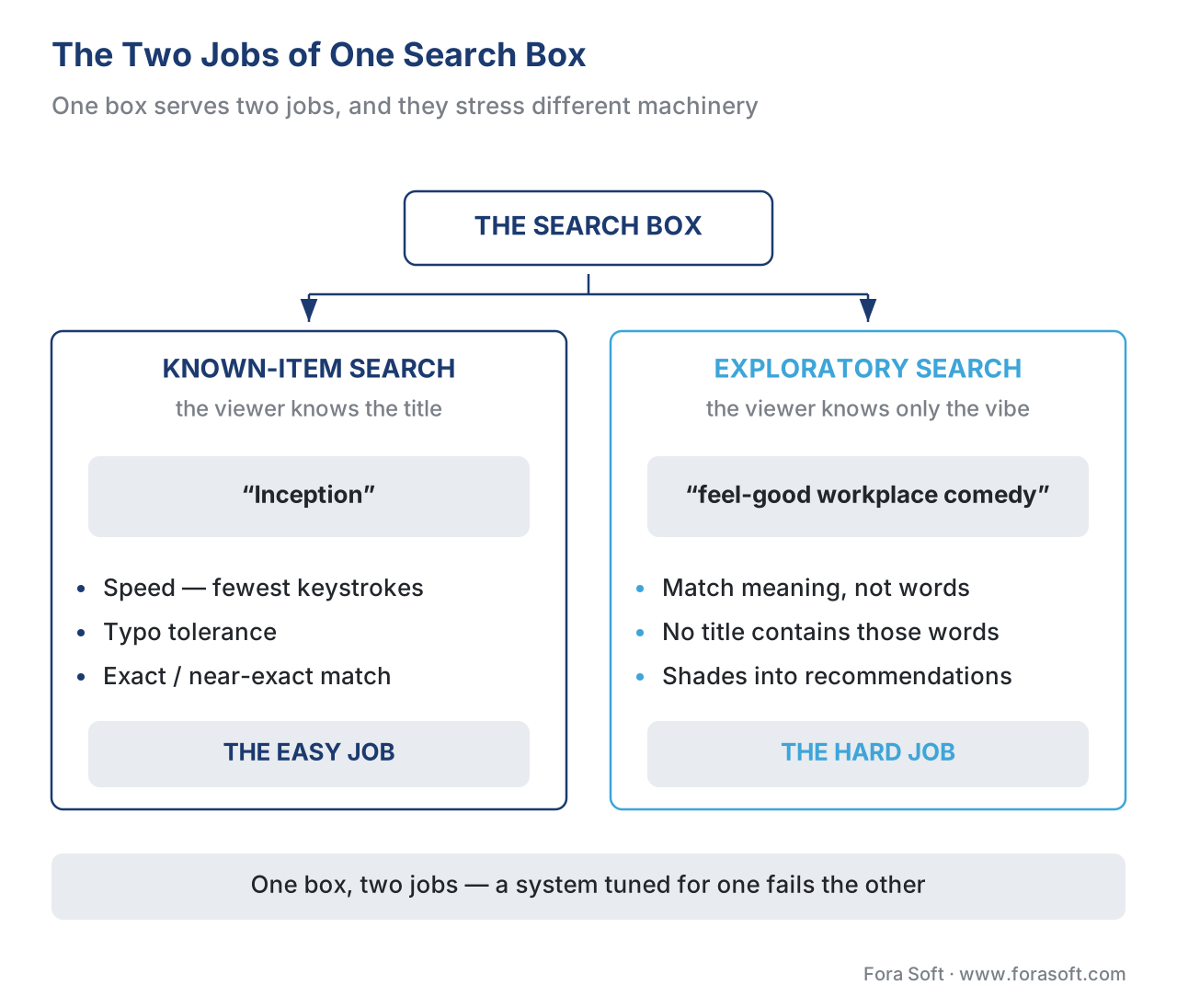 Figure 1. The search box does two different jobs. Known-item search ("Inception") needs speed, typo tolerance, and exact matching. Exploratory search ("feel-good workplace comedy") needs to match meaning, not words, and shades into recommendations. A system tuned for one fails the other — modern search has to do both.
How keyword search actually works: the inverted index and BM25
Begin with the older, still-essential half of search: matching the words a viewer types against the words in your catalog. This is called lexical search — lexical just means "to do with words" — and almost every search box on earth starts here.
The core data structure is the inverted index, and the plainest analogy is the index at the back of a textbook. Instead of storing "title A contains these words, title B contains these words," the search engine flips it around and stores, for every word, the list of titles that contain it — "the word heist appears in titles 12, 88, and 405." When a viewer types heist, the engine does not read every title in the catalog; it jumps straight to the heist entry and pulls back the short list of titles already known to contain it. This is what makes search feel instant even across a catalog of hundreds of thousands of titles: the work was done in advance, when the catalog was indexed, not at the moment of the query.
Finding the matching titles is only half the job. The other half is ranking them — deciding which match goes at the top — and the function that has done this in most production search systems for a decade is called BM25 (the "BM" stands for "Best Matching"). BM25 comes out of decades of academic information-retrieval research and is documented in full by its authors (Robertson & Zaragoza, 2009). You do not need its formula to use it, but three of its ideas are worth understanding because they explain search behavior you will see every day.
First, rarer words count for more. If a viewer searches "the matrix," the word the appears in almost every title and tells you almost nothing, while matrix is rare and highly informative. BM25 down-weights common words and up-weights rare ones automatically — this is the "inverse document frequency" idea, the observation that a word's value is inversely related to how many documents contain it (Spärck Jones's foundational insight, carried into BM25). Second, repetition has diminishing returns. A title whose description mentions heist five times is more relevant than one that mentions it once, but not five times more relevant; BM25 lets the score saturate. Third, length is normalized, so a long synopsis does not outrank a short one just by containing more words. BM25 exposes two tuning knobs for these last two behaviors — conventionally called k1 and b — and the usual defaults (k1 around 1.2–2.0 and b = 0.75) are what ship in the common search engines (Robertson & Zaragoza, 2009).
This matters to a buyer because BM25 is not exotic or expensive — it is the built-in default in the open-source search engines most teams already use, Apache Lucene and the Elasticsearch and OpenSearch systems built on it, which switched their default ranking to BM25 around 2016. In other words, competent keyword search with good ranking is close to free; the engineering effort goes into everything around it, which is where the next sections live.
Typo tolerance: why "strm" still has to find "Storm"
Exact keyword matching has an unforgiving flaw: people mistype, especially on the devices streaming services run on. A viewer thumbing a phone keyboard or pecking at letters with a TV remote will fumble, and a search box that only matches perfect spellings will return nothing for "strm" even though the viewer obviously means "Storm." The fix is typo tolerance — matching words that are close in spelling, not just identical.
The measure of "close" is edit distance: the number of single-character changes needed to turn one word into another. The classic version, Levenshtein distance, counts three kinds of edit — inserting a letter, deleting a letter, and substituting one letter for another (Levenshtein, 1966). So "strm" → "storm" is one edit (insert an o), a distance of 1. A refinement called Damerau-Levenshtein distance adds a fourth operation, transposition — swapping two adjacent letters — because the single most common typing mistake is exactly that: "teh" for "the," "micheal" for "michael" (Damerau, 1964). Treating a transposition as one edit instead of two is why this variant became the standard for spell-checking, and it is the distance a leading hosted search service uses, tolerating up to two typos in a word by default (Algolia, 2026).
The practical payoff is large and the cost is low: typo tolerance is a built-in feature of every serious search engine and hosted search service, not something you build from scratch. The product decision is how tolerant to be. Too strict and you lose the fumbling viewer; too loose and "star" starts matching "scar," "stir," and "tsar," burying the title the viewer actually wanted. Most platforms tie tolerance to word length — allow more edits on longer words, fewer on short ones — and rank exact matches above near matches so a perfect spelling always wins.
The other half of the typing problem is to make the viewer type less, through autocomplete — search-as-you-type, where suggestions appear after the first few characters. A viewer who types "inc" sees Inception offered before finishing the word and selects it. Autocomplete is not a luxury; on a television, where every character is a slow journey across an on-screen keyboard, it is the difference between a usable search and an abandoned one — which is the subject of its own section below.
The wall keyword search hits: it matches words, not meaning
Keyword search, however well-tuned and typo-tolerant, has a ceiling it cannot break through on its own: it matches words, not meaning. BM25 is, in the technical phrase, a "bag of words" — it looks at which query words appear in which titles and how often, and nothing about what those words mean (Robertson & Zaragoza, 2009). That works perfectly for the known-item job and fails the exploratory one.
Make the failure concrete. A viewer types "feel-good workplace comedy." No title in your catalog has the literal phrase "feel-good" in its synopsis. Keyword search dutifully looks for the words feel, good, workplace, and comedy, finds scattered partial matches, and ranks a documentary about factory safety above the ensemble sitcom the viewer actually wanted — because the documentary happened to contain workplace and good. The viewer's intent was clear to any human; it was invisible to a system that only counts words. The same wall blocks "movies like Inception" (no title contains the word "Inception" except Inception itself), "that show with the dragons," and every mood-, theme-, or vibe-based query a real viewer types.
This is the gap that semantic search was built to close, and it is the single most important upgrade in streaming discovery of the last few years. To cross the wall you need a search that understands that feel-good and heartwarming are neighbors, that workplace comedy and office sitcom are the same idea, and that the viewer who liked Inception is reaching for cerebral and mind-bending, not the literal string "Inception."
Semantic search: matching meaning with embeddings
The technology that matches meaning rather than words is semantic search, and it rests on a single powerful idea called an embedding. An embedding is a list of numbers — a coordinate — that represents the meaning of a piece of text or video as a point in space. The trick is that things with similar meaning get placed close together. "Feel-good," "heartwarming," and "uplifting" land near each other; "workplace comedy" and "office sitcom" land near each other; a gritty crime thriller lands far away from all of them. Meaning becomes geometry, and "find me something similar" becomes "find me the nearest points."
The analogy that anchors this: imagine every title and every search query placed on an enormous map, where distance means difference in meaning. Two romantic comedies sit in the same neighborhood; a war documentary is across town. When a viewer searches "feel-good workplace comedy," the system turns that phrase into a point on the map and looks for the titles standing closest to it — even if not one of them uses the viewer's exact words. That is semantic search: matching by nearness in meaning-space rather than by shared spelling.
How the map gets built — how a model turns text or video into these meaning-coordinates — is machine-learning work that belongs to a different section; the model internals, the embedding models, and how they are trained are covered in the AI for Video Engineering section on vector search and embeddings, and we stay at the product layer here. What a streaming team needs to know is the behavior: embeddings let search and recommendations work on meaning, which is exactly the fuel the exploratory job needs.
There is one engineering reality worth carrying, because it drives cost. Finding the closest points on a map of hundreds of thousands of titles, for every query, by measuring the distance to every single point, is too slow to do live. So semantic search uses approximate nearest neighbor search — ANN — which finds almost the closest points far faster by being willing to occasionally miss the true closest one. The dominant method, a graph structure called HNSW (Hierarchical Navigable Small World), builds a layered map that lets a query jump quickly to the right neighborhood instead of checking every title, trading a sliver of accuracy for roughly logarithmic search speed (Malkov & Yashunin, 2018). The takeaway for a buyer: semantic search is not free the way BM25 is — it needs embeddings computed for every title and a specialized index to serve them — but the cost is well understood and the building blocks are mature.
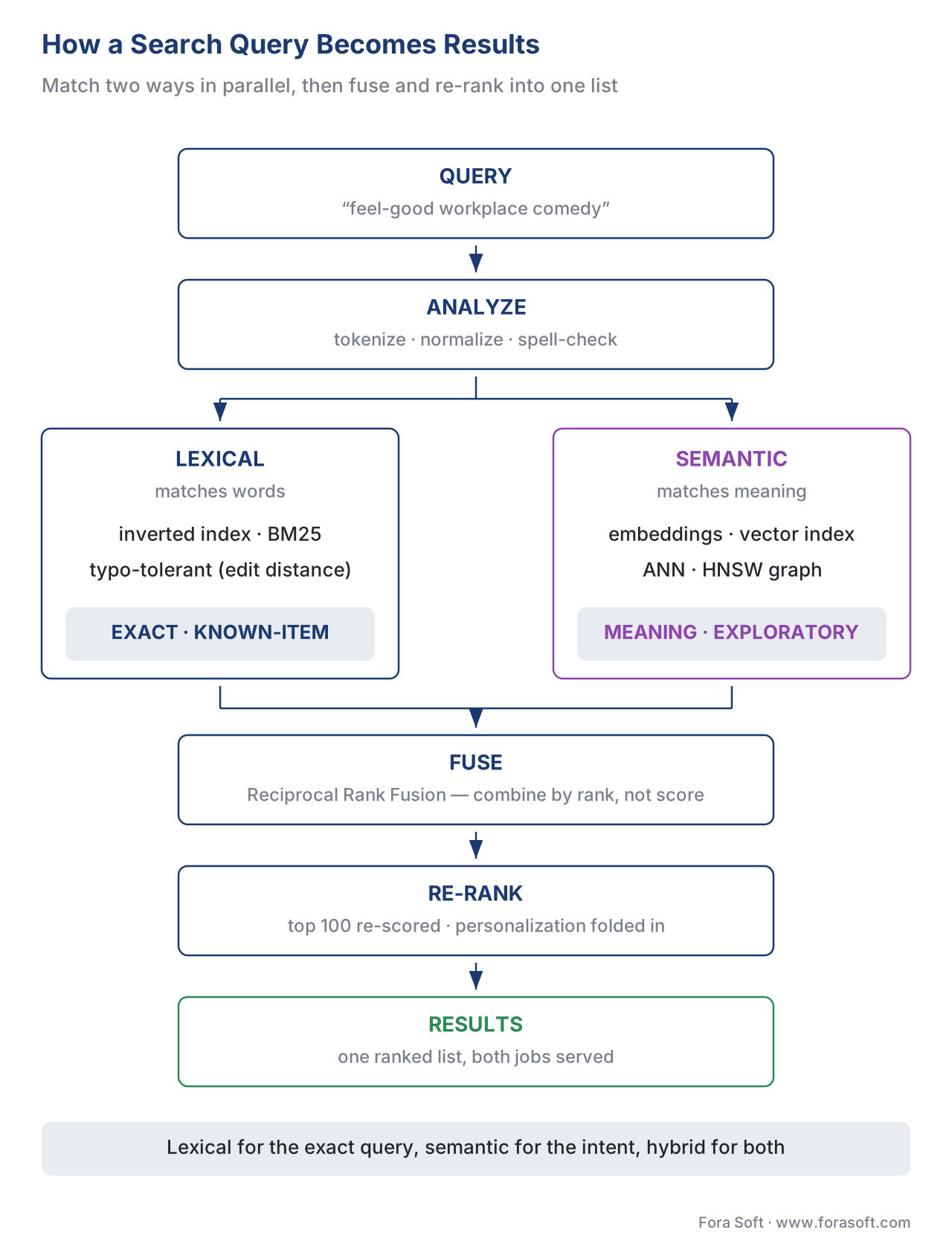 Figure 2. The modern search pipeline. The query is analyzed, then matched two ways in parallel — a typo-tolerant keyword search over the inverted index (BM25) and a semantic search over the embedding/vector index (ANN) — and the two ranked lists are fused and re-ranked into one result set. Lexical handles known-item queries; semantic handles meaning; hybrid does both.
Hybrid search: run both, then fuse
If keyword search nails the known-item job and semantic search nails the exploratory job, the obvious move is to run both and combine them. That is hybrid search, and it is the 2026 best practice for any catalog that takes discovery seriously.
The reason you need both, rather than just the newer one, is that each fails where the other succeeds. Keyword search is unbeatable at exact matches — a viewer who types a precise title, an actor's exact name, or a rare proper noun wants that literal match, and BM25 delivers it. Semantic search is unbeatable at meaning — paraphrases, moods, "something like X" — but it can underweight an exact rare-term match, occasionally ranking a thematically similar title above the precise one the viewer typed. Run only keyword search and you fail every mood query; run only semantic search and you sometimes fumble the exact title. Hybrid runs them in parallel and gets both right.
The wrinkle is combining the two result lists, because they score on incompatible scales — BM25 produces one kind of number, vector similarity another, and you cannot simply add them. The standard solution is elegant: ignore the raw scores and combine by rank instead. A method called Reciprocal Rank Fusion (RRF) does exactly this — a title that ranks high on either list, or moderately high on both, floats to the top of the merged list, with no score-scale juggling required (Cormack, Clarke & Büttcher, 2009). RRF is what the major search platforms use under the hood to power hybrid search.
Mature systems add one more stage. After hybrid retrieval produces a broad candidate pool — say the top 100 titles — a second, more expensive model re-ranks the top of that pool for final order, and this is the natural place to fold in personalization (what this viewer tends to watch) so two people typing the same query see a slightly different order. The pattern is "retrieve broad, then re-rank narrow": cast a wide, cheap net, then spend the expensive compute only on the handful of results the viewer will actually see. The table below sums up which approach wins for which query.
| Query the viewer types | Keyword search (BM25) | Semantic search (vector) | Hybrid (fused) — best for? |
|---|---|---|---|
| "Inception" (exact title) | Excellent — exact match | Good, can drift to similar | Yes — exact match wins |
| "Tom Hardy" (exact name) | Excellent | Fair | Yes — keyword carries it |
| "feel-good workplace comedy" (mood) | Poor — no literal match | Excellent — matches meaning | Yes — semantic carries it |
| "movies like Inception" (similarity) | Poor | Excellent | Yes — semantic carries it |
| "strm" (typo) | Good — with typo tolerance | Fair | Yes — keyword + typo tolerance |
| "that show with the dragons" (vague) | Poor | Good | Yes — semantic carries it |
Table 1. Which search approach wins for which query type. Keyword search owns exact titles, names, and typo-tolerant matching; semantic search owns moods, paraphrases, and "something like X"; hybrid runs both and fuses the results, so the same box serves the known-item and exploratory jobs at once. The "best for?" column is hybrid in every row — which is the argument for it.
The television problem: when typing is the enemy
Everything above assumes the viewer can type. On the device where most premium streaming is watched — the television — that assumption breaks, and search design has to bend around it.
A TV interface is what designers call a 10-foot user interface: the viewer sits about ten feet away and drives it with a directional remote, not a keyboard or a touchscreen (the term and its constraints are standard in platform design guidance, e.g. Amazon Fire TV). Entering text means navigating an on-screen keyboard one letter at a time — press right, right, right, down, select, for a single character — which is slow and irritating enough that long queries simply do not get typed. A viewer who would happily thumb "feel-good workplace comedy" into a phone will type "com" on a TV remote, give up, and browse instead. The cost of poor text entry is paid in abandoned searches.
Two design responses follow directly. The first is aggressive autocomplete: surface likely titles after one or two characters so the viewer can stop typing and select. On a TV, autocomplete is not a nicety, it is the primary input method. The second is voice search: let the viewer speak the query into the remote or a connected assistant instead of typing it, which platform design guidance treats as the preferred alternative to on-screen text entry (Amazon Fire TV; Android TV). Voice flips the television's weakness into a strength — speaking "feel-good workplace comedy" is effortless, which means voice search disproportionately produces the long, natural-language, exploratory queries that semantic search is built to answer. The two technologies reinforce each other: voice makes viewers willing to express real intent, and semantic search is what turns that intent into the right titles. A platform that ships voice search on top of a keyword-only backend captures the rich queries and then fails to answer them.
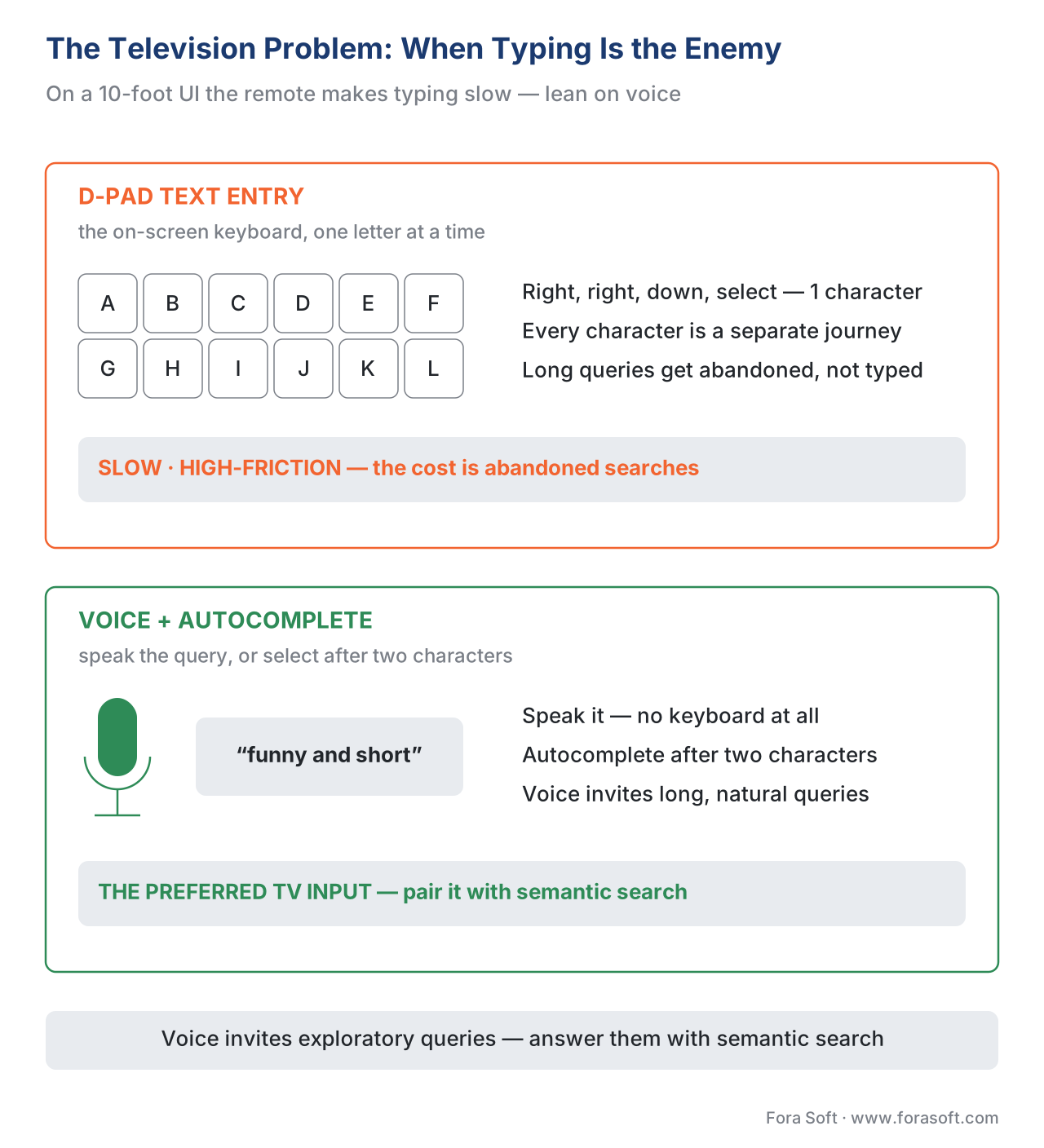 Figure 4. Why typing is the enemy on television. Entering text with a directional remote on an on-screen keyboard is slow enough that long queries get abandoned (top); voice and autocomplete are the preferred inputs (bottom). Because voice produces long, natural-language queries, it only pays off on top of a semantic search backend that can answer them.
When search finds nothing: the handoff to recommendations
The most under-designed moment in streaming search is the one where it finds nothing. A viewer searches, the catalog has no match, and a thin product shows a blank screen reading "No results." That blank screen is a small abandonment event every time it appears — the viewer came with intent and left with nothing.
Mature discovery treats a zero-result search not as a dead end but as a handoff to recommendations. If the exact query fails, the system falls back: it offers the closest semantic matches ("we don't have that, but here are titles like it"), or related genres, or the viewer's personalized rows, so the journey continues instead of stopping. This is the seam where search and recommendations meet — and it runs both directions. A successful search is a strong signal of intent that can feed the personalization data pipeline ("this viewer just searched for heist films"), and a failed search is the recommender's cue to step in. Search handles the known-item job, recommendations handle the open-ended one, and the handoff between them is what makes the whole discovery layer feel like it has no edges.
It is worth keeping the scale of the two surfaces in perspective. On a large catalog, far more viewing originates from recommendations than from search — Netflix has reported that its recommendation system influences around 80% of streamed hours (Gomez-Uribe & Hunt, 2015). Search is the smaller channel by volume, but it is the highest-intent one: the viewer who searches is telling you exactly what they want. Losing them to a blank screen is a more expensive failure than a mediocre recommendation row, because the intent was explicit and you still missed.
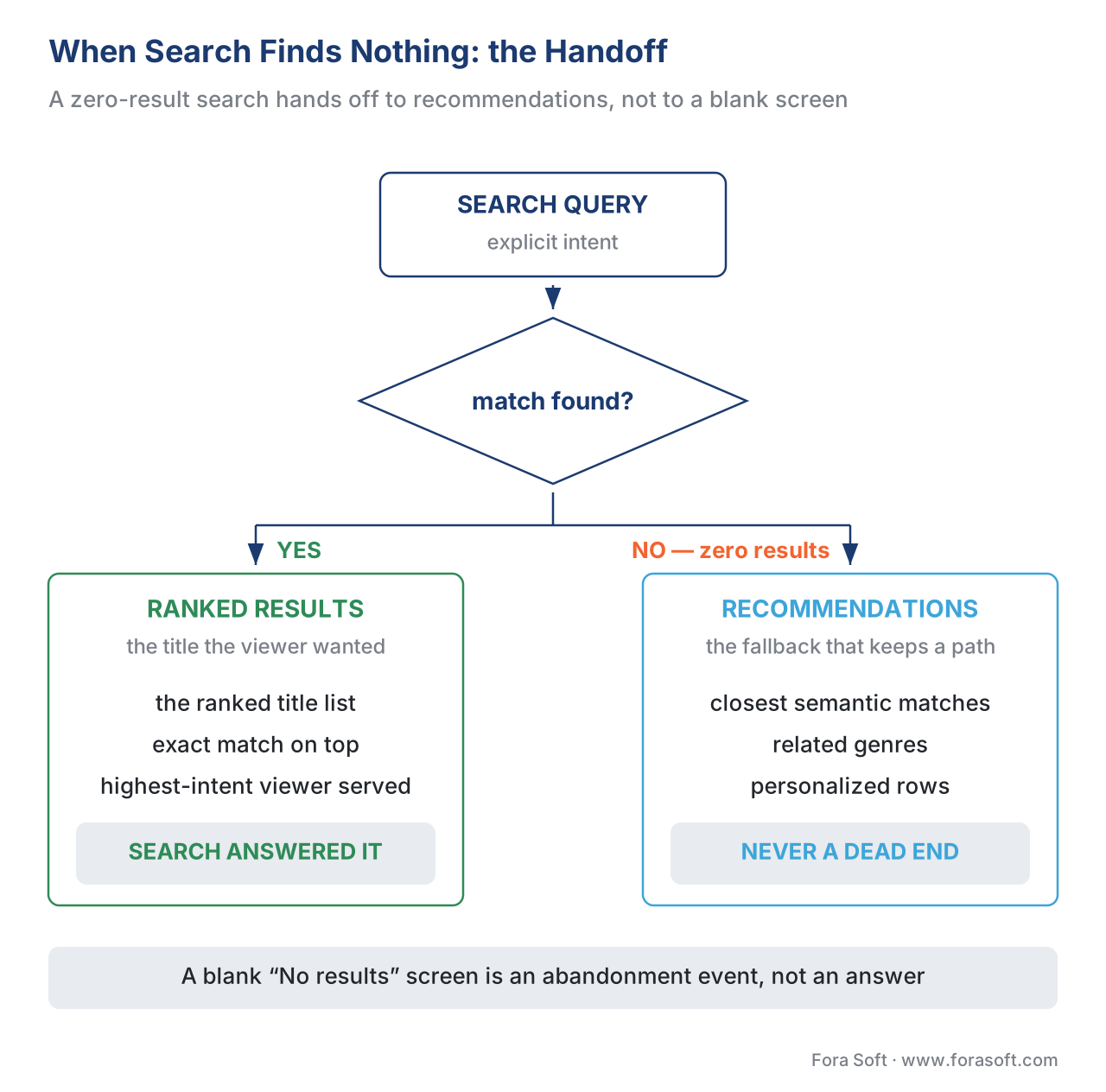 Figure 3. A search that finds nothing should never be a dead end. When the query matches, search returns ranked results; when it returns zero, the system hands off to recommendations — closest semantic matches, related genres, personalized rows — so the highest-intent viewer keeps a path forward instead of hitting a blank "No results" screen.
Discovery beyond your app: search engines and assistants
A large share of "search" for your titles never touches your search box at all. Someone types a film name into Google, or asks an AI assistant "where can I watch that show with the dragons," and a result appears — ideally pointing at your platform. This is off-platform discovery, and it runs on the same metadata, exposed in a machine-readable form.
The mechanism is structured data — Schema.org vocabulary embedded in your web pages so a search engine can read your catalog without guessing. Marking up a watch page with the VideoObject type (with at least a name, thumbnail, and upload date, plus a link to the content) makes it eligible for video rich results in Google search (Google Search Central, 2026; Schema.org, 2026). A related markup, SearchAction inside the WebSite type, historically powered a search box directly in Google's results; Google retired that specific feature in late 2024, but the markup retains value as search engines and AI assistants increasingly act as agents over structured catalog data (Google Search Central, 2026). The connection to this article is direct: the same descriptive metadata that fuels your in-app semantic search is the raw material an external engine reads to send a high-intent searcher your way. Build search well internally and you have most of what off-platform discovery needs already in hand — which is exactly the metadata-as-shared-fuel argument from the metadata article.
A worked example: the hidden cost of a blank search screen
Make the stakes concrete with arithmetic, because "improve search" is easy to defer until you see what it costs to skip. Take a mid-size service whose viewers run 500,000 searches a month.
Suppose the search box does exact keyword matching only — no typo tolerance, no semantic matching. Two failure modes bite. First, typos: on touch and remote keyboards, a meaningful share of queries carry at least one typing error; assume a conservative 8%, which is 500,000 × 0.08 = 40,000 searches a month that fail purely because "strm" did not match "Storm." Second, intent queries: assume 15% of searches are mood- or similarity-based ("feel-good comedy," "movies like…"), which keyword search cannot serve — 500,000 × 0.15 = 75,000 more failed searches. Ignore the overlap for a rough figure and you get on the order of 115,000 zero-result searches a month, a zero-result rate (the fraction of searches returning nothing) of roughly 23%. Nearly one search in four is a blank screen.
Now attach a behavior to that blank screen. If even 40% of those zero-result searches end the session — a plausible abandonment rate, since a viewer who searched and found nothing has little reason to stay — that is 115,000 × 0.40 = 46,000 sessions a month that began with explicit intent and ended in nothing. The fix costs far less than the loss: typo tolerance is a built-in feature, semantic search is a known and mature addition, and the zero-result handoff to recommendations is product wiring, not research. The arithmetic is why search quality is a retention lever, not a polish item — every point you knock off the zero-result rate is high-intent viewers you keep.
A common mistake: shipping exact-match search and calling it done
The most frequent search mistake in streaming is the cheapest to make and the quietest to fail: ship a search box that does exact keyword matching, watch it answer "Inception" correctly in the demo, and call it finished. It looks like it works because the person demoing it types titles they know how to spell. Real viewers mistype, search on moods, and describe instead of name — and the box quietly returns blank screens to a quarter of them. The fix is to treat typo tolerance and the zero-result handoff as launch requirements, not enhancements.
A second, opposite mistake is to over-correct into semantic-only search, assuming the newer technology replaces the old one. It does not. A vector-only search can fumble an exact title or a rare proper noun, ranking a "thematically similar" title above the precise one the viewer typed — the known-item job degrades. The correct shape is hybrid: keyword for the exact, semantic for the meaning, fused.
A third mistake is specific to television: building rich voice or natural-language input on top of a keyword-only backend. Voice invites viewers to speak long, exploratory queries — "something funny and short for tonight" — and a keyword backend cannot answer them, so the platform collects exactly the queries it is least able to serve. If you ship voice, ship the semantic search that makes voice worth using. Each mistake has the same root: search treated as a checkbox rather than as the highest-intent discovery surface you own.
Free download: Streaming Search Readiness Checklist — One PageThe two search jobs, the keyword, typo, semantic and hybrid layers, the television and voice input problem, the zero-result handoff to recommendations, off-platform structured data, and the metrics to track — on a single sheet you can take into a scoping meeting.Where Fora Soft fits in
Streaming search is a scale problem before it is a feature: a catalog of tens or hundreds of thousands of titles, queried across phone, web, and a remote-driven television, with sub-second response expected on every one. Across 625+ shipped projects for 400+ clients since 2005 in video streaming, OTT/Internet TV, e-learning, and video surveillance, the recurring pattern we build is the full search stack — a typo-tolerant keyword layer for known-item queries, a semantic/vector layer for intent and mood, the fusion and re-ranking that combine them, voice and autocomplete tuned for the 10-foot interface, and the zero-result handoff that turns a failed search into a recommendation instead of a dead end. Our approach is scalability-first and vendor-neutral: we start from your catalog size, query volume, and device mix, decide where a hosted search service is enough and where a custom hybrid index earns its cost, and wire search into the same metadata and recommendation systems so discovery behaves as one product across every screen.



The handbook
Fora Soft Video Engineering Handbook
We wrote a seven-volume handbook, 9,000+ pages, that takes the video stack from a single pixel to production — encoding, delivery, audio and AI — and someone who works through it can design and build a platform end to end. Volume 6 is the one to open next to this article: embeddings, vector search and retrieval over a video archive, which is the machinery behind every mood query your search box has to answer. Volume 7 carries those capabilities into a real-time budget — serving, cost per stream-hour, compliance — and volume 3 covers the delivery side your catalog sits on, from CDNs and players to the economics that decide what a search-driven session costs. Written by Nikolay Sapunov, CEO at Fora Soft.
Is your search box answering the queries your viewers actually type?
Tell us your catalog size, your monthly query volume and the screens you serve — phone, web, a remote-driven television — and we will say where typo-tolerant keyword search is enough, where a semantic layer earns its cost, and what it takes to wire the zero-result handoff so a failed search becomes a recommendation instead of a blank screen. 250+ video products shipped since 2005.
See our case studies
Case study
Franchise Record Pool
A DJ platform holding 720,000+ licensed tracks, with 200,000+ in the library and 3,000+ added every month, where discovery runs on track metadata — key, BPM, remixes — and an AI voice assistant answers requests like “Italian pop from the 90s, BPM 140” rather than exact titles: the exploratory job, on a catalog that size.
Case study
VALT
A video recording and observation platform used by 770+ U.S. organizations and 50,000+ active users, where word search locates spoken words inside recorded video through Amazon Transcribe — search that finds only what the transcript describes, which is the metadata argument of this article in its sharpest form.
Case study
Perspire.tv
A live and on-demand fitness platform whose viewers filter an on-demand library by workout type, equipment and skill level — the structured-filter half of discovery, and exactly the surface where a combination that matches nothing has to hand off to something instead of showing an empty screen.
What to read next
Metadata
Content Metadata: the Fuel for Streaming Discovery
Search finds only what your metadata describes — this is where that metadata comes from.
Recommendations
Video Recommendation System: How It Works
The other side of the handoff, and what picks the viewer up when a search returns nothing.
Personalization
The Personalization Data Pipeline
Where a completed search becomes the intent signal that re-ranks everything else.
Discovery
Streaming Personalization: Why Discovery Drives Retention
The block opener: why the discovery layer, not the size of the catalog, decides who stays.
References
- The Probabilistic Relevance Framework: BM25 and Beyond. Robertson, S. & Zaragoza, H. Foundations and Trends in Information Retrieval, 3(4): 333–389, 2009. DOI 10.1561/1500000019. Tier 1 (peer-reviewed primary literature, by BM25's authors). Source of: BM25 as the probabilistic-relevance ranking function; the bag-of-words property (matches term presence/frequency, not meaning or order); term-frequency saturation and document-length normalization with the
k1andbparameters and their conventional defaults (b= 0.75); the inverse-document-frequency weighting of rare terms. https://www.staff.city.ac.uk/~sbrp622/papers/foundations_bm25_review.pdf — accessed 2026-06-18. - Efficient and Robust Approximate Nearest Neighbor Search Using Hierarchical Navigable Small World Graphs. Malkov, Yu. A. & Yashunin, D. A. arXiv:1603.09320 (submitted 2016, last revised 2018-08-14); published in IEEE TPAMI. Tier 1 (peer-reviewed primary literature). Source of: HNSW as the graph-based approximate-nearest-neighbor index; the multi-layer proximity-graph structure; logarithmic search-complexity scaling; ANN as the speed-for-accuracy trade that makes vector search viable at scale. https://arxiv.org/abs/1603.09320 — accessed 2026-06-18.
- Binary Codes Capable of Correcting Deletions, Insertions, and Reversals. Levenshtein, V. I. Soviet Physics Doklady, 10(8): 707–710, 1966. Tier 1 (primary literature). Source of: edit distance (the Levenshtein distance) as the minimum number of single-character insertions, deletions, and substitutions to transform one string into another — the basis of typo tolerance. https://nymity.ch/sybilhunting/pdf/Levenshtein1966a.pdf — accessed 2026-06-18.
- A Technique for Computer Detection and Correction of Spelling Errors. Damerau, F. J. Communications of the ACM, 7(3): 171–176, 1964. DOI 10.1145/363958.363994. Tier 1 (primary literature). Source of: the Damerau-Levenshtein extension that treats transposition of two adjacent characters as a single edit, because transposition is the most common typing error class — the de facto basis of modern spell-checking and typo tolerance. https://dl.acm.org/doi/10.1145/363958.363994 — accessed 2026-06-18.
- Reciprocal Rank Fusion Outperforms Condorcet and Individual Rank Learning Methods. Cormack, G. V., Clarke, C. L. A. & Büttcher, S. Proc. ACM SIGIR 2009: 758–759. DOI 10.1145/1571941.1572114. Tier 1 (peer-reviewed primary literature). Source of: Reciprocal Rank Fusion (RRF) as the method for combining multiple ranked result lists by rank rather than by incompatible raw scores — the standard fusion step in hybrid (keyword + vector) search. https://dl.acm.org/doi/10.1145/1571941.1572114 — accessed 2026-06-18.
- Exploratory Search: From Finding to Understanding. Marchionini, G. Communications of the ACM, 49(4): 41–46, 2006. DOI 10.1145/1121949.1121979. Tier 1 (peer-reviewed primary literature). Source of: the distinction between known-item (lookup) search and exploratory search — the two-jobs framing that opens the article. https://dl.acm.org/doi/10.1145/1121949.1121979 — accessed 2026-06-18.
- Cumulated Gain-Based Evaluation of IR Techniques. Järvelin, K. & Kekäläinen, J. ACM Transactions on Information Systems, 20(4): 422–446, 2002. DOI 10.1145/582415.582418. Tier 1 (peer-reviewed primary literature). Source of: NDCG (Normalized Discounted Cumulative Gain) as the position-discounted, graded-relevance, [0,1]-normalized measure of ranking quality used to evaluate search relevance offline (alongside MRR). https://dl.acm.org/doi/10.1145/582415.582418 — accessed 2026-06-18.
- Video (VideoObject, Clip, BroadcastEvent) structured data documentation. Google Search Central, 2026. Tier 1 (first-party platform documentation for the controlling external-discovery surface). Source of:
VideoObjectmarkup and its required fields for video rich results; JSON-LD as the recommended format; theSearchAction/WebSitemarkup history and the late-2024 retirement of the sitelinks search box, with continued value for agentic search. https://developers.google.com/search/docs/appearance/structured-data/video — accessed 2026-06-18. - VideoObject; SearchAction; WebSite. Schema.org, 2026. Tier 1 (web-vocabulary standard). Source of: the
VideoObject,Movie, andTVSeriesmedia types and theSearchActionaction type used to mark up catalogs and site search for search engines. https://schema.org/VideoObject — accessed 2026-06-18. - The Netflix Recommender System: Algorithms, Business Value, and Innovation. Gomez-Uribe, C. A. & Hunt, N. ACM Transactions on Management Information Systems, 6(4), Article 13, 2015. DOI 10.1145/2843948. Tier 1 (peer-reviewed first-party engineering). Source of: recommendations influencing ~80% of streamed hours — the relative scale of recommendations versus search and the case for the search-to-recommendation handoff. https://dl.acm.org/doi/10.1145/2843948 — accessed 2026-06-18.
- Typo Tolerance (search documentation). Algolia, 2026. Tier 3 (first-party engineering documentation, orientation for "what ships"). Source of: typo tolerance based on Damerau-Levenshtein distance; the four edit operations (add, delete, substitute, transpose); the default of tolerating up to two typos per word and the special first-letter rule; prefix matching for autocomplete. https://www.algolia.com/doc/guides/managing-results/optimize-search-results/typo-tolerance/ — accessed 2026-06-18.
- Keyword search; Lucene/BM25 default similarity. OpenSearch / Elastic / Apache Lucene documentation, 2026. Tier 3 (first-party engineering documentation, orientation only). Source of: the inverted index as the retrieval structure; BM25 as the default ranking function in Lucene-based engines (Lucene ~6 / Elasticsearch 5.0, ~2016) and in OpenSearch; hybrid search and RRF support in production engines. https://docs.opensearch.org/latest/search-plugins/keyword-search/ — accessed 2026-06-18.
- Design and User Experience Guidelines (Fire TV); Android TV voice search. Amazon Developer / Android Developers, 2026. Tier 3 (first-party platform design documentation). Source of: the 10-foot UI constraint; D-pad on-screen-keyboard text entry as slow and high-friction; voice search as the preferred text-entry alternative on television. https://developer.amazon.com/docs/fire-tv/design-and-user-experience-guidelines.html — accessed 2026-06-18.
Where sources disagreed or popular explanations oversimplified, the primary literature was followed. The ranking, fuzzy-matching, vector-search, fusion, and evaluation claims are cited to the original peer-reviewed papers (refs 1–7) rather than to vendor paraphrases; the structured-data claims are cited to Google Search Central and Schema.org directly (refs 8–9). Vendor/engine documentation (refs 11–13) is used only for "what actually ships in 2026" (default parameters, typo limits, the 10-foot UI), never as the source for an algorithmic claim. The frequently-repeated idea that semantic search "replaces" keyword search is explicitly rejected in favor of the hybrid framing the primary literature supports.
