


This is engineering guidance, not legal advice. Confirm specifics with qualified counsel.
Why this matters
If you are scoping a telemedicine build, the reference architecture is the document you argue over before you write a line of code, because almost every expensive mistake in healthcare video is an architecture mistake made early and discovered late. A recording dropped into the wrong storage bucket, an analytics tool wired to a stream it should never see, a region added without a contract — each is cheap to prevent on a diagram and ruinous to fix in production. This article is written for founders, product managers, hospital IT leads, and the engineers who will build the thing, so that everyone shares one picture of what connects to what and which boundary must never be crossed without encryption and a contract. You will not need to code to follow it. You will finish able to read an architecture diagram and see the compliance boundary that should be drawn on it.
What a reference architecture is, and why this one is "video-first"
A reference architecture is a standard, annotated map of a system that teams adapt rather than invent from scratch. Think of it as the blueprint a builder starts from: it does not tell you the exact address of your house, but it tells you that the load-bearing wall goes here and the plumbing runs there, so you do not have to rediscover physics on every job.
This particular map is deliberately scoped to the real-time video platform — the live consultation and everything that directly serves it. A telemedicine business has more moving parts than this (a marketing site, a patient portal, an insurance back office), but the engineering risk and the compliance risk concentrate in the video path, because that is where a live stream of Protected Health Information moves between strangers' devices in real time. We keep the lens on video on purpose. The broader, non-video platform architecture is its own subject; here we draw the part that is hard to get right and dangerous to get wrong.
One definition before the map, because everything hangs on it. Protected Health Information, or PHI, is any health data that can be tied to an identifiable person — a name with a diagnosis, a face on a video call, a recording of a consult, an appointment that reveals someone saw a psychiatrist. PHI is the unit of risk in everything that follows. Every box in the architecture is sorted into one question: does this part touch PHI or not?
The ten components, end to end
Let us walk the platform the way a consultation does, from the patient's phone to the medical record and back, naming each part once in plain language before we draw the boundary over all of it.
1. The clients. These are the apps the patient and the clinician use — a phone app, a tablet, or a web page in a browser. The client captures camera and microphone, shows the other person, and hosts the in-call tools. It is the one part of the system that runs on a device you do not control, which makes it the part you must trust the least and verify the most.
2. The signaling service. Before two people can send video to each other, their apps have to agree on how — what codecs they support, what network addresses to try, what encryption keys to use. The signaling service is the introducer that carries those setup messages. A useful analogy: signaling is the host at a dinner who walks two guests over and says "you two should talk," then steps away; the actual conversation does not run through the host. Signaling carries no video, but it carries the metadata that sets video up, and that metadata can itself be sensitive (who is calling whom, and when).
3. The media server (SFU). When the call connects, the video usually does not travel directly between the two devices. It travels through a media server, almost always a Selective Forwarding Unit (SFU) — a server that receives each person's video once and forwards it to everyone else who needs it. The SFU is the switchboard operator of the call and the box that carries the real load. Why an SFU rather than the alternatives, and how it behaves for one-to-one versus group consults, is the subject of P2P, SFU, and MCU for clinical use; here it is simply the heart of the diagram.
4. The TURN relay. Sometimes two devices cannot find a direct path to each other — a hospital firewall blocks it, or a home router hides the device behind layers of network translation. When that happens, the media falls back to a TURN server (Traversal Using Relays around NAT), a relay that both sides can reach and that forwards their media for them. TURN is the post-office forwarding address a packet uses when the two devices cannot meet directly. On locked-down clinical networks a meaningful share of calls end up on TURN, which is why it is a first-class component, not an afterthought. The networking machinery behind it — STUN, ICE, and NAT traversal — lives in the Video Streaming section's NAT, STUN, TURN, and ICE article; we do not re-derive it here.
5. The recording pipeline. When a consult is recorded for the medical record, something has to capture the streams, combine them, and write them down. That is the recording pipeline. It is one of the most compliance-sensitive parts of the whole system, because a recording is durable PHI sitting in storage long after the call ends — and because recording collides with end-to-end encryption. The whole tension lives in recording clinical sessions; for the map, it is the part that turns a fleeting call into a stored asset.
6. The storage layer. Recordings, shared files, lab images, and chat transcripts have to live somewhere — encrypted object storage and databases. This is where most of a platform's PHI sits at rest, and it is the part an attacker most wants, because a live call is a moving target while a storage bucket is a vault.
7. The EHR bridge. A telemedicine consult is only clinically useful if it connects to the patient's record. The EHR bridge is the integration that reads and writes the Electronic Health Record (EHR) — the hospital's system of record for the patient — usually through a modern healthcare data standard called FHIR (Fast Healthcare Interoperability Resources). The bridge is where your video product meets the hospital's world; the standards and the vendor reality are covered in HL7, FHIR, and the EHR integration reality.
8. Billing and payments. Someone pays for the visit — a patient card, an insurer, or both. The payment path is its own subsystem, and the architecture's goal is to keep card data and as much billing detail as possible outside the PHI boundary, so the part of the system that handles money carries the least health data it can.
9. The identity and access layer. Before anyone joins a call, the system has to know who they are — patient identity proofing, clinician single sign-on through the hospital's identity provider, and the rules about who may see what. Identity is the gate the whole platform trusts, and it wraps every other component.
10. The audit and compliance layer. Finally, a layer that does not move video at all but watches everything that does: the audit log records who accessed which session, when, and from where. Think of it as the visitor sign-in sheet for patient data. It is not optional decoration — as we will see, the HIPAA Security Rule names audit controls as a required safeguard.
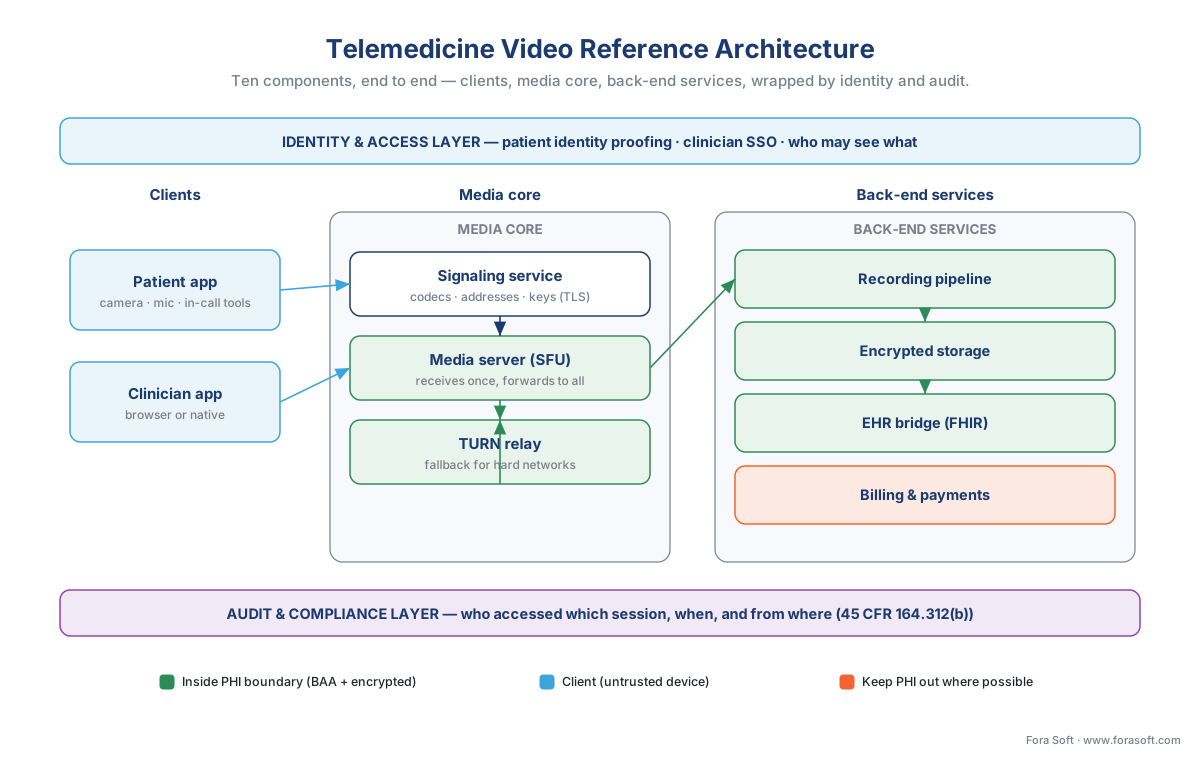 Figure 1. The full picture. Clients connect through signaling and a media core (SFU plus TURN relay) to the back-end services — recording, storage, the EHR bridge, and billing — with identity and audit wrapping everything. This is the map the rest of the article annotates.
The line that matters most: the compliance boundary
Now draw the one line that turns a video diagram into a healthcare architecture. The compliance boundary — also called the PHI boundary — is the fence around every component that can see, carry, or store Protected Health Information. It is the most important object in the whole picture, and most weak telemedicine builds are weak because nobody drew it.
Two rules govern everything inside the fence, and they are separate ideas that beginners constantly merge.
The first rule is the contract. Every vendor whose service sits inside the boundary must have signed a Business Associate Agreement (BAA) — the contract in which a company that handles PHI on your behalf legally commits to protect it. A BAA is the signed promise every contractor must make before they get a key to the building. Your cloud host, your TURN provider, your recording storage, your transcription API, your managed SFU if you buy one rather than build it — each is a "business associate" the moment it can touch PHI, and HHS guidance is explicit that this holds even when the vendor only ever sees encrypted data it cannot read. BAA coverage is binary: a vendor either has a signed agreement covering your use or it does not. The required terms of that agreement are set in the regulations at 45 CFR §164.314(a).
The second rule is encryption, and it is not the same as the first. Every hop that crosses the boundary, or moves PHI inside it, must be encrypted. WebRTC — the technology browsers use for real-time video — encrypts media by default using DTLS-SRTP, a standard defined across IETF RFC 3711 and RFC 5763/5764; signaling rides over TLS; storage is encrypted at rest. The deeper treatment is in encryption in transit, at rest, and end-to-end. The point for the map is that encryption is necessary but not sufficient: a stream can be perfectly encrypted and still be a HIPAA violation if the vendor carrying it never signed a BAA. Keep the two ideas apart — "encrypted" answers "can someone eavesdrop?"; "covered by a BAA" answers "is this vendor allowed to touch it at all?".
Sorting the components by the boundary is the exercise that makes the architecture safe. Inside the fence: the clients (they capture and show PHI), the SFU and TURN relay (they carry it), the recording pipeline and storage (they keep it), the EHR bridge (it reads and writes it), identity, and audit. The conservative position — the one we take in the compliance architecture pattern — is that even the TURN relay sits inside the boundary, because relayed media is still PHI in motion through that vendor's servers, so the relay vendor needs a BAA. Outside the fence, deliberately: the marketing site, generic product analytics, and as much of the payment path as you can push out, so the systems that never need health data never get it.
 Figure 2. The same architecture, sorted by the compliance boundary. Green components sit inside the HIPAA boundary — each needs a BAA and encrypted links. Orange components stay outside and must never receive PHI. The boundary, not the box count, is what an auditor reads first.
Common mistake: wiring a general-purpose analytics or crash-reporting tool into the client so it can "see what's happening on the call." That SDK quietly phones home with screen contents, URLs, or identifiers — PHI leaving the boundary to a vendor with no BAA. The fix is on the diagram before it is in the code: analytics that touches the clinical surface stays inside the boundary under a BAA, or it gets a de-identified feed and nothing else.
Why this is HIPAA's structure, not ours
The boundary is not a Fora Soft convention; it is the shape the HIPAA Security Rule pushes you into. The Rule's stated goal, at 45 CFR §164.306(a), is to protect the confidentiality, integrity, and availability of electronic PHI. It then sets out safeguards that map almost one-to-one onto the components above, which is why a good architecture and a compliant one look the same.
Four technical safeguards in 45 CFR §164.312 do most of the work, and it is worth seeing them as architecture, not legalese. Access control (§164.312(a)) is the identity-and-access layer — only the right people reach a given session. Audit controls (§164.312(b)) are the audit layer — the system records what happened to PHI; this is the regulation that makes the audit log mandatory, not optional. Integrity (§164.312(c)) means PHI is not improperly altered or destroyed — the backups and write protections around storage. Transmission security (§164.312(e)) is the encryption on every hop — the DTLS-SRTP and TLS we just labeled. Read that way, the four safeguards are simply four of the boxes in Figure 2.
Two more requirements explain parts of the map that look like operations rather than security. The contingency-plan standard at 45 CFR §164.308(a)(7) requires a data backup plan, a disaster recovery plan, and an emergency mode operation plan — which is why redundant storage and multi-region failover are part of the architecture, not extras. And availability being a named goal is why the SFU pool is designed to scale and survive a surge, the subject of scaling clinical video.
There is regulatory motion here worth watching. The HIPAA Security Rule update proposed by HHS — the Notice of Proposed Rulemaking published at 90 FR 800 on January 6, 2025 (RIN 0945-AA22) — would tighten exactly this territory, among other things making today's "addressable" specifications mandatory and demanding asset inventories and network maps that look a great deal like the diagram in this article. As of mid-2026 it remains proposed, not final: OCR is still working through roughly 4,700 public comments, and a coalition of provider groups has asked HHS to withdraw it. Treat it as direction, not law, and confirm status before citing a deadline. We track the video-specific implications in the 2026 HIPAA Security Rule for video.
Following the data: three journeys through the map
A static map is easier to trust once you watch data move across it. Three short journeys cover almost everything the platform does.
The live consult. The patient's client gathers camera and mic and asks the signaling service to set up a call. Signaling exchanges network candidates and encryption keys; the media connects, ideally device-to-SFU directly, falling back to the TURN relay if the network forces it. The SFU forwards the patient's stream to the clinician and the clinician's to the patient. Every leg is encrypted with DTLS-SRTP; every server on the path — SFU, TURN — sits inside the boundary under a BAA. Nothing is stored yet; this journey is pure motion.
The recording. If the visit is recorded, the recording pipeline captures the streams, composites them, and writes an encrypted file to storage, where it becomes durable PHI in the patient's designated record set. Access to it runs through the identity layer; every retrieval is written to the audit log. This is the journey that most often goes wrong, because the file outlives the call and an unencrypted or un-BAA'd bucket is a breach waiting to be reported.
The clinical write-back. After the visit, structured data — the note, the diagnosis codes, the visit metadata — flows through the EHR bridge into the hospital's record using FHIR. The video itself rarely enters the EHR; a pointer to the recording and the clinical note do. This is the journey that makes the platform clinically real rather than a standalone video toy, and it is governed as much by the hospital's integration rules as by your own.
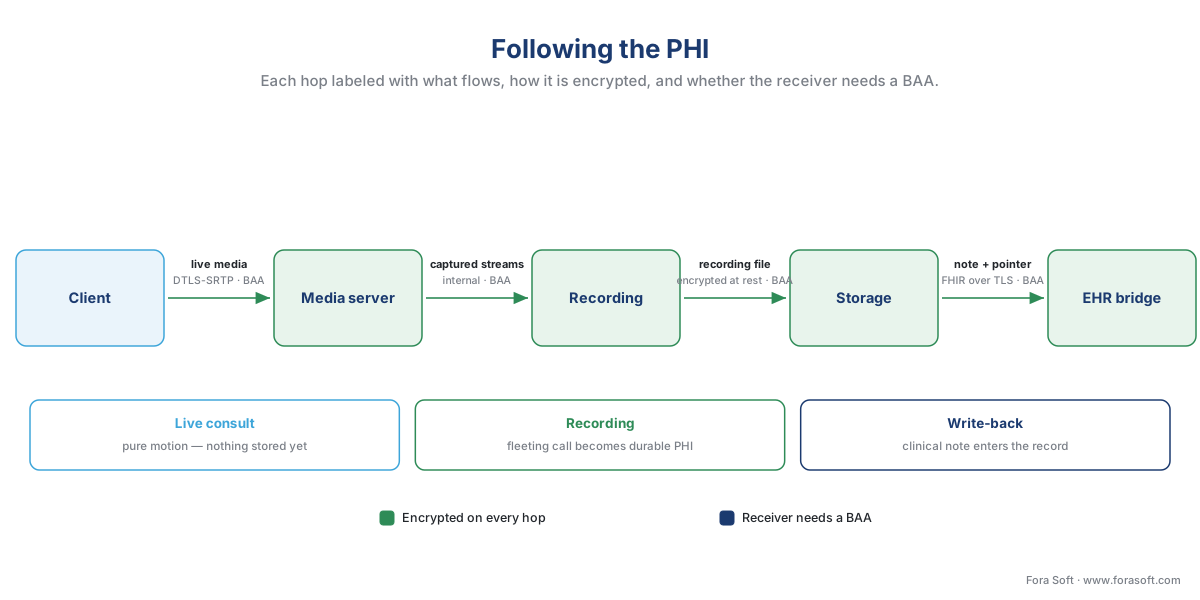 Figure 3. PHI on the move. Each arrow is labeled with what flows, how it is encrypted, and whether the receiving party needs a BAA. The live consult is motion; the recording is storage; the write-back is the EHR. Three journeys, one boundary.
The latency budget, written out
The architecture also has to feel instantaneous, and "instantaneous" has a number. Real-time conversation breaks down when the one-way delay — the time from something happening on one camera to appearing on the other screen — climbs too high; people start talking over each other and a clinical interview loses its rhythm. The widely used engineering reference, ITU-T Recommendation G.114, treats about 150 milliseconds (ms) one-way as the ceiling for natural interaction. The reference architecture has to spend that budget wisely, so let us add it up out loud for a well-placed call.
Capture + encode (client)      ≈  30 ms
Network to the SFU             ≈  40 ms   (patient in-region)
SFU forwarding                 ≈  10 ms
Network from the SFU           ≈  40 ms   (clinician in-region)
Decode + render (client)       ≈  20 ms
---------------------------------------------
One-way total                  ≈ 140 ms   (inside the 150 ms budget)
The sum lands just inside the budget — if the SFU is near both parties. Put the media server on the wrong continent and the network legs alone blow past 150 ms before any processing, which is why the architecture runs SFUs in multiple regions and routes each patient to the nearest one. The full quality-and-latency treatment, including when a dermatology or tele-stroke consult needs a tighter bar, is in latency, quality, and the clinical "good enough" bar, and the multi-device quality machinery (simulcast and SVC) lives in the Video Streaming section's simulcast and SVC on an SFU. The lesson for the map: latency is an architecture property, decided by where you put the SFU, not a setting you tune later.
Build, buy, or assemble — the architecture is the same shape
A reasonable question at this point is whether you build all of this or buy it. The honest answer is that the shape of the architecture does not change with that decision; only who operates each box does. You can self-host the SFU on an open-source project like mediasoup, Janus, or LiveKit, or you can rent the media layer from a managed communications platform (a CPaaS, a Communications-Platform-as-a-Service such as Twilio, Vonage, Daily, or Agora). The full decision, with the all-important BAA column, is in choosing the video layer: build vs buy. What the reference architecture insists on, either way, is that every component you do not operate yourself still has to sit correctly relative to the boundary — a managed SFU that will not sign a BAA cannot be inside your PHI boundary, which means it cannot carry your consults, full stop.
The table below sketches how the same ten components land under three build strategies. The BAA column is the one that gates every managed choice.
| Component | Self-hosted | Managed CPaaS | Hybrid (typical) | BAA needed if managed? |
|---|---|---|---|---|
| Signaling | Your service | CPaaS-provided | Your service | Yes |
| Media server (SFU) | mediasoup / Janus / LiveKit | CPaaS SFU | CPaaS or self-host | Yes |
| TURN relay | coturn you run | CPaaS-provided | Managed TURN | Yes |
| Recording | Your pipeline | CPaaS recording | Your pipeline | Yes |
| Storage | Your encrypted buckets | CPaaS or your cloud | Your cloud | Yes |
| EHR bridge | You build / aggregator | You build / aggregator | Aggregator | Yes |
| Identity | Your IdP + hospital SSO | Your IdP | Your IdP | Yes, if vendor-hosted |
| Audit | Your logging | Yours over CPaaS events | Yours | Yes, if vendor-hosted |
The progression is the lesson: buying speeds you up and self-hosting gives you control, but the boundary is non-negotiable in every column. A vendor that cannot be brought inside the fence with a signed BAA is not a cheaper option — it is not an option.
Where Fora Soft fits in
Fora Soft has built real-time video on WebRTC since 2005 across video conferencing, streaming, e-learning, surveillance, and telemedicine, and a reference architecture like this one is the first artifact we put on the table when a healthcare client starts scoping a build. The compliance-first discipline is the difference in healthcare: we draw the PHI boundary before we choose a single vendor, confirm a BAA is available for every component that lands inside it, label encryption on every crossing hop, and design the SFU pool, recording pipeline, and EHR bridge so the diagram a CTO hands to an auditor and the diagram our engineers build from are the same diagram. We assemble the parts the rest of this block describes — topology, reliability, recording, scaling — into one buildable whole, with availability treated as a HIPAA goal, not just an uptime number.
What to read next
- The compliance architecture pattern: wrapping video in HIPAA
- Choosing the video layer: build vs buy
- Scaling clinical video: regions, capacity, and surge
Call to action
- Talk to a telemedicine engineer — book a 30-minute scoping call to talk through your telemedicine reference architecture plan.
- See our case studies — 250+ shipped projects across video streaming, WebRTC, OTT, telemedicine, e-learning, surveillance, and AR/VR.
- Download the Telemedicine Video Reference Architecture Pack — One page: the ten-component inventory, the PHI compliance boundary (what sits inside vs outside), the per-hop encryption-and-BAA checklist, the latency budget, and the build-vs-buy boundary rule — a reference card a CTO can hand to an….
References
- HHS, HIPAA Security Rule — General Rules, 45 CFR §164.306(a) (confidentiality, integrity, and availability of ePHI). eCFR, current 2026. https://www.ecfr.gov/current/title-45/subtitle-A/subchapter-C/part-164/subpart-C/section-164.306 — Tier 1 (primary rule).
- HHS, Technical safeguards, 45 CFR §164.312 (access control, audit controls, integrity, person/entity authentication, transmission security). eCFR, current 2026. https://www.ecfr.gov/current/title-45/subtitle-A/subchapter-C/part-164/subpart-C/section-164.312 — Tier 1 (primary rule).
- HHS, Administrative safeguards — Contingency plan, 45 CFR §164.308(a)(7) (data backup, disaster recovery, emergency mode operation). eCFR, current 2026. https://www.ecfr.gov/current/title-45/subtitle-A/subchapter-C/part-164/subpart-C/section-164.308 — Tier 1 (primary rule).
- HHS, Business associate contracts and other arrangements, 45 CFR §164.314(a) (required BAA terms). eCFR, current 2026. https://www.ecfr.gov/current/title-45/subtitle-A/subchapter-C/part-164/subpart-C/section-164.314 — Tier 1 (primary rule).
- HHS/OCR, Guidance on HIPAA & Cloud Computing (a service provider maintaining encrypted ePHI is a business associate requiring a BAA). https://www.hhs.gov/hipaa/for-professionals/special-topics/health-information-technology/cloud-computing/index.html — Tier 1/2 (agency guidance).
- HHS/OCR, HIPAA Security Rule To Strengthen the Cybersecurity of Electronic Protected Health Information (NPRM), 90 FR 800, Jan. 6, 2025, RIN 0945-AA22 (proposed; comment period closed Mar. 7, 2025; not final as of mid-2026). https://www.federalregister.gov/documents/2025/01/06/2024-30983/hipaa-security-rule-to-strengthen-the-cybersecurity-of-electronic-protected-health-information — Tier 1 (primary rulemaking).
- IETF, RFC 3711, The Secure Real-time Transport Protocol (SRTP). https://www.rfc-editor.org/rfc/rfc3711 — Tier 1 (standard; media encryption).
- IETF, RFC 5763 & RFC 5764, Framework for Establishing a SRTP Security Context Using DTLS / DTLS Extension to Establish Keys for SRTP. https://www.rfc-editor.org/rfc/rfc5763 — Tier 1 (standard; DTLS-SRTP key exchange in WebRTC).
- ITU-T Recommendation G.114, One-way transmission time (≤150 ms one-way acceptable for interactive conversation). International Telecommunication Union, 2003. https://www.itu.int/rec/T-REC-G.114 — Tier 1 (standard).
- HL7, FHIR Release 4 (R4) — the healthcare interoperability standard used by the EHR bridge. https://hl7.org/fhir/R4/ — Tier 1 (standard).
- W3C, WebRTC 1.0: Real-Time Communication Between Browsers (mandatory media encryption; DTLS-SRTP). https://www.w3.org/TR/webrtc/ — Tier 1 (standard).
Where sources disagreed, the official rule won: vendor summaries that reduce HIPAA compliance to "we encrypt the video" were overridden by 45 CFR §164.314(a) and HHS cloud guidance, which require a signed BAA for any business associate handling ePHI — even encrypted ePHI it cannot read.
