


Why this matters
Bit allocation inside a GOP is the layer that turns a rate-control target like "5 Mbps average" into a precise quantization parameter for every frame. A product manager who understands it will stop asking engineers to "just give the I-frames more bits" — the modern allocator already does that, and over-tuning makes things worse. A streaming engineer who can read an x264 log and tell whether macroblock-tree fired correctly will catch quality regressions before they hit production. A founder evaluating a transcoding service will know which questions to ask: hierarchical-B depth, lookahead window, whether MB-tree or CU-tree is enabled, whether the encoder respects VBV/HRD limits per row or only per frame. This article walks through how the allocation actually happens — frame-type ratios, temporal-layer QP offsets, complexity-driven scaling, and the propagation-aware techniques (MB-tree, CU-tree, TPL) that the best encoders shipped in the last decade — and shows you the settings you will actually argue about in production.
What bit allocation is, and where it sits
Inside the encoder, three loops stack on top of each other. The outer loop is rate control: it picks a target — a bitrate, an average, or a quality factor — and decides how many bits the whole file or the next second of the file gets. The inner loop is mode decision: for one block, it picks the cheapest encoding given a fixed quality-versus-bits trade-off (called lambda, λ). Between them sits bit allocation. Allocation takes the outer loop's budget, splits it across the frames inside the next group of pictures, then translates each frame's share into a quantization parameter (QP) that mode decision can actually use.
The reason allocation is a separate problem is that frames inside a GOP are not equal. An I-frame is encoded from scratch and serves as the anchor everything else hangs off. A P-frame points back at the previous anchor for most of its data. A B-frame points both backwards and forwards, and in modern codecs B-frames themselves form a pyramid where some B-frames serve as anchors for other B-frames. If you give every frame the same QP, the anchors get under-funded and every later frame that copies from them inherits their compression artefacts. Allocation is the loop that fixes this.
A useful analogy. A budget for a road trip is not split evenly between days. You spend more on the night you stay at the destination hotel than on the gas-station coffee stop, because the destination is what the rest of the trip is for. Bit allocation does the same: it spends more on the frames the rest of the GOP relies on.
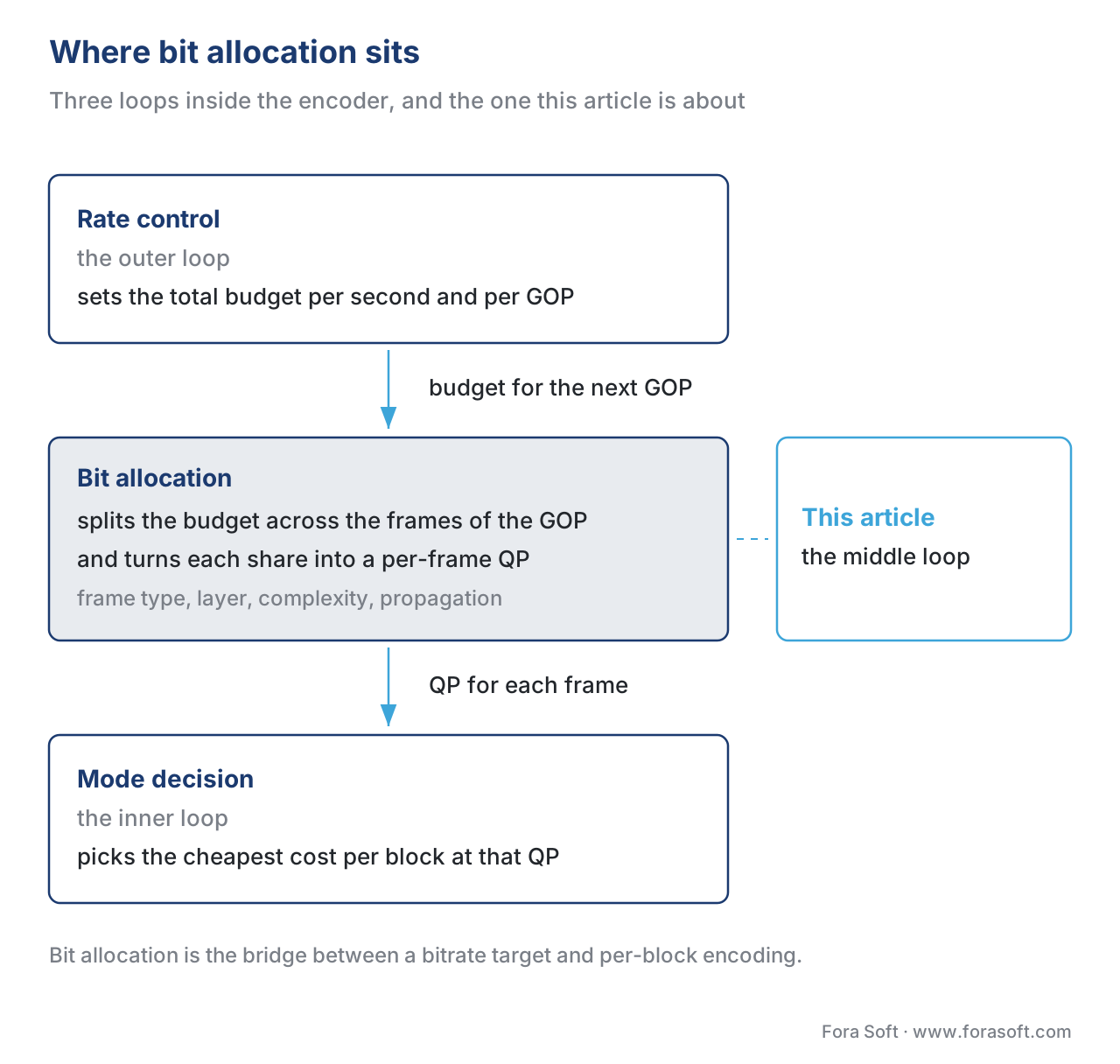 Figure 1. The three nested loops inside a modern encoder. Bit allocation sits between rate control and mode decision and is the layer that translates a bitrate target into per-frame quantization parameters. The dashed card on the right marks the loop this article is about.
The first split: frame type
The oldest piece of bit allocation, present in every video encoder since MPEG-1, is the frame-type ratio. Each frame type gets a quantizer multiplier relative to the P-frame, the workhorse of the codec. In x264 the two knobs are called ipratio (I-to-P quantizer step) and pbratio (P-to-B quantizer step). Their defaults are 1.40 and 1.30. That means if the encoder picks QP 22 for a P-frame, the matching I-frame is encoded at QP 22 minus 6 × log₂(1.40) ≈ 22 − 2.9 ≈ 19, and the matching B-frame is encoded at QP 22 plus 6 × log₂(1.30) ≈ 22 + 2.3 ≈ 24. The factor of 6 in the conversion comes from the H.26x family's rule that "+6 QP" halves the bitrate.
The physical reason for those defaults. An I-frame's bits are reused by every frame in the GOP for the next 2 seconds, so 1 bit spent on an I-frame buys roughly the same quality as 4 bits spent on the P-frame that copies from it. A B-frame is "disposable" — nothing else copies from it — so over-spending on a B-frame buys nothing for the rest of the GOP. Lowering the I-frame's QP by ~3 and raising the B-frame's QP by ~2 lands within a few percent of the optimum on natural video.
A worked example to anchor the numbers. Suppose your average P-frame in a 4 Mbps stream eats 133,000 bits. Default ipratio 1.40 means the I-frame target is roughly 1.40 × 133,000 ≈ 186,000 bits and the B-frame target is roughly 133,000 / 1.30 ≈ 102,000 bits. Across a 30-frame GOP with 1 I, 9 P, and 20 B-frames you spend 186 + 9 × 133 + 20 × 102 ≈ 3,423 kbits per second — close to your 4 Mbps target before the per-frame allocator nudges it the rest of the way.
The ratios are sensitive to content. Grainy noisy film benefits from lower ratios (closer to 1.15 / 1.15) because the I-frame has more high-entropy noise that costs the same regardless of QP; flat animation tolerates higher ratios (closer to 1.6 / 1.4) because P-frame copy-and-warp covers most of the picture. Modern encoders adapt this automatically — for x264 specifically, the macroblock-tree algorithm replaces the constant ratios when enabled (which is the default for any preset slower than ultrafast).
The second split: temporal layer in a hierarchical-B GOP
Modern codecs do not place B-frames in a flat row between P-anchors. They place them in a pyramid. A typical 8-frame mini-GOP looks like this in display order:
display order:  I   B   B   B   B   B   B   B   P
position:       0   1   2   3   4   5   6   7   8
temporal layer: 0   3   2   3   1   3   2   3   0
The frames in layer 0 (I and P) are anchors for everything. Frame 4 in layer 1 is encoded next and is an anchor for layers 2 and 3. Frames 2 and 6 in layer 2 are anchors for layer 3. Frames 1, 3, 5, 7 in layer 3 are not referenced by anything and can be dropped without affecting any other frame. Decoders that need to play at half frame rate simply skip layer 3.
Each temporal layer gets its own QP offset, and the offsets cascade. Layer 0 gets the lowest QP (most bits). Each higher layer adds a positive offset. In HEVC's reference implementation, the standard cascade for an 8-frame mini-GOP is QP+1, QP+2, QP+3, QP+4 for layers 0–3 respectively, with finer-grained variants depending on slice type. In SVT-AV1 the cascade is data-driven from the temporal dependency model (TPL) and depends on the encoder preset. The shape is always the same: deeper layers pay more for each bit because their distortion does not propagate to anybody.
This is where the largest single quality win in the last 15 years of codec engineering came from. Hierarchical B-frames with QP cascading delivered roughly 0.5 dB Y-PSNR over flat-B encoding on the test sequences MPEG used during HEVC standardisation. On natural content at a fixed bitrate, that is the equivalent of getting a half-step quality bump for free — without changing the codec at all, just by moving bits to the frames that the other frames depend on.
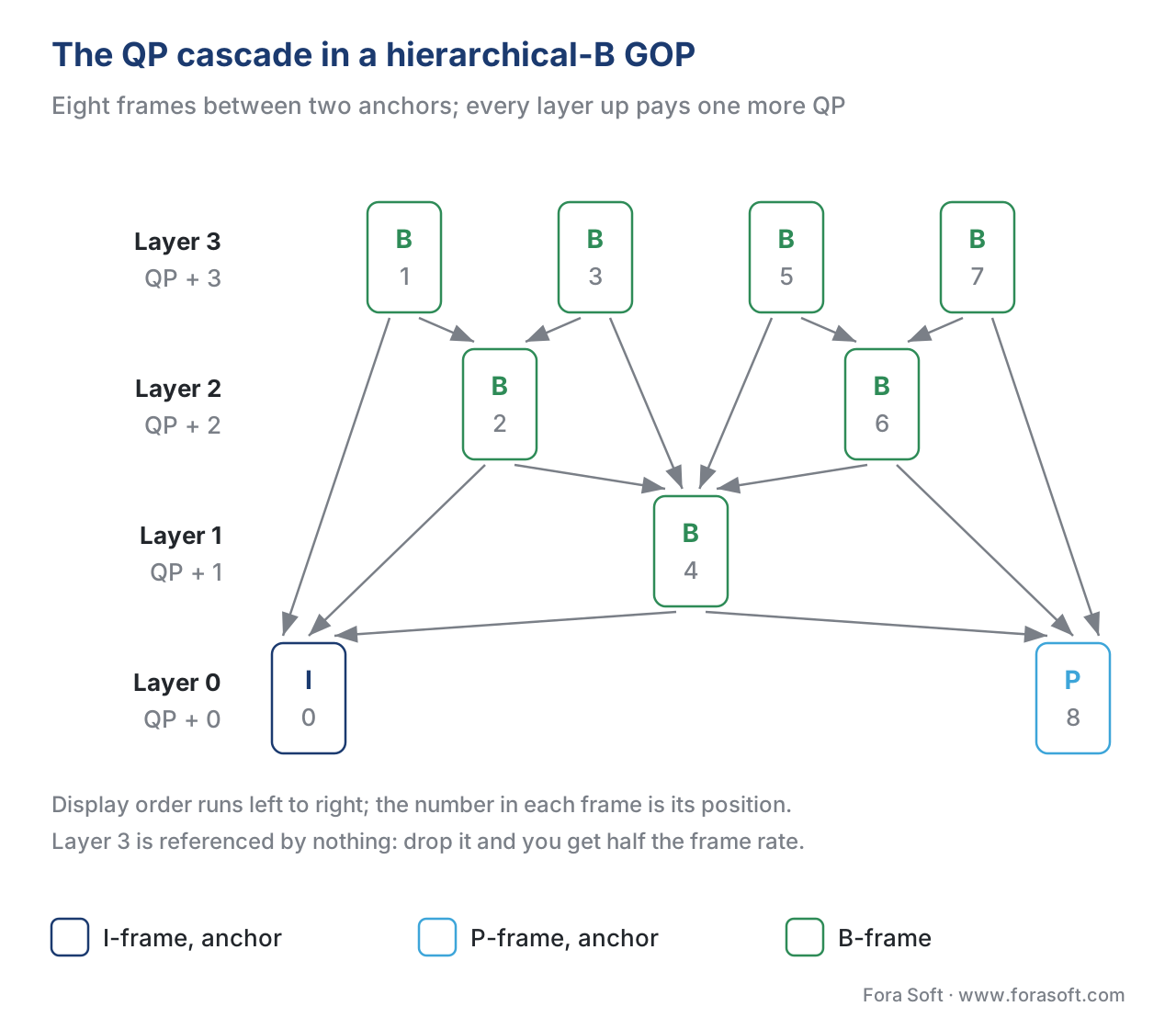 Figure 2. An 8-frame hierarchical-B mini-GOP. Layer 0 frames (I, P) anchor everything; each higher layer adds +1 QP because the frames in it are referenced less and their distortion stops with them. Every arrow points from a frame to the anchors it is predicted from, and nothing points into layer 3.
The third split: per-frame complexity
Frame-type ratios and temporal-layer offsets are static. They do not look at what the next 8 frames actually contain. A complexity-driven allocator does — it estimates how hard each upcoming frame is to encode, then redistributes the GOP's budget so the harder frames get more bits.
The canonical scaling formula in x264, taken verbatim from Loren Merritt's ratecontrol.txt, is:
target_bits[i] = complexity[i] ** qcomp × scale
where complexity[i] is the bit cost of frame i at a reference QP (taken from the first pass in two-pass mode, or from a half-resolution lookahead in single-pass), qcomp is a knob between 0 and 1, and scale is whatever makes the total match the rate-control budget. At qcomp = 0 every frame gets the same bits (constant bitrate, large quality swings). At qcomp = 1 every frame gets bits in exact proportion to its complexity (constant quantizer, large bitrate swings). The default, 0.60, is empirically the sweet spot for human perception on natural video — it spends slightly less than proportional on the hard scenes because the eye masks artefacts in motion, and slightly more than equal on the easy scenes so static backgrounds do not show banding.
A worked example to make complexity allocation concrete. Suppose your GOP contains three frames whose first-pass costs at QP 22 were 80, 200, and 50 kbits, and the GOP's target budget is 270 kbits. Equal allocation would give each frame 90 kbits — under-funding the 200-kbit middle frame badly. Strict proportional allocation gives 80/(80+200+50) × 270 = 65, 162, and 41 kbits — close to the originals but compressed evenly. The x264 default at qcomp 0.60 gives 80^0.6, 200^0.6, 50^0.6 (= 14.6, 24.6, 10.5 in arbitrary units), normalised to total 270: 81, 137, and 58 kbits. The hard frame gets less than its strict share (137 < 162) because perceptual masking forgives some loss there, and the easy frames get a small bonus so their static content stays clean.
In single-pass operation, the complexity estimate comes from x264's lookahead: it runs fast motion estimation on a half-resolution version of each frame in a sliding window (default 40 frames, up to 250 with --rc-lookahead), records the residual cost (SATD — sum of absolute transformed differences), and uses it as a proxy for complexity. Two-pass operation replaces the lookahead estimate with the actual first-pass bit cost, which is more accurate at the price of doubling encode time.
The fourth split: propagation-aware allocation (MB-tree, CU-tree, TPL)
Frame-type ratios and per-frame complexity stop at the frame level. They do not know that block (10, 5) in frame 4 is going to be the reference for block (10, 5) in frames 5, 6, 7, and 8 — so spending more bits on it would buy quality for five frames at once. Propagation-aware allocation closes that gap by allocating bits at the block level, weighted by how many future blocks will copy from each block.
The three implementations you will run into in production:
Macroblock-tree (MB-tree) is the algorithm x264 ships with, written by Jason Garrett-Glaser and Loren Merritt in 2009. The encoder runs its lookahead to estimate, for every 16×16 macroblock, how often that block is referenced by blocks in later frames within the lookahead window. Blocks that are heavily reused get a per-block QP discount; blocks that are quickly overwritten get a small QP penalty. The discount can be 6–10 QP for a stationary background that gets copied for two seconds straight. On natural content MB-tree saves roughly 5–10% bitrate at the same SSIM compared to flat frame-level allocation, and it costs almost nothing — the lookahead it needs is the same lookahead that already runs for B-frame placement and scene-cut detection.
CU-tree is x265's HEVC equivalent. The principle is identical, scaled up from 16×16 macroblocks to HEVC's variable-size coding units (CUs, up to 64×64 in the early versions and 128×128 with the screen-content extension). The 2018 paper by Pourreza et al. ("Optimize x265 Rate Control: An Exploration of Lookahead in Frame Bit Allocation and Slice Type Decision") quantified the win at 2–8% Bjøntegaard-delta bitrate (BD-rate) reduction on the MPEG common test conditions, depending on preset.
Temporal dependency model (TPL) is the AV1-era propagation tracker built into libaom and adopted by SVT-AV1 in version 0.9 (2021). TPL formalises what MB-tree did empirically: it solves a linear program over the GOP that minimises the sum of distortions, weighted by each block's "r0" value (the share of its rate-distortion cost that propagates into future blocks). The win in production AV1 streams is in the 5–12% BD-rate range over a non-TPL baseline, with the upper end coming from content where motion is highly structured (sports, animation).
The common thread: propagation-aware allocation is the single most valuable lookahead-based technique in modern encoders. Disable it and you give up 5–15% bitrate at the same quality on everything except low-motion talking heads (where there is nothing to propagate).
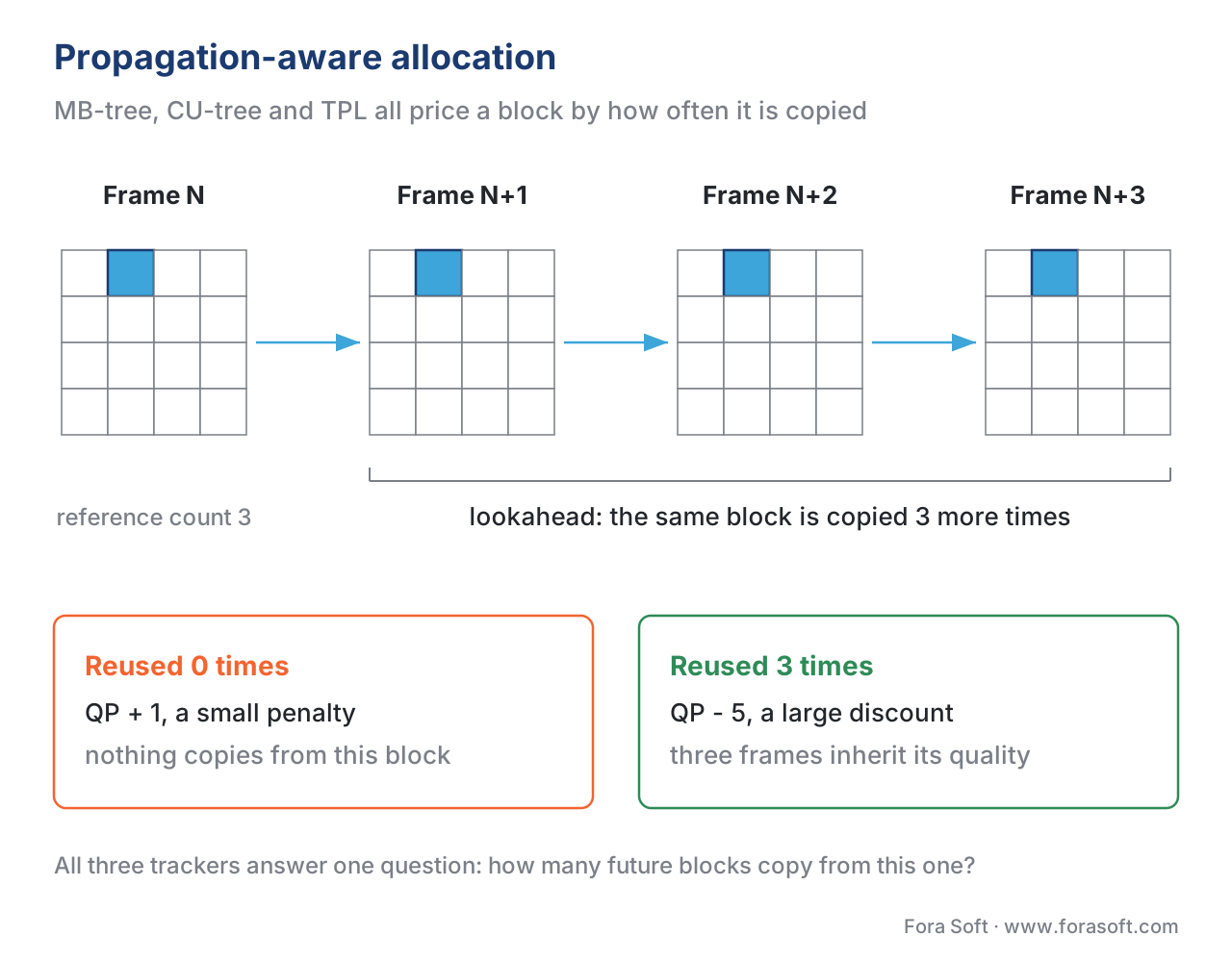 Figure 3. Propagation-aware bit allocation. The encoder counts, for each block in the current frame, how many future blocks within the lookahead window copy from it. Heavily reused blocks get a QP discount; blocks that are quickly overwritten get a small penalty. The four grids are the same block three steps apart; the two cards below are the two ends of the price scale.
How modern encoders split the work, side by side
The strategy is similar across encoders but the knob names and defaults differ. The table below covers what you will see in production today.
| Encoder | Frame-type knob | Temporal-layer knob | Complexity allocator | Propagation tracker | Lookahead default |
|---|---|---|---|---|---|
| x264 (H.264) | --ipratio 1.40, --pbratio 1.30 |
implicit via B-pyramid + MB-tree | --qcomp 0.60 |
MB-tree (on by default) | 40 (--rc-lookahead) |
| x265 (HEVC) | --ipratio 1.40, --pbratio 1.30 |
--bframe-bias, per-layer offset table |
--qcomp 0.60 |
CU-tree (on by default) | 20 (--rc-lookahead) |
| libaom-AV1 | tuned per-pass, not user-exposed | hierarchical, 5-layer default | first-pass stats + per-segment q | TPL (on for --good) |
--lag-in-frames 19 |
| SVT-AV1 | tuned per-preset, hidden | 5- or 6-layer, preset-driven | TPL r0 values | TPL (on by default) | preset-driven |
| VVenC (H.266/VVC) | profile-driven | per-layer QP offset table | rate-distortion cost map | per-layer Lagrangian | 16 default |
| libvpx-VP9 | similar to libaom | up to 3-layer hierarchical | first-pass stats | basic propagation (no TPL) | --lag-in-frames 25 |
The two patterns to notice. First, the H.26x family (x264, x265) exposes the knobs directly so an operator can hand-tune. The AOMedia family (libaom, SVT-AV1) hides them behind presets and TPL because the model is data-driven. Second, every modern encoder enables propagation tracking by default — MB-tree, CU-tree, and TPL are all on out of the box. If you encode without them, you give up bits for nothing.
Two-pass, single-pass, and what changes inside the allocator
In two-pass mode, the allocator has full information. The first pass writes a stats file with the exact bit cost of every frame at a placeholder QP, and the second pass uses those costs as the complexity input to the formula in the previous section. The allocator can plan the GOP-level distribution before it encodes a single frame in pass two, and the result lands within 0.5% of the target bitrate on a 90-minute file.
In single-pass mode, the allocator has only what the lookahead can see. The further the lookahead reaches, the closer single-pass quality gets to two-pass; the trade-off is encode latency, because the encoder cannot emit frame N until it has analysed frames N+1 through N+lookahead. For VOD jobs, lookahead 60 frames is the sweet spot — beyond that the quality curve flattens. For live, lookahead is capped by the end-to-end latency budget: WebRTC sub-second pipelines use lookahead 0–8; HLS sub-3-second pipelines use 16–40.
The bit-allocator inside the encoder makes one further compensation, in both modes: after each frame is encoded and the real bit cost is known, future-frame QPs get nudged to compensate for prediction error. If the allocator predicted 100 kbits for the next P-frame and got 130, the QPs of the following frames get scaled by 100/130 to claw the deficit back. The strength of that nudge is the difference between VBV-strict CBR (claw back hard, accept quality wobble) and looser ABR (claw back gently, accept ±10% bitrate variance).
The numbers your encoder log actually reports
When you run x264 with --verbose or x265 with --csv-log-level 2, the per-frame line shows you the allocator at work. A typical x264 line:
[debug] frame= 243 QP=22.0 NAL=2 Slice:P Poc:486 I:174 P:1542 SKIP:684 size=10623 bytes
The QP is 22.0, but that is the frame-level average. The actual per-macroblock QPs vary across the frame because of MB-tree's per-block discount. The encoder also emits a one-line histogram at the end that tells you how the QP was distributed:
[info] x264 [info]: frame I:23   Avg QP:17.85  size:113042
[info] x264 [info]: frame P:1085 Avg QP:21.21  size: 13420
[info] x264 [info]: frame B:2367 Avg QP:23.42  size:  4811
Three things to read out of this. First, the I-frame's average QP (17.85) sits about 3.4 QP below the P-frame's (21.21) — that is --ipratio 1.40 working as designed (6 × log₂(1.40) ≈ 2.9, plus a small MB-tree discount for the propagation those I-frames cause). Second, the B-frame's average QP (23.42) sits 2.2 QP above the P-frame — that is --pbratio 1.30 working as designed (6 × log₂(1.30) ≈ 2.3). Third, the average frame size ratio (113 : 13 : 4.8 kbits) is roughly 23 : 3 : 1, which matches the rule of thumb that an I-frame is ~5× a P-frame and a P-frame is ~2.5× a B-frame at the same perceived quality. If your log shows ratios wildly off these numbers — say an I-frame ratio of 50:1 — your encoder is starving the P/B frames and the picture will pulse at every keyframe.
A common pitfall: hand-tuning ipratio when MB-tree is on
The single most common production mistake is reading an old guide, deciding "my source is grainy so I should lower ipratio to 1.15," and shipping it. The problem: x264 with MB-tree (the default) ignores ipratio for the allocation decision and uses propagation weights instead. The hand-tuned ipratio applies only to a fallback path that gets used for the first few frames before the lookahead has filled. Net effect: the operator thinks they are tuning the encoder, the encoder is using its own model, and the output is identical to default.
The right move is one of two things. Either accept the MB-tree defaults — they have been tuned by Loren Merritt and the x264 team on the MPEG test set since 2009 and they win for almost every input. Or, if you have a strong reason to override (e.g. a low-latency live ingest with --rc-lookahead 0), pass --no-mbtree explicitly so the allocator falls back to the ratio-based path and your tuning actually takes effect. The same caveat applies to x265's --no-cutree and to disabling TPL in libaom (--enable-tpl-model=0). If you turn the propagation tracker off without knowing it, you lose 5–15% bitrate; if you turn it off intentionally because your latency budget forbids the lookahead, you have to re-tune the ratio knobs by hand.
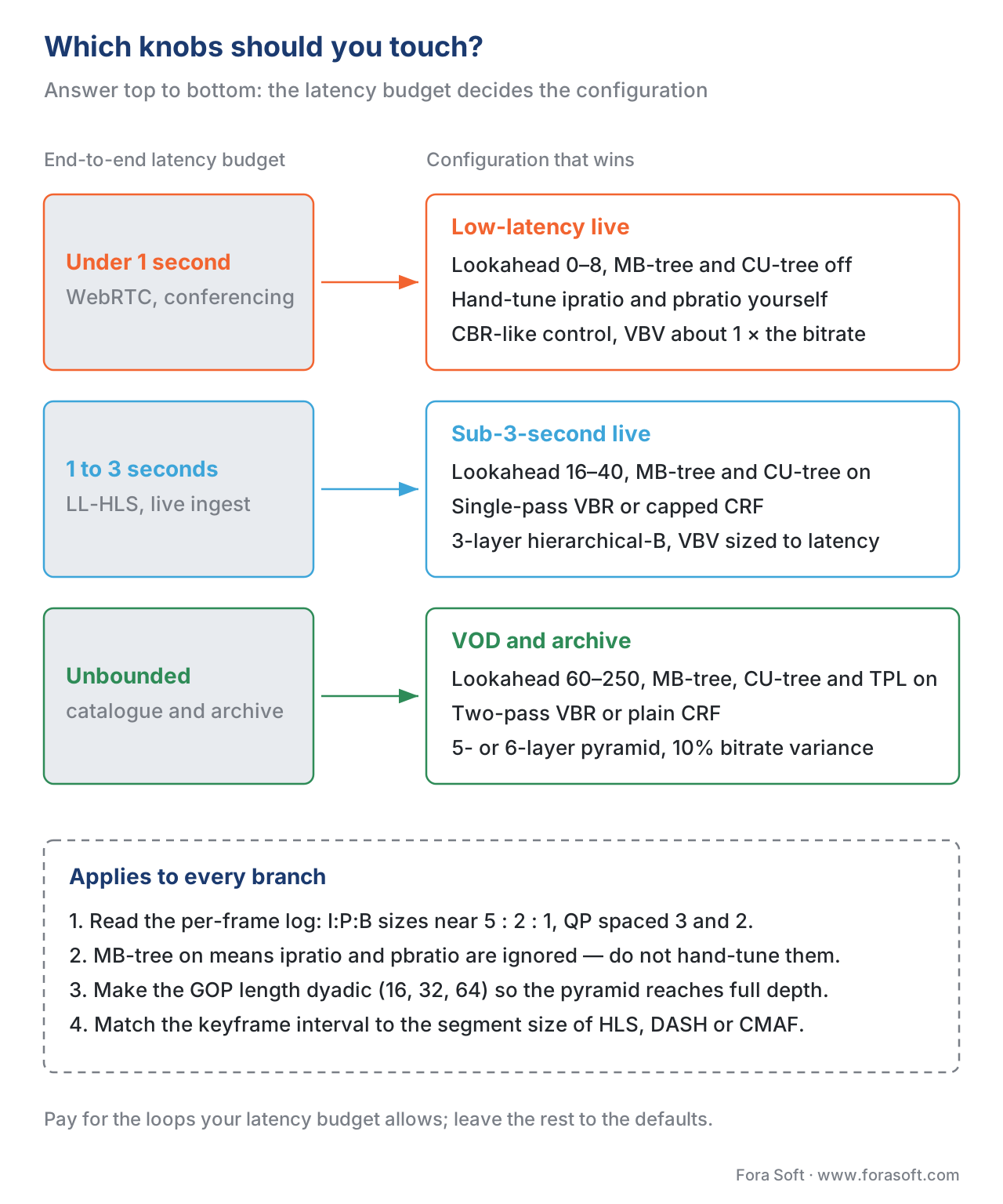 Figure 4. The same decision as a ladder. What your latency budget can pay for decides how far the lookahead reaches, and the rest — propagation tracking, pyramid depth, one pass or two — follows from that. The four rules in the dashed panel hold whichever row you land on.
Where Fora Soft fits in
Bit allocation is invisible until it is wrong, and then it is the first thing a viewer notices. In live video pipelines we have built for video conferencing and video streaming clients, the tuning question is almost always about latency versus quality: how much lookahead can the use case afford, which translates directly into how aggressive the bit allocator can be inside each GOP. For OTT and on-demand catalogues — telemedicine archives, e-learning libraries, surveillance recordings — we lean on two-pass allocation with full propagation tracking because the latency cost does not apply and the bitrate savings flow straight to the CDN bill. The configuration we ship varies by codec generation and by what the playback chain can decode, but the underlying decision is always the same: pick the loops you can afford to run, hand the rest to the encoder defaults, and read the per-frame log to verify the allocator is doing what you think it is.
The book
Video Encoding: A Complete Guide to Video Compression
This article stops at the frame; the book follows the bits down to the block. Volume 1 works through the whole allocation chain the encoders actually ship — the lookahead and its SATD cost estimates, the MB-tree and CU-tree propagation weights, the TPL model AV1 encoders solve over a GOP, and the quantisation and mode-decision stages that finally spend each frame's share. Volume 1 of the seven-volume Fora Soft Video Engineering Handbook, 1,522 pages. Written by Nikolay Sapunov, CEO at Fora Soft.
Not sure how much lookahead your latency budget can pay for?
Send us your content, your latency target and the encoder you ship, and we will measure it on your own footage: what MB-tree, CU-tree or TPL is worth at your bitrate, how deep a B-pyramid your players can still decode, and what the per-frame log should look like once the allocator is tuned. You get the numbers and the command line, not an opinion. 250+ video products shipped since 2005.
See our case studies
Case study
Worldcast Live
Concert streaming at 1.5 Gb/s with 0.4–0.5 s latency to 10,000 simultaneous viewers. At half a second glass-to-glass the encoder cannot look 40 frames ahead, so this is the top row of the ladder: a short lookahead, propagation tracking off, and the frame-type ratios tuned by hand.
Case study
Mindbox
An AI video management system on RTSP, FFmpeg and HLS with 50+ deployments across transport, pharma and gated communities. Corridors sit still for hours, which is where MB-tree pays most: a background copied for two seconds straight earns a 6–10 QP discount and the disk budget goes to the frames where something moves.
Case study
Speed.Space
A remote production platform recording at 1080p and 8 Mbps — five times a normal call — for Netflix, EA and HBO shoots. The recording is the deliverable and gets re-distributed later, so it lands in the bottom row: full lookahead, TPL or CU-tree on, and two-pass allocation across the whole file.
What to read next
Codec architecture
GOP Structure: I, P, B-Frames, Open vs Closed GOP
The structure the allocator spends its budget on: where the anchors sit and why the pyramid has a depth at all.
Codec architecture
Mode Decision and Rate-Distortion Optimization
The inner loop that receives each frame's QP and decides, block by block, how to spend it.
Codec architecture
Quantization: Where Quality Is Lost
What one QP step actually costs, and why 6 QP halves the bitrate in every formula on this page.
Encoding pipeline
Per-Title and Per-Scene Encoding
The same allocation question one level up: how the budget is split across a whole title instead of one GOP.
References
- Merritt, L. — A qualitative overview of x264's ratecontrol methods. x264 source,
doc/ratecontrol.txt. https://github.com/mstorsjo/x264/blob/master/doc/ratecontrol.txt (accessed 2026-05-17). - Garrett-Glaser, J., Merritt, L. — A novel macroblock-tree algorithm for high-performance optimization of dependent video coding in H.264/AVC. https://huyunf.github.io/blogs/2017/12/06/x264_slice_type_decision/MBtree%20paper.pdf (accessed 2026-05-17).
- Pourreza, R., Mirzaei, M., Naghibijouybari, H. — Optimize x265 Rate Control: An Exploration of Lookahead in Frame Bit Allocation and Slice Type Decision. IEEE Access, 2018. https://ieeexplore.ieee.org/document/8579235/ (accessed 2026-05-17).
- ITU-T H.265 (HEVC), v8, 2023, Annex C — Hypothetical Reference Decoder. https://www.itu.int/rec/T-REC-H.265 (accessed 2026-05-17).
- ITU-T H.264 (AVC), Annex C — Hypothetical Reference Decoder. https://www.itu.int/rec/T-REC-H.264 (accessed 2026-05-17).
- Chen, Y., Murherjee, D., Han, J., et al. — An Overview of Coding Tools in AV1: the First Video Codec from the Alliance for Open Media. APSIPA Transactions on Signal and Information Processing, 2020. https://www.cambridge.org/core/journals/apsipa-transactions-on-signal-and-information-processing/article/an-overview-of-coding-tools-in-av1-the-first-video-codec-from-the-alliance-for-open-media (accessed 2026-05-17).
- Norkin, A. — AV1 decoder model. https://norkin.org/research/av1_decoder_model/index.html (accessed 2026-05-17).
- AOMedia — SVT-AV1 Appendix: Rate Control. https://gitlab.com/AOMediaCodec/SVT-AV1/-/blob/master/Docs/Appendix-Rate-Control.md (accessed 2026-05-17).
- AOMedia — SVT-AV1 Appendix: Picture Decision and GOP Structure. https://deepwiki.com/wszqkzqk/SVT-AV1/4.3-picture-decision-and-gop-structure (accessed 2026-05-17).
- Adaptive Quantization Parameter Cascading in HEVC Hierarchical Coding. https://www.researchgate.net/publication/301571797_Adaptive_Quantization_Parameter_Cascading_in_HEVC_Hierarchical_Coding (accessed 2026-05-17).
- Efficient QP cascading in H.265/HEVC Low-Delay prediction. IEEE Conference Publication, 2017. https://ieeexplore.ieee.org/document/8026303/ (accessed 2026-05-17).
- Hierarchical B-frame Video Coding for Long Group of Pictures. arXiv:2406.16544. https://arxiv.org/html/2406.16544v1 (accessed 2026-05-17).
- x265 documentation — Command Line Options. https://x265.readthedocs.io/en/master/cli.html (accessed 2026-05-17).
- Silentaperture — x264 Settings: Advanced Encoding Guide. https://silentaperture.gitlab.io/mdbook-guide/encoding/x264.html (accessed 2026-05-17).
- slhck — Understanding Rate Control Modes (x264, x265, vpx). https://slhck.info/video/2017/03/01/rate-control.html (accessed 2026-05-17).
- AOMedia — AV1 Encoder Guide (libaom). https://aomedia.googlesource.com/aom/+/refs/heads/main/doc/dev_guide/av1_encoder.dox (accessed 2026-05-17).
