


Why this matters
If your service streams live video, transcodes a back-catalogue, or runs WebRTC at scale, the speed of your encoders is decided by how well they parallelise across CPU cores or GPU shaders. A product manager who understands "the encoder splits each frame into pieces and runs them on different cores" can read a vendor benchmark and ask the right question: how many tile columns, what slice mode, WPP on or off. A founder who can challenge "why are we paying for sixty-four cores per stream" can find out the encoder is single-slice and leaving forty of those cores idle. A technical lead who designs the live pipeline around tiles instead of slices saves a third of the bill at the same picture quality.
Why a single frame cannot be encoded as one block
To turn a frame into bits, an encoder makes thousands of small decisions: which prediction mode to use for this rectangle, which earlier frame to copy pixels from, how many bits to spend on this region. We covered the rectangles themselves — macroblocks, coding tree units, and superblocks — in our article on block-based prediction. The natural reading order is left to right, top to bottom — exactly how you read this page.
The problem with that order is that each block depends on its neighbours. The block at position (5, 3) cannot be encoded until the block at (4, 3) on its left is done, because the encoder may copy pixels or predictions from it. The block at (5, 3) also needs the row above to be done, because some prediction modes look up. This dependency chain means a single 4K frame at 60 frames per second has to flow through one core, one block at a time — and a single core is too slow.
Cutting the frame into pieces that can run on different cores looks easy, but compression has a price. Two neighbouring blocks that share information compress together more efficiently than two strangers. The moment you sever the link, you spend extra bits to repeat what the other block already knew. The job of slices, tiles, and wavefronts is to sever the link in the cheapest possible place — losing the least compression for the most parallelism.
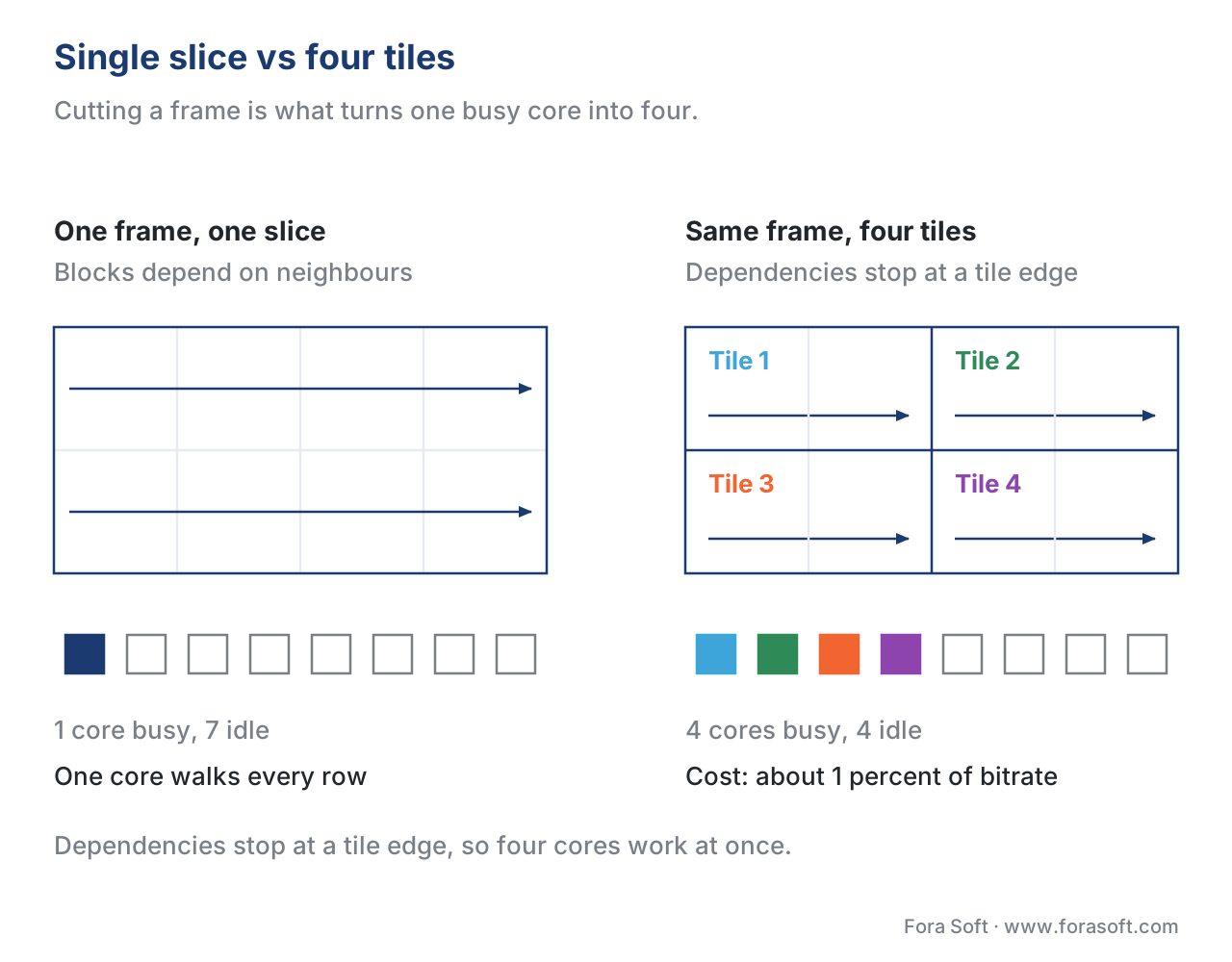 Figure 1. The same frame twice. As one slice the dependency chain runs the full width and one core does all of it; cut into four tiles each chain stops at the tile edge and four cores run at once, for about 1 percent of bitrate.
Slices — H.264's original answer
Slices were defined in H.261 in 1988 and survived unchanged through H.264. A slice is a sequence of consecutive blocks — read in left-to-right, top-to-bottom order — that is encoded as if no other slice exists. Inside one slice, blocks may reference each other; across the slice boundary they may not.
The original purpose of slices was not parallelism. It was packet loss. If a 1500-byte network packet drops on the way to the decoder, the decoder loses one slice instead of the whole frame, and it can resume cleanly from the next slice header. This is why broadcast and contribution feeds still use multi-slice encoding — even when the encoder is fast enough on one core, the network is not reliable enough.
Parallel processing rides along for free. If you tell an H.264 encoder to use four slices, four cores can encode the four slice regions side by side. The cost shows up in two places. First, the prediction chain breaks at every slice boundary, so flat regions that span two slices lose one to three percent of their compression efficiency. Second, every slice carries its own header with quantisation parameters, reference indexes, and entropy coder state — usually about 30 to 80 bits per slice. On a 1080p frame with 32 slices the header overhead alone is roughly two kilobits per frame, which at 30 frames per second is 60 kilobits per second of pure bookkeeping.
H.264 lets the encoder shape slices in two ways. The simple way is raster-scan slices: the encoder picks a number of macroblocks per slice and cuts after that count, in reading order. The flexible way is flexible macroblock ordering, abbreviated FMO, which lets the encoder declare a freeform map of which macroblock belongs to which slice — useful for region-of-interest streaming where a moving subject gets its own slice. FMO never caught on in mainstream products because most consumer decoders implement it slowly or not at all.
Tiles — HEVC's rectangular regions
HEVC, finalised in 2013, kept slices for packet-loss reasons and added a separate concept for parallelism: tiles. A tile is a rectangular grid cell on the frame. The encoder picks a number of tile columns and tile rows; the result is a regular grid of independent rectangles.
The advantages of tiles over slices for parallel work are mechanical. Tiles are square or close to square — the prediction breaks are short relative to the area inside, so the compression loss is smaller per tile than per equally-sized slice. Tiles always cut along block grid lines and pack into a rectangular layout, so the encoder can assign one tile to one core without load balancing logic.
The price is some compression and some flexibility. Cutting a frame into four tiles arranged 2×2 typically costs 0.5 to 2.0 percent bitrate at the same VMAF, depending on content. Sports and concert footage with motion crossing the screen pays more; flat backgrounds and static studio scenes pay less. Tiles must be rectangular and at least 64×64 luma pixels, so a 1080p frame supports a maximum of about 30 columns × 17 rows of HEVC tiles — overkill for any practical core count.
An experimental study on a 12-core HEVC encoder running at 3.33 GHz reported an average speedup of 9.3× on 4K sequences when using tiles, against an equivalent single-tile baseline (Fraunhofer HHI, 2015). The same study reported 8.7× for wavefronts on the same machine — close enough that the choice between the two is dictated by content and pipeline, not raw speed.
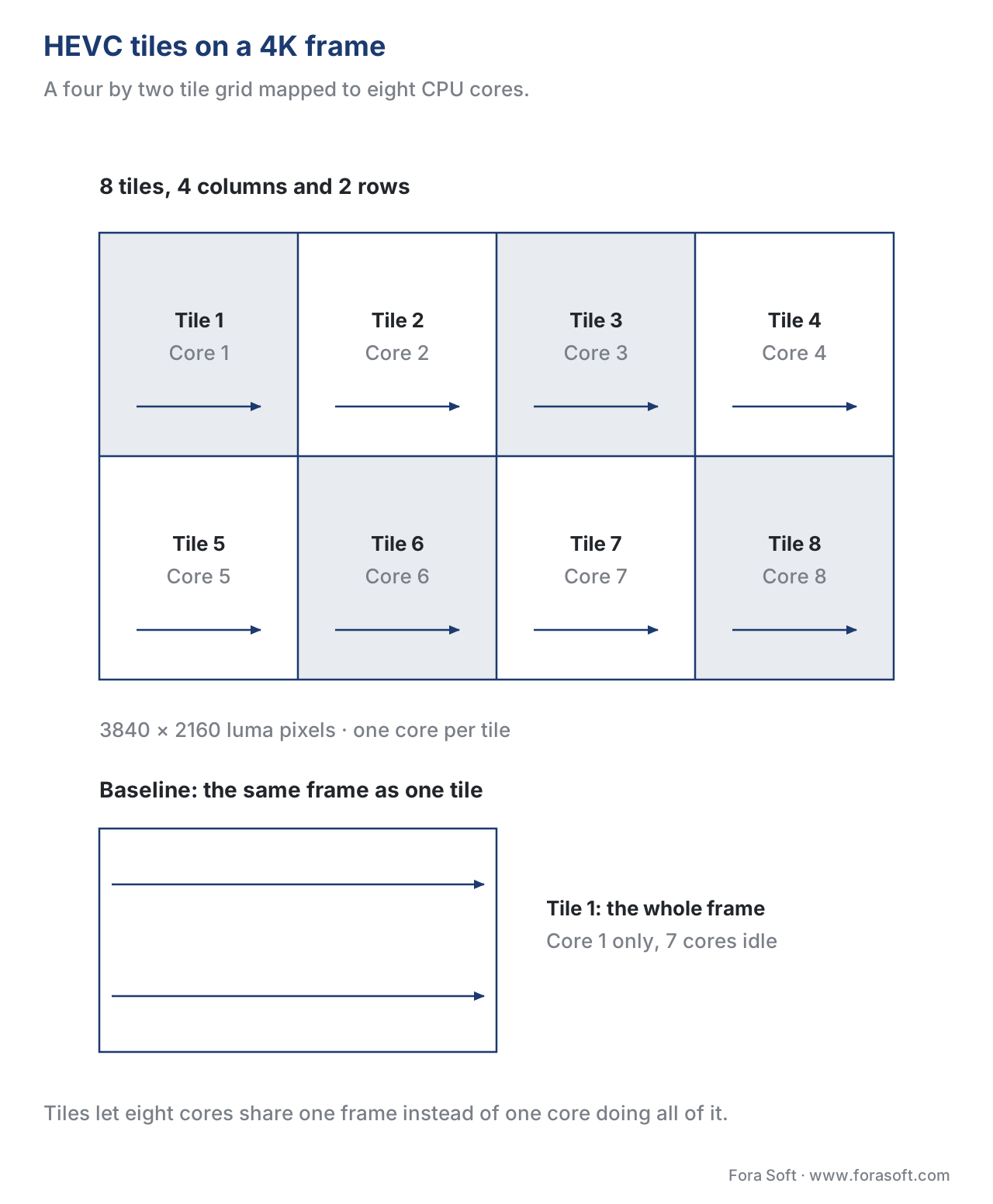 Figure 2. A 4K frame cut into eight HEVC tiles arranged 4×2, one core per tile. The baseline underneath is the same frame as a single tile, where seven of the eight cores sit idle.
Wavefront Parallel Processing — the diagonal trick
HEVC also introduced a third parallel mode, wavefront parallel processing, abbreviated WPP. WPP keeps the whole frame as one slice but staggers the work along the diagonal.
The rule is simple. Row 0 starts at column 0 and proceeds left to right. Row 1 cannot start until row 0 has produced at least two coding tree units, because row 1 needs the up and up-right neighbour to be ready. Row 2 cannot start until row 1 has produced two units. And so on. After a brief ramp-up at the top-left corner, all rows are encoding at the same time, advancing in lockstep along a moving diagonal — the wavefront.
WPP keeps the prediction chain intact horizontally, so compression loss is small — roughly one percent on typical content. The compression price is paid only because the entropy coder state — the running probability tables used by CABAC, the entropy coding engine we explain in the article on entropy coding in detail — has to reset at the start of every row.
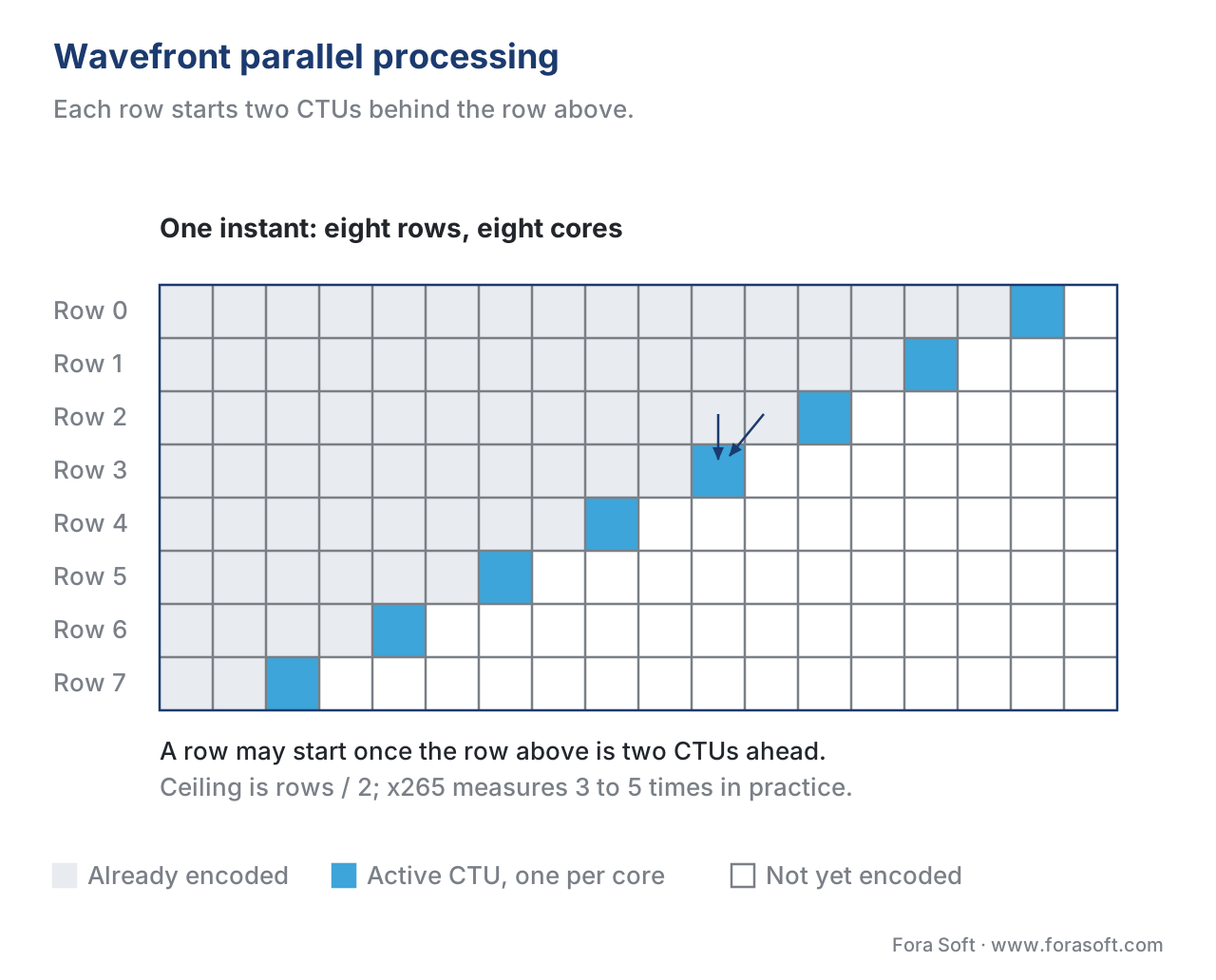 Figure 3. One instant of WPP. Every row is two CTUs behind the row above, so all eight rows encode at the same time; the two arrows show what the active CTU of row 3 is waiting for.
The speedup is bounded by the number of rows divided by two, because the diagonal ramp-up wastes the first few units of each row. On a 4K frame with 34 CTU rows, the theoretical ceiling is 17×; in practice x265 measures 3 to 5× wall-clock speedup at a one percent bitrate penalty (x265 documentation, 2025). The Streaming Learning Center benchmarked x265 with WPP on a 32-core system and found a 7.3× single-file speedup compared to no WPP, but only a 9 percent total throughput gain when running batch encodes — because batch jobs can keep all cores busy with separate files instead.
AV1 tiles — the power-of-two grid
AV1, finalised by AOMedia in March 2018, kept the tile concept but tightened the grammar. An AV1 frame is divided into a rectangular grid of tiles whose count along each axis is always a power of two: 1, 2, 4, 8, 16, or 32. The maximum is 64 tiles per frame.
The fixed power-of-two structure has two benefits. It makes the bitstream syntax compact — the encoder writes the log2 of the column and row counts as two short fields. It also matches the way decoder hardware schedules work, since power-of-two grids align with cache lines and SIMD lane widths.
The compression cost of AV1 tiles is competitive with HEVC tiles: a 2×2 grid costs roughly 0.5 to 1.5 percent bitrate, and a 4×2 grid costs 1 to 2 percent. YouTube began deploying AV1 in 2018 and added 8K AV1 in 2020; both rely on tile-based parallelism to keep encode times tractable on commodity cloud machines. Netflix reported in December 2025 that 30 percent of its streams now use AV1, encoded with content-aware tile counts that vary by title.
AV1 also defines a special large-scale tile mode for tiled VR and 360-degree video, where the player needs to decode only the tiles inside the user's current view instead of the whole frame.
| Mechanism | Codec family | Geometry | Compression cost (typical) | Practical speedup | Best for |
|---|---|---|---|---|---|
| Slice (raster scan) | H.264, HEVC, VVC | Sequence of blocks | 1–3% per 32 slices | 2–4× per slice count | Packet-loss resilience |
| FMO slice | H.264 only | Arbitrary block map | 2–5% | Limited (decoder support) | Region of interest |
| Tile | HEVC, VVC, AV1 | Rectangular grid | 0.5–2.0% | 5–10× | Multi-core parallelism |
| WPP wavefront | HEVC, VVC | Whole frame, staggered rows | ~1% | 3–5× | Single-stream speed |
| Subpicture | VVC only | Independent rectangular regions | 0.5–1.5% | 5–10× | Composite streams, ROI |
Table 1. Frame-partitioning mechanisms for parallel processing. Compression cost varies with content (sports and concerts pay more; talking heads pay less). Practical speedup measured against a single-core baseline on the same content.
Subpictures — VVC's contribution
VVC, ratified as H.266 in July 2020, kept slices, tiles, and WPP from HEVC and added a fourth mechanism: subpictures. A subpicture is a rectangular region of the frame that is encoded as if it were a standalone smaller video — its own slice header, its own reference list, optionally its own loop filter — and that can be extracted, replaced, or repacked without re-encoding.
The use case is composite streaming. A surveillance product that shows a 4×4 grid of cameras can encode each tile as a subpicture, deliver only the subpictures the operator is looking at in higher quality, and downsample the rest. A 360-degree VR player can encode the sphere as a grid of subpictures and stream only the ones inside the viewport at full resolution. HEVC supported a similar trick with motion-constrained tile sets — abbreviated MCTS — but the subpicture syntax in VVC is cleaner and decoder support is built into the standard.
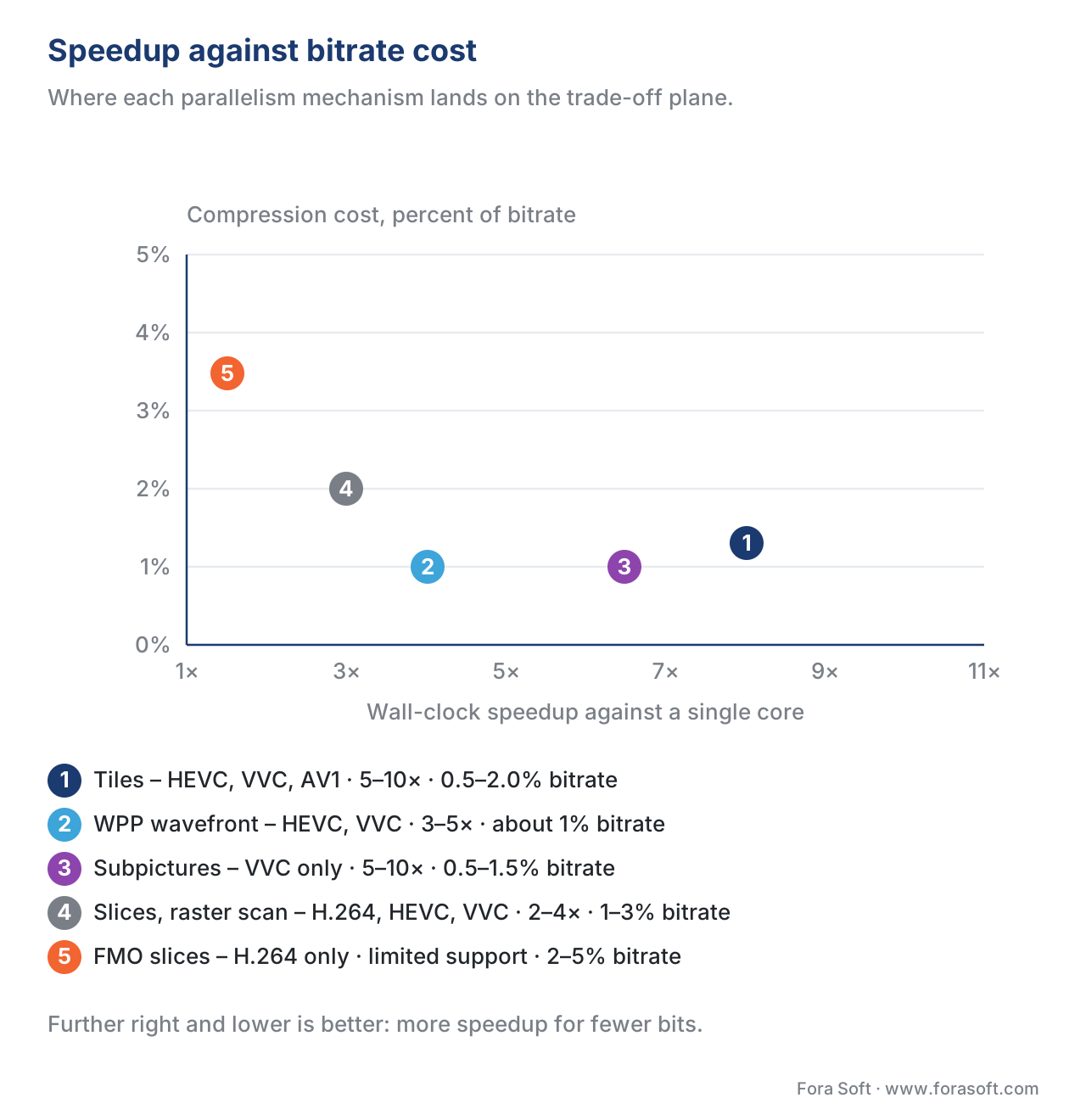 Figure 4. The five mechanisms on the speedup-versus-cost plane. Tiles buy the most parallelism per bit spent; FMO slices cost the most and deliver the least.
A common mistake — copying VOD settings into live
Teams routinely lift an encoder configuration from a VOD per-title encoding job and drop it into a live transcoder. The VOD job has thirty-two tiles because the back-catalogue runs on a 64-core node; the live job has four tiles because each live channel gets four cores. Running the VOD config in live mode either starves cores (most tiles are idle most of the time) or blows the latency budget (the encoder waits for tile boundaries that arrive late). Always size tiles to the cores available to this stream, not the cores available to the cluster.
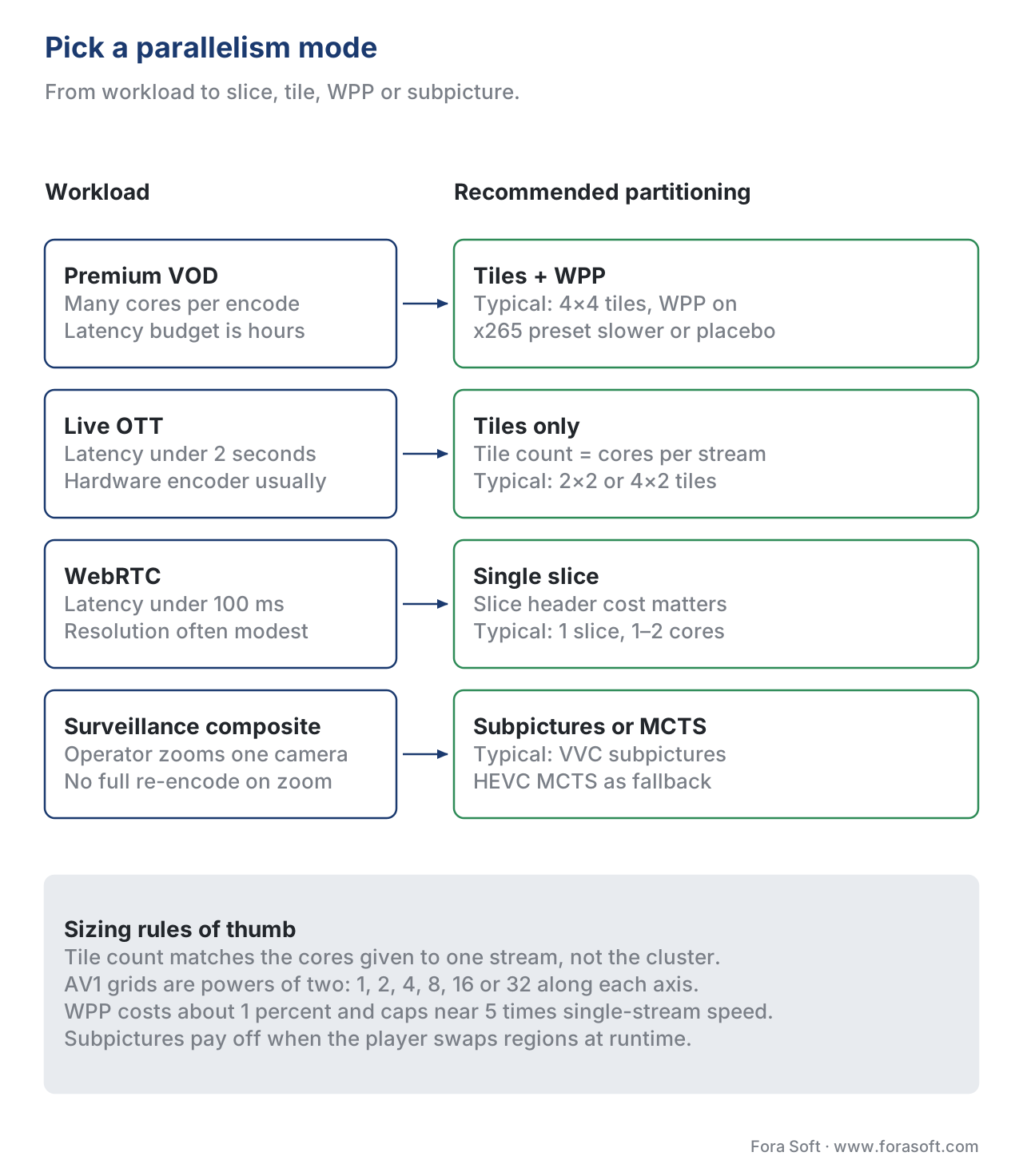 Figure 5. What each workload wants, and the tile counts that go with it. Size the grid to the cores this stream gets, not to the cores in the rack.
Where Fora Soft fits in
In the streaming, surveillance, and conferencing products we build, the choice of slices versus tiles versus WPP is one of the first decisions we lock in for any new pipeline. Live OTT and remote-production projects use HEVC or AV1 tiles to keep 4K-60 encodes inside a single machine with predictable latency. WebRTC SFUs we ship for video conferencing use a single slice per frame, because the latency cost of slice headers matters more than the parallelism gain at typical conferencing resolutions. Surveillance projects that show many camera tiles in one composite use VVC subpictures or HEVC MCTS, so an operator zooming into one camera does not force the server to re-encode the whole grid.

The book
Video Encoding: A Complete Guide to Video Compression
This article cuts the frame into pieces; the book runs the pieces through the whole encoder. Slices, tiles, wavefronts and subpictures are written out standard by standard, with the block structures they sit on, the CABAC state each boundary resets, and the rate control that has to hit a bitrate while eight cores work on eight regions of the same picture. It is volume 1 of the seven-volume Fora Soft Video Engineering Handbook, 1,522 pages, written by Nikolay Sapunov, CEO at Fora Soft.
How many of your cores are actually encoding?
Send us your encoder command line, the core count each stream is given, and an hour of typical content. We will come back with three numbers: how many of those cores the current slice, tile or WPP setting actually keeps busy, what the partition boundaries cost you in bitrate at matched VMAF, and what a tile count sized to the stream instead of the cluster would change in both. The arithmetic runs on your own footage, not on a reference clip. 250+ video products shipped since 2005.
See our case studies
Case study
Worldcast Live
Concert streaming at 1.5 Gb/s with 0.4–0.5 s latency to 10,000 simultaneous viewers. At that budget the encoder cannot wait for one core to walk the frame — the tile count is sized to the cores the channel actually gets.
Case study
Speed.Space
Remote production recording at 1080p and 8 Mb/s for Netflix, Electronic Arts and HBO shoots, where creators pick resolution, fps, codec and bitrate per stream. Change the resolution and the partition that pays off changes with it.
Case study
Mindbox
An AI video management system on RTSP, FFmpeg and HLS with 50+ deployments across transport, pharma and gated communities. A composite wall of cameras is exactly the case subpictures and motion-constrained tile sets were designed for.
What to read next
Architecture
Hybrid Video Codec Architecture
Where partitioning sits in the encoder: prediction, transform, quantisation, entropy coding and the reconstruction loop that feeds them.
Entropy coding
Entropy Coding in Detail: CAVLC, CABAC, and Arithmetic Coding
CABAC is the engine WPP has to reset at the start of every row. What it does, and what that reset costs in bits.
Codecs
AV1: The New Internet Standard And Where It Stands In 2026
The codec whose tile grid is a power of two on each axis, up to 64 tiles: hardware support, encoder speed and deployment today.
Codecs
H.266 / VVC: Technically Excellent, Market-Weak
The standard that added subpictures: what VVC buys over HEVC, and why the market has been slow to pick it up.
References
- Fraunhofer Heinrich Hertz Institute. "Wavefronts for HEVC Parallelism." Research project page. https://www.hhi.fraunhofer.de/en/departments/vca/research-groups/multimedia-communications/research-topics/past-research-topics/wavefronts-for-hevc-parallelism.html
- x265 project. "Threading — x265 documentation." x265 4.x docs. https://x265.readthedocs.io/en/master/threading.html
- AOMedia. "AV1 Bitstream & Decoding Process Specification." Section on tile groups and large-scale tile mode. https://aomediacodec.github.io/av1-spec/
- Chen, Y. et al. "A Technical Overview of AV1." arXiv:2008.06091, 2020. https://arxiv.org/pdf/2008.06091
- Sze, V., Budagavi, M., Sullivan, G. (eds.). "Block Structures and Parallelism Features in HEVC." Chapter in High Efficiency Video Coding (HEVC): Algorithms and Architectures, Springer, 2014.
- Wang, Y.-K. et al. "The high-level syntax (HLS) designs in VVC." DASH-IF technical overview, 2021. https://dashif.org/docs/VVC%20HLS%20overview%20.pdf
- ITU-T. "Recommendation H.265: High efficiency video coding." Latest edition, 2024. Sections on tiles, slices, and WPP.
- ITU-T. "Recommendation H.266: Versatile video coding." Edition 2, 2022. Sections on tiles, slices, subpictures, and WPP.
- Ozer, J. "x265 and WPP: What's Fast Isn't Always Efficient." Streaming Learning Center, 2024. https://streaminglearningcenter.com/encoding/x265-and-wpp-whats-fast-isnt-always-efficient.html
- Netflix Technology Blog. "Bringing AV1 Streaming to Netflix Members' TVs." 2020 (updated 2025). https://netflixtechblog.com/bringing-av1-streaming-to-netflix-members-tvs-b7fc88e42320
- Rom1v. "Implementing tile encoding in rav1e." 2019. https://blog.rom1v.com/2019/04/implementing-tile-encoding-in-rav1e/
