


Why this matters
Every video service you have ever used — Netflix, YouTube, Zoom, a security camera dashboard, an e-learning portal — runs a transcoding pipeline behind the screen. When you upload a 4K file from a phone and it plays smoothly on a friend's laptop on a slow connection, four stages did their job in order. When the audio drifts a second behind the picture, or the cloud bill triples after a routine deploy, one of the stages is wrong. This article is for the product manager, founder, or operations lead who needs to understand the pipeline well enough to talk to engineers, scope a project, and read an incident report — without becoming a media engineer themselves.
The pipeline in one breath
Every transcoder, from a Raspberry Pi running FFmpeg to AWS Elemental MediaConvert spinning up hundreds of cores, follows the same five-step recipe.
The five steps, in order, are demux, decode, filter, encode, and mux. The word "transcoding" is shorthand for running all five end-to-end, but most teams talk about the pipeline as four stages because demux is so tightly bound to decode in practice. We will use both framings — pipeline = decode → filter → encode → mux for the headline, with demux treated explicitly as the front door.
A useful analogy is a restaurant kitchen. The container file (MP4, MKV) is a sealed grocery delivery — the demux step unpacks the box. The decoder is the prep cook turning packaged ingredients back into raw materials. The filters are the actual cooking: chopping, frying, plating. The encoder is the line cook who packages each finished dish into a takeout container. The muxer is the delivery driver who loads everything into one bag for the customer. If any one of them mishandles the timing — the prep cook is slow, the line cook forgets a dish, the driver pours the soup on its side — the meal arrives wrong.
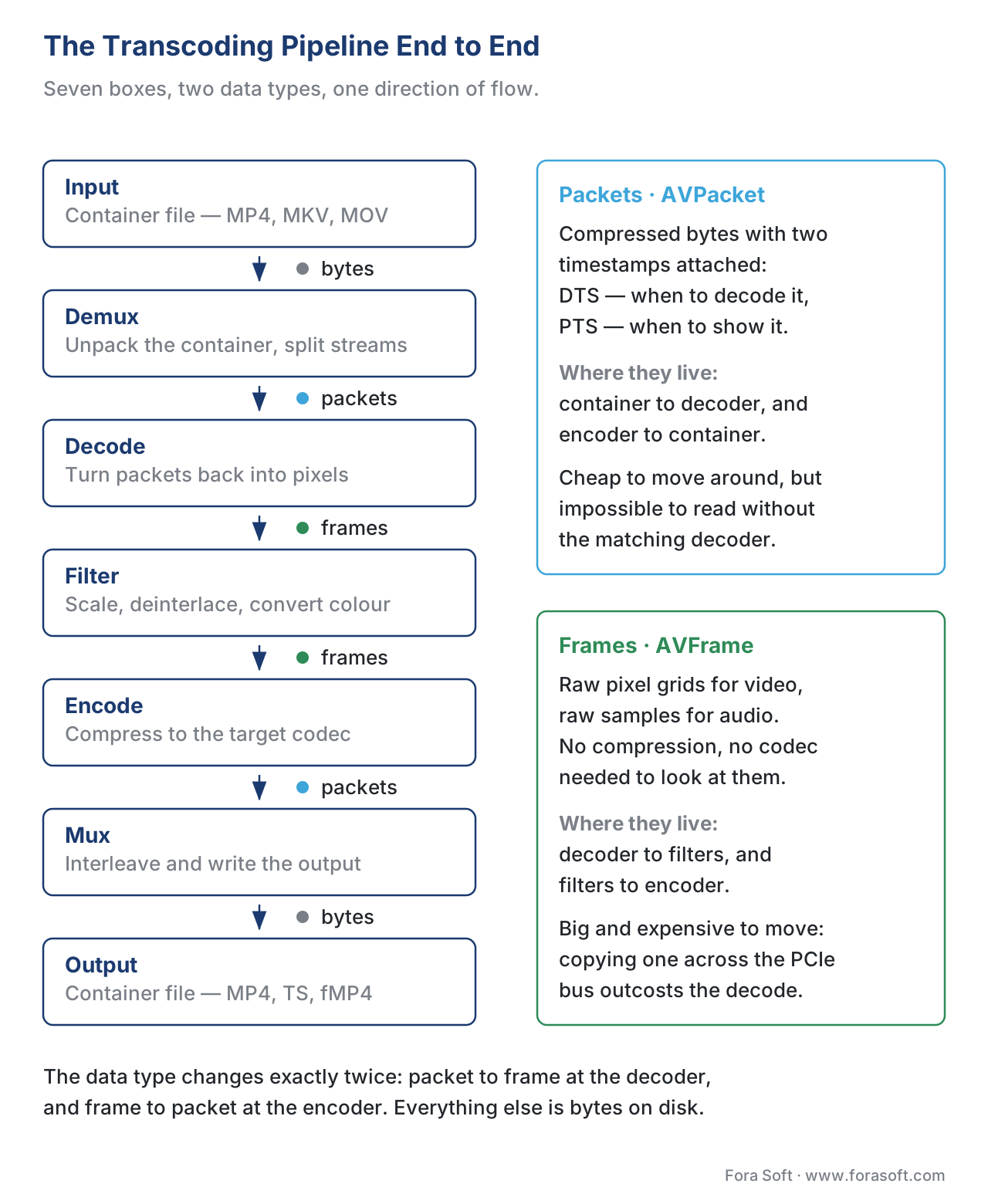 Figure 1. The transcoding pipeline end to end. Compressed packets flow into the decoder; raw frames flow through filters into the encoder; compressed packets flow into the muxer. The data type changes twice and only twice.
Stage 0 — Demux: opening the box
A video file you download is not a single stream of pixels. It is a container — MP4, MKV, MOV, WebM, MPEG-TS — that holds one or more compressed streams (video, audio, subtitles) interleaved together with timestamps and metadata. The demuxer reads that container and pulls each stream out separately, packet by packet.
A packet is the fundamental unit of compressed media. In FFmpeg's data model it is called AVPacket. One packet usually holds one compressed video frame or a short slice of compressed audio, plus two timestamps: a decode timestamp (DTS) that tells the decoder when to process the packet, and a presentation timestamp (PTS) that tells the player when to show or play the result. Those two timestamps look identical for simple audio, but for video they differ whenever the codec uses B-frames — frames that need future frames in order to decode, which means the playback order and the decode order are not the same.
If you have ever wondered why a video player can stutter at the start of playback, this is part of the reason. The decoder needs a few packets buffered in DTS order before it can emit the first frame in PTS order. The demux step is therefore the first place where timestamps must be exactly right. Lose a millisecond here and lipsync drifts later.
Demuxing is also the cheapest step in the pipeline. It is essentially a parsing job — no math on the pixels, no codec work, just reading the container layout. On a modern CPU, a demuxer can pull thousands of packets per second per stream.
Stage 1 — Decode: packets become pixels
The decoder takes the compressed packets from the demuxer and turns them back into uncompressed frames. The data type changes here for the first time: input is AVPacket (compressed bytes), output is AVFrame (raw pixel data for video, raw audio samples for audio).
Decoding is where most of the CPU time goes when no filtering is happening. An H.264 1080p stream decoded in software at 60 fps on a modern laptop CPU costs roughly 10–15% of one core. The same job on a GPU decoder unit (NVIDIA NVDEC, Intel Quick Sync, Apple VideoToolbox, AMD VCN) is essentially free for the CPU — the GPU's fixed-function block does the work in dedicated silicon, drawing about 5–15 watts.
There is one critical design decision at this stage: where do the decoded frames live? Software decoding produces frames in system memory (RAM). Hardware decoding produces frames in GPU memory (VRAM). If the next stage — filtering or encoding — also runs on the GPU, you want to keep the frame in VRAM. Copying a 4K frame from VRAM back to RAM and then back to VRAM again costs more than the decode itself. FFmpeg exposes this as -hwaccel cuda -hwaccel_output_format cuda, which keeps frames in CUDA memory across the whole pipeline. This is one of the most common ten-line wins in a hardware-accelerated transcoder — many production teams have left a 3–5× speedup on the table by leaving the default output format on nv12 instead of cuda.
The third design decision at the decoder is stream copy. If your goal is only to change the container — say, repackage an MP4 as an MPEG-TS for a hardware decoder that only speaks TS — you do not need to decode at all. You can demux, then mux into the new container, and skip decode/filter/encode entirely. This is called remuxing or stream copy, invoked in FFmpeg with -c copy. It costs almost nothing because no pixels are touched. Remuxing is the right answer about 30% of the time in real pipelines and is almost always overlooked by first-pass implementations.
Stage 2 — Filter: the part that actually changes the picture
The filter stage is where the pipeline does the work the user can see. Scale a 4K master down to a 720p rendition, deinterlace a broadcast capture, burn in subtitles, overlay a logo, denoise a low-light clip, convert pixel format from yuv422p10le to yuv420p so the consumer encoder will accept it — all of those are filters.
FFmpeg models this as a filtergraph: a directed acyclic graph of filter nodes connected by edges. Each node takes one or more frames in, does one transformation, and pushes the result downstream. A simple chain — yadif,scale=1280:720,format=yuv420p — means "deinterlace, then scale to 720p, then convert to 4:2:0 chroma." A complex filtergraph (-filter_complex) can split a single input frame into three branches, scale each branch to a different rendition, and feed three different encoders simultaneously. This pattern is the entire technical foundation of ABR (adaptive bitrate) ladders.
The classic filter chain for a VOD ABR ladder reads from top to bottom: deinterlace if the source is interlaced, normalize colour primaries and transfer function for HDR-to-SDR or vice versa, scale to the target resolution, set chroma subsampling to what the encoder expects, then add any visual brand overlay. Audio filters run on their own parallel chain: resample to a target sample rate, mix to the target channel layout, normalize loudness to a broadcast standard such as ITU-R BS.1770 / EBU R128.
Filters are also the second-largest CPU consumer in the pipeline. A clean scale filter on the CPU costs roughly the same as the decode for the same resolution; a chroma-subsampling conversion is free; a serious denoiser (nlmeans, bm3d) can cost 10× the decode. Hardware-accelerated filters exist on every GPU vendor — scale_npp and scale_cuda on NVIDIA, scale_qsv on Intel, scale_vt on Apple — and you should use them whenever the surrounding stages also run on the same GPU.
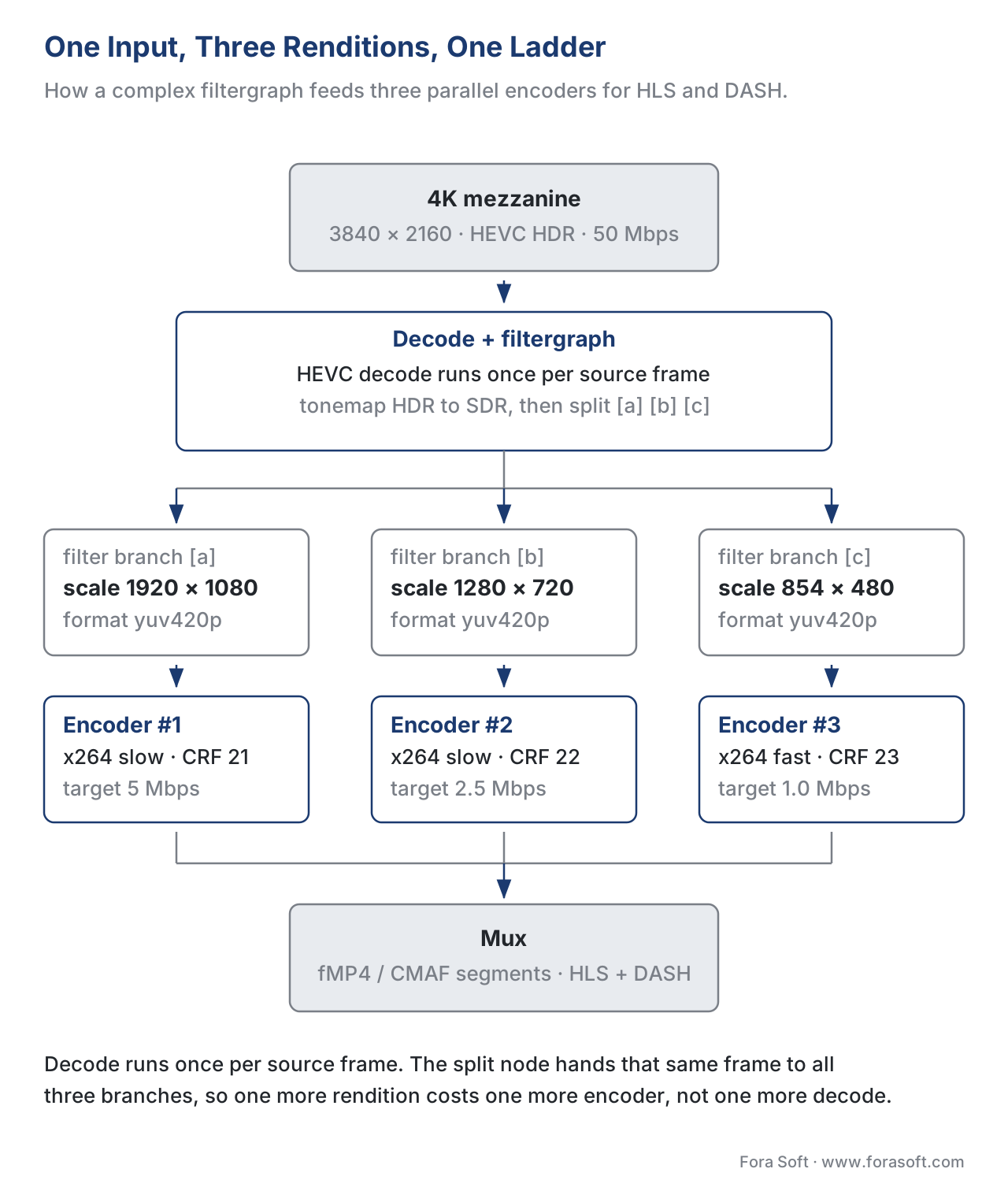 Figure 2. A single 4K input expanded into a three-rung ABR ladder using one complex filtergraph and three parallel encoders. The split happens after decode and runs once per input frame, then each rendition encodes independently.
Stage 3 — Encode: pixels become packets again
The encoder is the inverse of the decoder. Input is raw AVFrame data; output is compressed AVPacket packets, each tagged with PTS and DTS, ready to be muxed into a container. The encoder is the most expensive stage in any pipeline. As a rule of thumb, encoding the same content takes 5–50× more CPU than decoding it, depending on the codec and preset. A 60-second 1080p clip decodes in 2–3 seconds and encodes in 30 seconds with x264 at slow, or 90–180 seconds with SVT-AV1 at preset 5 (encoder implementations compares the seven main encoders in detail).
Two encoder-stage decisions move the most money. The first is codec and encoder choice. H.264 with x264 for compatibility, H.265 with x265 for HDR catalogues, AV1 with SVT-AV1 for new pipelines where the decoder base supports it. The second is rate control mode — CRF for constant quality, CBR for fixed bitrate, VBR for capped variable, and capped-CRF for the modern ABR sweet spot. We cover these in depth in rate control: CBR, VBR, CRF; for the pipeline view, what matters is that the encoder is the only stage that talks to a bitrate budget at all. Demux, decode, and filter are budget-blind.
Hardware encoders deserve special mention here. NVIDIA NVENC, Intel Quick Sync, Apple VideoToolbox, AMD AMF, and ASIC accelerators such as NETINT can encode at 10–50× the speed of software at the cost of some quality at matched bitrate. NVIDIA's January 2026 update extended its ultra-high-quality (UHQ) mode to AV1 on Blackwell silicon, narrowing the quality gap to software AV1 to within a few percent VMAF at 3× the throughput. For services that ship millions of streams, hardware encoders are not a compromise anymore — they are the default. See hardware acceleration: NVENC, VPU, ASIC for the vendor matrix.
Stage 4 — Mux: assembling the package
The muxer is the final stage. It takes the encoded packets from one or more encoders, interleaves them in delivery order, writes the container headers (the moov atom in MP4, the segment index for HLS), and produces the output file or stream. Like the demuxer, the muxer is cheap — almost no CPU — but it has two jobs that are easy to get wrong.
The first job is timestamp alignment. Every output packet from every encoder must have a consistent timeline. MP4 requires PTS values to be monotonically increasing, which means no backwards jumps. Some downstream players reject any stream with a negative DTS. The muxer applies a global offset to push every stream's timestamps into the positive range, then interleaves packets by DTS order so that a streaming player can decode them in arrival order. Get this wrong by 100 milliseconds and you have an audible lipsync issue. Get it wrong by 5 seconds and the player will refuse to play.
The second job is packaging — fragmenting the stream into segments for HTTP delivery. A VOD MP4 contains one moov atom and one continuous mdat block. A streaming-ready fragmented MP4 (fMP4 or CMAF) contains one moov atom and many moof + mdat pairs, each covering 2–6 seconds. Same codec output, same encoder; the only difference is how the muxer fragments it. CMAF is the 2026 default because the same fMP4 segments work for both HLS and DASH delivery from the same files (we cover this in containers: MP4, MKV, WebM, fMP4).
The data types that flow between stages
The whole pipeline is easier to reason about once you internalize that there are exactly two data types moving between stages. Packets (AVPacket in FFmpeg) are compressed bytes with timestamps. Frames (AVFrame) are raw, uncompressed pixel grids (for video) or audio samples (for audio).
Each stage transforms one type to the other:
- Demux: bytes in (container file) → packets out.
- Decode: packets in → frames out.
- Filter: frames in → frames out (same type, different content).
- Encode: frames in → packets out.
- Mux: packets in → bytes out (container file).
When you describe a transcoding bug to an engineer, naming the data type at each stage where the bug appears cuts the diagnosis time in half. "The PTS goes wrong on the packets coming out of the encoder" is a precise bug report. "The video is broken" is not.
Threading and the FFmpeg 7 scheduler
For most of FFmpeg's twenty-year history, the transcoding pipeline ran as a single thread that pulled one packet at a time through every stage in order. Decoders and encoders had their own internal threading, but the outer loop was sequential, which meant a slow encoder bottlenecked everything behind it.
FFmpeg 7.0, released in April 2024, introduced a full multi-threaded scheduler — described by lead maintainer Anton Khirnov as "one of the most complex refactorings of the FFmpeg CLI in decades." Every demuxer, decoder, filtergraph, encoder, and muxer now runs in its own thread, with a central Scheduler routing packets and frames between them through bounded queues. The change unlocks parallelism that was previously impossible: a single command can now decode an input, filter it three ways, encode each rendition on a separate set of cores, and mux them all, with no stage blocking another.
The practical effect is more linear scaling on many-core machines. On a 32-core Threadripper, a three-rung ABR transcode that took 90 seconds on FFmpeg 6 finishes in 35–40 seconds on FFmpeg 7 with no command changes. The CPU is the same; the pipeline is just no longer single-threaded between stages. If you are running a self-hosted transcoder farm and have not upgraded past FFmpeg 6, that upgrade is the highest-ROI change you can make in 2026.
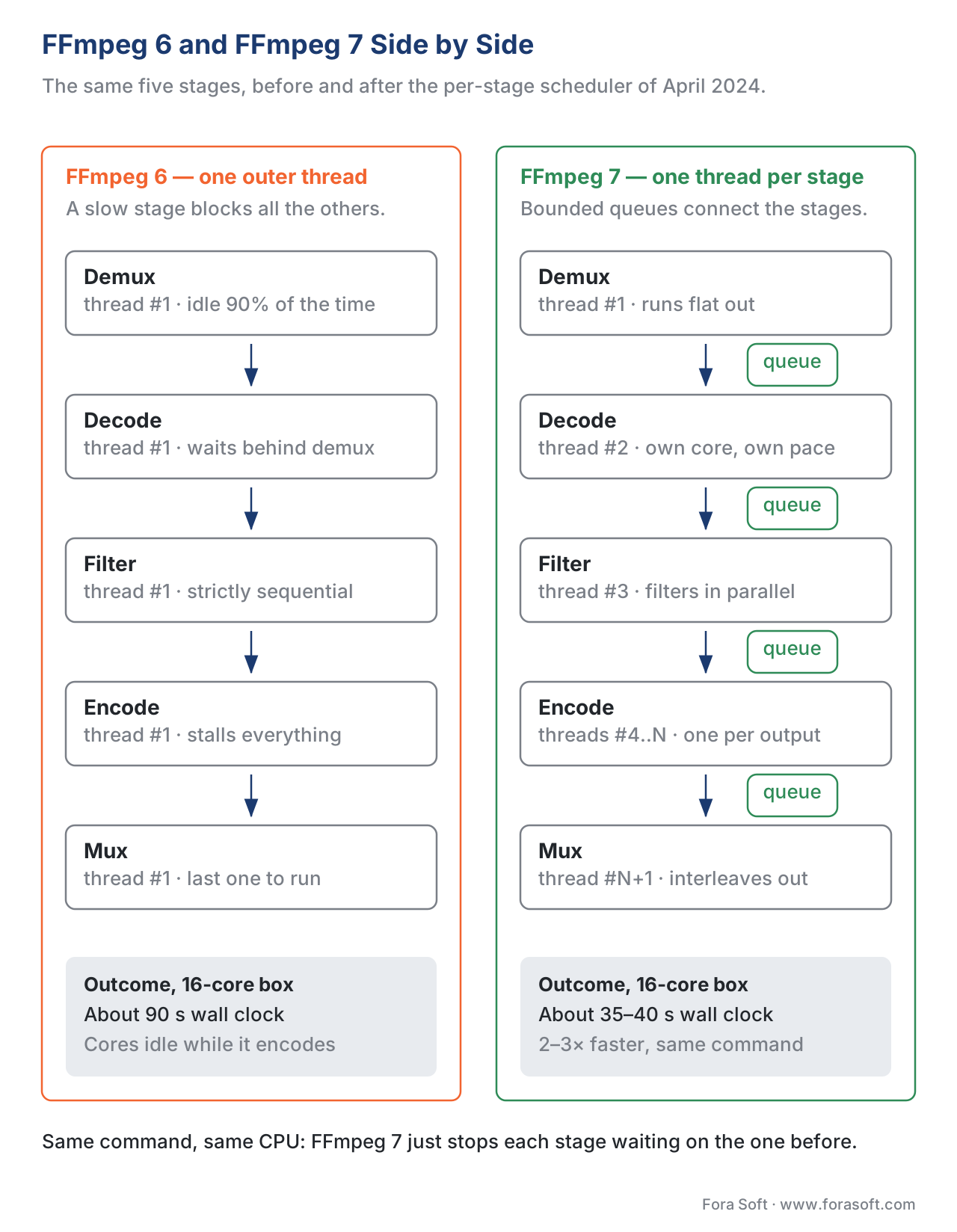 Figure 3. The FFmpeg 7 scheduler keeps every stage of the pipeline on its own thread, with bounded queues between them. The wall-clock saving on a many-core machine is typically 2–3× for ABR ladders.
Worked example: the math behind a 3-rung ABR transcode
Take a concrete workload: one 60-second 4K HDR mezzanine file, transcoded into a three-rung ABR ladder of 1080p / 720p / 480p H.264 SDR for HLS delivery. On a single 16-core machine running FFmpeg 7 with x264 software encoders, the per-stage CPU budget breaks down like this.
| Stage | Per-second CPU cost | Total for 60 s clip |
|---|---|---|
| Demux 4K HDR HEVC input | ~0.5% of one core | 0.3 core-seconds |
| Decode 4K HDR HEVC (software) | ~25% of one core | 15 core-seconds |
| Filter: tonemap + scale ×3 | ~30% of one core (shared) | 18 core-seconds |
| Encode 1080p H.264 (x264 slow) | ~150% of one core | 90 core-seconds |
| Encode 720p H.264 (x264 slow) | ~70% of one core | 42 core-seconds |
| Encode 480p H.264 (x264 slow) | ~30% of one core | 18 core-seconds |
| Mux 3 outputs to fMP4 / HLS | ~0.5% of one core | 0.3 core-seconds |
| Total | ~184 core-seconds |
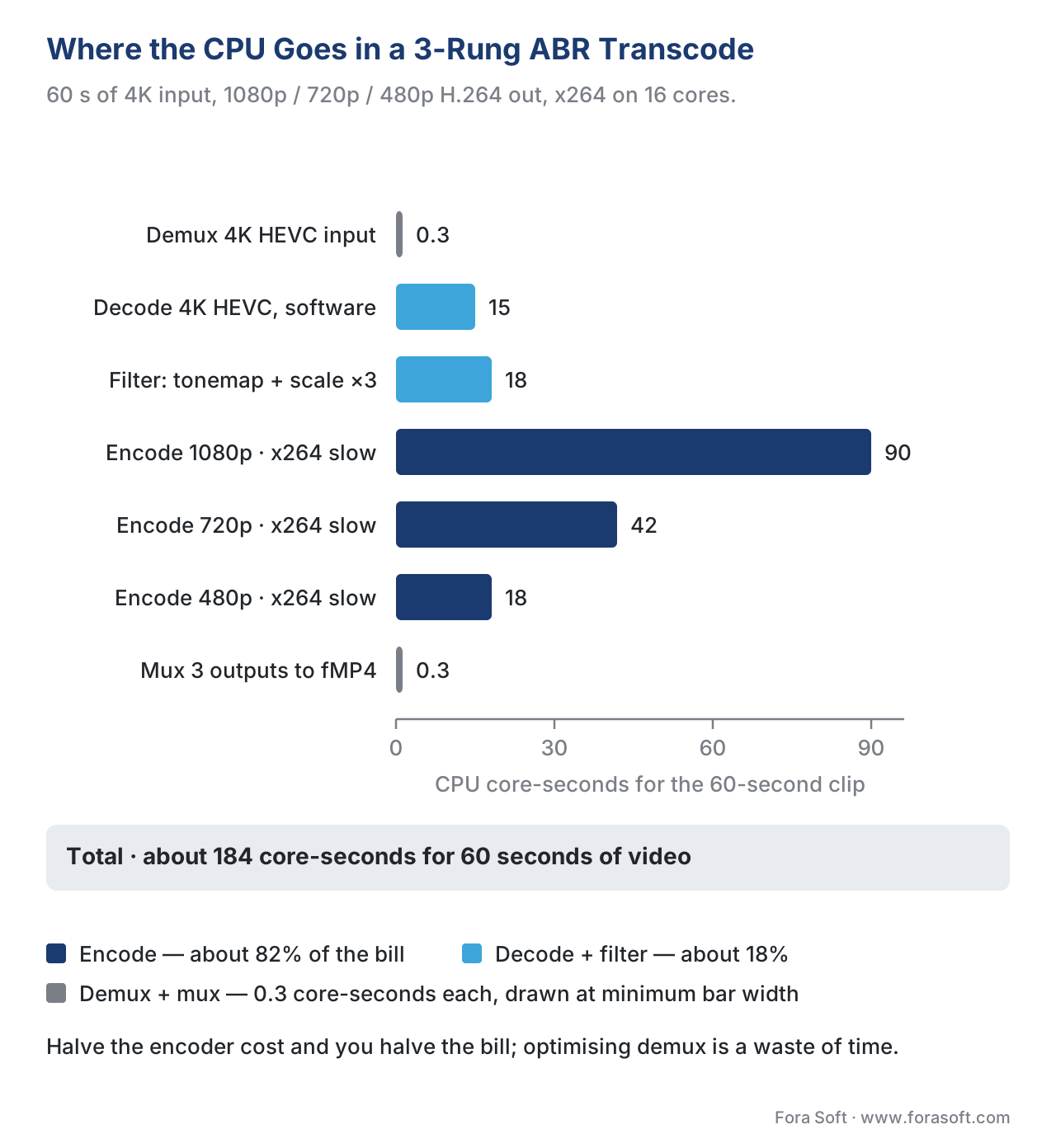 Figure 4. Where the CPU goes in this transcode: the three encodes take 150 of the 184 core-seconds, decode and filter 33, and demux and mux 0.3 each.
Reading the table: encoding dominates, accounting for ~82% of CPU. Decoding plus filtering is ~18%. Demux and mux are rounding error. This is the proportion every transcoding bill follows. If you cut your encoder cost in half — by switching to a hardware encoder, by lowering preset, by reducing the ladder — you cut your whole bill in half. Optimising demux is a waste of time.
Now add hardware. The same workload on the same 16-core machine, with NVDEC for decode, scale_npp for scale, and NVENC for all three encoders:
| Stage | Per-second CPU cost | Notes |
|---|---|---|
| Demux | ~0.5% of one core | unchanged |
| Decode (NVDEC) | ~0% CPU, GPU ~10W | GPU fixed-function |
| Filter (scale_npp ×3) | ~0% CPU, GPU ~5W | same GPU |
| Encode (NVENC ×3) | ~0% CPU, GPU ~30W | fixed-function |
| Mux | ~0.5% of one core | unchanged |
| Total | ~1 core-second + 45W GPU | wall clock: 10–15 s |
Wall clock drops from ~12 seconds (16-core saturated) to ~10–15 seconds, but the 16 CPU cores are now free to transcode the next clip. A single GPU-equipped box can transcode ~20–40 such clips per minute, where the CPU-only box handles 5–8. This is the entire economic case for hardware transcoding pipelines in 2026.
Common pipeline mistakes
Free download: Transcoding Pipeline Cheat SheetOne page with the five stages, the two data types between them, the four pitfalls that cost the most, and the FFmpeg recipes for the jobs you run every week.Pitfall: re-encoding when you only needed to remux. A common request — "convert this MKV to MP4" — is a remux, not a transcode. Running
ffmpeg -i in.mkv out.mp4without-c copydecodes and re-encodes everything, taking 10× longer and degrading quality. The right answer isffmpeg -i in.mkv -c copy out.mp4. Always ask whether the request is "change the container" (remux) or "change the codec / resolution / bitrate" (transcode).Pitfall: copying frames between RAM and VRAM unnecessarily. A pipeline that decodes on GPU, filters on CPU, and encodes on GPU spends most of its time copying frames across the PCIe bus. Either keep everything in VRAM with
-hwaccel cuda -hwaccel_output_format cudaand use GPU filters, or keep everything in RAM. Mixing the two is almost always slower than either pure path.Pitfall: ignoring audio. A typical pipeline has 1 video stream and 1–6 audio streams plus optional subtitles. Forgetting to map the audio (
-map 0:a) silently drops it, and the output plays in silence. Always verify all expected streams reach the output muxer.Pitfall: trusting default timestamps in live ingest. RTMP and SRT live ingests sometimes deliver negative DTS or wrapped timestamps after long uptime. If the muxer rejects them, the output stops. A safer default is
-fflags +genpts -avoid_negative_ts make_zeroso the muxer regenerates a clean monotonic timeline.
Where Fora Soft fits in
Fora Soft has built and operated transcoding pipelines since 2005 across conferencing, video streaming, OTT and IPTV, video surveillance, e-learning, telemedicine, and AR/VR. The recurring lesson across those 239+ projects is that the pipeline is not where most teams' bugs come from — the pipeline is where most teams' bugs become visible. A camera with the wrong colour primaries makes the encoder produce an off-colour output; an encoder with the wrong rate-control mode makes the muxer produce a stream the CDN refuses to cache; a CDN with the wrong cache key makes viewers see other viewers' DRM tokens. Operating a pipeline well means knowing every stage well enough to read a flame graph and identify which one is lying.

The book
Video Encoding: A Complete Guide to Video Compression — From Pixels and Color to H.264, HEVC, AV1, Quality Metrics, and AI
The pipeline on this page is five boxes; the money is in the decisions inside them. Volume one spends 1,522 pages on exactly that ground — what the decoder and the filtergraph really cost, how CRF, capped CRF and CBR behave on the same clip, how a ladder is built rung by rung, and how to prove with VMAF that the cheaper encode does not look cheaper. It opens the seven-volume Fora Soft Video Engineering Handbook, which walks the whole stack from the pixel to production, and is written by Nikolay Sapunov, CEO at Fora Soft.
Is your transcoding pipeline spending its CPU where you think it is?
Send us your source profile, your rendition ladder and the wall-clock budget you have to hit, and we will tell you which stage is eating the bill, what moving decode and encode onto a GPU would actually save, and which of your jobs are remuxes you are currently paying to re-encode — 250+ video products shipped since 2005.
See our case studies
Case study
Mindbox
An AI video management system with 50+ deployments, pulling RTSP off cameras and transcoding to HLS with FFmpeg — the five stages on this page, running around the clock on hundreds of camera feeds at once.
Case study
Worldcast Live
Concert streaming at 1.5 Gb/s with 0.4 to 0.5 s of latency for 10,000 simultaneous viewers — the version of this pipeline where no stage is allowed to buffer and every queue between them has to stay short.
Case study
Speed.Space
Remote production for Netflix, Electronic Arts and HBO shoots, recording at 1080p and 8 Mbps — five times the bitrate of a normal call, so filter and encode get the whole CPU budget and demux and mux stay rounding error.
What to read next
Tooling
FFmpeg: A Must-Know Cheat Sheet for Developers
The command lines that drive all five stages, with the flags that decide what each costs.
Hardware
Hardware Acceleration: GPU, VPU, ASIC
What happens to those 184 core-seconds when decode, filter and encode move onto silicon.
Containers
Containers: MP4, fMP4, MKV, WebM, MOV, MPEG-TS
What the demuxer opens at one end of the pipeline and the muxer writes at the other.
Encoding
Rate Control: CBR, VBR, CRF, ABR, Capped CRF
The one stage that talks to a bitrate budget, and the four modes it can do it with.
References
- FFmpeg, "ffmpeg Documentation." https://ffmpeg.org/ffmpeg.html. Accessed 2026-05-17. Supports: pipeline component definitions, filter syntax, stream copy.
- FFmpeg / DeepWiki, "Command-line Tools — FFmpeg." https://deepwiki.com/FFmpeg/FFmpeg/4-command-line-tools. Accessed 2026-05-17. Supports: scheduler architecture, per-stage threading model.
- Phoronix, "FFmpeg Lands CLI Multi-Threading As Its 'Most Complex Refactoring' In Decades." https://www.phoronix.com/news/FFmpeg-CLI-MT-Merged. Accessed 2026-05-17. Supports: FFmpeg 7 scheduler context.
- Anton Khirnov, "Multithreading and other developments in the FFmpeg transcoder" (FOSDEM 2024). https://archive.fosdem.org/2024/events/attachments/fosdem-2024-2423-multithreading-and-other-developments-in-the-ffmpeg-transcoder/slides/22735/presentation_QfzBaYr.pdf. Accessed 2026-05-17. Supports: scheduler design intent and node-based threading.
- Engineering at Meta, "FFmpeg at Meta: Media Processing at Scale" (2026-03-02). https://engineering.fb.com/2026/03/02/video-engineering/ffmpeg-at-meta-media-processing-at-scale/. Accessed 2026-05-17. Supports: production-scale transcoding architecture, real-time quality metrics.
- NVIDIA, "Using FFmpeg with NVIDIA GPU Hardware Acceleration." https://docs.nvidia.com/video-technologies/video-codec-sdk/13.0/ffmpeg-with-nvidia-gpu/index.html. Accessed 2026-05-17. Supports:
-hwaccel cuda -hwaccel_output_format cuda, GPU-resident frames, scale_npp. - NVIDIA Developer Blog, "NVIDIA FFmpeg Transcoding Guide." https://developer.nvidia.com/blog/nvidia-ffmpeg-transcoding-guide/. Accessed 2026-05-17. Supports: NVENC/NVDEC pipeline design, throughput claims.
- NVIDIA, "NVENC Application Note (Video Codec SDK 13.0)." https://docs.nvidia.com/video-technologies/video-codec-sdk/13.0/nvenc-application-note/index.html. Accessed 2026-05-17. Supports: Blackwell UHQ AV1 mode, 2026 update.
- FFmpeg Filters Documentation. https://ffmpeg.org/ffmpeg-filters.html. Accessed 2026-05-17. Supports: yadif, scale, filtergraph syntax, automatic format conversion.
- Bitmovin Developer Docs, "Understanding the Default Timestamp Offset for TS Muxings." https://developer.bitmovin.com/encoding/docs/understanding-the-default-timestamp-offset-for-ts-muxings. Accessed 2026-05-17. Supports: PTS/DTS offset rationale in muxing.
- Gcore, "Understanding of PTS and DTS in RTMP/SRT master streams." https://gcore.com/docs/streaming/live-streaming/pts-dts. Accessed 2026-05-17. Supports: PTS vs DTS for B-frame streams, lipsync impact.
- Bitmovin Blog, "Adaptive Bitrate Streaming (ABR): What is it?" https://bitmovin.com/blog/adaptive-streaming/. Accessed 2026-05-17. Supports: ABR ladder concept and per-rendition encoding.
- AWS Media Blog, "Introducing Automated ABR — A better way to encode VOD with MediaConvert." https://aws.amazon.com/blogs/media/introducing-automated-abr-adaptive-bit-rate-configuration-a-better-way-to-encode-vod-content-using-aws-elemental-mediaconvert/. Accessed 2026-05-17. Supports: per-title encoding and ladder generation.
- ImageKit, "Demystifying video transcoding: importance, tools, types and best practices." https://imagekit.io/blog/video-transcoding/. Accessed 2026-05-17. Supports: VMAF/PSNR quality verification, automation guidance.
- ITU-R BS.1770 / EBU R128 loudness recommendation. https://www.itu.int/rec/R-REC-BS.1770/. Accessed 2026-05-17. Supports: audio normalization filter target.
