
O-Time Bank × Fora Soft

Hourly video lobbies and 1:1 calls for a location-based social app

Published: Nov 24, 2026
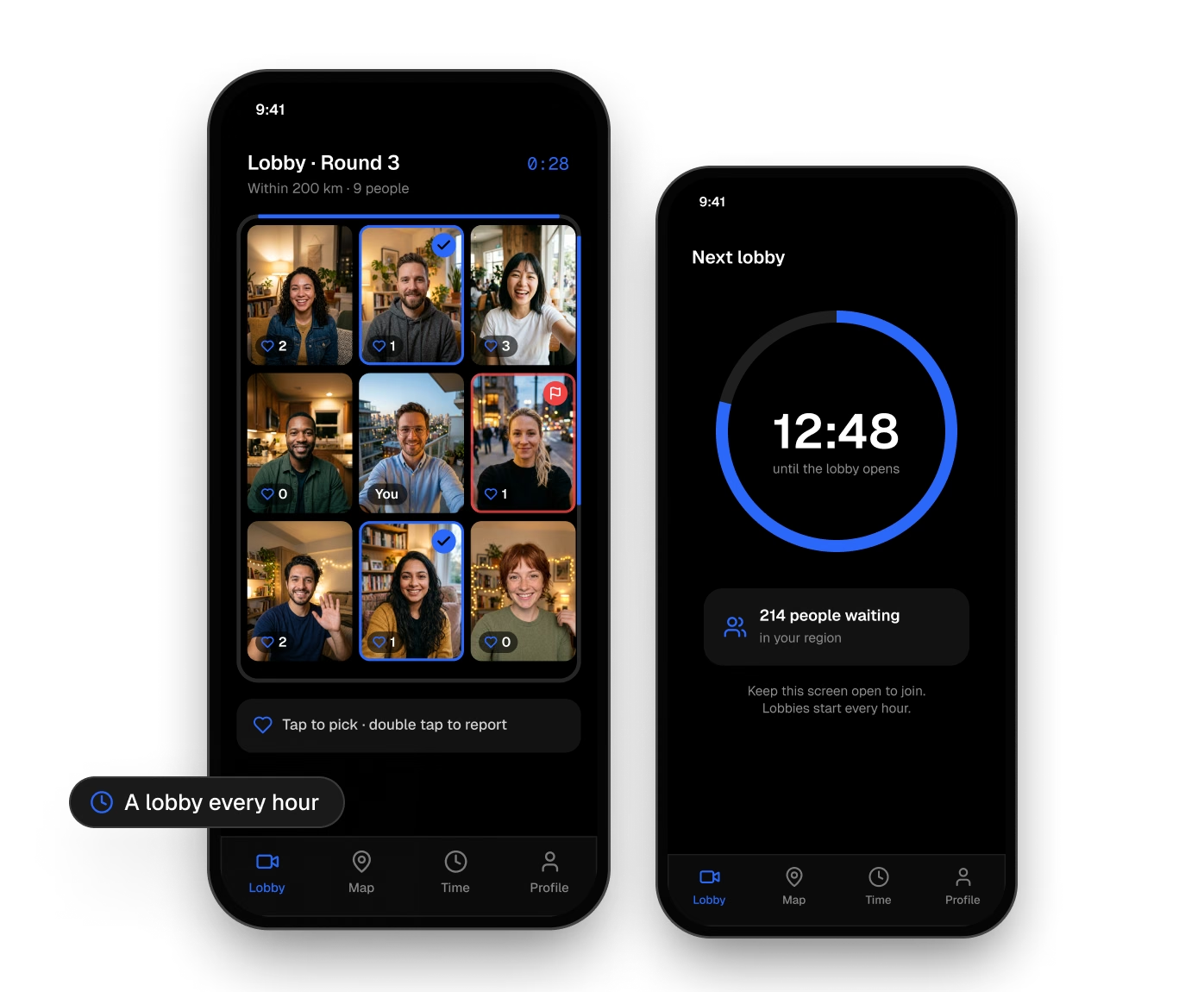
O-Time Bank video lobby with a 3 by 3 grid of live cameras and the countdown to the next lobby
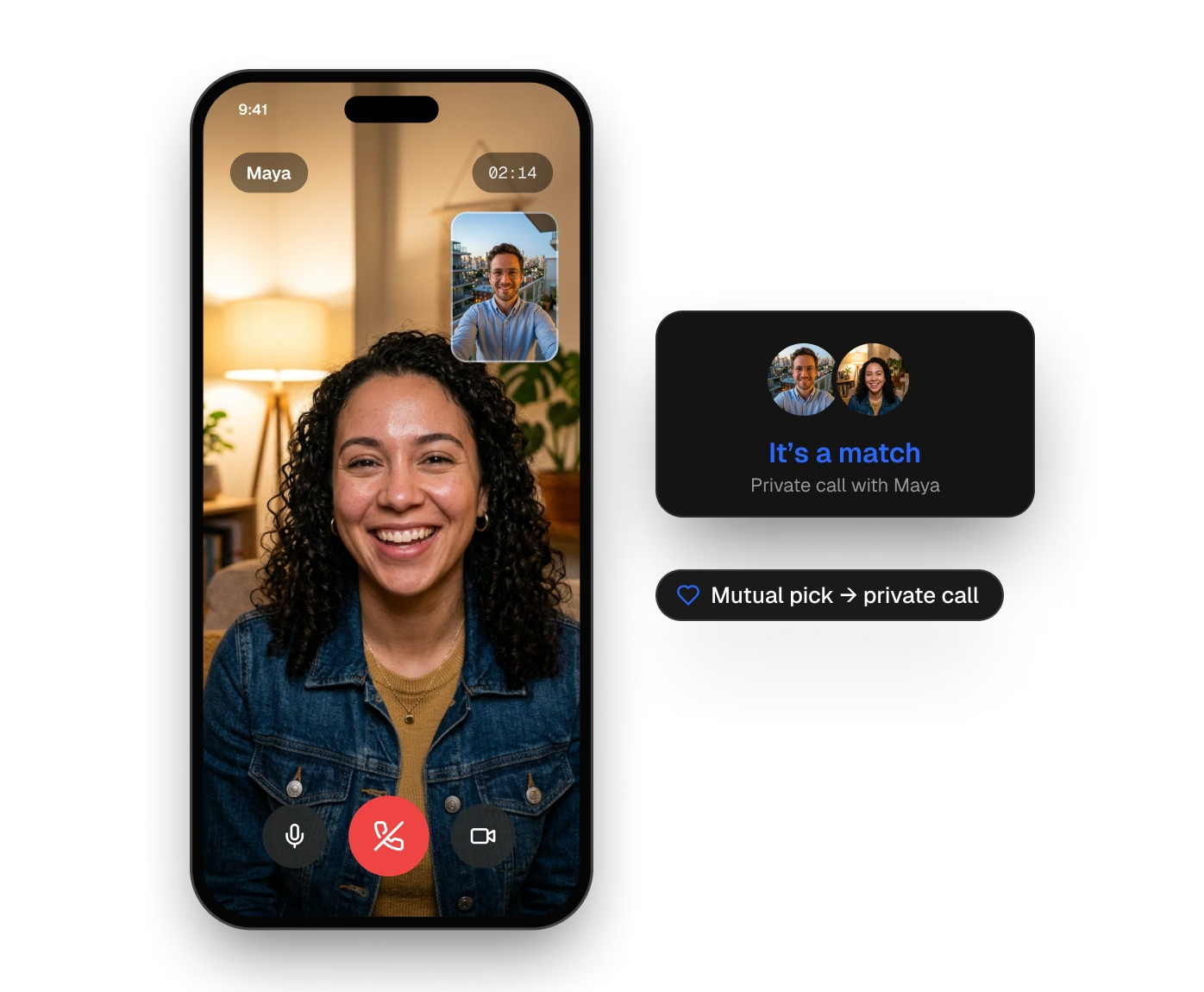
Private 1:1 video call after a mutual pick in O-Time Bank
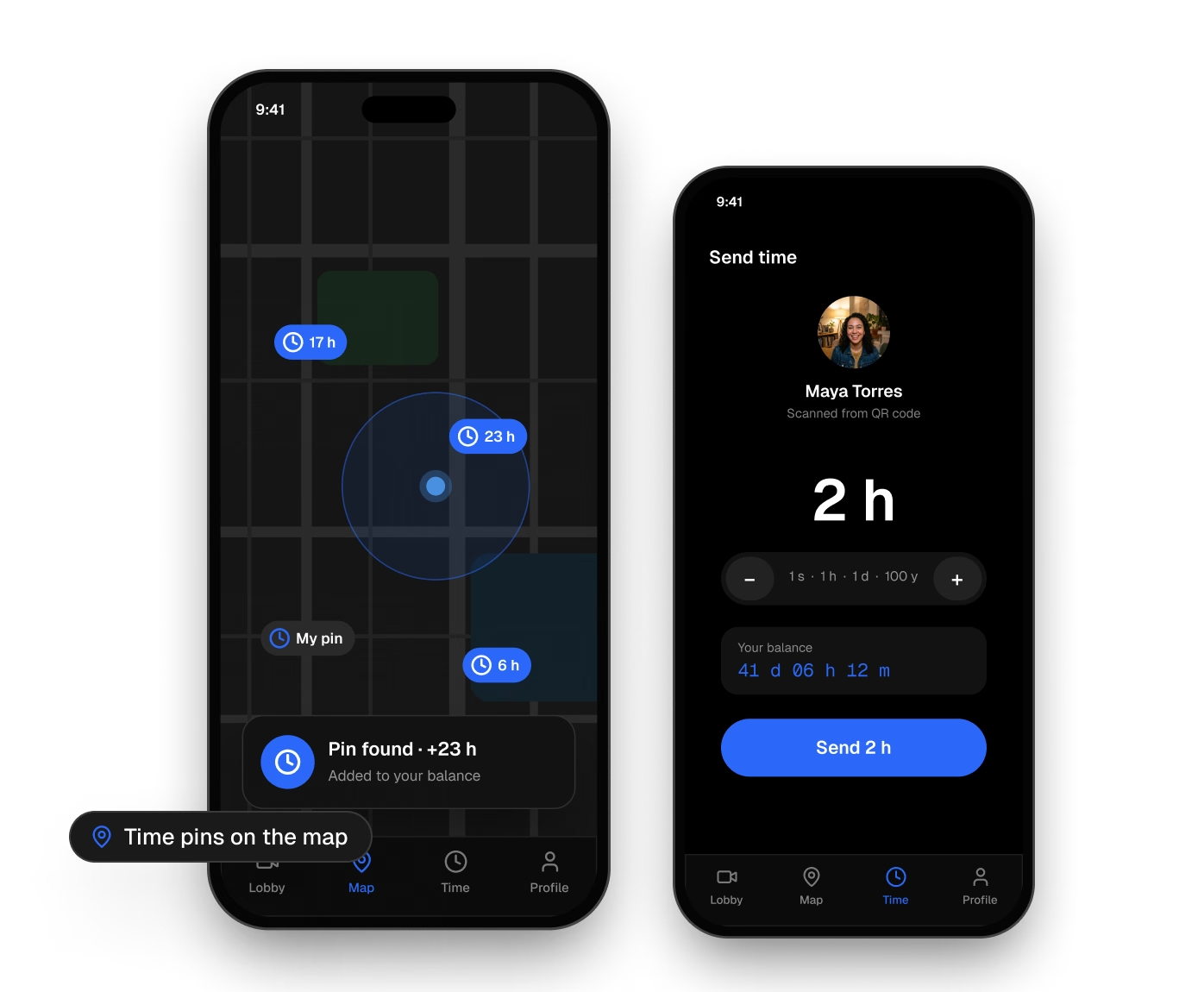
Time pins on the map and sending time to another member
O-Time Bank is a location-based video conversation app for iOS and Android. Members meet people from their region in short group video lobbies, pick the people they like, and move into a private 1:1 video call when the interest is mutual. Time is the app's internal currency: subscribers earn it second by second, send it to other members and drop it on the map as pins for others to collect.
The founder already had the app in the App Store and Google Play with time transfers, subscriptions, map pins, SMS phone confirmation and a first version of 1:1 calls. We took over the codebase and built the video lobby: the hourly countdown, the algorithm that splits people into groups, picks and reports, matching, and the private 1:1 calls that follow a match. We also prepared the iOS release and set up a staging environment with its own video server.
O-Time Bank countdown, video lobby and 1:1 call screens
The system works like this: once an hour, everyone waiting on the countdown screen is split into video lobbies, and each match takes two people out of the lobby into their own call.
Member path: countdown, video lobby, 1:1 call
The hardest part of the platform is the regrouping: after every round the server has to rebuild lobbies of up to nine people from the same region with a balance of men and women, and still give everyone a lobby when few people are online.
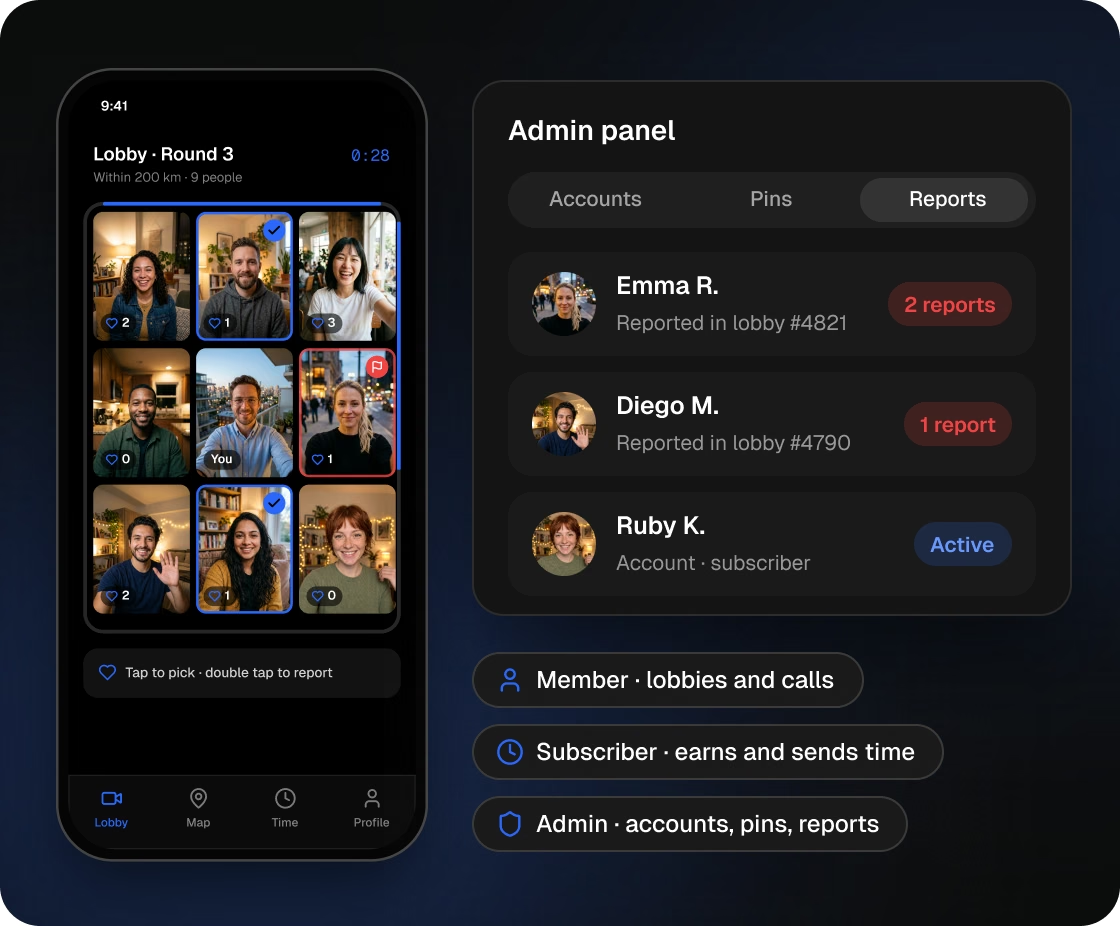
O-Time Bank members, subscribers and admins with the lobby, call and admin panel screens

Who uses the platform

  • Members create an account with an email and password and confirm a phone number by SMS. They join lobbies, make video calls and receive time.
  • Subscribers are members with an active subscription. Only subscribers earn time, send it to other members and drop pins.
  • Admins manage accounts, transactions, pins and reports in a web admin panel.

In a lobby, a member taps another member's video to pick them. When two members pick each other, that is a match, and the match opens a private 1:1 call. A report is a flag one member puts on another.
Highlights

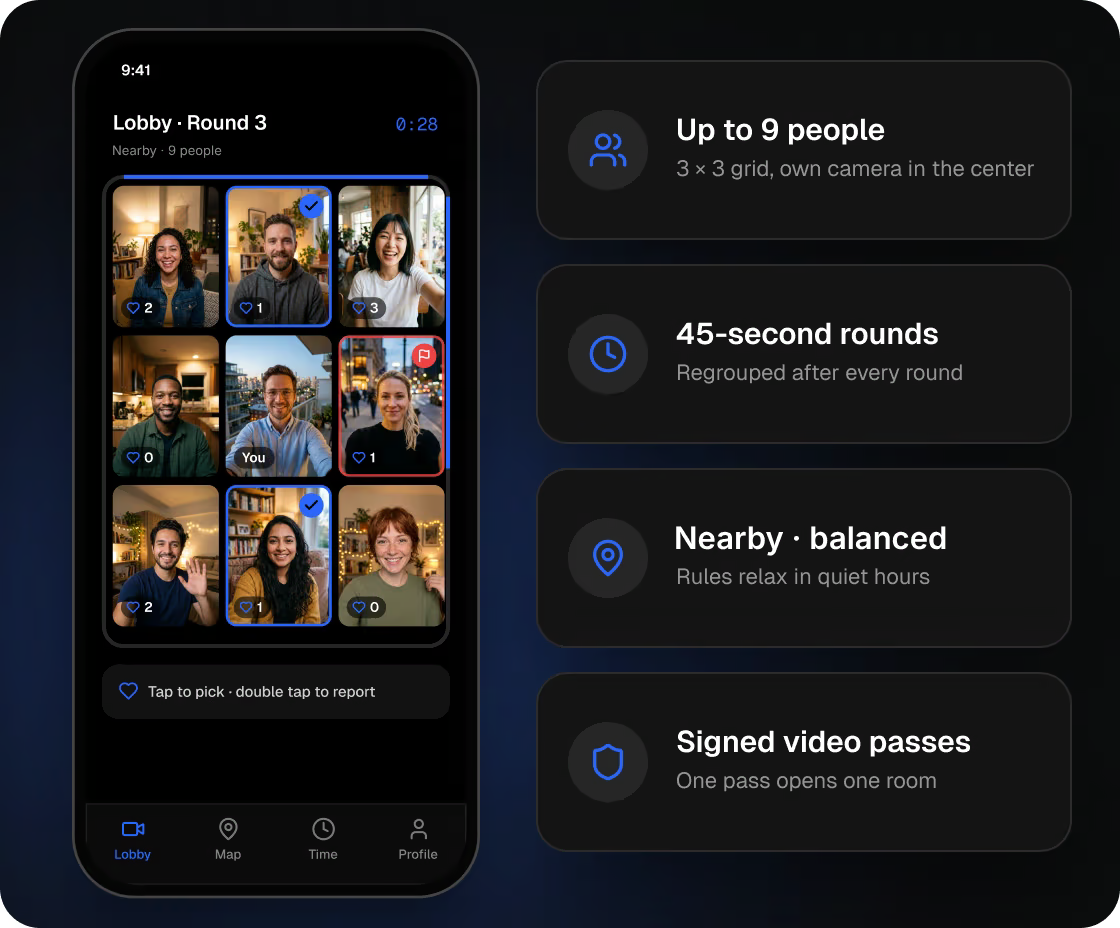
  • A video lobby of up to nine people that reshuffles every 45 seconds and turns mutual picks into private calls.
  • Grouping that aims for people who live close to each other and a balance of men and women, and relaxes these rules step by step in quiet hours.
  • A countdown synced to the server clock and signed video passes, so everyone sees the same time and enters only the room they were assigned to.
  • A staging copy of the whole system, video server included, for testing lobby builds on real phones.
O-Time Bank highlights: nine-person video lobby, distance and gender grouping, synced countdown, staging
Hourly lobby countdown and a 3 by 3 video lobby with a 45-second round

Hourly video lobby with 45-second rounds

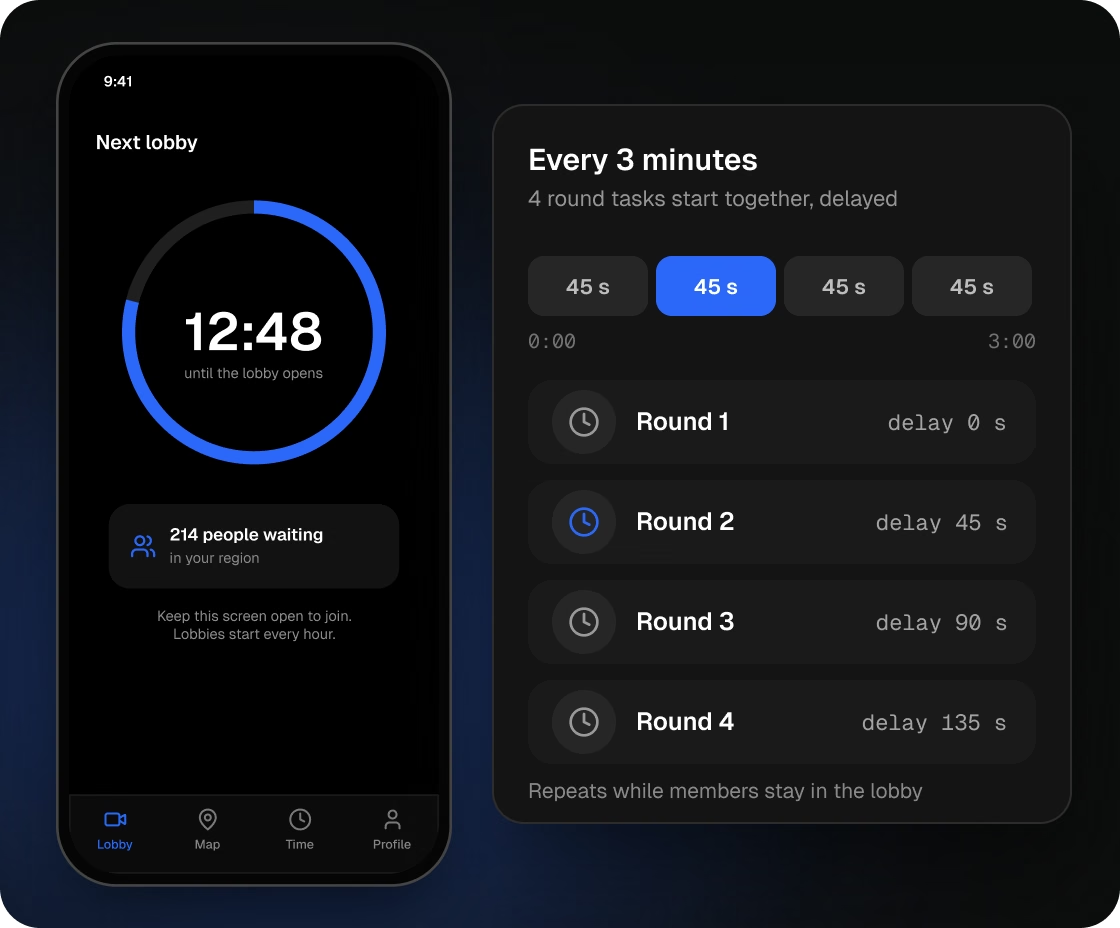
The lobby turns a random video chat into a structured event that brings people online at the same time. A countdown screen shows how long is left until the next lobby. The founder first planned one every three hours, and after the demos it was shortened to once an hour.

  • Members who keep the countdown screen open are marked as waiting. If they leave the screen or close the app, they drop out of the queue.
  • At the top of the hour the server takes everyone who is waiting, splits them into lobbies and sends each member an access pass to a video room.
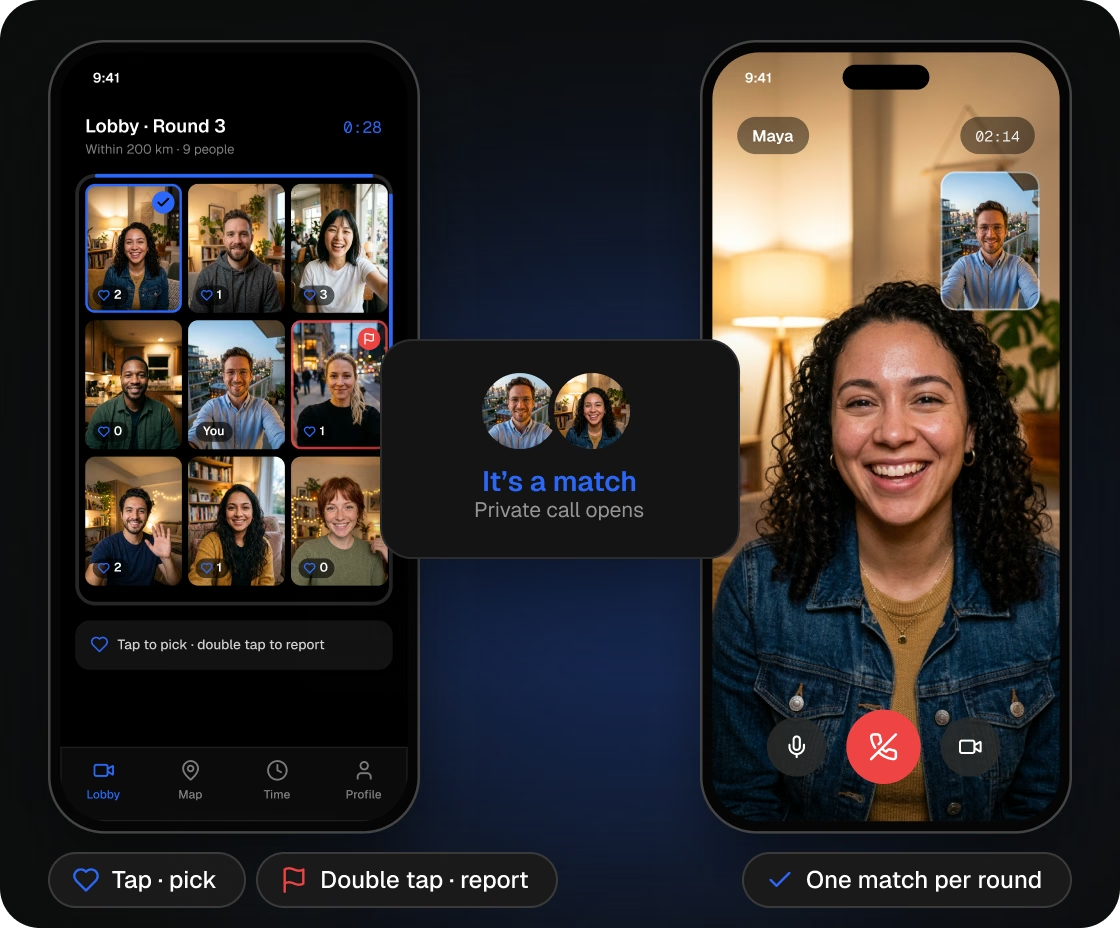
  • The lobby shows a 3 by 3 grid of live cameras with the member's own video in the center and a 45-second progress line around the edge.
  • After each round, matched members leave for their calls and everyone else is regrouped into new lobbies of up to nine.

The server can only start timed tasks at the top of a minute, and 45 seconds is not a whole minute. So every three minutes the server starts four round tasks at once and delays them by 0, 45, 90 and 135 seconds, and four 45-second rounds fill the three minutes exactly. Rounds keep going for as long as members stay in the lobby.

Grouping by distance and gender balance

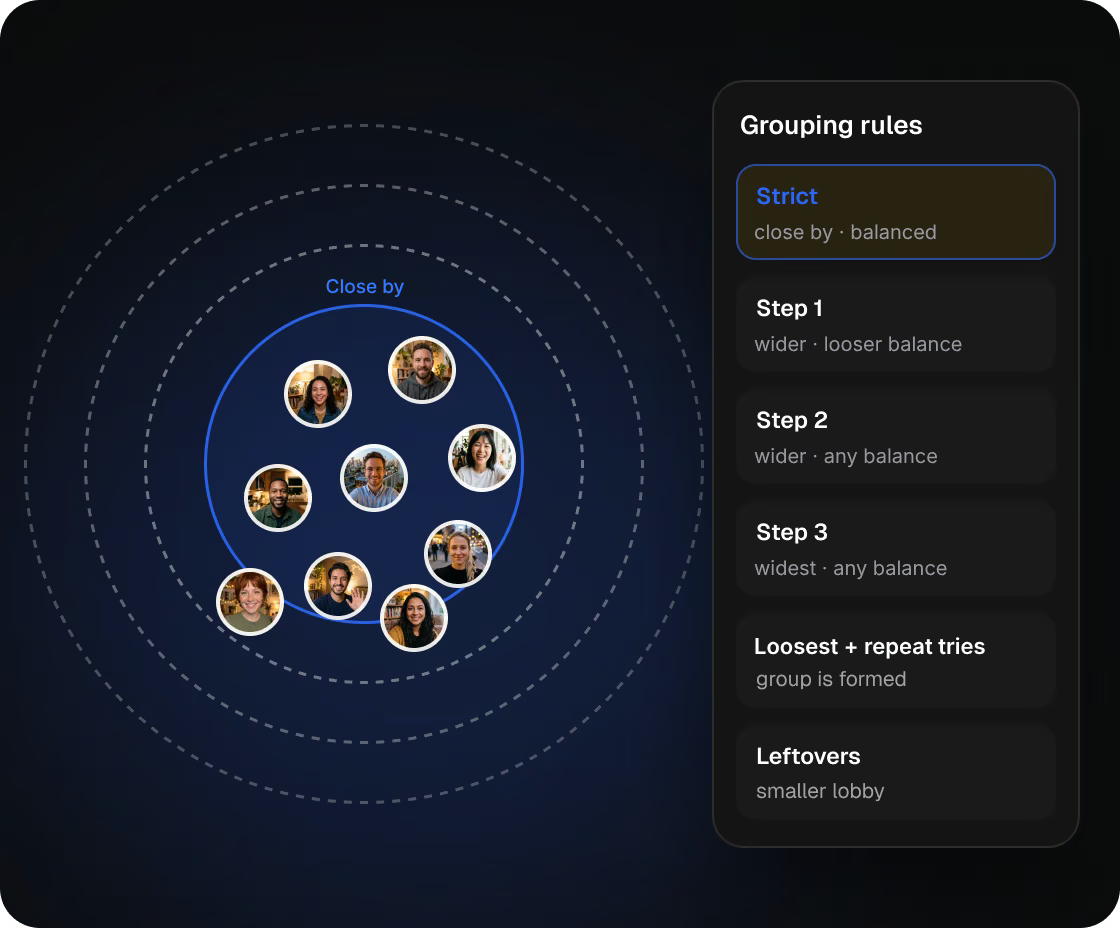
Lobbies work only when the people in them can meet in real life and both sides of the conversation are represented. The grouping algorithm handles this.

  • Waiting members are sorted by location, and the server tries them in groups of nine.
  • A group passes the strict check when all members live within a set distance of each other and men and women are evenly split.
  • If a group fails, the waiting list is shuffled and the rules relax one step at a time: the distance limit grows step by step up to a set maximum, the gender balance loosens and is then dropped.
  • Once the rules are at their loosest and anyone in the group has already been through several failed tries, the group is formed anyway, so grouping always finishes.
  • Members left over at the end go into a smaller lobby.

In quiet hours the product prefers a full lobby to a perfect one, so a group can end up spread wider than usual, and every waiting member gets a lobby.

The app sends the member's location to the server when the lobby tab opens, so grouping uses where the person is now. Gender comes from the member's profile.
Lobby grouping by distance and a balance of men and women
Picking and reporting members in the lobby and a private 1:1 video call after a match

Picks, reports and private 1:1 calls

The lobby needed simple gestures that work on a small video tile and a clear rule for who goes into a call with whom.

  • A single tap on a video picks that member, and a second single tap takes the pick back. Everyone in the lobby sees how many picks each member has, and the member who made a pick sees a check mark.
  • A double tap reports a member and puts a flag on their video. The app tells a single tap from a double tap, so a report does not count as a pick, and a second double tap removes the report. If the member had picked that person, the report also removes the pick.
  • Reports carry across lobbies, so the flag is still there when the same person appears again. Admins see every report in the admin panel.
  • Between rounds the server looks for mutual picks in the lobbies that just ended. Each member can get only one match per round. Both members of a match receive passes to a new private room and leave the lobby.
  • The 1:1 call shows the other member full screen with the member's own camera in a corner and a button to hang up. When one side leaves, the other is told right away.

Live updates and access-controlled video rooms

Picks and invitations need to land in seconds, so the server pushes them to the phones instead of waiting for them to ask.
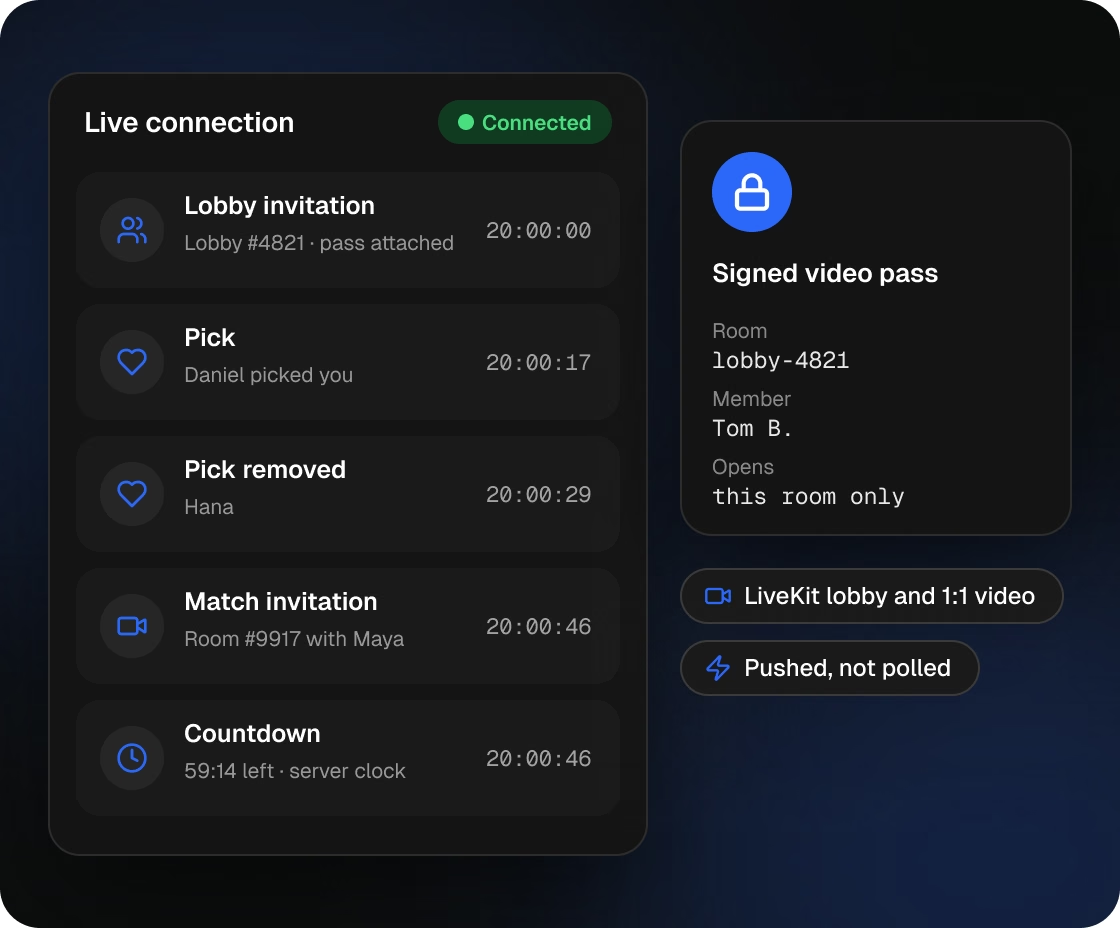
  • The app keeps a live connection to the server. Lobby invitations, match invitations, picks, removed picks and the countdown time all arrive through it.
  • The countdown is synced to the server clock, so members on different phones see the same time left.
  • Lobby and 1:1 video runs through LiveKit. The server issues each member a signed pass that opens one specific room, so a member can join only the lobby or call they were assigned to.
Live updates from the server and signed passes to LiveKit video rooms
iOS release build and a staging server with API, PostgreSQL, Redis and LiveKit

iOS release and staging environment

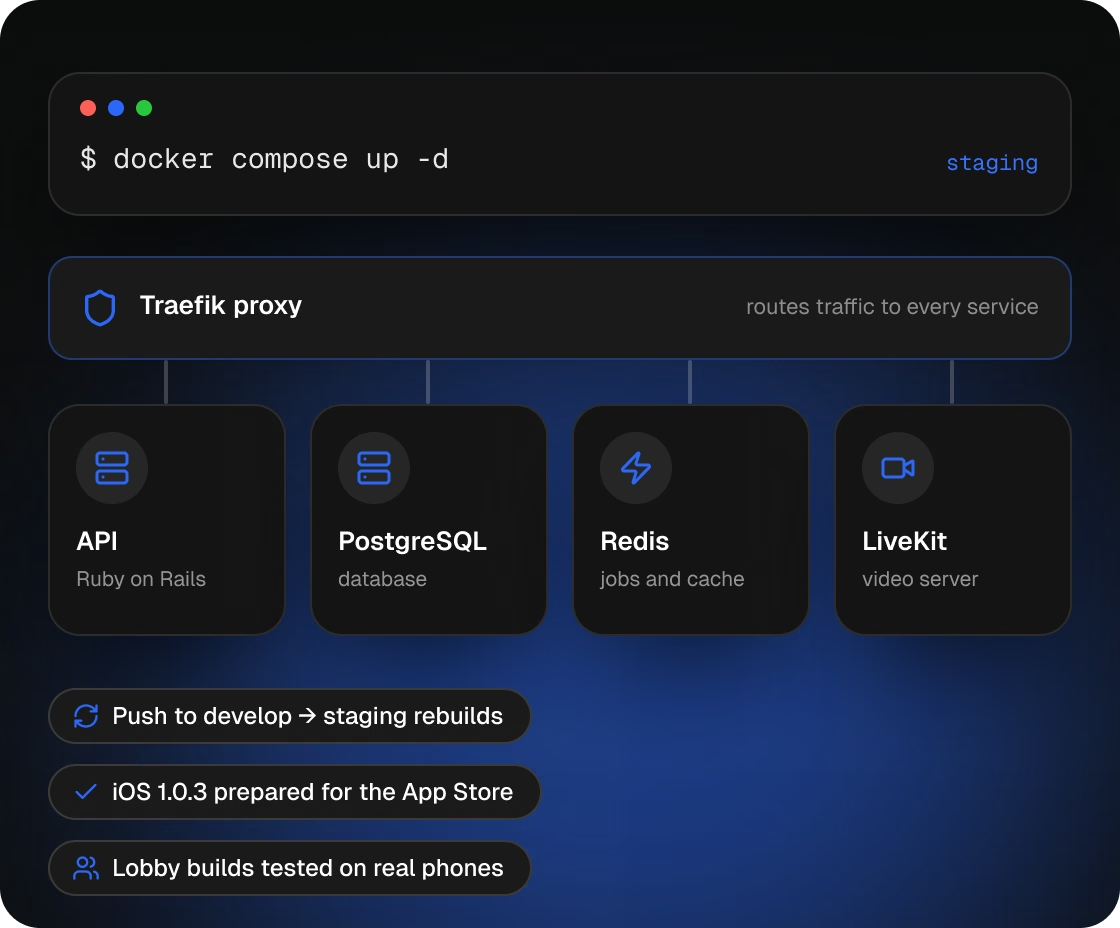
We prepared the iOS build of version 1.0.3 for the App Store. We also set up a staging server that starts the whole stack from one command: the API, PostgreSQL, Redis and a LiveKit video server behind a Traefik proxy. Each push to the development branch rebuilds it, so new lobby builds could be tested on real phones without touching production.

Smaller additions

We added a transaction history screen that lists the time a member sent and received, and last name and date of birth fields in the profile.
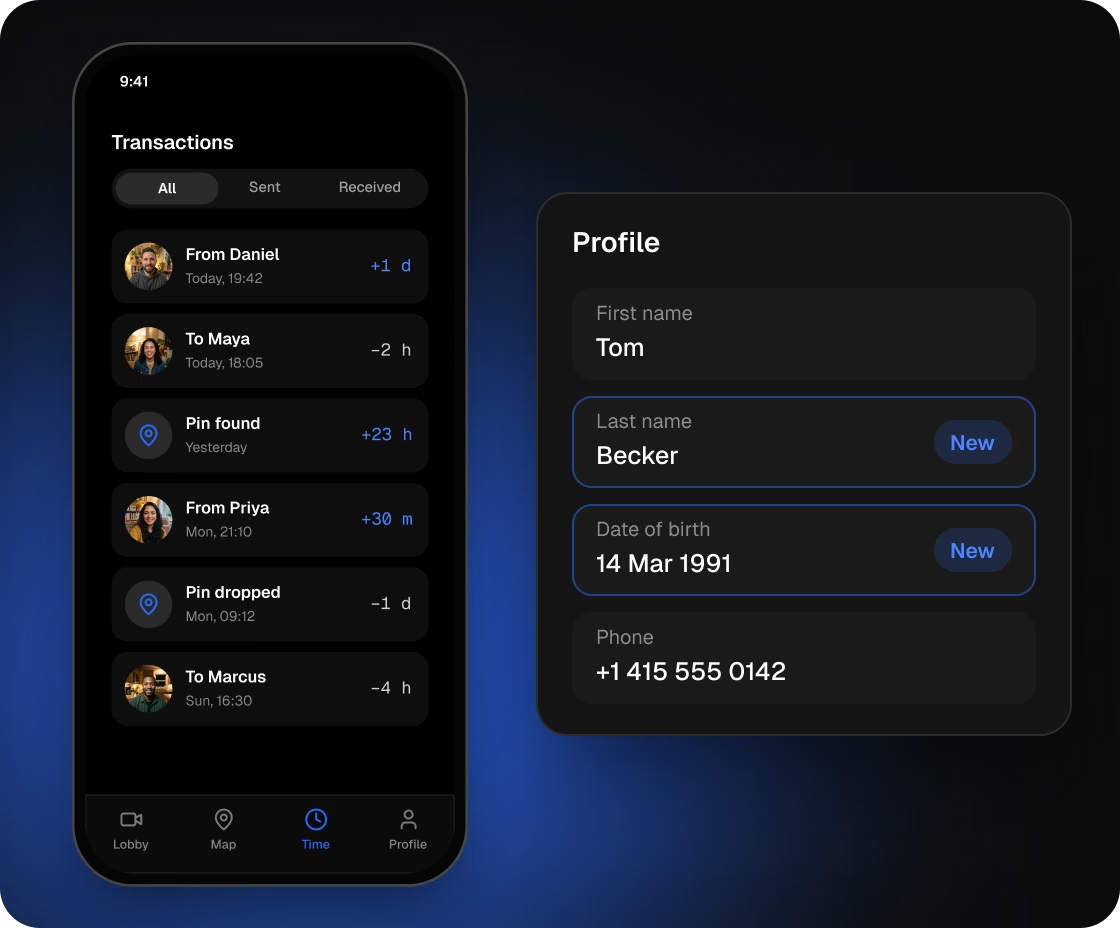
Transaction history screen and new profile fields
Time transfers, pins, subscriptions and SMS sign-up were already in the app when we joined, and the lobby was built on top of them.
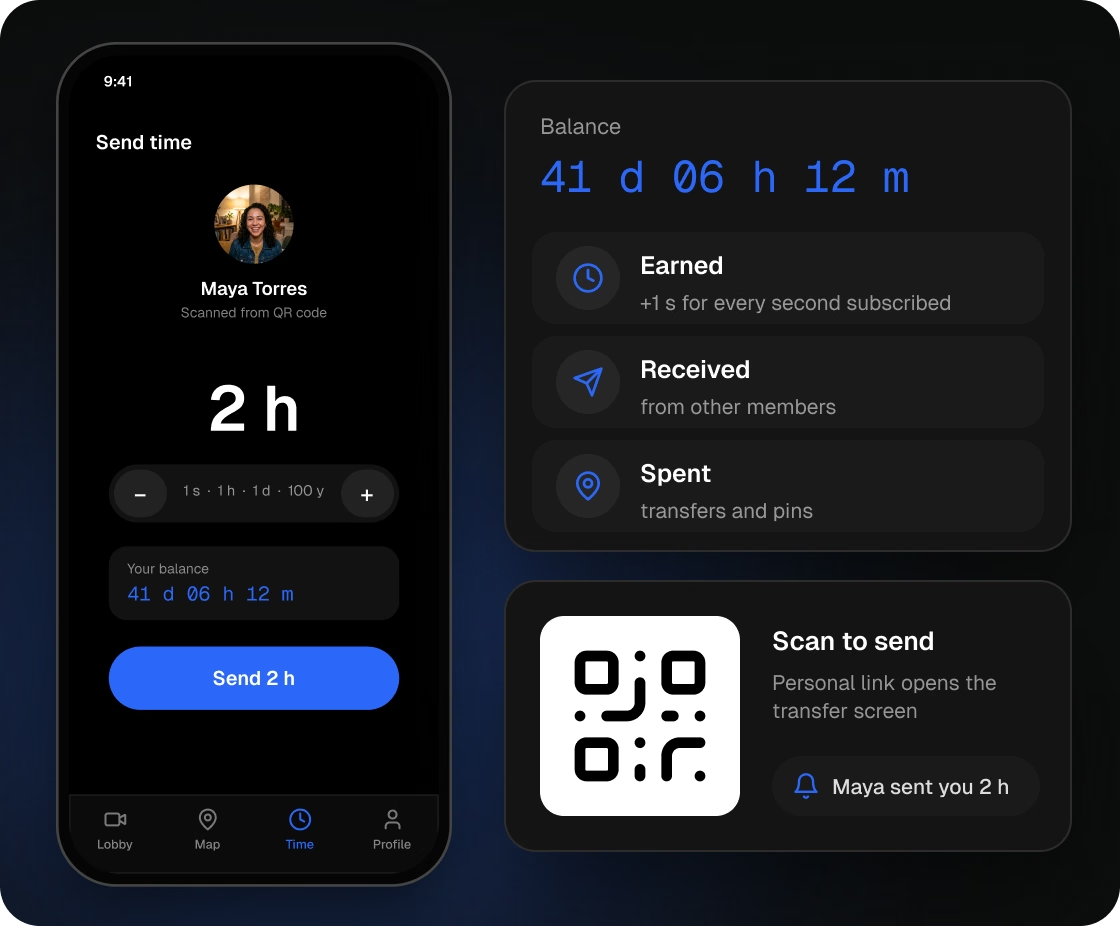
Time balance and sending time by QR code

Time as a currency

Time gives the product its own economy, and the server checks every transfer and pin claim rather than trusting the phone.

  • A subscriber earns one second of time for every second the subscription is active. A member who signs up with a confirmed phone number starts with one day of time.
  • The balance is the time earned plus time received, minus time spent.
  • Subscribers send time by scanning another member's QR code with the camera. The amount steps up from 1 second to 100 years, and the app stops at the member's balance.
  • The server rejects a transfer when the sender has no active subscription, does not have enough time, or is sending to themselves. The recipient gets a push notification with the sender's name and the amount.
  • Each member has a personal link that opens the app straight on the transfer screen for that member.

Time pins on the map

Pins add a reason to go outside and meet people nearby.

  • A subscriber can drop one pin a day on their current location. The pin costs one day of time.
  • A pin stays on the map for 24 hours. Members see the pins around them on a Google map.
  • When a member comes within 400 meters of someone else's pin, the app claims it automatically, plays a sound and vibrates. The server accepts the claim only within 500 meters of the pin.
  • The finder gets the time the pin has left: a pin found an hour after it was dropped gives 23 hours.
  • The server rejects a claim on a member's own pin, on a pin someone already took, and on an expired pin.
Time pins on a map and a found pin with the time it gives
Subscriptions, SMS phone confirmation and account security

Subscriptions, sign-up and accounts

These parts keep subscriptions in sync across both stores and protect sign-up and accounts from abuse.
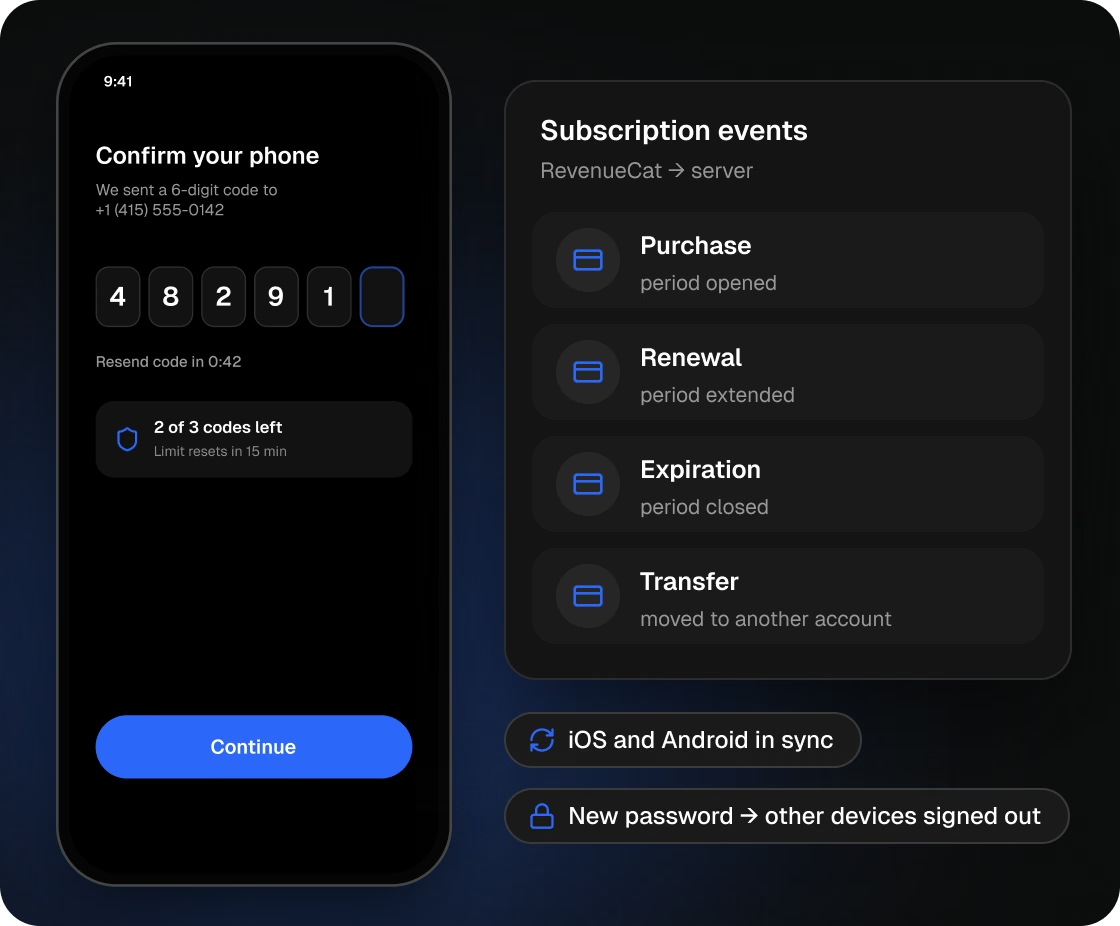
  • Purchases go through RevenueCat. The server receives events for purchases, renewals, expirations and subscriptions moved to another account, and opens or closes subscription periods to match, so earned time follows the real subscription.
  • Phone numbers are confirmed with a one-time SMS code. The server limits a member to three codes in 15 minutes and one network address to 30, and a successful confirmation stays valid for 10 minutes.
  • Changing the password signs the member out on all other devices.

Integrations

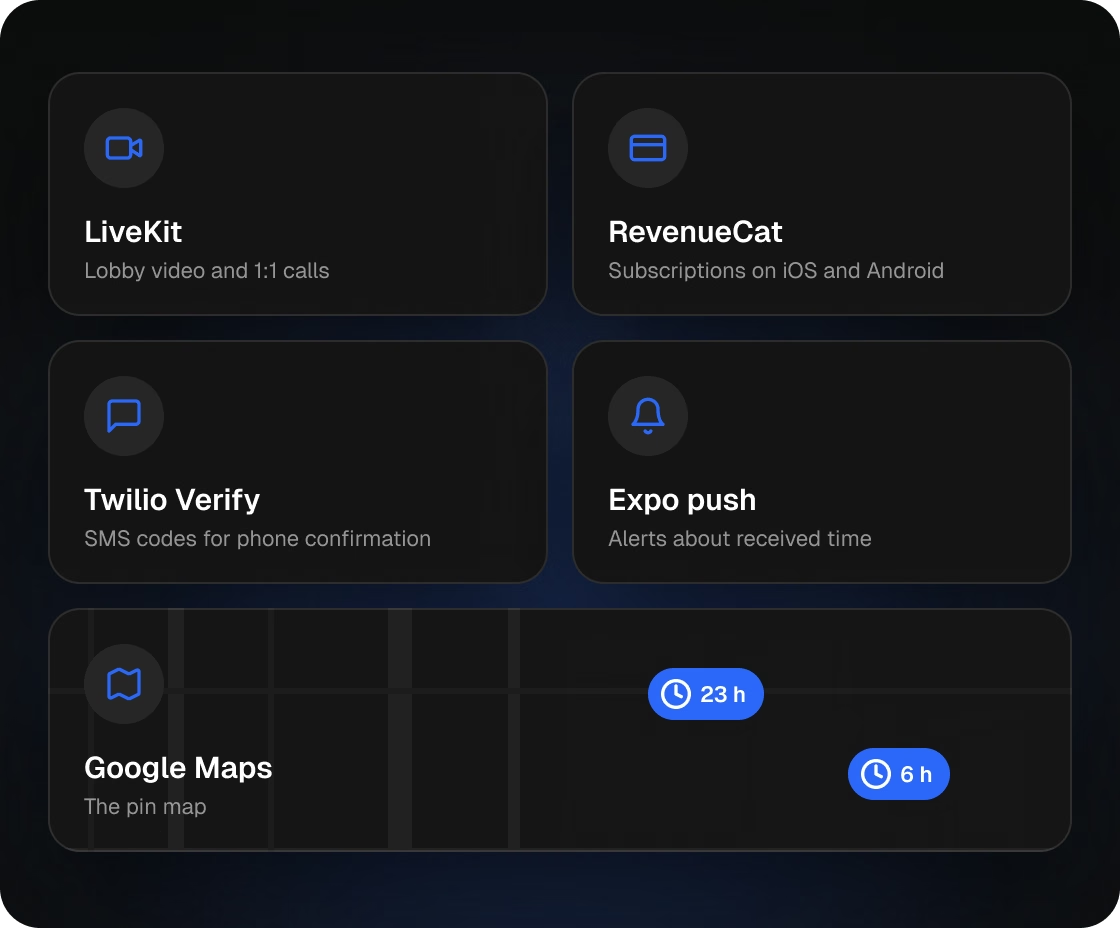
  • LiveKit: group lobby video and private 1:1 calls.
  • RevenueCat: in-app subscriptions on iOS and Android and subscription events for the server.
  • Twilio Verify: SMS codes for phone confirmation.
  • Expo push notifications: alerts about received time.
  • Google Maps: the pin map.
Integrations: LiveKit, RevenueCat, Twilio Verify, Expo push notifications, Google Maps

Technical Implementation

📱 Platforms
iOS, Android
⚛️ Mobile app
React Native, Expo, TypeScript, Effector, TanStack Query
💎 Backend
Ruby on Rails, Grape, Action Cable, PostgreSQL, Redis
🎥 Video
LiveKit
🔌 Services
Twilio Verify, RevenueCat, Expo Push Notifications, Google Maps
🐳 Infrastructure
Docker, Traefik, GitLab CI, GitHub Actions, Fly.io
O-Time Bank: video lobbies, mutual matches, time as currency