

Key takeaways
• The point of a camera is that nobody has to wear it. Most falls are unwitnessed, and industry surveys report the majority of seniors don’t wear a pendant consistently. A fall detection camera watches the room, not the person — no charging, no remembering, no “I took it off in the shower.”
• It’s pose estimation, not face recognition. The camera finds the body, tracks a skeleton of joint points, and reads the motion signature of a fall — rapid downward movement, then lying still. Done well, it never needs to identify who the person is.
• Privacy is an architecture choice. Run the AI on the device and only a fall alert leaves the room; stream raw bedroom video to the cloud and you’ve built a very different, much harder product. Edge-first is what makes cameras acceptable at all.
• The hard problem is false alarms, not missed falls. A camera watching 24/7 sees thousands of ordinary lie-downs. Even a 95%-specific detector generates a flood of nuisance alerts at facility scale, so human-in-the-loop verification matters more than a headline accuracy number.
• Buy for one home; build when it’s your product. Off-the-shelf devices like Kami or Sentinare fit a single household. A custom build wins when fall detection is a feature of a platform you sell, spans a whole facility, or has to keep video on your own infrastructure.
Updated October 2026: re-checked Kami, Sentinare and SafelyYou pricing and scale, CDC 2024 fall-death data, a consumer feature checklist, and 2026 field-trial evidence on false alarms.
An 82-year-old gets up at 2 a.m., loses her balance, and goes down between the bed and the bathroom. The pendant that would have called for help is on the nightstand, where it’s been every night since she decided it made her feel old. Nobody hears her. By the time a caregiver finds her in the morning, she’s been on the floor for hours — and the time on the floor, not the fall itself, is what turns a bruise into a hospital stay. This is the exact gap a fall detection camera is built to close.
We’ve built real-time video and computer-vision systems since 2005, including live incident-detection pipelines and large-scale video surveillance platforms. So this is the honest guide, not a product pitch: how AI fall detection cameras actually work, how accurate they really are, why privacy is the whole ballgame, how they compare to pendants and radar, and when it’s smarter to buy a device than to build a system.
Scoping a fall detection system?
Tell us the setting — one home, a senior-living facility, or a product you’re shipping — and we’ll tell you honestly whether to buy a device or build, with the privacy and accuracy tradeoffs behind the call.
Why Fora Soft wrote this guide
We’re a video and AI software company: 250+ projects since 2005, a team of 50+. A large share of that work is exactly the plumbing a fall detection camera needs — capturing a live video stream, running computer-vision models on it in real time, and getting an alert to a human fast enough to matter. When someone asks us to detect an event in a video feed and act on it within a second, we’ve usually built the underlying pieces already.
One example is Mindbox, where we built real-time incident detection on live video, and our broader work on anomaly detection in video surveillance. Fall detection is the same shape of problem: watch a scene, recognize an abnormal event the instant it happens, and route it to the right person — all without drowning them in false alarms.
We don’t sell a boxed fall-detection product, so there’s nothing to push here. For a single home, a $100 device off the shelf is usually the right answer, and we’ll say so. What we build is the custom version — the facility-wide or product-embedded system — which means we’ve earned the right to be honest about when you don’t need one.
What a fall detection camera actually is
A fall detection camera is a video sensor paired with computer-vision software that recognizes the shape and motion of a human body, spots the moment a person collapses to the floor, and sends an alert to a caregiver within seconds — no wearable required. The camera is ordinary; the intelligence is the software running on the feed. In practice, that software often layers onto cameras a home or facility already has, turning an ordinary lens into an elderly monitoring camera — which is part of why the category has grown so fast.
The stakes are why this category exists. More than one in four US adults over 65 falls each year — over 14 million people (CDC, page updated September 2026) — and the age-adjusted fall death rate rose 21% between 2018 and 2024, to 78.4 per 100,000 older adults (CDC, 2024 data). Nonfatal older-adult falls cost US healthcare about $80 billion in 2020, up from $50 billion in 2015 (Haddad et al., Injury Prevention, 2024, via NCOA), and are projected to top $101 billion by 2030 (Houry et al., 2016, via NCOA). A system that shortens the time between a fall and help is aimed squarely at that gap.
The important distinction is between the camera and the detection. A camera captures pixels. A fall detection system decides that a specific pattern of pixels — a body dropping fast and then staying down — is a fall and not someone sitting on the floor to play with a grandchild. Everything hard about this product lives in that decision: getting it right often enough to be trusted, and wrong rarely enough not to be ignored.
It also helps to say what it is not. It is not a medical alert pendant, which the person has to wear and press. It is not a general security camera, which records everything and asks a human to watch. And it is not a diagnosis — it detects an event, it doesn’t assess an injury. It sits in the same family as remote patient monitoring, but where RPM tracks vitals through devices the patient wears or uses, fall detection watches the room and needs nothing on the body at all.
The short answer: buy a device, or build a system
Buy an off-the-shelf device (Kami Fall Detect, AltumView Sentinare, and similar) if you’re protecting one or a few rooms in a home. You get working fall alerts this week for around $100–$230 plus, in some cases, a monthly fee — far cheaper and faster than anything custom, and for a single household it’s almost always the right call.
Buy a managed service (SafelyYou and peers) if you run a senior-living or memory-care facility and want fall detection with human verification, analytics, and staff workflows handled for you. It’s quote-based and priced per community, but you’re buying an outcome, not a camera.
Build a custom system when fall detection is part of a product you sell, when it has to span a whole facility on your own terms, when data-residency or privacy rules keep video out of a vendor cloud, or when per-room subscription fees at your scale have outgrown a one-time build. The rest of this guide is the evidence behind those three sentences.
How AI fall detection works: pose, motion, alert
AI fall detection is a short pipeline: find the person, estimate their pose, read the motion, classify whether it’s a fall, and only then alert a human. The clever part is the middle — pose estimation — which turns raw video into a skeleton of joint points (head, shoulders, hips, knees) and lets the model reason about a body’s geometry instead of its appearance.
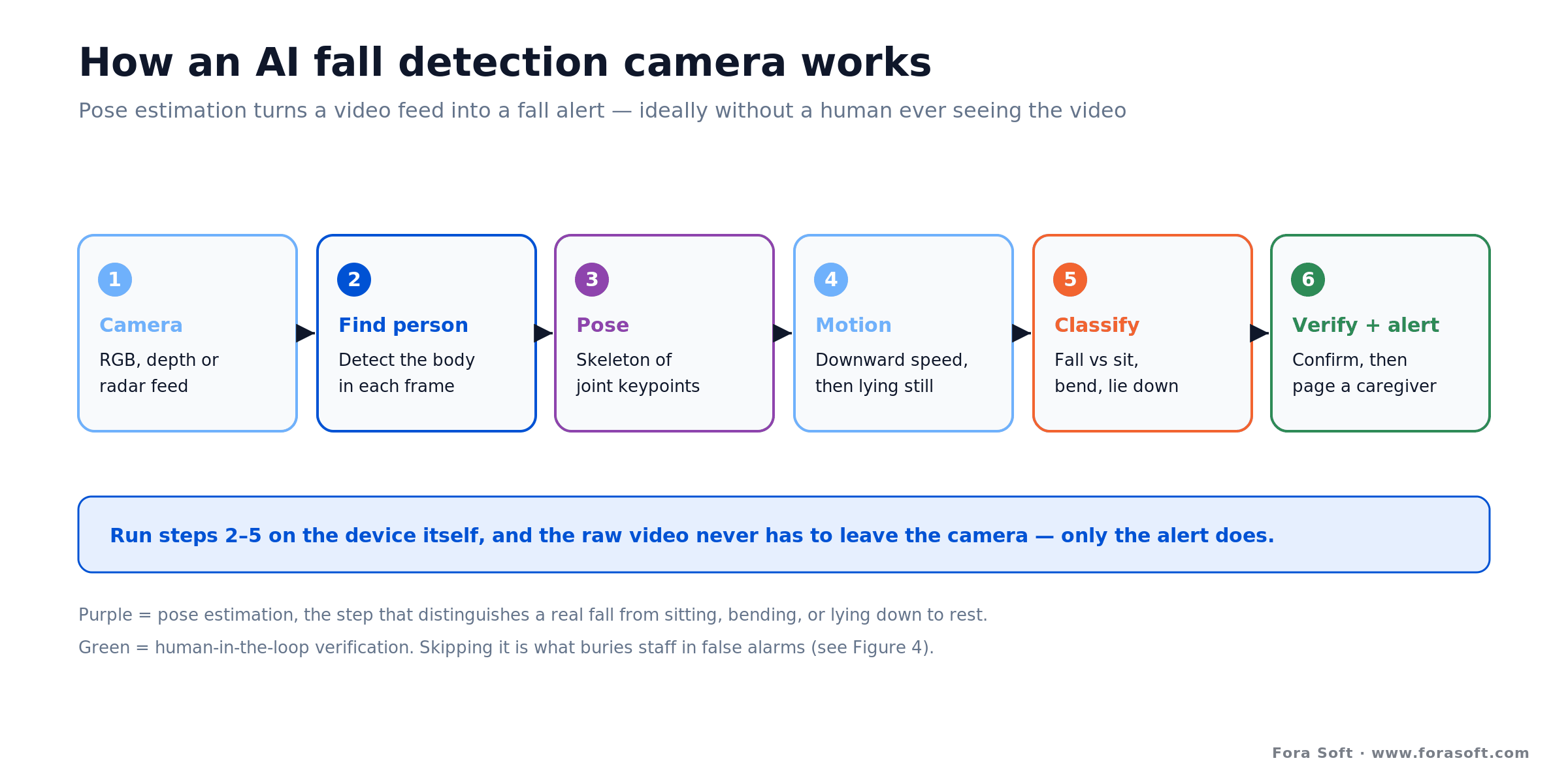
Figure 1. The fall detection pipeline. Pose estimation is what separates a real fall from sitting or lying down; running it on-device keeps the video in the room.
Detect and pose. A model such as a YOLO-family detector finds the body in each frame, then a pose estimator (OpenPifPaf, a YOLO-pose variant, or similar) marks the joint keypoints — our comparison of OpenPose, MediaPipe and RTMPose for pose tracking covers which one fits an edge device. Working from a skeleton rather than the pixels means the system can, in principle, ignore who the person is entirely — a real privacy advantage baked into how it works.
Read the motion. A fall has a signature: the body’s center of mass drops fast, the pose goes from upright to horizontal, and — the part that rules out most false alarms — the person then stays down. A classifier weighs downward velocity, final body orientation, and how long the person remains on the floor. That last cue is why sitting down quickly or lying on a couch doesn’t trip a good model.
Verify, then alert. The best systems don’t page a caregiver straight from the classifier. They add a confirmation step — an automated check, a short clip a reviewer sees, or both — before a human is interrupted. We’ll come back to why that step is the difference between a system people trust and one they mute. Speed still matters: the system detects the fall in real time and confirms it over a short dwell window — long enough to be sure the person stayed down, not so long that help is delayed.
RGB, depth, thermal, or radar: pick the sensor for the room
“Camera” is doing a lot of work in the phrase “fall detection camera.” There are several sensor types, and they trade off privacy, low-light performance, cost, and accuracy in different ways. The right one depends far more on the room and the person than on any spec sheet.

Figure 2. Ways to detect a fall, compared. No single sensor wins everywhere; bathrooms and bedrooms usually push you toward depth, thermal, or radar.
RGB cameras are the default: cheap, sharp in good light, and easy to run modern pose models on. Their weaknesses are darkness, where accuracy drops, and privacy, since they capture a recognizable image. For a living room they’re fine; for a bedroom or bathroom they’re a hard sell.
Depth cameras (the Kinect lineage) see spatial shape rather than a clear picture, which improves both night performance and privacy. The trade is cost, a narrower field of view, and shorter effective range. Thermal and infrared sensors go further on privacy — they read heat blobs with no appearance or room detail — and work in total darkness, at the cost of resolution.
mmWave radar isn’t a camera at all, and that’s the point. A 60 GHz radar detects position and the downward-velocity spike of a fall from radio reflections, capturing no image whatsoever — it works in a dark bathroom and can’t reconstruct a face or body. Peer-reviewed work has validated radar fall detection against wearable ground truth (Scientific Reports, 2026). It’s coarser than vision and struggles with clutter and multiple people, so it’s a strong choice precisely where a camera doesn’t belong.
Camera vs pendant vs radar: which fits whom
The case for a camera over a pendant is one uncomfortable fact: pendants only work when worn, and often they aren’t. Industry usage surveys report that a large majority of seniors don’t wear their alert device consistently — it’s left off at night, removed in the shower, or abandoned in a drawer because it feels like a badge of frailty. A device that spends the night on the nightstand can’t catch a 2 a.m. fall on the way to the bathroom, which is exactly when many falls happen.
A camera flips that: it protects the room whether or not the person cooperates, needs no charging, and can’t be forgotten. The cost is privacy and placement — you have to be thoughtful about where a lens points and what leaves the building. That’s the whole reason the privacy architecture later in this guide matters so much.
Reach for a pendant when: the person is willing to wear one reliably and spends a lot of time away from home. A wearable goes where a fixed camera can’t — the garden, a walk, a friend’s house — and adds a button they can press for non-fall emergencies. The best setups often pair a worn device outdoors with a camera or radar sensor indoors.
Radar sits in between: no wearable, no image, works in the dark and in private rooms, but coarser and less able to tell a fall from, say, sitting on the floor. A common facility pattern is cameras or depth sensors in living areas and hallways, radar in bedrooms and bathrooms, and a pendant for residents who go out — each tool where its strengths line up with the space.
What features should an AI fall detection app have?
A good consumer AI fall detection camera for an elderly parent needs five things: automatic fall alerts with a clip or stick-figure replay, a verification step that filters false alarms, escalation to emergency services when nobody answers, on-device processing so raw video stays home, and night-time coverage. Two-way audio, multi-caregiver sharing and a clear monthly price round out the list. The table maps each feature to why it matters and how the leading devices handle it, from public vendor pages checked in October 2026.
| Feature | Why it matters | How leading devices do it (2026) |
|---|---|---|
| Fall alert with a short clip or stick-figure replay | Caregiver sees what happened before calling back | Kami sends call, app, SMS or email alerts with a clip; Sentinare replays a stick figure |
| Verified alerts (AI or human review) | Cuts nuisance alarms so nobody mutes the app | Sentinare Home plan adds AI-verified alerts; SafelyYou adds remote clinical review |
| Escalation when nobody answers | A 2 a.m. fall still reaches help | Kami routes unanswered alerts to the nearest 911 center via RapidSOS |
| Privacy mode: on-device AI, no raw video | Makes bedrooms and family consent workable | Sentinare converts people to stick figures on the device |
| Night vision or a dark-room sensor | Many falls happen at night, on the way to the bathroom | IR night vision (Kami); depth, thermal or radar for dark rooms |
| Two-way audio and hand-wave help request | The person can say “I’m fine” or ask for help without a pendant | Kami two-way audio; Sentinare hand-waving detection and VoIP |
| Multi-caregiver sharing and alert history | Family and aides all get the alert; trends show fall risk | Kami unlimited sharing; Sentinare 14 to 90 days of history by plan |
| Clear monthly cost | The subscription, not the device, is the real price | $0 to $45 per month across the two consumer products compared here (latest public pricing) |
If you are building an app rather than buying one, this list is also the minimum feature set your users will compare you against. The model is table stakes; verification, escalation and privacy mode are where products win or lose families.
How accurate is fall detection, really?
Peer-reviewed camera fall detection typically reports accuracy in the mid-80s to high-90s percent, depending on the method and the conditions. Recent pose-based models report figures like ~92% real-time accuracy for a YOLOv8-plus-pose approach, and up to ~98% accuracy with ~95% sensitivity on curated datasets; other systems land nearer 83% with F1 scores around 90% (pose-based fall-detection studies, MDPI Future Internet and peer-reviewed work, 2024). Treat those numbers as ceilings from controlled tests, not promises for a real bedroom.
The gap between lab and living room is real, and honest vendors don’t hide it. Accuracy falls with poor lighting, awkward camera angles, occlusion behind furniture, unusual fall types, and people who move differently because of a disability or a walker. A number measured on a clean dataset of acted falls will not survive contact with a cluttered studio apartment unchanged. When a marketing page claims “99% accurate” with no conditions attached, read it as a best case, not a guarantee.
Read how the vendor counts. Kami, for example, reports 99.5% accuracy as falls its system captured divided by falls that were reported, from 3,700+ incidents in 2023 (Kami Vision, CES 2025). That is a detection-rate figure, and an upper bound: falls the system missed and nobody reported never enter the count, and it says nothing about how many false alarms came with it. Field trials show why that second number matters: a lightweight camera system published in Springer’s Computing in April 2026 ran for three months in a nursing home, saw no real falls and raised two false alarms. With zero real falls, its sensitivity could not even be measured. Real-world validation takes months of footage, not a test set.
There’s also a distinction that headline accuracy hides. Sensitivity (catching real falls) and specificity (not flagging non-falls) trade off against each other, and they fail in opposite ways: a missed fall is a safety failure, a false alarm is a trust failure. As the next section shows, at facility scale it’s the false alarms that quietly sink a deployment — which is why the right question isn’t “how accurate?” but “how accurate, and how does it fail?”
The real problem is false alarms, not missed falls
Here’s the counterintuitive part. A fall detection camera runs every second of every day, and most of what it sees is a person sitting, bending, reaching, or lying down to rest — thousands of ordinary movements. Even a very good detector will occasionally misread one of those as a fall. Multiply a small error rate by that many events, across many rooms, and you get a stream of false alarms that no staff will tolerate for long.
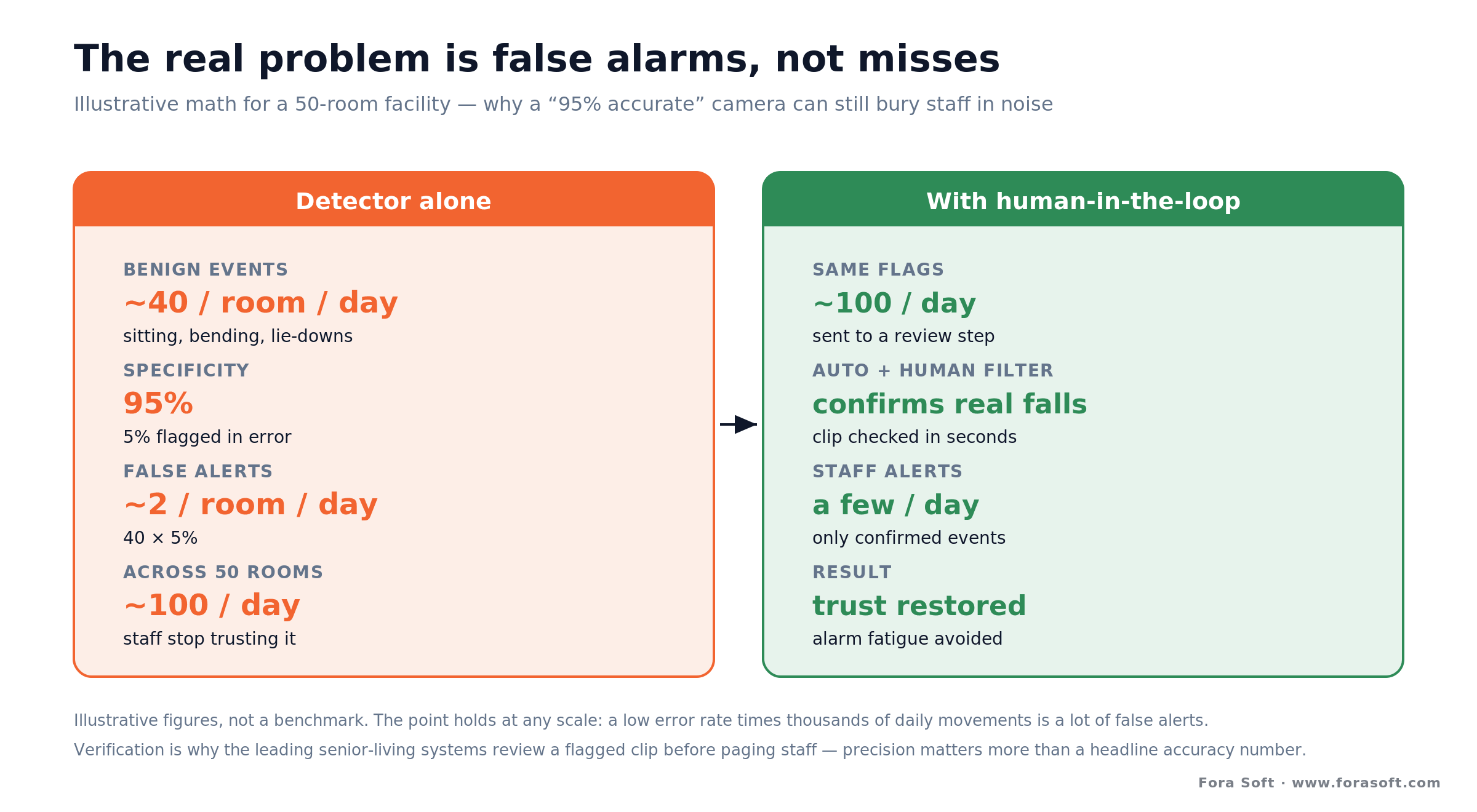
Figure 4. Illustrative false-alarm math. A verification step, not a higher headline accuracy, is what keeps staff trusting the alerts.
Walk the arithmetic. Suppose each room sees about 40 benign floor-adjacent movements a day and the detector is 95% specific — it wrongly flags 5% of them. That’s roughly 2 false alerts per room per day. In a 50-room facility, that’s about 100 false alerts a day. Staff learn to ignore the system within a week, and an ignored alert is worse than no system, because it breeds false confidence. These figures are an illustrative worst case for a model with no verification layer; real field rates depend on how many benign events a room produces and on the filtering that sits after the model, which is exactly why that filtering matters.
The fix isn’t a magic model with zero errors; it’s a verification step. Leading senior-living systems route every flagged event through an automated filter and often a quick human review of a short clip before any staff member is paged, so caregivers only ever see confirmed falls. Vendors now sell verification as its own tier: AltumView’s Sentinare Home plan ($30 per month) adds “AI-verified alerts” on top of the free basic plan (October 2026), and SafelyYou pairs detection with a remote clinical team that documents each fall and recommends how to reduce risk. That’s why precision and workflow beat a headline accuracy number — and why “what happens after the model fires?” is the question we ask first when we design one of these.
Worried a fall system will drown you in false alarms?
That’s the failure we design against first. We’ll walk through the verification workflow — automated filtering plus human-in-the-loop — that keeps precision high without missing real falls.
Privacy by design: process at the edge, don’t stream the bedroom
Ask an older adult how they feel about a camera in the bedroom and you’ll hear the real adoption barrier. It isn’t accuracy — it’s the idea of being watched. The good news is that privacy is mostly an architecture decision, and a well-designed fall detection camera can be far less invasive than a baby monitor.

Figure 3. Two architectures, very different privacy. Both detect the same fall; only one keeps the raw video in the room.
Process at the edge. Run the detection model on the device itself — on a small on-board computer such as an NVIDIA Jetson, or even a Raspberry Pi-class board for lighter models — and the raw video never has to leave the room. Only a fall event, and at most a short clip for verification, is sent onward. That single choice removes most of the privacy and bandwidth objections at once, and it lowers latency because nothing waits on a round trip to the cloud. Our breakdown of edge AI vs cloud AI for video walks through the hardware and cost side of that choice.
Show less than a picture. Some products go further and never expose a normal image at all: they emit only a stick-figure skeleton or a blurred silhouette, so a caregiver sees that a person fell without seeing the person. AltumView’s Sentinare, for instance, streams a stick-figure view rather than video by design. Depth, thermal, and radar sensors get to the same place through physics, by not capturing a recognizable image in the first place.
Contrast that with the naive design: point an RGB camera at the bed and stream everything to a cloud server for analysis. It works technically, but now continuous footage of someone’s most private space is leaving the home, sitting on someone else’s infrastructure, and widening the attack surface. When we build these, edge-first is the default and cloud video is the exception you justify, not the other way round. Our write-up on secure video communication goes deeper on protecting any video that does travel.
HIPAA, consent, and where a camera doesn’t belong
The moment a fall detection camera operates in a clinical or senior-care setting and its footage can identify a patient, US healthcare privacy law is in play. HIPAA treats identifiable video of a patient as protected health information, which means encryption, access controls, audit logging, and a business associate agreement with any vendor that touches the data. Designing edge-first, so that raw video stays on the device and only minimal event data moves, is the cleanest way to shrink that exposure — you can’t leak footage you never transmitted.
Consent is the other half, and it’s as much ethical as legal. Residents, and often their families or guardians, need to understand what the sensor does, what it captures, and who can see it — especially when the person has dementia and can’t meaningfully consent in the moment. Being able to say “this device never sends a recognizable image, only a fall alert” is not just a compliance checkbox; it’s what makes the conversation with a family go well. For clinical deployments, our guide to building a HIPAA-compliant video platform covers the stack in detail.
And some places are simply off-limits, or nearly so. A camera pointed at a bed or into a bathroom is the most sensitive placement there is, and for those rooms a camera-free sensor — radar or thermal — is often the only design a resident and their family will accept. Good deployment starts by asking not “where can we see the most?” but “what is the least the system needs to sense to do its job here?”
The vendors compared: Kami, Sentinare, SafelyYou, radar
The market splits cleanly by buyer. Consumer devices target a single home for around $100–$200 up front plus an optional or required monthly plan. Managed services target facilities and are quote-based. Camera-free radar targets the rooms cameras can’t. The table below reflects the latest public vendor pricing and scale, re-checked in October 2026; verify current figures before you buy, since these move.
| Option | Type | Price (latest public) | Where it wins | Where it breaks |
|---|---|---|---|---|
| Kami Fall Detect | Consumer RGB camera | $99.99 launch price (Jan 2025) + $45/mo; prepay discounts | Fast home setup; 911 escalation via RapidSOS | RGB privacy; ongoing subscription |
| AltumView Sentinare | Privacy stick-figure sensor | ~$200 device; free Basic plan, $30/mo Home plan with AI-verified alerts | Shows a stick figure, not video | Consumer scale; fewer staff tools |
| SafelyYou | Managed facility service | Quote (per community) | 1,000+ communities, 50,000 residents; human review; fall analytics | Enterprise only; vendor cloud |
| Nobi | AI smart light | Quote (facility rollouts) | Looks like a lamp, not a camera; fall detection plus prevention lighting | Facility focus; newer, smaller evidence base |
| Radar (Butlr, Vayyar) | Camera-free mmWave | Quote / varies | Bathrooms, bedrooms, total darkness | Coarser; multi-person clutter |
| Custom build | Your hardware + models | One-time build + hosting | Own the data, workflow, and privacy design | Upfront cost; you carry maintenance |
Our read: a family protecting one home should buy a device — Sentinare if privacy is the deciding factor, Kami if they want a familiar app and don’t mind a subscription. A facility that wants an outcome with staff workflows handled should look hard at a managed service like SafelyYou, which reports 1,000+ communities and 50,000 residents on its platform (vendor figures, October 2026) after a $43 million Series C in January 2025. Nobi, which builds fall detection into AI-powered smart lights, raised a $37 million Series B the same month, so the facility market is well funded and moving fast. Build enters the picture when you’re shipping fall detection as a feature, need it facility-wide on your own terms, or can’t send video to anyone else’s cloud.
Build vs buy: when a custom system wins
Most buyers should buy. If you’re covering a home or even a small facility with standard needs, an off-the-shelf device or managed service will beat a custom project on both cost and time, and we’ll tell you so on the call. Building starts to pay when fall detection stops being something you consume and becomes something you own or sell. Four honest rules:
Reach for an off-the-shelf device when: you’re protecting one home or a handful of rooms, standard placement works, and a monthly fee is acceptable. You trade control for speed, and for a single household that’s the right trade almost every time.
Reach for a managed facility service when: you run a senior-living or care operation and want fall detection with human verification, analytics, and staff workflows delivered as an outcome. You’re buying results and support, not a box — and you accept a per-community fee and a vendor cloud to get them.
Reach for camera-free radar when: the room is a bedroom or bathroom and no camera will be accepted, or you need reliable detection in total darkness. It’s coarser than vision, so use it where privacy is the hard constraint and pair it with cameras elsewhere.
Reach for a custom build when: fall detection is a feature of a product you sell, you need it across a whole facility on your own hardware and rules, data-residency or privacy policy keeps video off a vendor cloud, or per-room subscription fees at your scale have passed what a one-time build plus hosting would cost.
The build case is strongest for platforms, not end users. If you’re shipping a telehealth app, a senior-care platform, or a video product and fall detection needs to live natively inside it — the kind of work our computer vision development services team does on live video every day — bolting on a third-party device your customers also have to license is the weaker path. That’s the same logic that argues for owning the pipeline rather than renting it.
What a custom fall-detection build costs
A custom system is a one-time build plus ongoing hosting, weighed against subscription fees that never stop. We’ll give ranges, not a single number, because scope genuinely drives the figure — how many sensor types, which rooms, what it integrates with, and how strict the compliance floor is — and quoting a precise price sight-unseen would be dishonest.
The build side. A focused fall-detection system — edge inference on a chosen sensor, a tuned pose-and-motion model, a verification workflow, an alerting layer, and a caregiver app or dashboard — is a low-six-figure build in our experience, because the hard components (real-time video capture, on-device inference, alert routing) are proven pieces we assemble rather than invent. Hardening for a specific setting, HIPAA in a clinical deployment, say, adds work on top — it’s the audit, access, and consent plumbing that carries the cost, not the model.
The run side. Because detection happens at the edge, cloud costs stay modest — you’re moving small events, not video streams. The recurring spend is device hardware, light cloud for alerts and analytics, and normal maintenance. The economics flip toward building when a per-room subscription, multiplied across a facility and a few years, climbs past what a one-time build plus hosting would run. Model the money over two to three years, conservatively, before you decide.
Reach for a build when: recurring per-room fees at your scale are heading past a one-time build plus hosting over two or three years, or video legally can’t sit in a vendor’s cloud. Below that line, buying wins on speed and simplicity every time.
Want the build-vs-buy math for your case?
Send us your setting, room count, and privacy constraints. We’ll model buy versus build side by side — with realistic ranges and no sales theater.
Mini-case: real-time detection on live video
The situation. A fall detection camera is, underneath, a real-time incident-detection system on a video feed — the same engineering we built for Mindbox, where the job was to watch live video and flag a specific event the instant it occurred, then get it to a person who could act. The Mindbox video management platform now runs in 50+ deployments across transport, pharma and gated communities. Fall detection swaps the target event for “a person went down and stayed down,” but the plumbing is the same.
The engineering. The disciplines that make real-time detection trustworthy are exactly the ones fall detection needs. Inference runs close to the source so latency stays low and video doesn’t sprawl across the network. Detections pass through a confirmation stage before anyone is alerted, so the humans downstream keep trusting the signal. And the alert path is built to be fast and reliable, because a detection nobody receives in time is worthless.
The lesson. A decade of shipping real-time video systems taught us that the model is the easy half. The hard half is everything around it: keeping false positives low enough that people act on alerts, moving as little sensitive data as possible, and delivering the signal in time to change the outcome. That’s the lens we’d bring to a fall-detection build — and it’s a good 30-minute conversation to have before you commit to buy or build.
A fall-detection decision framework in five questions
1. One home, or many rooms? A single household almost always buys a device. A whole facility, or a product you sell, points toward a managed service or a custom build — you can’t resell someone else’s consumer gadget.
2. Which room is hardest? Living areas suit RGB cameras; bedrooms and bathrooms usually demand depth, thermal, or camera-free radar. Let the most sensitive room decide the sensor mix, not the easiest one.
3. Where is the video allowed to go? If policy or law keeps footage in the building, rule out cloud-video products and design edge-first, or build. If a vendor cloud is acceptable, off-the-shelf options open up.
4. Who handles a false alarm? At home, a family member. In a facility, staff — and that’s where a verification step becomes non-negotiable. Match the workflow to who’s on the receiving end at 3 a.m.
5. Buy price, or build economics? Add up subscription fees across every room over two or three years and compare to a one-time build plus hosting. The crossover, not the sticker price, is what should drive the decision at scale.
Anatomy of a production fall-detection system
If you do build, here’s the shape of what you’re building. A production system is six layers, and most of the engineering effort lands on the last three — not the model everyone thinks about first.
1. Sensing. The camera or radar itself, chosen per room from the tradeoffs in Figure 2. 2. Capture. Reliable frame acquisition from the sensor, handling reconnects, dropped frames, and multiple streams — the unglamorous layer that decides whether the system stays up.
3. Inference. Person detection, pose estimation, and the fall classifier, running on-device for privacy and latency. 4. Verification. The automated filter and optional human review that turn raw detections into confirmed events — the layer that decides whether staff trust the system, as Figure 4 showed.
5. Alerting. Fast, reliable delivery to the right person on the right channel, with escalation if the first alert isn’t acknowledged. 6. Management. The dashboard, analytics, retention rules, access control, and audit trail that let an operator run the fleet and satisfy compliance. Build the last three as carefully as the model, and you’ll have a system people actually keep switched on. For the surveillance-side plumbing, our video surveillance learning track is a good companion.
When NOT to deploy or build a fall detection camera
Don’t build if you’re protecting one home. A $100–$230 device gives a family working fall alerts this week; paying us to rebuild what Kami or Sentinare already does well would be a bad trade, and we’d say that on the first call. The same goes for a small facility whose needs a managed service already covers — buy the outcome and spend your budget elsewhere.
Don’t deploy a camera where a camera doesn’t belong. If the room is a bathroom or a bedside and the person or family won’t accept a lens, forcing one in erodes trust and often gets the whole system unplugged. Use camera-free radar or thermal there, or accept that some spaces are covered a different way. A sensor that gets switched off protects no one.
And don’t treat fall detection as a substitute for care. It shortens the time a person lies on the floor after a fall; it doesn’t prevent the fall, and it doesn’t replace check-ins, good lighting, or removing the rug they trip on. Sold or deployed as a magic safety guarantee, it disappoints. Positioned as one fast, reliable layer in a broader safety plan, it earns its keep — and pairs naturally with remote patient monitoring on the vitals side and telemedicine for the follow-up.
FAQ
What is a fall detection camera?
It’s a video sensor paired with computer-vision software that recognizes the shape and motion of a human body, detects the moment someone falls, and alerts a caregiver within seconds — without anyone wearing a device. The camera is ordinary; the intelligence is the pose-estimation and motion-analysis software running on the feed, often right on the device itself.
How does AI fall detection work?
The software detects the person, estimates their pose as a skeleton of joint keypoints, and reads the motion: rapid downward movement, a shift from upright to horizontal, and then lying still. A classifier decides whether that pattern is a fall rather than sitting or lying down. Good systems add a verification step before alerting a human, and the whole loop runs within a second or two.
How accurate are fall detection cameras?
Peer-reviewed models report roughly 83–98% accuracy depending on the method and conditions, with pose-based approaches often around 92–95% on curated datasets. Real-world accuracy is lower — poor light, camera angle, occlusion, and unusual movements all reduce it. Treat any “99%” claim without stated conditions as a best case, not a guarantee, and weigh false-alarm rate as heavily as detection rate.
Are fall detection cameras a privacy risk?
They can be, but good design largely removes the risk. Processing the video on the device means only a fall alert leaves the room — the raw footage never travels. Some products show only a stick figure or blurred silhouette, and depth, thermal, and radar sensors capture no recognizable image at all. The privacy problem comes from streaming raw video to the cloud, which a well-built system avoids.
Fall detection camera vs medical alert pendant — which is better?
They solve different halves of the problem. A pendant works anywhere the person goes but only if they wear it, and industry surveys report most seniors don’t wear one consistently. A camera protects a room whether or not the person cooperates, but only that room, and raises privacy questions. Many good setups combine them: a camera or radar sensor indoors, a worn device for time spent out of the house.
Can fall detection work in the bathroom or in the dark?
Yes, but usually not with a regular RGB camera. For bathrooms, bedrooms, and dark rooms, camera-free mmWave radar or thermal sensors are the better fit: they detect a fall without capturing an image and work in complete darkness. Depth cameras also perform better than RGB at night. Match the sensor to the room rather than forcing one camera type everywhere.
How much does a fall detection camera cost?
Consumer devices cost about $100–$200 up front as of October 2026, and the subscription is the bigger number: Kami Fall Detect launched at $99.99 plus $45 per month (CES 2025), while AltumView Sentinare is about $200 with a free basic plan and a $30-per-month plan for AI-verified alerts. Facility-grade managed services like SafelyYou are quote-based per community. A custom build is typically a low-six-figure one-time cost plus hosting, which pays off when subscription fees at your scale outgrow it.
What features should I look for in a fall detection camera app?
Look for automatic fall alerts with a clip or stick-figure replay, AI or human verification to filter false alarms, escalation to 911 when no caregiver answers, on-device processing so raw video stays home, and night-time coverage. Two-way audio, multi-caregiver sharing and a clear monthly price matter next.
Do fall detection cameras call 911 automatically?
Some do. Kami Fall Detect alerts caregivers first by call, app, SMS or email and, if nobody responds, sends the alert to the nearest 911 center through RapidSOS. Many other devices only notify family or staff, so check the escalation path before you buy.
Is there a fall detection camera without a monthly fee?
Yes. As of October 2026, AltumView Sentinare includes a free Basic plan with standard fall alerts and 14 days of alert history (those alerts are not AI-verified, so expect more false alarms); its $30-per-month Home plan adds AI-verified alerts and longer retention. Kami Fall Detect pairs the camera with a $45-per-month plan; check which alerts work without it before you buy.
Does a fall detection camera need to be HIPAA compliant?
If it operates in a clinical or senior-care setting and its footage can identify a patient, yes — that video is protected health information, requiring encryption, access control, audit logging, and a business associate agreement with any vendor that touches the data. Designing edge-first, so raw video stays on the device and only minimal event data moves, is the cleanest way to reduce HIPAA exposure. Confirm obligations for your specific deployment.
What to read next
Healthcare
Remote Patient Monitoring Platforms
The vitals-and-devices side of home care — the natural partner to camera-based fall detection.
Computer vision
Real-Time Monitoring with Machine Learning
The real-time detection engineering underneath a fall-detection system.
Surveillance
Anomaly Detection in Video Surveillance
Where detection accuracy and false-alarm limits bite, across surveillance use cases.
Compliance
HIPAA-Compliant Video Platform
How to keep clinical video private and compliant, the layer under any care deployment.
Ready to keep people safer without watching them?
A fall detection camera earns its place by closing the gap a pendant leaves open: it protects the room whether or not anyone wears a device, reads the motion of a fall through pose estimation, and gets help moving before a short wait on the floor becomes a long one. The engineering that matters most isn’t the model — it’s processing at the edge so video stays private, and verifying events so staff keep trusting the alerts.
Buy a device for one home; buy a managed service for a facility that wants the outcome handled; build when fall detection is your product, has to span a facility on your own terms, or can’t send video anywhere else. If you want a straight answer on which side of that line you’re on, we’re happy to run the numbers with you. If fall detection is one feature of a care product, see how we approach AI telehealth video platform development, where alerts, video and EHR integration live in one HIPAA-ready stack.

The book · Volume 6 of 7
AI for Video: A Complete Guide to Intelligence in Video Products: From Models and Inference to Computer Vision, Speech, Search, and Generative Video
A fall-detection system lives or dies on pose estimation and on telling a real fall from someone sitting down quickly. Volume 6 covers the computer vision behind it, including pose, detection, tracking and segmentation, plus the deployment topologies for running inference on the device itself, so product teams can weigh accuracy against privacy with real numbers. Written by Nikolay Sapunov, CEO at Fora Soft.
Read it on Amazon →Kindle & paperback · Fora Soft Video Engineering Handbook
Let’s design fall detection people won’t unplug
Whether you need help choosing a device or building fall detection into your own platform, we’ll give you an honest read in 30 minutes — buy or build, with the privacy and accuracy tradeoffs to back it.

