Key takeaways
• Every sports video analysis platform runs the same pipeline. Detect players and the ball, track them with stable IDs across frames, map the camera view onto real pitch coordinates, then turn positions into metrics. The tools differ; the stack doesn't.
• Detection is the easy part — tracking is where accuracy leaks. Modern detectors find players reliably. Keeping the same ID on a player through an occlusion, or when they leave and re-enter frame, is the step that separates a demo from a product.
• There are three tiers, and the tier picks the tool. Coaching apps (Kinovea, Onform) for individual review, automated club cameras (Veo, Hudl, Pixellot) for team footage plus basic analytics, and pro optical tracking (TRACAB, Hawk-Eye) for sub-metre broadcast data.
• Buy for a single club; build when the software is your product. A Veo or Hudl setup runs a season for a few thousand dollars. A custom build earns its cost when you need a metric no vendor sells, a sport nobody covers, ownership of the data, or analysis embedded in your own app.
• Consent and data ownership are decisions, not afterthoughts. Player tracking can be biometric data, youth footage needs guardian consent, and in pro sport the rights to tracking data are contested. Settle who owns what before a camera turns on.
Search “sports video analysis software” and you get product pages, a couple of free tools, and one buyer's guide. What none of them tells you is how the thing actually works, how accurate it really is, or when you should build your own instead of paying a vendor forever. This guide answers all three: the computer-vision pipeline behind every platform, the honest accuracy numbers, the vendor field from Kinovea to Hawk-Eye, and a clear build-vs-buy call with the math to back it.
Why Fora Soft wrote this guide
We're Fora Soft, a video and AI software studio that's shipped 250+ projects since 2005. Detection and tracking on live video sits under a lot of what we build — object-recognition camera systems, real-time incident detection, video-recognition software — and sports analysis is that same pipeline pointed at a pitch. So this isn't a listicle rewritten from other listicles; it's the advice we give teams who ask “should we buy Veo or build our own?” before we know their sport, their budget, or what they actually plan to do with the data.
We'll be concrete about what's hard and what isn't, because the marketing around this space blurs the line. Detecting a player in a frame is close to a solved problem. Following twenty-two of them through a scrum of occlusions for ninety minutes, and knowing which is which the whole time, is not. That gap is where budgets get spent, and it's where we'll spend most of this guide. It is also the layer our computer vision development team builds for live video: detection, recognition and tracking that keep working in production, not just in the demo clip.
One honest note up front: we build custom analysis platforms as part of our AI integration services, so it would pay us to tell everyone to build. We won't. For most single clubs a vendor camera is the right answer, and we'll say exactly when that stops being true.
Not sure whether to buy a camera or build a platform?
Tell us your sport, your budget, and what you want the data to do. We'll tell you honestly whether a vendor fits — or whether a custom build actually pays off.
What sports video analysis software actually does
Sports video analysis software turns match footage into something a coach, analyst, or broadcaster can act on: tagged clips, player and ball positions, movement metrics, heatmaps, and tactical maps. At the simple end that's a coach drawing arrows on a phone clip. At the deep end it's a system that reconstructs every player's position on the pitch, thirty times a second, and computes speed, distance, and formation from it.
The phrase covers three genuinely different jobs, and conflating them is how buyers pick the wrong tool. Review is watching and annotating footage — the coaching-app job. Tracking is following where players and the ball are on the field, which is a computer-vision problem. Analytics is turning tracking into numbers and insight: distance covered, expected goals, pressing intensity. A product can do one, two, or all three, and the price and difficulty climb steeply as you move from review to tracking to analytics.
This is distinct from fan-facing sports video. If your goal is engaging supporters with highlights, streams, and second-screen features, that's a different product with a different stack — we cover it in our guide to fan engagement platforms for sports teams. This guide is about analysing the game itself, not entertaining the crowd.
Inside the pipeline: detect, track, measure
Whatever the vendor claims, an automated sports video analysis system runs the same four-stage pipeline: detect the objects, track them across frames, map the camera view onto the real pitch, then compute metrics. Understanding it tells you exactly where accuracy comes from and where it's lost.
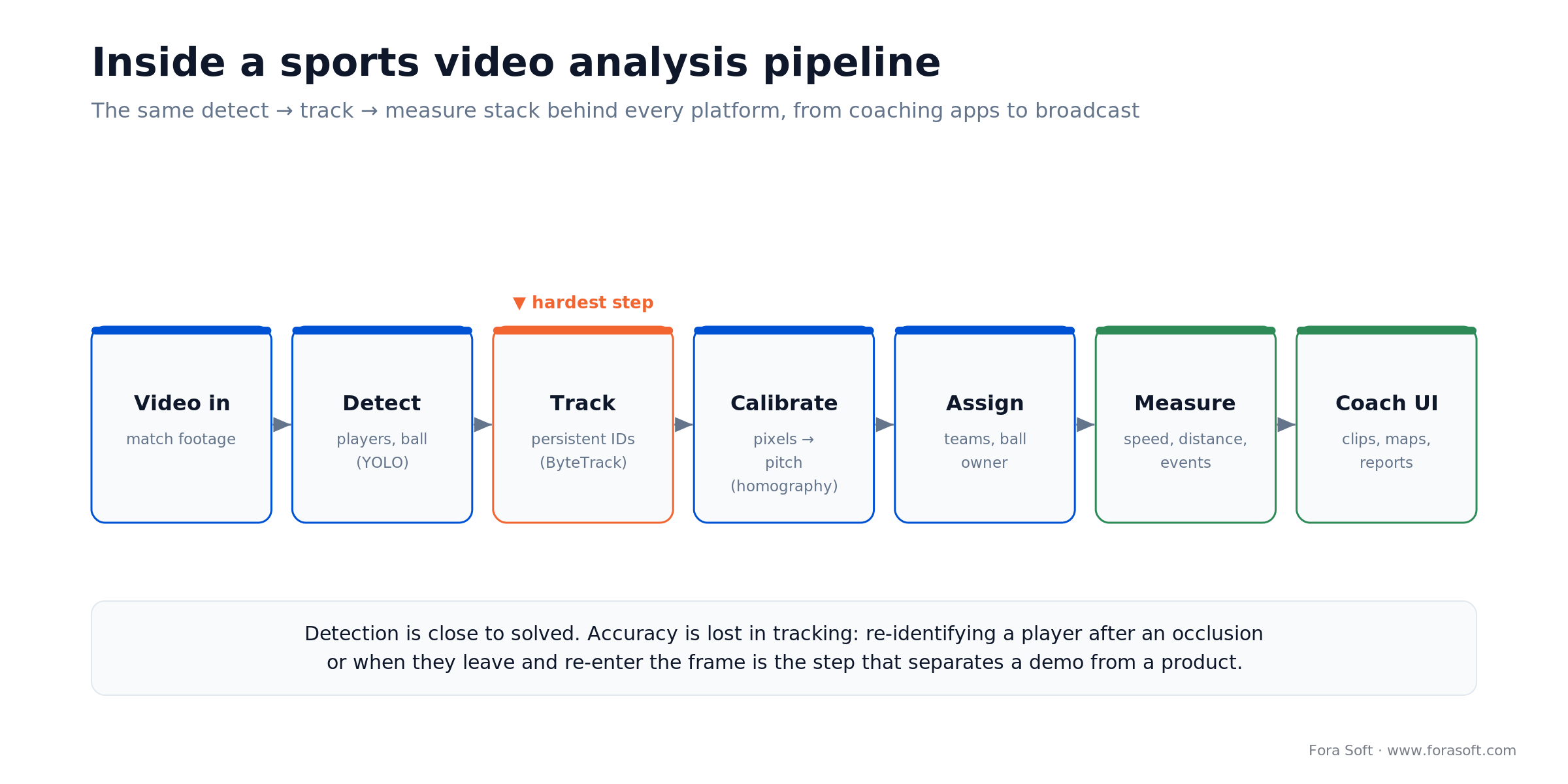
Figure 1. The detect → track → measure stack behind every platform. Tracking is the stage that separates a working demo from a shippable product.
Detect. An object detector finds players, referees, and the ball in each frame and draws a box around each one. The modern default is a model from the YOLO family, fine-tuned on sports footage; open datasets and reference pipelines from Roboflow's sports analytics work and academic groups make this the least risky step. Detection today is reliable enough that it's rarely the thing that breaks.
Track. A tracker links detections across consecutive frames and assigns each player a persistent ID, so player 7 stays player 7 from kickoff to whistle. ByteTrack and DeepSORT are the common choices. This is the hard part: when players collide, cross, or leave the frame, the tracker has to re-identify them afterward, and every mistake corrupts every metric downstream.
Calibrate and measure. Positions in pixels are useless for analytics — you need positions in metres on the pitch. That's the calibration step (the next section), after which speed, distance, possession, and formation fall out as arithmetic on real coordinates. Team assignment (jersey colour) and ball-possession logic run alongside it.
From camera pixels to a tactical map
Calibration is what turns a video into data. Every metric a coach cares about (how far a winger ran, how compact the defensive line is) needs positions measured in real-world metres, not screen pixels. Getting there is a geometry problem called homography.
A homography is a mathematical mapping that transforms points in the camera image onto a top-down model of the field. You anchor it to landmarks the system can recognise (the centre circle, penalty box corners, sidelines), and once it's solved, any player's pixel position projects onto a metric pitch. Soccer analysis typically models the pitch as a 105 m × 68 m rectangle, the standard full-size dimensions, so a player at a given pixel becomes a player at a given (x, y) in metres. The output is the 2D tactical map you've seen in broadcasts.
The catch is that a single moving or zooming broadcast camera re-solves this every few frames, and errors in the mapping become errors in every distance and speed you report. Fixed multi-camera rigs sidestep much of this with known, stable geometry, which is one reason pro tracking systems mount permanent cameras rather than relying on the broadcast feed. If you build, calibration reliability is where you'll spend real engineering time.
Reach for automatic calibration when: your camera moves or zooms (broadcast, single-operator club cameras). Reach for a fixed, pre-calibrated rig when you control the venue and want the most accurate positional data — it removes the least reliable part of the pipeline.
The metrics coaches and broadcasters actually use
Once you have tracked positions in metres, the analytics are mostly arithmetic on those coordinates over time. The value isn't any single number; it's picking the handful that change a decision for your sport and audience.
Physical metrics come straight from position and time: distance covered, top and average speed, accelerations, sprint counts, and time spent in speed zones. Spatial and tactical metrics come from where players are relative to each other: heatmaps, average positions, team width and depth, pressing lines, and passing networks. Event and outcome metrics layer models on top — expected goals (xG) from shot location and context, possession share, pass completion by zone. Broadcasters add a fourth bucket: graphics and augmentation, like a virtual offside line or a speed callout on a highlight.
Coaches at grassroots level mostly want clips and heatmaps; academies want physical load and positional discipline; pro clubs and media want the full tactical and event layer. This is exactly why a coaching app and a broadcast tracking system look like different products — they compute different ends of the same pipeline. If you're weighing which metrics justify a custom build, our overview of AI video analytics architecture and ROI walks through how to tie metrics to a return.
How accurate is it, really?
Accuracy depends almost entirely on the tracking and calibration, not the detection — and the honest answer is that it's very good in controlled setups and noticeably worse in messy real-world footage. Here are real numbers instead of “99% accurate” marketing.
On public benchmarks, tracking quality is measured with HOTA, a metric that separates how well you detect objects from how well you keep their identities straight. On the SoccerNet-Tracking dataset (the largest public soccer tracking benchmark, with 200 clips of 30 seconds and 225,375 annotated frames, introduced in 2022), recent systems report strong results. FootyVision reported a MOTA of 94.04% and a HOTA of 72.16% (ACM, 2024), and Deep HM-SORT reported 85.4 HOTA on SoccerNet-Tracking. The gap between a ~94% detection-heavy MOTA and a ~72% HOTA is the whole story: finding players is nearly solved, but keeping their identities correct through occlusions is where accuracy still leaks.
Purpose-built optical systems do far better because they control the cameras. A peer-reviewed validity study of TRACAB's optical tracking measured a position error (RMSE) of 0.08 m on its Gen5 system versus 0.09 m on Gen4 (PMC, 2020) — sub-decimetre, on a 105-metre pitch. That's the accuracy leagues pay enterprise money for, and it's not what you'll get from a single phone on a tripod. Set expectations by tier: a club camera gives coaching-grade tracking with visible occlusion errors; a pro rig gives officiating-grade data.
Reach for a fixed multi-camera setup when: you need positional accuracy you can trust for load management or officiating. A single moving camera is fine for review and rough heatmaps, but its calibration drift and occlusions make its distance and speed numbers directional, not exact.
Three tiers of sports video analysis
The market splits cleanly into three tiers, and matching your need to the right tier saves you from both overpaying and under-buying. Each tier captures footage differently, measures different things, and costs an order of magnitude more than the one below it.
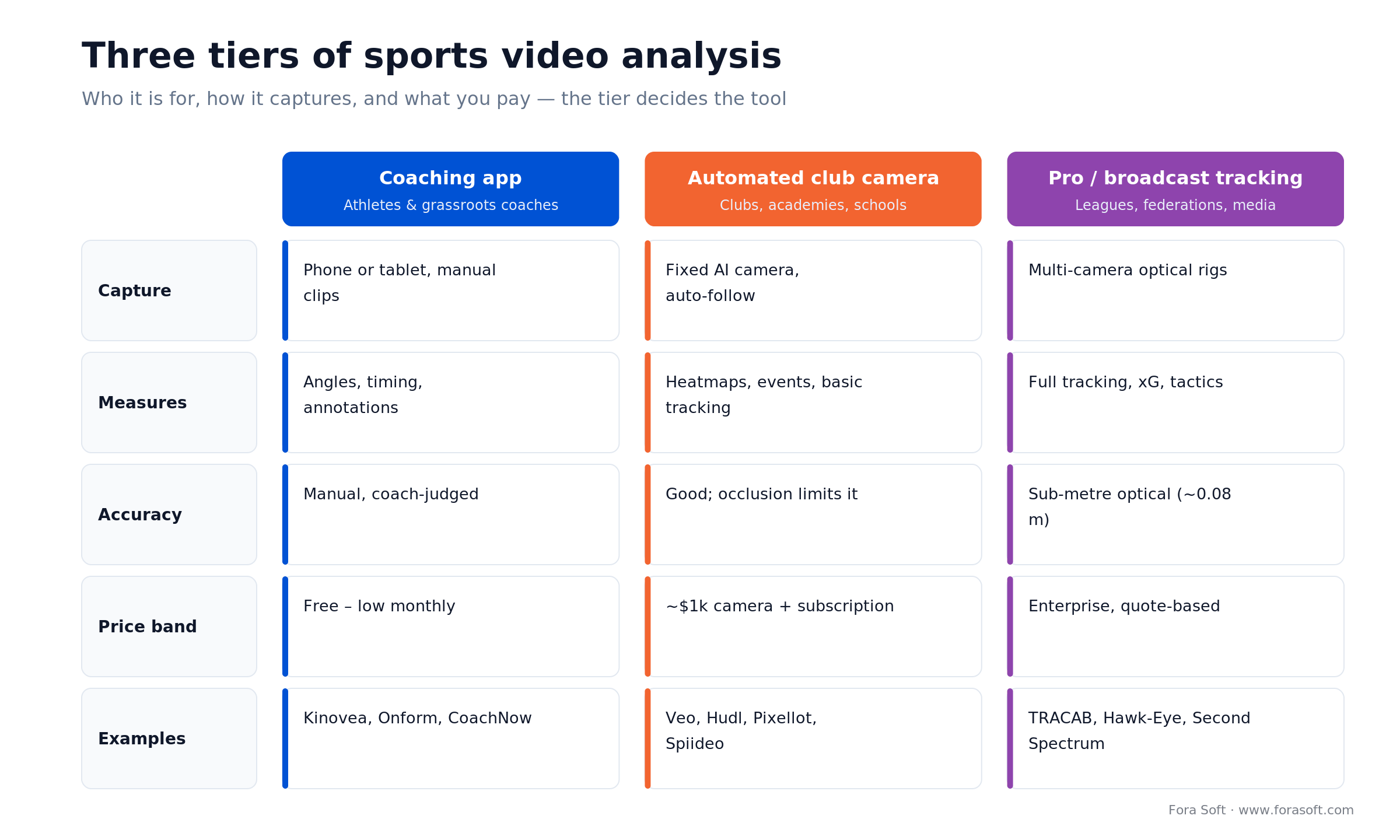
Figure 2. Who each tier is for, how it captures footage, what it measures, and the price band. The tier decides the tool.
Tier 1 — coaching apps. Phone- or tablet-based review tools for individual athletes and grassroots coaches. You film a clip, then draw, slow it down, compare side by side, and annotate. Kinovea, Onform, and CoachNow live here. Cheap or free, manual, no automatic tracking — and perfect for technique work.
Tier 2 — automated club cameras. A fixed AI camera that films the whole field and follows the action without an operator, then gives you tagged footage and basic analytics. Veo, Hudl, Pixellot, and Spiideo compete here. This is the sweet spot for clubs, academies, and schools: real automation for the price of a decent laptop plus a subscription.
Tier 3 — pro and broadcast tracking. Multi-camera optical rigs that deliver sub-metre tracking and the full tactical and event layer, sold to leagues, federations, and media. TRACAB (Stats Perform), Hawk-Eye (Sony), and Second Spectrum (Genius Sports) dominate. Enterprise pricing, permanent installs, officiating-grade data.
Which tier fits your program?
We'll map your sport, level, and goals to the right tier — and if none of the vendors fit, scope what a custom platform would take.
Optical tracking vs GPS wearables
Video isn't the only way to track athletes, and the choice matters if physical load is what you're after. The two approaches are complementary, not interchangeable: optical tracking watches from the outside, wearables report from the inside.
Optical (camera) tracking needs no hardware on the athlete, tracks everyone in frame including the ball and opponents, and is the only option for analysing broadcast or archive footage. Its costs are calibration and occlusion — and at the top end it's extraordinarily precise, with TRACAB measured at 0.08 m position RMSE. GPS and inertial wearables (Catapult, STATSports) sit on each athlete and are accurate to roughly a metre outdoors, sampling many times a second; they capture load, heart rate, and acceleration directly, but only for players wearing a device, and their signal degrades in roofed or semi-enclosed stadia where satellite reception is poor. Indoors, teams lean on the accelerometer and gyroscope rather than GPS.
The practical rule: use optical when you need to analyse the whole game and every player, including the opposition and the ball; use wearables when you need per-athlete physiological load and you can put a device on everyone. Elite clubs run both and reconcile them. If you're building, decide early which one your product depends on, because they drive completely different architectures.
Reach for wearables (not video) when: your priority is individual physical load (distance, heart rate, acceleration) and every athlete can wear a device. Reach for optical when you need opponents, the ball, tactics, or you're working from footage you didn't capture live.
The vendor field: Veo, Hudl, Pixellot, and more
Most teams don't need to build — they need to pick the right vendor. Here are the ones that matter, grouped by tier, with prices taken from vendor pages and public listings on 2026–07–15. Treat subscription figures as starting points; nearly all of these quote by team, sport, and add-on.
Veo is the default automated club camera. The Veo Cam 3 hardware is around $1,299 (a 5G model around $1,599), paired with a subscription tier — Starter (about 10 recording hours a month), Team (about 20 hours), or Club (unlimited hours, up to 10 teams) — plus optional add-ons for AI Analytics (player tracking, heatmaps; soccer only), Player Spotlight, and live streaming (Veo, 2026–07–15). It films the whole field, follows play automatically, and auto-detects events. Hudl is the incumbent in team sports software; its Focus Flex fixed camera runs around $1,999 plus a Hudl subscription, and Hudl also owns Sportscode for elite analysis and Wimu wearables (Hudl, 2026–07–15).
Pixellot pioneered the unmanned multi-camera rig that stitches a panoramic view and auto-produces broadcasts, highlights, and ads; the Pixellot Air starts around $949 plus a subscription reported in the $69–$167 per month range, with analytics via VidSwap (Pixellot listings, 2026–07–15). Spiideo bundles an automated SmartCam with its Perform analysis suite on an annual subscription reported around $3,800 per year for a single team and roughly $6,100 for a club package (Spiideo listings, 2026–07–15). At the free end, Kinovea is an open-source desktop tool for angles, timing, and frame-by-frame review — excellent for technique work, Windows-only, and entirely manual.
At the top, TRACAB (Stats Perform), Hawk-Eye (Sony), and Second Spectrum (Genius Sports) supply optical tracking and officiating data to leagues and federations. These are enterprise engagements with permanent installs and quote-based pricing — not something a club buys off a page.
| Vendor | Tier | Price (2026-07-15) | Where it wins / breaks |
|---|---|---|---|
| Kinovea | Coaching app | Free (open source) | Wins on technique review; breaks with no automation, Windows-only |
| Veo | Club camera | ~$1,299 cam + subscription | Wins on ease and coverage; deeper analytics are soccer-first add-ons |
| Hudl | Club camera + suite | ~$1,999 cam + subscription | Wins on team-sport ecosystem; can get pricey across modules |
| Pixellot | Club camera | ~$949 cam + ~$69–167/mo | Wins on auto-production and streaming; analytics via third party |
| Spiideo | Club camera + analysis | ~$3,800–6,100/yr | Wins on integrated capture + analysis; higher annual cost |
| TRACAB / Hawk-Eye | Pro / broadcast | Enterprise, quote-based | Wins on sub-metre accuracy; overkill and cost-prohibitive for clubs |
Prices from vendor pages and public listings, captured 2026–07–15; subscriptions are largely quote-based and change often. Confirm current figures with each vendor.
Build vs buy: which one fits you
For a single club analysing standard footage, buy — a vendor camera is cheaper and faster than anything you could build. You should build when the analysis software is itself your product, or when you need something no vendor sells. The decision comes down to four questions.
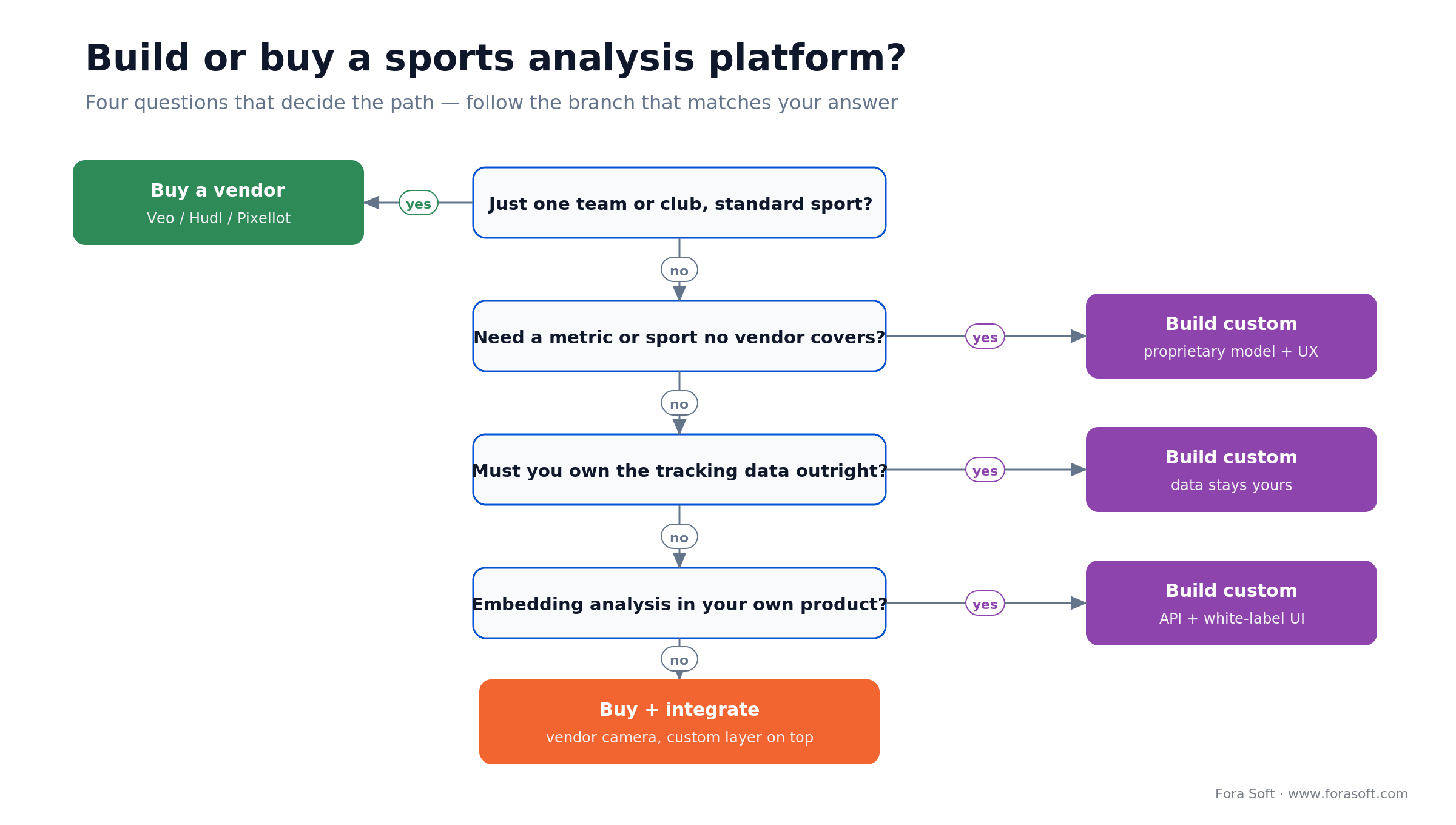
Figure 3. Four questions that decide the path. A “yes” on any of the lower three usually means build; otherwise buy or buy-and-integrate.
Buy a vendor if you're one team or club with a standard sport and you just want footage, clips, and basic analytics. Build custom when you need a metric or sport no vendor covers, when the tracking data has to be yours to own and commercialise, or when analysis is a feature inside your own app that you're selling to others. In between sits the most common serious project: buy and integrate — take a vendor's camera or a cloud detection model and build your own analytics and UX layer on top, so you get proven capture without reinventing computer vision.
That middle path is where we do most of our work, and it's usually the right call for startups building an analytics product: don't reinvent the detector, do own the metrics and the experience that make your product different.
What it costs: buy a camera vs build a platform
The two paths have completely different cost shapes, so comparing a headline price to a build quote is misleading. Buying is a recurring per-season cost; building is a one-time investment plus cheap marginal running costs. Here's the honest math for a single club, with prices dated 2026–07–15.
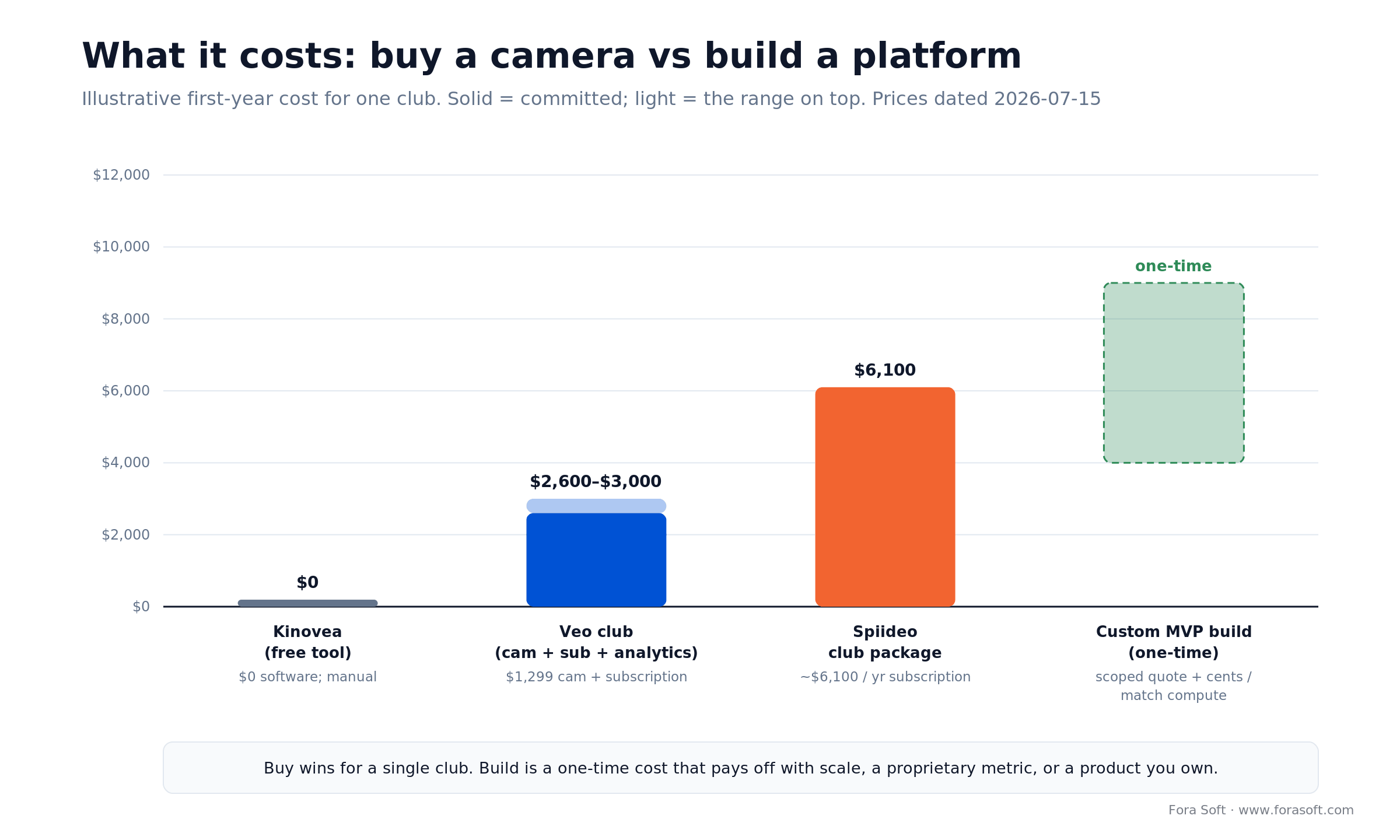
Figure 4. Illustrative first-year cost for one club. Buying wins for a single team; building is a one-time cost that pays off with scale or a product you own.
The buy path. A club going with Veo pays roughly $1,299 for the camera plus a Team-level subscription and the Analytics add-on, landing in the neighbourhood of $2,600–$3,000 in the first year, and the subscription each year after. Spiideo's club package sits higher, around $6,100 a year, with capture and analysis bundled. Kinovea is $0 in software if you're happy filming and tagging by hand. These are ballpark figures — every vendor quotes by sport, team count, and add-ons.
The build path. A custom analysis MVP — detection, tracking, calibration, and a coach-facing web app running on cloud GPU inference — is a one-time engineering cost, after which the marginal cost of analysing a match is cents to low dollars of compute on a mid-range cloud GPU. We won't publish a fixed build number here because it swings with sport, metrics, and scope; the honest move is a scoped quote. The point of the chart is the shape: a single club almost never recoups a build against a $3,000-a-year camera. A company selling analysis to hundreds of clubs, or a federation running many venues, crosses that line quickly.
Reach for a build when: the per-club economics flip — you're serving many teams, embedding analysis in a product you sell, or you need a proprietary metric that becomes your moat. For one team, the camera wins on total cost including your time.
The anatomy of a custom platform
If you do build, the system has a predictable shape, and knowing it up front keeps the scope honest. It's five layers, and the risk concentrates in the middle two.
Capture and ingest. Cameras (fixed rig or a vendor camera you integrate) feed video into storage and a processing queue. Decide here whether you analyse live or after the match — live adds latency budgets and a lot of infrastructure. Inference (detection + tracking). A fine-tuned detector and a tracker run on GPU, producing per-frame boxes and persistent IDs. This is where model quality and occlusion handling make or break the product, and where you'll iterate most. Calibration and spatial engine. Homography maps pixels to pitch coordinates; this layer turns tracks into analysable positions and is the second-biggest source of error.
Analytics and models. Positions become metrics (distances, zones, heatmaps, xG, events) stored so they're queryable and comparable across matches. Presentation. The coach- or fan-facing app: video synced to a 2D map, clip generation, dashboards, exports. Because so much rides on the model layer, teams building here lean on managed GPU inference and proven open detectors rather than training from scratch; the deep dive on how these systems are engineered lives in our Learn: AI for video engineering section.
Mini-case: a detection-and-tracking pipeline in production
We want to be precise about what we can claim. We don't run a sports-tracking service, but we've shipped the exact computer-vision plumbing a sports analysis platform needs: detection and multi-object tracking on live video, calibrated to real-world coordinates, feeding a product interface. Here's the shape of that work.
On our Mindbox project, the brief was real-time detection on video streams with alerts fired when specific events happened on screen. The hard problems were the same ones a sports platform hits: running inference fast enough to be useful, holding stable identities on moving objects as they occlude each other, and turning raw detections into events a non-technical user trusts. We built the detection and tracking on a YOLO-style detector, tuned the tracker for the client's footage, and wrapped it in a UI that surfaced only what mattered rather than a firehose of boxes.
The transferable lesson for sports: the demo that detects players in a clean clip is a week of work; the product that keeps their identities correct through a full, messy match and produces numbers a coach will act on is the rest of the project. That's the part vendors have spent years on, and the part any custom build has to respect. If you want to see whether your idea sits on the easy or the hard side of that line, book a call and walk us through it.
Which path to choose: five questions
Run these five questions before you spend anything. They'll put you in the right tier and settle build vs buy faster than any feature comparison.
| Your situation | Pick |
|---|---|
| Individual technique review, tight budget | Coaching app (Kinovea, Onform) |
| One club wants whole-game footage + basic analytics | Automated club camera (Veo, Hudl) |
| Need officiating-grade, sub-metre positional data | Pro optical tracking (TRACAB, Hawk-Eye) |
| Selling analysis to many teams, or need a proprietary metric | Build custom (own the model + UX) |
| Want proven capture but a differentiated product | Buy + integrate (vendor camera, custom layer) |
If your answers land you in the bottom two rows, the next step is a scoping conversation, not a longer feature spreadsheet — that's exactly the audit we do on a first call.
Five mistakes that wreck a sports analysis build
These are the five we see sink custom projects and over-ambitious buys. Each one is avoidable if you name it early.
1. Budgeting for detection, not tracking. Teams demo a detector on a clean clip, feel great, and under-scope the re-identification and calibration work that's 80% of the effort. Plan for the hard middle.
2. Ignoring calibration drift. With a moving camera, homography errors quietly corrupt every distance and speed. If accuracy matters, control the camera geometry or invest heavily in reliable auto-calibration.
3. Trusting marketing accuracy. “99% accurate” usually means detection on easy footage. Ask for HOTA or positional RMSE on realistic conditions, and de-rate for your camera setup.
4. Building live when you needed post-match. Real-time analysis multiplies infrastructure and latency headaches. Most coaching value is post-match; only build live if the use case truly demands it.
5. Skipping the consent and ownership question. Deploying cameras on minors, or shipping a product that stores identifiable player data, without settling consent and data rights first is a legal problem waiting to surface.
Scoping a custom sports analysis platform?
Bring your sport, your metrics, and your accuracy target. We'll tell you what's a week of work, what's the hard 80%, and what it realistically costs to build.
Consent, likeness, and who owns the data
Player tracking creates data about identifiable people, so consent and ownership are engineering requirements, not legal footnotes. Three issues come up on nearly every project, and you should settle them before deployment.
Biometric and personal data. Tracking that identifies individuals (especially facial recognition, but potentially jersey-number identification too) can fall under data-protection law such as the GDPR in Europe and biometric statutes like Illinois's BIPA in the US. Facial recognition is legally heavier than anonymous spatial tracking, so if you can identify players by number or manual assignment instead of face, you reduce your exposure. This is a “talk to counsel” area, not a “figure it out later” one.
Youth footage. A huge share of the club-camera market is youth sport, where the subjects are minors. That means guardian consent, clear retention limits, and tight access control on the footage. Build these in from day one; retrofitting consent onto a system full of children's video is painful and risky.
Data ownership. In professional sport, the rights to tracking and event data are commercially contested between leagues, clubs, and vendors. If you build or buy, write down who owns the resulting data and what each party may do with it before a camera records a minute — it's far cheaper to settle on paper than in a dispute.
When not to build your own
Don't build if you're a single club, a school, or an academy whose goal is better coaching. A Veo or Hudl setup will give you more, sooner, for less than a custom project ever could, and you'll spend your budget on coaching instead of computer vision. Buying is the right answer for the large majority of teams, and there's no prize for building infrastructure a $3,000 camera already runs.
Don't build if you haven't validated demand for the specific analysis you have in mind. The hardest part isn't the first demo; it's the last 20% of accuracy and the ongoing model maintenance. If you're not sure people will pay for your metric, integrate a vendor camera or a cloud detection API first, prove the value, and only then invest in owning the pipeline. And don't build live real-time analysis when a post-match workflow would serve the coach just as well — you'd be paying for latency nobody asked for.
What to measure once it's live
Whether you bought or built, judge the system on three buckets of metrics, not on how impressive the demo looked.
Accuracy. Tracking identity accuracy (HOTA or ID switches per match) and positional error against a known reference. If you can't measure it, you can't trust the analytics built on it. Usefulness. Adoption by coaches, clips actually watched, decisions changed — the product only matters if people use it. A beautiful dashboard nobody opens is a failed build. Operational cost and reliability. Compute cost per match, processing turnaround time, and how often a match fails to process and needs a human. These three tell you whether the system is genuinely working or just running.
FAQ
What is sports video analysis software?
It's software that turns match footage into something actionable: tagged clips, player and ball tracking, movement metrics, heatmaps, and tactical maps. It ranges from simple phone apps for annotating clips to systems that reconstruct every player's position on the pitch and compute speed, distance, and tactics from it.
What's the best sports video analysis software?
It depends on your tier. For individual technique review, Kinovea (free) or Onform. For a club that wants whole-game footage plus analytics, Veo or Hudl. For leagues needing sub-metre officiating data, TRACAB or Hawk-Eye. There's no single best — match the tool to whether you need review, tracking, or full analytics.
Is there free sports video analysis software?
Yes. Kinovea is free and open source, and it's genuinely good for angles, timing, and frame-by-frame technique review. It's Windows-only and fully manual, with no automatic tracking or whole-game capture, so it suits individual coaching rather than team-wide analytics.
How accurate is automated player tracking?
Detection is nearly solved; tracking identity is where accuracy leaks. On the public SoccerNet-Tracking benchmark, recent systems report around 72–85 HOTA (2024), while purpose-built optical systems like TRACAB achieve about 0.08 m positional RMSE (2020). A single moving camera gives coaching-grade estimates; a fixed multi-camera rig gives officiating-grade data.
Do I need a special camera, or can I analyse broadcast footage?
Both work, with trade-offs. Broadcast or phone footage can be analysed, but a single moving camera makes calibration harder and hurts positional accuracy. A fixed, pre-calibrated camera (or multi-camera rig) removes the least reliable part of the pipeline and is why club and pro systems ship their own hardware.
Should we build custom sports analysis software or buy a vendor?
Buy if you're a single club with a standard sport — it's cheaper and faster. Build when analysis is your product, when you need a metric or sport no vendor covers, or when you must own the data. A common middle path is to buy a vendor camera and build your own analytics and UX layer on top.
Optical tracking or GPS wearables — which should we use?
Use optical (camera) tracking when you need the whole game, opponents, and the ball, or you're working from footage you didn't capture. Use GPS/inertial wearables when your priority is per-athlete physical load and everyone can wear a device. Elite clubs run both. Optical tops out sub-metre; GPS is around a metre outdoors and weaker under roofs.
What technology powers AI sports analysis?
The standard stack is an object detector (usually a YOLO-family model) to find players and the ball, a tracker (ByteTrack or DeepSORT) to hold persistent IDs across frames, homography to map camera pixels onto real pitch coordinates, and analytics on top to compute speed, distance, possession, and events. The hard engineering is in tracking and calibration, not detection.
What to read next
Sports
Fan engagement platforms for sports teams
Analysing the game is one product; engaging the crowd is another.
Analytics
AI video analytics: architecture and ROI
How to tie video analytics metrics to a real return.
Computer vision
Video recognition software development
The detection and recognition stack underneath sports tracking.
Detection
Object-recognition camera solutions
A worked example of detection and tracking in production.
ML on video
Machine learning for video emotion analysis
Another applied CV pipeline, from frames to insight.
Ready to analyze the game?
The right sports video analysis software isn't the one with the flashiest demo — it's the one that matches your tier and your goal. A coaching app for technique, an automated camera for a club, pro optical tracking for a league, or a custom build when analysis is the product you're selling. Underneath all of them is the same detect-track-measure pipeline, and the same truth: detection is easy, and keeping every player's identity correct through a full match is the work.
Get three things right and the decision makes itself: pick the tier that fits your actual need, be honest about the accuracy your camera setup can deliver, and only build when the per-club economics or a proprietary metric justify it. Do that, and you'll spend your money on insight instead of infrastructure.

The book · Volume 6 of 7
AI for Video: A Complete Guide to Intelligence in Video Products: From Models and Inference to Computer Vision, Speech, Search, and Generative Video
Following twenty-two players through occlusions is the hard part this guide describes, and it is a computer vision problem first. Volume 6 covers detection, tracking, segmentation and pose estimation, plus deployment topologies and search across a video archive. Sports-tech teams use it to plan a pipeline that stays accurate for the full match. Written by Nikolay Sapunov, CEO at Fora Soft.
Read it on Amazon →Kindle & paperback · Fora Soft Video Engineering Handbook
Let's build your sports analysis platform
250+ projects since 2005, including production detection-and-tracking pipelines on live video. Bring your sport and your goal — we'll tell you whether to buy, integrate, or build, and what it'll really cost.