


Key takeaways
• Dubbing and lip sync are two different jobs. A voice dub swaps the audio into a new language; a visual dub (lip sync AI) also re-renders the mouth so the lips match the new words. The second one is what makes translated video look native instead of overdubbed.
• The pipeline is four models in a row. Speech-to-text, translation, text-to-speech with voice cloning, then lip sync. None of them is the hard part on its own. The hard part is timing.
• Isochrony makes or breaks the dub. German runs about 25% longer than English for the same sentence. If the translation ignores that, the lips finish and the audio keeps talking. The fix is length-aware translation, not faster playback.
• Managed tools cost $0.33–$3.00 a finished minute; a component build runs about $0.12 in raw API and compute. The gap is the UI, the ops, and the review workflow, not magic. Build only when volume and control justify carrying it yourself.
• We build the whole loop. Fora Soft ships multilingual media systems (TransLinguist runs live interpretation across 62 languages), and we'll tell you when to just buy Rask or ElevenLabs instead of building. If the text-to-speech stage is the piece you’re choosing, our ElevenLabs alternatives guide compares the voice engines by price and latency.
Why Fora Soft wrote this playbook
Search “lip sync AI” and you get a wall of free tools that promise a talking video in one click. None of them tells you what happens when you try to localize a 300-hour training library into eight languages and the German dub runs a beat behind the mouth in every clip. That's the real job, and it's an engineering problem, not a button. We wrote the guide we wish those tool pages linked to: how dubbing and lip sync actually work, where they break, and when you should pay a vendor instead of building.
Fora Soft has built real-time video and AI systems since 2005: 250+ projects, 50 people, all of it in video, streaming, and AI. Multilingual media is close to home. On TransLinguist we run live AI interpretation across 62 languages, cascading Deepgram, Google, and Speechmatics for speech recognition and cutting end-to-end latency from 900 ms to 380 ms while holding word error under 6%. Dubbing recorded video is the same pipeline shape with the clock relaxed: speech in, AI in the middle, media out.
This is a build-and-buy guide, not a sales page. We'll walk the four-stage pipeline, the isochrony trap that sinks most dubs, the open-source lip-sync models, a tool comparison with 2026 prices, and the cost math, then a five-question test for whether to build at all. If you'd rather skip to a scoped estimate, our AI integration team does this work.
What AI video dubbing and lip sync actually mean
AI video dubbing is replacing a video's spoken audio with a new language generated by machine models, ideally in the original speaker's voice. AI lip sync is the extra step that re-renders the mouth so the lips match the new audio. You can do the first without the second, and most cheap tools do exactly that. The result is a dub where the voice is right but the mouth is still speaking the source language, which reads as slightly off even to viewers who can't name why.
So there are two products hiding under one search term. Voice dubbing gives you a translated soundtrack laid over the original picture. Visual dubbing, also called lip-sync dubbing, alters the pixels of the mouth so a viewer sees the speaker forming the translated words. Visual dubbing is harder, costs more, and is the thing people mean when they say a dub “looks native.” Flawless and a handful of studios have built whole companies on that gap.
Video localization is the umbrella term for the business goal: making one piece of content work for another language and culture. Dubbing and lip sync are two tools inside it, alongside subtitles, on-screen text translation, and cultural adaptation. Getting the words right is table stakes. Getting the timing and the mouth right is where the engineering lives.
Dubbing recorded video vs translating live video
These are different problems, and confusing them wastes money. Dubbing a recorded file is an offline batch job: you have the whole clip, so you can transcribe it, translate carefully, regenerate the voice, and re-render the lips with quality as the only goal. Translating a live call or stream is a real-time job where every stage has a latency budget and there's no second pass. The models overlap, the systems don't.
Here's the practical split. If you're localizing a video library, a course catalog, marketing clips, or a YouTube back-catalog, you want dubbing: patient, high-quality, review-friendly. If you're captioning a live webinar or interpreting a support call as it happens, you want a real-time pipeline, and that's a separate architecture we cover in our real-time video translation guide and our piece on AI translation for live streaming.
This article is about the offline kind. The relaxed clock changes everything: you can run a bigger translation model, do multiple lip-sync passes, put a human reviewer in the loop, and spend two seconds per frame if the output earns it. That freedom is why dubbed video can look better than live translation ever will, and why the quality bar buyers hold you to is higher.
Why localizing video at scale is still hard in 2026
The demand is real and growing. The video localization market sits around $4.02 billion in 2026, dubbing and voice-over near $4.94 billion, and the slice that's specifically AI dubbing tools grew from roughly $1.15 billion in 2025 to $1.35 billion in 2026 (market estimates from Business Research Insights and Research and Markets, 2026). YouTube poured fuel on it: multi-language audio rolled out to millions of creators from September 2025, auto-dubbing reached all eligible creators in 27 languages by February 2026, and channels with extra audio tracks now pull a quarter or more of their watch time from non-primary languages.
So why isn't it solved? Because the easy 80% and the hard 20% look identical in a demo. A single talking head reading clean script dubs beautifully today. Then reality arrives: two people talking over each other, a laugh mid-sentence, a brand name that must not be translated, on-screen text baked into the frame, a whispered aside, a language whose script runs right-to-left. Every one of those is a place a naive pipeline produces something that's 90% right and unmistakably wrong.
And the failures are the kind humans notice instantly. We are wired to read faces, so a mouth that's a few frames out of sync feels uncanny even when the translation is perfect. That's the trap of dubbing at scale: the last 10% of quality is where trust lives, and it's exactly the part the tools quietly skip. The rest of this guide is about that 10%.
The dubbing pipeline: four stages from source to lip sync
An AI dub is four models wired in sequence. Speech-to-text (ASR) turns the original audio into a transcript with timestamps. A translation model rewrites that transcript in the target language. A text-to-speech model with voice cloning speaks the translation in the original speaker's timbre. And a lip-sync model re-renders the mouth to match the new audio. Voice dubbing stops after the third stage; visual dubbing adds the fourth.

Figure 1. The four-stage dubbing pipeline. Voice dubbing ends at text-to-speech; visual dubbing adds a lip-sync render so the mouth matches the new language.
The thing that separates a good pipeline from a demo is what happens between the stages. Timestamps from the ASR have to survive translation so the dub lands on the right frames. Speaker labels have to follow each voice so a two-person scene doesn't collapse into one narrator. The translation has to know how long each line is allowed to be before it's even written. Skip that plumbing and you get four good models producing a bad dub.
We treat the transcript as the source of truth and carry a timing track through every stage. The original speaker's word timings define the windows; the translation fills them; the voice fills the audio; the lip-sync fills the mouth. Get that contract right and each model can be swapped for a better one later without rewriting the system. Get it wrong and every upgrade means starting over.
Sitting on a video library you can't localize?
We'll map your content, languages, and quality bar to a pipeline and a real number in one call.
The isochrony problem: making translated speech fit the mouth
Isochrony is the requirement that the dubbed speech occupies the same time as the original, so the mouth movements still line up. It's the single biggest reason dubs look wrong, and it has nothing to do with the models being weak. It's a length problem. The same sentence takes a different amount of time to say in every language, and the difference is large.

Figure 2. A literal translation overruns the on-screen mouth window; length-aware translation plus a micro time-stretch lands lips and audio together.
Take a line that's 1.4 seconds in English. Translate it literally into German and it might need 1.9 seconds to say. Now the lips stop moving while the audio keeps going, and the illusion collapses. Speed the audio up to fit and the voice sounds chipmunked. Neither is acceptable, so the real fix happens upstream: the translation itself has to be written to a length budget, rephrasing to hit the target duration while keeping the meaning. Researchers call this length-aware or isochronic translation, and it's an active area (see the 2024 work on lip-synchrony in audio-visual speech-to-speech translation).
In production you combine three levers: a translation prompted or trained to match syllable counts, a small amount of time-stretching that stays under the ear's detection threshold, and a lip-sync model that absorbs the last few frames of slack. Get the translation length right and the other two barely have to work. Ignore it and no lip-sync model on earth will save the shot. This is why the best dubbing systems spend most of their engineering budget on the translation stage, not the flashy mouth-rendering stage.
How AI lip sync works: the model families
A lip-sync model takes a face and an audio track and repaints the mouth region so it looks like it's speaking that audio. The whole field traces back to Wav2Lip, the 2020 paper bluntly titled “A Lip Sync Expert Is All You Need,” which used a pre-trained sync discriminator to force the generated mouth to match the sound. It's still the workhorse: fast, reliable timing, and a huge community, at the cost of a soft, low-resolution mouth by 2026 standards.
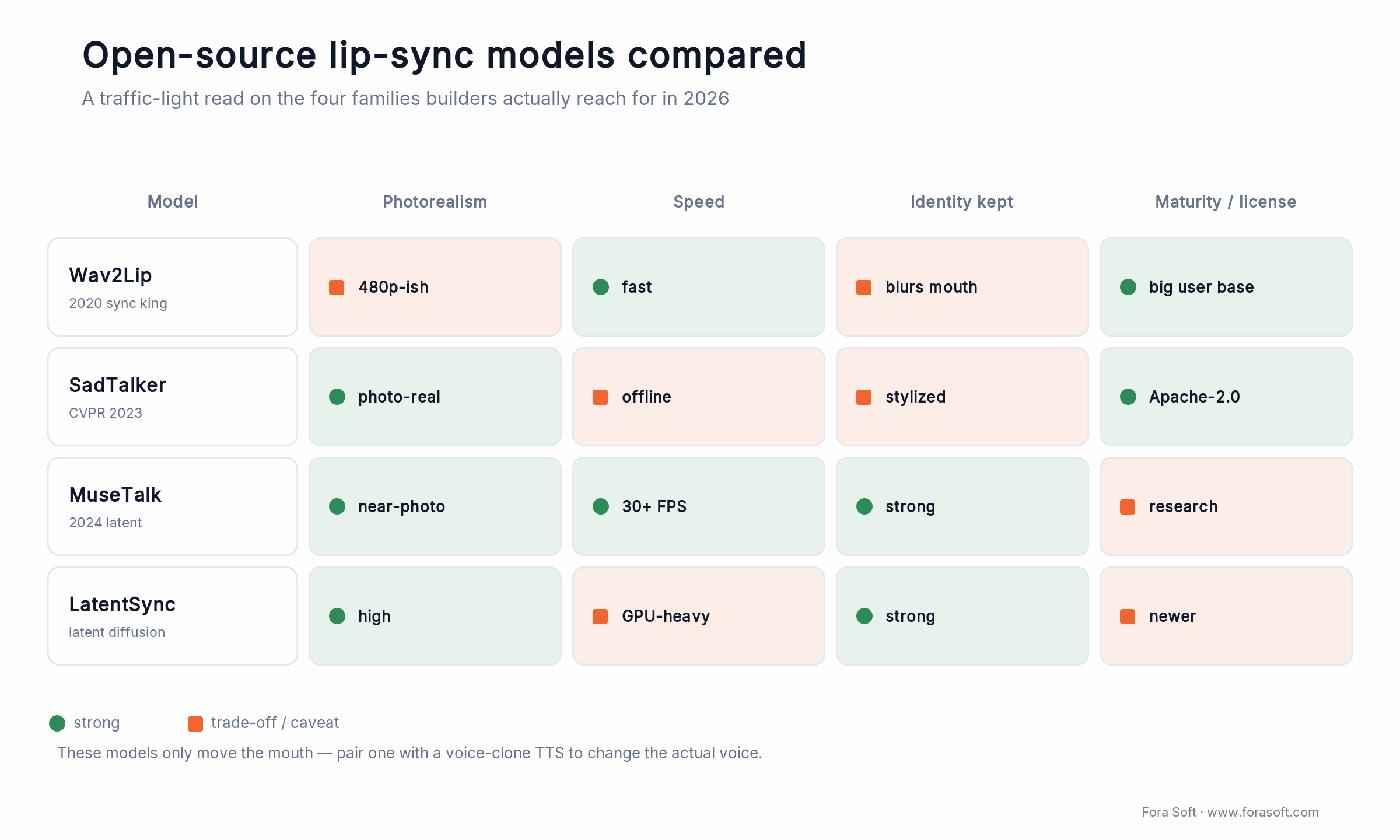
Figure 3. The four open-source lip-sync families builders reach for in 2026, read as a traffic-light matrix. These models only move the mouth; the voice comes from a separate text-to-speech stage.
The newer families trade speed for realism. SadTalker (CVPR 2023) animates a single portrait with head motion and expression, which looks more alive than a mouth-only model but can read as stylized, and it runs offline. MuseTalk, a 2024 latent-space model, gets near-photorealistic results at 30+ frames per second by inpainting the mouth in a compressed representation, which is why it's become the go-to for anyone who wants quality without a render farm. LatentSync pushes realism further with diffusion in latent space and strong identity preservation, at a heavier GPU cost. There's no single winner; there's a fit for your resolution, speed, and hardware budget.
One thing every one of these models has in common: they change the mouth, not the voice. The voice is a separate text-to-speech-plus-cloning stage, which is why we treat voice cloning and synthesis as its own discipline. Pair a strong voice clone with a weak lip-sync model and viewers forgive it; pair a great mouth with a robotic voice and they don't.
Reach for open-source lip sync when: you have GPU capacity and a real volume of minutes, you need to control resolution and licensing, and a two-to-three-week integration is cheaper than a per-minute fee you'll pay forever.
Reach for a managed lip-sync API when: your volume is low or spiky, you want a polished mouth today without hiring an ML engineer, and $0.30–$3.00 a minute is cheaper than the team it takes to run your own.
Measuring lip-sync quality: LSE-C, LSE-D, and the human eye
You can't improve what you can't measure, and “looks good to me” doesn't survive a 300-hour library. The standard automatic metrics come from SyncNet, the same discriminator Wav2Lip trained against. LSE-C (Lip Sync Error – Confidence) scores how strongly the audio and the mouth correlate, and higher is better. LSE-D (Lip Sync Error – Distance) measures how far apart the audio and lip representations sit, and lower is better. The useful trick is that neither needs a ground-truth video, so you can score a fresh dub automatically the moment it renders.
In practice we gate a batch on these numbers: any clip whose LSE-D drifts above a threshold gets flagged for a human before it ships. That catches the systematic failures, the scenes where the model lost the face or the timing slipped, without a person eyeballing every second. It's the same discipline we apply to speech systems, where audio quality metrics like PESQ and POLQA turn “sounds fine” into a number you can track.
The honest caveat: a good LSE score is necessary, not sufficient. The metrics reward mouth-audio correlation, but they don't judge whether the voice carried the right emotion, whether the translation kept the joke, or whether a brand name survived. Those still need a human, ideally a native speaker. Automated metrics narrow the review to the clips that need it; they don't remove the reviewer.
Where localization pays off, and where subtitles win
Dubbing earns its cost where the face and voice carry the value: e-learning and corporate training, product demos and marketing, YouTube channels chasing watch time in new markets, and any content where a viewer's hands or eyes are busy. In those cases a dub lifts completion and comprehension in ways subtitles can't, because the viewer never has to choose between reading and watching.
Subtitles win more often than dubbing vendors admit. They're cheaper, faster, fully reviewable, and preferred by many audiences for film and prestige content where the original performance matters. If your content is dialogue-light, highly technical, or aimed at viewers who value the original voice, subtitles plus translated on-screen text may be the whole answer. The smart move is often both: subtitle everything, dub the titles that justify it.
A rule we give clients: dub where the voice is the product, subtitle where the words are. A sales demo where warmth closes the deal wants a dub. A dense API walkthrough that people scrub through wants subtitles. Name the outcome you're buying before you pick the technique, and the budget stops leaking.
Build vs buy: managed dubbing vs your own pipeline
For most teams starting out, buy. A managed tool like ElevenLabs, HeyGen, or Rask turns a video into a dubbed one through a UI, with lip sync as a toggle, and you're shipping the same afternoon. You pay per minute, you accept their quality ceiling and their language list, and you skip the entire problem of running models. For a few hundred minutes a month, that's the right call and it isn't close.
You build when one of three things breaks the managed model: volume that makes per-minute fees hurt, control you can't get from a UI (a custom glossary, a specific voice, a compliance boundary, a private deployment), or integration into a product where dubbing is a feature your users trigger, not a task your team does. At that point you're assembling the four stages yourself, choosing a vendor API or an open-source model at each one, and owning the orchestration, the review workflow, and the GPUs.
The middle path is what we build most often: buy the AI, own the pipeline. Use ElevenLabs or Deepgram for speech, a strong LLM for length-aware translation, a cloned voice, and either a managed lip-sync API or a self-hosted model, all stitched into your system with your glossary and your human-review step. You get most of the control of a full build without training a single model, and you can swap any stage when a better one ships.
Reach for a managed dubbing tool when: you dub under a few thousand minutes a month, the built-in voices and languages cover you, and you'd rather pay per minute than staff a pipeline.
Reach for a custom pipeline when: dubbing is a feature inside your product, you need a specific voice or glossary or private deployment, or your monthly volume is high enough that per-minute fees dwarf a small team plus GPUs.
The tools compared: ElevenLabs, HeyGen, Rask, sync, custom
Here's the honest read on the tools most teams shortlist, with prices pulled from each vendor's own page in July 2026. The big fork is whether you need lip sync at all: audio-only dubbing is cheap and everywhere; visual dubbing with a re-rendered mouth is where the price and the quality both jump.
| Tool | Lip sync | Price (2026) | Where it wins | Where it breaks |
|---|---|---|---|---|
| ElevenLabs Dubbing | No (voice only) | $0.33–$0.50 / min | Best voice quality, 29 languages, clean API | Mouth stays in the source language |
| HeyGen Video Translate | Yes | 5 credits/min dub + lip sync | Strong talking-head lip sync, avatars | Struggles on multi-speaker, busy scenes |
| Rask AI | Yes (Creator Pro+) | $150/100 min; $3/extra min | 135 languages, multi-speaker, SOC 2 | Lip sync gated behind higher tier |
| sync. (sync.so) | Yes (specialist) | API, usage-based | Visual-dubbing quality, developer API | You still build the rest of the pipeline |
| Custom (buy AI, own pipeline) | Yes (your model) | ~$0.12/min raw + build | Full control, glossary, private deploy | Needs engineering and GPU ops |
The pattern to notice: ElevenLabs gives you the best voice but stops at audio, HeyGen and Rask give you a finished lip-synced dub through a UI, sync gives developers a best-in-class mouth to build around, and a custom pipeline gives you everything at the price of owning it. Most teams start on Rask or HeyGen, hit a wall on volume or control, and graduate to buying the AI and owning the pipeline. For a broader view of the vendor field, our roundup of AI translation companies covers the localization partners too.
Outgrowing your dubbing tool?
When per-minute fees or a missing feature start to hurt, we'll design the pipeline that replaces them.
What dubbing actually costs: worked math per finished minute
Per finished minute, a component build costs roughly $0.12 in raw API and compute, while managed all-in-one dubbing runs $0.33 to $3.00. That's the number that decides build vs buy, so here's the arithmetic behind it rather than a vague range.

Figure 4. One finished minute, three ways. Component build is raw API plus compute; managed prices buy you the UI, the ops, and the review workflow.
The component build, per finished minute: speech-to-text on ElevenLabs Scribe is $0.22 an hour, about $0.004 a minute. Length-aware translation through an LLM is roughly a cent. Text-to-speech with a cloned voice at ElevenLabs' $0.10 per 1,000 characters, and about 900 characters of speech in a minute, is close to $0.09. A self-hosted lip-sync pass on an AWS g6.xlarge (one NVIDIA L4 at about $0.80 an hour, so $0.013 a minute) plus retries lands near $0.02. Add them up and you're around $0.124 a minute in raw cost.
Now the managed side. ElevenLabs Dubbing is $0.33 a minute with a watermark, $0.50 without, but that's voice only, no lip sync. Rask AI at the Business tier is $750 for 500 minutes, or $1.50 a finished minute with lip sync included, climbing to $3.00 on extra minutes. So the managed premium over raw cost is real: you're paying two-and-a-half to twenty-five times the component price for the convenience.
Here's the catch that keeps most teams on managed tools longer than the raw math suggests: that $0.12 excludes engineering, the human review step, idle GPU time, and the failures you re-run. A managed price buys all of that plus a UI. The crossover only tips toward building when your sustained monthly minutes are high enough to amortize a small team and reserved GPUs, and it moves with your languages and your quality bar. We keep those estimates conservative, because a dubbing pipeline that looks cheap on a spreadsheet and expensive in production helps nobody.
Mini-case: multilingual media at scale
TransLinguist came to us needing live interpretation across dozens of languages at a latency users would tolerate on a call. It isn't a dubbing product, and we'll say that plainly: it interprets in real time rather than dubbing recorded files. But it runs the exact pipeline shape this article describes, speech in, AI in the middle, media out, at production scale, which is why it's our clearest proof of how we'd build a dubbing system.
The plan was buy-then-build. Rather than train speech models from scratch, we cascaded commercial recognizers, Deepgram, Google, and Speechmatics, and routed each language to whichever vendor scored best on it, then invested our own engineering only where the vendors fell short. That's the same instinct we bring to dubbing: buy the AI at each stage, own the orchestration, and spend custom effort at the one bottleneck that actually moves quality.
The result was end-to-end latency down from 900 ms to 380 ms across 62 languages while holding word error under 6%. For a dubbing pipeline the clock is friendlier, but the discipline transfers directly: measure every stage, route to the best vendor per language, and keep a human on the clips the metrics flag. Want a similar assessment of your localization stack? Book a 30-minute call and we'll walk your content and languages.
A decision framework: build or buy in five questions
Run your project through these five questions before you write a line of code or sign a subscription. The answers usually point clearly one way.
1. How many minutes a month? Under a few thousand, buy a managed tool and stop reading. In the tens of thousands and climbing, the per-minute fees start to fund a pipeline, and building deserves a serious look.
2. Do you need the mouth, or just the voice? If audio-only dubbing is enough, your problem is far cheaper and ElevenLabs-class tools solve it. If you need visual dubbing, budget for the lip-sync stage and the quality reviews it demands.
3. Is dubbing a task or a feature? If your team dubs finished videos, a UI is fine. If your users trigger dubbing inside your product, you need an API and orchestration you control, which pushes you toward building.
4. How specific are your voice, glossary, and compliance needs? Generic voices and public models cover a lot. A required brand voice, a locked terminology list, or a private, no-data-retention deployment usually can't be bought off the shelf.
5. Who reviews the output? Every serious localization program has native-speaker review. If you don't have that muscle, a managed tool with a review UI beats a custom pipeline with none. If you're building, budget the reviewers before the GPUs. Not sure where you land? That's a good first call with our AI integration team.
Not sure whether to build or buy?
Bring your minutes, languages, and quality bar. We'll give you a straight recommendation, even if it's “just use Rask.”
Five pitfalls that sink dubbing projects
1. Translating before you budget for length. Teams translate first and worry about timing later, then discover every line overruns the mouth. Bake the length budget into the translation prompt from the start, or you'll re-translate the whole library.
2. One narrator for a multi-speaker scene. Lose the speaker labels between stages and a two-person conversation dubs as a single voice reading both parts. Carry speaker diarization through the pipeline and assign a distinct cloned voice per speaker.
3. Translating what shouldn't be translated. Product names, people, code, and legal terms get mangled by a model that translates everything. A locked glossary and do-not-translate list is not optional for business content.
4. Shipping without native review. Automated metrics catch sync errors, not tone, idiom, or a translation that's technically correct and culturally wrong. A native reviewer on the flagged clips is the cheapest quality insurance you'll buy.
5. Ignoring consent and disclosure. Cloning a person's voice into languages they never spoke has legal and ethical weight, and some markets require disclosure that content is AI-generated. Settle rights and labeling before you scale, not after a takedown.
KPIs: what to measure
Quality KPIs. Track LSE-D and LSE-C on every rendered clip and flag anything past threshold. Layer a native-reviewer pass rate on top: what share of clips ship without a human edit. Watch translation length error too, the gap between target and actual duration per line, because that's the leading indicator of a mouth that won't sync.
Business KPIs. Measure cost per finished minute end to end, including review, not just the API line. Then measure what the dub earns: watch time and completion from non-primary languages, conversion or comprehension lift in dubbed markets, and time-to-publish per language. A dub that costs $2 a minute and lifts completion 30% is cheap; one that costs $0.10 and nobody finishes is not.
Reliability KPIs. Track render success rate and retry rate, per-language failure patterns, and end-to-end turnaround for a batch. If one language quietly fails 20% of the time, you want a dashboard telling you, not a customer.
When NOT to use AI dubbing
Skip AI dubbing when the performance is the point. Prestige film, comedy that lives on delivery, or anything where an actor's voice is the art deserves human dubbing or subtitles, not a clone. AI dubbing is a scale tool, and scale isn't what those projects need.
Skip it for tiny volumes with no repeat need. Dubbing one three-minute video into one language is often faster and better with a freelancer than with a pipeline you have to set up, learn, and QA. The overhead of any system, managed or custom, only pays back across volume.
And skip the mouth when subtitles do the job. If your audience prefers the original voice or your content is dense and technical, translated subtitles plus on-screen text are cheaper, faster, and fully reviewable. Honesty here builds trust: not every video should be dubbed, and we'll tell you when yours shouldn't.
Reach for subtitles instead when: your audience values the original performance, the content is dialogue-dense or technical, or the budget only stretches to one language treatment and reach matters more than immersion.
FAQ
Can AI actually do dubbing well in 2026?
Yes, for the right content. AI dubbing is strong on single-speaker talking-head video with clean audio: training, demos, explainers, and most YouTube content. It still struggles with overlapping dialogue, heavy emotion, rapid speech, and non-Latin scripts, which is where a human reviewer earns their place. The realistic 2026 answer is “great for scale, not yet for art.”
What's the difference between AI dubbing and lip sync?
Dubbing replaces the audio with a translated voice. Lip sync goes further and re-renders the on-screen mouth so the lips match the new language. You can dub without lip sync (the voice is translated but the mouth still moves in the original language), but lip sync is what makes a dub look native rather than overdubbed.
How much does AI dubbing cost per minute?
Managed tools run about $0.33–$0.50 a minute for voice-only dubbing (ElevenLabs, July 2026) and roughly $1.50–$3.00 a finished minute with lip sync (Rask, July 2026). A component build that assembles the AI APIs yourself is around $0.12 a minute in raw cost, before engineering, review, and GPU overhead.
What's the best AI dubbing tool?
There's no single best; it depends on what you need. ElevenLabs leads on voice quality but is audio-only. HeyGen is strong for talking-head lip sync. Rask covers 135 languages with multi-speaker support and SOC 2. sync specializes in developer-grade visual dubbing. If you need control, volume, or a private deployment, a custom pipeline beats all of them.
Does AI dubbing preserve the original speaker's voice?
It can. Voice cloning recreates the speaker's timbre so they appear to speak the new language in their own voice. Quality varies by tool and by how much clean source audio you provide, and cloning a real person's voice carries consent and disclosure obligations you should settle before you scale.
Why does my dub look out of sync even when the translation is correct?
Almost always isochrony. The translated line takes longer to say than the original, so the lips finish before the audio does. The fix is length-aware translation that rephrases to hit the original's duration, plus a small time-stretch and a lip-sync pass. Speeding up the audio to fit is not the answer; it makes the voice sound unnatural.
Is open-source lip sync good enough for production?
For many use cases, yes. MuseTalk and LatentSync produce near-photorealistic results in 2026, and Wav2Lip remains a reliable, fast baseline. The trade-off is that you own the GPU ops, the tuning, and the integration. Open-source pays off at volume; below that, a managed API is usually cheaper once you count engineering time.
Is AI dubbing safe and legal to use?
Generally yes for content you own, but two things need care: you need rights to clone any real person's voice, and some jurisdictions and platforms require you to disclose AI-generated or AI-dubbed content. Use reputable tools with clear data-handling terms, keep a consent trail, and label output where required. We build those checks into client pipelines by default.
What to read next
Real-time
Real-Time Video Translation Guide
The live counterpart to this article: translating calls and streams as they happen.
Voice
Voice Cloning and Synthesis
The voice stage of the dubbing pipeline, explained in depth.
Avatars
Interactive AI Avatar Development
Real-time digital humans that use the same lip-sync building block, live.
Partners
AI Translation Companies Compared
When to hire a localization partner versus building it yourself.
Ready to localize your video library?
Dubbing and lip sync are two jobs, not one: the voice is close to solved, the mouth and the timing are where quality lives. The pipeline is four models, and the hard part is isochrony, keeping the translated speech inside the original's timing so the lips still land. Measure sync with LSE-C and LSE-D, keep a native reviewer on the flagged clips, and pick your technique by the outcome you're buying.
On cost, managed tools run $0.33 to $3.00 a finished minute and a component build is about $0.12 in raw API and compute, so buy while your volume is low and build when control or scale justifies owning it. Most teams start on a managed tool and graduate to buying the AI and owning the pipeline. Wherever you are on that path, we'll give you the straight answer for your content and languages.

The book · Volume 6 of 7
AI for Video: A Complete Guide to Intelligence in Video Products: From Models and Inference to Computer Vision, Speech, Search, and Generative Video
The dubbing pipeline in this guide is speech recognition, translation, a synthetic voice and a lip-sync model chained together. Volume 6 of our handbook goes deeper into each link: ASR and diarization, text-to-speech, generative video models, and how to pick a deployment topology. Read it before you decide which stages to buy and which to build yourself. Written by Nikolay Sapunov, CEO at Fora Soft.
Read it on Amazon →Kindle & paperback · Fora Soft Video Engineering Handbook
Let's scope your dubbing pipeline
Tell us your content, languages, and quality bar. We'll come back with a build-or-buy recommendation and a real number.

