

Key takeaways
• An interactive AI avatar is a conversation, not a clip. It listens, thinks, speaks, and shows a face: a real-time loop of speech-to-text, an LLM, text-to-speech, a lip-sync renderer, and WebRTC. That last, live piece is what separates it from a HeyGen or Synthesia video you download.
• One second is the line. People expect a reply within about 200 ms of finishing a sentence (Stivers, PNAS 2009). A first video frame in ~900 ms feels alive; two seconds feels broken. You buy that budget back by streaming every stage.
• Pick a rendering approach on purpose. 2D neural (Wav2Lip, MuseTalk) is photoreal but flat; 3D rigged (Ready Player Me, MetaHuman) gives full control but reads as a game; Gaussian-splatting is stunning and still research-grade in 2026.
• Managed APIs cost $0.09 (face only) to $0.35 (full conversation) per minute at October 2026 list prices; a custom stack runs ~$0.06–$0.12 in raw compute. The gap is convenience, ops, and concurrency management, not magic. Build only when volume and control justify carrying GPUs.
• We build the whole loop. Fora Soft has shipped the real-time render-into-a-video-track half (StreamFog) and the voice half (AI assistants), and we'll tell you when to buy Tavus instead of building.
Updated October 2026: October 2026 vendor prices (Tavus, HeyGen LiveAvatar, Anam), two new options (Synthesia’s Interactive Avatar API, Google’s Gemini Live Avatar), and EU AI Act Article 50 disclosure rules that apply since 2 August 2026.
Why Fora Soft wrote this playbook
Search “interactive AI avatar” and you get product pages. LiveAvatar, RAVATAR, Synthesia, HeyGen, D-ID. Every result wants to sell you a subscription, and none of them will tell you what breaks at 2 a.m. when 40 people are talking to your avatar at once. We wrote the guide we wish those pages linked to: how the thing actually works, what it costs to run, and when you should just pay a vendor instead of building.
Fora Soft has built real-time video and AI since 2005: 250+ projects, 50 people, all of it in video, streaming, and AI. We've shipped both halves of a digital human. On StreamFog we render faces and avatars onto a live camera feed in real time and pipe them into Zoom, OBS, and Discord as a virtual camera — the hard rendering-and-transport half. On voice assistants we've wired speech-to-text into an LLM and back out as speech — the conversation half. Put them together and you have an interactive AI avatar.
This is a build-and-buy guide, not a sales page. We'll show the pipeline, the latency budget, the three rendering families, a vendor comparison with 2026 prices, and the cost math, then a five-question test for whether you should build at all. If you'd rather skip to a scoped estimate, our AI integration team does this work.
What is an interactive AI avatar
An interactive AI avatar is a digital face that holds a two-way conversation in real time: you speak, it hears you, an AI decides what to say, and a synthetic person answers on video within about a second. The industry also calls it a “digital human,” a “conversational AI avatar,” or a “real-time AI avatar.” The defining word is interactive — it reacts to you, turn by turn, instead of playing a script.
Under the hood it's a chain of models wired together. A speech recognizer turns your microphone into text. A large language model reads that text and writes a reply. A text-to-speech model turns the reply into audio. An avatar model animates a face so the lips match the audio. And WebRTC carries the finished video and voice to your screen. The avatar is the visible part, but it's the last link in a longer chain — it sits downstream of the same voice loop that powers an AI video agent.
That framing matters because most of the engineering, and most of the failure, lives in the plumbing between the models, not in the face itself. A gorgeous avatar that answers two seconds late is worse than a plain one that answers instantly. Fora Soft treats the avatar as one component in a real-time video-agent architecture, not as the whole product.
Interactive avatar vs generated avatar video
Here's the distinction people trip on: a generated avatar video is rendered once and downloaded — you type a script, wait a minute, and get an MP4. An interactive avatar is a live stream that responds in the moment. Synthesia’s video studio and the standard HeyGen studio produce the first kind. Tavus, HeyGen's LiveAvatar, Anam, D-ID Agents, Synthesia’s Interactive Avatar API (launched July 2026) and Google’s Gemini Live Avatar (generally available since September 2026) produce the second. Same face, completely different engineering.
The gap is latency and statefulness. A generated video can take 30 seconds to render because nobody's waiting in a conversation, so quality is the only goal. An interactive avatar has a person staring at the screen expecting a human-timed reply, so every millisecond counts and the system has to hold context across turns. If you only need marketing clips or localized training videos, you want generation, and our roundup of HeyGen alternatives covers those tools. This article is about the live kind.
One more source of confusion: dubbing and lip-sync translation (making an existing video speak another language) is generation too, not interaction; our guide to AI video dubbing and lip sync covers that offline pipeline. It shares the lip-sync building block with interactive avatars but skips the whole real-time loop. Keep the two mental models separate and the rest of this guide clicks into place.
Where interactive avatars actually earn their keep
The honest answer: anywhere a face beats a chat bubble and a human can't be there 24/7. The strongest cases we see are a customer-service or reception desk that never sleeps, on-site sales and product demos that answer follow-up questions, interactive kiosks in lobbies and stores, tutors and role-play partners for training, and patient-intake or triage front doors in healthcare. What they share is a two-way conversation where warmth and presence lift completion or conversion.
Where they don't earn their keep is anything a text chatbot already nails. If the interaction is “reset my password,” a face adds cost and latency without adding value. Avatars pay off when the emotional register matters — a nervous patient, a hesitant buyer, a learner who quits on a wall of text — or when the channel is inherently visual, like a video call or a physical screen.
A rule we give clients: if you can't name the specific moment where seeing a face changes the outcome, you don't need an avatar yet. Start with the voice agent, measure, and add the face when the data says presence is the missing ingredient.
The real-time pipeline: five stages from mic to face
A real-time avatar is five stages in a row, and the avatar renderer is the fourth, not the first. Audio comes off the caller's mic, a speech recognizer (ASR) turns it into text, an LLM writes a reply, a text-to-speech model turns that reply into audio, an avatar model turns the audio into a talking face, and WebRTC carries the video and voice back. Miss any stage and there's no conversation; slow any stage and the whole thing feels dead.
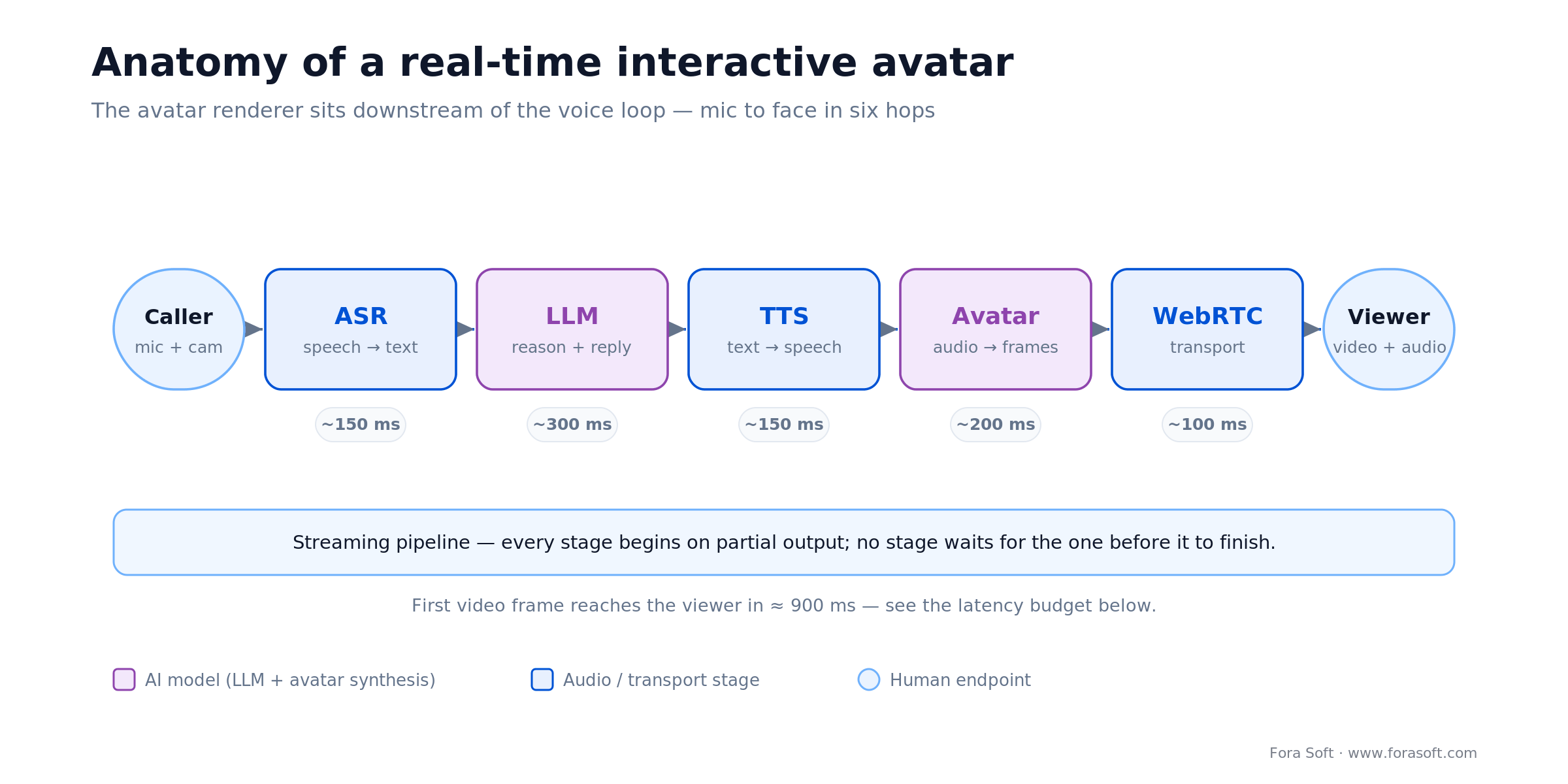
Figure 1. The avatar renderer sits downstream of the voice loop — the same ASR→LLM→TTS chain that drives a voice agent, plus a face and a transport.
The trick that makes it feel real is streaming. A naive build runs the stages in sequence: wait for the full transcript, wait for the full LLM answer, wait for the full audio file, then render. Add those waits and you're at three or four seconds. A streaming build overlaps them — the ASR emits partial text, the LLM starts generating tokens before you stop talking, TTS turns the first clause into audio while later clauses are still being written, and the avatar model renders frames as audio chunks arrive. Each stage starts on partial output from the one before it.
The voice part of this loop is exactly what we cover in our voice synthesis guide, and the pricing of the LLM-and-voice layer is broken down in our OpenAI Realtime API cost analysis. The avatar adds one more real-time stage on top of that stack — and one more thing that can miss the latency budget.
Not sure where the avatar fits in your stack?
We'll map your use case to a pipeline, name the models, and tell you honestly whether to buy or build. No slideware.
The latency budget: why one second is the line
People notice avatar lag before they notice anything else, and the threshold isn't arbitrary. When two humans talk, the gap between one finishing and the other starting peaks at 0–200 milliseconds across every language studied (Stivers et al., PNAS 2009). Your avatar can't hit 200 ms end to end — there's too much computation — but it needs to land the first frame under about a second, or the brain files it as “machine.”
Here's where the budget goes on a well-built stack: roughly 150 ms to endpoint your speech and transcribe it, ~300 ms for the LLM's first token, ~150 ms for the first chunk of synthesized audio, ~200 ms for the avatar model's first video frame, and ~100 ms of WebRTC transport and jitter buffer. That's about 900 ms to first frame — under the ceiling, but only just.

Figure 2. A realistic first-frame budget. The LLM and the avatar model are the two biggest line items — they're where optimization pays off.
Two line items dominate: the LLM and the avatar renderer. That's where we spend optimization effort: a smaller or faster model for the reply, a streaming TTS with a short first-chunk time, and an avatar model that starts emitting frames on the first audio packet instead of waiting for the sentence. The mechanics of syncing those frames to audio in a call are covered in our Learn note on real-time avatars and lip-sync in a video call.
Rendering: 2D neural, 3D rigged, and Gaussian splatting
There are three ways to draw the face, and they trade photorealism, control, and cost against each other. Choosing wrong is the mistake that's expensive to undo, so decide before you write code.
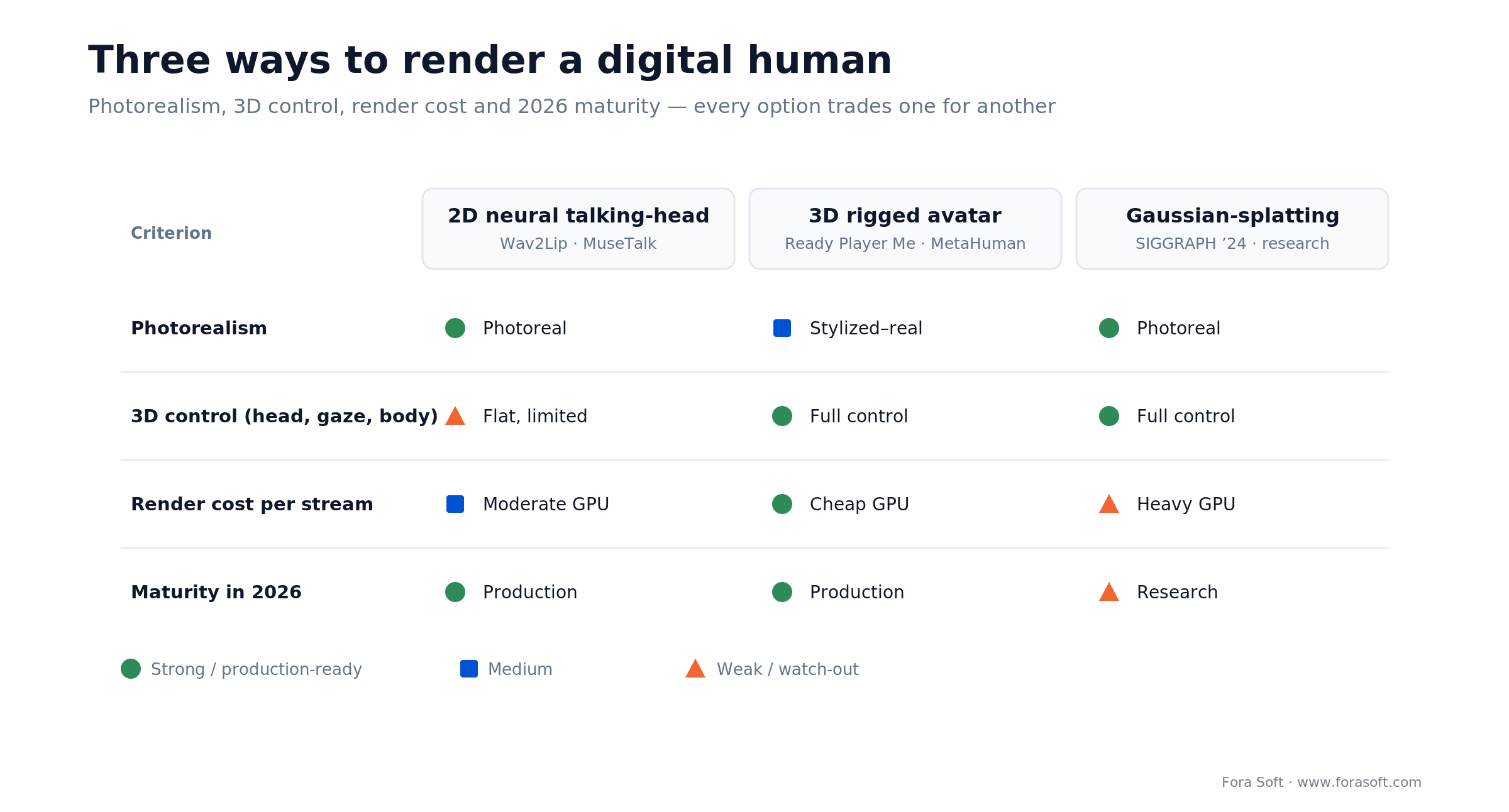
Figure 3. No approach wins on every axis. 2D neural and 3D rigged are both production-ready in 2026; Gaussian-splatting is the photoreal-plus-3D future that isn't quite shippable yet.
2D neural talking-head
This animates a photo or short video of a real face. Open-source options include Wav2Lip (2020), SadTalker (CVPR 2023), and MuseTalk from Tencent's TMElyralab, which hits 30+ FPS real-time lip-sync on a single GPU using latent-space inpainting. The upside is photorealism from a single image. The downside is that it's flat — the head barely turns, there's no gaze or body, and hard angles fall apart. Most commercial “talking head” avatars, including HeyGen and D-ID, are this family.
Reach for 2D neural when: you want a recognizable real person's face, the framing is a head-and-shoulders talking head, and photorealism matters more than head movement or a full body.
3D rigged avatar
This drives a 3D character (Ready Player Me, an Unreal MetaHuman, a custom mesh) by mapping speech sounds (visemes) to mouth shapes (blendshapes). You get full control: the head turns, the eyes track, the body gestures, and rendering is cheap and deterministic on a modest GPU. The cost is realism — even MetaHuman reads as “very good game character,” not a real person. That's often fine, and sometimes better: a clearly-synthetic guide sets honest expectations. This is the family behind most kiosk and game-style avatars, and it's how our StreamFog VTube avatars render in real time.
Reach for 3D rigged when: you need head turns, gaze, gestures, or a full body; you want a branded non-human character; or you're rendering many concurrent streams and GPU cost per stream has to stay low.
Gaussian-splatting neural avatars
The newest family reconstructs a head as millions of 3D “splats,” giving photorealism and 3D control — the head can turn and still look like a real person. The 2024–2026 research is striking; 3D Gaussian Blendshapes (SIGGRAPH 2024) and follow-ups render heads at real-time frame rates. But it needs per-subject training, heavier GPUs, and toolchains that aren't productized yet. We'd call it the future you prototype, not the thing you ship to a paying customer in 2026.
Reach for Gaussian-splatting when: photorealism and free head movement are both non-negotiable, you have GPU budget and ML staff, and you can treat it as an R&D bet rather than a delivery date.
One trap sits across all three: the uncanny valley. Masahiro Mori's 1970 observation still holds. A face that's almost-but-not-quite human unsettles people more than an obviously stylized one. If you can't reach true photorealism, don't aim for the middle. A clean, clearly-synthetic 3D character usually tests better than a slightly-off “real” one.
The transport layer: WebRTC and the avatar-plugin pattern
Once you have frames, you have to deliver them live, and that's WebRTC's job. HLS and other streaming protocols buffer for seconds, which kills conversation. WebRTC is built for sub-second, two-way media, so it's the default transport for interactive avatars, the same as it is for video calls. The avatar model publishes a video track; the caller's browser subscribes to it; audio and video stay in sync at the transport layer.
The pattern that's won in 2026 is treating the avatar as a swappable plugin on top of a voice agent. LiveKit Agents, for example, ships an avatar-plugin layer with 16 providers listed as of October 2026 (Tavus, Anam, Simli, Beyond Presence, bitHuman, D-ID, HeyGen's LiveAvatar, Synthesia, Runway, LemonSlice and more) behind one interface. You build the ASR-LLM-TTS agent once, hand its audio output to an avatar session, and the avatar publishes the video track into the room. Swapping vendors, or moving to a self-hosted renderer later, doesn't mean rewriting the agent.
That's the architecture we recommend to most teams: keep the avatar renderer behind a clean seam. It lets you start on a managed avatar to validate the product, then move the render in-house when volume justifies it — without touching the brains of the system. Our LiveKit AI agents guide walks through wiring the voice half, and our LiveKit AI agent development team builds and runs that agent in production with the avatar seam already in place.
Build vs buy: managed avatar APIs vs a custom stack
Short answer: buy first, build when the numbers force you to. A managed avatar API (Tavus, HeyGen LiveAvatar, D-ID) gets you a talking face in days, handles the GPU fleet, and charges per minute. A custom stack on your own GPUs with open-source models costs less per minute at scale and gives you total control, but you carry the ops, the concurrency, and the on-call.
Reach for a managed API when: you're validating the product, volume is low or spiky, and you'd rather pay $0.09–$0.35 a minute than run GPUs. It's the right first move for almost everyone.
Reach for a custom stack when: you run high, steady concurrency; you need data to stay on your own infrastructure; or you want a face and behavior no vendor offers — and you have (or hire) the ML and DevOps to keep GPUs healthy.
The middle path we like: build the voice agent yourself (it's cheap and it's your IP), rent the avatar renderer at first, and keep it behind the plugin seam from the last section. You get to market fast and keep the option to in-source the expensive part later.
The platforms compared: Tavus, LiveAvatar, Anam, Synthesia, Gemini, custom
Which tools let you build a real-time conversational AI avatar on your own LLM or knowledge base? In October 2026 the main options are Tavus, HeyGen LiveAvatar in Avatar-only (LITE) mode, Anam, Simli, Beyond Presence and Synthesia’s Interactive Avatar API: each takes your agent’s audio and returns a lip-synced video track, and all of them have a LiveKit Agents plugin. If you want one vendor to run the whole loop instead, Tavus, LiveAvatar Full mode, D-ID Agents and Google’s Gemini Live Avatar bundle the speech and language models too.
The market splits into full conversational platforms, which bundle the voice loop, and render-only APIs you bolt onto your own agent. Prices below come from each vendor’s own pricing page or launch post, retrieved 9 October 2026. Treat them as list prices that move.
| Platform | Type | Price (October 2026) | Best for | Watch-out |
|---|---|---|---|---|
| Tavus (CVI) | Full conversational; custom LLM supported | Builder $59/mo (175 min, $0.35/min overage); Growth $397/mo (1,300 min, $0.31); Business $975/mo (4,000 min, $0.26) | Replicas of a specific person; Phoenix-4 rendering with Raven-1 perception and Sparrow-2 turn-taking | Priciest per minute; 30-second minimum per conversation; 1–15 concurrent sessions by tier |
| HeyGen LiveAvatar | Full mode, or Avatar-only (LITE) on your own stack | Essential $99/mo for 1,100 credits; Full = 2 credits/min (~$0.18), LITE = 1 credit/min (~$0.09) | Photoreal 2D faces, large stock library, cheapest per minute in LITE mode | Credit-based; Full mode doubles the per-minute burn |
| Anam | Avatar with optional managed voice; works with your own LLM | Explorer $49/mo (250 min, $0.14 overage); Growth $299/mo (2,000 min, $0.12); Professional $999/mo (8,000 min, $0.11); per-second billing | Live customer conversations where turn speed matters | Session length capped at 5–10 min on lower tiers; 1–10 concurrent sessions |
| Synthesia Interactive Avatar API | Render-only: your LLM and STT, optional Synthesia TTS | Enterprise plans only, price on request (launched 15 July 2026) | Teams already producing Synthesia video who want the same brand avatar live | No public price; official LiveKit plugin is Python-only |
| Google Gemini Live Avatar | Full speech-to-speech agent on Gemini 3.8 Live | Gemini Enterprise pricing, provisioned throughput (GA 24 September 2026) | 97 languages, background tool calls, camera and screen understanding | Curated avatar library; custom faces need allowlisting; the LLM is Gemini |
| D-ID Agents, Simli, Beyond Presence, bitHuman | Full agent (D-ID) or render-only APIs | Usage-based; check current per-minute rates | Bolting a face onto an existing voice agent | With render-only APIs you own the rest of the pipeline and its latency |
| Custom (MuseTalk + your GPU) | Self-hosted | ~$0.06–$0.12/min compute (before ops) | High steady volume, data control, unique face | You run the GPUs, the scaling, and the on-call |
Sources: Tavus pricing, LiveAvatar credits, Anam pricing, Synthesia launch post, Google Cloud launch post; all retrieved 2026-10-09. Hedra no longer appears among LiveKit’s avatar plugins.
Synthesia or Tavus for a real-time conversational avatar? Pick Tavus if you want the whole conversation managed, including perception and turn-taking, and you are fine paying about $0.26–$0.35 per extra minute. Pick Synthesia’s Interactive Avatar API if you already run your own LLM and speech stack, need an enterprise contract, and want the same branded avatar you use in Synthesia videos.
Comparing avatar vendors and drowning in per-minute fine print?
Send us your expected concurrency and minutes. We'll run your real numbers against Tavus, HeyGen, and a custom build and show you the break-even.
What real-time avatars actually cost: the worked math
Here’s the short version: a custom stack runs roughly $0.06–$0.12 per active minute of compute, while managed avatar APIs charge $0.09–$0.35. The rest of this section is the arithmetic behind those numbers. The custom render GPU is the easy part. An AWS g6.xlarge with an NVIDIA L4 lists at about $0.8048 per hour. Divide by 60 and one stream's render time is roughly $0.013 per minute. MuseTalk's 30+ FPS headroom means one GPU can sometimes serve a couple of concurrent streams, but budget one stream per GPU for quality and you're still near a penny a minute for the face.
Add the voice loop and it grows: speech-to-text runs ~$0.01–$0.02, the LLM ~$0.02–$0.05, and text-to-speech ~$0.01–$0.03 per minute. So a custom stack lands around $0.06–$0.12 per minute of compute — before you pay for idle GPU time, autoscaling headroom, and the engineers who keep it alive.

Figure 4. Managed vs custom, per active minute. The custom bar is compute only; the real decision hinges on usage, not the sticker. The chart uses July 2026 list prices; October 2026 prices move the managed range to $0.09–$0.35 without changing the picture.
Now the managed side, at October 2026 list prices. Tavus’s Growth plan is $397 for 1,300 minutes, about $0.31 per minute, with overage at $0.31. HeyGen LiveAvatar costs about $0.09 per minute in Avatar-only (LITE) mode and about $0.18 in Full mode on the $99 Essential plan. Anam’s Growth plan works out to about $0.15 per minute ($299 for 2,000 minutes). Compare like for like: a full managed loop at $0.18–$0.35 is roughly 1.5–6× the raw compute of a custom loop, and face-only LITE at $0.09 (your voice stack is billed separately) is about 7× the ~$0.013 a custom render costs. That premium buys real things: no GPUs to babysit, instant scaling, and a maintained model.
Here's the part vendors won't say out loud: there's no single break-even minute. It depends on usage. If your avatar runs a few hundred minutes a month, managed is cheaper all-in once you count an engineer's salary. If you run tens of thousands of minutes a month at steady concurrency, reserved GPUs amortize and custom pulls ahead. We keep our build estimates deliberately conservative — if a number's shaky, we don't ship it — and we'll model your specific usage rather than quote you a myth.
Mini-case: rendering avatars onto a live feed at scale
The hardest, least-glamorous half of a digital human is getting a rendered face onto a live video track without dropping frames — and getting it into whatever app the viewer is using. That's the problem we solved on StreamFog, a free AI effects platform for live streamers. It renders 300+ AR lenses and 100+ VTube avatars onto a streamer's camera in real time and delivers them as a virtual camera into OBS, Streamlabs, Zoom, and Discord.
The engineering that mattered is exactly the engineering an interactive avatar needs. Faces are tracked and re-rendered every frame with no perceptible lag. An “Efficient Mode” auto-scales resolution so the render never starves the rest of the machine — the same trade-off you make when a GPU is shared across avatar streams. And the output is a standard virtual camera, so it drops into any conferencing app the way an avatar video track drops into a WebRTC room. Setup takes about three minutes.
Pair that render-and-transport muscle with the voice loop we've built for AI assistants (speech in, an LLM in the middle, speech out) and the live speech analysis we run inside sales calls on Meetric, an AI sales video platform, and you have every piece of an interactive AI avatar, shipped and battle-tested separately. Want a similar assessment of your own build? Grab a 30-minute call and we'll sketch the architecture with you.
A decision framework: build or buy in five questions
Run your project through these five before you commit a budget. If most answers point the same way, your path is clear.
1. Does a face actually change the outcome? If you can name the exact moment presence lifts conversion or completion, keep going. If not, ship a voice or text agent first and revisit.
2. How many concurrent minutes at peak? Hundreds a month favors a managed API. Tens of thousands of minutes a month at steady concurrency starts to favor a custom stack on reserved GPUs.
3. Real face or character? A specific real person's likeness pushes you to 2D neural (and to written consent). A brand character or guide is a clean fit for a 3D rigged avatar.
4. Where does the data have to live? Healthcare, finance, or anything with a data-residency rule may rule out sending audio and video to a third-party avatar cloud — which pushes you toward self-hosting.
5. Do you have ML and DevOps to run GPUs? If keeping a GPU fleet healthy sounds like someone else's job, it should be — buy managed. If you already run inference in production, building is on the table. Not sure? That's the conversation we have on a scoping call.
Consent, disclosure, and the honesty problem
A photoreal talking face is a deepfake with a friendly job title, and that carries obligations you should design in from day one. Three rules we hold to. First, get written consent for any real person's likeness and voice — the actor or employee whose face and voice train the model has to agree, in writing, to the specific use. A face you cloned without permission is a lawsuit, not a feature.
Second, disclose that it's AI. In the EU it is now the law: Article 50 of the AI Act has applied since 2 August 2026, so people must be told they are talking to an AI system, and deepfake audio and video must be disclosed as such. Machine-readable marking of synthetic output is due by 2 December 2026 for systems already on the market, a grace period the 2026 AI omnibus (Regulation (EU) 2026/1744) added for marking only; it postponed the high-risk rules but left the disclosure duties in force (White & Case, July 2026). Google, for example, watermarks every Gemini Live Avatar stream with SynthID. A short “You're chatting with our AI assistant” up front costs you nothing and buys trust — and it sidesteps the uncanny-valley backlash when someone realizes mid-conversation.
Third, treat the media stream like the sensitive data it is. Audio and video of a user go over WebRTC and, on a managed avatar, through a vendor's cloud. Know where those frames land, encrypt in transit, set a retention policy, and check the vendor's data terms before you send a regulated user's face through them. This is where “self-host” stops being about cost and starts being about compliance.
Five pitfalls that sink avatar projects
1. Optimizing the face and ignoring the latency. Teams spend weeks on photorealism and ship a two-second reply delay. Users forgive an imperfect face; they don't forgive lag. Budget latency first, polish the pixels second.
2. Batching instead of streaming. Running ASR, LLM, TTS, and render in sequence is the single biggest cause of slow avatars. If any stage waits for the full output of the one before it, you've already lost the second.
3. Aiming for the uncanny middle. A slightly-off “realistic” human unsettles people more than a clean stylized one. If you can't hit true photorealism, commit to clearly-synthetic and stop chasing the valley.
4. Forgetting concurrency until launch. One avatar on your laptop is easy. Forty at once is a GPU-fleet and autoscaling problem. Load-test concurrency early, because it changes your whole cost model and your buy-vs-build answer.
5. Skipping consent and disclosure. Cloning a face without written permission, or hiding that the agent is AI, turns a good product into a legal and PR problem. Handle it in the design, not after the complaint.
KPIs: what to measure
Quality KPIs. Time-to-first-frame (target under ~1,000 ms), turn latency across a full exchange, lip-sync accuracy (audio-to-visual offset), and a subjective “does it feel alive” score from real users. Track the P95, not the average — the slow tail is what people remember.
Business KPIs. The metric the avatar was hired to move: conversion on a demo, completion on a lesson, containment on a support flow, no-show reduction on an intake. If the avatar isn't beating your text or voice baseline on that number, the face isn't paying for itself.
Reliability KPIs. Concurrent-session capacity before quality degrades, GPU usage, cost per active minute (measured, not estimated), and error or drop rate on the WebRTC track. These are the numbers that tell you when to move from a managed API to your own stack.
When NOT to build an interactive AI avatar
Sometimes the right call is not to build one, and we'll say so on a sales call. Skip the avatar if a text chatbot already solves the task. Adding a face to a password reset burns money and adds latency for zero lift. Skip it if you can't get consent for the likeness you want, or if disclosure rules in your market make a synthetic human more liability than asset.
Also wait if your voice agent isn't good yet. The avatar is the last layer, not the first. A face on top of a dumb or slow agent just makes the failure more vivid. Get the conversation right in voice or text, prove it moves your metric, and then add the face. An avatar can't rescue a product that people don't want to talk to.
Ready to put a face on your AI agent?
We build the whole loop (voice, avatar, WebRTC) or just the piece you're missing. Tell us where you are and we'll scope it.
FAQ
How do you create an interactive AI avatar?
Wire five stages into a streaming loop: speech-to-text, an LLM, text-to-speech, an avatar render model, and WebRTC transport. Fastest path is a managed platform like Tavus or HeyGen LiveAvatar; the flexible path is a custom stack with open-source models such as MuseTalk on your own GPU. Start managed, move in-house when volume justifies it.
What's the difference between an interactive avatar and an AI avatar generator?
A generator (Synthesia’s video studio, standard HeyGen) renders a video from a script and you download it — one-way, no waiting party. An interactive avatar streams a live, two-way conversation and has to reply within about a second. Same face technology, very different real-time engineering.
Is there a free or open-source interactive AI avatar?
The render models are open source (Wav2Lip, SadTalker, and MuseTalk at 30+ FPS real-time), and most vendors have a free tier for testing. But “free” ends at the GPU: running a real-time avatar means paying for compute, roughly a penny a minute per stream on an entry cloud GPU, plus your ASR, LLM, and TTS.
Is WebRTC required, or will regular streaming do?
You need WebRTC (or an equivalent sub-second transport). HLS and DASH buffer for several seconds, which is fine for one-way video but fatal for a conversation. WebRTC is built for two-way, sub-second media, so it's the standard transport for interactive avatars.
How low does latency need to be?
Aim for a first video frame under about one second. Humans reply to each other within roughly 200 ms (Stivers, PNAS 2009), and while an avatar can't match that end to end, crossing two seconds makes it feel broken. Streaming every stage is how you keep the first frame near 900 ms.
Which is better: a 2D talking head or a 3D avatar?
Neither wins outright. 2D neural is more photorealistic but flat, which suits a head-and-shoulders talking head. 3D rigged gives full head, gaze, and body control and cheaper rendering, which suits kiosks, characters, and high concurrency. Pick by whether photorealism or control and cost matters more.
How much does an interactive avatar cost to run?
Managed platforms run about $0.09–$0.35 per active minute in 2026 (HeyGen LiveAvatar to Tavus). A custom stack is roughly $0.06–$0.12 per minute of compute before ops and idle GPU time. Which is cheaper all-in depends on your usage — managed wins at low volume, custom at sustained high concurrency.
How long does it take to build one?
A working prototype on a managed avatar API is days, not months, because the plugin sits on top of a voice agent. A production custom stack with your own render model, concurrency, and compliance is a multi-week engagement. We keep estimates conservative and scope them to your usage and data rules on a first call.
Which tools let you connect a real-time AI avatar to your own LLM or knowledge base?
Tavus, HeyGen LiveAvatar in Avatar-only (LITE) mode, Anam, Simli, Beyond Presence and Synthesia’s Interactive Avatar API all accept your own LLM, so your retrieval and knowledge base stay in your agent. The cleanest wiring is a LiveKit Agents voice agent with the avatar plugin attached: you keep the brain, the vendor only draws the face.
Which platforms offer live, interactive AI avatars for real-time customer conversations?
As of October 2026: Tavus, HeyGen LiveAvatar, Anam, D-ID Agents, Synthesia (Interactive Avatar API, enterprise only) and Google’s Gemini Live Avatar (Gemini Enterprise). List prices run from about $0.09 per minute (face only) to $0.35 (full conversation); Synthesia quotes on request, and Google bills through Gemini Enterprise.
How do you add a digital human avatar to a real-time AI voice call?
Keep the voice agent as it is and attach an avatar session to it: the agent’s TTS audio goes to the avatar service, which publishes a lip-synced video track into the same WebRTC room. With LiveKit Agents that is one plugin and a few lines of code; the added latency is typically a few hundred milliseconds for the first frame.
Synthesia or Tavus for an interactive conversational avatar?
Tavus if you want the full conversation managed, with perception and turn-taking models, at about $0.26–$0.35 per extra minute. Synthesia if you already run your own LLM and speech stack, need an enterprise contract, and want the same brand avatar you use in Synthesia videos.
What to read next
Tools
7 Best HeyGen Alternatives in 2026
Picking a tool for generated avatar video, and when to build custom instead.
AI agents
How Video AI Agents Work
The voice-and-reasoning loop the avatar sits on top of, explained end to end.
Build guide
Building AI Agents with LiveKit
Wiring the real-time voice agent that an avatar plugin attaches to.
Cost
OpenAI Realtime API Pricing
What the voice layer under your avatar really costs per minute.
Ready to build your interactive AI avatar?
An interactive AI avatar is a streaming loop (ASR, LLM, TTS, a lip-sync renderer, and WebRTC), and it lives or dies on the second it takes to answer. Pick your rendering approach on purpose, keep the avatar behind a swappable seam, and buy a managed API to start. Build your own stack only when steady, high concurrency or a data-residency rule makes the $0.06–$0.12-per-minute custom path worth the GPUs and the on-call.
We've shipped both halves, the real-time render-and-transport on StreamFog and the voice loop on AI assistants, and we'll tell you honestly when to buy Tavus instead of hiring us. If you want a face on your agent that answers like a person and doesn't fall into the uncanny valley, let's scope it.

The book · Volume 7 of 7
AI for Video: A Complete Guide to Intelligence in Video Products: From Real-Time Pipelines and Agents to Serving, Cost, Compliance, and Verticals
This playbook puts the line for a live avatar at about one second from the end of a sentence to the first frame. Volume 7 goes deeper into that budget: where AI enters a WebRTC pipeline, how agent loops, memory and tools are engineered, how models are served on vLLM, Triton or TensorRT, and what each stream-hour costs. It also covers C2PA and the EU AI Act, which shape disclosure for synthetic faces. Written by Nikolay Sapunov, CEO at Fora Soft.
Read it on Amazon →Kindle & paperback · Fora Soft Video Engineering Handbook
Let's build your digital human
Bring your use case and your numbers. We'll design the pipeline, pick buy-or-build, and give you a conservative, honest estimate.

