Key takeaways
• The camera is the easy part. Body-worn camera software is everything that happens after the lens: activation, upload, hashing, categorization, retention, redaction, and release. That software, not the device, is what turns a video file into evidence a court will accept.
• Categorization decides what survives. A clip tagged evidentiary is kept for years; an untagged clip defaults to the routine clock and is auto-deleted in 30 to 90 days. The single most important job the software does is force that tag before the clock runs.
• Storage is the bill nobody budgets for. A body camera can make 10 GB or more per shift under continuous recording, and Axon’s evidence cloud has grown past 100 petabytes. Holding 100 TB on one hot tier runs about $2,300 a month; lifecycle tiering drops it to roughly $319 (AWS list, 2026).
• The law sets the deadlines. California’s AB 748 forces release of critical-incident footage within 45 days, redacted for privacy; CJIS 6.0 governs how it’s stored; and a gap in the audit trail can get the footage thrown out. Compliance is designed in, never bolted on.
• Buy for one agency; build when it’s your product. A bundled platform gets a single department running fast. A custom back end wins when evidence is part of a product you sell, spans regulated verticals, or must stay in your own environment — the pattern behind VALT, the evidence platform we run for 770+ US organizations.
An officer records a use-of-force arrest on a body camera, and fourteen months later a defense attorney asks a plain question: can you prove this is the whole clip, unedited, and account for everyone who touched it? If the footage was never tagged as evidence, the honest answer might be that the system deleted it on the routine 60-day schedule — and now a real recording is gone, not through tampering, but through a missing checkbox. Body-worn camera software exists to make that failure impossible.
We’ve built video and evidence software since 2005, including VALT, a recording and evidence platform used by 770+ US organizations to capture police interviews, child-advocacy sessions, and medical-simulation footage. Interview-room capture is the indoor sibling of the body camera: same chain-of-custody rules, same court. This is the honest guide to the software behind the camera — how footage gets from an officer’s chest to a courtroom, what the law demands at each step, what the storage really costs, and when it’s smarter to buy a platform than build one.
Building a body-camera evidence platform?
Tell us your camera fleet, your compliance floor, and your footage volume. We’ll tell you honestly whether to buy a bundled platform, extend one, or build — with the chain-of-custody and storage math behind the call.
Why Fora Soft wrote this guide
We’re a video and AI software company: 250+ projects since 2005, a team of 50+. A large share of that work is video capture, streaming, and the storage-and-access plumbing that decides whether a system can be trusted to hold evidence. Body cameras aren’t the only devices that feed an evidence pipeline, and the hard engineering sits downstream of all of them, in the software that proves a recording is what it claims to be.
The clearest example is VALT, the recording and evidence platform we’ve built and run for over a decade. It serves 50,000+ users across 770+ US organizations and captures exactly the recordings that become evidence: police interviews, child-advocacy interviews, and medical-simulation exams. Those verticals put CJIS, HIPAA, and FERPA on one codebase, which is why the compliance parts of this guide aren’t theory to us. A body camera in the field and an interview-room camera end up in the same place: an evidence system that has to defend a chain of custody.
We don’t sell a shrink-wrapped body-camera product, so there’s nothing to push here. We’ll tell you when a bundled platform like Axon or Motorola is the right call, which, for a single agency, it usually is, and we’ll tell you when owning the back end is the only thing that makes sense. What we build is the custom version, so we’ve earned the right to be honest about when you don’t need one.
What body-worn camera software actually is
Body-worn camera software is the system that manages footage after it’s recorded: it ingests each clip from the camera, proves its integrity with a cryptographic hash, categorizes it, applies a retention rule, stores it under access control, logs every access and change, and produces defensible copies for court, disclosure, or a records request. In one sentence, it’s the evidence-management back end for body cameras, and its whole job is to keep a provable chain of custody from the officer’s chest to the courtroom.
It helps to separate the device from the software. The camera captures video and audio; the software is where that video goes to be governed. Vendors sell them together, so people conflate the two, but they’re different problems. The device problem is battery life, low light, and mounting. The software problem — the one that gets an agency sued or a case dismissed — is proving the footage is authentic, releasing it lawfully, and not losing it by accident. This guide is about the second one, which is where the real cost and risk live. For the broader platform that footage flows into, see our guide to digital evidence management software.
The category exists because of volume. As of the last comprehensive federal count (Bureau of Justice Statistics, 2016 data), 47% of general-purpose US law-enforcement agencies had acquired body cameras, and about 80% of large local police departments had; adoption has climbed since. Each camera can generate 10 GB or more per shift under continuous recording, and Axon’s evidence cloud alone has grown from a few terabytes in 2016 to more than 100 petabytes today. You cannot govern that on a network share, and you certainly cannot prove chain of custody on one.
The short answer: buy the bundle, extend, or build
Buy a bundled platform (Axon Evidence, Motorola VideoManager, Genetec Clearance) if you’re a single agency with fairly standard workflows and you can live inside a vendor’s cameras, cloud, and pricing. It’s the fastest way to get a real chain of custody, and for most single-agency buyers it’s the right answer.
Extend a platform when a vendor product covers most of the job but you need a specific integration, a retention or residency rule it won’t bend to, or a workflow the product doesn’t support. Most enterprise platforms expose APIs; you build the missing piece around them rather than from scratch.
Build a custom back end when body-camera evidence is part of a product you sell, when you span several regulated verticals on one codebase, when data-residency or air-gap rules keep evidence out of a public vendor cloud, or when per-officer and per-terabyte fees at your scale have outgrown a one-time build. The rest of this guide is the evidence behind those three sentences.
The capture-to-court workflow
Footage moves through six stages, with an audit trail bolted across all of them: activate, upload and hash, categorize, store, review, and disclose. The order matters. The step that decides whether evidence survives is categorization; the step that makes it defensible in court is the hash at upload.
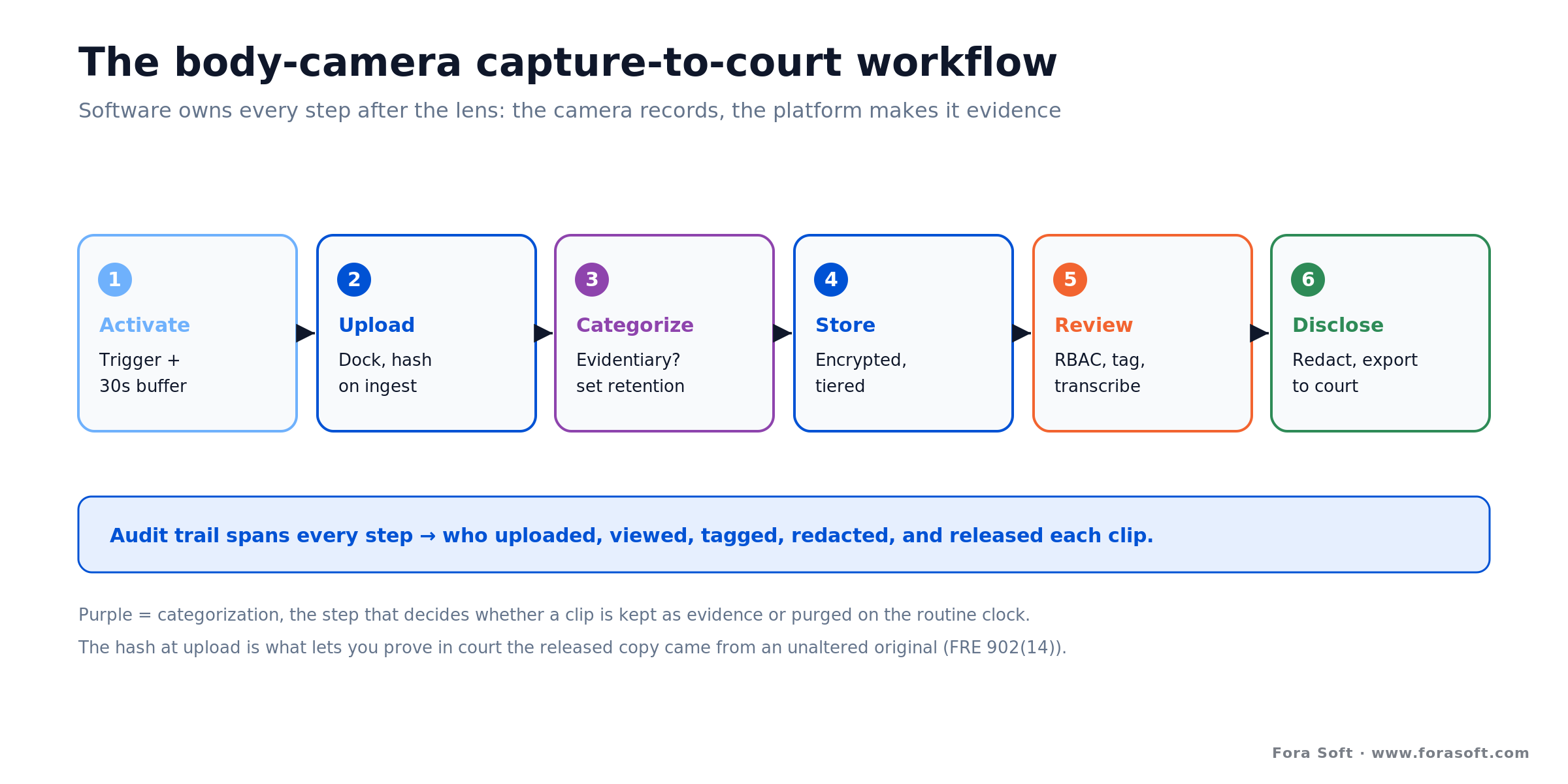
Figure 1. The workflow body-camera software owns. Categorization decides what is kept; the hash at upload is what makes a release provable.
Each stage is a section below, but the shape is worth holding in your head first. A clip is activated on the camera, often automatically, with a buffer that captures the seconds before the trigger. At end of shift it’s uploaded over a dock, and the moment it lands the software hashes it and records who submitted it and when. It’s categorized, which sets the retention clock, then stored encrypted and tiered by how often it’ll be touched. Investigators review it under role-based access, and when a court or a records request comes, the system discloses a redacted copy with its own hash and an audit manifest.
Miss any one of these and the whole chain is weaker than its documentation suggests. A missing hash means you can’t prove the file is unaltered. A missing category means the clip may be deleted before anyone realizes it mattered. A missing audit entry is the two-hour gap a defense attorney needs. The software’s value is that it does all six consistently, for every clip, without depending on an officer remembering to.
Activation and the pre-event buffer
The oldest complaint about body cameras is that the officer “forgot” to turn it on. Automatic activation is the software-and-sensor answer. Axon’s Signal Sidearm, for example, puts a magnetic sensor on the holster and a magnet on the weapon’s retention strap; drawing the sidearm trips the sensor and starts recording. The same trigger alerts nearby Axon cameras for about 30 seconds, so a second officer arriving mid-incident captures it too, from another angle.
The pre-event buffer is the detail that surprises people. Cameras continuously hold a rolling window of video — configurable from 0 to 120 seconds, 30 by default on Axon hardware — and when an event recording starts, that buffered footage from before the trigger is saved and attached to the clip. So “the camera was off” is rarely the whole story: the lead-up is usually there. One honest caveat: on most models the buffer is video only, with no audio, which matters when you’re reconstructing what was said in the seconds before an encounter escalated.
Reach for automatic activation when: your policy requires recording of specific events and you can’t rely on manual starts under stress. Holster sensors, light-bar and siren triggers, and geofences cut the “unrecorded incident” problem sharply, but design the software to log every auto-start as metadata, so an activation itself is part of the audit record.
Docking, upload, and where chain of custody begins
At end of shift the camera goes into a dock, and footage uploads to the evidence platform — some cameras also stream over LTE for live incidents. Chain of custody starts the instant that clip lands, because the first thing the software should do is compute a cryptographic hash of the file. SHA-256 is the practical standard: run the video through it and you get a fixed string that changes completely if a single byte changes. Store that hash, and you can re-hash the file at any later date and prove it’s the same footage.
This is not just good hygiene; it ties directly to admissibility. Under US Federal Rule of Evidence 902(14), effective since December 2017, electronic data can be self-authenticated when a qualified person verifies it with a hash digest, sparing you a live witness just to establish that a copy is genuine. Software that hashes on upload and keeps the hash in its audit record builds that paper trail automatically. Alongside the hash, the system captures metadata the court cares about: which officer and device, the timestamps, and often GPS.
The master clip is then sealed and never edited in place. Every later view, download, tag, redaction, and share is written to an audit log tied to a specific user. That discipline is what separates evidence from a folder of MP4s, and it’s why courts have grown willing to reject footage with gaps — a missing stretch in the log is exactly the opening a defense needs to challenge the exhibit.
Categorization is what saves (or deletes) your evidence
Here is the single most consequential thing the software does, and the one buyers underestimate. Every clip has to be classified — evidentiary or non-evidentiary — usually with sub-categories like use-of-force, arrest, homicide, traffic stop, or mental-health call. That tag sets the retention clock, and the two clocks are worlds apart.

Figure 2. One tag at ingest routes a clip to years of retention or a 30-to-90-day purge. Untagged footage defaults to the purge lane.
Non-evidentiary footage — routine patrol, administrative recordings, tests — is commonly kept 30 to 90 days and then deleted, which is correct, because roughly 90% of body-camera video never becomes evidence and storing it forever would bankrupt the program. Evidentiary footage is kept until the case closes plus a statutory add-on, and footage of a homicide or an officer-involved shooting is often held indefinitely. Crucially, the preservation window for evidence is set by state law; the rest is agency policy.
Reach for forced categorization when: footage can be deleted on a schedule — which is always. If a clip isn’t tagged before the routine clock expires, it defaults to purge and real evidence disappears. Build the workflow so an officer or supervisor must categorize each clip (or it’s auto-flagged and held) before deletion can touch it. This is the failure that ends up in the news, not a hacker.
Good software makes the safe path the easy path: category prompts at upload, bulk tagging by shift or incident, integration with the records or case-management system so a clip linked to an open case can’t be purged, and legal holds that override any retention rule. Increasingly, agencies use AI to pre-classify footage and even flag likely use-of-force events for human review, because the volume of unreviewed video has outgrown the people available to watch it. The tag still has to be a human decision on anything that matters, but the software can make sure it happens.
Storage: the petabyte problem and the bill
Body-camera video is big, it’s kept for years when it’s evidence, and retention rules mean you rarely get to delete the part that matters. That combination turns storage from a footnote into the line item a finance director blocks in month three. A single 200-officer department can generate on the order of 33 terabytes a year under event-based recording, and several times that if cameras roll continuously; scale that across a country and the numbers get surreal, which is why Axon’s cloud is measured in hundreds of petabytes.

Figure 3. The same 100 TB of retained footage, single-tier versus lifecycle tiering, at AWS S3 list prices (us-east-1, 2026-07-15).
Here’s the arithmetic. Take a department holding 100 TB of retained footage. On AWS S3 Standard at $0.023 per GB per month, that’s 100,000 GB × $0.023 = about $2,300 a month, or roughly $27,600 a year, and it only climbs as the archive grows. Now tier it by access pattern: keep 10% hot for active cases on Standard (10 TB ≈ $230/mo) and push the 90% cold tail to Glacier Deep Archive at $0.00099 per GB (90,000 GB ≈ $89/mo). Total: about $319 a month, roughly 86% less, for the identical data (AWS list, us-east-1, 2026-07-15).
Reach for deep-archive tiers when: footage is past its active window but still under retention or legal hold. The catch is retrieval — Glacier Deep Archive takes 12 to 48 hours to restore and has a 180-day minimum — so a clip an investigator might reopen next week does not belong there. Model your access pattern before you commit, or a cheap tier becomes an expensive delay in a live case.
Two more levers matter. Codec: H.265 roughly halves file size versus H.264 at the same quality, which halves the whole bill for video you control. And architecture — object storage, on-premises, or hybrid — is often dictated by the same residency rules from the compliance section below. Our write-up on secure cloud video management covers the storage-and-access layer in more depth.
Storage bill growing faster than the budget?
Send us your footage volume and retention rules. We’ll model tiered storage, codec choices, and on-prem-versus-cloud for your case — and show where the recurring cost is actually going.
Redaction and release: AB 748, FOIA, and the 45-day clock
Body-camera software doesn’t just store footage; it hands controlled copies out, and that release step is where privacy law bites hardest. A public-records or FOIA request compels release, but the privacy of uninvolved people has to be protected first. California’s AB 748, in effect since July 2019, is the sharp example: footage of a critical incident — an officer discharging a firearm, or use of force causing death or great bodily injury — generally has to be released under the Public Records Act within 45 days, and the law explicitly requires redaction technology to blur or distort images to protect privacy before release.
That deadline is why redaction lives inside the evidence software, not in a separate video editor. Faces, minors, bystanders, and sometimes audio have to be obscured on a derivative copy while the master stays sealed and logged. Finding those faces and plates frame by frame is a job for AI video recognition software, with a human reviewer signing off. Do it by hand, one clip at a time, and a 45-day clock becomes a backlog. Skip it and you breach the privacy you were obligated to protect. The stakes are concrete: in one 2024 case, an Illinois city settled a records lawsuit after denying a body-camera request on the grounds that it “lacked the means to blur faces” — missing redaction capability is itself a liability. The full mechanics of automated blurring, accuracy limits, and reversible-versus-irreversible masking are in our video redaction software guide.
Every release is itself an evidence event. The system produces a redacted copy, hashes it, and logs who created it, what was shared, and with whom — often packaging an audit manifest alongside the file. A GDPR subject access request adds another wrinkle: it gives a person footage of themselves, but not of everyone else in frame, so the same redaction workflow applies with a roughly one-month deadline. Release without a trail and you’ve turned admissible evidence back into an unverified clip.
Compliance and admissibility: CJIS 6.0 and getting footage into court
Body-camera footage of criminal matters is criminal-justice information, so the FBI’s CJIS Security Policy is the storage floor, and it just got taller. Version 6.0, released 27 December 2024, was the largest rewrite in over a decade, expanding to more than 180 primary controls. The parts that shape the software most: FIPS-validated encryption (AES-256 at rest, TLS 1.2 or better in transit, with FIPS 140-2 modules moving to the historical list on 21 September 2026, so target 140-3); multi-factor authentication for all access to criminal-justice information, fully auditable and sanctionable since 1 October 2024; tamper-evident audit logging; and triennial audits by the FBI’s CJIS Audit Unit. If footage also touches health or education records, HIPAA and FERPA stack on top.
Admissibility is the other half, and it’s decided by the audit trail. To use body-camera footage, a party has to show it’s authentic, relevant, and untampered, usually through the wearing officer’s testimony plus embedded metadata and timestamps. Courts have grown strict about gaps: the Virginia Supreme Court in Baez v. Commonwealth (December 2024) treated authentication as one part of admissibility, not a rubber stamp, and trial judges have excluded footage over unexplained breaks in the record. The practical rule is the same as the compliance rule: hashing, per-user audit logging, and access control are designed in from sprint one, because retrofitting them after a system is live routinely costs several times what building them in would have.
The vendors compared: Axon, Motorola, Genetec, custom
A few names dominate, plus the custom option. They all do the core job — ingest, hash, categorize, store, audit, redact, disclose — so the real differences are hardware lock-in, deployment, and who ends up owning your evidence and workflow. One honest note up front: none of these vendors publishes reliable per-officer pricing. It’s quote-based, negotiated per agency, and usually bundled into multi-year contracts, so the table below deliberately doesn’t invent numbers — get a written quote for your fleet and volume.
| Option | Model | Pricing | Where it wins | Where it breaks |
|---|---|---|---|---|
| Axon (Evidence.com) | Camera + cloud, bundled (Officer Safety Plan) | Quote; 5-year bundle | Deepest ecosystem; AI report drafting; majority US install base | Hardware and cloud lock-in; you’re on Axon’s roadmap |
| Motorola Solutions | Camera + VideoManager | Quote | Fits agencies already on Motorola radio and dispatch | Payoff depends on already running Motorola; thinner third-party ecosystem than Axon |
| Genetec Clearance | Camera-agnostic evidence platform | Quote | Mixed camera fleets; strong VMS integration and sharing | Payoff assumes you already run Genetec VMS; heavier to stand up as a standalone BWC program |
| Redaction-first tools | Add-on (Veritone, VIDIZMO, Secure Redact) | Quote / per-minute | Bolt automated redaction onto an existing store | Not a full evidence back end on their own |
| Custom build | Your infrastructure | One-time build + hosting | Own the data, workflow, residency, and chain of custody | Upfront cost and time; you carry maintenance |
Our read: a single agency that already buys one vendor’s cameras should usually buy that vendor’s software — the integration is worth it. Look hard at a build when you’re camera-agnostic by necessity, when evidence spans verticals a single product wasn’t designed for, or when residency rules put the data somewhere a public cloud can’t go.
Anatomy of a body-camera evidence back end
If you’re scoping a build or evaluating a product, it helps to see the whole system as a stack of six layers, with a tamper-evident audit log running alongside all of them. Buy a bundled platform and these come as one product; build, and you assemble proven storage, streaming, and transcription components and own the evidence logic that ties them together.

Figure 4. The six layers between the lens and the courtroom. The audit log spans all of them.
The capture and activation layer is the camera and its triggers: manual, holster sensor, light-bar, geofence, plus the pre-event buffer. Ingest and hash handles the dock or LTE upload, SHA-256 on arrival, and metadata capture. The evidence store is encrypted at rest, isolated per tenant, and tiered hot-to-cold by access pattern. Categorization and retention is the rules engine that turns a tag into a retention clock and enforces legal holds.
The review, access, and redaction layer gives investigators case search, transcription, and role-based access, and produces redacted derivatives for release. Disclosure and export packages copies for court, FOIA, or a DSAR, each with its own hash and manifest. None of these is exotic on its own — the storage and streaming are commodity, the transcription is a solved problem. The engineering that carries the risk, and the cost, is the audit log and access control woven through every layer, because that’s what a court and an auditor actually inspect.
Build vs buy: when a custom back end wins
Most single agencies should buy. If your workflow is standard and you can live in a vendor’s cloud, a bundled platform will beat anything we could build you on both cost and time-to-value, and we’ll say so on the call. Building starts to make sense when body-camera evidence stops being an internal chore and becomes part of a product, a multi-vertical platform, or a hard residency requirement. Four honest decision rules:
Reach for a bundled platform when: you’re one agency with fairly standard workflows, you’re buying cameras anyway, and your evidence is allowed to live in the vendor’s cloud. You trade control for speed, and for a single department that’s usually the right trade.
Reach for extending a platform when: a vendor product covers most of the job but misses an integration, a retention rule, or a workflow. Build the missing piece against the vendor’s API instead of reinventing the whole evidence store.
Reach for a hybrid when: you want a proven storage and streaming core but the evidence logic — sealing, hashing, categorization, audit, disclosure — has to be yours. Reuse the commodity plumbing; own the chain of custody. This is often the fastest path to a defensible system.
Reach for a full custom build when: body-camera evidence is a feature of a product you sell, you span regulated verticals on one codebase, residency rules keep data out of a public vendor cloud, or per-officer and per-terabyte fees at your scale have outgrown a one-time build.
The build case is strongest for platforms, not end users. If you’re shipping a body-camera product, a records-management system, or a vertical evidence platform, a chain of custody native to your system beats bolting on a third-party product your customers also have to license. That’s the same logic that put evidence governance inside VALT rather than beside it. And the flip side is just as honest: if you’re a single department that already runs one vendor’s cameras, paying us to rebuild what Axon or Motorola already does well would be a bad trade, and we’d tell you that first.
What a custom body-camera back end costs
A custom back end is a one-time build plus ongoing hosting, weighed against recurring per-officer fees that never stop. We’ll give ranges, not a single number, because scope genuinely drives the figure — how many verticals, which compliance regimes, what it integrates with — and quoting a precise price sight-unseen would be dishonest.
The build side. A focused evidence back end — ingest with SHA-256 hashing, categorization and retention rules, tiered encrypted storage, role-based access, a tamper-evident audit log, a review UI, and export with a manifest — is a low-six-figure build in our experience, because the hard components (storage, streaming, transcription) are proven pieces we assemble rather than invent. Compliance hardening for a regime like CJIS 6.0 typically adds a further chunk on top; it’s the audit and access work, not the storage, that carries the cost.
The run side. Ongoing cost is dominated by storage — and, as Figure 3 showed, lifecycle tiering can turn a roughly $27,600-a-year hot-storage bill into about $3,830 for the same 100 TB. Add compute for transcription and any AI classification, plus normal maintenance. The marginal cost of the ten-thousandth hour of footage is close to the first once the pipeline exists, which is exactly why the buy-versus-build line moves in a build’s favor as you scale.
Reach for a build when: recurring per-officer fees at your scale are heading past what a one-time build plus hosting would cost over two or three years, or the evidence legally can’t sit in a vendor’s cloud. Below that line, buying wins on speed and simplicity every time.
Want the build-vs-buy math for your program?
Send us your fleet size, verticals, and where the data has to live. We’ll model buy, extend, and build side by side — with the storage math and a realistic budget, no sales theater.
Mini-case: evidence-grade capture at VALT scale
The situation. VALT, the recording and evidence platform we’ve built and run for over a decade, sits in 770+ US organizations with 50,000+ users. It records the sensitive material by design: police interviews, child-advocacy interviews, and medical-simulation exams. It isn’t a body-camera system, but it solves the identical downstream problem — every recording routinely has to be produced to a court, a defense team, or a child-protection officer, which means each one needs a chain of custody, not just a place to sit.
The engineering. The disciplines that make VALT trustworthy are exactly the ones body-camera software demands. Recordings are stored per tenant with bucket-level isolation, so one organization’s footage can never leak into another’s. Every write to the audit log is signed into a hash chain, so the record of who did what is tamper-evident. And export is gated behind a justification field: you can’t release a copy without stating why, which is the kind of control a CJIS or HIPAA reviewer looks for first.
The result. One codebase carries CJIS, HIPAA, and FERPA workloads at once, which is the thing off-the-shelf products struggle with, because they’re usually built for a single vertical. The lesson from a decade of shipping it applies directly to body cameras: the hard part is almost never the recording or the storage. It’s the chain of custody wrapped around them, and the retention logic that decides what survives. Want the same rigor applied to your footage? That’s a good 30-minute call.
A body-camera-software decision framework in five questions
1. Are you one agency, or a platform? A single department almost always buys. If body-camera evidence is part of a product you sell, or you serve many tenants, you build — you can’t resell someone else’s evidence platform.
2. Are you locked to a camera vendor? If you already run one vendor’s cameras, their software integration is a strong reason to buy theirs. If you’re camera-agnostic by necessity, that lock-in argument disappears and a camera-agnostic platform or a build looks better.
3. What’s your compliance floor? CJIS, HIPAA, FERPA, and state release laws each pull the architecture a different way. The more of them you stack on one system, the more a purpose-built or custom platform earns its keep.
4. Where is the evidence allowed to live? If law or policy keeps data on-premises or in a specific region, rule out cloud-only products and look at on-prem, hybrid, or a custom build.
5. How much footage, and for how long? Volume and retention drive the storage bill more than anything. Petabytes held for years make tiering, codec choice, and retention automation worth real engineering attention.
Five pitfalls to avoid
1. No forced categorization. If a clip can pass its retention deadline without a category, it will, and real evidence gets purged. Make categorization mandatory before deletion can touch a clip, and auto-hold anything linked to an open case.
2. Hashing late, or not at all. If you compute the hash after files have already moved through the system, you can’t prove the original was unaltered. Hash on upload, before anything else touches the file, and store which algorithm you used.
3. Editing the master. Never redact, clip, or transcode the original in place. Seal it and generate a separate derivative for every release. Edit the master and you’ve destroyed the evidentiary value of the source.
4. Single-tier storage. Keeping years of footage on one hot tier is the budget mistake finance finds in month three. Tier by access pattern from day one, and respect retrieval times before you send active cases to deep archive.
5. A weak or mutable audit log. If the log itself can be edited or deleted without a trace, it can’t defend the chain of custody, and it’s the first thing a defense attorney probes. Make it tamper-evident and hash-chained, and treat it as part of the deliverable, not an afterthought. For the platform layer this all sits inside, our digital evidence management software guide and the video surveillance learning track go deeper.
FAQ
What is body-worn camera software?
It’s the system that manages footage after the camera records it: ingesting each clip, hashing it to prove integrity, categorizing it, applying a retention rule, storing it under access control, logging every access, and producing defensible copies for court or disclosure. Its whole purpose is to maintain a provable chain of custody from the officer’s chest to the courtroom. The camera captures; the software governs.
How long is body camera footage kept?
It depends on how the clip is categorized. Non-evidentiary footage — routine patrol and admin — is commonly kept 30 to 90 days and then deleted. Evidentiary footage is held until the case closes plus a statutory add-on, and homicide or officer-involved-shooting footage is often retained indefinitely. Evidence-preservation windows are set by state law; everything else is agency policy. The risk is that an untagged clip defaults to the routine clock and is deleted before anyone flags it.
Does body camera software need to be CJIS compliant?
If it stores footage of criminal matters, yes — that’s criminal-justice information. It must meet the FBI’s CJIS Security Policy, version 6.0 as of December 2024, which requires FIPS-validated encryption (AES-256 at rest, TLS 1.2+ in transit), multi-factor authentication, tamper-evident audit logging, and access control, all subject to triennial FBI audits. If footage also touches health or education records, HIPAA and FERPA apply on top. Build these in from the start; retrofitting is far more expensive.
How does body camera software maintain chain of custody?
By hashing each clip on upload (SHA-256), sealing the master so it’s never edited in place, and writing every access, view, download, tag, and share to an immutable, ideally hash-chained audit log tied to a specific user. Releases are separate hashed derivatives, logged with who created them and what was shared. That record is what lets a party prove in court the footage is unaltered and account for it at every step, which supports self-authentication under Federal Rule of Evidence 902(14).
What’s the difference between body camera software and a digital evidence management system?
Body-worn camera software is the workflow specific to the body-camera program: activation, docking and upload, categorization, and release under body-camera-specific laws. A digital evidence management system (DEMS) is the broader platform that governs all digital evidence — body-cam and CCTV video, photos, audio, phone extractions. Body-camera footage is one input to a DEMS. Vendors often sell both together, but they’re distinct scopes.
How much does body camera software cost?
Vendor pricing is quote-based and usually bundled with cameras into multi-year contracts, so there’s no reliable public per-officer figure — get a written quote for your fleet. What’s concrete is storage: 100 TB of footage runs about $2,300 a month on a single hot cloud tier versus roughly $319 with lifecycle tiering (AWS list, 2026). A custom back end is typically a low-six-figure one-time build plus hosting, which starts to beat recurring per-officer fees at larger scale.
Does body camera software redact footage automatically?
Most modern platforms include automated redaction that detects and blurs faces, plates, and other identifiers, but accuracy isn’t perfect, so a human review pass is standard before release. Redaction runs on a derivative, never the master, and the released copy is hashed and logged. It matters legally: California’s AB 748 requires redaction to protect privacy before releasing critical-incident footage within 45 days. See our video redaction software guide for the mechanics and accuracy limits.
Can body camera footage be used as evidence in court?
Yes, if it’s authenticated and its chain of custody holds. A party has to show the footage is genuine, relevant, and untampered — usually through the wearing officer’s testimony plus embedded metadata, timestamps, and a hash. Courts increasingly reject footage with unexplained gaps in the record, and authentication alone doesn’t guarantee admission (the Virginia Supreme Court made that point in Baez v. Commonwealth, 2024). Solid software that hashes on upload and logs every access is what keeps footage admissible. State rules vary, so confirm your jurisdiction.
What to read next
Platform
Digital Evidence Management Software
The broader platform body-camera footage flows into: chain of custody, CJIS, storage, build vs buy.
Disclosure
Video Redaction Software
The release step: automatic face and plate blurring for FOIA, AB 748, and GDPR.
Case
Inside VALT, an Evidence Platform at Scale
The recording and evidence platform behind this guide: architecture, compliance, and build-vs-buy.
Storage
Secure Cloud Video Management
How encrypted, access-controlled cloud storage keeps evidentiary video safe and retrievable at scale.
Ready to make your footage defensible?
Body-worn camera software earns its place by turning a legal obligation into a repeatable pipeline: activate with a buffer, upload and hash, categorize so nothing evidentiary is lost, store cheaply, review under access control, and release redacted with a manifest, all under one audit trail. The hard part is never the camera or the storage. It’s the categorization that decides what survives and the chain of custody that gets it into court.
Buy a bundled platform if you’re one agency with standard workflows; it’s the fast, sensible call. Build when body-camera evidence is part of a product you sell, spans regulated verticals, or has to stay in your own environment, and let lifecycle tiering keep the storage bill honest. If you want a straight answer on which side of that line you’re on, we’re happy to run the numbers with you. Explore our video surveillance development services to see where we’d start.



The handbook · 7 volumes
Fora Soft Video Engineering Handbook
Chain of custody and redaction decide whether body-camera footage holds up in court. We wrote a seven-volume handbook on the full video stack; begin with Volume 6 for the detection, tracking and OCR behind automated redaction, then Volume 1 for encoding and bitrate and Volume 7 for regulation including biometrics. Written by Nikolay Sapunov, CEO at Fora Soft.
Browse the handbook on Amazon →7 volumes · 9,000+ pages · Kindle & paperback
Let’s make your body-camera evidence hold up
Whether you need help choosing a platform or building one into your own product, we’ll give you an honest read in 30 minutes: buy, extend, or build, with the chain-of-custody and storage math to back it.