

Key takeaways
• Most people looking for a Jitsi alternative don’t have a Jitsi problem — they have a scaling or product problem. Jitsi Meet is excellent free software. Teams outgrow it when recording every call, embedding video in their own app, or pushing past a single videobridge turns into a second full-time DevOps job.
• There are three real replacement paths, not a list of logos. Move to a managed video API (Daily, Whereby, LiveKit Cloud, 8x8’s JaaS), self-host a more modern open-source stack (LiveKit, mediasoup, BigBlueButton), or build a custom platform you own. Which one fits depends on whether video is a feature you consume or a product you sell.
• Managed pricing is per participant-minute; self-hosting trades that for infrastructure and people. Daily and Whereby run about $0.004 per participant-minute (2026); LiveKit Cloud’s Scale plan is $500/mo with WebRTC minutes far cheaper per unit. Self-hosting has no per-minute fee but a real bandwidth, compute, and on-call bill.
• Recording and scale are where Jitsi’s architecture bites. Jibri records by running a whole headless Chrome plus ffmpeg per session, and one videobridge has a hard ceiling, so growth means cascaded bridges and a TURN layer. If that’s your bottleneck, it’s the thing to design out.
• Sometimes the right answer is “stay on Jitsi.” For internal meetings, a privacy-first self-hosted room, or a low-volume tool, Jitsi is hard to beat on price and honesty. We’ll say so — we build custom video for a living and still won’t sell you a rewrite you don’t need.
Open source is one route, a managed SDK another. All vendor comparisons, priced the same way.
You installed Jitsi because it was free, open source, and worked in an afternoon. Then the product grew: you needed to record every session, embed the call inside your own app, brand it, bill for it, and keep it smooth at a few hundred concurrent rooms. Suddenly you’re maintaining videobridges, babysitting a recording server, and reading XMPP logs at midnight. That’s the moment people start typing “jitsi alternative” into a search bar.
We’ve built video and real-time software since 2005, including conferencing platforms on the same WebRTC plumbing Jitsi uses. So this isn’t a listicle of ten logos with star ratings. It’s a builder’s guide to replacing Jitsi: why teams outgrow it, when they shouldn’t, the three paths off it, what each one costs in 2026, and how to move without a big-bang rewrite.
Outgrowing Jitsi and not sure what’s next?
Tell us your concurrency, whether you record, and whether video lives inside your own product. We’ll tell you straight whether to move to a managed API, self-host a newer stack, or build — with the cost math behind the call.
Why Fora Soft wrote this guide
We’re a video and AI software company: 250+ projects since 2005, a team of 50+ in-house specialists, and a 99% job success score on Upwork across two decades. Real-time video is the core of what we do — WebRTC, media servers, SFUs, recording, and the AI layers now bolted on top.
Crucially for this topic, we’ve built the thing people migrate to. We’ve shipped custom conferencing platforms from scratch on open-source media servers, run our own SFUs in production, and integrated managed APIs when that was the smarter trade. We know where Jitsi’s architecture shines and where it fights you, because we’ve operated the same components at scale.
That’s the balance we’re after here. We sell custom video development, so we have an obvious interest in you building something. We’ll still tell you when Jitsi is fine as-is, or when a $9.99 managed plan solves your problem for the next two years. A guide that only ever points at “hire us” isn’t worth your time, and it wouldn’t earn the call we actually want.
What people mean by “a Jitsi alternative”
“Jitsi alternative” (many people search “Jitsi Meet alternative”) is one search phrase hiding four different needs, and matching the right one to yours saves months. Before comparing tools, figure out which of these you actually are.
The end user just wants a meeting link that isn’t Jitsi — a Zoom or Google Meet substitute for calls. That’s a product-picking question, not an engineering one, and it’s not who this guide is for. The self-hoster wants to keep running video on their own servers for privacy or cost, but on a stack that scales or records better than Jitsi does. The product builder is embedding video into an app — telehealth, e-learning, a marketplace — and needs an SDK or API, not a standalone meeting site. And the platform owner is selling video itself and needs to own the media path, the data, and the margin.
The rest of this guide speaks to the last three. If you’re self-hosting, jump to the open-source options. If you’re embedding, weigh managed APIs against a build. If video is your product, the build-vs-buy math is where the real decision lives. Everyone should read the honest section first: whether you should switch at all.
Why teams outgrow Jitsi
Jitsi rarely fails outright. It quietly stops fitting. The pattern we see is a product that started with Jitsi for the free video and hit a wall on one of four fronts. Naming yours tells you what to optimize the replacement for.
Scaling past one bridge. Jitsi’s SFU, the Jitsi Videobridge (JVB), is a single process with a real CPU ceiling. Small deployments run one bridge and are happy. Growth means running several bridges with cascading, a Jicofo focus component load-balancing across them, and a coturn/TURN layer for the users behind strict firewalls. None of that is exotic, but it’s ongoing infrastructure work, and it’s the first place a hobby deployment turns into an operations project.
Recording every call. Jitsi records and streams through Jibri, which works by launching a headless Chrome in a virtual framebuffer and encoding its output with ffmpeg — per the project’s own architecture docs. That’s a whole browser and encoder for each simultaneous recording. For a product where every session is recorded (telehealth, coaching, depositions), that resource cost climbs fast and becomes the dominant line in your infrastructure bill.
Deep customization and embedding. Jitsi Meet is a polished React application built to be a meeting site. Bending it into a white-labeled component inside your own app — your UI, your auth, your billing, your data model — means forking or heavily overriding a large codebase, then owning that fork through every upstream change. Teams underestimate this and end up maintaining a divergent copy of a fast-moving project.
The maintenance tax. Self-hosting anything means you own security patches, upgrades, TURN bandwidth, monitoring, and the 2 a.m. page when a bridge falls over. That’s a fair trade when video is central to your business and you have the team. It’s a bad one when video is a side feature and your engineers should be building your actual product. If you want the architecture background first, our WebRTC architecture guide maps these pieces end to end.
When Jitsi is still the right choice
Here’s the part most “alternatives” articles skip: a lot of the time you should keep Jitsi. It’s genuinely good software, it’s free, and switching has a cost. Before you spend a quarter migrating, check whether you’re actually in one of these camps.
Stay on Jitsi when: your calls are internal or low-volume, you value self-hosting for privacy and want a zero-license-fee option, one videobridge comfortably covers your concurrency, and you don’t need to record everything or embed deeply into a custom product. For a company all-hands, a community server, or a privacy-first meeting room, Jitsi is hard to beat — and moving off it would burn money to solve a problem you don’t have.
Jitsi’s superpowers are real. It’s Apache-licensed open source with no per-seat cost, it self-hosts for data control, and meet.jit.si lets anyone test the experience in seconds. For teams that chose it specifically for privacy or sovereignty, those reasons don’t evaporate because you’re growing. Sometimes the fix is a bigger bridge and a tuned TURN server, not a new vendor.
The honest test is friction versus effort. If Jitsi costs you a few hours of ops a month and does what you need, keep it. If it’s costing you a recurring engineer and blocking features your customers are asking for, the migration pays for itself. The rest of this guide assumes you’ve run that test and landed on “time to move.”
Anatomy of what you’re actually replacing
To compare alternatives sensibly, you have to know which parts of Jitsi you’re replacing. A conferencing system is four layers, and Jitsi gives you a named component for each. Any alternative — managed or open source — has to cover the same four, whether it hands them to you or hides them.
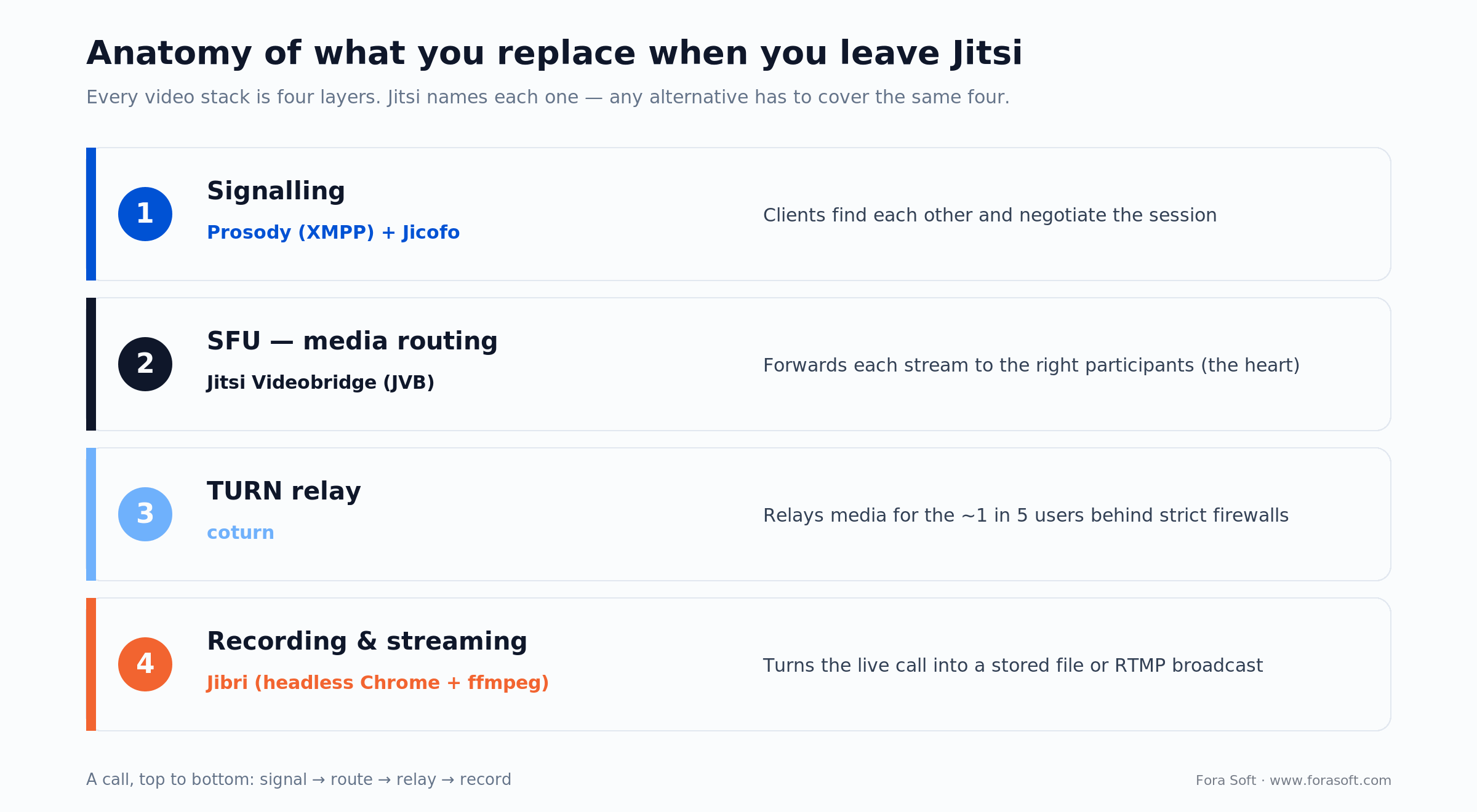
Figure 1. The four layers of a real-time video stack, mapped to Jitsi’s components. When you switch, you’re replacing each of these — a managed API absorbs all four; a self-host successor swaps the implementations; a custom build lets you choose per layer.
Signalling. Before any media flows, clients have to find each other and negotiate. Jitsi uses Prosody, an XMPP server, plus Jicofo to manage the conference. Your alternative needs some signalling layer, though most modern stacks hide it behind a clean SDK so you never touch XMPP.
The SFU. This is the heart. A Selective Forwarding Unit receives each participant’s stream and forwards the right versions to everyone else, which is how you get past the four-or-five-person limit of a peer-to-peer mesh. Jitsi’s SFU is the Videobridge. Alternatives differ most here — LiveKit and mediasoup are, at their core, competing SFUs. If the SFU trade-offs are new to you, our explainer on P2P vs MCU vs SFU is the right primer.
TURN relay. Up to roughly one in five users sits behind a firewall or symmetric NAT that blocks direct media, so you need TURN servers (Jitsi and everyone else use coturn or equivalent) to relay their streams. TURN egress bandwidth is quietly one of the biggest running costs of self-hosting, and it’s the line managed providers bake into their per-minute price.
Recording and streaming. Turning a live call into a stored file or an RTMP broadcast is its own subsystem. Jitsi’s is Jibri, and as noted it’s heavyweight per session. This is often the single biggest reason to switch, so weigh how each alternative records before anything else.
Three ways to replace Jitsi
Every alternative falls into one of three buckets, and the choice between buckets matters far more than the choice of logo inside one. Get the bucket right and the shortlist writes itself.
1. A managed video API. Someone else runs the SFU, TURN, and recording; you call an SDK and pay per participant-minute. Daily, Whereby, LiveKit Cloud, and 8x8’s own JaaS (Jitsi as a Service) live here. You trade per-minute cost and less control for zero ops and fast time to market. Best when video is a feature in your product and you’d rather ship than run servers.
2. A newer self-hosted open-source stack. You still run your own servers — keeping the data control and zero license fee that drew you to Jitsi — but on software that scales or embeds more cleanly, like LiveKit or mediasoup. You keep the ops burden; you shed Jitsi’s specific pain points. Best when self-hosting is a requirement, not a preference.
3. A custom platform you own. You (or a partner) build the product on top of an open-source media core, owning the UI, data, integrations, and margin end to end. Highest upfront cost, lowest long-run cost at volume, and the only path that gives you full control. Best when video is the product you sell. The next three sections take the buckets in turn.
Managed video APIs: Daily, Whereby, LiveKit Cloud, JaaS
If you want to stop running video infrastructure entirely, a managed API is the fastest exit from Jitsi. You embed an SDK, they run everything behind it, and you pay for what you use. The four worth knowing, with pricing captured in July 2026:
Daily is a developer-first video API with genuinely simple pricing: 10,000 free participant-minutes a month, then $0.004 per participant-minute for video, dropping toward $0.0015 at tens of millions of minutes. Recording is about $0.0135 per recorded minute, and HIPAA support is a $500/month add-on. It’s a clean, predictable Jitsi replacement when you’re embedding calls and don’t want a bill you can’t model.
Whereby Embedded leans even further toward “drop it in”: an iframe or SDK, a free tier of 2,000 participant-minutes, then a $9.99/month plan at $0.004 per participant-minute, with HIPAA as a $16.99/month add-on and up to 200 participants per room. For a small product that just needs branded video without engineering a stack, it’s the lowest-effort option on this list. Whereby even publishes its own “vs Jitsi” page, which tells you who it’s courting.
LiveKit Cloud is the managed version of the open-source LiveKit stack, so you can prototype on the cloud and self-host later without changing code. Its free Build plan includes 5,000 WebRTC participant-minutes; the Scale plan is $500/month with 1.5 million WebRTC minutes included and overage at roughly $0.0005 per minute — markedly cheaper per media-minute than the per-participant-minute pricing above — plus HIPAA and SOC 2. It’s the strongest fit if you want an escape hatch back to self-hosting.
JaaS (Jitsi as a Service) deserves a mention because it’s the least disruptive move of all: it’s the same Jitsi experience, hosted and supported by 8x8, billed per monthly active user with a free developer tier. If your only real problem is the ops burden of self-hosting Jitsi — and you like the product itself — JaaS lets you keep Jitsi and hand off the servers. It won’t fix deep-customization limits, but it erases the maintenance tax.
Want the managed-vs-self-host math for your numbers?
Send us your monthly minutes, concurrency, and recording needs. We’ll model Daily, Whereby, LiveKit, and a self-hosted build side by side — with a realistic budget and no sales theater.
Self-hosted open source: LiveKit, mediasoup, BigBlueButton
If self-hosting is non-negotiable — data residency, sovereignty, cost at scale — you’re not leaving open source, you’re trading one project for a better-fitting one. These are the self-hosted, open source video conferencing options we reach for most.
LiveKit is the modern default. It’s an Apache-licensed SFU written in Go with first-class client SDKs, designed for horizontal scaling and clean embedding from day one, and it powers real-time voice and video for the likes of OpenAI. For most teams migrating off Jitsi who still want to self-host, LiveKit is the closest thing to a like-for-like successor with a smoother scaling and recording story. You can self-host the exact same software LiveKit Cloud runs.
mediasoup sits one level lower. It’s not an app, it’s an SFU library (a C++ media worker with a Node.js or Rust API) that you build a product around. You write the signalling, the UI, and the operations yourself. In exchange you get maximum control and performance, which is why it underpins many custom platforms — including conferencing products we’ve built. Choose it when you’re building, not when you want something turnkey.
BigBlueButton is the specialist. It’s open source purpose-built for online teaching — whiteboard, breakout rooms, polls, and LMS integration — so if you outgrew Jitsi specifically for a virtual classroom, it fits better than any general tool. Worth naming too: Element Call (Matrix-based, end-to-end encrypted), TrueConf (commercial on-prem), and lightweight SFUs like MiroTalk. Match the specialist to your vertical rather than forcing a general meeting tool to do a specialized job.
The alternatives compared
Here are the main options side by side on the dimensions that decide a migration: who runs it, how it scales, roughly what it costs, and how much control you keep. Managed prices are per participant-minute and current as of July 2026; self-host “cost” is infrastructure plus your team’s time, not a license.
| Option | Who runs it | Pricing shape (2026) | Best for | Watch out for |
|---|---|---|---|---|
| Jitsi (self-host) | You | Free software + your infra | Internal, privacy-first, low volume | Scaling bridges, heavy Jibri recording |
| Daily | Managed API | ~$0.004 / participant-min; 10k free | Embedding calls, predictable billing | Per-minute cost grows with usage |
| Whereby Embedded | Managed API | $9.99/mo + ~$0.004 / participant-min | Lowest-effort branded video | Less control; 200-participant cap |
| LiveKit Cloud | Managed (self-host option) | Build free; Scale $500/mo, ~$0.0005/min | Scale + an exit back to self-host | You still build the app around it |
| LiveKit / mediasoup (self-host) | You | Free software + your infra | Data control, cost at high volume | Ops burden stays with you |
| JaaS (8x8) | Managed by 8x8 | Per monthly active user; free dev tier | Keeping Jitsi, dropping the ops | Same customization limits as Jitsi |
| Custom build | You own it | One-time build + hosting | Video is your product; full control | Upfront cost and time to build |
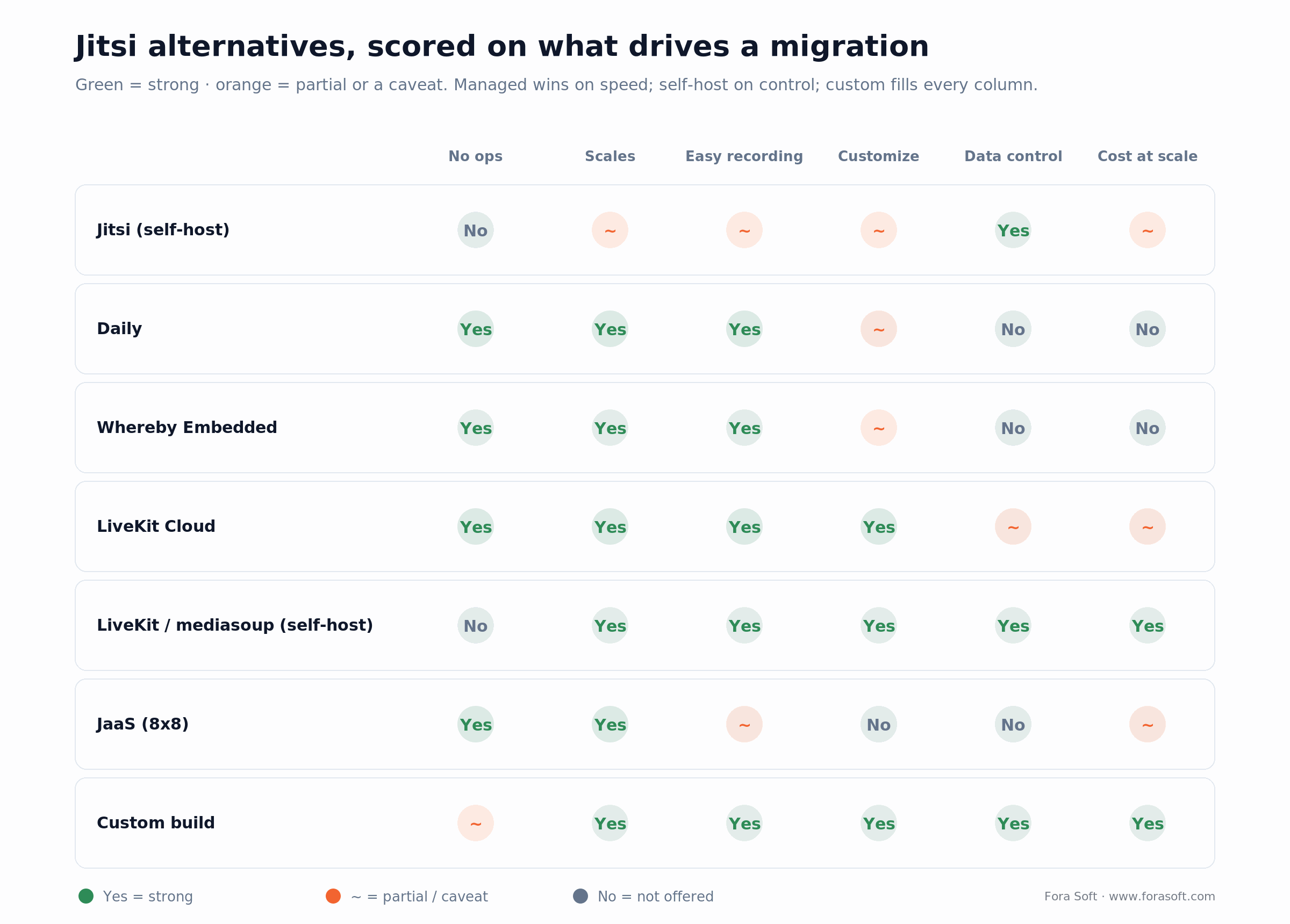
Figure 2. The same options against the capabilities that drive a migration. Managed APIs win on time-to-market; self-hosting wins on control; only the custom path fills every column, at the cost of building it.
Data residency, privacy, and the EU question
A big share of Jitsi deployments exist for one reason: control over where the video goes. Privacy-focused communities and European teams pick Jitsi precisely so no US cloud sits in the media path. If that’s you, a Jitsi alternative isn’t just about features — it’s about not surrendering the thing you chose Jitsi for.
That mostly rules the managed-first thinking out, or narrows it. If data residency is a hard requirement, self-hosting LiveKit or mediasoup keeps media on infrastructure you control, in the region you choose, with the same sovereignty story Jitsi gave you and a better scaling one. Some managed providers offer regional media zones or an EU deployment, but you’re trusting a third party with the packets either way, so read the data-processing terms before you assume a managed API clears your compliance bar.
For regulated work — health, finance, legal — end-to-end encryption, a signed BAA where HIPAA applies, and clear residency are table stakes. LiveKit Cloud and Daily both offer HIPAA support as noted; a custom self-hosted build lets you satisfy the strictest rules because nothing leaves your estate. The point: don’t trade away your original reason for choosing open source just to escape an ops headache. There’s usually a path that keeps both.
The AI angle: transcription, notetaking, and voice agents
One of the newest reasons teams leave Jitsi has nothing to do with scaling: they want AI in the call, and Jitsi has no native layer for it. If your roadmap includes live transcription, an AI notetaker, real-time translation, or an AI participant that can talk, the modern stacks give you a first-class path that stock Jitsi doesn’t.
This is where LiveKit and Daily have pulled ahead. LiveKit ships an Agents framework and inference tooling built specifically to drop an AI participant into a room; Daily maintains Pipecat, a widely used open-source framework for voice and multimodal agents, and offers real-time transcription at around $0.0059 per participant-minute plus Krisp-powered noise cancellation. Managed APIs increasingly treat “bot joins the call, listens, and acts” as a supported pattern rather than something you hand-roll.
You can bolt AI onto Jitsi — pipe the audio to a speech-to-text service and back — but you’re building and maintaining that plumbing yourself. If AI features are core to where your product is going, that plumbing existing out of the box is a legitimate reason to switch, and a strong argument for a stack (or a custom build) designed with an agent in the room from the start.
Cost math: self-host vs managed at 1,000 MAU
Numbers make the decision concrete, so here’s a worked example. Take a product with 1,000 monthly active users who average a handful of meetings a month. Round that to roughly 600,000 participant-minutes per month — a mid-sized SaaS load. What does each path cost, in round 2026 dollars?
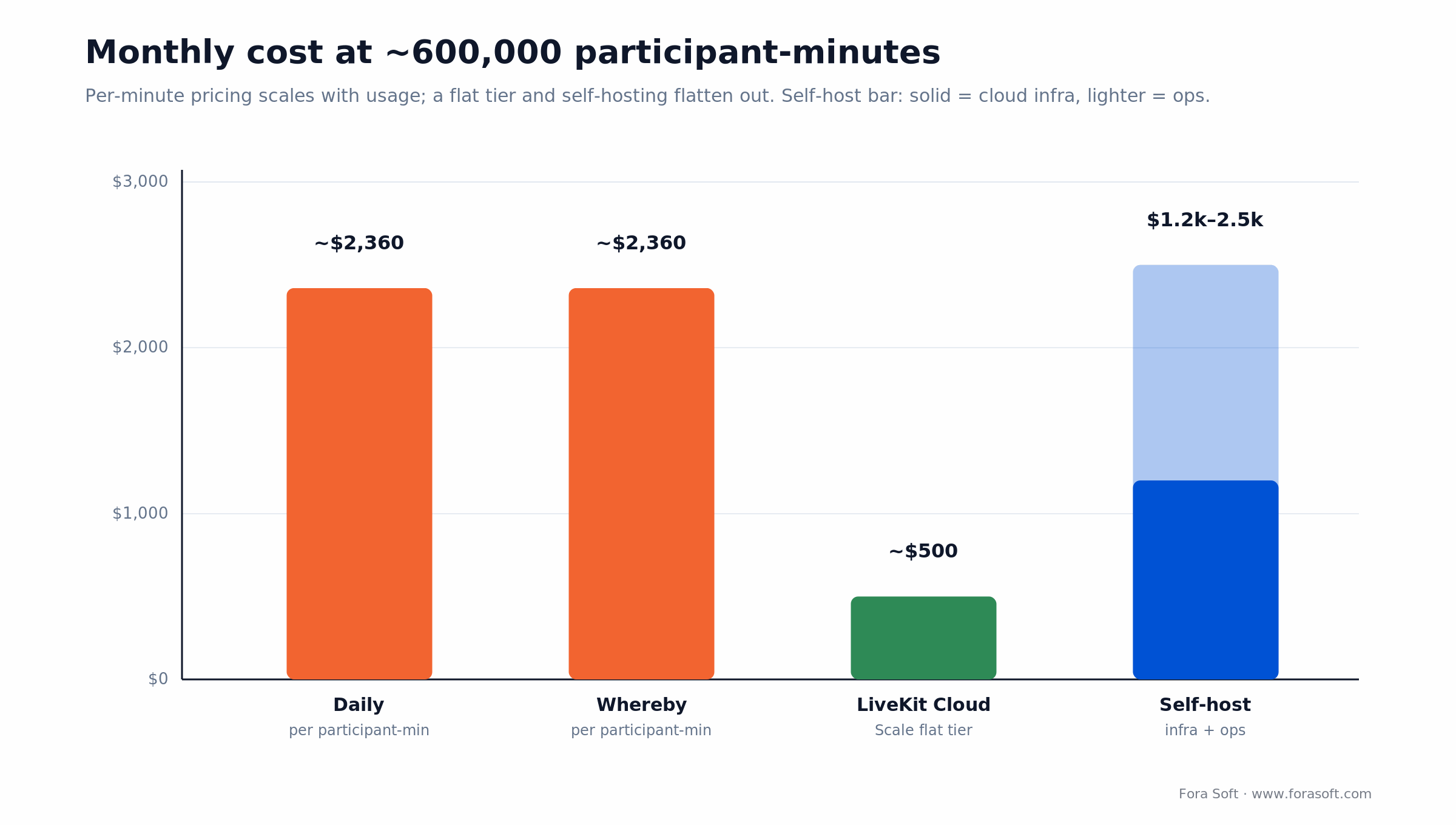
Figure 3. Rough monthly cost at ~600,000 participant-minutes. Per-participant-minute pricing scales linearly with usage; a flat managed tier and self-hosting both flatten out, which is why the ranking flips as you grow.
Per-minute managed (Daily, Whereby). At $0.004 per participant-minute with the first 10,000 free, 600,000 minutes lands around $2,360 a month on Daily (Whereby is a hair higher: a smaller free tier plus a $9.99 base). Simple, no ops, and it climbs in a straight line: double your usage, roughly double your bill. Great early, expensive at scale.
Flat-tier managed (LiveKit Cloud Scale). Because Scale includes 1.5 million WebRTC minutes for $500/month, that same 600,000 minutes sits inside the plan — call it $500 plus egress. The per-media-minute model is structurally cheaper for pure video than per-participant pricing, which is why LiveKit often wins the spreadsheet once you’re past a trivial volume.
Self-host (Jitsi or LiveKit on your cloud). No per-minute fee, but you pay for SFU compute, TURN egress bandwidth (usually the biggest line), recording workers, and a fraction of an engineer to run it. Realistically that’s roughly $1,200 to $2,500 a month in cloud (the range in Figure 3) plus meaningful staff time. It wins decisively at high, steady concurrency and loses below that, because the fixed ops cost doesn’t shrink when usage does. The crossover is the whole decision, and it’s worth modeling with your real numbers rather than a rule of thumb — our LiveKit vs Agora cost analysis shows the same modeling approach applied to two managed vendors.
Migrating off Jitsi without a big-bang rewrite
The good news about leaving Jitsi is that WebRTC clients are fairly portable, and the pieces you’re replacing have clean seams. The move is real work, but it’s rarely a from-scratch rewrite if you sequence it well.
Start with the SFU, keep your app. Most of your product — scheduling, rooms, auth, UI shell — doesn’t care which media server sits underneath. Swapping Jitsi’s Videobridge for LiveKit or a managed API touches the join flow and the client media handling, not your whole application. That’s the highest-impact first step and it de-risks the rest.
Run both side by side when: you’re migrating a live product. Route a slice of new rooms to the alternative behind a feature flag, keep Jitsi serving the rest, and compare quality, cost, and reliability on real traffic before you cut over. A parallel run beats a flag day every time — you find the edge cases (recording, screen share, mobile, TURN on locked-down networks) while you still have a fallback.
Recording and integrations are the parts to plan hardest. If you relied on Jibri, decide early how the new stack records and where files land, because that pipeline rarely maps one-to-one. Same for any XMPP-specific hooks you built around Prosody — those don’t survive the move, so budget to rebuild them against the new SDK. Sequenced this way, teams typically cut over gradually over weeks, not in one terrifying weekend.
Build vs buy: where the line sits
Most teams should not build a video platform from scratch. Buying (or self-hosting a ready stack) is the right call far more often than engineers like to admit. Building earns its cost in a specific set of situations, and being honest about which one you’re in saves a lot of money.
Reach for a managed API when: video is a feature inside a bigger product, your volume is small-to-moderate, and time-to-market matters more than per-minute cost. Ship in weeks, put zero engineers on infrastructure, and revisit the decision when the bill gets big.
Reach for a custom build when: video is the product you sell, per-minute fees would compound past a build’s cost, you need deep customization or data ownership, or you’re embedding video so tightly that an off-the-shelf tool can’t follow. Build on a proven media core (LiveKit, mediasoup) rather than inventing an SFU, and you own the UI, data, and margin without owning the hardest 90%.
The build case is strongest for platforms, weakest for consumers. If you’re selling video or it’s the core of your app, owning the stack pays off. If video is a convenience feature bolted onto something else, a managed API is almost always the better trade — and we’d tell you so on the first call. Our guide to choosing a video conferencing development company covers what to look for if you do go the build route.
Thinking about building your own platform?
We build custom video conferencing on LiveKit, mediasoup, and WebRTC — owned by you, scaled for your load. Tell us what you’re replacing and we’ll scope it honestly, build or not.
Our Solution: a custom platform you own
The situation. When a client’s video needs outgrow an off-the-shelf tool, the honest answer is often a platform built for them. We built ProVideoMeeting, a business video-conferencing SaaS, from scratch — not on Jitsi, but on the same class of open-source media plumbing you’d migrate to. It combines a full conferencing experience with in-call document signing, so participants sign legally valid documents mid-meeting without leaving the call.
What we built. A custom WebRTC stack with a Kurento-based SFU and FreeSWITCH for SIP/VoIP dial-in, so users join from a browser or a regular phone line, with branded rooms, waiting rooms, recording, and calendar integrations. That’s the anatomy from earlier — signalling, SFU, TURN, recording — assembled and owned by the client rather than rented. On a separate platform, iMind, the same discipline scaled calls to 200 video and 1,000 audio participants with AES-256 encryption, used by teams like PwC.
The lesson for a Jitsi migration. The media server is the interchangeable part; the product is the exhibit signing, the dial-in, the branding, the data model. We assemble proven components (LiveKit, mediasoup, Kurento, FreeSWITCH) rather than reinventing an SFU, which is what keeps a custom build a matter of months rather than years. If you’re past “which logo” and into “we need to own this,” that’s a good 30-minute call.
A decision framework in five questions
1. Is Jitsi actually the problem? If your only pain is the ops burden and you like the product, JaaS or a tuned self-host may be the whole answer. Don’t migrate away from software that’s working to solve a hosting problem.
2. Do you need to self-host? If data residency or sovereignty is a hard rule, stay self-hosted and move to LiveKit or mediasoup. If it’s a preference, a managed API is back on the table.
3. Is video a feature or the product? A feature inside a bigger app points to a managed API. Video as the product you sell points to self-hosting or a custom build, where owning the stack matters.
4. What’s your volume and trajectory? Low or spiky volume favors per-minute managed pricing. High, steady concurrency favors a flat tier or self-hosting, where the per-minute cost stops making sense.
5. How much do you need to customize and record? Heavy branding, deep embedding, or recording every session pushes you toward LiveKit or a custom build and away from both stock Jitsi and thin managed wrappers. The tree below walks the same logic top to bottom.
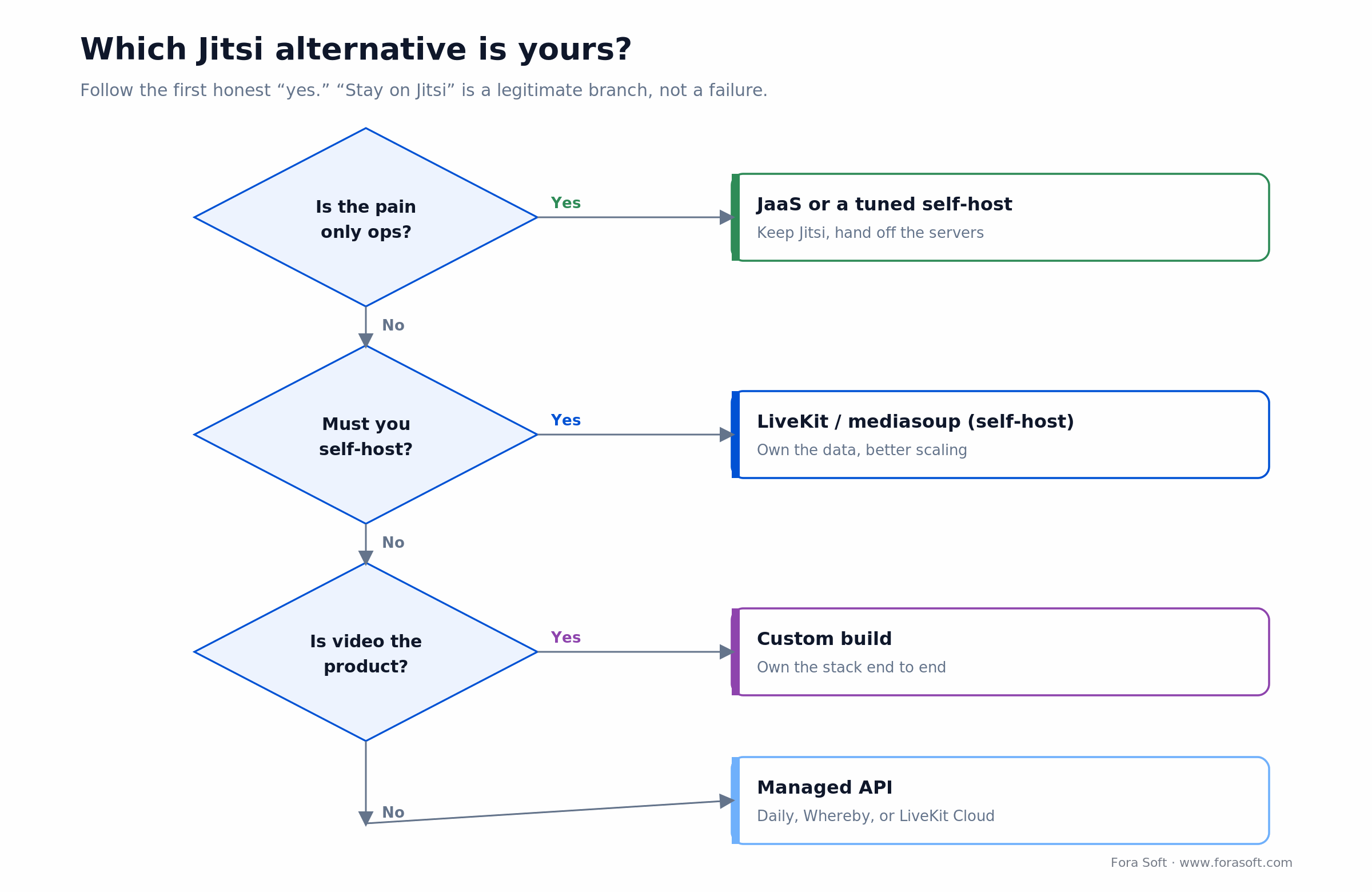
Figure 4. The choice as one path. The first honest “yes” usually settles it — and note that “stay on Jitsi” is a legitimate branch, not a failure.
When NOT to switch or build
Switching has failure modes too, and the worst ones are avoidable. Don’t migrate if Jitsi is genuinely doing the job. If one bridge covers your concurrency, you don’t record much, and you don’t need deep customization, a migration burns weeks to fix a problem you don’t have. Tuning what you’ve got is cheaper than moving.
Don’t build from scratch if video is a side feature. Standing up your own SFU, TURN, and recording to power a convenience feature in a non-video product is a poor use of engineering. Reach for a managed API, ship, and put your team on the thing customers actually pay you for. Building makes sense when video is central, not incidental.
And don’t confuse a bad configuration with a bad tool. A lot of “Jitsi doesn’t scale” stories are really under-provisioned bridges, a missing or overloaded TURN server, or default settings never tuned for the load. Before you conclude you need a new stack, make sure the current one was set up properly — sometimes the alternative you need is a better deployment of what you already run. Our video streaming learn track covers the fundamentals worth checking first.
FAQ
What is the best alternative to Jitsi?
There isn’t one best alternative — it depends on your need. If you want to stop running servers, a managed API like Daily or Whereby is fastest. If you must keep self-hosting, LiveKit is the closest modern successor and mediasoup gives you the most control. If video is the product you sell, a custom build on one of those cores is the strongest long-term option. Match the tool to whether video is a feature you consume or a product you own.
Is Jitsi still good in 2026?
Yes. Jitsi is actively maintained by 8x8, it’s free and open source, and for internal meetings, privacy-first rooms, or low-to-moderate volume it’s excellent. People look for alternatives not because Jitsi is bad, but because they hit scaling limits (past a single videobridge), heavy recording costs (Jibri runs a headless browser per session), or deep-customization needs. If none of those apply to you, staying on Jitsi is a perfectly good decision.
Is there an open-source alternative to Jitsi that scales better?
LiveKit is the one most teams move to. It’s an Apache-licensed SFU built in Go for horizontal scaling, with clean client SDKs and a smoother recording story than Jibri, and you can self-host the same software its cloud runs. For maximum control you can build on mediasoup, an open-source SFU library. For online teaching specifically, BigBlueButton is a strong open-source choice. All keep you self-hosted and free of license fees.
Jitsi vs Zoom: which one should you use?
For a company that just needs reliable meetings with no infrastructure, Zoom (or Google Meet) is the pragmatic pick. Jitsi wins when you want to self-host for privacy or data control, avoid per-seat fees, or embed and customize video in your own product — things Zoom’s hosted service doesn’t allow. If you’re building a product rather than buying a meeting tool, neither Zoom nor stock Jitsi may be the answer; a video API or custom build usually is.
How much does it cost to replace Jitsi with a managed API?
Managed video APIs charge per participant-minute. As of 2026, Daily is about $0.004 per participant-minute with 10,000 free each month, and Whereby Embedded is $9.99/month plus roughly $0.004 per participant-minute. LiveKit Cloud’s Scale plan is $500/month with 1.5 million WebRTC minutes included, which is structurally cheaper per media-minute at volume. A product doing ~600,000 participant-minutes a month lands around $2,360 on per-minute pricing or about $500 on LiveKit’s flat tier.
Can you migrate off Jitsi without rewriting your whole app?
Usually, yes. Most of your application — scheduling, rooms, auth, UI — doesn’t depend on which media server runs underneath, so swapping the Videobridge for LiveKit or a managed API mainly touches the join flow and client media handling. The parts that need real work are recording (if you used Jibri) and any XMPP-specific hooks around Prosody. The safest approach is to run the new stack in parallel behind a feature flag and cut over gradually rather than all at once.
Is JaaS (Jitsi as a Service) the same as self-hosted Jitsi?
It’s the same Jitsi experience, but 8x8 runs the servers and supports it, billed per monthly active user with a free developer tier. JaaS solves the maintenance-tax problem — no bridges to scale, no patches to apply — while giving up the full data control of self-hosting. It won’t remove Jitsi’s deep-customization limits, so it’s ideal when your only real complaint is ops, and less useful when you need to reshape the product itself.
Is Jitsi free, and are the alternatives?
Jitsi is free and open source (Apache 2.0) — you pay only for the infrastructure you run it on. Among alternatives, LiveKit and mediasoup are also free open source when self-hosted; you pay for servers and your team’s time. Managed APIs (Daily, Whereby, LiveKit Cloud, JaaS) have free tiers and then usage-based pricing. So “free” really means “no license fee” — every option has a real cost in either infrastructure or usage once you’re past a small scale.
What to read next
Architecture
WebRTC Architecture Guide for Business
How signalling, SFUs, and TURN fit together — the foundation under every alternative in this guide.
Fundamentals
P2P vs MCU vs SFU
Why the SFU is the heart of every stack, and how the topologies trade off cost and scale.
Cost
LiveKit vs Agora Cost Analysis
The same cost-modeling approach applied to two managed video vendors, in detail.
Service
Video Conferencing Development
How we build custom conferencing platforms on LiveKit, mediasoup, and WebRTC.
Ready to pick your Jitsi alternative?
A Jitsi alternative is a decision about what kind of team you are, not a ranking of logos. If Jitsi still fits, keep it. If the ops burden is the only issue, JaaS hands off the servers. If you’re embedding video, a managed API like Daily, Whereby, or LiveKit Cloud gets you there in weeks. If self-hosting is a must, LiveKit or mediasoup keeps your data yours with a better scaling story. And if video is the product you sell, a custom build on a proven media core is where owning the stack pays off.
Whichever path is yours, get the anatomy right first — signalling, SFU, TURN, recording — and the choice gets clear. We’ve built video on all of these, and we’ll give you an honest read on where you sit. See how we approach it in our video conferencing development work.

The book · Volume 3 of 7
Video Streaming: A Complete Guide to Video Delivery: From ABR and CDNs to Players, WebRTC, DRM, and the Economics of Streaming
Whichever replacement path you pick for Jitsi, the media layer underneath is still WebRTC and an SFU. Volume 3 of our handbook covers WebRTC and real-time delivery, ABR, CDNs, players and the economics of streaming, so you can price self-hosting against a managed API on more than a vendor rate card. Written by Nikolay Sapunov, CEO at Fora Soft.
Read it on Amazon →Kindle & paperback · Fora Soft Video Engineering Handbook
Let’s find your path off Jitsi
Whether you’re moving to a managed API, self-hosting a newer stack, or building your own platform, we’ll give you a straight answer in 30 minutes — switch, self-host, or build, with the cost math to back it.

