Key takeaways
• The feature that sells a language app is speaking practice, and it's the hardest to build. Vocabulary drills are a solved problem. What learners now expect — and what Duolingo, ELSA, and Speak compete on — is talking out loud and getting corrected. That means pronunciation scoring and an AI conversation partner, not just flashcards.
• You almost certainly shouldn't build the pronunciation scorer yourself. A speech API that returns phoneme-level accuracy, fluency, and completeness scores costs a fraction of a cent per utterance. Azure, Speechace, and SpeechSuper have each spent years on acoustic models you can't replicate on a startup budget.
• The AI parts are cheaper than the content. Speech recognition, pronunciation scoring, and a GPT-4o conversation tutor together cost cents per active learner per month. Writing a real curriculum — graded lessons, review items, correct example audio — is the line item teams underestimate every time.
• Retention is an algorithm, not a nice-to-have. A spaced-repetition scheduler decides what a learner reviews and when. Modern schedulers like FSRS hit the same retention as the classic SM-2 algorithm with roughly 20–30% fewer reviews — less busywork, better daily-active numbers.
• A credible AI-powered MVP runs about $80,000–$150,000; a Duolingo-scale platform is $300,000+. The range is set by how much content you build and how deep the speaking features go — not by which speech API you pick.
Search “language learning app development” and you mostly find two things: personal build diaries from solo developers, and agency posts that promise a “Duolingo clone” without ever explaining how the speaking part actually works. Neither answers the question a founder or product team really has, which is: what does it take to build an app where people talk, get their pronunciation scored, and actually keep coming back — and what will that cost in 2026? This guide answers that. We'll walk the AI speaking-practice loop end to end, compare the pronunciation-scoring APIs with real prices, cost out an MVP, and be honest about when building one is the wrong move.
Why Fora Soft wrote this guide
We're Fora Soft, a video and AI software studio that's shipped 250+ projects since 2005. A lot of that work sits at the exact intersection this article is about: real-time audio and video, speech processing, and e-learning products that have to keep learners engaged. We've built platforms where people speak, get feedback, and track progress — so we've integrated the speech APIs, wired up the scoring, and argued with clients about where to spend the budget.
This isn't a listicle rewritten from other listicles. It's the advice we give when someone asks us to build “an app like Duolingo, but for our language” before they've thought about pronunciation scoring, content, or retention. Every vendor price below was taken from that vendor's own pricing page on 2026–07–15, and we date each one, because they change.
One honest note up front. We make our living building custom software, so it would be easy for us to tell everyone to build everything from scratch. We won't. Some of the most important pieces of a language app — the pronunciation scorer especially — are things you should buy, not build, and we'll say exactly where that line sits.
Scoping a language learning app?
Tell us the language, the audience, and whether you need speaking practice. We'll tell you what to build, what to buy, and a realistic budget — before you write a line of code.
What “language learning app development” actually means
A language learning app is a consumer product that teaches someone a new language through short, self-paced practice — vocabulary, grammar, listening, and increasingly speaking — wrapped in gamification that keeps them practicing daily. Think Duolingo, Babbel, Busuu, ELSA. That's a different animal from an LMS or a school platform, and mixing the two up is the first way a project goes sideways.
The distinction is worth nailing down because it changes what you build. An e-learning platform is built around instructors, courses, enrollments, and administration — the plumbing a school or training company needs to deliver and manage teaching. A language learning app has no teacher in the loop most of the time. The “teacher” is the software: it presents an exercise, evaluates the answer, decides what comes next, and does that thousands of times without a human. If your product has cohorts, grading, and an admin dashboard, you're building a platform; if it has streaks, a review queue, and an AI that talks back, you're building a language app. This guide is about the second.
The market is why so many teams want in. The online language learning market is projected to reach roughly $54.8 billion by 2030, growing about 16.6% a year from 2025 (Grand View Research, 2025). Duolingo alone crossed $1.04 billion in revenue in 2025, up around 39% year over year, with more than 50 million daily active users and 12.2 million paying subscribers (Duolingo Q4/FY2025 results, 2026–02–26). Those numbers pull founders in — but they were earned with world-class speaking features and retention engineering, which is exactly what the rest of this guide is about.
The anatomy of an AI speaking-practice loop
Every “talk to the app” feature, whether it's repeat-after-me pronunciation or a free conversation with an AI tutor, runs the same loop under the hood. Understanding it tells you exactly which pieces you build and which you buy, because each stage maps to a different vendor and a different cost.
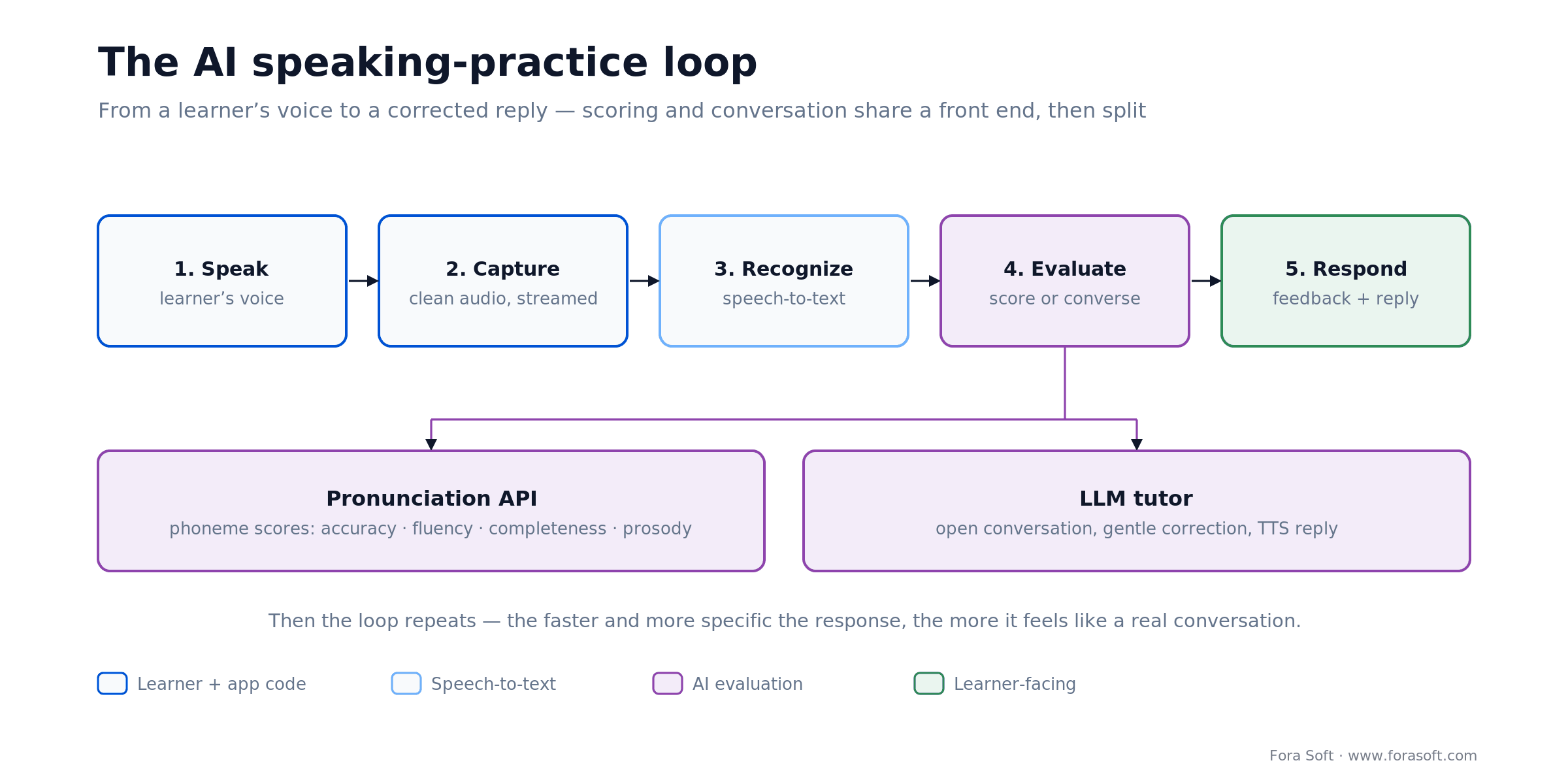
Figure 1. The path from a learner's voice to a corrected reply. The scoring branch and the conversation branch share a front end but split at evaluation.
Capture. The learner speaks into the phone. You record clean audio, handle permissions and interruptions, and stream it up — ideally in chunks so nothing waits for a long recording to finish. This is your code, and getting it reliable across noisy rooms and cheap microphones is more work than it looks.
Recognize. Speech-to-text turns the audio into words. For open conversation you need a general ASR model — OpenAI's Whisper family or a streaming service like Deepgram. For scored pronunciation you often skip generic transcription entirely, because the pronunciation API does its own acoustic analysis against the expected text.
Evaluate. This is where the two branches split. A pronunciation-assessment API compares what was said to what should have been said and returns numeric scores per phoneme, word, and sentence. A conversation feature instead sends the transcript to a large language model that plays the role of a tutor. Same voice in; very different evaluation.
Respond. The app turns the result into something the learner sees or hears — a colored score on each syllable, a corrected sentence, or a spoken reply generated by text-to-speech. Then the loop starts again. The faster and more specific this response, the more the practice feels like a real conversation instead of a form submission.
How pronunciation scoring actually works
Pronunciation scoring isn't speech-to-text with a grade bolted on. It's a separate technique: the system knows what the learner was supposed to say, aligns the audio to those expected sounds, and measures how close each sound came to a native reference. The classic approach is called Goodness of Pronunciation — for every phoneme, the model estimates how confidently that exact sound was produced, and low-confidence phonemes are flagged as mistakes.
In practice the good APIs return four kinds of score. Accuracy is how correct each phoneme sounded. Fluency looks at pacing, pauses, and hesitation. Completeness checks how much of the expected text was actually spoken. Prosody rates intonation and stress — the melody that separates a natural sentence from a robotic one. Azure's Pronunciation Assessment, for example, scores all four and returns results down to the phoneme level, with prosody available for US English (Microsoft, 2026). The scores roll up: phonemes into words, words into a sentence score, sentences into a session.
Why does this matter for your build? Because it's the feature learners can feel. Seeing the word “thorough” light up red on the th and knowing precisely which sound to fix is the moment an app earns trust. It's also genuinely hard to build well — it takes native-speaker training data, acoustic modeling, and years of tuning across accents. That's the single strongest argument in this whole guide for buying rather than building, which we come back to in the build-vs-buy section.
Pronunciation assessment APIs compared
Four options cover almost every project: Azure AI Speech, Speechace, SpeechSuper, and ELSA — plus the always-lurking option of building your own. They differ on languages, what they score, how they price, and whether they'll run offline. Here's how they stack up on the dimensions that decide the choice.
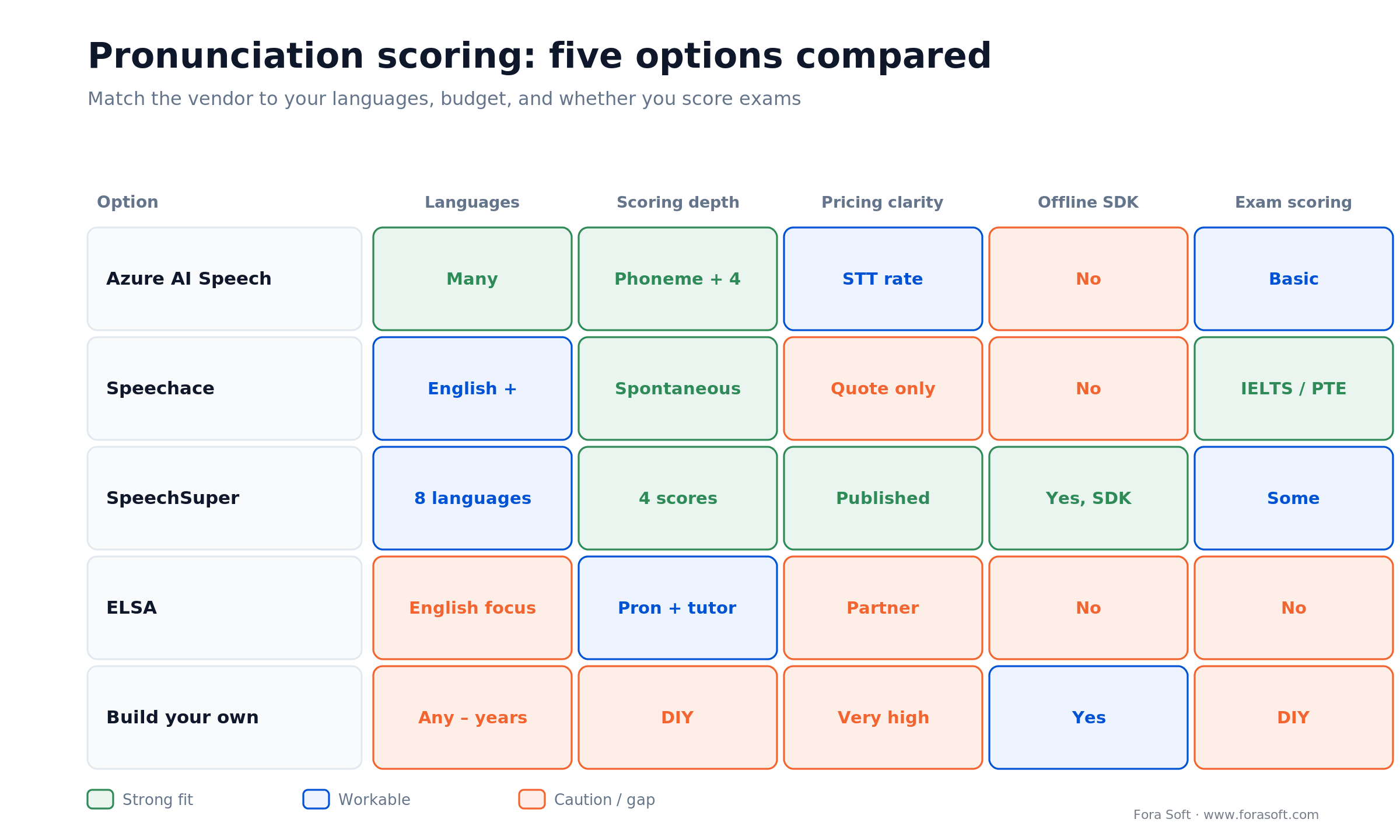
Figure 2. The pronunciation-scoring options at a glance. No option wins every row — you're matching the vendor to your languages, budget, and whether you need to score exams.
Azure AI Speech Pronunciation Assessment is the default for many teams: it scores accuracy, fluency, completeness, and prosody at the phoneme level, supports a wide range of languages, and is billed at the same rate as Azure's speech-to-text, with usage counting toward any speech commitment tier (Microsoft, 2026). It's a safe, well-documented choice if you're comfortable in the Azure ecosystem.
Speechace is the specialist for test prep. Its API returns scores mapped to IELTS, PTE, TOEFL, and CEFR, and its top tier grades spontaneous, unscripted speech — not just repeat-after-me. If your app promises “get your IELTS speaking band,” this is the vendor built for it. Speechace doesn't publish per-request pricing, so you'll need a quote (Speechace, 2026).
SpeechSuper is the most price-transparent, which makes it our anchor for cost math. Scripted assessment (the learner reads known text) is $0.004 per word request, $0.006 per sentence, and $0.008 per paragraph on pay-as-you-go, with a $20 monthly minimum; unscripted English assessment runs $0.030–$0.035 per request, dropping at prepaid volume tiers. It scores pronunciation, fluency, completeness, and rhythm across eight languages, and it licenses an on-device SDK for roughly $0.90–$1.00 per device per year at volume (SpeechSuper, 2026–07–15).
ELSA is more a finished product than a raw API. It has over 13 million users and trained on more than 200 million hours of accented speech from learners in 195 countries, and it now bundles a generative AI tutor (ELSA, 2021–2023). ELSA offers a developer program, but you're partnering with a company that also sells its own app, so weigh that against a neutral API you fully control.
| Option | Scores | Pricing (2026–07–15) | Best for |
|---|---|---|---|
| Azure AI Speech | Accuracy, fluency, completeness, prosody; phoneme-level | Billed at Azure speech-to-text rate | General use, Azure shops |
| Speechace | IELTS/PTE/TOEFL/CEFR estimates; spontaneous speech | Quote only (not public) | Test-prep and exam scoring |
| SpeechSuper | Pronunciation, fluency, completeness, rhythm; 8 languages | $0.004–$0.008/req scripted; $0.03–$0.035 unscripted | Transparent pricing, on-device SDK |
| ELSA | Pronunciation + AI tutor; strong on English accents | Partner program (contact) | English pronunciation, turnkey feel |
| Build your own | Whatever you can train — years of work | Salaries + data; effectively very high | Only at huge scale or a novel language |
Reach for a pronunciation API (not your own model) when: you're teaching a language one of these vendors already covers and you want to ship this year. Reach for Speechace specifically if you score exams, SpeechSuper if you want predictable per-request pricing or offline scoring, and Azure if you're already in that cloud.
Speech recognition: choosing your ASR
For open conversation and for transcribing free speech, you need general speech-to-text, and here the honest answer is short: use a service, don't train a model. The research problem is solved and rented cheaply. OpenAI's Whisper was trained on 680,000 hours of audio, and its large-v3 model hits around 2.7% word error rate on clean English (OpenAI, 2023); the family spans seven sizes so you can trade accuracy for speed and cost. That's a level of quality no small team reproduces in-house. In our custom speech-to-text development projects the engineering goes into streaming, accents and audio cleanup around these models, not into retraining them.
The real choice is batch versus streaming. If the learner records a whole sentence and waits, a batch transcription — self-hosted Whisper or a cloud call — is fine and cheap. If you want the app to respond while they're still talking, you need streaming ASR, where latency is the number that matters: Deepgram's Nova-3, for example, returns partial transcripts in under 300 milliseconds and runs a fraction of a cent per minute (Deepgram, 2026). Learners feel that responsiveness directly — it's the difference between a conversation and a walkie-talkie. Getting good transcripts out of imperfect audio is its own discipline, which we cover in speech recognition accuracy in noisy environments.
Reach for streaming ASR when: you want the tutor to respond mid-sentence or feel like a live conversation. Reach for batch transcription when the learner speaks a full prompt and can wait a beat — it's simpler and cheaper, and for scored pronunciation you often skip general ASR entirely and let the pronunciation API do the acoustic work.
AI conversation practice: the LLM tutor loop
The newest wave of language apps lets you just talk — a free-form conversation with an AI that stays in character, corrects your grammar gently, and never gets bored. This is a different pipeline from scored pronunciation, and it's built almost entirely from off-the-shelf parts: speech-to-text to hear the learner, a large language model to reason and reply as a tutor, and text-to-speech to speak back.
The two ways to wire it up trade latency against control. A speech-to-speech model like OpenAI's Realtime API handles the whole loop in one connection, which feels fast and natural; its audio pricing runs about $0.06 per minute of input and $0.24 per minute of output (OpenAI, 2025). The alternative is a cascade — separate ASR, LLM, and TTS — which is cheaper and lets you swap parts, but you have to engineer the turn-taking yourself. For pacing that feels human, streaming ASR matters: Deepgram's Nova-3, for instance, returns partial transcripts in under 300 milliseconds (Deepgram, 2025). We break down the trade-offs of speech-to-speech versus a cascade in our guide to the real cost of the OpenAI Realtime API.
The catch with LLM tutors is that fluency isn't the same as correctness. A model will happily hold a lovely conversation while quietly ignoring the learner's grammar mistakes, or — worse — invent a “rule” that doesn't exist. Serious apps constrain the tutor with a tight system prompt, a target vocabulary and grammar set for the lesson, and pronunciation scoring layered on top for the words that matter. The LLM makes the conversation feel alive; the scoring keeps it honest. Getting that balance right is a design problem as much as an engineering one, and it's close cousin to the adaptive tutoring we cover in AI tutors and adaptive learning.
Spaced repetition: the retention engine
Everything above teaches; spaced repetition is what makes it stick. A spaced-repetition scheduler decides which words a learner reviews and when, timing each review for just before they'd forget it. This is the quiet engine behind daily-active numbers, because a learner who's reminded to review at the right moment comes back — and one who's drilled on things they already know gets bored and leaves.
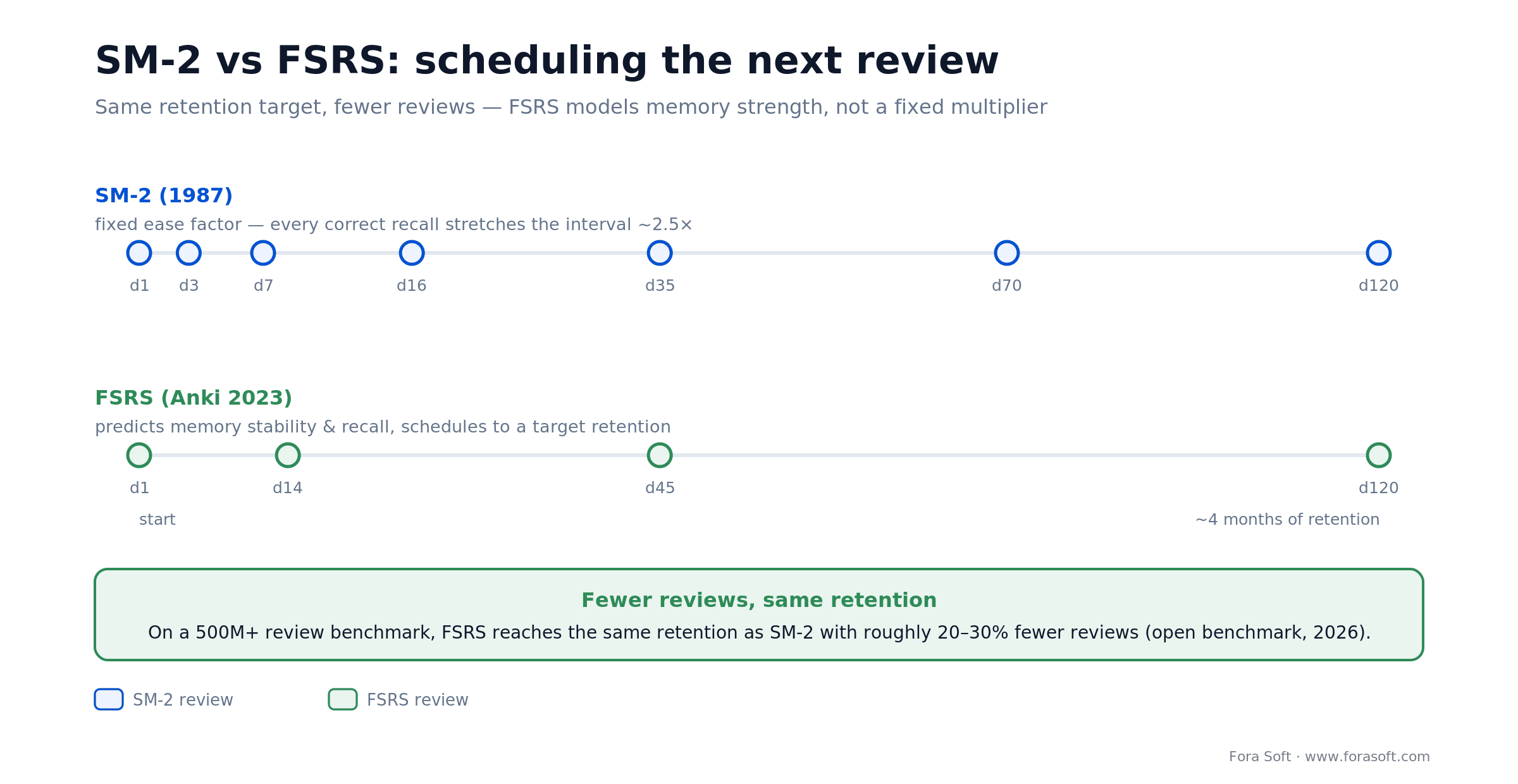
Figure 3. Two scheduling algorithms. SM-2 stretches intervals by a fixed ease factor; FSRS predicts memory strength and schedules the next review to hit a target retention.
The classic algorithm is SM-2, created by Piotr Woźniak and first shipped in SuperMemo back in 1987. It's simple and battle-tested: each card carries an “ease factor,” and every time you recall it correctly the interval to the next review stretches by that factor. Most flashcard apps still run some variant of it, and for a first version it's completely reasonable.
The modern alternative is FSRS (the Free Spaced Repetition Scheduler), which Anki adopted as a built-in option in late 2023. Instead of one fixed ease factor, it models each memory's stability and your probability of recall, then schedules the next review to hit a retention target you set. On community benchmarks over hundreds of millions of reviews, FSRS predicts recall more accurately than SM-2 and reaches the same retention with roughly 20–30% fewer reviews (open-spaced-repetition benchmark, 2026). Fewer wasted reviews means less busywork per learner, which is a direct lever on engagement.
Our advice for most teams: ship SM-2 in the MVP because it's trivial to implement and correct, then move to an FSRS-style scheduler once you have enough review history to benefit. Don't invent your own algorithm — this is a place where the published work is far ahead of anything you'll tune in a sprint.
Ship SM-2 first, upgrade to FSRS when: you have enough review history to fit the model — usually a few thousand reviews per active learner. Before that, SM-2's fixed ease factor is simple, correct, and completely fine; the gain from FSRS is real but shows up at scale, not on day one.
The feature set that makes a language app work
Under the AI, a language app is a fairly well-understood set of features. The trick is knowing which ones belong in the first version and which can wait, so you ship something learners love before the budget runs out.
The MVP core. Onboarding that sets a goal and a level, a lesson player with a few exercise types (multiple choice, listening, and speaking), a spaced-repetition review queue, progress tracking, and accounts. That's the smallest thing that actually teaches a language and keeps someone coming back. Speaking practice with pronunciation scoring is what makes it feel modern rather than a 2015 flashcard app — we'd argue it belongs in the MVP now, not a later phase.
The retention layer. Streaks, daily goals, reminders, experience points, and leagues. This is the Duolingo playbook, and it works: a large share of Duolingo's 50-million-plus daily actives are there because the habit loop is engineered as carefully as the lessons (Duolingo, 2026). Gamification isn't decoration — it's the difference between an app people download and one they open every morning.
The later phases. Live tutor marketplaces, social and leaderboards, offline mode, stories and podcasts, and multiple languages from one codebase. All valuable, none needed to prove the concept. Build the loop that teaches and retains first; add breadth once you know people stay.
What it costs to build — and to run
Two numbers matter: what it costs to build the app, and what it costs to run the AI once people use it. Teams obsess over the second and underestimate the first, which is backwards — the API bills are small, and the build and content are where the money goes.
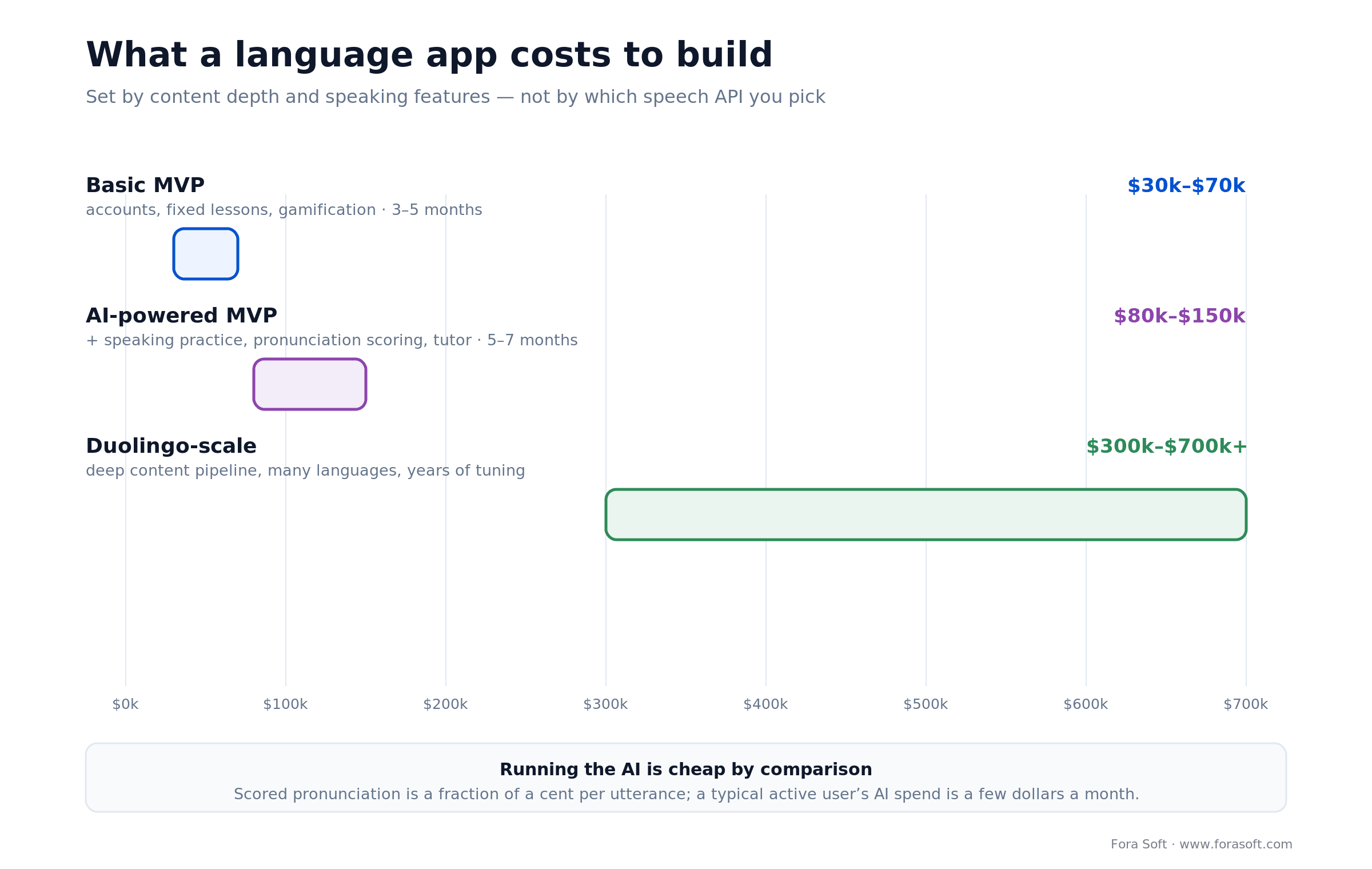
Figure 4. Build cost by ambition. The jump from a basic MVP to an AI-powered one is speaking practice and personalization; the jump to Duolingo-scale is content, platforms, and years.
Build cost. A basic MVP — accounts, fixed lessons, progress, and gamification, no serious AI — typically runs $30,000–$70,000 over three to five months. Add AI speaking practice, pronunciation scoring, an LLM tutor, and multi-platform support and you're at roughly $80,000–$150,000. A full Duolingo-scale platform, with a deep content pipeline and years of retention tuning, is $300,000–$700,000 and up (industry benchmarks, 2026). Treat these as directional; the real number depends on how many languages, how much content, and how polished the speaking features are.
Run cost — a worked example. Say a learner does 20 scored pronunciation attempts and one five-minute AI conversation per day. Using SpeechSuper's scripted sentence rate of $0.006, the pronunciation scoring is 20 × $0.006 = $0.12 a day. The five-minute conversation on a Realtime-style model at roughly $0.30 per minute of combined audio is about $1.50 a day. That's about $1.62 a day, or roughly $49 a month, for a very heavy user. Cut the conversation to a couple of minutes and score only key words, as most apps do, and the AI cost per active user drops to a few dollars a month or less — comfortably inside a subscription price.
The point of the arithmetic: the AI is affordable, and the pricing model you pick (per-request scoring versus per-minute conversation) matters more than the vendor's headline rate. What you actually budget for is engineering and content — and content is next.
Want the real number for your app?
Bring your languages, feature list, and target audience to a 30-minute call. We'll cost the build and the per-user AI spend with you — no obligation.
Build vs buy: where to draw the line
The single most expensive mistake in this space is building the parts you should buy and buying the parts you should build. Here's the line we draw with clients, component by component.
Buy the pronunciation scorer. Full stop, for almost everyone. A vendor charges a fraction of a cent per utterance for acoustic models that took years and native-speaker data to build. Replicating that means hiring speech scientists, collecting labeled audio across accents, and tuning for a long time before you match what an API gives you on day one. The only reason to build is a language no vendor supports, or scale so large the per-request fees genuinely dwarf a research team's salary — and that's a rare, late-stage problem.
Buy the speech recognition and the tutor model too. Whisper, Deepgram, and the big LLM providers give you world-class ASR and reasoning as a metered service. Training your own is a research project, not a product feature. Use the APIs, and spend your engineering on the glue — the turn-taking, the prompts, the guardrails that keep the tutor accurate.
Build the things that are your product. The lesson logic, the spaced-repetition scheduling and how it drives the review queue, the gamification and habit loop, the progress model, and above all the content and how it's sequenced. These are what make your app different from a wrapper around the same three APIs everyone else uses. This is where your money and your best people should go.
Build a component in-house only when: it's a genuine differentiator learners can feel, no vendor covers your case, or your volume makes the API bill larger than an engineering team. For the AI primitives — ASR, pronunciation scoring, LLM — that threshold is far higher than it feels early on.
Content and curriculum: the cost nobody budgets
Ask a team what their language app costs and they'll quote engineering. Ask what teaches the language and they go quiet. Content — the actual lessons, sentences, correct-answer audio, grammar explanations, and review items — is the line item that's underestimated on nearly every project, and it's often bigger than the code.
A serious course is graded from A1 to C2 on the CEFR scale — the six-level standard (A1/A2 basic, B1/B2 independent, C1/C2 proficient) the Council of Europe published in 2001 and that the whole industry uses. Each level needs vocabulary chosen and ordered, example sentences written and checked by native speakers, reference audio recorded, and exercises authored so the difficulty ramps smoothly. Multiply that by every language pair you support and the scale becomes obvious: content is a pipeline, not a one-off.
Generative AI helps — you can draft sentences and generate example audio with text-to-speech — but it doesn't remove the need for expert review, because a plausible-sounding wrong example teaches the wrong thing. Our practical advice: budget content as its own workstream with its own owner, start with one language pair and one or two CEFR levels, and prove learners finish and come back before you scale the curriculum. It's the same discipline that separates a real platform from a demo in any e-learning video product.
Mini-case: learning software that has to keep people engaged
A language app lives or dies on the same thing every learning product does: whether people keep showing up. Scholarly, an online learning platform we built, is a good picture of that discipline. It combines live and self-paced learning — video sessions, interactive materials, and progress tracking — into one product where the engineering job was making the learning experience smooth enough that students stayed with it.
The lesson that transfers directly to language apps is that the media and interactivity layer is where trust is won or lost. Audio and video that just work, feedback that arrives fast, progress that's visible — those are the difference between a tool someone uses once and one they build a habit around. For a language app, that same standard applies to the speaking loop: if the pronunciation score takes three seconds and feels vague, the learner stops trying.
That's the muscle we bring to a language product — real-time audio and video, tight feedback loops, and retention-minded design across 250+ projects since 2005. Want an assessment of what your speaking features and content pipeline should look like? Book a 30-minute call and we'll map it with you.
Which approach to choose: five questions
1. Which language, and does an API cover it? If you're teaching English, Spanish, or another major language, every vendor supports you and pronunciation scoring is a solved buy. A rarer language narrows your options and may be the one real reason to consider building — check vendor language lists before you scope anything.
2. How central is speaking? If speaking and pronunciation are your pitch, budget for a top pronunciation API and possibly an LLM tutor from day one. If you're really a vocabulary or grammar app, speaking can be a later phase and your costs drop accordingly.
3. Do you need to score exams? “Get your IELTS band” is a different product from “practice speaking.” Exam scoring points you at Speechace and its test-aligned outputs; casual practice gives you the full field to choose from.
4. Where will your content come from? Have a curriculum and native reviewers lined up? You can move fast. If content is an afterthought, fix that before writing code — it's the longest pole in the tent.
5. What's your real budget and timeline? Under $80,000 means a focused MVP, one language, sensible use of APIs, and speaking scoped tightly. Expecting Duolingo in six months for the price of a basic MVP is the mismatch that sinks projects — pick the scope your budget actually buys.
Five mistakes that sink language apps
1. Building the pronunciation model yourself. It's the most seductive mistake because it feels like the core tech. It isn't your product — it's a multi-year research effort you can rent for cents. Buy it and spend the saved time on content and retention.
2. Treating content as an afterthought. A beautiful app with thin, poorly graded lessons teaches nothing, and learners feel it within a week. Content is a workstream with an owner and a budget, not something you generate the night before launch.
3. Skipping spaced repetition. Without a scheduler, learners re-drill what they know and forget what they don't, and they leave. A review queue timed to memory is what turns a study session into a daily habit.
4. Trusting the LLM tutor to be correct. A chatty model that misses grammar mistakes or invents rules is worse than no tutor, because learners believe it. Constrain it with prompts, a lesson-scoped vocabulary, and pronunciation scoring for accuracy that matters.
5. Under-engineering audio capture. Speaking practice is only as good as the audio you record. Noisy rooms, cheap mics, and clipped recordings produce garbage scores that frustrate learners and make your excellent API look broken. Get capture right before you blame the model.
Building speaking practice into your app?
We integrate pronunciation scoring, ASR, and AI tutors into learning products — and build the lesson and retention logic around them. Let's talk through your speaking loop.
When not to build a language learning app
Sometimes the right call is not to build. If your idea is “Duolingo but for everything,” with no specific language, audience, or angle, you're taking on the incumbents at their own game with a fraction of their resources — that rarely ends well. The winners in this market are focused: a single language, a specific exam, a profession, or an underserved language pair. Breadth is how you lose; a sharp niche is how a new app gets traction.
And be honest about what you actually need. If your real goal is training employees or delivering courses with instructors and administration, you want an e-learning platform, not a consumer language app — different features, different build. If you only need to add pronunciation feedback to an existing product, that might be one API integration, not a new app at all. The pipeline that's right for a mass-market language app is overkill for a narrow feature, and the reverse is just as true.
What to measure
Engagement KPIs. Day-1, day-7, and day-30 retention, daily active over monthly active, and lessons completed per active user. These tell you whether the habit loop works. A language app with weak day-7 retention has a content or motivation problem no feature will paper over.
Learning KPIs. Review accuracy over time, pronunciation score improvement per learner, and lesson completion versus drop-off points. These prove the app teaches, and they show you exactly which lessons are too hard or too dull to finish.
Cost and quality KPIs. AI cost per active user per month, speech-scoring latency, and conversation response time. Track cost against your subscription price so unit economics stay sane, and watch latency — slow feedback quietly kills the speaking feature you paid the most to build.
FAQ
How much does it cost to develop a language learning app?
A basic MVP with accounts, fixed lessons, progress, and gamification runs about $30,000–$70,000 over three to five months. Add AI speaking practice, pronunciation scoring, an LLM tutor, and multi-platform support and it's roughly $80,000–$150,000. A full Duolingo-scale platform is $300,000–$700,000 and up (industry benchmarks, 2026). The range is driven mostly by how much content you build and how deep the speaking features go, not by which speech API you use.
How do language apps score pronunciation?
They use a pronunciation-assessment API that knows the expected text, aligns the learner's audio to those sounds, and scores each phoneme against a native reference — the classic technique is called Goodness of Pronunciation. Good APIs return accuracy, fluency, completeness, and prosody scores down to the phoneme level. Azure AI Speech, Speechace, and SpeechSuper all do this; almost no one builds it from scratch because it needs years of native-speaker training data.
Should I build my own pronunciation scoring model?
Almost never. A pronunciation API costs a fraction of a cent per utterance for acoustic models that took vendors years and huge native-speaker datasets to build. Building your own means hiring speech scientists and collecting labeled audio across accents before you match what an API gives you on day one. The only real reasons are a language no vendor supports, or scale so large that per-request fees exceed a research team's cost — a rare, late-stage situation.
How do I build an app like Duolingo?
Build the loop that teaches and retains: a lesson player with a few exercise types, spaced-repetition review, pronunciation-scored speaking practice, and a gamification layer of streaks and goals. Buy the AI primitives — speech recognition, pronunciation scoring, and the tutor LLM — and spend your engineering on lesson logic, the review scheduler, and content. Don't try to match Duolingo's breadth at launch; win a focused niche first, then expand.
Which pronunciation assessment API is best?
It depends on your case. Azure AI Speech is the safe general choice and bills at its speech-to-text rate. Speechace is best for exam scoring, with IELTS/PTE/TOEFL/CEFR-aligned outputs and spontaneous-speech grading. SpeechSuper has the clearest published pricing ($0.004–$0.008 per scripted request) and an on-device SDK. ELSA is strong for English pronunciation with a turnkey feel. Match the vendor to your languages, whether you score exams, and your pricing needs.
What is spaced repetition, and do I need it?
Spaced repetition is a scheduling algorithm that shows a learner each item just before they'd forget it, which is how vocabulary actually sticks. Yes, you need it — it's the engine behind retention and daily-active numbers. Ship the classic SM-2 algorithm in your MVP because it's simple and proven, then move to a modern scheduler like FSRS, which hits the same retention with roughly 20–30% fewer reviews, once you have review history.
How long does it take to build a language learning app?
A focused MVP with speaking practice is typically four to seven months, depending on how many exercise types and languages you launch with and how much content is ready. A basic vocabulary app without serious AI can be quicker, three to five months. A Duolingo-scale platform is a multi-year program. The content pipeline — graded lessons and native-reviewed audio — is usually the longest pole, so start it in parallel with development, not after.
How much does the AI cost to run per user?
Less than most teams expect. Scored pronunciation is a fraction of a cent per utterance (SpeechSuper's scripted sentence rate is $0.006), and an AI conversation on a realtime model runs around $0.30 per minute of audio. Even a heavy user doing 20 scored attempts and a five-minute conversation daily is roughly $49 a month; a typical user who scores key words and chats briefly costs a few dollars a month or less — comfortably inside a subscription price.
What to read next
Adaptive
AI tutors and adaptive learning
How the tutor decides what to teach next — the layer above the conversation.
Platform
E-learning platform development
When you need courses and instructors, not a consumer language app.
Speech
Speech recognition accuracy in noisy environments
Why audio capture makes or breaks your speaking scores.
Cost
What the OpenAI Realtime API really costs
Pricing the AI conversation tutor at production scale.
Ready to build the right language app?
Language learning app development in 2026 is less about writing a speech recognizer and more about assembling the right pieces well: buy the pronunciation scorer, the ASR, and the tutor model; build the lesson logic, the spaced-repetition engine, the gamification, and above all the content. Get the speaking loop fast and specific, and give retention the same engineering attention as the lessons.
Three decisions make or break the result: pick a focused niche instead of chasing Duolingo's breadth, treat content as its own funded workstream, and buy the AI primitives so your team spends its time on what makes your app different. Do that, and an $80,000–$150,000 MVP can teach a language as well as apps that cost far more — and keep learners coming back.

The book · Volume 6 of 7
AI for Video: A Complete Guide to Intelligence in Video Products: From Models and Inference to Computer Vision, Speech, Search, and Generative Video
Pronunciation scoring and the LLM tutor loop are only as good as the speech models underneath them. Volume 6 of our handbook covers those capabilities in depth: ASR and TTS, diarization, deployment topologies, and the ML basics you need to choose between a vendor API and a model of your own. Written by Nikolay Sapunov, CEO at Fora Soft.
Read it on Amazon →Kindle & paperback · Fora Soft Video Engineering Handbook
Let's build your language learning app
250+ projects since 2005, from real-time audio and video to AI-powered learning products. Bring your language, audience, and goals — we'll tell you what to build, what to buy, and what it'll cost.
01Why Fora Soft wrote this guide
02What “language learning app development” actually means
03The anatomy of an AI speaking-practice loop
04How pronunciation scoring actually works
05Pronunciation assessment APIs compared
06Speech recognition: choosing your ASR
07AI conversation practice: the LLM tutor loop
08Spaced repetition: the retention engine
09The feature set that makes a language app work
10What it costs to build — and to run
11Build vs buy: where to draw the line
12Content and curriculum: the cost nobody budgets
13Mini-case: learning software that has to keep people engaged
14Which approach to choose: five questions
15Five mistakes that sink language apps