

Key takeaways
• Virtual inspection software replaces a site visit with a guided video call. An adjuster or inspector steers a claimant’s phone camera in real time, captures stamped evidence, and closes the file without dispatching anyone.
• The economics are hard to argue with. A routine field visit runs $150–$500; a virtual inspection costs the adjuster’s minutes plus a few dollars of platform time. At 10,000 inspections a year that gap is real money.
• Buy first, build when you hit a wall. Blitzz, Zoho Lens, and Truepic cover the common cases. You build when volume, fraud exposure, or claims-system integration make the per-inspection SaaS bill and the workflow gaps hurt.
• The hard engineering is a full-resolution photo mid-call. The live video track is downscaled, so a court-grade still needs a separate native capture path — not a screenshot of the video element. Vendors gloss over this; it’s where builds slip.
• A geotag is not proof anymore. EXIF is trivially edited and 2025 saw a sharp rise in AI-manipulated claim photos. Content provenance (C2PA) and capture-time device checks are the controls that hold up.
Why Fora Soft wrote this guide
The call usually opens the same way: “We settle a few thousand claims a month, every one needs an inspection, and sending a person out is killing our cycle time. Can we just do it over video?” The answer is yes — but the demo that looks effortless hides the two things that actually decide whether the project ships: capturing evidence that survives a fraud review, and wiring the tool into the claims system so an adjuster isn’t copy-pasting between tabs.
Fora Soft has built real-time video and AI products for 21 years, across 250+ projects. Two of them sit directly under this topic. ProVideoMeeting is a WebRTC platform where people join from a browser or a phone with no install, verify identity by photo and SMS, and sign documents against a tamper-evident audit trail — the exact primitives a remote inspection needs. V.A.L.T., our video management platform, runs across 770+ organizations and 50,000+ users, and taught us how insurers and lawyers think about chain of custody.
This guide is the version we’d give a claims VP, a proptech founder, or a govtech product lead who has to make a real build-vs-buy call this quarter. It covers what these tools do, the vendors worth shortlisting with their 2026 prices, the cost math, the parts that break in production, and the fraud problem that got a lot worse in the last year. No hype, and we’ll tell you when buying beats building. If you do build, our video chat app development team ships the browser-and-mobile call layer with recording and screen share as the starting point.
Scoping a virtual inspection build this quarter?
Bring your claim volume, your fraud requirements, and your claims system. A senior engineer will tell you in 30 minutes whether to buy, build, or do both — and what the build really costs.
What virtual inspection software does
Virtual inspection software lets a remote expert see and document a physical thing (a damaged car, a roof, a rental unit, a finished electrical panel) without standing in front of it. In practice it is one of two workflows, and mixing them up is the first mistake buyers make.
Live-guided inspection. The inspector sends a link, the other person opens it on their phone (the good tools need no app), and a video call starts. The inspector points where to aim, freezes frames, drops an on-screen arrow, and grabs high-resolution stills the moment the damage is on camera. This is the “remote video inspection” most insurers mean.
Self-guided capture. No live call. The claimant follows prompts (“photograph the VIN,” “walk each room”) and the app captures stamped media that a reviewer checks later, sometimes with AI scoring the damage. It scales to huge volumes and works across time zones, but you lose the ability to say “no, tilt up.”
Two neighbors are easy to confuse with this category and are not the same product. 3D digital-twin capture (Matterport) builds a walkable model from a special camera, great for documentation and overkill for a fender. And industrial remote visual inspection (RVI) uses borescopes and drones for non-destructive testing of turbines and pipelines. This guide is about guided video for insurance, property, and permits, where the camera is a regular phone in a regular person’s hand. A closer sibling is remote visual assistance software, which uses the same guided video to fix equipment or coach a field technician rather than to document a claim.

Figure 1. The anatomy of a guided remote video inspection, from the invite link to the signed, exportable evidence package.
Why the switch is happening in 2026
Because the customer now expects it and the numbers finally back it. When the pandemic forced the issue, LexisNexis Risk Solutions tracked virtual handling of auto claims jumping from under 15% to nearly 100% overnight, then settling at “a little over 60%” a year later (2021). It never went back. By 2024, LexisNexis found 71% of homeowners were aware of consumer-led mobile inspections and preferred them to a stranger in their house.
The satisfaction data is the part that should catch a claims leader’s eye. J.D. Power’s 2022 U.S. Property Claims study found that customers who submit photos but then still have to schedule an in-person visit score 47 points lower than those handled fully digitally, and the fully-digital group got repairs started nine days sooner. A half-measure is worse than either extreme. If you ask for photos and then send someone anyway, you get the cost of both and the goodwill of neither.
Meanwhile the tooling grew up. Browser WebRTC works on a mid-range Android over cellular. Phone cameras shoot 12-megapixel stills that beat what a field adjuster shot on a point-and-shoot a decade ago. And carriers now treat remote inspection as core claims infrastructure, not a stopgap. The question stopped being “does this work” and became “do we buy it or build it.”
Where remote video inspection pays off
The pattern that makes virtual inspection worth it: a physical visit that is frequent, low-to-medium complexity, and mostly about confirming what something looks like. Four domains fit cleanly.
Insurance claims. At first notice of loss (FNOL), a specialist triages over video in minutes: settle now, send a field adjuster, or flag for review. Auto claims lean self-guided (photograph the four corners and the VIN); property and catastrophe claims lean live-guided because a homeowner needs steering to show roof or water damage safely.
Underwriting and risk. Before binding a policy, carriers verify a property’s condition: roof age, wiring, wood stove, trampoline. A five-minute video walk beats waiting three weeks for an inspection vendor and losing the quote.
Property and real estate. Move-in and move-out condition reports, rental turnovers, a progress check on a job site, or a pre-purchase look for a remote buyer. The report and the timestamps are the deliverable.
Municipal permits. The International Code Council publishes Recommended Practices for Remote Virtual Inspections, and jurisdictions like Los Angeles County already approve video inspections for water heaters, panel changeouts, re-roofs, and solar. Govtech that fits an existing permitting system has a real, standards-backed market.
Reach for virtual inspection when: the visit is high-frequency and mostly visual confirmation — auto FNOL, roof and property claims, underwriting condition checks, rental turnovers, permit sign-offs. Keep it in person when the job needs touch, measurement tools, or destructive testing.
Live-guided vs self-guided capture
Pick the wrong modality and you either drown adjusters in live calls that didn’t need to be live, or ship a self-guided app that produces useless footage from people who don’t know what “show me the drip edge” means. The split comes down to who needs steering.
Live-guided wins when the subject is unfamiliar to the person holding the phone, when safety matters (don’t send a homeowner onto a wet roof; keep them at the eaves), and when a judgment call happens on the spot. It costs a scheduled slot of adjuster time, so it doesn’t scale infinitely.
Self-guided wins on volume and asynchrony. A prompted flow (capture this, now this) with automatic quality checks (too blurry, retake) handles tens of thousands of simple claims. Add AI damage scoring and a reviewer only touches the exceptions. The risk is garbage capture and a wide-open door for staged or reused photos, which is why the fraud controls in section eleven matter more here.
Most serious platforms do both and route by claim type: self-guided for a windshield chip, live-guided escalation the moment the flow detects structural damage or the value crosses a threshold. Build the router early; retrofitting it is painful.
Reach for self-guided when: volume is high, claims are simple and repeatable, and turnaround can be asynchronous. Escalate to live-guided the instant value, safety, or complexity crosses a line you set.
Anatomy of a virtual inspection platform
Strip a virtual inspection tool down and it is six layers. Miss one and the demo works but the product doesn’t survive contact with a real claim.
1. Invite and join. An SMS or email link that opens straight into a browser session. Every install requirement you add costs you completed inspections — a stressed claimant will not download an app to file a claim.
2. Real-time media. WebRTC for the live video and audio, with STUN and TURN servers so the call connects through carrier NAT. This is the layer that decides whether the call holds up on a bar of LTE in a basement.
3. Guidance. An on-screen pointer, freeze-frame, flashlight toggle, and two-way audio so the inspector can direct the shot. Small features, huge effect on capture quality.
4. Evidence capture. Full-resolution stills and clips, each stamped with time, GPS, and device, ideally with content provenance baked in at capture. This is the deliverable and the hard part; the next section is entirely about it.
5. Reporting and workflow. Annotations, a structured report, and an export that lands in the claims or permitting system, not a folder of loose JPEGs someone renames by hand.
6. Storage and audit. Encrypted retention with a retention clock, immutable audit log, and role-based access. Insurers and courts care about who touched what and when, which is the lesson V.A.L.T. drilled into us over years of evidentiary video.
The hard part: full-res capture over a live call
Here’s the catch no vendor page mentions: the photo you pull off a live video call is not the photo your fraud team needs. A WebRTC video track is compressed and downscaled to survive the network — often 720p, heavily encoded. Screenshot the video element and you get a soft, artifact-ridden frame that a reviewer can’t zoom into to read a VIN or a hairline crack.
The naive approach draws the current video frame onto an HTML canvas and exports it, the standard drawImage-then-toDataURL path documented on webrtc.org. That’s fine for a thumbnail. It is not fine for evidence. The browser ImageCapture API can grab a higher-resolution frame than the preview stream, but support is uneven across mobile browsers in 2026, so you can’t rely on it alone.
The path that actually works: when the inspector taps “capture,” trigger a real photo from the device’s native camera at full sensor resolution — a separate capture path running alongside the WebRTC stream — then upload that still out of band while the low-res call keeps running. On a native mobile app that’s a native camera call; in a browser it means pushing ImageCapture where it exists and falling back gracefully where it doesn’t. Either way, the evidence photo and the call video are two different pipelines. Teams that discover this in week six lose the schedule they promised in week one.
TURN is the other quiet budget line. A field claimant is usually on cellular behind carrier-grade NAT, so the media often can’t go peer-to-peer and has to relay through a TURN server, which means you pay for every gigabyte of that call. Self-hosting TURN is bandwidth-heavy and easy to underestimate; it’s a big reason teams start on a CPaaS that bundles global relays. We go deeper in our WebRTC architecture guide and the production-systems course.
Not sure your capture path holds up as evidence?
We’ve shipped WebRTC capture that survives a fraud review. Send us your requirements and we’ll pressure-test the plan before you write code.
The tools compared
Short answer: for live-guided video, shortlist Blitzz; for authenticated self-guided capture, shortlist Truepic; for cheap general-purpose AR assist, Zoho Lens; for roof and exterior measurement, Hover; for municipal permits, Vuspex. None of them is the whole platform if your workflow is unusual. Prices below are from each vendor’s own pages, captured 2026-07-13.
| Tool | Type | Public price (2026-07-13) | Best for | Watch out for |
|---|---|---|---|---|
| Blitzz | Live-guided, no-app browser video | Professional $334/mo billed annually (600 inspections/yr); Enterprise on quote | Insurance & field service wanting one live tool | SOC 2, recording, API are paid add-ons |
| Truepic Vision | Self-guided, C2PA-authenticated capture | Quote-based | Fraud-sensitive claims and lending | Not a live guided call; async by design |
| Zoho Lens | AR remote assist + snapshots | Standard ~$9/tech/mo; Professional ~$15/tech/mo | Budget SMB, general field assist | Not insurance-specific; no provenance |
| Hover | Photo-to-3D roof/exterior measurement | Pro $99/mo or $999/yr + $29–$139/project | Roof and exterior property claims | Measurement only, not a live inspection |
| Vuspex | Municipal live + self-guided | Quote-based (gov procurement) | Building departments on Accela | Permitting-shaped; thin on claims |
| Custom build | Whatever your workflow is | Your engineering + run cost | High volume, deep integration, IP ownership | You own uptime, TURN, and compliance |
Vendor ROI claims (“60% faster,” “320% first-month ROI”) are self-reported marketing and are left out of this table on purpose. Prices verified on vendor pages 2026-07-13 and will drift — check before you budget.
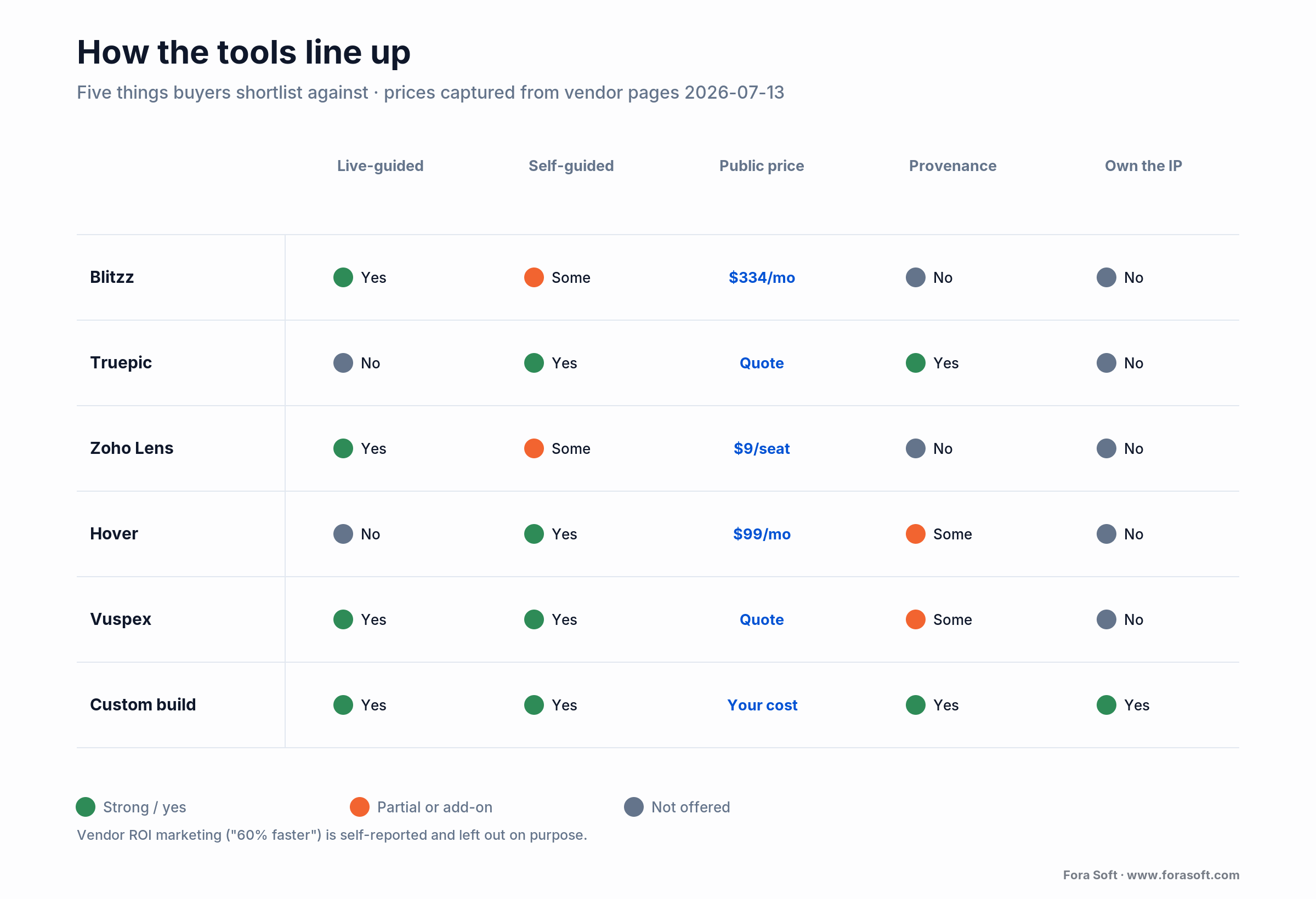
Figure 2. How the main tools line up on the five things buyers actually shortlist against. Complements the table above, not a repeat of it.
Reach for a SaaS tool when: your workflow is standard, volume is under a few thousand inspections a month, and you don’t need the tool welded into a custom claims system. The monthly bill beats an engineering team until scale or integration says otherwise.
Build vs buy: where the line sits
Buy until the SaaS stops fitting, then build the part that doesn’t. The trigger is rarely raw video. It’s everything around it: per-inspection pricing that balloons at volume, a fraud bar the vendor can’t meet, or a claims system the tool won’t integrate with the way you need.
Stay on SaaS when you do a few thousand inspections a month, your process matches the vendor’s, and their compliance posture is enough. At that scale a subscription is cheaper than one senior engineer’s salary, and you get maintenance and uptime for free.
Go hybrid when the video is fine but the workflow isn’t. Keep the vendor’s call engine, build a thin custom layer for routing, reporting, and the integration into your claims or permitting system. Most teams live here longer than they expect.
Build when volume makes the per-inspection bill dwarf a platform team, when you need capture and provenance the vendors don’t sell, when you want to own the IP and the data, or when the tool has to feel like a native part of your product. Building means you own the TURN bill, the uptime, and the compliance. Go in clear-eyed.
Reach for a custom build when: per-inspection SaaS fees at your volume exceed a platform team’s cost, you need fraud-grade capture the vendors don’t offer, or the inspection flow has to be a native part of your own product.
Cost math: physical vs virtual, and a build
Let’s do the arithmetic out loud, conservatively. A routine field visit an insurer would otherwise dispatch runs somewhere in the $150–$500 range once you load travel and time; we’ll use $200 to stay on the safe side.
A virtual inspection replaces that with two costs: the adjuster’s time and a slice of platform. Say a live-guided inspection takes 20 minutes of an adjuster whose loaded cost is $50/hour — that’s about $16.70. On Blitzz’s Professional plan, 600 inspections a year for $4,008 works out to roughly $6.70 per inspection. Add them: about $23 per virtual inspection versus $200 in the field. That’s a $177 saving each time, before you count the days you shave off cycle time.
Scale it: at 10,000 inspections a year, $200 each is $2.0M; $23 each is $230K. The gap is roughly $1.77M a year. Even if half your inspections still need a truck for complexity, you’re saving on the other half. This is why the vendor marketing quotes 80%+ cost reductions — the underlying arithmetic supports a big number even when you strip the hype.
Now the build side. A full WebRTC platform built from scratch is a heavy, multi-quarter program — commonly six or seven figures over a year or more; an SDK-based build (Twilio, Vonage, Agora, LiveKit) is far cheaper, often mid-five to low-six figures, and then you carry an ongoing run cost for TURN relay, media servers, and storage. A focused virtual-inspection MVP — browser join, live guidance, native full-res capture, stamped storage, one claims-system integration — is much narrower than a full conferencing product. With our Agent Engineering approach, we scope that kind of MVP conservatively in the low six figures and 10–14 weeks, because the boilerplate — auth, storage lifecycle, report export — is exactly what agents draft well and senior engineers review fast. The math tips to build when your annual SaaS bill starts to rhyme with that number.

Figure 3. Per-inspection and annual cost, physical versus virtual, with the build-cost band for context. Bars anchored at zero; figures are conservative and derived in the text.
Want the cost math run on your real volume?
Give us your inspection count and current process. We’ll model buy vs build against your numbers and send back an honest break-even, not a sales deck.
Fraud-proof capture: geotags and C2PA
Start from the uncomfortable truth: a geotag is not proof. EXIF metadata (the date, GPS, and device stamped into a photo) is trivially editable; a free tool rewrites any field in seconds, and messaging apps strip it entirely on the way through. Phone GPS is only accurate to a few meters even when it’s honest. “We geotag the photos” is a feature, not a fraud control.
This has been building fast. Allianz UK reported a roughly threefold rise in manipulated and AI-generated images in claims between 2022 and 2023, and the market has flagged further escalation since as generative tools got cheaper and better. A self-guided flow that trusts whatever photo gets uploaded is a fraud magnet in that environment.
The real control is content provenance. The C2PA standard — backed by Adobe, Microsoft, the BBC, Intel, and Truepic since 2021 — binds a cryptographically signed manifest to a photo at the moment of capture: what device took it, when, whether it was edited. Change one pixel afterward and the signature breaks. Pair that with a capture path that verifies the device isn’t rooted or feeding a virtual camera, and you have media that stands up to review.
One honest limit, because it trips people up: C2PA proves chain of custody, not truth. It records that this camera captured this frame at this time. It does not detect a deepfake. A verified camera can faithfully sign a photo of a screen showing a fake (the “analog hole”). Provenance narrows the attack surface hard; it doesn’t close it. Layer liveness prompts and anomaly checks on top for anything high-value.
Reach for provenance-grade capture when: claims are self-guided, values are high, or you’ve seen staged or reused photos. Capture-time C2PA plus device-integrity checks beats after-the-fact forensics on an uploaded JPEG.
Security and compliance you can’t skip
A virtual inspection records a person, their home or vehicle, and often their face and voice. That’s personal data and sometimes video of a minor in the background. Handle it like the regulated material it is.
Consent and recording. Get explicit, logged consent to record before the camera rolls. Several U.S. states require all-party consent for recordings; a consent banner and a stored timestamp are cheap insurance against a later dispute.
Encryption and access. Encrypt media in transit and at rest, gate it behind role-based access, and keep an immutable audit log of every view and export. When a claim goes to litigation, the audit trail is what makes your evidence admissible.
Retention. Set a retention clock per record type and delete on schedule. Keeping footage “just in case” turns a data-minimization principle into a breach liability. GDPR and U.S. state privacy laws both punish indefinite retention.
Certifications. Enterprise carriers will ask for SOC 2, and health-adjacent inspections may pull in HIPAA. On several SaaS tools these are paid tiers, so price them in early, because “we’ll add SOC 2 later” is a procurement blocker, not a footnote.
Mini-case: what ProVideoMeeting taught us
Situation. ProVideoMeeting isn’t an inspection product — it’s a WebRTC video platform with in-call document signing, but the port to inspection is short, because it already solves the same four problems. People join from a browser or a plain phone call with no install. Identity is verified by photo snapshot and SMS. Every signature writes to a tamper-evident audit trail. Video quality adapts to whatever connection the person has.
What transferred. Three lessons carried straight over. First, no-install browser join is the single biggest lever on completion rate; every download prompt loses people, and a claimant is already stressed. Second, identity and audit belong in the first sprint, not bolted on later; ProVideoMeeting’s photo-plus-SMS check and signed log are the same pattern an inspection needs to tie a capture to a real person at a real time. Third, a phone and SIP dial-in fallback keeps the session alive when the video won’t connect — on a field inspection over rural cellular, that fallback is the difference between a completed file and a reschedule.
The honest caveat. A conferencing core gets you most of the way, but not all of it: full-resolution evidence capture and content provenance are net-new work on top, and that’s exactly the part we flagged earlier as where builds slip. If you want the short version of the port plan — what’s reusable and what’s new — grab a 30-minute call and we’ll walk your team through it.
A decision framework in five questions
Five questions get most teams to the right call in an afternoon.
1. What’s your volume? Under a few thousand inspections a month, buy. Tens of thousands, and the per-inspection SaaS bill starts funding a platform team — model the break-even.
2. Live-guided, self-guided, or both? Both, routed by claim type, is the durable answer. If you only need one, it’s usually live-guided for property and self-guided for auto.
3. How exposed are you to fraud? High-value, self-guided, or a history of staged claims pushes you toward capture-time provenance, which narrows your vendor list fast or argues for a build.
4. How deep is the integration? If the tool has to live inside your claims or permitting system and feel native, a thin custom layer or a full build beats fighting a vendor’s workflow.
5. Who owns uptime and compliance? Buy and it’s the vendor’s problem. Build and it’s yours — TURN, retention, SOC 2, all of it. If you don’t have anyone to own that, the answer is buy, and that’s a good answer.
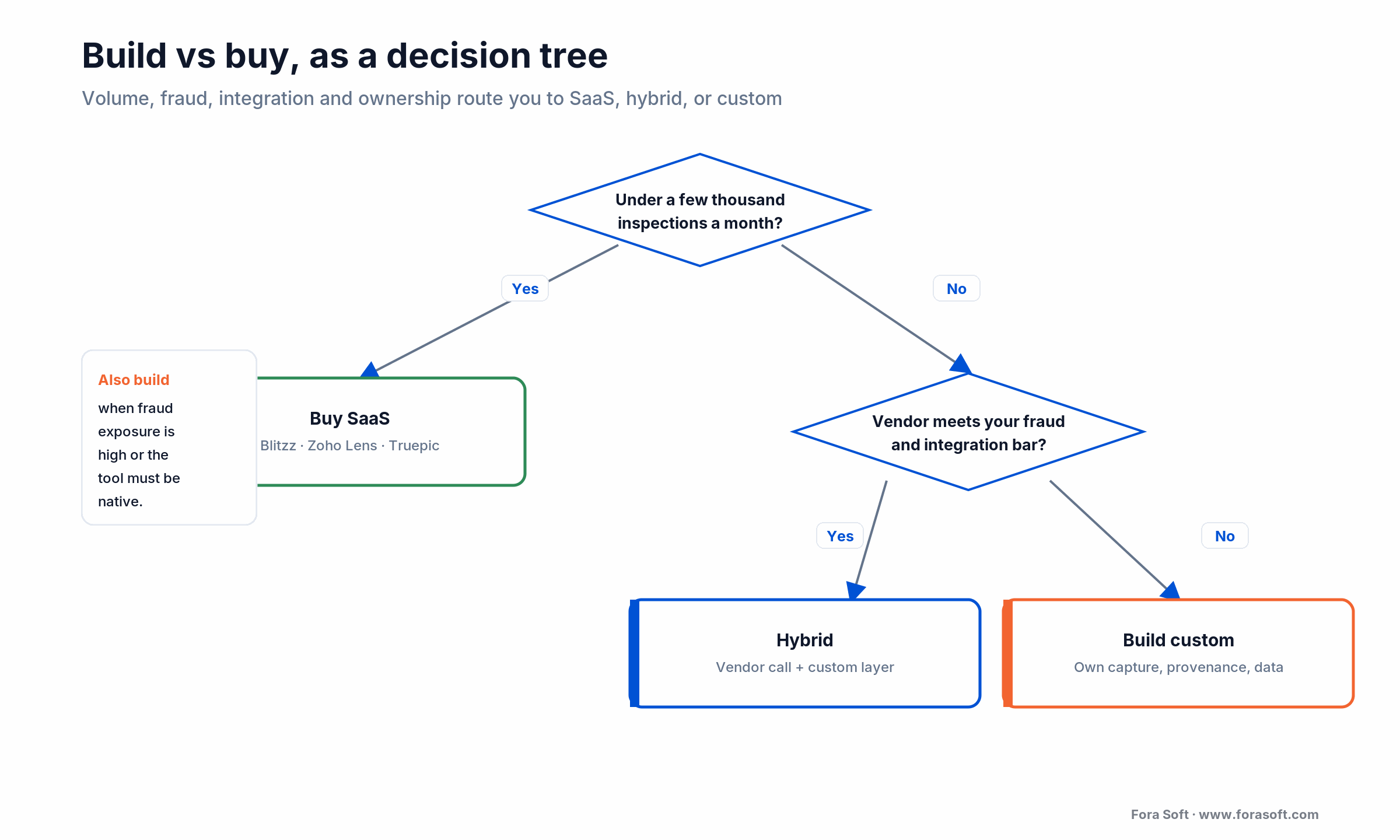
Figure 4. The build-vs-buy decision as a tree: volume, fraud exposure, integration depth, and ownership route you to SaaS, hybrid, or a custom build.
Five pitfalls that sink these projects
1. Treating the call screenshot as evidence. The downscaled video frame won’t survive a fraud review. Build the native full-resolution capture path from day one, or you’ll rebuild it after the first disputed claim.
2. Requiring an app install. Every install step drops completion. If a claimant has to visit an app store to file a claim, a chunk of them simply won’t. Browser-first, always.
3. Underestimating TURN and bandwidth. Field users are behind carrier NAT, so most calls relay through TURN and you pay for the gigabytes. Model this cost before launch, not after the first invoice.
4. Bolting on identity and audit late. Consent, identity checks, and an immutable log belong in the first sprint. Retrofitting chain of custody into a live system costs multiples of building it in.
5. Shipping capture without provenance. In a year where AI-manipulated claim photos jumped sharply, a self-guided flow that trusts raw uploads is a liability. Capture-time provenance is the fix, and it’s far cheaper than the fraud losses it prevents.
KPIs to track once you go live
Adoption KPIs. Invite-to-join rate (what share of sent links become sessions), completion rate, and app-free join percentage. If invite-to-join sits under 70%, your onboarding or your join flow is leaking — fix that before anything else.
Business KPIs. Cost per inspection versus your old field cost, cycle time from FNOL to close, and truck-rolls avoided per hundred claims. These are the numbers that justify the program to finance.
Quality and integrity KPIs. Recapture rate (how often evidence is too poor to use), fraud-flag rate on captured media, and evidence-completeness per inspection. Rising recapture means your guidance or capture quality needs work; a fraud-flag rate that’s suspiciously low usually means you aren’t checking hard enough.
When NOT to use virtual inspection
Virtual inspection is the wrong tool more often than the vendors admit. Skip it when:
The job needs touch or tools. Moisture readings behind a wall, structural measurement, a gas-leak sniff test: a camera can’t do these. Video is for visual confirmation, not physical testing.
The stakes are very high and adversarial. A total-loss dispute or a large liability claim heading for court often warrants a qualified human on site, whatever the video shows. The ICC makes the same point for permits: keep an in-person fallback for complex or inaccessible work.
Your users can’t support it. Poor connectivity, low device quality, or a population that won’t manage a video call will tank completion. Know your audience before you mandate the channel.
Volume is tiny. A handful of inspections a month doesn’t justify even a SaaS seat, let alone a build. A phone camera and a shared folder is a fine place to start; adopt software when the volume earns it.
Ready to see what your build actually looks like?
A senior engineer will map your inspection flow, the reusable pieces, and the net-new work — capture, provenance, integration — in one call. Zero obligation.
FAQ
What is virtual inspection software?
It’s software that lets a remote inspector or adjuster document a physical asset over a live video call or through self-guided photo capture, instead of visiting in person. It captures stamped, high-resolution evidence and packages it into a report for a claims or permitting system.
How much does remote inspection software cost?
SaaS ranges from about $9 per technician per month (Zoho Lens) to $334 a month for 600 inspections (Blitzz Professional, billed annually), with fraud-grade tools like Truepic quote-based (prices as of 2026-07-13). A custom build is low-to-mid six figures for a focused MVP, more for a from-scratch WebRTC platform.
What’s the difference between live-guided and self-guided inspection?
Live-guided is a real-time video call where the inspector steers the camera and captures on the spot — best for unfamiliar or safety-sensitive subjects. Self-guided is a prompted capture flow the claimant completes alone, reviewed later — best for high-volume, simple claims. Mature platforms do both and route by claim type.
Can a virtual home inspection replace an in-person one?
For condition checks, underwriting walks, and rental turnovers, yes. For a pre-purchase inspection that needs moisture readings, structural assessment, or code testing, no — use video to triage and a qualified inspector on site for the physical parts. Video confirms what things look like; it can’t measure or test.
How do you stop fraud in remote inspections?
Not with geotags alone — EXIF is trivially edited. The durable control is capture-time content provenance (the C2PA standard) plus device-integrity checks that confirm the media was shot live on a genuine device. For high-value claims, add liveness prompts. Provenance proves chain of custody but not truth, so layer anomaly detection on top.
Do people need to install an app?
The good tools don’t require one — they open a WebRTC session straight in the phone’s browser from an SMS or email link. App-free join is the single biggest driver of completion rate, so treat any required install as a red flag for a consumer-facing inspection flow.
What technology powers remote video inspection?
WebRTC for the live video and audio, STUN and TURN servers for connectivity through carrier NAT, a native capture path for full-resolution evidence stills, and encrypted storage with an audit log. The subtle engineering is grabbing a court-grade photo mid-call, since the live video track itself is downscaled.
Are virtual inspections accepted for building permits?
Increasingly yes. The International Code Council publishes recommended practices for remote virtual inspections, and jurisdictions such as Los Angeles County approve them for defined work like water heaters, panel changeouts, solar, and re-roofs. Authorities keep an in-person fallback for complex or inaccessible jobs.
What to read next
Architecture
WebRTC Architecture Guide for Business
The real-time media stack behind guided video — STUN, TURN, and scale.
Video & AI
Construction Site Video Monitoring
Multi-site video, evidence retention, and build-vs-buy for the field.
Engineering
Real-Time Video Processing with AI
How live frames become annotations, scoring, and structured output.
Case study
V.A.L.T. Video Management Platform
Chain of custody and evidentiary video at 770+ organizations.
Ready to scope a virtual inspection build?
The case for virtual inspection is settled: customers prefer it, the cost math clears by a wide margin, and standards bodies from the ICC to C2PA have caught up. What’s left is execution — picking the modality, meeting the fraud bar, and deciding where the SaaS ends and your build begins.
Buy while a vendor fits. Build when volume, fraud exposure, or integration says it’s time. When you do, get the full-resolution capture path and the provenance layer right, because that’s where the demo-to-production gap lives. If you want a second opinion before you commit budget, we’re happy to be the honest voice in your inbox.



The handbook · 7 volumes
Fora Soft Video Engineering Handbook
Capturing full-resolution evidence during a live call is where most virtual inspection tools fall short. We wrote the seven-volume Fora Soft Video Engineering Handbook on the stack these platforms run on. Volume 3 covers WebRTC and real-time delivery over weak mobile networks, Volume 1 explains resolution and compression trade-offs for evidence frames, and Volume 7 addresses C2PA provenance and compliance. Written by Nikolay Sapunov, CEO at Fora Soft.
Browse the handbook on Amazon →7 volumes · 9,000+ pages · Kindle & paperback
Let’s pressure-test your plan
Bring your volume, your fraud requirements, and your claims or permitting system. A senior engineer will tell you whether to buy, build, or blend — and what it really costs. 30 minutes, no sales deck.

