

Key takeaways
• Enterprise video streaming is a bandwidth problem first. An all-hands at 50,000 employees is a 100 Gbps problem, and no corporate WAN survives that without peer-assist. eCDN cuts it by 85–95% and pays for itself on a single event.
• Off-the-shelf internal video platforms plateau. Microsoft Stream on SharePoint lost its eCDN in 2024. Zoom Webinars throttles above 5K. Custom architecture is how you get to 100K concurrent viewers without rebuffering.
• MDM is first class in enterprise video. Intune, Jamf, Workspace ONE, Kandji, and Hexnode push managed app config, per-app VPN, and conditional access to your video app. The player has to listen.
• Budget reality. A Vimeo Enterprise or Brightcove Communicator deal runs $150K–$300K/year. A custom build with Ant Media or AWS MediaLive plus eCDN is competitive over three years only if you have the DevOps bench.
• Fora Soft ships custom enterprise streaming in 4–7 months. We reuse a hardened ingest-packager-player core, wire it to your MDM, and apply Agent Engineering to shorten the timeline without skipping compliance.
Why Fora Soft wrote this playbook
We have built video and streaming software since 2005 — 250+ delivered projects with a 50+ person in-house team, a large share of it real-time video. Enterprise video streaming sits right in that wheelhouse: we built the platform behind BrainCert’s 500M+ classroom minutes, the concurrency layer for Worldcast Live’s HD concert streams, corporate training platforms, and broadcast-grade event streaming for enterprises that decided Microsoft Stream was not going to hold their next all-hands. We have also integrated apps with every major MDM — Intune, Jamf Pro, VMware Workspace ONE, Kandji, Hexnode — so app config, conditional access, and per-app VPN work the way IT expects on day one.
This playbook is what we would walk through with an IT director or a platform engineering lead on a first call. If you want the service summary, we keep it on our video and audio streaming software development page, and our specifically scalable stream work on scalable video streaming with AI. If you want the fundamentals of how segments move from origin to player, our Learn section has a video delivery primer. What follows is the architecture, the math, and the mistakes that have cost our clients time and money.
Every number below is sourced from public vendor pricing, our own project ledgers, or widely-cited benchmarks. Where we cannot prove a number, we leave it out rather than invent a range.
Planning a 50K+ all-hands that cannot buffer?
Book 30 minutes with our streaming architect — we will size the ingest, CDN, and eCDN layer for your headcount and office footprint.
Why off-the-shelf buffers during all-hands
Most enterprise streaming pain is not about codecs. It is about the last mile — specifically, the corporate WAN pipe. Here is what typically breaks:
- Microsoft Stream on SharePoint plays unicast. When Stream migrated to SharePoint/OneDrive in 2024, on-demand playback became unicast — one stream per viewer, no eCDN. Live delivery kept peer-assist, but Microsoft retired Teams live events in favor of town halls, where Microsoft eCDN is now bundled into Teams Enterprise (2026) and on by default. On-demand all-hands replays still fall back to unicast.
- Zoom Webinars and Teams town halls scale, but not on your terms. Zoom Webinars reach 100,000 view-only with a large-event license; Teams town halls hit 10,000 on standard plans (more via capacity packs). The ceiling you meet first is control, not raw capacity — you cannot embed them in your own app, wire per-device MDM policy, run your own eCDN, or push completion to your LMS.
- Vimeo Enterprise and YouTube unlisted depend on your WAN. Standard CDN delivery saturates a 10 Gbps corporate uplink within seconds at 50K concurrent 1080p. Vimeo’s eCDN is an add-on; YouTube has none.
- Codec ladders are cost-capped. Public platforms target a narrow bitrate ladder to control their egress. Enterprises with legacy laptops or field devices need a 360p/0.8 Mbps fallback that most SaaS players do not expose.
- QoE collapses at the knee. On standard CDN-only delivery, median buffering ratio climbs from under 1% at 500 viewers to 8–12% at 10K. Startup latency slips from under 2 s to 6–10 s at p95.
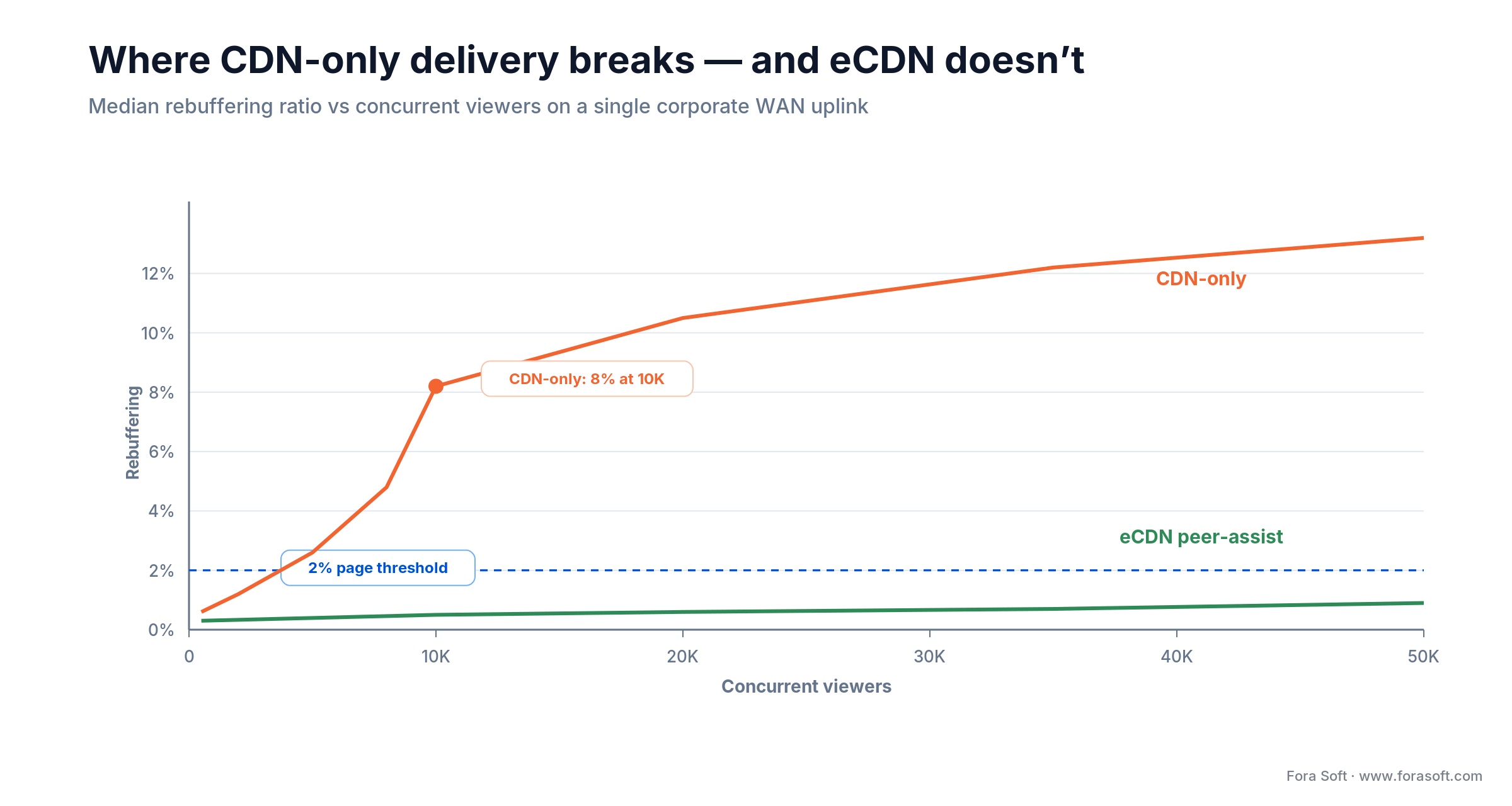
Figure 1. Median rebuffering ratio past the 2% page threshold: CDN-only delivery buckles once an event crosses ~5–10K concurrent viewers; peer-assist eCDN stays flat.
The fix is never “buy more CDN.” The fix is to stop shipping the same bits N times across the same WAN uplink. That is what eCDN does, and it is why custom enterprise video exists as a product category.
The bandwidth math that forces a rebuild
One formula decides most architecture arguments: concurrent viewers × bitrate = WAN egress. At enterprise scale, it is brutal.
Without eCDN. 50,000 concurrent viewers at 1080p (a blended ~2 Mbps once the ABR ladder settles) = 100 Gbps of sustained WAN egress. A Fortune-500 headquarters typically has 10 Gbps of internet uplink. The pipe is ten times oversubscribed; the stream collapses to 360p or drops entirely within a minute or two.
With eCDN peer-assist. Hive Streaming and Kollective headline up to ~99% WAN reduction; plan for 85–95% in the real world. At 85%, residual load drops to 15 Gbps — in range for most corporate uplinks, and easily handled by a multi-CDN edge. Peers on the same LAN share CMAF segments over gigabit links instead of fighting for the uplink.
Egress cost. 100 Gbps for a two-hour event is roughly 90 TB delivered. At $0.085/GB (CloudFront US), that is about $7,650 per event in egress alone. Eighty-five percent eCDN reduction drops that to roughly $1,150. Across two all-hands per month, a mid-size eCDN contract (typically $1–3 per employee per year for Kollective; lower for Hive at scale) pays for itself in the first quarter.
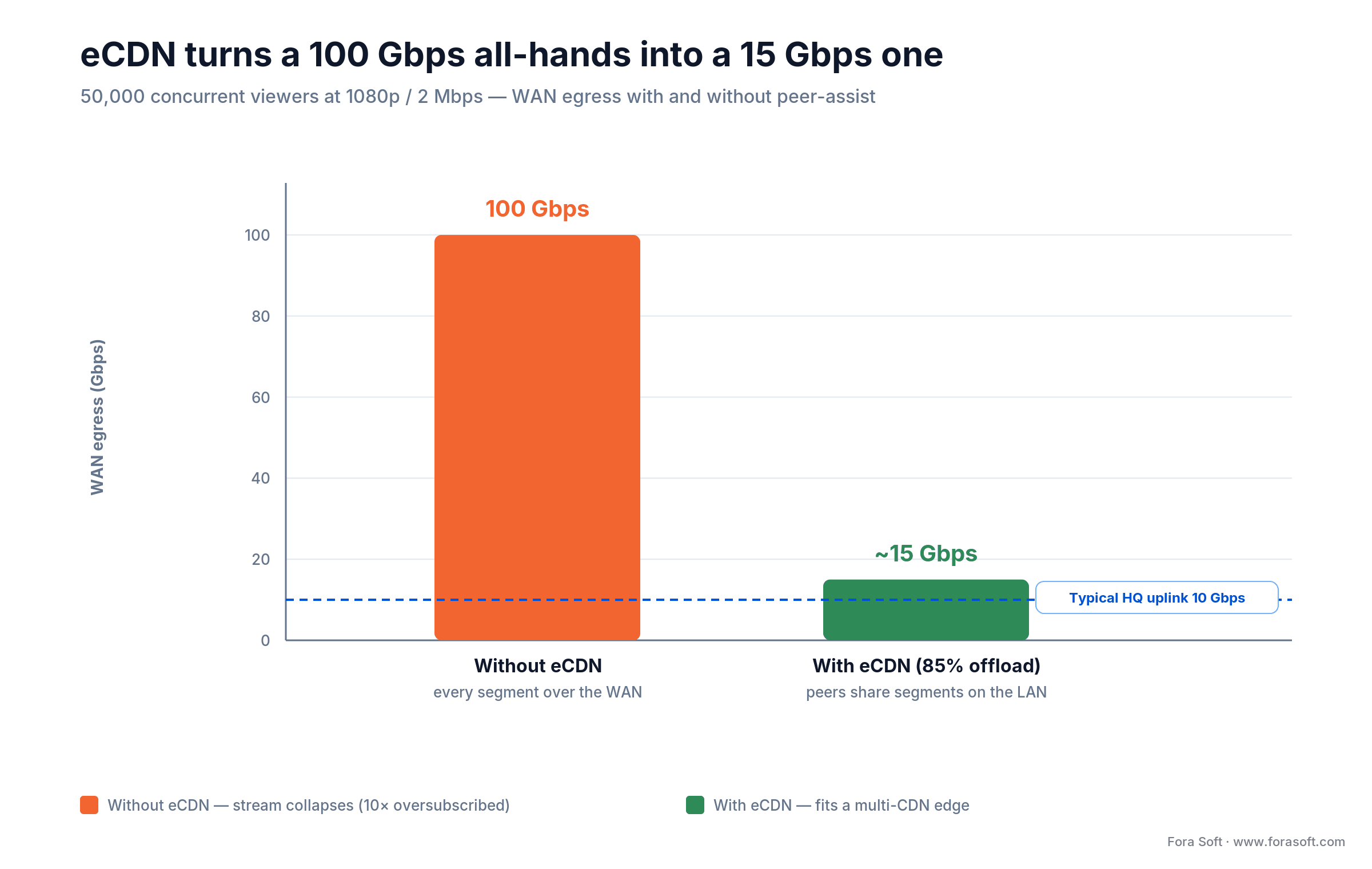
Figure 2. The same 50,000-viewer all-hands: 100 Gbps of WAN egress without eCDN vs ~15 Gbps with 85% peer-assist offload — under a typical 10 Gbps HQ uplink.
Reach for eCDN when: you expect 10K+ concurrent viewers on any single event, or total monthly viewer-hours cross 1M. Below that, multi-CDN alone is enough.
Reference architecture for enterprise streaming
A production stack for enterprise video streaming at 10K–100K concurrent viewers is six stages. Each one can be a managed service, a self-hosted component, or a split.
1. Ingest
RTMP or RTMPS for legacy hardware encoders; SRT or WebRTC (WHIP) for low-latency contribution where the broadcast feed is generated on a laptop or cloud switcher. Always run a primary and a hot backup feed — single-feed ingest is the most common event-killing failure. Typical tools: Wowza Streaming Engine, AWS MediaLive, Ant Media Server, or a custom NGINX-RTMP proxy.
2. Transcoding and packaging
One ABR ladder per event: 360p/0.8 Mbps, 480p/1.5 Mbps, 720p/2.5 Mbps, 1080p/5 Mbps, optional 4K/12 Mbps. Package once in CMAF, produce both HLS and DASH manifests. Low-latency HLS hints keep glass-to-glass latency in the 2–5 s range. At 10K concurrent, downstream egress is ~50 Gbps, but the transcoder’s own output is fixed by the ladder, so autoscale the encode against input bitrate, not viewer count.
3. Origin and origin shield
AWS MediaPackage, Unified Origin, or a Wowza origin instance. Origin shield in a second region absorbs cache-miss storms and cuts origin load by 90%+. Always enable range requests and conditional GETs. For compliance-sensitive content, the origin is inside a VPC with no public IP.
4. Multi-CDN
Primary CDN (CloudFront, Fastly, Akamai) plus a secondary (Cloudflare, BunnyCDN) for regional failover. Manifest-level CDN selection in the player layer (HLS.js, Shaka, Bitmovin SDK) gives you both failover and real-time load shifting.
5. eCDN (peer-assist)
The single most impactful component in a custom enterprise stack. Hive, Kollective, and Microsoft eCDN (now default for Teams town halls) all do the same job: segment-level peer distribution inside the corporate LAN. Hive is agent-based; Kollective is browser-based via the player SDK; pick by your device fleet. Ramp is now part of Vbrick after a 2025 acquisition, so the standalone-eCDN field is consolidating. Expect 85–95% WAN reduction in production.
6. Player and MDM bridge
The player is a first-class integration surface, not a drop-in widget. It reads managed app config, verifies per-app VPN tunnel, checks conditional access, and logs per-session telemetry back to your analytics pipeline. In the browser it is HLS.js or Shaka; in native mobile it is AVPlayer wrapped by the Bitmovin or THEO SDK, and ExoPlayer on Android. For an expanded walk-through, see our custom video player development guide.
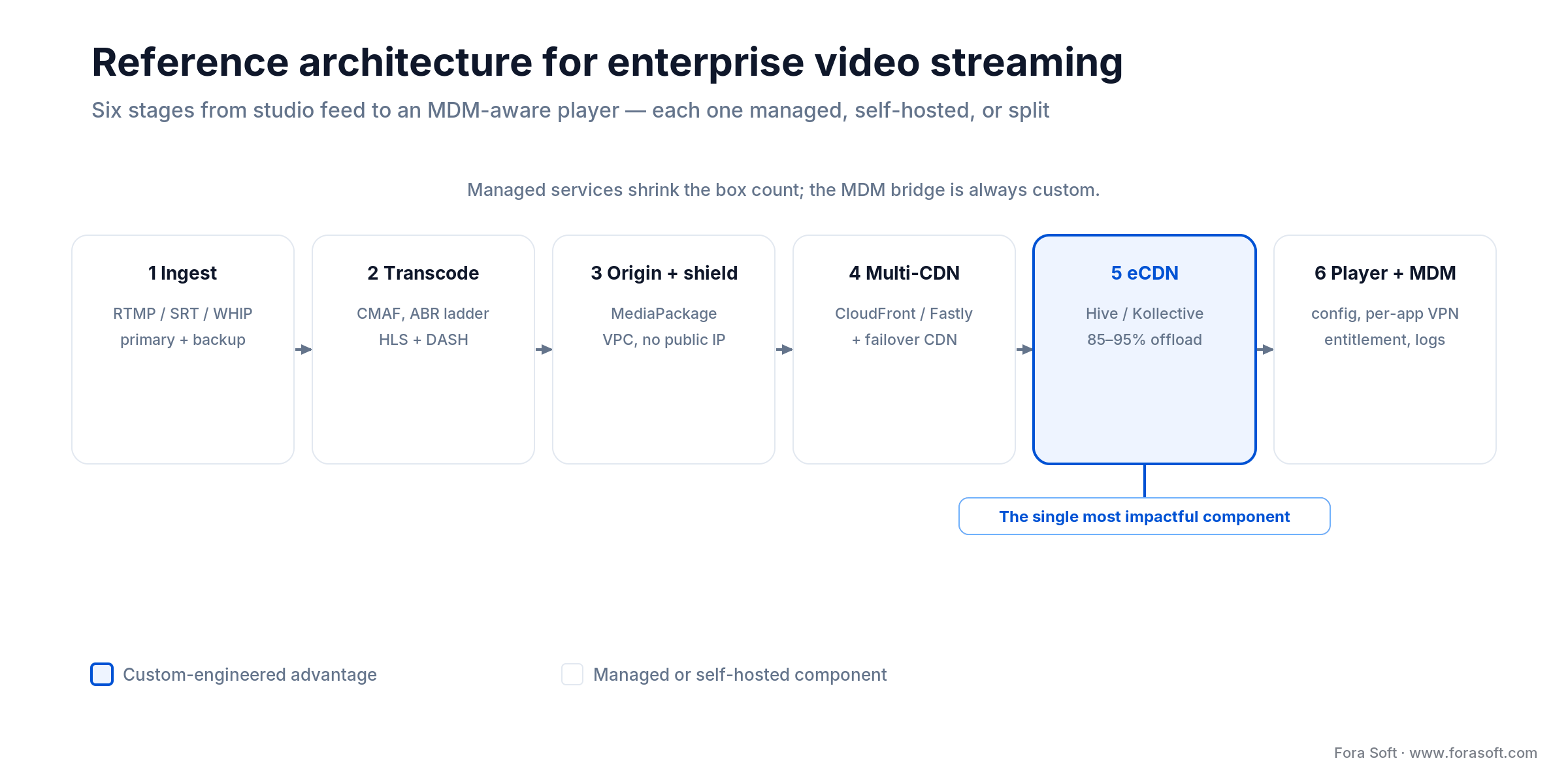
Figure 3. The six-stage enterprise streaming pipeline. The eCDN peer-assist layer is the one component a custom build owns end to end.
Second opinion on your streaming architecture?
Share your current topology and headcount — we will flag the eCDN, codec, and MDM gaps before your next quarterly all-hands.
MDM integration: Intune, Jamf, Workspace ONE, Kandji, Hexnode
Enterprise video only earns IT’s trust when it respects the same device controls as Outlook or Teams. That means the video app integrates at five points with the MDM platform.
1. Managed App Configuration. iOS (Apple Managed App Configuration) and Android (Managed Configurations) let IT push a key-value config to the app at install time — backend URL, maximum bitrate per device group, offline cache window, feature flags. The video app reads the config on launch from NSUserDefaults or RestrictionsManager and adjusts its runtime.
2. Conditional access. Intune, Workspace ONE, and Jamf Pro evaluate device compliance (encryption on, passcode, no jailbreak), location, time window, and group membership. Non-compliant devices never receive a license. The gate belongs in your entitlement service, not in the player.
3. Per-app VPN. MDM can scope a VPN tunnel to a single app. Your video app’s requests leave the device through a corporate gateway; the origin inside the VPC only accepts traffic from that gateway. The side benefit: IP-based geofencing becomes reliable because the IP is always yours.
4. SSO and SCIM. SAML or OIDC federation to Okta, Entra ID, or Ping handles sign-in. SCIM keeps the video platform’s user list in sync with HR: a new hire appears within an hour of onboarding, a leaver is deprovisioned within an hour of termination. Do not manage users by hand.
5. Device group content targeting. IT assigns “Finance Corporate iPads” to a group; that group maps to content tags in your video CMS (quarterly financial reviews, SOX training). The entitlement service joins user → group → content at request time.
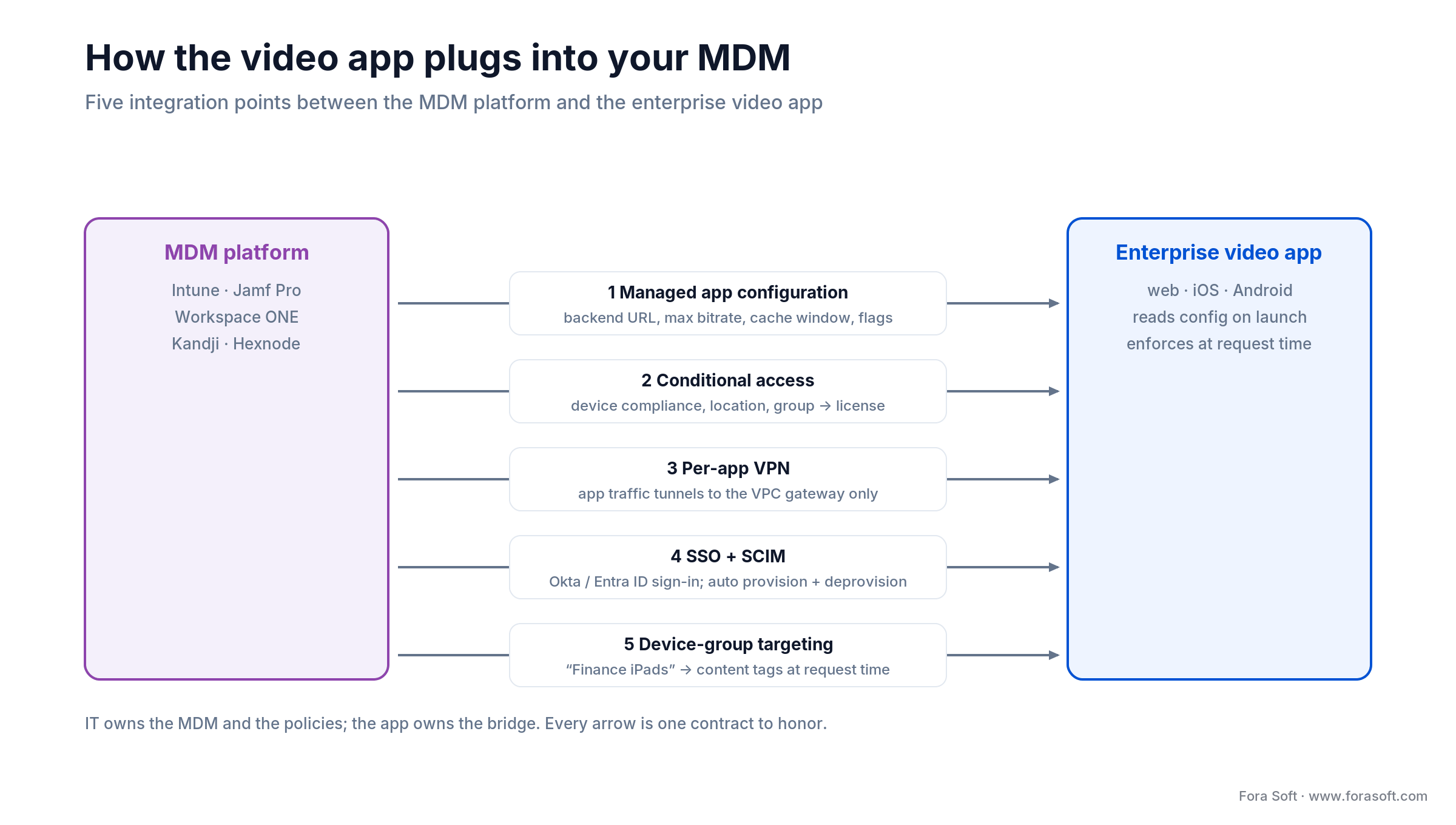
Figure 4. Five integration points where an MDM-aware video app meets Intune, Jamf Pro, or Workspace ONE.
Content scenarios that shape the architecture
Different workloads stress different parts of the stack. Most enterprises run four to six of these at once.
- Live all-hands. 10K–100K concurrent, 60–120 minutes. Stress point: WAN + eCDN + live transcoding autoscale.
- On-demand training. 10K–100K videos, 2–10 TB library. Stress point: CDN cache warmup, analytics per video, LMS sync.
- Compliance training with tracking. Locked playback, seek prevention, quiz capture, xAPI webhook to Cornerstone/Workday/Docebo. Stress point: audit log volume and certificate generation latency.
- Executive communications. Sub-1K concurrent, highest confidentiality. Stress point: DRM, forensic watermark per viewer, screen-record block through MDM.
- Sales kickoffs and product launches. 5K–20K concurrent, interactive (polls, Q&A). Stress point: live UX, on-demand replay within 24 hours.
- Internal podcasts and recorded webinars. Low-bitrate audio + slides. Stress point: embed surfaces — Slack, Viva Engage, Teams tabs.
Build vs. buy: vendor comparison matrix
The right answer is almost always a split. Commercial platforms give you a player, analytics, and an ingest appliance; custom work wraps them with the MDM, entitlement, and compliance-tracking layer your enterprise actually needs.
| Path | Annual license | Concurrent ceiling | eCDN | MDM fit |
|---|---|---|---|---|
| Microsoft Stream on SharePoint | In O365 E3+ | < 5K | Not supported | Native Intune |
| Vimeo Enterprise | ~$50K–$200K | 50K+ with add-on | Add-on | Custom SDK wrap |
| Brightcove Communicator | ~$100K–$300K | 100K | Partner (Hive, Ramp) | SAML + SDK |
| Panopto | ~$100K–$300K | Lower for live | Partner | Okta / Entra SSO |
| Custom (Ant Media / AWS MediaLive + eCDN) | From $6K license + build | As designed | Any vendor | Deep, native |
Our typical recommendation: use a managed transcoding stack (AWS MediaLive, Bitmovin, or Mux), a managed DRM service if you need it, a commercial eCDN (Hive or Kollective), and a custom app — web, iOS, Android, Windows — that owns the MDM bridge, entitlement, and analytics. That split is where custom engineering compounds.
Reach for a custom build when: you need deep MDM wiring, conditional access across device groups, strict compliance audit logging, or a concurrent ceiling above 50K. Below that, Vimeo Enterprise or Brightcove is usually the right default.
Protocol choice: HLS, LL-HLS, CMAF, SRT, WebRTC
Latency targets drive the choice. Enterprise delivery almost always lands on CMAF with LL-HLS hints for the player layer and SRT or WebRTC for contribution.
| Protocol | Latency | Scale | Best for |
|---|---|---|---|
| Legacy HLS | 10–30 s | 100K+ | Wide device coverage, on-demand |
| LL-HLS / CMAF chunked | 2–5 s | 100K+ | Live all-hands, sales events |
| SRT | ~200 ms | Contribution only | Studio → origin ingest |
| WebRTC | < 500 ms | Low (per-viewer cost) | Interactive, < 500 viewers |
We ship CMAF with LL-HLS hints as the default. For live all-hands with Q&A that demands a sub-second loop, we carve out a WebRTC track for the moderator layer and keep the broadcast on LL-HLS. For deeper context on ultra-low-latency patterns see edge computing in live streaming.
Security, compliance, and watermarking
Enterprise video is a compliance exercise as much as a streaming one. Five controls cover most audits.
SSO and SCIM. SAML or OIDC to Okta or Entra ID; SCIM for automated provisioning and deprovisioning. No manual accounts, ever. A leaver should lose video access within an hour of HR termination.
Role-based access. Group membership flows from the IdP into the entitlement service via SAML claim or SCIM attribute. “Finance Only” content is gated at request time, never by client-side hiding.
Forensic and visible watermarking. A visible watermark (date, viewer ID, “CONFIDENTIAL”) deters casual sharing. A forensic watermark encoded into the pixel domain by the packager survives recording and identifies the leaker. Forensic services from Nagra, Verimatrix Vualto, or NexGuard run $2K–$10K/month and are typical only for board-level and M&A video.
DRM where it is justified. For most internal video, per-app VPN + forensic watermark + audit logs is enough. For executive comms, earnings-adjacent content, or anything that touches MNPI, add multi-DRM: Widevine for Android/Chrome, FairPlay for Apple, PlayReady for Windows/Xbox/many TVs. CMAF with CBCS encryption feeds all three from one encode.
Audit logging. Every playback event — user ID, device, IP, geolocation, timestamp, bitrate, rebuffer events — flows into your SIEM (Splunk, Sentinel, ELK). Retention per SOC 2, HIPAA, or GDPR requirement; typically one to seven years. Immutability matters for HIPAA.
Offline playback on managed devices
Field staff, travelling executives, and compliance training all need offline playback. The pattern is the same on iOS and Android: CMAF segments are downloaded to an app-sandboxed cache, encrypted with an AES-256 key derived from a device-bound secret, and decrypted by the player at playback time.
Three rules keep offline caching safe: expiry windows come from MDM app config, never from a constant in code; the cache key is not recoverable from the device alone — an MDM wipe command must invalidate it; and any visible or forensic watermark must be baked into the pixel domain at packaging time, because player-side overlays do not survive an offline file. ExoPlayer on Android and AVPlayer with a custom AVAssetResourceLoaderDelegate on iOS are the standard implementations.
Cost model: 12 months, 50,000 employees
Numbers below are our 2026 estimates for a typical enterprise streaming build with Agent Engineering, wired to an existing MDM stack. They are conservative.
Phase 1 — MVP (3–4 months). Ingest + transcoding (managed: AWS MediaLive or Mux), packaging (CMAF), multi-CDN, web app with HLS.js, SSO via SAML, basic audit log, admin console. Budget: ~$80K–$130K.
Phase 2 — Mobile and MDM (2–3 months). iOS + Android apps with managed app configuration, per-app VPN support, offline cache, conditional access enforcement. Includes integration with Intune, Jamf Pro, or Workspace ONE — pick one; the rest piggyback on the same patterns. Budget: ~$60K–$100K.
Phase 3 — Compliance and analytics (2 months). LMS integration via xAPI (Cornerstone, Workday Learning, Docebo), forensic watermarking, QoE dashboard, SCIM provisioning, SIEM export. Budget: ~$40K–$70K.
Running costs at 50,000 employees. eCDN from Hive or Kollective at $1–$3 per employee per year = $50K–$150K. CDN egress (with eCDN savings) $5K–$15K/month. Transcoding and origin compute $3K–$10K/month. Forensic watermarking (if used) $2K–$10K/month. Total: roughly $160K–$450K/year depending on event cadence.
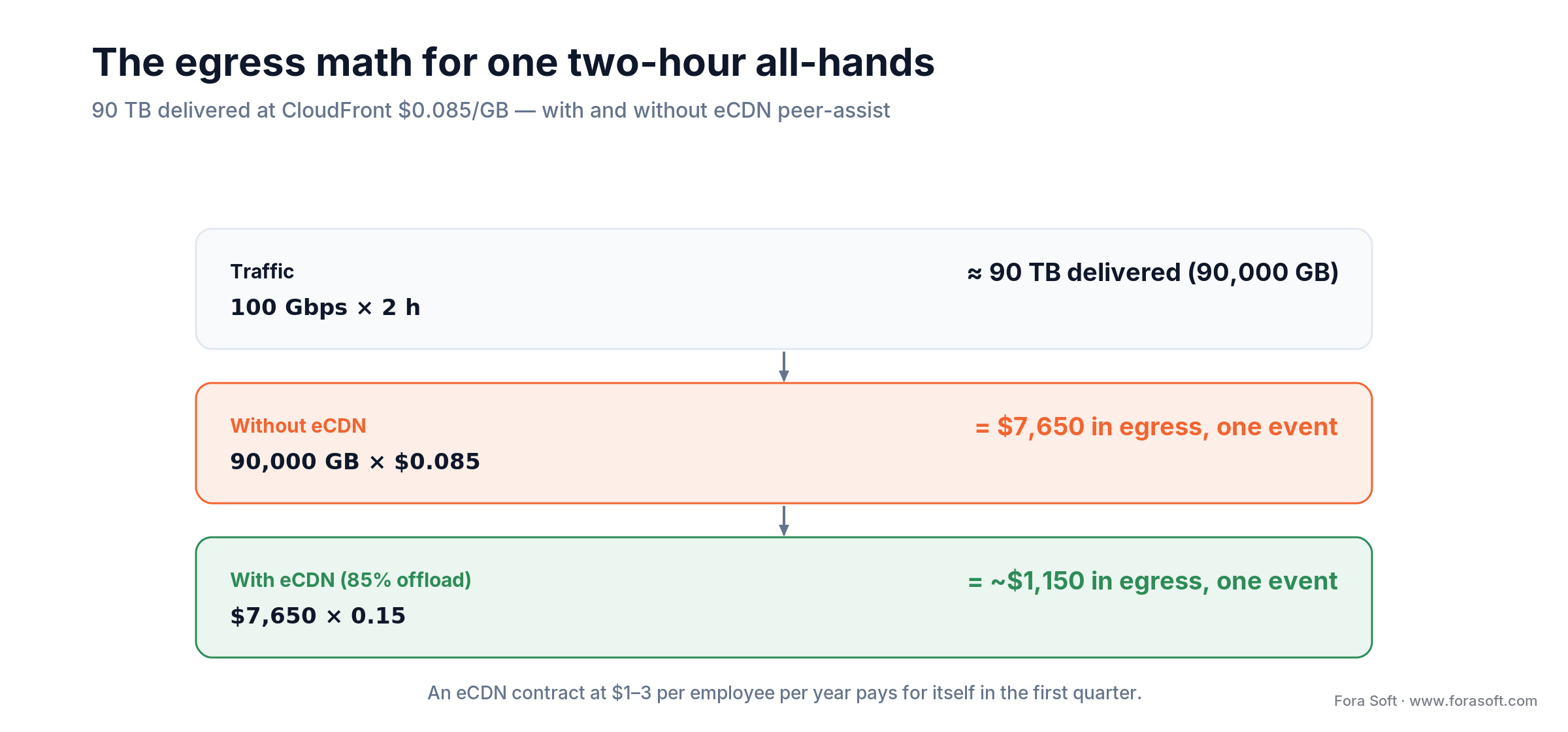
Figure 5. Egress math for one two-hour all-hands: 90 TB at CloudFront $0.085/GB is $7,650 without eCDN, ~$1,150 with 85% offload.
Reach for managed transcoding when: your event cadence is under two live-a-week and peak concurrency fits inside the 100K cap of AWS MediaLive or Mux — the per-minute fee is almost always cheaper than hiring a streaming engineer to babysit a self-hosted encoder cluster.
Analytics and QoE: turning streams into telemetry
A streaming platform without telemetry is a streaming platform you cannot defend in front of HR, legal, or the CFO. The analytics layer has three customers, and each wants different numbers at different cadences.
Real-time QoE for the NOC. Player-side beacons (startup time, rebuffering events, bitrate ladder, fatal errors) land in a time-series store like Grafana Mimir or Datadog within five seconds of the event. The NOC watches a dashboard during every live event; anomaly thresholds page the on-call engineer if rebuffering exceeds 2% at any office.
Batch analytics for communications and L&D. Comms leaders want attendance, average watch time, drop-off curves; L&D wants completion rates, quiz scores, certificate issuance latency. These land in a warehouse (BigQuery, Snowflake, Redshift) and feed weekly Looker or Power BI reports.
Compliance-grade audit log. Immutable per-viewer playback events flow to a SIEM (Splunk, Sentinel) with retention aligned to SOC 2, HIPAA, or GDPR. The audit log is the single source of truth when a leaked video triggers an internal investigation.
Mux Data, Conviva, and Bitmovin Analytics are the commercial equivalents for the first two feeds. None of them cover the SIEM requirement, so the custom layer almost always writes a parallel audit-log stream.
Reach for Mux Data or Conviva when: you want a production-grade QoE dashboard the week you ship, and you would rather avoid building your own rebuffering-ratio pipelines from Kafka up — but keep your own SIEM stream in parallel for compliance.
Mini-case: rescuing a quarterly all-hands
A recent engagement asked us to diagnose why a quarterly all-hands on Microsoft Stream had ended with 40% of viewers seeing buffering and 12% dropping off entirely. The company had roughly 22,000 employees across three continents and a 10 Gbps primary uplink at HQ. Stream’s migration to SharePoint had quietly removed their eCDN fallback; every segment was being pulled over the WAN.
The fix was a 12-week sprint. We kept Stream for the recording and on-demand archive, but for live we built a thin custom app using AWS MediaLive for ingest and transcoding, a CloudFront + Fastly dual-CDN edge, and Kollective eCDN for peer-assist in the LANs. The player embedded into Viva Engage and Teams tabs; SSO ran through Entra ID; conditional access blocked personal devices from the restricted executive segments. Next quarter’s all-hands ran at 18,400 concurrent viewers with rebuffering at 0.4% and a p95 startup time of 1.8 s. The WAN uplink peaked at 1.3 Gbps during the event, down from a projected 44 Gbps without eCDN.
Want a similar assessment for your next all-hands? Book a 30-min streaming audit — bring your topology and employee count, leave with a sizing plan.
Stuck on a SharePoint-shaped streaming bottleneck?
We will audit your current stack and show you the cheapest path to eCDN and an MDM-aware player — numbers based on your own last event.
A decision framework in five questions
1. What is your peak concurrent viewership? Under 5K: stay on Stream or Teams town halls. 5K–50K: Vimeo Enterprise or Brightcove Communicator. Above 50K: custom, almost certainly.
2. Do you have a single WAN pipe per site? If yes, eCDN is not optional above 10K concurrent — it is the only way the pipe survives.
3. Which MDM do you already run? The video app integrates with one deeply and the rest shallowly. Pick the primary; Intune in Microsoft shops, Jamf in Apple-heavy orgs, Workspace ONE in mixed estates.
4. Do you need LMS sync for compliance training? If yes, xAPI (Tin Can) webhooks to Cornerstone, Workday Learning, or Docebo are table stakes. Design them in week one.
5. Does your content include MNPI, HIPAA, or client-confidential material? If yes, add DRM, forensic watermarking, and immutable audit logs from day one. Retrofitting is never cheap.
Five pitfalls that derail enterprise streaming
1. Discovering egress costs on the CloudFront bill. The first 50K-concurrent all-hands without eCDN can add $20–$30K of egress in a single afternoon. Model the worst case before the first event.
2. Ignoring the legacy laptop fleet. H.265 saves bitrate but is absent on pre-2017 CPUs. If you have a five-year laptop cycle, H.264 is still your primary — H.265 is a secondary tier for modern devices.
3. Treating LMS integration as a final-week task. Compliance certificates depend on real-time completion webhooks. Batch processing introduces 30–60 minute delays that frustrate learners and generate support tickets.
4. Over-restrictive conditional access. Blocking personal devices during WFH weeks kills the all-hands attendance rate. Tier your policies: broadcast content tolerates personal devices, regulated content does not.
5. Offline cache windows that expire on a plane. Sales teams download training on Monday, lose access Thursday on a red-eye. Set expiry from course deadline via SCIM, not a global constant.
KPIs worth putting on the dashboard
Quality KPIs. p95 startup < 2 s on corporate LAN, < 4 s on mobile. Rebuffering ratio < 1% at any event size. Exit-before-first-frame < 0.5%. Break everything down by device group and office location.
Business KPIs. All-hands attendance rate, compliance training completion rate, average dropout point in training videos, LMS certificate issuance latency. These are what convince HR and legal that the investment is working.
Reliability KPIs. eCDN offload ratio (target ≥ 85%), CDN failover events, DRM license failure rate (< 0.5%), mean time to detect a playback regression. Low offload ratio means your peer mesh is not seeded correctly.
When a custom build is the wrong answer
A custom enterprise streaming platform is the wrong investment below roughly 5K concurrent viewers, when your primary need is occasional webinar broadcasting, or when your IT organisation cannot staff two to three platform engineers year-round for operations. In those cases the right answer is Vimeo Enterprise, Brightcove, or an O365 subscription with a pragmatic third-party eCDN add-on — and revisiting the build conversation only after the business outgrows the ceiling.
Custom is also wrong if you are trying to solve a cultural problem (people don’t watch our all-hands) with a technical one. Buffering is rarely the only reason engagement is low. Fix the content first, then scale the platform.
FAQ
Does Microsoft Stream on SharePoint support eCDN in 2026?
Not natively. Teams town halls include Microsoft eCDN (now bundled into Teams Enterprise and on by default), but Stream on SharePoint plays unicast — it lost dedicated eCDN in the 2024 migration. Enterprises running large internal events on Stream typically wrap it with a custom app that injects a third-party eCDN SDK (Hive, Kollective, Ramp) or migrate live events off Stream entirely.
Can we rely on Zoom Webinars or Teams for a 20K all-hands?
Teams town halls with Microsoft eCDN are the closest off-the-shelf path; the standard cap is 10,000 (higher with capacity packs). Zoom Webinars scale to 100,000 view-only with a large-event license. Both handle the raw viewer count. What they will not do is let you embed the player in your own app, enforce per-device MDM policy, run your own eCDN, or push completion to your LMS. If the event has to be smooth and on your terms at 20K+, plan a purpose-built streaming app with its own eCDN.
Which eCDN should we pick: Hive, Kollective, or Ramp?
All three reach similar WAN-reduction numbers (85–95%). Hive is agent-based and slightly better on locked-down Windows fleets. Kollective is browser-based via a JavaScript SDK and fits app-centric deployments well. Ramp is competitive on mid-market pricing. We usually shortlist by how much control IT has over browser extensions and native agents in the device fleet.
Do we need DRM for internal training?
Usually not. Per-app VPN, conditional access, forensic watermarking, and audit logs cover the risk for most internal training. DRM becomes necessary for material-non-public information, HIPAA content, and board-level communications. It is not hard to add multi-DRM later if you kept CMAF packaging from day one.
How fast can a custom enterprise streaming platform go live?
An MVP covering web, SSO, basic analytics, and a managed ingest stack is 3–4 months with our pattern. Mobile apps with MDM integration add another 2–3 months. Full compliance tooling (LMS sync, forensic watermarking, SIEM export) is another 2 months. With Agent Engineering we regularly shave 15–25% off that timeline.
Will an eCDN work on employees’ home networks?
Only partially. Peer-assist depends on multiple devices on the same LAN segment, which does not exist at home. For remote and hybrid employees, you fall back to multi-CDN. The practical answer is to design for both: eCDN handles the corporate office concurrency, multi-CDN handles the home-network long tail. Do not oversell eCDN as a silver bullet for a remote-first workforce.
How does Fora Soft work with our existing MDM team?
We treat IT as the lead tenant. Kickoff starts with a joint session: the MDM admin defines device groups and policies, we translate those into the app’s managed configuration schema, entitlement rules, and per-app VPN profile. IT keeps owning the MDM; we own the app, the backend, and the bridge between them.
Can we keep Microsoft Stream for on-demand and only build live?
Yes, and this is a common split. Stream stays the VOD archive; a custom app handles live all-hands with eCDN and richer interactivity. Recording pipelines write both to Stream (for storage and basic playback) and to your archive bucket (for analytics and long-term retention). It is the cheapest practical path for most Microsoft-centric enterprises.
What to Read Next
Guide
Custom Video Streaming Software Development
Architecture choices and delivery stack for custom streaming platforms.
Security
Secure Video Communication Apps in 2026: Architecture, Encryption, Compliance, Cost
Architecture, encryption and compliance for secure video communication apps.
Player
Custom Video Player Development Services
How to build a player that reads MDM config, handles DRM, and supports offline.
Live
Edge Computing in Live Streaming
Where edge nodes actually reduce latency and save egress cost in live workflows.
Cost breakdown
Cost to Develop a Video Streaming App
Budget model from MVP to enterprise scale with concrete numbers.
Ready to ship a streaming platform that actually holds at 50K concurrent?
Scalable enterprise video streaming is solved when you respect three facts. The all-hands is a bandwidth problem first; eCDN is how you solve it. The app is a trust problem second; MDM wiring is how you solve that. And the compliance story is a logging problem third; SSO, SCIM, forensic watermarking, and an audit pipe are how you solve that. Every vendor in this space — Vimeo, Brightcove, Panopto, Vbrick, Microsoft — gives you pieces. Custom engineering is how they all click together against your own MDM, your own LMS, and your own content rules.
Under 5K concurrent, stay managed. Above 50K, go custom. In between, hybrid. Whatever you pick, budget eCDN, design MDM in from day one, and stand up the audit pipeline before the first event — not the week after.


The handbook · 7 volumes
Fora Soft Video Engineering Handbook
An all-hands that holds at 50,000 viewers depends on choices across the whole video stack, not on one protocol. We wrote a seven-volume handbook on that stack: start with the volume on ABR, CDNs, players and DRM, then the transport volume on ingest, HLS, DASH and CMAF, and the encoding volume for the bitrate ladder itself. Written by Nikolay Sapunov, CEO at Fora Soft.
Browse the handbook on Amazon →7 volumes · 9,000+ pages · Kindle & paperback
Let’s map your streaming roadmap
Tell us your headcount, your MDM, and your next event — we will come back with a sizing plan and a staged build.

