Key takeaways
• Shoppable video is three systems pretending to be one. A video player, a live product feed, and a cart all have to agree in real time. The video is the easy part; wiring the overlay to real prices, real inventory, and a real checkout is the build.
• SaaS platforms bill by the view, and that's the catch. Bambuser charges $0.25 per view over your allowance; Tolstoy meters by the thousand impressions (accessed 2026–07–15). It's cheap to start and it scales with your traffic, not your margin.
• Buy to validate, build when views (or control) outgrow the meter. A hosted platform proves the format in a week. Custom pays off when your view volume makes per-view pricing hurt, or when you need to own the checkout, the data, and the page-speed budget.
• The uplift is real but narrow. Controlled benchmarks put shoppable-video site-wide conversion lift in the mid-double-digit percentages — concentrated in the roughly 10–15% of visitors who actually interact. It moves the engaged slice, not every shopper.
• Two things quietly break it: page speed and attribution. A heavy player tanks Core Web Vitals; last-click analytics gives video zero credit. Both are solvable, and both are ignored until launch.
Search “shoppable video” and you get two kinds of pages: Shopify app listings that promise a widget in ten minutes, and vendor guides that explain the concept without ever saying what it costs or where it breaks. Neither answers the question a product or engineering lead actually has, which is: what does a shoppable video platform really consist of, should I buy one or build it, and what will it cost me at my traffic? This guide answers that — the architecture, the integrations, the honest vendor pricing, the conversion reality, and the point where buying stops making sense.
Why Fora Soft wrote this guide
We're Fora Soft, a video and AI software studio that's shipped 250+ projects since 2005. Video commerce is squarely in our lane: through our video streaming software development work we've built the playback, the interactive overlays, and the e-commerce plumbing behind platforms that move real money, not demos. So this isn't a listicle rewritten from other listicles — it's what we tell clients who come in asking to “make our videos shoppable” before we know whether they need a $19-a-month widget or a custom player.
One of those clients, the Danish video-commerce platform Sprii, has done over €365M in cumulative sales through video, with dynamic product overlays, gamification, and native Shopify, WooCommerce, and Magento integrations we helped engineer. We've built the overlay-to-cart path, fought the page-speed fights, and instrumented the attribution — so we'll be specific about where the effort and the risk actually live.
One honest note up front: we make money building custom platforms, so we'll tell you plainly when you shouldn't build one. For most brands starting out, a hosted platform is the right first move, and we'd rather earn a serious build when the numbers justify it than sell you an expensive one now.
Not sure whether to buy a widget or build a player?
Tell us your catalog, your monthly video views, and your stack. We'll tell you honestly which path fits — even if it's the cheap one.
What shoppable video actually is
Shoppable video is on-demand video with the store built into it: a viewer taps a product on screen and can see the price, pick a size, and add it to the cart without leaving the video. The clip is pre-recorded and plays 24/7 — a product demo, a look-book, a how-to, a repurposed live stream — and interactive tags turn passive watching into a path to checkout. That's the whole idea, and it's genuinely useful: it collapses the gap between “I want that” and “it's in my cart” from several page loads to zero.
The reason it's harder than it looks is that the video isn't the product — the connection is. A shoppable video that shows a $40 sweater which is actually $32 and out of stock is worse than no video at all. So under the hood, the player has to reach into your live catalog for the real price and inventory, and reach into your cart when someone buys. Get that plumbing right and it feels like magic; get it wrong and it feels broken in the most sales-damaging way possible.
You'll see the format everywhere now, from Shopify storefronts to interactive product demos to social feeds. The mechanics are consistent even when the surface changes, which is why it's worth understanding the anatomy once rather than treating each channel as a new mystery.
Shoppable video vs live commerce: don't conflate them
These two get lumped together constantly, and it leads to the wrong build. Live commerce is a real-time broadcast: a host streams live, the audience reacts in the moment, and urgency and scarcity drive the sale. It needs low-latency streaming, live chat, and a broadcast operations discipline. Shoppable video — the subject of this guide — is on-demand: the clip is already recorded, it works while you sleep, and the sale is driven by intent and convenience rather than a live moment.
The engineering overlaps in the commerce layer (both need product overlays and cart integration) but diverges sharply in the video layer: live needs an ingest-and-broadcast pipeline with latency budgets; on-demand needs adaptive playback and a content library. Many brands do both — they run a live event, then repurpose the recording as an evergreen shoppable clip — which is exactly why the two should share a commerce backend but not be treated as one product. If real-time selling is your goal, read our companion guide on live commerce platform development; the rest of this article is about the on-demand side.
Reach for shoppable (on-demand) video when: you want the format working around the clock across product pages, email, and social, without staffing a live show. Reach for live commerce when the sale depends on a host, a moment, and real-time interaction — and plan to recycle those recordings into shoppable clips afterward.
The anatomy of a shoppable video player
A shoppable video platform is five layers stacked on top of ordinary video playback. Each solves a different problem, and the interesting engineering is in how they stay in sync — because a mismatch between what the video shows and what the cart charges is where trust dies.
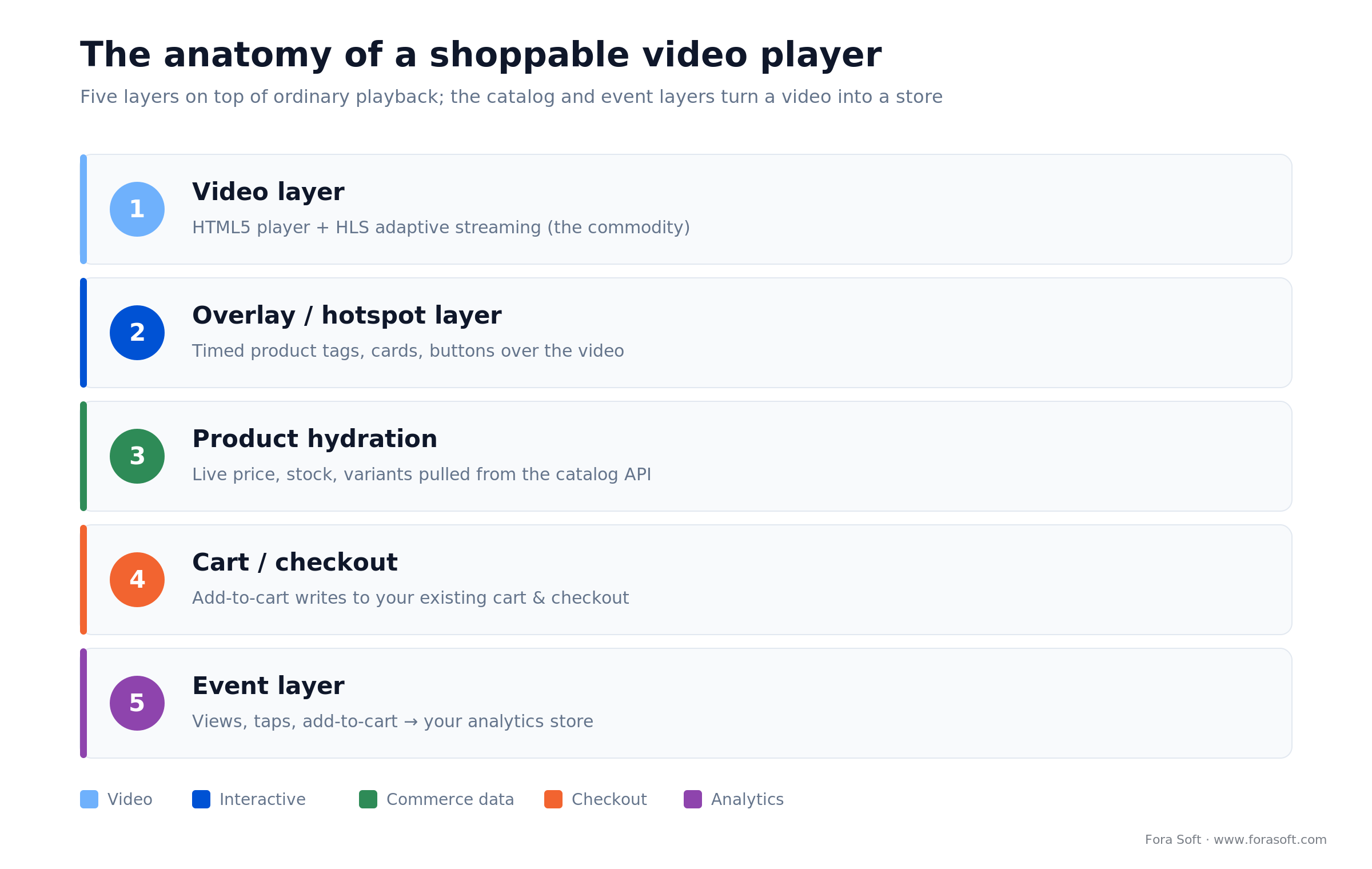
Figure 1. The five layers between a playing clip and a completed cart. The catalog and event layers are what turn a video into a store.
1. Video layer. The actual playback — an HTML5 player running adaptive streaming so the clip loads fast and doesn't buffer. This is the commodity layer; the hard problems live above it.
2. Overlay / hotspot layer. The interactive tags, product cards, and buttons rendered on top of the video at the right timestamps. This is what makes the video “shoppable” visually, and it has to survive resizing, mobile, and fullscreen.
3. Product hydration. The layer that fetches live price, availability, variants, and images from your commerce catalog every time the video plays — so the overlay never shows a stale price. This is the layer people forget, and it's the one that makes or breaks trust.
4. Cart / checkout. The write path: when a viewer taps “add to cart,” it has to land in the same cart the rest of your store uses, so checkout, discounts, and taxes all behave. Owning versus renting this layer is one of the biggest build-vs-buy questions.
5. Event layer. Every play, hotspot tap, and add-to-cart, captured and sent to your analytics. Without it you can't prove the format works and you can't optimize it — and, as we'll see, standard analytics will silently give video no credit at all.
How a tap becomes a cart: the runtime
Watching the sequence of a single purchase tells you exactly which system owns each step — and where a custom build has to integrate with what you already run.
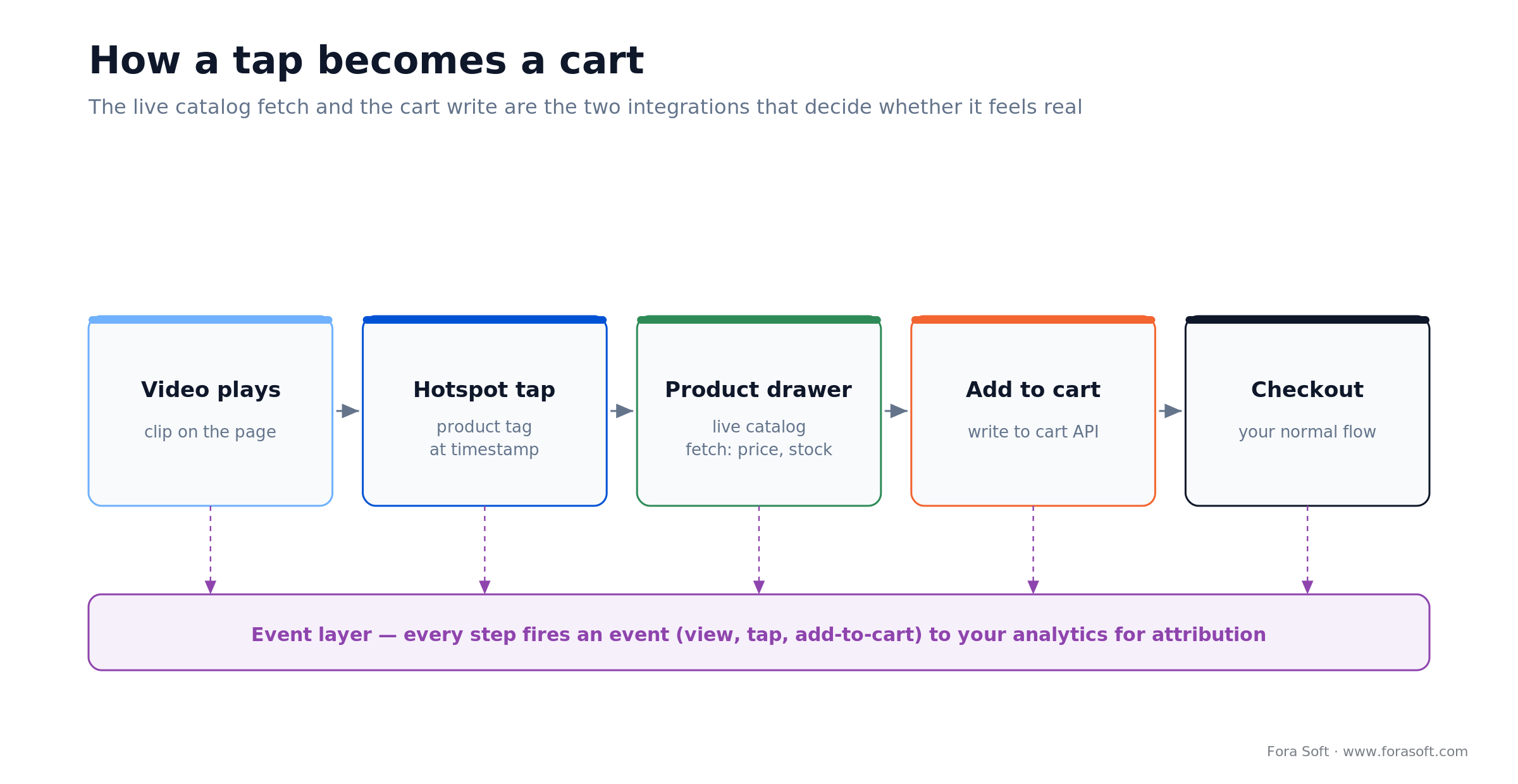
Figure 2. The path from a playing clip to checkout. The live catalog fetch and the cart write are the two integration points that decide whether the experience feels real.
The clip plays, and at a set timestamp the overlay renders a hotspot. The viewer taps it, and a product drawer opens — but before it shows anything, the player hydrates that product by calling your commerce API for the current price, variants, and stock. The viewer picks a size and taps add-to-cart, which writes to your cart (on Shopify, the AJAX Cart or Storefront API; on other stacks, the basket API). From there the shopper goes to your normal checkout, so payments, tax, and promotions all just work. In parallel, every step emits an event to analytics.
The two arrows that matter are the catalog fetch and the cart write. Everything else is presentation. If you buy a platform, those two integrations are what the vendor's app handles for you; if you build, they're the first thing you engineer — and the reason a shoppable video is a commerce project wearing a video costume.
Hotspots, overlays, and the interactive layer
The interactive layer is an HTML overlay positioned on top of the video element, with tags anchored to timestamps (and sometimes to on-screen coordinates that move with the shot). When the player's clock reaches a tag's time, the overlay shows the product card; when the shot changes, it hides or swaps. Doing this well means the overlay has to track the player's real playback time, reflow for any screen size, stay tappable on mobile, and survive fullscreen — none of which the raw video element gives you for free.
Beyond simple hotspots, richer formats add branching (“tap to see it in blue”), chapters, quizzes, and swipeable product carousels. Each adds engagement and complexity, and each is a place where a generic embed stops being enough and a real player — the kind we cover in custom video player development — starts to earn its keep. The rule of thumb: if your interactions stay close to “tap product, add to cart,” a hosted widget is fine; the moment you want bespoke interaction design, you're building.
Catalog sync and cart/checkout integration
This is the layer that separates a real shoppable video from a video with buttons on it. Two integrations do the work. Catalog sync keeps the overlay honest: product data has to come from your live source of truth — a Shopify catalog, a commerce API, or a product feed — either pulled on demand when the video plays or kept in sync via webhooks. Cache it too aggressively and you show wrong prices; fetch it too often and you add latency. The right answer is usually a short-lived cache with webhook invalidation on price and stock changes.
Cart integration is the write path, and it's where platform choice bites hardest. The clean version adds items to your existing cart so the shopper checks out through your normal flow — keeping your payment methods, discount logic, tax rules, and analytics intact. The messy version, common in bolt-on tools, sends the shopper to a separate or redirected checkout, which fragments the cart, breaks promotions, and — critically — can drop your conversion tracking. On Shopify specifically, the difference is whether the tool uses the AJAX Cart and Storefront APIs (native) or bounces the user elsewhere (fragile).
Build custom when: you run a headless or non-standard commerce stack, need the shoppable cart to share promotions and loyalty with the rest of the store, or can't accept a vendor owning your checkout and the data that flows through it. That’s the point where a platform’s convenient defaults become your constraints.
Video hosting, delivery, and page speed
Underneath the commerce cleverness, this is still video, and video is heavy. Serious shoppable content is delivered with HLS adaptive streaming: the master MP4 is transcoded into several quality renditions and a manifest, and the player picks the rendition that fits the viewer's bandwidth, so a clip on a product page loads fast instead of stalling. Platforms like Shopify auto-generate HLS renditions on upload; a custom build leans on a video CDN or a service like Mux or Cloudflare Stream rather than reinventing transcoding. If the streaming layer is new to you, our Learn: video streaming primer covers the fundamentals.
The trap here is page speed. A shoppable video sits on your highest-value pages, and a heavy player can wreck Core Web Vitals — Google's own guidance notes that video embeds can block the main thread and that autoplaying video downloads bytes before the user asks for anything (web.dev, 2025). A slow product page loses sales and rankings, which is a bitter irony for a tool meant to sell more. The fixes are known: lazy-load the player, defer autoplay, ship a poster image first, and keep the script small. Any platform you evaluate — or any player you build — should be measured on its LCP impact, not just its features.
Watch the page-speed budget when: you're adding video to product or landing pages that already sit near their Core Web Vitals limits. Test the player's real LCP and main-thread cost on a mid-range phone before you roll it out sitewide — a widget that adds a second to load can cost you more sales than the video wins.
Analytics and the attribution problem
Here's the failure that makes good shoppable video look worthless: standard last-click analytics gives it no credit. A shopper watches a clip, taps a product, adds it to the cart, and buys — but if your analytics only records the last page before checkout, the sale is attributed to the product page, not the video. On paper the video “did nothing,” and someone kills a program that was actually working.
The fix is event-level instrumentation: fire discrete events for video view, hotspot click, product-drawer open, and add-to-cart — ideally with the video and timestamp attached — into GA4 or your analytics store, then attribute revenue to sessions that engaged with video. Hosted platforms include a dashboard for this, though it usually lives in the vendor's silo; a custom build lets you put the events into your own warehouse alongside everything else. Either way, decide your attribution model before launch, because retrofitting it after three months of “the video isn't converting” is how good programs die.
Making shoppable video discoverable (SEO and AI)
A shoppable video only sells if people reach the page, and search engines and AI assistants can't watch video. To be discoverable, the page around the player has to do the talking: VideoObject and Product structured data (JSON-LD), a real transcript or descriptive copy, and clean, crawlable text. This is what lets a clip surface in Google video results and gives AI Overviews, ChatGPT, and Perplexity something extractable to cite — because they're reading the markup and the text, never the pixels.
The same personalization thinking that powers a good storefront applies to a shoppable feed: which clip to show which visitor is a recommendation problem, and it responds to the same techniques we cover in AI content recommendation systems. Treat discoverability as part of the build, not a marketing afterthought — a beautifully engineered player on an invisible page is wasted work.
Worried the widget will tank your product-page speed?
We'll audit the real LCP and attribution cost of your shoppable video setup — hosted or custom — and show you how to keep the sales without the Core Web Vitals hit.
Buy: the shoppable video platform options
If you're validating the format, buying is almost always the right first move. Several mature platforms will have shoppable video on your store in days. They differ less in features than in pricing model, how much they own your checkout, and how deep their analytics go — which are exactly the dimensions that decide whether you outgrow them.
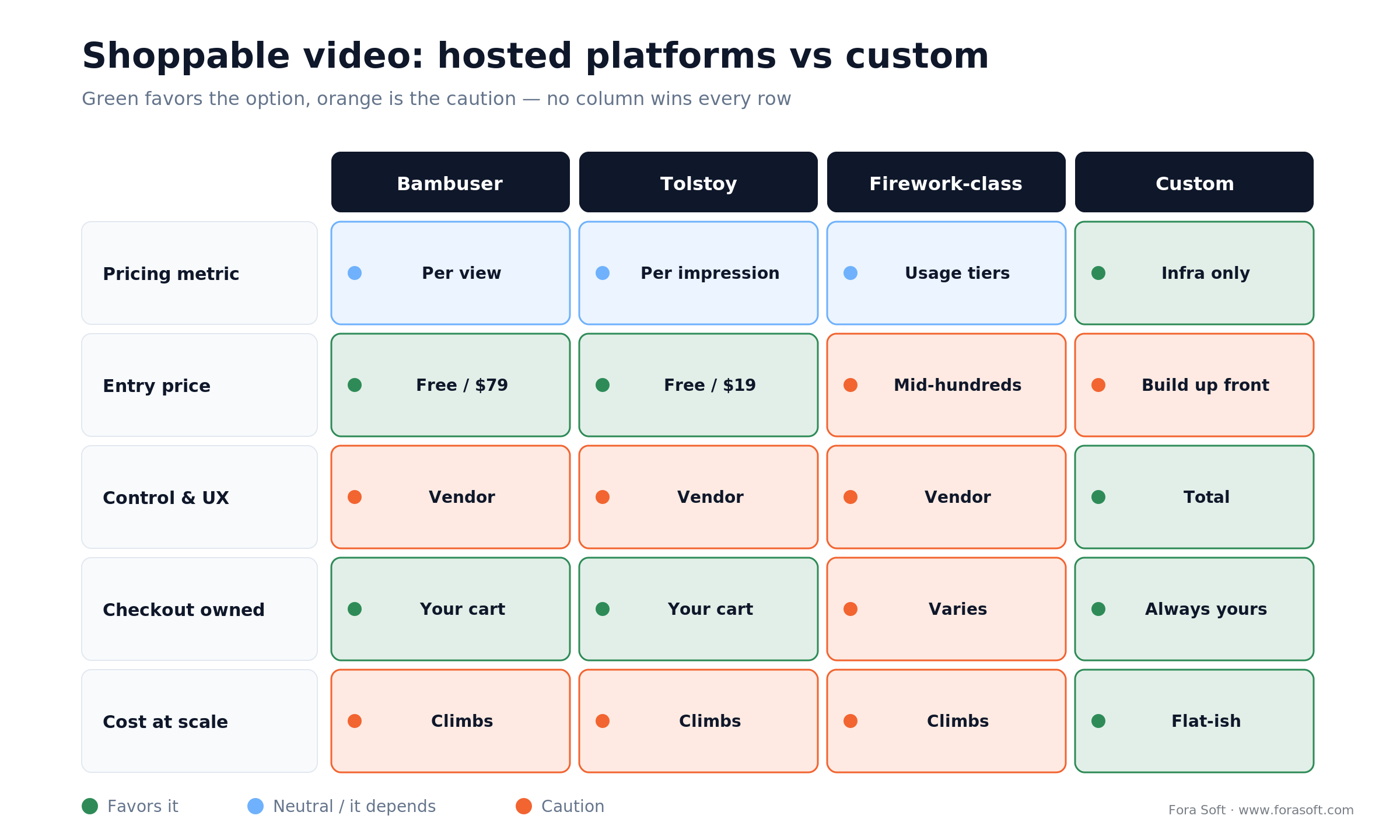
Figure 3. Hosted platforms versus custom, scored on the dimensions that actually decide the choice. No column wins every row.
| Dimension | Bambuser | Tolstoy | Firework-class | Custom build |
|---|---|---|---|---|
| Pricing metric | Per view | Per impression | Usage tiers | Your infra only |
| Entry price | Free; $79/mo | Free; $19/mo | Pilot; mid-hundreds/mo | Build cost up front |
| Control & UX | Vendor's player | Vendor's player | Vendor's player | Total |
| Checkout ownership | Your cart (native) | Your cart (native) | Varies by integration | Always yours |
| Attribution / data | Vendor dashboard | Vendor dashboard | Vendor dashboard | Your warehouse |
| Cost at high views | Rises with views | Rises with impressions | Rises with usage | Flat-ish (delivery only) |
Bambuser and Tolstoy both integrate natively with Shopify carts, which is the thing to insist on: a tool that owns or redirects your checkout is the one you'll regret. Firework, Videowise, Vimeo, and the Shopify app ecosystem round out the field with similar mechanics and different price points. The pattern across all of them is the same, and it's the subject of the next section.
Reach for a hosted platform when: you're validating the format, you run a standard Shopify or similar store, and your monthly view volume is modest. It's the fastest, cheapest way to prove shoppable video works before you commit any engineering — and the one thing to verify is native cart integration.
How platforms charge, and why it bites at scale
Nearly every hosted shoppable-video platform meters by consumption, and it's the single most important thing to understand before you commit. Bambuser is free up to 250 views a month, then $79/mo (billed annually) for 2,000 views, $249/mo for the Pro tier, and enterprise pricing above that — with overage charged at $0.25 per view beyond your allowance (bambuser.com/pricing, accessed 2026–07–15). Tolstoy's AI Player starts at $19/mo for 5,000 impressions, $99/mo for 20,000, and $299/mo for 50,000, with overage from $5 to $10 per 1,000 impressions depending on tier, plus a free plan for the Shop app (gotolstoy.com/pricing, accessed 2026–07–15).
Read those numbers again with scale in mind. The meter is views, and views grow with your traffic and your success. A viral clip or a busy sale month doesn't just delight you — it inflates the bill, whether or not those extra views converted. That's the structural tension: the pricing scales with exposure, while your margin scales with sales, and the two diverge exactly when the format is working hardest. It's a fine deal at low volume and an increasingly awkward one as you grow, which is the whole reason build-vs-buy is a live question and not a foregone conclusion.
Build vs buy: the honest decision
Buying wins on speed and on getting started cheap: you get a proven player, native cart integration, and a dashboard in days, for tens to low hundreds of dollars a month. It's the correct choice for validating whether shoppable video moves your numbers at all — and most brands should start here, full stop.
Building wins on three things the meter can't give you: economics at scale (a flat delivery cost instead of a per-view tax), control (your own player, interaction design, and checkout), and ownership (the video events land in your warehouse, not a vendor's silo). The cost is a real up-front engineering project and ongoing maintenance. The honest framing isn't “build good, buy bad” — it's a crossover: below some view volume, buying is cheaper than a build could ever be; above it, the per-view meter overtakes the cost of owning the stack. The next section puts numbers on that crossover. If you want that line drawn for your own catalog before anyone writes code, our MVP planning and monetization modeling sprint does it within a week.
What it costs: buy vs build worked math
Let's make the crossover concrete. These are illustrative figures to show the shape of the decision, not a quote — your real numbers depend on clip length, video quality, and how hard you negotiate an enterprise deal. We'll use Tolstoy's published impression pricing as the SaaS reference and a conservative custom-delivery estimate.
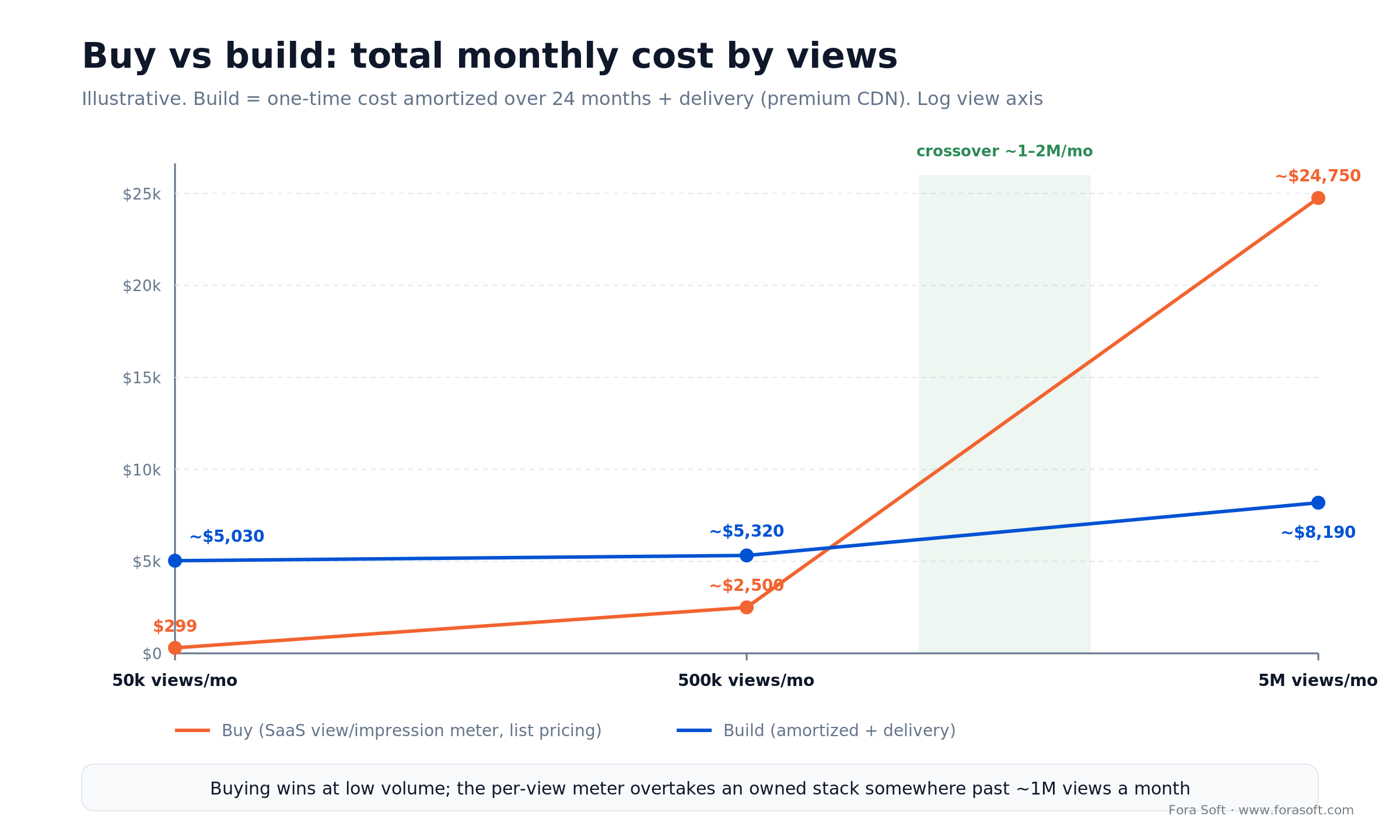
Figure 4. Illustrative monthly platform cost by view volume. The SaaS meter is cheapest at the bottom and punishing at the top; custom delivery stays roughly flat once built.
At 50,000 views a month, a hosted platform costs about $299/mo on list pricing — and a custom build makes no sense, because you'd spend more on the engineers than you'd ever save. Buy.
At 500,000 views a month, list overage on top of a $299 plan runs into the low thousands per month (450,000 extra impressions at roughly $5 per thousand is about $2,250, so on the order of $2,500/mo, or ~$30,000/year). A custom build's delivery cost for the same traffic — say 500,000 plays of a 30-second clip at ~2 Mbps, about 3.75 TB — is roughly $20–40/mo on a low-cost CDN, or a few hundred a month on a premium one. The build and its maintenance are the real cost now, and at this volume they start to pencil out.
At 5,000,000 views a month, list pricing becomes theoretical — you'd negotiate an enterprise contract long before this, and that's the point. Enterprise deals soften the list overage, so treat these top-end list numbers as a signal, not a literal invoice. But the direction is unmistakable: custom delivery stays in the low hundreds of dollars while the meter, negotiated or not, keeps climbing with every view. Somewhere between a few hundred thousand and a few million monthly views, owning the stack becomes the cheaper option — and if you also need to own the checkout and the data, that crossover arrives sooner. For a full model of the delivery side, our server-cost estimator for video platforms walks through the inputs.
Want the crossover math for your real view volume?
Bring your monthly views, catalog size, and stack to a 30-minute call. We'll model buy vs build with your numbers — no obligation, and no pressure to build.
Does shoppable video actually convert?
Yes — but less magically than the marketing claims, and it's worth being precise so you set the right expectations. The most rigorous public data comes from a controlled benchmark by Whatmore across 200,000+ sessions and seven brands (A/B tested, statistically significant, late 2025 to early 2026): shoppable video lifted site-wide conversion by roughly 17–33% at the median, and shoppers who actually engaged with a video converted about 125% better than those who didn't. Note that this is a vendor's benchmark, so read it as directional rather than gospel — but its methodology is far more transparent than the usual “225% more likely to add to cart” single-stat claims you'll see elsewhere.
The nuance that matters is where the lift comes from. The same benchmark found that only about 10–15% of visitors engage with the video at all. So the format doesn't lift every shopper; it strongly lifts the engaged minority, and that's enough to move the site-wide number. This matters for two reasons: it sets a realistic ceiling (don't expect video to double your whole store's conversion), and it tells you where to optimize (getting more people to start the video is often worth more than tuning the ones who already watch). Survey data points the same way. Wyzowl reports that 87% of people say a video has convinced them to buy something (2024), though survey intent and measured conversion aren't the same thing, so trust the controlled numbers over the self-reports.
Mini-case: video commerce at scale
Sprii, a Danish video-commerce platform we've engineered for, is a good picture of what the commerce layer looks like when it's real and at scale. Through video-driven shopping it has done over €365M in cumulative sales, moved 21 million products, and hosted 72,000+ shopping events for 3,000+ brands and retailers across Europe. That volume only works because the plumbing underneath is solid, not because the videos are pretty.
Our slice of it is exactly the layers this guide is about: dynamic product overlays configured independently per channel, gamification (polls, quizzes, countdowns) to lift engagement, abandoned-cart notifications, and native integration with Shopify, WooCommerce, and Magento so the cart and checkout stay the merchant's own. Sprii's core is live selling, but the same overlay-and-cart engine powers on-demand playback of recorded events — the exact repurposing pattern we described earlier, where a live stream becomes an evergreen shoppable clip.
The lesson we take from it into every shoppable-video project: the value isn't the video widget, it's the reliability of the connection between the overlay and the merchant's real commerce systems. We apply the same real-time discipline in projects like Tradecaster, where a live data layer rides on top of video. Want a similar read on your idea? Book a 30-minute call and we'll tell you what it would actually take.
Buy or build: a decision in five questions
1. Have you proven the format works for you? If not, buy. A hosted platform answers “does shoppable video move our numbers” for the price of a monthly subscription. Don't fund a build to test a hypothesis a widget can test in a week.
2. What's your monthly view volume? Tens of thousands of views fit a hosted plan comfortably. Once you're into the high hundreds of thousands or millions, the per-view meter starts to cost more than owning delivery — that's the economic signal to build.
3. How custom is your stack and your UX? A standard Shopify store with standard interactions is a great fit for a platform. A headless commerce stack, a bespoke interaction design, or unusual catalog logic pushes you toward custom fast.
4. Do you need to own the checkout and the data? If the shoppable cart must share promotions, loyalty, and analytics with the rest of the store — and the video events must live in your warehouse — a vendor silo becomes a liability, and building is the cleaner answer.
5. Is video commerce your product or a feature? If it's a feature that enhances your store, rent it forever and move on. If interactive video is the business, you'll want to own the stack — the way a platform like Sprii does.
Five pitfalls that sink shoppable video builds
1. Treating it as a video project. The video is the easy 20%. Teams that pour effort into playback and slap the commerce integration on last ship something that looks shoppable and shows wrong prices. The catalog and cart layers are the project.
2. Ignoring the page-speed budget. A heavy player on your best pages can wreck Core Web Vitals and cost you more in lost sales and rankings than the video wins. Measure LCP on a real phone before rolling out sitewide.
3. Forgetting attribution until it's too late. Without event-level tracking, last-click analytics gives video zero credit, and a working program gets killed on bad data. Decide the attribution model before launch, not after.
4. Letting a vendor own your checkout. A tool that redirects to a separate checkout fragments the cart, breaks promotions, and drops tracking. Insist on native cart integration — or build so the cart is always yours.
5. Underestimating the per-view meter. Founders model the subscription and forget overage. A successful, high-traffic month can multiply the bill unexpectedly. Do the cost math at your target view volume, not today's.
When not to build shoppable video
Sometimes the right answer is don't build — or don't bother at all. If you haven't validated that the format converts for your catalog, building a custom player is the most expensive way to run that experiment; a hosted widget answers it for pocket change. If your traffic is modest and likely to stay that way, the per-view meter will never catch up to the cost of a build, so renting is the permanent right answer, not a temporary one.
And be honest about whether shoppable video is even the tool for your problem. If your goal is letting shoppers see a product in their space or on themselves, that's augmented reality and virtual try-on — a different discipline we cover in AR virtual showrooms and product demos — not overlay-on-video shopping. And if the sale really depends on a live host and real-time urgency, you want live commerce, not on-demand clips. Pick the format that matches the buying moment; the wrong one is effort spent selling the way your customers don't buy.
FAQ
What is shoppable video?
Shoppable video is on-demand video with the store built in: interactive tags let a viewer see a product's price, choose a variant, and add it to the cart without leaving the clip. The video is pre-recorded and plays around the clock, and it works by connecting an overlay layer to your live product catalog and your cart, so prices, stock, and checkout stay real.
How much does a shoppable video platform cost?
Hosted platforms meter by views or impressions. Bambuser is free up to 250 views a month, then $79/mo for 2,000 views, with $0.25 per view over your allowance; Tolstoy's AI Player starts at $19/mo for 5,000 impressions, up to $299/mo for 50,000 (both accessed 2026–07–15). A custom build is an up-front engineering cost plus low, flat delivery costs — cheaper only once your view volume makes the per-view meter expensive.
Does shoppable video actually increase conversion?
In controlled testing, yes — a benchmark across 200,000+ sessions found roughly 17–33% site-wide conversion lift at the median, with engaged viewers converting about 125% better (Whatmore, 2026, vendor-run but methodologically transparent). The catch: only about 10–15% of visitors engage with the video, so it lifts the engaged minority strongly rather than every shopper. Set expectations accordingly.
Should I buy a shoppable video platform or build one?
Buy to start and to validate — it's faster and cheap at low volume. Build when your monthly views make per-view pricing expensive, when you need a custom player or a headless stack, or when you must own the checkout and the analytics. The crossover typically lands somewhere between a few hundred thousand and a few million monthly views, sooner if control and data ownership matter to you.
Does shoppable video work with Shopify?
Yes. The main platforms integrate natively with the Shopify cart via the AJAX Cart and Storefront APIs, so add-to-cart lands in the shopper's normal checkout. The thing to verify is exactly that: a good integration adds to your existing cart; a poor one redirects to a separate checkout, which fragments the cart and can break your promotions and conversion tracking.
Will a shoppable video slow down my site?
It can, if you're careless. Video embeds can block the main thread and autoplay downloads bytes before the user asks (Google web.dev, 2025), which hurts Core Web Vitals on your highest-value pages. The fixes are standard: lazy-load the player, defer autoplay, show a poster image first, and keep the script light. Measure the real LCP impact on a mid-range phone before rolling out sitewide.
What's the difference between shoppable video and live commerce?
Live commerce is a real-time broadcast with a host and live urgency; it needs low-latency streaming and live chat. Shoppable video is on-demand — pre-recorded clips that sell 24/7 through overlays and cart integration. They share a commerce layer but differ in the video layer, and many brands run live events then repurpose the recordings as evergreen shoppable clips.
How is shoppable video tracked and attributed?
With event-level instrumentation. You fire discrete events — video view, hotspot click, product-drawer open, add-to-cart — into GA4 or your analytics store and attribute revenue to sessions that engaged with video. Default last-click analytics credits the product page, not the video, which makes a working program look like it does nothing. Decide the attribution model before launch.
What to read next
Live
Live commerce platform development
The real-time sibling of shoppable video, and when to use each.
Player
Custom video player development
The player layer under the overlay: ABR, controls, and the hard parts.
AI
AI content recommendation systems
Which clip to show which shopper — the personalization layer.
AR
AR virtual showrooms and product demos
When the answer is try-on and 3D, not overlay-on-video.
OTT
OTT platform development guide
The broader video-platform architecture this sits inside.
Ready to make your video shoppable?
Shoppable video is whatever the moment needs it to be: a $19-a-month widget to prove the format, or a custom player you own when views and control outgrow the meter. The architecture is knowable — a video layer, an overlay, live product hydration, a cart write, and an event stream — and the same five layers hand off in the same order no matter which path you pick.
The parts that decide success are unglamorous: sync the catalog so prices are never wrong, own or protect the checkout, guard the page-speed budget, and instrument attribution before launch so the format gets credit for the sales it drives. Do those, and the difference between a shoppable video that sells and a widget that just sits there is the difference between a commerce channel and a decoration.

The book · Volume 3 of 7
Video Streaming: A Complete Guide to Video Delivery: From ABR and CDNs to Players, WebRTC, DRM, and the Economics of Streaming
The video was the easy part of shoppable video, but the player and the delivery bill still decide page speed and margin. Our volume on video delivery walks through what sits between the protocol and the screen: ABR and bitrate ladders, CDNs and caching, player behaviour after stalls, and the economics of streaming at scale. Written by Nikolay Sapunov, CEO at Fora Soft.
Read it on Amazon →Kindle & paperback · Fora Soft Video Engineering Handbook
Let's scope your shoppable video
250+ projects since 2005, from video-commerce platforms doing hundreds of millions in sales to custom players. Bring your catalog and your view volume — we'll tell you what it really takes and whether you should buy or build.