

Key takeaways
• Diarization answers “who spoke when,” not “what was said.” It splits an audio file into speaker-labelled segments. Pair it with speech-to-text and you get a transcript that knows who talked. It is a separate job from the transcription itself, and most APIs bill it as an add-on.
• Accuracy is measured in DER, and the number is only honest with its setup. Diarization Error Rate adds missed speech, false alarms, and speaker confusion. A vendor quoting 5% with a generous collar and no overlap counted is not comparable to pyannote's strict 12–25%. Always ask how it was scored.
• The managed field is close on price. AssemblyAI runs about $0.15–$0.27 an audio-hour, Deepgram Nova-3 with diarization about $0.41, Google Chirp folds it into $0.24–$0.96 (vendor pages, July 2026). Accuracy on your audio, not the sticker price, is what should decide it.
• Open-source pyannote is the free baseline everyone benchmarks against. MIT-licensed, ~11 million downloads a month, self-hostable for roughly $0.08–$0.16 of raw GPU per audio-hour — before the engineering and ops that are the real cost.
• We build the whole speaker-attributed pipeline. Fora Soft ships meeting-intelligence and audio AI systems, and we'll tell you when to just call AssemblyAI instead of self-hosting a model.
Why Fora Soft wrote this comparison
Search “speaker diarization API” and the first page is vendor docs and one comparison written by a vendor about itself. Useful if you already know which box you're shopping in, useless if you're trying to decide whether to pay AssemblyAI, wire up Deepgram, or self-host pyannote and own the GPUs. We kept hitting that gap on client projects, so we wrote the straight version: how diarization actually works, how to read an accuracy claim without getting fooled, what each option costs, and when to build versus buy.
Fora Soft has built real-time audio, video, and AI systems since 2005: 250+ projects, 50+ people, all of it in this domain. Diarization shows up in most of our meeting-intelligence and speech-to-text development work, because the moment two people share a call, “who said the action item” matters as much as the words. We've shipped it on top of commercial APIs and as self-hosted models, and we've paid for the mistakes in both directions.
This is a build-and-buy guide, not a sales page. We walk the pipeline, the DER metric that vendors quote loosely, a head-to-head of the main APIs with July 2026 prices, the open-source lane, the streaming problem, and the cost math, then a five-question test for your own stack. If you'd rather skip to a scoped estimate, our AI integration team does this work.
What speaker diarization actually is
Speaker diarization is the task of partitioning an audio stream by speaker: cutting the timeline into segments and labelling each one “Speaker 1,” “Speaker 2,” and so on, without being told in advance who they are or even how many there are. The output is a set of time-stamped, speaker-tagged spans. In research it's written as an RTTM file; in an API it comes back as a speaker field on each word or utterance.
The key word is “without being told.” Diarization figures out the speaker structure from the audio alone. It doesn't know that Speaker 1 is Dr. Alvarez; it only knows that the same voice comes back at 0:12, 1:40, and 3:05 and groups them. Attaching real names is a different, later step. That distinction trips up a lot of teams, so it's worth being precise about the neighbours.
Diarization on its own is rarely the goal. What people usually want is a speaker-attributed transcript: the words, plus who said each one. That's diarization and speech-to-text working together, and understanding where one ends and the other begins is the whole reason this decision is confusing. So let's separate them.
Diarization vs transcription, speaker recognition, and channels
Diarization vs speech-to-text (ASR). ASR turns audio into words. Diarization decides who spoke each stretch. They're orthogonal: you can transcribe with no idea who's talking, or diarize a recording you never transcribe. A speaker-attributed transcript needs both, run together so the speaker turns and the words line up on the same timeline. Diarization sits on top of the same audio your speech recognition reads, and noisy audio hurts both.
Diarization vs speaker recognition. Recognition (or speaker identification) matches a voice to a known, enrolled person — it needs a voiceprint on file and answers “is this Alice?” Diarization has no enrolment and no names; it answers “how many distinct voices, and which segments belong together?” Many products chain them: diarize first to find the speakers, then recognize to put names on the anonymous labels.
Diarization vs channels. Here's the cheapest win in the whole field: if each speaker is already recorded on a separate audio channel — a call center where the agent and customer are on different legs, for instance — you don't need diarization at all. Transcribe each channel and label it by channel. Diarization only earns its keep when multiple people share one mixed track, which is exactly the case in meetings, interviews, podcasts, and courtroom audio.
How diarization works: the pipeline and the end-to-end shift
The classic approach is a pipeline of three stages. Voice activity detection (VAD) throws away the silence and keeps the speech. A speaker-embedding model turns each little slice of speech into a vector — a numeric fingerprint of the voice, historically called an x-vector or d-vector (our audio-for-video glossary defines the terms). Then a clustering step groups those vectors: slices whose fingerprints are close belong to the same person. Count the clusters and you have your speakers. pyannote's modern pipeline keeps this shape but swaps the front end for a neural segmentation model that also handles brief overlaps.

Figure 1. The modular diarization pipeline — VAD, embedding, clustering — and the end-to-end neural alternative. Add speech-to-text on the same timeline and you get a speaker-attributed transcript.
The modular pipeline is interpretable and easy to debug, but it has a well-known weak spot: overlapping speech. When two people talk at once, a clustering step that assumes one speaker per slice has to pick a winner, and it loses the other voice. That's why the field moved toward end-to-end neural diarization, where a single network is trained to emit per-frame speaker activity for several speakers at once. NVIDIA's Sortformer and the broader EEND family fall here; they handle overlap natively and, in streaming variants, assign labels as the audio arrives.
For a buyer, the takeaway is simpler than the machinery: every API and model is some version of these two designs, and the trade-off is always the same. Modular pipelines are transparent and tunable; end-to-end models are stronger on overlap and real time but harder to poke inside when they're wrong. When you compare vendors below, you're really comparing how well each one handles the messy parts — overlap, short turns, and an unknown number of speakers.
Need a speaker-attributed transcript in your product?
We'll map your audio, languages, and accuracy bar to a diarization stack and a real number in one call.
How accuracy is really measured: DER, collar, and overlap
The standard metric is Diarization Error Rate. DER adds up three kinds of mistake as a fraction of total speech time: missed speech (a person talked, the system heard silence), false alarm (the system labelled silence or noise as speech), and speaker confusion (right that someone talked, wrong about who). Lower is better, and because false alarms pile on top, DER can technically exceed 100%. It is not a “percent correct.”
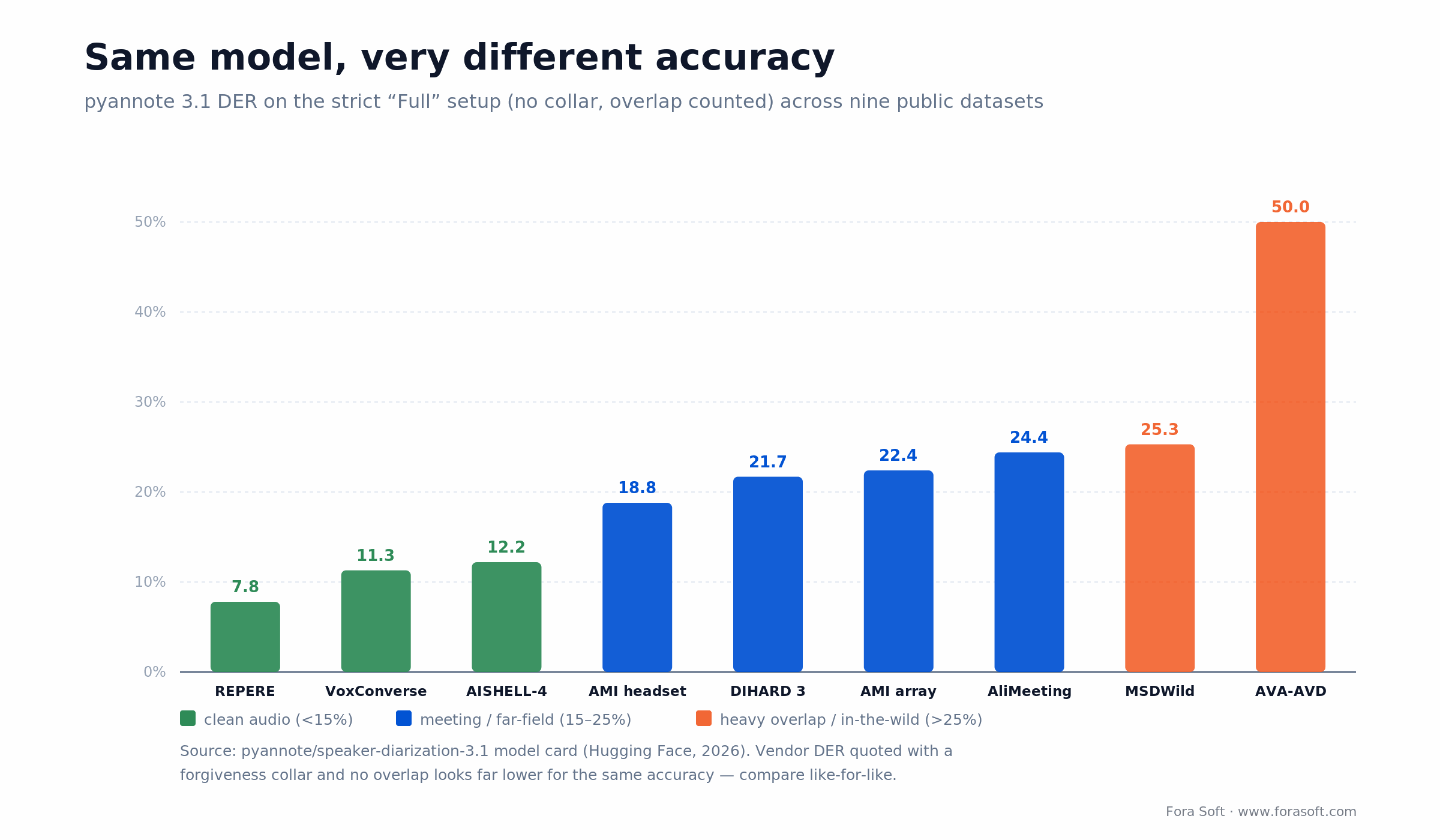
Figure 2. One model (pyannote 3.1), nine datasets, strict scoring. Clean broadcast audio lands near 8%; far-field meetings and in-the-wild video run 22–50%. The spread is the audio, not the algorithm.
Here's the part vendors gloss over. A DER number is meaningless without two settings: the forgiveness collar (how many milliseconds around each speaker change you agree to ignore) and whether overlapping speech is scored at all. Turn on a 0.25-second collar and skip overlap and the same model's DER drops by half. So a marketing page claiming “5% DER” and pyannote's published 12–25% on the strict “Full” setup (no collar, overlap counted) may describe identical accuracy. Always ask how it was scored before you trust the digit.
The other honest point Figure 2 makes: your audio matters more than your vendor. pyannote 3.1 scores about 7.8% DER on clean broadcast news (REPERE) and 50% on in-the-wild audiovisual clips (AVA-AVD) — same model, wildly different results, driven entirely by how clean and how overlapped the recording is. Before you obsess over which API wins a benchmark, benchmark all of them on your audio. A related metric, Jaccard Error Rate (JER), weights every speaker equally regardless of talk time, which matters when one person dominates and a few short interjections would otherwise vanish into the average.
The APIs compared: AssemblyAI, Deepgram, Google, Azure/AWS, pyannote
Here's the honest read on the options most teams shortlist, with prices pulled from each vendor's own page in July 2026. Diarization is almost never sold alone; it rides on a speech-to-text request as an included feature or a small add-on, so the numbers below are the diarization-inclusive cost per audio-hour, not a separate line.
| Option | Diarized cost (2026) | Streaming? | Where it wins | Where it breaks |
|---|---|---|---|---|
| AssemblyAI | ~$0.15–$0.27 / hr | Yes (Universal realtime) | Cheapest all-in, 99 languages, clean SDK | Diarization tuned for its own transcripts |
| Deepgram Nova-3 | ~$0.41 / hr (batch + add-on) | Yes | Low latency, self-host option, HIPAA/BAA | Diarization is a paid add-on on top |
| Google Cloud (Chirp) | ~$0.24–$0.96 / hr | Yes | Diarization included, GCP-native, batch tier cheap | Standard rate pricier, GCP lock-in |
| Azure / AWS Transcribe | ~$0.60–$1.44 / hr | Yes | Fits existing cloud + compliance stack | Priciest, accuracy trails specialists |
| pyannote (self-host) | ~$0.08–$0.16 / hr raw GPU | Batch (Sortformer for live) | Free, MIT, full control, private deploy | You own the GPUs, tuning, and ops |
A few vendor notes worth having. Deepgram prices Nova-3 batch at $0.0048 a minute and diarization as a $0.0020-a-minute add-on, so a diarized transcript is about $0.0068 a minute, or $0.41 an hour, with a self-hosted deployment and a HIPAA BAA available for regulated work. AssemblyAI is the value pick: basic diarization comes inside its $0.15-an-hour Universal model, with a small add-on for naming speakers, across 99 languages. Google's Chirp folds diarization into its per-minute rate at no surcharge, and the 24-hour Dynamic Batch tier is genuinely cheap at $0.004 a minute if you don't need results now.
The pattern to notice: the managed prices are close enough that price shouldn't be your tiebreaker. What actually differs is accuracy on your kind of audio, whether you need real-time labels, and how much control and privacy you require. For a broader look at the audio-AI toolkit these sit inside, our roundup of tools to elevate audio apps maps the neighbours.
The open-source lane: pyannote, WhisperX, and Whisper's missing feature
pyannote.audio is the open-source standard, and it's not close. The speaker-diarization-3.1 pipeline is MIT-licensed, pulls around 11 million downloads a month, and is the model nearly every benchmark and half the commercial products quietly build on. It runs in pure PyTorch, ingests 16 kHz mono, and lets you pin the number of speakers when you know it. Its published DER table is the strict, no-collar, overlap-counted kind, which is why its numbers look higher than glossier marketing claims: it's being honest.
A recurring question deserves a blunt answer: no, OpenAI's Whisper does not do speaker diarization. Whisper is a superb transcriber with zero notion of who's speaking. The common recipe is WhisperX, which wraps Whisper for the words, adds wav2vec2 forced alignment for precise word timestamps, and calls pyannote for the speaker labels. If you've seen a “Whisper with speakers” demo, it was almost certainly Whisper plus pyannote underneath.
Reach for self-hosted pyannote when: you have GPU capacity and real volume, you need data to stay on your own infrastructure, and a few weeks of integration is cheaper than a per-hour fee you'll pay forever.
Reach for a managed API when: your volume is low or spiky, you want diarized transcripts today without hiring an ML engineer, and $0.15–$0.41 an hour is cheaper than the team it takes to run your own.
Weighing self-hosted pyannote against an API?
We've shipped both. Bring your volume and privacy needs and we'll tell you which one actually costs less for you.
Streaming vs batch: diarizing live audio is a harder problem
Diarizing a finished recording is the easy case: the whole file exists, so the system can look at every voice before committing to any label, then cluster with full context. Diarizing a live call is much harder. The model has to decide who's speaking as the words arrive, with no future context, and it has to keep the label for a given voice stable across the whole session — if Speaker 2 turns into Speaker 5 halfway through, downstream logic breaks.
This is where end-to-end streaming models earn their keep. NVIDIA's Streaming Sortformer, released in 2025, does frame-level diarization in real time, tags each utterance with a speaker and timestamp as the conversation unfolds, and uses an arrival-order speaker cache to keep labels consistent as new voices join. It reliably tracks up to about four speakers and is optimized for English. On the managed side, AssemblyAI, Deepgram, and Google all offer streaming speech-to-text with speaker labels, with the usual real-time caveat that early labels can shift slightly as more audio confirms who's who.
The practical rule: if you're processing recordings — podcasts, uploaded meetings, call archives — batch diarization is more accurate and simpler, and you should prefer it. Only reach for streaming when the product genuinely needs live speaker labels, like a meeting bot captioning who's talking in real time. Live diarization is a real feature, not a free one; budget for the accuracy hit and the extra engineering.
Build vs buy: a managed API or your own pyannote
For most teams, start by buying. A managed API gives you diarized transcripts through one request, at $0.15–$0.41 an audio-hour, with no models to run and no GPUs to babysit. For a few hundred hours a month, that's the right call and it isn't close — the per-hour fee is far below what an engineer's time to stand up a pipeline would cost.
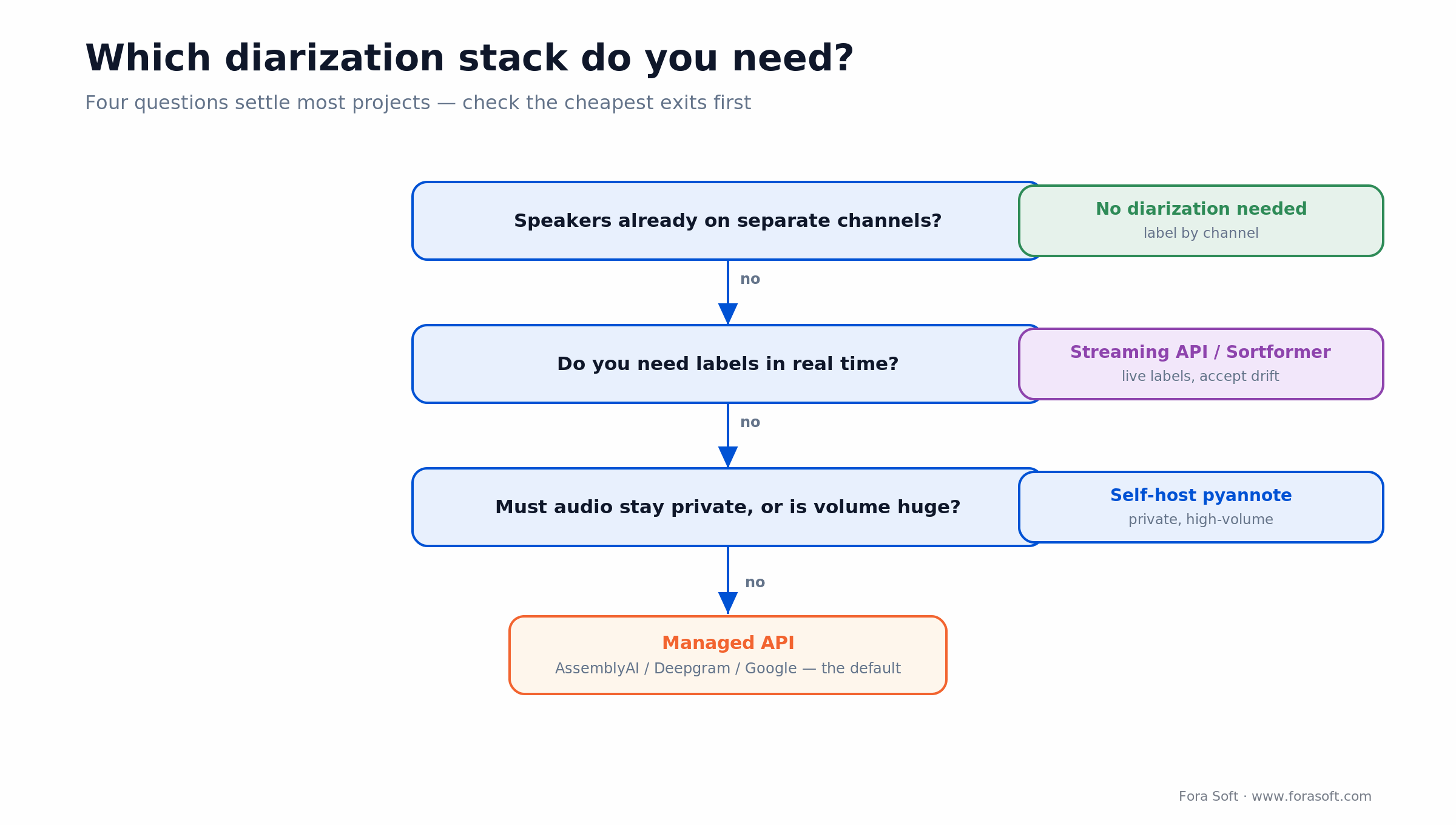
Figure 3. Four questions decide most diarization stacks: separate channels first (you may need nothing), then real-time, then privacy and volume.
You build — meaning self-host pyannote or a Sortformer-class model — when one of three things breaks the managed case. Data residency or privacy that forbids sending audio to a third party. Volume high enough that per-hour fees dwarf a small team plus reserved GPUs. Or diarization being a core, differentiated feature of your product that you need to tune and control, not a checkbox you call. At that point the raw GPU cost is low; the real budget is the MLOps, the tuning for your audio, and the on-call.
Reach for a managed API when: you process under a few thousand hours a month, the built-in languages and accuracy cover you, and you'd rather pay per hour than staff a model in production.
Reach for self-hosted pyannote when: audio can't leave your infrastructure, your monthly volume is high enough that fees dwarf a small team plus GPUs, or diarization is a feature you must tune and own.
What diarization actually costs: worked math per audio-hour
Per audio-hour of diarized transcript, managed APIs run from about $0.15 to $0.96 and self-hosted pyannote runs about $0.08–$0.16 in raw GPU. That gap is smaller than it looks, and the arithmetic shows why.
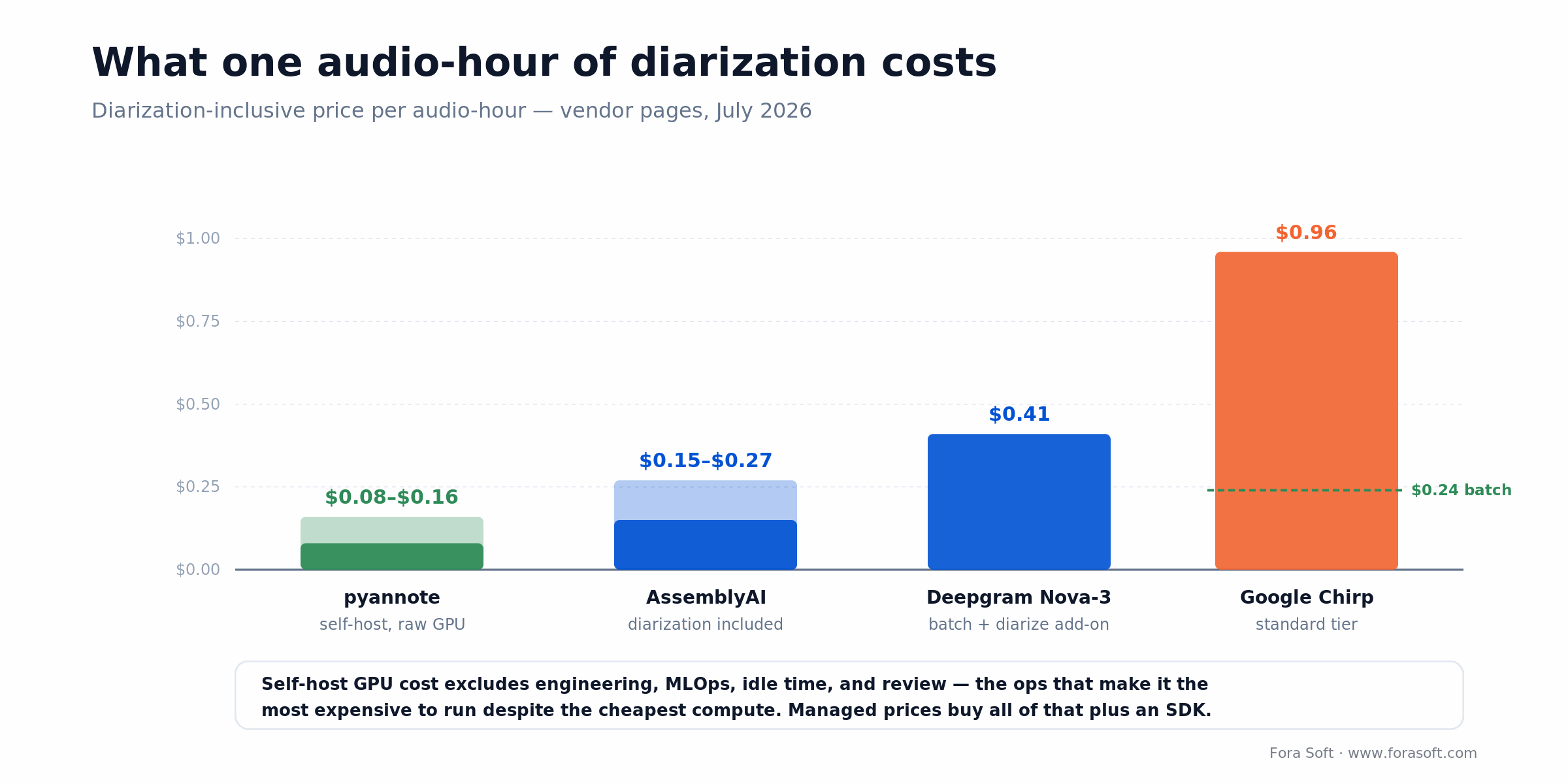
Figure 4. One audio-hour, four ways. Self-hosting is the cheapest compute and the most expensive to operate; managed prices buy you the ops and a UI.
The managed side, from vendor pages in July 2026: AssemblyAI is roughly $0.15–$0.27 an hour with diarization included, Deepgram Nova-3 is $0.0048 a minute plus a $0.0020-a-minute diarization add-on, which is $0.0068 a minute or about $0.41 an hour, and Google's Chirp includes diarization inside $0.016 a minute ($0.96 an hour standard, or $0.24 an hour on the 24-hour batch tier). Azure and AWS Transcribe land higher, roughly $0.60–$1.44 an hour at standard tiers.
Now self-hosting pyannote. One NVIDIA L4 GPU on an AWS g6.xlarge is about $0.80 an hour on demand. But pyannote diarizes far faster than real time in batch — a conservative five to ten audio-hours cleared per wall-clock hour on a single L4 — so the raw GPU cost lands around $0.08 to $0.16 per audio-hour. On paper that undercuts every API.
Here's the catch that keeps most teams on APIs longer than the raw math suggests: that $0.08–$0.16 excludes the engineer who builds and maintains the pipeline, the idle GPU time between batches, the tuning for your audio, and the retries on failures. A managed price buys all of that plus an SDK. Self-hosting only wins once your sustained monthly volume is high enough to amortize a small team and reserved GPUs, and even then, a hard privacy requirement is often the truer reason to do it. We keep these estimates conservative, because a pipeline that looks cheap on a spreadsheet and expensive in production helps nobody.
The levers that actually move accuracy
Tell it the speaker count when you know it. Every serious pipeline, pyannote included, lets you pin or bound the number of speakers. A two-person interview diarized with num_speakers=2 is dramatically more accurate than letting the model guess, because you've removed its hardest decision. If you know the range, set the minimum and maximum. This one flag often beats switching vendors.
Fix the audio before the model sees it. Diarization inherits every problem in the recording. Far-field microphones, room echo, cross-talk, and low sample rates all push DER up, and no API setting undoes bad capture. Getting a clean 16 kHz mono feed, or better yet separate channels where you can, does more than any model choice. This is the same discipline that governs speech recognition in noisy environments.
Respect overlap and short turns. The errors that survive good audio are the ones in overlapping speech and quick back-channels. If your content has a lot of cross-talk — debates, lively meetings — favour an end-to-end model built for overlap over a classic clustering pipeline. And accept that a perfect score on a two-person podcast doesn't predict the score on a six-person standup; test on the audio you'll actually run.
Where diarization actually matters
Meeting intelligence is the biggest driver. A notetaker that can't tell who committed to what produces a summary nobody trusts, so diarization is the difference between “someone will send the deck” and “Priya will send the deck.” It also powers per-speaker talk-time analytics, coaching, and CRM auto-fill, all of which need the words attributed to a person.
Contact centers, medical scribing, and legal or media transcription lean on it just as hard. A call-quality tool has to separate agent from customer; an ambient clinical scribe has to keep clinician and patient distinct in the note; a court or interview transcript is worthless if it can't say who testified to what. Media localization is a quieter consumer: per-speaker segments let a dubbing pipeline assign a distinct cloned voice to each person instead of collapsing a scene into one narrator.
The thread through all of these is the same: the value isn't the transcript, it's the attribution. Once a system knows who said what, a stack of features — search by speaker, per-person analytics, targeted redaction, accountability — becomes possible. That's why diarization keeps showing up as the unglamorous layer under products that look nothing alike.
Mini-case: multi-speaker meeting intelligence
Meeting-intelligence products are where we've felt diarization matter most. Fora Soft has built meeting-bot and notetaker systems that join calls across Zoom, Google Meet, and Teams, capture the audio, and turn it into a speaker-attributed transcript and summary. The hard part is never the transcription; a good API nails the words. The hard part is keeping the speakers straight when four people talk over each other on a bad hotel Wi-Fi connection, because a summary that pins the wrong commitment to the wrong person is worse than no summary at all.
Our instinct on those builds is the one this guide argues for: buy the AI, own the pipeline. We lean on a managed speech-to-text-plus-diarization API for the transcript so we're not running models we don't need to, then invest our own engineering in the orchestration — joining the meeting, handling reconnects, mapping anonymous speaker labels to real participants from the call roster, and gating low-confidence segments for review. That last step, turning “Speaker 2” into “Priya” using metadata the API never sees, is exactly the kind of value a raw API can't give you and a good build can.
We'll be honest about the boundary: diarization is a component here, not the product, and on clean two-person calls a managed API alone would get you most of the way. The engineering pays off precisely in the messy, high-speaker-count, real-world calls where attribution is hard and matters. Want a similar assessment of your meeting or transcription stack? Book a 30-minute call and we'll walk your audio and requirements.
A decision framework: pick your diarization stack in five questions
Run your project through these five questions before you sign a contract or spin up a GPU. The answers usually point one way fast.
1. Are your speakers already on separate channels? If yes, you may not need diarization at all — transcribe per channel and label by channel. Only keep reading if multiple people share one mixed track.
2. Do you need it live or on recordings? Recordings favour batch, which is more accurate and simpler. Live labelling needs a streaming API or a Sortformer-class model, and a tolerance for early labels that shift.
3. Can the audio leave your infrastructure? If privacy, contracts, or regulation say no, self-hosted pyannote is the honest answer regardless of volume. If yes, a managed API is on the table.
4. What's your monthly volume? Hundreds of hours: buy an API and stop. Tens of thousands and climbing: the per-hour fees start to fund a self-hosted pipeline, and building deserves a serious look.
5. How overlapped and noisy is your audio? Clean, low-overlap audio works well on almost anything; benchmark on price and languages. Heavy cross-talk and far-field audio should push you to an overlap-aware model and a round of testing on your own recordings. Not sure where you land? That's a good first call with our AI integration team.
Not sure which diarization stack fits?
Bring your audio, volume, and privacy needs. We'll give you a straight recommendation, even if it's “just use AssemblyAI.”
Five pitfalls that wreck diarization projects
1. Trusting a DER number without its setup. A “3% DER” claim with a hidden collar and no overlap scoring can be worse in practice than an honest 15%. Compare vendors only on like-for-like scoring, and ideally on your own audio.
2. Diarizing audio you should have kept on separate channels. Teams pay for diarization on a two-leg call that was already split by channel. If you control the capture, separate speakers at the source and skip the hardest problem entirely.
3. Letting the model guess the speaker count. Not passing a known or bounded speaker count is the most common self-inflicted accuracy loss. If you know it's two people, say so.
4. Assuming Whisper does diarization. It doesn't. Budget for pyannote or WhisperX from the start instead of discovering the gap after you've built around plain Whisper.
5. Benchmarking on the wrong audio. A vendor that wins on clean podcast audio can lose on your noisy six-person calls. Test on representative recordings before you commit, not on the demo file everyone uses.
KPIs: what to measure
Accuracy KPIs. Track DER on a held-out set of your own audio, scored one consistent way (state your collar and whether you count overlap). Break it into its parts — missed speech, false alarm, speaker confusion — because the fix differs: confusion points at the embedding or clustering, misses point at VAD or audio quality. Add speaker-count accuracy: how often the system gets the number of people right.
Cost KPIs. Measure cost per audio-hour end to end, including review and re-runs, not just the API line. If you self-host, track GPU usage and audio-hours cleared per GPU-hour, because idle GPUs are where the “cheap” build quietly gets expensive.
Reliability KPIs. Track processing success and retry rate, latency for streaming use, and label stability — how often a speaker's label stays consistent across a session. A pipeline that's accurate on average but flips labels mid-meeting will still fail the user.
When you don't need diarization
Skip it when the speakers are already separated. Multi-channel call recordings, podcast stems, or any setup where each person has their own microphone and track give you speaker attribution for free — transcribe each channel and label it. Paying a diarization add-on on already-split audio is spending money to solve a problem you don't have.
Skip it for single-speaker content. A solo narration, a voicemail, a dictation — there's one voice, so there's nothing to separate. And if what you actually need is to confirm a specific known person is speaking, that's speaker recognition against an enrolled voiceprint, not diarization; don't reach for the wrong tool.
Be honest about when the accuracy just isn't there yet, too. On chaotic audio with many speakers talking over each other, even the best diarization will make errors a human would catch, and shipping it unreviewed can be worse than a plain transcript. We'll tell you when your audio is a bad fit rather than sell you a layer that won't hold up.
Skip diarization when: speakers are on separate channels, there's only one speaker, or you actually need enrolled speaker recognition — not anonymous “who spoke when” labels.
FAQ
What is speaker diarization?
Speaker diarization is the process of splitting an audio recording into segments by speaker and labelling each one — “who spoke when” — without knowing the speakers in advance. It doesn't transcribe the words or name the people; it groups the timeline by voice. Combined with speech-to-text, it produces a transcript that shows who said each line.
Does OpenAI Whisper support speaker diarization?
No. Whisper is a speech-to-text model with no built-in notion of speakers. To get speaker labels you combine it with a diarization model, most commonly through WhisperX, which runs Whisper for the words and pyannote for the speakers. Any “Whisper with speakers” setup is Whisper plus a separate diarization step.
Which speaker diarization API is most accurate?
There's no universal winner, because accuracy depends heavily on your audio. AssemblyAI, Deepgram, and Google are all strong on clean, low-overlap recordings; open-source pyannote is the honest benchmark most others are measured against. The only reliable answer is to test the shortlist on your own representative audio and compare DER scored the same way.
What is a good Diarization Error Rate (DER)?
It depends entirely on the audio and the scoring setup. On clean broadcast audio, strong models score under 10%; on far-field meetings or overlapping in-the-wild clips, 20–30% is normal even for the best. A number without its collar and overlap settings is not comparable — always ask how DER was measured before judging it.
Deepgram vs AssemblyAI for diarization — which is cheaper?
On July 2026 vendor pricing, AssemblyAI is the cheaper all-in option at about $0.15–$0.27 an audio-hour with diarization included, while Deepgram Nova-3 plus its diarization add-on is about $0.41 an hour. Deepgram counters with very low latency and a self-hosted option with a HIPAA BAA. Price them on your actual volume and accuracy needs, not the headline rate.
Is pyannote free to use commercially?
The pyannote/speaker-diarization-3.1 pipeline is released under the MIT license, so yes, it's free to use and self-host commercially. You accept the model's user conditions on Hugging Face to download it. The same team offers a paid hosted service, pyannoteAI, if you'd rather not run the model yourself.
Can speaker diarization run in real time?
Yes, but it's harder than batch. Streaming models like NVIDIA's Sortformer assign speaker labels as audio arrives and track a handful of speakers on the fly, and the major APIs offer streaming transcription with speaker labels. The trade-off is that early labels can shift as more audio confirms who's who, and accuracy is usually a little below what you'd get processing the finished recording.
How much does a speaker diarization API cost?
Diarization rides on speech-to-text pricing. In July 2026, expect roughly $0.15–$0.27 an audio-hour with AssemblyAI, about $0.41 with Deepgram Nova-3 plus its add-on, and $0.24–$0.96 with Google Chirp depending on tier. Self-hosting pyannote is about $0.08–$0.16 an audio-hour in raw GPU, before the engineering and operations that are the real cost.
What to read next
Meetings
How to Build an AI Meeting Notetaker
Capturing the meeting audio that diarization then attributes per speaker.
Accuracy
Speech Recognition in Noisy Environments
The ASR that diarization rides on, and why bad audio hurts both.
Localization
AI Video Dubbing and Lip Sync
Per-speaker segments let a dub give each person a distinct voice.
Toolkit
7 AI Tools to Elevate Audio Apps
The wider audio-AI toolkit diarization lives inside.
Ready to add speaker attribution to your product?
Diarization is the layer that turns a transcript into a record of who said what, and the decision comes down to a few honest questions. Check whether your speakers are already on separate channels first. Read every accuracy claim with its collar and overlap in mind, and benchmark the shortlist on your own audio. Pin the speaker count when you know it, because that one flag beats most vendor switches.
On cost, the managed APIs cluster between $0.15 and $0.96 an audio-hour and self-hosted pyannote is about $0.08–$0.16 in raw GPU, so buy while your volume is low and build when privacy or scale justifies owning it. Most teams start on a managed API and only move to self-hosting when the numbers or the compliance rules force it. Wherever you are on that path, we'll give you the straight answer for your audio and requirements.

The book · Volume 6 of 7
AI for Video: A Complete Guide to Intelligence in Video Products: From Models and Inference to Computer Vision, Speech, Search, and Generative Video
Diarization error rate is one number; a meeting product needs the whole speech layer to hold together. Volume 6 covers ASR, TTS and diarization alongside the AI feature lifecycle, deployment topologies and search and RAG across recorded video, the components that turn a multi-speaker recording into searchable, attributed text. Written by Nikolay Sapunov, CEO at Fora Soft.
Read it on Amazon →Kindle & paperback · Fora Soft Video Engineering Handbook
Let's scope your diarization stack
Tell us your audio, languages, volume, and privacy needs. We'll come back with a build-or-buy recommendation and a real number.

