Key takeaways
• A meeting bot API sends a recorder into a call. It joins Zoom, Google Meet, or Microsoft Teams, captures audio, video, and a transcript, and pushes that data to your app through webhooks and a media WebSocket.
• The 2026 shift is bot-free capture. Zoom RTMS has been generally available since June 25, 2025 (sold as a paid Developer Pack); Google’s Meet Media API is still a developer preview that stopped accepting new sign-ups (Google docs, October 2026). Native streams change the build-vs-buy math only on Zoom today.
• Buying beats building for most teams. Recall.ai charges $0.50 per recording hour (cut from $0.70 in March 2026), Skribby $0.35; doing it yourself burns 3–5 engineers for roughly a year and about 4 vCPU per concurrent bot.
• Consent is a real risk, not a checkbox. Twelve US states require all-party consent in 2026, and no court treats a visible bot in the roster as legal notice. On August 13, 2026 a federal judge let the core wiretap claims against Otter.ai’s auto-join bot proceed.
• Custom wins at scale or on control. Above roughly six figures of monthly recording hours, or when you need per-speaker media and in-meeting agents, owning the stack pays off. We built exactly that for Meetric.
Updated October 2026: new section on which meeting bot API is most reliable and easiest to set up; October 2026 prices for Recall.ai, Skribby, MeetingBaaS, Vexa and Attendee; Zoom RTMS and Meet Media API status; the August 2026 Otter.ai ruling.
Why Fora Soft wrote this meeting bot playbook
We build real-time video and AI products for a living. Fora Soft has shipped 250+ projects since 2005, and a growing share of them capture live meetings: sales-intelligence tools, recruiting platforms, telehealth recorders, and compliance systems. When a founder asks us “how do we get a bot into every Zoom, Teams, and Meet call and pull the transcript out,” we’ve answered it in code, not in a slide deck, usually together with our custom speech-to-text development work for the transcript side.
One of those builds was Meetric, an AI sales-video platform that connects to Zoom, Google Meet, and Microsoft Teams, runs the same analytics on any of them, and automates 80–100% of CRM data entry. It raised SEK 21M and lifted client close rates by 25%. That project taught us where the bodies are buried: waiting rooms, per-speaker audio, reconnect storms, and the legal review nobody budgets for.
This guide is the honest version of that knowledge. It explains how a meeting bot API works, how the new native media APIs are rewriting the category, what the vendors actually cost in 2026, and when you should build your own instead. No vendor is paying us to say any of this.
Trying to decide between Recall.ai and a custom bot?
We’ll map your meeting-data flow across Zoom, Teams, and Meet and tell you which path is cheaper at your volume — in one call.
What a meeting bot API actually is
A meeting bot API is infrastructure that puts a recorder inside a live video call and hands the results to your software. You send it a meeting URL; it joins the call as a participant (the “bot”), records audio and video, produces a transcript, and delivers everything through a webhook for events and a WebSocket for raw media. Your product never touches a video SDK directly — it talks to one clean API.
Call the create-bot endpoint with a meeting_url and a recording config that says what to capture and where to send it. Register a webhook URL for transcript and participant events, and a WebSocket for raw media frames. That’s the whole contract. Everything hard, from joining and staying connected to decoding streams and scaling, happens on the other side of that endpoint.
This is the plumbing under every AI notetaker you’ve seen. The notetaker is the visible product; the meeting bot API is the layer that gets the words out of the call so a language model can summarize them. Once you have the transcript and speaker labels, summarization is the easy part, and you can even build retrieval over your stored recordings so users query past meetings in plain language. Score and coach reps on those same calls and you’ve moved from capture into conversation intelligence software, the analytics layer that sits on top of the transcript. That retrieval layer is a separate concern from capture, and this guide is about capture.
The category is real money, which is why it’s worth getting the architecture right. Recall.ai, the largest meeting-bot infrastructure vendor, raised a $38M Series B at a reported $250M valuation in September 2025, says it powers “thousands of companies” including Calendly, HubSpot and ClickUp, and was estimated by Sacra at about $31M in annual recurring revenue in January 2026. Demand for “get my product into every meeting” is not slowing down.
How a meeting bot joins and captures a call
A bot moves through six stages: authenticate, join, wait, capture, process, and deliver. Each stage has a failure mode that looks trivial in a demo and eats weeks in production. Here is the full path from “join this URL” to “here is a labeled transcript.”

Figure 1. The end-to-end path of a meeting bot: authentication and join, the waiting-room hold, raw media capture, the transcription and diarization stage, and delivery to your app over webhooks and a media socket.
1. Authenticate. Each platform gates programmatic access differently. Zoom needs Meeting SDK credentials and, since enforcement began on March 2, 2026, any app joining a meeting outside its own account must present an OBF token issued by an authorized user who is already in that meeting (Meeting SDK 5.17.5 or later). Teams needs an Azure Bot registration. Get this wrong and the bot never gets past the door.
2. Join and wait. The bot requests entry and often lands in a waiting room until a host admits it. Deciding how long to wait, whether to retry, and what to report back when it’s never admitted is a design problem, not a one-liner.
3. Capture. Now the bot pulls raw media. Zoom’s Meeting SDK delivers video as I420 frames and audio as PCM 16LE. A Teams application-hosted media bot receives 16 kHz PCM audio and H.264 or raw NV12/RGB24 video through Microsoft’s .NET media library. You’re handling uncompressed or lightly-compressed streams in real time: per participant on Zoom, while a Teams media bot gets mixed audio by default plus a few dominant-speaker and subscribed video streams.
4. Process and deliver. Raw frames become an encoded recording, and audio flows into speech-to-text and speaker diarization to produce a transcript with names attached. Events (participant joined, recording started, transcript ready) fire over the webhook; live media flows over the WebSocket. Your app reacts. The real-time speech-to-text pipeline is its own engineering effort, and accuracy in noisy, multi-speaker rooms is where most transcripts fall apart.
Meeting bot versus native real-time media API
There are now two ways to get meeting data: send a bot participant, or subscribe to a native real-time media stream with no bot at all. The bot approach works on every platform today. The bot-free approach is newer, cleaner where it exists, and the single biggest reason to re-think your architecture in 2026.
The bot approach puts a visible participant in the call. It works across Zoom, Teams, Meet, Webex, and more, and it’s the only option when a platform has no media API. The downsides: the bot shows up in the roster, it consumes a seat, and you own all the reconnect and scaling pain.
The native approach streams per-participant audio, video, transcript, chat, and screen share straight to your backend. Zoom’s Realtime Media Streams (RTMS) does exactly this over WebSockets with no automated participant, and Zoom made it generally available, as a paid feature, on June 25, 2025. Google’s Meet Media API offers real-time audio, video and participant metadata too, but as of October 2026 it is still in the Workspace Developer Preview and no longer accepts new sign-ups. Microsoft Teams supports application-hosted media bots, but those are still bots in the roster, not a bot-free stream.
Reach for native streams when: your product lives mostly on Zoom, you want no bot in the roster, your customers’ Zoom admins will enable RTMS, and you only need to receive media. RTMS is receive-only, so a bot is still the only way to speak or show content inside the call.
Platform by platform: Zoom, Google Meet, Teams
The three platforms that matter for most products are Zoom, Google Meet, and Microsoft Teams. Each exposes meeting data differently, and “we support all three” hides very different amounts of work per platform. Here’s what each one actually gives you in 2026.
Zoom is the most constrained and the most mature. There is no native API to simply join a meeting and pull raw streams the old way; the Meeting SDK exposes raw data (I420 video, PCM 16LE audio), and since March 2, 2026 any app joining outside its own account must authorize with an OBF token from a signed-in user in that meeting. The bright spot: RTMS gives you per-participant audio, video, transcript, chat, and screen share over WebSockets with no bot, with official Node.js and Python SDKs. Know its limits before you commit: RTMS is a paid Zoom Developer Pack feature (self-service purchase opened in mid-2026), a Zoom admin must enable it and the host can pause or block it, it is receive-only, and breakout rooms are not supported. If Zoom is your primary and you only need to listen, build on RTMS.
Google Meet has the Meet Media API for native real-time audio, video, and screen share — no extra participant needed. The catch is availability: as of October 2026 it is still a Developer Preview feature, Google has stopped accepting new sign-ups, consent must come from the organizer’s organization, and it cannot connect to encrypted or watermarked meetings. That makes it unusable as a product foundation today. Until it reaches general availability, a bot is still the practical way to capture Meet at scale, which is where multi-language capture across calls gets tricky.
Microsoft Teams supports application-hosted media bots that receive per-call audio and video through the Graph Communications media library. The constraints are strict: C# on .NET only, production on Windows Server VMs in Azure with an instance-level public IP, calls pinned to the VM that accepted them, and at least two CPU cores per instance (Microsoft Learn, updated July 2026). It also needs an Azure Bot registration and Graph permissions. Teams is the most “enterprise” of the three: heavier setup, but a well-trodden path for compliance-recording use cases.
Need all three platforms working reliably?
Zoom RTMS, a Meet bot, and a Teams media bot each behave differently. We’ve shipped all three — let’s scope yours.
SDK versus browser automation: two ways to build
If you build a bot yourself, you pick one of two techniques, and the choice decides how much your on-call team will suffer. Option one is the official platform SDK. Option two is headless browser automation — a real Chrome instance driven by Puppeteer or Playwright that clicks “join” and scrapes the media.
Official SDK is the stable, compliant path. You get documented raw-media access and you stay inside the platform’s terms of service. The cost is setup and review: Zoom app submission, Azure registration, and per-platform quirks. This is what you want in production.
Reach for the official SDK when: you’re going to production, you need Zoom in particular, or you sell to enterprises that will read your data-handling terms.
Browser automation is the fastest way to a prototype and the fastest way to a 2 a.m. page. It works on any platform with a web client, so you can demo Meet capture in a day. But it breaks whenever a platform changes a button or a DOM node, and running a real browser per meeting is heavy. It also violates Zoom’s terms for production use. Great for a spike; painful as a foundation.
Reach for browser automation when: you’re validating an idea this week, the platform has no usable SDK, and you’ve accepted that you’ll rebuild on an SDK or a vendor before real customers arrive.
Why meeting bots are harder than they look
The demo takes a weekend; the product takes a year. The reason is that a meeting bot isn’t a feature, it’s an infrastructure business with a per-meeting compute cost that never goes away. Three numbers explain why teams that start building usually end up buying.
About 4 vCPU per concurrent bot. Each active meeting needs its own compute to decode and re-encode media in real time. Unlike normal SaaS, where an extra user costs almost nothing, every simultaneous call you record provisions real cores. A thousand concurrent meetings is a serving fleet, not a background job.
Roughly a year of work for 3–5 engineers. That’s the going estimate to build and operate reliable capture across the major platforms — handling different APIs, reconnects, participant changes, transcription pipelines, and compliance. Recall.ai says offloading this saves teams 500+ developer hours before they ship anything.
The $1M networking surprise. In a November 2024 engineering post, Recall.ai wrote that internal data transfer over WebSockets pushed their AWS networking bill toward $1M a year; re-architecting away from WebSockets cut per-bot CPU roughly in half. That’s a team whose entire job is meeting bots discovering an expensive scaling trap — the kind you only find after you’re in production.
Build vs buy: the honest trade-off
Buy when meeting capture is a feature; build when it’s your product. That’s the one-line rule. If your differentiation is the summary, the sales coaching, or the CRM automation on top of the transcript, a vendor gets you there faster and cheaper. If your differentiation is the capture itself — per-speaker media, sub-second latency, custom in-meeting behavior — owning it is the only way.
Reach for a vendor when: you’re pre-product-market-fit, recording under ~50,000 hours a month, and every engineer-week is better spent on the layer your customers actually pay for.
Reach for a custom build when: capture is your moat, you need raw per-speaker streams or in-meeting agents, you’re at six-figure monthly hours where per-hour fees dominate, or data residency rules out sending media to a third party.
A middle path exists: open-source or source-available infrastructure you self-host. Attendee is source-available under the Elastic License 2.0 (free to self-host, not to resell as a hosted service), supports Zoom, Teams, and Meet, and also offers a hosted version. Vexa is Apache 2.0, covers Meet, Teams and Zoom, and charges nothing to self-host. Either way you own the browser-automation maintenance and the ops. You trade a per-hour bill for an engineering-time bill.
Meeting bot API providers compared
Recall.ai leads on platform coverage; Skribby and Vexa lead on price; Attendee and Vexa lead on control. The right pick depends on how many platforms you need, how much you record, and whether you want a bill or a codebase. Prices below were captured from vendor pricing pages on October 11, 2026, and per-hour pricing moves — confirm before you commit.

Figure 2. How the main meeting bot API options line up on platform coverage, price per recording hour, real-time media, self-hosting, and setup effort. Green marks a strength; orange marks a constraint.
| Option | Price / recording hr | Platforms | Self-host | Best for |
|---|---|---|---|---|
| Recall.ai | $0.50 + $0.15 transcription; $0.25 startup rate for first 10k hrs | Zoom, Meet, Teams, Webex, Slack, GoTo | No | Widest coverage, fastest to ship |
| Skribby | $0.35 base; $0.39–1.36 with transcription | Zoom, Meet, Teams | No | Lowest managed price |
| Vexa | $0.30 + $0.20 transcription | Zoom, Meet, Teams | Yes (Apache 2.0, free) | Open-source, self-host |
| MeetingBaaS | $0.35–0.50 per token-hour + plan $0–299/mo | Zoom, Meet, Teams | No (own S3 storage) | Prepaid, bursty usage |
| Attendee | Compute only, or hosted plan | Zoom, Meet, Teams | Yes (Elastic License 2.0) | Full control, own the ops |
| Custom build | ~4 vCPU/bot + eng time | Whatever you build | Yes | Capture is your moat |
Two honest caveats. First, Recall.ai’s $0.50 is often the cheapest option once you price in engineering, because their setup is the simplest and their coverage the broadest — a real point even if it’s their own claim. Second, MeetingBaaS sells prepaid tokens (one token is one recording hour; $0.35–$0.50 depending on pack size), adds +0.25 token per hour for Gladia transcription, bills the time a bot waits in the lobby, and caps bots per day by plan tier, so model your real usage before you pick it. Nylas Notetaker is a bundled alternative at $0.70 per hour including transcription (Nylas, August 2026).
Which meeting bot API is most reliable and easiest to set up?
Short answer: as of October 2026, on public evidence Recall.ai is the most reliable and the easiest meeting bot API to set up, and it supports the most meeting platforms: it is the only vendor in this comparison that advertises a 99.9% uptime SLA, and it covers six platforms against three for Skribby and MeetingBaaS. Skribby is the cheapest managed bot for Zoom, Meet and Teams. MeetingBaaS sits between them on price with prepaid tokens. Vexa and Attendee are the picks when you must self-host.
Every vendor calls itself “the most stable.” None of them publishes independent join-success numbers, so treat each claim as a hypothesis and test it on your own calls. Here is how the common questions resolve on public facts.
| Question | Short answer | Why (source, date) |
|---|---|---|
| Most reliable / most stable | Recall.ai | Only vendor here advertising a 99.9% uptime SLA (Recall.ai, 2026); confirm which plan it covers, and remember uptime is not join success. Skribby and MeetingBaaS publish no SLA; self-hosted Vexa or Attendee is as reliable as your ops team. |
| Most platform integrations | Recall.ai | Zoom, Google Meet, Teams, Webex, GoTo Meeting and Slack Huddles, plus desktop and mobile recording SDKs. Skribby, MeetingBaaS, Vexa and Attendee cover Zoom, Meet and Teams (vendor pages, October 2026). |
| Easiest to set up, fastest time to value | Recall.ai or Skribby | Both are one create-bot call with a meeting URL. Recall.ai adds a free calendar API, sample apps and five free hours; Skribby needs no credit card. Self-hosting Vexa or Attendee takes days to weeks of setup. |
| Most customers | Recall.ai | Says it powers “thousands of companies” (2026), names Calendly, HubSpot, ClickUp and Datadog as customers; Sacra estimated about $31M ARR in January 2026. |
| Incident management | A vendor with real-time transcripts | Incident calls need a fast join and a live transcript, not a post-call summary. incident.io is a published Recall.ai case study; any vendor with real-time transcription webhooks on Zoom, Meet and Teams fits. |
| Most complex | Teams media bots and custom builds | A Teams application-hosted media bot needs C#/.NET on Windows Server VMs in Azure (Microsoft Learn, July 2026); a custom multi-platform fleet is about a year for 3–5 engineers. |
Recall.ai vs Skribby: which supports more meeting platforms? Recall.ai supports more: six meeting platforms against Skribby’s three (Zoom, Meet and Teams), plus per-participant real-time audio and video, a calendar API and Output Media for bots that speak. Skribby is cheaper at $0.35 per hour base and $0.39–$1.36 with transcription (Skribby pricing page, October 2026), but real-time audio is an add-on. Recall.ai’s own 300-call test reported that Skribby joined Google Meet reliably only 42% of the time. That is a competitor’s test, so rerun it on your traffic before you decide.
Recall.ai vs MeetingBaaS: which is easier to set up? Recall.ai is simpler to buy and to run: pay as you go at $0.50 per hour ($0.65 with built-in transcription), no platform fee, billed to the second. MeetingBaaS is not harder to code against, but it has more to model: prepaid token packs ($0.35–$0.50 per recording hour, +0.25 token for Gladia transcription), a plan tier that caps bots per day (75 on the free tier, 3,000 on the $299/month Enterprise plan), and billing for lobby wait time. Both cover Zoom, Meet and Teams.
How we test reliability before we pick a vendor. Run 100+ joins per platform across your real meeting types: waiting rooms, external tenants, webinars, and late-starting hosts. Track join success rate, median time-to-join, mid-call drop rate and time-to-transcript. On client builds, this one-week test has told us more than any vendor comparison page. If you’re weighing vendors for your AI meeting transcription stack, run the same script against each shortlist candidate.
What a meeting bot really costs: the math
At 1,000 recording hours a month, a managed API costs about $650 and a custom build costs about $400 in compute — before you count a single engineer. The compute gap looks like a win for building until you add the salaries, and that’s the whole point of the exercise. Let’s do the arithmetic out loud.
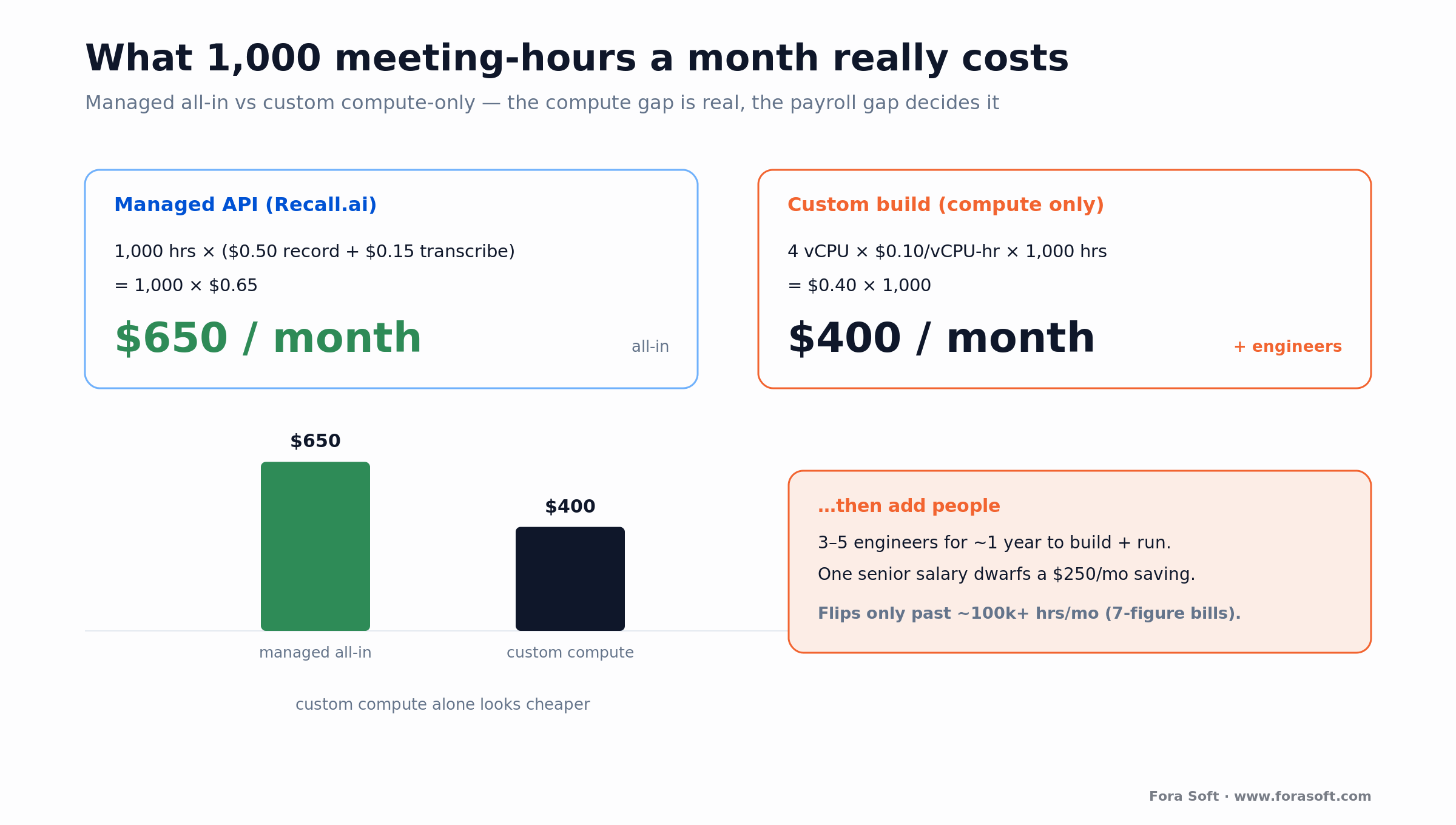
Figure 3. The same 1,000 monthly recording hours priced two ways. The managed line is all-in; the custom line is compute-only and hides the engineering payroll that dominates at low volume.
Managed API. Recall.ai at $0.50 recording + $0.15 transcription = $0.65 per hour. 1,000 hours × $0.65 = $650/month, no platform fee, no servers, no on-call. Skribby at $0.35 would be $350 for capture. Early-stage startups on Recall.ai’s startup program pay $0.25 per hour for the first 10,000 hours, which brings the same month to $400 with transcription. Done.
Custom build. Assume each bot uses 4 vCPU and your blended cloud rate is about $0.10 per vCPU-hour (conservative; commodity hosts run cheaper). That’s 4 × $0.10 = $0.40 per recording hour, or $400/month of compute for 1,000 hours — plus transcription if you don’t self-host a model. Like for like, that is $100 a month cheaper than Recall.ai’s $0.50 capture rate, or $250 cheaper than the $0.65 all-in rate only if you also self-host transcription.
Now add people. Building and running the capture layer is 3–5 engineers for about a year up front, then ongoing maintenance as platforms change. One senior engineer’s fully-loaded cost dwarfs a $250/month compute saving. At 1,000 hours, the vendor wins by a mile.
Where it flips. Scale the volume. At 200,000 hours a month, the managed bill is 200,000 × $0.65 = $130,000/month, or $1.56M a year. The same hours self-hosted might run $80,000/month in compute, plus transcription and a small team — about $600,000 a year saved before salaries, and more once you negotiate volume rates for compute and self-host the speech model. The crossover sits in the hundreds of thousands of hours a month, which is exactly why infrastructure vendors exist and why their biggest customers eventually build. We keep our development estimates conservative, and we’ll tell you if your volume doesn’t justify a custom build.
Want the crossover number for your volume?
Tell us your monthly meeting hours and platforms; we’ll model managed vs custom and hand you the real break-even, not a sales pitch.
Real-time streaming versus post-meeting capture
Decide early whether you need data during the call or after it, because that choice sets your whole architecture. Post-meeting capture, meaning record now and transcribe and summarize later, is simpler and cheaper. Real-time streaming — live transcript, live coaching, in-meeting agents — is harder and opens up the products people will pay more for.
Post-meeting is the default for notetakers. You get the full recording, run speech-to-text once, and generate a summary. Latency doesn’t matter, so you can batch and save money. Most AI meeting notes products live here.
Real-time is the default for anything that acts during the call: live sentiment for a sales rep, a compliance alert, an agent that answers a question mid-meeting. This is where per-speaker streams and speaker diarization matter most — you need to know who is speaking, right now, to attribute words correctly. Getting names onto the right words in a noisy multi-speaker room is one of the hardest parts of the whole pipeline, and it’s a topic worth its own deep dive on speech recognition accuracy in noisy environments.
MeetStream, for example, differentiates on exactly this: per-speaker audio over a real-time WebSocket with per-speaker attribution and in-meeting agent support. If your product acts live, that per-speaker stream isn’t a nice-to-have — it’s the foundation.
Recording consent and compliance you can’t skip
Recording a meeting is a legal act, and a visible bot in the roster does not make it legal. As of 2026, no US jurisdiction treats the presence of a recording bot in the participant list as sufficient notice or consent. If your product records people, consent design is part of the architecture, not a footnote.
Two-party consent states. Twelve US states require all-party consent in 2026: California, Connecticut, Delaware, Florida, Illinois, Maryland, Massachusetts, Montana, New Hampshire, Oregon, Pennsylvania, and Washington. In those states, one participant agreeing isn’t enough — everyone on the call must consent. Your app needs to collect and log that.
The Otter.ai warning. Four class actions filed against Otter.ai in 2025 were consolidated as In re Otter.AI Privacy Litigation. On August 13, 2026 Judge Eumi K. Lee (N.D. Cal.) denied Otter’s motion to dismiss the federal Wiretap Act, California CIPA §631 and Illinois BIPA voiceprint claims, holding that the plaintiffs plausibly allege the notetaker acts as a third-party eavesdropper; the CFAA claims were dismissed with leave to amend. That is a pleadings ruling, not a finding of liability, and the case is moving to discovery. Whatever the outcome, the message for builders is clear: auto-join without explicit, logged consent is a legal risk you’re taking on your customers’ behalf.
Europe is stricter, not looser. GDPR Article 7 requires consent that is specific, informed, freely given, and unambiguous. And GDPR isn’t the only layer: Germany’s §201 StGB makes unauthorized recording of private speech a criminal offense punishable by up to three years, independent of any data-protection analysis. Build consent capture, easy withdrawal, and clear notice into the product from day one. On Meetric we spent time on encrypted streams, encrypted storage, and GDPR alignment precisely because sales calls are sensitive.
Mini-case: multi-platform capture for Meetric
A client came to us with a strong sales-presentation tool and one hard requirement: run the same deep analytics on any call, whether it happened on Zoom, Google Meet, or Microsoft Teams. That’s the meeting-bot problem in its purest form — one product, three very different capture paths, uniform data out the other end.
We built Meetric with proprietary live video conferencing, built by our video conferencing development team, plus capture across all three platforms, then layered engagement tracking, speech analysis, and automated post-meeting reports on top. During calls it measures attention, talk-time balance, and reactions; after calls it generates a full summary of objections, pain points, and next steps. Consent, encryption, and GDPR alignment were designed in, not bolted on.
The outcome: 25% higher close rates, coaching made roughly 30× more efficient, and 80–100% of CRM data entry automated straight from the conversation. The platform raised SEK 21M. A basic version of this kind of system takes about 2–4 months; the full build with AI analytics and multi-platform integration ran 4–6 months. Want a similar assessment of your capture stack? Grab a 30-minute call.
A decision framework in five questions
Five questions decide your path: platform mix, volume, real-time need, control, and compliance. Answer them in order and the architecture picks itself — managed API, native streams, self-hosted open source, or a full custom build.
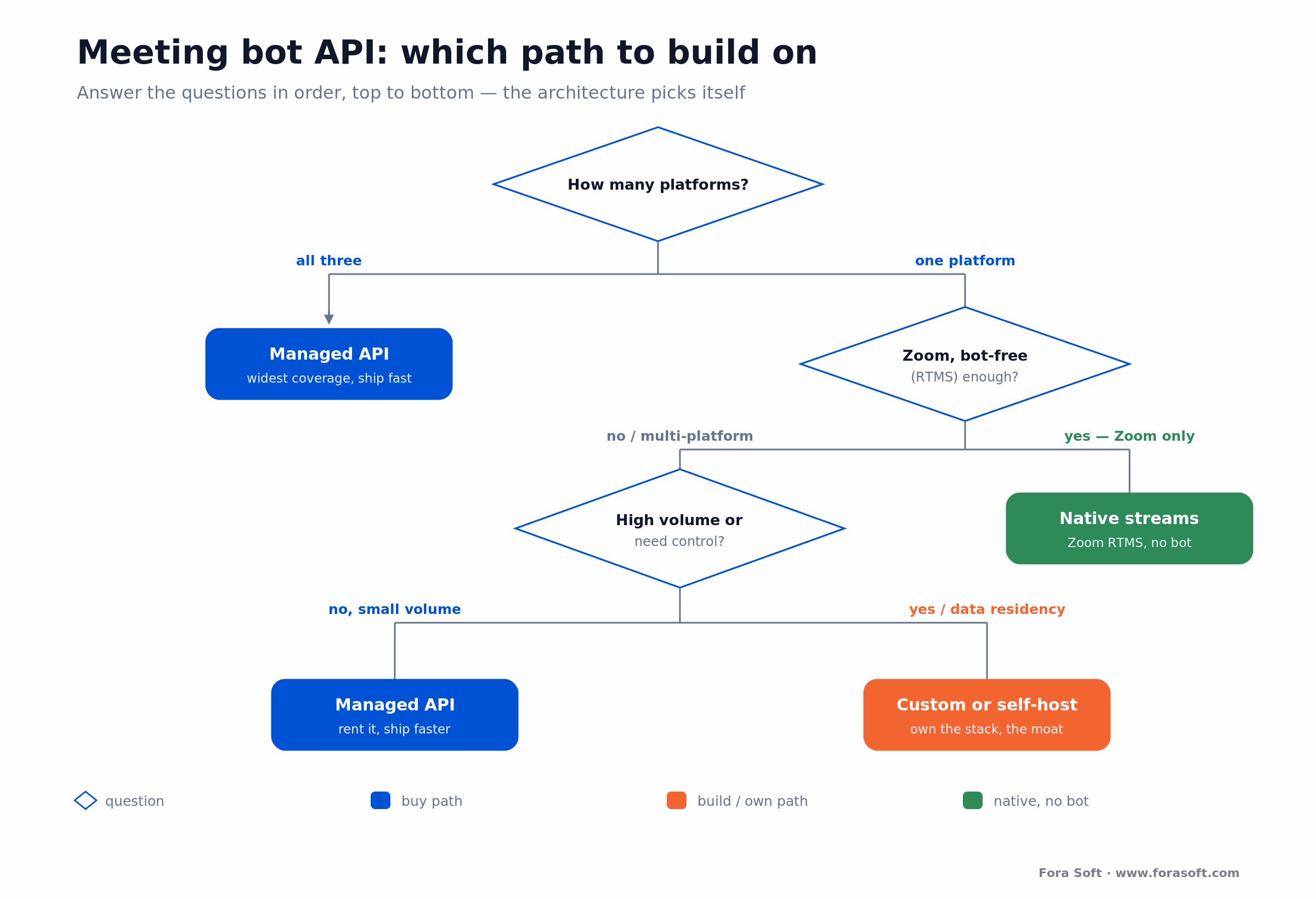
Figure 4. Five questions that route you to a path: a managed API for speed and coverage, native streams for a Zoom-first bot-free build, self-hosted open source for control on a budget, or a full custom build when capture is the moat.
1. How many platforms? If you need Zoom, Meet, and Teams on day one, a managed API with broad coverage is the fastest honest answer. One platform only, especially Zoom, opens the native-streams door.
2. What volume? Under ~50,000 hours a month, per-hour vendor pricing is noise next to salaries — buy. Into the six figures, per-hour fees dominate and building starts to pay.
3. Real-time or after the fact? If you act during the call, you need per-speaker streams and low latency — that pushes you toward native APIs or a custom build. If you only summarize later, almost any vendor works.
4. How much control do you need? If capture is your differentiation or you need custom in-meeting behavior, own it. If it’s a feature under your real product, rent it.
5. Where does the data have to live? If residency or contracts forbid sending media to a third party, self-hosted open source or a custom build is the only path. Otherwise a managed vendor with the right certifications is fine.
Five pitfalls that sink meeting bot projects
Most meeting-bot projects don’t fail at the demo; they fail three months in, on the same five problems. Knowing them upfront is the difference between a launch and a rewrite.
1. Underestimating per-meeting compute. Teams budget like it’s SaaS and discover that every concurrent call needs its own cores. Model peak concurrency, not total hours, or your cloud bill and your capacity both surprise you.
2. Building on browser automation for production. A Puppeteer bot demos beautifully and breaks every time a platform ships a UI change. It’s also against Zoom’s terms in production. Fine for a spike, wrong for a foundation.
3. Ignoring consent until legal review. Auto-join with a bot in the roster is a lawsuit waiting to happen in all-party states. Design consent capture and logging before you write the capture code, not after.
4. Treating diarization as solved. “Who said what” is far harder than raw transcription, especially with overlapping speakers and cheap microphones. If your product attributes words to people, test diarization on real, messy calls early.
5. Betting on a preview API for a launch date. Google’s Meet Media API is compelling, but building your GA launch on a developer-preview feature that stopped taking new sign-ups is a schedule risk. Ship on what’s generally available; adopt previews behind a flag.
KPIs: what to measure once you ship
Three buckets tell you whether your meeting bot is healthy: capture quality, business impact, and reliability. Pick one hard number in each and watch it weekly.
Quality KPIs. Transcript word error rate on real calls (aim well under 10% in clean audio), diarization accuracy (correct speaker attribution), and join success rate — the share of meetings the bot actually enters and records end to end. A bot that fails to join 5% of calls loses 5% of your product’s value silently.
Business KPIs. Cost per recorded hour (all-in, including compute and transcription), and the metric your customer actually buys — for Meetric that was close-rate lift and CRM-automation percentage. Tie capture health to a dollar outcome or nobody will fund the next improvement.
Reliability KPIs. Reconnect rate (how often a bot drops and rejoins), median and p95 time-to-transcript after a meeting ends, and webhook delivery success. These are the numbers that page your on-call, and they’re the ones vendors quietly handle for you.
When NOT to build a meeting bot
Don’t build a meeting bot if capture isn’t your product, your volume is small, or your users are all on one platform with a good native API. In those cases a custom bot is a liability you’ll maintain forever for no competitive gain. Honesty here saves you a year.
If you’re building an AI notetaker and your edge is the summary, the workflow, or the CRM integration, use a vendor and spend your engineers on the layer customers pay for. If you’re recording a few thousand hours a month, the per-hour fee is rounding error next to one salary. And if your whole audience is on Zoom, RTMS may give you bot-free capture without any of the fleet-scaling pain.
Build when capture is the moat: you need raw per-speaker media, in-meeting agents, sub-second latency, on-prem data residency, or you’re at a scale where per-hour fees would cost seven figures a year. Everywhere else, buying is the smarter engineering decision — and we’ll tell you so on the call rather than sell you a build you don’t need.
FAQ
What is a meeting bot API?
It’s infrastructure that sends a recording participant into a video call — Zoom, Google Meet, Microsoft Teams and others — captures audio, video, and a transcript, and delivers that data to your app through webhooks for events and a WebSocket for raw media. You call one endpoint with a meeting URL; the vendor handles joining, capturing, and scaling.
What’s the best meeting bot API in 2026?
There’s no single winner; it depends on your need. Recall.ai has the widest platform coverage (six meeting platforms), a advertised 99.9% uptime SLA and the simplest setup at $0.50 per recording hour ($0.65 with its transcription). Skribby is the cheapest managed option at $0.35. Vexa (Apache 2.0) and Attendee (Elastic License 2.0) are for teams that want to self-host. Custom is best when capture is your core product and you record at six-figure monthly volume.
What is the most reliable meeting bot API?
As of October 2026, Recall.ai is the most reliable meeting bot API on public evidence: it advertises a 99.9% uptime SLA and covers six meeting platforms. Skribby and MeetingBaaS publish no SLA. Run your own 100-join test per platform before you commit.
What is the difference between Recall.ai and Skribby?
Recall.ai supports six meeting platforms, real-time per-participant audio and video, and a advertised 99.9% SLA at $0.50 per hour. Skribby supports Zoom, Meet and Teams only and costs $0.35 per hour base, with real-time audio as a paid add-on (pricing pages, October 2026).
How do I build a Microsoft Teams meeting bot?
Register an Azure Bot with Graph calling permissions, then write an application-hosted media bot in C#/.NET with Microsoft’s Graph Communications media library and run it on Windows Server VMs in Azure. It receives 16 kHz PCM audio and H.264 or raw video per call. Node.js and C++ can’t access real-time media.
How do I build a meeting bot for Zoom, Teams, and Meet?
Per platform: Zoom via the Meeting SDK (raw I420 video, PCM 16LE audio) or bot-free via RTMS; Google Meet via a bot, because the Meet Media API is a closed developer preview; Teams via an application-hosted media bot written in C#/.NET on Windows Server in Azure. Building and operating all three reliably is roughly a year of work for 3–5 engineers, which is why most teams start with a vendor.
What is a good Recall.ai alternative?
Skribby ($0.35/hour) and MeetingBaaS are managed alternatives; Vexa and Attendee are self-hostable ones; MeetStream focuses on per-speaker real-time audio and in-meeting agents; Nylas Notetaker bundles recording and transcription at $0.70 per hour. If none fit, because you need full control, custom media handling, or data residency, a custom build is the real alternative.
Do I still need a bot with Zoom RTMS and the Google Meet Media API?
Not on Zoom: RTMS streams per-participant audio, video, transcript, chat, and screen share over WebSockets with no bot participant, it has been generally available since June 25, 2025, but it is a paid add-on, the customer’s Zoom admin must enable it, and it is receive-only. On Google Meet you still need a bot, because the Meet Media API is a developer preview that no longer accepts new sign-ups (October 2026).
Is it legal to record meetings with a bot?
Only with proper consent. Twelve US states require all-party consent in 2026, and no jurisdiction treats a visible bot in the participant list as sufficient legal notice. In Europe, GDPR Article 7 governs consent and countries like Germany add criminal statutes on unauthorized recording. Build explicit consent capture, logging, and easy withdrawal into your product — recording is a sensitive matter, and if you’re unsure, consult a lawyer for your jurisdictions.
How much does a meeting bot API cost?
Managed vendors charge per recording hour: Recall.ai $0.50 plus $0.15 for transcription, Skribby $0.35 base, Vexa $0.30 plus $0.20, MeetingBaaS $0.35–$0.50 per token-hour plus an optional plan, Nylas Notetaker $0.70 bundled (all captured October 2026). A custom build costs roughly 4 vCPU per concurrent bot, about $0.40 per hour in compute at a conservative $0.10 per vCPU-hour, plus the engineering team to build and run it.
Why is building a meeting bot so hard?
Because it’s an infrastructure problem with per-meeting compute. Each concurrent bot needs about 4 vCPU, platforms change their APIs, reconnects and waiting rooms are fiddly, and diarization is unsolved on messy audio. Recall.ai wrote in 2024 that internal WebSocket data transfer pushed their AWS bill toward $1M a year before they re-architected — a warning from a team that does only this.
What to read next
AI & agents
RAG over meeting recordings and chat
Once you’ve captured the transcript, let users query past meetings in plain language.
Audio
Speech-to-text for live streaming
The real-time transcription pipeline that turns captured audio into usable words.
Audio
Speech recognition in noisy rooms
Why diarization and accuracy fall apart on real calls, and how to fix it.
AI & agents
AI call assistants: an API guide
The voice-agent cousin of the meeting bot — APIs, latency, and build vs buy.
Ready to ship your meeting bot?
A meeting bot API gets a recorder into Zoom, Teams, and Meet and hands you audio, video, and a transcript. In 2026 the big change is bot-free capture on Zoom: RTMS is generally available, while Google’s Meet Media API is still a closed preview, so plan for bots on Meet and Teams. For most teams a vendor like Recall.ai at $0.50 an hour beats building, until volume or control pushes you to own the stack.
Whichever path you’re leaning toward, get the consent design right, model peak concurrency rather than total hours, and don’t launch on a preview API. Our AI integration team has built multi-platform capture end to end — if you want a second opinion on your architecture, that’s a conversation we enjoy having.
The book · Volume 5 of 7
Audio for Video: A Complete Guide to Sound in Video Products: From Jitter Buffers and Lip Sync to Atmos, Quality Metrics, and Neural Codecs
Once the bot is in the call and the audio is flowing, the remaining problems are about sound over a network. Our Audio for Video volume picks up there: jitter buffers and NetEq, packet-loss concealment, timestamps and lip sync, plus a full section on recording and transcription. It helps teams who need clean per-speaker tracks rather than a muddy mixed recording. Written by Nikolay Sapunov, CEO at Fora Soft.
Read it on Amazon →Kindle & paperback · Fora Soft Video Engineering Handbook
Let’s design your meeting-data stack
Bring your platforms, volume, and use case. We’ll tell you build or buy, native or bot, and what it’ll actually cost — no obligation.