

Key takeaways
• A video annotation tool for computer vision is not a video-markup tool. The thing that ranks for “video annotation tool” is split between consumer telestration apps and CV labeling platforms. This guide is about the second kind: software that produces frame-accurate ground truth to train a model, with object tracking, keyframe interpolation, and export to COCO or YOLO.
• Video is frame-dense, so tracking and auto-labeling aren’t nice-to-haves. One hour of 30 fps footage is 108,000 frames. Nobody boxes that by hand. The whole category exists to avoid it: label a few keyframes, interpolate the rest, and let a model track objects across the clip.
• Start open-source, buy a platform when workflow hurts, build only when it’s your edge. CVAT (MIT) and Label Studio (open-source) label video for free; Labelbox, V7, Encord, and SuperAnnotate sell workflow, QA, and scale on top. A fully custom tool pays off only when annotation itself is a differentiator.
• SAM 2 changed the math. Meta’s Segment Anything Model 2 tracks an object across a whole clip from a single prompt, even through occlusion, with 3× fewer interactions and roughly 8× faster video annotation than the original SAM (Meta, 2026-07-17). It’s Apache-2.0 and already wired into CVAT and Roboflow.
• Cost is driven by objects × frames-touched × QA passes, not runtime. Two tools can both “annotate video” and differ 5× in real spend. Model the labeled-object budget and the review passes before you pick a tool, and treat QA and export as first-class, not afterthoughts.
You need labeled video to train a computer-vision model, so you search “video annotation tool” and get a mess: consumer apps that draw arrows on a clip, a university lecture annotator, a couple of GitHub repos, and vendor pages all claiming to be fastest. None of them tells you the thing you actually need to decide — whether to grab an open-source tool, buy a platform, or build your own, and what each really costs once tracking, quality control, and export are in the picture.
We’re Fora Soft, a video and AI software company: 250+ projects since 2005 and a team of 50+ in-house specialists, with a big slice of that work in computer vision — recognition pipelines, anomaly detection on surveillance video, and the labeling that feeds them. We don’t sell an annotation platform, so there’s nothing to push here: this is the engineering read on how these tools work, what they cost, where they break, and when building your own is smart versus wasteful. Vendor prices are dated to when we captured them from each vendor’s own page (2026-07-17); treat them as a snapshot, not a quote.
Building a computer-vision product and stuck on labeling?
Tell us what you’re detecting, how much video you have, and your accuracy target, and we’ll tell you honestly whether an open-source tool, a bought platform, or a custom pipeline fits — and roughly what the labeling will cost.
Why Fora Soft wrote this guide
We build computer-vision software as part of our computer vision development for live video, and every one of those projects runs on labeled data. When a client wants to detect a weapon on a camera feed, count people in a venue, or flag an anomaly in surveillance footage, someone has to produce the ground truth first — and that someone has often been us, setting up the tool, defining the label schema, running the QA. So we’ve lived inside these platforms, not just read their launch posts.
That’s the angle here. Search results for this topic are dominated by vendors selling their own tool and by listicles that rank ten of them without telling you how to choose. A vendor never says “use the free tool instead” or “don’t build this.” We sell neither an annotation product nor a reason to over-engineer, so we can be blunt about where open source is enough, where a paid platform earns its price, and when a custom build is the right call.
One caveat up front: pricing in this space changes and half the serious platforms quote “on request.” Every number here is dated to 2026-07-17 and taken from the vendor’s own page. The shapes — open-source core, per-unit platforms, custom-quote enterprise — are stable; the exact figures may shift, so re-check the source before you commit a budget.
What a video annotation tool actually is
A video annotation tool is software that lets people (and increasingly models) draw and store labels on video frames — bounding boxes, polygons, segmentation masks, keypoints, polylines — to produce the ground-truth dataset a computer-vision model trains on. You load footage, define what the labels mean (the ontology), mark objects frame by frame or across frames, review the result, and export it in a format your training code can read. It’s the data-preparation front end for any detection, tracking, or segmentation model.
The first thing to get straight is what this is not. Consumer “annotate video online” tools — the Clideo-style apps and coaching telestration tools — let a human draw on a video for other humans to watch. That output is pixels burned into a clip; it never becomes training data. A CV annotation tool produces structured, machine-readable labels tied to frame numbers and object IDs. If your goal is to teach a model to see, the consumer tools are the wrong category entirely, even though they share the search term.
The second boundary is against image annotation. Every image tool can, in theory, show video as a stack of frames — but a real video tool adds three things images don’t need: object tracking (the same car keeps ID 7 across frames), interpolation (label frame 1 and frame 30, get frames 2–29 filled in), and playback-aware review. Those features are the entire reason video labeling is tractable, and they’re what separates a tool built for CV video from an image tool with a timeline bolted on.
Why video labeling is harder than image labeling
The short answer is frame density. A single hour of video at 30 frames per second is 108,000 frames; even sampling down to 5 fps leaves 18,000. If you had to draw a box on every object in every frame by hand, a modest surveillance dataset would take months and cost a fortune. That’s the core problem every video annotation tool is designed to solve, and it’s why comparing them on “can it label video” misses the point — they all can. The question is how few human clicks they need per labeled object.
Three mechanics make it tractable. Interpolation: you label an object on two keyframes and the tool fills in the boxes between them, so a slow-moving object over 60 frames might cost two clicks instead of sixty. Tracking: a model follows an object forward through the clip and you only correct where it drifts. Model-assisted labeling: a segmentation model proposes masks you accept or fix. Get these right and the human effort per object drops by multiples; get them wrong and you’re paying for frame-by-frame work with extra steps.
Video also carries problems images never raise: objects leave the frame and come back needing the same ID, motion blur and occlusion break trackers, and temporal consistency matters — a box that jitters frame to frame trains a worse model than one that moves smoothly. A good tool helps with all three; a weak one leaves your annotators cleaning up drift by hand. This is exactly the kind of grind that shows up when you build object-recognition camera solutions, where the model is only as good as the temporal labels behind it.
What label types your model needs
Before you pick a tool, know what shape of label your model actually needs, because it changes both the cost and which tools fit. Bounding boxes are the cheapest and most common — a rectangle around each object, enough for detection and tracking. Polygons and segmentation masks trace an object’s exact outline; they cost far more human time per object but are required for instance segmentation and precise measurement. Keypoints mark specific points (joints for pose estimation, facial landmarks), and polylines trace lanes or paths. The rule of thumb: label the simplest shape your model can learn from, because every step up in precision multiplies annotation cost.
On video, the label type also decides how much auto-labeling helps. Boxes and masks propagate well through trackers like SAM 2; keypoints and fine polygons need more correction because small errors compound across frames. So a pose-estimation dataset is inherently more expensive per hour of footage than a vehicle-detection one, and that difference should shape your budget and your tool choice, not surprise you halfway through the project.
Decide this first: pin the label type to what your model needs to do, not to what looks thorough. Teams often default to segmentation masks “to be safe,” then pay 3–5× the labeling cost for precision the model never uses. If detection is the task, box it.
Anatomy of a video annotation platform
Whether you buy or build, a video annotation platform is the same five stages in a line. Understanding them tells you what you’re really evaluating — and where the hidden work lives if you decide to build.
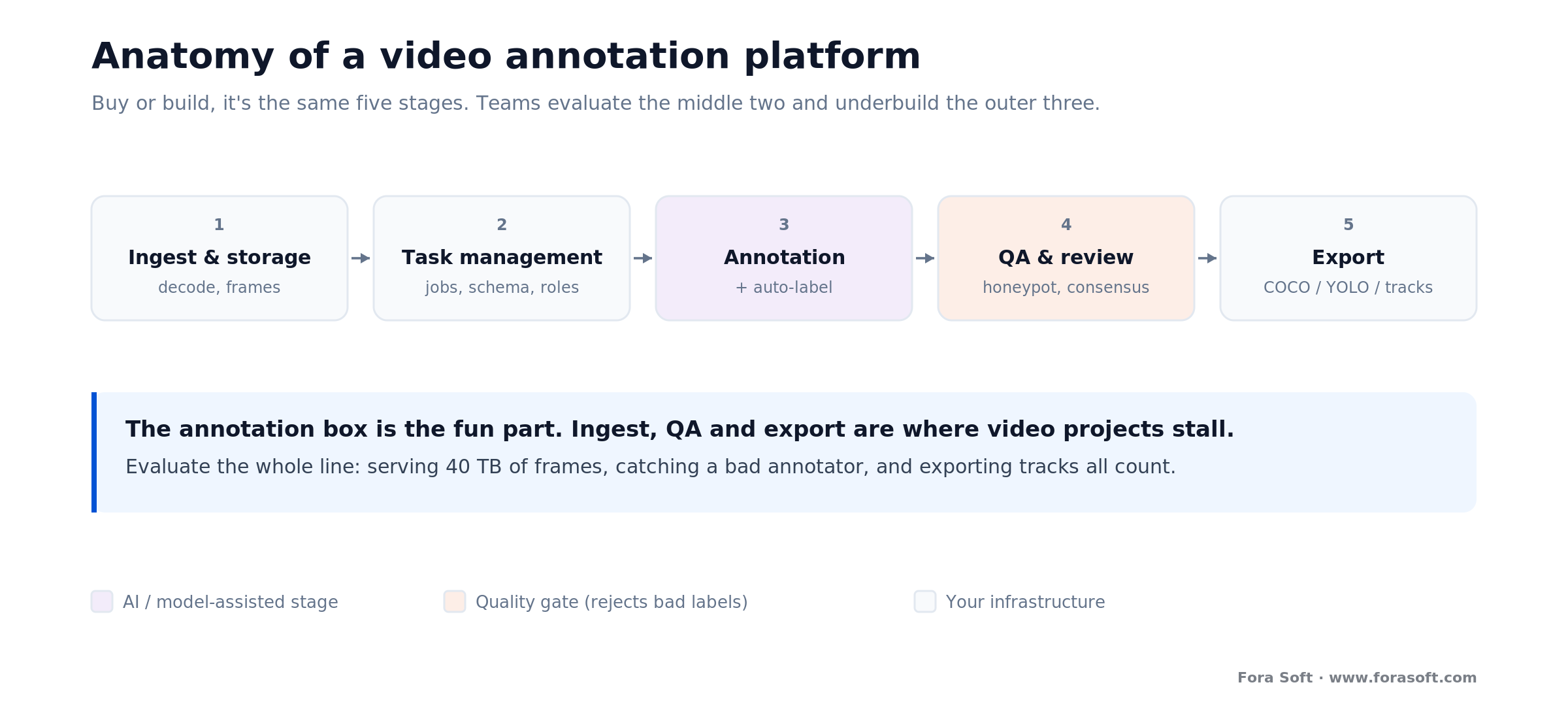
Figure 1. The pipeline behind every annotation tool. Teams evaluate the middle two boxes and underbuild the outer three — ingest, QA, and export are where video projects actually stall.
First, ingest and storage: the tool decodes your footage, extracts frames, and holds them somewhere your annotators can reach fast — usually your own cloud bucket. This sounds trivial until you hit terabytes of 4K video and discover that decoding and serving frames is a real engineering cost. Second, task management: splitting footage into jobs, assigning them, defining the label schema, and controlling who can do what. This is the layer paid platforms charge the most for, and the layer open-source tools handle adequately but plainly.
Third, annotation and auto-labeling: the drawing tools plus the tracking, interpolation, and model-assist that make video viable. Fourth, QA and review: honeypot frames with known answers, reviewer passes, and consensus between multiple annotators — the difference between a dataset you trust and one that quietly poisons your model. Fifth, export: turning your labels into COCO, YOLO, or another format your training pipeline reads, ideally without losing track IDs. Miss any one of these and the pipeline leaks.
The trap: teams demo three tools on the annotation box — the fun part — and skip ingest, QA, and export. Then the pilot works and the production run stalls because nobody can serve 40 TB of frames, catch a bad annotator, or export tracks the training code can read. Evaluate the whole line, not the middle of it.
Auto-labeling: SAM 2, tracking and interpolation
Auto-labeling is where the economics of a video project are won or lost, and the technology jumped in the last two years. The headline is Meta’s Segment Anything Model 2 (SAM 2): a single model that segments and tracks an object across an entire clip from one prompt — a click, a box, or a mask — and keeps following it even when the object is briefly occluded or leaves the frame, thanks to a per-session memory module. Meta reports it needs 3× fewer interactions than the original SAM and runs about 8× faster for video annotation (Meta, captured 2026-07-17). It was trained on the SA-V dataset of 600,000+ masklet annotations across 51,000 videos, and it’s Apache-2.0, so you can self-host it.
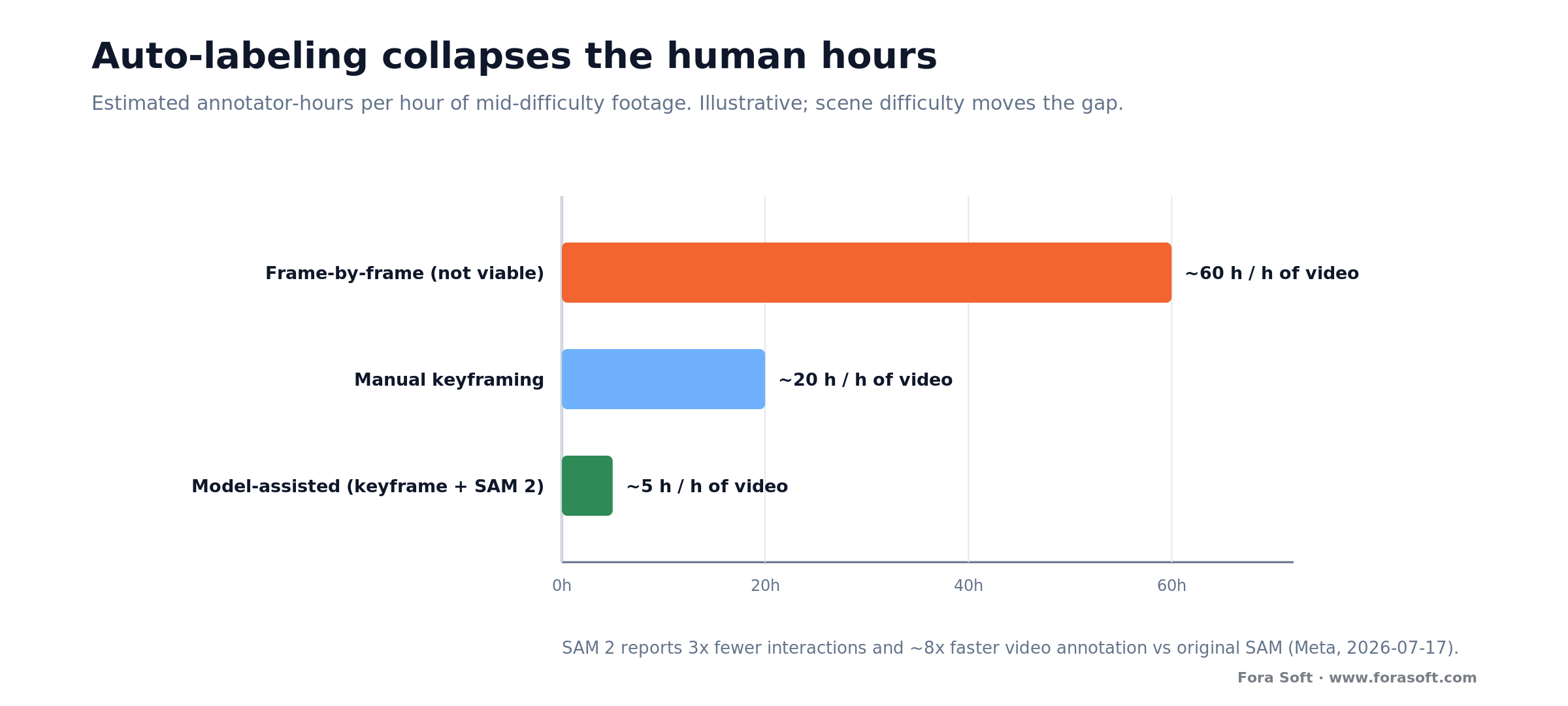
Figure 2. The same footage, two workflows. Model-assisted labeling collapses the human hours per hour of video — the multiplier is illustrative and depends on object count and scene difficulty, but the direction is consistent.
In practice you combine three techniques. SAM 2 (or a similar tracker) proposes masks or boxes across the clip; interpolation fills the gaps on simpler, linear motion; and your annotators become reviewers who correct drift instead of drawing from scratch. Tools like CVAT and Roboflow already ship SAM 2 as a built-in tracker, so you don’t have to wire it yourself to get most of the benefit.
Be honest about the ceiling, though. Auto-labeling is fastest on distinct, well-lit objects and struggles with dense crowds, near-identical instances, heavy occlusion, and tiny far-field targets — the exact conditions common in surveillance and sports footage. So the real gain isn’t “the model labels everything.” It’s that humans stop drawing and start correcting, which is faster on easy frames and roughly break-even on hard ones. Budget for a human-in-the-loop review pass regardless; a fully automatic pipeline that skips it produces confidently wrong labels.
Lean on auto-labeling when: your objects are distinct and reasonably lit, and you can afford a review pass. Fall back to more manual work when footage is crowded, heavily occluded, or full of near-identical instances — there, a tracker’s confident mistakes cost more to fix than to avoid. Measure the assist rate on your own clips before you assume the benchmark number applies.
Want auto-labeling wired into your own pipeline?
We integrate SAM 2 and tracking models into annotation workflows so your team reviews instead of draws. Send us a sample clip and your object types, and we’ll estimate the realistic throughput gain for your footage — not a demo-day number.
Build vs buy: the decision that actually matters
Most teams frame this as “which tool,” when the real question is which of three paths they’re on. Adopt open source (CVAT, Label Studio) when you have engineers who can host and run it and your workflow is standard. Buy a platform (Labelbox, V7, Encord, SuperAnnotate, Roboflow) when annotation is a means to an end and you’d rather pay to skip the ops, QA tooling, and scaling. Build custom only when the annotation process itself is a competitive advantage — a novel label type, a proprietary auto-labeling model, or a workflow no product supports.
Our default advice surprises people: start on open source, and don’t build. CVAT will label video with SAM 2 tracking, run QA jobs, and export COCO/YOLO for the cost of hosting it. That covers most projects. You graduate to a paid platform when the pain is workflow — managing dozens of annotators, audit trails, SLA support — not capability. And you build custom far less often than vendors and your own engineers will suggest, because a labeling tool is undifferentiated infrastructure for almost everyone.
The honest exception: “build” rarely means building the whole tool from scratch. It usually means assembling open-source parts — CVAT or Label Studio for the front end, SAM 2 for auto-labeling, your own storage and export glue — into a pipeline that fits your data and integrates with your training stack. That’s the sweet spot we hit most often for clients: 80% off-the-shelf, 20% custom where it counts, which is exactly how we approach any AI integration project.
CVAT, Label Studio, Labelbox and the rest compared
Here are the tools most CV teams actually shortlist, side by side. They all label video; the real differences are licensing, how they price, how much workflow and QA they give you, and whether auto-labeling is built in. Prices are each vendor’s own list rate, captured 2026-07-17; several sell only by custom quote.
| Tool | Model & price (2026-07-17) | Auto-label | Where it wins | Watch-out |
|---|---|---|---|---|
| CVAT | MIT open source; Online free / $33–66 mo; Enterprise $12k/yr+ | SAM 2 tracking, interpolation | Best free video tool; self-host; COCO/YOLO export | You run the ops on self-host |
| Label Studio | Open-source Community (free); cloud from ~$50/mo | Via ML backend | Multi-modal (video, text, audio); very flexible | Video less specialized than CVAT |
| Labelbox | $0.10/LBU (1 video = 1 LBU); services from $10/hr | Model-assisted | Managed workflow + human labeling on tap | Per-unit cost scales with volume |
| V7 (Darwin) | Custom quote (platform + seats + volume) | Strong built-in | Polished workflow; medical/enterprise | No public price; no free tier |
| Encord | Custom quote; free trial | SAM-based, tracking | Video-first; markets 6× faster labeling | Price on request; verify claims on your data |
| SuperAnnotate | From ~$62/user/mo; free plan; custom above | Model-assisted | Transparent entry price; QA tooling | Enterprise features gated to custom tier |
| Roboflow | Freemium (~$60/mo credits); paid above | SAM 2, auto-label | End-to-end: label → augment → train | Most valuable if you use its whole pipeline |
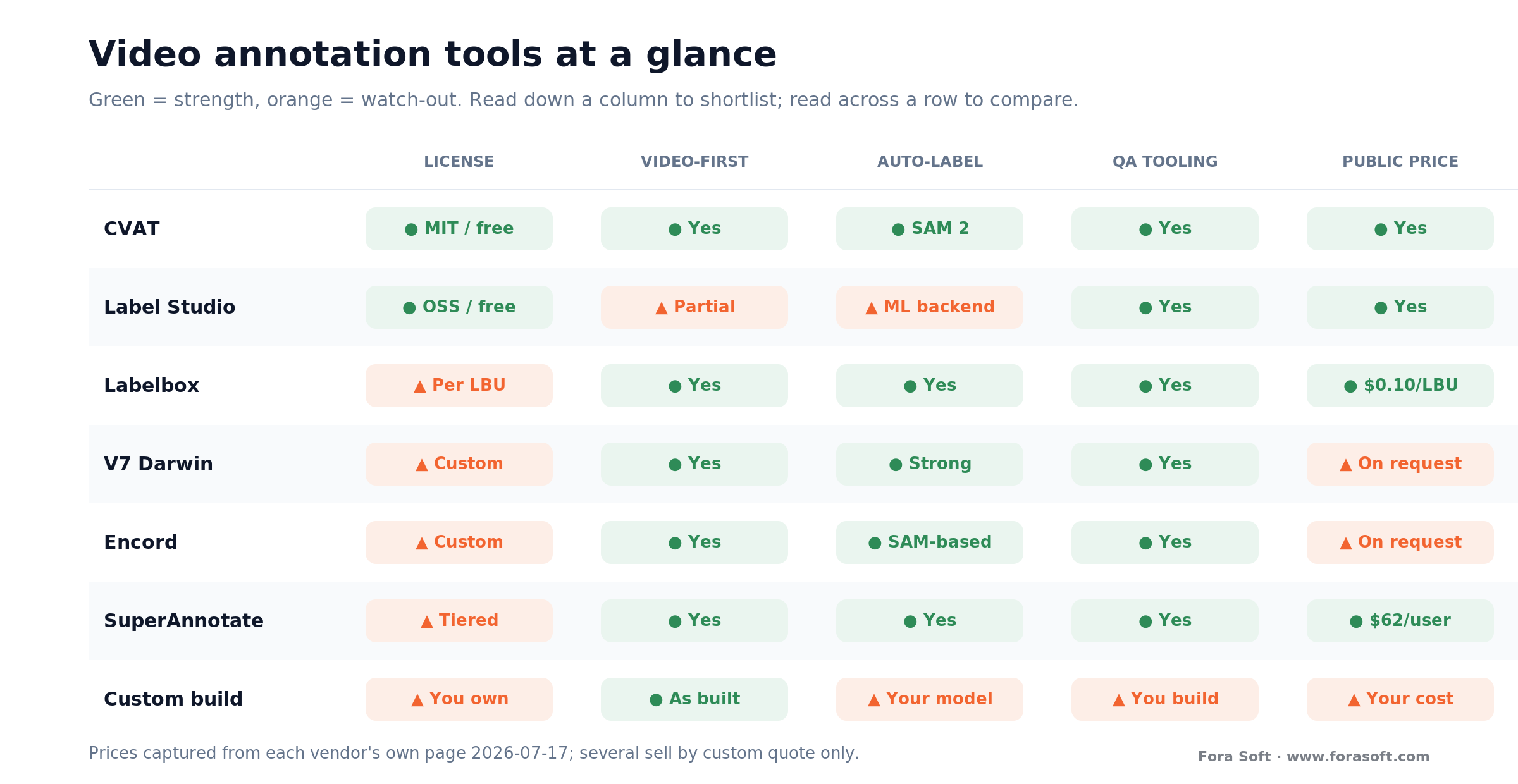
Figure 3. The shortlist at a glance. Read down a column to filter on one axis (say, “free and self-hostable”); read across a row to see one tool’s trade-offs.
A quick way to read it: CVAT is the default free starting point and the base for most custom builds; Label Studio wins when you label more than video; Labelbox and SuperAnnotate give you managed workflow at a published price; V7 and Encord are polished, video-strong, and quote-only; Roboflow is the pick when you want labeling and training in one place. Which one you land on falls out of cost and workflow, covered next.
The open-source stack you can start on today
If you’re starting from zero, you can stand up a capable video-labeling setup this week with three open-source pieces and no license fee. CVAT (MIT, originally built by Intel and now backed by the OpenCV Foundation) is the workhorse: native video with frame-by-frame labeling, object tracking, interpolation between keyframes, SAM 2 for video segmentation and tracking, QA via ground-truth and honeypot jobs, and export to COCO, YOLO, Pascal VOC, and a “universal” format that keeps track IDs. Its hosted Online tier has a free plan and paid Solo/Team plans, but the self-hosted edition is free.
Label Studio (open-source Community edition) is the flexible generalist — it labels video, images, text, audio, and time series in one tool, which is useful if your project isn’t purely video or you want one platform across data types. Its video labeling is less specialized than CVAT’s but perfectly usable, and it connects to an ML backend for model-assisted labeling. SAM 2 (Apache-2.0) is the auto-labeling engine you plug into either, self-hosted on your own GPU so your footage never leaves your infrastructure.
Reach for the open-source stack when: you have engineers to host and maintain it, your footage can’t leave your infrastructure for compliance reasons, or you want to control cost at scale. It’s also the right base if you’ll eventually build custom — you extend CVAT rather than reinvent it. Weigh a paid platform instead when you need managed multi-annotator workflow, audit trails, and support more than you need to save the license fee.
Export formats: COCO, YOLO, Pascal VOC and tracks
Export is the quiet failure point, so decide your format before you label, not after. The three you’ll meet: YOLO TXT is one text file per frame with normalized center-x/y/width/height and zero-indexed class IDs — what Ultralytics YOLO models want. COCO JSON is a single file for the whole dataset with absolute-pixel x/y/width/height — the format for Detectron2, MMDetection, and anything using the COCO evaluation protocol. Pascal VOC XML is one file per frame with absolute-pixel corner coordinates — mostly legacy and QA now.
The video-specific gotcha is tracks. Object identity across frames — “this is the same car in frames 1 through 90” — is the whole point of video labeling, but COCO doesn’t natively carry track IDs. Export naively to COCO and you can silently lose the temporal links you paid annotators to create. The safe pattern is to keep a rich master format that retains tracks (CVAT’s universal format does) as your source of truth, then generate training-specific exports — YOLO for the detector, COCO for evaluation — from that master.
Watch out: pick the export format your training code needs on day one and test a round-trip — label a short clip, export, load it into your training pipeline — before you scale to thousands of hours. We’ve seen teams finish a huge labeling run only to find the export dropped tracks or mismatched class IDs, forcing a re-export or, worse, re-labeling. A ten-minute round-trip test up front prevents a very expensive surprise.
Quality control: the part teams underbuild
Label quality decides model quality, full stop. A dataset with sloppy boxes, inconsistent class definitions, or drifting tracks trains a model that fails in exactly the ways your labels were wrong — and you won’t know until production. Yet QA is the stage teams cut first to save time. That’s backwards: on video, where auto-labeling introduces its own systematic errors, review isn’t optional, it’s the thing that makes auto-labeling safe to use at all.
The mechanisms are well understood. Honeypot frames with known-correct answers, mixed invisibly into the work, catch annotators who are guessing. Reviewer passes put a second, senior set of eyes on a sample. Consensus has multiple annotators label the same frames and flags disagreement for adjudication. Good platforms (and CVAT’s ground-truth jobs) build these in; if you’re rolling your own, you have to build them yourself, and they’re more work than the drawing tools people focus on.
A practical rule we use: budget a review pass over at least a meaningful sample of every batch, and measure inter-annotator agreement early so you can fix an ambiguous label definition before it’s baked into 10,000 frames. The cost of a review pass is small next to the cost of retraining a model on data you later discover was wrong. This discipline is the difference between a dataset that ships a working sports-video analysis model and one that plateaus at mediocre accuracy for reasons nobody can trace.
What it costs to label 1,000 hours of video
Let’s put arithmetic on it, with the assumptions stated so you can swap in your own. The cost driver isn’t runtime — it’s objects × frames-touched × QA passes. Take a mid-difficulty surveillance dataset: 1,000 hours of footage, sampled at 5 fps for training (18,000 frames per hour, 18 million frames total), a handful of objects per frame. Frame-by-frame by hand is a non-starter, so nobody prices it that way. The honest comparison is manual keyframe labeling versus a model-assisted workflow.
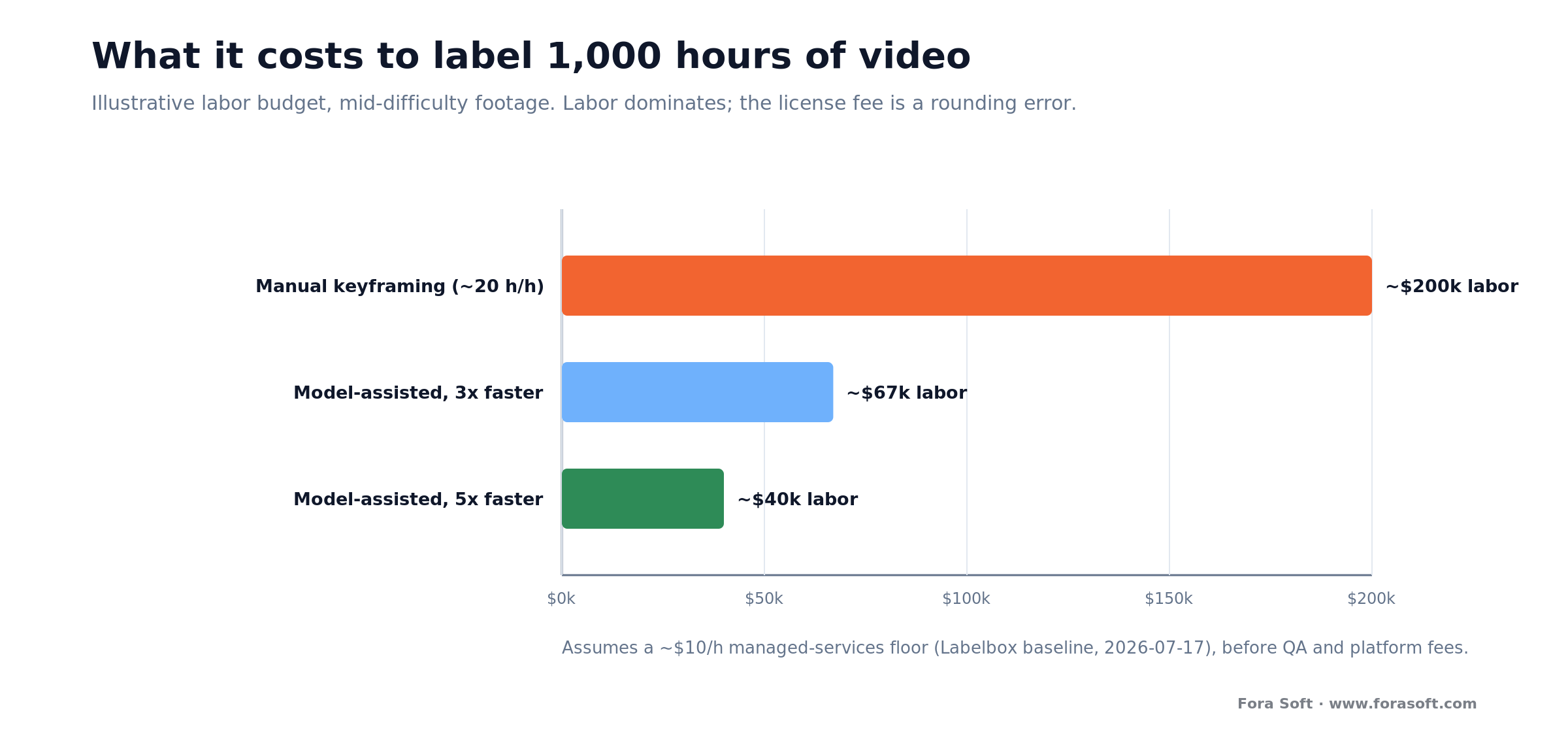
Figure 4. Illustrative labeling budget for 1,000 hours of mid-difficulty video. Numbers assume a keyframe workflow and a documented labeling rate; your objects, scene difficulty, and QA depth move them, so treat the shape, not the exact totals, as the takeaway.
Suppose a manual keyframe workflow lands around 20 annotator-hours per hour of footage for this difficulty (a conservative mid-range assumption, not a benchmark) — that’s 20,000 annotator-hours for the full 1,000 hours. At a managed labeling-services floor of about $10/hour (Labelbox’s published baseline, captured 2026-07-17), you’re near $200,000 in labor before QA and platform fees. Now apply a model-assisted workflow. If SAM 2 tracking and interpolation cut human time by a conservative 3×–5× on this kind of footage — below SAM 2’s own ~8× figure, because real surveillance video is harder than a benchmark — you’re at roughly 4,000–6,700 annotator-hours, or about $40,000–$67,000 in labor. The auto-labeling saving dwarfs any license fee.
Two things fall out of that. First, the platform license is a rounding error next to labor — optimizing for a cheaper tool while ignoring throughput is optimizing the wrong number. Second, because labor dominates, anything that raises annotator productivity (better auto-labeling, a tighter label schema, less rework from clear QA) pays back many times its cost. We keep estimates like this deliberately conservative; the real figure depends on your object count, scene difficulty, and how many QA passes you run, so use this as a shape to reason with and let us run it against your actual footage before you budget.
Need a real labeling-cost estimate?
Give us your footage volume, object types, and accuracy target, and we’ll model the annotator hours, the auto-labeling saving, and the QA overhead for your project — and tell you plainly whether to adopt, buy, or build.
What we learned labeling data for CV projects
Labeling is real work for us, not a datasheet exercise. Across recognition and surveillance projects — the kind behind our video recognition and anomaly-detection builds, and AI features inside production video products like BrainCert — the same lesson keeps repeating: the drawing is the easy 20%, and the schema, QA, and export are the hard 80%.
The mistakes that cost the most weren’t technical. They were an ambiguous label definition discovered after thousands of frames, so “is a partially occluded person one box or none” got answered three different ways. A tracker that drifted on crowded frames and quietly degraded the dataset until a review pass caught it. An export that dropped track IDs the training pipeline expected. Every one of those is a process failure, not a tool failure — and every one is cheap to prevent and expensive to fix after the fact.
The transferable takeaway: nail the label schema and a QA loop before you scale, use auto-labeling to make humans reviewers instead of drawers, and test your export round-trip early. That’s what turns a labeling effort into a dataset you can trust — and it’s the same conversation we’d start with you on a call.
Which path to pick, in five questions
Before you shortlist a tool or scope a build, answer these five. They decide most of the choice and the spend.
1. Can your footage leave your infrastructure? If compliance or client contracts say no, you’re self-hosting — CVAT or Label Studio with SAM 2 on your own GPU. If it can, hosted platforms open up.
2. Do you have engineers to run a tool? If yes, open source is the cheapest capable option. If not, a managed platform’s price buys you the ops you’d otherwise staff for.
3. How many annotators and how much oversight? A few people labeling occasionally is fine on open source. Dozens of annotators, audit trails, and SLAs are where Labelbox, V7, Encord, and SuperAnnotate earn their fee.
4. Is annotation a means or a moat? If it’s a means to a model, adopt or buy. Build custom only if a novel label type, a proprietary auto-labeler, or an unsupported workflow is genuinely your edge.
5. What’s your volume trajectory? A one-off dataset can ride a free tier or a short services engagement. Continuous, growing labeling justifies investing in a pipeline — and that’s where our AI integration team tends to help most.
Five ways teams waste money on video labeling
1. Optimizing the license, not the labor. Agonizing over a $50/month tool while labor is the six-figure line. Pick for throughput and QA, not the sticker price of the platform.
2. Skipping auto-labeling. Paying humans to draw frame by frame when SAM 2 tracking would turn them into reviewers. On easy footage that’s multiples of wasted spend.
3. Cutting QA to hit a deadline. Shipping unreviewed labels, then discovering in production that the model learned your labeling errors. Retraining costs far more than the review pass you skipped.
4. Locking the export format too late. Labeling thousands of hours, then finding the export drops tracks or mismatches class IDs. Test a round-trip into your training code before you scale.
5. Building custom too early. Standing up a bespoke tool to “save on licenses” when CVAT plus SAM 2 would have covered it. Build only when annotation is your differentiator, not before.
What to measure once labeling is running
Once labeling is live, three buckets of metrics tell you whether it’s healthy. Throughput: annotator-hours per hour of footage and per labeled object, tracked against your auto-labeling assist rate — the number that shows whether model-assist is actually helping or your team is just correcting bad proposals. Cost: spend per labeled object and per finished hour of video, so a drift toward expensive manual rework surfaces before the invoice does.
The third bucket is quality: inter-annotator agreement, honeypot pass rate, and reviewer rejection rate — and, downstream, whether model accuracy improves when you add more labeled data. If accuracy stops responding to more data, the problem is usually label quality, not label quantity, and these metrics point you at it. Watching quality alongside throughput is the fastest way to catch a workflow that’s producing a lot of labels you can’t trust.
When not to build your own annotation tool
Building a custom annotation tool is the wrong move in most cases, and it’s worth being honest about which. If your labeling is standard bounding boxes or masks on ordinary footage, CVAT already does it — building your own reinvents mature software for no advantage. If you have a one-off dataset, a free tier or a short managed-services engagement finishes it before a custom build would even be scoped.
Skip the custom build, too, when your real constraint is people, not software. If the bottleneck is that labeling is slow and error-prone, the fix is auto-labeling and QA process on an existing tool, not a new tool. And if your team doesn’t have engineers to maintain infrastructure, a bespoke platform becomes a liability the moment its author moves on — a paid platform’s support contract is cheaper than owning that risk.
Custom is right when annotation genuinely is your edge: a label type no tool supports, a proprietary auto-labeling model you want in the loop, or a workflow tied to your product that no platform fits — and even then, you almost always extend CVAT or Label Studio rather than start from a blank page. Being clear-eyed about that is why a partner who says “just use CVAT with SAM 2” is worth more than one who quotes you a from-scratch build.
FAQ
What is a video annotation tool?
A video annotation tool is software for drawing and storing labels — bounding boxes, polygons, masks, keypoints — on video frames to create ground-truth training data for a computer-vision model. Unlike consumer video-markup apps, which draw on a clip for humans to watch, a CV annotation tool produces structured, machine-readable labels tied to frame numbers and object IDs, with object tracking and interpolation to handle video’s frame density, and export to formats like COCO and YOLO.
What is the best video annotation tool in 2026?
There’s no single best — it depends on your path. For a free, capable, self-hostable tool, CVAT (MIT) is the default and includes SAM 2 tracking. For multi-modal labeling beyond video, Label Studio. For managed workflow at a published price, Labelbox ($0.10/LBU) or SuperAnnotate (from ~$62/user/mo). For polished, video-first platforms sold by quote, V7 and Encord. For labeling plus training in one place, Roboflow (prices captured 2026-07-17).
Is there a free, open-source video annotation tool?
Yes. CVAT is MIT-licensed and free to self-host, with native video labeling, object tracking, interpolation, SAM 2 auto-labeling, QA jobs, and COCO/YOLO/Pascal VOC export. Label Studio’s Community edition is also open-source and free, and handles video alongside images, text, and audio. Both are production-grade; the trade-off versus a paid platform is that you run the hosting, scaling, and support yourself.
How does SAM 2 speed up video annotation?
Meta’s Segment Anything Model 2 segments and tracks an object across a whole clip from a single prompt — a click, box, or mask — keeping it identified even through brief occlusion, via a per-session memory module. Meta reports 3× fewer interactions and about 8× faster video annotation than the original SAM (captured 2026-07-17). In practice it turns annotators into reviewers who correct drift rather than drawing every frame. It’s Apache-2.0 and built into CVAT and Roboflow.
Should we build our own video annotation tool or buy one?
Default to adopting open source (CVAT, Label Studio) and don’t build. Buy a platform when you need managed multi-annotator workflow, audit trails, and support more than you need to save the license fee. Build custom only when annotation itself is a competitive edge — a novel label type, a proprietary auto-labeler, or an unsupported workflow — and even then you usually extend CVAT rather than start from scratch. Labor dominates cost, so optimize throughput, not license price.
What export format should video annotations use?
Match your training code: YOLO TXT (normalized center coordinates, per-frame files) for Ultralytics YOLO; COCO JSON (absolute-pixel coordinates, one dataset file) for Detectron2, MMDetection, and COCO-protocol evaluation; Pascal VOC XML mostly for legacy or QA. The video catch: COCO doesn’t natively carry object track IDs, so keep a track-preserving master format (CVAT’s universal export) as your source of truth and generate training exports from it. Test a round-trip before scaling.
How much does it cost to label video data?
Labor dominates, so cost tracks objects × frames-touched × QA passes, not runtime. As an illustrative shape, 1,000 hours of mid-difficulty footage via manual keyframing might run ~20,000 annotator-hours; at a ~$10/hour managed-services floor (Labelbox baseline, 2026-07-17) that’s near $200,000 before QA. A model-assisted workflow cutting human time a conservative 3×–5× brings labor to roughly $40,000–$67,000. Your object count and scene difficulty move these a lot — treat it as a shape, not a quote.
Why is labeling video harder than labeling images?
Frame density and time. One hour of 30 fps video is 108,000 frames, so frame-by-frame labeling doesn’t scale — you rely on tracking, interpolation, and auto-labeling instead. Video also adds temporal problems images don’t have: objects leave and re-enter needing the same ID, occlusion and motion blur break trackers, and jittery boxes across frames train a worse model. A real video tool addresses all three; an image tool with a timeline bolted on doesn’t.
What to read next
Computer vision
Video Recognition Software Development
What the labeled data you produce here goes on to train — the model side of the pipeline.
Object recognition
Object Recognition Camera Solutions
How temporal labels become a working detector on real camera feeds.
Surveillance AI
Anomaly Detection in Surveillance Video
The hard-footage case where auto-labeling struggles and QA earns its keep.
Learn: AI
AI for Video Engineering
The engineering track behind building on video and vision models — data, pipelines, integration.
Ready to build your labeling pipeline?
Choosing a video annotation tool comes down to a few clear calls. Separate CV labeling from consumer video markup — you want the first. Start on open source (CVAT, Label Studio) with SAM 2 for auto-labeling, and buy a platform only when managed workflow, not capability, is the pain. Treat QA and export as first-class, because a dataset you can’t trust is worse than a smaller one you can. And remember labor dominates cost, so optimize throughput, not the license price.
The default for most teams is simple: adopt an open-source tool, add model-assisted labeling and a real QA loop, and build custom only when annotation is genuinely your edge. If you want a straight answer on which path fits your project — and help wiring the pipeline into your training stack — we’re happy to run it with you.

The book · Volume 6 of 7
AI for Video: A Complete Guide to Intelligence in Video Products: From Models and Inference to Computer Vision, Speech, Search, and Generative Video
A labeling pipeline is the unglamorous half of a computer vision project, and the label schema follows from what the model must see. Volume 6 covers the AI feature lifecycle, model artifacts and the ML minimum for product decisions, plus detection, tracking, segmentation and pose, the tasks most video annotation work exists to feed. Written by Nikolay Sapunov, CEO at Fora Soft.
Read it on Amazon →Kindle & paperback · Fora Soft Video Engineering Handbook
Let’s get your training data right
Whether you need help choosing a tool, wiring SAM 2 auto-labeling, or standing up a QA and export pipeline, we’ll give you an honest read in 30 minutes — with the adopt-buy-build tradeoff and a realistic cost shape for your footage.

