

Key takeaways
• The pricing model matters more than the per-minute rate. Some encoders bill you for every rung of the bitrate ladder; others don't charge to encode at all and only bill delivery. Comparing headline rates without understanding the model is how estimates end up 10× wrong.
• “Free encoding” is real — and it reshapes the math. Mux encodes just-in-time and api.video charges nothing to encode; you pay storage and delivery instead. AWS MediaConvert, by contrast, charges per normalized output minute, so a five-rung HD ladder can cost about $53 per 1,000 source minutes before a single byte ships.
• A “video encoding API” is not WebCodecs or NVENC. Those are browser and GPU encoding primitives. What most teams need is a cloud service that ingests a file and returns streamable renditions — a different decision with different vendors.
• Codec choice is a cost lever that cuts both ways. AV1 and HEVC shrink your delivery bill but cost more to encode — AV1 runs about 3.5× the encode rate of H.264 on MediaConvert (a 7× base multiplier versus 2×). You're trading a one-time encode cost against a recurring delivery saving.
• Build your own pipeline only when volume or control demands it. A managed API is almost always the right first move; a custom FFmpeg pipeline pays off at sustained high volume or when you need features and control no vendor gives you — not to save a few dollars early.
Search “video encoding API” and you get a strange mix: one vendor's product page, some browser and GPU documentation, and a dozen services that all sound identical. None of them answers the question a team actually has, which is: which encoding API to use, what it'll really cost, and when to run your own pipeline instead? This guide answers that — the pricing models that decide your bill, a like-for-like comparison of Mux, AWS MediaConvert, Cloudflare Stream, api.video, and a custom FFmpeg build, and the honest math on when to build.
Why Fora Soft wrote this guide
We're Fora Soft, a video and AI software studio that's shipped 250+ projects since 2005. Encoding sits underneath almost everything we build — VOD platforms, live streaming, user-generated video — so we've integrated the managed APIs, run our own transcoding on custom Wowza pipelines, and paid the bills at both small and broadcast scale. This isn't a listicle rewritten from other listicles; it's the advice we give clients who ask “which encoding API should we use” before we know their volume, their codecs, or their appetite for running infrastructure.
Because encoding pricing is genuinely confusing — different vendors bill different things — we'll be concrete about where the money hides. All the vendor prices below were taken from each vendor's own pricing page on 2026–07–15, and we'll date them, because they change.
One honest note up front: we build custom encoding pipelines as part of our video streaming development services, so it would be easy for us to tell everyone to build one. We won't. For most teams a managed API is the right answer for a long time, and we'll say so plainly — and tell you the specific signals that mean it's finally time to bring encoding in-house.
Not sure which encoding API fits your volume?
Tell us your library size, monthly viewing hours, and codec needs. We'll tell you honestly which service fits — and whether a custom pipeline would actually save you money.
What a video encoding API actually is
A video encoding API is a cloud service you send a source file to and get back streamable renditions — multiple resolutions and bitrates, packaged into HLS and DASH, ready for an adaptive-bitrate player. You call it over REST, it does the heavy CPU work on someone else's machines, and it hands you URLs. That's the thing most people mean, and it's what this guide compares.
It's worth clearing up a confusion the search results actively create, because two very different things share the phrase. Browser and GPU encoding primitives — the WebCodecs VideoEncoder interface, or NVIDIA's NVENC in the Video Codec SDK — are low-level tools for encoding frames inside a browser tab or directly on a GPU. They're powerful for real-time and in-app work, but they are not a service that takes a file and returns an ABR package. If you're building a normal VOD or streaming product, you want a cloud encoding service, not a codec primitive. Confusing the two sends teams down a weeks-long detour building infrastructure a $0.001-per-minute API already runs.
Encoding is also distinct from transcoding and packaging, though the terms get used loosely. Encoding compresses raw video with a codec; transcoding converts one already-compressed format to another; packaging wraps the result into HLS or DASH segments. Most cloud “encoding” APIs do all three in one job. For the theory underneath — codecs, bitrates, and how an encoding ladder is built — we keep a primer in Learn: video encoding; this guide stays on vendors, pricing, and the build-vs-buy call.
Reach for WebCodecs or NVENC (not a cloud API) when: you're encoding live in the browser, building a client-side editor, or squeezing GPU transcode throughput on your own hardware. For turning uploaded files into streamable renditions at scale, a cloud encoding API is faster to ship and cheaper to run.
The anatomy of a cloud encoding pipeline
Whichever vendor you pick, the pipeline has the same shape. Understanding it tells you exactly which steps you're paying for, and which ones a given API bundles or bills separately — the source of most pricing surprises.
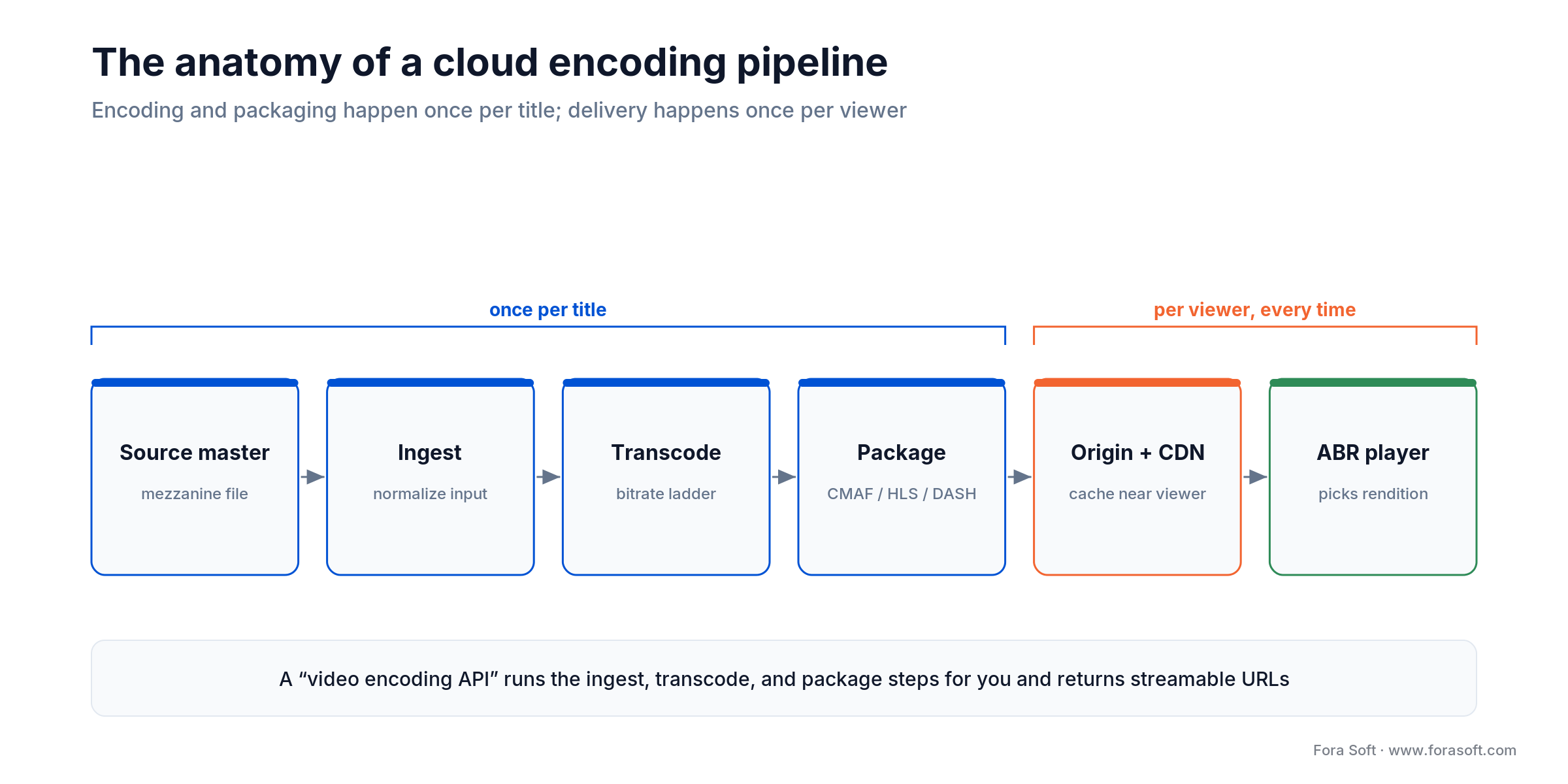
Figure 1. The path from an uploaded master to a frame on screen. Encoding and packaging happen once per title; delivery happens once per viewer — which is why they're priced so differently.
Ingest. You upload a mezzanine master (or point the API at a URL or bucket). Good APIs accept almost anything and normalize it — fixing container quirks before encoding so a malformed input doesn't corrupt the output.
Transcode into a ladder. The service produces a set of renditions — say 1080p, 720p, 480p, 360p, and 240p — each at a target bitrate. This is the CPU-heavy step, and it's where per-output pricing multiplies: five renditions is five outputs to bill.
Package. The renditions are cut into short segments and wrapped with manifests for HLS and DASH — increasingly as a single CMAF set that serves both. Some APIs package on demand at playback (just-in-time); others produce and store the files up front.
Store and originate. The renditions live somewhere durable and act as the origin your CDN pulls from. With an all-in-one API this is invisible and metered per minute stored; with MediaConvert it's your own S3 bucket, billed by AWS separately.
Deliver. A CDN pushes segments to viewers, and the player switches renditions as bandwidth changes. Delivery is the recurring cost that grows with every viewer — and, as we cover in our guide to building a streaming service like Netflix, it usually dwarfs the encode.
The four pricing models that decide your bill
Here's the thing nobody explains: encoding vendors don't just charge different amounts, they charge for fundamentally different things. Get the model wrong and your estimate is off by an order of magnitude. There are four, and every service on the market is a variation of one of them.
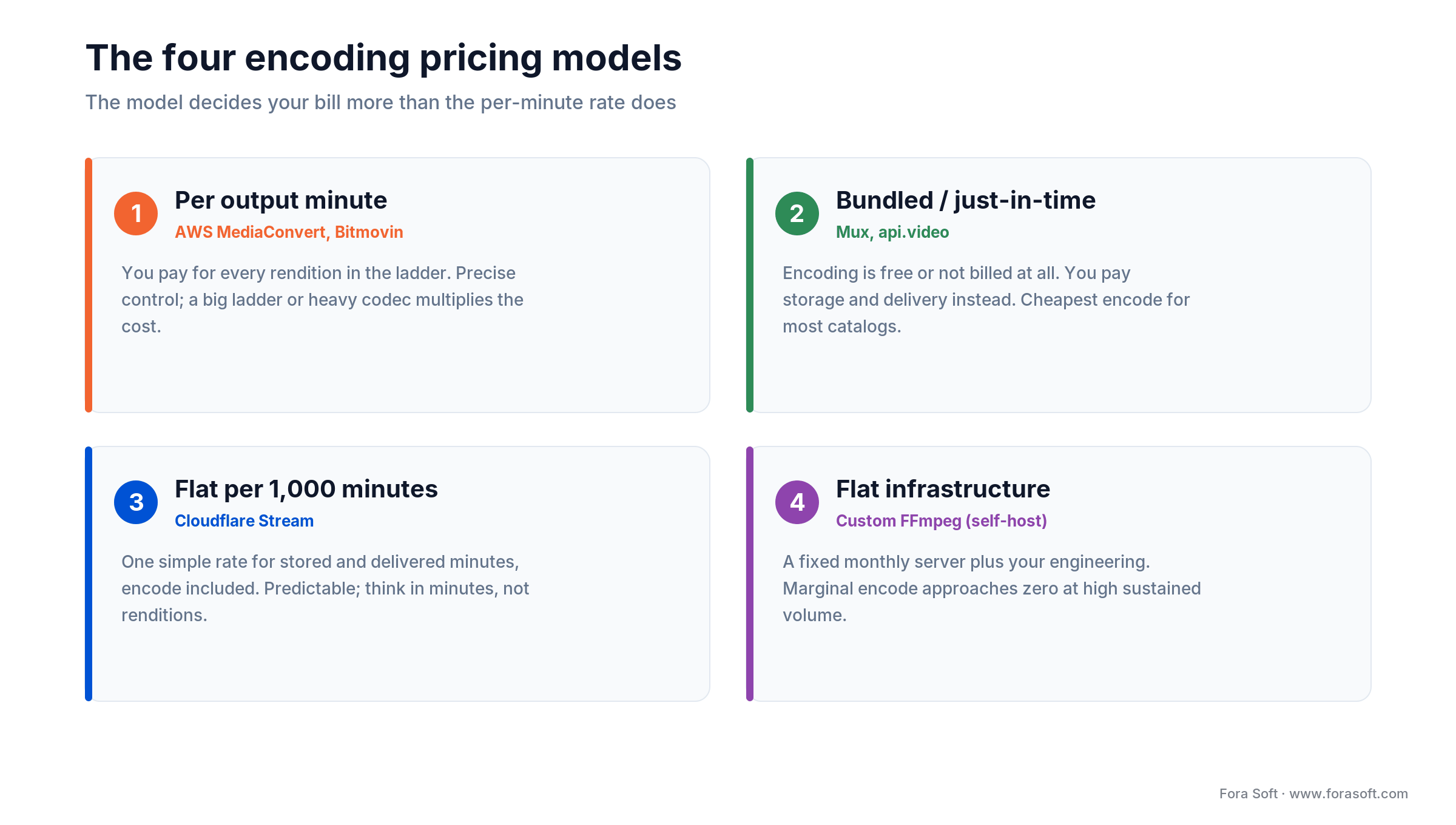
Figure 2. The four ways encoders bill. The same 1,000 minutes of video costs wildly different amounts depending only on which model you're on.
1. Per output minute. You pay for each minute of each rendition produced. A five-rung ladder means you're billed roughly five times the source duration — more, because higher resolutions and heavier codecs carry multipliers. AWS MediaConvert and Bitmovin work this way. It gives you precise control and can be cheap for light ladders, but it punishes big ladders and expensive codecs.
2. Bundled or just-in-time. Encoding isn't billed as a line item at all. Mux encodes just-in-time (it only builds a rendition when a viewer asks for it) and api.video simply makes encoding free; both make their money on storage and delivery. For most catalogs this is dramatically cheaper for the encode step, because the most expensive part is free.
3. Flat per unit of content. A single simple rate for stored and delivered minutes, encoding included. Cloudflare Stream charges $5 per 1,000 minutes stored and $1 per 1,000 delivered (Cloudflare, 2026–07–15), and you don't think about renditions at all. Predictable, easy to model, occasionally more expensive at very high delivery volume.
4. Flat infrastructure (self-host). You run FFmpeg on servers you rent. The cost is the box — a capable dedicated encoder rents for tens of dollars a month — plus the engineering to build and babysit the pipeline. Marginal cost per encode trends toward zero at volume, but the fixed cost is your team's time, not a slider in a dashboard.
Reach for a bundled or flat model when: you want a predictable bill and don't need to hand-tune every rendition. Reach for per-output pricing when you need tight control over the exact ladder and codecs — and you've done the math to confirm your ladder is light enough that it stays cheap.
Mux: just-in-time encoding
Mux is the developer-favorite for a reason: it's a clean API, and its just-in-time encoding model means you're not billed a separate encode fee at all. You upload, Mux stores your master, and it generates streaming renditions on demand when viewers watch — so encode cost is folded into storage and delivery rather than charged up front.
On its pay-as-you-go plan, input starts free at the Basic quality level, storage starts at $0.0024 per minute (720p), and delivery gives you 100,000 free minutes a month and then starts at $0.0008 per minute (Mux, 2026–07–15). Higher quality tiers raise the input rate — “Plus” input starts at $0.025/min and “Premium” at $0.0384/min for 720p — and media-grade DRM is $100/month plus $0.003 per play. The headline is that for a normal catalog you can host and stream video for a few dollars a month, and the encode itself is effectively free.
The trade-offs are the flip side of the convenience. You get Mux's encoding decisions, not a knob for every rendition; just-in-time means the first viewer of a cold asset waits fractionally longer while a rendition is built; and at very large delivery volume the per-minute delivery fee is something to model against a raw CDN. If a “mux alternative” is what you're after, it's usually because you want either more control over the ladder (MediaConvert, custom) or a flatter delivery cost at scale (Cloudflare Stream, self-host) — the rest of this comparison maps those exits.
AWS Elemental MediaConvert: per-output control
MediaConvert is the professional's tool: it encodes essentially any codec and format AWS supports, integrates with the rest of the AWS media stack, and gives you exact control over every output. It's also the clearest example of per-output pricing, which is exactly what you have to reason about carefully.
You pay per normalized output minute — output minutes multiplied by a factor for resolution, frame rate, codec, and quality mode. On the Basic tier, the first 100,000 normalized minutes run $0.0075 each, dropping to $0.0053 and then $0.0038 at volume; the Professional tier (which adds HEVC, AV1, captions, DRM, and more) starts at $0.0120 and steps down to $0.0096, $0.0072, and $0.0036 (AWS, US East Ohio, page updated 2026–05–13). The multipliers are the part that bites: HD H.264 is 2×, HD HEVC is 4×, and HD AV1 is 7×. Storage on S3 and delivery through CloudFront are billed separately on top.
So a five-rung HD H.264 ladder isn't “$0.0075 a minute” — it's roughly seven normalized minutes per source minute once you sum the rungs, which we'll cost out precisely below. Reach for MediaConvert when you genuinely need that control — specific codecs, broadcast features, tight AWS integration — and budget for the ladder, not the base rate.
Worried your encoding bill will scale the wrong way?
We'll model your encode and delivery at your real catalog and codec mix, then show you the vendor — or the custom pipeline — that keeps unit costs sane as you grow.
Cloudflare Stream: flat and predictable
Cloudflare Stream's pitch is simplicity: one API for upload, encode, and delivery, and a price you can hold in your head. Storage is $5.00 per 1,000 minutes ($0.005/min) and delivery is $1.00 per 1,000 minutes delivered ($0.001/min), with encoding included and no per-rendition accounting (Cloudflare, 2026–07–15). It ingests RTMP and SRT for live and outputs HLS and DASH, and it rides Cloudflare's global network.
The appeal is that you never think about the ladder or codecs — you upload minutes and pay for minutes stored and watched. For a lot of products that predictability is worth more than squeezing the last cent out of a hand-tuned ladder. The consideration at scale is that a flat $0.001/min delivery rate is a per-minute fee, so a genuinely huge, delivery-heavy workload eventually wants comparison against a raw CDN or a self-hosted origin — the same crossover every managed model reaches.
Reach for Cloudflare Stream when predictable billing and one-vendor simplicity beat fine-grained control, and when you're already in the Cloudflare ecosystem.
api.video, Bitmovin, and the rest of the field
api.video takes the bundled model to its logical end: encoding is free for unlimited minutes, and you pay only for hosting (from $0.00285/min stored) and delivery (from $0.0017/min delivered), regardless of how many qualities or codecs it produces (api.video, 2026–07–15). It encodes 240p to 4K, delivers over a global CDN, and bills by delivered duration — a clean, developer-friendly middle ground between Mux and Cloudflare Stream.
Bitmovin is the enterprise encoder and, tellingly, the single product page that ranks first for “video encoding API.” It's a cloud-native VOD (and live) encoder with per-title encoding, multi-codec output including AV1, split-and-stitch for fast turnaround, and multi-pass quality modes. Pricing is consumption- and credit-based and quoted per customer rather than published as a flat per-minute rate, so treat it as a “request a quote” option for teams with serious, specific encoding requirements. We won't invent a number for it; ask them for one tied to your ladder.
The rest of the field clusters around these models. Coconut and Transloadit are developer-focused encoding services; Brightcove's Zencoder is the long-running enterprise API; CloudConvert offers encoding among many file conversions; Cloudinary bundles video into a broader media platform. They differ in ergonomics and enterprise features far more than in what encoding fundamentally is — so choose on pricing model, codec support, and integration fit rather than on the word “encoding” itself.
Reach for api.video when: you want free encoding and simple per-minute hosting and delivery without Mux's quality tiers or Cloudflare's ecosystem lock-in. Reach for Bitmovin when your encoding requirements are specific and serious enough to justify a custom quote and per-title tuning.
The custom FFmpeg pipeline
FFmpeg is the engine inside most of these services, and you can run it yourself. A custom pipeline is FFmpeg (and often a packager like Shaka Packager) on servers you rent, orchestrated with a queue, retries, and monitoring you build. The economics are completely different from any API: the cost is a flat monthly box plus your engineering time, and the marginal cost of one more encode approaches zero.
Concretely, a capable dedicated encoder — say a Hetzner AX52 with an 8-core Ryzen 7 7700, 64 GB of RAM, and NVMe storage — rents for roughly €64 a month as of 2026 (Hetzner, 2026; a price adjustment took effect 2026–06–15). That one box can chew through a large ladder for thousands of minutes a month. So at sustained high volume, self-hosting is by far the cheapest per-minute encode there is.
The catch is everything the API was quietly doing for you: input normalization, retries on flaky files, per-title tuning, autoscaling for spikes, DRM packaging, monitoring, and the on-call engineer when a job wedges at 2 a.m. The box is cheap; the pipeline is not. That's why the honest answer for most teams is “use an API until the volume or the control requirement makes the engineering worth it” — a line we draw precisely in the crossover section below.
Reach for a custom FFmpeg pipeline when: you encode enormous, sustained volume, you need control an API won't give you (exotic codecs, bespoke per-title logic, on-prem or sovereign hosting), and you have the engineering to run it reliably. Not to shave dollars off a small catalog — there the API wins on total cost including your time.
The comparison at a glance
Five real options, scored on the dimensions that actually decide the choice. No option wins every row — you're choosing which trade-offs fit your stage and scale.

Figure 3. The five options scored where it counts. Green favors the option, orange is the caution.
| Option | Encode pricing model | Control | Best for |
|---|---|---|---|
| Mux | Bundled (just-in-time); encode free, pay storage + delivery | Low — Mux decides the ladder | Fast, clean dev experience |
| AWS MediaConvert | Per normalized output minute (ladder multiplies) | Total — every codec and knob | Broadcast features, AWS shops |
| Cloudflare Stream | Flat per 1,000 min; encode included | Low — no rendition control | Predictable billing, simplicity |
| api.video | Bundled; encode free, pay hosting + delivery | Medium — sensible defaults | Free encode, simple per-min bill |
| Custom FFmpeg | Flat infrastructure; your engineering | Total — you own the stack | High sustained volume, control |
Bitmovin sits alongside MediaConvert as a per-output, control-first encoder with a custom quote; we've left it out of the table only because it has no public rate to compare cleanly. If per-title tuning and multi-codec output matter most, it belongs on your shortlist next to MediaConvert.
What 1,000 minutes actually costs
Let's make it concrete. Say you have 1,000 minutes of source video and you want a standard five-rung H.264 ladder — 1080p, 720p, 480p, 360p, and 240p. Here's what the encode step alone costs under each model, holding storage and delivery aside so the comparison is clean.

Figure 4. The encode step for the same 1,000-minute ladder. The bundled and flat models don't charge to encode at all; the per-output model does; self-host is a flat box.
MediaConvert. Summing the ladder's multipliers — 1080p and 720p at 2× each, plus 480p, 360p, and 240p at 1× each — gives 7 normalized minutes per source minute. For 1,000 source minutes that's 7,000 normalized minutes, and at the Basic tier's $0.0075 that's about $52.50 just to encode, before any S3 storage or CloudFront delivery. Switch the ladder to AV1 (7× per HD rung) and the encode cost multiplies several-fold.
Mux, api.video, Cloudflare Stream. The encode is $0 — none of them charges an encode line item. You'd pay to store those 1,000 minutes (roughly $2.40/month on Mux, $2.85 on api.video, $5 on Cloudflare Stream) and then per delivered minute as people watch. For the encode step itself, the bundled and flat models are simply free.
Custom FFmpeg. That ladder is a small slice of one ~€64/month box's monthly capacity, so the attributable encode cost is a few dollars — but only after you've built and staffed the pipeline. At 1,000 minutes, the API's free or near-free encode plus zero engineering wins easily. The picture inverts only when the minutes get very large, which is the crossover we turn to next. For a whole-platform view rather than just the encode line, our server-cost estimator for video platforms walks through every input.
Want the real number for your catalog?
Bring your minutes, ladder, and viewing hours to a 30-minute call and we'll cost encode, storage, and delivery across these options with you — no obligation.
Codecs: the lever under every price
Codec choice quietly sets both your encode and your delivery costs, and it's the one lever that moves both. H.264/AVC is the universal floor — cheap to encode, plays everywhere, biggest files. HEVC and VP9 compress better. AV1 is the frontier: as of December 2025 it carries about 30% of Netflix streaming and delivers equal quality at roughly a third less bitrate than HEVC or VP9 (Netflix TechBlog; Slashdot, 2025–12–05).
The trade-off is direct: more efficient codecs cost more to encode but less to deliver. On MediaConvert, HD AV1 bills at 7× the normalized rate versus 2× for H.264 — so encoding gets three-and-a-half times pricier — but every delivered gigabyte shrinks by around a third, which compounds across every viewer. Because delivery usually dominates the recurring bill, the efficient codec often wins overall at scale, provided you keep an H.264 fallback for devices that can't decode AV1.
The other lever is the ladder itself. Per-title encoding — introduced by Netflix in 2015 — analyzes each title's complexity and builds a bespoke ladder instead of one fixed set, holding quality while cutting bitrate on simple content. Bitmovin and others offer it out of the box; on a per-output biller it also trims your encode bill by producing fewer wasted bits. For the codec and quality mechanics in depth, see video encoding and streaming quality.
When a custom pipeline gets cheaper
The build-vs-buy question has a clean shape. A managed API is a per-minute (or per-delivered-minute) cost that scales linearly with your volume — double the minutes, double the bill. A custom pipeline is mostly a fixed cost — the servers and the engineering — that barely moves as volume grows. Plot both against volume and they cross. Below the crossover, the API is cheaper because you're not paying for idle infrastructure or an engineering team. Above it, the flat cost of self-hosting wins and keeps winning. Past that point, our custom video processing development team builds the FFmpeg workers, queue and ladder logic as a service you own.
Where that crossover sits depends on your numbers, but the honest framing is this: the crossover is almost always higher than founders guess, because the fixed cost of a custom pipeline isn't the €64 box — it's the salaried engineers who build normalization, retries, autoscaling, DRM packaging, monitoring, and on-call. Add those and a managed API stays cheaper far longer than a spreadsheet comparing raw per-minute rates suggests.
Two things move the crossover toward “build,” though, and neither is purely about price. The first is genuinely large, sustained volume where the linear API bill grows into real money every month. The second is a control requirement no vendor satisfies — an exotic codec, bespoke per-title logic, sovereign or on-prem hosting, or deep integration with your own systems. When either is true, custom becomes the rational choice; when neither is, it's premature. If you're scaling delivery into the millions, our guide to scaling video streaming to a million viewers covers the delivery side of the same decision.
Mini-case: an encoding pipeline at scale
Mangomolo, an end-to-end OTT platform we've worked on, is a good picture of encoding when the volume is real. It runs over a billion streams a month for 30+ million daily viewers and manages 400,000+ videos for publisher clients, with broadcast-grade delivery up to 4K. At that scale, encoding and packaging aren't a checkbox — they're a pipeline that has to ingest a constant stream of masters, build ladders reliably, and never drop a job.
Our slice of that work was the unglamorous stream-processing internals: a custom Wowza module that recognizes SCTE-35 ad markers in live streams and performs server-side ad insertion in real time. It's the kind of control-and-scale requirement that pushes a platform past a generic managed API — exactly the “build” side of the crossover, and only worth it because the volume and the specificity justified the engineering.
The same discipline shows up smaller. For Franchise Record Pool we run a content library of 720,000+ licensed tracks with the rights and processing machinery major labels require. Want an assessment of whether your volume justifies a custom pipeline or a managed API? Book a 30-minute call and we'll tell you where your crossover really sits.
Which encoder to choose: five questions
1. What's your monthly volume? A few thousand minutes of catalog and modest viewing fits comfortably on any managed API. Hundreds of thousands of sustained minutes is where per-output pricing and even flat per-minute delivery start to add up, and where custom enters the conversation.
2. How much control do you need? If sensible defaults are fine, a bundled API (Mux, api.video) or flat service (Cloudflare Stream) is fastest. If you need specific codecs, broadcast features, or a hand-tuned ladder, that points to MediaConvert, Bitmovin, or custom.
3. Which pricing model matches your usage? Big ladders punish per-output pricing; delivery-heavy workloads eventually strain per-minute delivery. Match the model to the shape of your usage, not the headline rate.
4. Where does your infrastructure already live? Deep in AWS? MediaConvert integrates cleanly. On Cloudflare? Stream is a natural fit. Vendor-neutral and developer-led? Mux or api.video. Reducing integration friction is worth real money.
5. Do you have the team to run a pipeline? Custom encoding means far more than FFmpeg: the retries, autoscaling, and on-call rota come with it. If you don't have (or want) that engineering, the API's total cost, including your time, almost always wins.
Five encoding mistakes that blow up the bill
1. Comparing per-minute rates across models. A $0.0075 per-output rate and a $0.0008 bundled delivery rate aren't the same unit. Comparing the numbers directly, without accounting for the ladder and what each fee covers, is the single most common way encoding estimates end up wildly wrong.
2. Forgetting the ladder multiplies per-output cost. On MediaConvert or Bitmovin, five renditions is roughly five-plus times the source duration billed. Teams price “one minute” and get surprised by a bill sized to the whole ladder.
3. Ignoring delivery because you fixated on encode. Encode is a one-time cost; delivery recurs with every viewer and usually dwarfs it. An encoder that's cheap to encode but expensive to deliver can cost more overall than the reverse.
4. Choosing an efficient codec without a fallback. AV1 cuts delivery cost, but ship it to a device that can't decode it and playback fails. You need capability detection and an H.264 fallback, or the “savings” become support tickets.
5. Building a pipeline to save money too early. A custom FFmpeg pipeline looks cheap if you only count the server. Counting the engineering, it's the most expensive option until volume is genuinely large. Building it to shave dollars off a small catalog is effort spent in the wrong place.
When not to build your own encoding pipeline
Most of the time, don't — at least not yet. If your volume is small or moderate, a managed API will be cheaper than a custom pipeline once you count the engineering, and you'll ship faster. If encoding is a supporting feature of a larger product rather than your core business, a managed API will serve you better forever than a bespoke stack you have to maintain and staff.
And if what you actually need is in-browser or real-time encoding — a client-side editor, live capture, low-latency contribution — then a file-based cloud encoding API is the wrong tool entirely, and so is a batch FFmpeg farm; that's WebCodecs, NVENC, or a real-time media server territory. Be honest about which problem you have. The pipeline that's right for a big VOD catalog is the wrong answer for a live, interactive product, and vice versa.
What to measure
Cost KPIs. Cost per source minute encoded, cost per delivered minute, and the ratio between them — the numbers that tell you whether your model still fits your usage. Track them monthly; the moment delivery cost per hour approaches your revenue per hour is the moment to revisit codec and vendor.
Quality KPIs. Perceptual quality at each rung (VMAF is the industry standard), rebuffering ratio, and video start-up time. Cheaper encoding that raises rebuffering isn't cheaper — it's churn with a discount.
Pipeline KPIs. Encode success rate, time from upload to playable, and failure rate by input type. These matter most if you self-host, because they're the things a managed API silently handles — and the things that page your engineers if you don't.
FAQ
How much does a video encoding API cost?
It depends entirely on the pricing model. Bundled services like Mux and api.video charge nothing to encode and bill storage and delivery instead (roughly $0.0024–$0.005 per minute stored, sub-cent per minute delivered). AWS MediaConvert charges per normalized output minute, so a five-rung HD H.264 ladder costs about $53 per 1,000 source minutes at the Basic tier before storage and delivery. Cloudflare Stream is flat at $5 per 1,000 minutes stored and $1 per 1,000 delivered (all rates 2026–07–15).
What's the best Mux alternative?
It depends on why you're leaving. For a simpler flat bill, Cloudflare Stream; for free encoding with straightforward per-minute hosting and delivery, api.video; for total control over codecs and the ladder, AWS MediaConvert or Bitmovin; for the lowest per-minute cost at very high sustained volume, a custom FFmpeg pipeline. Match the alternative to the specific limit you hit with Mux — control, delivery cost at scale, or predictability.
Is video encoding really free with some APIs?
Yes. api.video charges nothing for encoding regardless of how many qualities it produces, and Mux encodes just-in-time so there's no separate encode fee. They make their money on storage and delivery instead. It's genuinely free encoding — the cost simply moves to the parts of the pipeline you pay for by the minute, which for most catalogs is still cheaper than a per-output encoder.
Should I build my own encoding pipeline with FFmpeg?
Only if you have very high sustained volume or a control requirement no vendor meets. FFmpeg on a rented server encodes for a flat monthly cost, so at scale it's the cheapest per-minute option. But the real cost is engineering — input normalization, retries, autoscaling, DRM, monitoring, and on-call — not the box. For small or moderate volume, a managed API is cheaper once you count your team's time.
Is WebCodecs a video encoding API?
Not in the sense most teams mean. WebCodecs (the browser VideoEncoder interface) is a low-level primitive for encoding frames inside a browser tab, useful for client-side editing and real-time work. It doesn't take a file and return a packaged HLS/DASH ladder the way a cloud encoding service does. If you're building normal VOD or streaming, you want a cloud encoding API, not WebCodecs.
Which codec should I encode to — H.264, HEVC, or AV1?
Ship H.264 as your universal baseline because it plays everywhere. Add AV1 (or HEVC) for devices that support it once your delivery volume is large enough that a ~30% bitrate cut outweighs the higher encode cost — AV1 runs about 3.5× the encode rate of H.264 on MediaConvert but shrinks every delivered gigabyte. Keep the H.264 fallback so older devices still play.
What's the difference between encoding and transcoding?
Encoding compresses raw video into a codec; transcoding converts one already-compressed format into another (or into multiple renditions). In practice a cloud “encoding” API does both, plus packaging into HLS and DASH, in a single job — so the distinction rarely changes which service you pick, but it explains why the same product is sometimes called a transcoding service.
What's the cheapest way to encode video at scale?
For the encode step alone, a self-hosted FFmpeg pipeline is cheapest at very high sustained volume, because the cost is a flat server rather than a per-minute fee. But “at scale” usually means delivery dominates, so the real savings come from an efficient codec (AV1/HEVC) and a cost-effective CDN. Below high volume, a bundled API with free encoding beats self-host once you count engineering time.
What to read next
Quality
Video encoding and streaming quality
The codec and quality trade-offs underneath these prices.
Architecture
How to build a streaming service like Netflix
Where encoding fits in the full VOD platform.
Cost
Server cost for a video platform
The whole-platform cost model, not just the encode line.
Scale
Scaling video streaming to a million viewers
The delivery side of the build-vs-buy decision.
Custom
Custom Wowza development services
When a bespoke encoding and streaming pipeline is worth it.
Ready to get your encoding right?
The right video encoding API isn't the one with the lowest headline rate — it's the one whose pricing model matches the shape of your usage. Bundled services like Mux and api.video make encoding free and win for most catalogs; Cloudflare Stream trades control for a flat, predictable bill; AWS MediaConvert and Bitmovin give total control at a per-output cost you have to model against your ladder; and a custom FFmpeg pipeline wins only when volume or control justifies the engineering.
Get three things right and the choice makes itself: understand which model you're on, pick a codec that balances encode cost against delivery savings, and be honest about whether your volume has actually crossed the line where building beats buying. Do that, and encoding becomes a solved line item instead of a surprise on the invoice.

The book · Volume 1 of 7
Video Encoding: A Complete Guide to Video Compression — From Pixels and Color to H.264, HEVC, AV1, Quality Metrics, and AI
Every price in this comparison comes back to one lever: how many bits your codec and ladder spend on each minute. Our encoding volume goes under that lever, covering H.264, HEVC and AV1 internals, rate control and encoder settings, per-title ladders and quality metrics like VMAF, so you can tell whether a cheaper API or your own FFmpeg pipeline is actually giving you the same picture. Written by Nikolay Sapunov, CEO at Fora Soft.
Read it on Amazon →Kindle & paperback · Fora Soft Video Engineering Handbook
Let's get your encoding pipeline right
250+ projects since 2005, from managed-API integrations to custom transcoding at broadcast scale. Bring your numbers — we'll tell you which encoder fits and what it'll really cost.

