Shoppers keep asking the same question a fitting room used to answer: will this actually look right on me? A virtual fitting room tries to answer it on screen and the payoff is real, because apparel is the most-returned category in e-commerce and every avoided return is margin you keep. But “virtual try-on” is not one technology. It’s at least four, and they behave nothing alike: a real-time AR overlay for glasses is a different engineering project from a diffusion model that paints a dress onto a customer’s photo. Pick the wrong one for your category and you ship something that looks impressive in a demo and fails in a cart. We build real-time video, AR, and computer-vision products, so this is the builder’s guide: the approaches, what each is good for, the APIs you can buy, what it costs, and where it quietly breaks.
Key takeaways
• There are four approaches, not one. Real-time 2D AR overlay (glasses, makeup, shoes, watches), 3D body-and-garment simulation, generative diffusion (paint a garment onto a photo), and body-scan sizing. Your product category decides which one you build and the architecture follows from that choice.
• The business case is returns, not novelty. US retail returns hit roughly $890 billion in 2024 (about 16.9% of sales, per NRF), and apparel returns run well above the ~20% e-commerce average. Cutting even a few points of returns is usually the number that justifies the build.
• On-device AR and cloud diffusion are opposite architectures. AR landmark tracking runs in real time on the phone; diffusion runs on a server GPU and takes seconds per image (a single 512×512 result at 50 steps is around 15 seconds in the research). Latency, cost, and infrastructure all fork here.
• Looking right is not the same as fitting right. Generative try-on is stunning at visualization and says nothing about whether a medium actually fits. If your returns are driven by size, you need measurement and fit prediction, not just a prettier picture.
• Body and face photos are biometric data. Face-geometry try-on has drawn a wave of Illinois BIPA class actions. Consent, purpose, and retention have to be designed in from day one — not bolted on after legal reviews the launch.
Why Fora Soft wrote this guide
We build real-time video, AR, and AI products, and virtual try-on sits right where those three meet. Fora Soft has delivered 250+ projects since 2005 (more than 20 years) with a team of 50+ in-house specialists, and a 99% Job Success Score on Upwork across that work — much of it computer vision, streaming, and camera-driven mobile apps.
Three of our builds map directly onto the parts a try-on product is made of. We built an AI wardrobe app for iOS that recognizes garments from a photo — type, season, color, fabric, cut — using custom-trained YOLOv8 and CLIP models running on-device with TensorFlow Lite. That’s the exact garment-segmentation and on-device inference a try-on feature leans on. We built a 360 3D scan app that turns ordinary photos into real 3D meshes with an OpenCV and PyTorch pipeline (stitching, depth estimation, mesh generation) — the reconstruction backbone behind any 3D-body approach. And we built Sprii, a live-shopping platform that has driven €365M+ in sales, so we know where a try-on has to plug into a real commerce stack.
So when this guide separates the four approaches or warns that diffusion mangles logos, it’s from building the pieces, not reading the brochures. If you want the short version of how we’d scope yours, our AR/VR development team does these builds; the rest of this page is how the decision should go. A try-on usually lives next to other commerce experiences, so it’s worth reading alongside our live commerce platform guide — that’s selling through live video, where this is helping a shopper picture the product on themselves.
What a virtual fitting room actually is
A virtual fitting room (or virtual try-on) is software that shows a shopper how a product would look on them before they buy: glasses on their face, a jacket on their body, a sneaker on their foot, a lipstick shade on their lips. Under the hood it does some mix of three things: it understands the person (face landmarks, body pose, foot position, or measurements), it understands the product (a 2D image, a 3D model, or a training set), and it composites the two into a believable result, either live on the camera or as a generated image.
It helps to name what it is not. It’s not the same as an AR showroom or a 3D product viewer, which place a product in the shopper’s room or let them spin it in space but never put it on the shopper—we cover those separately in our iOS AR virtual showrooms guide. Try-on is specifically about the person wearing the thing. And it’s not one algorithm you can drop in; the right build for eyewear shares almost no code with the right build for dresses.
The market backdrop is why this keeps landing on roadmaps. Estimates diverge widely by firm, but they agree on direction: research houses put the virtual fitting room market somewhere around $4–7 billion in 2024 and project it into the $12–21 billion range by 2030, at roughly 19–25% a year. Treat any single figure as directional — the firms disagree by nearly a factor of two but the growth rate is a consistent signal.
The returns problem this is really solving
Before you build anything, get clear on the number that pays for it. Virtual try-on is fun; the reason a CFO signs off is returns. US retail returns reached roughly $890 billion in 2024 — about 16.9% of all retail sales, up from around $743 billion the year before, per the National Retail Federation. Apparel is the worst offender, with return rates commonly cited well above the ~20% e-commerce average, and every returned parcel costs a retailer an estimated $20–$30 to process, before you count the lost item value and the carbon.
A big chunk of that is behavioral. “Bracketing” — buying the same item in multiple sizes intending to send some back — has become normal: in 2024 about 51% of Gen Z shoppers reported doing it, versus 36% of Gen X and 24% of Boomers. Try-on attacks this two ways: it nudges the shopper toward the right choice before checkout, and it makes them more confident so they order one, not three.

Figure 1. Where try-on pays back. The uplift figures are vendor-reported and category-dependent — use them to frame a pilot, not as a guarantee.
How much does it move the needle? Here the honest answer is: the impressive numbers are vendor claims, and you should treat them as such. Perfect Corp markets figures like a 2.5× conversion lift and 8% fewer returns; 3DLOOK claims up to 48% fewer returns and 4× conversion; Zeekit, before Walmart bought it, cited around 36% fewer returns; a Snap-commissioned survey reported AR-assisted products convert about 94% higher and that 66% of AR shoppers are less likely to return. These come from the companies selling the tech, so read them as “this can work,” not “this will.”
Do the arithmetic with your own numbers: take your apparel return rate, your average processing cost, and your monthly volume. A store shipping 10,000 apparel orders a month at a 28% return rate is eating about 2,800 returns; shaving even five points off that is 500 fewer returns a month, and at $25 each that’s $12,500 monthly — before the extra revenue from higher conversion. Run that math first. If it’s small, a lightweight tool beats a custom build.
The four ways to build try-on
This is the fork that decides everything downstream. There are four families, and they differ in what they track, what they need from your catalog, where the compute runs, and what they’re honestly good at.
1. Real-time 2D AR overlay. The phone’s camera tracks landmarks — a face mesh, a foot, a wrist and renders a product anchored to them, live, at 30 frames a second. Google’s MediaPipe Face Mesh, for instance, estimates 468 3D facial points on-device from a plain RGB camera, no depth sensor required; Apple’s ARKit adds the TrueDepth camera on newer iPhones. This is what powers glasses, makeup, jewelry, watches, and sneaker try-on. It’s fast, runs locally, and feels magical for rigid or face-anchored items. It’s poor at draped clothing, where there’s nothing rigid to anchor to.
2. 3D body and garment simulation. Build a 3D avatar of the shopper (from measurements or a scan), digitize each garment as a 3D model, and simulate the cloth draping on the body. The academic backbone here is the SMPL body model, whose standard mesh has 6,890 vertices and represents body shape and pose parametrically. This is the only approach that genuinely reasons about fit but it’s the most expensive, because every garment has to be turned into a physics-ready 3D asset.
3. Generative diffusion try-on. Give a model a photo of a person and a photo of a garment, and it paints the garment onto the person. Google’s TryOnDiffusion (CVPR 2023) kicked off the modern wave with its Parallel-UNet, and open models like IDM-VTON, OOTDiffusion, and CatVTON followed in 2024. The magic is that it needs no 3D assets — just images so it scales across a catalog cheaply. The catch is that it runs on a server GPU, takes seconds, and struggles with hands, logos, and fine patterns.
4. Body-scan sizing. Not a picture at all — a measurement engine. Tools like 3DLOOK’s YourFit take two phone photos (front and side) and derive 80+ body measurements to recommend a size. Often paired with one of the visual approaches, this is the piece that actually reduces size-driven returns, because it answers “which size,” not just “how does it look.”
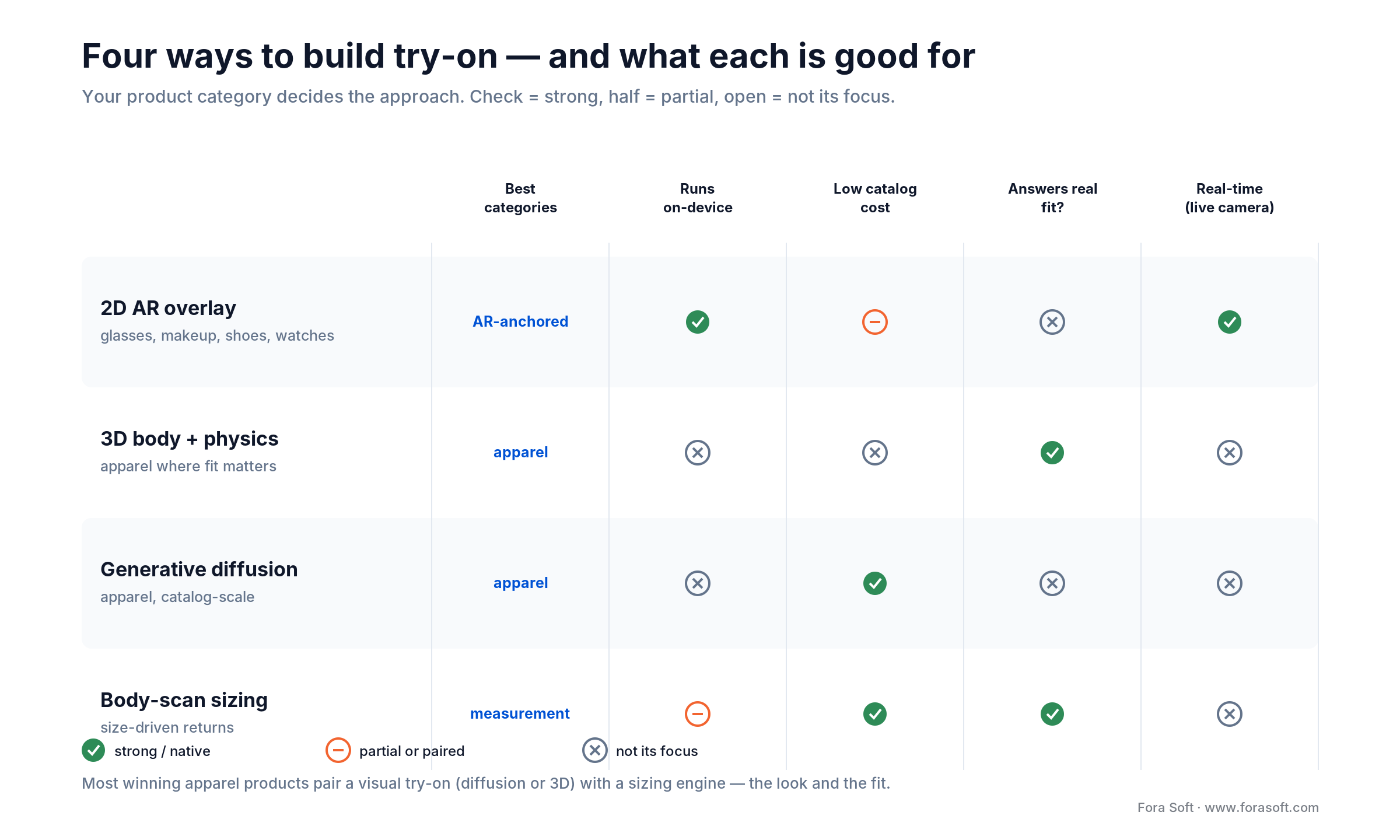
Figure 2. The four approaches at a glance. Most serious products combine two: a visual try-on for the look and a sizing engine for the fit.
Which approach fits your category
The single best predictor of the right approach is what you sell. Rigid or face-anchored products want AR; draped clothing wants diffusion or 3D; size-sensitive clothing wants a sizing engine on top.
Eyewear, watches, jewelry. Real-time 2D AR overlay, every time. These sit on tracked landmarks and don’t drape, so on-device AR looks perfect and runs instantly. Warby Parker shipped exactly this in 2019 on ARKit and the TrueDepth camera, even measuring pupillary distance from the same scan.
Makeup and beauty. Real-time AR on the face mesh, tinting lips, cheeks, and eyes. Sephora’s Virtual Artist and the Perfect Corp / YouCam engines are the reference points; the hard part is color fidelity across skin tones and lighting, not tracking.
Footwear. AR foot tracking. Amazon launched Virtual Try-On for Shoes in 2022, and Snapchat and Gucci did a global shoppable sneaker try-on back in 2020. Feet are semi-rigid and well-tracked, so AR works well; pair it with foot-length scanning (Nike Fit did a 13-point measurement accurate to about 2 mm) if sizing is your return driver.
Apparel. The hard one, and where the interesting choices are. Generative diffusion gives the most convincing look with the least catalog work, and it’s what Google Shopping’s try-on uses; Walmart’s Zeekit-powered experience reached a similar result earlier with image-based garment warping rather than diffusion. 3D simulation gives true fit at higher cost. Most winning apparel products pair a visual try-on with a sizing engine, because a beautiful render of the wrong size still comes back.
Who’s already shipping this
You’re not pioneering here, and that’s good news — the approaches are proven in production by names you know, which is the best evidence of what works per category. The dates also show how fast the generative wave arrived.
Eyewear and footwear went first, on AR. Warby Parker shipped face-tracked glasses try-on back in 2019. Nike launched Nike Fit the same year, scanning feet to about 2 mm with a 13-point measurement. Snapchat and Gucci ran the first global shoppable AR sneaker try-on in 2020, and Amazon added Virtual Try-On for Shoes in 2022. These are all the AR-overlay pattern, because the products anchor cleanly to tracked landmarks.
Apparel waited for generative AI. Walmart bought Zeekit in 2021 and rolled out an upload-your-photo try-on in 2022. Then Google put generative try-on into Shopping in 2023, rendering how tops drape and fold on real models across sizes XXS to 4XL, and took it consumer with the Doppl app in 2025. The gap between 2019 and 2023 is exactly the gap between “anchor a rigid object” and “believably repaint fabric,” and it’s why diffusion changed what’s possible for clothing.
How a try-on actually works, end to end
Whatever the approach, the pipeline has the same four stages. The difference is where they run and how heavy each one is. Walking it through shows why on-device AR and cloud diffusion are genuinely different systems.
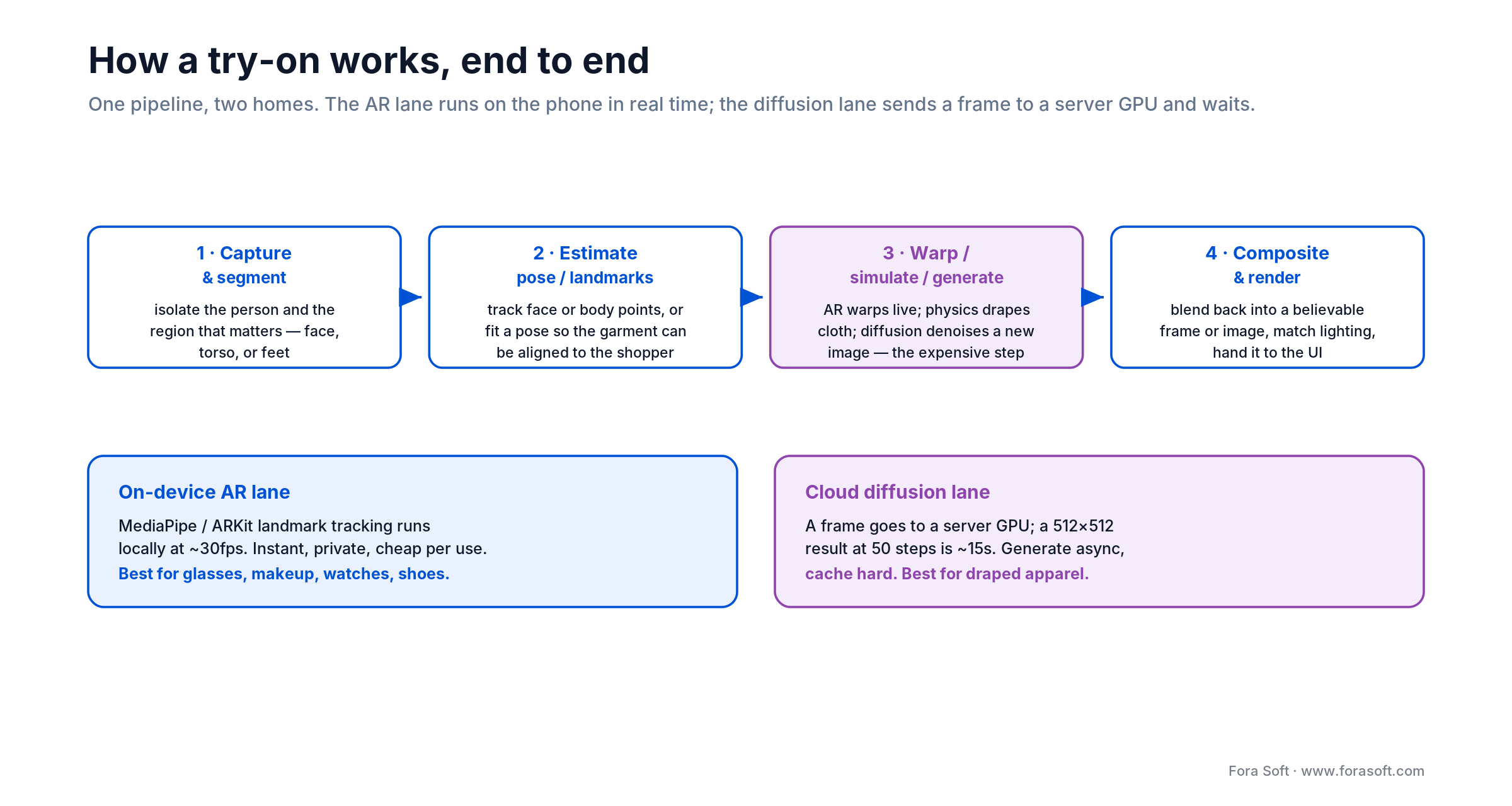
Figure 3. One pipeline, two homes. The AR lane runs entirely on the phone; the diffusion lane sends a frame to a GPU and waits.
Capture and segment. Get the person and, for image-based methods, isolate the region that matters: the face, the torso, the feet. Garment segmentation (cleanly cutting the shirt away from the background and the body) is one of the quiet make-or-break steps; our AI wardrobe work lived in exactly this problem.
Estimate pose or landmarks. AR tracks facial or body landmarks live; diffusion and 3D methods estimate a body pose so the garment can be aligned to it. This is the step that has to survive real conditions: bad lighting, motion, half-visible bodies, a hand across the frame.
Warp, simulate, or generate. Here the approaches split hard. AR warps a 2D or lightweight 3D asset onto the landmarks in real time. Physics simulates cloth on the avatar. Diffusion denoises a brand-new image of the person wearing the garment and that’s the expensive step, on a server GPU, measured in seconds.
Composite and render. Blend the result back into a believable image or live frame, match lighting and shadow, and hand it to the UI. For AR this is continuous at 30fps; for diffusion it’s a single image you cache and reuse so the shopper doesn’t pay the latency twice.
Not sure which approach fits your catalog?
Tell us what you sell and where returns hurt. We’ll map the right approach — AR, diffusion, 3D, sizing, or a pairing and a realistic first version before any code gets written.
Generative try-on: what it can and can’t do
Diffusion try-on is the approach everyone’s excited about in 2026, and for good reason: it produces photoreal results from nothing but a person photo and a garment photo, so you can cover a whole catalog without building a single 3D model. Google put it in Shopping in 2023 — rendering how a top drapes, folds, and wrinkles on real models across sizes XXS to 4XL using the Monk Skin Tone Scale and reported those try-on images drew 60% more high-quality views. Google’s Doppl app took it consumer in 2025. It’s genuinely impressive, and it’s the right default for apparel.
But you have to build around its limits, because they’re specific and stubborn. Diffusion models are weak at hands and fingers, and they lose small text, brand logos, and fine or complex patterns — the detail gets smeared during the model’s internal compression. If your brand lives on a chest logo or a signature print, a naive diffusion try-on will quietly ruin it. And it’s slow: it runs on a server GPU and takes seconds per image — a typical latent-diffusion baseline at 512×512 and 50 denoising steps lands on the order of ten-plus seconds — so you architect for asynchronous generation and aggressive caching, never a live camera feed.
The distinction that saves projects: diffusion optimizes for looking right, not fitting right. A generated image of someone in a medium tells you nothing about whether the medium fits. The model will happily render any size convincingly. If size is what drives your returns, a gorgeous diffusion render alone won’t fix it; you need a measurement or sizing layer underneath it.
The APIs and SDKs you can integrate
You rarely build the model from scratch. The market splits cleanly into three kinds of building block, and knowing which one you’re buying is half the decision: on-device AR SDKs, cloud diffusion APIs, and body-scan sizing services.
| Provider | Type | Best for | Pricing signal (2026) |
|---|---|---|---|
| FASHN AI | Diffusion API (apparel) | Catalog-scale apparel try-on | ~$0.075/image; volume tiers lower |
| Kolors / Kling | Diffusion API (apparel) | Photoreal garment transfer | ~$0.07/generation via resellers |
| Perfect Corp / YouCam | AR SDK (on-device) | Makeup, eyewear, watches, jewelry | Enterprise quote |
| Banuba / DeepAR | AR SDK (on-device) | Face AR you embed in your app | MAU-tiered subscription |
| Snap Camera Kit | AR SDK (Lens engine) | Footwear, accessories in-app | Partner terms |
| 3DLOOK YourFit | Body-scan sizing + try-on | Size/fit to cut returns | Enterprise quote |
Two pricing notes matter for the build math. Diffusion is billed per image — FASHN’s published rate is about $0.075 per generation (dropping below $0.04 at volume), and Kolors runs near $0.07 through API resellers so cost scales with usage and you cache results hard. AR SDKs are billed by monthly active users, so cost scales with audience, not usage. That difference changes your unit economics completely at scale.
The consolidation is worth watching too: Perfect Corp acquired Wannaby (the WANNA footwear and watch AR that Farfetch had bought) in late 2024, pulling more categories under one SDK. For most builders the practical move is to integrate a best-of-breed API for the look and add a sizing layer, wiring both behind your own product logic. Our AI integration team does exactly this kind of model-and-SDK plumbing.
The hard parts that decide quality
A try-on demos beautifully on a hero image in a studio. Whether it survives real shoppers comes down to a few unglamorous problems, and these are where the engineering budget actually goes.
Garment and person segmentation. Cleanly separating the shirt from the background and the body sounds trivial and isn’t; hair, hands across the torso, patterned backdrops, and loose fabric all break naive masks. This step gates everything downstream, and it’s the same computer-vision problem our AI wardrobe work lived in.
Pose, occlusion, and real conditions. Shoppers photograph themselves in bad light, mid-motion, half-cropped, with a phone at arm’s length. Landmark tracking and pose estimation have to hold up when an arm crosses the body or the person turns, or the garment lands in the wrong place and the illusion dies instantly.
Color and lighting fidelity. For makeup and apparel alike, a shade that renders slightly off is worse than no try-on, because it teaches the shopper to distrust the whole experience. Matching color across skin tones and lighting is a genuine, ongoing challenge, not a solved one.
Latency and catalog onboarding. We covered both above and they bear repeating as the two silent killers: a diffusion render on the critical path feels broken, and getting a whole catalog into the system — clean images or 3D models — is the cost that turns a demo into a product. Plan for both on day one.
Biometric data: the risk hiding in the camera
A try-on points a camera at a person’s face or body, and that’s where an otherwise fun feature turns into legal exposure. Face geometry and body scans are biometric data, and in Illinois the Biometric Information Privacy Act (BIPA) has driven a wave of class actions against virtual try-on, including makeup, eyewear, and jewelry try-ons. In late 2022 a federal judge let a BIPA suit proceed against a cosmetics brand’s try-on; some eyewear cases have been dismissed under BIPA’s health-care exemption, but the pattern is clear and the statutory damages are per-violation.
BIPA and laws like it require written notice, a stated purpose and retention schedule, and prior written consent before you collect biometric identifiers. None of that can be an afterthought — it changes your data flow. The safest architectures process face and body data on-device and never send or store the raw biometric, or they treat any stored scan as consent-gated, purpose-limited, and time-boxed.
Design rule: prefer on-device processing so the biometric never leaves the phone. Where you must send an image to a cloud model, get explicit consent, tell the shopper exactly what you keep and for how long, delete the source photo after generating the result, and don’t quietly reuse those images to train models. “We didn’t store it” is a far stronger position than any consent form.
What it costs to build, with the arithmetic
Two costs matter: the one-time build and the per-try-on running cost. We keep build estimates conservative and scope-driven, so instead of a headline number, here’s how to reason about both.
The build cost scales with approach, categories, and catalog. Integrating an AR SDK for one category (say, eyewear) into an existing app is a focused project. The number climbs with every additional category (each with its own tracking and assets), with 3D (every garment digitized by hand), and with a sizing engine on top. Diffusion is the cheapest to scale across a catalog because it needs only flat product images, not 3D models — that catalog-onboarding cost is the biggest hidden line item in any 3D approach.
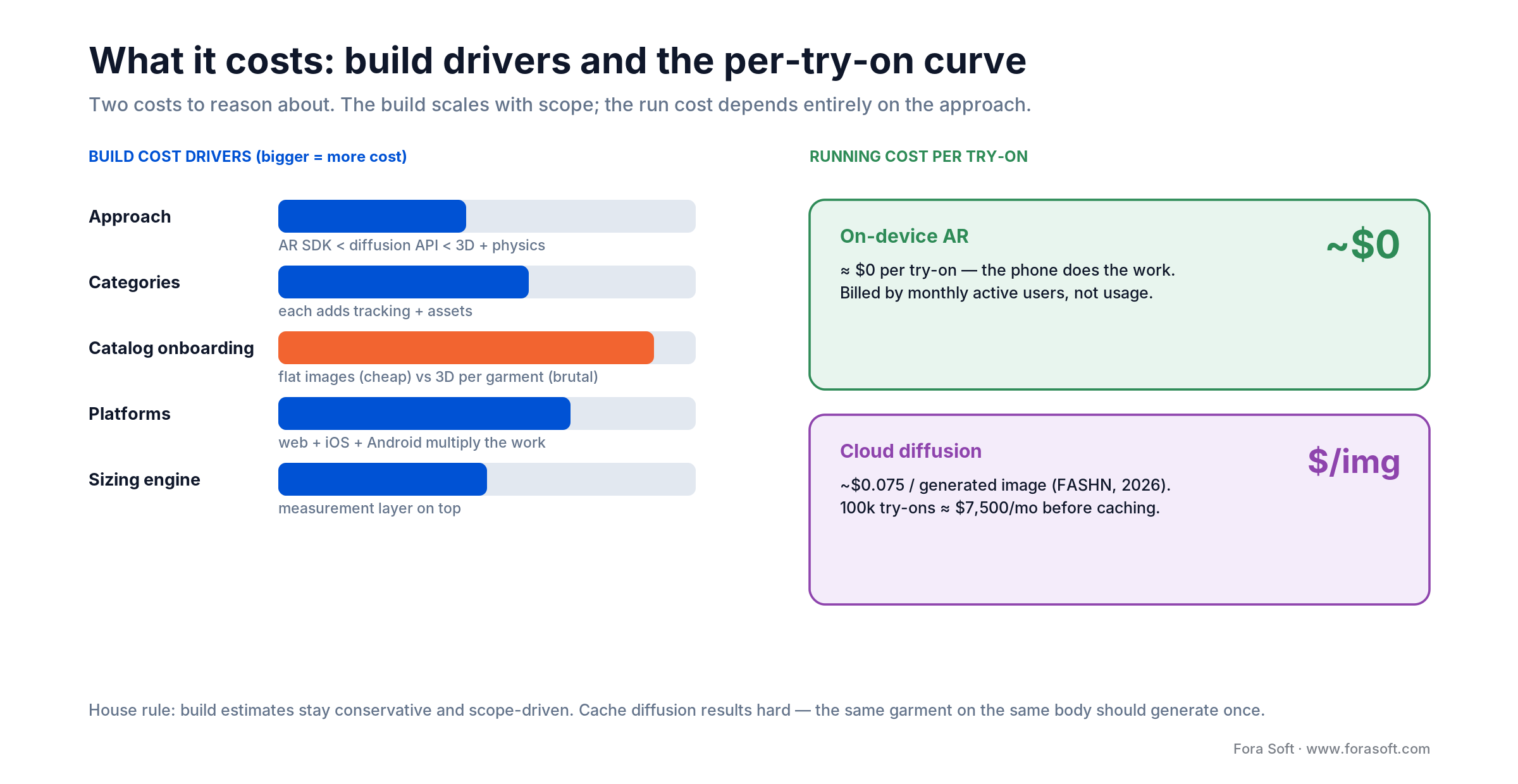
Figure 4. The two cost curves. On-device AR is near-zero per use but charged by audience; diffusion is charged per image, so caching is a first-class design concern.
The running cost depends entirely on the approach. On-device AR costs you effectively nothing per try-on — the shopper’s phone does the work — though SDK vendors bill by monthly active users. Diffusion costs real money per image: at roughly $0.075 a generation, 100,000 try-ons a month is about $7,500 in inference before caching. Cache aggressively (the same garment on the same body should generate once), and that number falls sharply. This is why the architecture question (on-device or cloud) is also the unit-economics question.
Build, buy an SDK, or embed an API
There are three honest endpoints, and for many stores the answer isn’t “build from scratch.” Match the path to who you are.
Buy an off-the-shelf widget when you’re a single store on Shopify or similar and want try-on for one category fast. An app-store plugin gets you live in days for a monthly fee. There’s no engineering return in rebuilding this yourself.
Embed an API or SDK into your own product when you have an app or a custom storefront and want the try-on inside your brand’s experience, with your UX and your data. This is the sweet spot for most serious retailers: you own the flow and the funnel, and you let a specialist provide the model.
Build custom when you’re a platform or marketplace, you need categories or fit logic no product offers, or the try-on itself is your differentiator. This is where owning the pipeline, the models, and the data pays for itself and where we come in.
Mini-case: the pieces we’ve shipped
The garment brain. We built an AI wardrobe app for iOS where a shopper photographs their clothes and the app recognizes each item’s type, season, color, fabric, and cut, then suggests outfits. It runs custom-trained YOLOv8 object detection and OpenAI’s CLIP for semantic understanding, all on-device through TensorFlow Lite. Garment recognition and segmentation is the same computer-vision problem a try-on solves before it can put a shirt on anyone and doing it on-device is what keeps it private and instant.
The 3D backbone. We also built a 360 3D scan app that reconstructs real 3D meshes from ordinary photos using an OpenCV and PyTorch pipeline — image stitching, depth estimation, and mesh generation. That reconstruction stack is the exact backbone a 3D-body try-on needs to turn a shopper’s photos into an avatar you can drape clothing on.
The commerce home. And we built Sprii, a live-shopping platform that has driven €365M+ in sales across 3,000+ brands, integrated with Shopify, WooCommerce, and Magento. A try-on doesn’t live alone; it plugs into a catalog, a cart, and a checkout, and we’ve wired that commerce plumbing at scale. Put the three together — garment CV, 3D reconstruction, and a real commerce integration and you have the spine of a try-on product. Want the same assessment for yours? Grab a 30-minute call and we’ll map it.
Five pitfalls that wreck try-on projects
1. Picking the approach by hype, not category. Diffusion is exciting, but if you sell glasses, on-device AR is faster, cheaper, and better. Start from what you sell and where returns hurt, not from what’s trending.
2. Confusing looks with fit. A beautiful render of the wrong size still comes back. If size drives your returns, a visualization alone won’t move the number; you need measurement or fit prediction underneath it.
3. Underestimating catalog onboarding. The demo works on one hero product. Getting your whole catalog in (clean garment images or 3D models) is the real cost, and 3D is brutal here. Budget for it or the launch stays a demo.
4. Ignoring biometric consent until legal does. Face and body scans are regulated data. Retrofitting BIPA-grade consent after you’ve built the flow means rebuilding the flow. Design it in.
5. Putting diffusion on the critical path. A 10-to-15-second server render behind a “Try it on” button that shoppers expect to be instant kills the experience. Generate asynchronously, show progress, and cache so nobody waits twice.
Building try-on into your own product, not a plugin?
Once the try-on lives inside your app and your funnel, owning the pipeline and the data is the point. We’ll scope the approach, the integrations, and a conservative cost with you.
KPIs: what to measure once it’s live
Engagement KPIs. Try-on adoption rate (share of product-page visitors who use it), try-ons per session, and completion rate (started versus finished). Low completion on the diffusion lane usually means latency; low adoption usually means the button is buried.
Commercial KPIs. The pair that justifies the spend: conversion rate for shoppers who tried on versus those who didn’t, and return rate for the same two groups. Measure them as a controlled comparison, not a headline — a lift that vanishes when you account for engaged shoppers isn’t a lift.
Quality and cost KPIs. Render latency (p95, not average), cache hit rate on the diffusion lane (it directly sets your inference bill), and a human-rated quality score on generated images — catching the logo-smearing and hand artifacts before shoppers do.
When not to build — or even offer it
Sometimes the right answer is don’t build, and we’ll say so. If you’re a single store selling one category and your return math is modest, an off-the-shelf widget delivers most of the value for a fraction of the cost. Rebuilding that yourself is effort with no return.
And sometimes the honest move is to narrow it. If your returns are driven by size rather than style, skip the flashy visual try-on and build the sizing engine — the measurement layer that actually answers “which size,” which is the piece that moves the number. A convincing render that doesn’t reduce size-driven returns is polish, not payback.
Build custom when you’re a platform, when the try-on is your differentiator, or when you need category or fit logic nothing off the shelf provides. Below that line, buying or embedding isn’t the lazy choice — it’s the correct one. If you’re also weighing how try-on connects to selling through video, our shoppable video guide covers the adjacent build.
FAQ
What is a virtual fitting room?
A virtual fitting room, or virtual try-on, is software that shows a shopper how a product would look on them before buying: glasses on a face, a jacket on a body, a sneaker on a foot, or a lipstick shade on lips. It combines an understanding of the person (face or body tracking, or measurements) with the product (a 2D image, a 3D model, or a training set) and composites the two into a believable result, live on the camera or as a generated image.
How does virtual try-on technology work?
Through one of four approaches. Real-time 2D AR overlay tracks landmarks (a face mesh, a foot) and anchors a product to them live used for glasses, makeup, and shoes. 3D simulation builds an avatar and drapes a digitized garment on it. Generative diffusion paints a garment from a photo onto a person’s photo. And body-scan sizing derives measurements to recommend a size. The pipeline is always capture, estimate pose or landmarks, warp or simulate or generate, then composite but AR runs on the phone while diffusion runs on a server GPU.
How much does it cost to build a virtual fitting room?
It depends almost entirely on scope. Integrating one AR category into an existing app is a focused project; cost climbs with each added category, with 3D (every garment digitized by hand), and with a sizing engine on top. Running cost splits by approach: on-device AR is effectively free per try-on but billed by monthly active users, while diffusion runs around $0.075 per generated image before caching. We keep estimates conservative and scope-driven, so the first question is how narrow the first version can be.
Does virtual try-on actually reduce returns?
It can, and returns are usually the reason to build it. US retail returns hit about $890 billion in 2024, with apparel among the worst. Vendors report meaningful drops (Perfect Corp markets around 8% fewer returns; 3DLOOK claims up to 48%), but those are vendor figures, so treat them as “possible,” not guaranteed. The biggest wins come when you address the actual cause: if returns are size-driven, pair the visual try-on with a sizing engine, because a good-looking render of the wrong size still comes back.
AR overlay or generative AI: which should you use?
Category decides. Rigid or face-anchored products — glasses, makeup, watches, jewelry, shoes — want real-time on-device AR, which is instant and cheap per use. Draped apparel wants generative diffusion, which looks photoreal and scales across a catalog from flat images, at the cost of server latency (seconds per image) and weakness with logos and patterns. Many strong products use both: AR for accessories, diffusion for clothing, and a sizing layer where fit drives returns.
Is there an API for virtual try-on?
Yes, several, and they come in three kinds. Cloud diffusion APIs (FASHN, Kolors/Kling) generate apparel try-on images, billed per image. On-device AR SDKs (Perfect Corp/YouCam, Banuba, DeepAR, Snap Camera Kit) embed face and body tracking in your app, billed by monthly active users. Body-scan sizing services (3DLOOK) return measurements and size recommendations. Most builders integrate a visual API plus a sizing layer and wire both behind their own product logic rather than training a model from scratch.
Can you add a virtual fitting room to Shopify?
Yes. For a single store on one category, an app-store widget gets you live in days for a monthly fee — usually the right call. If you want the try-on inside your own app or a custom storefront, with your UX and your data, you embed an API or SDK behind your product logic instead. Build fully custom when you’re a platform, when try-on is your differentiator, or when you need category or fit logic no plugin offers.
Is virtual try-on a privacy risk?
It can be, because face geometry and body scans are biometric data. In Illinois, the Biometric Information Privacy Act (BIPA) has driven a wave of class actions against face-based try-on, requiring written notice, a stated purpose and retention period, and prior consent. The safest designs process biometric data on-device and never store the raw scan; where you must send an image to the cloud, get explicit consent, delete the source after generating the result, and don’t reuse it for training. Build this in from day one, not after launch.
What to read next
Sell through video
Live Commerce Platform Development
The commerce home a try-on plugs into — selling live over video, cart and checkout included.
The other AR
iOS AR Virtual Showrooms & Product Demos
Placing a product in the shopper’s space, not on their body — where showrooms end and try-on begins.
Generative AI
Interactive AI Avatar Development
The real-time generative-human tech next door to diffusion try-on.
Learning hub
AI for Video & Vision Engineering
The computer-vision fundamentals under garment segmentation, pose, and generation.
Ready to build the right version?
A virtual fitting room is four different products wearing one name. Pick the approach from your category — AR for accessories, diffusion for apparel, 3D or sizing where fit is the return driver and the architecture, cost, and privacy posture all follow from that one choice. Get it right and you cut returns and lift conversion; get it wrong and you ship a demo that impresses in a meeting and disappoints in a cart.
We’ve built the garment CV, the 3D reconstruction, and the commerce integration a try-on is made of. If you’re weighing your own, the fastest way to the right answer is 30 minutes with someone who’s built the pieces.

The book · Volume 6 of 7
AI for Video: A Complete Guide to Intelligence in Video Products: From Models and Inference to Computer Vision, Speech, Search, and Generative Video
Whether you pick an AR overlay or a diffusion model, a try-on product rests on the same vision work: finding the body, its pose and the garment edges. Volume 6 covers segmentation, pose estimation, detection and tracking, plus generative video and how models are deployed and served. It helps product teams judge an SDK demo against what will hold up in a real cart. Written by Nikolay Sapunov, CEO at Fora Soft.
Read it on Amazon →Kindle & paperback · Fora Soft Video Engineering Handbook
Let’s scope your virtual try-on build
Tell us what you sell, where returns hurt, and whether you want a widget, an embedded API, or a custom pipeline. We’ll map the approach, the integrations, and a conservative cost and tell you straight whether to buy or build.
Fora Soft builds real-time video, AR, and AI software — 250+ projects since 2005. Explore our AI & video engineering learning hub or our live commerce platform guide to go deeper on the commerce and vision layers.