


Why This Matters
The previous two lessons gave you the agent loop and the three primitives that make it run. This lesson answers the next question every product team asks: which framework should our engineers build on? The choice is not academic — it decides how fast you ship, how much you pay per run, how easily you can audit what the agent did, and whether you are locked into one cloud. If you are scoping an agent feature for conferencing, surveillance, OTT, e-learning, or telemedicine, you do not need to write the code, but you do need to follow the argument your engineers will have, because picking the wrong framework for the job costs months. By the end you will be able to read any "we'll use LangGraph" or "let's go with CrewAI" proposal and check that the choice fits the task, the team, and the budget.
What An Agent Framework Actually Does
Start with the job, not the brand names. In the previous lesson we said an agent is a language model given three powers it lacks on its own: tools to act in the world, memory to carry knowledge across steps, and planning to turn a goal into ordered actions. Building those three by hand is real work. You have to manage the back-and-forth of every tool call, store and retrieve memory, run the planning loop, handle a step that fails halfway, save progress so a crashed server can resume, and watch what the agent did when it goes wrong. An agent framework is a pre-built library that does this plumbing for you, so your engineers describe what the agent should do and the framework handles how the loop runs.
Think of it like the difference between wiring a house yourself and buying a fuse box. The electricity — the language model — is the same either way. The framework is the standardized box that routes the power safely, trips when something shorts, and lets the next electrician understand the wiring without a tour. Without one, every team hand-rolls its own loop, its own retry logic, and its own memory store, and every one of those is a place to introduce a bug.
Three jobs separate a real framework from a weekend script. The first is orchestration — deciding which step runs next, whether steps run one at a time or several at once, and how one agent hands work to another. The second is state and memory — holding the task in progress and pulling in long-term facts when needed, the way we described agent memory in the last lesson. The third is durability and observability — saving progress so an interrupted job resumes, and recording every decision so a human can see why the agent did what it did. A framework that does all three well is the difference between a demo and a feature you can put in front of a paying customer.
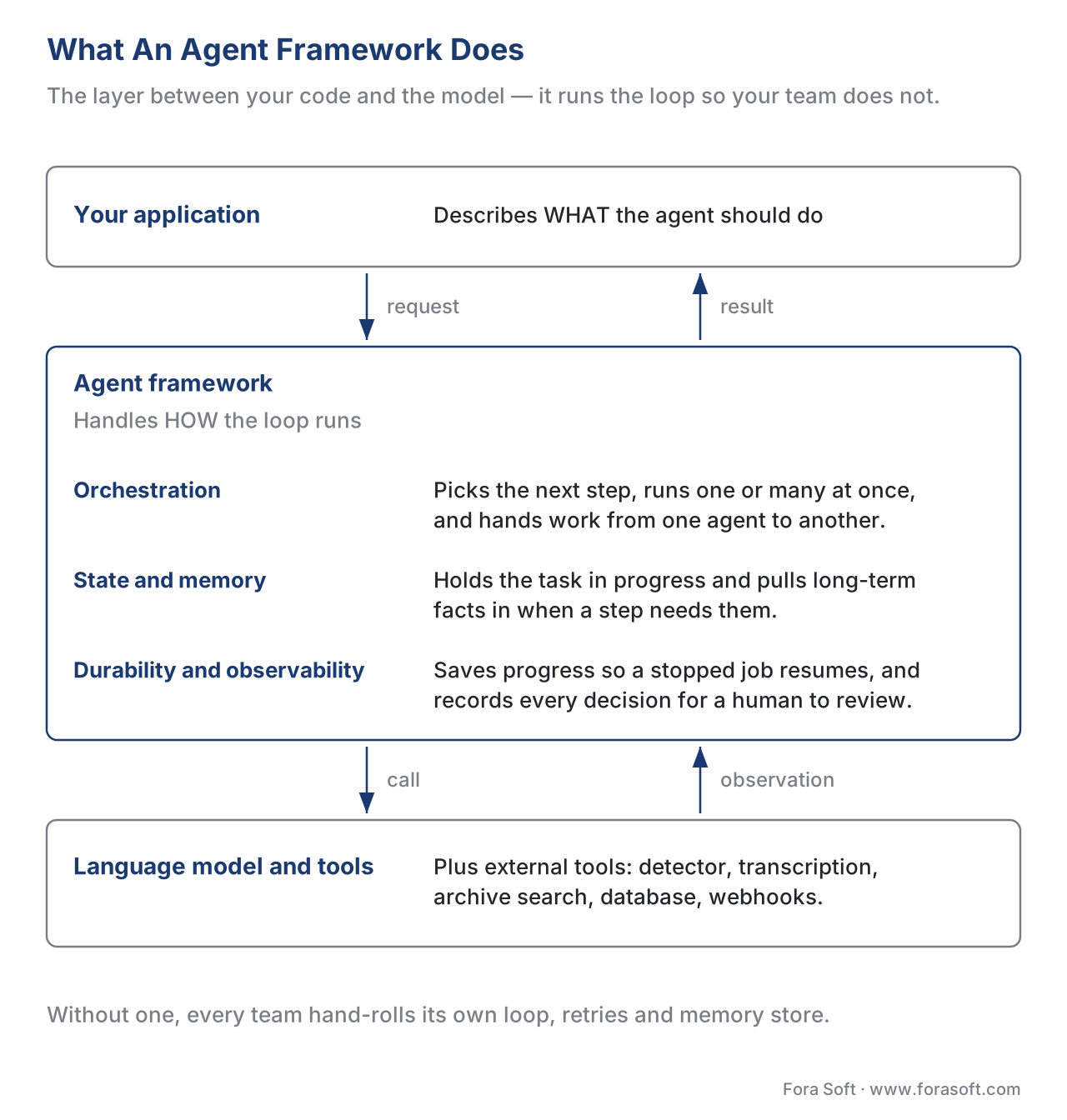 Figure 1. An agent framework is the layer between your application and the model. It manages the three primitives from Lesson 7.2 — tool use, memory, planning — plus the durability and observability that production demands.
The 2026 Shift You Have To Know First
Before comparing the three, you need one piece of news, because it reshapes the whole landscape and most articles you will find are out of date. In late 2025 and early 2026 the agent-framework world went through a wave of consolidation. Picking a framework in 2026 is not the same decision it was in 2024, and a proposal that cites a 2024 blog post is working from a stale map.
Three things changed. First, in October 2025 LangChain and LangGraph both reached version 1.0 — their first stable major releases, with a promise of no breaking changes until 2.0. That matters because "1.0" is a signal: the makers are telling production teams the foundation is now stable enough to build on for years. Second, AutoGen was absorbed into Microsoft Agent Framework. Microsoft merged its two agent projects — AutoGen, which came out of Microsoft Research, and Semantic Kernel, its enterprise toolkit — into one framework that entered public preview in October 2025 and shipped version 1.0 on 3 April 2026. AutoGen itself is now in "maintenance mode," meaning it gets bug fixes and security patches but no new features. Third, CrewAI matured from a simple library into a platform, adding a second execution mode ("flows") and a commercial cloud product alongside its open-source core.
The practical takeaway is blunt. If an engineer proposes "AutoGen," ask whether they mean the old AutoGen or its successor, Microsoft Agent Framework — because building new work on a framework in maintenance mode is a slow-motion mistake. And if a comparison they show you predates October 2025, treat its version-specific claims with suspicion. The names survived; the products underneath them moved.
 Figure 2. The 2025–2026 consolidation. LangChain/LangGraph hit 1.0; AutoGen and Semantic Kernel merged into Microsoft Agent Framework (1.0 in April 2026); CrewAI grew a flows mode and a cloud platform. Any comparison older than this is working from a stale map.
What Is LangGraph — And How Is It Different From LangChain?
This is the single most common point of confusion in 2026, so handle it first. LangChain and LangGraph are two different tools from the same company, and you do not have to choose between them — they are designed to work together.
LangChain is the high-level, get-started-fast toolkit. It gives you a standard way to call any model provider — OpenAI, Anthropic, Google, and hundreds of others — through one common interface, so swapping the underlying model is a one-line change rather than a rewrite. Its main building block is a function called create_agent, which sets up the basic agent loop — send a request to the model, run any tool it asks for, feed the result back, repeat until done — in a few lines. If your agent fits that standard loop, LangChain is the quickest path to a working version.
LangGraph is the low-level, control-first runtime that sits underneath. Where LangChain hands you a pre-shaped loop, LangGraph hands you the parts to build any shape you want. Its core idea is in the name: you describe the agent's work as a graph — a map of steps (called nodes) connected by arrows (called edges) that show which step leads to which. Because a graph can loop back on itself and branch in different directions, LangGraph can express workflows that the simple straight-line loop cannot: an agent that retries a failed step, pauses to wait for a human's approval, runs two branches at once, or recovers from a crash exactly where it stopped.
Here is the relationship that resolves the confusion: LangChain's create_agent runs on the LangGraph engine under the hood. Since the October 2025 releases, the two are formally layered. You start with LangChain's high-level shortcut, and when your agent outgrows the standard loop, you drop down to LangGraph for fine control — without switching frameworks or rewriting from scratch. The common phrasing in 2026 is correct: you do not pick LangChain or LangGraph; you start high and drop low as the task demands.
Two LangGraph capabilities deserve a plain-language name because they are why production teams choose it. Durable state means the agent's progress is saved automatically, so if the server restarts in the middle of a long job, the agent resumes exactly where it left off instead of starting over. Built-in persistence means you can pause an agent for hours or days — waiting for a human to approve a step, say — and pick the workflow back up later, without your engineers writing custom database code to remember the half-finished task. For a video product, that is the difference between an investigation agent that survives an overnight run and one that loses everything when a machine reboots.
LangGraph also ships a companion tool worth knowing by name: LangGraph Studio, a visual workspace where engineers can watch an agent move through its graph step by step, inspect what it decided at each node, and debug a stuck run. Studio is paired with LangSmith, LangChain's observability and evaluation platform — the place teams go to see what their agents are really doing in production. We cover that kind of monitoring in the agent evaluation and observability lesson.
The adoption story backs the choice. The LangChain ecosystem reports on the order of 90 million downloads a month, LangGraph specifically draws tens of millions, and named production users include Uber, LinkedIn, Klarna, JP Morgan, and Cisco. When a framework runs at companies that size, you are not the one discovering its sharp edges.
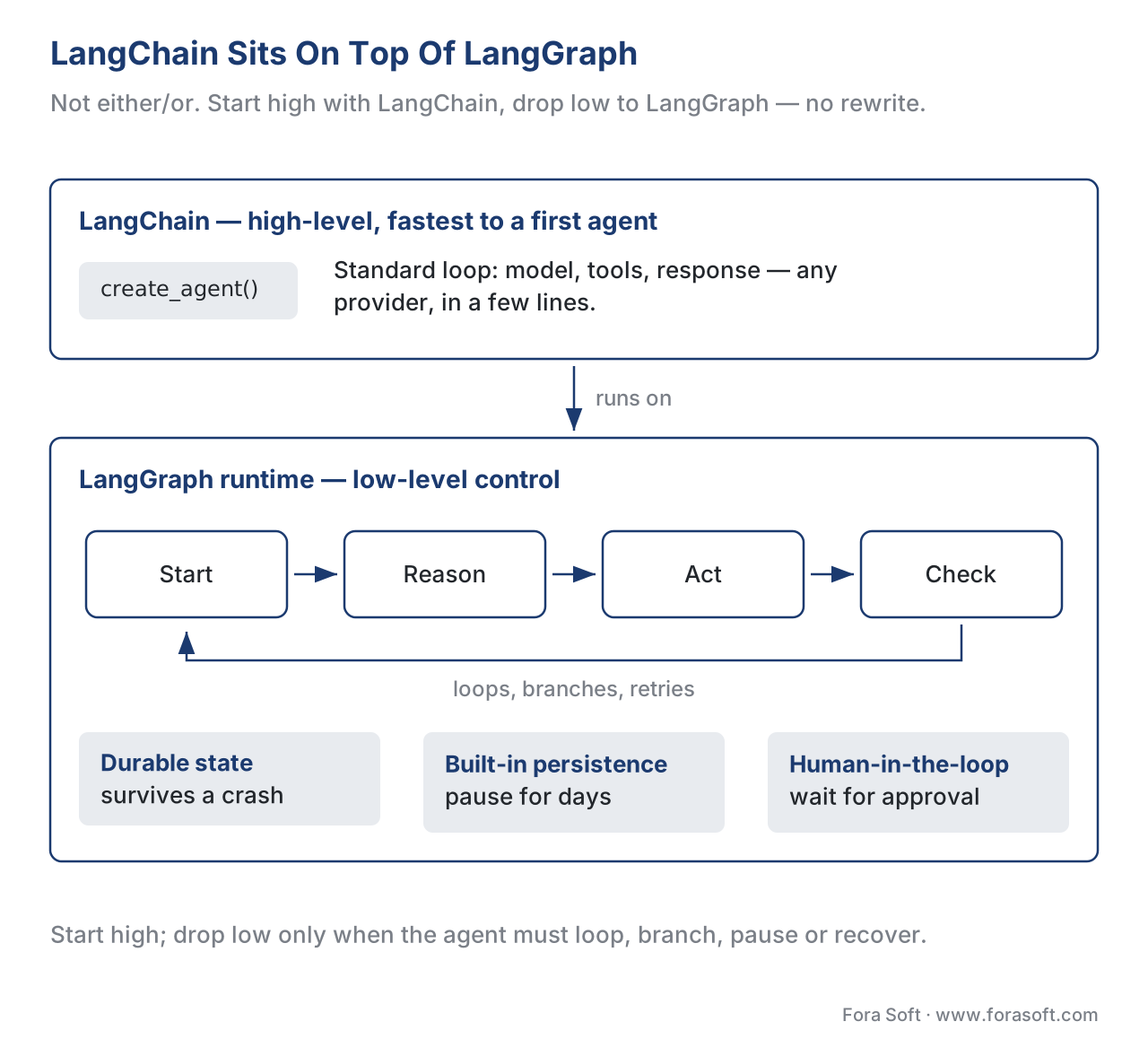 Figure 3. LangChain sits on top of LangGraph. Start with LangChain's
 create_agent for the standard loop; drop to LangGraph's graph, durable state, and persistence when the agent needs to loop, branch, pause, or recover. Same stack, no rewrite.
What Is CrewAI?
CrewAI takes a different mental model, and it is the most intuitive of the three for a non-technical reader. Instead of asking you to draw a graph, it asks you to describe a team. You define each agent the way you would write a job description — a role ("video analyst"), a goal ("find every person who entered after hours"), and a back-story that shapes how it behaves — then group several of these agents into a crew that works toward a shared objective. The agents collaborate, hand findings to one another, and divide the work, much like a small department of specialists. CrewAI is an independent Python framework — early versions built on LangChain, but it was rebuilt to stand on its own — and it is known for getting a believable multi-agent setup running quickly.
CrewAI has two modes, and the distinction maps cleanly onto the planning patterns from the last lesson. Crews are the role-based, model-driven mode: you give the team a goal and the agents figure out how to collaborate, which is flexible but less predictable. Flows are the event-driven, deterministic mode: you lay out an explicit sequence — when this happens, do that — for work that must run the same way every time and be auditable afterward. The guidance that follows is simple: reach for a crew when the path to the answer is open-ended and you want agents to reason their way there; reach for a flow when the steps are fixed and you need a repeatable, inspectable pipeline. Many real systems combine both — a deterministic flow that calls a reasoning crew at the one step that actually needs judgment.
CrewAI also leans hardest of the three into being a commercial product, not just a library. Alongside the open-source framework it offers a hosted platform — branded AMP Cloud in 2026 — with a visual editor, a copilot to help build agents, built-in monitoring, and guardrails. The company markets heavy enterprise traction, claiming use across a majority of the Fortune 500; treat that as a vendor figure rather than an audited statistic, but the direction is clear: CrewAI wants to be the framework a business team can adopt with managed support, not only the one engineers clone from a code repository.
What Is AutoGen — Now Microsoft Agent Framework?
AutoGen began as a research project from Microsoft for building agents that solve problems by talking to each other. Its signature pattern is a conversation between specialized agents — for example, one agent that writes a plan, a second that critiques it, and a third that executes it — passing messages back and forth until they converge on an answer. That conversational, multi-agent style made AutoGen a favorite for experimentation and for tasks where several perspectives improve the result.
Here is the part that reshapes the decision in 2026. Microsoft has folded AutoGen, together with its enterprise toolkit Semantic Kernel, into a single new framework: Microsoft Agent Framework. It entered public preview in October 2025 and reached version 1.0 — its production-ready, stable-API release — on 3 April 2026, available for both Python and the .NET platform (the toolset for building software in Microsoft's ecosystem) under a permissive open-source license. Crucially, the original AutoGen and Semantic Kernel projects are now in maintenance mode: they still receive bug fixes and security patches, but new features go into Microsoft Agent Framework instead. Microsoft publishes migration guides to move existing projects over.
What you get in the successor is the combination its makers intended: AutoGen's easy agent-and-conversation abstractions joined to Semantic Kernel's enterprise features — managed state, type safety (guard-rails that catch certain mistakes before the code runs), middleware, and telemetry — plus a graph-based workflow system for laying out explicit multi-agent execution paths. In other words, the new framework borrows the graph idea that makes LangGraph powerful and the multi-agent idea that made AutoGen interesting, and aims them at teams already invested in Microsoft's cloud, Azure.
The practical rule for a product team: choosing "AutoGen" today means choosing Microsoft Agent Framework, and it is the natural fit when your organization already runs on Azure and .NET, or when your engineers want Microsoft's enterprise support behind their agents. If you are not in the Microsoft ecosystem, the gravity that pulls teams toward Agent Framework is weaker, and LangGraph or CrewAI will usually feel more native.
Single Agent Or A Team Of Agents?
One decision cuts across all three frameworks and shapes which one fits, so it is worth pausing on: does your task need a single agent, or several agents working together — a multi-agent system? The distinction is exactly what it sounds like. A single agent is one reasoning loop with one set of tools and one memory. A multi-agent system is several such agents, each with a narrower job, that pass work between them — what the field calls a handoff — until the goal is met.
Multi-agent designs are fashionable, and the fashion has a cost. The appeal is real: splitting a hard job across specialists can improve quality, because an agent focused only on "writing the incident report" tends to do it better than one juggling detection, retrieval, and writing at once. AutoGen built its reputation on exactly this conversational, several-agents-talking pattern, and CrewAI's whole metaphor is a team. But every extra agent adds a seam — a place where one agent misunderstands what another handed it, where the cost of model calls multiplies, and where debugging gets harder because the failure could be in any member of the team or in the conversation between them. A two-agent system is more than twice as hard to reason about as a one-agent system.
The honest guidance, echoed by the framework makers themselves, is to start with a single agent and add more only when one agent measurably cannot do the job. Many tasks that look like they need a team — "transcribe, then summarize, then draft actions" — are really one agent calling three tools in sequence, not three agents negotiating. Reserve true multi-agent designs for work where the sub-jobs clearly benefit from separate reasoning and separate context: a meeting copilot where a live-transcription agent and a research agent really do run on different rhythms, or an investigation where one agent gathers evidence and a distinct, more cautious agent decides whether to escalate. All three frameworks can do single-agent and multi-agent work; the question is whether your task earns the extra agents, not whether the framework allows them.
The Head-To-Head Comparison
With each framework defined, here is how they line up on the dimensions that decide real projects. Read the table as a starting filter, not a verdict — the right choice depends on your task, which we get to next.
| Dimension | LangGraph (+ LangChain) | CrewAI | AutoGen → Microsoft Agent Framework |
|---|---|---|---|
| Mental model | Graph of steps (nodes + edges) | A team ("crew") of role-based agents | Agents in conversation + graph workflows |
| Control level | Lowest — build any shape | Higher-level — describe roles | Mid — abstractions + enterprise features |
| Fastest to a first agent | LangChain create_agent (high) |
High — describe a crew | Medium |
| Best at | Reliable, long-running, custom flows | Multi-agent collaboration; quick teams | Azure/.NET shops; conversational multi-agent |
| Durability / resume | Strong — durable state, persistence | Via the platform | Strong — managed state |
| Language | Python, JavaScript | Python | Python, .NET |
| Maturity (2026) | 1.0 (Oct 2025) | Stable, platform-backed | 1.0 (Apr 2026); old AutoGen in maintenance |
| Commercial cloud | LangGraph Platform + LangSmith | AMP Cloud | Azure AI Foundry |
| Pick it when | You need control and reliability | You think in collaborating roles | You live in the Microsoft cloud |
One honest caveat belongs under this table. The three are converging. LangGraph added higher-level shortcuts through LangChain; CrewAI added deterministic flows; Microsoft Agent Framework added graph workflows. The gaps that made these frameworks feel completely different in 2024 are narrowing, which is good news for you: there are fewer wrong answers than there used to be, and the cost of switching later is lower because they increasingly speak the same concepts.
What It Costs
Frameworks themselves are open-source and free to run on your own machines — you pay for the model calls and the servers, which we break down in the cost-of-AI lesson. The money question is about the managed platforms the framework companies sell on top, which handle hosting, monitoring, and scaling so your team does not have to. Their pricing models differ in a way that matters for budgeting, and the published numbers below are early-2026 figures that change often — confirm current rates before you commit.
LangChain's commercial side centers on LangSmith (observability and evaluation) and LangGraph Platform (hosting agents). The entry tier is free for individual developers up to a generous monthly allowance of agent steps, a Plus tier runs about $49 per month per seat with usage-based charges on top, and larger deployments move to custom enterprise agreements. CrewAI prices by execution — one full run of a crew — with a free tier of roughly 50 executions a month, a Professional tier near $25 a month for around 100 executions, and enterprise plans negotiated annually that bundle compliance certifications and dedicated support. Microsoft Agent Framework is free and open-source; the costs appear when you run it on Azure's managed agent services, billed like the rest of Azure.
The arithmetic is worth doing once, because per-execution pricing surprises teams. Suppose a surveillance product runs a nightly investigator agent across 40 cameras, and each camera's nightly review counts as one execution. That is 40 executions a night, or 40 × 30 = 1,200 executions a month. On a plan that includes 100 executions, you are 1,100 over, and at a typical overage of a few cents each — say $0.05 — that is 1,100 × $0.05 = $55 a month in execution fees alone, before a single model token is counted. Scale to 400 cameras and the same math gives 12,000 executions a month, putting you firmly in enterprise-pricing territory. The lesson is not that one model is cheaper; it is that you must map your real usage — runs per day times days times sites — onto the pricing unit before you pick a plan, or the bill will not match the demo.
Beyond The Big Three
LangGraph, CrewAI, and AutoGen dominate the search traffic and the conversation, but they are not the only credible choices in 2026, and a thorough proposal will at least mention the alternatives. A few worth knowing by name: the OpenAI Agents SDK is a lean toolkit, the production successor to OpenAI's earlier "Swarm" experiment, built around four simple ideas — agents, handoffs between them, guardrails, and tools — and it is the quickest path if you are already committed to OpenAI's models and want minimal scaffolding. Google's Agent Development Kit (ADK) is Google's entry, tuned for its Gemini models but able to use others, and the natural pick for teams on Google Cloud. Mastra is the standout for teams who build in TypeScript rather than Python — it reached version 1.0 in January 2026, ships built-in memory and human-in-the-loop controls, and slots neatly into modern web stacks. And low-code tools like n8n let non-engineers assemble agent workflows by connecting boxes on a canvas, trading fine control for speed and accessibility.
We give these newer entrants a full treatment — including Manus AI, the Claude Agent SDK, OpenAI Swarm, Google ADK, and n8n — in a dedicated 2026 framework deep-dive. For this lesson, the point is only that the big three are the safe default, not the entire field.
How To Actually Choose
Strip away the brand loyalty and the decision comes down to a handful of questions about your task, your team, and your constraints. Walk them in order and the field narrows fast.
Start with the shape of the work. If the agent's job is one open-ended goal handled by a single reasoning loop with a few tools, you do not need heavy machinery — LangChain's create_agent (running on LangGraph) gets you there fastest, and Mastra does the same for TypeScript teams. If the job naturally splits across several specialists who collaborate — an analyst, a writer, a reviewer — CrewAI's team metaphor will feel native. If the job is a long-running, branching, must-not-lose-progress workflow with human approvals in the middle, that is LangGraph's home ground.
Then layer on the team and the ecosystem. Your engineers' language is a hard constraint, not a preference: Python teams have every option, TypeScript teams lean Mastra or LangGraph's JavaScript build, and .NET teams gravitate to Microsoft Agent Framework. Your cloud matters too — Azure shops toward Microsoft Agent Framework, Google Cloud shops toward ADK — because the managed services, billing, and support are already in place there.
Finally, weigh control versus speed. More control means more code and a steeper learning curve but fewer surprises in production; more speed means a working agent this week but less room to customize when the task gets unusual. There is no universally "best" framework, despite how the question is often phrased — there is only the best fit for a specific task, team, and budget. The reassuring part, given how the three are converging, is that a reasonable choice today is rarely a trap tomorrow.
 Figure 4. A framework decision tree. Start with the shape of the work, then filter by team language and cloud. There is no single best framework — only the best fit for a task, a team, and a budget.
Matching Frameworks To Video Agent Jobs
This section grounds the abstract decision in the video work the rest of this curriculum builds toward. Three agent jobs recur across our domains, and each one points to a different framework strength.
A video investigator agent for surveillance — the subject of a later lesson — runs long, branches based on what a detector finds, and must survive an overnight job without losing its place. It pauses for a human to confirm a flagged clip before escalating. That profile — long-running, branching, human-in-the-loop, must-not-lose-progress — is the textbook case for LangGraph's durable state and persistence.
A meeting copilot agent for conferencing — covered in its own lesson and related to the LiveKit meeting assistant build — often splits naturally into roles: one agent transcribes and tracks the live discussion, another retrieves relevant context, a third drafts follow-up actions. When the work decomposes into collaborating specialists like that, CrewAI's crew metaphor is the most direct expression of the design.
An async video-review agent for an OTT or e-learning archive — the archive pattern lesson — usually runs the same fixed sequence over every file: ingest, transcribe, tag, index. The steps do not change from file to file, so the work wants a deterministic pipeline — CrewAI flows, a LangGraph graph with fixed edges, or a Microsoft Agent Framework workflow if the shop is on Azure. The reasoning model is called only where judgment is truly needed, keeping the cost down.
 Figure 5. The same decision, applied to three recurring video agent jobs. The job's shape — long and branching, role-divided, or a fixed pipeline — points to the framework strength that fits it.
A Common And Expensive Mistake
The most frequent framework error is not picking the "wrong" one — it is reaching for a framework at all when the task does not need an agent. As we said in the last lesson, if the steps never change, you do not need an open-ended planner; you need a plain script that calls the model at the one step that needs it. Standing up LangGraph, a vector database, and a multi-agent crew to summarize a single ten-minute clip is over-engineering that costs money to run and months to maintain. The discipline that keeps agent projects healthy is matching the tool to the job: use a workflow when the path is fixed, an agent when it truly is not, and the simplest framework that covers the real requirement. A second, related mistake is chasing the newest framework because it trended last month; the boring, 1.0-stable choice your engineers already know will usually ship sooner and break less.
Free download: Agent Framework Decision — Cheat SheetOne page: what LangGraph, CrewAI and Microsoft Agent Framework each are, what changed in the 2025-2026 consolidation, the head-to-head matrix, the pricing unit each vendor bills on, and the rules for choosing.Where Fora Soft Fits In
We build video products across conferencing, streaming, OTT, surveillance, e-learning, telemedicine, and AR/VR, and when a feature needs an agent, the framework choice is one of the first design decisions we make with a client. Our approach is to start from the task — its shape, its reliability needs, and its budget — and let that pick the framework, rather than defaulting to whatever is fashionable. For a long-running surveillance investigation we lean toward control and durability; for a conferencing copilot that splits into clear roles we lean toward the team metaphor; for a fixed archive pipeline we lean toward a deterministic workflow that calls a model only where it earns its cost. The frameworks are converging, so we optimize for what the client's engineers can maintain after we hand the system over — because an agent feature nobody on the team understands is a liability, not an asset. Agent features like these are what our AI integration services deliver inside existing video products, and the LLM workflows and retrieval behind them come from our generative AI development work.

The book
AI for Video: A Complete Guide to Intelligence in Video Products: From Real-Time Pipelines and Agents to Serving, Cost, Compliance, and Verticals
We wrote a seven-volume handbook that takes the whole video stack apart, from the pixel to production, and this lesson continues in Volume 7. It runs the agent chapters in full — the loop primitives, the frameworks and the runtimes under them, memory and tools, the serving stack, and the cost-per-stream-hour arithmetic that turns a per-execution price into a monthly bill. Volume 6 sits next to it with the capabilities your agent will call: detection, tracking, speech, and retrieval over a video archive. Written by Nikolay Sapunov, CEO at Fora Soft.
Scoping an agent feature and unsure which framework fits?
Tell us the shape of the work and we will tell you what we would build it on, what it costs to run at your volume, and what your own engineers will have to maintain after handover. 250+ video products shipped since 2005.
See our case studies
Case study
Mindbox
The long-running, branching job in production: AI facial recognition at 99.5%+, ANPR across 500,000+ vehicles a day, and Smart Forensic Search over hours of footage — 50+ deployments since 2020.
Case study
Meetric
The role-split copilot, built out: live speech analysis during the call, automated post-meeting reports, 80-100% of CRM data entry automated, and close rates up by 25%.
Case study
VALT
The fixed pipeline over an archive: every session recorded, transcribed on Amazon Transcribe and made searchable for 770+ organizations and 50,000+ users, under HIPAA and GDPR.
What to read next
Agents
Tool use, memory, planning — the agent primitives
The three powers a framework orchestrates for you. Read this first if the terms above moved too fast.
Agents
Manus AI, Claude Agent SDK, OpenAI Swarm, Google ADK, n8n
The rest of the field beyond the big three, judged by the same task-shape test.
Conferencing
The meeting copilot agent
The CrewAI-shaped job end to end: who transcribes, who retrieves, who drafts the actions.
Economics
What AI in video actually costs at scale
The model bill sitting under the per-execution fees, mapped onto runs per day and sites.
References
- LangChain — "LangChain and LangGraph Agent Frameworks Reach v1.0 Milestones" (October 22, 2025) — https://www.langchain.com/blog/langchain-langgraph-1dot0 — tier 3 (framework author). Source of truth for the LangChain/LangGraph 1.0 releases, the
create_agentabstraction running on the LangGraph runtime, durable state, persistence, middleware, and the named production users (Uber, LinkedIn, Klarna, JP Morgan, Cisco). - LangChain — LangGraph product page and documentation — https://www.langchain.com/langgraph and https://docs.langchain.com — tier 3 (author/de-facto spec). Graph-based execution model (nodes/edges), StateGraph, LangGraph Studio, and the LangChain-on-LangGraph layering.
- LangChain — LangSmith / LangGraph Platform pricing — https://www.langchain.com/pricing — tier 4 (vendor). Developer free tier, Plus (~$49/mo), usage-based charges, and enterprise plans. Prices are early-2026 and change frequently.
- CrewAI — official site and documentation (Crews vs Flows, AMP Cloud) — https://docs.crewai.com and https://crewai.com — tier 3 (author). The crew/role model, the flows event-driven mode, the hosted platform, and the independent-of-LangChain status.
- CrewAI — pricing page — https://crewai.com/pricing — tier 4 (vendor). Per-execution pricing model: free (~50 executions/mo), Professional (~$25/mo), and custom enterprise. The "63% of the Fortune 500" figure is a vendor marketing claim, flagged as such in the body.
- Microsoft — "Microsoft Agent Framework Overview" (Microsoft Learn) — https://learn.microsoft.com/en-us/agent-framework/overview/ — tier 3 (author). The convergence of AutoGen and Semantic Kernel, Python + .NET support, MIT license, managed state, workflows, and the maintenance-mode status of the predecessors.
- Visual Studio Magazine — "Microsoft Ships Production-Ready Agent Framework 1.0 for .NET and Python" (April 6, 2026) — https://visualstudiomagazine.com/articles/2026/04/06/microsoft-ships-production-ready-agent-framework-1-0-for-net-and-python.aspx — tier 4 (trade press). The 1.0 GA date (3 April 2026), public-preview date (October 2025), and feature set. Cross-checked against Microsoft Learn (ref 6).
- Yao et al. — "ReAct: Synergizing Reasoning and Acting in Language Models," arXiv:2210.03629 (Princeton University & Google, 2022) — https://arxiv.org/abs/2210.03629 — tier 5 (primary). The reason–act loop these frameworks implement; grounds the "what a framework orchestrates" section.
- Model Context Protocol — official specification and documentation — https://modelcontextprotocol.io — tier 3 (de-facto spec). The open tool-connection standard all three frameworks now support (e.g., LangGraph's MCP integration), referenced as the standard way tools are wired in.
- Firecrawl — "The best open source frameworks for building AI agents in 2026" — https://www.firecrawl.dev/blog/best-open-source-agent-frameworks — tier 6 (orientation only). Used to cross-check 2026 adoption figures (download counts, GitHub stars) for OpenAI Agents SDK, Google ADK, and Mastra; each figure treated as approximate and labelled as early-2026.
