


Why this matters
If you build or run a video product — a conferencing app, an OTT service, an e-learning or telemedicine platform — bit depth is one of the first settings your engineers choose, and the wrong choice either wastes storage or, worse, bakes a ruined recording you cannot fix. You do not need to be an engineer to make the right call, but you do need to know what the number controls, why 24-bit helps at capture but not at delivery, and what 32-bit float actually buys you. This article is written for a smart reader with no audio background; a senior engineer will still find every fact correct and cited to the standard or paper that defines it. By the end you will be able to pick a bit depth with confidence and explain the choice to anyone on your team.
A one-paragraph refresher: what a sample is
Before bit depth means anything, recall how sound becomes data, covered in full in What is digital audio: from sound wave to bits. A microphone turns the air's pressure changes into a smoothly wiggling electrical voltage. A chip called an analog-to-digital converter measures the height of that voltage at regular, closely spaced moments, and writes each measurement down as a number called a sample. The companion article Sample rate: 44.1, 48, 96, 192 kHz answers how often the system takes those measurements. This article answers a different question: how precisely it writes each measurement down. That precision is the bit depth.
What bit depth actually controls
The number called bit depth is how many binary digits — bits — the system uses to record the loudness of each sample. Think of it like the number of rungs on a ladder. When the converter measures the voltage, it cannot store the exact height; it has to round to the nearest rung. More rungs mean the rounding is finer, so the stored number sits closer to the true value.
The count of rungs doubles with every bit, because each bit is a yes/no switch. One bit gives 2 rungs, two bits give 4, eight bits give 256. The general rule is two to the power of the bit depth:
16-bit: 2^16 = 65,536 loudness levels per sample
24-bit: 2^24 = 16,777,216 loudness levels per sample
So a 16-bit sample can land on any of 65,536 rungs; a 24-bit sample on any of nearly 16.8 million. Integer audio samples are stored as signed values — they range from a large negative number to a large positive one, because a sound wave swings both above and below the centerline of silence. For 16-bit that range runs from −32,768 to +32,767.
Here is the rule that trips people up, and it is worth stating before going further: bit depth does not change which pitches you can capture or how clear the sound is at normal volume. That is set by the sample rate, a separate number. Bit depth controls only one thing — how much quiet detail survives below the loud parts. The technical name for that span is dynamic range, and it is the heart of this article.
The one rule that decides it: about 6 dB per bit
Dynamic range is the distance between the loudest sound a system can store without distorting and the quietest sound it can store before that sound disappears into the system's own background hiss. We measure that distance in decibels (dB), a logarithmic unit where every 6 dB is roughly a doubling of signal level. The quiet floor exists because rounding each sample to the nearest rung leaves a tiny error, and across millions of samples those errors add up to a faint background noise called quantization noise — the digital equivalent of tape hiss.
Every bit you add halves the size of a rung, which halves the rounding error, which pushes that noise floor down by about 6 dB. That is the famous rule. The exact version, derived by W. R. Bennett at Bell Labs in 1948 and stated in the standard engineering reference (Analog Devices' MT-001), is:
SNR = 6.02 × N + 1.76 dB
where N is the number of bits and SNR is the signal-to-noise ratio — the gap between the loudest signal and the noise floor, which for a full-scale signal equals the dynamic range. Plug in the common depths:
16-bit: 6.02 × 16 + 1.76 = 98.1 dB
24-bit: 6.02 × 24 + 1.76 = 146.3 dB
You will more often see the round numbers 96 dB for 16-bit and 144 dB for 24-bit in everyday writing. Those drop the +1.76 dB constant and just count 6 dB per bit; both framings are correct, they simply answer slightly different questions (the 1.76 dB term depends on signal type). Use the round numbers in conversation; cite the formula when precision matters.
 Figure 1. Each bit adds about 6 dB of dynamic range by pushing the quantization noise floor down. 16-bit (96 dB) already exceeds the ~120 dB range of human hearing once dither and noise-shaping are applied; 24-bit (144 dB) adds headroom, not audible detail.
Is 16-bit enough? Put it next to your own ears
The most useful way to judge a dynamic range number is to compare it to the range of human hearing. Your ears run from the threshold of hearing — the faintest sound you can detect in a silent room — up to the threshold of pain, where sound becomes physically damaging. That span is about 120 dB.
Now compare. A 16-bit file's 96 dB is a little short of that 120 dB span on paper. But two tricks close the gap. The first is dither, explained in the next section, plus a refinement called noise shaping that hides the noise in frequencies the ear is least sensitive to. With shaped dither, the perceived dynamic range of 16-bit audio reaches about 120 dB — Chris Montgomery of Xiph.org, a co-author of the Opus codec, puts it bluntly: 16 bits is enough to store everything we can hear. The second trick is simply that no listening environment is silent; room noise and your own equipment sit well above the 16-bit noise floor anyway.
So for a finished file that a person will listen to, 16-bit is not a compromise — it is enough, forever, for human ears. The case for more bits is never about the listener. It is entirely about what happens before the file is finished, during recording and editing, which is where the next sections go.
The problem 24-bit solves: setting levels you can't see
If 16-bit is enough for the listener, why do professional recorders capture at 24-bit? The answer is headroom — room at the top of the scale that you leave empty on purpose.
When you record, you do not know in advance exactly how loud the loudest moment will be. A speaker leans into the microphone, a musician hits a sudden accent, a sound effect spikes. The loudest a digital system can go is a hard ceiling called 0 dBFS (decibels relative to full scale). Go over it and the wave is clipped — the tops are sliced flat, producing harsh distortion that cannot be undone. To stay safe, engineers record with the loudest expected peak well below the ceiling. The standard target is around −18 dBFS average level, leaving roughly 18 dB of empty space above for surprises — a digital habit inherited directly from analog tape practice.
Here is where bit depth comes in. Leaving 18 dB of headroom means you are not using the top 3 bits of the scale. With 16-bit, sacrificing those bits drops your effective range toward the noise floor and the quiet detail starts to suffer. With 24-bit, you have 48 dB more range to spend, so you can leave generous headroom — even 15 to 20 dB — and the noise floor is still so far down that no listener will ever reach it. Work the arithmetic:
24-bit range:                 144 dB
headroom you leave at top:    −18 dB
remaining usable range:       126 dB   (still more than human hearing's 120 dB)
That is the whole point of 24-bit capture. It does not make the sound better; it makes setting levels forgiving. You can be careless about gain and still deliver a clean recording, because the 24-bit noise floor is buried so deep that even a quiet, poorly-set recording sits comfortably above it.
There is a real-world ceiling worth knowing. The 144 dB that 24-bit can theoretically encode is more than any microphone or converter can actually deliver. The best analog-to-digital converters reach an effective resolution of about 21 bits — roughly 123 dB — because circuit noise drowns the lowest bits. So 24-bit gives you the comfortable workspace; the laws of physics, not the format, set the true floor. This is also why a "32-bit converter" chip is marketing: the extra bits below 21 hold only noise.
Dither: trading distortion for a gentle hiss
When you reduce a recording from a high bit depth to a lower one — the last step before delivering a 16-bit file — you face a subtle problem, and the fix is worth understanding because the wrong choice sounds bad.
Cutting from 24-bit to 16-bit means throwing away the 8 least important bits of every sample. The blunt way to do this is truncation: just chop them off. The trouble is that the rounding error left behind is not random — it tracks the music, and the ear hears patterned error as distortion: a grainy, gritty edge, most audible in quiet fades like the tail of a reverb or a piano note dying away.
The fix is dither — adding a tiny, deliberate hiss of random noise before the bit reduction. It sounds backward to add noise to clean up sound, but it works: the noise randomizes the rounding so the error is no longer patterned, converting ugly distortion into a smooth, constant hiss that sits far below anything audible. The standard recipe is TPDF dither (triangular probability density function), a specific noise shape that mathematically eliminates the patterned distortion. Add the optional refinement of noise shaping, and that hiss is moved into frequencies the ear barely notices.
Common mistake: truncating instead of dithering when exporting a 16-bit master. The damage is small on loud, dense material and obvious on quiet, exposed passages — exactly the moments listeners pay attention to. Always dither on the final bit-depth reduction; never dither twice. And note: 24-bit and 32-bit files do not need dither, because their noise floor already sits below any dither you could add.
32-bit float: the format you can't clip
The newest option changes the rules. Where 16-bit and 24-bit store each sample as a plain integer — a fixed count of rungs — 32-bit floating point stores it the way a scientific calculator stores very large and very small numbers: as a fraction multiplied by a scaling factor. The format follows the IEEE 754 standard and splits its 32 bits into a sign, a 23-bit fraction (the mantissa), and an 8-bit exponent that slides the decimal point.
That sliding exponent is the magic. Because the scale can move, the format covers an enormous range — about 1,528 dB of dynamic range, far beyond anything in physical reality. The practical consequence is the headline feature: you cannot digitally clip a 32-bit float recording. If a sound goes "over 0 dBFS," the number is simply stored with a bigger exponent rather than slammed against a ceiling. When you open the file later, you pull the level back down and the peak is intact, as if it had never been too loud.
This is why modern field recorders and every major editing program now capture or process in 32-bit float. In a recorder, the trick is usually built from two analog-to-digital converters running in parallel — one tuned for quiet sounds, one for loud — with the device stitching their outputs into a single 32-bit float stream. The result is a recorder where you stop setting input levels at all: capture first, set the level afterward in software. Inside a digital audio workstation, the same property means a mix that overshoots 0 dBFS is not ruined — pull the master fader down and the clipped-looking wave becomes a usable mix again.
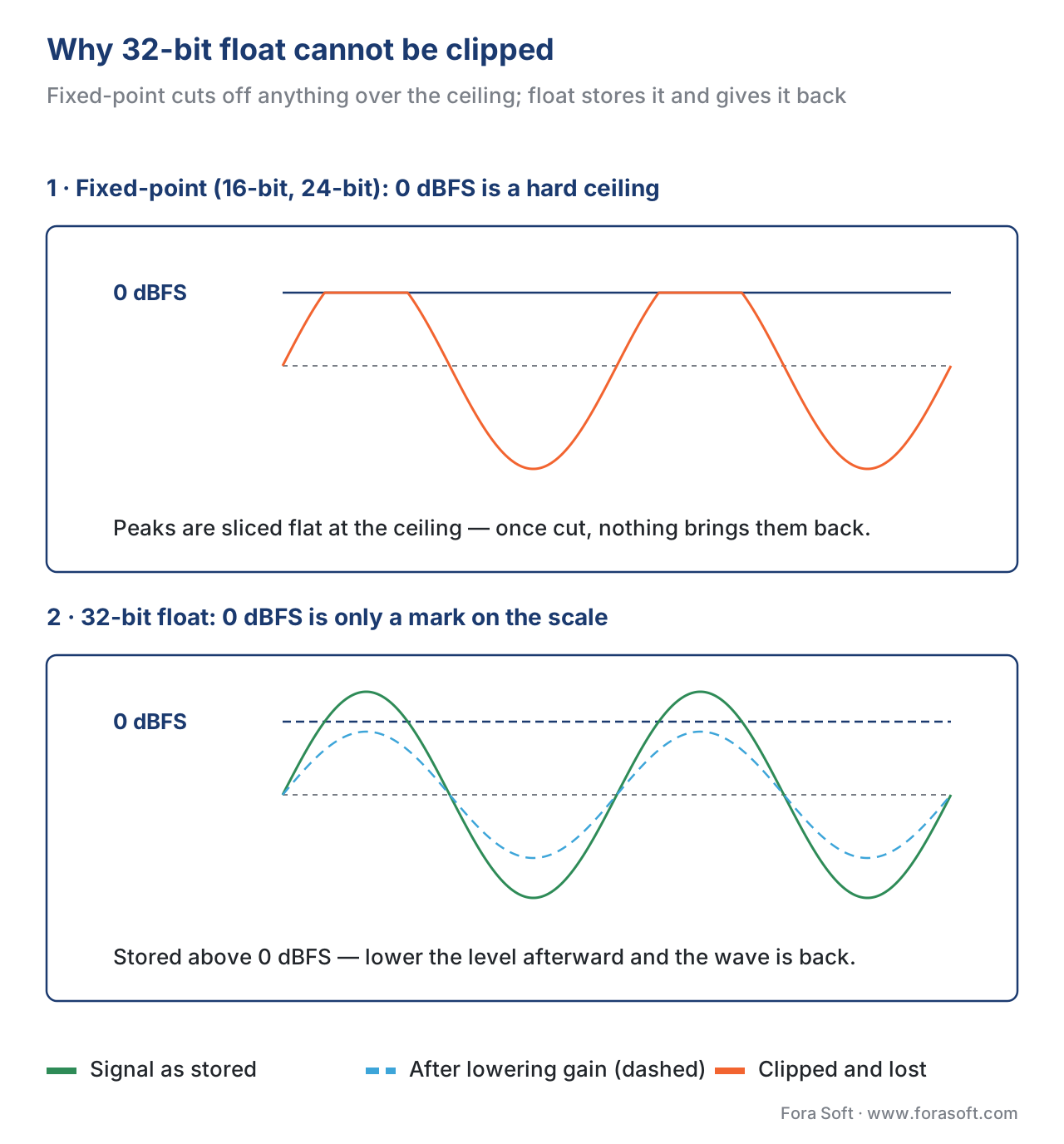 Figure 2. Fixed-point (integer) audio clips hard at 0 dBFS — the peaks are sliced off and gone. 32-bit float stores the same over-level signal intact; lowering the gain afterward recovers the original wave.
Two honest caveats keep this from being magic. First, 32-bit float protects only the digital stage. If the microphone capsule or the analog preamp in front of the converter is overdriven, that distortion is baked in before any number is stored, and no format can remove it. Second, the dual-converter trick can inject a brief burst of ultrasonic noise at the instant the device switches between its quiet and loud converters; it sits above the audible range and rarely matters, but it is real. 32-bit float removes the level-setting mistake, not every mistake.
When to use which: a decision guide
The choice collapses to a short rule set. Read it top to bottom and stop at the first row that matches your job.
| Your situation | Use this depth | Why |
|---|---|---|
| Capturing audio you can't re-record (interviews, field, live) | 32-bit float | Impossible to clip; no level-setting; rescue hot or quiet takes |
| Studio recording and mixing in a DAW | 24-bit capture, 32-bit float processing | Generous headroom at input; no clipping while editing |
| Delivering a finished file to listeners (stream, download) | 16-bit | Enough for human hearing; half the size of 24-bit |
| Archival master of irreplaceable source | 24-bit (or 32-bit float) | Future-proof headroom; storage is cheap for masters |
| Real-time voice/video (WebRTC, conferencing) | 16-bit internally | Codecs (Opus) work in 16-bit PCM; more bits waste CPU |
| Telephony / legacy narrowband | 8-bit companded | Set by the codec (G.711 μ-law/A-law), not a free choice |
Table 1. Choosing a bit depth by task. Capture high (24-bit or 32-bit float), deliver at 16-bit. The depth you record at and the depth you ship are different decisions.
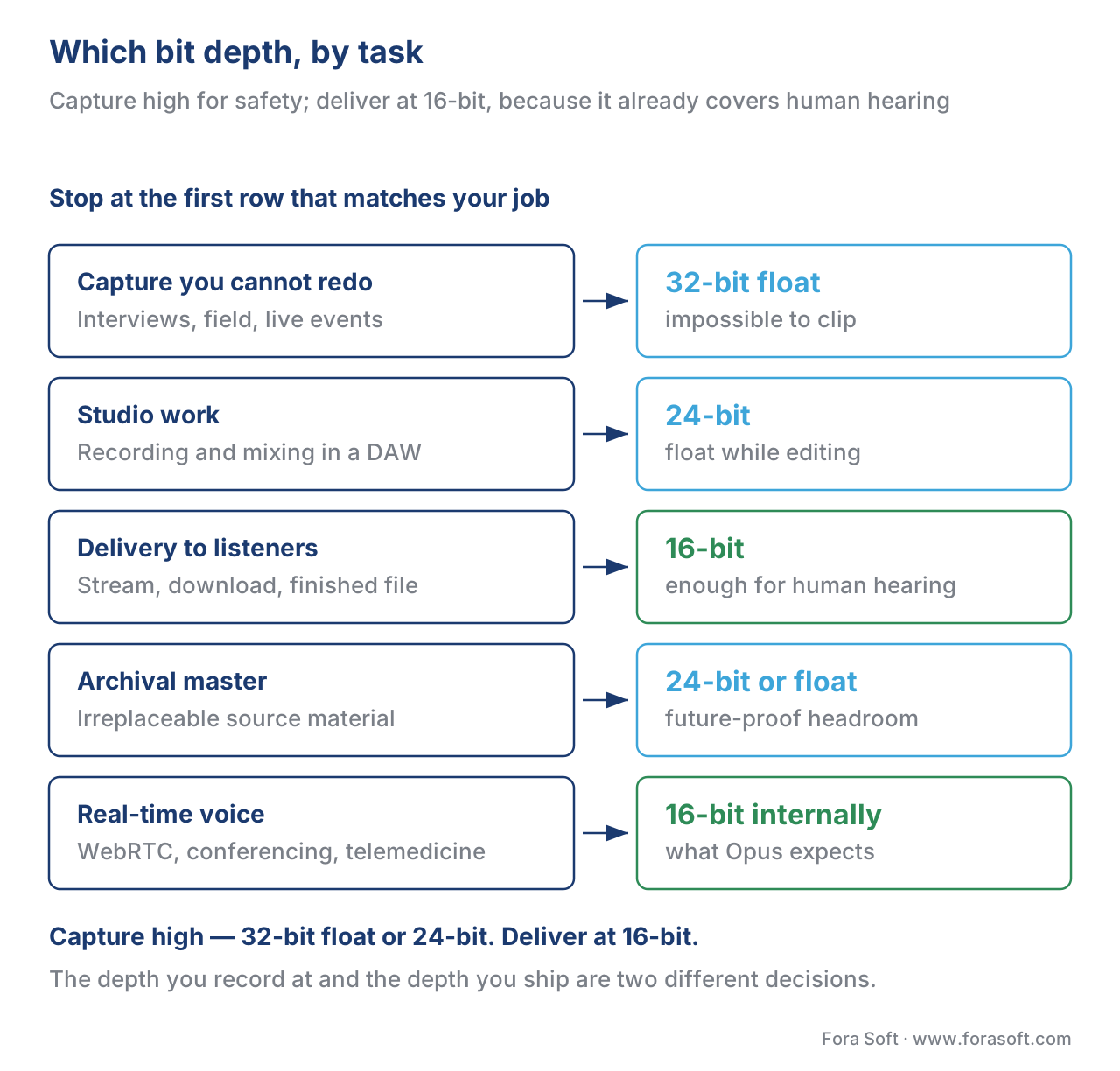 Figure 3. A top-down decision tree: capture decisions branch to 32-bit float or 24-bit for headroom; every delivery path lands on 16-bit because it already covers human hearing.
The expensive misconception: "more bits sound better"
The single most common and costly belief about bit depth is that a higher number makes a finished track sound better to the listener. It does not, and the reason follows directly from everything above. Once a file has more dynamic range than the ear can perceive — which 16-bit already does, once dithered — adding bits only lowers a noise floor that was already below the threshold of hearing and below the room you are sitting in. The listener gains nothing; the file just gets bigger.
The practical failure modes are concrete:
- Delivering 24-bit audio to consumers doubles your storage and egress for detail no listener can hear, when a properly dithered 16-bit file is indistinguishable in a blind test.
- Recording a conferencing app at 24-bit wastes CPU and bandwidth that would be better spent on echo cancellation and noise suppression, since the voice codec works in 16-bit anyway.
- Truncating instead of dithering when you reduce to 16-bit adds audible grain to the very passages — quiet fades — where the ear is most attentive.
Match the depth to the job. The right pattern is almost always: capture with high bit depth for safety, deliver at 16-bit for the listener. The two ends of the pipeline answer different questions, and conflating them is where money and quality leak.
Free download: Bit Depth Cheat SheetOne-page reference of the 6-dB-per-bit rule, the dynamic-range numbers for 16-bit, 24-bit and 32-bit float, the dither rule, recording headroom, and a per-task bit-depth guide.Where Fora Soft fits in
Across the video products we build at Fora Soft — conferencing, telemedicine, OTT, e-learning, surveillance, and AR/VR — the bit-depth decision splits cleanly by stage, and getting it right early is one of the cheapest quality choices in the pipeline. For real-time voice in conferencing and telemedicine, we work in 16-bit PCM internally because the Opus codec and the WebRTC stack are built around it, and the spare CPU goes to echo cancellation and noise suppression instead. For recorded and produced content — e-learning lectures, OTT masters — we capture and edit with high bit depth for headroom, then dither down to 16-bit for delivery. The mistake we most often correct in inherited systems is a pipeline that ships 24-bit to end users for no audible benefit, or one that truncates to 16-bit without dither and adds grain to quiet passages. Our audio and video processing development team sets the bit-depth and dither policy per pipeline stage, and our WebRTC developers tune the real-time voice path around Opus, echo cancellation and noise suppression.

The book
Audio for Video: A Complete Guide to Sound in Video Products: From PCM and Codecs to Loudness, Accessibility, and Real-Time Voice Processing
This article settles one number. The book spends 1,229 pages on the rest of the material side of sound: bit depth and dynamic range next to sample rate and channel layouts, the dither step that ends every reduction to 16-bit, the loudness work that follows it, and the codecs those samples feed — Opus, the AAC family, the speech codecs — down to the real-time voice processing that runs on 16-bit PCM. Written by Nikolay Sapunov, CEO at Fora Soft.
Not sure where your pipeline should capture deep and where it should ship 16-bit?
Tell us what you are building and we will map the audio chain end to end — capture depth and headroom, the single dither step, and the point where 16-bit delivery starts. 250+ video products shipped since 2005.
See our case studies
Case study
Speed.Space
Remote production recording at 1080p / 8 Mbps for Netflix, Electronic Arts and HBO, where the crew sets recording parameters for up to 25 participants — the take you cannot redo, captured with headroom instead of a hopeful level.
Case study
TransLinguist
Simultaneous interpretation in 75+ languages on a mediasoup WebRTC stack, with speech-to-speech translation in 16 and captions in 22 — a pipeline that stays 16-bit internally, because that is what Opus and the recognizers take.
Case study
WorldCast Live
Concert streaming with five audio channels at 1.5 Gb/s, delivered to 10,000 simultaneous viewers at 0.4–0.5 s latency — the delivery end, where 16-bit already carries everything the audience can hear.
What to read next
Formats
PCM, WAV, AIFF, FLAC, ALAC: lossless formats explained
Where 16-bit and 24-bit samples actually get written, and what lossless really means.
Foundations
Loudness, peak, RMS, LUFS — measuring how loud audio actually is
The other level number: headroom decides where you sit, loudness decides what people hear.
Codecs
How audio compression works: the four ideas behind every modern codec
What happens to those samples once a codec decides which bits nobody will miss.
Real-time
The WebRTC audio pipeline end-to-end
The chain that works in 16-bit PCM from microphone to speaker, stage by stage.
References
- Audio bit depth — Wikipedia, accessed 2026-06-04. Tier 6 (orientation only). Corroborates the 2^N levels-per-sample table (65,536 for 16-bit; 16,777,216 for 24-bit), the 98.09 dB / 146.26 dB / 194.42 dB SNR figures, the ~21-bit (123 dB) real-converter ceiling, the 120 dB human-hearing span, IEEE 754 float structure, and that 24/32-bit do not require dither. Standards facts trace to the primary sources below. https://en.wikipedia.org/wiki/Audio_bit_depth (accessed 2026-06-04).
- MT-001: Taking the Mystery out of the Infamous Formula, "SNR = 6.02N + 1.76 dB" — Walt Kester, Analog Devices, 2007. Tier 3 (reference-grade engineering note from the converter industry). The derivation of the quantization SNR formula and the per-bit 6.02 dB relationship; rests on W. R. Bennett's 1948 Bell Labs analysis of quantization noise. https://www.analog.com/media/en/training-seminars/tutorials/MT-001.pdf (accessed 2026-06-04).
- IEEE 754-2019 — IEEE Standard for Floating-Point Arithmetic — IEEE, 2019. Tier 1 (standard). Defines single-precision (binary32) format: 1 sign bit, 8-bit exponent, 23-bit mantissa — the basis for 32-bit float audio's enormous range and clip-proof behavior. https://standards.ieee.org/ieee/754/6210/ (accessed 2026-06-04).
- ITU-T Recommendation G.711 (11/1988) — Pulse code modulation (PCM) of voice frequencies. International Telecommunication Union. Tier 1 (standard). 8-bit companded PCM (μ-law / A-law) for telephony — the legacy narrowband bit depth cited in the decision table. https://www.itu.int/rec/T-REC-G.711 (accessed 2026-06-04).
- "24/192 Music Downloads ...and why they make no sense" — Chris Montgomery (Xiph.Org; co-author of Opus, RFC 6716), 2012. Tier 3 (first-party engineering, codec author). Shaped dither brings 16-bit perceived dynamic range to ~120 dB; 16 bits is enough to store everything human hearing can resolve. https://people.xiph.org/~xiphmont/demo/neil-young.html (accessed 2026-06-04).
- "Q. How much headroom should I leave with 24-bit recording?" — Sound On Sound. Tier 4 (industry educational). The −18 dBFS recording target and the analog-tape-derived headroom practice; why 24-bit makes generous headroom free. https://www.soundonsound.com/sound-advice/q-how-much-headroom-should-leave-24-bit-recording (accessed 2026-06-04).
- "What is dithering in audio?" — iZotope (Native Instruments). Tier 4 (vendor educational, dither tooling maker). Truncation vs TPDF dither; why dither converts patterned quantization distortion into benign hiss; apply dither only on the final bit-depth reduction. https://www.izotope.com/en/learn/what-is-dithering-in-audio.html (accessed 2026-06-04).
- "32-Bit Float: Everything You Need to Know" — Zoom Corporation. Tier 4 (vendor, recorder maker). The ~1,528 dB float range, the dual-ADC implementation (one converter for quiet, one for loud), and the no-level-setting / clip-proof capture workflow. https://zoomcorp.com/en/us/news/32-bit-float-everything-you-need-to-know/ (accessed 2026-06-04).
- "32-bit float audio recording is not a panacea" — Wade Tregaskis, 2023. Tier 5 (independent technical analysis). The honest limits of 32-bit float: analog front-end (mic/preamp) saturation is not recoverable, and converter-switching can inject ultrasonic noise bursts. https://wadetregaskis.com/32-bit-float-audio-recording-is-not-a-panacea/ (accessed 2026-06-04).
Per §4.3.2 source hierarchy: where vendor blogs imply higher bit depth audibly improves finished playback, this article follows the standards-and-science position — the 6.02N + 1.76 dB quantization formula (Analog Devices / Bennett) plus the ~120 dB span of human hearing show that 16-bit, properly dithered, already exceeds what the ear can resolve. The case for more bits is restricted to its true domain: capture headroom and editing safety, not delivery.
